Where to buy
Check the latest price, availability and delivery on Amazon. Orders are placed on Amazon. We may earn a commission from qualifying purchases.
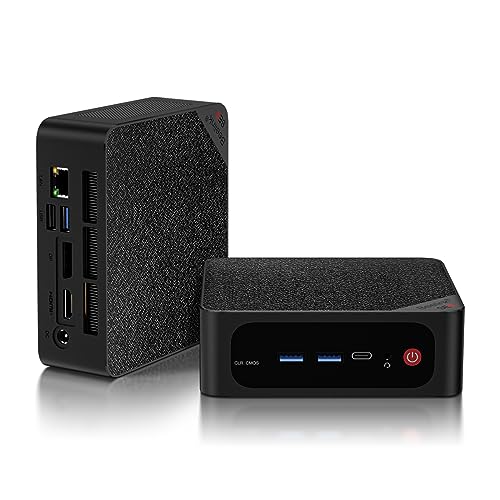
- Best overall streaming workstation under $500: Beelink SER5 MAX, Ryzen 7 5800H, 32GB RAM, 1TB NVMe — Check on Amazon
- GMKtec NucBox K6, Ryzen 7 7840HS, 32GB DDR5, 1TB PCIe 4.0 SSD — Check on Amazon
- GMKtec M5 Plus, Ryzen 7 5825U, 32GB RAM, 1TB NVMe, Dual 2.5GbE — Check on Amazon
- BOSGAME P4, Ryzen 7 5700U, 32GB RAM, 1TB SSD, Triple 4K — Check on Amazon
See 2 more Amazon options
- KAMRUI E3B, Ryzen 5 7430U, 32GB RAM, 512GB SSD — Check on Amazon
- HP EliteDesk 800 G5 Mini, Core i5-9500T, 16GB RAM, 256GB NVMe (Renewed) — Check on Amazon
Read the full guide ↓
Disclosure: As an Amazon Associate, reviewstook.com earns from qualifying purchases. Links to Amazon on this page are affiliate links; they cost you nothing extra. Listing details such as price and availability change often, so check the current Amazon listing before you buy.
A workstation PC bought for streaming is really two purchases wearing one product title. The workstation half is familiar: cores, memory and storage for the work itself — the code, the design file, the edit timeline, the spreadsheet model. The streaming half is a broadcast chain that has to run at the same time, on the same silicon, without stealing from the first half: a capture of your screen or camera, an encoder turning that picture into a compressed stream, and a network connection steady enough to push it out for hours. This guide grades all six machines below on both halves, and it grades the encoder first, because at this budget the encoder — not the processor’s headline speed — is what decides whether your stream looks clean or falls apart.
Here is the honest shape of the tier before any product names appear. None of these six machines has a discrete graphics card, which means none of them has NVIDIA’s NVENC encoder — the hardware block most game streamers rely on. What they have instead are three different integrated answers. Five AMD machines encode through the video block built into their integrated graphics: four of them carry the older Vega-generation block, which handles H.264 and HEVC but produces the softest H.264 picture of any current encoder family at streaming bitrates, and one — the newest chip here — carries an RDNA 3 block that adds genuine AV1 encoding. The sixth machine, a renewed Intel business mini, encodes through Quick Sync, Intel’s integrated hardware encoder, which is a respectable H.264 performer. AV1 encoding exists on exactly one pick in this guide. If your plan is fast-paced competitive game streaming at a high level, that paragraph is the whole review: save for a machine with a discrete card. If your plan is streaming your work — development, design, data, classes, podcasts, lighter games — read on, because several of these boxes do that job properly.
The workflow this guide grades is the standard one-machine setup: your work or game, OBS, and chat or a browser running together on a single PC. On Twitch that means sending roughly 6,000 kbps in constant bitrate (CBR) with two-second keyframes, which is the practical ceiling for most channels and the setting this guide treats as the target. On YouTube you can push higher bitrates, send a 1440p feed so the platform gives your stream its better processing path, and — on the one machine here whose encoder supports it — send AV1. Streaming in 4K is platform-limited everywhere: neither major platform treats it as a normal live option, so no pick below is graded on it. Mini PC prices move with coupons and sale cycles, so check the live price on Amazon for each pick before you buy — and one pick below only belongs in this guide when it is on sale within this budget at all.
In this guide
Quick Picks
Short on time, or comparing several options at once? Each row below names a streaming job and the machine that suits it, with a link to the listing.
| Streamer type | Pick | Why it stands out | Link |
|---|---|---|---|
| Best overall streaming workstation | Beelink SER5 MAX, Ryzen 7 5800H, 32GB/1TB | Eight cores for the work and the stream, socketed memory, three 4K outputs | Check on Amazon |
| Best encoder and performance | GMKtec NucBox K6, Ryzen 7 7840HS, 32GB DDR5/1TB | The only AV1 encoder in this guide, and the strongest graphics — when on sale, check price on Amazon | Check on Amazon |
| Best value stream-and-work box | GMKtec M5 Plus, Ryzen 7 5825U, 32GB/1TB | 32GB and 1TB, with dual 2.5GbE for a wired stream — check price on Amazon | Check on Amazon |
| Best storage per dollar | BOSGAME P4, Ryzen 7 5700U, 32GB/1TB | A terabyte for recordings and projects — check price on Amazon | Check on Amazon |
| Best budget 32GB streamer | KAMRUI E3B, Ryzen 5 7430U, 32GB/512GB | Socketed 32GB and two drive slots — check price on Amazon | Check on Amazon |
| Best renewed streaming mini | HP EliteDesk 800 G5 Mini, i5-9500T, 16GB/256GB (Renewed) | Quick Sync encoding and three DisplayPorts in a budget-tier renewed package — check price on Amazon | Check on Amazon |
How These Picks Were Chosen
The starting set is the six machines verified for the standard workstation guide at this budget: real Amazon listings that sell at or regularly within $500 in the United States, complete with Windows installed. Check the live price on Amazon for each pick before you buy. One pick, the GMKtec NucBox K6, qualifies only when it is on sale within this budget — its usual price sits above the budget, and this guide repeats that warning wherever the machine appears. Machines that reached $500 only by shipping 8GB of memory or a processor too old for Microsoft’s Windows 11 supported list were excluded before streaming entered the discussion.
On top of that workstation foundation, three streaming filters were applied. The first is the encoder filter: every pick had to have a hardware video encoder documented in its silicon — an AMD video block or Intel Quick Sync — because software-only encoding on a machine that is also doing the work is how streams stutter. The second is the headroom filter: streaming is a second workload, so the memory and core counts that make a workstation (32GB fitted or a socketed path to it, six cores or more) matter twice here — OBS, a browser full of chat and dashboard tabs, and your actual application all draw from the same pool. The third is the network filter: a stream is only as stable as its upload path, so the wired Ethernet each listing documents was recorded pick by pick, and this guide claims a port speed only where the base research documents one. Where a specification matters and the verified sources do not establish it — one pick’s memory construction is undocumented — the review leaves it unclaimed and tells you how to check, rather than guessing.
We did not use these machines ourselves. We read the maker listings, specification pages and model databases behind the base guide, and re-graded every pick on the encoder its documented silicon actually contains. That discipline matters, because encoder generations are easy to inflate: an older AMD block does not gain AV1 by sitting in a newer-looking box. What each pick’s encoder can and cannot do is stated from the silicon, once, and then applied consistently through every review, the comparison table and the OBS section.
The Encoder Map: What Each Pick’s Silicon Can Actually Send
An encoder is the hardware (or software) that compresses your picture into the stream your viewers receive. At Twitch’s roughly 6,000 kbps, compression is lossy and the differences between encoders are visible: fine detail — foliage, confetti, small text, fast camera movement — is where weaker encoders smear first.
The Vega-generation AMD block (four picks). The Ryzen 5800H, 5825U, 5700U and 7430U machines encode through the video block paired with Vega-generation integrated graphics. It hardware-encodes H.264 and HEVC, and in OBS it is a perfectly workable Twitch encoder for screen-based work: code, documents, design tools, slides, a camera feed. Its honest limits are two. Its H.264 output at streaming bitrates is the softest of the encoder families in this guide — fast, detailed game footage is where it shows. And it has no AV1: it cannot encode AV1, so the YouTube AV1 path is closed on these four machines, full stop. For lighter content, these chips’ eight (or six) CPU cores also give you a software fallback — OBS’s x264 encoder at its faster presets — which trades processor load for picture quality and is graded per pick in the reviews.
The RDNA 3 AMD block (one pick). The NucBox K6’s Radeon 780M carries AMD’s newer video block, which adds AV1 encoding alongside H.264 and HEVC. AV1 is the codec YouTube rewards with its best processing and the cleanest picture per bit, so the K6 is the only pick here that can send it. Its H.264 is also a step up from the Vega block’s, though at Twitch bitrates the practical advice is unchanged: hardware encoder for the stream, and let the eight cores do the work.
Intel Quick Sync (one pick). The renewed EliteDesk’s Core i5-9500T encodes through Quick Sync in its UHD Graphics 630. Quick Sync’s H.264 is a genuinely good Twitch encoder — for a budget-tier renewed machine it is this pick’s quiet strength — and it also handles HEVC. It has no AV1 encoding. Its constraint is not the encoder but everything around it: six cores that must also run the work, and 16GB of memory fitted as sold.
What no pick has. No machine here has NVENC, because none has an NVIDIA card; no machine here has a second, separate encoder to split streaming and recording across; and only the K6 can encode AV1. Recording locally while you stream means sharing the one encoder (or spending CPU cores on the recording), and the OBS section below handles that trade pick by pick.
The 6 Best Workstation PCs for Streaming Under $500
Beelink SER5 MAX, Ryzen 7 5800H, 32GB RAM, 1TB NVMe
Who it suits: Streamers whose broadcast is their work — developers, analysts, teachers — who want one balanced machine to do the job and send it, with room to grow.
The SER5 MAX stays at the top of this guide for the same reason it tops the workstation list, re-read through a streaming lens. The Ryzen 7 5800H brings eight cores and sixteen threads, and streaming is a parallel workload: while OBS composites your scene, the browser holds chat and your dashboard, and the application you are actually streaming — the IDE, the spreadsheet, the design tool — still needs cores of its own. Thirty-two gigabytes of socketed DDR4, expandable to 64GB, keeps that three-way split from rationing. Storage is a 1TB NVMe drive plus an internal 2.5-inch bay, which matters to streamers more than to most buyers: local recordings of your own broadcasts are the cheapest quality archive you own, and the bay swallows them without touching the fast disk your projects live on. Three 4K-at-60Hz outputs (HDMI 2.0, DisplayPort 1.4, USB-C video) run the classic streaming desk — work screen, chat and OBS screen, camera or preview screen — and the documented wired connection is gigabit Ethernet, which is several times the upload headroom a 6,000 kbps stream needs.
Its encoder is the Vega-generation AMD block: hardware H.264 and HEVC, no AV1 in either direction that matters here. For the content this machine is aimed at — screen work, a camera, lighter games — its H.264 at Twitch bitrates is serviceable and stable, and the eight cores give you the guide’s best software fallback on a Vega pick: x264 at a fast preset for content where you would rather spend CPU than accept the hardware block’s softness. Two base-guide caveats ride along. The fitted SSD in documented units is a Crucial P3 Plus, a QLC drive that slows on very long sustained writes — relevant if you record long broadcasts locally while copying media. And Beelink runs this chip at a 54W setting with dual fans that reviewers have flagged as audible under sustained load; a microphone hears fans, so placement and a noise gate are part of this pick’s setup, and the review in the base guide says the same about quiet rooms. Check the live price on Amazon for the configuration on offer before you order. One trap deserves its own sentence: the SER5 MAX name also covers a Ryzen 7 6800U machine with soldered memory, and it is not this pick. The link here is the 5800H build with DDR4 slots — check the processor name and memory type on the listing before ordering, because the badge alone proves nothing.
- Eight cores and socketed 32GB — the headroom a work-plus-stream workload consumes.
- 1TB NVMe plus a 2.5-inch bay for local broadcast recordings.
- Three independent 4K outputs for a work / chat / preview desk.
Honest limitation: Its Vega-generation encoder is the softest H.264 family here and has no AV1; the fans are audible under sustained load, and a same-name soldered variant exists — verify the 5800H configuration at checkout.
Choose it if you stream your work and want the balanced box: cores, memory, storage and displays with a workable encoder. Skip it if your stream is fast-paced game footage first — that job wants a discrete card’s encoder, which this budget’s workstations do not have.

GMKtec NucBox K6, Ryzen 7 7840HS, 32GB DDR5, 1TB PCIe 4.0 SSD
Who it suits: Streamers who want the best picture this budget can send — including YouTube AV1 — and whose work leans on graphics as well as cores; buyers who can wait for a sale.
The K6 is the streaming ceiling of this guide, for one silicon reason: its Radeon 780M carries AMD’s RDNA 3 video block, the only encoder here that can send AV1. On YouTube, that is a real, visible advantage — AV1 at a given bitrate holds detail that H.264 spends bits to lose, and YouTube’s higher-bitrate and 1440p ingest paths are open to this machine in a way they are not to its Vega siblings. Its H.264 for Twitch is also the strongest AMD hardware encoding in this roundup. Around the encoder, the workstation case is the base guide’s: a Ryzen 7 7840HS with eight cores and sixteen threads, 32GB of DDR5-5600 in two SO-DIMM slots expandable to 64GB, a 1TB PCIe 4.0 SSD with a second M.2 2280 slot, triple 4K output through HDMI 2.0, DisplayPort 1.4 and USB4, Wi-Fi 6E, Windows 11 Pro — and dual 2.5-gigabit Ethernet, the best documented wired networking in this guide, which makes the upload side of streaming a non-issue and suits the machine to a second career as a home-lab or server box. Its integrated graphics are also the strongest here, which is the game side of the stream: 1080p timeline editing is comfortable, 4K proxy workflows are practical, and lighter games are genuinely playable while the encoder works.
Now the price problem, stated plainly. The K6 usually sits above this guide’s ceiling — check price on Amazon before you consider it. Its seat here rests on its recurring sale pattern: when the 32GB/1TB build drops into this budget on sale, nothing else in this guide touches it as a streaming workstation. At its usual price, buy it as the higher-tier machine it then is, or leave it. Two smaller notes from the base research: reviewers have flagged fan noise under load with no BIOS fan-profile control to tame it — plan microphone placement accordingly — and the maker offers Quiet 45W and Performance 65W power modes, the quiet mode being the sensible streaming default. A single verified buyer found prior power-on hours in a fitted SSD’s SMART data; turn that into a first-week ritual on any pick here — read the drive’s health figures when the box arrives, while a return is still painless.
- The only AV1 encoder in this guide — the YouTube picture-quality pick.
- Strongest integrated graphics here, for the game and edit side of the stream.
- Dual 2.5GbE wired networking and a second M.2 slot for recordings.
Honest limitation: Budget membership is sale-dependent — at its usual price it belongs a tier up — and its fan runs audible under load, with no BIOS profile to soften it.
Choose it if stream quality is the priority and you can buy on the sale cycle. Skip it if you need the machine this week at whatever price it is sitting at, or your stream is a quiet-room voice recording where fan noise outranks encoding.

GMKtec M5 Plus, Ryzen 7 5825U, 32GB RAM, 1TB NVMe, Dual 2.5GbE
Who it suits: Streamers on a firm budget whose broadcast is CPU-and-screen work — development, data, teaching, podcasts with a camera — and who may later retire the box to server duty.
The M5 Plus is the value argument of this guide, and its streaming case is built on everything except the encoder. Check price on Amazon before you buy — it fits the two specifications that cost the most to add later: 32GB of DDR4 in two slots, expandable to 64GB, and a 1TB M.2 NVMe drive in a dual-slot layout rated to 4TB total — room for the machine’s projects and an ever-growing folder of local recordings. The Ryzen 7 5825U is an eight-core, sixteen-thread chip, so the work-plus-OBS-plus-browser split has the same core headroom as the SER5 MAX above. Its documented wired networking is the joint best in this guide: dual 2.5-gigabit Ethernet, exactly what a stream wants today (one port, wired, stable) and what a small server wants tomorrow. Triple 4K display output over DisplayPort, HDMI and USB-C, Wi-Fi 6E and Windows 11 Pro complete a specification that reads like a considerably more expensive machine.
The encoder is where the money was saved, and this review will not dress it up. The 5825U’s integrated graphics are Vega generation, and its video block is the same family as the SER5 MAX’s: hardware H.264 and HEVC, the softest H.264 at streaming bitrates in this guide, and no AV1 encoding. For screen-based streams — code, dashboards, documents, a face camera — that is a workable, honest tool, and the eight cores again allow an x264 fast-preset fallback for content that deserves it. For game-first streaming it is the wrong machine, as every Vega pick here is. Frame the purchase correctly and it is the smartest money in the guide: you give up encoder generation and a measure of single-core pace against the K6, and you keep the entire workstation skeleton — cores, memory ceiling, storage ceiling, networking — at a lower tier than the SER5 MAX and well below the K6. When a faster desktop eventually replaces it, this becomes the always-on box without buying anything else.
- 32GB socketed to 64GB and 1TB in dual M.2 slots — recordings and projects both fit.
- Dual 2.5GbE wired networking — the stream’s upload path, documented.
- Eight cores for the work, OBS and chat — check price on Amazon.
Honest limitation: Its Vega-generation encoder matches the SER5 MAX’s limits — softest H.264 family here, no AV1 — and its integrated graphics are a clear class below the 780M for anything graphical.
Choose it if your stream is your screen and your budget is firm. Skip it if AV1 or game-stream picture quality is the point — that is the K6’s job, when it is on sale.

BOSGAME P4, Ryzen 7 5700U, 32GB RAM, 1TB SSD, Triple 4K
Who it suits: Streamers who record everything — VOD archives, project files, media libraries — and need the terabyte and the 32GB above all, at a budget-tier price for that combination.
The P4 sells itself with simple arithmetic: eight cores and sixteen threads from a Ryzen 7 5700U, 32GB of memory and a full terabyte of SSD — check price on Amazon. Nothing else in this guide pairs that much fitted memory with that much fitted storage at this tier, and for a streamer the storage is not a luxury: local recordings are how you re-upload, clip and archive without depending on a platform’s export tools, and a terabyte holds them alongside the project files. The port set is a work set — triple 4K at 60Hz displays across HDMI, DisplayPort and USB-C, dual 2.5-gigabit Ethernet for the wired stream, Wi-Fi 6E and Windows 11 Pro. Its encoder is the Vega-generation AMD block, graded exactly as on the two picks above: hardware H.264 and HEVC, fine for screen work and a camera, the softest family here for fast game footage, and no AV1 encoding. The eight cores give the same x264 fast-preset fallback for lighter content.
What gives pause here is not any documented flaw but the undocumented territory around the machine. BOSGAME operates at a smaller scale than Beelink or GMKtec, with thinner documentation and support depth to match — the intangible part of the price. More specifically, the sources verified for this listing do not establish whether its memory is socketed or soldered, and this guide will not guess: if expandability to 64GB is part of your plan, check the listing’s specification table and the machine itself in the first week, and treat the answer as a condition of keeping it. Near-identical titles in this listing family have also covered a 5825U variant; the build attached to this ASIN is the 5700U with 32GB and 1TB, so confirm that exact combination in the cart. None of that is a disqualification — it is the homework this price asks for, and the homework earns its keep.
- 32GB and 1TB together — check price on Amazon, and the recording archive fits.
- Eight cores, triple 4K output and dual 2.5GbE — a complete stream-and-work port set.
- Windows 11 Pro fitted, where rivals often ship 16GB machines.
Honest limitation: Support depth from a smaller brand, plus one genuine unknown: the verified sources never establish how its memory is built, so check socketed-or-soldered before an upgrade plan depends on it.
Choose it if capacity per dollar leads and you are happy verifying details on arrival. Skip it if the requirement includes a guaranteed 64GB path or a big-brand support channel.

KAMRUI E3B, Ryzen 5 7430U, 32GB RAM, 512GB SSD
Who it suits: Beginning streamers and students who want a real 32GB workstation specification at the lowest new-machine price, streaming screen-based work rather than games.
The E3B’s bargain is a single, openly made trade: half the storage of the picks above, in exchange for a budget-tier position among new 32GB machines here — check price on Amazon. The structure survives the trade. The 32GB is two 16GB sticks in dual channel, socketed, with a documented ceiling of 64GB; storage lives in two M.2 2280 slots — one NVMe, one SATA-only — so recordings that outgrow the fitted 512GB have a real expansion path. Outputs are a proper triple-display set — HDMI 2.0, DisplayPort 1.4 and USB-C, each 4K at 60Hz — Windows 11 Pro is confirmed in the listing’s own product information, a VESA plate is in the box, and the documented wired connection is gigabit Ethernet, comfortably above a 6,000 kbps stream’s needs.
Its streaming grade is the most bounded of the AMD picks, for two documented reasons. The Ryzen 5 7430U is a six-core, twelve-thread processor — two cores down on the picks above — so the work-plus-OBS split has less slack, and the x264 software fallback that rescues the eight-core picks is light-duty here: fine for slides, documents and a camera, not a quality route for moving game footage. Its encoder is the Vega-generation block (the chip’s graphics are Radeon RX Vega 7): hardware H.264 and HEVC, no AV1, same softness caveat as its siblings. Reviewers have also noted the fan becomes audible under sustained heavy load — the common tax of small, inexpensive cooling, and a microphone consideration. Judge it as the entry point to the tier: socketed memory with headroom, a spare drive slot, three real monitor outputs, a hardware encoder and a supported operating system, at the price that leaves room for the microphone this guide tells you to buy first.
- Socketed 32GB and a 64GB ceiling — check price on Amazon.
- Two M.2 slots — the recording archive has somewhere to grow.
- Windows 11 Pro stated in the listing’s own product information.
Honest limitation: Six cores rather than eight narrows both the workload and the software-encoding fallback; 512GB of storage, a SATA-only second slot, and a fan that is audible under sustained load.
Choose it if the budget is hard and the stream is your screen. Skip it if you know your recordings and projects pass a terabyte in year one — the BOSGAME above is the same money shape with the space fitted.
HP EliteDesk 800 G5 Mini, Core i5-9500T, 16GB RAM, 256GB NVMe (Renewed)
Who it suits: Practical buyers who want a dedicated little stream-and-work box for very little money — and anyone who values corporate serviceability and three DisplayPorts over newness.
Renewed buying is the workstation world’s oldest economy: let a business pay full price, then buy the machine when the business is finished with it. For streaming, this EliteDesk 800 G5 Mini has one specific virtue none of the AMD picks can copy: its Core i5-9500T encodes through Intel Quick Sync, and Quick Sync’s H.264 is a genuinely good Twitch encoder — cleaner at streaming bitrates than the Vega-generation blocks above it in this guide. It also handles HEVC. It has no AV1 encoding, and this guide claims none for it. The six-core processor sits on Microsoft’s Windows 11 supported list — the line that separates a renewed bargain from a renewed dead end. The 16GB of DDR4 is socketed, so the 32GB this guide treats as standard is an inexpensive upgrade rather than a new machine; that upgrade matters for streaming, because 16GB is the one specification here that the work-plus-OBS-plus-browser split will genuinely feel. There are six USB-A ports and a USB-C — room for microphone, camera and capture peripherals — and the display set is three DisplayPort outputs, two 1.2 and one 1.4. The base research documents no wired Ethernet speed for this listing, so this guide claims none; confirm the port on the live listing and, whatever its speed, run the stream wired. It sits in the budget tier for a renewed machine — check price on Amazon.
The renewed rules all apply to this pick, without exception. What is inside the case varies from refurbisher to refurbisher — model analyses record units arriving with the advertised Wi-Fi absent or supplied as a USB adaptor, and this listing contradicts itself on the Windows edition, its title claiming Windows 11 Pro against a features block’s Windows 10 Professional. Review outlets have also reported malware detections on pre-installed images for this model family, so the professional routine applies: whatever arrives, wipe it and install Windows cleanly from Microsoft’s own media before any real work — or any broadcast — touches it. Amazon Renewed’s program floor is a 90-day guarantee, not HP’s warranty. Storage is the other day-one limit: 256GB is a stream box’s drive, not an archive, so recordings belong on external or network storage from the start. Bought with those eyes open, it is the cheapest credible streaming encoder in this guide, with manuals, parts and documentation that no-name minis never will have.
- Quick Sync H.264 — the cleanest Twitch encoder per dollar in this guide.
- A six-core CPU that sits on the Windows 11 supported list, and socketed DDR4 that makes 32GB a cheap upgrade.
- The cheapest entry in this guide — check price on Amazon.
Honest limitation: 16GB and 256GB as sold, unit-to-unit configuration variation, a 90-day program floor instead of a manufacturer warranty, and a clean Windows reinstall folded into the purchase.
Choose it if value and a good hardware encoder lead and you are comfortable with the renewed routine. Skip it if the warranty must carry a manufacturer’s name, or if 32GB has to be fitted on day one without opening the case.

Comparison Table
| Product | Processor | Encoder (documented silicon) | Memory / Storage | Best streaming use | Link |
|---|---|---|---|---|---|
| Beelink SER5 MAX (5800H) | Ryzen 7 5800H, 8 cores | AMD Vega-generation block: H.264/HEVC, no AV1 | 32GB DDR4 socketed to 64GB / 1TB NVMe + 2.5-inch bay | The balanced work-and-stream all-rounder | Check on Amazon |
| GMKtec NucBox K6 | Ryzen 7 7840HS, 8 cores | AMD RDNA 3 block: H.264/HEVC + AV1 encode | 32GB DDR5 socketed to 64GB / 1TB PCIe 4.0 + second M.2 | Best picture, incl. YouTube AV1 — on sale | Check on Amazon |
| GMKtec M5 Plus | Ryzen 7 5825U, 8 cores | AMD Vega-generation block: H.264/HEVC, no AV1 | 32GB DDR4 socketed to 64GB / 1TB NVMe, dual slot | Value stream-and-work box, dual 2.5GbE | Check on Amazon |
| BOSGAME P4 | Ryzen 7 5700U, 8 cores | AMD Vega-generation block: H.264/HEVC, no AV1 | 32GB, construction unverified / 1TB SSD | Most fitted capacity per dollar for recordings | Check on Amazon |
| KAMRUI E3B | Ryzen 5 7430U, 6 cores | AMD Vega-generation block: H.264/HEVC, no AV1 | 32GB DDR4 socketed to 64GB / 512GB + second M.2 (SATA) | Cheapest new 32GB streaming workstation | Check on Amazon |
| HP EliteDesk 800 G5 Mini (Renewed) | Core i5-9500T, 6 cores | Intel Quick Sync: H.264/HEVC, no AV1 | 16GB DDR4 socketed / 256GB NVMe | Renewed value with a strong H.264 encoder | Check on Amazon |
Streaming With OBS on These Machines: The Settings That Matter
Whichever pick you buy, the OBS setup follows the same skeleton, and the differences are per-pick encoder choices rather than different software. Set the output to constant bitrate (CBR) at about 6,000 kbps for Twitch, with a two-second keyframe interval — that pairing is what the platform’s ingest expects, and variable bitrate is the most common silent quality mistake at this level. On YouTube you may raise the bitrate and send a 1440p canvas for the platform’s better processing path; send AV1 only on the K6, the one pick whose encoder has it. Encoder assignment per pick: on the K6, use the AMD hardware encoder (AV1 for YouTube, H.264 for Twitch) and keep the CPU for the work. On the SER5 MAX, M5 Plus and P4, use the AMD hardware H.264 encoder for screen-based streams; for content with constant fast motion, test the x264 software encoder at a fast preset in a private broadcast first — their eight cores can carry it alongside lighter work, and it can look cleaner than the Vega block. On the E3B, stay on the hardware encoder: its six cores are the fallback of last resort, for slides and a camera only. On the EliteDesk, use Quick Sync H.264 — it is that pick’s reason to exist. If you record while streaming, record with the same hardware encoder at a higher bitrate rather than asking the CPU for a second encode, unless cores are genuinely idle.
When a stream stutters, OBS tells you which of three different problems you have, and each has a different fix — treating them as one problem is how beginners lose weekends. Rendering lag means the machine could not composite the scene in time: the graphics were busy with the work or the game. Fix it by capping the application’s frame rate, lowering the OBS canvas, or closing the GPU-heavy extras — not by changing the encoder. Encoding lag means the chosen encoder could not keep up: on a hardware encoder, drop the stream to 720p output or a slower-quality preset; on x264, move to a faster preset or hand the job back to the hardware block. Network dropped frames mean the upload path failed, and no setting inside the encoder fixes it: run a cable. Every pick in this guide documents wired Ethernet — gigabit on the SER5 MAX and E3B, dual 2.5-gigabit on the K6, M5 Plus and P4, and a port to confirm on the EliteDesk’s live listing — and a 6,000 kbps stream uses a small fraction of any of those. Wi-Fi is for the chat machine, not the broadcast machine. If dropped frames persist on a cable, lower the bitrate before you touch anything else: a stable 4,500 kbps looks better than a stuttering 6,000.
The Kit Around the Box, Priced Honestly
This guide puts no prices on peripherals, because peripheral prices were not part of the verified research — but the order in which to buy them is advice we will stand behind. Buy the microphone first. Viewers forgive a soft picture for an entire stream; they leave bad audio in minutes, and every encoder discussion in this guide is worth less than a decent microphone placed close to your mouth with the PC’s fans placed away from it — which, on the picks with audible fans, also argues for the machine living under the desk rather than beside the mic. Lighting comes second for camera-based streams: a lit face on a modest camera beats an expensive camera in a dark room. A second (and third) monitor comes third, and the picks’ triple outputs exist for exactly this — work on one screen, OBS and chat on another.
The capture card question deserves a direct answer, because it is the peripheral most often bought wrongly for machines like these. If everything you stream happens on the PC itself — your work, your screen, your games — you do not need one for any pick in this guide: OBS captures the screen directly. A capture card earns its place in exactly two situations: bringing a console or another external source into the stream, or feeding a second PC’s picture into a dedicated streaming machine. That second pattern is a legitimate budget architecture — a renewed EliteDesk-class box as the encoder while a stronger machine does the work — but it is a two-computer decision, not an accessory purchase, and it should be made deliberately. Spend on the microphone, the light and the cable first.
How to Choose a Streaming Workstation PC Under $500
- Name the stream before the machine. Streaming your screen — code, design, data, teaching — is a job all six picks can do. Streaming fast-paced games is a discrete-GPU job that this tier honestly cannot; the K6 is the least-wrong option, and even it is an integrated-graphics compromise.
- Grade the encoder, not the headline. At this budget the encoder generations rank plainly: the K6’s RDNA 3 block (with AV1) first, Quick Sync’s H.264 next, the Vega-generation blocks last for picture quality — though all are stable for screen work. No pick has NVENC; do not let a listing’s “gaming” language imply one.
- Treat AV1 as a YouTube-only question. Only the K6 encodes it. If you stream to Twitch, AV1 earns you nothing today and should not drive the purchase; if YouTube is your platform, it is the K6’s strongest argument.
- Count cores for the double workload. Your application and your broadcast share the processor. Eight cores carry work plus OBS plus a browser comfortably; six cores carry it with discipline. Memory follows the same logic: 32GB fitted, or a socketed path to it.
- Wire the stream. Every pick documents wired Ethernet (gigabit or dual 2.5-gigabit where the base research establishes the speed). Budget the cable run as part of the purchase and never broadcast over Wi-Fi because the desk arrangement was easier.
- Plan recording storage. Local recordings are your archive, your clips and your insurance against a platform outage. A terabyte fitted, a second slot or a bay — one of those should be in the purchase, or external storage should be in the plan, as it must be with the renewed pick’s 256GB.
- Listen before you broadcast. Two picks carry reviewer-flagged fan noise under load and a third is noted as audible; a microphone is a fan-noise detector. Quiet power modes, placement under the desk and a noise gate are settings, not accessories — apply them in the first week.
- Watch the sale cycle, not the headline price. The K6 on sale and the K6 at its usual price are the same box carrying two different verdicts. Decide your walk-away budget before you shop, and check price on Amazon for every pick here.
- On a renewed pick, check the CPU against Microsoft’s Windows 11 list. Intel’s 8th generation is roughly the floor. Plenty of listings install Windows 11 on processors Microsoft does not support; the installation works and the support does not come with it.
- Do the first-week checks. Confirm the configuration matches the listing, read the SSD’s health data, run a private test stream on each platform you use, and — on a renewed machine — reinstall Windows from Microsoft media before the first broadcast. Every one of those checks costs nothing inside the return window and real money outside it.
Common Buying Mistakes
- Assuming “workstation” or “gaming” in a listing title implies a discrete GPU encoder. None of these six machines has NVENC; the encoder is integrated, and its generation is the specification that matters.
- Crediting every AMD machine with AV1. Four of the five AMD picks use the Vega-generation block, which cannot encode AV1 at all. Exactly one pick in this guide — the K6 — can.
- Streaming over Wi-Fi because the speed test looked fast. Streams fail on stability, not headline speed; dropped frames are a cable problem with a cable solution.
- Paying the K6’s typical price and still calling it a $500 workstation. At its usual price it is a perfectly good higher-tier machine; this guide’s claim stands only when it is on sale within this budget.
- Confusing the two SER5 MAX machines. A soldered-memory 6800U build wears the same SER5 MAX name as the socketed 5800H pick — read the processor and memory lines on the listing, not the badge.
- Buying the microphone last. Audio is the first thing viewers judge and the last thing encoder shopping fixes; the kit order in this guide is deliberate.
- Buying a capture card to stream your own screen. OBS captures the PC itself for free; a card is for consoles and second PCs only.
- Skipping the clean reinstall on a renewed machine. Refurbisher images vary and have drawn malware reports on this model family; thirty minutes with Microsoft’s own installation media is part of the price — and you do not broadcast from an image you do not trust.
- Filling the only drive with recordings. Broadcast archives grow toward whatever space exists; a second slot, a bay or an external plan is not a luxury specification.
- Ignoring fan noise until the first live stream. A microphone hears what a spec sheet does not list; test with your actual mic, in your actual room, before you go live.
Final Recommendation
- Most streaming-workstation buyers: Beelink SER5 MAX (Ryzen 7 5800H, 32GB/1TB).
- Best picture, including YouTube AV1: GMKtec NucBox K6 — when on sale, check price on Amazon.
- Screen-based streams on a firm budget: GMKtec M5 Plus.
- Maximum fitted storage for recordings: BOSGAME P4.
- Lowest price for the 32GB specification: KAMRUI E3B.
- Cheapest credible hardware encoder: HP EliteDesk 800 G5 Mini (Renewed).
Our top two for streaming buyers at this budget are the Beelink SER5 MAX in its 5800H configuration, for the most complete balance of cores, socketed memory, storage and displays behind a workable hardware encoder, and the GMKtec NucBox K6, for buyers who stream to YouTube or lean on graphics and can time the purchase to its sale — it is the only machine here that sends AV1, and the gap is real. If the budget is the binding constraint, the M5 Plus and the E3B deliver the same 32GB skeleton at budget-tier pricing — check price on Amazon — and the renewed EliteDesk remains the connoisseur’s route: Quick Sync encoding, three DisplayPorts and a memory upgrade away from the full specification. Buyers whose streaming is really a gaming question should also see Best Streaming PC Under $500, those furnishing a smaller desk can start with Best Workstation PC For Small Spaces Under $500, and first-time buyers have a gentler on-ramp in Best Workstation PC For Beginners Under $500. Wire the connection, buy the microphone first, run a private test stream, and check the live price before you order — at $500, that homework is the whole difference between a broadcast setup and a regret.
Frequently Asked Questions
Can a workstation PC under $500 really stream?
Yes — with the stream matched to the silicon. Screen-based broadcasts (development, design, data, classes, podcasts with a camera) run properly on all six picks: each has a documented hardware encoder, and the workstation specification of cores and memory is exactly the headroom a one-machine setup consumes. What the tier cannot do is high-level, fast-paced game streaming, because none of these machines has a discrete graphics card or its encoder. That boundary is stated in the intro and applied in every review rather than discovered after purchase.
Which pick has the best encoder?
The GMKtec NucBox K6, when it is on sale within this budget: its RDNA 3 video block is the only one here that encodes AV1, and its H.264 is the strongest AMD hardware encoding in the guide. Second place depends on the platform — for Twitch, the renewed EliteDesk’s Quick Sync H.264 is cleaner than the Vega-generation blocks in the other AMD picks. For YouTube, only the K6 can use the AV1 path at all.
Do I need AV1 to stream?
No. Twitch’s standard path is H.264 at roughly 6,000 kbps, and every pick here encodes H.264 in hardware. AV1 matters if YouTube is your platform and you want its best picture-per-bit processing, or if you record locally in AV1. It is a genuine advantage on the one pick that has it, and an irrelevant one for a Twitch-only streamer — which is why this guide grades it as a platform question, not a headline.
Can I stream and record at the same time on one of these?
Yes, with the encoder shared. The practical setup is to stream and record through the same hardware encoder, recording at a higher bitrate than the stream; asking the CPU for a second, software encode at the same time is where the six-core picks run out of road. Storage is the other half of the answer: recordings accumulate, so the terabyte picks, a second slot or an external plan should be part of the purchase.
Is the renewed HP a safe streaming buy?
It is a managed risk, priced as one throughout this guide. The CPU sits on Microsoft’s Windows 11 supported list, the hardware is fleet-grade with documentation and parts behind it, and cover is Amazon Renewed’s program floor — a 90-day guarantee, not a manufacturer warranty. The routine that makes it safe is in the review: verify the configuration on arrival, expect variation between units, fit the memory upgrade if the workload split feels tight, and reinstall Windows cleanly from Microsoft media before your first broadcast — refurbisher images for this model family have drawn malware reports.
What should I step up to if $500 is not enough?
More of the same, one tier up: the machines in Best Workstation PC Under $700 and Best Workstation PC Under $800 add newer platforms and stronger graphics, and Best Workstation PC Under $1200 is where the conversation changes. The honest exception is game-first streaming: for that, the step is not a bigger mini but a machine with a discrete graphics card and its encoder, at a different price entirely. Buyers at the other end of the budget can also see Best Workstation PC Under $400.
Can one of these replace my gaming PC for streams?
Partly — and the two guides exist separately for a reason. Integrated graphics here will play lighter and older games respectably, and the K6’s 780M is the strongest of them, but none of these is a gaming machine first, and their encoders are graded for work-shaped streams. If gaming is the actual content, Best Streaming PC Under $500 approaches this budget from that direction, and the workstation view without the broadcast is in Best Workstation PC Under $500.


