Where to buy
Check the latest price, availability and delivery on Amazon. Orders are placed on Amazon. We may earn a commission from qualifying purchases.
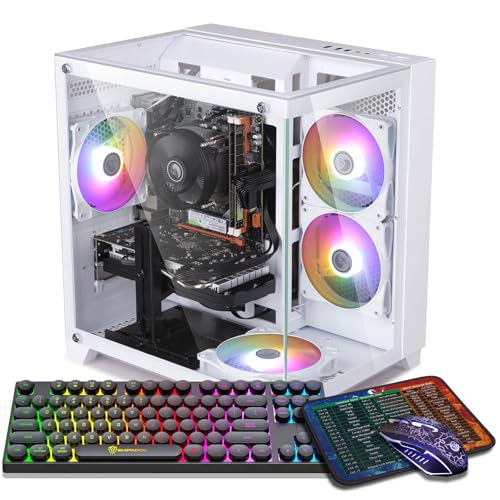
- Best encoder in a white case: ZER-LON Gaming PC, Ryzen 5 5500, RTX 4060, White — Check on Amazon
- STGAubron Gaming PC, White, Ryzen 5 5500, RTX 3050 6GB, RGB Fan x6, RGB Keyboard & Mouse — Check on Amazon
- LXZ Gaming PC, White, Ryzen 5 5500, RTX 3050 8GB, 32GB DDR4, 1TB NVMe SSD — Check on Amazon
- LXZ Gaming PC, White, Ryzen 5 5500, RTX 3050 8GB, 16GB DDR4, 512GB NVMe SSD — Check on Amazon
- LXZ Gaming PC, Sea View White, Ryzen 5 5600GT, 16GB DDR4, 1TB NVMe SSD — no graphics card; a stream-later platform — Check on Amazon
See 1 more Amazon option
- STGAubron Gaming PC, White, Ryzen 7 5700X, RTX 3060 12GB — the white 3060, currently a deal-watch pick — Check on Amazon
Read the full guide ↓
Disclosure: As an Amazon Associate, reviewstook.com earns from qualifying purchases. Links to Amazon on this page are affiliate links; they cost you nothing extra. Listing details such as price and availability change often, so check the current Amazon listing before you buy.
A streaming PC has two jobs running at the same time, and this guide grades both. Job one is the game. Job two is the broadcast: OBS Studio compositing your scenes, capturing the game, encoding the picture into a video stream and pushing it up your connection while chat, alerts and a browser sit alongside. On a single machine — the setup this budget buys — game and encode compete for the same hardware unless the graphics card carries a dedicated encoder chip that handles the stream without touching the part of the GPU that renders your game. That encoder, more than the case color or the headline card name, is what separates a PC that streams from one that merely plays games while a stream stutters behind it. Every pick below is graded encoder-first: what hardware encodes the stream, in which codec, and at what cost to the game.
The workflow this guide assumes is the standard one-PC setup. You play at 1080p on the same machine that runs OBS. On Twitch, the practical broadcast standard is around 6,000 kbps at a constant bitrate (CBR) in H.264 with two-second keyframes — the ceiling most channels actually send. YouTube accepts higher bitrates, takes 1440p live streams, and supports AV1 encoding where your hardware offers it, which makes AV1 a genuine second prize rather than a spec-sheet ornament. Streaming in 4K, by contrast, is platform-limited on both services regardless of the PC: ingest caps, transcoding queues and viewer bandwidth decide what an audience receives, and no graphics card changes that. Buy for a clean 1080p Twitch stream and a high-quality local recording, and every machine in this guide is honestly specified for the job.
Then there is the color, because this is a white-PC guide and white is where the second honesty note lives. At $700, white is a finish rather than a specification, and the verified white market is thinner than the black one: fewer listings, a card ladder that stops a rung lower, and prices that dip under budget less often. For all six picks the case color is verified from the listing’s own data — but a white case is not a white build. No listing here publishes the color of the card’s shroud, the power supply cables or the motherboard, so through the glass expect a white room with mostly dark furniture in it. The reviews grade the documented layer — case, fans, included peripherals, encoder silicon — and flag the undocumented layer instead of guessing. What $700 in white buys a streamer, plainly: one current-generation card with the newest encoder on its sale days, three honest RTX 3050 machines whose Ampere encoders were built for the Twitch standard above, one white platform with no graphics card that exists to receive one later, and the white RTX 3060 as a labeled exception at its real, over-budget price.
In this guide
Quick Picks
Short on time, or comparing several options at once? Each row below names a streamer type and the machine that suits it, with a link to the listing.
| Streamer type | Pick | Why it stands out | Link |
|---|---|---|---|
| Best encoder, future-proof stream | ZER-LON Gaming PC, Ryzen 5 5500, RTX 4060, White | The set’s only AV1 encoder (Ada NVENC) — YouTube-ready — but a sale-days-only price | Check on Amazon |
| Best finished stream desk in white | STGAubron Gaming PC, White, RTX 3050 6GB | Ampere NVENC for Twitch, six RGB fans, keyboard and mouse in the box — check price on Amazon | Check on Amazon |
| Best for a heavy streaming desktop | LXZ Gaming PC, White, RTX 3050 8GB, 32GB DDR4 | 32GB of RAM for game + OBS + browser + chat, and the 8GB card | Check on Amazon |
| Best value Twitch machine | LXZ Gaming PC, White, RTX 3050 8GB, 512GB SSD | The 8GB card and its Ampere encoder without paying for the 32GB build | Check on Amazon |
| Best white platform to grow into streaming | LXZ Gaming PC, Sea View White, Ryzen 5 5600GT | A finished white showcase case in the budget tier — the encoder arrives with the graphics card you add later | Check on Amazon |
| Best white RTX 3060 — deal-watch | STGAubron Gaming PC, White, Ryzen 7 5700X, RTX 3060 12GB | The strongest CPU here and 12GB of VRAM — a premium-tier deal-watch pick; check price on Amazon | Check on Amazon |
How These Picks Were Chosen
Two filters decided this list, and the encoder filter came first. Every pick had to answer one question: what hardware turns your gameplay into a stream? The answers at this budget are NVIDIA’s NVENC in two generations — the Ada block in the RTX 4060, which adds AV1 encoding, and the Ampere block in the RTX 3050 and RTX 3060, which encodes H.264 and HEVC but has no AV1 encode at all — and, in the platform pick, AMD’s integrated graphics, whose Vega-class encoder is the oldest design here and offers neither AV1 encode nor AV1 decode. There is no Intel machine in this set, so there is no Quick Sync to fall back on anywhere in it; where a pick’s encoder is weak, the review says so and names the cost instead of hiding it. Software encoding through OBS’s x264 is the universal fallback, but it spends the same CPU cores your game is using — which is why hardware encoding is the grading standard here and x264 appears below only as a stopgap.
The second filter is the one the base white guide applied: color verified from listing data, budget applied as a ceiling, and current pricing left to the live Amazon listing rather than printed here. Two picks fit this budget only when they are on sale and carry printed walk-away rules; one — the white RTX 3060 — generally sits above this budget tier and appears as a clearly labeled premium exception, so check price on Amazon before considering it. Two LXZ picks carry no price claim at all in this guide; their reviews state the under-$700 condition instead — only consider them when the live listing fits the budget. We did not use these machines ourselves. We read the maker listings and specification pages and compared encoder hardware, cards, memory, storage and connectivity — and where a listing leaves something unpublished (power supply wattage on both STGAubron picks, RAM speed, the color of everything inside the cases), the review names the gap rather than filling it.
The Encoder Map: What Actually Encodes Your Stream
Before the reviews, the map they are graded against. An encoder is a fixed-function block on the graphics chip whose only job is compressing video. With OBS set to a hardware encoder, the game renders frames, the block compresses them, and the CPU mostly supervises — which is why a modest six-core Ryzen can stream and game at once when the encoder is good. The RTX 4060’s Ada-generation NVENC is the newest block in this guide: it encodes H.264, HEVC and AV1, and AV1 is the codec YouTube’s higher-quality live ingest is built around, delivering a cleaner picture at the same bitrate than H.264 can. The RTX 3050 and RTX 3060 carry the previous Ampere-generation NVENC. For Twitch’s H.264 standard that block is fully sufficient — it is the same encoder family a generation of streamers built channels on — but it has no AV1 encode, and no setting or driver changes that; an Ampere card will never send an AV1 stream. (The 3060 can decode AV1 for playback, which is a different feature and earns it nothing as a broadcast source.)
The platform pick sits at the bottom of the map, and its review grades it there. The Ryzen 5 5600GT’s integrated Radeon graphics belong to the Vega generation, whose encode block handles H.264 and HEVC at the softest quality here, with no AV1 support in either direction. OBS can still stream from it — through that encoder at modest quality, or through x264 on its six CPU cores at a real cost to the game — but that is a stopgap for casual streams, not a channel setup, and it is why the pick is framed as a platform: the day a discrete card goes in, its encoder becomes the stream’s encoder and the grade changes completely. Keep the map in mind through the reviews — card names differ by a digit at a time, but encoder generations are the real ladder.
The 6 Best White Gaming PCs for Streaming Under $700
ZER-LON Gaming PC, Ryzen 5 5500, RTX 4060, White (Model AOV4060)
Who it suits: The streamer who wants the modern encoder — AV1 for YouTube, headroom for years — in a white case, and who can wait for a sale to prove the price.
This is the only machine in the guide whose encoder speaks AV1. The RTX 4060’s Ada-generation NVENC encodes your Twitch stream in H.264 at 6,000 kbps without costing the game anything measurable, and the same block gives you the two upgrades Ampere owners cannot have: AV1 encoding for YouTube live and for local recordings that stay sharp at reasonable file sizes, plus a simultaneous high-bitrate local record alongside the live stream. As a gaming card it is also the strongest here — comfortable 1080p at high settings, DLSS upscaling for demanding titles, and DLSS 3 Frame Generation. The platform is the familiar recipe: Ryzen 5 5500 six-core, 16GB of DDR4, a 1TB NVMe SSD, in a white case with four RGB fans. Grade the white build on its documented layer: case and fans are the verified white; the listing does not publish shroud or cable colors, so expect standard dark internals behind the glass.
Price is where this pick argues back. This model usually sits in a higher tier than this guide’s budget and only fits the under-$700 ceiling when it is on sale, so check price on Amazon before you plan around it. Treat it as a discipline purchase: the budget ceiling is the walk-away figure, a sale dip is the buying moment, and an approaching launch date is not a reason to pay above budget. Two smaller caveats ride along. The Wi-Fi is Wi-Fi 5, a generation behind the STGAubron below — a minor point, because the OBS section of this guide will tell you to run a cable regardless. And the 4060’s 8GB of VRAM is less than the older 3060’s 12GB; at 1080p today that trade favors the 4060’s speed and encoder, but texture-heavy games will age the 8GB card sooner.
- RTX 4060 with Ada NVENC — the only AV1 encoder in this guide, and the newest H.264 block.
- DLSS 3 Frame Generation — a display feature no 30-series pick in this guide can match.
- 1TB NVMe SSD and 16GB DDR4 — room for recordings and the full standard specification.
Honest limitation: Sale days are the only days it belongs here — it usually sits above this budget tier — and on paper its Wi-Fi 5 and 8GB of VRAM both lose to rivals with cheaper names.
Choose it if you stream to YouTube, record everything, or want the encoder that will not be the reason you upgrade in two years — and you will buy only when the live listing fits the under-$700 budget — check price on Amazon first. Skip it if you need to order today regardless of price; when it sits above budget, the black-case guides serve you better.

STGAubron Gaming PC, White, Ryzen 5 5500, RTX 3050 6GB, RGB Fan x6
Who it suits: The Twitch-first streamer who wants the whole white stream desk — case, lights, peripherals — finished in one box, at a documented price.
For the platform most new streamers actually use, this machine’s encoder is the right one. The RTX 3050’s Ampere NVENC was built for Twitch’s H.264 standard: set OBS to NVENC, 6,000 kbps CBR, and the stream runs on the encoder block while the game keeps the rest of the card. What you give up against the ZER-LON is AV1 — this block cannot encode it, so YouTube streams go out in H.264 like everyone else’s and local recordings take the older codecs — and a class of gaming performance: the 3050 in 6GB form is a genuine 1080p card at medium-to-high settings with DLSS helping in the demanding titles, and its 6GB of VRAM is the ceiling texture settings will hit first. Around it, the package is the most complete in the guide: a white case with six RGB fans — the most lighting hardware documented here, and lighting your camera can see — plus an RGB keyboard and mouse in the box, Wi-Fi 6, Bluetooth 5.0, 16GB of DDR4 and a 1TB SSD on the same Ryzen 5 5500.
Pricing is where this pick behaves best in this guide. It sits in the budget tier and regularly fits the under-$700 ceiling, so check price on Amazon to confirm the current listing before you buy. Compared with the black version of the same machine in the sibling guides, the white premium here is small at sale time — the color costs little at this level. The standing STGAubron caveats apply in full: the listing does not publish the power supply’s wattage or brand, the RAM speed or the SSD’s interface, so the first-week inspection this brand requires — read the PSU label, confirm the configuration in Windows, keep the box — is part of the purchase.
- Ampere NVENC — the proven Twitch encoder, running the stream off the game’s silicon.
- Six RGB fans and an RGB keyboard and mouse included — a camera-ready white desk in one box.
- Budget-tier pricing in white — check price on Amazon — with Wi-Fi 6 and Bluetooth 5.0.
Honest limitation: No AV1 encode, ever; the 3050 6GB is a class below the 4060, and the unpublished PSU is the usual STGAubron unknown.
Choose it if Twitch is your platform and the finished white look matters — this is the stream desk as a complete product. Skip it if YouTube AV1 or a multi-year recording archive is the plan; that is the ZER-LON’s job, on its sale days.

LXZ Gaming PC, White, Ryzen 5 5500, RTX 3050 8GB, 32GB DDR4, 1TB NVMe SSD
Who it suits: The streamer whose desktop is genuinely crowded — game, OBS with layered scenes, browser sources, chat, Discord, recording — and who feels RAM pressure before anything else.
Every other machine in this guide ships 16GB of system memory; this one documents 32GB, and for a streaming desktop that is not a luxury specification. OBS scenes with browser sources, the game, a chat client, a browser full of dashboard tabs and a recording writing to disk all draw on the same pool, and 16GB is where that pool starts forcing compromises. Thirty-two gigabytes removes the negotiation. The graphics side repeats the STGAubron’s streaming story with one improvement: the RTX 3050 in its 8GB form carries the same Ampere NVENC — Twitch H.264 on the encoder block, AV1 encode absent and not upgradable — while the extra 2GB of VRAM holds texture settings the 6GB card makes you lower, the difference between this card aging gracefully and aging loudly. The Ryzen 5 5500 underneath is the same six-core found across the guide, and at 1080p it is not the limiting factor; the 3050 is, in either form.
What defines this pick is a pair of cautions, and both attach to the listing rather than the hardware. The family blends its variants: specifications for another configuration entirely — an Intel i5-12400F paired with an RTX 4060 — surface inside the same family’s pages, so the cart has to be audited line by line against the headline build (Ryzen 5 5500, RTX 3050 8GB, 32GB, 1TB, white) before money moves, and the delivered box audited again on arrival. Second, we print no price for this exact configuration in this guide; check price on Amazon for the current listing, because the wider LXZ family spans several builds and only this headline configuration is the pick. Treat the live price as the pick’s condition: when it fits the under-$700 budget the specification justifies it; above that, the ZER-LON’s card and encoder are the better spend.
- 32GB of DDR4 — double the memory of every other pick, sized for a real streaming desktop.
- The 8GB RTX 3050 — Ampere NVENC plus the VRAM headroom textures will spend.
- 1TB NVMe storage for the recording habit.
Honest limitation: The listing family mixes variants, including a different CPU and card — the cart check is mandatory — and no verified price could be pinned for this exact configuration.
Choose it if your stream desktop is heavy and the live price is at or under $700 with the headline configuration in the cart. Skip it if the cart shows any other configuration, or the price has drifted toward the 4060’s territory.

LXZ Gaming PC, White, Ryzen 5 5500, RTX 3050 8GB, 16GB DDR4, 512GB NVMe SSD
Who it suits: The value hunter who wants the Twitch-ready 8GB card in white, without paying for the 32GB configuration above.
Strip the pick above down to its streaming essentials and this is what remains: the same Ryzen 5 5500, the same RTX 3050 in its 8GB form — which means the same Ampere NVENC encoder, fully sufficient for a 6,000 kbps Twitch broadcast and equally incapable of AV1 — with 16GB of DDR4 and a 512GB NVMe SSD in the white case of LXZ’s R5go line. The grading logic is the same as in the base guide. Between the two memory sizes of the 3050, the 8GB card is the one to own, because VRAM is the texture budget the next few years of games will spend; and for a gaming-plus-OBS machine that does not run a production desktop alongside, 16GB of system RAM remains a workable standard rather than a compromise. The money this configuration does not charge you is money available for the microphone the kit section below puts first — the purchase that improves a young stream more than any specification on this page.
The trade is printed in the specification, and streaming makes it sharper: 512GB is half the storage of the guide’s 1TB picks, and a local-recording habit consumes disk at a rate that surprises new streamers — hours of footage kept until the edit is done. On this drive, the delete-after-edit discipline is not advice, it is arithmetic; budget for a second drive or keep the library and the archive ruthless. The pricing discipline matches the pick above: this review makes no printed price claim for this exact listing, so check price on Amazon — it earns its place if, and only if, the live price lands under $700 with the headline configuration in the cart. As with its sibling, confirm the style on the live listing; this brand’s families are wide and similarly named machines differ in storage, power supply and graphics.
- The 8GB RTX 3050 — the right version of the card, Ampere NVENC included — in a verified white case.
- 16GB DDR4 and a Ryzen 5 5500 — sufficient for game plus OBS without a production desktop.
- The slimmest path to the 8GB card in a white case — provided the live price plays along.
Honest limitation: 512GB fills fast under a recording habit, and no verified price could be pinned for this exact listing — the under-$700 rule is a condition, not a description.
Choose it if streaming is the job, the desktop is light, and the live price is under $700. Skip it if you multitask heavily (the 32GB build above is yours) or you record everything and edit monthly (a 1TB pick is yours).

LXZ Gaming PC, Sea View White, Ryzen 5 5600GT, 16GB DDR4, 1TB NVMe SSD
Who it suits: The patient builder whose stream starts later — someone who wants the white showcase case and a working PC now, and the encoder when the graphics card arrives as stage two.
Read this specification the way a streamer must: its most important component is the one that is not there. There is no discrete graphics card, which means there is no NVENC — the Ryzen 5 5600GT renders and encodes through its integrated Radeon graphics, and independent listing analysis of this exact machine confirms the integrated-only configuration. Integrated graphics of this Vega generation carry the oldest encoder in this guide: H.264 and HEVC through AMD’s video block at the softest quality here, no AV1 encode, no AV1 decode. OBS will run on it — casual streams to friends, through the integrated encoder or through x264 software encoding on the six Zen 3 cores at a visible cost to lighter games — and the machine plays esports titles and older games at 1080p on modest settings from the day it arrives. What it will not do is carry a growing channel, and no settings change fixes silicon.
So why is it here? Because the case is the point and the arithmetic works. This is the best-documented white showcase in the guide — a white tempered-glass “sea view” case in the panoramic style that wraps the view around the front corner — on a budget-tier machine — check price on Amazon — with 16GB of DDR4, a 1TB NVMe drive and six Zen 3 cores that will not bottleneck a mid-range card added later. At this tier it leaves meaningful headroom in the budget for the used or sale-priced card that completes it — at which point the card’s encoder becomes the stream’s encoder, and you own a white streaming build with a better broadcast chip than any finished 3050 machine here, in two stages. Bought expecting a finished streaming PC, it will disappoint. Bought as the first stage of two, it is the shrewdest white purchase on this page.
- A white tempered-glass sea-view case — the most thoroughly documented showcase in this guide.
- Budget-tier platform pricing — check price on Amazon — leaving stage-two money unspent.
- 1TB NVMe and a six-core Zen 3 platform ready to receive a real card — and its encoder.
Honest limitation: No discrete graphics card means the weakest encoder in this guide. Integrated graphics is a stopgap for casual streams until you buy a card — that purchase is not included in the price.
Choose it if adding a graphics card later as stage two sounds like a plan rather than a chore, and the case is the part you intend to keep. Skip it if you need one box, finished, that streams properly on day one — that is the STGAubron above.

STGAubron Gaming PC, White, Ryzen 7 5700X, RTX 3060 12GB — the deal-watch exception
Who it suits: The reader this search is really for — the one who wants the resident card of the $700 tier, the RTX 3060 12GB, in white — and who deserves the true price of that combination.
On hardware, this is the best-balanced streaming machine in the guide. The RTX 3060’s Ampere NVENC is the encoder a generation of Twitch channels was built on, and it handles the platform’s H.264 standard at 6,000 kbps without touching the game’s performance; what it lacks is AV1 encode — the 3060 decodes AV1 for playback, but as a broadcast source it sends H.264 and HEVC only, permanently. The card around that encoder is the tier’s benchmark: proper 1080p at high settings and 12GB of VRAM, the most in this guide — texture headroom that keeps modern games looking right on stream. The Ryzen 7 5700X is the strongest CPU here — eight cores against everyone else’s six — which matters to a streamer in a specific way: the spare cores are where OBS’s scene compositing, browser sources and chat software live when a game gets heavy, and they make x264’s veryfast preset a genuinely usable fallback the six-core picks cannot match. The white case carries four RGB fans, with Wi-Fi 6, Bluetooth 5.2, 16GB of DDR4 and a 1TB SSD. As a white build it grades like its sibling: case and lighting documented, internals’ colors unpublished, power supply wattage unpublished.
And then the price, which is why this pick wears a label instead of a recommendation. For this white 5700X/3060 configuration, current pricing sits in the premium tier, well above the black STGAubron 3060 machine and well above this guide’s budget — check price on Amazon to see the live listing. That is the white premium in its purest form at this level. We include the machine because a white streaming guide that never mentions the white 3060 would leave readers to find it alone and assume its price was a mistake; it is not a mistake, it is the color’s current cost at this card. The rule is absolute: buy it only if the live listing ever dips into the under-$700 budget, or buy it knowingly above budget with the premium understood. Everyone else should take the black machine’s deal, or the ZER-LON’s newer encoder, and let the color go.
- RTX 3060 12GB with Ampere NVENC — the proven Twitch encoder and the most VRAM in this guide.
- Ryzen 7 5700X — the only eight-core CPU here; spare cores for OBS and a real x264 fallback.
- Wi-Fi 6 and Bluetooth 5.2 beside a 1TB SSD — a specification with nothing trimmed away.
Honest limitation: It sits above this budget in the premium tier — check price on Amazon — and its encoder generation matches the 3050s — no AV1. File it as a deal-watch listing — not as an under-$700 pick having an expensive week.
Choose it if a sale dip ever brings the live listing into the under-$700 budget — check price on Amazon — or if you have consciously decided the color earns its substantial premium over the black equivalent. Skip it if you are stretching beyond this budget — at that higher tier, the under-$800 and under-$1200 guides buy a faster PC with a newer encoder.

Comparison Table
| Product | Encoder | Best use | Link |
|---|---|---|---|
| ZER-LON Gaming PC, Ryzen 5 5500, RTX 4060, White | Ada NVENC — H.264 / HEVC / AV1 | Best encoder in white — sale days only | Check on Amazon |
| STGAubron Gaming PC, White, RTX 3050 6GB | Ampere NVENC — H.264 / HEVC, no AV1 | The finished white Twitch desk, peripherals included | Check on Amazon |
| LXZ Gaming PC, White, RTX 3050 8GB, 32GB | Ampere NVENC — H.264 / HEVC, no AV1 | Heavy streaming desktops; 32GB of RAM | Check on Amazon |
| LXZ Gaming PC, White, RTX 3050 8GB, 512GB | Ampere NVENC — H.264 / HEVC, no AV1 | The lean value route to the 8GB card | Check on Amazon |
| LXZ Gaming PC, Sea View White, Ryzen 5 5600GT | Integrated Vega-class — H.264 / HEVC, no AV1 | A white platform to finish with your own GPU | Check on Amazon |
| STGAubron Gaming PC, White, RTX 3060 12GB | Ampere NVENC — H.264 / HEVC, no AV1 | The white 3060 — premium-tier deal-watch; check price on Amazon | Check on Amazon |
Setting Up OBS on Any of These Machines
The settings below are the working standard for a one-PC stream at this budget, and they apply to every pick with an NVENC encoder. In OBS, choose the NVIDIA NVENC encoder — never x264 — when a discrete NVIDIA card is present, because the whole point of these machines is that the encode runs on silicon your game is not using. Set rate control to CBR, bitrate to around 6,000 kbps for Twitch (YouTube accepts more, and rewards it), keyframe interval to two seconds, and stream at 1080p or at the 936p many channels prefer for fast games — broadcast resolution is yours to choose independently of the resolution you play at. Add a recording output at a much higher bitrate than the stream: the recording is your edit source and archive, and it benefits most from the 4060’s AV1 or, on the Ampere picks, from high-bitrate HEVC. On the platform pick, until a card arrives, use the integrated encoder for casual streams or x264 on the veryfast preset for short ones, and treat both as the stopgaps its review describes.
When a stream goes wrong, OBS tells you which of three counters is responsible, and each has a different fix — learn to read them before blaming the PC. Rendering lag means the GPU could not composite your OBS scene in time, usually because the game is using the entire card: cap the game’s frame rate, or lower its settings, until the GPU keeps a margin for compositing. Encoding lag means the encoder itself fell behind: on NVENC this is rare at 1080p and usually means the quality preset is set beyond what the block sustains alongside a recording, so step the preset down a notch rather than lowering your bitrate. Dropped frames (network) are not the PC’s fault at all — they are your upload path failing to sustain the bitrate, and no specification on this page fixes them. Hence the last rule, which is absolute: run an Ethernet cable to the streaming desk. None of the six listings in this guide documents a wired port speed, so this guide claims none — check the live listing for the port on the machine you buy — but every one of these desktops has a wired port, and a stream sent over it is stable in a way no Wi-Fi generation, 5 or 6, reliably matches while a game shares the radio.
What Else a Streamer Buys: Costing the Kit Without Prices
The PC is the largest purchase in a streaming setup, not the only one, and this guide costs the rest of the kit in priority order rather than dollars — peripheral prices move too fast for printed numbers to stay honest, and the order matters more than the amounts. First, a microphone: viewers forgive a soft picture for a whole stream and abandon a bad-sounding one in minutes, so audio outranks every specification in this guide. Second, a second monitor — OBS, chat and alerts need a home that is not your game screen, and any basic panel does the job. Third, lighting — where the white builds quietly repay part of their tax, since the RGB fans documented on these picks are camera-visible light you have already bought; a plain desk lamp bounced off a wall still beats case lighting for a face. A capture card comes last and, for the setup this guide assumes, not at all: it exists to bring a console or a second PC into your stream, and a one-PC setup has nothing for it to capture. Budget for one only if a console joins the desk. Everything else — camera upgrade, boom arm, acoustic treatment — is a later purchase that a growing audience justifies and a starting one does not.
How to Choose a White Streaming PC Under $700
- Grade the encoder before the card name. The streaming ladder here is Ada NVENC with AV1 (the 4060), Ampere NVENC without it (the 3050s and the 3060), then integrated graphics. For Twitch’s H.264 standard the Ampere block is fully sufficient; for YouTube’s AV1 ingest and the longest recording life, only the 4060 qualifies. Choose by the platform you will actually stream to.
- Decide what “white” has to mean before you shop. At this budget the documented offer is a white case with standard dark internals. If a white case wrapped around black parts is the desk you are picturing, shop this guide with confidence. If the picture in your head is white at every layer — board, card, cabling — no verified prebuilt sells it at $700, for streaming or for anything else.
- Price the color explicitly. Look up the black twin of any white machine on your shortlist on Amazon and compare the live prices. The pattern in this guide is consistent: the premium is small at the 3050 level and steep at the 3060 level — a premium you have measured before paying is a decision, and one you have not is a leak.
- Treat sale-only picks as a different product. Two of these picks earn their place only when they are on sale, and buying them means buying the wait as well: fix your walk-away budget in advance, check price on Amazon, purchase on the dip, and keep a fallback pick warm. A self-imposed launch date is the worst negotiator at the table — do not let it push you into paying above budget.
- Count VRAM and RAM as streaming specs. VRAM is the texture budget your game renders from while the encoder works, and the 8GB 3050 outlasts the 6GB; system RAM is the desktop budget OBS draws on, and 16GB is where a heavy streaming desktop starts closing things. Neither is as cheap to fix later as it is to choose now.
- Verify the configuration, not the headline. Listing families at this end of the market blend their variants — one family documented in this guide hosts a different processor and graphics card inside its own pages. Read every line of the cart before paying, then open Windows on the delivered machine and confirm the specification while the return window is still open.
- Interrogate the unpublished layer. Power supply wattage, RAM speed, SSD interface, wired port speed, and the colors of everything inside the case: if the spec table does not publish it, assume the budget version and verify on the live listing.
- Budget the second stage honestly. The platform pick is a two-purchase plan: case now, card later — and for a streamer the card is also the encoder. Price the whole plan, card included, before comparing it with finished machines.
The White Tax, Priced
This niche’s premium follows a clear pattern when you compare the white machines here with the black versions of the same machines in the sibling guides — check price on Amazon for both colors before you buy. Start at the RTX 3050 6GB level, where sale pricing nearly erases it: the white STGAubron sits in the same budget tier as its black sibling, and for a streamer that small premium also buys the only package in the guide whose lighting arrives with a matching keyboard and mouse. Move up to the RTX 4060 and the premium changes currency from money to timing: the white ZER-LON sits in a higher tier than comparable black 4060 towers, and its dips into the under-$700 budget are rare while black 4060 machines reach this budget far more often. What you spend is patience — and patience is the entire price of this guide’s only AV1 encoder.
At the RTX 3060 12GB level the tax stops being a fee and becomes a wall. The black STGAubron 3060 machine sits in a far lower tier; its white counterpart, carrying the stronger CPU, sits in the premium tier — a substantial gap that no coupon, variant or seller closes. The streaming answer is therefore structural: the 4060 on its sale days when the encoder leads, the 3050s when the finished white desk leads (their Ampere blocks surrender nothing on Twitch), the platform when you would rather build toward both, and the white 3060 understood for what it presently is — a premium-tier PC answering an under-$700 search, with an encoder no newer than the 3050’s.
Common Buying Mistakes
- Assuming any RTX card encodes AV1. Only the 40-series block in this guide does. The 3050 and 3060 encode H.264 and HEVC through NVENC and will never send an AV1 stream, whatever the listing’s graphics imply.
- Encoding with x264 while an NVENC card sits idle. Software encoding spends the CPU cores your game needs; the hardware encoder exists precisely so you do not. Check the OBS encoder field on day one.
- Streaming over Wi-Fi because the listing advertised a fast wireless generation. Wireless specs describe the radio, not your upload stability; dropped network frames are the most common stream fault, and the cable is the cheapest fix that exists.
- Paying the white 3060’s premium-tier price while expecting an under-$700 machine. The premium is explained in this guide — the error is paying it without noticing, not paying it on purpose.
- Paying above budget for a sale-only pick after its deal expires. A ZER-LON above budget and a ZER-LON inside the under-$700 budget are two different purchases wearing one name — the walk-away rule in its review is part of what you are buying.
- Taking the 6GB 3050 instead of the 8GB to pocket a small saving. VRAM cannot be added to the card later, and texture settings are among the first things your audience actually sees.
- Trusting a headline on a listing family that mixes its variants. One family here hosts a different processor and graphics card inside its own pages — the headline is a claim, and only the cart is a contract.
- Ordering the platform pick as though it were a finished streaming PC. With no graphics card it has no real encoder — a fact its title block, review and comparison row all state, and still the most common disappointment in this category.
- Buying a capture card for a one-PC setup. There is nothing for it to capture. The microphone you did not buy would have improved every minute of every stream.
Final Recommendation
- Best encoder in white: ZER-LON Gaming PC, RTX 4060 — AV1 and the newest NVENC, at $700 or under on its sale days.
- Best finished white stream desk: STGAubron Gaming PC, White, RTX 3050 6GB — the complete package, peripherals included, Twitch-ready out of the box.
- Heavy streaming desktops: LXZ Gaming PC, White, RTX 3050 8GB, 32GB — if the cart and price check out.
- Patient upgraders: LXZ Sea View White 5600GT — the case now, the card and its encoder as stage two.
- The one you actually want: STGAubron White RTX 3060 12GB — wait for a dip that has not happened yet, or pay the premium with your eyes open.
Our top two are the ZER-LON and the STGAubron 3050, because they are the two honest ways to stream from a white PC at this budget: encoder first, waiting for the sale that puts the only AV1 block in this guide inside a white case; or the finished desk first, in a package whose Ampere encoder loses nothing on Twitch and whose budget-tier pricing leaves room in the budget for the microphone. Most readers of this search land in one of those two camps. If the budget genuinely stretches, discipline says the stretch should not land on the premium-tier white 3060 — read Best White Gaming PC Under $800 to see what the next tier does to the tax, or compare the dedicated machines in Best Streaming PC Under $700, where dropping the color requirement widens the encoder ladder at the same money. First-time streamers should also read Best White Gaming PC For Beginners Under $700, which grades these same machines on support and simplicity rather than specification. Put a dollar figure on the color before you open a single listing; the listings are built on the hope that you will not.
Frequently Asked Questions
Can a $700 white PC actually stream and game at the same time?
Yes — that is precisely what a hardware encoder is for. On this guide’s NVENC picks, the stream is compressed by a dedicated block on the graphics chip while the game renders on the rest of it, so a six-core Ryzen runs game, OBS and chat together at 1080p. The exception is the platform pick: on integrated graphics alone, streaming is a casual stopgap until a card — and its encoder — is added.
Do I need AV1 to stream?
No. Twitch’s standard is H.264 at around 6,000 kbps, and every NVENC pick in this guide handles it fully. AV1 matters for YouTube, where the platform’s ingest supports it and it delivers a cleaner picture at the same bitrate, and for local recordings you intend to keep. Only the RTX 4060 pick encodes AV1; the 3050 and 3060 never will, and that is a hardware fact, not a settings problem.
How much extra does white cost compared with the same PC in black?
The card decides it. The premium is small at sale time for the RTX 3050 6GB, where white and black versions of the same STGAubron machine sit in the same budget tier — compare the live prices on Amazon to see it. Mostly patience at the RTX 4060 level, where the white listing sits in a higher tier yet slips into the under-$700 budget far less often. The premium is steep at the RTX 3060 12GB level, where the white machine sits well above its black equivalent. In short: the premium is small on the cards you settle for and steep on the card you actually want.
Are the insides of these PCs white too?
No listing in this guide documents it. Each of the six spec tables states the case color and goes no further; shrouds, power supply cables and motherboards carry no color specification, and budget integrators assemble from standard parts, which usually means dark ones. Behind the glass, picture a white case surrounding a conventional interior, lit by its fans. If the interior’s color is what decides you, the listing photographs are the only documentation that exists — study them before ordering.
Why is there a PC with no graphics card in a streaming PC guide?
Because in the white niche the case is a product in its own right, and this one is the best-documented white showcase in the budget tier — check price on Amazon — for a working computer with a six-core processor and 1TB of storage. It streams casually on integrated graphics today, and becomes the best white streaming build here the day a mid-range card goes into it, because the card brings the encoder with it. It is labeled a platform everywhere it appears; buy it as stage one of two, or do not buy it.
Should I stream over Wi-Fi or Ethernet?
Ethernet, whenever the desk allows it. A dropped-frames problem is a network problem, and a cable removes the variable entirely; Wi-Fi — 5 or 6, both appear in this guide — shares one radio between your game and your upload. None of these listings documents a wired port speed, so check the live listing for the port on the machine you choose — but do not let a wireless generation on a spec sheet talk you out of the cable.
Should I just buy the black version and save the money?
If the PC lives under a desk and off camera, yes — the black equivalents in Best Streaming PC For Streaming Under $700 buy a wider card and encoder ladder at the same money. If the PC sits on the desk, in frame, in a room you have styled around it, the white premium at the 3050 level is genuinely small and the platform route is genuinely smart. The single indefensible outcome is paying the 3060-level premium by accident.
- Best White Gaming PC Under $700
- Best White Gaming PC Under $500
- Best White Gaming PC Under $800
- Best White Gaming PC For Beginners Under $700
- Best White Gaming PC For Small Spaces Under $700
- Best White Gaming PC For 1440p Gaming Under $700
- Best Gaming PC Under $700
- Best Prebuilt Gaming PC Under $700
- Best Budget Gaming PC Under $700
- Best Streaming PC Under $700


