Where to buy
All six machines below are sold on Amazon, and that is where your order is placed. We may earn a commission from qualifying purchases.
- Best first streaming PC for most beginners: Lenovo Legion Tower 7i Gen 10, Core Ultra 9 285K, RTX 5080 — Check on Amazon
- CLX Set Gaming PC, Ryzen 7 9800X3D, RTX 5080 — Check on Amazon
- Alienware Aurora ACT1250, Core Ultra 9 285, RTX 5080 — Check on Amazon
- Skytech King 95, Ryzen 7 9800X3D, RTX 5070 Ti — Check on Amazon
- iBUYPOWER Y40 PRO, Ryzen 9 7900X, RTX 5070 Ti — Check on Amazon
See 1 more Amazon option
- ZOTAC MEK Gaming PC, Ryzen 7 9700X, RTX 5070 Ti, Windows 11 Pro — Check on Amazon
Read the full guide ↓
Disclosure: As an Amazon Associate, reviewstook.com earns from qualifying purchases. Links to Amazon on this page are affiliate links; they cost you nothing extra. Listing details such as price and availability change often, so check the current Amazon listing before you buy.
Starting your first stream on a $3,000 budget sounds like it should be complicated. It is not, and this guide is written on that assumption: you have never owned a streaming PC, the jargon means nothing to you yet, and you want a machine you can unbox, plug in, and go live on without a computer-science degree. Every machine below is a complete, ready-made PC. Nothing here needs building, nothing arrives in pieces, and nothing on this list is second-hand. A plain-English glossary further down translates the jargon — encoder, bitrate, NVENC — as you meet it.
Two honest warnings belong at the top, because beginners are exactly who the marketing aims at. First: there is no complete RTX 5090 PC anywhere near $3,000. Complete 5090 machines sit well above this budget. If a listing at this budget uses “5090-class” language, that language is decoration over a lesser graphics card. The honest top cards at $3,000 are the RTX 5080 and the RTX 5070 Ti, and every pick below carries one of those two. Second: the websites you stream to cap your picture long before your PC does. Twitch’s standard guidance tops out around 6,000 kbps, which makes 1080p60 the practical Twitch picture for almost everyone; YouTube allows far more, up to genuine 4K streaming. So much of what $3,000 buys is not a sharper broadcast — it is headroom: smooth gameplay at high settings, a clean recording of every stream, and a machine you will not outgrow in a year.
One more beginner-specific reassurance. Years ago, serious streamers ran two PCs — one to play on, one to broadcast with — because sending the stream used to eat the same processor that ran the game. That era is over. Both graphics cards in this guide carry two hardware encoders (the parts that turn your gameplay into the video your viewers watch): one sends your live stream while the second records a high-quality local copy, and neither slows your game down. One machine really is enough.
In this guide
Quick Picks
New to all of this? Find the line that sounds like you.
| If you are… | Pick | Why it fits a beginner | Link |
|---|---|---|---|
| Most first-time streamers | Lenovo Legion Tower 7i Gen 10 | The strongest all-rounder: plays, streams, records and edits, with every important figure published | Check on Amazon |
| A player first, streamer second | CLX Set Gaming PC | The best gaming processor here plus an RTX 5080 — check price on Amazon and confirm it fits your budget before buying | Check on Amazon |
| Wanting a big brand behind you | Alienware Aurora ACT1250 | RTX 5080 power with Dell’s support network — check the current price on Amazon | Check on Amazon |
| Impatient with deal-hunting | Skytech King 95 | Top gaming processor and the full streaming setup, positioned below the RTX 5080 picks in this guide — check price on Amazon | Check on Amazon |
| Planning to edit videos too | iBUYPOWER Y40 PRO | Twelve processor cores and a big 2TB drive, positioned at the lower end of this guide’s range — check price on Amazon | Check on Amazon |
| A careful spec-sheet reader | ZOTAC MEK Gaming PC | Every key figure printed in the listing, plus Windows 11 Pro | Check on Amazon |
How These Picks Were Chosen
We did not use these machines ourselves. We read the manufacturers’ Amazon listings and specification pages closely, and judged every machine on the things that decide whether a first streaming PC is a pleasure or a project. Anything whose headline hinted at RTX 5090 performance at this money was excluded immediately, because no such complete system exists near $3,000.
First, the encoder count — the most streaming-specific number on any spec sheet. NVIDIA’s published specifications give both the RTX 5080 and the RTX 5070 Ti two ninth-generation NVENC encoders with AV1 support: your live stream and your local recording become separate hardware jobs that never fight each other or your game. Every pick has that pair; it was the entry ticket. Second, the processor, judged by the job it actually does for a streamer. Because the graphics card handles the stream, the processor’s real work is the game plus everything around it — editing videos, running your streaming scenes, a browser full of tabs. Machines split two ways below: many-core processors (24 cores in the Legion and the Aurora, 12 in the Y40 PRO) for people who will edit and produce, and the Ryzen 7 9800X3D for people whose machine mostly plays games as fast as possible. Third, storage and memory sized for recording: local recordings use gigabytes per hour, so 2TB drives scored ahead of 1TB ones, and 32GB of memory is the floor at this budget — every pick meets it. Fourth, honesty in print: builders who publish their power supply wattage scored ahead of builders who leave gaps, and where a figure is not published — one pick does not headline its power supply — the review says so instead of guessing.
Finally, every pick was checked against what Twitch and YouTube actually accept today: all six clear both platforms’ requirements with room to spare, which is why this guide spends its words on setup rather than pretending a bigger PC makes a Twitch stream sharper than Twitch allows.
Beginner’s Glossary: The Words in Plain English
Every term this guide uses, translated. Read it once now and the reviews below will read like ordinary English.
- Graphics card (GPU): The part that draws your game on screen — and, for streamers, the part that also produces your broadcast video. It is the single most important part in a streaming PC. A small, weak graphics chip is also built into most processors (called integrated graphics); it can show a picture but plays games slowly, which is why the walkthrough insists your monitor cable goes into the graphics card, not the motherboard.
- Processor (CPU): The machine’s general-purpose brain. It runs the game, your streaming software, your browser and your editing program. Its power is partly described in cores — more cores means more jobs done at once, which matters for editing, while a special gaming design (the 9800X3D below) can beat a many-core chip at games alone.
- Encoder (NVENC): A small, dedicated circuit on NVIDIA graphics cards whose only job is turning gameplay into streamable video. Because it is separate hardware, using it costs your game almost nothing. Both cards in this guide carry two of them — one can send your live stream while the other records. They also support AV1, a newer, more efficient video format YouTube accepts that produces a cleaner picture at the same bitrate.
- Bitrate: How much video data you send per second, measured in kbps or Mbps. Higher is sharper, up to the limit the platform accepts — Twitch’s standard limit is around 6,000 kbps. Your home internet’s upload speed (not download) feeds it, and a good rule is to stream at no more than about three-quarters of the upload speed you actually measure.
- Streaming software (OBS): The free program almost every streamer uses to combine game, camera and microphone into a broadcast and send it to Twitch or YouTube. It is not included with any PC — you download it on your first evening, as the walkthrough covers.
- Memory (RAM): The machine’s short-term workspace, measured in GB. More memory means more programs open at once without slowing down. Every pick here has 32GB — the comfortable amount for gaming plus streaming plus a browser.
- Storage (SSD): Where your games and recordings live, measured in GB or TB (1TB ≈ 1,000GB). All six picks use fast SSD storage. Streamers fill drives faster than gamers because local recordings are large files — hence this guide’s preference for the 2TB machines.
- Power supply (PSU): The box inside the PC that feeds electricity to everything else, measured in watts. You never interact with it, but its size decides whether a future graphics card upgrade is possible — which is why published wattage is a trust signal in the reviews.
- Refresh rate: How many times per second your monitor redraws the picture, measured in Hz. A 144Hz monitor can show far smoother motion than a 60Hz one — but only if you switch it on in Windows settings, because monitors often arrive set to 60Hz. Step 7 of the walkthrough does this.
- Prebuilt: A complete PC assembled by a company and sold ready to use. All six picks are prebuilts: unbox, plug in, and the machine works. The opposite — buying separate parts and building — is a hobby in itself, not what this guide is about.
- Renewed (refurbished): A used machine that has been checked, repaired if needed, and resold. Renewed PCs can be bargains, but to be plain: none of the six picks is renewed. Every machine here is sold new.
- Barebone: A partly-finished PC sold without some pieces — usually memory, storage or Windows — that the buyer must add before it works. Again, plainly: none of the six picks is barebone. Each arrives complete, with memory, storage and Windows installed.
- Soldered: Parts permanently fixed to the machine’s board, so they can never be upgraded. This matters in laptops and mini PCs, but not here: none of the six picks has soldered memory — all use standard desktop memory sticks. One pick (the Legion) has a different limit, a stated 32GB memory ceiling, explained in its review.
The 6 Best Streaming PCs for Beginners Under $3,000
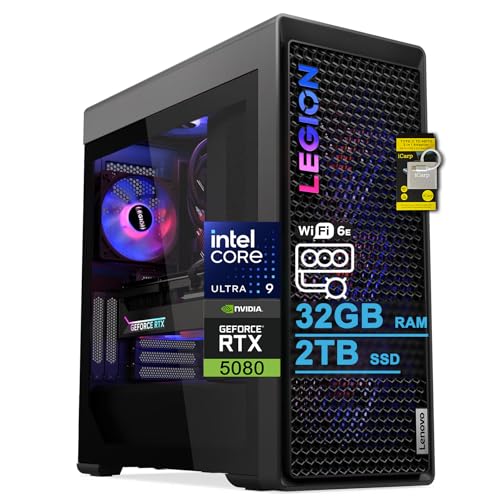
Lenovo Legion Tower 7i Gen 10 — Core Ultra 9 285K, RTX 5080
Who it suits: The beginner who wants one machine that does everything — plays the game, runs the stream, records the master copy, and edits the video afterwards — without having to learn which compromises to make.
If you would rather not develop opinions about processors, this is the pick that asks the fewest questions. Its Core Ultra 9 285K has 24 cores, which in plain terms means it is strong at the game and strong at everything around the game: editing tonight’s stream into a video, exporting clips, running a busy streaming scene. The RTX 5080 beside it carries the two encoders this guide is built around — one sends your live broadcast, the second records a clean, high-quality local copy at the same time, and neither slows the game. The supporting details are the most complete here: a roomy 2TB drive for a growing recording archive, liquid cooling, an 850W power supply whose size Lenovo actually publishes (a trust signal, and what makes a future graphics card swap realistic in this standard tower), 2.5Gb Ethernet, Wi-Fi 6E, and a keyboard and mouse in the box. Check price on Amazon for the current listing. Lenovo also sells comparable configurations through its own store, so at checkout, check that the listing in front of you really is the 285K and RTX 5080 configuration and not a different Legion wearing a similar name.
- 24-core processor: the best in this guide at doing several jobs at once.
- Two hardware encoders — stream live and record a master copy simultaneously.
- 2TB of storage, a published 850W power supply, wired 2.5Gb Ethernet, keyboard and mouse included.
Honest limitation: The listing states that 32GB is the maximum memory this configuration takes, so the memory it arrives with is the memory it keeps. That is plenty for streaming and editing, but the heaviest multitaskers should know the ceiling exists before ordering.
Choose it if you want the default answer — the machine a beginner can grow into for years. Skip it if you will only ever play and stream, because the gaming-focused picks below are positioned lower in this guide’s range for that narrower job.

CLX Set Gaming PC — Ryzen 7 9800X3D, RTX 5080
Who it suits: The beginner who is a player first — competitive games, high-refresh monitor, a simple stream setup — and who is willing to check the current price on Amazon before buying.
The CLX pairs the strongest pure-gaming processor in this guide, the Ryzen 7 9800X3D, with the RTX 5080 and its two encoders. In plain terms: the graphics card does all the streaming work by itself, so the processor can give the game its full attention, and you get the smoothest possible play while broadcasting. The rest of the specification suits someone who records every session: 32GB of memory and a generous 2TB drive. Now the condition, and it is a firm one: check price on Amazon before you buy, because this configuration’s positioning in the range can shift. When it sits comfortably within this guide’s budget, it is arguably the best player-first streaming PC here; when it is positioned above that budget, the Legion and the Aurora do the same streaming job and add far more editing power.
- The guide’s best gaming processor beside a dual-encoder RTX 5080.
- 2TB of storage and 360mm liquid cooling — built for long, recorded sessions.
- When it sits comfortably within budget, the strongest play-and-stream combination on this page — check the current price on Amazon.
Honest limitation: Its positioning can shift, so the value case depends on checking the current price on Amazon — and its eight-core processor is the weakest here at editing and production work if your ambitions grow that way.
Choose it if the current price on Amazon sits comfortably within your budget and gaming is the main job. Skip it if it is positioned above your budget, or you plan to edit heavily — that is the Legion’s territory.

Alienware Aurora ACT1250 — Core Ultra 9 285, RTX 5080
Who it suits: The beginner who wants top-tier power with a famous brand’s support network behind it — and who is comfortable doing one careful check of the listing before ordering.
The Aurora is a lower-positioned door into this guide’s top graphics tier among the RTX 5080 picks — check the current price on Amazon to confirm where it sits today. What you get is the RTX 5080 with its two encoders, a 24-core Core Ultra 9 285 processor for editing headroom, 32GB of memory, and a 1000W Platinum-rated power supply that Dell publishes outright — generous enough to make a future graphics card swap realistic. Two honest notes about the listing itself, because a beginner deserves to hear them before ordering. Amazon’s product information describes this processor as having 20 cores; Intel, which makes it, specifies 24 cores (8 performance plus 16 efficiency), and Intel is the one to believe. The same listing cannot decide whether the liquid cooling is fitted as standard or charged as an option. Neither contradiction changes the hardware, but confirm the cooling arrangement with the seller before you order. Also plan ahead on storage: its 1TB drive is the smallest among the 5080 picks, and recording every stream will fill it.
- Positioned at the lower end of the RTX 5080 machines in this guide — check price on Amazon.
- 24-core processor (per Intel’s specification) plus a published 1000W Platinum power supply.
- Dell’s whole-system support behind the machine — a real comfort for a first PC.
Honest limitation: The listing contradicts itself on the core count and the cooling, so verify before ordering; and the 1TB drive fills quickly once you record every stream.
Choose it if you check the current price on Amazon, it sits comfortably within your budget, and brand support matters to you. Skip it if it is positioned at the top of or above your budget, where the Legion’s bigger drive and cleaner spec sheet argue louder.

Skytech King 95 — Ryzen 7 9800X3D, RTX 5070 Ti
Who it suits: The beginner who does not want to play the deal lottery — the same top gaming processor and the same streaming hardware as the picks above, in a straightforward purchase — check price on Amazon.
The King 95 is the calm purchase in this guide. Its graphics card, the RTX 5070 Ti, sits one step below the 5080 — but here is the thing beginners are rarely told: for the stream itself, the step barely matters. NVIDIA gives the 5070 Ti the same two ninth-generation encoders as the 5080, so the stream-and-record workflow is identical, and the platforms cap your broadcast at 1080p60 on Twitch long before this card runs out of anything. What the card does affect is your own screen: the 5080 picks pull ahead for native 4K and very-high-refresh play. Around the card you get the 9800X3D gaming processor, 32GB of memory, and an 850W Gold power supply that Skytech publishes — enough headroom for a future graphics card swap to be realistic. It is positioned below the RTX 5080 picks in this guide’s range — check the current price on Amazon. Two cautions for checkout: the listing notes the graphics card’s brand may vary, which is normal for assembled PCs, and near-identical King 95 variants exist under other listings, so match the model number ST-KING95-1671-W-AM exactly.
- The same dual-encoder streaming setup as the 5080 picks, positioned below them in this guide’s range — check price on Amazon.
- Top-tier gaming processor with a published 850W Gold power supply.
- No deal-hunting required — check the current price on Amazon and buy when it fits your budget.
Honest limitation: One graphics tier down, which you will feel in native 4K play rather than in your stream; the 1TB drive is tight for a growing recording archive; and the graphics card brand may vary per the listing.
Choose it if you stream to Twitch or YouTube and want the gaming-first machine without watching prices. Skip it if playing in native 4K at high refresh rates is the whole point — that is what the 5080 picks are for.

iBUYPOWER Y40 PRO — Ryzen 9 7900X, RTX 5070 Ti
Who it suits: The beginner who already knows the streams are only half the plan — the other half is editing them into videos — and who wants strong creator hardware positioned at the lower end of this guide’s range.
The Y40 PRO is the value surprise here. Its Ryzen 9 7900X processor has 12 cores: fewer than the 24 in the Intel flagships above, but well past the point where editing timelines, exports and a busy streaming scene stop slowing each other down. Its RTX 5070 Ti carries the same pair of encoders as every other pick, and around them sit 32GB of memory, a 2TB drive, a keyboard and mouse in the box, and a stated 1-year warranty. Its positioning is the headline: it sits at the lower end of this guide’s range while keeping the creator’s checklist complete — check the current price on Amazon. Two things to handle carefully. The power supply’s wattage is not headlined in the listing material we verified, so check it on the live listing or on the unit itself when it arrives — and until you have read that label, do not plan a future graphics card swap around this machine. Also, the Y40 PRO name covers a different configuration (with a 7800X3D processor) under another listing; this review is only about the 7900X machine, model Y40BA9N57T01, so match that model number at checkout.
- 12-core processor, dual-encoder graphics card and 2TB of storage — the creator’s checklist, complete.
- Positioned at the lower end of this guide’s range: the guide’s value outlier — check price on Amazon.
- A keyboard and mouse come in the box, and the warranty is stated plainly at 1 year.
Honest limitation: The power supply wattage is not published in the verified listing material — a must-check, not a number anyone should guess at — and the 7900X trails the 9800X3D as a pure gaming processor.
Choose it if you will split your time between streaming and editing — check price on Amazon and confirm it fits your budget. Skip it if you would rather have every figure in print before you spend — the ZOTAC at the end of this guide is that machine.

ZOTAC MEK Gaming PC — Ryzen 7 9700X, RTX 5070 Ti
Who it suits: The beginner who reads the fine print — or wants a machine that rewards it — and anyone who would use Windows 11 Pro’s extras, like signing into the PC remotely from another room.
The MEK earns its place by hiding nothing. Its listing prints the lot: ZOTAC’s own RTX 5070 Ti with the two encoders every pick here shares, a fast eight-core Ryzen 7 9700X processor, 32GB of fast DDR5-6000 memory, a 750W 80+ Gold power supply with its wattage and efficiency rating stated (enough published headroom that a future graphics card swap is a realistic project), WiFi 6E, Bluetooth 5.3, and four display outputs — one HDMI and three DisplayPort — enough for a multi-monitor streaming desk. Windows 11 Pro is a quiet bonus: it lets you remote into the machine from another computer and gives you more control over updates, handy if the PC lives in another room. It is positioned in the middle of this guide’s range for the RTX 5070 Ti picks — check the current price on Amazon. The caveats are about paperwork: a secondary source flagged inconsistencies in ZOTAC’s supporting documentation around the Windows edition and outputs, so buy from the Amazon listing’s headline specification — the one quoted here — and confirm it at checkout.
- The most completely published spec sheet in the guide — power supply wattage and rating included.
- Windows 11 Pro, fast memory, and four display outputs for a multi-monitor desk.
- Dual-encoder RTX 5070 Ti — check price on Amazon.
Honest limitation: The 9700X is a fine gaming processor but the slimmest here for heavy production work, and ZOTAC’s secondary documentation has inconsistencies — trust the listing’s headline spec.
Choose it if a fully printed spec sheet and Windows 11 Pro are what you have been looking for. Skip it if editing will fill half your week — that workload belongs to the 12- and 24-core machines above.

Comparison Table
| Product | Processor / Graphics card | Best for a beginner who… | Link |
|---|---|---|---|
| Lenovo Legion Tower 7i Gen 10 | Ultra 9 285K (24-core) / RTX 5080 | Wants one machine for playing, streaming, recording and editing | Check on Amazon |
| CLX Set Gaming PC | Ryzen 7 9800X3D / RTX 5080 | Plays competitively — check price on Amazon and confirm it fits the budget | Check on Amazon |
| Alienware Aurora ACT1250 | Core Ultra 9 285 (24-core) / RTX 5080 | Wants a lower-positioned route to an RTX 5080, with Dell support — check price on Amazon | Check on Amazon |
| Skytech King 95 | Ryzen 7 9800X3D / RTX 5070 Ti | Wants gaming-first streaming without deal-hunting — check price on Amazon | Check on Amazon |
| iBUYPOWER Y40 PRO | Ryzen 9 7900X (12-core) / RTX 5070 Ti | Will edit as much as stream, positioned at the lower end of the range — check price on Amazon | Check on Amazon |
| ZOTAC MEK Gaming PC | Ryzen 7 9700X / RTX 5070 Ti | Reads spec sheets and wants Windows 11 Pro | Check on Amazon |
Your First Evening: From Sealed Box to First Test Stream
Every pick arrives as a complete, working computer, so your first evening is about connecting things in the right order and changing three or four settings — not building anything. Work through these steps in order; the whole list takes most people one to two hours, and the streaming steps at the end turn a gaming PC into your streaming PC.
- Choose the spot. Put the tower where air can move around it — on or under the desk with the vents unobstructed, never inside a closed cabinet. If you can, place it within cable reach of your router; step 5 explains why.
- Unpack and power. Remove any packing material the maker placed inside the case (some builders cushion the graphics card for shipping — the quick-start sheet will say). Connect the power cable to a wall socket or surge protector, and flip the switch on the back of the power supply if there is one.
- Plug the monitor into the graphics card — not the motherboard. This is the single most common beginner mistake. The back of the tower has two clusters of sockets: a vertical group on the motherboard, and a horizontal row lower down belonging to the graphics card. Your monitor cable goes into the graphics card’s sockets. Every processor in this guide has a small built-in graphics chip, so the motherboard socket may well show you a picture — a slow, weak one, with games running on the wrong hardware and no error to warn you. Card sockets, always.
- Connect keyboard, mouse and the rest. USB devices can go in any USB socket. If your pick included a keyboard and mouse (the Legion and the Y40 PRO do), those are perfectly good to start with.
- Wire the internet. Run an Ethernet cable from your router to the tower’s network socket. Streaming sends a constant flow of data out of your home, and a cable is steadier than Wi-Fi in a way your viewers can literally see. Every pick here has an Ethernet socket; the Legion’s is a faster 2.5Gb type.
- Let Windows update, then update the graphics driver. On first start, Windows will set itself up and begin downloading updates — let it finish, restarting when it asks. Then install NVIDIA’s driver app so the graphics card runs its latest software. Do this before judging anything about performance.
- Set your monitor’s real refresh rate. Monitors frequently arrive set to 60Hz even when they can do much better. In Windows: Settings → System → Display → Advanced display → choose the highest refresh rate your monitor offers. If your monitor is a 60Hz model, there is nothing to change — and nothing wrong with that for streaming.
- Check the machine you received is the machine you ordered. In Windows: Settings → System → About shows the processor and memory; storage size shows in File Explorer. Compare them with the model number on your order — King 95 model ST-KING95-1671-W-AM, Y40 PRO model Y40BA9N57T01, and so on. Similar-looking variants exist for several of these names, and this five-minute check catches a wrong variant while returning it is still easy.
- Install a game store and one game. Download Steam (or the launcher for games you already own), sign in, and install the game you plan to stream. Play it for ten minutes with nothing else running — this is your baseline for “working properly.”
- Install OBS and connect your channel. Download OBS Studio from its official site, run its auto-configuration wizard, and sign in to your Twitch or YouTube account inside it. Set the encoder to the NVENC option it offers — that is the graphics card’s dedicated streaming hardware doing the work — and let the wizard’s bitrate suggestion stand for now, capped by the three-quarters-of-your-upload rule from the glossary.
- Do a private test stream. Stream for ten minutes to a test or unlisted setting while a friend — or your own phone on mobile data — watches. Check three things: the picture is smooth, your voice is clear and louder than the game, and the stream does not keep buffering. Fix the microphone level first if anything is off; viewers forgive plain video far sooner than bad audio.
That is the whole setup. Everything after this evening — overlays, alerts, a second monitor — is decoration you can add one piece at a time.
What Else You Will Spend Money On
The PC is the biggest purchase, not the only one. These are separate items, and we have deliberately not attached prices to them, because they vary too much by taste to quote honestly. Budget for them in this order.
- A monitor, first. If you do not already own one, it outranks everything else on this list: the PC is useless without a screen. A 1440p high-refresh model is the sweet spot these machines are built for; a 4K model is a fair choice for the RTX 5080 picks. If you already have a monitor, keep it — the screen can be upgraded later.
- A microphone. Your viewers hear you more than they see you. A basic USB microphone is the first streaming accessory most people buy, ahead of any camera, because clear speech is what makes a new channel feel professional. A headset you already own is a perfectly acceptable start.
- A camera, if you want to be on screen. Optional, and later than the microphone. Many streamers begin with voice only, and any ordinary webcam works with all six PCs.
- A second drive, for the 1TB picks. The Aurora, King 95 and ZOTAC MEK each ship with 1TB of storage. Games alone will fit for a long while, but if you record every stream — and the dual-encoder workflow makes that effortless — recordings will fill a 1TB drive sooner than you expect. Treat a second drive as a planned later purchase for those three, when the archive demands it. The 2TB picks (Legion, CLX Set, Y40 PRO) postpone that day considerably.
- An Ethernet cable. Trivially cheap and genuinely important — if your router is in another room, buy a long one.
How to Choose a Streaming PC Under $3,000
- Count the encoders first. Both the RTX 5080 and RTX 5070 Ti carry two NVENC encoders, so the live stream and your local recording are separate jobs that never slow your game. Every pick here has the pair. At this budget, do not settle for less.
- Choose the processor for the work around streaming. The graphics card does the broadcasting, so the processor’s real jobs are the game plus editing, exporting and multitasking. Will you edit videos? Take cores — 24 in the Legion and Aurora, 12 in the Y40 PRO. Will the machine mostly play and broadcast? The 9800X3D in the CLX Set and King 95 is the better gaming processor.
- Buy storage for the recording habit. A high-quality local recording uses gigabytes per streamed hour. The 2TB machines fit that habit out of the box; the 1TB machines will ask for a second drive sooner.
- Match the graphics card to your monitor, not your viewers. Your audience’s picture is capped by Twitch or YouTube. Your own picture is capped by your screen: high-refresh 1440p is served by every pick, while native 4K high-refresh play is the honest reason the RTX 5080 exists here.
- Check the current price on Amazon for every pick. Confirm the pick you want sits comfortably within your budget before ordering. A pick positioned above your budget is a different purchase wearing the same name.
- Wire the stream. Keep your bitrate at roughly three-quarters of your measured upload speed or less, and run the Ethernet cable. No graphics card fixes an unstable upload.
- Match the model number, not the family name. Legion Towers, King 95s and Y40 PROs all exist in near-identical variants. The reviews’ numbers belong to the exact configurations named — check yours matches, using step 8 of the walkthrough.
Streaming Basics: What Your Viewers Actually See
Beginners often assume a more powerful PC automatically produces a better-looking stream. The platforms have other ideas, and knowing their limits will save you money and disappointment. Twitch’s standard broadcasting guidance is built around H.264 video at up to roughly 6,000 kbps — enough for a good 1080p60 picture, and a practical ceiling for most streamers no matter what PC they own. Twitch’s Enhanced Broadcasting, for Affiliates and Partners, raises that to around 7,500 kbps at 1080p and 9,000 kbps at 1440p in a more efficient format. That is the whole Twitch ladder, and every machine here climbs it easily.
YouTube is the generous platform. Its own encoder guidance recommends roughly 12 Mbps in AV1 or HEVC for 1080p60 — about double Twitch’s standard ceiling — around 24 Mbps for 1440p60, and 35 Mbps in AV1 or HEVC (50 Mbps in H.264) for 4K60, and it re-processes everything you send, so a richer source improves what viewers see at every quality level. The honest summary: on Twitch, your $3,000 buys gameplay smoothness, recording quality and editing speed, because the broadcast capped out long ago; on YouTube, the same machine’s AV1 encoder and 4K rendering genuinely reach your viewers. Readers on a smaller budget should see Best Streaming PC Under $2500 or Best Streaming PC For Beginners Under $2500, and those who have outgrown the basics can compare the enthusiast view in Best Streaming PC Under $3000.
And the two-PC question, since every beginner meets it: the classic setup — a gaming PC plus a separate streaming PC with a capture card — made sense when broadcasting consumed the same processor that ran the game. With two encoders on the graphics card, that reason is gone. Split into two machines only if you stream consoles seriously (a console genuinely does need a capture device) or if a broadcast that can never go down is a professional obligation. For PC games, one machine from this guide is the right answer.
Common Buying Mistakes
- Believing a “5090-class” headline at $3,000. No complete RTX 5090 system exists near this budget — complete 5090 machines sit well above it. The headline is decoration on a lesser card.
- Plugging the monitor into the motherboard. Every processor here has a weak built-in graphics chip that will happily show you a slow picture with no warning. The cable belongs in the graphics card’s sockets — step 3 of the walkthrough.
- Buying processor cores “for the stream.” The encoders do the streaming. Cores are for editing and production — buy them for the job they will actually do.
- Expecting a bigger graphics card to sharpen a Twitch stream. Twitch’s standard ceiling is around 6,000 kbps; beyond it, extra card buys your gameplay and recordings, not your viewers’ picture.
- Leaving the monitor at 60Hz. If your screen supports a higher refresh rate, Windows may not enable it by itself. Two minutes in Settings (walkthrough step 7) is the cheapest upgrade you will ever make.
- Underestimating storage. A 1TB drive plus a record-everything habit equals a full disk mid-season. Buy 2TB now, or budget the second drive.
- Buying without checking the current price on Amazon. If a pick such as the CLX Set or the Aurora is positioned above your budget when you look, it is a different purchase from the one reviewed — check price on Amazon first and walk away if it does not fit.
- Ordering the family instead of the configuration. Legion, King 95 and Y40 PRO names each cover several builds. Match the model number at checkout — and check again when the box arrives.
- Trusting a listing over the manufacturer. If the listing says 20 cores and Intel’s own specification says 24, believe Intel. Verify contradictions before they become returns.
Final Recommendation
- Best for most beginners: Lenovo Legion Tower 7i Gen 10.
- Players first: CLX Set Gaming PC — when it sits comfortably within budget; check price on Amazon.
- Lower-positioned RTX 5080 option: Alienware Aurora ACT1250.
- Gaming-first, no deal lottery: Skytech King 95.
- Creators watching value: iBUYPOWER Y40 PRO.
- Spec-sheet readers and Windows 11 Pro: ZOTAC MEK Gaming PC.
If you are buying your first streaming PC and simply want the safest pair of hands, take the Legion Tower 7i: 24 cores for everything around the stream, a dual-encoder RTX 5080 for the stream itself, 2TB for your recordings, and a published power supply. If you are a player first and editing can wait, the Skytech King 95 gives you the same dual-encoder workflow and the best gaming processor here, positioned below the RTX 5080 picks. If you check the current price on Amazon and the CLX Set sits comfortably within your budget, it overtakes both for pure players; the Y40 PRO, positioned at the lower end of this guide’s range, is the value answer for anyone who edits. Beginners whose room is the real constraint should also see Best Streaming PC For Small Spaces Under $3000, and anyone cross-shopping the wider category can compare Best Gaming PC For Streaming Under $3000. Check price on Amazon, match the model number, plug the monitor into the graphics card, wire the Ethernet — and prioritise the microphone among the accessories.
Frequently Asked Questions
I have never owned a gaming PC. Can I actually set one of these up myself?
Yes. Every pick is a complete prebuilt: no building, no loose parts, nothing to install inside the case. Your first evening is connecting cables in the right order and changing a few Windows settings, and the walkthrough above covers it step by step — placement, the monitor cable (into the graphics card, not the motherboard), updates, the refresh-rate setting, a configuration check, then OBS and a private test stream.
Are any of these PCs used, refurbished, or sold unfinished?
No — and it is worth stating plainly, because all three categories exist on Amazon. None of the six picks is renewed or refurbished; all are sold new. None is barebone; each arrives complete with memory, storage and Windows installed. And none has soldered memory; all use standard desktop memory, so they are not sealed against future upgrades the way many small PCs and laptops are.
Can I really not buy an RTX 5090 streaming PC for $3,000?
Not a complete one. Complete RTX 5090 prebuilts sit well above this budget. At $3,000 the honest top tier is the RTX 5080 — and for streaming the gap matters less than it appears, because the platforms cap your broadcast far below what either card can produce.
What does the second encoder actually do for me?
It splits your two video jobs so they never interfere. One encoder sends your live stream to Twitch or YouTube; the second records a high-quality local copy — in 4K if you play in 4K — that your clips, edits and uploads come from. Both jobs run on dedicated hardware, so neither costs your game any performance. Both cards in this guide carry two of these encoders, which is why every pick here has one of them.
Should I buy more processor cores, or the 9800X3D?
Decide by what the processor does when you are not live. Broadcasting is the graphics card’s job in every pick here, so cores buy production work: editing, rendering, busy streaming scenes. If that sounds like your week, the 24-core Legion or Aurora — or the 12-core Y40 PRO — is where the money belongs. If the machine plays and broadcasts and little else, the 9800X3D’s gaming speed is worth more than cores that will sit idle.
Will one of these PCs let me stream in 4K?
On YouTube, yes: that is the platform with 4K headroom, and these machines’ AV1 encoders and 4K rendering cover it, provided your upload connection does — YouTube’s 4K60 guidance implies roughly 50 Mbps or more of real, sustained upload. On Twitch, standard broadcasting is built around ~6,000 kbps, making 1080p60 the practical ceiling for most streamers, with Enhanced Broadcasting adding up to 1440p for Affiliates and Partners. In practice, “4K streaming” means 4K on YouTube — and every machine in this guide can do it.
How much internet upload speed do I need?
Less than these PCs can produce — your connection, not the computer, is the limit. A Twitch stream at the standard ~6,000 kbps ceiling wants roughly 8–10 Mbps of stable upload once everything is counted, keeping the stream near three-quarters of your measured speed. YouTube’s higher targets scale up from there: its 1080p60 recommendations imply around 16–20 Mbps of dependable upload, 1440p60 roughly doubles that, and 4K60 is fibre territory. Measure your upload at the hours you actually plan to stream, and run the Ethernet cable — a stable 1080p60 beats an ambitious stream that keeps dropping.
Can I upgrade one of these PCs later?
In plain terms: the graphics card is the upgrade that matters, and it is realistic in the picks whose listings publish a generously sized power supply in a standard tower — the Legion (850W), the Aurora (1000W Platinum), the King 95 (850W Gold) and the ZOTAC MEK (750W Gold). For the CLX Set, no power supply figure was published in the material we verified, and the Y40 PRO does not headline its wattage at all — with those two, read the label on the delivered unit before planning any swap. Memory and storage upgrades are straightforward in all six, with one exception: the Legion’s listing states a 32GB memory maximum, so its memory is not an upgrade path even though its storage and graphics card are.


