
Where to buy
Check the latest price, availability and delivery on Amazon. Orders are placed on Amazon. We may earn a commission from qualifying purchases.
- Best overall small form factor gaming PC for a first-time buyer: GMKtec NucBox K8 Plus, Ryzen 7 8845HS, Radeon 780M, 32GB, 1TB, OCuLink — Check on Amazon
- Beelink SER8, Ryzen 7 8745HS, Radeon 780M, 32GB, 1TB — Check on Amazon
- GMKtec NucBox K11, Ryzen 9 8945HS, Radeon 780M, 32GB, 1TB, OCuLink — Check on Amazon
- AOOSTAR GEM12+ PRO Barebone, Ryzen 7 PRO 8845HS, Radeon 780M, OCuLink — Check on Amazon
- Minisforum UM890 Pro Barebone, Ryzen 9 8945HS, Radeon 780M — Check on Amazon
See 1 more Amazon option
- Minisforum UM880 Plus Barebone, Ryzen 7 8845HS, Radeon 780M — Check on Amazon
Read the full guide ↓
Disclosure: As an Amazon Associate, reviewstook.com earns from qualifying purchases. Links to Amazon on this page are affiliate links; they cost you nothing extra. Listing details such as price and availability change often, so check the current Amazon listing before you buy.
If this is your first gaming PC, the phrase “small form factor” is the first thing to pin down, because sellers use it loosely. This guide measures it the strict way: in liters, worked out from the dimensions each maker publishes. A normal mid-tower gaming PC takes up 40 liters or more; a classic do-it-yourself small build in a mini-ITX case takes 7 to 20 liters. Every machine below measures between 0.81 and 1.10 liters — small enough to sit behind a monitor, inside a TV stand, on a dorm desk or in a backpack. In late 2026, memory and SSD costs have risen sharply, so a brand-new small tower with a real graphics card simply cannot be assembled within the under-$800 budget. At this budget, honest small form factor means mini PCs — and this guide is written for people buying one for the first time.
Here is the good news first. All six picks run AMD’s Radeon 780M graphics, the strongest graphics built into a processor at this price, backed by 32GB of memory in the finished machines. That combination plays esports games, indie games and older big releases properly at 1080p, and newer demanding games at reduced settings with a helper called upscaling (explained in the glossary below). Now the honest limits, stated before you spend anything. Integrated graphics are not a graphics card: a full-size RTX 4060 tower has been offered on Amazon within this budget tier on sale, and it out-games everything here by a wide margin. It gets its own section below. The six machines here answer a different need: a gaming PC that fits where a tower cannot. Three of them are finished computers that game the evening they arrive. Three are “barebones” — a box and processor with no memory, no storage and no Windows — and this guide is open about what it takes to finish them.
In this guide
Quick Picks
Short on time? Each row below names a buyer type and the machine that suits it, with the measured volume that defines this category and a link to the listing.
| Buyer type | Pick | Volume | Why it stands out | Link |
|---|---|---|---|---|
| Best overall for beginners | GMKtec NucBox K8 Plus (complete, 32GB/1TB) | ~0.98 L | Finished machine, nothing to assemble; a real dock port for later; check price on Amazon | Check on Amazon |
| Quietest and smallest complete PC | Beelink SER8 (8745HS, 32GB/1TB) | ~0.81 L | Measured around 32 dBA under load; the flattest box here | Check on Amazon |
| Fastest graphics tune (buy on sale) | GMKtec NucBox K11 (8945HS, 32GB/1TB) | ~0.98 L | Graphics measured up to 15% faster than rival systems; check the current price on Amazon | Check on Amazon |
| Best barebone for a future graphics dock | AOOSTAR GEM12+ PRO Barebone | ~1.01 L | Dock port on its own channel — never costs you a storage slot | Check on Amazon |
| Most expandable barebone | Minisforum UM890 Pro Barebone | ~1.10 L | Two storage slots, memory to 96GB; check price on Amazon | Check on Amazon |
| Smallest barebone | Minisforum UM880 Plus Barebone | ~0.83 L | Lower-tier kit in this set; wins when you already own memory and an SSD — check price on Amazon | Check on Amazon |
The Words on the Box, in Plain English
Mini PC listings are written in shorthand. These are the terms used in this guide, translated once.
- Small form factor (SFF): A PC built to take up very little space. This guide judges it by measured volume in liters, not by the word “mini” in a title.
- Integrated graphics (iGPU): Graphics built into the main processor instead of living on a separate card. Every pick here uses AMD’s Radeon 780M, the strongest integrated graphics at this price — genuinely good at 1080p, and not a match for a desktop graphics card.
- Graphics card (discrete GPU): A separate card whose only job is graphics — what towers have and these mini PCs do not. A mini PC listing implying card-level performance is describing a different machine.
- Complete PC: A machine that arrives with memory, storage and Windows installed, ready to game. Picks 1, 2 and 3 here are complete.
- Barebone: A box, motherboard and processor only — no memory, no storage, no Windows. You buy and fit those parts yourself. Picks 4, 5 and 6 here are barebones, and each review explains what else is needed to finish it.
- Renewed (refurbished): A used machine checked, repaired and resold. Plainly stated for this set: none of the six picks is renewed — all six are sold new.
- RAM (memory): The PC’s short-term workspace. Games and Windows share it, and integrated graphics borrow from it too, which is why 32GB matters here. “Dual channel” means the memory works as a matched pair, which integrated graphics need for full pace.
- Socketed vs soldered memory: Socketed memory sits in slots (SO-DIMM slots in small PCs) and can be removed and upgraded; soldered memory is fixed to the board forever. Plainly stated for this set: none of the six picks has soldered memory — all six use slots, so all six can grow later.
- SSD (storage): Where Windows, games and files live. These machines use small fast drives called NVMe SSDs, slotting into connectors named M.2. A 1TB drive holds a healthy game library; a second M.2 slot lets you add space without replacing anything.
- OCuLink: A special port that connects a mini PC to an external graphics dock at nearly full speed — far faster than USB. It is the one honest route by which a mini PC borrows a desktop graphics card later. Not every pick has it, and on two picks it arrives through an adapter; each review says which.
- eGPU dock: A separate box holding a desktop graphics card, its own power supply, and a cable to an OCuLink port. A dock is a later upgrade costing substantially on top of the PC — covered in full further down, never hidden inside the $800 headline.
- Refresh rate (Hz): How many times per second your monitor redraws the picture. A 144Hz monitor left at 60Hz in Windows is showing you 60 — the walkthrough below includes the one-minute fix.
- Upscaling: Rendering a game at a lower resolution and intelligently stretching it to fill your screen, trading a little sharpness for a lot of smoothness. It is how demanding games stay playable on integrated graphics.
How These Picks Were Chosen
The first test was a tape measure. Each pick’s volume was calculated from its maker’s published dimensions, and anything that could not publish dimensions, or whose numbers put it outside a genuinely small footprint, was left out. That rule removed some famous names. The current ZOTAC MEK line photographs like a compact PC but measures roughly 38 liters — a mid-size tower in stylish clothing — so it is not here. Console-sized machines from MSI (Trident) and ASUS (ROG G22CH) are genuinely small PCs with real graphics cards, but no Amazon listing within the under-$800 budget could be verified for either, so they are landmarks, not picks. The one small PC with a true built-in graphics card and a verified Amazon presence, Minisforum’s AtomMan G7 Pt at roughly 2.7 liters, sits in a higher price tier — above this budget.
The second test was the graphics class, because beginners deserve one clear expectation. Every pick carries the same Radeon 780M, on eight-core Ryzen 8000-series processors. We make no per-game frame-rate claims, because we did not test them; expectations are stated the way reviewers who have tested this class state them — strong esports performance at 1080p, demanding recent games at low-to-medium settings with upscaling, and no native 1440p in heavy games.
The third test was honest completeness. Three picks are complete PCs. Three are barebones, and for those the review adds a completion kit — 32GB of DDR5 memory and a 1TB SSD — before treating the setup as finished. The cost of that kit is one of the most variable parts of any build here, in a late-2026 memory and storage shortage, so check the current price on Amazon for the kit and the parts before you compare. Where a finished barebone stops making sense against a complete machine, the review says so and names the complete machine.
We did not use these PCs ourselves. We read maker listings, specification pages, manuals and reviewer measurements, and favored makers who publish dimensions, ports and memory configurations in full. Check price on Amazon before you buy, because pricing in this category swings with the component shortage. Several picks carry a simple budget rule — the machine makes sense only while it sits within the under-$800 budget, as stated in its review. Above that budget, wait or choose differently.
Your First Evening: Setup, Step by Step
One thing before the steps: if you bought a barebone (picks 4, 5 or 6), your first evening starts earlier. Fit the memory sticks and SSD into their slots — the maker’s manual shows exactly where — and make a Windows installer on a USB stick using any other computer, because a barebone arrives with no operating system. You will also need a Windows licence for it. Owners of the three complete PCs skip straight to step 1.
- Choose the spot, and give it air. Put the PC where it will live — on the desk, on a TV stand shelf, behind the monitor — with a hand’s width of open space around its vents. Small PCs breathe through small grilles, and a box pushed flush against a wall runs hotter and louder. Place the power brick (the laptop-style adapter every pick uses) somewhere ventilated too, not on carpet or inside a closed drawer.
- Connect power. Plug the brick into the PC first, then into the wall. There is no internal power supply in a mini PC — the brick is the power supply — so if a future troubleshooting evening starts with “it does nothing,” suspect the brick and its cable first.
- Connect the monitor to the PC’s display ports. A tower has two kinds of display socket — the graphics card’s (correct) and the motherboard’s (which bypass the card) — and plugging into the wrong set is the classic first-night mistake. A mini PC has no separate graphics card and no wrong socket: its graphics live inside the processor, and every HDMI and DisplayPort socket on the box is driven by them. Use any of them, with the cable fully seated at both ends — a cable pushed halfway home is the most common cause of a “broken” new PC that is not broken at all.
- Add keyboard, mouse and a network cable. Plug in your peripherals, and if your router is within reach, run an Ethernet cable to the PC as well. Every pick here has fast wired networking, and a cable removes Wi-Fi from the list of things that can stutter mid-game or crawl through the first big downloads. Wi-Fi is the fallback, not the plan.
- Run Windows Update, then the graphics driver. Before installing a single game, open Settings, run Windows Update, restart, and run it again until it stops offering updates — a new PC is usually months behind. Then make sure the AMD graphics driver is current: Windows Update delivers a working one, and AMD’s own software keeps it updated afterward. Barebone owners: also download chipset and network drivers from your maker’s support page.
- Set your monitor’s real refresh rate. Windows often defaults a fast monitor to 60Hz, throwing away smoothness you paid for. Go to Settings, then Display, then Advanced display, and choose the highest refresh rate your monitor offers. Ten seconds, once, and every game benefits.
- Check the machine matches what you ordered. Open Settings, then System, then About, and Task Manager’s Performance tab, and compare three things against your order: the processor name, the memory total (32GB on the complete picks here), and the storage size (1TB). Listings sell near-identical model names with different memory and storage — the SER8’s 24GB version is a different purchase from its 32GB version.
- Install a game store and one game. Install Steam (or your store of choice), sign in, and install one game you know well. Playing something familiar for twenty minutes is the real acceptance test — picture, sound, network and performance all at once — inside the return window, while returning it is still painless if anything is wrong.
The 6 Best Small Form Factor Gaming PCs Under $800 for Beginners
GMKtec NucBox K8 Plus (Complete, 32GB/1TB) — Best Overall for Beginners
Who it suits: The first-time buyer who wants a finished machine — nothing to assemble, nothing to add — that is also the easiest small PC here to grow with.
The K8 Plus is the machine this category is judged against, and for a beginner its chief virtue is that everything is already done. Inside a body measuring 132.08 × 127 × 58.42 mm — about 0.98 liters, roughly a paperback book stood on edge — you get a Ryzen 7 8845HS processor with Radeon 780M graphics, 32GB of memory in two slots (upgradeable to 96GB), a 1TB SSD with a second storage slot free, two fast wired network ports, two USB4 ports, HDMI 2.1 and DisplayPort 2.1 outputs, Wi-Fi 6 and Windows 11 Pro installed. The specification that matters most after the graphics is the memory: integrated graphics borrow system memory, and 32GB as a matched pair lets the 780M run at full pace while Windows and your game still have room. Cheaper 16GB versions of rival machines quietly give that up.
The port that earns it first place is OCuLink, fitted as a real port on the back panel — the connection an external graphics dock needs, and the reason this finished machine can borrow desktop graphics in a year or two without being replaced. Two honest qualifications come with it. GMKtec states the port is not hot-pluggable — you connect a dock with the machine switched off — and the dock path is a serious additional purchase, covered in full further down. On price, this listing can swing sharply in the shortage market, so check the current price on Amazon before you buy. The rule is simple: buy it only while it sits within the under-$800 budget; above that budget, wait or choose differently.
- A finished PC on night one — memory, storage and Windows all included.
- Native OCuLink port: the real dock connection, no adapter required.
- Nothing sealed: memory slots to 96GB and a spare storage slot.
Honest limitation: Its price swings hard during the shortage, so check the current price on Amazon and buy it only while it sits within the under-$800 budget; note too that the OCuLink port is not hot-pluggable.
Choose it if you want a finished, expandable center for a small desk setup. Skip it if the listing is currently sitting well above this budget, or you know a dock will never interest you and you would rather choose a lower tier in this set for the same graphics.

Beelink SER8 (Ryzen 7 8745HS, 32GB/1TB) — Quietest and Smallest Complete PC
Who it suits: Anyone whose PC will live in a shared room, a bedroom or a TV stand — places where fan noise is a household issue, not a footnote.
The SER8 is the smallest finished machine here: 134.87 × 134.87 × 44.7 mm, about 0.81 liters, a flat square slab under two inches tall that slides beneath a monitor stand or onto a media-console shelf where no tower could go. Its party trick is silence. Reviewers measured roughly 32 dBA at about 18 inches under sustained load — around a quiet room’s background noise — and a respected reviewer roundup recorded its fan noise being called the best of any mini PC the tester had tried. That matters because a PC this size sits beside you or beside the television, not under a desk.
The specification is the class standard done cleanly: Ryzen 7 8745HS, Radeon 780M, 32GB of memory upgradeable to 64GB, a 1TB SSD with a second slot, USB4, HDMI 2.1, DisplayPort 1.4, wired networking, Wi-Fi 6 and Windows 11 Pro. What it deliberately leaves out is OCuLink — there is no dock port, so the 780M is this machine’s permanent graphics ceiling, and anyone dreaming of a dock later should take the K8 Plus instead. Two more honest notes: there is no VESA mount in the box, so screwing it to the back of a monitor is not its trick, and reviewers have reported Wi-Fi dropouts traced to the antenna arrangement inside its metal case, for which Beelink has offered updated antennas — another reason the walkthrough above starts with a network cable. On price: check the current price on Amazon for the exact configuration, because the 32GB/1TB version and the smaller-memory version are different purchases. Buy only a configuration that sits within the under-$800 budget, and check the memory size twice before ordering.
- The smallest complete pick here at about 0.81 L, and the flattest — it fits shelves no tower can.
- Measured at roughly 32 dBA under load — quiet enough for a living room.
- Full class-standard specification with nothing sealed.
Honest limitation: No OCuLink, so no dock future; the 32GB version can sit above this budget, so check the current price on Amazon and treat it as a buy-only-within-the-under-$800-budget pick — and check which memory size you are buying.
Choose it if silence and the smallest finished footprint are what you are buying. Skip it if you want a dock path later, or the current price on Amazon sits outside the under-$800 budget — wait, or take the K8 Plus instead.

GMKtec NucBox K11 (Ryzen 9 8945HS, 32GB/1TB) — Fastest Graphics Tune, Buy on Sale
Who it suits: The patient bargain-hunter who wants the hardest-running version of this graphics class and is willing to watch a listing until it dips.
The K11 uses the same body as the K8 Plus — the same 132.08 × 127 × 58.42 mm, about 0.98 liters — and fills it with the stronger Ryzen 9 8945HS processor, allowed to draw more power. That allowance is the whole story: reviewers measured its Radeon 780M running up to 15% faster than rival systems carrying the identical graphics, simply because this chip may spend more watts. This tune is the most aggressive here. The rest matches or betters the class standard: 32GB of memory to 96GB, a 1TB SSD plus a second storage slot, an OCuLink port on the front, two USB4 ports, two wired network ports, HDMI 2.1 and DisplayPort 2.1, Wi-Fi 6 and Windows 11 Pro.
Everything else about the K11 is a trade, stated plainly. The same power budget that buys the speed buys noise: measured fan noise runs about 36 to 39 dB(A) under load against the SER8’s roughly 32, and owners have reported high temperatures in its 65W performance mode on the factory thermal paste. The ring of RGB lighting on top cannot be turned off, which rules it out for some bedrooms outright, and there is no VESA mount. Then there is the price, which is why the warning sits in this pick’s title. Its pricing is notably volatile, moving between sale pricing within this budget and levels well above it. At a sale price within the under-$800 budget it is arguably the best value in this guide; well above that budget, it is the worst. Check the current price on Amazon, and buy the dip only while it sits within this budget — never well above it.
- Fastest version of this graphics class here — up to 15% over same-graphics rivals by reviewer measurement.
- Front OCuLink and the fullest port set in the guide.
- Strong value on sale within this budget — check the current price on Amazon before you buy.
Honest limitation: Its price can sit well above this budget as readily as within it on sale — a sale-watch pick only, so check the current price on Amazon. It runs audibly louder than the SER8 under load, and its RGB ring cannot be switched off.
Choose it if you will truly wait for the sale price and want the most pace integrated graphics offer here. Skip it if you must buy today at whatever price is showing; take the K8 Plus instead.
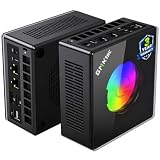
AOOSTAR GEM12+ PRO Barebone — Best Barebone for a Future Graphics Dock
Who it suits: The beginner comfortable fitting memory and storage — or with a friend who is — who knows an external graphics dock is in their future.
Start with what “barebone” means here, because what you still need to buy depends on it: this box arrives with no memory, no SSD and no Windows. What the kit price buys is the best dock foundation in this guide. The GEM12+ PRO — 130 × 130 × 60 mm, about 1.01 liters in an aluminum body — runs its OCuLink port on its own independent channel. It does not occupy a storage slot, and both of the machine’s two M.2 storage slots stay free whether or not a dock is attached. Every other dock route in this guide charges some toll; this one does not. The platform around it is equally deliberate: a Ryzen 7 PRO 8845HS with the 780M, two memory slots, two USB4 ports, two Intel wired network ports, HDMI 2.1 and DisplayPort output, Wi-Fi 6, a small 2.68-inch status screen with a fingerprint reader, and BIOS power modes up to 70W for later tinkering.
Now what is still needed, in the open. Check the current price on Amazon for the kit itself, and remember you still need 32GB of memory and a 1TB SSD to complete it — plus an operating system if you do not already own a Windows licence, which the kit alone does not include. Even so, it sits in the lower tier of this guide as a route to a dock-ready machine with 32GB of memory once completed. The honest debits are about polish, not platform: the status screen’s control software draws complaints from owners; the driver bundle is disorganized, so budget an extra half hour on setup night; and at least one Amazon buyer in reviewer roundups reported receiving a previously opened unit sold as new — check the seals when yours arrives and use the return window if they are broken. None of that changes the architecture, and the architecture is why it is here.
- OCuLink on its own channel — both storage slots stay free with a dock attached.
- Lower-tier route to a completed dock-ready machine here, before an operating system.
- Status screen, fingerprint reader and higher power modes for tinkerers.
Honest limitation: Barebone — the kit alone includes no memory, no SSD and no operating system, and the screen software and driver bundle are the rough edges owners report.
Choose it if a graphics dock is a plan, not a daydream, and you are comfortable fitting memory and storage. Skip it if you want to game the evening the box arrives; that is the K8 Plus.

Minisforum UM890 Pro Barebone — Most Expandable Barebone
Who it suits: The upgrader who treats a small PC as a platform — highest memory ceiling, two fast SSDs, lots of displays — and reads the fine print before celebrating the dock connection.
The UM890 Pro is the largest pick here at roughly 130 × 127 × 66.6 mm, about 1.10 liters, and it spends the extra height on headroom. Its Ryzen 9 8945HS runs the 780M at the top of the class’s clock range; its two memory slots take DDR5 to 96GB; its two M.2 storage slots take serious capacity; and its port set — two USB4 ports with power delivery in, two wired network ports, four-display output, Wi-Fi 6E — is the most complete in the guide. Check the current price on Amazon for the kit, and remember you still need to add memory, storage and an operating system if you need one to finish it. Set that against the factory-finished version, which sits in a higher tier above this budget, and the barebone is one of the routes into this platform within the under-$800 budget once completed with parts you choose carefully.
Now the fine print, because this machine carries the guide’s most important one. Its OCuLink connection runs through an included adapter plate that fits into one of the two M.2 storage slots — so using a dock costs you half your internal storage expansion. That is a real architectural tax the GEM12+ PRO above does not charge, and it is why that machine, not this one, is the dock pick despite this one’s stronger sheet elsewhere. Reviewer measurements also put its fan at roughly 43 dB in performance mode, the loudest figure in this guide, which matters for a machine meant to sit within arm’s reach. If your future is memory, storage and screens, this is the most expandable liter here. If a dock is your future, the AOOSTAR is the buy.
- Highest ceilings here: memory to 96GB, two fast storage slots, dual USB4 with power-in.
- Barebone route into this platform within this budget — check price on Amazon for the kit and the parts to finish it.
- Four-display output and Wi-Fi 6E for a serious desk setup in 1.10 liters.
Honest limitation: Its dock connection arrives via an adapter that consumes one of the two storage slots, and performance mode is the loudest here at roughly 43 dB measured.
Choose it if expansion means memory, storage and screens. Skip it if expansion means a graphics dock — the GEM12+ PRO’s native port is the better foundation.
Minisforum UM880 Plus Barebone — Smallest Barebone, for Parts Owners
Who it suits: The buyer who already owns laptop-style DDR5 memory and an NVMe SSD — spares from a laptop upgrade or a previous mini — and wants the smallest box to put them in.
At 130 × 126.5 × 50.4 mm, about 0.83 liters and roughly two-thirds of a kilogram, the UM880 Plus is nearly as small as the SER8 while remaining a fully slotted machine: Ryzen 7 8845HS, 780M graphics, two memory slots to 96GB, two M.2 storage slots, USB4, wired networking and Wi-Fi 6E. The kit itself sits in the lowest tier in this guide — check the current price on Amazon. For the parts owner, the finished machine costs the kit plus an evening’s assembly, and nothing here touches that value.
For everyone else, this review carries the guide’s most useful warning. A pricing survey of this exact barebone completed two ways — the kit plus a new 32GB memory kit and a 1TB SSD bought new, against the complete version of the same machine — found the self-completed route could cost more than the complete machine in the current shortage market. A kit price is not a computer price, and in a shortage the comparison can flip completely. The same caution applies to its OCuLink, which is provided through an adapter board rather than a true port — workable, but not the equal of the GEM12+ PRO’s arrangement. Buy it for the right reason — parts on hand, or parts caught on a genuine sale — and it is the smallest bargain here. Buy it assuming barebone always means cheaper, in this market, and it can become the most expensive pick in the guide.
- Smallest slotted machine here at about 0.83 L; lower-tier kit — check price on Amazon.
- Full platform despite the size: memory to 96GB, two storage slots, USB4, Wi-Fi 6E.
- Unbeatable value when the memory and SSD are already in your drawer.
Honest limitation: With new parts at shortage pricing, a surveyed completion of this kit cost more than the complete machine — and its dock connection runs through an adapter board, not a true port.
Choose it if the parts are already yours, or you can catch them on a real dip. Skip it if you are pricing a from-scratch build at today’s memory prices; a complete machine is the saner buy.

Comparison Table
| Product | Volume | Graphics | As sold | Dock port (OCuLink) | Price | Link |
|---|---|---|---|---|---|---|
| GMKtec NucBox K8 Plus | ~0.98 L | Radeon 780M | Complete, 32GB/1TB | Built-in port | Check price on Amazon | Check on Amazon |
| Beelink SER8 | ~0.81 L | Radeon 780M | Complete, 32GB/1TB | None | Check price on Amazon | Check on Amazon |
| GMKtec NucBox K11 | ~0.98 L | Radeon 780M, fastest tune | Complete, 32GB/1TB | Built-in port, front | Check price on Amazon | Check on Amazon |
| AOOSTAR GEM12+ PRO | ~1.01 L | Radeon 780M | Barebone — add memory, storage + OS | Built-in port, own channel | Check price on Amazon | Check on Amazon |
| Minisforum UM890 Pro | ~1.10 L | Radeon 780M | Barebone — add memory, storage + OS | Via adapter (uses a storage slot) | Check price on Amazon | Check on Amazon |
| Minisforum UM880 Plus | ~0.83 L | Radeon 780M | Barebone — kit + your parts | Via adapter board | Check price on Amazon | Check on Amazon |
The Tower You Are Not Buying
Every beginner guide owes its reader one plain paragraph, and this is it. A full-size CyberPowerPC tower with a desktop RTX 4060 graphics card — a Core i5-13400F, 16GB of memory and a 1TB SSD — has been offered on Amazon within this budget tier on sale, and on raw gaming performance it is not close: a desktop 4060 out-games the integrated graphics in every pick above by a margin no tune or memory configuration can argue with. If raw gaming performance is your first priority, stop reading and buy the tower; our guides to the Best Gaming PC Under $800 and the Best Budget Gaming PC Under $800 cover that field.
For the reader still here, the liters buy everything the tower cannot do. A 0.81 to 1.10 liter machine shelves inside a TV stand, travels in a backpack, sips power beside a television and — in the SER8’s case — plays at roughly 32 dBA where a tower’s fans would join the evening. The trade is explicit: you are paying tower money for a tenth of the tower’s volume and accepting integrated graphics as the trade. This guide exists for buyers who made that trade with open eyes — not for buyers told a mini PC is a tower in disguise. It is not.
What Else You Will Spend
The PC is not the whole purchase, and a beginner’s budget deserves the full list before checkout.
- A monitor, first. None of these PCs includes a screen. If you do not already own one — or a television you are happy to game on — a monitor is the first extra purchase, ahead of everything else here. Buy it for 1080p: that is the resolution these graphics are honestly for.
- Keyboard and mouse. None of the six picks bundles peripherals, so budget for a basic set if you do not own one.
- For a barebone: the completion kit. Picks 4, 5 and 6 need 32GB of DDR5 memory and a 1TB SSD before they are computers — check the current price on Amazon for the pair, as parts pricing is among the most variable in this guide. Each barebone review counts that kit as still needed; the kit alone on the listing does not include it.
- For a barebone: Windows. The three barebones ship with no operating system. If you do not already own a Windows licence you can move, one belongs in the total. The three complete picks include Windows 11 Pro and need nothing.
- A network cable. A small thing with an outsized effect: every pick has fast wired networking, and one cable removes Wi-Fi from the equation for downloads and online play.
- Not yet: the graphics dock. The OCuLink upgrade covered further down — a substantial extra cost beyond the PC — is a year-two decision. Do not let it inflate today’s budget; just buy the port in its best form now if you may want it.
How to Choose a Small Form Factor Gaming PC Under $800
- Begin with the space you have, measured in liters. Work it out yourself — width × depth × height — from the published specification. Everything here sits between 0.81 and 1.10 liters; a “compact” tower at 15 to 38 liters is a different product in the same adjective’s clothing, and listing photos cannot tell you which one you are buying.
- Decide what small is for. Inside a TV stand or under a monitor, the flattest machines (SER8, UM880 Plus) win. On a desk where ports get used daily, the K8 Plus and K11 put their dock port and dual network ports within reach. Let the furniture, not the spec sheet, set the liter count.
- Complete or barebone: count the whole purchase before deciding. Add memory, an SSD and an operating system to any barebone kit. In the current shortage that finished setup can cost more than a complete machine — a surveyed UM880 Plus completion with new parts cost more than the complete version. Barebone wins with parts on hand or on sale, and loses as a reflex.
- Treat the graphics as the tier, not a stepping stone. Every pick shares the same graphics class, so choose on noise, ports, memory and price discipline — not on promises that one machine’s 780M is a different GPU from another’s. The K11’s harder tune is worth up to about 15% by reviewer measurement; no tune changes the graphics class itself.
- If a dock is in your future, choose the port in its best form today. A built-in port on its own channel (GEM12+ PRO) is best; a built-in port (K8 Plus, K11) is good; adapter versions (UM890 Pro, UM880 Plus) work but charge a slot or a board. You cannot add the port later.
- Slotted memory is the longevity divider. All six picks use memory slots rather than soldered memory, which is why they are here. A small PC whose memory cannot change is a finished appliance; these can grow to 64GB or 96GB when prices settle.
- Budget the brick. The liter figure is only the computer; every pick also carries an external power adapter. Plan its placement — ventilated, off carpet — too.
- Apply the budget rule, not the headline. Pricing in this category swings sharply with the component shortage, so check the current price on Amazon. Each review states whether its machine makes sense within the under-$800 budget. A pick currently sitting above that budget is not a worse machine — it is the same machine at the wrong moment.
Upgrades, in Plain Terms — and the Dock Invoice
Beginners are often sold a first PC on its “upgrade path,” so here is this set’s path with nothing dressed up. You cannot swap the graphics in any of these machines: the graphics are part of the processor, and no pick here is a tower with a standard case and a named power supply waiting for a card — so this guide promises an internal graphics swap for none of them. What you genuinely can upgrade is memory and storage: every pick has memory slots (to 64GB on the SER8, 96GB on most others) and room to add storage, and those are the upgrades that will actually happen in these machines’ lives.
The one route to desktop graphics is external, and it deserves its full invoice rather than a footnote. An OCuLink port by itself renders nothing. To turn one of these machines into a desktop-graphics PC you need three further purchases: an OCuLink dock — Minisforum’s DEG1 is the reference unit; a power supply for the dock, which ships without one — a basic 500W unit is the usual starting point; and the graphics card itself, such as a new desktop RTX 4060. Together they are a substantial additional purchase on top of the mini PC, well beyond this guide’s headline budget — check the current price on Amazon for each part. That extra cost never appears in this guide’s headline, and any guide presenting a dock-ready mini PC as if the port alone were the upgrade is hiding most of the invoice.
Is the path worth it at that total? As a day-one purchase, no — the same money buys a stronger complete tower. As a year-two upgrade, it is the most rational route in this category: the machine you already own borrows a desktop card without being replaced, and the card and dock carry forward to whatever you buy next. What matters tonight is only that the path exists in the right form on your pick — built-in on the K8 Plus, K11 and GEM12+ PRO, adapter-based on the two Minisforum barebones, and absent on the SER8, whose silence is what it offers instead.
Common Buying Mistakes
- Trusting the word “mini” in a listing title instead of computing the volume from published dimensions — the current ZOTAC MEK line is a roughly 38-liter tower in compact clothing.
- Comparing a barebone’s kit price against complete PCs. A kit has no memory, no storage and no operating system; finished honestly, it can cost more than the complete machine in a shortage market.
- Counting a dock port as a graphics upgrade. The port starts a substantial further purchase — dock, power supply and card — and a budget that omits it is fiction.
- Assuming all dock connections are equal. On the UM890 Pro it consumes a storage slot through an adapter; on the GEM12+ PRO it runs on its own channel.
- Paying the spike. The K8 Plus and the K11 can both sit well above this budget in the same season they sit within it on sale. In this category, timing is a specification — check the current price on Amazon.
- Buying the SER8 for a future dock build. It has no OCuLink port and never will — silence and size are its virtues, and the dock plan belongs to the GMKtec and AOOSTAR picks.
- Skipping the configuration check on delivery. Near-identical model names hide different memory and storage sizes — the SER8’s 24GB and 32GB versions are different purchases wearing one name.
- Expecting native 1440p or ray tracing from integrated graphics. The 780M is an excellent 1080p integrated GPU; listings implying otherwise are describing a different, more expensive machine.
- Ignoring noise because the PC is small. Small fans work harder and sit closer to your ears; the gap between roughly 32 dBA (SER8) and roughly 43 dB (UM890 Pro in performance mode) is the difference between a living-room machine and a desk-only one.
Final Recommendation
- Best overall for beginners: GMKtec NucBox K8 Plus.
- Quietest, smallest complete PC: Beelink SER8.
- Fastest tune, on sale only: GMKtec NucBox K11.
- Best dock foundation: AOOSTAR GEM12+ PRO Barebone.
- Most expandable platform: Minisforum UM890 Pro Barebone.
- Best for parts owners: Minisforum UM880 Plus Barebone.
Our top two for most first-time buyers are the K8 Plus and the SER8, because they answer the two honest shapes this search takes. The K8 Plus is the grower’s machine: finished today, slotted everywhere, with a built-in dock port keeping the desktop-graphics door open at a known, itemized extra cost. The SER8 is the settler’s machine: the smallest and quietest finished PC here, bought by people content for integrated graphics to stay their graphics. Builders should start from the dock question: GEM12+ PRO when a dock is planned, UM890 Pro when memory and storage are the plan, UM880 Plus when the parts are already in a drawer. Readers whose space allows a tower should weigh the Best Compact Gaming PC Under $800 and Best Mini Gaming PC Under $800 guides alongside this one, step down to the Best Small Form Factor Gaming PC Under $500 tier if the budget tightens, or step up to the Best Small Form Factor Gaming PC Under $1200 tier, where built-in graphics cards in genuinely small bodies begin. Measure your shelf, count the full parts you still need, and respect the budget.
Frequently Asked Questions
What actually counts as a small form factor gaming PC at this price?
Measured honestly, the field under $800 is mini PCs between about 0.8 and 1.1 liters. A classic mini-ITX build with a separate graphics card occupies 7 to 20 liters and cannot currently be built new for $800 — component prices have seen to that. Console-sized brand PCs with real graphics cards exist, but no verifiable Amazon listing puts one at this budget.
Can integrated graphics really game?
Yes, within stated limits. The Radeon 780M in every pick here is the strongest integrated graphics class at this price, and reviewer consensus puts it at strong 1080p performance in esports and indie titles, with demanding recent releases playable at low-to-medium settings using upscaling. It is not a 1440p solution and it does not ray-trace in any meaningful sense. Every pick pairs it with 32GB of dual-channel memory or the slots to fit it, because graphics that share system memory are only as fast as the memory feeding them.
I am a total beginner. Should I buy a barebone?
Only if the finished setup — kit plus memory, plus an SSD, plus Windows if you need a licence — still makes sense against the complete machine you would otherwise buy, and only if fitting two memory sticks and a drive sounds like a fine evening rather than a chore. The GEM12+ PRO sits in the lower tier of this guide once completed, because its kit sits low enough in its tier to leave room for memory and storage even at shortage-era parts pricing — check the current price on Amazon for the kit and the parts. If any of that gives you pause, buy a complete PC and spend your first evening playing instead; that is what the K8 Plus and SER8 are for.
Is a barebone mini PC cheaper than a complete one?
Not automatically — in late 2026, often not at all. A barebone needs memory, storage and usually an operating system before it is a computer — one pricing survey found completing the UM880 Plus with new parts cost more than the complete version. Barebones win when you already own the parts, or buy them on a genuine dip.
What does an OCuLink graphics dock setup really cost?
A substantial amount beyond the PC: a dock, a separate power supply, and a desktop graphics card such as an RTX 4060 bought new — check the current price on Amazon for each part. A docked setup is therefore well beyond this guide’s budget — a sensible year-two upgrade for a machine you already own, not a purchase inside the under-$800 budget.
Which pick is best for a living room or bedroom?
The Beelink SER8, bought within the under-$800 budget — check the current price on Amazon. It is the smallest complete machine here at about 0.81 liters, measured at roughly 32 dBA under load — the quietest figure in this guide — and its flat shape fits the shelves and TV stands that define living-room computing. The K11 is the one to avoid for a bedroom: its light ring cannot be turned off and its tune is audibly busier.
- Best Small Form Factor Gaming PC Under $800
- Best Small Form Factor Gaming PC Under $700
- Best Small Form Factor Gaming PC Under $1200
- Best Small Form Factor Gaming PC For Small Spaces Under $800
- Best Small Form Factor Gaming PC For Beginners Under $700
- Best Small Form Factor Gaming PC For Streaming Under $800
- Best Small Form Factor Gaming PC For 1440p Gaming Under $800


