
Where to buy
Check the latest price, availability and delivery on Amazon. Orders are placed on Amazon. We may earn a commission from qualifying purchases.
- Best overall: GMKtec NucBox K8 Plus, Ryzen 7 8845HS, Radeon 780M, 32GB/1TB — Check on Amazon
- Beelink SER8, Ryzen 7 8745HS, Radeon 780M, 32GB/1TB — Check on Amazon
- GMKtec NucBox K11, Ryzen 9 8945HS, Radeon 780M, 32GB/1TB — Check on Amazon
- AOOSTAR GEM12+ PRO Barebone, Ryzen 7 PRO 8845HS, No RAM/SSD/OS — Check on Amazon
See 2 more Amazon options
- Minisforum UM890 Pro Barebone, Ryzen 9 8945HS, No RAM/SSD/OS — Check on Amazon
- Minisforum AtomMan G7 Pt, Ryzen 9 7945HX, Radeon RX 7600M XT, 32GB/1TB — deal watch only — Check on Amazon
Read the full guide ↓
Disclosure: As an Amazon Associate, reviewstook.com earns from qualifying purchases. Links to Amazon on this page are affiliate links; they cost you nothing extra. Listing details such as price and availability change often, so check the current Amazon listing before you buy.
Buying your first gaming PC is confusing in a specific way: the boxes are small, the names are long strings of numbers, and two machines that look identical in photos can be completely different purchases. This guide is written for that first purchase. It explains the technical words, walks through your first evening, and says plainly what else you will spend on.
Here it is. For $800, a mini gaming PC gives you integrated graphics — a graphics processor built into the main chip rather than a separate graphics card. Five of the six machines below use AMD’s Radeon 780M, the strongest integrated graphics in mainstream mini PCs. In plain terms: games like Rocket League, League of Legends, Minecraft and older titles run fast and smooth; big modern games run at 1080p (the standard “full HD” resolution) if you lower their graphics settings and let a helper feature called upscaling do some of the work. What the 780M cannot do is run demanding new games at high settings, and no setting menu changes that. One machine below — the sixth — does have a real graphics card, and it is included only as a labeled watch-list pick, because on Amazon it sits in a higher tier well above this budget — check price on Amazon. If what you actually want is maximum game speed and you have room for a big box, a full-size tower PC with a desktop RTX 4060 graphics card can fall within this same budget on Amazon — check the current price on Amazon — and it is simply faster than everything here. Buy the tower if speed is the whole point. Buy a mini if the point is a gaming PC the size of a paperback book — one that sits behind your monitor, makes almost no noise, uses very little electricity and can travel in a backpack.
Two more things a beginner needs to know before the picks. First, two of the six machines are barebone kits: they arrive without memory, storage or Windows, and you (or a friend who has done it before) add those parts. They are the cheapest honest route to a finished machine if you already own the parts, and each review states plainly what extra parts they need to become finished machines — a kit on its own is never presented as a finished computer in this guide. Second, prices in this category are currently unstable: memory and storage shortages have pushed some of these listings up and down sharply within one season. Check the current price on Amazon for every pick before you decide. If a listing is above the $800 budget when you look, the correct move is to wait or pick another machine from the list — not to stretch.
In this guide
Quick Picks
Short on time, or comparing several options at once? Each row below names a buyer type and the machine that suits it, with a link to the listing.
| Buyer type | Pick | Why it stands out | Link |
|---|---|---|---|
| Best overall for a first mini | GMKtec NucBox K8 Plus (32GB/1TB) | Arrives complete and ready, with the full port set and a future graphics-card exit | Check on Amazon |
| Best for a quiet room | Beelink SER8 (32GB/1TB) | The quietest machine here — reviewers measured about 32 dBA under load | Check on Amazon |
| Best if you can wait for a sale | GMKtec NucBox K11 (32GB/1TB) | The fastest version of this graphics chip — highly sale-dependent, so timing is everything; check price on Amazon | Check on Amazon |
| Best if you already own parts | AOOSTAR GEM12+ PRO Barebone | A lower-cost kit in this tier that finishes for less once you add memory and storage — check price on Amazon | Check on Amazon |
| Best kit for keen builders | Minisforum UM890 Pro Barebone | The strongest processor platform here — finishes within budget with new parts in typical configurations; check price on Amazon | Check on Amazon |
| The real-graphics-card exception | Minisforum AtomMan G7 Pt (32GB/1TB) | A genuine graphics card in a mini body — but it sits in a higher tier above this budget, so watch it, don’t budget for it; check price on Amazon | Check on Amazon |
How These Picks Were Chosen
The budget was applied to the finished machine, not the headline price. A complete PC qualifies when its current Amazon listing falls within the $800 budget — check the current price on Amazon, because listings move — and where a machine spends part of its life above that line, its review says so and describes its position in qualitative terms. A barebone kit qualifies on its finished total: the kit itself plus a completion kit of 32GB of DDR5 memory and a 1TB solid-state drive. Memory and storage are the most volatile part of that finished total, so check current prices before you commit — and a kit also needs an operating system, which costs extra unless you own a Windows license or use Linux for free.
We did not use these PCs ourselves. We read makers’ listings and specifications and independent reviews that measured these machines, and compared graphics class, memory, storage, ports and size. Size claims were checked against maker-stated measurements: complete machines here run from about 0.8 to 1.0 liters, kits around a liter, and the graphics-card exception about 2.7 liters. Performance claims stay at the class level reviewers agree on, with no per-game frame rates claimed.
Two filters mattered especially for a gaming guide. The first is memory: integrated graphics borrow the machine’s main memory, so a full 32GB in two sticks is not a luxury here, it is part of the graphics setup. Every pick either ships with 32GB or accepts it, and machines with memory permanently fixed inside were excluded on principle — the plain-English version of that idea, “soldered,” is in the glossary below. The second filter is the exit: a mini PC’s built-in graphics can never be replaced, so we credited machines that leave a door open — a special port (OCuLink or USB4) that can connect a desktop graphics card later — and marked down sealed machines with no door at all. A mini PC with a real graphics card that genuinely sells within this budget on Amazon could not be verified, so the current one appears below as a clearly labeled exception positioned in a higher tier above this budget.
The Words on the Box, in Plain English
Mini PC listings are written in a dialect of abbreviations. Here are the thirteen terms that actually decide whether a machine is right for you, translated once so the reviews below can use them freely.
- Integrated graphics (iGPU). The graphics processor is built into the main processor chip and shares the machine’s memory. Every mini PC here except one uses this. The best integrated graphics run most games acceptably — but the ceiling is fixed and cannot be upgraded later.
- Discrete graphics card (GPU). A separate graphics processor with its own memory, like the RX 7600M XT in the sixth pick. This is what “a real graphics card” means, and it is the big step up in game performance — and in price.
- Upscaling (FSR). A trick where the game is drawn at a lower resolution and software stretches it to fill your screen, so the picture looks close to full quality while the machine does less work. AMD’s version is called FSR. It is how integrated graphics make demanding games playable, and it is a normal setting in modern games.
- Barebone (or “kit”). A PC sold without memory, storage or an operating system. The box, processor and ports arrive; you supply the rest. Cheaper at checkout, more expensive than it looks, and it does nothing until finished.
- RAM (memory) and “dual channel.” RAM is the machine’s short-term working space. “Dual channel” means the memory is fitted as two matching sticks, which lets data flow faster — and because integrated graphics eat RAM, two sticks and a full 32GB genuinely change how games run here.
- Soldered vs. socketed. Soldered parts are permanently attached and can never be changed; socketed parts sit in slots and can be swapped or upgraded with a screwdriver. For memory, socketed is what you want in a gaming mini.
- SSD, NVMe and M.2. The SSD is where games and Windows live — the modern, fast replacement for a spinning hard drive. NVMe is the fast kind of SSD, and M.2 is the small stick shape it comes in. When a listing says “second M.2 slot,” it means you can add another stick later.
- OCuLink. A small port that carries a direct line to the processor — important because it is the best way to plug a full-size desktop graphics card into a mini PC later, using an external dock. It is the closest thing these machines have to an upgrade path for graphics.
- USB4. The fastest version of the USB-C-shaped port. It can also connect an external graphics card, but more slowly and with pricier docks than OCuLink.
- Refresh rate (Hz). How many times per second your monitor redraws the picture. A 60Hz screen shows at most 60 frames per second no matter how fast the PC is; gaming monitors run at 144Hz or more. Windows often leaves a fast monitor set to 60Hz until you change it.
- Ethernet and 2.5GbE. Ethernet is internet by cable instead of Wi-Fi: faster, steadier, and better for gaming. “2.5GbE” just means the socket supports a faster wired standard. “Dual” means there are two of them.
- Operating system (OS) and Windows license. The software the whole machine runs on — here, Windows 11. Complete machines below include it. Barebone kits do not: you install it yourself and use a license you own, buy one, or install free Linux instead.
- Price check. Listings change often, so this guide does not print a fixed price for a pick as if it were a promise. The same machine may sit in a bargain position in one month and in a higher tier in the next, so each review describes where a pick sits relative to this budget and directs you to check the current price on Amazon before you buy.
Three plain statements follow from those terms, so nothing in the reviews surprises you. None of the six picks is a renewed or refurbished machine — all six are sold new. Two of the six are barebone kits — the AOOSTAR GEM12+ PRO and the Minisforum UM890 Pro — and their reviews say so in their first lines. And none of the six has soldered memory: every machine here either ships with memory in removable slots or has empty slots waiting, so the memory can always grow later. That last point was a deliberate filter, not luck.
The 6 Best Mini Gaming PCs Under $800 for Beginners
GMKtec NucBox K8 Plus (Ryzen 7 8845HS, 32GB/1TB)
Who it suits: A first-time buyer who wants the whole thing in one order — a finished, ready-to-play machine with nothing to install and the best future options in the guide.
The K8 Plus is the machine this price tier revolves around, and for a beginner its biggest virtue is that it is complete. The box that arrives is a working Windows 11 Pro computer: a Ryzen 7 8845HS processor (eight cores, up to 5.1GHz) with Radeon 780M integrated graphics, 32GB of memory fitted as two sticks in slots you can upgrade later (up to 96GB), and a 1TB SSD with a second empty slot for more storage. Nothing needs building or buying before your first game. Its port selection is the most complete in this guide: an OCuLink port (the good external-graphics exit, explained in the glossary), two USB4 ports, two fast wired-network sockets, and modern HDMI and DisplayPort outputs — all in a box of about 0.98 liters, small enough to hide behind the screen it serves.
What will it actually play? The honest shape of the 780M: esports games and older titles run fast at 1080p; big modern games run at 1080p if you choose low-to-medium graphics settings and turn on FSR upscaling; and 1440p — a sharper screen resolution — is something it reaches only in lighter games, with upscaling’s help. What lifts the K8 Plus above the other 780M boxes is that its ceiling is not necessarily final: the OCuLink port is a genuine route to a desktop graphics card later. That upgrade is a serious second purchase — the full bill is itemized in the upgrades section below, because the dock is the cheap part of it — but the door exists, and on most minis it does not. One quirk to know in advance: the OCuLink connection is not “hot-pluggable,” meaning you connect the dock while the machine is off, then switch on.
The price is the one thing you must manage. This Amazon listing has at times sat comfortably within budget and at other times has been pushed well above it during the current memory shortage. The rule is simple: check price on Amazon, and when it falls within the $800 budget, this is the best overall mini gaming PC here; above that budget, wait or choose another pick.
- Arrives complete with Windows installed — the only homework is the first-evening setup below.
- The right memory configuration as sold: 32GB in two sticks, feeding the integrated graphics properly.
- OCuLink plus two USB4 ports: the best set of future options in this guide.
Honest limitation: Its price swings widely — sometimes pushing it above this budget tier — and the 780M, however well fed, is still integrated graphics with a ceiling no settings menu removes.
Choose it if you want one finished purchase that games well tonight and keeps the graphics-card door open. Skip it if the listing is currently sitting in a higher tier above this budget, or if you already know you want graphics-card performance — in which case read the tower note in the upgrades section before spending anything.

Beelink SER8 (Ryzen 7 8745HS, 32GB/1TB)
Who it suits: Anyone whose PC will live in a bedroom, a living room or a shared space — where how much noise it makes matters as much as how fast it is.
The SER8’s claim to fame is quiet. Independent reviewers measured it at around 32 dBA under sustained load — roughly the level of a quiet room — with one respected roundup calling its fan noise the best of any mini PC tested. It gives up nothing important to earn that: the same Radeon 780M graphics as the K8 Plus, driven by a Ryzen 7 8745HS, with 32GB of socketed memory (upgradable to 64GB), a 1TB SSD plus a second slot, USB4, modern monitor outputs, a fast wired-network socket and Windows 11 Pro, in the smallest complete box here at about 0.81 liters. Gaming performance is the familiar 780M profile, delivered quietly enough to play beside a sleeping household.
Two honest debits, plus a price discipline. The SER8 has no OCuLink port, so its only external-graphics route is USB4 — workable, but slower and with more expensive docks, which makes its graphics ceiling closer to final than the K8 Plus’s. And some owners have reported Wi-Fi dropouts, traced to the wireless card working inside a metal case; Beelink offers updated antennas, but the simplest protection is the wired Ethernet cable the setup walkthrough recommends anyway. On price: not every configuration of this machine falls within this budget, and configurations vary. Check the current price on Amazon, order the configuration that currently falls within the $800 budget on the day, and do not stretch for one that sits in a higher tier.
- Measured at roughly 32 dBA under load — no gaming mini here runs quieter.
- Full specification despite the silence: 32GB socketed memory, 1TB SSD and a spare storage slot.
- Smallest complete machine here, at roughly 0.81 liters.
Honest limitation: No OCuLink, so the external-graphics exit is the slower, pricier USB4 kind — and some owners have reported Wi-Fi dropouts from the metal case.
Choose it if the PC shares a room with people who are not gaming. Skip it if an OCuLink graphics dock is already in your future plans — the K8 Plus above is built for that path.

GMKtec NucBox K11 (Ryzen 9 8945HS, 32GB/1TB)
Who it suits: A patient buyer who wants the fastest version of this graphics chip and is happy to let a price alert do the shopping.
The K11 is the K8 Plus’s close sibling with the volume turned up. Its Ryzen 9 8945HS runs the same Radeon 780M graphics but feeds it more power than most rivals do, and independent testing measured the result at up to 15% faster than other machines carrying the same graphics — at this level, that margin is the difference between settings you put up with and settings you actually choose. Everything else matches the flagship pattern: 32GB of memory upgradable to 96GB, a 1TB SSD with a second slot, an OCuLink port on the front, two USB4 ports, two wired-network sockets, modern monitor outputs and Windows 11 Pro, in the same roughly one-liter case. It is the quickest integrated-graphics mini in this guide.
Then there is the price, which is why this pick wears a warning label instead of a crown. Its pricing is highly volatile: on sale it can fall within this budget, and at other times the very same listing can sit well above it in a higher tier. Check price on Amazon before you buy; which position you catch it in is a decision about timing, not about the product. Ownership has quirks worth knowing before they surprise you: measured fan noise of roughly 36–39 dB(A) under load is ordinary rather than quiet, owners have reported high temperatures in its highest “performance” power mode, there is no mount for attaching it behind a monitor, and the colored lighting ring on top cannot be switched off. Set an alert for when it falls within the $800 budget, buy when it dips into that budget, and pay the listing no attention the rest of the year.
- Independent measurement makes its Radeon 780M the fastest-tuned in this guide.
- Front OCuLink, dual USB4 and dual wired networking — the full flagship port set.
- Compelling on sale when it falls within budget: check price on Amazon for its current position.
Honest limitation: The same listing can sit well above this budget — this is a sale to catch, not a position to expect — and its lighting cannot be turned off.
Choose it if you can wait for the deal and want the strongest integrated graphics here. Skip it if you are buying today at whatever the listing says; at its higher-tier pricing it belongs to a different guide.
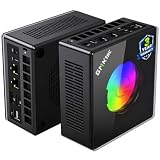
AOOSTAR GEM12+ PRO Barebone (Ryzen 7 PRO 8845HS, No RAM/SSD/OS)
Who it suits: A beginner with a more experienced friend, a parts drawer, or a willingness to learn one careful hour of assembly — in exchange for the lowest finished price in the guide.
Read the name first: barebone. The box that arrives holds a Ryzen 7 PRO 8845HS processor with Radeon 780M graphics, a case with a small 2.68-inch status screen and a fingerprint sensor, and empty slots. There is no memory, no storage drive and no Windows inside — the maker’s own manual says so in plain words. What the kit does include is unusually generous: an OCuLink port wired on its own channel so it never borrows one of the two storage slots (some rivals make the port and a drive share), two USB4 ports, two fast wired-network sockets, and room for up to 128GB of DDR5 memory.
Now the finished total, because with a kit that total is the review. The kit sits in the lower part of this tier — check price on Amazon. Add the completion parts — 32GB of DDR5 memory and a 1TB SSD, at their current prices — and the finished machine remains the lowest completed total in this guide and falls within this budget, plus Windows if you need to buy a license. If your memory and SSD come free from a retired laptop, the same machine finishes for little more than the kit itself, and no complete PC here can touch that. The debits are a small maker’s debits: the status screen’s control software has drawn owner complaints, the driver downloads are a disorganized bundle rather than a tidy support page, and at least one Amazon buyer reported receiving a previously opened unit sold as new — so inspect yours on arrival and use the return window if the seals tell a story.
- Finishes as the cheapest completed 780M machine here with new parts — check price on Amazon.
- Its OCuLink port has its own channel: using a graphics dock never costs you a storage slot.
- Room for up to 128GB of memory — the deepest headroom of any kit here.
Honest limitation: It is a kit, not a computer — memory, storage and Windows are yours to supply and install — and the maker’s software and driver support are visibly rougher than the bigger brands’.
Choose it if you own the parts already, or you like the idea of finishing the machine yourself and saving the difference. Skip it if you want to unbox tonight and play — the K8 Plus offers the same graphics, already finished.

Minisforum UM890 Pro Barebone (Ryzen 9 8945HS, No RAM/SSD/OS)
Who it suits: A keen beginner-builder who wants the strongest processor platform in the guide — more memory room, more screens, more of everything — and is happy to finish the machine personally.
This is also a barebone kit: processor, case and ports arrive; memory, storage and Windows are yours to add. The Ryzen 9 8945HS runs to 5.2GHz with the highest-clocked Radeon 780M in this guide, and around it Minisforum built the most expandable mini here: two memory slots accepting up to 96GB, two fast storage slots, two USB4 ports, two wired-network sockets, and outputs for up to four monitors, in a chassis of about 1.1 liters. The kit is positioned in the middle of this tier — check price on Amazon — so with the completion parts the finished machine can still fall within the $800 budget, plus Windows if you need it. Minisforum also sells this machine finished, and its position tells the kit’s story by itself: the complete version typically sits in a higher tier above this budget. Assembling the kit is how this platform honestly gets within this budget.
One design decision must be read before ordering, because it is this pick’s defining compromise: its OCuLink graphics port runs through an included adapter plate that occupies one of the two storage slots whenever a graphics dock is connected. A one-drive machine with a dock is a perfectly good machine — but it is a choice the AOOSTAR kit above does not force on you, and anyone dreaming of two drives and a dock should notice now rather than mid-assembly. Measured noise in its performance mode is around 43 dB — clearly audible, closer to a small tower than to the SER8’s whisper. Buy this kit for the platform, and for a finished total that still leaves room in the budget for games.
- Ryzen 9 8945HS and the highest-clocked 780M here, with room for 96GB of memory.
- Four-monitor support and two USB4 ports — the most expandable platform in the guide.
- Kit positioned to finish within budget with new parts — check price on Amazon.
Honest limitation: The OCuLink adapter occupies a storage slot, so a graphics dock and two internal drives exclude each other — and at around 43 dB in performance mode it is not a quiet-room machine.
Choose it if you are building deliberately and value processor headroom and screen outputs over silence. Skip it if you want two drives and a dock at once, or a finished PC — the completed version of this machine lives above this budget.
Minisforum AtomMan G7 Pt (Ryzen 9 7945HX, Radeon RX 7600M XT, 32GB/1TB)
Who it suits: The buyer this guide cannot serve at $800 — the mini PC shopper set on a real graphics card — included so you can watch the right machine instead of settling for a wrong one.
Everything above this review shares the same integrated graphics. This machine does not. The AtomMan G7 Pt pairs a 16-core Ryzen 9 7945HX processor — desktop-replacement class, up to 5.4GHz — with a discrete Radeon RX 7600M XT graphics card carrying its own 8GB of memory, inside a slim vertical body of about 2.7 liters, powered by a chunky 300W external power brick. Reviewers place it exactly where that specification suggests: strong at 1080p, capable of sharper 1440p play in suitable games — a different gaming category from the 780M machines, and the only mini here that plays demanding games the way a gaming PC is expected to. It ships complete with 32GB of memory (upgradable to 96GB) and a 1TB SSD. If this guide’s budget were in a higher tier, this would be its performance pick.
Within this budget, honesty requires its position in full. On Amazon, this configuration sits in a higher tier well above this budget — check price on Amazon. Even discounted offers for this same configuration through Minisforum’s own store have remained above this budget, with uncertain stock. No Amazon offer for this machine within this budget has been verified, and this guide will not pretend otherwise. So the G7 Pt is a watch-list pick: if a genuine offer within the $800 budget ever appears — a clearance, a stacked coupon, an honored price error — you now know exactly which machine is worth pouncing on. Until that day, buying it means leaving this budget for a higher tier. If you do watch it, apply deal rules in their strictest form: an alert for when it falls within the $800 budget, and the configuration checked carefully in the cart, because barebone versions of this same model exist and are not the same purchase.
- A discrete RX 7600M XT graphics card with its own 8GB of memory — the only real graphics card in this guide.
- A 16-core processor no other pick here approaches.
- Complete 32GB/1TB configuration, with memory upgradable to 96GB.
Honest limitation: It does not live within this budget — Amazon pricing sits in a higher tier, and even the maker’s own store discounts have stayed the wrong side of the line. This is a machine to keep an eye on, not a machine at this budget.
Choose it if a genuine offer within the $800 budget appears, or your budget quietly grows to its real tier. Skip it if you are spending within this budget this week — every machine above it in this guide honestly answers this budget, and this one does not.

Comparison Table
| Product | Graphics | Best use | Link |
|---|---|---|---|
| GMKtec NucBox K8 Plus (32GB/1TB) | Radeon 780M + OCuLink port | The complete one-box answer under budget | Check on Amazon |
| Beelink SER8 (32GB/1TB) | Radeon 780M | Quiet rooms and living-room gaming | Check on Amazon |
| GMKtec NucBox K11 (32GB/1TB) | Radeon 780M, higher power budget | The fastest integrated graphics, bought on sale | Check on Amazon |
| AOOSTAR GEM12+ PRO Barebone | Radeon 780M + OCuLink port | Lowest finished price for parts owners | Check on Amazon |
| Minisforum UM890 Pro Barebone | Radeon 780M, OCuLink via adapter | The builder’s platform: processor, memory ceiling, screens | Check on Amazon |
| Minisforum AtomMan G7 Pt (32GB/1TB) | Radeon RX 7600M XT discrete 8GB | Real discrete graphics — deal watch only, sits in a higher tier; check price on Amazon | Check on Amazon |
Your First Evening: Setup, Step by Step
Every complete machine here can go from sealed box to first game in one evening, most of it waiting for downloads. Work through these steps in order. Kit owners: do step 0 first, then join everyone else at step 1.
Step 0 — kit owners only: finish the machine. If you bought the AOOSTAR or Minisforum barebone, your PC does not exist yet. Following the maker’s manual, open the case, click the two memory sticks into their slots until the clips catch, fit the SSD stick under its screw, and close up. Then install Windows from a USB stick (Microsoft’s free Media Creation Tool makes one on any working PC) or install Linux. It is an hour of careful, screwdriver-level work — no soldering, nothing fragile if you work slowly.
Step 1 — placement. Put the mini where air can move around it: on the desk, on a shelf, or mounted behind the monitor if your pick supports a mount. Never seal it inside a closed cabinet or a drawer — these small boxes shed their heat through the air around them. Leave a hand’s width of clear space on the sides with vents.
Step 2 — power. Connect the power supply that came in the box and plug it into the wall before anything else. The G7 Pt’s supply is a large 300W brick that needs floor or shelf space of its own; the others use compact adapters. An ordinary socket is fine.
Step 3 — the monitor cable goes in the mini’s video sockets. Plug your screen into the mini’s HDMI or DisplayPort socket. On a mini PC this step is simpler than on a big tower: the graphics live inside the processor, so every video socket on the box is the right one — there is no separate graphics-card row of sockets to hunt for, and no “wrong hole” that silently gives you a weaker picture. The G7 Pt is the partial exception that proves the rule: its sockets feed its real graphics card, which is exactly what you want. And a caution that belongs to towers, stated so nobody imports it wrongly: none of these six machines uses a processor with its graphics disabled, so there is no dead-socket trap here at all.
Step 4 — keyboard, mouse and a wired internet cable. Plug in your keyboard and mouse (or their wireless receivers). Then, even if you plan to use Wi-Fi forever, run an Ethernet cable from the mini to your router for setup night. It makes step 5’s big updates faster and steadier, it is the better connection for gaming generally, and it sidesteps the one known wireless weak spot in this guide — the SER8’s reported Wi-Fi dropouts inside its metal case.
Step 5 — first switch-on, Windows Update, and the graphics driver. Power on and follow Windows’ first-run questions. Then open Settings → Windows Update and let it install everything, restarting as many times as it asks — this is the slow part of the evening, and it is normal. Afterwards, install the current AMD graphics driver from AMD’s or the maker’s support page: a fresh driver is worth real game performance on integrated graphics.
Step 6 — set your monitor’s real refresh rate. If you bought a fast gaming monitor, Windows will probably be running it at 60Hz until told otherwise. Go to Settings → System → Display → Advanced display, and choose the highest refresh rate your monitor offers. Skipping this step is the most common way new owners pay for speed they never see.
Step 7 — check the machine matches the order. Before the return window becomes a memory, verify what actually arrived. In Windows, open Settings → System → About and Task Manager → Performance: confirm the model name, that memory shows 32GB, and that storage shows the full 1TB. This matters in this category more than most, because makers sell barebone and complete versions under nearly identical names — if you paid for 32GB/1TB and the machine reports empty slots, you have the wrong box, and tonight is when that is easiest to fix.
Step 8 — install a game store and your first game. Install Steam (or the Epic Games Store, or the Xbox app — all free), sign in, and download a game you know well. Play it for twenty minutes. Listen to the fan, feel whether the box is hot, and confirm the picture is smooth at the settings the review suggested.
What Else You Will Spend
The PC is not the whole purchase. In the order you will actually meet the extras:
- A monitor comes first. If you do not already own a screen, it is the next purchase after the PC itself — the mini has no display of its own. (A television works too; every pick here can drive one.) Buy the screen before any other accessory; everything else on this list can wait, and this cannot.
- Kit owners: the completion parts. The two barebone picks finish with a memory-and-storage kit at current prices — check the current price on Amazon for those parts — plus a Windows license if you do not own one. That finished total is already reflected in their reviews; it is listed here so nobody meets it as a surprise at checkout.
- A keyboard, mouse and headset if your household does not already own them. None of the six listings here bundles a documented set, so treat any you need as ordinary extra purchases of your own choosing.
- Later, maybe: the graphics dock. The OCuLink upgrade in the next section is a substantial additional purchase when the day comes. It is a plan for year two, not a first-evening expense.
One firm rule runs through this guide: none of these extras is ever hidden. When a review describes a finished machine, the parts it needed to become a computer are described beside it, never disguised.
Upgrades in Plain Terms
Beginners are often told a PC can “just be upgraded later.” For mini PCs, here is the truthful version.
You cannot swap the graphics inside any of these machines. On the five 780M models the graphics are part of the processor itself; on the G7 Pt the graphics card is a laptop part built into the design. No pick here documents a standard desktop case with a named power supply of the kind that makes an internal graphics-card swap possible — so this guide promises that swap for none of the six, and you should distrust anyone who promises it for a one-liter box. What you can upgrade is real, and it is this:
- Memory and storage grow almost everywhere. The K8 Plus and K11 accept up to 96GB of memory and carry a second storage slot; the SER8 goes to 64GB with a spare slot; the kits accept up to 128GB (AOOSTAR) and 96GB (UM890 Pro) with two storage slots each; the G7 Pt reaches 96GB. Adding a storage stick later is the most likely upgrade any owner here will ever do, and it is a ten-minute job.
- The graphics exit is external, and it has a full cost. The K8 Plus, K11 and AOOSTAR kit carry a proper OCuLink port; the UM890 Pro offers OCuLink through an adapter that borrows a storage slot; the SER8’s exit is USB4, slower and with pricier docks; the G7 Pt needs no exit, having a card already. When you use that exit, the full purchase is: a dock, a power supply for the dock, and a desktop graphics card such as a new RTX 4060 — check the current price on Amazon for each part. Together they add up to a substantial extra purchase on top of the mini, bringing the all-in total into a higher tier. The dock is not hot-pluggable: shut down, connect, boot. Costed like that, the eGPU is a plan for later, not a bonus today.
- The honest alternative is a different first purchase. If graphics-card performance is the goal and a big box fits your room, the same money buys it directly: a CyberPowerPC Gamer Xtreme tower — Core i5-13400F processor, desktop RTX 4060 graphics card, 16GB of memory, 1TB of storage — can fall within this same budget on Amazon, so check the current price on Amazon, as tracked in our Best Gaming PC Under $800 and Best Budget Gaming PC Under $800 guides. Choose the mini for its size, silence and flexibility — with open eyes about the currency it charges, which is graphics settings.
How to Choose a Mini Gaming PC Under $800
- Start with the graphics truth, not the product names. Under $800, mini gaming means the Radeon 780M: esports and older games run fast, demanding games run at 1080p on reduced settings with FSR upscaling. If your library is current big-budget titles at high settings, no mini at this price is your machine — see the tower note above before spending anything.
- Complete or kit — decide honestly. A complete machine is the right first PC for most beginners. A barebone saves real money only if you already own memory and storage, or genuinely want the building experience; its finished price, not its kit price, is the number to compare.
- Feed the graphics or don’t buy. Integrated graphics share the machine’s memory, so 32GB fitted as two sticks is the correct configuration, and 16GB — especially a single stick — is a measurable downgrade. Every pick here ships with 32GB or accepts it; anything less is a different, worse product.
- Pick your exit before you buy. A mini’s built-in graphics are forever. If a graphics dock is even a “maybe,” buy a native-OCuLink machine now (K8 Plus, K11, AOOSTAR kit); retrofitting the slower USB4 route later costs more and gives less.
- Treat this tier’s prices as changeable, not fixed. Memory shortages have swung these listings sharply within a single season. Check the current price on Amazon for every pick; set alerts, verify the exact configuration in the cart — this category reuses model names across barebone and complete versions — and walk away above the $800 budget without regret.
- Match the box to the room. A bedroom or living-room PC should be bought on measured noise — the SER8’s roughly 32 dBA is a specification, not a vibe — while a study desk can trade quiet for the K11’s faster tuning or the UM890 Pro’s four-screen support.
Common Buying Mistakes
- Treating a barebone’s kit price as if it were a computer price. Memory, storage and an operating system stand between the box and a game; price the finished machine.
- Buying 16GB — or worse, a single memory stick — behind integrated graphics. The 780M eats the machine’s RAM; starving it is the cheapest way to make this tier feel slow.
- Paying the shortage spike. Listings in this guide can sit far apart in position within the same season; the reader who buys the K11 at its spike and the reader who buys it on sale own exactly the same PC.
- Counting the dock as the whole graphics-upgrade cost. The dock is only a small part of that upgrade; the card and its power supply are the rest.
- Assuming every OCuLink port is equal. The UM890 Pro’s adapter occupies a storage slot; the AOOSTAR’s native port does not. Read the implementation, not the logo.
- Confusing configurations in the cart. This category sells barebone and complete versions under near-identical names — verify memory, storage and operating system on the actual listing before paying.
- Sealing the mini in a cabinet for tidiness. Small PCs breathe through the air around them; a closed door turns a quiet machine into a hot, loud, short-lived one.
Final Recommendation
- Most first-time buyers: GMKtec NucBox K8 Plus — buy only when it falls within the $800 budget; check price on Amazon.
- Quiet rooms and living rooms: Beelink SER8, in whichever of its configurations currently falls within the $800 budget; check price on Amazon.
- Deal-hunters: GMKtec NucBox K11, bought on an alert for when it falls within the $800 budget — never at its higher-tier pricing.
- Parts owners and new builders: AOOSTAR GEM12+ PRO barebone for the lowest finished price; Minisforum UM890 Pro barebone for the deepest platform.
- Graphics card or bust: the AtomMan G7 Pt is the machine to watch — and the tower guides are the machines to buy this week.
Our top two for a first mini gaming PC at this budget are the K8 Plus — the complete 780M machine with the full port set and the honest graphics exit — and the AOOSTAR GEM12+ PRO kit, which finishes cheaper than everything else here for anyone with parts on hand. If silence is the specification, the SER8 is your specialist; if patience is yours, the K11 on sale is the tier’s fastest integrated graphics; and if your games demand a real graphics card today, the honest signposts point to Best Mini Gaming PC Under $1200 for the G7 Pt’s real tier, or to a tower under this same budget. Readers speccing smaller or simpler should also see Best Mini Gaming PC Under $500 and Best Mini Gaming PC Under $700, and those set on this size can compare the neighboring shapes in Best Compact Gaming PC Under $800 and Best Small Form Factor Gaming PC Under $800.
Frequently Asked Questions
Can a mini PC under $800 really game?
Yes — inside the integrated-graphics limits this guide states up front. The Radeon 780M machines here run esports and older titles quickly at 1080p, and today’s demanding games at 1080p on low-to-medium settings with FSR upscaling helping. What they cannot do is high-settings big-budget gaming or native 1440p; that requires a discrete graphics card, which at this budget means a tower — or the deal-watch exception in this guide at its real, higher price.
I have never built anything. Is a barebone kit a mistake for me?
Not necessarily — fitting memory and a storage stick is closer to changing a battery than to building a PC, and step 0 of the walkthrough covers it. But be honest about the whole job: the kit also needs Windows installed from scratch, and its finished total (the kit plus the completion parts, plus a license if you need one) is the figure to compare against a complete machine. If the saving after all that is small and the building sounds like a chore, buy the K8 Plus and spend your first evening gaming instead.
Why is there no mini PC with a real graphics card under $800?
Because, on current Amazon listings, there isn’t one within this budget. Today’s discrete mini — the AtomMan G7 Pt and its RX 7600M XT — sits in a higher tier above this budget on Amazon, so check price on Amazon, and even discounted offers from the maker’s own store have still missed this budget. This guide would rather label the G7 Pt an exception than pretend it sits in a lower tier than it does.
How much memory does a mini gaming PC need?
Thirty-two gigabytes, in two sticks. The integrated graphics reserve part of the machine’s memory for themselves, modern games are not shrinking, and two sticks working together (“dual channel”) are part of the graphics performance you are paying for. Every pick in this guide ships or accepts 32GB; a 16GB configuration at this budget is a false economy, and fixed, soldered memory is a ceiling you cannot renovate later — which is why no pick here has it.


