Where to buy
Check the latest price, availability and delivery on Amazon. Orders are placed on Amazon. We may earn a commission from qualifying purchases.
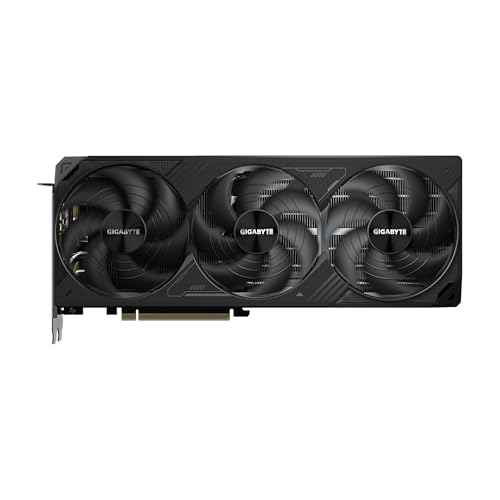
- Best first build for most beginners: GIGABYTE GeForce RTX 5070 Ti WINDFORCE SFF 16G — Check on Amazon
- Best if the PC also has a day job: AMD Ryzen 9 9900X, 12-Core — Check on Amazon
- The RTX 5080 path, assessed honestly: GIGABYTE GeForce RTX 5080 WINDFORCE OC SFF 16G — Check on Amazon
- Already built, and cheaper than building: iBUYPOWER Y40 PRO, Ryzen 9 7900X, RTX 5070 Ti — Check on Amazon
See 2 more Amazon options
- Skytech King 95, Ryzen 7 9800X3D, RTX 5070 Ti — Check on Amazon
- The build that leaves money for the monitor: GIGABYTE GeForce RTX 5070 WINDFORCE OC SFF 12G — Check on Amazon
Read the full guide ↓
Disclosure: As an Amazon Associate, reviewstook.com earns from qualifying purchases. Links to Amazon on this page are affiliate links; they cost you nothing extra. Listing details such as price and availability change often, so check the current Amazon listing before you buy.
If this is your first build, welcome — and an honest warning before anything else: you have picked a strange month to start. The machine this budget is supposed to buy is easy to describe: a fast eight-core processor, an RTX 5070 Ti, 32GB of memory and a 2TB drive. In an ordinary year those parts would sit comfortably inside this budget. November 2026 is not an ordinary year. Memory factories have been busy supplying AI data centres instead, and memory and storage now sit far above their historical norms, while graphics cards in this class often sell well above their launch positioning at retail. Priced line by line, the obvious parts list can easily overshoot this budget — before paying for Windows — so check the current price on Amazon for every line before you commit.
So this beginner’s guide does something a beginner’s guide should always do: it shows its working. Four of the six picks are build paths — complete lists of parts covering every line, including the boring lines first-timers forget: the cooler (no processor here includes one), the case, and the Windows licence. The other two picks are ready-made PCs, included because the big builders buy graphics cards through supply channels that can soften the retail price spike, and their finished machines can be the more realistic route to this tier when retail card prices are high. One pick — the RTX 5080 path — does not fit the budget at all, and instead of quietly dropping it we explain in full why it belongs in a higher budget tier, because learning why a build does not fit is worth more to a first-timer than another list that pretends it does. Check the current price on Amazon for every pick before you buy; where a build only fits when a card is favourably priced, the review says so.
The Words on the Boxes, in Plain English
Build guides assume a vocabulary you may not have yet. Here is every term this page uses, translated once.
- CPU (the processor): the chip that runs the game itself — the world, the physics, the other players. It sets the ceiling on how fast everything else may go.
- GPU (the graphics card): the part that draws the picture, and the most expensive line in any gaming build. When a review says “the card,” this is it.
- VRAM: the graphics card’s own private memory, printed in its name (16GB, 12GB). Too little, and the prettiest settings are the first thing to go as games grow.
- RAM (system memory): the PC’s short-term workspace, sold in kits of two sticks. 32GB is the comfortable amount for this tier. Different from VRAM, and different again from storage.
- SSD (the drive): where Windows, games and files live permanently. Every pick here uses a fast NVMe SSD that plugs straight into the motherboard.
- PSU (power supply): the box that feeds electricity to everything else, rated in watts. A good one is boring, quiet and outlasts several graphics cards.
- Cooler: the fan-and-metal-block (or liquid loop) that keeps the processor from cooking itself. No processor in the build paths includes one, so it is a line you must buy.
- Windows licence: the paid permission to run Windows 11 properly — check price on Amazon. A PC can be switched on without one, but the licence is a real cost of a finished machine, and this guide counts it.
- Prebuilt: a complete PC that arrives assembled, tested and licensed, with one warranty covering the whole box. Two of the six picks are prebuilts.
- Barebone: a half-finished PC — case and board included, memory, drive and sometimes processor left for you to add. Plainly stated: none of the six picks is a barebone, none is renewed or second-hand, and nothing in any pick is soldered down — every build path here is standard parts you can unplug and replace later.
- DLSS: the graphics card’s smart upscaling: it draws the game at a lower internal resolution and rebuilds a bigger picture. At a 1440p output, DLSS Quality renders about 1707×960 internally and Performance about 1280×720; at 4K, Quality renders about 2560×1440 and Performance about 1920×1080. A card “reaching 4K with DLSS” is upscaling to 4K, not rendering it.
- Refresh rate: how many times per second your monitor redraws, in Hz. A 144Hz screen shows twice the motion of a 60Hz one — but only once you switch it to its real rate in Windows (step 7 below; almost every first-timer misses it).
In this guide
Quick Picks
Short on time, or comparing several options at once? Each row below names a builder type and the path that suits it, with a link to the anchor listing. Check the current price on Amazon for each pick; the full breakdown is in each review.
| Builder type | Pick | Why it stands out | Link |
|---|---|---|---|
| Best first build for most beginners | Ryzen 7 9800X3D + RTX 5070 Ti build | The fastest gaming processor and this tier’s graphics card — check price on Amazon; this path fits most readily when the card is favourably priced | Check on Amazon |
| Best if the PC also has a day job | Ryzen 9 9900X + RTX 5070 Ti build | Twelve cores for streaming, editing and rendering, positioned below the gaming flagship in this guide — check the current price on Amazon | Check on Amazon |
| The RTX 5080 question | RTX 5080 corner-cut build | Included to show the gap honestly: on a disciplined platform it does not fit this budget, and the review shows why | Check on Amazon |
| Already built, and cheaper than building | iBUYPOWER Y40 PRO | An RTX 5070 Ti system with Windows included, positioned as a lower-cost route than building the equivalent parts list — check price on Amazon | Check on Amazon |
| The flagship spec, assembled for you | Skytech King 95 | 9800X3D + RTX 5070 Ti with a published 850W Gold power supply, positioned below the same specification bought as separate parts — check the current price on Amazon | Check on Amazon |
| Best build with money left over | Ryzen 7 7800X3D + RTX 5070 build | The most budget-friendly complete path here, with the licence counted — check price on Amazon; the path here that fits most comfortably, with room spare | Check on Amazon |
How These Picks Were Chosen
The first rule of this guide is that a build’s price means the whole machine. Beginners get caught by parts lists that stop at the exciting lines, so every total here includes the processor, graphics card, motherboard, memory, drive, power supply, cooler, case and — where it is not already included — the Windows licence. Four build paths share one supporting platform: an MSI B650 Gaming Plus WiFi motherboard, a 32GB Patriot Viper Venom DDR5-6000 CL30 memory kit, a 2TB Samsung 990 Pro drive, an MSI MAG A850GL 850W Gold power supply with the native 12V-2×6 cable current cards use, a Thermalright Peerless Assassin 120 SE cooler, and a Fractal Design North case with 355mm of room for a graphics card — check price on Amazon for each part. That platform is identical in picks 1, 2, 3 and 6 — only the two headline parts move.
The second rule is that a price is never a promise. Prices for parts in this tier move often, and graphics cards move most of all — the gap between a card’s launch positioning and what it can sell for at retail can be larger than most people’s entire upgrade budget. Check the current price on Amazon for the graphics card first, then the memory kit and drive, before trusting that any build still fits. A build that only fits when a card is favourably priced is labelled that way everywhere it appears; nothing here is “under $2,500” on a hope.
The third rule concerns the two prebuilts. They were not included to fill space; they can undercut the parts lists when retail card prices are high, and a beginner’s guide that hid that would be failing its only job. Their specifications were verified from the same sibling research this batch used for the budget tier, and their compromises are stated at the same size as the DIY picks’. We did not assemble these machines ourselves; part choices follow the documented consensus specification for this tier, and performance descriptions stay at the level published independent testing supports, without invented figures.
The 6 Best Gaming PC Builds for Beginners Under $2,500
1. The Flagship Build — Ryzen 7 9800X3D + RTX 5070 Ti
Who it suits: A first-time builder who wants the strongest honest gaming specification at this budget — the fastest gaming processor AMD makes, paired with this tier’s graphics card — and who can be patient about one particular purchase.
Start with the processor. The Ryzen 7 9800X3D — check price on Amazon — is an eight-core Zen 5 chip whose party trick is memory stacked directly on the processor: 96MB of L3 cache, in the second generation of AMD’s 3D V-Cache design. Games constantly ask the processor for the same data over and over; this chip keeps far more of it within arm’s reach, which is why it tops gaming charts in independent testing. It boosts to 5.2GHz, draws 120W and — remember the glossary — includes no cooler, which is why the parts list carries one.
The graphics card is GIGABYTE’s WINDFORCE SFF RTX 5070 Ti 16G — check the current price on Amazon. Its 16GB of current-generation memory matters more than the badge — 16GB is this guide’s floor for a card kept four years — and independent testing puts this class at high-refresh 1440p as its native home, with DLSS carrying the heaviest titles and making 4K output credible. Around those headlines sits the shared platform: the B650 board, the 32GB DDR5-6000 CL30 kit, the 2TB 990 Pro, the 850W Gold power supply, the Peerless Assassin cooler and the Fractal North case. Together the processor, the card and that platform make up the complete parts list for this build.
Now the condition, in the plainest words on this page: this build fits most readily when the card is favourably priced. When in-stock 5070 Ti cards sell well above their launch positioning, the same list can overshoot this budget by a wide margin. Treat this pick as two purchases: a processor-and-platform bundle you can order with confidence, and a graphics card you buy on the day its price behaves — check the current price on Amazon — or not at all. If you need a finished machine this month, picks 4 and 5 exist for you.
- The fastest gaming processor available, with 96MB of cache — check price on Amazon.
- A 16GB graphics card — the memory size that decides whether a card ages gracefully.
- Every supporting line sits on a shared platform you can re-check line by line on Amazon on ordering day.
Honest limitation: The parts total alone does not include the Windows licence, and once the licence is counted the complete machine can push over this guide’s ceiling — especially when card prices are high. Fitting everything inside $2,500 can mean trimming the case or delaying the licence — neither is hidden here. Check price on Amazon for the card and the licence before you commit.
Choose it if you can hunt for a favourably priced graphics card and want to know every part inside your machine. Skip it if you are ordering every line this week at whatever price is showing — that version can overshoot the budget badly, and picks 4 and 5 exist for exactly that situation.
2. The Creator Build — Ryzen 9 9900X + RTX 5070 Ti
Who it suits: Beginners whose PC will work as well as play — streaming, video editing, rendering, compiling — and who would rather have twelve cores doing that work than the last slice of gaming-only cache.
The surprise in this tier’s processor positioning is that the twelve-core Ryzen 9 9900X — check price on Amazon — sits below the eight-core gaming flagship in pick 1. It is a Zen 5 chip boosting to 5.6GHz, and for mixed use it is the value pick of the range: the extra four cores are what a stream’s background software, a video render or a big compile actually eats. Like every processor here, it includes no cooler; the platform’s Peerless Assassin covers that.
Everything else is pick 1’s platform, unchanged — the same board, kit, drive, power supply, cooler and case, with the same WINDFORCE SFF RTX 5070 Ti doing the gaming — check the current price on Amazon for the card. Together they form one of the most accessible routes in this guide to a 5070 Ti machine with no weak line in it. For a streamer the pairing is the sensible one: the card’s encoder handles the broadcast while the spare cores absorb chat software, browser sources and the rest of the background load, and 2TB suits a machine holding games and footage.
Two honest trades. In purely processor-limited games this chip gives ground back to the 3D V-Cache processors — the stacked cache earns its money exactly in esports and simulation titles — so a games-only buyer pays for cores that will mostly idle. And the 64GB this class eventually invites means a second memory kit — a substantial extra purchase that takes the build over budget, and correctly a planned later purchase. The board has the slots waiting for when memory prices calm down.
- Twelve Zen 5 cores for mixed work, positioned below the eight-core gaming flagship — check price on Amazon.
- The identical no-weak-line platform to pick 1; the processor’s lower positioning is the entire difference between the two builds.
- The natural streaming build of the six: core headroom for the background load, the card’s encoder for the broadcast.
Honest limitation: It trails the cache-stacked chips in cache-sensitive games, and the 64GB configuration creators eventually want does not fit at current memory prices — a second purchase, planned, not included.
Choose it if the machine will stream, edit, render or compile as well as game. Skip it if it is purely a games machine — pick 1’s cache is worth more to you than cores you will never feed.

3. The RTX 5080 Build — Included So You Can See Why It Does Not Fit
Who it suits: Nobody, at this budget, this month — and the review exists so that statement is a calculation rather than an opinion. If you arrived set on an RTX 5080, this section shows you precisely what that certainty costs.
Give the build every advantage. GIGABYTE’s WINDFORCE OC SFF sits at the more accessible end of the RTX 5080 range — check the current price on Amazon. Pair the card with the most accessible strong gaming processor here, the 7800X3D, because at 1440p and 4K the card is the limit. Add the shared platform — the board, memory kit, drive, power supply, cooler and case — and the build already sits well above this budget tier. Now cut corners the way forum posts suggest: delete the case entirely and build in a cardboard box — and the build is still over budget, with no Windows licence bought and no case to put the machine in. The remaining cuts fail the same way: memory below the 32GB this tier needs, a power supply undersized for a card of this class, a drive too small for a modern library — each unverifiable or unwise, and together still not enough. The card would need to fall dramatically from its usual positioning in this tier for the build to fit.
None of this makes the card bad: comparative independent testing puts the 5080 roughly 15% ahead of the 5070 Ti at 4K, and it turns native 4K from an ambition into a plan. But the corner-cut version sacrifices the platform around the card — storage, memory headroom, airflow, power-supply margin — which is exactly backwards. A 5070 Ti in a balanced machine is still a good PC in four years; a 5080 starved by a bargain power supply and a small drive is a great card with a supporting cast that lets it down daily. If the 5080 is the point, the honest budget is the next tier up, around $3,000, and Best Gaming PC Build Under $3000 is where this parts list belongs. If $2,500 is the point, the 5070 Ti builds above are not a consolation prize; they are the tier working as designed.
- Even the most accessible RTX 5080 line puts the build well over this budget on a disciplined platform — check price on Amazon.
- Even with no case at all, the build sits well over budget — and no Windows licence has been bought yet.
- The card would have to fall dramatically from its usual positioning for the build to fit this budget.
Honest limitation: This pick misses the budget deliberately, and that gap is the entire point. It is published so the gap is documented rather than rumoured; treat its link as the listing to watch — check the current price on Amazon — not as a recommendation to buy at $2,500.
Choose it if the 5080 is non-negotiable and your real ceiling is the next budget tier up, around $3,000. Skip it if $2,500 is a hard limit — at this card’s usual positioning, it is simply not a $2,500 build.

4. The Prebuilt That Beats Building — iBUYPOWER Y40 PRO
Who it suits: Beginners who priced pick 1, watched high retail graphics card prices ruin it, and would like a finished machine this month — plus anyone who values one warranty and a PC that works the evening it arrives.
The Y40 PRO pairs a Ryzen 9 7900X with an RTX 5070 Ti 16GB, 32GB of DDR5 memory, a 2TB NVMe drive and Windows 11 Home — check the current price on Amazon. Set that beside the DIY flagship, whose parts list still needs a Windows licence on top. The prebuilt — assembled, licensed, covered by one warranty — can cost less than the parts once the licence it includes is counted, especially when retail card prices are high. That is a verdict about this pricing moment, not about building: system builders’ graphics card supply is priced in a different world from retail listings. Building’s rewards — choosing every line, knowing every line — are still real; whether they are worth a premium depends on the live price on the day you order.
The compromises are the standard prebuilt trade-offs, and each one is specific enough to name. The 7900X is a strong twelve-core processor that leans toward creator work; in cache-sensitive games it trails the 9800X3D you would have chosen yourself. The memory runs at DDR5-5200 rather than the 6000 CL30 kit a builder picks — a small, real step behind best practice. And iBUYPOWER’s listing material does not publish the power supply’s wattage, so upgrade headroom cannot be confirmed from the listing — check it live before relying on it; this guide will not invent a number the maker has not printed. None of that outweighs a meaningful saving and a machine that works on delivery day, but the saving is the pick: if the live price has climbed back toward parts value, pick 1 becomes the recommendation again.
- Windows included, positioned below the equivalent DIY parts route — check price on Amazon.
- When it is favourably priced, nothing else in this guide reaches a 5070 Ti for less.
- One warranty, one box, nothing to assemble — the lowest-risk first high-end machine here.
Honest limitation: The processor leans creator rather than gaming-flagship, the memory is DDR5-5200 instead of 6000, and the power supply wattage is not published in the verified listing material — confirm it live before planning upgrades.
Choose it if you want this tier this month at the lowest overall cost — check the current price on Amazon first. Skip it if its live price has climbed back toward parts value, or if choosing your own motherboard and power supply is the point of the exercise.

5. The Flagship Spec, Assembled — Skytech King 95
Who it suits: Beginners who want pick 1’s exact specification — the 9800X3D and the 5070 Ti, no substitutions — without the graphics-card price hunt — Skytech sells it assembled, and it can undercut the parts cost at today’s retail prices.
The configuration verified for this guide is the flagship pairing itself: a Ryzen 7 9800X3D, an RTX 5070 Ti 16GB, 32GB of DDR5-5600 memory, a 1TB Gen4 NVMe drive, a published 850W Gold ATX 3 power supply, a 360mm liquid cooler, Wi-Fi and Windows 11 — check the current price on Amazon. Compare like with like: pick 1’s parts list still needs a licence on top. This is the same specification — liquid cooling, Windows licence and a named 850W Gold power supply of exactly the class a builder would specify — in assembled form, positioned below the same specification bought as separate parts when retail card prices are high, and broadly comparable to pick 1’s best-case route once licence and assembly are included.
The disciplines still apply — learn them here, because they apply to every prebuilt listing on the internet. This pick qualifies when it is favourably priced within this budget; at the top of its range it is over this guide’s ceiling and belongs to the under-$3,000 conversation — check price on Amazon before you decide. The 1TB drive is the configuration’s smallest line — half of pick 1’s 2TB — so a second drive is a near-term purchase to budget for. Skytech notes the graphics card brand may vary — normal for system builders, and worth knowing before you fall for a specific cooler design in the photos. And the King 95 name covers a family of configurations, including a 2TB, DDR5-6000 variant positioned higher — the model number must match the specification above before anything in this review means anything.
- The exact flagship pairing — 9800X3D and RTX 5070 Ti — assembled, licensed and liquid-cooled.
- Skytech prints the power supply — 850W Gold, ATX 3 — where most prebuilt listings hide it; that number is your future upgrade headroom, documented.
- Positioned below the same specification as a parts list when retail card prices are high — check the current price on Amazon.
Honest limitation: It qualifies only when favourably priced within this budget; at the top of its range it is over budget. Storage is 1TB where the DIY flagship carries 2TB, and the graphics card brand may vary by production run.
Choose it if you want the flagship specification without the price hunt and without giving up the strong power supply. Skip it if the live listing sits at the top of its range, or if 2TB of storage on day one matters more to you than the processor.

6. The Build That Leaves Money for a Monitor — Ryzen 7 7800X3D + RTX 5070
Who it suits: Beginners whose $2,500 has to cover more than the tower — a monitor above all — and players honest enough to admit their screen is 1440p and their library does not need the Ti.
Every other build path in this guide fits the budget only by catching a graphics card at a favourable price or by leaving the Windows licence unpaid. This one simply fits. The Ryzen 7 7800X3D — the previous generation’s gaming champion, carrying the same 96MB of stacked cache as its successor — check price on Amazon. The graphics card is GIGABYTE’s WINDFORCE OC SFF RTX 5070 with 12GB of memory — check the current price on Amazon — positioned below the Ti tier. On the shared platform — the board, the 32GB kit, the 2TB drive, the 850W Gold power supply, the cooler and the case — plus the Windows licence, the complete, legal, finished machine sits comfortably inside this budget, leaving room unspent — money the what-else section below argues belongs to your monitor.
The compromise is the card, named precisely: the RTX 5070 is a strong 1440p card — its designed tier — but its 12GB of memory ages first in this build, where the Ti’s 16GB is the tier’s insurance policy; heavy ray tracing at 1440p with ultra textures is where the difference appears soonest. The 7800X3D likewise sits a step behind its successor in processor-limited titles, though beside a 5070 at 1440p the card is the limit in nearly everything, so the gap mostly goes unseen. What the saving buys is the screen the flagship builds quietly assume you already own: a 5070 in front of a new 1440p high-refresh monitor is a better gaming setup than a 5070 Ti in front of the 1080p panel you have had since 2019 — and this is the only pick that lets $2,500 buy the whole setup instead of the tower alone.
- The only build path that fits comfortably with the Windows licence paid, with money left over.
- The platform deliberately outclasses the card: board, power supply and case are all ready for a future swap.
- The 7800X3D remains one of the strongest value gaming processors in its class — check price on Amazon.
Honest limitation: Twelve gigabytes of VRAM is where this build ages first, and the card’s pricing wanders too — a sharply higher live price would erode the saving that justifies the pick, so check the current price on Amazon.
Choose it if the budget must also buy the screen, or if you would rather bank the difference toward a future graphics card. Skip it if a good 1440p or 4K monitor is already on your desk and this card has to last four-plus years — that buyer wants the Ti’s 16GB.

Comparison Table
| Pick | Type | Positioning | Best use | Link |
|---|---|---|---|---|
| 9800X3D + RTX 5070 Ti build | DIY parts list | Parts build; fits most readily when the card is favourably priced — check price on Amazon | The flagship spec, for patient card hunters | Check on Amazon |
| 9900X + RTX 5070 Ti build | DIY parts list | Parts build positioned below the flagship build — check price on Amazon | Streaming, rendering and gaming in one machine | — |
| RTX 5080 corner-cut build | DIY parts list | Well over this budget on a disciplined platform | Documenting why the 5080 needs a $3,000 budget | — |
| iBUYPOWER Y40 PRO | Prebuilt | Prebuilt positioned as a lower-cost route to this tier — check price on Amazon | This tier at the lowest overall cost when favourably priced | Check on Amazon |
| Skytech King 95 | Prebuilt | Flagship specification assembled, within budget when favourably priced — check price on Amazon | The flagship spec assembled, licence included | — |
| 7800X3D + RTX 5070 build | DIY parts list | Most budget-friendly complete build here, licence included — check price on Amazon | A complete setup — tower plus money toward a monitor | Check on Amazon |
Your First Evening: From Boxes to Playing
Whether your pick arrives as parts or as one finished box, the first evening follows the same shape — these steps, in order, each prevent a specific beginner panic.
- Assemble first, if yours needs assembling (picks 1, 2, 3 and 6). Work on a table, not carpet, and keep every box for the first week. The order that keeps a first build calm: processor into the motherboard socket, cooler onto the processor, the two memory sticks into the slots the board’s manual marks for a pair, SSD into its M.2 slot. That loaded board goes into the case next; power supply follows, then its cables, and the graphics card goes in last, into the top long slot, power cable clicked home. Prebuilt buyers (picks 4 and 5) skip to step 2 — but open the side panel first and check nothing shook loose in transit.
- Place it where air can reach it. Desk or a stand beside it, vents unobstructed, never sealed in a closed cabinet — these machines move real heat. Leave room behind the case for cables.
- Power, in the right order. Power supply’s rear switch on, cable into the wall, then the case’s front button. A first build showing no sign of life is almost always a cable or that rear switch, not a dead part — check before you grieve.
- Monitor into the graphics card — never the motherboard. The case back has two clusters of display sockets — the motherboard’s, up near the USB ports, and the graphics card’s, lower down. Your cable belongs in the card’s row. This matters more than it sounds with these processors: every CPU in this guide carries a small basic graphics chip of its own, so the motherboard sockets will show a picture — a slow one, drawn by the backup chip while your expensive card sits idle, with no warning message. The only symptom is games running far worse than reviews promised, and it catches first-timers constantly. Card’s ports, always.
- Peripherals and a wired connection. Keyboard and mouse into any USB ports. Then an Ethernet cable if one can possibly reach: setup night involves gigabytes of downloads, and wired is faster and steadier. Wi-Fi — included on the prebuilts and the build paths’ B650 board — is fine permanently, just slower tonight.
- Install Windows (build paths), then let updates finish. Prebuilts arrive with Windows installed and licensed; builders install it from USB and enter their licence key. Either way: run Windows Update until it stops offering things, restarting as asked, then install NVIDIA’s graphics driver — the one Windows picks is a placeholder, and the real driver unlocks DLSS and full performance.
- Set the monitor’s real refresh rate. Windows defaults many high-refresh monitors to 60Hz. In Settings, Display, Advanced display, select the highest rate your screen offers. Until you do, a 144Hz monitor is a 60Hz monitor with a nicer box.
- Verify what actually arrived or got built. Two minutes that protect the whole purchase. In Task Manager’s Performance tab and Settings’ storage page, confirm the processor name matches your pick, memory shows 32GB, the graphics card shows its correct model, and the drive shows its full size. Prebuilt buyers: check against the model number on your order, not the family name — the King 95 name also covers a 2TB, DDR5-6000 variant, and the Y40 PRO’s family has namesakes. If anything disagrees with the listing, you are inside the return window and holding evidence; that is what it is for.
- Install a game store and one game. Steam, or whichever store your library lives in. Download one game you know well — it is your reference point. If it runs the way reviews of your card class say it should, the build is done and the evening is yours.
What Else You Will Spend
This guide is honest about the tower; it is not the whole cost of a gaming setup, and a beginner deserves the rest of the list before ordering, not after. Nothing here is folded into a pick’s price — these are separate purchases, in the order you will feel them.
- The monitor comes first. Every graphics card in this guide is a 1440p card by design, and a 1440p high-refresh monitor is its natural partner. Plugging a high-end tower into an old 1080p 60Hz screen wastes the purchase more thoroughly than any parts mistake in this guide. If the screen budget does not exist yet, that is precisely what pick 6 is for: the room it leaves against the flagship paths is monitor money. No monitor prices are quoted here — shop that purchase with the same check-the-live-price discipline as the card.
- The Windows licence, where it is a catch. The prebuilts include it; the build paths do not, and it lands differently per pick: on pick 6 it is already counted in the complete figure, while on picks 1 and 2 it is the extra cost that can push a parts total over the ceiling, counted plainly as machine plus licence — check price on Amazon. Running Windows unactivated, watermark and all, legitimately spreads the cost — it does not make it zero, and no total here treats it as zero.
- A second drive for the King 95. Its 1TB is the smallest storage in the guide on a flagship-class machine, where a second SSD is a near-term certainty, not a someday luxury — budget for it as part of choosing pick 5, the way you would budget the licence on pick 1.
- The creator build’s second memory kit. Pick 2’s 64GB configuration is a second 32GB kit — check price on Amazon — a planned purchase for when memory prices retreat, stated here so it stays a plan rather than becoming a surprise.
- Keyboard, mouse and a desk that fits. The build paths assume you own or will buy these separately; prebuilts vary by listing, so check the box contents live rather than assuming. No prices are quoted — none were verified for this guide — only the reminder that a first setup needs them in the cart somewhere.
Upgrades, in Plain Terms
A beginner’s fair question is “what can I change later?” The honest answer differs by pick, and this guide only promises a graphics-card swap where the verified facts support one: a named power supply with wattage to spare, in a standard case with room.
- Picks 1, 2 and 6 (the build paths): swap promised. All three share the MSI MAG A850GL — a named 850W Gold power supply with the native 12V-2×6 cable current cards use — and the Fractal Design North, a standard case with 355mm of card clearance. That pairing is why the platform was specified this way: a future card is a one-part purchase, not a card-plus-power-supply purchase. Pick 6 was designed around this promise; its card is the weakest part on purpose.
- Pick 5 (Skytech King 95): swap path stated by the maker. Its 850W Gold ATX 3 power supply is published in the listing — the same class a builder would choose — so a future swap rests on documentation, not hope. Confirm the delivered unit matches the listing, using the step-8 check, before the plan depends on it.
- Pick 4 (iBUYPOWER Y40 PRO): no promise made. Its power supply wattage is not published in the verified listing material, so this guide promises nothing. Read the delivered unit’s label first; the label decides what swap, if any, can honestly be promised.
- Everything else is easier than the card. A second SSD and more memory are upgrades a beginner can do in minutes on every pick here — nothing in any of the six is soldered, and the build paths’ boards have the slots waiting. Processor swaps are a longer conversation: the build paths and the King 95 sit on AMD’s current AM5 platform, designed to accept newer processors over time.
How to Choose a Gaming PC Build Under $2,500
- Price the whole machine, not the exciting parts. Processor and graphics card are roughly half an honest total at this tier. Cooler, board, memory, storage, power supply, case and a Windows licence add a substantial platform cost to every build path here — check the current price on Amazon for each line. A parts list that omits them is not a $2,500 build; it is a $2,500 down payment.
- Check the graphics card’s current price, not its launch positioning. The RTX 5070 Ti can sell well above its launch positioning at retail. Demand the same live-price discipline of any list you copy, and check the card’s current price on Amazon before anything else — it moves a total more than all other lines combined.
- Treat memory as a priced component again. The kit this guide uses — 32GB of DDR5-6000 CL30 — check price on Amazon; kits of its class historically sat far lower before memory capacity was diverted to AI accelerators. A total that assumed last year’s RAM price is wrong by a wide margin before it starts.
- Keep the 16GB VRAM floor. A 12GB card at flagship money needs its saving to buy something concrete — pick 6’s buys the rest of the setup, and says so. Otherwise hold the 16GB line: for a card kept four years, it is the specification that decides whether the machine ages gracefully.
- Match the processor to the work, not the leaderboard. For pure gaming, the 9800X3D; for mixed work, the 9900X — which was, unusually, seen cheaper; for value, the 7800X3D. At 1440p behind a strong card, the gap between them is smaller than the gap between a good and a bad graphics card price on the day you order.
Common Buying Mistakes
- Budgeting memory and storage from memory. Against their historical norms, late-2026 DDR5 and NVMe prices rose sharply; a total that assumes last year’s RAM pricing is fiction.
- Forgetting the cooler and the licence. No processor in the build paths ships with a cooler, and a retail Windows licence is a real extra cost — check price on Amazon — together a common source of “mystery overrun” in most failed first budgets.
- Plugging the monitor into the motherboard. With these processors the machine will still show a picture — drawn by the small backup graphics chip — and a beginner can game on the wrong chip for months without knowing. The card’s ports are the only correct answer.
- Leaving the monitor at 60Hz. Windows defaults many high-refresh screens to 60Hz; the thirty-second settings change in step 7 of the walkthrough is the cheapest upgrade in this guide.
- Assuming a prebuilt’s specification from its name. The King 95 is a family of configurations and the Y40 PRO’s power supply wattage is unpublished. Verify the model number on the live listing, then again on the delivered machine.
- Buying the flagship tower and keeping the old 1080p monitor. The setup is the product — pick 6 is built on that idea: a tier down in the tower and a tier up in the screen is the better gaming purchase.
Final Recommendation
- Most beginners who want to build: the Ryzen 7 9800X3D + RTX 5070 Ti build — when the card is favourably priced.
- Beginners whose PC also works: the Ryzen 9 9900X + RTX 5070 Ti build.
- Ordering this week, at whatever price is showing: the Skytech King 95 when favourably priced, or the iBUYPOWER Y40 PRO.
- Outfitting a whole desk: the Ryzen 7 7800X3D + RTX 5070 build, with the leftover spent on the monitor.
- Set on an RTX 5080: raise the budget to the next tier up, around $3,000; the gap in pick 3 is not negotiable.
Our top two for a beginner are the flagship build path and the King 95 — the same specification, so the choice is temperament, not hardware. If you want the experience of building — and the decade of easy swaps a known platform gives you — build pick 1, hunting for a favourably priced graphics card and counting the licence honestly. If you want the machine, order the King 95 — check the current price on Amazon — and spend your first evening playing instead of assembling; its published 850W Gold power supply means you have not given up the upgrade path either. The Y40 PRO’s favourable pricing makes it the value pick of the guide when it appears, and pick 6 is the right answer whenever the screen still needs buying. Tighter ceilings: Best Gaming PC Build Under $1500. Small desks: Best Gaming PC Build For Small Spaces Under $2500. Streaming: Best Gaming PC Build For Streaming Under $2500. Resolution first: Best Gaming PC Build For 1440p Gaming Under $2500. Check the current price on Amazon for every line on the day — graphics card first, memory second, everything else after — and $2,500 will buy what it is supposed to buy.
Frequently Asked Questions
Can a beginner really build one of these?
Yes — a modern build is closer to furniture assembly than to electronics work. The parts are keyed so they only fit the right way round, assembly is a screwdriver and an hour or two, and the walkthrough above covers the two traps that actually catch people: the monitor cable in the wrong sockets, and the monitor left at 60Hz. What no beginner can do is make this month’s prices behave — which is why two picks here are prebuilts, and choosing one is a legitimate decision, not a surrender.
Why is the RTX 5070 Ti the recommended card at this budget?
Because it is the card the tier is built around: 16GB of memory that meets this guide’s floor for a four-year machine, performance that independent testing places at high-refresh 1440p natively with credible 4K through DLSS, and a positioning that — when the card is favourably priced — leaves room in $2,500 for a quality platform around it. The 5080 is faster and, as pick 3 shows, does not fit; the plain 5070 fits easily and hands back the memory headroom. The Ti is the balance point.
What does “rendering at 1707×960” actually mean for DLSS?
It means the card draws fewer pixels than the screen shows, then rebuilds the rest. At a 1440p output, DLSS Quality renders about 1707×960 internally and Performance about 1280×720; at a 4K output, Quality renders about 2560×1440 and Performance about 1920×1080. The on-screen picture is genuinely the bigger size, and in motion it looks far closer to native than the raw numbers suggest — but when a listing boasts a card “does 4K,” ask whether it renders 4K or upscales to it.
Is it cheaper to build or buy a gaming PC right now?
At current Amazon prices, buying can be — the opposite of the usual answer. Counted as finished machines with the licence paid, the flagship specification bought as separate parts can cost more than the King 95 selling that same specification assembled and licensed — check the current price on Amazon for both routes before you decide. The cause is narrow and temporary: retail card and memory prices have spiked far past what system builders pay through their own supply channels. When retail card prices settle back toward their launch positioning, pick 1 shows what normal looks like, and building retakes the lead.
What should I upgrade first in a year or two?
In the order the hardware suggests: the graphics card, which the named 850W power supplies and roomy cases in picks 1, 2, 5 and 6 were specified to accept; storage, especially in the 1TB King 95 configuration; and memory to 64GB for the creator build, once DDR5 prices retreat from their current elevated level — check price on Amazon. Beginners who started smaller and are growing into this tier will find the same upgrade logic at Best Gaming PC Build For Beginners Under $1500.
- Best Gaming PC Build Under $2500
- Best Gaming PC Build Under $1500
- Best Gaming PC Build Under $3000
- Best Gaming PC Build For Beginners Under $1500
- Best Gaming PC Build For Streaming Under $2500
- Best Gaming PC Build For Small Spaces Under $2500
- Best Gaming PC Build For 1440p Gaming Under $2500
- Best Gaming PC Under $2500
- Best Prebuilt Gaming PC Under $2500
- Best Budget Gaming PC Under $2500


