Where to buy
Check the latest price, availability and delivery on Amazon. Orders are placed on Amazon. We may earn a commission from qualifying purchases.
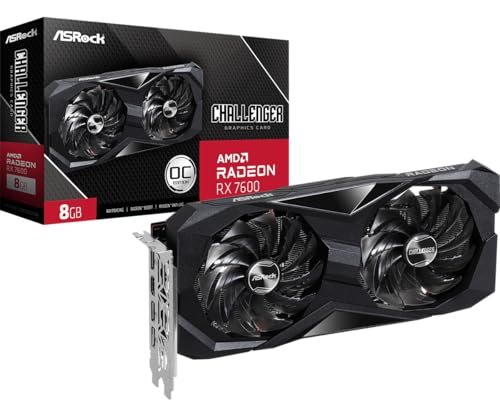
- Start here if you are building: ASRock Radeon RX 7600 Challenger 8GB OC — the graphics card Build 1 is planned around — Check on Amazon
- Build 2, the one with extra video memory: Sparkle Intel Arc B580 Titan OC, 12GB — Check on Amazon
- Build 3, the Nvidia features build: MSI GeForce RTX 4060 Ventus 2X Black 8G OC — Check on Amazon
- Build 4, the newer-platform reality check: AMD Ryzen 5 7600X — Check on Amazon
See 2 more Amazon options
- Ready-made, and cheaper than building its twin: CyberPowerPC Gamer Xtreme VR (GXiVR8060A24), RTX 4060 — Check on Amazon
- Ready-made on the newer platform: iBUYPOWER SlateMesh (SlateMeshA5N4601), Ryzen 5 7600 / RTX 4060 — Check on Amazon
Read the full guide ↓
Disclosure: As an Amazon Associate, reviewstook.com earns from qualifying purchases. Links to Amazon on this page are affiliate links; they cost you nothing extra. Listing details such as price and availability change often, so check the current Amazon listing before you buy.
If this is your first gaming PC, here is the sentence most guides will not print: in November 2026, building your own machine is not automatically the cheapest way to get one. A memory price spike — AI datacenters buying up supply — has pushed memory kits of both generations sharply upward, while graphics cards sell far above their launch prices. Honestly add a Windows license, and a from-scratch build with a current card lands well above the $800 line.
This guide is written for a beginner, so it does two things differently. First, it explains the jargon before using it — a plain-English glossary sits below the quick picks, and no review depends on a word it has not covered. Second, it shows its working. Every build is a complete parts list, and every part is linked so you can check its current price on Amazon before you spend anything. One build fits under $800 the patient way, if its parts are caught on sale. One lands just over the line no matter what. One — the RTX 4060 build everyone asks about — does not fit at all right now, and we say so plainly instead of tidying it up. And because honesty cuts both ways, the last two picks are ready-made PCs: at their documented sale prices they include Windows, assembly and a warranty, and they beat building. If your $800 cannot move and you want to play this week, they are the right answer.
In this guide
Quick Picks
Short on time, or comparing several options at once? Each row below names a builder type and the build that suits it, with a link to the listing.
| Builder type | Pick | Why it stands out | Link |
|---|---|---|---|
| First build, hard budget | Build 1 — RX 7600 + Ryzen 5 5500 (AM4) | Parts caught on sale keep it under the line; the only do-it-yourself route that fits — check price on Amazon | Check on Amazon |
| Worried about texture settings | Build 2 — Arc B580 12GB + Ryzen 5 5500 (AM4) | 12GB of video memory and AV1 encoding; lands just over the line even shopped perfectly | Check on Amazon |
| Wants Nvidia’s feature set | Build 3 — RTX 4060 + Ryzen 5 5500 (AM4) | DLSS frame generation and the NVENC streaming encoder — at an honest total well over the line in parts alone | Check on Amazon |
| Thinking years ahead | Build 4 — Ryzen 5 7600X + B650 + DDR5 (AM5) | The platform with a future — well over budget from scratch, it is not an $800 build and we do not call it one | Check on Amazon |
| Wants it finished and licensed | CyberPowerPC Gamer Xtreme VR, RTX 4060 | Seen on Amazon on sale, Windows included — less than the parts for its DIY twin; check price on Amazon | Check on Amazon |
| Wants the new platform, finished | iBUYPOWER SlateMesh, Ryzen 5 7600 / RTX 4060 | Seen on sale on Amazon; check price on Amazon — the only AM5 + RTX 4060 + Windows combination under the line | Check on Amazon |
The Words on the Boxes, in Plain English
Thirteen terms cover almost everything in this guide.
- Build. A PC you assemble from separate parts. Here, a “build” is a complete shopping list — every part a working machine needs — not a graphics card with a dream attached.
- Prebuilt. A finished PC that arrives assembled, Windows installed, one warranty over the whole box. Two of the six picks are prebuilts — sometimes the smarter choice this month.
- CPU (the processor). The machine’s general-purpose brain: it runs the game, Windows and everything in the background. The builds’ Ryzen 5 chips and one prebuilt’s Intel Core i5 are all processors.
- Graphics card (GPU). The part that draws the game on your screen, and the biggest influence on how games look and run. Each build here is planned around one: an RX 7600, an Arc B580 or an RTX 4060.
- VRAM (video memory). The card’s own private memory, where game textures live. More VRAM keeps higher texture settings available in newer games. The cards here carry 8GB, except the B580’s 12GB — the whole point of Build 2.
- Motherboard and socket (AM4 vs AM5). The board everything plugs into. Its socket decides which processors fit: AM4 is AMD’s older, finished socket; AM5 is the current one. A CPU fits only its own socket, and each socket needs its own memory type — why this choice drives the budget.
- RAM (memory) and dual-channel. The PC’s short-term workspace, separate from VRAM. 16GB is the sensible amount here. “Dual-channel” means two sticks working as a pair — measurably faster than one stick of the same total, so always prefer two.
- SSD (storage). Where Windows, games and files live permanently — fast NVMe drives, sized in gigabytes and terabytes. Modern games often take 70–150GB each, so size is a planning number.
- Power supply (PSU). The box that turns wall power into what the parts need, described in watts. A named 650W unit from a known maker, like the builds use, is also future headroom: it decides whether a stronger card fits later.
- Cooler. The fan-and-metal-block that stops the processor overheating. Some processors include one (the Ryzen 5 5500); some do not (the Ryzen 5 7600X) — a classic first-build surprise.
- Upscaling (DLSS, FSR, XeSS). The card renders the game at a lower resolution and reconstructs it to fill your screen, buying smoothness at a small cost in sharpness. DLSS is Nvidia’s, FSR AMD’s, XeSS Intel’s — a card runs only its own maker’s version.
- Refresh rate (Hz). How many times per second your monitor redraws the picture. A 60Hz screen caps you at 60 frames per second however fast the PC is; a faster screen shows more — once you set its real rate in Windows, as the walkthrough covers.
- Barebone and renewed. A barebone is a half-finished mini PC sold without some mix of memory, storage and Windows, which you complete yourself — its sticker price is never a whole-PC price. “Renewed” means refurbished second-hand. Plainly: no pick here is either, and nothing is soldered shut — the builds use replaceable parts, the prebuilts are new PCs.
How These Picks Were Chosen
The budget was applied to the whole machine, never to a headline part. Every build is costed as a complete, working PC: processor, motherboard, memory, storage, graphics card, power supply, case, a cooler where the processor lacks one, and Windows as its own separate line instead of quietly forgotten. Anything that only fits by deleting the Windows license, or by quoting a card at its years-old launch price, was excluded or relabeled — two picks carry their over-budget status openly, because a beginner deserves the real number before the parts arrive, not after.
We did not build these PCs ourselves. We worked from live Amazon listings and price-tracking records, favoring parts whose numbers are printed where you can check them: a stated PSU wattage, a stated chipset, a card whose exact model and memory size could be confirmed. Prices here are never a promise. November 2026 is volatile, so check the current price on Amazon for every part at checkout, and judge each build by where its basket lands against the line then.
One choice needs explaining: four picks are parts lists and two are finished PCs, in a guide with “build” in its title — because the honest comparison at $800 this year is build against buy. Prebuilt makers buy Windows licenses, memory and cards at trade prices a home shopper cannot match during a shortage, and their sale prices here have been documented below the equivalent parts cost. Where a prebuilt wins, its review concedes the point and names the price of winning: your parts choices, a known power supply, an upgrade path you specced yourself.
The One Decision That Decides the Budget: AM4 or AM5
Everything at $800 this year turns on the socket choice from the glossary, so here it is in plain terms. An AM4 platform — Ryzen 5 5500 with included cooler, MSI B550M PRO-VDH WiFi board, 16GB DDR4 kit — is the budget-friendly end of the market. The equivalent AM5 platform — 7600X, B650 board, 16GB of DDR5, plus a cooler the 7600X does not include — costs far more, itemized in Build 4’s review. That gap, most of a graphics card’s worth, opens up before either machine gets storage, a power supply or a case.
Read that gap the beginner’s way: it is most of a graphics card. AM5 is genuinely the better platform, with years of processors ahead of it while AM4’s roadmap is finished — but DDR5’s spike has moved its entry ticket clean out of this budget. Only upgraders reusing parts from an existing PC should still pay it — and even they land above $800 once a current card joins the list, as Build 4 shows. If your desk is empty, start with the AM4 builds below.
The 6 Best Gaming PC Builds Under $800, Explained for a First-Timer
Build 1 — RX 7600 + Ryzen 5 5500 (AM4): The One That Fits
Who it suits: A first-time builder with a firm $800 ceiling who wants a genuine 1080p gaming PC from new parts, and who can buy over a week or two as prices dip rather than in one panicked cart.
Here is the whole shopping list — check the current price on Amazon for each part before you order, because every line here moves. The graphics card is an ASRock Radeon RX 7600 Challenger 8GB OC. The processor is a Ryzen 5 5500, its cooler included in the box. The motherboard is an MSI B550M PRO-VDH WiFi — the WiFi in the name means wireless internet is built in. Memory is a Silicon Power 16GB kit, two 8GB sticks, DDR4-3200. Storage is a Crucial P3 Plus 1TB NVMe drive. The power supply is an MSI MAG A650BN, a named 650W unit — one ordering note: the listing family mixes 550W and 650W language, so confirm you are ordering the 650W version. The case is a Montech X3 Mesh, a mesh-fronted box with room for cards up to 305mm long.
Now the honest cost picture, because both halves of it are true. Caught on sale, the parts basket fits under the $800 line; at everyday prices, the same list runs over it. Which one you pay is mostly patience during the Black Friday window. A new Windows 11 Home license adds a further cost on top — check its current price on Amazon or at Microsoft’s own store — and the two prebuilts below exist precisely because of that sentence. A retail Windows license from an old PC may transfer; one that came preinstalled on a dead machine generally stays tied to it.
What you end up with is a proper 1080p gaming PC: a high-settings 1080p card with AMD’s FSR upscaling for heavier titles and a first taste of 1440p in lighter ones, fed by six cores that keep up in most games. Two honest platform facts. First, the 5500 speaks PCIe 3.0 while the card connects over eight lanes, so the pairing gives up a few percent in some games versus PCIe 4.0 — real, measurable, and small next to the platform saving. Second, AM4 is finished: the meaningful in-socket upgrade later is a Ryzen 5 5600, which also restores PCIe 4.0. Buy this as a complete answer to 1080p for the next few years.
- The only from-scratch parts list here whose basket verifiably dips under $800.
- Every part is a named, current listing — nothing arrives as a mystery component.
- The named 650W power supply leaves real room for a mid-range graphics card swap later.
Honest limitation: The under-$800 figure is the patient basket, not the everyday price — at today’s listings the parts run over the line, and a new Windows license takes any version further over. The card’s 8GB of VRAM also means turning texture settings down in the newest releases.
Choose it if your budget is hard, your target is 1080p, and you can shop the dips. Skip it if you need a finished, guaranteed-total PC this weekend — that is the CyberPowerPC further down.

Build 2 — Arc B580 12GB + Ryzen 5 5500 (AM4): The Extra-Memory Build
Who it suits: A beginner who plays texture-heavy modern games, dislikes turning texture settings down, and wants the strongest raster performance per dollar available new — plus proper AV1 encoding for a first attempt at streaming.
The platform is Build 1’s, unchanged — 5500, B550M board, 16GB DDR4, P3 Plus 1TB, A650BN, X3 Mesh, from the same listings. The one substitution is the graphics card: a Sparkle Intel Arc B580 Titan OC carrying 12GB of memory — check its current price on Amazon. The basket lands just over the line even with every part caught on sale, and further over at everyday prices, before Windows. Yes, that is over the line, labeled over on purpose: it is the cheapest route to 12GB of VRAM from new parts, and the overshoot is smaller than one sale on any component. Had the card held its launch price, it would have settled this whole guide; at its current level it is no bargain, just the least-bad route to 12GB in a bad market.
The case for the card itself is real. In ordinary rasterized games it trades blows with the RTX 4060 class while carrying half again as much memory, and 12GB is the difference between high and medium textures in the most demanding current releases, with Intel’s XeSS upscaling for a foothold at 1440p. Its costs are equally real. Intel’s drivers have improved enormously but still stumble in some older and niche titles where Nvidia and AMD are boring in the best way. The card performs best with a motherboard setting called Resizable BAR switched on, which the B550 board supports — the walkthrough below reminds you. It too runs eight lanes over the 5500’s PCIe 3.0 link, costing a few percent in some titles. And Sparkle’s Titan OC is a full-size card: check its length against the case’s 305mm clearance before ordering.
- More video memory than any new Nvidia or AMD card here can offer at the price.
- AV1 hardware encoding — a streaming feature usually locked a tier higher.
- The same named, honest AM4 platform as Build 1 — one part changes, nothing else.
Honest limitation: It does not fit under $800: just over the line with every part caught on sale, further over at everyday prices, plus Windows. Driver maturity in older titles still trails the other two graphics makers.
Choose it if textures and longevity matter more than the last few dollars of the budget line. Skip it if your library is mostly older or obscure titles, or your $800 cannot move at all.
Build 3 — RTX 4060 + Ryzen 5 5500 (AM4): The Nvidia Build, Priced Honestly
Who it suits: A beginner who specifically wants Nvidia’s feature set — DLSS upscaling with frame generation, the NVENC encoder that makes streaming easy — and would rather see this build’s real price than a comforting fiction.
The platform is Builds 1 and 2’s, unchanged — 5500, B550M board, 16GB DDR4, P3 Plus 1TB, A650BN, X3 Mesh. The graphics card is an MSI GeForce RTX 4060 Ventus 2X Black 8G OC, and here is the sentence this guide exists to print. New RTX 4060 listings on Amazon sit far above the card’s launch price, and the card is no longer in production — check its current price on Amazon before you plan around it. The build therefore totals well over the line in parts alone, and further still with a Windows license added. It is not an under-$800 build. It sits in this guide because “RTX 4060 build under $800” is what thousands of people are searching this month, and they deserve the true number and the true comparison: the CyberPowerPC below contains this same card class, a faster platform and a Windows license, documented on Amazon for less than this parts list.
None of that makes the card itself bad. The RTX 4060 remains a superb 1080p card — efficient, cool-running, with DLSS frame generation that flatters high-refresh monitors and an encoder that makes single-PC streaming painless. Catch one back near its old launch-price territory on sale and this build’s math transforms: it becomes the obvious pick. The platform around it matches Builds 1 and 2 precisely so you can swap that one basket line and watch the total change. We could make the build look cheaper by printing the old launch figure, but you would meet the real price at checkout — so check the live price and plan around that. Set a price alert, buy the platform parts while they are cheap, and let the card come to you — or take the prebuilt.
- DLSS frame generation plus NVENC: the high-refresh and streaming feature set.
- Sips power, so it runs cool and quiet and barely troubles the 650W supply.
- Shares its verified platform with Builds 1 and 2, so the graphics card is a one-line swap in the basket.
Honest limitation: At current prices this build is well over budget in parts alone, and its 8GB of VRAM is the same ceiling as the cheaper RX 7600 build. You are paying for features and driver polish, not for memory or raw speed.
Choose it if you plan to stream, or DLSS matters to your games, and your budget can stretch well past the line. Skip it if $800 is the ceiling — Builds 1 and 5 are your honest options.

Build 4 — Ryzen 5 7600X + B650 + DDR5 (AM5): The Platform Investment, at Its Real Price
Who it suits: A beginner upgrading from an existing PC — reusing a case, power supply, storage and Windows license — who wants the platform with a future, and wants to know exactly what that future costs this year.
The new parts are these. A Ryzen 5 7600X — check its current price on Amazon — and note, because every beginner trips on it, that its box contains no cooler, so budget for a basic tower cooler as an extra line. A B650 motherboard, from MSI’s B650 Gaming Plus WiFi to the PRO B650M-A WiFi. A 16GB DDR5 kit, carrying the full memory-spike premium with name-brand kits higher still — this single line is the platform’s whole problem. And Build 1’s ASRock RX 7600 Challenger. Reusing your case, power supply, SSD and Windows license, the new spend still lands over the line; building entirely from scratch, adding the P3 Plus, A650BN and X3 Mesh, totals far more again. Neither route is under $800, and this pick exists to make that undeniable: the AM5 premium over AM4 is large at current prices, nearly all of it the DDR5 kit and the board — the 7600X itself is competitively priced.
What the premium buys is also real. AM5 takes Ryzen 7000, 8000 and 9000 processors, with AMD’s socket support running years beyond AM4’s finished roadmap, so this board and memory can carry future processor generations while Build 1’s platform tops out at chips already released. DDR5 and full PCIe 4.0 come as standard rather than a processor-dependent maybe. If you are the kind of owner who upgrades a processor in year three instead of replacing the machine, AM5 is the rational buy — at a bigger budget, or as an upgrade kit when the platform cost fits your plans. What it is not, in November 2026, is an $800 build, and any guide calling it one has quietly deleted the memory line. Until DDR5 prices normalize, the honest AM5 route under $800 is the iBUYPOWER prebuilt below, whose maker bought its DDR5 at trade prices.
- The only pick whose motherboard and memory survive your next processor upgrades.
- The 7600X itself is competitively priced; the platform around it is the cost.
- Full PCIe 4.0 for the card’s eight lanes, with no 5500-style asterisk.
Honest limitation: Well over budget from scratch, and still over even as a reuse upgrade — over this guide’s budget by any honest accounting. The 7600X also needs a cooler its box does not include.
Choose it if you are upgrading an existing PC and platform life matters more than this year’s total. Skip it if you are starting from an empty desk with $800 — that is Builds 1, 5 and 6.

Pick 5 — CyberPowerPC Gamer Xtreme VR (GXiVR8060A24): The Prebuilt That Beats Building
Who it suits: A beginner whose $800 is absolute, who wants a finished, licensed, warrantied PC — and who is honest enough to take the better deal when the parts market loses to it.
The machine, in plain terms: an Intel Core i5-13400F processor, a GeForce RTX 4060 8GB card, 16GB of DDR5 memory, a 1TB PCIe Gen4 SSD, and Windows 11 Home installed, all under a single system warranty. It has been documented on Amazon at a sale price well below its list price — check its current price on Amazon. Hold that against Build 3: the same card class, a processor at least the 5500’s equal on a newer platform, DDR5 instead of DDR4, Windows included instead of an extra license cost — for less than Build 3’s parts basket at its own best-case prices. There is no honest way to dress that up as a tie. During a component spike, builders’ trade pricing is a genuine buyer advantage, and the correct advice is to take it.
The concessions are the standard prebuilt ones, stated here rather than discovered later. CyberPowerPC does not publish this model’s power supply wattage, which matters the day you want a bigger graphics card — when the machine arrives, read the label on the supply itself and plan upgrades around the truth. Builders also reuse model numbers across configurations, so confirm the live listing shows the i5-13400F, RTX 4060, 16GB and 1TB specification before ordering, and check the machine against that list on arrival, as the walkthrough below describes. Finally, its qualifying price is a sale price, not a shelf price: at full list the machine is merely competitive with Build 3 rather than cheaper, so the decision is price-dependent in a way the parts builds are not. At or under $800, though, this is the most gaming PC this guide can honestly put in front of you.
- Documented Amazon sale pricing — check price on Amazon; cheaper than the equivalent pile of parts.
- Windows 11 Home included, plus assembly and one warranty for the whole machine.
- DDR5 platform and a Gen4 SSD — no memory-crisis compromises inside the box.
Honest limitation: The qualifying price is a sale price; at list price the advantage shrinks to convenience. The unpublished power supply wattage makes it a weaker upgrade base than a self-build with a named 650W unit.
Choose it if it is listed at or under $800 when you check, and you value finished-and-warrantied over specced-by-you. Skip it if it is sitting at full list and you enjoy building — Build 1’s basket is then the better spend.
Pick 6 — iBUYPOWER SlateMesh (SlateMeshA5N4601): AM5 Under $800, the Only Way It Exists
Who it suits: A beginner who read Build 4 and wants AM5’s future anyway — this year, under budget, with Windows — accepting a builder’s parts choices to get it.
The machine: an AMD Ryzen 5 7600 on AM5, an RTX 4060 8GB card, 16GB of DDR5-5200 memory, a 500GB NVMe SSD, Windows 11 Home, and a bundled RGB keyboard and mouse, in iBUYPOWER’s mesh-fronted SlateMesh case. It has been seen on Amazon on sale at a price well below its list price — check its current price on Amazon. Compare Build 4’s arithmetic once more: the platform alone — a 7600-class processor, a B650 board, 16GB of DDR5 — costs a home builder a large share of this budget at current prices before a graphics card exists, yet here is the whole finished PC, card and license included, under the line on sale. That is the trade-pricing advantage in its purest form, and the only honest way this guide can put “AM5” and “under $800” in the same sentence in November 2026.
Its compromises are concrete, and they are these. The 500GB SSD is the smallest storage here — with game installs running 70–150GB, a second drive is a planned purchase, and budgeting for one is part of this pick’s true cost. The listing material we reviewed did not confirm whether the 16GB arrives as one stick or two; a single stick costs real performance in memory-bound moments, so check the live listing, look in the slots on arrival, and treat a second matching stick as part of the true cost if it ships with one. And like the CyberPowerPC, its under-budget figure is a recurring sale price, not a standing one — at full list, Build 4’s reuse route and a bigger budget become the better AM5 answers. Caught on sale, though, this is the pick for the platform-first beginner.
- AM5, an RTX 4060 and Windows together under $800 — a combination no parts list here can match.
- Mesh-front case: the airflow-first design home builders choose for themselves.
- A keyboard and mouse are bundled, so the desk needs nothing else on day one.
Honest limitation: 500GB of storage fills fast, the memory stick configuration is unconfirmed in the listing material, and the qualifying price is a sale price against a much higher list.
Choose it if AM5 is your priority and you catch it on sale under the line. Skip it if you need storage headroom now or it is sitting at list price — Build 1 plus a future platform change is the calmer spend.

Comparison Table
| Pick | Type | Cost picture | Best use | Link |
|---|---|---|---|---|
| Build 1 — RX 7600 + Ryzen 5 5500 | DIY parts list (AM4) | Fits under the line when parts are caught on sale; Windows extra — check price on Amazon | The build that fits a hard $800 parts budget | Check on Amazon |
| Build 2 — Arc B580 12GB + Ryzen 5 5500 | DIY parts list (AM4) | Just over the line even shopped on sale; Windows extra — check price on Amazon | 12GB VRAM and AV1 encoding | Check on Amazon |
| Build 3 — RTX 4060 + Ryzen 5 5500 | DIY parts list (AM4) | Well over the line in parts; Windows extra — check price on Amazon | DLSS frame generation and streaming | Check on Amazon |
| Build 4 — Ryzen 5 7600X + B650 + DDR5 | DIY parts list (AM5) | Well over budget from scratch; still over reusing case/PSU/SSD/Windows | Platform life and future CPU upgrades | Check on Amazon |
| CyberPowerPC Gamer Xtreme VR | Prebuilt (RTX 4060) | Seen on sale under the line, Windows included (list higher) — check price on Amazon | Most finished gaming PC per dollar | See Where to buy |
| iBUYPOWER SlateMesh | Prebuilt (AM5, RTX 4060) | Seen on sale under the line, Windows included (list higher) — check price on Amazon | AM5 under $800, finished and licensed | See Where to buy |
Your First Evening: From Boxes to Playing
Whether you built or bought, the first evening follows the same shape. Prebuilt owners skip to step 6 — your assembly was done for you. Expect one unhurried evening, updates included.
- Check every box against your list before anything is opened. Confirm each part is the model ordered: the card’s exact name and memory size, the board’s chipset, and — for the DIY builds — that the power supply is the A650BN’s 650W version, since its listing family mixes 550W and 650W language. On the B580 build, check the card’s length against the case’s 305mm clearance now, not mid-assembly.
- Fit the processor and cooler to the motherboard first, outside the case. Rest the board on its own box, seat the CPU following the socket’s corner markers, then fit the cooler: the 5500’s included Wraith Stealth for Builds 1–3, or the separate cooler you budgeted for Build 4’s cooler-less 7600X.
- Add memory and storage while the board is still on the desk. Click the two memory sticks into the slot pair the manual marks for first use — two sticks, never one, so dual-channel works. Seat the NVMe SSD in its M.2 slot and secure its screw.
- Mount the board in the case, then the power supply. Screw the board to the case’s standoffs, fit the power supply, and plug in the board’s main and processor power cables. On the B580 build, remember to enable Resizable BAR in the board’s settings later — the card performs best with it, and the B550 supports it.
- Fit the graphics card last. Push it into the board’s top long slot until it clicks, screw its bracket to the case, and plug in the power cable the card asks for — Build 1’s RX 7600 takes a single 8-pin connector. One last cable check, then close the case.
- Place the PC where air can move. On or under the desk, mesh front unobstructed, a hand’s width around the vents — never sealed in a closed cabinet, where its heat circles back in.
- Connect power — and flip the switch on the power supply itself. The rocker switch on the PSU’s back ships off, and causes the classic first-build “it is dead” panic.
- Plug the monitor into the graphics card’s ports — never the motherboard’s. The most common beginner mistake in PC building. In Builds 1–3 the Ryzen 5 5500 has no integrated graphics at all, so a monitor on the motherboard port shows a black screen with no fallback picture; the CyberPowerPC’s i5-13400F is the same story, the F meaning no built-in graphics. On every pick here, the cable belongs in the graphics card, full stop.
- Connect peripherals and a wired internet cable. Keyboard, mouse, and an Ethernet cable to your router for setup night. The B550 board has Wi-Fi built in, but the first update round is large, and a cable makes it faster and interruption-proof.
- Power on, let Windows settle, then update everything. Run Windows Update until it stops offering updates, then install the current graphics driver from the card maker — AMD for the RX 7600, Intel for the B580, Nvidia for the RTX 4060 builds and prebuilts.
- Set the monitor’s real refresh rate. In Windows display settings, pick the highest rate your monitor offers. Screens commonly default to 60Hz, silently capping a fast monitor at 60 frames per second until you change this one setting.
- Verify the machine matches what you paid for. In Windows settings and Task Manager, read back the processor, graphics card, memory and storage. Prebuilt buyers: confirm the CyberPowerPC shows the i5-13400F, RTX 4060, 16GB and 1TB ordered — its maker reuses model numbers across configurations — and on the SlateMesh, the 500GB drive and whether the 16GB arrived as one stick or two. Builders: confirm the driver shows your exact card model and memory reads 16GB across two sticks. Anything wrong is a return-window problem, and tonight is when to find it.
- Install a game store and download something. Steam or your store of choice, sign in, queue a game. That download doubles as a first test of storage and internet — and the moment the build becomes a PC.
What Else You Will Spend
The reviews cover the computer itself. A working desk needs a little more, and a beginner should see these costs coming rather than meet them at checkout. None is hidden inside a pick above — where a catch belongs to one pick, it counts as part of that machine’s true cost.
- A monitor comes first. Nothing here includes a screen. Every card in this guide is a 1080p card, so a 1080p high-refresh monitor is the natural partner; reusing an older 60Hz screen works too — just remember step 11 when a faster screen arrives.
- Windows, for the four builds. A real extra cost — check its current price on Amazon or at Microsoft’s own store. The prebuilts include it. A retail license from an old PC may transfer; one preinstalled on a dead machine generally does not.
- A cooler, for Build 4 only. The 7600X ships without one; a basic tower cooler is an extra purchase — check price on Amazon. Builds 1–3 need nothing — the 5500’s cooler is in its box.
- A second drive, for the SlateMesh. Its 500GB SSD is this guide’s smallest and fills quickly at 70–150GB per game; budgeting for a second drive is part of that pick’s true cost.
- Possibly a second memory stick, for the SlateMesh. If its 16GB arrives as one stick, a matching second stick belongs on the list — check what shipped before spending anything.
- Desk basics. A keyboard and mouse sit outside every parts basket; only the SlateMesh bundles a set. If your desk has none, they are a real, if modest, extra — and the one place a beginner can safely buy cheap.
Upgrades Later, in Plain Terms
Here is exactly what can be promised on upgrades — and what cannot. For Builds 1–3, and for Build 4 assembled from scratch with the same named parts, the foundation is documented: an MSI MAG A650BN supply with its 650W on the label, in a standard Montech X3 Mesh ATX case. On that foundation, a future mid-range graphics card swap is a realistic one-part upgrade — the supply has the wattage and the case the room, subject to the 305mm card-length clearance. The processor has a documented step too: a Ryzen 5 5600 drops into the same AM4 board and restores full PCIe 4.0 speed. Build 4’s AM5 board goes further, accepting future Ryzen generations on the same board and memory — the longevity its premium buys.
For the two prebuilts, no graphics card swap is promised, for a simple reason: neither publishes its power supply wattage in the listing material we verified. An unknown supply might handle your next card or might not, and guessing wrong turns a cheap upgrade into two purchases. When a prebuilt arrives, read the wattage on the supply’s label and plan from the truth. Storage and memory upgrades are the safe first steps on any pick — a second SSD where a drive is small, more memory when a game actually asks for it — because neither depends on the power supply.
How to Choose a Gaming PC Build Under $800
- Cost the whole machine before falling for a graphics card. Processor, board, memory, storage, card, power supply, case, a cooler if the processor lacks one, and the operating system. Leave Windows out of the sum and the build does not actually fit.
- Ask which total you are looking at. Everyday basket, patient sale-caught basket and prebuilt sale price are three different numbers; refuse to compare one guide’s sale figures against another’s everyday prices.
- Do the platform math at today’s memory prices. AM4’s platform is far cheaper than AM5’s right now, almost entirely because of DDR5 — a gap worth most of a graphics card. Recompute it whenever memory prices move; it changes first.
- Start from the monitor already on your desk. All three DIY cards here are 1080p cards with upscaling tricks for more. If that monitor is a 1440p high-refresh model, no honest $800 build drives it natively — accept upscaling, or spend at the monitor’s tier.
- Count VRAM as a settings budget. 8GB runs today’s games at 1080p with some texture discipline; the B580’s 12GB removes most of that discipline. Neither is wrong — know which one you are buying.
- Buy the power supply by name and number. A stated 650W with an 80 Plus rating from a known maker is upgrade headroom you can plan around. An unpublished wattage is a question you will eventually answer with the side panel off.
- Let the prebuilts compete. During a component spike, builders’ sale prices can undercut parts baskets outright. Check both prebuilts’ live prices before ordering a single part; if either sits at a deep sale price, the decision may already be made.
- Sequence the buying. Platform parts — board, memory, case, power supply — are best bought when seen cheap. The graphics card is the line to price-watch: biggest cost, and most inflated over launch.
Common Buying Mistakes
- Plugging the monitor into the motherboard instead of the graphics card — then troubleshooting a “dead” PC that was never broken. With the 5500 there is no built-in graphics to fall back on, so the screen stays black until the cable moves.
- Trusting a parts list that totals under $800 by leaving out the operating system, the cooler or the second memory stick — and meeting the real total at checkout.
- Budgeting with launch prices. The RTX 4060 launched as a far cheaper card than the one sellers offer in November 2026. The live listing price is the only honest currency this year.
- Buying a Ryzen 5 7600X and forgetting it ships without a cooler — or buying any processor ending in F and expecting built-in graphics for troubleshooting; there are none.
- Paying the AM5 premium by accident: choosing the newer platform for the future, then discovering the DDR5 kit costs more than the processor and board combined.
- Leaving Resizable BAR switched off on an Arc B580 build, or ordering the full-size card without checking its length against the case’s clearance.
- Choosing a 500GB drive for a modern library. With big installs running 70–150GB, you will be deleting a game to install a game by the second month.
- Counting on a prebuilt’s power supply handling your next graphics card without ever reading its label — if the wattage was never published, budget for replacing the supply too.
Final Recommendation
- Hard $800, building it yourself: Build 1 — RX 7600 + Ryzen 5 5500, bought patiently as its parts dip on sale.
- Textures and memory first: Build 2 — Arc B580 12GB, accepting that it lands just over the line.
- Streaming and DLSS, budget flexible: Build 3 — RTX 4060, at its real, over-budget total.
- Upgrading an existing PC: Build 4 — the AM5 kit, priced honestly.
- Best finished PC per dollar: CyberPowerPC Gamer Xtreme VR at its sale price — check price on Amazon.
- AM5 under $800, finished: iBUYPOWER SlateMesh at its sale price — check price on Amazon.
Our top two depend on which kind of beginner you are, and this guide refuses to blur them. If the building itself is the point — your parts, your named power supply, your upgrade path — Build 1 is the one: a 5500, an RX 7600 and a basket of named parts that verifiably dips under $800 when each is caught on sale this season. If playing is the point and the $800 is immovable, take the CyberPowerPC at its sale price — this month the parts market will not sell you its equal — with the iBUYPOWER as the AM5 alternative. Smaller budget? See Best Gaming PC Build Under $700. Room to do AM5 properly? Jump to Best Gaming PC Build Under $1200. Recheck every price on the live listings before ordering — in this market, the checking is part of the build.
Frequently Asked Questions
Can a complete beginner really build one of these?
Yes — the walkthrough above is written for exactly you. Assembly is a screwdriver job in a fixed order: processor and cooler on the board, memory and SSD next, board and power supply into the case, graphics card last. The two genuine traps are covered at full size in this guide: the monitor plugs into the graphics card, not the motherboard, and the power supply’s own switch gets flipped before the first power-on. Allow one unhurried evening, updates included.
Can you really build a gaming PC for under $800 in November 2026?
Yes, with three honest asterisks. Build 1’s basket fits under the line when every part is caught on sale — but runs over at everyday prices, with a new Windows license adding a further cost to either. Move a retail license over from an old PC and a genuinely sub-$800 all-in total is possible. Otherwise, read $800 as the parts budget — or buy a prebuilt on sale and let its included license close the gap.
Why is the RTX 4060 build not under $800?
Because production has ended and sellers know what they hold. New Amazon listings for the RTX 4060 sit far above its launch price — at which point the parts alone come to well over the line, before any Windows license. If the card returns toward its launch territory on sale, the same build fits immediately; only that one line needs to change.
AM4 or AM5 for a first build?
AM4, unless you are upgrading an existing PC. At current prices the AM5 platform — 7600X, B650 board, 16GB DDR5, plus a cooler — costs far more than the AM4 platform, and nearly all of that gap is DDR5’s spike. AM5 is the platform with the future; it is simply not the platform for this exact budget this year. If AM5 under $800 is a must, the SlateMesh on sale is the one honest route to it.
Can these PCs play at 1440p, or only 1080p?
Honestly, they are 1080p machines that can visit 1440p with upscaling’s help. Upscaling renders the game lower and reconstructs it: on the RTX 4060 builds, DLSS Quality at a 1440p output is actually rendering about 1707×960 internally, and Performance about 1280×720 — which is why it looks good rather than magical. The RX 7600’s FSR and the B580’s XeSS do the same job in lighter titles. For native 1440p in every game, see Best Gaming PC Build For 1440p Gaming Under $800 — and expect a bigger budget.
Should I just buy one of the prebuilts instead?
If the budget is firm and the goal is playing this month, the numbers say yes. At their documented sale prices, the prebuilts bundle Windows, assembly and a warranty, and match or beat the DIY builds’ hardware. Build instead when you want specific parts, a named power supply, an upgrade path you chose, or the satisfaction of the thing itself. Decide with the live prices on screen, though — at list price the advantage swings back to building. For the wider ready-made field, see Best Prebuilt Gaming PC Under $800.
- Best Gaming PC Build Under $800
- Best Gaming PC Build Under $700
- Best Gaming PC Build Under $1200
- Best Gaming PC Build For Streaming Under $800
- Best Gaming PC Build For Small Spaces Under $800
- Best Gaming PC Build For 1440p Gaming Under $800
- Best Gaming PC Under $800
- Best Budget Gaming PC Under $800
- Best Prebuilt Gaming PC Under $800
- Best Gaming Desktop Under $800


