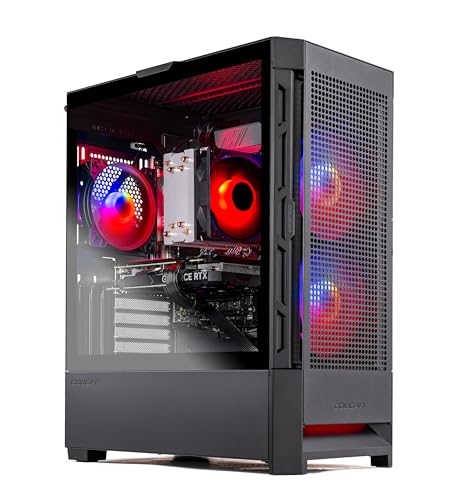
Where to buy
Check the latest price, availability and delivery on Amazon. Orders are placed on Amazon. We may earn a commission from qualifying purchases.
- Best streaming desktop under $1,200: Skytech Blaze4 Mini, Ryzen 7 5700, RTX 4060 Ti, 16GB, 1TB — Check on Amazon
- Thermaltake LCGS Quartz i1460, Core i5-14400F, RTX 5060 — Check on Amazon
- CyberPowerPC Gamer Xtreme VR, Core i7-13700F, RTX 4060 Ti 16GB — Check on Amazon
- Skytech Archangel, Core i5-14400F, RTX 4060, 32GB DDR5, 2TB — Check on Amazon
See 2 more Amazon options
- CyberPowerPC Gamer Xtreme VR, Core i5-13400F, RTX 4060, DDR5 — Check on Amazon
- Skytech Nebula, Ryzen 5 5600X, RTX 4060 Ti — Check on Amazon
Read the full guide ↓
Disclosure: As an Amazon Associate, reviewstook.com earns from qualifying purchases. Links to Amazon on this page are affiliate links; they cost you nothing extra. Listing details such as price and availability change often, so check the current Amazon listing before you buy.
A streaming PC does two jobs at once, and only one of them is playing the game. While the graphics card renders your session, a separate block of silicon has to compress every frame into a broadcast, sixty times a second, for hours — and if that second job is done badly, your viewers watch a smeared, stuttering version of a game that looks perfect on your own monitor. That is why this guide grades these six desktops encoder-first. The workflow we are buying for is the real one: a Twitch broadcast at around 6,000 kbps constant bitrate and 1080p60, or a YouTube stream at the higher bitrates YouTube accepts, where 1440p output and AV1 encoding are genuinely on the table. Every pick below has to run the game, OBS, a browser full of chat and dashboards, and usually a local recording, all at the same time — and it is graded on that combined load, not on the game alone.
The good news is that $1,200 is the first budget where the encoder question answers itself well. Every machine in this guide carries an RTX 4060, 4060 Ti or 5060, and every one of those cards has a modern NVENC encoder with AV1 encode support — the hardware that makes a one-PC stream look clean at Twitch bitrates and stay future-proof for YouTube’s AV1 ingest. The differences that decide this guide are therefore the second-order ones: how much system memory is left over for OBS and everything around it, how much VRAM the game and the encoder pipeline share, how much storage a recording habit eats, and — because two of these listings have two personalities — what price the machine is actually showing on the day you buy. For most streamers we would start with the Skytech Blaze4 Mini, whose pricing has repeatedly put a 4060 Ti tower well under this budget, or the Skytech Archangel if your stream runs heavy with browser sources and recordings. Below are the quick picks, the encoder briefing every buyer at this tier needs, detailed reviews of all six desktops, an OBS setup section, what the rest of a streaming setup costs in everything except money, and the mistakes that make streams look cheap on expensive hardware.
In this guide
Quick Picks
Short on time, or comparing several options at once? Each row below names a streamer type and the desktop that suits it, with a link to the listing.
| Streamer type | Pick | Why it stands out | Link |
|---|---|---|---|
| Best overall for streaming | Skytech Blaze4 Mini, Ryzen 7 5700, RTX 4060 Ti | 4060 Ti NVENC with AV1 — the value outlier of the tier; check price on Amazon | Check on Amazon |
| Best current-generation encoder | Thermaltake LCGS Quartz i1460, RTX 5060 | The only 50-series card in the guide; check price on Amazon | Check on Amazon |
| Best VRAM for stream longevity | CyberPowerPC Gamer Xtreme VR, RTX 4060 Ti 16GB | Double the VRAM of every other pick — a deal-only buy; check price on Amazon | Check on Amazon |
| Best simultaneous load | Skytech Archangel, 32GB DDR5, 2TB SSD | Double the RAM and storage of the field — room for OBS, chat and recordings | Check on Amazon |
| Best budget pick | CyberPowerPC Gamer Xtreme VR, RTX 4060, DDR5 | The same NVENC generation, a full tier cheaper; check price on Amazon | Check on Amazon |
| Best when the price dips | Skytech Nebula, Ryzen 5 5600X, RTX 4060 Ti | 4060 Ti value when the price dips — timing is everything; check price on Amazon | Check on Amazon |
How These Picks Were Chosen
The first filter was the encoder, applied from each listing’s documented graphics card and nothing else. A desktop belongs in a streaming guide at this price only if its GPU carries a modern hardware encoder, and the six below all clear that bar with the same generation of technology: NVENC on the RTX 4060, 4060 Ti and 5060, each with AV1 encode. Anything built around older or entry silicon whose encoder story is a compromise — the RTX 3050 towers and integrated-graphics machines that pad out this price band on Amazon — was excluded, however strong its processor. One honesty note belongs here rather than buried: none of these six desktops has a second hardware encoder to fall back on. Every Intel processor in the guide is an F-suffix model with no integrated graphics, and neither Ryzen chip carries an iGPU either, so there is no Intel Quick Sync anywhere in this set. NVENC does all the encoding on every pick. That is not the handicap it might sound like — NVENC is a dedicated block that works independently of the rendering cores, which is precisely why one-PC streaming on these cards is practical — but it does mean the OBS settings in the setup section below assume one encoder, used well.
The second filter was simultaneous load. A streaming desktop is never running one program: it is running the game, OBS with its scenes and browser sources, a chat window, a browser with the dashboard and alerts, voice chat, and often a local recording at higher quality than the broadcast. We weighed system memory, VRAM and storage as streaming specs, not gaming specs — which is why the guide’s one 32GB, 2TB machine earns a headline row despite carrying the second-strongest graphics card, and why the 16GB-of-VRAM machine matters to streamers even though the extra memory adds no frames. We did not use these desktops ourselves. We read the maker listings and specification pages and compared graphics cards and their encoder hardware, memory capacity and generation, storage, power supplies where the builder publishes them, and platform, favoring listings that publish their numbers in full. Where a builder does not publish a figure — the two CyberPowerPC power supplies are not stated in the verified research — this guide does not invent one.
The budget was applied the way a buyer experiences it: a desktop belongs here if it fits this budget tier, as a regular price or at a deal price that recurs. Two picks drift above this budget for weeks at a time between sales; they are included because their deal pricing is documented and repeats, and their reviews flag them as deal-only buys instead of pretending the sale price is the everyday price. Prices change constantly, so check price on Amazon for every pick before you buy.
The Encoder Briefing: What Actually Encodes Your Stream
Everything in this guide runs through one piece of hardware, so it deserves a plain explanation before the reviews. NVENC is NVIDIA’s dedicated video-encoding block, sitting on the graphics card but separate from the cores that render your game. When OBS hands NVENC the frames, the game keeps almost all of the GPU it had — the encode costs a small slice of memory bandwidth and VRAM rather than a slice of your frame rate, which is the entire reason a single PC can stream well. All three cards in this guide — the RTX 4060, the RTX 4060 Ti in both memory sizes, and the RTX 5060 — carry a single modern NVENC block with AV1 encode support. Single is the honest word: the dual-encoder configurations live on much more expensive cards, so no pick here can split a broadcast encode and a separate high-quality recording encode across two blocks. One encoder, asked to do both jobs through OBS’s settings, is the setup the section below is written for.
AV1 is the second half of the story, and it needs separating into what is true now and what is coming. AV1 encoding produces a visibly cleaner picture than H.264 at the same bitrate, which matters most exactly where Twitch streamers suffer — fast motion at a capped 6,000 kbps. But platform support decides what you can send: YouTube accepts AV1 live streams today and rewards them, while Twitch’s standard ingest remains H.264, with AV1 arriving through its Enhanced Broadcasting program rather than as a default. So the AV1 hardware in every pick here is best understood as a YouTube advantage today and a Twitch advantage as that rollout widens — a reason this tier ages well, not a reason today’s Twitch broadcast magically sharpens. What no pick here offers is an AV1 shortcut around Twitch’s bitrate cap for ordinary streams; the cap is the platform’s, not the hardware’s, and it applies to every desktop in this guide equally.
Two absences complete the briefing, because streaming guides usually hide them. There is no Quick Sync in this guide: the four Intel machines use F-suffix processors (the F means the integrated graphics — and with it, Intel’s encoder — is not present), and the two AMD machines’ processors have no integrated graphics at all. If your current setup leans on Quick Sync for a recording or a second encode, that workflow does not transfer; NVENC takes over both jobs. And there is no software-encoding hero here either: x264 on the CPU is the fallback every one of these machines could manage at light presets, but with six to sixteen cores already busy running a modern game and a browser stack, CPU encoding is the emergency option, not the plan. The plan, on all six picks, is NVENC H.264 for Twitch and NVENC AV1 or H.264 for YouTube — and it is a good plan.
The 6 Best Gaming Desktops for Streaming Under $1,200
Skytech Blaze4 Mini — Ryzen 7 5700, RTX 4060 Ti 8GB, 16GB DDR4, 1TB SSD
Who it suits: Streamers who want this tier’s defining card and encoder at a price that has repeatedly undercut the budget itself — and who are willing to buy when the price is right rather than on a fixed day.
The Blaze4 Mini leads this guide for the same reason it leads its siblings: the value. This listing has repeatedly priced its RTX 4060 Ti tower well under this budget, at the budget end of the tier rather than the top. A tower with an RTX 4060 Ti that leaves real money in a streamer’s budget is a streaming feature in itself, because the microphone and lighting further down this page do more for a broadcast than the next hardware tier would. The card itself is the complete streaming package at this level: a single modern NVENC block with AV1 encode for YouTube, DLSS in reserve for the games that need it, and enough rendering strength to hold 1440p for your own screen while the encoder sends your viewers a 1080p broadcast. Around it sit an eight-core Ryzen 7 5700, 16GB of DDR4-3200, a 1TB SSD, a 650W 80 Plus Gold power supply, WiFi and Windows 11 Home, in a compact standard-parts tower. For the simultaneous load, grade it honestly: 16GB of system memory runs the game, OBS and a chat browser comfortably for most titles, and gets tight when a heavy game, a browser with a dozen tabs and a recording all peak together — the Archangel below exists for exactly that workload.
The limitations are platform and patience. The Ryzen 5700 sits on AM4, AMD’s finished socket: fine value today, but a future processor upgrade means a new motherboard and memory, so this machine’s realistic growth path is storage and a graphics card, not a CPU. The 4060 Ti’s 8GB of VRAM is shared between the game and the encode pipeline, and texture-heavy recent titles at 1440p already prefer more — the 16GB CyberPowerPC below is the answer to that specific worry. Skytech also notes the graphics card brand may vary; the model and its encoder are the contracted spec, the badge on the cooler is not. And the price discipline is real: on its deal pricing this is the best streaming value in the guide; at its everyday level it is merely a good one. Buy it on a deal, consider it at its everyday price, and know which you are doing — check price on Amazon before you decide.
- RTX 4060 Ti — NVENC with AV1 encode, in a tower that repeatedly prices at the budget end of this tier; check price on Amazon.
- 650W 80 Plus Gold power supply leaves headroom for a future GPU upgrade.
- Eight-core Ryzen 7 handles game-plus-OBS multitasking without strain.
Honest limitation: 16GB of system memory and 8GB of VRAM are the tightest simultaneous-load fit in this guide, and the AM4 platform is finished.
Choose it if you can time the purchase to a deal and want maximum encoder and card per dollar. Skip it if your stream runs heavy — many browser sources, local recording, big games — and it is not showing deal pricing; the Archangel or the Quartz is the steadier buy.

Thermaltake LCGS Quartz i1460 — Core i5-14400F, RTX 5060 8GB, 16GB DDR4, 1TB NVMe
Who it suits: Streamers who want the current graphics and encoder generation — the longest driver support runway and the newest feature set — at a price that has stayed honestly inside the budget.
The Quartz is the only desktop here built around a 50-series card, and for a streamer that generation step is worth more than the raw frame rates suggest. The RTX 5060 performs in the same class as the 4060 Ti machines around it — native 1440p at high settings in most games — while carrying the newest NVENC generation with AV1 encode and the current DLSS feature set, including multi frame generation in supported titles. Frame generation deserves its honest sentence, here as everywhere: it inserts AI-generated frames to raise the displayed rate and smooth motion; it does not render the game faster and does not reduce input latency, and because generated frames are a display feature, they are not what your encoder sends — your broadcast is built from the rendered stream, so judge this card for streaming on its encoder and its native rendering, both of which are the newest available at this tier. Its pricing has stayed inside this budget as everyday pricing, not a once-a-quarter dip — check price on Amazon. The rest of the machine is current and standard: a ten-core Core i5-14400F, 16GB of Thermaltake ToughRam DDR4-3600, a 1TB NVMe drive, a 600W 80 Plus Gold power supply, WiFi and Windows 11, in an airflow-first Thermaltake case.
The trade-offs are the platform’s, not the encoder’s. The i5-14400F is an F-suffix chip, so there is no Quick Sync second encoder — NVENC carries the whole broadcast, as it does on every pick here. Thermaltake paired the LGA1700 socket with DDR4 rather than DDR5, which loses nothing in games or in OBS today but means the memory does not carry into a future platform, and the socket itself is at the end of its road; the 600W power supply is properly rated but the least headroom in the guide. The simultaneous-load grade matches the Blaze4’s: 16GB is comfortable for a standard one-PC setup and tightens under a heavy browser stack. None of that dents what the Quartz is — the current-generation streaming desktop at an honest, non-deal price.
- RTX 5060 — the newest NVENC generation in the guide, with AV1 encode and the longest support runway.
- Priced inside this budget as regular pricing, not a fleeting deal; check price on Amazon.
- Ten-core processor and builder-standard parts throughout.
Honest limitation: DDR4 on an end-of-road socket, 16GB of memory for the combined load, and the guide’s least PSU headroom at 600W.
Choose it if you value the newest encoder generation and a price that does not require deal-hunting. Skip it if your stream’s simultaneous load is heavy enough to want 32GB — that is the Archangel below.

CyberPowerPC Gamer Xtreme VR — Core i7-13700F, RTX 4060 Ti 16GB, 16GB DDR5, 1TB NVMe
Who it suits: Streamers playing texture-heavy games at 1440p who plan to keep the machine for years — provided they buy it on a deal and not above this budget.
One specification is this machine’s whole streaming argument: 16GB of VRAM, double every other desktop in this guide. The RTX 4060 Ti 16GB renders at the same speed as its 8GB sibling and carries the identical single NVENC block with AV1 encode — the extra memory buys no frames and no encoder quality. What it buys is room. The graphics card’s memory is shared between the game and everything the broadcast pipeline touches, and at 1440p a growing set of recent titles already crowds 8GB with textures alone; when VRAM runs out mid-stream, the symptom is not a polite warning but stutter in the game and dropped frames in the render pipeline at the same moment. This is the one pick where that ceiling is simply not part of the conversation. Around the card sit the strongest processor in the guide — a sixteen-core Core i7-13700F, which shrugs off the game-plus-OBS-plus-browser stack — 16GB of DDR5, and a 1TB NVMe drive in a standard full-size tower. The processor’s core count also makes this the set’s best emergency fallback: if you ever need CPU encoding at a light preset for a secondary recording, this is the only machine here with cores to spare for it.
It is also the pick whose price swings hardest between its two personalities. On deal weeks it lands inside this budget; between deals it climbs into a different guide’s budget entirely. So the rule is printed on the pick: on a deal, buy it ahead of everything else here if 1440p streaming longevity is your priority; above this budget, skip it without regret and take the Blaze4 or the Quartz. Check price on Amazon before you commit. The i7 is an F-suffix chip, so — as with every pick in this guide — there is no Quick Sync; NVENC does the encoding, and the DDR5 platform underneath is as durable as the graphics side. CyberPowerPC does not publish this configuration’s power supply wattage in the verified research, and this guide will not guess at it: check the live listing if a future GPU upgrade is part of your plan. This is the one machine here with no streaming apology attached — only a pricing one.
- 16GB of VRAM — double the field; the texture ceiling never enters a stream.
- Core i7-13700F is the strongest CPU in the guide; DDR5 platform underneath.
- A deal-week regular — on deal pricing, arguably the best buy here; check price on Amazon.
Honest limitation: Between deals it sells outside this budget entirely. The pick is the deal; at full price it does not belong in this guide, so check price on Amazon and wait for a deal week.
Choose it if you stream texture-heavy games at 1440p, keep machines for four-plus years, and can wait for the deal. Skip it if you are buying this week and it is showing above this budget — no specification justifies pretending otherwise.

Skytech Archangel — Core i5-14400F, RTX 4060 8GB, 32GB DDR5, 2TB SSD
Who it suits: Streamers whose bottleneck is not the encoder but everything running beside it — a browser full of chat, dashboards and alerts, Discord, and a local recording of every session — and who would rather pay for capacity now than close tabs mid-stream.
Every streaming guide needs one pick graded on the load nobody screenshots, and the Archangel is this one’s. Its RTX 4060 is a step below the 4060 Ti machines as a renderer — still a genuine native-1440p card at high settings in most games, and a superb 1080p card — and its single NVENC block with AV1 encode is the same generation as the Ti’s, so the broadcast itself loses nothing. What the trade buys is double everything the broadcast depends on: 32GB of DDR5-5600 where the field has 16GB, and a 2TB SSD where the field has 1TB. Those are the two numbers that decide whether a one-PC stream feels calm. Sixteen gigabytes runs a modern game and OBS; it does not run them plus a browser stack, voice chat and a recording without the occasional hitch, and the hitch always arrives live. Thirty-two gigabytes ends that arithmetic. The 2TB drive does the same for storage: a local recording habit at broadcast quality eats disk steadily, and on the 1TB machines the deleting starts within months. The platform is modern — Core i5-14400F on DDR5, a 650W 80 Plus Gold power supply, WiFi and Windows 11 Home in Skytech’s standard-parts tower — and its pricing lives near the top of this budget rather than swinging wildly: it sits near its usual level instead of visiting a deep low twice a year, so check price on Amazon and budget for the top of the tier.
The limitation is the mirror of the pitch. The RTX 4060’s 8GB of VRAM carries the same 1440p texture caveat as its Ti sibling, and in the heaviest titles the card leans on DLSS sooner. If your stream is a game, OBS and one chat tab, you paid for capacity you will not touch, and the Blaze4’s stronger card serves you better at similar money. Judge this pick by how much you actually run at once — streamers know their own browser stack, and it is the honest spec here.
- 32GB DDR5 and a 2TB SSD — double the field on the two specs simultaneous load eats first.
- Same NVENC generation with AV1 encode as the 4060 Ti picks; the broadcast loses nothing.
- Pricing lives near the top of this tier without wild swings — no deal lottery required; check price on Amazon.
Honest limitation: The RTX 4060 is the second-strongest renderer in this guide, and its 8GB of VRAM is the tier’s known ceiling at 1440p.
Choose it if your stream runs heavy — many sources, recording everything, a real browser stack. Skip it if your setup is lean; take the stronger card in the Blaze4 instead.

CyberPowerPC Gamer Xtreme VR — Core i5-13400F, RTX 4060 8GB, 16GB DDR5, 1TB Gen4 SSD
Who it suits: Streamers who came to this guide with $1,200 and would rather leave with a desktop, a real microphone budget and change — or anyone broadcasting at 1080p whose stream matters more than their monitor’s resolution.
Every streaming guide should contain one machine that asks whether you need to spend the whole budget, and this is it — because for streaming specifically, the answer is usually no. Your viewers watch at 1080p or below whatever you play at, and the encoder in this machine is the same single NVENC block with AV1 encode as the 4060 Ti picks above it. This CyberPowerPC sits at the budget end of the tier while keeping the specification honest: a Core i5-13400F, an RTX 4060, 16GB of DDR5 and a 1TB PCIe Gen4 SSD, with WiFi and Windows 11 Home in a standard tower. As a renderer the 4060 is the 1080p sweet spot — high settings and high refresh in esports, high settings in demanding games — and it does native 1440p at medium-to-high settings in most titles when your own screen asks for it. The DDR5 platform is the quiet headline: unlike the DDR4 towers that usually own the budget shelf, this machine’s memory standard is the current one.
What you give up is headroom, in two named places. Sixteen gigabytes of system memory is the workable-but-tight simultaneous-load grade: fine for the game, OBS and chat, less fine when a heavy title, a recording and a fat browser stack peak together — the Archangel is the fix, at Archangel money. And at 1440p in the heaviest games, the 4060 leans on DLSS where the Ti picks render natively, with the same 8GB VRAM texture caveat. The i5-13400F is an F-suffix chip, so NVENC carries the broadcast alone, as everywhere in this guide, and CyberPowerPC does not publish this configuration’s PSU wattage in the verified research — confirm it on the live listing if upgrades matter to you. Judged as a streaming purchase rather than a gaming one, the budget this pick leaves behind can fund the microphone and lighting in the kit section below, which your viewers will notice more than any spec in this guide.
- The budget pick of the set — the same NVENC generation as the Ti picks, a full tier cheaper; check price on Amazon.
- DDR5 platform at a budget-tier price; standard-parts tower with a real upgrade path.
- The money it leaves behind funds the kit viewers actually hear and see.
Honest limitation: 16GB of memory is the tight simultaneous-load fit, and at 1440p the 4060 relies on DLSS sooner than the Ti machines.
Choose it if you broadcast at 1080p and your setup budget is shared with microphones and lights. Skip it if you play and stream the heaviest current releases at 1440p — spend the full budget on a Ti or the Archangel’s capacity.
Skytech Nebula — Ryzen 5 5600X, RTX 4060 Ti 8GB, 16GB DDR4, 1TB NVMe
Who it suits: Patient streamers who understand that some listings have two prices — the one for people buying today and the one for people buying well — and who want 4060 Ti encoding and rendering when this listing is being the second kind.
The Nebula’s specification needs no apology: a Ryzen 5 5600X, an RTX 4060 Ti 8GB with the same single NVENC block and AV1 encode as the guide’s leading pick, 16GB of DDR4-3200, a 1TB NVMe drive and a 600W 80 Plus Gold power supply, in Skytech’s standard tower with Windows 11 Home. The six-core 5600X costs the machine little as a streaming processor — NVENC does the encoding, and six modern cores run the game, OBS and a chat browser without drama. Everything interesting about this pick lives in its pricing, which swings wider than any other listing in this guide — and that spread makes the Nebula as much a lesson as a recommendation. When its price dips, it rivals the Blaze4 as the best streaming value here. At its everyday level, it is a competent 4060 Ti tower and nothing more. When it climbs into a pricier tier, it is a desktop from another guide borrowing this one’s link, and the only correct move is to close the tab and check price on Amazon again on a deal week.
The platform notes match the Blaze4’s: AM4 is finished, so the upgrade path is graphics and storage; 8GB of VRAM is the 1440p texture ceiling the encoder shares with the game; 16GB of system memory is the workable simultaneous-load grade rather than the roomy one; and Skytech’s “graphics card brand may vary” note applies. What distinguishes the Nebula is purely discipline. Set the walk-away line before you look — buy it when it sits well under this budget, consider it near the middle of the tier, and pass when it climbs toward the top — because a listing with this spread is designed to catch buyers who shop by specification alone, and a streamer’s budget has better places to go.
- RTX 4060 Ti encoding and rendering at a budget-tier price when the listing dips; check price on Amazon.
- Standard-parts Skytech tower, 600W Gold power supply, 1TB NVMe.
- The clearest illustration in the guide of why checking the live price matters more than any headline.
Honest limitation: Its pricing can climb outside this budget and into poor value; the pick exists only at the bottom half of its range, so check price on Amazon before you buy.
Choose it if it is showing well under this budget when you are ready to buy — check price on Amazon. Skip it if it is anywhere near the top of its range — the same money buys the 16GB CyberPowerPC on deal or the Quartz any day.

Comparison Table
| Product | Encoder | Best use | Link |
|---|---|---|---|
| Skytech Blaze4 Mini (Ryzen 7 5700) | NVENC (4060 Ti) + AV1 encode | Maximum encoder value in the tier; check price on Amazon | Check on Amazon |
| Thermaltake LCGS Quartz i1460 | NVENC (RTX 5060) + AV1 encode | Newest encoder generation at an everyday price | Check on Amazon |
| CyberPowerPC Gamer Xtreme VR (i7-13700F) | NVENC (4060 Ti 16GB) + AV1 encode | 1440p stream longevity; deal-only pick — check price on Amazon | Check on Amazon |
| Skytech Archangel (32GB / 2TB) | NVENC (RTX 4060) + AV1 encode | Heavy simultaneous load; nothing to add | Check on Amazon |
| CyberPowerPC Gamer Xtreme VR (i5-13400F) | NVENC (RTX 4060) + AV1 encode | 1080p streaming value on DDR5; check price on Amazon | Check on Amazon |
| Skytech Nebula (Ryzen 5 5600X) | NVENC (4060 Ti) + AV1 encode | Ti streaming when the price dips; check price on Amazon | Check on Amazon |
Setting Up OBS on Any of These Desktops
Every pick in this guide runs the same encoder, so the setup below applies to all six; where a pick changes the answer, it says so. Start in OBS’s output settings with the encoder itself: choose NVENC H.264 for a Twitch broadcast, or NVENC AV1 for a YouTube stream, where AV1’s cleaner picture at a given bitrate is a genuine advantage. On YouTube, H.264 remains the safe choice if your viewers watch on older devices. Set the rate control to constant bitrate — CBR — because live platforms are built around a steady stream, not an efficient one: around 6,000 kbps is Twitch’s working ceiling for ordinary broadcasts, while YouTube accepts substantially higher bitrates and is where a 1440p stream becomes sensible. Set the keyframe interval to 2 seconds, which the platforms expect and which makes your stream joinable and seekable for viewers arriving mid-game. On the recording side, record locally at a higher quality setting than the broadcast — the same NVENC block handles it — and on the Archangel, let the 2TB drive and 32GB of memory carry that habit without management; on the 1TB machines, give recordings a folder and a routine clear-out before the drive’s free space becomes a dropped-frames problem of its own.
When a stream stutters, OBS tells you which of three different failures you are looking at, and each has a different fix — learn to read them before your first live session rather than during it. Rendering lag means the GPU is too busy drawing the game to compose OBS’s scenes on time; the fixes are to cap the game’s frame rate rather than letting it run unlimited, trim browser sources, and resist stacking effects — it is the counter the 8GB VRAM picks watch most closely in texture-heavy games, and the one the 16GB CyberPowerPC is built to never show you. Encoding lag means the encoder block itself is overloaded, which on a single-NVENC machine usually means the broadcast and a maximum-quality recording are competing; drop the recording to a saner quality preset before touching the broadcast, and never solve it by switching to CPU encoding mid-stream. Network dropped frames are not the computer’s fault at all — they are the connection’s, and no setting in OBS repairs an unstable upload. That is why the last rule is physical rather than digital: run an Ethernet cable. Every desktop in this guide ships with WiFi, and WiFi is fine for downloads, but a live broadcast is hours of sustained upload where one interference spike becomes a visible freeze for every viewer. Wire the machine, test the upload at your streaming hour rather than at noon, and set your bitrate to what the connection sustains on a bad evening, not a good one.
What the Rest of the Setup Costs (Nothing Here Is Priced, on Purpose)
A streaming desktop is the biggest line in a setup budget, not the only one, and the honest order of the remaining purchases is by what your audience experiences first. The microphone comes first: viewers forgive a soft picture far longer than they forgive bad audio, and a decent USB microphone — or a headset’s boom mic replaced by one — is the single largest quality jump a new streamer can buy. It is never part of a desktop’s price in this guide, and any of the budget the lower-priced CyberPowerPC leaves behind should land here before anywhere else. Lighting comes second: one light aimed at your face does more for a webcam image than a camera upgrade does, because small sensors are starved for light long before they are starved for resolution. The webcam comes third, and for many streamers a phone they already own, mounted and wired, outperforms a cheap dedicated camera. A capture card is last, and it is console-only in this guide’s terms: every pick here plays and streams its own games on one machine, so a capture card buys a PC gamer nothing; it enters the budget only if you also stream a console’s output through the desktop. None of these items is priced here, because prices for kit churn faster than desktop prices do and the base research for this guide verified desktops, not accessories — treat any article that bundles a precise kit total into a PC recommendation with suspicion, including the suspicion that the total was invented to fill a table.
How to Choose a Streaming Desktop Under $1,200
- Start with your platform, not the listings. Twitch streamers are buying a clean H.264 broadcast at a capped bitrate; YouTube streamers can use the AV1 encode every pick here carries, plus higher bitrates and 1440p. The platform decides which features matter before the hardware does.
- Buy the encoder generation, then the card. At this budget every pick shares the same modern NVENC generation, which is why the guide can rank on load and price. Below this tier that stops being true, and the encoder becomes the first thing to check — see Best Gaming Desktop For Streaming Under $800.
- Count your simultaneous load honestly. Game plus OBS plus one chat tab runs on 16GB. Game plus OBS plus a dashboard browser, alerts, voice chat and a recording is the Archangel’s 32GB case. Most streamers underestimate their own browser stack; do not.
- Read VRAM as stream insurance. The game and the broadcast pipeline share the card’s memory. 8GB is the tier’s working ceiling at 1440p; the 16GB pick removes the one failure mode that hits the game and the stream at the same moment.
- Budget storage for the recording habit. Broadcasting alone needs little disk. Recording every session at quality turns 1TB into a management chore within months; 2TB is the set-and-forget size.
- Check the live price, not the headline. Two picks here drift above this budget between sales. Treat a deal-week price as what a machine can cost and its everyday level as what it usually does: buy on a deal, judge it at its everyday level, and walk away when it climbs — check price on Amazon for every pick.
- Keep the whole setup in the budget. A top-of-budget desktop streaming through a laptop-grade headset mic sounds worse than the budget pick with a real microphone. The desktop is the biggest line, not the only one — first-time streamers should read Best Gaming Desktop For Beginners Under $1200 alongside this guide.
- Plan the wire before the first stream. Ethernet to the desk is part of the purchase. If the router is a room away, solve that on day one, not during your first dropped-frames evening.
Common Buying Mistakes
- Paying for a stronger renderer when the stream was the bottleneck. Your viewers receive an encoded 1080p broadcast; past this tier’s encoder generation, extra rendering power improves your screen, not theirs.
- Believing AV1 fixes Twitch today. AV1 encode is real on every pick here, but Twitch’s standard ingest is still H.264 — AV1 pays off on YouTube now and on Twitch as its rollout widens.
- Streaming on WiFi because the desktop “has WiFi 6.” Downloads forgive interference; a sustained live upload does not. The dropped-frames counter will teach this lesson publicly if you let it.
- Running the game at an unlimited frame rate while OBS starves. Rendering lag is the most common self-inflicted wound in one-PC streaming, and the fix is a frame cap, not a new computer.
- Recording at maximum quality on a single encoder and a 1TB drive. The broadcast and the recording share one NVENC block, and the drive fills quietly until it doesn’t.
- Buying a deal-only pick at its everyday price. The 16GB CyberPowerPC and the Nebula sit well above their deal pricing between sales — at those levels they are worse buys than the machines ranked above them, so check price on Amazon and wait for a deal week.
- Skipping the configuration check at checkout. Builders quietly revise parts under an unchanged model name; what ships is the configuration on the listing in front of you, not the one described in any review.
- Spending the whole budget on the tower and nothing on sound. The microphone is the cheapest large quality jump in streaming, and it is the one buyers postpone.
Final Recommendation
- Most streamers: Skytech Blaze4 Mini — buy it at its deal pricing.
- Current-generation encoder, no deal-hunting: Thermaltake LCGS Quartz i1460.
- 1440p streams for the long term: CyberPowerPC Gamer Xtreme VR with the RTX 4060 Ti 16GB — on deal pricing only, never above this budget.
- Heavy simultaneous load: Skytech Archangel.
- 1080p streamers keeping money for kit: CyberPowerPC Gamer Xtreme VR with the RTX 4060.
- Patient deal-watchers: Skytech Nebula, only when its price dips well under this budget — check price on Amazon.
Our top two at this budget are the Blaze4 Mini, whose pricing puts the tier’s defining card and encoder in a tower well below the ceiling, and the Thermaltake Quartz, the current-generation machine for streamers who would rather pay a fair everyday price than play the deal calendar. Together they answer the two forms this search usually takes: the most performance per dollar, or the newest platform at a fair everyday price. If your stream runs heavy — recordings of everything, a real browser stack — the Archangel outranks both on the strength of the two specs simultaneous load eats first; if your library is the texture-heavy end of the catalog at 1440p, the 16GB CyberPowerPC on its deal weeks is the longevity pick. Streamers ready to step up a tier should compare Best Gaming Desktop For Streaming Under $1500, those whose room argues for something smaller should see Best Gaming Desktop For Small Spaces Under $1200, and anyone cross-shopping the wider category will find the sibling guide at Best Streaming PC Under $1200. Before ordering, check price on Amazon for the pick you want — at this budget, the gap between a good buy and a great one is usually just the week you happened to click.
Frequently Asked Questions
Can one PC really game and stream well at this budget?
Yes, and the reason is architectural rather than heroic: NVENC is a dedicated encoding block, separate from the cores rendering your game, so the broadcast costs little rendering performance. Every pick in this guide carries that hardware with AV1 encode. The limits that remain are the shared ones — system memory, VRAM and storage — which is why this guide grades simultaneous load instead of pretending the encoder works alone.
Is $1,200 enough for a streaming desktop that runs 1440p properly?
For your own screen, yes: the 4060 Ti and RTX 5060 machines render 1440p natively at high settings in most current games, and the 4060 picks do it at medium-to-high settings. For your broadcast, the honest framing is that most viewers will watch at 1080p regardless — Twitch’s bitrate ceiling makes 1080p60 the standard broadcast, while YouTube is where a 1440p stream and AV1 encode become practical. The general tier guide is at Best Gaming Desktop Under $1200.
Does AV1 encoding matter for a Twitch streamer?
Not yet, for most. Twitch’s standard ingest is H.264 at around 6,000 kbps, and AV1 is arriving through its Enhanced Broadcasting program rather than as a default. AV1 matters today if you stream to YouTube, which accepts it and rewards the cleaner picture, and it matters as insurance: the hardware in every pick here will still be current when platform support finishes widening. It is a longevity feature, not a present-tense Twitch upgrade.
Why is there no Quick Sync in this guide?
Because none of the six machines has it. The four Intel desktops use F-suffix processors — the F means no integrated graphics, and Quick Sync lives in the integrated graphics — and the two AMD processors have no iGPU either. NVENC carries every encode on every pick. If your old setup used Quick Sync for a separate recording, that job moves to the same NVENC block here, which is why the OBS section sets the recording to a sensible quality rather than a maximum one.
How much RAM does a streaming setup actually need?
Sixteen gigabytes runs the standard shape — game, OBS, chat, voice — and five of these six machines prove it. Thirty-two gigabytes is for the heavier reality many streamers actually live in: a browser stack of dashboards and alerts, a recording of every session, and a modern game that wants memory of its own. The Archangel is the only pick here with 32GB, and its review is written for exactly that buyer.
How much should I trust the prices in this guide?
Treat every price in this tier as a moving target, which is why this guide points you to the live listing instead of printing figures that go stale. Prices swing between deal events — the 16GB CyberPowerPC and the Nebula swing widest of all — so check price on Amazon for the pick you want, buy the deal-only machines only on deal weeks, and let that comparison, not urgency, decide. If you are weighing this tier against its neighbors, see also Best Gaming Desktop For 1440p Gaming Under $1200 and Best Budget Gaming PC Under $1200.
- Best Gaming Desktop Under $1200
- Best Gaming Desktop Under $1500
- Best Gaming Desktop For Beginners Under $1200
- Best Gaming Desktop For Streaming Under $800
- Best Gaming Desktop For Streaming Under $1500
- Best Gaming Desktop For Small Spaces Under $1200
- Best Gaming PC Under $1200
- Best Prebuilt Gaming PC Under $1200


