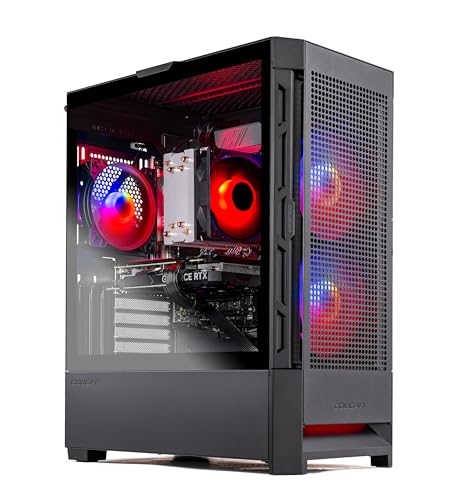
Where to buy
Check the latest price, availability and delivery on Amazon. Orders are placed on Amazon. We may earn a commission from qualifying purchases.
- Best overall desktop under $1,200: Skytech Blaze4 Mini, Ryzen 7 5700, RTX 4060 Ti, 16GB, 1TB — Check on Amazon
- Thermaltake LCGS Quartz i1460, Core i5-14400F, RTX 5060 — Check on Amazon
- CyberPowerPC Gamer Xtreme VR, Core i7-13700F, RTX 4060 Ti 16GB — Check on Amazon
- Skytech Archangel, Core i5-14400F, RTX 4060, 32GB DDR5, 2TB — Check on Amazon
See 2 more Amazon options
- CyberPowerPC Gamer Xtreme VR, Core i5-13400F, RTX 4060, DDR5 — Check on Amazon
- Skytech Nebula, Ryzen 5 5600X, RTX 4060 Ti — Check on Amazon
Read the full guide ↓
Disclosure: As an Amazon Associate, reviewstook.com earns from qualifying purchases. Links to Amazon on this page are affiliate links; they cost you nothing extra. Listing details such as price and availability change often, so check the current Amazon listing before you buy.
Twelve hundred dollars is the budget where a gaming desktop stops being a compromise you apologize for. Cheaper tiers make you choose: a real graphics card or a current platform, 16GB of memory or a terabyte of storage, a machine for today or a machine you can upgrade. At $1,200 the choosing mostly ends. This is the tier of the RTX 4060 Ti and the RTX 5060 — graphics cards that run 1440p natively, at high settings, in the great majority of games, without leaning on upscaling to survive. It is also the tier where the word “desktop” earns its meaning: full-size towers built from standard parts, with empty slots, spare drive bays and power supplies you can replace at any PC shop, rather than the sealed mini PCs and laptop hardware that fill the cheaper guides. Every machine below is a tower you can open with a screwdriver and improve with a credit card, in that order, for years.
The honest framing belongs up front. A $1,200 desktop is a 1440p machine and a superb 1080p high-refresh machine; it is not a 4K machine, and any listing at this price that leads with 4K is selling you upscaling under a false name. Prices in this tier also swing hard — two of the six picks below regularly drift above the budget between deal events, and their reviews say plainly when a pick only makes sense on deal rather than pretending a sale price is the everyday price, so check the price on Amazon before you order. For most buyers we would start with the Skytech Blaze4 Mini, whose deal pricing has repeatedly put a 4060 Ti tower well inside this budget — a value the rest of this guide has to chase — or the Thermaltake Quartz if you want the current GPU generation. Below are the quick picks, detailed reviews of all six desktops, a comparison table, a section on which builders use standard parts and which cut corners, the mistakes that waste money at this tier, and the questions buyers ask before ordering.
In this guide
Quick Picks
Short on time, or comparing several options at once? Each row below names a buyer type and the desktop that suits it, with a link to the listing.
| Buyer type | Pick | Why it stands out | Link |
|---|---|---|---|
| Best overall under $1,200 | Skytech Blaze4 Mini, Ryzen 7 5700, RTX 4060 Ti | 4060 Ti performance at standout deal pricing well inside the budget — the value outlier of the tier | Check on Amazon |
| Best current-generation GPU | Thermaltake LCGS Quartz i1460, RTX 5060 | The only 50-series card in the guide, at honest everyday pricing inside the budget | Check on Amazon |
| Best for 1440p longevity | CyberPowerPC Gamer Xtreme VR, RTX 4060 Ti 16GB | Double the VRAM of every other pick — a deal-only buy; check price on Amazon | Check on Amazon |
| Best memory and storage | Skytech Archangel, 32GB DDR5, 2TB SSD | Double the RAM and storage of the field, on a DDR5 platform | Check on Amazon |
| Best value platform pick | CyberPowerPC Gamer Xtreme VR, RTX 4060, DDR5 | A full price tier cheaper than the rest of the guide, on the newer memory standard | Check on Amazon |
| Best when the price dips | Skytech Nebula, Ryzen 5 5600X, RTX 4060 Ti | Deep deal pricing when it dips, unremarkable at its everyday level — timing is everything | Check on Amazon |
How These Picks Were Chosen
The budget was applied as a ceiling with a condition: a desktop belongs in this guide if it sells at or under $1,200 as a normal event — either as its regular price or at a deal price that recurs — and where a price drifts, the review says so plainly and points you to the live listing rather than printing a hard number you should hold us to — check the price on Amazon before you order. Two picks fail that test for weeks at a time between sales; they are included because their deal prices are documented and repeat, and their reviews state plainly that at full price they belong to a higher guide. Anything whose graphics card could not run 1440p natively — the RTX 3050 towers and 4060 laptops-in-a-box that pad out this price band on Amazon — was excluded, however modern its processor.
We did not use these desktops ourselves. We read the maker listings and specification pages and compared graphics cards, VRAM, memory generation and capacity, storage, power supply wattage and rating, and platform, favoring listings that publish their numbers in full. Because this guide is specifically about desktops, one filter sat on top of the usual ones: the machine had to be a genuine tower built from standard parts — a retail-style motherboard, a standard ATX power supply, a case with room to work — and that filter is why no big-brand office-line towers appear below. Several household-name desktops at this price use proprietary power supplies and motherboards in shapes no replacement part matches; they can be fine computers, but they fail the desktop test this guide is built on, which is that you can open the machine in five years and fix or improve it with parts from anywhere. A section below names which of the six builders are fully standard and where the small print lives.
Platform honesty mattered as much as parts. This tier straddles two memory generations: DDR4 machines are cheaper and their performance in games today is effectively identical, while DDR5 machines cost more and buy you a memory standard that carries into your next build. Neither is a wrong answer, but they are different answers, and each review below states which one it is giving you and what it means in three years. The same applies to sockets: two picks sit on AMD’s finished AM4 platform, which is a dead end for processor upgrades and a bargain precisely because of it. We would rather tell you that in the review than let you discover it in a forum.
The 6 Best Gaming Desktops Under $1,200
Skytech Blaze4 Mini — Ryzen 7 5700, RTX 4060 Ti 8GB, 16GB DDR4, 1TB SSD
Who it suits: Buyers who want the strongest graphics card this budget normally allows, at a price that has repeatedly undercut the budget itself — and who are willing to buy when the price is right rather than on a fixed day.
The Blaze4 Mini is the value anomaly of this tier, and its deal pricing explains why it leads the guide. This listing has repeatedly appeared at deal pricing well inside the budget, and a tower with an RTX 4060 Ti at that level is a machine a full price class out of place: the 4060 Ti is the card that makes 1440p native play the default rather than the exception, running high settings at that resolution in most current games and turning DLSS from a necessity into headroom. Around it, Skytech has built a sensible, standard machine: a Ryzen 7 5700 with eight cores, 16GB of DDR4-3200, a 1TB SSD, a 650W 80 Plus Gold power supply, WiFi and Windows 11 Home, in a compact case that is still a real tower with standard parts inside. Nothing in the specification is exotic, and that is the point — every component is replaceable, and the power supply has the wattage and rating to accept a meaningfully stronger graphics card later.
The honest limitations are about platform and patience. The Ryzen 5700 sits on AM4, AMD’s previous socket: excellent value today, but the platform is finished, so a future processor upgrade means a new motherboard and memory as well — the realistic upgrade path for this machine is graphics card and storage, not CPU. The 8GB of VRAM on the 4060 Ti is the card’s known ceiling at 1440p; a small number of texture-heavy recent titles already prefer more, which is exactly the gap the 16GB CyberPowerPC below exists to fill. And the price discipline is real: at its everyday pricing this is a good desktop; when it dips to its deal level it is the best value in the guide. Buy it on deal, consider it at its everyday level, and know which of the two you are doing — check the price on Amazon first. Skytech listings also note that the graphics card brand may vary — the model and VRAM are the contracted spec, the badge on the cooler is not.
- RTX 4060 Ti 8GB — the tier’s defining card, in a whole tower that repeatedly dips well inside the budget on deal.
- 650W 80 Plus Gold power supply leaves genuine headroom for a future GPU upgrade.
- Standard-parts tower: every component replaceable with off-the-shelf hardware.
Honest limitation: The AM4 platform is finished — CPU upgrades mean a platform swap — and 8GB of VRAM is the tightest fit in this guide for texture-heavy 1440p games.
Choose it if you can time the purchase to a deal and want maximum graphics performance per dollar. Skip it if you need to buy today at whatever price is showing and it is sitting at its everyday level — the Thermaltake below is the steadier buy.

Thermaltake LCGS Quartz i1460 — Core i5-14400F, RTX 5060 8GB, 16GB DDR4, 1TB NVMe
Who it suits: Buyers who want the current graphics generation — the longest driver support runway and the newest feature set — at a price that has stayed honestly inside the budget.
The Quartz is the only desktop in this guide built around a 50-series card, and that is a deliberate kind of value. The RTX 5060 performs in the same class as the 4060 Ti machines around it — native 1440p at high settings in most games — while adding the newest DLSS generation, including multi frame generation in the titles that support it. Frame generation deserves its honest description: it inserts AI-generated frames to raise the displayed frame rate, which makes motion look smoother; it does not render the game faster and it does not reduce input latency, so competitive players will leave it off and everyone else should understand it as a presentation feature, not free performance. Judged on native rendering, this is a 1440p card with the longest support horizon in the guide, and it has stayed at honest everyday pricing inside the budget, not a once-a-quarter dip — check the price on Amazon to confirm before you order. The rest of the machine is current and standard: a Core i5-14400F with ten cores, 16GB of Thermaltake’s ToughRam DDR4-3600, a 1TB NVMe drive, a 600W 80 Plus Gold power supply, WiFi and Windows 11, in Thermaltake’s own case with the airflow-first design the brand is known for.
Two trade-offs define the pick. Thermaltake paired Intel’s LGA1700 platform with DDR4 rather than DDR5 — a cost decision that loses nothing in games today but means the memory does not carry into a future platform the way the DDR5 picks’ does; the socket itself is also at the end of its road, so like the AM4 machines, this is a tower whose big future upgrade is the graphics card. And the 600W power supply, while properly rated, is the least headroom in the guide — fine for this card and its successor class, not the unit you would choose for a flagship upgrade. Neither point dents what the Quartz is: the current-generation desktop at the honest price, from a builder whose cases and power supplies are retail products in their own right.
- RTX 5060 — the only current-generation card in the guide, with the longest driver runway.
- Honest everyday pricing inside the budget, not a fleeting deal.
- Builder-standard parts throughout, in a case designed for airflow.
Honest limitation: DDR4 memory on an end-of-road socket limits platform longevity, and the 600W PSU is adequate rather than generous for future upgrades.
Choose it if you value the newest GPU generation and a price that does not require deal-hunting. Skip it if DDR5 and maximum upgrade headroom matter more than GPU generation — look at the Archangel below.

CyberPowerPC Gamer Xtreme VR — Core i7-13700F, RTX 4060 Ti 16GB, 16GB DDR5, 1TB NVMe
Who it suits: 1440p players planning to keep the machine for years — especially anyone whose games are the texture-heavy kind that punish 8GB of VRAM — provided they buy it on deal, while it sits inside this budget.
This is the longevity pick, and one specification is the whole argument: 16GB of VRAM, double every other desktop in this guide. The RTX 4060 Ti 16GB renders at exactly the same speed as its 8GB sibling — the extra memory buys no frames today in most games. What it buys is texture headroom: the small but growing set of recent titles that stutter or quietly downgrade their textures on 8GB cards at 1440p simply do not on this one, and that set grows every year of the machine’s life. Around the card, CyberPowerPC has fitted a Core i7-13700F — the strongest processor in this guide, with sixteen cores — 16GB of DDR5, and a 1TB NVMe drive, in a standard full-size tower. As a specification, it is the most future-resistant machine here.
It is also the guide’s clearest case of a price with two personalities. On deal it sits inside this budget; between deals it drifts into a higher budget entirely, where it is a worse value than several machines in this one. So the rule is printed on the pick: when it is on deal inside the budget, buy it ahead of everything else here if 1440p longevity is your priority — check the price on Amazon first; when it is sitting above the budget, skip it without regret and take the Blaze4 or the Quartz. The DDR5 memory and standard-parts construction mean the platform side is as durable as the graphics side — this is the one machine in the guide with no structural apology attached, only a pricing one.
- 16GB of VRAM — double the field, and the single best longevity feature at this budget.
- Core i7-13700F is the strongest CPU in the guide; DDR5 platform underneath.
- On deal inside the budget, arguably the best buy here.
Honest limitation: Between deals it sells outside this budget entirely. The pick is the deal; at its everyday level it does not belong in this guide.
Choose it if you play texture-heavy games at 1440p, keep machines for four-plus years, and can wait for the deal. Skip it if you are buying this week and it is showing above the $1,200 budget — no specification justifies pretending otherwise.

Skytech Archangel — Core i5-14400F, RTX 4060 8GB, 32GB DDR5, 2TB SSD
Who it suits: Buyers whose bottleneck is not frames but everything else — big game libraries, a dozen launcher tabs, streaming or recording while playing — and who would rather pay for capacity now than open the case twice in the first year.
Every guide has a pick that trades one headline spec for the specs people actually run out of, and the Archangel is this one’s. Its RTX 4060 is a step below the 4060 Ti machines: still a genuine native-1440p card at high settings in most games, and a superb 1080p high-refresh card, but with less headroom at 1440p in the heaviest titles. What the trade buys is double everything else — 32GB of DDR5-5600 where the field has 16GB, and a 2TB SSD where the field has 1TB. Those are not decorative numbers. Modern game installs run 70–150GB, so the 1TB drives in this guide hold perhaps eight large games before the deleting starts; the Archangel holds twice that, and 32GB of memory ends the quiet performance tax of browsers, Discord and launchers competing with your game. The platform is the modern one: a Core i5-14400F on DDR5, with a 650W 80 Plus Gold power supply, WiFi and Windows 11 Home in Skytech’s standard-parts tower. Its pricing has tended to sit near the top of this budget, which makes it one of the more honestly priced machines in the guide: it lives near its everyday level rather than visiting a deep deal low twice a year — check the price on Amazon before you order.
The limitation is the mirror of the pitch: if your library is three games and your browser discipline is good, you paid for capacity you will not touch, and the Blaze4’s stronger card serves you better at similar money. The RTX 4060’s 8GB of VRAM also carries the same 1440p texture caveat as its Ti sibling. Judge this pick by your storage habits, not by the tier’s fashion.
- 32GB DDR5 and a 2TB SSD — double the field on both, ending the two commonest first-year upgrades.
- DDR5 platform with a 650W Gold power supply and standard-parts construction.
- Pricing lives near the top of the budget at its everyday level — no deal lottery required.
Honest limitation: The RTX 4060 is the second-strongest card in this guide; heavy 1440p titles will ask for DLSS sooner than on the 4060 Ti picks.
Choose it if your library is large, your multitasking is real, and you want the machine that needs nothing added. Skip it if you play a small rotation of games — take the stronger card in the Blaze4 instead.

CyberPowerPC Gamer Xtreme VR — Core i5-13400F, RTX 4060 8GB, 16GB DDR5, 1TB Gen4 SSD
Who it suits: Buyers who came to this guide with $1,200 and would rather leave with a desktop, a monitor budget and change — or anyone whose screen is 1080p and likely to stay that way for a while.
Every $1,200 guide should contain one machine that asks whether you need to spend $1,200, and this is it. This CyberPowerPC sits a full price tier below the rest of the guide — a genuine budget-tier machine — while keeping the specification honest: a Core i5-13400F, an RTX 4060, 16GB of DDR5 and a 1TB PCIe Gen4 SSD, with WiFi and Windows 11 Home in a standard tower. The RTX 4060 at 1080p is not a compromise at all; it is the sweet spot, running high settings and high refresh rates in esports and high settings in demanding games, and it does native 1440p at medium-to-high settings in most titles when asked. The DDR5 platform is the quiet headline: unlike the cheaper DDR4 towers that usually own the budget shelf, this machine’s memory standard is the current one, so the platform side of the box is not the part you will replace first.
What you give up against the rest of the guide is 1440p headroom and nothing structural. In the heaviest current games at 1440p, the 4060 leans on DLSS where the 4060 Ti picks render natively, and its 8GB of VRAM carries the same texture caveat. If your monitor is 1440p and staying, that difference is worth money — take a Ti pick. If your monitor is 1080p, the difference is worth very little, and the money this pick leaves in your pocket buys the 1440p monitor later, at which point the honest upgrade is a graphics card this tower’s standard construction accepts. That is the desktop argument in one machine: buy the platform, upgrade the part.
- A budget-tier price — the guide’s performance-per-dollar pick for 1080p players; check price on Amazon.
- DDR5 platform at a DDR4 price; standard-parts tower with a real upgrade path.
- RTX 4060 is the 1080p sweet spot and a credible medium-settings 1440p card.
Honest limitation: At 1440p in heavy titles it relies on DLSS sooner than the 4060 Ti machines, and 8GB of VRAM is the tier’s known ceiling.
Choose it if you game at 1080p, or want a platform to grow into 1440p with a later GPU swap. Skip it if you already own a 1440p high-refresh monitor and play the heaviest current releases — spend the full budget on a Ti.
Skytech Nebula — Ryzen 5 5600X, RTX 4060 Ti 8GB, 16GB DDR4, 1TB NVMe
Who it suits: Patient buyers who understand that some listings have two prices — the one for people buying today and the one for people buying well — and who want 4060 Ti performance when this listing is being the second kind.
The Nebula’s specification needs no apology: a Ryzen 5 5600X, an RTX 4060 Ti 8GB, 16GB of DDR4-3200, a 1TB NVMe drive and a 600W 80 Plus Gold power supply, in Skytech’s standard tower with Windows 11 Home. That is the same graphics card as the guide’s leading pick, with a slightly older six-core processor that costs it little in games. The story is entirely in its pricing swings: this listing swings wider than any other in the guide, from deep deal pricing well inside the budget to levels far outside it, and that spread turns the Nebula into a lesson as much as a pick. At the bottom of its range it rivals the Blaze4 as the best value here. At its everyday level it is a fair but unremarkable 4060 Ti tower. At the top of its range it is simply a machine from a more expensive guide wearing this one’s link, and the correct response is to close the tab.
The platform notes match the Blaze4’s: AM4 is finished, so the upgrade path is graphics and storage; 8GB of VRAM is the 1440p texture ceiling; and Skytech’s “graphics card brand may vary” note applies. What distinguishes the Nebula is purely discipline. Set the walk-away line before you look — buy only when it is showing at the low end of its range, inside this budget, and pass when it drifts toward the top of that range — because a listing with this spread is designed to catch buyers who shop by specification alone.
- RTX 4060 Ti performance at deep deal pricing when the listing dips.
- Standard-parts Skytech tower, 600W Gold power supply, 1TB NVMe.
- The clearest illustration in the guide of why checking the live price matters more than headline prices.
Honest limitation: At the top of its range it is outside this budget and poor value; the pick exists only at the bottom half of its price range.
Choose it if it is showing at the low end of its range, inside the budget, when you are ready to buy. Skip it if it is anywhere near the top of its range — the same money buys the 16GB CyberPowerPC on deal or the Quartz any day.

Comparison Table
| Product | Graphics card | Best use | Link |
|---|---|---|---|
| Skytech Blaze4 Mini (Ryzen 7 5700) | RTX 4060 Ti 8GB | Maximum GPU per dollar at deal pricing | Check on Amazon |
| Thermaltake LCGS Quartz i1460 | RTX 5060 8GB | Current GPU generation at an everyday price | Check on Amazon |
| CyberPowerPC Gamer Xtreme VR (i7-13700F) | RTX 4060 Ti 16GB | 1440p longevity; deal-only, inside the budget | Check on Amazon |
| Skytech Archangel (32GB / 2TB) | RTX 4060 8GB | Big libraries, multitasking, nothing to add | Check on Amazon |
| CyberPowerPC Gamer Xtreme VR (i5-13400F) | RTX 4060 8GB | 1080p value on a DDR5 platform at a budget-tier price | Check on Amazon |
| Skytech Nebula (Ryzen 5 5600X) | RTX 4060 Ti 8GB | Ti performance when the price dips to the low end of its range | Check on Amazon |
How to Choose a Gaming Desktop Under $1,200
- Start with your monitor, not the listings. A 1080p screen makes the budget-tier CyberPowerPC the smartest buy in this guide; a 1440p screen is what the 4060 Ti and RTX 5060 picks are for; a 4K screen means this is the wrong guide — no $1,200 desktop runs 4K natively, whatever the listing implies.
- Buy the graphics card class first. At this budget the hierarchy that matters is 4060 Ti / RTX 5060 above RTX 4060, and everything else — processor generation, RGB, case glass — is secondary. A newer CPU behind a weaker card is a worse gaming desktop, full stop.
- Read VRAM as a longevity spec, not a speed spec. 8GB and 16GB versions of the same card render at the same speed today; the 16GB card will hold its texture settings at 1440p years longer. If you keep machines a long time, that difference is worth more than a processor tier.
- Decide what DDR5 is worth to you. DDR4 machines are cheaper and game identically today. DDR5 costs more and is the standard your next platform will use. Neither answer is wrong — but know which one you bought, because it decides whether your memory survives your next upgrade.
- Check the power supply like an adult. Wattage and an 80 Plus rating, published in the listing. The picks here run 600–650W Gold units — enough for their cards and the next class up. A listing that hides its PSU is telling you something.
- Judge a pick by its everyday price, not its headline deal. Two picks in this guide cross above the budget between deals. A deal price tells you what a machine can cost; its everyday level tells you what it usually costs. Buy on deal, judge at the everyday level, walk away when it drifts above the budget — and always check the price on Amazon before ordering.
- Count your library before choosing capacity. At 70–150GB per modern game, 1TB is a working constraint and 2TB is freedom. If you juggle installs constantly, the Archangel’s trade — a step down in card, double in storage — may be the right one for you specifically.
- Keep the whole setup in the budget. A top-of-budget desktop in front of a cheap office monitor is a worse experience than the budget-tier pick in front of a good 1440p high-refresh screen. The desktop is the biggest line, not the only one.
Standard Parts vs Proprietary: Who Builds What at $1,200
The least discussed difference between gaming desktops is the one that decides what the machine costs you in year four: whether it is built from standard parts. All three builders in this guide — Skytech, CyberPowerPC and Thermaltake’s LCGS line — assemble from the same retail ecosystem you would buy from yourself: standard ATX or micro-ATX motherboards, standard ATX power supplies, ordinary cases with ordinary mounting points. When the power supply dies in 2029, any 650W ATX unit from any maker fits. When you want a stronger graphics card, the slot, the space and the connectors are the industry’s, not a brand’s. That is the entire case for the desktop form factor, and these six machines all honor it.
The contrast is worth naming because it shares this price band on Amazon: several big-brand gaming and office desktops use proprietary power supplies in non-standard shapes, motherboards with non-standard front-panel and power connectors, and cases that accept only the brand’s own parts. They are not scams — they are often quiet, compact and well-warrantied — but their upgrade path is a service department, and their second GPU is usually the one they shipped with. If a listing does not publish its motherboard or power supply details, that silence is the tell. Two smaller print items apply even to the standard builders here: Skytech notes the graphics card brand may vary between units (the model and memory are the spec; the cooler badge is not), and system integrators occasionally revise a model’s components under the same name — check the configuration on the live listing against the review before ordering, a thirty-second habit that prevents most prebuilt disappointments.
1440p, Done Natively: What This Tier Actually Runs
The phrase that sells this tier is 1440p, so it deserves a precise meaning. Native 1440p means the game renders at 2560×1440 and the card you bought did the work. The 4060 Ti and RTX 5060 machines in this guide do that at high settings in most current games — that is the honest headline, and it is a genuinely new thing at $1,200; a few years ago this budget bought 1080p and optimism. DLSS upscaling then becomes what it should be: headroom for the heaviest titles and a way to chase high-refresh rates, rather than a life-support system the card needs at its native resolution. The RTX 4060 picks render most games natively at 1440p too, at medium-to-high settings, and lean on DLSS in the demanding tail of the catalog.
What the tier does not do is equally specific. It does not run 4K natively in demanding games — that is a conversation for a much higher budget — and path-traced showcase modes remain a flagship feature at any resolution here. The 8GB VRAM ceiling is the other real boundary: a handful of texture-heavy recent releases already prefer more at 1440p, which is why the 16GB CyberPowerPC exists in this guide and why, if your library is exactly those games, it should be your pick on its deal weeks. Buy this tier for 1440p high settings with DLSS in reserve, and it will not disappoint you; buy it for the 4K logo on a listing, and it will.
Common Buying Mistakes
- Paying the full budget for a machine that regularly sells well inside it on deal. In this tier the deal price is the real price for at least two of the six picks; the premium for impatience can be steep.
- Choosing by processor. An i7 behind an RTX 4060 is a worse gaming desktop than an i5 behind a 4060 Ti at the same money. The card renders the game.
- Reading “16GB” without asking of what. 16GB of system RAM and 16GB of VRAM are different specs on different parts; listings blur them on purpose. The 16GB that matters for 1440p longevity is on the graphics card.
- Believing the 4K claim. Every “4K gaming” desktop at this price is upscaling. Native 4K starts two price tiers up.
- Buying a proprietary big-brand tower for its badge, then discovering in year three that its power supply fits nothing else on earth.
- Filling a 1TB drive in a month and blaming the machine. Count your library first; capacity is a spec, and the Archangel exists because of this mistake.
- Skipping the configuration check at checkout. Integrators revise components under the same model name; the listing in front of you, not the review you read, is what ships.
- Spending the whole budget on the tower and pairing it with a 60Hz office monitor. The screen is where the frames go; budget for it.
Final Recommendation
- Most buyers: Skytech Blaze4 Mini — buy it at its deal pricing.
- Current-generation GPU, no deal-hunting: Thermaltake LCGS Quartz i1460.
- 1440p for the long term: CyberPowerPC Gamer Xtreme VR with the RTX 4060 Ti 16GB — on deal inside the budget, not above it.
- Big libraries and multitaskers: Skytech Archangel.
- 1080p players keeping money back: CyberPowerPC Gamer Xtreme VR with the RTX 4060.
- Patient deal-watchers: Skytech Nebula, at the low end of its range only.
Our top two at this budget are the Blaze4 Mini, whose deal pricing puts the tier’s defining graphics card in a tower well below the ceiling, and the Thermaltake Quartz, the current-generation machine for buyers who would rather pay a fair everyday price than play the deal calendar. Between them they cover the two shapes this search usually takes: maximum performance per dollar, and the newest platform at an honest number. If you keep a desktop for years and play the texture-heavy end of the catalog, the 16GB CyberPowerPC on its deal weeks outranks both; if your library is the problem rather than your frame rate, the Archangel is the grown-up pick. Buyers whose room or desk argues for something smaller should see Best Gaming Desktop For Small Spaces Under $1200, first-time buyers should start with Best Gaming Desktop For Beginners Under $1200, and those ready to step up a tier can compare Best Gaming Desktop Under $1500. Check the price on Amazon before you order — at this budget, the difference between a good buy and a great one is usually the week you chose to click.
Frequently Asked Questions
Is $1,200 enough for a gaming desktop that runs 1440p properly?
Yes — it is the first budget where that sentence is simply true. The RTX 4060 Ti and RTX 5060 desktops in this guide render 1440p natively at high settings in most current games, with DLSS as reserve headroom rather than a requirement. The RTX 4060 machines do it at medium-to-high settings in most titles. What $1,200 does not buy is native 4K; treat any 4K claim at this price as upscaling.
RTX 4060 Ti 8GB or 16GB — does the extra memory matter?
Not for speed: both render at the same rate today. It matters for texture headroom at 1440p over the machine’s life — a small, growing set of recent games already prefers more than 8GB, and that set only grows. If you replace your desktop every two years, save the money; if you keep one for four or five, the 16GB card is the safer buy, which is why it is in this guide despite its deal-dependent pricing.
Is DDR5 worth paying for in a $1,200 desktop?
For gaming today, no — DDR4 and DDR5 machines with the same graphics card perform within noise of each other. DDR5’s value is forward-looking: it is the standard your next platform will use, so the memory can move with you. Buy DDR5 if you upgrade in stages; buy DDR4 without guilt if you replace whole machines.
Are the AM4 machines in this guide a bad idea?
No — they are a priced-in idea. AM4 is a finished platform, so the processor you buy is the processor the machine retires with, and in exchange you pay less for performance that is current today. The upgrade path that remains — graphics card, storage, memory within the platform — is the one most owners actually use. Just buy it knowing the socket’s story, which the reviews state.
Why are there no big-brand desktops in this guide?
Because this guide’s subject is the desktop as an upgradable machine. Several big-brand towers at this price use proprietary power supplies and motherboards that no standard replacement fits, which quietly removes the main reason to buy a tower. The three builders here — Skytech, CyberPowerPC and Thermaltake — assemble from standard retail parts, so any component can be replaced or upgraded with hardware from anywhere.
How much should I trust the prices in this guide?
As a snapshot, not a promise — which is why this guide prints no fixed product prices at all. This tier’s prices move a lot between deal events: the CyberPowerPC 16GB machine sits inside this budget on deal and well outside it between deals, and the Nebula’s swing is wider still. Each review describes the pricing situation in which the pick makes sense. Check the price on Amazon, compare it with the review’s guidance, and let that — not urgency — make the decision. Buyers comparing this tier with its neighbors should also see Best Gaming Desktop For 1440p Gaming Under $1200 and Best Budget Gaming PC Under $1200.


