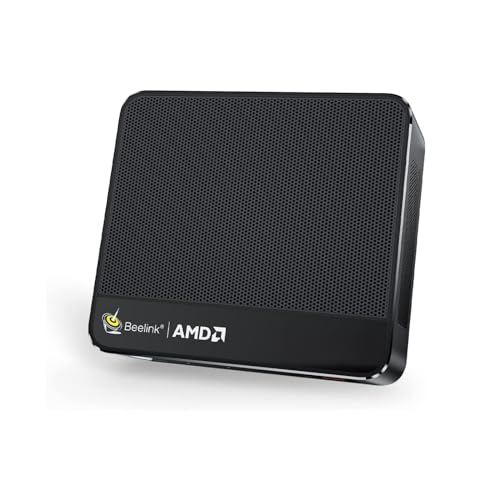
Where to buy
Check the latest price, availability and delivery on Amazon. Orders are placed on Amazon. We may earn a commission from qualifying purchases.
- Best small-space gaming desktop: Beelink SER5 MAX Mini PC, Ryzen 7 7735HS, Radeon 680M, 24GB RAM — Check on Amazon
- GMKtec NucBox M6 Mini PC, Ryzen 5 6600H, Radeon 660M, 16GB RAM — Check on Amazon
- ACEMAGIC Mini Gaming PC, Ryzen 7 7735HS, Radeon 680M, Triple 4K — Check on Amazon
- abytespark Gaming PC, GTX 1660 Super, 16GB RAM, 1TB SSD — Check on Amazon
See 2 more Amazon options
- STGAubron Gaming PC, Ryzen 5 5500, RX 580 8GB, 16GB RAM — Check on Amazon
- STGAubron Gaming PC, Core i7, RX 580 8GB, 16GB RAM — Check on Amazon
Read the full guide ↓
Disclosure: As an Amazon Associate, reviewstook.com earns from qualifying purchases. Links to Amazon on this page are affiliate links; they cost you nothing extra. Listing details such as price and availability change often, so check the current Amazon listing before you buy.
A small room changes what “best” means. When the desk is a metre wide, the bedroom doubles as the office, or the only free surface is a shelf, a gaming desktop is not just a spec sheet — it is a piece of furniture that has to earn the space it occupies, breathe in the space around it, and trail its cables somewhere that is not your elbow. So this guide grades the installation first and the hardware second: how much room each machine actually takes once it is plugged in, where its power supply lives, how far its cables reach and drop, and how much open air it needs around its vents to stay healthy. The spec-sheet verdicts from our main guide still stand — under $500 there is no new desktop with a current-generation graphics card, and every pick below is a previous-generation tower or an integrated-graphics mini PC — but the ranking here is re-sorted for the buyer whose scarcest resource is not money. It is square centimetres.
That re-sorting produces a clear split. Three of the six picks are mini PCs: small boxes that sit behind a monitor, on a shelf or beside a screen and ask for almost no surface at all. The other three are full-size towers, and in a small space a tower is a serious commitment — it claims floor or desk area permanently, it needs open air on its intake and exhaust sides, and it cannot be shut inside a cabinet to hide it. Towers still belong in this guide, because they hold the strongest graphics cards under $500 and the only real upgrade paths; but they are graded here as installations, and a tower that cannot breathe in your room is a bad buy however good its graphics card is. One honest note on method before the picks: the listings behind this guide do not publish a trustworthy set of dimensions, weights or mounting specifications for these machines, so this guide grades size by form-factor class — mini box, full tower — rather than inventing measurements. Measure your own spot against the live listing’s figures before you order; the five-step routine in the buying guide below walks through exactly how.
In this guide
Quick Picks
Short on time, or comparing several options at once? Each row below names a small-space situation and the machine that fits it, with a link to the listing.
| Your space | Pick | Why it fits | Link |
|---|---|---|---|
| Best for most small spaces | Beelink SER5 MAX, Ryzen 7 7735HS | The strongest mini here — a box that disappears behind the monitor | Check on Amazon |
| Best when the budget is as tight as the room | GMKtec NucBox M6, Ryzen 5 6600H | Lower end of this tier — check price on Amazon; mini footprint, money left for the desk setup | Check on Amazon |
| Best for a multi-monitor corner | ACEMAGIC Mini Gaming PC, Ryzen 7 7735HS | Triple 4K display support and 2.5G LAN from a mini box | Check on Amazon |
| Best tower if you have the floor space | abytespark Gaming PC, GTX 1660 Super | Strongest GPU under $500 and 1TB storage — if the room can take a tower | Check on Amazon |
| Best tower to grow into | STGAubron Gaming PC, Ryzen 5 5500 / RX 580 | AM4 platform with upgrades left — buy only when it sits inside this budget; check price on Amazon | Check on Amazon |
| Cheapest tower, with homework | STGAubron Gaming PC, Core i7 / RX 580 | Toward the lower end of this tier — check price on Amazon; verify the unspecified CPU before you commit the space | Check on Amazon |
How These Picks Were Chosen
The six machines are the verified set from our main Best Gaming Desktop Under $500 guide — the same real Amazon listings, the same honesty rules — re-graded for a different question. That question is not “which is fastest?” but “which can you actually live with in a small room?” Four installation tests were applied to every pick. The first is the footprint test: not the box alone, but the box plus the clearance it needs, the cables behind it and the surface it renders unusable — a tower on a small desk consumes the desk, while a mini behind a monitor consumes almost nothing. The second is the air test: towers move air with fans and need open intake and exhaust paths, so a pick loses marks if its natural home in a small room — inside a TV unit, under a desk against a wall, in a cupboard — is exactly where it would suffocate. The third is the power test: where does the electricity arrive? A tower’s supply is internal, so its address is simply a wall socket within cable reach; a mini PC runs from a separate power adapter, and that adapter needs a home of its own — on the desk, behind it, or in a cable tray — which is part of the installation whether listings mention it or not. The fourth is the cable test: display, power, Ethernet and peripherals all leave the back or sides of the machine and drop somewhere, and in a small space that drop is usually visible, so the tidier the cable story, the better the grade.
The hardware honesty from the main guide carries over unchanged. All six picks are sold new. No new desktop with a current-generation graphics card exists under $500 — the RTX 3050 towers that define “cheap modern gaming PC” typically sit well above this entire budget — so the towers here run previous-generation cards, the GTX 1660 Super and the Radeon RX 580, and the minis run integrated Radeon graphics a clear step below them. Those are 1080p machines: esports and older games play well, the newest releases ask for lowered settings, and none of them is a ray-tracing or 1440p desktop. Check the current price on Amazon before you buy, and where a pick habitually drifts above this budget it is flagged with an explicit buy-only rule rather than quietly presented as an in-budget machine. We did not use these machines ourselves; the grades below come from the maker listings and specification pages behind the main guide, read through the installation lens this keyword demands.
The Space a Gaming Desktop Really Occupies
A product photo shows a box. An installation is everything around the box, and in a small room the surroundings are where purchases go wrong. Start with air. A gaming tower is a wind tunnel with delusions of furniture: the three towers in this guide each run four case fans, pulling cool air in and pushing warm air out, and that circuit needs open space at both ends. Park a tower with its rear exhaust a centimetre from a wall, or its intake pressed against the side of a desk, and you have not saved space — you have built a slow oven that throttles the hardware you paid for. The extreme version, shutting a tower inside a closed media cabinet or cupboard to hide it, is refused outright in this guide for every tower pick: no door, no enclosed shelf, no exceptions. If the only home you can offer a tower is a sealed box, buy a mini instead and let it sit in the open.
The minis breathe differently — small fans, modest heat, a fraction of a tower’s power draw — but “differently” is not “not at all”: their vents still want open air rather than a drawer, a stack of books or the sealed back compartment of a TV stand. Their real space advantage is placement freedom. A mini can live behind the monitor it feeds, on a bookshelf among the books, beside the TV, or on the sliver of desk a tower would laugh at — and because it sips power, the heat it adds to a small room is a fraction of what a tower contributes on a summer evening. Then there is the power supply’s address. On a tower it is settled: the supply is inside the case, one cable runs to the wall, and the only planning is reach. On a mini, the adapter is a separate object in the room — it will live on the desk, behind the desk, or in a tray under it — and giving it a planned address before the machine arrives is the difference between a tidy corner and a warm lump in the cable pile. Finally, walk the cable drop in your head: display cable, power, Ethernet if you wire it, keyboard, mouse, headset. In a large room those cables vanish behind furniture. In a small one they cross your sightline every day, which is why the reviews below treat the drop as part of each pick’s footprint.
The 6 Best Gaming Desktops for Small Spaces Under $500
Beelink SER5 MAX Mini PC — Ryzen 7 7735HS, Radeon 680M, 24GB LPDDR5, 500GB SSD
Who it suits: Small-space buyers who want the most gaming a disappearing computer can do — a box that lives behind the monitor and leaves the desk empty. Status: sold new.
As an installation, this is the easiest machine in the guide to place and the easiest to forget. The SER5 MAX is a mini PC in the fullest sense: a box smaller than a paperback that can sit behind the display it feeds, stand on a shelf, or occupy the corner of a desk a tower would consume entirely. Its cable story is correspondingly short — power in, display out, peripherals — and because it draws a fraction of a tower’s power, it adds little heat to a small room and runs near-silently while doing it. Give its power adapter a planned home behind the desk or in a tray and the whole installation reduces to a screen, a keyboard and empty surface. For a bedroom desk, a studio flat or a shared living room, that vanishing act is the feature; everything else is specification.
The specification, fortunately, is the strongest of the three minis. The Ryzen 7 7735HS is a modern eight-core laptop-class processor, and its integrated Radeon 680M graphics are the best integrated graphics in this guide — roughly the GTX 1050 Ti class, which means esports titles play well at 1080p, older AAA games are playable at low-to-medium settings, and the newest releases ask for upscaling and patience. The supporting cast has no asterisks: 24GB of memory and a 500GB PCIe 4.0 NVMe SSD make it a complete everyday computer as well as a games machine. It sits at the very top of this budget tier, buying the most capable small box in it — check price on Amazon before you order.
The limitation is architectural and permanent, and in a small space it cuts both ways. The 24GB of LPDDR5 memory is soldered to the board: it cannot be upgraded, ever, and the graphics are integrated for life — there is no slot and no card in this machine’s future. The fair judgement is that a mini PC is an appliance, bought finished, and 24GB with an eight-core CPU is a finished specification with years in it; the SSD can at least be swapped for a larger one when the library outgrows 500GB. What you must not do is buy it as a small gaming tower. It is the best small desktop under $500 — the tower part is the one thing it will never be.
- Mini footprint: sits behind a monitor or on a shelf and returns your desk to you.
- Radeon 680M graphics and 24GB of RAM — the strongest mini specification here.
- Near-silent and cool-running: adds little heat or noise to a small room.
Honest limitation: Soldered memory and integrated graphics for life — the specification you buy is the specification forever, a clear performance step below the discrete-GPU towers.
Choose it if your space is genuinely tight and your gaming is esports, indie and backlog. Skip it if you want a machine you can open and improve — that is what the towers below are for.

GMKtec NucBox M6 Mini PC — Ryzen 5 6600H, Radeon 660M, 16GB DDR5, 512GB SSD
Who it suits: Buyers whose room and budget are both small — the $500 has to cover a monitor and a desk setup, not just the computer. Status: sold new (GMKtec-Direct on Amazon).
The M6 makes the small-space argument in its purest form: spend less on the box, keep the box tiny, and put the savings into the setup around it. It is a mini PC of the same disappearing class as the Beelink — a small unit that tucks behind a display or onto a shelf edge, trails a short cable drop, and asks its power adapter to find a home behind the desk. Positioned toward the lower end of this tier for the 16GB configuration — check price on Amazon — it leaves real headroom inside this budget: enough for a decent 1080p monitor, which is the purchase that actually completes a small battlestation. A tiny expensive box in front of a dim old screen is a worse installation than this machine in front of a good one.
It also breaks the mini-PC rule in one welcome way. Its 16GB of DDR5 is socketed SO-DIMM memory, not soldered, and the chassis takes two M.2 SSDs — so the two upgrades minis usually forbid, more memory and more storage, are both possible later, even though the graphics remain integrated for life. The rest of the specification reads above its price: a six-core Ryzen 5 6600H, Wi-Fi 6E, Bluetooth 5.2, dual 2.5G Ethernet ports, a full-feature USB4/Type-C port and Windows 11 Pro. The trade is the graphics: the Radeon 660M sits a class below the 680M machines — esports at reduced settings, older games comfortably, new AAA titles only in the “technically runs” sense.
One warning belongs in bold company with the praise, because it is a space mistake as much as a money one: GMKtec sells barebones and alternate configurations on related listings, so confirm the listing you order is the complete 16GB + 512GB machine, not a bring-your-own-parts kit at a temptingly lower number. A barebones kit arriving in a small room is not just an incomplete computer — it is a project that colonises the desk you were trying to keep clear until the parts arrive. Bought correctly, this is the cheapest credible new gaming desktop in the guide, and the one that leaves a small room best equipped overall.
- Sits toward the lower end of this tier — check price on Amazon; the headroom helps buy the monitor a small setup actually needs.
- Socketed DDR5 memory and two SSD slots — upgrade paths minis almost never offer.
- USB4, Wi-Fi 6E and dual 2.5G LAN in a box that hides behind the screen.
Honest limitation: The Radeon 660M is the weakest graphics in this guide, and related listings include barebones kits that must not be confused with the complete machine.
Choose it if the budget must stretch to a whole setup, or the room is small and the gaming is esports-and-older. Skip it if modern AAA gaming is the goal — that needs the towers, or a bigger budget.

ACEMAGIC Mini Gaming PC — Ryzen 7 7735HS, Radeon 680M, 24GB RAM, 512GB SSD, Windows 11 Pro
Who it suits: Small-space buyers whose desk is a workstation by day — several screens, fast wired networking — and a games machine by night. Status: sold new (sold by ACEMAGIC US).
The installation story starts where the Beelink’s does: a mini box that occupies almost no surface, sits behind or beside its display, and keeps its cable drop short. What this machine adds is a reason for a small desk to run more cables willingly. It supports three 4K displays, which in a small space is a genuinely different proposition from one large screen: a compact corner can carry a main gaming display plus a second panel for work, chat or a stream dashboard without a tower anywhere in sight. Add a 2.5Gbps Ethernet port — worth having if your router and storage can use it, and worth the one extra cable in the drop — Wi-Fi 6, and Windows 11 Pro rather than Home, and the picture is a work-and-play station that happens to be tiny.
Under the shell it is the same honest recipe as the SER5 MAX: a Ryzen 7 7735HS with Radeon 680M graphics, 24GB of RAM and a 512GB SSD, which means the same performance character — esports and older titles at 1080p, the newest games only with settings and expectations lowered, and the same near-silent, low-heat presence in the room. It sits near the top of this budget tier, positioned just below its Beelink rival with a slightly larger SSD — check the current price on Amazon. Between the two, the decision is about ports and the current price on the day; the silicon is identical and so is the footprint class.
Alongside the usual mini-PC cautions there is one that belongs to the listing itself. The memory configuration is fixed at purchase and the graphics are integrated permanently — storage is the only upgrade that exists. And mini-PC listings commonly host several configurations under one page, so confirm on the live listing, and again at checkout, that the variant in your cart is the 7735HS with 24GB, not a cheaper sibling wearing the same product name; in a small space the wrong variant is doubly annoying, because the return-and-reorder cycle happens in the same few square feet you were trying to organise. Buy the right variant and this is the most connected small desktop under $500.
- Triple 4K display support: a multi-screen corner with no tower in it.
- 2.5Gbps LAN and Windows 11 Pro — the best desk infrastructure of the minis.
- Same 7735HS / 680M recipe as the class leader — check price on Amazon.
Honest limitation: Integrated graphics and a fixed memory configuration for life, and the listing’s multiple variants make variant-checking at checkout essential.
Choose it if your small desk runs multiple monitors or fast wired networking. Skip it if one screen and the lowest price matter more — the M6 above leaves more money for both.

abytespark Gaming PC — Core i7, GTX 1660 Super 6GB, 16GB RAM, 1TB NVMe SSD
Who it suits: Buyers with a small room but a genuine tower-sized home for the machine — a floor corner or a desk end with open air around it — who want the strongest graphics under $500. Status: sold new.
Grade the installation honestly and this is the most demanding pick so far: a full-size tower with four RGB fans that must live in the open. It needs clearance at its intake and exhaust, it cannot go inside a cabinet or cupboard, and on a small desk it will consume the end of the desk entirely — which is why its natural small-space home is the floor beside the desk, on a hard surface rather than carpet, with the rear exhaust kept off the wall and the cable drop (power, display, peripherals) walked up to the desk deliberately rather than left to sprawl. Its power supply is internal, so at least the electrical address is simple: one socket within reach of the case. If your room can offer that floor corner with breathing room, the tower earns its footprint like no mini can.
What it earns it with is the graphics card. The GTX 1660 Super is the fastest GPU in this guide — a genuine 1080p card with 6GB of GDDR6 that handles esports titles at high frame rates and older AAA games at medium-to-high settings without the compromises the RX 580 towers make, and the only card here with a modern video encoder worth mentioning for light streaming. Around it the documented configuration is generous: 16GB of RAM and a full 1TB NVMe SSD, double the storage of the other towers, which matters in a small library of large games. The listing (series AOV1660S 6G) sits comfortably inside this budget tier with room to spare — check price on Amazon.
The catches are the base guide’s catches, unchanged. The documented CPU is a Core i7-7700, a quad-core chip from 2017 on the end-of-line LGA1151 platform: there is no meaningfully faster CPU for this motherboard, so the upgrade path is a rebuild, not an upgrade — judge it as the best-performing finished appliance in the guide, bought for what it does now. And because the exact configuration under this ASIN has been known to drift, verify the CPU and card in the listing and again in the box before the return window closes; in a small room, a return is a hassle you particularly want to avoid, which is an argument for checking twice, not for skipping the check.
- GTX 1660 Super 6GB — the strongest graphics card under $500, worth floor space.
- 1TB NVMe SSD: double the rival towers’ storage, room for a real library.
- Positioned comfortably inside this budget tier — check price on Amazon.
Honest limitation: A full tower’s footprint and airflow demands, wrapped around a 2017 dead-end CPU platform — no CPU upgrade path, and no hiding it in furniture.
Choose it if you have an open floor corner and want the best 1080p performance per dollar today. Skip it if the only home you can offer is enclosed, or a living upgrade path is the point — that is the Ryzen tower below.
STGAubron Gaming PC — Ryzen 5 5500, Radeon RX 580 8GB, 16GB DDR4, 512GB SSD
Who it suits: Small-space buyers committing one open corner to a tower they intend to keep and improve for years. Status: sold new (sold by STG USA).
The installation terms are the same as the abytespark’s — full tower, four RGB fans, open air at intake and exhaust, no cabinets — with one small-space consideration the other tower lacks: this machine is a project as well as a product. Its AM4 motherboard can later accept substantially faster processors, including the gaming-celebrated X3D chips, and a future graphics card swap is the rest of the plan. In a small room that means the tower’s home should be somewhere you can open it: a corner you can pull it out of, work on, and slide back, rather than a slot so tight that every upgrade becomes a furniture rearrangement. Choose the corner with that future Saturday in mind and the platform argument works even in a bedsit.
Today’s machine is a sensible one: a modern six-core Ryzen 5 5500, a Radeon RX 580 8GB — an older card than the 1660 Super, playing esports and older AAA titles at 1080p medium, but carrying 8GB of VRAM that ages gracefully in texture-heavy games — plus 16GB of DDR4, a 512GB SSD, Wi-Fi 6, Bluetooth 5.2, Windows 11 Home, and an RGB keyboard and mouse in the box, which saves a first-time buyer a real second purchase and a small desk a second delivery. AMD has moved the RX 500 series to a legacy driver cadence: the card works and plays, but its driver story is maintenance, not advancement.
Two flags from the base guide fly at full size here. The first is price: this machine often sits above this budget and only visits it at the lower end of its range. The rule is absolute: buy it only when it sits inside this budget — check price on Amazon — and walk away when it sits above it, because well above this budget you are within sight of the RTX 3050 towers that reset this category. The second flag is the power supply: STGAubron does not publish its wattage, and since a future GPU upgrade — the entire point of the AM4 platform — depends on PSU headroom, open the case when it arrives, read the PSU label, and plan around the number you find. If it is marginal, a quality PSU is a cheap fix, but budget it knowingly.
- AM4 platform with a real CPU upgrade path — the tower that can grow in place.
- The RX 580 is an older card whose 8GB of VRAM ages well at 1080p.
- An RGB keyboard and mouse come in the box, with Wi-Fi 6 and Bluetooth 5.2 built in.
Honest limitation: For much of the year the price sits above this budget — buy only when it drops inside it; check price on Amazon — the PSU wattage goes unpublished, and the RX 580 is on AMD’s legacy driver cadence.
Choose it if you have one open corner and will actually upgrade over the next two years. Skip it if the live price sits above this budget, or your only tower space is enclosed.

STGAubron Gaming PC — Core i7, Radeon RX 580 8GB, 16GB RAM, 512GB SSD
Who it suits: Bargain hunters with an open tower corner who will do ten minutes of verification homework before committing the space. Status: sold new.
Physically, this is the same commitment as its sibling: a full-size tower, four RGB fans, an internal power supply, a cable drop to plan and a strict need for open air — no cupboard, no sealed TV unit, no pushing the exhaust against the wall to save a centimetre. In a small room, floor space is the scarcest currency there is, which raises the stakes on this listing’s particular catch: before you give a tower a permanent corner of a small room, you want to be certain about what is inside it, and certainty is exactly what this listing withholds. On paper the recipe matches the Ryzen tower — RX 580 8GB, 16GB of RAM, a 512GB SSD, Wi-Fi 6, RGB fans, Windows 11 Home — positioned toward the lower end of this tier, below its sibling — check price on Amazon. What separates it is a single word the listing leaves out.
The processor field reads “Core i7”, up to 3.9GHz — and nowhere does the listing say which generation of Core i7 that is. That omission matters anywhere; in a small space it matters more, because “Core i7” spans more than a decade of silicon — a recent i7 is a fast modern chip, while an older one is a quad-core that will bottleneck the RX 580 in CPU-heavy games and strand you on another dead-end platform, in a tower you have already made room for. Independent coverage of this listing family has noted the same gap, alongside middling ratings and mixed reliability reports. None of that makes the machine a scam; it makes it a verify-then-decide purchase rather than a click-and-forget one.
The checking routine is short, and on this pick it is not optional. Put the question to the seller in the listing’s Q&A before you order — the exact CPU model, in writing — and keep a screenshot of the reply. On arrival, open Windows Task Manager and read the processor name before installing a thing, then give the machine an hour of gaming with temperatures watched — all inside the return window, never after it. If the chip turns out to be a reasonably modern six-core, you have bought the cheapest honest route to an RX 580 tower in this guide, with the same unpublished-PSU caveat as its sibling: open the case, read the label, and let that number plan your upgrades. If what arrives is an old quad-core behind a famous badge, send it back and buy the Ryzen build above instead — its processor is named in full. A listing that will not tell you what its CPU is has told you something; do not give it the corner until it answers.
- An RX 580 8GB tower toward the lower end of this tier — check price on Amazon; among the most affordable routes to a discrete card in this guide.
- The 16GB of memory and the 512GB drive meet the floor this guide sets for the tier.
- Wi-Fi 6 and Windows 11 Home included.
Honest limitation: Which generation of Core i7 you get is unspecified — anything from a modern chip to a bottleneck-era quad-core is possible — the PSU wattage goes unpublished, and coverage of this listing family reports mixed reliability. Verification on delivery is not optional.
Choose it if the CPU model is confirmed in writing by the seller and you are willing to stress-test inside the return window. Skip it if you cannot get the CPU named — a small room is the wrong place to store a disappointment.
Comparison Table
| Product | Form factor | Graphics | Small-space verdict | Link |
|---|---|---|---|---|
| Beelink SER5 MAX | Mini PC | Radeon 680M (integrated) | Disappears behind the monitor — the easiest install here | Check on Amazon |
| GMKtec NucBox M6 | Mini PC | Radeon 660M (integrated) | Tiny and cheap — savings fund the rest of the setup | Check on Amazon |
| ACEMAGIC Mini Gaming PC | Mini PC | Radeon 680M (integrated) | Mini box, multi-monitor ambitions | Check on Amazon |
| abytespark Gaming PC | Full tower | GTX 1660 Super 6GB | Needs an open floor corner — earns it with the best GPU | Check on Amazon |
| STGAubron Ryzen 5 5500 | Full tower | RX 580 8GB | One corner, kept for years — leave room to open it | Check on Amazon |
| STGAubron Core i7 | Full tower | RX 580 8GB | Verify the CPU before the corner is committed | Check on Amazon |
How to Choose a Gaming Desktop for a Small Space: Measure Before You Buy
Small-space buying fails in a predictable order: the machine is chosen first and the room is consulted afterwards. Reverse it. The five steps below take twenty minutes with a tape measure and will save you a return, a suffocated tower, or a desk that never feels clear.
- Step 1 — Measure the spot. Decide where the machine will actually live — behind the monitor, on the shelf, on the floor corner — and measure that space, not the space you wish you had. Then read the live listing’s stated dimensions for the machine you are considering and compare them honestly; the listings behind this guide are graded by form-factor class here precisely because their published figures vary, and the listing, not this article, is the authority on the box you will receive. If the spot is a shelf, measure its depth and height as well as its width — shelf lips and the shelf above are the measurements everyone forgets.
- Step 2 — Reserve ventilation clearance. Whatever the spot measures, the machine’s real footprint is bigger. A tower needs open air at its intake and exhaust — leave a hand’s breadth or more of unobstructed space around its vented faces, keep the rear exhaust off the wall, and rule out any enclosed cabinet, cupboard or sealed TV unit entirely, however perfect the fit looks. A mini needs less, but not nothing: vents unblocked, no drawer, no burial under books or consoles. If Step 1’s spot cannot satisfy Step 2, the spot is wrong, not the rule.
- Step 3 — Give the power supply an address. For a tower, the supply is internal: the address is a wall socket, so confirm one is within the case’s cable reach of the spot without an extension lead crossing the room. For a mini, the power adapter is a separate object that will live somewhere — decide now whether that is behind the desk, in a cable tray, or on a shelf end, and confirm the spot from Step 1 still works with the adapter in it. An adapter with no planned address ends up in the cable pile, warming the dust.
- Step 4 — Walk the cable drop. Trace every cable from the machine’s position to its destination: display cable to the screen, power to the socket, Ethernet if you wire it (worth it for the ACEMAGIC’s 2.5G port or the M6’s dual ports, if your router is near), keyboard, mouse, headset. In a small room each of those runs is visible, so check lengths, check where they fall, and prefer the placement whose drop falls behind furniture rather than across the desk. A mini behind its monitor has the shortest drop in this guide; a floor tower’s drop is a small project — plan it, do not discover it.
- Step 5 — Then order, and verify on arrival. Only now spend the money — and spend the first evening verifying what arrived, because four of these six picks carry a documented check. Confirm the ACEMAGIC’s variant is the 7735HS with 24GB, not a cheaper sibling under the same listing. Confirm the GMKtec is the complete 16GB + 512GB machine, not a barebones kit. Read the abytespark’s CPU and graphics card against the listing, since its configuration has been known to drift. Ask the STGAubron i7’s seller for the exact CPU model before ordering, then confirm it in Task Manager on arrival; and on either STGAubron, open the case and read the power supply label, because the wattage is unpublished and it governs every upgrade plan. Stress-test whatever arrives inside the return window. Verification is Step 5 of measuring, not an optional extra.
Common Buying Mistakes
- Hiding a tower in a closed cabinet or cupboard to “save space.” A tower in a sealed box is an oven with a graphics card in it — the space you save is repaid in throttling and heat. If it must be hidden, buy a mini and hide that in the open instead.
- Measuring the box and forgetting the installation — the clearance around the vents, the adapter on the desk, the cables behind. The machine’s real footprint is everything it touches.
- Putting a tower on carpet or hard against a wall. Bottom and rear airflow are not suggestions; a floor tower wants a hard surface and daylight behind its exhaust.
- Paying above this budget for the Ryzen STGAubron because its listing wears an in-budget label. It often sits above this tier; the rule is to buy only when it sits inside this budget — check price on Amazon — or not at all.
- Committing a small room’s only tower corner to the STGAubron Core i7 before the seller names the CPU generation. Space is the scarcest thing you own; do not spend it on an unspecified processor.
- Ordering the wrong mini variant — a cheaper configuration under the ACEMAGIC’s listing, or a GMKtec barebones kit instead of the complete M6 — and discovering it at unboxing, in the room you were trying to organise.
- Assuming a mini PC can be upgraded like a tower later. With soldered memory in the 680M machines and integrated graphics everywhere, the specification on the day you buy is the specification forever; only the M6’s socketed RAM and dual SSD slots break that rule, and only for memory and storage.
- Spending the whole $500 on the box and nothing on the display, then judging a decent machine through a dim old monitor. The M6 exists in this guide to make the opposite mistake impossible.
Final Recommendation
- Most small spaces: Beelink SER5 MAX — the strongest mini, an installation that disappears.
- Tight room, tight budget: GMKtec NucBox M6 — and spend the savings on the monitor.
- Multi-monitor corners: ACEMAGIC Mini Gaming PC — triple 4K from a mini box.
- Open floor corner, maximum frames: abytespark Gaming PC — the best GPU under $500.
- One corner, kept for years: STGAubron Ryzen 5 5500 — bought only when it sits inside this budget; check price on Amazon.
Our top two for small-space buyers are the Beelink SER5 MAX, the machine that asks the least of a room while doing the most of any mini here, and the GMKtec NucBox M6, which trades a class of graphics for a price that lets the whole setup — monitor included — fit the budget as comfortably as the box fits the shelf. Between them they cover most small rooms honestly: performance that vanishes, or value that equips. Buyers with a genuine open corner and a taste for upgrading should read the tower reviews above with a tape measure in hand; buyers whose budget or room is larger will find the same installation grading at Best Gaming Desktop For Small Spaces Under $700, and buyers who simply want the spec-sheet ranking should return to Best Gaming Desktop Under $500. Whatever you choose: measure first, leave the air its room, and verify what arrives while returning it is still free.
Frequently Asked Questions
Can I put a gaming tower inside a TV unit or cabinet to save space?
No — not a closed one. The towers in this guide cool themselves with case fans moving room air through the chassis; seal one in a cabinet and the air inside heats until the hardware throttles itself to survive. An open-backed, open-front shelf with clearance around the vents is a different matter, but a door that closes is a refusal. If hiding the machine is the priority, a mini PC sitting in the open behind your monitor is both tidier and healthier than a tower suffocating in furniture.
How much clearance does a gaming desktop actually need?
Enough that every vented face breathes room air rather than its own exhaust: as a working rule, a hand’s breadth or more of open space around a tower’s intake and exhaust faces, the rear kept off the wall, and nothing stacked on top. Minis need the same principle at smaller scale — vents unblocked and no enclosed drawer or compartment. The listings’ own figures and manuals are the authority for a specific machine; the principle is that clearance is part of the footprint, so budget space for it in Step 1 of the checklist above, not after the box arrives.
Is a mini PC really a gaming desktop?
It is a desktop that games, within honest limits. The Radeon 680M machines here play esports and older titles at 1080p and the newest games only at lowered settings; the 660M machine sits a class below that. What none of them does is match a discrete graphics card, do ray tracing, or run 1440p — and none can be upgraded into doing so. For a small room whose gaming is esports, indie and backlog, that trade buys silence and an empty desk. For modern AAA ambitions, the towers — or a bigger budget, starting with Best Gaming Desktop Under $700 — are the honest route.
Where does the power supply live on these machines?
On the three towers, inside the case: one power cable runs from the tower to a wall socket, so the only planning is reach. Note that STGAubron does not publish its towers’ PSU wattage, so read the label inside the case on arrival — that number governs any future graphics-card upgrade. On the three minis, power arrives through a separate adapter that sits outside the box; it needs a home of its own behind the desk, in a cable tray or on a shelf end. Either way, give the supply an address in your plan before the machine arrives, as Step 3 of the checklist sets out.
New or renewed for a small-space desktop?
All six picks here are sold new, each with a manufacturer’s warranty and the standard return window. The renewed route — refurbished business towers with an added graphics card — exists at this price and can be good value, but judge it on its own terms: a shorter guarantee (Amazon Renewed typically covers 90 days), hardware that has already lived a working life, and, for this keyword specifically, a business tower’s footprint, which is rarely smaller than the gaming towers above. Never compare a renewed price against a new price as if they were the same offer, and verify the delivered configuration either way.
What if my room is small but I want to upgrade later?
Then you are choosing between two honest answers. The STGAubron Ryzen tower is the only pick whose platform genuinely grows — faster AM4 CPUs and, PSU permitting, newer graphics cards — but it asks for a permanent open corner and room to open the case. The GMKtec M6 is the compromise: a mini that unusually allows memory and storage upgrades through its socketed DDR5 and dual SSD slots, while its graphics stay integrated forever. The 680M minis and the abytespark tower are finished appliances. Buy the future you will actually use, and measure for it first — the dedicated small-form-factor categories at Best Small Form Factor Gaming PC Under $500 and Best Compact Gaming PC Under $500 are also worth a look before you commit a corner.
- Best Gaming Desktop Under $400
- Best Gaming Desktop Under $700
- Best Gaming Desktop For Beginners Under $500
- Best Gaming Desktop For Small Spaces Under $400
- Best Gaming Desktop For Streaming Under $500
- Best Gaming PC Under $500
- Best Budget Gaming PC Under $500
- Best Mini Gaming PC Under $500
- Best Prebuilt Gaming PC Under $500


