Where to buy
Check the latest price, availability and delivery on Amazon. Orders are placed on Amazon. We may earn a commission from qualifying purchases.
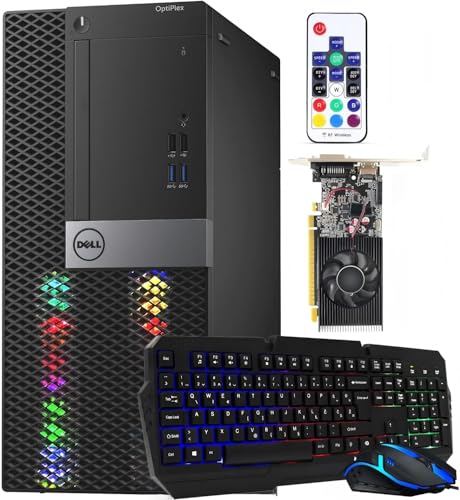
- Best encoder in the guide: Dell RGB Gaming Tower, Core i7 6th Gen, GTX 1050 Ti 4GB, 16GB RAM, 512GB SSD (Renewed) — Check on Amazon
- Beelink SER5 MAX Mini PC, Ryzen 7 5800H, 16GB RAM, 500GB SSD — Check on Amazon
- GMKtec M5 Plus Gaming Mini PC, Ryzen 7 5825U, 32GB RAM, 1TB SSD — Check on Amazon
- BOSGAME P4 Light Gaming Mini PC, Ryzen 7 5700U, 32GB RAM, 1TB SSD — Check on Amazon
See 2 more Amazon options
- KAMRUI E3B Mini Gaming PC, Ryzen 5 7430U, 32GB RAM, 512GB SSD — Check on Amazon
- Dell OptiPlex 9020 SFF Desktop, Core i7-4770, 32GB RAM, 1TB SSD (Renewed) — Check on Amazon
Read the full guide ↓
Disclosure: As an Amazon Associate, reviewstook.com earns from qualifying purchases. Links to Amazon on this page are affiliate links; they cost you nothing extra. Listing details such as price and availability change often, so check the current Amazon listing before you buy.
Streaming asks a computer to do two jobs at once, and under $400 it is worth being precise about what those jobs are before any product names appear. The workflow this guide grades against is the real one: a game rendering on the machine, OBS compositing your scenes, a browser holding chat and alerts open, a local recording saving alongside the broadcast, and the whole picture leaving the house as a constant-bitrate stream — around 6,000 kbps CBR for Twitch at 1080p60 or 720p60, with YouTube accepting higher bitrates, 1440p uploads and AV1 where the hardware supports it. That last clause matters immediately: nothing in this guide can encode AV1. Not one pick. AV1 encoding lives on current-generation graphics hardware that costs more than this entire budget, so if AV1 is the reason you are shopping, the honest answer is to shop a higher tier. What $400 can do — genuinely, not as a consolation prize — is H.264 streaming done properly: a hardware encoder block that compresses the picture without stealing frames from your game, enough processor and memory to hold the game, the broadcast software, the chat window and the recording at the same time, and a wired network connection that does not drop frames when someone else in the house starts a video call.
That is why this guide grades the encoder first and the game second, which is the reverse of how most budget pages are written. A streaming PC lives or dies on its encoder silicon: a dedicated hardware encoder turns gameplay into a stream on a fixed-function block while the graphics hardware keeps rendering, whereas software encoding hands the compression to the same processor cores your game is fighting for — and at this budget, there are no spare cores. So each pick below is graded on the encoder its documented hardware actually carries. The renewed Dell tower at the top owns the only discrete NVIDIA encoder in the guide, a Pascal-generation NVENC block inside its GTX 1050 Ti: an older encoder generation, honestly labelled as such, but a dedicated one, and at Twitch bitrates a dedicated block beats a shared processor every time. The four Ryzen mini PCs encode through AMD’s VCN hardware inside their integrated graphics — a real hardware encoder, visibly softer than NVIDIA’s at the same bitrate, with no AV1 — and they differ from each other in how much processor, memory and storage surrounds that encoder. The second Dell, a renewed OptiPlex, carries the oldest encoder here, a 2013 Quick Sync generation, and its review says plainly what that means: as delivered it is a project base for a streaming desk, not a streaming machine, and it is graded last because of it.
One more piece of honesty belongs up front, because it shapes every recommendation below. At this budget, the realistic streaming shapes are three: a one-machine stream of esports and older games, where the game is light enough to share the box with OBS; a console stream, where a capture card brings the console’s picture in and this machine’s only jobs are compositing, encoding and uploading — the lightest workload of the three, and the one where the cheapest picks here genuinely shine; and a talk, desktop or creative stream, where the “game” is a screen, a camera and your voice. Modern AAA games streamed from the same machine that renders them are not on this menu, and any guide that implies otherwise at $400 is selling you a dropped-frames counter. Below are the quick picks, the encoder-first reasoning, detailed reviews of all six machines, a full OBS setup section, the kit you will still need around the machine, and the mistakes that end first streams early.
In this guide
Quick Picks
Short on time, or comparing several options at once? Each row below names a streaming job and the machine that suits it, with a link to the listing.
| Streaming job | Pick | Why it stands out | Link |
|---|---|---|---|
| Best encoder in the guide | Dell RGB Gaming Tower, GTX 1050 Ti (Renewed) | The only discrete NVENC encoder here — Pascal generation, dedicated block, slot-powered | Check on Amazon |
| Best one-machine esports stream | Beelink SER5 MAX Mini PC, Ryzen 7 5800H | Strongest processor in the guide around an AMD VCN encoder — check price on Amazon | Check on Amazon |
| Best for recording while you stream | GMKtec M5 Plus Mini PC, Ryzen 7 5825U | 32GB RAM and 1TB SSD with a second slot — room for the game, OBS and the archive | Check on Amazon |
| Best wired-network citizen | BOSGAME P4 Mini PC, Ryzen 7 5700U | Dual 2.5GbE LAN — one cable for the stream, one for everything else | Check on Amazon |
| Cheapest credible stream desk | KAMRUI E3B Mini PC, Ryzen 5 7430U | 32GB dual-channel memory and a VCN encoder — ideal for console capture; check price on Amazon | Check on Amazon |
| Best project base | Dell OptiPlex 9020 SFF (Renewed) | 32GB and 1TB already fitted — a chassis whose encoder arrives with its GPU; check price on Amazon | Check on Amazon |
How These Picks Were Chosen
The first filter was the encoder, because it is the component a streaming guide is actually about. Every machine below was graded on the hardware encoder its documented silicon carries — not on a badge, not on a marketing line. NVIDIA’s NVENC, Intel’s Quick Sync and AMD’s VCN are all fixed-function blocks that compress video without consuming the cores or shaders your game needs, and all six picks have one; what separates them is generation and company. The Dell tower’s GTX 1050 Ti carries a Pascal-generation NVENC: a dedicated block with H.264 and HEVC support, no AV1, and quality a visible step behind the NVENC generations that followed it — but dedicated, which at 6,000 kbps is the property that matters. The four Ryzen minis share AMD’s VCN encoder family across three processor generations; VCN’s H.264 output is honestly softer than NVENC’s at Twitch bitrates, a known trade every AMD-encoder streamer manages with settings rather than denial. The OptiPlex’s i7-4770 carries Haswell-generation Quick Sync from 2013, the oldest encoder silicon here by years, and it is graded that way. No pick was credited with an encoder feature its hardware does not have: there is no AV1 encode anywhere in this guide, and no pick’s encoder is described as a newer generation than it is.
The second filter was simultaneous load, because streaming is never one program. The graded workload was a game plus OBS compositing and encoding, a browser with chat and alert pages open, and a local recording writing to disk at the same time — the ordinary Tuesday-evening stream. That workload is why memory configuration and storage capacity carry unusual weight in the reviews: 32GB of memory and a terabyte of storage are not gaming luxuries here, they are the difference between a stream that holds together for three hours and one that starts swapping, stuttering and dropping frames in hour two. It is also why processor core counts matter beyond the game itself — the eight-core chips in this guide hold the combined workload with room to breathe, and the reviews say where the smaller chips start to feel the squeeze.
The third filter was the network, and it is a rule rather than a ranking: streaming is a wired activity. Every pick below has a physical Ethernet port, and the OBS section of this guide treats the cable as part of the purchase. Wi-Fi figures in the listings were noted and then deliberately ignored as a streaming path, because a stream that shares airtime with every phone in the house will drop frames no encoder can save. Two picks carry dual LAN ports, which earns them a specific streaming virtue — one port can be dedicated to the stream’s path to the router while the other handles everything else the desk does. Finally, the standing filters from the base guide apply unchanged: the budget is a ceiling applied to every pick, renewed machines are named as renewed everywhere they appear with their 90-day window treated as a testing deadline, the Dell tower’s buy-only-at-or-under-$400 rule is absolute, and the BOSGAME listing family’s processor-variant warning is carried at full size. We did not use these machines ourselves; the grading rests on the maker and refurbisher listings, Amazon’s product records and independent price histories documented in the base guide’s research.
The 6 Best Gaming Desktops for Streaming Under $400
Dell RGB Gaming Tower Computer, Core i7 6th Gen, GTX 1050 Ti 4GB, 16GB RAM, 512GB SSD (Renewed)
Who it suits: The one-machine streamer on a real budget — you want to play and broadcast from the same box, and you want the encoder to be a dedicated block of silicon rather than a hope.
This renewed tower tops a streaming guide for one reason no other pick can match: its GeForce GTX 1050 Ti contains a Pascal-generation NVENC encoder, a dedicated hardware block that turns gameplay into an H.264 stream without touching the processor cores the game is using and without competing with the graphics rendering itself. That separation is the entire architecture of a good one-machine stream. While the card renders your esports title or older AAA game at 1080p low-to-medium settings, the encoder block compresses the picture at a steady 6,000 kbps CBR, the six-core-era Core i7 handles OBS’s compositing, the browser and the chat, and the stream leaves by cable. Pascal NVENC needs its honesty label: it is an older encoder generation, its H.264 quality at a given bitrate sits a step behind the NVENC blocks in newer NVIDIA cards, and it offers no AV1 — for YouTube’s AV1 path or 1440p streaming ambitions, this is not your machine, and no settings menu will make it so. Judged on the Twitch-shaped job it can actually do, though, it is the strongest encoder in this guide by a clear margin, because it is the only discrete one.
The simultaneous-load story is good with one managed caveat. The 16GB of memory is the tightest in the guide alongside the Beelink, and a game, OBS, a browser full of chat and alerts, and a recording will fill it — the fix is behavioural rather than financial: keep the browser lean, close the launcher libraries you are not using, and record to the 512GB SSD with an eye on free space, because a recording drive that fills mid-stream ends the recording, not politely. The tower’s second streaming virtue is its future. The graphics slot is open to a later card, and a card swap is also an encoder swap: the day a newer low-power NVIDIA card goes in, the stream gains a newer NVENC generation with it, which makes this the only pick whose encoder can improve without replacing the machine. Until you have read the refurbished power supply’s label inside the case — the listing does not publish its wattage — keep any swap in the slot-powered class. The condition terms are the renewed ones: Refurbished – Excellent through Amazon Renewed, sold by STG USA, with the 90-day refund-or-replacement window treated as a stress-testing deadline — stream hard on it in week one, at full bitrate, for full sessions. And the price rule from the base guide stands absolute: this listing is known to drift above this budget, so check the price on Amazon before you order. Buy it at or under $400, or do not buy it that day.
- Pascal NVENC — the only discrete, dedicated hardware encoder in this guide.
- The only pick whose encoder can be upgraded later, via the graphics slot.
- Amazon Renewed Refurbished – Excellent, sold by STG USA, 90-day window to stress-test.
Honest limitation: Pascal NVENC is an older encoder generation — softer H.264 than modern NVENC and no AV1 — the platform is a dead-end 2015-era socket, and the listing’s price drifts above $400 as often as it sits below it.
Choose it if you will stream games from the same machine you play them on, and you will price-watch it under the $400 line. Skip it if your stream is console-based — the minis below do that job cheaper — or if AV1 is a requirement rather than a wish.

Beelink SER5 MAX Mini PC, Ryzen 7 5800H, 16GB RAM, 500GB SSD
Who it suits: Streamers who want the strongest all-round simultaneous-load machine in the guide — a new box, a warranty, and a processor with genuine headroom for game-plus-broadcast workloads.
The SER5 MAX encodes through the AMD VCN hardware built into its Ryzen 7 5800H, and its review should start with what that means in practice. VCN is a real fixed-function encoder: in OBS it appears as the AMD hardware option, it compresses H.264 and HEVC without loading the processor cores, and it leaves the Vega 8 graphics free to render the game. Its known trade is quality at low bitrate — AMD’s H.264 encoding is visibly softer than NVIDIA’s NVENC at the same 6,000 kbps, most noticeably in fast motion and fine detail — and the working streamer’s answer is settings, not denial: stream at 720p60 rather than 1080p60 so each frame gets more of the bitrate, keep the encoder on its quality-leaning preset, and let Twitch’s player do the rest. There is no AV1 encode on this silicon, full stop. What the Beelink adds around that encoder is the strongest supporting cast in the guide: an eight-core processor set to an unusually generous 54W, which is the chip that holds a game, OBS compositing, a chat browser and a recording together with the least drama of any pick here. For the one-machine esports stream — the lightest games, the heaviest multitasking — this is the mini that sweats least.
The constraints are the mini-PC constants plus one streaming-specific squeeze. Memory is 16GB, and because the integrated graphics borrow system RAM, a streaming workload competes with the game for the same pool twice over; the machine’s saving grace is that its memory can grow to 64GB later, the one upgrade that genuinely improves this box as a stream desk, alongside swapping the 500GB SSD for up to 2TB so recordings stop being a space negotiation. The graphics themselves are soldered into the processor and final: the encoder you buy is the encoder you retire with, and when the Vega 8 falls behind your library, the whole machine moves to lighter work — where, it should be said, a quiet VCN-equipped box makes an excellent dedicated streaming or media machine for a second desk. It arrives new with Windows 11 Pro and a manufacturer’s warranty, mounts behind a monitor to keep the desk clear for a microphone arm, and is positioned as a mid-range option in this budget tier — check the price on Amazon — making it the strongest simultaneous-load package in the guide.
- Ryzen 7 5800H at 54W — the most simultaneous-load headroom of any pick here.
- AMD VCN hardware encoder: H.264/HEVC without loading the CPU cores.
- Memory grows to 64GB and storage to 2TB — the two upgrades a stream desk actually wants.
Honest limitation: VCN’s H.264 is softer than NVENC at Twitch bitrates, there is no AV1, and the encoder and graphics are fixed forever — 16GB of shared memory is the day-one squeeze to manage.
Choose it if you stream esports or older games from the same machine and want new hardware with a warranty. Skip it if picture quality at 1080p60 is your top priority — that is the Dell tower’s NVENC, or a higher budget.

GMKtec M5 Plus Gaming Mini PC, Ryzen 7 5825U, 32GB RAM, 1TB SSD
Who it suits: Streamers who record everything — the local archive matters as much as the live broadcast, and the machine has to hold the game, the stream and the recording without rationing any of them.
The M5 Plus carries the same AMD VCN encoder family as the Beelink — H.264 and HEVC from a fixed-function block, the same honest softness against NVENC at Twitch bitrates, the same absence of AV1 — driven by a Ryzen 7 5825U, a lower-power U-series chip whose graphics sustain less performance than the Beelink’s 54W part in long gaming sessions. On encoder and game alone, it would rank second. What moves it into its own slot is everything the streaming workload piles on top of the game. Thirty-two gigabytes of dual-channel memory, fitted as two sticks, means OBS, the browser, the chat, the alerts and the game coexist without the memory pressure that makes streams stutter in hour two — and dual-channel matters doubly here because the integrated graphics feed from the same memory. A full terabyte of NVMe storage, in a board with a second SSD slot that can grow total storage to 4TB, means the local recording — the high-quality copy you edit, clip and archive after the broadcast — is never the thing you delete to make room for a game install. For streamers whose real product is the edited video after the live show, that is not a footnote; it is the workflow.
The networking deserves its sentence: dual 2.5GbE LAN ports let this box keep a dedicated wired path to the router for the stream while the second port handles a network drive, a second machine or the rest of the desk’s traffic — the cleanest wired arrangement in the guide alongside the BOSGAME below. The trade-offs are the family’s: the U-series power budget makes this a lighter gaming machine than the Beelink, so its one-machine streaming suits esports and older titles at sensible settings rather than anything heavier; the graphics and encoder are integrated and final; and memory expansion to 64GB exists but is the least necessary upgrade in the guide, since 32GB is already the comfortable number. Check the price on Amazon before you order. On value, this is the guide’s best recording-while-streaming pick in this budget tier: a stream desk that treats the archive as a first-class citizen.
- 32GB dual-channel RAM and 1TB SSD as standard — the fullest simultaneous-load spec here.
- Second SSD slot (to 4TB total) — recordings never compete with game installs.
- Dual 2.5GbE LAN: a dedicated wired path for the stream.
Honest limitation: The low-power U-series chip sustains less graphics performance than the Beelink’s, and the VCN encoder shares the family’s softness at low bitrates and its lack of AV1.
Choose it if you record every stream locally and edit afterwards, or your stream desk multitasks heavily. Skip it if raw one-machine gaming performance is the priority — the SER5 MAX is the stronger games machine.

BOSGAME P4 Light Gaming Mini PC, Ryzen 7 5700U, 32GB RAM, 1TB SSD
Who it suits: The organised streamer — a tidy wired desk, a stream that shares the house network politely, and a machine with a planned second career when its gaming days end.
The P4’s encoder is the family’s AMD VCN block inside a Ryzen 7 5700U: H.264 and HEVC in hardware, no AV1, the familiar softness against NVENC at 6,000 kbps that you answer with a 720p60 canvas and a quality preset rather than with hope. Around it sits the same generous supporting specification as the GMKtec — 32GB of memory and a 1TB SSD — so the simultaneous-load grade is the comfortable one: game, OBS, browser and recording coexist without rationing, and the archive has somewhere to live. The 5700U is an older, lower-power chip than the Beelink’s 5800H, and in one-machine gaming streams it is the lighter machine of the three 32GB minis; where it claws the ground back is the network. Dual 2.5GbE LAN ports are a streaming feature in disguise: run one cable to the router as the stream’s dedicated road, and the second port absorbs everything else — a network drive holding the recordings, a second PC, a console on the same desk — so the broadcast never queues behind the household’s file transfers. Combined with triple 4K display output, it is the mini most naturally arranged as the fixed centre of a wired streaming desk.
Two cautions travel with this pick from the base guide, and both stay at full size here. The first is the listing-family warning: this model has also been sold in a 5825U variant under near-identical titles, so confirm the exact configuration on the live listing before ordering — the 5700U specification in this review is the one tied to this listing in the verified records, and the encoder story above belongs to it. The second is the standard mini clause: graphics and encoder are integrated and final, and the upgrades are memory and storage only. The P4’s afterlife planning is the best in the guide, though — those dual LAN ports and that terabyte make it a natural home server or network-storage hub when the streaming ends, which is more than a consolation: a retired stream machine that becomes the house’s recording archive is a purchase that keeps paying. Check the price on Amazon through BOSGAME’s own storefront before you order — this is the organised desk’s pick in this budget tier.
- Dual 2.5GbE LAN — dedicate one wired path to the stream, the other to the desk.
- 32GB RAM and 1TB SSD: the comfortable simultaneous-load specification.
- The best second-career hardware here — a home server waiting inside a stream box.
Honest limitation: The 5700U is the lightest gaming chip among the 32GB minis, the VCN encoder has no AV1, and the listing family mixes processor variants under similar titles — verify the live configuration before buying.
Choose it if your stream desk is wired, organised and multitasking, with a server-shaped retirement in mind. Skip it if one-machine gaming performance leads your priorities — the Beelink and GMKtec both game harder.

KAMRUI E3B Mini PC, Ryzen 5 7430U, 32GB RAM, 512GB SSD
Who it suits: The console streamer and the talk-show streamer — your games happen on a console or your content is your screen and your voice, and this machine’s job is to composite, encode and upload without costing real money.
Reframe what this box is for, and it becomes one of the smartest purchases in the guide. Its Ryzen 5 7430U carries the same AMD VCN hardware encoder as its siblings — H.264 and HEVC on a fixed-function block, no AV1 — with Vega 7 integrated graphics a tier below the Vega 8 picks and a low-power chip behind them. As a one-machine gaming streamer it is the lightest here, and its review will not pretend otherwise: esports at sensible settings, older games with patience, and nothing heavier. But the two streaming shapes that ask least of the machine are the ones a first channel most often is. Feed it a console through a capture card and the machine never renders a game at all — it composites your camera and overlays, encodes through VCN, records locally and uploads, a workload this hardware handles with room to spare. Point it at a talk, desktop or creative stream and the same is true: the “game” is a screen and a webcam, the encoder does the one hard job, and the 32GB of dual-channel memory — fitted as two sticks, the detail that matters — keeps OBS, the browser and the chat comfortable all evening.
The value case is the other half of the recommendation. This is the cheapest credible stream desk in the guide, positioned at the budget end of the tier, so it leaves room in the overall budget for the microphone and lighting that will do more for a young channel than any encoder upgrade — check the price on Amazon before you order. A VESA plate is included for mounting behind a monitor, memory can grow to 64GB and storage to 2TB, and it arrives new with a warranty. The finality clause applies as it does to every mini here: the encoder and graphics are integrated and cannot change, so buy it for the streaming shapes it suits. For a console channel, a podcast-with-video or a first esports stream on a disciplined budget, that is not a compromise — it is the correct allocation of the budget, with room left for the kit around the machine.
- The cheapest credible streaming desk in this guide — check the price on Amazon.
- VCN hardware encoding with no game to render is an easy workload: ideal for console capture.
- 32GB fitted as two sticks; VESA mount included; RAM and storage can grow.
Honest limitation: Vega 7 graphics are the lightest gaming muscle among the minis — one-machine streams of anything beyond esports and older titles will strain it — and the encoder is final, as with all the minis.
Choose it if you stream a console, a talk format, or light esports, and the budget must also fund a microphone. Skip it if you intend to play and stream demanding PC games from one box — that job belongs to the Dell tower or a higher tier.
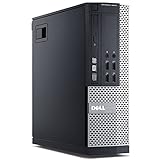
Dell OptiPlex 9020 SFF Desktop, Core i7-4770, 32GB RAM, 1TB SSD (Renewed)
Who it suits: The patient builder of a streaming desk — you want a real desktop chassis at the budget end of the guide, and you understand that its streaming career starts with a second purchase, not with delivery day.
This pick’s encoder paragraph is the shortest and the bluntest in the guide. The Core i7-4770’s Intel HD Graphics 4600 carries a Haswell-generation Quick Sync encoder from 2013 — the oldest encoder silicon here by a wide margin. Quick Sync exists on this chip, and OBS will offer it, but that generation’s H.264 quality at streaming bitrates is the weakest in this guide, and it sits beside integrated graphics that cannot run the games a stream would show: genuinely old titles and the lightest esports at reduced resolution are its ceiling as delivered. So the as-delivered verdict is the base guide’s, restated for this angle: this is not a streaming PC out of the box, and nobody should buy it expecting to go live on Friday. It is graded sixth because that is what honesty requires.
What it is, is the cheapest foundation a streaming desk can be built on. The renewed configuration already contains the expensive boring parts: 32GB of memory — the comfortable simultaneous-load number — a full 1TB SSD for recordings, Windows 11 Pro, and a genuine Dell desktop chassis with a PCIe slot — check the price on Amazon before you order, and note that renewed pricing for this listing family is volatile and can move sharply. The slot is the story. It accepts low-profile, slot-powered graphics cards — the small-form-factor case and low-wattage proprietary power supply allow nothing else — and a card of that class brings its own modern encoder with it, transforming the machine’s streaming grade in one purchase, with the simultaneous-load specification already maxed. The caveats are the renewed platform’s, doubled: a 2013 processor on a finished socket running DDR3, Windows 11 Pro installed on a chip outside Microsoft’s official support list, and the 90-day Renewed window as the only warranty — use it to stress the machine as a desk PC immediately, even before the card arrives. Buy it as a foundation with the second purchase genuinely planned, and it is the most streaming-desk foundation this budget tier can start with. Buy it as a finished streamer, and the encoder paragraph above is the review you will wish you had read.
- 32GB RAM and 1TB SSD already fitted — the streaming workload’s support spec, done.
- The cheapest real desktop chassis here, at the budget end of the tier — check the price on Amazon.
- One low-profile GPU slot — the purchase that gives this machine a modern encoder.
Honest limitation: As delivered it is not a streaming machine — the 2013 Quick Sync is the weakest encoder in this guide and the HD 4600 cannot run the games — and the SFF case restricts the fix to low-profile, slot-powered cards only.
Choose it if you enjoy the project and will actually buy the low-profile card. Skip it if you want to stream this week — every other pick here can, in its shape, and this one cannot yet.
Comparison Table
| Product | Hardware encoder | Simultaneous load | Best streaming shape | Link |
|---|---|---|---|---|
| Dell RGB Gaming Tower (Renewed) | Pascal NVENC (GTX 1050 Ti) — dedicated, no AV1 | 16GB — manage the browser; record with space discipline | One-machine esports and older AAA | Check on Amazon |
| Beelink SER5 MAX | AMD VCN (Ryzen 7 5800H) — H.264/HEVC, no AV1 | 16GB, but the strongest CPU here; RAM grows to 64GB | One-machine esports with heavy multitasking | Check on Amazon |
| GMKtec M5 Plus | AMD VCN (Ryzen 7 5825U) — H.264/HEVC, no AV1 | 32GB and 1TB plus a second SSD slot — the archive-friendly spec | Stream-and-record workflows, edited content | Check on Amazon |
| BOSGAME P4 | AMD VCN (Ryzen 7 5700U) — H.264/HEVC, no AV1 | 32GB and 1TB; dual LAN keeps the stream’s path clear | Wired multitasking desk; console capture | Check on Amazon |
| KAMRUI E3B | AMD VCN (Ryzen 5 7430U) — H.264/HEVC, no AV1 | 32GB dual-channel; lightest game rendering of the minis | Console capture and talk/desktop streams | Check on Amazon |
| Dell OptiPlex 9020 SFF (Renewed) | Haswell Quick Sync (i7-4770) — 2013 generation, weakest here | 32GB and 1TB fitted — ready once the GPU slot is filled | A project: a streaming desk after its card arrives | Check on Amazon |
Setting Up OBS on a $400 Stream Machine
The encoder choice is the first setting and the one this guide exists to inform. In OBS, set the encoder to the hardware block your pick carries: NVENC on the Dell tower, the AMD hardware encoder on any of the four Ryzen minis, and Quick Sync on the OptiPlex — with the standing warning that the OptiPlex’s 2013 generation is a stopgap until its graphics slot is filled. Never choose the software x264 encoder on any machine in this guide: it spends the same processor cores your game, your browser and OBS’s own compositing are already dividing, and at this budget that trade shows up as stutter within the hour. Set rate control to CBR — constant bitrate is what Twitch’s ingest expects — at 6,000 kbps for Twitch, with a keyframe interval of 2 seconds, which the platform requires and which costs you nothing to obey. On YouTube you may raise the bitrate and the canvas — 1440p uploads earn better treatment from YouTube’s transcoding — but remember that no pick here encodes AV1, so H.264 at a generous bitrate is your YouTube shape, and it is a respectable one.
Choose your canvas by your encoder, not by your monitor. The Dell tower’s NVENC can carry a 1080p60 output for the esports and older titles it plays. On the AMD VCN picks, 720p60 is the quality move: the same 6,000 kbps spread over fewer pixels hides VCN’s softness instead of exhibiting it, and viewers on phones — most of your audience — will never know. Whatever you choose, run the game, the stream, the chat browser and a local recording together in a test stream before your first real one, and watch OBS’s three counters, because each one accuses a different component. Frames lost to rendering lag mean the graphics hardware is saturated: lower the game’s settings or cap its frame rate, because the encoder cannot composite frames the game has not finished drawing. Frames lost to encoding lag mean the encoder or its preset is overmatched: step the encoder preset one notch toward performance, or drop the output canvas a size. Dropped frames on the network counter are neither of those — they are the connection, and the fix is not a setting. It is a cable.
Which is the section’s last rule, stated as a rule because every pick in this guide makes it easy to obey: stream on wired Ethernet. Plug the machine into the router or a switch with a physical cable, and treat the Wi-Fi in these listings as a convenience for everything except going live. A stream is a constant, unforgiving upload for hours; Wi-Fi is a shared, variable medium that degrades with walls, distance and the rest of the household. On the two dual-LAN picks — the GMKtec and the BOSGAME — dedicate one port to the router path and let the second absorb network drives and desk traffic. Do a full-length test broadcast at your chosen settings, watch all three counters for the whole session, and only then announce a schedule. The machines in this guide can stream; this hour of setup is what makes them stream well.
The Kit Around the Machine: What Else a Stream Needs
No machine in this guide is a stream by itself, and the honest budget conversation includes the kit around it — costed here in priority order rather than prices, because the order is the advice. First, always, is the microphone. Viewers forgive a soft picture for hours and bad audio for about ninety seconds; a modest dedicated USB microphone, positioned close to your mouth with the gain set low, improves a channel more than any encoder upgrade in this guide’s price universe, and it is where the money saved by choosing a budget-tier KAMRUI or BOSGAME should go first. Second is lighting: a single soft light facing you makes an ordinary webcam look like a considered setup, and it costs a camera upgrade’s fraction. Third is the webcam itself — adequate is genuinely adequate once the light is right, and it should be bought after the first two, not before. Fourth, and only for one specific shape, is the capture card: it is a console streamer’s essential and a PC streamer’s unnecessary expense. If your games are on a console, a capture card is what turns the KAMRUI, BOSGAME or GMKtec into a complete broadcast station; if your games are on the PC itself, the card does nothing the machine is not already doing, and its budget belongs in the microphone fund. None of this kit is inside any pick’s price, and any total-cost comparison that hides it is flattering the computer at the expense of the channel.
How to Choose a Streaming Desktop Under $400
- Name your streaming shape before you name a machine. One-machine PC gaming, console-through-capture, and talk/desktop formats load a computer completely differently. The Dell tower exists for the first, the KAMRUI’s value only makes sense in the second and third, and buying for the wrong shape wastes the whole budget, not part of it.
- Grade the encoder generation, not the encoder’s existence. Every pick here has a hardware encoder; they are not equals. A dedicated NVENC block, even an older Pascal one, out-streams a shared integrated encoder at Twitch bitrates — and a 2013 Quick Sync is a placeholder, not a plan. Ask which silicon encodes, and from which year.
- Accept the AV1 line. Nothing under $400 encodes AV1. If a listing or a rival guide implies otherwise at this price, it is wrong. YouTube still accepts H.264 happily; AV1 is a reason to raise the budget, not a feature to hunt for inside this one.
- Count the whole workload, not just the game. OBS, chat, alerts, a browser and a recording ride along with every stream. That is why 32GB of memory and a terabyte of storage grade so highly in this guide — they are streaming specifications, not gaming garnish.
- Make the wired connection part of the purchase. Budget the cable, place the desk or the switch so Ethernet reaches it, and treat any plan that streams over Wi-Fi as a plan to drop frames. Dual-LAN picks earn their keep by giving the stream a road of its own.
- Match the canvas to the encoder. NVENC here can carry 1080p60 for light games; VCN looks better at 720p60 with the same bitrate. Choosing the smaller canvas is not settling — it is the settings discipline that makes budget streams look professional.
- For renewed machines, stream inside the window. The 90-day Renewed window is your warranty: run full-length test streams at full bitrate in the first weeks, watch the counters, and return anything that cannot hold a broadcast while returning is still free.
- Spend the savings where viewers notice. At this tier the channel improves faster from a microphone and a light than from any computer upgrade available. The cheaper picks in this guide are partly a funding strategy for exactly that.
Common Buying Mistakes
- Encoding in software. Choosing x264 on a budget machine hands the compression to the cores your game needs, and the stream stutters for reasons buyers then blame on their internet. The hardware encoder is already in every pick here — use it.
- Streaming over Wi-Fi because the listing advertises fast wireless. The specification is real and irrelevant: a constant multi-hour upload needs a cable, and the network dropped-frames counter will make the argument for you, live, in front of viewers.
- Chasing AV1 at $400. It does not exist at this price, in any brand, in any form factor. Listings that gesture at it are describing decode, a different feature that does nothing for your broadcast.
- Buying the project box and never filling the slot. The OptiPlex’s streaming story begins with its low-profile graphics card; without that second purchase you own the weakest encoder in this guide and a firm intention.
- Ignoring the recording until the drive is full. A local recording at stream quality consumes real space for hours at a time; on a 500GB machine it competes with the game library. Watch free space like a fuel gauge, or buy the terabyte picks.
- Setting 1080p60 on an encoder that would look better at 720p60. Canvas size is a quality decision, not a status symbol — on VCN especially, fewer pixels at the same bitrate is the sharper picture.
- Paying over the line for the renewed tower. The Dell’s price is known to drift above the $400 line; when it sits over the ceiling, the correct purchase is patience, because the rule in its review is the whole value case.
- Buying the capture card for a PC stream. It adds nothing when the game already lives on the streaming machine — that money is a microphone. The card is for consoles, only for consoles.
Final Recommendation
- One-machine game streaming: Dell RGB Gaming Tower (Renewed) — the only dedicated encoder, on a day it sits at or under $400.
- Strongest all-round stream desk, new: Beelink SER5 MAX.
- Stream and record everything: GMKtec M5 Plus.
- Wired, organised, multitasking desk: BOSGAME P4.
- Console capture or talk format on the tightest budget: KAMRUI E3B.
- The long way round, cheapest first step: Dell OptiPlex 9020 SFF (Renewed), plus its low-profile card when ready.
Our top two split along the same line as the encoders themselves. If you will play and broadcast from the same machine, the renewed Dell tower is the only pick whose encoder is a dedicated block of NVIDIA silicon, and its open slot means the encoder can grow up later — obey its price rule, stress it inside its window, and it is the most streaming $400 buys. If your stream is a console, a conversation or a lighter esports diet, the Beelink SER5 MAX is the better-shaped purchase: the strongest processor in the guide around a competent VCN encoder, new with a warranty, positioned in this budget tier so that money remains for the microphone. Streamers ready to step up should see Best Gaming Desktop For Streaming Under $500 and Best Gaming Desktop For Streaming Under $700, where newer encoder generations — and eventually AV1 — enter the picture; those comparing the wider category at this ceiling will find the sibling views at Best Gaming Desktop Under $400, Best Streaming PC Under $400 and Best Budget Gaming PC For Streaming Under $400. Whichever shape is yours, check the live price and the exact configuration before you order, plug in the cable, and run the test stream before the announced one.
Frequently Asked Questions
Can you really stream from a $400 desktop?
Yes — in the shapes this guide defines. Esports and older games from the same machine, console games through a capture card, and talk or desktop formats all stream properly at Twitch settings from the picks above, because every one of them carries a hardware encoder. What $400 does not stream is a modern AAA game rendered and broadcast by the same box, and it does not encode AV1 anywhere. Those are budget facts, not machine failures.
Which encoder should I use in OBS on these machines?
The hardware one your machine carries: NVENC on the Dell tower, the AMD hardware encoder on the Ryzen minis, Quick Sync on the OptiPlex until its graphics slot is filled. Set CBR at 6,000 kbps with a 2-second keyframe interval for Twitch. Avoid the software x264 encoder on every pick here — at this budget its cost lands directly on your game’s frame rate.
Is AMD’s encoder good enough, or do I need NVIDIA?
Good enough is the honest phrase. VCN’s H.264 is softer than NVENC’s at the same bitrate, and the working answer is settings: a 720p60 canvas, a quality-leaning preset, and good lighting on your camera, which viewers notice more than encoder grain. If 1080p60 picture quality is your channel’s centrepiece, that is a genuine reason to choose the Dell’s NVENC or to budget above this tier — not a reason to pretend the difference is zero.
Why is there no AV1 in this guide?
Because no hardware under $400 encodes it. AV1 encoding arrived with current-generation graphics cards whose cost alone approaches or exceeds this entire budget. The picks here decode AV1 for watching, which is a different feature, and stream in H.264 — which Twitch requires and YouTube accepts. Any $400 listing implying AV1 streaming is confusing the two directions of the codec.
Can I stream over Wi-Fi to save running a cable?
You can, and the dropped frames will eventually persuade you otherwise, usually mid-broadcast. Streaming is a constant upload sustained for hours over a shared medium; every pick in this guide has an Ethernet port, two have two, and the cable is the cheapest reliability upgrade in this entire article. Run the wire.
Is the Dell OptiPlex really a streaming pick?
As a foundation, yes; as a finished streamer, no — and its review says so before its price does. Its 2013 Quick Sync is the weakest encoder here and its integrated graphics cannot show modern games. Its value is that the memory, storage and chassis are already bought, so one low-profile graphics card completes a genuine streaming desk near this budget’s ceiling. If the card purchase is not genuinely planned, choose a mini instead.


