Where to buy
Check the latest price, availability and delivery on Amazon. Orders are placed on Amazon. We may earn a commission from qualifying purchases.
- Best true gaming desktop: Dell RGB Gaming Tower, Core i7 6th Gen, GTX 1050 Ti 4GB, 16GB RAM, 512GB SSD (Renewed) — Check on Amazon
- Beelink SER5 MAX Mini PC, Ryzen 7 5800H, 16GB RAM, 500GB SSD — Check on Amazon
- Dell OptiPlex 9020 SFF Desktop, Core i7-4770, 32GB RAM, 1TB SSD (Renewed) — Check on Amazon
- GMKtec M5 Plus Gaming Mini PC, Ryzen 7 5825U, 32GB RAM, 1TB SSD — Check on Amazon
See 2 more Amazon options
- KAMRUI E3B Mini Gaming PC, Ryzen 5 7430U, 32GB RAM, 512GB SSD — Check on Amazon
- BOSGAME P4 Light Gaming Mini PC, Ryzen 7 5700U, 32GB RAM, 1TB SSD — Check on Amazon
Read the full guide ↓
Disclosure: As an Amazon Associate, reviewstook.com earns from qualifying purchases. Links to Amazon on this page are affiliate links; they cost you nothing extra. Listing details such as price and availability change often, so check the current Amazon listing before you buy.
You searched for a desktop, so this guide starts with the sentence most $400 gaming pages bury: there is no new gaming desktop with a real graphics card under $400. Not from a brand you have heard of, not from one you haven’t. A current entry-level graphics card, a Windows licence and a case with a power supply in it already consume most of this budget before a processor, memory or storage enters the conversation, and the new towers that do appear at this price are office machines in gaming clothes. What $400 genuinely buys on the desktop side of the market is the renewed business fleet — Dell towers and small-form-factor machines that spent their first life on office desks, were retired by the thousand, and now sell through Amazon Renewed with a graphics card added by the refurbisher, or with an empty slot waiting for one. Those machines are real desktops in every way that matters to a buyer: a case you can open, a graphics slot you can fill, memory and storage you can change. They are also old, and this guide will not pretend otherwise.
That creates the honest fork this whole page is organised around. The best gaming value under $400 is not a desktop at all — it is a Ryzen mini PC, a box the size of a paperback whose integrated graphics play the same games as the renewed towers, on a modern processor, with a manufacturer’s warranty, while using a fraction of the electricity. What the mini PC will never do is grow: its graphics are fixed on the day it arrives, forever. The renewed tower is the opposite bargain — slower silicon from 2013 to 2016, a 90-day safety net instead of a warranty, but a slot, a case and a future. So this guide includes both, labelled clearly, and every review ends with the same two questions answered in plain terms: what can you upgrade in this machine, and what is finished forever? If you want a desktop because you intend to open it, upgrade it and keep it evolving, the Dell tower at the top of the list is your pick. If you want the most gaming per dollar today and accept a sealed box, start with the Beelink. Below are the quick picks, detailed reviews of all six machines, a comparison table, the tower-versus-mini ledger in full, and the mistakes that waste money at exactly this budget.
In this guide
Quick Picks
Short on time, or comparing several options at once? Each row below names a buyer type and the machine that suits it, with a link to the listing.
| Buyer type | Pick | Why it stands out | Link |
|---|---|---|---|
| Best true gaming desktop | Dell RGB Gaming Tower, GTX 1050 Ti (Renewed) | The only pick with a real graphics card in a real, openable tower | Check on Amazon |
| Best gaming value overall | Beelink SER5 MAX Mini PC, Ryzen 7 5800H | 54W Ryzen chip with Vega 8 graphics — check price on Amazon | Check on Amazon |
| Best project desktop | Dell OptiPlex 9020 SFF (Renewed) | 32GB RAM and 1TB SSD in a real desktop chassis — check price on Amazon — a base for a low-profile GPU | Check on Amazon |
| Best mini for big libraries | GMKtec M5 Plus Mini PC, Ryzen 7 5825U | 32GB RAM and 1TB SSD as standard, dual 2.5GbE LAN | Check on Amazon |
| Cheapest credible start | KAMRUI E3B Mini PC, Ryzen 5 7430U | 32GB dual-channel memory and Vega 7 graphics — check price on Amazon | Check on Amazon |
| Best second-career mini | BOSGAME P4 Mini PC, Ryzen 7 5700U | 32GB/1TB with dual LAN — retires into a home server when gaming days end | Check on Amazon |
How These Picks Were Chosen
The budget was applied as a ceiling, not a target: every machine below is a real Amazon listing that sells at or regularly within $400 in the United States, and where a price drifts — renewed stock drifts constantly — the review directs you to check the live price on Amazon rather than printing a hard number you should hold us to. One pick, the Dell gaming tower, spends part of its life above the line; it is included with a simple rule attached, because it is the only genuine gaming desktop in this money and pretending otherwise would leave the guide answering a search nobody made.
We did not use these machines ourselves. We read the maker and refurbisher listings, Amazon’s product records and independent price histories, and compared processors, graphics, memory configuration, storage and — because this keyword promises a desktop — the physical upgrade path: whether the case opens, whether a graphics slot exists, what kind of card physically fits, and whether the power supply leaves any headroom to feed one. That last filter is where most cheap “gaming desktops” fail. A tower whose power supply cannot run a better card, or whose case only accepts a half-height card, has an upgrade path on paper only, and the reviews below say which is which for every pick. Machines that were desktops in name only — all-in-ones with no slot, stick PCs, office boxes with no graphics path and no redeeming price — were excluded.
Two honesty filters sat on top of all of that. The first is the graphics filter: gaming performance claims in this guide are stated in settings, not invented frame rates — esports titles and older AAA games at 1080p low-to-medium settings is what this entire tier does, and no pick is described as doing more. The second is the condition filter: two of the six picks are Amazon Renewed, and they are named as renewed in their titles everywhere they appear, with the 90-day return window treated as what it is — a testing deadline, not a warranty. New machines with a modern platform and a sealed design were judged against renewed machines with an old platform and an open design on exactly those terms, because at $400 that trade is the whole decision.
The 6 Best Gaming Desktops Under $400
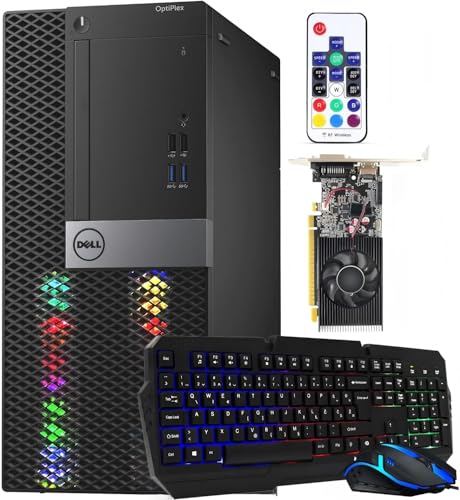
Dell RGB Gaming Tower Computer, Core i7 6th Gen, GTX 1050 Ti 4GB, 16GB RAM, 512GB SSD (Renewed)
Who it suits: Buyers who meant it when they typed “desktop” — you want a tower you can open, a real graphics card today, and a slot you can fill again in two years.
This is the only machine in the guide that is a gaming desktop in the full sense: a standard tower case, a discrete GeForce GTX 1050 Ti with 4GB of its own memory, a Core i7 processor, 16GB of RAM and a 512GB SSD, refurbished and sold through Amazon Renewed by STG USA in Refurbished – Excellent condition with the program’s 90-day refund-or-replacement backing. The refurbisher adds the gaming trimmings — RGB lighting, built-in WiFi, Windows 11 Pro installed — to what began life as a business Dell. The 1050 Ti is a 2016 card, and the review below will not dress it up, but it remains a genuinely useful one: it has its own video memory instead of borrowing system RAM, it draws all its power from the slot so it asks nothing of the power supply, and it plays the esports catalogue and the pre-2020 AAA library at 1080p low-to-medium settings with the steadiness integrated graphics can’t match in heavier scenes.
The upgrade ledger is why it tops a desktop guide. Open the side panel and the machine is a normal tower: the graphics card can be replaced (staying in the modest power class until you verify what the refurbished power supply actually is — the listing does not publish its wattage, so treat any swap as slot-powered until you have read the label inside the case), the RAM can grow, and a second drive can be added. What cannot change is the platform. The Core i7 is a 6th-generation chip from the LGA1151 era: respectable core counts, but the socket’s ceiling is one generation away, DDR4 is its final memory standard, and the processor sits outside Microsoft’s official Windows 11 CPU support list even though the refurbisher ships Windows 11 Pro installed — it runs, but long-term feature-update guarantees on unsupported silicon are murkier than on a modern chip. Then there is the price, and it needs stating plainly: this listing’s price drifts, and it spends part of its time above this budget — check the price on Amazon before you buy. The rule for this pick is therefore absolute: buy it on a day it sits at or under $400, and walk away on the days it doesn’t.
- A real discrete graphics card — GTX 1050 Ti 4GB — in a standard, openable tower case.
- The only pick whose graphics can be replaced later; RAM and storage expand the normal desktop way.
- Amazon Renewed Refurbished – Excellent, sold by STG USA, with the 90-day refund/replacement window.
Honest limitation: The platform is a dead end — a 2015-era socket with one generation of CPU headroom — and the listing’s price drifts above $400 as often as it sits below it; the refurbished power supply’s wattage is unpublished, which caps GPU swaps until verified.
Choose it if a desktop means a tower with a future graphics swap, and you will price-watch it under the $400 line. Skip it if you want a warranty, a modern processor, or a machine whose price is the same every day of the week.

Beelink SER5 MAX Mini PC, Ryzen 7 5800H, 16GB RAM, 500GB SSD
Who it suits: Buyers who searched “desktop” out of habit but actually want the most gaming their $400 can play — and can accept that the box will never open for a graphics card.
Every honest $400 guide has to include this machine, because on gaming value it beats the desktops it shares the page with. The SER5 MAX runs a Ryzen 7 5800H — an eight-core laptop-class processor set to a 54W power level, unusually generous for a mini PC — with Radeon Vega 8 integrated graphics, 16GB of DDR4 and a 500GB SSD, in a box roughly five inches square that mounts behind a monitor. Check the price on Amazon — as a budget-tier mini PC it undercuts the renewed tower while running a processor architecture half a decade newer, sipping power, and arriving new with Windows 11 Pro and a manufacturer’s warranty. In game terms it covers the same ground as the Dell above — esports titles comfortably at 1080p, older AAA at low-to-medium settings, modern AAA only at low settings with resolution scaling — with the difference that its graphics share the system memory, so keeping the dual-channel RAM configuration healthy matters more here than in any tower.
The finality clause deserves its own paragraph, because it is the entire trade. Inside this box you can change the RAM (up to 64GB) and swap the SSD (up to 2TB), and that is the complete list — the graphics are part of the processor and the processor is soldered to the board. When this machine stops playing the games you want, the upgrade is a different machine, and its second career is as an office PC, a media box or a home server. Compare that honestly with the Dell tower: the Dell is slower silicon with a living upgrade path; the Beelink is faster silicon with none. Neither answer is wrong — but they are answers to different questions, and the question you typed into the search bar was about a desktop. If the tower-ness was the point, scroll back up. If the gaming was the point, this is the best budget-class gaming purchase in the guide.
- Ryzen 7 5800H at 54W — the strongest processor in this guide, mini or tower.
- Check price on Amazon — a budget-tier pick, new, with a manufacturer warranty.
- Triple display output (HDMI, DisplayPort, USB-C), WiFi 6 and Windows 11 Pro.
Honest limitation: The graphics can never be upgraded — RAM and storage are the only doors that open, and when the Vega 8 falls behind, the whole machine retires to lighter work.
Choose it if gaming per dollar matters more than upgradability and you like your hardware new. Skip it if the plan was always to drop a better graphics card in next year — that plan needs the tower above.

Dell OptiPlex 9020 SFF Desktop, Core i7-4770, 32GB RAM, 1TB SSD (Renewed)
Who it suits: Tinkerers who want a real desktop chassis for the least money possible — and who understand, before ordering, that the graphics card is a second purchase.
This pick needs its honesty paragraph first, because out of the box it is barely a gaming machine at all. The OptiPlex 9020 is a small-form-factor business desktop from Dell’s Haswell era: a Core i7-4770, Intel HD Graphics 4600 integrated graphics, and — in this renewed configuration — a generous 32GB of DDR3 memory and a 1TB SSD, with Windows 11 Pro, WiFi and Bluetooth, sold through Amazon Renewed. Check the price on Amazon — renewed pricing for this listing is volatile and has moved sharply in the past. The HD 4600 is a 2013 integrated GPU far weaker than the Vega graphics in the mini PCs here: it will run genuinely old games and the lightest esports at reduced resolution, and it will not run much else. Nobody should buy this machine to play games on delivery day.
So why is it in the guide? Because it is the cheapest honest answer to the desktop question: a real, openable Dell chassis with the expensive boring parts already done. The memory is maxed, the storage is a full terabyte of SSD, the Windows licence is installed — what remains is the one purchase that turns an office box into a gaming desktop, a low-profile graphics card. The small-form-factor case and its low-wattage proprietary power supply limit that card to bus-powered, half-height models — the GTX 1650 low-profile and RX 6400 class — which are exactly the cards that transform machines like this into credible 1080p esports desktops. Taken together, machine plus card is positioned as a budget-tier project with a desktop’s upgrade story intact for RAM, storage and that one slot. The platform caveats are the tower’s, only more so: the i7-4770 is a 2013 chip on a finished socket, its DDR3 is two generations old, and it too runs Windows 11 outside Microsoft’s official CPU support list. Buy it as a chassis and a project, with your eyes open, and it is the most desktop this budget tier can buy. Buy it as a finished gaming PC and you will be disappointed by Friday.
- A genuine desktop chassis with a PCIe slot — 32GB RAM and 1TB SSD already fitted.
- Check price on Amazon — a budget-tier project base, leaving headroom in the budget toward a low-profile GPU.
- Amazon Renewed backing with the 90-day window to test, stress and decide.
Honest limitation: As delivered it is not a gaming PC — the HD 4600 integrated graphics are the weakest in this guide — and the SFF case plus proprietary low-wattage power supply restrict the future GPU to low-profile, slot-powered cards only.
Choose it if you enjoy the project and want the cheapest route to an upgradable desktop. Skip it if you want to play games the day it arrives — every other pick here does that better.
GMKtec M5 Plus Gaming Mini PC, Ryzen 7 5825U, 32GB RAM, 1TB SSD
Who it suits: Buyers who want the mini-PC route without the usual mini-PC compromises — full memory, full storage, and ports a desktop would be proud of, from day one.
Most $400 mini PCs make you choose which corner was cut; the M5 Plus is the one that mostly declines to. It pairs a Ryzen 7 5825U with 32GB of DDR4 memory — double the Beelink above, and fitted as two sticks so the integrated Radeon graphics get the dual-channel bandwidth they depend on — plus a 1TB NVMe SSD in a dual-slot board that can grow to 4TB, with memory expandable to 64GB. Around the back sit dual 2.5GbE LAN ports, triple 4K display outputs and WiFi 6E, a port selection closer to a workstation’s than a budget box’s. Check the price on Amazon — it is positioned at the top of this budget tier, so confirm the live listing before you assume where it sits against the budget’s ceiling.
The honest asterisk is the processor’s power class. The 5825U is a U-series chip built for thin laptops, running at a much lower power level than the Beelink’s 54W H-series part — and although both machines carry Vega 8-class graphics with the same core count and clock figures on paper, the GMKtec’s graphics share a smaller power budget with the CPU, so in long gaming sessions the Beelink pulls ahead. What the M5 Plus buys instead is headroom everywhere else: games install without arithmetic, multitasking never touches the memory ceiling, and the second SSD slot means storage grows without replacing anything. The upgrade ledger is the mini-PC standard — RAM and storage yes, graphics never — but of all the sealed boxes here, this is the one least likely to make you wish you’d bought the bigger configuration, because you already did.
- 32GB dual-channel RAM and 1TB SSD as standard — the fullest configuration in the guide.
- Dual 2.5GbE LAN, triple 4K outputs, WiFi 6E — desktop-grade connectivity.
- Check price on Amazon — positioned at the top of this budget tier.
Honest limitation: The U-series processor’s low power budget means its Vega graphics sustain less performance than the Beelink’s same-named GPU — and like every mini here, the graphics can never be upgraded.
Choose it if you want one purchase with nothing left to upgrade but the games list. Skip it if raw gaming performance per dollar is the only metric — the SER5 MAX wins that contest.

KAMRUI E3B Mini PC, Ryzen 5 7430U, 32GB RAM, 512GB SSD
Who it suits: The careful first step — buyers who want a new machine, a real warranty and credible 1080p esports gaming for the least money in this guide.
The E3B’s claim is value. It is positioned as a budget-tier machine — check the price on Amazon — and it is the cheapest credible starting point here. What that money buys is well chosen rather than merely cheap: a Ryzen 5 7430U with six cores, Radeon Vega 7 graphics, and — the detail that matters most at this price — 32GB of memory fitted as two 16GB sticks, so the integrated graphics run dual-channel instead of limping on a single stick the way so many budget boxes do. Storage is a 512GB M.2 SSD, the machine carries WiFi 6 and triple-display output, a VESA plate is included for mounting behind a monitor, and both memory (to 64GB) and storage (to 2TB) can grow later.
Position it honestly against its neighbours. The Vega 7 is one graphics tier below the Vega 8 in the Beelink and GMKtec — same family, fewer cores — and the 7430U is again a low-power U-series chip, so this is the guide’s lightest gaming muscle: esports titles and indie games at 1080p, older AAA at low settings, and modern AAA only with resolution scaling and patience. It is also, like every mini PC here, a finished product the day it arrives: no slot, no graphics future, a second career in office or media duty when the gaming ends. What it offers instead of a future is a budget-tier position that leaves headroom in the budget — enough to matter for the monitor, keyboard and headset that a first setup also needs, which is a trade the tower picks cannot make.
- Check price on Amazon — the cheapest credible new gaming machine in this guide.
- 32GB fitted as two sticks: dual-channel memory done right for integrated graphics.
- VESA mount included; RAM and storage both upgradeable later.
Honest limitation: Vega 7 graphics are the weakest of the mini PCs here — one tier down from the Vega 8 picks — and the graphics are, as always with a mini, final.
Choose it if the budget has to cover peripherals too, or this is a first machine for esports and indie gaming. Skip it if older AAA games are the main diet — spend the extra on the Beelink’s stronger chip.
BOSGAME P4 Light Gaming Mini PC, Ryzen 7 5700U, 32GB RAM, 1TB SSD
Who it suits: Buyers who think in whole lifecycles — a capable gaming mini today that is already dressed for its second job as a home server tomorrow.
The P4’s specification reads like the M5 Plus’s sibling: a Ryzen 7 5700U, 32GB of RAM, a full 1TB SSD, Windows 11 Pro, triple 4K display output over HDMI, DisplayPort and USB-C, WiFi 6E and dual 2.5GbE LAN ports. Check the price on Amazon through BOSGAME’s own Amazon storefront — as a budget-tier machine, it puts a 32GB/1TB specification at a level other brands often reserve for half the memory and storage. The gaming itself is the familiar Vega-class story: the 5700U’s integrated graphics handle the esports catalogue and older AAA at 1080p low-to-medium settings, and the generous memory and storage mean nothing about the machine gets in the way of that — no downloads rationed, no memory ceiling brushed while a browser and a voice call share the machine with the game.
Where the P4 earns its own slot in this guide is the afterlife. Those dual LAN ports and the terabyte of storage are wasted on a pure gaming box and perfect for a home server, a network storage hub or a router-adjacent mini — the standard second career for a retired gaming mini, and one this hardware is suspiciously well dressed for. The cautions are two. First, the standard mini-PC clause in its purest form: graphics are integrated and final, RAM and storage are the only upgrades, and when the Vega graphics fall behind your library, the machine changes jobs rather than parts. Second, a listing-family warning we will state rather than hide: this model has also been sold in a 5825U variant under near-identical titles, so confirm the exact configuration on the live listing before ordering — the 5700U specification above is the one tied to this listing in the records we verified.
- 32GB RAM and 1TB SSD — check price on Amazon — big-spec, budget-tier value.
- Dual 2.5GbE LAN and triple 4K output: the best second-career hardware in the guide.
- Full-size spec at a budget-tier position — check the live price on Amazon.
Honest limitation: Integrated graphics are final, as with all the minis — and the listing family mixes processor variants under similar titles, so the live configuration must be checked before buying.
Choose it if you want gaming now and a home server later from the same purchase. Skip it if you will never use the second LAN port or the storage — the Beelink games harder at a similar tier.

Comparison Table
| Product | Type | Graphics | Upgrade path | Link |
|---|---|---|---|---|
| Dell RGB Gaming Tower (Renewed) | Full tower desktop | GTX 1050 Ti 4GB, discrete | GPU swappable (slot-powered class), RAM and storage open; CPU platform finished | Check on Amazon |
| Beelink SER5 MAX | Mini PC | Radeon Vega 8, integrated (54W chip) | RAM to 64GB, SSD to 2TB; graphics final | Check on Amazon |
| Dell OptiPlex 9020 SFF (Renewed) | SFF desktop | Intel HD 4600, integrated | One low-profile GPU slot to fill; RAM maxed, 1TB fitted; platform finished | Check on Amazon |
| GMKtec M5 Plus | Mini PC | Radeon Vega 8, integrated (low-power chip) | RAM to 64GB, second SSD slot; graphics final | Check on Amazon |
| KAMRUI E3B | Mini PC | Radeon Vega 7, integrated | RAM to 64GB, SSD to 2TB; graphics final | Check on Amazon |
| BOSGAME P4 | Mini PC | Radeon Vega-class, integrated | RAM and storage open; graphics final; dual LAN for server duty | Check on Amazon |
How to Choose a Gaming Desktop Under $400
- Decide what “desktop” means to you before anything else. If it means a case you can open and a graphics card you can replace, only the two renewed Dells in this guide qualify, and you accept old processors as the price. If it means a machine that sits on your desk and plays games, the mini PCs are faster, newer and warrantied. Every other decision follows from this one.
- If you go tower, prefer a real tower over small form factor. A full tower accepts standard graphics cards; an SFF box like the OptiPlex 9020 takes half-height, low-profile cards only, which narrows your future choices to a handful of models. SFF is a fine project base — just price the right card class from the start.
- Read the power supply before dreaming about graphics swaps. Business desktops use proprietary, low-wattage power supplies with no spare connectors. Until you have read the wattage label inside the case, assume any replacement card must be slot-powered — the 75W class — and never order a card that needs a power cable a renewed office box cannot provide.
- Judge the processor by generation, not by badge. A 6th-generation Core i7 sounds senior to a Ryzen 5, but the mini PCs’ modern Ryzen chips match or beat the old i7s in most work while using a third of the power. “i7” on a renewed listing is a decade-old nameplate, not a performance promise.
- Treat the 90-day Renewed window as a testing deadline. In the first week, run the machine hard: long gaming sessions, memory and storage checks, a listen for tired fans and a look at temperatures. A refurbished machine that survives a deliberate stress week inside its return window is a reasonable risk; one that was never pushed is an unknown.
- For integrated graphics, dual-channel memory is not optional. Vega graphics borrow system RAM, and a single memory stick can cost a fifth of their performance. Every mini in this guide ships with two sticks fitted — if you ever upgrade, replace in matched pairs.
- Check the Windows 11 footnote on renewed machines. Both Dell picks run Windows 11 Pro on processors outside Microsoft’s official support list. It works — refurbishers ship it daily — but a modern mini PC carries no such asterisk, and if the machine is for someone who will keep it five years untouched, that counts.
- Apply the price rule to drifting listings. Renewed prices move with stock, and both Dell listings in this guide have spent time well above this budget. Set your ceiling, check the price on Amazon, buy when the listing respects it, and never let a “renewed” badge talk you over the line.
- Leave money for the rest of the desk. None of these machines includes a monitor. A budget-tier machine and a decent 1080p screen is a better gaming setup than spending the whole budget on the machine and using a borrowed television — the KAMRUI and BOSGAME picks exist in this guide partly to leave that headroom.
- Plan the second career at purchase time. A tower’s second career is more parts. A mini’s is a new job — office box, media player, home server. The BOSGAME’s dual LAN ports are pointless for gaming and priceless for a server; buying with the afterlife in mind is how budget machines stay useful for a decade.
Tower vs Mini PC: The Upgradability Ledger
Since this keyword promises a desktop, the comparison deserves more than a slogan, so here is the full ledger. A renewed tower gives you four living upgrade paths — graphics card, memory, storage, and peripherals like a better power supply if the case and board accept one — wrapped around one dead one: the processor platform, which in both Dell picks is a finished socket running memory one or two generations old. Every future dollar you spend on a tower improves it, but every improvement is capped by a 2013–2016 foundation, and the day the foundation is the problem, the case, card and drives move to a new build and the rest is e-waste. The renewed route also carries condition risk the new route doesn’t: fans with a decade of hours on them, thermal paste of unknown age, and a 90-day window instead of a warranty.
The mini PC’s ledger is the mirror image. Its foundation is modern — current-generation efficiency, fast storage standards, warranty support — and exactly one part of it can never change: the graphics, which are also the part a gaming machine outgrows first. RAM and storage upgrades are real but they are maintenance, not evolution. So the choice is not upgradable versus not; it is which kind of old age you prefer. The tower ages by slowing down gradually while accepting transplants. The mini ages all at once, the day a game arrives that its integrated graphics can’t run — and then, if you bought well, it starts a second career at work it can still do perfectly. Buy the tower if you enjoy the transplant process. Buy the mini if you’d rather the machine just work until it can’t, then become something else.
What $400 of Desktop Gaming Actually Looks Like
Set expectations by the catalogue, not the calendar. Everything in this guide — tower or mini — plays the esports library properly at 1080p: League of Legends, Valorant, CS2, Rocket League, Dota 2 and Minecraft are home turf, and Fortnite joins them in its performance mode. The pre-2020 AAA library — GTA V, Skyrim Special Edition, The Witcher 3, the Tomb Raider reboot trilogy — runs at 1080p low-to-medium settings on the 1050 Ti tower and the Vega 8 minis, which is a genuinely large amount of excellent gaming for this budget. What this tier does not do is current AAA at high settings: the big releases of the last few years need more graphics than anything here has, and the honest settings for them are low, with resolution scaling, or a decision to wait. The OptiPlex 9020 as delivered sits a clear class below even this — treat it as a chassis with a library card, not a gaming machine, until its slot is filled.
One comparison deserves stating because buyers at this budget always make it: a games console at similar money will out-play every machine in this guide at new releases, on a television, with no settings menu involved. What it won’t do is everything else — the PC library’s decades of cheap back-catalogue, mods, mouse-and-keyboard genres, emulation, and the small fact that the machine also does homework, work and media duty. Buy the desktop for the catalogue and the versatility, with your eyes open about the ceiling, and $400 is well spent. Buy it expecting a cheap route to this year’s biggest releases at high settings, and no guide can save the purchase.
Common Buying Mistakes
- Believing a new “gaming desktop” exists at this price. If a new tower under $400 claims gaming graphics, read the listing until you find the integrated GPU or the decade-old card it is hiding behind the RGB.
- Badge shopping — paying for “Core i7” without checking the generation. A 4th- or 6th-generation i7 is a fine old chip and a slow modern one; the generation number is the specification that matters.
- Assuming any tower takes any graphics card. SFF cases need low-profile cards, proprietary power supplies feed slot-powered cards only, and some business boards have slot power limits below standard. Measure the case, read the PSU label, then shop for the card.
- Paying over the line for drifting renewed stock. The Dell gaming tower’s listing has spent time above this entire guide’s budget — check the price on Amazon. On that day, the correct purchase is patience.
- Buying the OptiPlex-style project box and never buying the graphics card. As delivered, its integrated graphics are the weakest here; the project only works if the second purchase actually happens.
- Expecting a mini PC to grow. No mini in this guide — or any guide — can take a graphics card. If your plan includes a GPU upgrade in year two, the minis were never candidates, whatever their benchmarks say today.
- Skipping the stress test on a renewed machine. The 90-day window is the warranty you get; a machine that was only ever used to browse the web in week one can still be hiding a dying fan or a tired drive.
- Spending the whole $400 on the box and nothing on the screen. These are desktops: a monitor, keyboard and mouse are part of the purchase, and the cheaper picks in this guide exist to fund them.
Final Recommendation
- True desktop, real graphics card: Dell RGB Gaming Tower (Renewed) — on a day it sits at or under $400.
- Most gaming per dollar, new: Beelink SER5 MAX.
- Cheapest upgradable desktop project: Dell OptiPlex 9020 SFF (Renewed), plus a low-profile card when ready.
- Nothing left to upgrade: GMKtec M5 Plus.
- Tightest total budget, peripherals included: KAMRUI E3B.
- Gaming now, home server later: BOSGAME P4.
Our top two split exactly along the fork this guide is built on. If “desktop” was a deliberate word — you want the case, the slot and the hobby — the renewed Dell tower is the only machine here that honours it fully, and its GTX 1050 Ti plays today’s round of games while its slot waits for tomorrow’s card; just obey the price rule, because its listing spends real time above $400. If the word was habit and the gaming is the point, the Beelink SER5 MAX is the best purchase on the page: newer, faster silicon, a warranty, and money left over. Buyers ready to step up should see Best Gaming Desktop Under $500 and Best Gaming Desktop Under $700, where new towers with modern graphics cards begin; buyers staying at this ceiling can compare the resolution-first view in Best 1080p Gaming PC Under $400. Whichever side of the fork you choose, check the live price and the exact configuration before you order — at $400, that homework is the difference between a desktop and a disappointment.
Frequently Asked Questions
Is there a real gaming desktop for under $400?
Only a renewed one. No manufacturer sells a new desktop with a discrete graphics card at this price — the economics of the card, the Windows licence and the case forbid it. The genuine desktops under $400 are Amazon Renewed business towers, like the Dell in this guide, refurbished with a GTX 1050 Ti fitted. Everything else at the price is either an office machine, an all-in-one, or a mini PC.
Tower or mini PC — which actually games better at $400?
Roughly a draw today, opposite answers tomorrow. The renewed tower’s GTX 1050 Ti and the mini PCs’ Vega 8 graphics cover the same ground — esports and older AAA at 1080p low-to-medium. The tower can be made faster later with a card swap; the mini never can, but it starts with a far newer processor, lower power draw and a warranty. Pick based on whether you value the upgrade path or the modern platform.
Can I upgrade the renewed Dell tower later?
The graphics card, memory and storage, yes — that is the point of it. Stay in the slot-powered card class until you have verified the refurbished power supply’s wattage from its label, because the listing doesn’t publish it. The processor platform, no: the 6th-generation socket has one generation of headroom and DDR4 is its final memory standard, so a true CPU upgrade means a new motherboard and effectively a new build.
Is the Dell OptiPlex 9020 a gaming PC?
Not as delivered, and this guide says so in its review rather than in a footnote. Its HD 4600 integrated graphics are the weakest here. It earns its place as the cheapest real desktop chassis with 32GB of RAM and a 1TB SSD already fitted — a base that becomes a credible esports desktop when a low-profile, slot-powered graphics card goes into its PCIe slot. If you won’t make that second purchase, buy a mini PC instead.
Is Amazon Renewed a safe way to buy a desktop?
It is a managed risk. Renewed machines are inspected and sold with a 90-day refund-or-replacement window, and both Dell picks here are Refurbished – Excellent grade. Manage it actively: stress-test the machine hard in the first week — long gaming sessions, memory and drive checks, fan noise — and return anything that complains while the window is open. What Renewed is not is a multi-year warranty; if that matters more than the upgrade path, buy one of the new mini PCs.
Should I just save up for a $500 or $700 desktop instead?
If you want a new tower with a modern graphics card, yes — that market begins just above this budget and becomes genuinely good around $700, which is why this guide links those tiers in its final recommendation. Stay at $400 if the renewed route’s trade-offs suit you, if a mini PC’s sealed design is fine, or if the total desk budget — monitor included — is the real constraint. The worst outcome is spending $400 on a new “gaming” tower that is neither: no card worth the name and no slot worth filling.


