Where to buy
Check the latest price, availability and delivery on Amazon. Orders are placed on Amazon. We may earn a commission from qualifying purchases.
- Best overall fanless mini PC for streaming under $700: MeLE Quieter4C Fanless Mini PC, Intel N150, 16GB RAM, 512GB SSD, Windows 11 Pro — Check on Amazon
- UDPTCP Fanless Core Ultra 7 155H Mini PC, Arc Graphics, 6x 2.5GbE (Barebone) — Check on Amazon
- Kinupute Fanless Industrial Mini PC, Core i7-1165G7, 8GB RAM, 256GB SSD — Check on Amazon
- MeLE Quieter DL Business-Grade, N150, 16GB RAM, 512GB SSD, Dual Intel 2.5GbE — Check on Amazon
- Protectli Vault Pro VP2430, N150, 4x 2.5GbE, Barebone — Check on Amazon
See 1 more Amazon option
- Protectli Vault Pro VP2440, N150, 2x 10G SFP+, 16GB RAM, 250GB SSD — Check on Amazon
Read the full guide ↓
Disclosure: As an Amazon Associate, reviewstook.com earns from qualifying purchases. Links to Amazon on this page are affiliate links; they cost you nothing extra. Listing details such as price and availability change often, so check the current Amazon listing before you buy.
Streaming is the one job in this whole category where a fanless PC’s famous weakness stops mattering and its famous strength becomes a production feature. The weakness is graphics power: every machine in this guide renders games with low-power Intel integrated graphics, and none of them is a one-machine game-streaming rig for modern titles. The strength is silence, and silence is worth money in front of a microphone. Every fan in a streaming room is a noise source the mic can hear; a fanless PC is the only computer that adds exactly nothing to the room’s noise floor, which means your voice needs less gating, less suppression and less fixing afterwards. So this guide grades the six verified fanless mini PCs under $700 the way a streamer should: encoder first, then the memory and storage the streaming stack shares, then the wired connection, and only then everything else.
The realistic workflow deserves defining before any product names, because it decides which pick is honest for you. There are four jobs here. Talk and desktop streams — just-chatting, podcasts, screen-share content, live coding, watch-alongs — run at 1080p60 on all six machines, because the encoding is done by a fixed-function hardware block, not by the processor’s spare time. Console streaming through a capture card also runs at 1080p60 on all six: the console does the rendering, the silent box does the encoding, and it is quietly the best-looking workflow in this guide. Games rendered on the box itself are the narrow case: the lightest titles at 720p, and only the two stronger graphics picks stretch even that far. And media duty — playing back and transcoding video for the household — is the job these machines were born for. Twitch’s standard target runs through all of it: roughly 6,000 kbps, constant bitrate, H.264. If what you actually want is one machine that renders modern games and broadcasts them at the same time, that machine has a fan and a discrete graphics card, and this guide’s final section will point you at it without a moment’s hard feelings.
In this guide
Quick Picks
Short on time, or comparing several options at once? Each row below names a streamer type and the product that suits it, with a link to the listing.
| Streamer type | Pick | Why it stands out | Link |
|---|---|---|---|
| Best overall for streaming | MeLE Quieter4C N150, 16GB/512GB | Complete and silent tonight: Quick Sync encoding, triple 4K outputs, mounts behind the streaming monitor | Check on Amazon |
| Most streaming headroom | UDPTCP Fanless Core Ultra 7 155H (Barebone) | The strongest processor and newest Quick Sync generation here — you fit the memory and drive | Check on Amazon |
| Best ready desktop that streams | Kinupute Fanless Mini PC, Core i7-1165G7 | A complete Windows desktop with Iris Xe Quick Sync — bring 8GB discipline | Check on Amazon |
| Best wired-infrastructure pick | MeLE Quieter DL Business-Grade, 16GB/512GB | Two Intel 2.5GbE ports and memory in a real slot that can grow to 32GB | Check on Amazon |
| Best project box | Protectli Vault Pro VP2430 (Barebone) | Build it once, then it talks, captures and serves for years, with datasheets behind it | Check on Amazon |
| 10-gigabit networks only | Protectli Vault Pro VP2440, 16GB/250GB | Two 10G SFP+ ports — and a strict rule: buy only if the live price on Amazon is within this guide’s budget | Check on Amazon |
How These Picks Were Chosen
The first filter is inherited from the base guide for this budget and it is not negotiable: fanless, proven. A machine only appears here if its passive cooling is documented in the manufacturer’s own specifications, datasheets or hands-on coverage — not because a listing headline used the word “silent.” That filter removed well-known models whose fanless status could not be verified, and it matters doubly for streaming, because a “quiet” fan you can hear across a bedroom is exactly the sound a microphone is best at finding.
On top of that, every pick was re-graded for streaming, in this order. First, the encoder: which generation of Intel Quick Sync hardware the chip carries, because that block — not the core count — decides broadcast quality. Second, the simultaneous load: a stream runs the game or capture source, OBS, a browser full of chat and alerts, and a local recording at once, and on integrated graphics all of it draws from one shared pool of system memory, so 8GB, 16GB and slotted-versus-fixed memory are graded as streaming specifications, not fine print. Third, recording storage: an SSD is a recording drive, onboard eMMC is not, and small drives fill mid-stream. Fourth, the wired connection, because every pick here has proper Ethernet and a stream should never ride Wi-Fi when a port exists. Two picks are barebones whose completion parts are carried openly in their reviews. One pick, the VP2440, is included under an explicit rule — check the live price on Amazon and buy only if it is within this guide’s budget — rather than on any printed figure. We did not use these machines ourselves; the grading rests on maker listings, datasheets, specification pages and independent reviews.
The Encoder Is the Streaming Spec
In a fanned gaming PC, the streaming conversation starts with the graphics card’s encoder. Here there is no discrete graphics card at all, and that single fact reorganises everything. All six picks encode with Intel Quick Sync Video, a fixed-function block inside the integrated graphics whose only job is turning frames into a broadcast stream. That is why a mini PC with a single-digit-watt processor can put a clean talk stream on Twitch: the encoder is dedicated silicon working in parallel, not a software task begging the processor for spare cycles. It is also why the encoder’s generation — which is fixed forever at purchase — matters more to a streamer than anything else on the spec sheet.
Three generations of that block appear in this guide, and they are not equal. Four picks share the Intel N150, whose Quick Sync handles H.264 and HEVC hardware encoding — everything Twitch asks for, since Twitch broadcasts are H.264 at roughly 6,000 kbps constant bitrate — and transcoding for a home media server besides. What the N150’s generation does not have is an AV1 encoder: that capability belongs to newer Intel graphics generations, so no N150 pick should ever be bought for AV1 live streaming, whatever a listing’s buzzwords imply. The Kinupute’s Core i7-1165G7 carries Iris Xe graphics with the same H.264/HEVC encoder story and considerably more graphics muscle around it. The UDPTCP’s Core Ultra 7 155H carries the newest Quick Sync generation in this set, inside Arc graphics strong enough to render a light game while the encoder works — the only pick where rendering and encoding genuinely coexist. Software x264 encoding is the fallback everywhere and a poor one on the quad-core N150 picks, where it is a talk-scene-only option at its fastest preset; on the 155H’s sixteen cores it is usable, but pointless, because Quick Sync does the same work for nearly nothing.
Two streaming-specific consequences follow. The first is the silence dividend, and it is real: with no fan anywhere in the machine, the noise floor of your room is set by the room, not the PC, so the microphone can sit closer, run at lower gain, and skip the aggressive noise suppression that makes voices sound underwater. The second is the marathon caveat. A three-hour stream is a sustained load, and passive cases settle their clocks under sustained loads — but the fixed-function encoder is the last component to feel that settling, because it is not competing for the thermal budget the way rendering does. Give the fins open air, as the buying guidance below insists, and the broadcast holds long after the game side has found its sustainable pace.
The 6 Best Fanless Mini PCs for Streaming Under $700
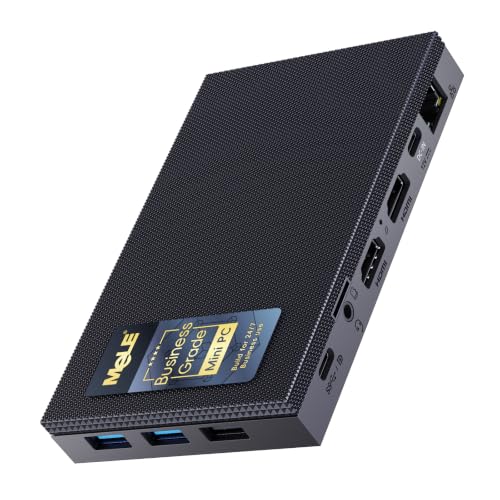
MeLE Quieter4C, Intel N150, 16GB RAM, 512GB SSD
Who it suits: The streamer who wants to broadcast tonight — talk content, desktop shows, console capture — from a machine that disappears behind the monitor and is never heard again.
The Quieter4C earns the top spot in this variant for a simple reason: it is the most complete streaming station in the set, ready the day it arrives. Windows 11 Pro is installed, 16GB of memory and a 512GB SSD are fitted, and the N150’s Quick Sync block handles the encode — the same hardware this machine’s reputation was built on for 4K playback and home media server transcoding, pointed at a broadcast instead. The display outputs are quietly ideal for a streaming desk: two HDMI 2.0 ports and a full-function USB-C give you the main screen, a second screen for OBS and chat, and a spare, all at 4K60. The included VESA mount puts the whole slab behind the main monitor, so the streaming corner has no visible PC at all — and no audible one, because the case is the heatsink and there is nothing inside it that spins. Check the live price on Amazon before you buy.
The limitations are the ones its configuration fixes in place. The 16GB of memory is fitted for life — this build’s memory is not upgradeable — and 16GB is also the pool that OBS, the browser, the chat and the integrated graphics all share. For talk, desktop and capture-card work that pool is comfortable headroom; it is the ceiling you will meet first if you ask the machine to render a game at the same time, which on an N150 means the lightest titles at 720p and modest expectations. Networking is a single gigabit Ethernet port plus Wi-Fi 5: one good port is all a roughly 6 Mbps uplink needs, with headroom to spare, but the rule of this guide applies — stream on the wire, and let Wi-Fi do anything else. Judged as what it is, this is the pick that turns a spare corner into a silent broadcast desk with the least friction in the guide.
- Quick Sync hardware encoding with 16GB and 512GB fitted — a complete streaming station out of the box.
- Triple 4K outputs: main display, OBS/chat display, and one to spare.
- VESA mount included and zero moving parts — invisible and inaudible on mic.
Honest limitation: Memory is fixed at 16GB for life, and the N150 renders only the lightest games itself — this is a talk, desktop and capture station, not a game-rendering streamer.
Choose it if you want the finished, silent streaming desk with no assembly and no homework. Skip it if you want to render and stream PC games from one machine — that job belongs to the UDPTCP below, or to a fanned PC entirely.

UDPTCP Fanless Core Ultra 7 155H Mini PC, 6x 2.5GbE (Barebone)
Who it suits: Builders who want the strongest silent streaming machine this budget can produce — the newest encoder, real rendering headroom, and a homelab’s worth of ports — and who are happy to fit memory and storage themselves.
Nothing else in this guide is close on silicon. The Core Ultra 7 155H brings sixteen cores and Arc integrated graphics with the newest Quick Sync generation in the set, sealed into a passive case that Notebookcheck’s reporting describes as a slightly larger chassis built around a sizable passive heatsink, rated by its maker for ambient temperatures from 0 to 60°C. For streaming, that combination changes the category’s basic bargain: this is the one pick that can render a light game — esports and older titles at the settings the base guide documents — while Quick Sync encodes the broadcast in parallel, so a genuine one-machine game stream at 720p60 or 1080p30 exists here and nowhere else in the six. The documented PCIe 4.0 x8 expansion slot leaves room for an internal capture card for console work, Thunderbolt 4 covers fast external gear, and six Intel I226-V 2.5-gigabit ports are absurd overkill for a stream uplink while being exactly right for the homelab this box will also run.
The barebone arithmetic needs saying out loud. Check the live price on Amazon for the kit, and remember that it covers the board, case and processor — DDR5 memory and an M.2 SSD, for a 16–32GB and 512GB–1TB build, are still on you, so allow for those parts separately. A factory-configured 32GB/1TB build is also listed; check its live price on Amazon too, because a finished machine should be compared as a finished machine, not as a barebone sticker. Two specification notes from the base research belong in the open: the board supports DDR5-5600 but configured builds ship with DDR5-4800, and no Wi-Fi card is included in any configuration seen — for a streamer that is nearly a virtue, since the wired rule becomes the only option, but know it before you order. Under a long stream the 28-watt-class chip settles to what the fins allow; the fixed-function encode holds, and the game side gives up its boost first, which is the correct order of sacrifices.
- Core Ultra 7 155H with Arc graphics — the newest Quick Sync here, and the only real render-while-streaming headroom.
- PCIe 4.0 x8 slot, Thunderbolt 4 and six Intel 2.5GbE ports for a streaming-plus-homelab build.
- Industrial ambient ratings (0–60°C, up to 95% humidity) for a machine that runs for years.
Honest limitation: Barebone — memory, storage and OS are yours to add, which can carry a finished machine past this guide’s budget — and no Wi-Fi card is included.
Choose it if you want maximum silent streaming capability and enjoy the build. Skip it if your budget for this guide is a hard all-in limit, or you want to stream the day the box arrives.

Kinupute Fanless Industrial Mini PC, Core i7-1165G7, 8GB RAM, 256GB SSD
Who it suits: Buyers who want a genuine everyday desktop that also streams — complete with Windows installed and Wi-Fi fitted — in a sealed industrial case that will never whine on a recording.
The Kinupute is the most conventional computer in this guide: a Core i7-1165G7 with Iris Xe graphics, Windows 11 Pro installed, Wi-Fi 6 built in, two 2.5-gigabit LAN ports and dual displays over HDMI and VGA, all inside a finned metal enclosure rated by its maker for continuous duty. Check the live price on Amazon before you buy. Its Iris Xe Quick Sync is the second-strongest encoder story here, a clear step above the N150 block for capture and talk work, and the graphics around it are the second-strongest in the set for light local play. As a broadcast desk it asks for nothing: unbox, wire one of the LAN ports, install OBS, and the talk show, the desktop content and the console capture all work.
Its streaming weakness is one number, and this variant grades it harder than the base guide did: 8GB of memory. A stream is a pile-up — OBS, a browser carrying chat and alerts, the capture or game, and the integrated graphics borrowing their share from the same pool — and 8GB is where that pile-up starts swapping. Talk and capture work survives with discipline: keep the scene simple, close the spare tabs, let Quick Sync carry the encode. Asking it to render a game on top is where it breaks first, so treat local game streaming as the lightest titles only, or not at all. The 256GB SSD asks for a second habit: local recordings at high bitrates eat it, so offload the archive on a schedule. The platform is 2020-era, and its boost clocks settle inside the sealed case under long loads, as every pick here does. Within those two disciplines, it is the most desktop-honest streamer in the guide.
- Iris Xe Quick Sync — the second-strongest encoder here — in a complete, ready-to-run desktop.
- Windows 11 Pro installed, Wi-Fi 6 fitted, two 2.5GbE ports for the wired rule.
- Rugged fanless industrial build intended for continuous 24/7 operation.
Honest limitation: 8GB of memory is the tightest simultaneous-load budget in this guide, and 256GB of storage fills fast with local recordings.
Choose it if you want one silent box that is a real desktop first and a competent talk/capture streamer second. Skip it if your stream stack is heavy — many browser sources, big scenes — or you plan to render games locally while broadcasting.

MeLE Quieter DL Business-Grade, Intel N150, 16GB RAM, 512GB SSD
Who it suits: The infrastructure-minded streamer: one silent box that runs the home’s services all day and the broadcast in the evening, on the most reliable wired connection in this guide.
Under the encoder, this is the same streaming machine as our top pick — the N150’s Quick Sync block, 16GB of memory, a 512GB NVMe SSD — wrapped in a different set of trade-offs. The memory sits in a real DDR4 slot you can later raise to 32GB, which makes this the only ready-to-run pick whose simultaneous-load headroom can grow after purchase. The two Intel I226-V 2.5-gigabit ports give the wired rule its best form here: the stream rides one clean wired link while the machine’s other lives — media server, smart-home hub, DNS — share the second. The documented size is a slab about 6.6 by 3.7 by 0.84 inches and under a pound, with a VESA mount in the box, and MeLE rates it at about 6 watts at idle, which is the power draw of a machine that never sleeps. Check the live price on Amazon for the 16GB/512GB build before you buy.
Two warnings travel with this pick at full size, and both are about buying the exact machine. First, the build name: MeLE sells other builds of this same model with soldered memory and Realtek network controllers that owners report firewall systems failing to recognise — the Business-Grade build with Intel controllers is the one this review covers, so read the listing’s controller line before ordering and check what arrived. Second, stock: availability of this exact 16GB build has been intermittent, so treat it as a listing to catch and check availability on Amazon. The fallback is the Business-Grade 8GB/256GB build — check its live price on Amazon — a fine services box, but 8GB under a streaming stack is the discipline problem described in the Kinupute review, and the smaller drive fills sooner. The rendering ceiling is the N150 ceiling everywhere: talk, desktop and capture at full quality; local games only in the lightest sense.
- Same Quick Sync streaming core as the top pick, with memory in a slot that grows to 32GB.
- Two Intel I226-V 2.5GbE ports — the wired rule with a spare link for everything else.
- Sub-inch slab, VESA mount in the box, roughly 6W at idle by MeLE’s rating.
Honest limitation: Stock of the 16GB build has been intermittent, and the model name alone does not guarantee the Intel-NIC Business-Grade build — the soldered Realtek builds share it.
Choose it if you want the silent services box that also streams, with a memory upgrade path. Skip it if you cannot catch it in stock, or you need more than the N150’s rendering ceiling.

Protectli Vault Pro VP2430, Intel N150, 4x 2.5GbE (Barebone)
Who it suits: Builders whose streaming corner is also the network closet — buyers who value datasheets, firmware choice and a support desk, and who treat assembly as part of the fun.
Be clear about what the listing includes, because this variant grades the point harder than a firewall guide would: the VP2430 listing is a barebone. Check the live price on Amazon for the barebone, and remember you still owe it a DDR5 memory stick (Protectli has qualified modules up to 64GB in its single slot), an M.2 drive, and an operating system of your own. The 32GB of onboard eMMC is a boot device for a lightweight system, not a recording drive; a streamer who mistakes it for storage will fill it in the first week, and recordings belong on the M.2 SSD you fit. Budget the parts, spend a weekend, and what emerges is genuinely capable: the N150’s Quick Sync for talk, desktop and capture work, four Intel I226-V 2.5-gigabit ports, and four video outputs — HDMI, DisplayPort and two USB-C with DisplayPort — which is the most multi-monitor streaming desk in this guide once it exists.
What the Protectli premium buys is paperwork and predictability: published datasheets that describe the model as a fanless appliance in their first line, a hardware knowledge base, a coreboot firmware option beside the standard BIOS, and US-based support. Protectli’s own published WireGuard figure for this box, around 2.25 Gbps in its OPNsense testing, is a maker number and labelled as such — it is here as evidence of a company that tests and publishes, not as a streaming specification. The streaming ceiling, once built, is the N150 ceiling: the encoder is willing, the rendering is light-titles-only. Buy it as a project that becomes infrastructure, and it will out-document everything else on this page for years.
- Four Intel I226-V 2.5GbE ports and four video outputs — a multi-screen streaming desk, once built.
- DDR5 slot qualified by Protectli to 64GB, so the memory pool is your choice, not a ceiling.
- Coreboot option, published datasheets and US support — the best-documented platform here.
Honest limitation: Barebone and OS-free: nothing streams until you have fitted memory and storage and installed a system, and the onboard eMMC is boot storage, never a recording drive.
Choose it if the build is a pleasure and the machine will anchor your network as well as your stream. Skip it if you want to broadcast this week — the complete MeLE boxes above exist for that.

Protectli Vault Pro VP2440, Intel N150, 2x 10G SFP+, 16GB RAM, 250GB SSD
Who it suits: Exactly one buyer: the streamer whose home network already runs at 10 gigabits and who refuses to put a fan in it — and only at the right live price.
The price rule comes first, in the review and not the small print: we are not printing a static price for this listing, and we will not invent one — check the live price on Amazon. This pick belongs in this guide only if that live price is within this guide’s budget when you check it; above that line it belongs in a bigger-budget guide, full stop. The configuration covered here ships with 16GB of DDR5 memory and a 250GB SSD fitted, plus the 32GB onboard eMMC, with no operating system included.
Now the streaming honesty, which is this pick’s real limitation: its encoder is the same N150 Quick Sync block found in the other N150 picks in this guide. The two Intel X710 10-gigabit SFP+ ports move traffic around your house at ten gigabits, but a Twitch broadcast leaves through your internet connection at roughly six megabits — the ports cannot make a stream one pixel better, only a network faster, and Protectli’s own published WireGuard results over those ports (maker figures, labelled as such) are a routing specification, not a streaming one. One documented caveat matters more here than in a firewall guide: Protectli’s technical service bulletin TSB-2025-001 reports that VP2440 units running coreboot firmware v0.9.0 can see intermittent slowdowns on the 2.5GbE ports, with a published workaround and a permanent fix in development; the default AMI BIOS is unaffected. For a machine whose streaming job is a boring, stable wired uplink, run the stock BIOS or apply the workaround — and note that a maker publishing such a bulletin at all is the strongest argument for the brand. Buy this for its SFP+ cages, at the right price, or not at all.
- Two Intel X710 10G SFP+ ports — the only fanless route past 2.5 gigabits in this guide.
- Ships configured with 16GB DDR5 and a 250GB SSD, memory ceiling 64GB.
- Protectli’s datasheets, knowledge base and published firmware bulletins behind it.
Honest limitation: No static price is printed for this listing — check the live price on Amazon and buy only if it is within this guide’s budget — and its streaming encoder is the same N150 block as far cheaper picks; the premium buys network speed a stream cannot use.
Choose it if your network is genuinely 10-gigabit and the live price obeys the rule. Skip it if you are buying it to improve a stream — the VP2430, or either MeLE, streams identically for less.
Comparison Table
| Product | Processor / encoder | Best streaming use | Link |
|---|---|---|---|
| MeLE Quieter4C N150, 16GB/512GB | Intel N150, Quick Sync | The complete silent talk, desktop and capture station | Check on Amazon |
| UDPTCP Fanless Core Ultra 7 155H (Barebone) | Core Ultra 7 155H, Arc Quick Sync | Most headroom: light games rendered and encoded on one silent box | Check on Amazon |
| Kinupute Fanless Mini PC, i7-1165G7 | Core i7-1165G7, Iris Xe Quick Sync | A real desktop that talks and captures — mind the 8GB stack | Check on Amazon |
| MeLE Quieter DL Business-Grade, 16GB/512GB | Intel N150, Quick Sync | Silent services box that streams, with growable memory | Check on Amazon |
| Protectli Vault Pro VP2430 (Barebone) | Intel N150, Quick Sync | The documented project box for a network-corner stream desk | Check on Amazon |
| Protectli Vault Pro VP2440, 16GB/250GB | Intel N150, Quick Sync | Streaming on a 10-gigabit network — only if the live price on Amazon is within this guide’s budget | Check on Amazon |
How to Choose a Fanless Mini PC for Streaming
- Start with the workflow, not the box. Talk, desktop and console-capture streaming run at full quality on every pick here. Rendering PC games on the same machine is the UDPTCP’s party trick and, at a stretch, the Kinupute’s — on the N150 picks it means the lightest titles at 720p. Decide which streamer you are before you decide which box.
- Grade the encoder, then the memory pool. Every pick encodes with Quick Sync H.264; the generations differ in headroom, not in the Twitch result. What differs daily is the shared memory the game, OBS, browser and graphics all drink from: 8GB is discipline, 16GB is comfort, and a slotted machine (Quieter DL, both Protectlis, the UDPTCP once you fit it) is a future.
- Treat recording storage as a separate budget. Local recordings belong on a real SSD. Onboard eMMC — the Protectlis carry 32GB of it — is boot storage and nothing else, and the 250–256GB drives in this guide fill quickly at high recording bitrates. Offload on a schedule or buy the 512GB picks.
- Wire it, always. Every pick in this guide has at least one proper Ethernet port, and a stream should ride it. Wi-Fi — even the Kinupute’s Wi-Fi 6 — is for everything except the broadcast. One gigabit port is already far more than a roughly 6 Mbps uplink needs.
- Do the barebone arithmetic before comparing stickers. Neither barebone in this guide is a finished computer as listed: both still need memory, storage and an operating system added before they compute anything. The UDPTCP and VP2430 are excellent machines once completed; compare them as finished builds, not as barebone listings.
- Give the fins open air. A stream is a marathon load, and a fanless case cools by radiating from its surfaces. An open shelf keeps the broadcast at full pace for hours; a sealed cabinet bought for a clean look is an oven with a stream in it.
- Remember what the premium buys. At this budget, extra money buys ports, fitted parts, documentation and support — not a better Twitch picture, which is capped by the platform and your uplink. If silence is not the point, the same money in a fanned mini gaming PC renders and streams circles around all six of these; see Best Mini Gaming PC Under $700.
Set Up OBS Once, Correctly
Every pick in this guide takes the same first decision in OBS: under Settings, Output, set the streaming encoder to QuickSync H.264. That single choice routes the broadcast to the fixed-function block on all six machines — the N150 picks, the Kinupute’s Iris Xe and the UDPTCP’s Arc alike; the stronger chips do not unlock a different encoder name, they buy preset headroom under it. Set rate control to CBR and the bitrate to 6,000 kbps for a 1080p60 Twitch broadcast, with a keyframe interval of 2 seconds and the High profile. Start the quality preset at Quality on the UDPTCP and Kinupute and at Balanced on the N150 picks. For the one case where the box renders the game itself — light titles on the stronger picks, the lightest on the rest — drop the output to 720p60 and keep the bitrate: fewer pixels at the full 6,000 kbps looks cleaner than 1080p starved.
When a stream misbehaves, the Stats dock separates three problems that all feel like “lag” and each has a different cure. Dropped frames are the network: the fix is the wire — plug in the Ethernet cable every pick here provides — and only then a lower bitrate. Skipped frames are encoding lag: the encoder is behind, so step the Quick Sync preset one notch faster, then lower the output resolution before touching anything else. Missed frames are rendering lag: the scene or the game is overloading the integrated graphics, so cap the game’s frame rate, simplify the scene’s browser sources, and close the tabs you are not reading. Treating the three as one problem is how streamers spend an evening changing the wrong setting. Recordings deserve one line of their own: record locally with Quick Sync at quality-based settings, onto the internal SSD — never onto eMMC — and keep free space in reserve on the 250–256GB picks. Finally, enjoy the dividend these machines exist for: with no fan in the room’s noise floor, you can run the microphone closer at lower gain and ease off the noise suppression that makes voices sound processed.
What $700 Does Not Include
No pick in this guide includes a single piece of streaming kit, and the honest order to buy that kit in is not the order most people guess. The microphone comes first: a stream sounds like its microphone, and a fanless PC’s whole contribution is a room quiet enough for a decent one to finally sound decent. Lighting comes second — a lit face on an ordinary webcam beats a shadowed face on an expensive one, every time. The webcam itself comes third, after the light that makes it look good. The capture card comes last and is console-only: it exists to bring a console’s picture into the PC, and for games rendered on the same machine it does literally nothing. Note the pleasant inversion that creates in this guide — on the N150 picks, a capture card is not an accessory but the main event, because the console-renders, Quick-Sync-encodes workflow is the best-looking stream those machines can produce. None of this kit is included with any pick; budget for it separately, in that order, and let the machine budget stay the machine budget.
Common Buying Mistakes
- Buying the fastest processor and ignoring the encoder. Every road in this guide leads to Quick Sync; know which generation you are buying and what it cannot do — the N-class block has no AV1 encode, whatever the buzzwords say.
- Streaming over Wi-Fi because the desk looks cleaner without a cable. Every pick here has Ethernet. The cable is the cheapest quality upgrade in streaming.
- Paying for 10-gigabit ports to improve a roughly 6-megabit stream. The VP2440’s SFP+ cages speed up a network, not a broadcast — and it only belongs here if the live price on Amazon is within this guide’s budget.
- Ordering a Quieter DL by model name and landing a soldered-memory build with Realtek controllers. The Business-Grade Intel build is a specific listing; check the controller line before you pay and again when it arrives.
- Comparing a barebone sticker against a complete PC’s price. Memory, storage and an operating system belong in the barebone’s budget from the first minute.
- Recording the archive to onboard eMMC, or letting a 250GB drive fill mid-stream. eMMC is a boot device; recordings live on SSDs with room to spare.
- Sealing the silent PC inside a media cabinet for the clean streaming look. A passive case in a closed box throttles through exactly the marathon load a stream is.
- Expecting one-machine modern game streaming from integrated graphics — or buying an N150 box for AV1 streaming. Both purchases are answered elsewhere: a fanned gaming PC for the first, a newer graphics generation for the second.
Final Recommendation
- Most streamers, broadcasting tonight: MeLE Quieter4C N150, 16GB/512GB.
- Most headroom, happy to build: UDPTCP Fanless Core Ultra 7 155H (Barebone).
- A real desktop that also streams: Kinupute Fanless Mini PC, Core i7-1165G7 — with 8GB discipline.
- Infrastructure first, stream second: MeLE Quieter DL Business-Grade, 16GB/512GB.
- The documented project box: Protectli Vault Pro VP2430 (Barebone).
- 10-gigabit networks: Protectli Vault Pro VP2440 — only if the live price on Amazon is within this guide’s budget.
Our top two for streaming are the Quieter4C, for the majority who want a silent broadcast desk that works the day it arrives — complete configuration, Quick Sync encoding, a second screen for chat, and a machine the microphone will never know exists — and the UDPTCP, for the builder who wants the one fanless box with genuine headroom, accepting the barebone homework as the price of the strongest processor and newest encoder silence can buy. The Kinupute is the honest desktop of the six, the Quieter DL the services box with the growable memory, and the Protectli pair are bought for documentation and network pedigree rather than for anything they do to a broadcast. If your real budget is smaller, this category forgives stepping down more than most — Best Fanless Mini PC For Streaming Under $500 keeps the same silent idea at a lower tier — and if you arrived here wanting to render modern games while you stream them, Best Streaming PC Under $700 is the same budget spent on fans and a discrete encoder, with our blessing. Check the live price and the exact build name before you order, wire the Ethernet, give the fins open air, and the stream will take care of itself.
Frequently Asked Questions
Can a fanless mini PC actually stream games?
Yes, with the workflow stated plainly. Talk, desktop and console-capture streams run at 1080p60 on every pick here, because a console or a desktop scene leaves the rendering to someone else and Quick Sync handles the encode. Games rendered on the machine itself are the narrow case: the lightest titles at 720p, with only the UDPTCP — and at a stretch the Kinupute — having the graphics to attempt it. Modern games rendered and streamed from one fanless box are beyond all six; let a bigger machine or a console render, and let the silent box broadcast.
Why does silence matter so much for streaming?
Because the microphone hears the room, not your intentions. A fan near a streaming desk raises the noise floor under every word, and the usual cures — gates, suppression, expansion — all leave marks on the voice. A fanless PC contributes nothing to that floor, so the mic can run closer and quieter and the processing can stay gentle. It is the one streaming upgrade no fanned PC can match without acoustic treatment.
Do any of these PCs support AV1 streaming?
No pick in this guide should be bought for AV1 live streaming. The N150’s Quick Sync generation — four of the six picks — has no AV1 encoder at all, and the guide’s workflow is built on what Twitch actually uses: H.264 at roughly 6,000 kbps CBR, which every pick here encodes in hardware. YouTube accepts H.264 happily and its higher bitrates are kind to it. If AV1 live is a hard requirement, you are shopping for a newer graphics generation, not a fanless N-class box.
Which encoder should I select in OBS?
QuickSync H.264, on all six picks. The stronger chips do not change the encoder’s name; they change how much preset and resolution headroom sits behind it. Pair it with CBR at 6,000 kbps and a 2-second keyframe interval for Twitch, and use the Stats dock’s three counters — dropped for network, skipped for encoding, missed for rendering — to fix the problem you actually have.
Is 8GB of memory enough to stream?
Enough for talk and capture with discipline, and the tightest budget in this guide. On the Kinupute, OBS, a browser with chat, and the integrated graphics all share the same 8GB, so the stack survives by keeping scenes simple and tabs closed — and it is the first thing to fail if you ask the machine to render a game as well. If your stream runs many browser sources, the 16GB picks are the honest answer.
Barebone or ready-to-run for a streaming setup?
Ready-to-run if the stream starts this week: the Quieter4C, the Kinupute and the Quieter DL broadcast the day they arrive. Barebone if you enjoy the build or already own DDR5 and an NVMe drive — the UDPTCP is the strongest streaming machine here once completed, and the VP2430 becomes the best-documented one. Either way, allow for the parts before comparing listings, and never count onboard eMMC as recording storage.
Will a fanless PC throttle in the middle of a long stream?
The clocks settle under sustained load by design — that is how a passive case protects itself — but the broadcast is the last thing to feel it, because Quick Sync encoding is fixed-function work that barely competes for the thermal budget. What settles first is rendering headroom, which is why the game side of a one-machine stream softens before the encode does. Placement decides the margin: open air around the fins, never a sealed cabinet.


