Where to buy
Check the latest price, availability and delivery on Amazon. Orders are placed on Amazon. We may earn a commission from qualifying purchases.
- Best overall for a 1440p screen: MINIX NEO Z300-0dB, Intel Core i3-N300, 16GB RAM, 512GB SSD — Check on Amazon
- MeLE Quieter 4C (Intel N150, Business Grade), 8GB RAM, 256GB Storage — Check on Amazon
- CWWK N100 Fanless Firewall Mini PC, 4 x 2.5GbE LAN, 8GB DDR5, 128GB NVMe — Check on Amazon
- Protectli Vault FW4C, 4 Port 2.5GbE Firewall Appliance, 4GB RAM, 32GB Storage — Check on Amazon
- MeLE Quieter 4C (Intel N100, Business Grade), 8GB RAM, 128GB Storage — Check on Amazon
- ZOTAC ZBOX CI337 Nano Fanless Mini PC, Intel N100, Barebone (No RAM / SSD / OS) — Check on Amazon
Read the full guide ↓
Disclosure: As an Amazon Associate, reviewstook.com earns from qualifying purchases. Links to Amazon on this page are affiliate links; they cost you nothing extra. Listing details such as price and availability change often, so check the current Amazon listing before you buy.
This guide exists because of a gap between two meanings of the same number, and it is fairer to close that gap in the first paragraph than to let a headline do it quietly. A 1440p monitor has 2,560 by 1,440 pixels. Displaying 1440p means lighting all of them — showing a desktop, a document or a video at that full resolution. Rendering 1440p means a graphics processor calculating a game’s world at that full resolution, sixty or more times a second. Every machine in this guide can do the first thing, and several do it very well. Not one of them can honestly do the second. These are fanless mini PCs: passively cooled boxes built around Intel’s low-power N100, N150 and Core i3-N300 processors, whose integrated graphics are designed for video playback and everyday computing, not for pushing modern games at nearly 3.7 million pixels per frame. Any guide that tells you otherwise is selling you a monitor specification as if it were a gaming specification.
So what is the honest version of “1440p gaming” on a silent, fanless box under $500? It has three parts, and all three are genuinely useful. First, the desktop itself runs at a true, native 1440p — text is sharper, documents and spreadsheets show more at once, and photo work looks the way it should. Second, video plays at full resolution: these Intel chips decode video in hardware, so streamed films, high-resolution YouTube and locally stored media look exactly as crisp on a 1440p panel as the source allows. Third — and this is the part that involves games — you render the game at 1080p, or at 720p for heavier titles, and let the display chain scale that image up to fill the 1440p screen. Done well, with a game’s own resolution scaling set sensibly, an upscaled 1080p image on a good 1440p monitor looks clean and plays at frame rates these chips can actually sustain. Done dishonestly — by setting the game’s render resolution to 1440p and watching it crawl — it looks like a slideshow. This guide grades every pick on how honestly and how well it supports that real workflow: the outputs it documents, the memory its graphics can draw on, and the decode hardware behind its video.
One more piece of framing before the picks. Silence is the reason this category exists. A fanless PC has no fan at all; its metal case is the heatsink, and it makes no noise, ever, at any load. That is why the processors are modest — a passive case can only shed the heat of a 6-to-15-watt chip — and it is why the performance ceiling in this guide is set by physics rather than by the $500 budget. If your priority order is silence first, a sharp 1440p desk second, and light gaming third, the six machines below are the verified best of a small and honest market. If native 1440p gaming is the actual goal, no fanless box at any price will deliver it, and the end of this guide points you at the machines that will.
In this guide
Quick Picks
Short on time, or comparing several options at once? Each row below names a buyer type and the machine that suits it, with a link to the listing. Check the current price on Amazon for each pick, because mini PC prices move constantly.
| Buyer type | Pick | Why it stands out for a 1440p setup | Link |
|---|---|---|---|
| Best overall for a 1440p screen | MINIX NEO Z300-0dB, Core i3-N300, 16GB / 512GB | The strongest integrated graphics and most memory in the guide, dual 4K HDMI plus USB-C display output — check price on Amazon | Check on Amazon |
| Best silent 1440p desktop | MeLE Quieter 4C, Intel N150, 8GB / 256GB | Dual 4K HDMI outputs and a VESA mount that hides it behind the monitor it drives — check price on Amazon | Check on Amazon |
| Best if the box also routes | CWWK N100, 4 x 2.5GbE, 8GB DDR5 / 128GB | Two 4K HDMI outputs on a four-port firewall box, with DDR5 in a slot rather than soldered — check price on Amazon | Check on Amazon |
| Best supported 1440p desk box | Protectli Vault FW4C, 4GB / 32GB | A documented, warrantied appliance that drives a sharp desktop and decodes video — check price on Amazon | Check on Amazon |
| Best value for the same screen | MeLE Quieter 4C, Intel N100, 8GB / 128GB | The same dual-4K chassis in a lower tier of this budget — check price on Amazon, and it often rewards waiting for a dip | Check on Amazon |
| Best barebone starter | ZOTAC ZBOX CI337 Nano, Intel N100 | HDMI and DisplayPort outputs on a kit you complete with your own memory and SSD — check price on Amazon | Check on Amazon |
How These Picks Were Chosen
The first filter was the word “fanless” itself, applied strictly. A machine belongs in this guide only if its passive cooling is verified — stated in the manufacturer’s own specifications or product materials, or confirmed by an independent review that documented the absence of a fan. Marketplace adjectives were not enough: several popular mini PCs call themselves “silent” while hiding a small fan inside, and those machines are excluded no matter how good their specifications look. Silence is the product in this category, so the standard of proof is the product.
The second filter was the processor ceiling that passive cooling imposes. A fanless case of this size can shed roughly 15 watts of sustained heat, which in practice limits the menu to Intel’s Alder Lake-N and Twin Lake chips: the quad-core N100 and N150, and the eight-core Core i3-N300. Every pick below uses one of those chips. That ceiling is also what makes the honesty rule in this guide non-negotiable — there is no configuration trick, at this budget or far above it, that turns this class of integrated graphics into a native 1440p gaming processor, and the grading below starts from that fact rather than negotiating with it.
The third filter was the display chain, because for this angle it matters more than raw specification sheets suggest. We looked at what each listing and manufacturer page actually documents: how many display outputs there are, at what resolution, and over which connectors — dual HDMI at 4K on several picks, HDMI plus DisplayPort on the barebone, a USB-C port with display output on the top pick. A machine that drives a 1440p monitor at its native resolution and refresh behaviour through a documented output earns its place; vague “supports high-definition output” language does not. We also weighed memory, because integrated graphics have no memory of their own — they borrow from system RAM — so a 16GB machine with memory in a slot feeds its graphics better, and for longer, than a soldered 8GB configuration.
The fourth filter was price and availability: each machine needed a verified Amazon listing within the under-$500 budget of this guide. Prices move constantly, so check the current price on Amazon before you buy — some picks below tend to fluctuate a lot, and their reviews say so plainly. Where a model is sold in several configurations on Amazon, we linked one specific configuration under its own ASIN and described exactly that configuration, because on Amazon the configuration is the product. Finally, a note on method: we did not use these machines ourselves. We read manufacturer specification pages, listing copy, manuals and independent reviews, and where sources disagreed, the review says what is confirmed, what is claimed, and what to check on the live listing before ordering.
1440p on a Fanless PC: What Is Real and What Is Not
Because this keyword pairs “1440p” with “gaming,” the distinction deserves its own section rather than a footnote. There are three different jobs a PC does with a 1440p screen, and a fanless mini PC is genuinely good at two of them.
The desktop: fully native, fully real. Every pick in this guide drives a 1440p monitor at its native resolution for everyday computing — several through outputs documented at 4K, which comfortably covers 1440p. This is not a consolation prize. At 1440p, a 27-inch monitor shows text with visibly cleaner edges than 1080p, fits two documents side by side without strain, and gives photo and design work room to breathe. For the hours most people spend looking at a desktop rather than a game, this is where a 1440p monitor earns its money on a machine like this, and it costs the little Intel chips almost nothing to provide.
Video: fully native, hardware-decoded. The N-series chips carry Intel’s Quick Sync hardware for video, which decodes modern streaming and local media formats in dedicated silicon rather than on the main processor cores. Practically, that means high-resolution streamed video, video calls and media-server playback run at the full resolution of the file — up to and beyond 1440p — while barely troubling the CPU. It is also why these boxes are such good game-streaming endpoints: a game rendered on a proper gaming PC elsewhere in the house, or on a cloud service, arrives as a video stream, and decoding video is the one graphics-adjacent job these chips are genuinely built for. A streamed game on a 1440p panel, decoded in hardware by a silent box, is a legitimate and enjoyable way to “game at 1440p” in a quiet room — as long as everyone is clear the rendering happened somewhere else.
Games rendered locally: 1080p or 720p, scaled up. Here is the boundary, stated without decoration. The integrated graphics in an N100, N150 or i3-N300 share the processor’s small power budget and borrow their memory from system RAM. At a native 1440p render resolution, even undemanding modern games ask for more pixels per second than this class of hardware can produce at playable frame rates. The working method — the one this guide grades the picks against — is to set the game’s render resolution to 1080p, or 720p for heavier titles, use the resolution-scaling options most modern games include to present that image on the 1440p display, and keep settings modest. Esports staples, older titles, indie games and retro emulation all live comfortably inside that envelope. Two things to be clear about: these are Intel integrated graphics, so NVIDIA’s DLSS does not exist here at all; and the practical lever is plain render-resolution scaling, which is built into games and operating systems alike — no special upscaling feature needs to be claimed for these chips, and none is in this guide.
Pairing a monitor honestly. A 1440p monitor is a good purchase alongside any pick below if your desk time is mostly desktop, media and light games — the sharpness is real every minute of every day. What the monitor cannot do is add rendering power: buying a 1440p panel does not move a single game from the “render at 1080p” column into the “render at 1440p” column. Buy the screen for the desktop and the video. Set the games to the resolution the silicon can feed. Buyers whose game library is the priority, and whose settings ambitions start at native 1440p, need a discrete graphics card and a fan to cool it — our Best 1440p Gaming PC Under $500 guide covers that territory, and it is a different category of machine entirely.
Detailed Reviews
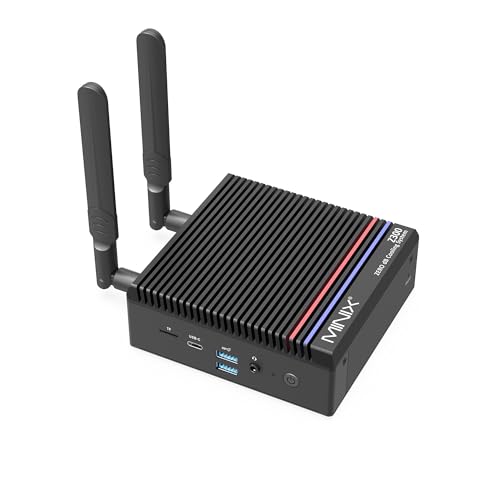
1. MINIX NEO Z300-0dB — the most 1440p headroom a fanless box offers
Who it suits: buyers who want the strongest version of this guide’s honest workflow — a native 1440p desktop, hardware-decoded video, and the lightest local games rendered at 1080p and scaled — in a silent machine that also has real multitasking headroom.
The MINIX NEO Z300-0dB is built around the Intel Core i3-N300, the eight-core flagship of the Alder Lake-N family and the most capable processor that can be passively cooled in a box this size. For this angle, three of its documented specifications matter most. Its display support is the best here: two HDMI outputs at 4K, plus a USB-C port with display output, so a 1440p monitor — or two, or three screens — is driven natively with connectors to spare. Its memory is 16GB of DDR4 in a slot, upgradeable to 32GB, and because integrated graphics borrow system memory, that capacity and that upgrade path feed the graphics side of the chip better than any soldered 8GB configuration can. And its Quick Sync hardware handles the video side of a 1440p setup — streamed media, calls and game streams rendered elsewhere — without waking the main cores. Storage is a 512GB PCIe SSD in an M.2 2280 slot that accepts drives up to 4TB, Windows 11 Pro is preinstalled, and connectivity runs to a 2.5-gigabit Ethernet port, Wi-Fi 6 and Bluetooth 5.2. The all-metal chassis, roughly 135 x 122 x 45mm, is the heatsink; the “0dB” name reflects a genuinely fanless design verified in the maker’s specifications and independent coverage. Check the current price on Amazon before you buy — this is the top-tier pick in this budget, so confirm it still fits the under-$500 framing on the day you shop.
- Best display chain in the guide: dual 4K HDMI plus USB-C display output — a native 1440p desktop with room for extra screens
- Most graphics feed: 16GB of slotted, upgradeable memory is the largest pool the integrated graphics can borrow from
- Strongest chip in the class: eight cores keep the desktop fluid while video decodes in hardware alongside
- Genuinely fanless: an all-metal chassis with no fan anywhere, verified from specifications and independent reviews
Honest limitation: even the best chip in this category is an integrated-graphics chip. Native 1440p game rendering is beyond it, exactly as it is beyond every pick here; its advantage is a smoother 1080p-rendered image and a better desktop, not a different resolution class. It also runs into the category’s thermal wall under sustained load — independent measurement put this processor at 98°C under continuous load, and long all-core jobs throttle. And it is the most expensive pick here, sitting at the top of this budget tier; check price on Amazon and skip it if the current price has moved above the budget.
Choose this if you want the fullest version of the honest 1440p workflow and the current price still fits the under-$500 budget. Skip it if your screen time is mostly a single desktop with light use — the picks below drive the same 1440p desktop for far less. Check on Amazon
2. MeLE Quieter 4C (N150, 8GB / 256GB) — the 1440p desktop that disappears
Who it suits: anyone whose 1440p plan is really a desktop plan — sharp text, streamed video, light games on the side — and who wants the PC itself to vanish behind the monitor it drives.
The MeLE Quieter 4C in this configuration pairs Intel’s N150, the Twin Lake refresh of the N100 with slightly higher clocks, with 8GB of LPDDR5 memory and 256GB of storage, running Windows 11 Pro. Its display credentials are exactly what this angle needs: two HDMI outputs documented at 4K, which means a native 1440p desktop on one or two screens without adapters or compromises, and the N150’s Quick Sync hardware decodes streamed and local video at full resolution while the processor idles. The Quieter chassis is fanless by design and by name, dissipating through its low-profile case, and it VESA-mounts behind a monitor — the neatest possible answer to “where does the PC go in a 1440p desk setup,” which is nowhere visible at all. USB-C power delivery means it can run from a suitable monitor or power bank, Wi-Fi 6, Bluetooth 5.2 and gigabit Ethernet cover connectivity. Check the current price on Amazon for this business-grade configuration — its pricing tends to fluctuate, so it rewards patience and checking back for a dip.
- Verified fanless: the Quieter series is a passively cooled design, confirmed by the maker and by years of independent reviews
- Dual 4K HDMI: a native 1440p desktop on one or two monitors, driven directly
- Desk-invisible: VESA-mounts behind the very monitor it feeds, and can be powered over USB-C
- Current-generation chip: the N150 is the newest quad-core in this guide
Honest limitation: the memory is soldered LPDDR5, so 8GB is permanent — and since the integrated graphics borrow from that same 8GB, the 1080p-render-and-scale workflow has less headroom here than on the MINIX, and busy multitasking alongside a game will show it. Storage grows only via a microSD card rather than a second internal drive. And its pricing can sit well above its typical level in this tier, so the honest advice is to check the current price on Amazon, buy it on a dip where you can, or choose the configuration below.
Choose this if you want the current chip driving your 1440p desktop from behind the screen, near or below its average price. Skip it if you want 16GB of memory headroom for the graphics to borrow — that points at the MINIX — or if the price is sitting at its high, in which case the next-but-one pick is the same box for less. Check on Amazon
3. CWWK N100 Firewall Mini PC (4 x 2.5GbE, 8GB / 128GB) — the router that also drives the screen
Who it suits: home-lab builders whose silent box has two jobs — routing the network as a pfSense or OPNsense appliance, and driving a sharp 1440p desk or console screen when a display is attached.
The CWWK N100 four-port is a finned, verified-fanless aluminium appliance built around the quad-core N100, fitted here with 8GB of DDR5 memory in a SO-DIMM slot and a 128GB NVMe SSD. Its reason to exist is on the back panel — four Intel i226-V 2.5-gigabit Ethernet ports, the controllers the firewall community specifically looks for — but for this angle its front-facing specifications matter too: two HDMI outputs documented at 4K, which drive a native 1440p desktop without strain, and the N100’s Quick Sync hardware, which decodes streamed video and game streams rendered elsewhere in the house. The DDR5 memory being slotted rather than soldered is a genuine plus in a category full of fixed configurations, since memory is what the integrated graphics borrow. USB 3.0 and 2.0 ports and a USB-C port round out the box. Check the current price on Amazon for this configuration — pricing across this listing family tends to wander inside the budget rather than sit still, so confirm the exact configuration and its current price together.
- Four Intel 2.5GbE ports: i226-V controllers, the ones pfSense and OPNsense users actually want
- Two 4K HDMI outputs: a native 1440p desktop from the same box that routes the house
- DDR5 in a slot: memory that can grow, in a class where soldered memory is the norm
- Verified fanless: a finned aluminium case with no fan, designed for 24/7 duty
Honest limitation: gaming is this box’s side job, not its purpose — the N100’s integrated graphics sit at the modest end of an already modest class, so local games mean 720p-to-1080p rendering at low settings, full stop. You are also paying an Amazon premium for hardware the maker sells directly for less, support is a marketplace seller rather than a US support desk, and documentation and BIOS polish lag the Protectli below. The N100 has real limits as a firewall under heavy intrusion-prevention workloads, too. One caution deserves emphasis: read the live listing’s configuration line closely before ordering, since this listing family covers several different memory and storage combinations under near-identical titles.
Choose this if the box routes first and displays second, and you are comfortable self-supporting. Skip it if the screen is the main job — the desktop picks above and below serve a 1440p desk better for the money. Check on Amazon
4. Protectli Vault FW4C (4GB / 32GB) — the supported appliance on a sharp screen
Who it suits: buyers who want a documented, warrantied, silent appliance first — a firewall with open-firmware options — and whose display needs are a crisp desktop and streamed video rather than locally rendered games.
The Protectli Vault FW4C wraps four Intel i226-V 2.5-gigabit Ethernet ports in a finned, fanless case, and it comes from a US company that publishes proper documentation, maintains a knowledge base, answers support tickets and backs the box with a two-year warranty. Its signature feature is firmware choice: a coreboot option, the open-source firmware security-conscious buyers specifically seek, alongside the standard AMI BIOS. Graded for this angle, the honest summary is short. The configuration linked here pairs 4GB of memory with 32GB of storage — dimensions chosen for a firewall distribution rather than a desktop — and driving a desktop at 1440p and decoding streamed video are light duties that sit comfortably within what this box does all day, so a silent, supported machine doing them in a study or living room is a perfectly sensible purchase. Check the current price on Amazon before you buy. Because Protectli sells this model in several memory and storage combinations, and through more than one channel, confirm the exact configuration on the live listing before you order.
- coreboot available: open firmware is a genuine differentiator no other pick here offers
- Real support: US-based company, published documentation and a two-year warranty
- Four 2.5GbE Intel ports: the same i226-V controllers as the CWWK, in a fully supported package
- Verified fanless: a finned metal case built for silent 24/7 service
Honest limitation: this is the weakest graphics platform in the guide, and the review should not dress that up. Its Celeron J3710 platform is a generation older than the N100 boxes, with DDR3 memory and mSATA storage; its integrated graphics are the oldest here, and while a 1440p desktop and decoded video are fine, locally rendered games are the most constrained of any pick — this is a display-and-decode machine, not a render machine, even by this guide’s modest standards. The 4GB of memory also leaves the least room for the graphics to borrow. Buy the FW4C as a supported firewall that happens to drive a sharp screen, and it makes sense; buy it as a gaming-adjacent PC and it does not.
Choose this if support, documentation and coreboot matter more to you than specifications. Skip it if local light gaming is a real part of the plan — every other pick here renders more capably. Check on Amazon
5. MeLE Quieter 4C (N100, 8GB / 128GB) — the same 1440p desktop, bought smarter
Who it suits: patient buyers who want the Quieter 4C’s dual-4K, monitor-hiding desktop experience for the least money — and who understand exactly which configuration they are looking at, because this guide lists the same chassis twice on purpose.
This Quieter 4C configuration is the previous chip generation of pick two: the quad-core N100 instead of the N150, 8GB of LPDDR5 memory, and 128GB of storage instead of 256GB, in the identical fanless, VESA-mountable chassis with the same two HDMI outputs documented at 4K, the same USB-C power delivery and Windows 11 Pro preinstalled. For the 1440p workflow, the experience is near-identical to its sibling: the desktop renders natively at 1440p, the N100’s Quick Sync hardware decodes video at full resolution, and light games render at 1080p or below and scale to the panel — the N150’s small clock advantage is not something a week of desk use would reveal. What you would feel is the storage: 128GB fills quickly under Windows, so this configuration suits a machine that works from cloud storage, network drives or a microSD card. Check the current price on Amazon — this configuration’s pricing fluctuates more widely than any other pick in this guide, often moving well below its higher points in this tier, and that is the reason it earns the “buy it when it dips” label outright.
- The proven chassis: identical fanless case, mounting and dual-4K outputs to the N150 configuration
- Near-identical 1440p experience: the same native desktop, the same hardware video decode, the same render-and-scale gaming envelope
- A genuine dip target: its pricing regularly drops well below its higher points in this tier
- Business-grade build: the same 24/7-oriented configuration line as pick two
Honest limitation: when its current price sits high in this tier, this configuration is poor value — priced close to the better N150 model — and 128GB of storage with soldered 8GB memory is the least future-proof specification in the guide. The shared-memory constraint matters for this angle in particular: the graphics borrow from the same 8GB the system runs on, permanently. Treat it as a price-watch listing rather than an automatic buy-today one: check price on Amazon, and when it has dipped well below the N150 configuration it is a bargain, while at the top of its range it is not, and a review that blurred that line would not be doing its job.
Choose this if you can land it on a dip, well below its N150 sibling, and your files live on network or cloud storage anyway. Skip it if the price on the day you shop has climbed close to that sibling — past that point, the N150 configuration above becomes the sensible buy. Check on Amazon
6. ZOTAC ZBOX CI337 Nano — the barebone you complete for the screen you own
Who it suits: tinkerers with a spare SO-DIMM and SSD on the shelf who want a verified-fanless machine from an established brand, with both HDMI and DisplayPort on the back, for the least money in this guide.
What Zotac sells in the ZBOX CI337 Nano is a kit, not a finished PC: the Intel N100 sits in the long-running fanless CI-series chassis — the listing itself leads with “Fanless Silent,” and the CI line’s passive design is well documented — and the slots for memory, storage and an operating system stand empty. No RAM, SSD or operating system is included. For this angle, its output pairing is a quiet strength: HDMI and DisplayPort side by side cover the two connectors a 1440p monitor is most likely to offer, and the N100’s Quick Sync hardware handles the decode side of the workflow once the machine is built. You add a SO-DIMM and an M.2 SSD — confirm the exact memory type and slot specification on Zotac’s product page before ordering parts — install the operating system of your choice, Linux being free and ideal, and the result is a silent N100 desktop with a card reader and VESA mounting. Check the current price on Amazon for the kit, and check current prices for the parts you still need as well. Completing it with a 16GB memory stick and a 512GB SSD still positions the finished machine as a lower-tier option comfortably inside this budget — and fitting 16GB from the start gives the integrated graphics a bigger memory pool than any complete pick except the MINIX.
- Cheapest way in: a verified-fanless kit from an established brand, in the lowest tier of this guide — check price on Amazon
- HDMI and DisplayPort: both connectors a 1440p monitor wants, on one small box
- Your parts, your spec: choose the memory size the graphics will borrow from, instead of accepting a fixed configuration
- Linux-friendly: the natural home for a free OS, which keeps the completion cost down
Honest limitation: the sticker price is not a computer — it is most of a computer — and the comparison only flatters the kit if your parts are cheap or already owned. Memory and SSD prices are volatile, and a completion built entirely from new retail parts can drift toward the price of the complete Quieter 4C above while adding an hour of assembly and an OS install; there is no Windows licence in the completion cost unless you add one. The finished machine also renders games exactly like every other N100 box — 1080p and below, scaled — because the silicon, not the kit, sets that ceiling.
Choose this if the parts are already on your shelf, or the assembly itself is half the appeal. Skip it if you expect a working machine minutes after the box opens — the other five picks are all complete. Buyers weighing the kit route against the wider barebones market might also browse our Best Mini PC Under $500 coverage before deciding. Check on Amazon
Comparison Table
Every machine in this guide side by side, graded for the 1440p workflow: native desktop and decoded video everywhere, local rendering at 1080p or below on all six. Check the current price on Amazon for each machine before you buy, because several of these move frequently.
| Machine | Processor | Memory | Documented display outputs | Price | Best for |
|---|---|---|---|---|---|
| MINIX NEO Z300-0dB | Core i3-N300, 8 cores | 16GB DDR4, upgradeable to 32GB | 2 x HDMI 4K, USB-C display | Check price on Amazon | Most headroom at every step of the workflow |
| MeLE Quieter 4C (N150) | Intel N150, 4 cores | 8GB LPDDR5, soldered | 2 x HDMI 4K | Check price on Amazon | Silent 1440p desktop behind the monitor |
| CWWK N100 4-Port | Intel N100, 4 cores | 8GB DDR5, slotted | 2 x HDMI 4K | Check price on Amazon | Router first, sharp screen second |
| Protectli Vault FW4C | Celeron J3710, 4 cores | 4GB DDR3L | Display output for desktop and video duty | Check price on Amazon | Supported appliance, desktop and decode only |
| MeLE Quieter 4C (N100) | Intel N100, 4 cores | 8GB LPDDR5, soldered | 2 x HDMI 4K | Check price on Amazon | Value pick — buy on a dip |
| ZOTAC ZBOX CI337 Nano | Intel N100, 4 cores | None fitted — add your own | HDMI + DisplayPort | Check price on Amazon | Cheapest fanless kit for a 1440p desk |
How to Choose a Fanless Mini PC for a 1440p Setup
Decide what “1440p” means in your house first. If it means a sharp desktop, full-resolution video and light games rendered lower and scaled, every pick in this guide qualifies and the choice turns on budget and ports. If it means games rendered natively at 2560 by 1440, no fanless machine qualifies at any price, and the honest move is to change category rather than raise the budget — a discrete graphics card is the entry ticket, and it comes with a fan attached.
Check the outputs, not the adjectives. What matters is the documented connector list: two HDMI outputs at 4K on the MeLE and CWWK picks, HDMI plus USB-C display output on the MINIX, HDMI and DisplayPort on the ZOTAC. Any of those drives a 1440p monitor natively. A listing that cannot tell you its outputs cannot tell you much else either.
Count memory as graphics memory. Integrated graphics borrow system RAM, so the memory figure is partly a graphics figure. Sixteen slotted gigabytes (the MINIX, or a ZOTAC you complete with a 16GB stick) give the render-and-scale workflow the most room; soldered 8GB configurations are adequate for the desktop-and-video parts and tighter when a game joins the multitasking. Buy memory for the machine’s whole life, because in most of these boxes it can never be changed.
Set the render resolution deliberately. The working recipe for local games on this class of hardware: leave the display at its native 1440p, set the game’s render resolution to 1080p — 720p for heavier titles — use the game’s own resolution scaling where it offers it, and keep texture and shadow settings modest. The desktop stays sharp, the game stays fluid, and the upscaled image on a 1440p panel looks far better than the same game struggling at native resolution.
Use streaming for the games that do not fit. A game rendered on a gaming PC elsewhere in the house, or on a cloud service, reaches these boxes as video — and hardware video decoding is the thing they do best. For a quiet room with a 1440p screen, a fanless box as the streaming endpoint is often a better experience than a noisy PC under the desk, and it is the only route by which demanding games appear on these machines at all. Our Best Fanless Mini PC For Streaming Under $500 guide takes that angle in full.
Placement is part of the cooling system. A fanless case sheds heat into the room through its fins, so give it air: open shelf rather than sealed cupboard, fins unobstructed, out of direct sun. The MeLE picks cheat the problem elegantly by mounting behind the monitor in open air. A box that throttles inside a closed TV cabinet in summer is obeying physics, not failing — and if your only available spot is enclosed and warm, this category is the wrong choice.
Match the purchase to the support you need. The stakes differ by role, and that is the point: a misbehaving desktop costs you an afternoon, while a misbehaving firewall costs you the network. That asymmetry is why the supported Protectli earns its premium for network duty while the marketplace CWWK wins on hardware value — and why pure desktop buyers can shop on specification and current pricing alone, as the Best Fanless Mini PC For Beginners Under $500 and Best Fanless Mini PC For Small Spaces Under $500 companion guides do from their own angles.
Common Mistakes
- Reading “supports 4K output” as “games at 4K” — or at 1440p. Output resolution describes the desktop signal, not rendering power. Every pick here outputs far more pixels than its graphics can render in a game; the two numbers live in different worlds.
- Setting games to native 1440p and blaming the machine. The render-and-scale workflow exists because native rendering is beyond this silicon. A slideshow at 1440p is a settings error, not a defective PC.
- Expecting DLSS or a named upscaling feature to rescue the frame rate. These are Intel integrated graphics; NVIDIA’s technology is not present, and no special upscaler is claimed for these chips. Plain render-resolution scaling is the tool, and it is enough for the games that fit this category.
- Buying a 1440p monitor as a performance upgrade. The panel sharpens the desktop and video. It adds no rendering power whatsoever, and pairing it with expectations it cannot meet is the most expensive disappointment in this category.
- Buying soldered 8GB for a five-year desktop. Memory the graphics must borrow from, in a quantity that can never grow, should be chosen for the machine’s whole life. If the plan is a long-lived main desktop, the 16GB route is the honest minimum.
- Comparing a barebone sticker to complete prices. For a parts owner the ZOTAC kit is outstanding value; for a buyer pricing every component new, the comparison quietly stops working. Always compare the finished cost of the completed kit — kit plus the parts and any licence you still need, at their current prices — against the current price of a complete machine.
- Sealing the box in furniture. A fanless PC in a closed cabinet is a PC in an oven, and a throttling one at that. Placement is cooling; treat it that way.
Final Recommendation
For most buyers pairing a silent PC with a 1440p screen, the MINIX NEO Z300-0dB is the pick: the strongest integrated graphics in the class, 16GB of upgradeable memory for those graphics to borrow, the best documented display chain here, and hardware video decode doing the streaming work — provided the current price still fits this budget — check price on Amazon before you buy. Buyers whose 1440p life is desktop and video should save the difference and take the MeLE Quieter 4C, ideally when its price has dipped below its usual level in this tier — check the current price on Amazon — and hide it behind the monitor it feeds. Network builders split by temperament: the CWWK is the hardware value, the Protectli is the supported appliance with the weakest graphics here. The ZOTAC kit rewards anyone with parts on the shelf. And the boundary bears repeating one last time: buy any of these for a native 1440p desktop, full-resolution video and honestly scaled light gaming in total silence — and if native 1440p gaming is the real requirement, start with the Best 1440p Gaming PC Under $500 guide instead, where the graphics cards live. Readers whose budget sits lower can run the same logic through the Best Fanless Mini PC For 1440p Gaming Under $400 guide, and general gaming shoppers through Best Gaming PC Under $500.
FAQ
Can a fanless mini PC actually game at 1440p? Not natively, and this guide will not pretend otherwise. The integrated graphics in these Intel chips cannot render modern games at 2560 by 1440 at playable frame rates. What they do honestly is render light games at 1080p or 720p and scale the image to a 1440p display, run the desktop and video at native 1440p, and decode game streams rendered on stronger hardware elsewhere. If native 1440p gaming is the requirement, you need a discrete graphics card — see the Best Mini Gaming PC Under $500 guide.
Will a 1440p monitor still be worth it with one of these PCs? Yes, for everything except native game rendering. The desktop is visibly sharper than 1080p, documents and media gain real room, and streamed or local video plays at full resolution through hardware decoding. The monitor is a display upgrade, not a performance upgrade — buy it for the hours you spend looking at the desktop, which for most people is most of them.
Why do the listings advertise 4K output if the PCs cannot game at high resolutions? Because output and rendering are different jobs. Sending a 4K desktop signal is cheap — the display engine does it almost for free. Rendering a game at that resolution means calculating millions of pixels of 3D world dozens of times per second, which is the most expensive job in computing. A listing can be telling the truth about the first and implying something false about the second; this guide grades the second.
Which pick handles the 1440p workflow best? The MINIX NEO Z300-0dB, on three documented counts: the strongest chip in the class, 16GB of slotted memory for its integrated graphics to borrow, and the best output set — dual 4K HDMI plus USB-C display. The MeLE Quieter 4C configurations follow closely for desktop-and-video use, with the N150 version ahead on chip and storage and the N100 version ahead on price when it dips.
Does memory really affect gaming on an integrated-graphics PC? Yes, more than on a machine with a graphics card. The integrated GPU has no memory of its own, so game textures and frame buffers live in system RAM, shared with Windows and everything else you have open. More memory — and memory in a slot, which can grow — directly widens what the render-and-scale workflow can handle, which is why the 16GB MINIX and a 16GB-completed ZOTAC grade above the soldered 8GB configurations for this angle.
What about game streaming services on a fanless PC? They suit these machines unusually well. A cloud or in-home stream arrives as video, and Quick Sync hardware decoding — present across the N-series picks — plays it back at full resolution with minimal processor load and zero noise. For demanding games in a quiet room with a 1440p screen, a fanless box as the streaming endpoint is frequently the best experience available at this budget; the Best Fanless Mini PC Under $400 guide covers the cheaper end of the same idea.


