Where to buy
Check the latest price, availability and delivery on Amazon. Orders are placed on Amazon. We may earn a commission from qualifying purchases.
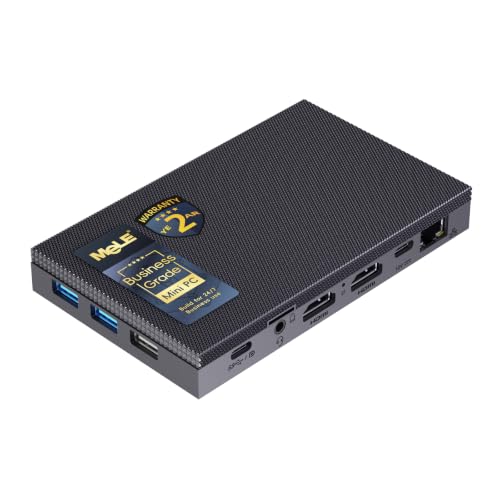
- Best overall fanless mini PC for streaming: MeLE Quieter4C Fanless Mini PC, Intel N150, 8GB RAM, 256GB NVMe SSD, Windows 11 Pro — Check on Amazon
- MeLE Quieter4C Fanless Mini PC, Intel N100, 8GB RAM, 128GB Storage, Windows 11 Pro — Check on Amazon
- HUNSN RJ42 Fanless Mini PC, Intel N150, 8GB RAM, 128GB SSD, 4x 2.5GbE Ports — Check on Amazon
- MeLE PCG02 Pro Fanless PC Stick, Intel N100, 8GB RAM, 256GB, Windows 11 Pro — Check on Amazon
- MeLE Quieter3Q Fanless Mini PC, Celeron N5100, 8GB RAM, 256GB — Check on Amazon
- ZOTAC ZBOX CI337 Nano Fanless Silent Mini PC, Intel N100, Barebone — Check on Amazon
Disclosure: As an Amazon Associate, reviewstook.com earns from qualifying purchases. Links to Amazon on this page are affiliate links; they cost you nothing extra. Listing details such as price and availability change often, so check the current Amazon listing before you buy.
Start with the sentence every other guide in this category avoids: a fanless mini PC is not a game-streaming machine, and pretending otherwise would waste your money. There is no graphics card in any pick below, no discrete encoder, and no cooling headroom for one — a fanless case sheds heat through its own metal skin, which caps these machines at low-power Intel chips with integrated graphics. If your plan is to play a modern game on the same PC that encodes and broadcasts it, stop here and put the budget toward a fanned machine instead; the honest version of that search is Best Mini Gaming PC Under $400. What a fanless box does brilliantly — and what this guide grades — is the other three streaming jobs: a silent talk, podcast or desktop-show station that never adds fan noise to your microphone; a console streaming station, where a capture card feeds it gameplay rendered by a PlayStation, Xbox or Switch and the little PC only has to encode and broadcast; and a tireless media box that transcodes and serves your library around the clock. For those jobs, silence is not a compromise. It is the feature.
The encoder story is short enough to state in the introduction, because it decides everything that follows. All six picks are Intel machines, and all six encode with Intel Quick Sync — a fixed-function block inside the processor that turns video into a stream without asking the CPU cores to do it. That matters twice over in a fanless box. First, it is why these machines can broadcast at all: four small efficiency cores would be a poor software encoder, but they do not have to be one. Second, it is why they can broadcast quietly for hours: fixed-function encoding is light work, and the best-documented pick below was measured drawing roughly 15 watts at the wall while transcoding 4K video — a load a passive case can shed all evening. The limits are just as plain. Quick Sync on these chip generations encodes H.264 and HEVC; it does not encode AV1, and no pick in this guide can send an AV1 stream to YouTube no matter what a listing headline implies. Twitch’s standard — H.264 at up to roughly 6,000 kbps CBR — is exactly what these encoders are good at.
Every machine below ships with 8GB of memory, and a stream is never one program: it is OBS, a browser with chat and dashboards, the capture or media software, and Windows itself, all drawing from the same small pool while the encoder works. So this guide grades the simultaneous load as hard as the encoder — memory headroom, recording storage, and whether the box gives you a way to add either. A stream that drops frames because the browser ate the RAM is just as dead as one the encoder could not keep up with. The picks are ranked for streaming first and everything else second; the parent guide to this one, Best Fanless Mini PC Under $400, ranks the same six machines as general-purpose silent PCs, and the two orders are not the same.
In this guide
Quick Picks
Short on time, or comparing several options at once? Each row below names a streaming job and the product that suits it, with a link to the listing.
| Streaming job | Pick | Why it stands out | Link |
|---|---|---|---|
| Best overall for streaming | MeLE Quieter4C, N150, 8GB/256GB NVMe | The complete silent stream station: current Quick Sync, real SSD for recordings — check price on Amazon | Check on Amazon |
| Best value stream box | MeLE Quieter4C, N100, 8GB/128GB | Same encoder class in a value-tier build, with a free M.2 slot waiting for a recording drive — check price on Amazon | Check on Amazon |
| Best for a busy, always-on setup | HUNSN RJ42, N150, 8GB, 4x 2.5GbE | Socketed memory to 32GB and room for three drives — the only pick that outgrows the 8GB ceiling | Check on Amazon |
| Best console-capture station | MeLE PCG02 Pro stick, N100, 8GB/256GB | Plugs straight into the TV beside the console and encodes in total silence — check price on Amazon | Check on Amazon |
| Best budget talk station | MeLE Quieter3Q, N5100, 8GB/256GB | An older Quick Sync generation that still handles talk and desktop shows — check price on Amazon | Check on Amazon |
| Best for builders | ZOTAC ZBOX CI337 Nano, N100, barebone | You choose the memory and SSD yourself — the kit route to a silent encoder, check price on Amazon | Check on Amazon |
How These Picks Were Chosen
The first filter was the word “fanless” itself, applied strictly. A pick had to be a genuinely passively cooled machine — no fan, verified from the manufacturer’s own specifications or documentation, not from a marketplace headline. That filter removed famous names: the popular N100 and N150 mini PCs in this price band from the big mini-PC brands are actively cooled by small internal fans, and at least one box sold into the fanless category states in its own listing copy that a cooling fan helps it dissipate heat. Those machines may be fine computers, but a fan you can hear on a microphone is the whole problem this category exists to solve, so they are not here.
The second filter was the encoder. Streaming from integrated graphics lives or dies on the fixed-function encoder block, so every pick had to carry Intel Quick Sync with hardware H.264 encoding — the format Twitch broadcasting runs on. That sounds like a low bar, and at this budget it is the bar that matters: it is what separates a silent box that can hold a 6,000 kbps CBR broadcast for three hours from one that dissolves into skipped frames. Where a pick’s chip generation changes the encoder’s ability, the review says so; where the base research documents a machine actually doing this work — one pick below has independent measurements of it transcoding 4K video at roughly 15 watts — that evidence is cited rather than a spec-sheet promise.
The third filter was the simultaneous load. A streaming PC is judged on its worst minute, not its idle desktop: OBS compositing scenes, a browser holding chat, alerts and a dashboard, the capture feed or media server running, and the recording writing to disk, all at once, all inside 8GB of memory on five of these six picks. So the grading weighs memory and storage as streaming specs, not footnotes — whether the storage is a real SSD or slow eMMC, whether there is a free slot for a dedicated recording drive, and whether the memory can ever be upgraded. Pricing in this category moves weekly, so check price on Amazon for every pick before you buy; one pick is a barebone whose review costs the completion honestly instead of letting the barebone format hide what a finished machine requires. We did not use these machines ourselves. We read the maker listings, datasheets, manuals and independent teardowns, and compared encoder generation, memory type and upgrade paths, storage, port layouts and stated thermal design — and where a maker’s claims stretch, the review says so.
The Encoder Is the Streaming Spec
On a gaming tower, streaming quality is mostly a question of which graphics card you bought, because the card’s encoder does the work. On a fanless mini PC there is no card, so the question collapses into the processor itself — and specifically into which generation of Intel Quick Sync it carries. Five of the six picks run Alder Lake-N chips (the N100 and N150), whose Quick Sync block encodes H.264 and HEVC in hardware. H.264 is the one that matters for broadcasting: it is what Twitch takes, and a hardware H.264 encode at 1080p60 or 720p60 at 6,000 kbps sits comfortably inside what this block does all day. HEVC earns its mention for the local recording: smaller files at the same quality, produced without troubling the CPU cores. The sixth pick, the Quieter3Q, runs an older Jasper Lake Celeron whose Quick Sync is a generation behind: still a genuine hardware H.264 encoder, still entirely capable of talk and desktop broadcasts, but with less headroom when the scene gets busy — which is why it is graded as the budget talk station rather than the all-rounder.
What none of these encoders does is AV1. AV1 encoding arrived in Intel’s later graphics generations, and the N100, N150 and Celeron N5100 predate it: their Quick Sync blocks have no AV1 encode path, full stop. This needs saying plainly, because listings love to imply otherwise. If a headline for any machine in this guide suggests AV1 streaming, it is wrong. In practice the denial costs a Twitch broadcaster nothing today — Twitch’s standard broadcast is H.264 — and it costs a YouTube streamer the option of AV1’s better quality at high bitrates, which is a real but narrow loss. Judge these machines as what they are: excellent H.264 broadcast encoders that happen to be silent.
The alternative to Quick Sync is software encoding with x264, and on this hardware it is a fallback, not a plan. Four efficiency cores running OBS, a browser and a capture feed have little left to give a software encoder; x264 at its fastest presets can hold a talk or desktop scene at 720p, but asking it to encode gameplay — even gameplay arriving from a console — invites the skipped frames the OBS section below teaches you to read. The discipline of this entire guide is therefore simple: the hardware encoder does the broadcasting, the CPU cores run the show around it, and anything that steals from either half shows up on air. There is one more fanless-specific reason to keep it that way. A software encode is sustained CPU load, and sustained load is what a passive case is worst at — clocks settle to what the fins can shed. A Quick Sync encode barely warms the cores, which is why the documented transcode measurement for the N100 pick below shows the whole machine sipping power while doing continuous video work.
The 6 Best Fanless Mini PCs for Streaming Under $400
MeLE Quieter4C Fanless Mini PC — Intel N150, 8GB RAM, 256GB NVMe SSD
Who it suits: The streamer who wants one finished, silent box that does the whole job — talk and desktop shows, console capture, recordings kept — with nothing to build and nothing to apologise for.
This is the most complete streaming station in the guide, and the reasons are unglamorous: the newest encoder in the set, fitted to the one mainstream pick that stores your recordings on a real SSD. The processor is Intel’s N150, a quad-core chip boosting to 3.6 GHz, and its Quick Sync block is the same Alder Lake-N generation as the N100’s with a little more clock behind the cores that run OBS and your browser. Be honest about that chip name, because the guide is: the N150 is a clock-bump refresh of the N100, not a new class of processor, and this pick wins on its configuration, not its badge. The 256GB of storage is an NVMe SSD rather than eMMC, and that matters every single stream: OBS recordings are large, sustained writes, and an SSD absorbs them without the stutters and wear that flash storage designed for appliances can suffer. Around the encoder, MeLE builds the most finished silent desktop on Amazon — two HDMI ports plus a full-function USB-C for triple 4K displays, gigabit Ethernet for the wired connection this guide insists on, Wi-Fi 5 and Bluetooth 5.1, a VESA mount in the box so the 5.2 by 3.2 by 0.7 inch slab can live behind your streaming monitor, and Windows 11 Pro installed. Check price on Amazon before you buy, because pricing in this category moves often.
Under the simultaneous load, this is the pick with the fewest excuses to make. Eight gigabytes of memory is the set’s shared ceiling and it is still the binding constraint — OBS, chat, a dashboard and a capture feed fit, but they fit the way they fit on every pick here, with no room for a dozen careless browser tabs. What this configuration buys you is that the two other streaming resources are not rationed: the encoder is current-generation Quick Sync, and the recording drive is a proper SSD with space for a real archive of broadcasts. The case gets properly warm under sustained work, as its sibling pick’s measurements document, and belongs in open air. If your stream is a talk show, a podcast with video, a desktop tutorial or a console broadcast, this is the machine that does it tonight, out of the box, in silence.
- Current-generation Quick Sync H.264/HEVC encoding — the broadcast never touches the CPU cores.
- NVMe SSD storage that treats recordings as a first-class job, not an afterthought.
- Triple 4K output and a VESA mount: stream deck, chat screen and main display, box hidden.
Honest limitation: 8GB of memory is the ceiling for the whole simultaneous load, and the N150 is a refresh, not a leap — you are paying for the finished configuration, not for speed.
Choose it if you want the silent stream station that is ready tonight and your shows are talk, desktop or console broadcasts. Skip it if your plan is playing and streaming a modern game from one machine — no fanless box does that, and this one does not pretend to.

MeLE Quieter4C Fanless Mini PC — Intel N100, 8GB RAM, 128GB Storage
Who it suits: The value-minded streamer who wants the same encoder class in a value-tier build and is willing to treat one planned upgrade — a recording drive in the free slot — as part of the deal.
Everything said about the encoder in the pick above applies here, because the N100 carries the same Alder Lake-N Quick Sync generation: hardware H.264 for the broadcast, HEVC for the local recording, and a fixed-function block that does continuous video work at very low power. That last point is not a spec-sheet claim for this machine — it is measured. Independent reviewers who ran this exact model through a 4K transcoding workload recorded roughly 15 watts at the wall, around 10 watts in typical use, a CPU peak of 82°C and no throttling observed in a normal room. A machine that transcodes all evening without slowing down will hold your broadcast; the streaming workload is lighter than the test it already passed. The rest of the platform matches its sibling: triple 4K output across dual HDMI and USB-C, gigabit Ethernet, Wi-Fi 5, Bluetooth 5.1, the VESA mount in the box, Windows 11 Pro. Check price on Amazon before you buy, because pricing for this model moves often — and compare the live listing against the N150 build above when you judge its value.
The catch is storage, and for streaming it is a sharper catch than in general use. The 128GB is eMMC — appliance flash, soldered in, slower and less durable under sustained writes than an SSD — and a streamer writes constantly: the local recording of every broadcast, plus Windows and OBS competing for the same small pool. Grade it harder than a desktop buyer would. The saving grace is designed in: every Quieter4C build carries a free M.2 slot that takes an NVMe or SATA drive up to 4TB, so the correct way to buy this machine is as a two-part purchase — the box now, a modest SSD in the slot as your recording drive, with OBS pointed at it from day one. The finished result is arguably the better streaming layout: system and recordings on separate storage. Reviewers of this model advise exactly that — install the working load on NVMe rather than eMMC — and for a streamer it is not advice, it is the setup step. One discipline note: this build’s memory type is not asserted here, because MeLE sells the 4C with different memory arrangements by build and the research does not pin this one down; what is certain is 8GB, and the memory is not the upgrade path — the slot is.
- The set’s best-documented encoder: independently measured transcoding 4K video at ~15W with no throttling.
- A free M.2 slot on every build — the recording-drive fix is designed in, not improvised.
- Same encoder class as the top pick, in a value-tier configuration built around that free slot.
Honest limitation: 128GB of eMMC is the wrong storage for a recording habit — budget the slot SSD as part of the purchase, and check price on Amazon before you judge its value.
Choose it if you will add the recording drive and check price on Amazon first. Skip it if you want to unbox and broadcast with zero additions — that is the N150 build above.
HUNSN RJ42 Fanless Mini PC — Intel N150, 8GB RAM, 128GB SSD, 4x 2.5GbE
Who it suits: The technical streamer whose setup has outgrown a simple desk box — multiple networks, a home lab, a media server and a stream to run at once — and who is comfortable installing their own operating system.
The RJ42 is the odd one out in this guide, and for a certain streamer it is the most capable pick here. It starts from the same N150 and the same Alder Lake-N Quick Sync encoder as the top pick, so the broadcast itself is identical. What changes is everything around the broadcast. Memory sits in a real DDR5 SO-DIMM slot and can grow to 32GB — the only pick that can break the set’s 8GB ceiling, and for a streamer running OBS, two browsers, a media server and a home-lab stack, that headroom is the difference between a machine that copes and one that swaps. Storage expands the same way: a 128GB SSD fitted, plus two M.2 NVMe slots and a 2.5-inch bay, so recordings, media and system each get their own room. And the four Intel I226-V 2.5-gigabit Ethernet ports — this is a network appliance’s port layout, not a desktop’s — mean the wired-Ethernet rule this guide preaches can be satisfied with a dedicated port while the box routes or serves on the others. Check price on Amazon for this exact configuration before you buy, and read the listing carefully — the RJ42 line covers several configurations under similar names, so the configuration line matters.
Now the honesty this pick demands. There is no Wi-Fi in the listing — for a machine that must be wired to stream, that is nearly a virtue, but it means placement is wherever the cables are. The documentation trail needs care: the user manual’s text was written for the N100 generation of this model family, and the RJ42 is also sold barebone under near-identical names, so the configuration line of the exact listing — chip, memory, storage — is a thing to verify before ordering and again on arrival. And this is an appliance in spirit: expect to install and configure your own system rather than unbox a finished Windows desktop. If your stream is one job among several an always-on box performs, and you have the skills to set it up once and let it run for years, the RJ42 is the pick with room to grow into the job.
- Socketed DDR5 memory to 32GB — the only escape from the set’s 8GB simultaneous-load ceiling.
- Three storage locations (fitted SSD, two M.2 slots, 2.5-inch bay) for recordings and media.
- Four 2.5-gigabit Ethernet ports: a dedicated wired path for the broadcast, always.
Honest limitation: An appliance, not a finished desktop — no Wi-Fi, your own OS setup, and a model family whose generations and barebone variants demand careful reading of the configuration line.
Choose it if your stream shares a box with lab and media duties and you can set it up yourself. Skip it if you want to unbox a Windows PC and broadcast tonight — both MeLE builds above exist for you.

MeLE PCG02 Pro Fanless PC Stick — Intel N100, 8GB RAM, 256GB
Who it suits: The console streamer. This stick plugs into the television beside the console, takes the capture feed, and runs the broadcast from the one place fan noise would be most unforgivable — the living room.
The form factor is the pitch: a complete Windows 11 Pro PC in a stick with a male HDMI connector that plugs straight into the back of a display. Inside are the same N100 and Alder Lake-N Quick Sync as the Quieter4C picks, so the encoder grading carries over unchanged — hardware H.264 at Twitch’s bitrate, HEVC for the local recording, no AV1 encode, and a fixed-function load light enough for a passive stick to sustain. For the console workflow, that is precisely the right shape of computer: the console renders the game, a capture card hands the picture to the stick, and the stick’s only real work is compositing your overlay and camera, encoding, and sending — the lightest version of streaming there is, and the one where silence is worth the most. Dual HDMI outputs drive a second 4K display for chat and OBS monitoring, gigabit Ethernet satisfies the wired rule without an adapter hunt, and features like auto power-on and PXE boot mark it as a machine designed to live behind a screen and be forgotten. Check price on Amazon for the current listing before you buy.
The limits are written into the stick. Memory is 8GB of LPDDR4x, soldered — the simultaneous-load ceiling again, with no upgrade path of any kind. Storage is 256GB of eMMC with no M.2 slot on this model: recordings fit, but the archive discipline has to be real — move finished broadcasts off the stick (the microSD slot takes cards up to 2TB as overflow) rather than letting eMMC fill and age under constant recording writes. And the thermal mass is the smallest in the guide; a stick plugged into the back of a warm television in a closed cabinet is living its hardest life, so give it air. Judged as a desktop it is cramped; judged as the silent half of a console streaming setup, nothing else in this guide disappears as completely.
- Zero-footprint streaming: plugs into the TV, hides behind it, encodes in silence.
- The same Quick Sync generation as the top picks, in the lightest workload streaming offers.
- Gigabit Ethernet built in — the wired rule holds even in the living room.
Honest limitation: Fixed forever: soldered 8GB memory and 256GB of eMMC with no expansion slot — an appliance specification you manage around, not a machine that grows.
Choose it if the stream is a console broadcast from the living room. Skip it if the PC has to run the show and store months of recordings — the Quieter4C builds are built for that.

MeLE Quieter3Q Fanless Mini PC — Celeron N5100, 8GB RAM, 256GB
Who it suits: The talk streamer on a budget — podcasts, interviews, desktop shows and community streams — who wants genuine silence and hardware encoding without paying for the current chip generation.
The Quieter3Q is the previous generation of the same idea, and its review turns on one honest question: how much encoder do you actually need? Its Celeron N5100 is a Jasper Lake quad-core, and its Quick Sync block is a generation behind the Alder Lake-N picks — but a generation behind in Quick Sync still means a real hardware H.264 encoder, and for a talk or desktop broadcast at 1080p60 or 720p60, that is the job done: scenes that change at the pace of a conversation, a camera feed, a shared screen. Where the older block shows its age is headroom — busy animated overlays, fast-moving capture feeds and high-motion content leave it less margin — so this guide grades it as the talk station and does not ask it to anchor a console setup. The rest of the machine is the classic Quieter formula: a case about 18mm thick with a grooved top that exists because the antennas need it, dual HDMI 2.0 outputs for two 4K displays, gigabit Ethernet, Windows ready to run, and power draw in the region of 4 watts idle and 12 under load. Check price on Amazon for the current listing, as pricing varies by build and seller.
Two streaming-specific credits lift it above its age. First, storage: 256GB fitted and — unlike the stick above — a user-accessible M.2 2280 NVMe slot, so the recording-drive upgrade that the N100 Quieter4C needs is available here too, on a budget pick in the guide. Second, honesty about the one documented confusion: MeLE’s own materials conflict on this model’s wireless — some list Wi-Fi 5 with Bluetooth 5.1, the spec table shows Wi-Fi 6 with Bluetooth 5.2 — and the review in the parent guide flags it rather than resolving it, because the live listing is the only authority. For a streamer the practical consequence is small, since this guide’s wired-Ethernet rule means the stream should never ride the Wi-Fi either way; but check the live listing if the wireless matters to your room. Buy it knowing exactly what it is: last generation’s encoder, this generation’s silence, in a budget-tier build.
- A genuine hardware H.264 encoder in a budget-tier build — talk and desktop shows are fully covered.
- A user-accessible M.2 slot: the recording-drive upgrade path survives even in this budget build.
- Sips power (~4W idle, ~12W under load) — an always-on stream and media box costs almost nothing to keep.
Honest limitation: The older Quick Sync generation has the least headroom here for high-motion capture content, and MeLE’s own documents disagree about its wireless specification — verify on the live listing.
Choose it if your show is talk, interview or desktop and the budget is the point. Skip it if console capture with fast gameplay is the plan — the current-generation picks hold that load with margin to spare.

ZOTAC ZBOX CI337 Nano Fanless Silent Mini PC — Intel N100, Barebone
Who it suits: The builder-streamer: someone who would rather choose their own memory and SSD — and size the recording drive correctly from the start — than accept a factory configuration.
ZOTAC has made passively cooled nano PCs longer than almost anyone, and the CI337 Nano is the current entry point to that line: an Intel N100 in a finned, fanless chassis with HDMI and DisplayPort outputs. The encoder is therefore a known quantity — the same Alder Lake-N Quick Sync as the MeLE N100 pick, with the same H.264/HEVC grading and the same no-AV1 honesty. What is different is everything else — there is none: this is a barebone. The listing title says it plainly — no memory, no storage, no operating system. Check price on Amazon for the current listing, and remember that the barebone figure is a down payment on a computer, not the computer itself. You add a DDR5 SO-DIMM, an M.2 SSD and the operating system of your choice. Costed honestly, you still need to add memory, storage and an operating system, so check the cost of the finished build before ordering — parts pricing moves, and the basket deserves a fresh check. The streaming argument for enduring that assembly is real: you choose the recording drive’s size and quality yourself, you can fit more memory than any finished pick here offers in its stock form, and the finished machine is a brand-name fanless encoder with a support organisation behind it.
The counterweight is equally real. If you do not already own a spare stick of memory and an SSD, the barebone format flatters the machine; if your parts shelf holds the wrong memory generation, note the platform’s specification governs what fits — read ZOTAC’s own spec page before buying parts, not a reseller’s summary. The barebone route also means the first evening is assembly and installation, not broadcasting, and any problem is yours to diagnose in a way a finished MeLE’s buyer can hand to a warranty line. For the right buyer none of that is a deterrent — it is the hobby. For everyone else, the finished picks above cost their convenience honestly. This guide places the ZOTAC last not because the finished machine is worse — configured well, it matches the #2 pick’s encoder with better storage — but because a streaming guide should rank the box that broadcasts tonight above the kit that broadcasts after a parts order.
- You spec the streaming machine: memory size and a recording SSD chosen for the job, not the price point.
- The same verified Quick Sync encoder as the finished N100 picks, in a brand-name fanless chassis.
- A barebone entry point — especially attractive if your parts shelf is already stocked.
Honest limitation: Barebone means barebone: no RAM, no SSD, no operating system, and the parts bill can add up quickly — cost the finished build before you commit.
Choose it if you have parts on hand or enjoy the fitting. Skip it if you want to unbox a working stream station — the complete picks above are ready to run for most buyers.

Comparison Table
| Product | Encoder | Best streaming use | Link |
|---|---|---|---|
| MeLE Quieter4C, N150, 8GB/256GB NVMe | Quick Sync (Alder Lake-N), H.264/HEVC | The complete silent stream station, recordings on a real SSD | Check on Amazon |
| MeLE Quieter4C, N100, 8GB/128GB eMMC | Quick Sync (Alder Lake-N), H.264/HEVC | Same broadcast in a value-tier build — add a slot SSD for recordings | Check on Amazon |
| HUNSN RJ42, N150, 8GB, 4x 2.5GbE | Quick Sync (Alder Lake-N), H.264/HEVC | Always-on lab and media box that also broadcasts | Check on Amazon |
| MeLE PCG02 Pro stick, N100, 8GB/256GB | Quick Sync (Alder Lake-N), H.264/HEVC | Console capture station hidden behind the TV | Check on Amazon |
| MeLE Quieter3Q, N5100, 8GB/256GB | Quick Sync (Jasper Lake), H.264 | Budget talk, podcast and desktop shows | Check on Amazon |
| ZOTAC ZBOX CI337 Nano, N100, barebone | Quick Sync (Alder Lake-N), H.264/HEVC | The kit route — your memory, your recording drive | Check on Amazon |
Read the encoder column carefully, because it is the table’s honest secret: five of the six rows are the same encoder generation, and the sixth is one step behind it. There is no pick here with a dramatically better broadcast than the others, and no AV1 encode anywhere in the table — every difference that matters lives in the memory, the storage, the ports and the price.
Set Up OBS Once, Correctly
Every pick here shares the same encoder logic, so every pick runs the same setup. Set it up once, correctly, and a fanless box will hold a broadcast for hours; set it up carelessly and the same box will drop frames in ways that look like hardware failure. In OBS, choose the Quick Sync H.264 hardware encoder — on these machines it may appear as QuickSync H.264 — and resist any tutorial that tells you to use x264 for “better quality”: on four efficiency cores that also run your browser and scenes, software encoding is the skipped-frame generator, kept only as a 720p fallback for talk scenes. Set rate control to CBR, because Twitch’s ingest expects a constant bitrate rather than a variable one that spikes on busy scenes; around 6,000 kbps is the platform’s practical ceiling for standard broadcasts, and a 1080p60 talk or capture stream sits happily there, while 720p60 wants noticeably less. Set the keyframe interval to 2 seconds — Twitch requires it, and leaving it on automatic is the most common silent misconfiguration in new setups. Record locally in HEVC if your pick carries the Alder Lake-N encoder, which all but the Quieter3Q do, and point the recording path at the right storage: the fitted SSD on the N150 build, the slot drive you added to the N100 build or the Quieter3Q, a dedicated volume on the HUNSN — anywhere except the eMMC a stick or budget build boots from.
Then learn to read the three counters in OBS’s Stats window, because each one names a different failure with a different fix, and on a small machine confusing them wastes evenings. Dropped frames are the network: the encoder produced frames the connection could not send. The fix is never the encoder — it is the wired-Ethernet rule below, or a lower bitrate. Skipped frames due to encoding lag mean the encoder fell behind: on this hardware the cause is almost always that something talked you into x264, or an output resolution the scene cannot sustain; go back to Quick Sync, and if it persists, drop the output to 720p, which halves the encoder’s work at a cost most talk and capture audiences will never see. Missed frames due to rendering lag mean the graphics side could not composite your scenes in time — too many browser sources, animated overlays, a capture feed at a resolution the integrated graphics resents. Simplify the scene, cap the capture resolution, and close the dashboard tabs you are not watching; the memory they free is the same pool the compositor breathes from.
The wired rule deserves its own paragraph because it is the cheapest reliability in streaming: run an Ethernet cable. Every pick in this guide has at least gigabit Ethernet built in — the HUNSN has four 2.5-gigabit ports — and a cable removes the variable that Wi-Fi can never promise, which is a steady 6,000 kbps through a wall. The MeLE picks’ Wi-Fi 5 is a fine fallback for a media box and a poor foundation for a broadcast. Finally, the fanless-specific step nobody puts in OBS guides: place the box in open air before you go live, fins unobstructed, nothing stacked on it, not sealed in the TV cabinet with the console. A passive case sheds a streaming load easily — the documented machine in this guide did continuous video work at around 15 watts — but only into moving room air. Heat is the one co-host who never speaks and always votes.
What $400 Does Not Include
The mini PC is the encoder, not the studio. Whatever pick you choose, the broadcast around it needs the same supporting kit, and none of it comes with the mini PC — so plan for it separately, in this order, because the order is the order your audience will notice it. A microphone comes first, and on a fanless setup it matters more, not less: the entire point of a silent PC is that the microphone hears your voice and nothing else, and a good microphone in a quiet room is the single largest quality jump a new streamer can buy. Lighting comes second: a camera in a dim room looks worse than a cheaper camera in a lit one, and lighting asks nothing of the PC at all. A webcam comes third — the camera itself, feeding a scene the integrated graphics composite without complaint at sensible resolutions. A capture card comes last and is console-only: it is essential if a PlayStation, Xbox or Switch renders your games, and it is entirely useless for playing and streaming a game on the same PC — a workflow these machines honestly cannot do anyway. Buy the kit in that order, after the box, and let the leftover budget from a value pick — the Quieter3Q or the N100 Quieter4C — fund the microphone before it funds anything else. That trade, a slightly older encoder and a much better microphone, is the best deal in this entire guide.
How to Choose
Work through four questions, in this order, and the right pick names itself. First: what is actually on screen? If it is you talking, your desktop, or a guest interview, every pick here encodes it — buy on price and storage, which points at the Quieter3Q or the N100 Quieter4C. If it is console gameplay arriving through a capture card, the encoder load rises and the current Quick Sync generation earns its money: the two Quieter4C builds, or the stick if the setup lives at the television. If it is a game rendered on this same PC, close this guide — that job needs a fan and a graphics card, and Best Fanless Mini PC For 1440p Gaming Under $400 will show you honestly how far these integrated graphics stretch as players rather than broadcasters.
Second: where will the recordings live? A streamer who keeps broadcasts needs a recording strategy before a machine: an SSD fitted (the N150 build), a slot waiting for one (the N100 build, the Quieter3Q), room for three drives (the HUNSN), or a fixed eMMC pool you must actively manage (the stick). If the honest answer is “recordings matter and I will not add parts,” the N150 Quieter4C is the only pick that needs nothing. Third: how much else runs during the show? Count the simultaneous load truthfully — OBS, chat, alerts, a browser dashboard, a media server, a home-lab stack. If the count is just the show, 8GB serves every pick. If the box works three jobs at once, the HUNSN’s socketed memory is the only headroom in the guide, and its appliance nature is the price of it. Fourth: do you want a product or a project? The ZOTAC barebone and, in spirit, the HUNSN are projects with better ceilings; the MeLE builds are products with lower ones. Neither answer is wrong, but buying a project on a product schedule is how streams get cancelled. And whatever you choose, hold the placement rule from the moment it arrives: open air around the fins, a cable to the router, and the first test stream run inside the return window, with the OBS Stats window open.
Common Buying Mistakes
- Believing a fanless box will play and stream a modern game at once. Integrated graphics render light games; they do not render a modern title and leave a broadcast-grade experience standing. The fanless streaming jobs are talk, desktop and console capture — buy for those, or buy a fanned machine.
- Hunting for AV1 in this price class. These Quick Sync generations have no AV1 encode path. A listing that implies otherwise is describing a different machine or a decode feature; your Twitch broadcast is H.264 regardless, and it is well served.
- Setting OBS to x264 because a tutorial said so. On four efficiency cores, software encoding is how you manufacture skipped frames. Quick Sync is not the compromise here — it is the design.
- Streaming over Wi-Fi because the desk is far from the router. Dropped frames are a network diagnosis, and the cure is a cable. Every pick has Ethernet; the long cable is the cheapest upgrade in streaming.
- Recording to eMMC for months. Appliance flash is the wrong medium for a recording habit. Use the slot, the fitted SSD, or an archive routine — and grade the stick’s fixed storage as the commitment it is.
- Sealing the silent PC in a cabinet to keep it silent. A fanless case is a heatsink that breathes through its skin. Buried in a cabinet it throttles; in open air it is silent anyway. The cabinet buys nothing and costs performance.
- Reading a barebone’s sticker as a computer’s price. The ZOTAC’s barebone listing excludes memory, storage and an operating system. Cost the finished machine, then compare it with the finished machines.
Final Recommendation
For most people reading this guide, the answer is the MeLE Quieter4C with the N150: the current Quick Sync encoder, recordings on a real NVMe SSD, a mount in the box, and nothing to build — the silent stream station that simply works — check price on Amazon for the current listing. If the budget is the argument, the N100 build of the same machine carries the same encoder in a value-tier build, provided you check price on Amazon first and treat the slot SSD as part of the purchase. Console streamers should look at the PCG02 Pro stick and its disappearing act behind the television; talk streamers on a budget should take the Quieter3Q and put the budget toward the microphone; and the technical minority whose stream shares a box with a lab should take the HUNSN and its upgradeable memory seriously. Readers whose needs sit one tier up — a bigger silent budget or a second machine for the studio — will find the same six-machine logic extended at Best Fanless Mini PC For Streaming Under $500 and Best Fanless Mini PC Under $500. What none of these machines will do is play and broadcast a modern game from one silent box, and a guide that respected you would end the way this one began: that job belongs to a fan, and the honest fanless stream — talk, desktop, console — is not the consolation prize. In a room where the loudest thing is your voice, it is the point.
FAQ
Can a fanless mini PC really stream? Yes — the jobs it is built for. Talk, podcast, desktop and console-capture broadcasts are encoder work, and the Quick Sync hardware encoder in every pick here does that work without the CPU cores or a fan. What it cannot do is render a modern game and broadcast it from the same box; that needs a graphics card and a fan.
Which encoder should I use in OBS? Quick Sync H.264, at CBR around 6,000 kbps with a 2-second keyframe interval for Twitch. Software x264 encoding on these four-core chips is a fallback for simple 720p talk scenes, not a quality upgrade.
Do any of these PCs stream in AV1? No. The N100, N150 and Celeron N5100 generations of Quick Sync have no AV1 encode path. Twitch broadcasting is H.264 in any case, so the practical loss is limited to YouTube’s AV1 option.
Is 8GB of memory enough for streaming? For the show itself — OBS, chat, a dashboard, a capture feed — yes, on every pick here, provided the browser stays disciplined. It is not enough for a show plus a heavy second job; the HUNSN RJ42 is the only pick whose memory can grow, to 32GB.
Why does the wired connection matter so much? Because dropped frames are a network failure, not a computer failure, and Wi-Fi cannot promise a steady bitrate through walls at busy hours. Every pick has built-in Ethernet; the cable is the cheapest reliability you will ever buy.
Will a fanless PC overheat on a long stream? Not if it can breathe. A Quick Sync broadcast is light, fixed-function work — the best-documented pick here did continuous 4K video work at roughly 15 watts without throttling. Sealed in a cabinet, the same machine will throttle. Open air is the whole rule.
Should I buy the barebone and build my own? If you have memory and an SSD on the shelf, or enjoy fitting them, the ZOTAC CI337 finishes into a machine that matches the #2 pick’s encoder with storage you chose. If you are buying every part separately, compare the finished build against the complete MeLE builds before you order. The sibling guide for first-time buyers, Best Fanless Mini PC For Beginners Under $400, walks the same choice from a beginner’s angle, and Best Fanless Mini PC For Small Spaces Under $400 grades these same boxes purely as installations.


