Where to buy
Check the latest price, availability and delivery on Amazon. Orders are placed on Amazon. We may earn a commission from qualifying purchases.
- Best overall for a 1440p desk: MeLE Quieter4C Fanless Mini PC, Intel N100, 8GB RAM, 128GB, Windows 11 Pro — Check on Amazon
- MeLE Quieter4C Fanless Mini PC, Intel N150, 8GB RAM, 256GB SSD, Windows 11 Pro — Check on Amazon
- HUNSN RJ42 Micro Firewall Mini PC, Intel N150, 8GB RAM, 128GB SSD, 4 x 2.5GbE LAN — Check on Amazon
- MeLE PCG02 Pro Fanless PC Stick, Intel N100, 8GB RAM, 256GB, Windows 11 Pro — Check on Amazon
- MeLE Quieter3Q Fanless Mini PC, Celeron N5100, 8GB RAM, 256GB, Windows 11 Pro — Check on Amazon
- ZOTAC ZBOX CI337 Nano Fanless Mini PC Barebone, Intel N100 (no RAM, storage or OS) — Check on Amazon
Read the full guide ↓
Disclosure: As an Amazon Associate, reviewstook.com earns from qualifying purchases. Links to Amazon on this page are affiliate links; they cost you nothing extra. Listing details such as price and availability change often, so check the current Amazon listing before you buy.
Two different numbers hide inside the phrase “1440p gaming,” and this entire guide hangs on keeping them separate. The first number is the resolution your screen displays. The second is the resolution the computer actually renders the game at, frame by frame, before anything reaches that screen. A 1440p monitor asks for 2,560 by 1,440 pixels — about 3.7 million of them, roughly 78 percent more than a 1080p panel. Rendering a modern game at that pixel count, natively, is real work: it is the job of a discrete graphics card with its own memory, its own power budget and, invariably, its own fan. No machine in this guide has one of those. Every pick below is a fanless mini PC built on a low-power Intel chip — an N100, an N150 or an older Celeron — whose integrated graphics share the processor’s few watts and the system’s memory. Stated as plainly as it deserves: native 1440p gaming is not reachable on any machine in this guide, at any configuration, and no honest guide should imply otherwise.
So why does this guide exist, and why might one of these silent boxes still be exactly right for a 1440p desk? Because the honest route to a good 1440p experience on integrated graphics is well understood, and these machines walk it better than most. It has three legs. First, the display side is genuinely strong: every pick here was verified to drive high-resolution screens — most push 4K at 60Hz over HDMI, DisplayPort or USB-C, so a 1440p monitor is driven natively, at full sharpness, for everything that is not a rendered game. Your desktop, your text, your browser, your documents and your video all appear at the panel’s true resolution, and text on a 1440p screen is visibly crisper than on the 1080p monitor it usually replaces. Second, video: the Intel Quick Sync hardware in these chips decodes video codecs in dedicated silicon, so streamed and local video plays at the screen’s full resolution without troubling the processor cores. Third, the games themselves: the workable pattern is to render the game at 1080p — or at 720p for the more demanding titles in a light library — and let the display pipeline scale that image up to fill the 1440p panel. That is render scaling, a setting inside the game or its graphics options, and it is the practical route on this hardware. A 1080p image stretched across a 1440p screen is softer than a native render — nobody should pretend otherwise — but at normal chair distance it is a perfectly playable picture for the games these machines run. The alternative reading of this keyword, a silent box rendering modern games natively at 1440p, does not exist at this budget or anywhere in the fanless category.
What this guide therefore grades is honesty of support: the display outputs each maker documents (how many screens, at what resolution, over which connectors), the video decode hardware behind its streaming and playback, the memory and storage you will live with while a game, a browser and a chat client share 8GB, and the thermal reality that a fanless case meters out sustained effort. The six machines below are this site’s verified fanless shortlist at this budget, re-examined through the 1440p lens. If your evenings are indie games, older titles, emulation, esports at modest settings and cloud gaming on a silent 1440p desk, read on. If you came wanting native 1440p rendering, that search ends at a fanned machine with a real graphics card, and this site’s wider guides cover it.
In this guide
Quick Picks
Short on time, or comparing several options at once? Each row below names a buyer type and the product that suits it, with a link to the listing.
| Buyer type | Pick | Why it stands out | Link |
|---|---|---|---|
| Best overall for a 1440p desk | MeLE Quieter4C, Intel N100, 8GB/128GB | Triple 4K 60Hz output, total silence, and an M.2 slot to fix its one slow part | Check on Amazon |
| Best ready-to-run | MeLE Quieter4C, Intel N150, 8GB/256GB SSD | The newer chip and a real NVMe drive fitted at the factory, same triple-4K shell | Check on Amazon |
| Best outputs and networking | HUNSN RJ42, Intel N150, 4 x 2.5GbE | HDMI, DisplayPort and USB-C display outputs beside four 2.5GbE ports | Check on Amazon |
| Best for a 1440p TV corner | MeLE PCG02 Pro PC Stick, Intel N100, 8GB/256GB | A silent PC in a stick — plugs into the screen, decodes video, disappears | Check on Amazon |
| Best budget 1440p display driver | MeLE Quieter3Q, Celeron N5100, 8GB/256GB | Dual 4K HDMI from the thinnest, cheapest verified fanless box in the guide | Check on Amazon |
| Best barebone for builders | ZOTAC ZBOX CI337 Nano, Intel N100 | Zotac’s fanless nano kit with HDMI and DisplayPort — you choose RAM, SSD and OS | Check on Amazon |
How These Picks Were Chosen
The first filter is the one this category lives or dies by: proof of no fan. A pick needed passive cooling documented by its maker or by an independent teardown or review: a finned or metal chassis doing the work, and no fan anywhere in the parts list. That filter is harsher than it sounds. Plenty of best-selling N100 boxes wear words like “quiet” and “silent operation” in their bullet points while a small fan spins inside the case; one widely sold model even admits the fan in its own listing copy. Whatever their value, a fanned box fails this guide’s first test, so none of them appears below. Two respected models still missed the cut — an ASUS business mini and a MINIX box, each verified as genuinely fanless — because no verifiable Amazon US listing could be pinned for either, and a guide that links you to a guess helps nobody.
The second filter is specific to this angle: documented display support. For a guide about 1440p screens, a pick’s outputs are not a bullet point, they are the product. We used only the output configurations the maker’s documentation or the verified listing research supports — how many displays, over which connectors, at what stated resolution — and where the base research documents no output resolution for a pick, this guide says so rather than borrowing a number from a sibling model. Every pick clears the bar that matters: each can put a desktop on a 1440p monitor at the panel’s native resolution, because its documented outputs reach 1440p or beyond. What none can do is render a demanding game at that resolution, and the reviews grade the gap pick by pick.
The third filter was the budget, applied the way this site always applies it: every pick is a real Amazon US listing that fits this guide’s under-$400 budget — check price on Amazon for the current figure rather than treating any listing as a price promise. Two picks need their asterisks up front. The ZOTAC arrives as a barebone — its sticker buys neither memory, storage nor an operating system — and its review costs the finished machine honestly. The HUNSN earns its living as a firewall appliance and sells in several configurations under near-identical names; the link here points to the configured 8GB/128GB version that independent spec research identified, and its review spells out what to check before ordering.
We did not use these products ourselves. We read maker specification pages, independent reviews and teardowns, and compared what decides this purchase: the documented display outputs, the chip and its power budget, whether storage is fast NVMe or slow eMMC, whether memory can grow or is fixed for life, and what reviewers measured when the machine was pushed — because in a fanless box, sustained-load behavior is the specification marketing leaves out. One structural fact shaped the whole list, and it deserves saying plainly: the verified fanless category under $400 on Amazon US today belongs mostly to one specialist maker, MeLE, whose Quieter line was designed for exactly this job. Four of the six picks wear that badge because verification, not laziness, left them standing; an industrial networking box and Zotac’s barebone cover the buyers MeLE does not.
Rendering Is Not Displaying: The 1440p Distinction, Once, Properly
Everything else in this guide is commentary on one paragraph, so it gets a section of its own. A monitor displays whatever image it is handed, at its own native pixel grid. A game renders its image internally, at whatever resolution its settings demand, and the two numbers only have to match if you insist they do. Render a game at 1920 by 1080 on a 2560 by 1440 monitor, and the picture you see is the 1080p render, scaled up by the display pipeline to fill the panel. Set the desktop to 1440p — as every pick here can — and windows, text and video are drawn at the panel’s full native sharpness, because drawing a desktop is cheap and decoding video is done by dedicated hardware. The confusion this keyword trades on is the assumption that buying the monitor obliges the computer to render games at 1440p. It does not. It obliges the computer to drive the monitor, which is easy, and invites it to render at 1440p — where, on integrated graphics, honesty has to enter the room.
How soft is the upscaled picture, honestly? Softer than native — edges lose their last degree of bite, fine detail smears a little, and a side-by-side screenshot comparison will always convict it. In motion, at desk distance, in the genres these machines actually run — indie titles, older releases, emulation, esports games at the modest settings competitive players choose anyway — most players stop noticing within an evening. The practical tool is render scaling: most modern games expose an internal resolution slider, and dropping it while leaving the output at the panel’s native 1440p keeps interface, text and menus crisp at full resolution while only the 3D scene renders lower. That is the single most useful setting in this guide, and it costs nothing. What this hardware does not offer is the branded upscaling of discrete graphics cards: there is no DLSS here, because DLSS is NVIDIA technology and no pick contains NVIDIA silicon — and this guide claims no upscaler’s internal-resolution figures for these Intel chips, because the base research documents none. Render scaling and the game’s own settings are the honest toolkit, and for this library they are enough.
Cloud gaming deserves its sentence here too, because it collapses the distinction entirely. When a service renders the game on a server and streams it as video, the local job is decode and display — and decode is the one task these chips perform at a flagship level, through Quick Sync hardware that barely warms the case. A fanless box can therefore put a modern game’s streamed image on your 1440p screen, in silence, at whatever resolution your connection and subscription support. It is not rendering that image, and this guide will keep saying so; but if the picture on the panel is what you bought the monitor for, the distinction may matter less to your evenings than to a spec sheet.
The 6 Best Fanless Mini PCs for a 1440p Desk Under $400
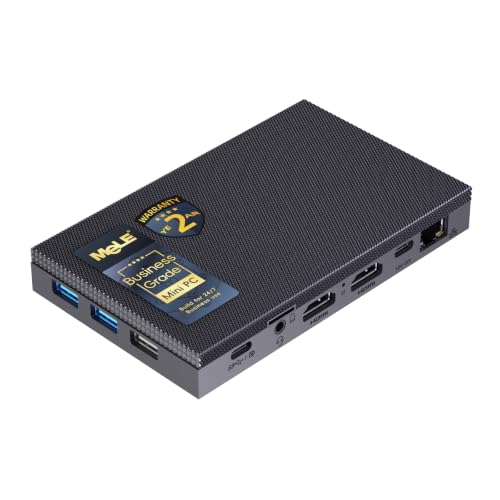
MeLE Quieter4C Fanless Mini PC — Intel N100, 8GB RAM, 128GB (Business Grade)
Who it suits: The buyer building a silent 1440p desk — sharp text and video on the panel all day, light games rendered below native in the evening, and no fan noise at any hour.
Start with the display story, because on this angle it is the strongest in the guide. The Quieter4C drives three screens at once: two full-size HDMI ports plus a USB-C with display output, documented at 4K 60Hz per screen. A 1440p monitor is therefore not a stretch goal but a light duty — the panel runs at native resolution for desktop, browsing and video with headroom to spare, and a second or third screen can join it without adapters. If your 1440p plan is really a sharp-desk plan — crisp text, two documents side by side, video at full panel resolution — this pick delivers it in complete silence, from a slab about 5.2 by 3.2 inches and 0.7 inches thick that mounts behind the monitor with the bracket included in the box. Mounted there, the computer vanishes from the desk it serves: the fanless idea at its most complete.
The gaming side is the N100’s story, told at the right resolution. Four cores boosting to 3.4 GHz with integrated graphics render the light library — older titles, indie games, emulation, esports at modest settings — at 1080p or below, and the render-scale route carries that picture to your panel. Quick Sync decode handles streamed games and video without heating the case. Power draw is a footnote: one reviewer measured roughly 15 watts at the wall under a combined 4K transcoding and benchmark load, around 10 in ordinary use. Check price on Amazon for the current figure before you decide — the live listing is the only price that counts.
The honest limitations concentrate in one component. This build’s 128GB of built-in storage is eMMC, noticeably slower than an SSD, and reviewers of this machine advise running the operating system from an NVMe drive in its free M.2 slot — a slot that takes NVMe or SATA drives up to 4TB — for a machine that feels quick rather than adequate. Treat that drive as part of the purchase if responsiveness matters. The case also runs hot under sustained load, with clocks stepping down on long heavy jobs; short bursts, browsing, streaming and light games never meet that ceiling, but a marathon session of anything demanding will. And the guide’s boundary applies to its best pick without exception: no modern games rendered at 1440p, and 8GB of memory is the configuration you live with — buy for the workload you have.
- Triple 4K 60Hz output over dual HDMI and USB-C — a 1440p panel driven natively, with screens to spare.
- Verified genuinely fanless — 0 dB, zero moving parts, built for round-the-clock duty.
- An empty M.2 slot accepts NVMe or SATA drives up to 4TB — the one upgrade that fixes its one slow part.
Honest limitation: The included 128GB is eMMC, not SSD, and games render at 1080p or below — the 1440p sharpness is for the desktop and video, not the render.
Choose it if your 1440p ambition is a silent, sharp desk with light gaming upscaled to the panel. Skip it if you want fast storage with nothing to install — that is the N150 build below — or native 1440p rendering, which no fanless box offers.

MeLE Quieter4C Fanless Mini PC — Intel N150, 8GB RAM, 256GB SSD (Business Grade)
Who it suits: The same silent 1440p desk buyer as the pick above, who would rather pay a little more once than open the case later — the newer chip and a real SSD, factory fitted.
The display credentials repeat the top pick’s, because the shell is the same: dual HDMI plus USB-C display output, three 4K 60Hz screens documented, the monitor mount in the box. Your 1440p panel is driven natively for everything except the game render. What changes is everything behind the panel. The N150 is the N100 with its clocks turned up — the same four cores boosting to 3.6 GHz instead of 3.4, with a slightly faster graphics block — and this build pairs it with a 256GB NVMe SSD on PCIe 3.0, the faster storage that reviewers tell buyers of the eMMC build to add. Games load from a real drive, Windows boots like it means it, and the M.2 upgrade path remains ahead of you for the day 256GB stops being enough.
For the 1440p route, the practical difference is smoothness of the whole evening rather than any change in the render ceiling: renders still happen at 1080p or below, the panel still receives its native desktop, and Quick Sync still decodes streamed games and video in dedicated hardware. Check price on Amazon for the current figure — the live check is a genuine part of this pick’s value rather than a formality.
Two honest notes. First, the step from N100 to N150 is a refresh, not a revelation: in a fanless chassis both chips are bounded by the same passive cooling and the same low stock power limit, so cross-shoppers should buy on configuration and price, not on the chip name. Second, this build’s 8GB of memory is fixed rather than a part you upgrade later — the storage is the growth path here — so a workload built on many containers, virtual machines or a heavy multitasking habit wants a bigger configuration or a different machine. Neither note dents the pick for its intended buyer.
- The N150 refresh chip plus a 256GB NVMe SSD fitted at the factory — both upgrades N100 buyers end up making, already done.
- The same verified fanless design — 0 dB, three 4K 60Hz outputs, and the VESA mount in the box.
- Positioned as the buy-it-finished step up in this line — check price on Amazon before you buy.
Honest limitation: 8GB of RAM is a ceiling you live with rather than upgrade past, and the render ceiling is unchanged — 1440p is the display’s resolution, not the game’s.
Choose it if you want the silent MeLE experience, SSD included, driving a 1440p desk from day one. Skip it if you are happy to add an SSD to the N100 build above yourself — the experience barely differs once that drive is fitted.
HUNSN RJ42 Micro Firewall Mini PC — Intel N150, 8GB RAM, 128GB SSD, 4 x 2.5GbE LAN
Who it suits: The home-lab buyer whose 1440p screen sits on a desk that also runs the house network — a silent firewall and server that moonlights as a high-resolution desktop.
On outputs alone, this is the most connected pick in the guide. The maker’s manual for the RJ42 family documents two HDMI ports, a DisplayPort and a USB-C display output — a connector set that covers a 1440p monitor however it wants to be fed, with screens to spare — beside the four Intel I226-V 2.5-gigabit Ethernet ports — the machine’s real reason to exist. The configured listing identified for this guide pairs the Intel N150 with 8GB of DDR5 memory in a single SO-DIMM slot, upgradeable to 32GB, and a 128GB SSD, with two M.2 2280 NVMe slots and a 2.5-inch bay inside for storage growth. The aluminum chassis is the heatsink; the maker’s manual specifies a fanless design at 0.00 dB. Check price on Amazon for the configured listing linked here, since this family sells in many configurations.
Through the 1440p lens, the RJ42’s strength is division of labor. As a desktop it is the standard N150 story: panel at native resolution, video decoded in hardware, light games rendered at 1080p or below and scaled to the screen. As a network box it is in a class of one here — a router, firewall or Proxmox host drawing single-digit watts at idle, silently, in a room where a rackmount anything would be absurd. Evenings split between desk and home lab get both machines in one silent brick.
The honest limitations are about fit, not quality. This listing has no Wi-Fi at all. It is a wired machine, and independent research on the model warns that replacing your router with it means adding a separate wireless access point. HUNSN sells the RJ42 in barebone and configured forms under near-identical names, and the wider family includes an earlier N100 generation: check the listing’s configuration line — processor, memory, storage — against what you intended before ordering, because the name alone does not tell you which machine is in the box. The display-output documentation likewise comes from the family manual, written for the earlier generation — one more reason the verify-on-arrival habit matters with this pick. Expect an appliance’s welcome, not a desktop’s: you install the operating system and do the setup yourself.
- Four 2.5GbE ports on Intel I226-V controllers — the firewall-appliance spec, in a fanless aluminum case.
- Expansion with room to spare: a DDR5 SO-DIMM slot good for 32GB, twin M.2 NVMe slots and a 2.5-inch bay.
- Documented HDMI, DisplayPort and USB-C display outputs — a 1440p panel fed any way it likes.
Honest limitation: No Wi-Fi, an appliance’s do-it-yourself personality, and a model family whose lookalike barebone and older-generation listings demand a careful read before ordering.
Choose it if your silent 1440p desk is also your network’s home. Skip it if a friendly out-of-box desktop is the goal; the MeLE picks above are that machine.

MeLE PCG02 Pro Fanless PC Stick — Intel N100, 8GB RAM, 256GB
Who it suits: The buyer whose screen is a 1440p monitor or TV in a room where the computer itself must not exist — a stick behind the panel, silence everywhere else.
The stick form reframes the 1440p question in a useful way. The PCG02 Pro drives two 4K displays over dual HDMI, so a 1440p screen is driven natively for desktop and video — and for a stick, video is not a side duty but the main event. Quick Sync decode handles streamed video and cloud gaming streams in dedicated hardware, which makes this little computer a genuinely good 1440p viewing machine: sharp panel, silent room, nothing on the desk. Inside is the same Intel N100 as the top pick — four cores to 3.4 GHz — with 8GB of LPDDR4 memory and 256GB of storage, cooled entirely passively; MeLE’s own manual for the line describes a fanless design. Gigabit Ethernet rides along beside Wi-Fi 5 and Bluetooth 5.1, power arrives over USB-C with PD 3.0, and a microSD slot accepts cards up to 2TB. Check price on Amazon for the current figure.
For games, the stick’s honest menu is the cloud and the back catalog. Rendered locally, the N100 in a stick’s thermal envelope is the lightest renderer in this guide — older and indie titles at 720p to 1080p, scaled to the panel, in short-to-medium sessions. Streamed, it is a different machine: the rendering happens elsewhere, the stick decodes, and the screen shows a modern game in silence. Buyers whose library lives in a streaming service will find this the most natural 1440p gaming pick here precisely because it never pretends to render.
Honesty about the form is required, because the compromises are structural. Storage is eMMC — 256GB of it, fixed — and there is no M.2 slot inside a stick, so expansion ends at the microSD slot and USB drives. Memory is soldered at 8GB. A stick also has the least metal of any pick here to spread heat into, so the sustained-load rule of this category applies with emphasis: bursty work is its home, and long heavy sessions will see it warm and slower. Finally, a stick lives or dies by its ports’ placement: it needs an HDMI socket with room around it and power within reach, and the short HDMI extension in the box exists because some screens make that awkward. Look at your screen’s back panel before you fall for it.
- A whole fanless Windows PC in a stick — the desk stays empty, the cabinet stays empty, the room stays silent.
- Dual 4K HDMI output with Quick Sync decode — a natural 1440p video and cloud-gaming endpoint.
- Gigabit Ethernet, USB-C PD power and microSD expansion to 2TB.
Honest limitation: Fixed eMMC storage and soldered memory with no internal upgrade path, and the least thermal mass in the guide — sustained local rendering is not its job.
Choose it if the PC must vanish behind a 1440p screen and the gaming is streamed, emulated or light. Skip it if opening the machine and improving it is ever in your plans — the Quieter4C slab above offers the same silence with a future attached.

MeLE Quieter3Q Fanless Mini PC — Celeron N5100, 8GB RAM, 256GB
Who it suits: The budget-first buyer whose 1440p monitor deserves a silent driver — a media corner, a kitchen screen, a spare-room desk — at the budget end of this guide.
The surprise of this pick, viewed through the 1440p lens, is that its display support is not the budget part. Dual full-size HDMI outputs drive two 4K 60Hz screens, so the previous-generation Celeron puts a desktop on a 1440p panel at full native sharpness just as the newer chips do — because, as this guide’s central section explains, displaying is cheap. Text is crisp, documents are roomy, and 4K HDR playback is work reviewers found this machine doing properly: as a media endpoint feeding a high-resolution screen, the 3Q is in its element and silent at it, idling at a few watts and drawing roughly a dozen under load in independent testing. The chassis is the thinnest here at about 18mm — a grooved plastic top over a metal base plate, the plastic chosen so the Wi-Fi antennas inside can breathe — and a user-accessible M.2 2280 slot means storage can grow even though the platform is old. It sits at the budget end of this guide, below the other picks in positioning — check price on Amazon for the current figure for the build and seller in front of you.
Where the trade-off shows is the render. Jasper Lake is 2021 silicon: the Celeron N5100 boosts to 2.8 GHz, its graphics are a generation behind the N100’s, and the light library shrinks accordingly — retro emulation, older and indie titles, streamed games, at 720p to 1080p renders scaled to the panel. That is a real library, honestly framed — simply a smaller one than the picks above offer, and modern ambitions should stop at the streaming services.
Two further limitations. MeLE cannot agree with itself about this model’s wireless: current store titles list Wi-Fi 5 and Bluetooth 5.1, while a spec table elsewhere shows Wi-Fi 6 and Bluetooth 5.2 from the earlier review units. Treat the listing in front of you — not any summary, this one included — as the authority on the build you are buying. Sustained heavy loads warm the case and trim the clocks, as they do in every fanless box here; the 3Q’s smaller, older design simply reaches that ceiling sooner.
- The cheapest verified way into true fanless computing — the budget pick of this guide; check price on Amazon.
- Dual 4K HDMI drives a 1440p panel at full native sharpness for desktop and video.
- Thinnest case in the guide at ~18mm, with a user-accessible M.2 slot for storage growth.
Honest limitation: Previous-generation Celeron rendering — the 1440p is all on the display side — plus maker documentation that disagrees with itself about the wireless spec.
Choose it if the 1440p screen mostly shows media, documents and streamed or retro games, and silence outranks speed. Skip it if the N100 Quieter4C checks out close on Amazon when you compare the live listings — within reach, the newer machine is the one to take.

ZOTAC ZBOX CI337 Nano Fanless Mini PC Barebone — Intel N100 (No RAM, Storage or OS)
Who it suits: The builder — someone with a spare DDR5 stick and SSD on the shelf, or who simply wants to choose their own parts — who wants a name-brand fanless kit behind a 1440p monitor.
Zotac’s C-series nano line has been the fanless specialist’s other badge for years, and the CI337 is its current N100 entry: the listing’s own title says “Fanless Silent,” the Intel N100 sits in a passively cooled nano chassis, and the documented outputs are HDMI and DisplayPort — the two connectors a 1440p desk monitor most likely wants. One discipline note, stated rather than smoothed over: the base research documents those outputs from the listing itself without a stated resolution figure for this model, so this guide claims none — the exact display ceiling for this box is a number to confirm on the live listing before ordering, not one to take from us. What arrives is a barebone: the computer minus memory, storage and operating system, which the listing states plainly. Its barebone sticker is the lowest entry point in this guide — check price on Amazon for the current figure — but that sticker is not the price of a working PC, and this review will not pretend otherwise.
Here is the honest accounting. The barebone sticker still owes you a DDR5 SO-DIMM stick, an M.2 SSD and an operating system — Windows costs money, Linux costs none — before the CI337 is a computer at all. Total the whole basket and check price on Amazon for each part before you order; for a builder whose drawer already holds compatible parts, the finished machine needs little beyond the kit itself — the barebone bargain at its best. Assembly buys back the choices the sealed picks deny you — your capacity, your drive, your OS — plus Zotac’s long-running nano lineage in place of a marketplace brand. Once built, its 1440p behavior is the N100 pattern this guide has repeated: native desktop and hardware-decoded video on the panel, light games rendered below native and scaled up.
The limitations are the mirror of the freedoms. No Windows license rides in the box, and beyond the hardware there is no software support story; when something in the build misbehaves, the troubleshooting is yours. Fill it with premium parts bought at retail and the finished-cost advantage evaporates — so price the whole basket before ordering, not after. The performance ceiling is the one this whole guide lives under: an N100 behind passive cooling is a light-work, media and light-gaming machine, and no SSD choice moves it. Buy the CI337 for the pleasure of building, not for a benchmark score.
- Zotac’s specialist C-series fanless kit around the N100 — the lowest entry point in the guide; check price on Amazon.
- Memory, storage and operating system are your choices — ideal when the parts are already on your shelf.
- HDMI and DisplayPort outputs on a passively cooled nano chassis that has no fan to fail.
Honest limitation: The sticker is not a computer — RAM, SSD and OS are all extra — and the listing’s documented outputs carry no resolution figure in our research, so confirm the display ceiling live.
Choose it if compatible parts are already waiting, or if speccing your own machine is half the fun. Skip it if you want to unbox and compute — the other five picks are all finished articles.

Comparison Table
| Product | Chip | Documented display support | Best use | Link |
|---|---|---|---|---|
| MeLE Quieter4C (N100, 8GB/128GB) | Intel N100 | Triple 4K 60Hz — dual HDMI + USB-C | The default silent 1440p desk, with an M.2 upgrade path | Check on Amazon |
| MeLE Quieter4C (N150, 8GB/256GB SSD) | Intel N150 | Triple 4K 60Hz — dual HDMI + USB-C | Newer chip and real SSD storage, nothing to install | Check on Amazon |
| HUNSN RJ42 (N150, 4 x 2.5GbE) | Intel N150 | HDMI + DisplayPort + USB-C (family manual) | Silent firewall and server that drives the desk screen too | Check on Amazon |
| MeLE PCG02 Pro Stick (N100, 8GB/256GB) | Intel N100 | Dual 4K — dual HDMI | A PC that disappears behind the 1440p screen | Check on Amazon |
| MeLE Quieter3Q (N5100, 8GB/256GB) | Celeron N5100 | Dual 4K 60Hz — dual HDMI | Cheapest verified silence for a high-resolution media desk | Check on Amazon |
| ZOTAC ZBOX CI337 Nano (barebone) | Intel N100 | HDMI + DisplayPort (resolution not stated in our research) | A fanless kit for builders with parts on hand | Check on Amazon |
Pairing These Machines With a 1440p Monitor
The monitor half of this keyword deserves direct treatment, because a 1440p panel changes what these machines are good at. What the panel gives you, with any pick here driving it: a desktop with roughly 78 percent more room than 1080p, text sharp enough to make long reading and writing days measurably kinder, video played back at the screen’s full native resolution through hardware decode, and a streamed-game picture limited by your connection rather than by the box. If you work at the screen all day and game lightly at night, the 1440p upgrade is real, and these silent machines deliver the working half of it without compromise.
What the panel cannot give you is rendering power: it does not make the integrated graphics faster, only gives them a larger canvas they should mostly decline to paint at native size. Two consequences follow. First, set expectations per application, not per machine: desktop and video at native 1440p, games rendered at 1080p or below with the output left at the panel’s resolution so menus and text stay crisp. Second, mind the cable and the port, not the marketing: use the connection the maker’s documentation supports for high-resolution output — where our research does not document an output resolution, as with the Zotac kit, the live listing is the authority. Refresh rate deserves the same realism: these are 60Hz-class display pipelines in the documented research, suiting this library and every desktop purpose; a high-refresh monitor’s extra hertz would chase a signal these machines do not send, so spend on panel quality instead.
How to Choose a Fanless Mini PC for a 1440p Desk Under $400
- Separate the two resolutions before anything else. Decide what renders and what displays. On this hardware the honest split is: desktop, text and video at the panel’s native 1440p; games rendered at 1080p or below and scaled up. Any listing or guide that blurs that split is selling you the blur.
- Verify the silence, not the adjective. A listing can say “quiet” and “silent operation” and still be describing a fan. A genuinely fanless machine says so in the maker’s specifications, shows a finned or all-metal chassis in teardown photos, and lists no fan among its parts. Unconfirmed means assume a fan is in there.
- Read the outputs from documentation, not headlines. The port mix decides this purchase: HDMI count, DisplayPort, USB-C display output, and the resolution the maker actually documents for each. Makers’ summaries sometimes disagree with their own spec tables — and where no resolution is documented, treat the live listing as the only authority.
- Use the render-scale slider like you mean it. Leave the game’s output at the panel’s native 1440p so interface and text stay sharp, and lower the internal render scale until the frame rate settles. It is the one setting that makes this entire category work, and it is free.
- Read the storage line twice. Listings call both eMMC and NVMe SSD “storage,” and the two feel nothing alike in use: eMMC machines boot and load noticeably slower. So either buy the configuration that ships with an SSD, or buy a machine with a free M.2 slot and count the drive as part of the purchase.
- Ask what is soldered. Thin fanless designs often fix their memory for life. If the job might grow — more containers, more tabs, a server role — buy the memory you need on day one, or choose a design with a SO-DIMM slot.
- Plan for heat like an adult. A fanless case is a heatsink sitting in your room’s air, so give it clearance on every side, keep it clear of sealed cabinets and direct sun, and expect warmth under load — warmth is the design working. Any of these machines slows under a sustained heavy workload; if long renders or long gaming sessions are the main job, buy a fanned PC and put it further away.
- Cost the whole machine. A barebone’s sticker leaves out memory, storage and an OS; a stick’s price leaves out the second screen cable you will inevitably want. Compare finished, working totals using the live listings — check price on Amazon for the kit and for every part it still needs.
Common Buying Mistakes
- Reading “1440p” on the monitor box as a promise about games. The panel displays 1440p; the game renders where the hardware can manage. Buy the split knowingly and it works; buy the blur and it disappoints.
- Setting games to native 1440p and blaming the machine. Integrated graphics asked to render 3.7 million pixels will crawl in anything demanding. Render at 1080p or below, scale to the panel, and the same machine feels competent.
- Expecting a branded upscaler that is not there. There is no DLSS on Intel integrated graphics, and no upscaling figure from a discrete-card guide applies to these chips. Render scaling in the game’s own settings is the tool this hardware actually has.
- Buying a “quiet” mini PC that turns out to have a fan. It is this category’s most common mistake: the listing said silent and the teardown shows a blower. Verify fanless from the maker or a teardown before any money moves.
- Ignoring the eMMC compromise. A fanless box that feels sluggish is usually not CPU-bound at all — it is booting from eMMC. Buy the SSD build, or budget the M.2 drive into the purchase.
- Sealing the heatsink in a cabinet. A fanless PC shut inside a closed TV unit is an oven with a computer in it — the airflow around the case is the cooling system, so do not furniture it away.
- Comparing a barebone sticker to finished PCs. Until your parts shelf says otherwise, a barebone sticker is not cheaper than a complete box. Total the whole build before comparing.
- Buying the wrong twin. Lookalike listings fill this category — barebone against configured, N100 against N150, eMMC against SSD under a single model name. Read the exact listing’s configuration line, every single time.
Final Recommendation
- Most buyers: MeLE Quieter4C, Intel N100, 8GB/128GB.
- Buy-it-finished buyers: MeLE Quieter4C, Intel N150, 8GB/256GB SSD.
- Home-lab and networking: HUNSN RJ42, 4 x 2.5GbE.
- Living rooms and second screens: MeLE PCG02 Pro PC Stick.
- Tightest budgets: MeLE Quieter3Q.
- Builders with parts on hand: ZOTAC ZBOX CI337 Nano barebone.
Our top two are the two Quieter4C builds, because they are this angle’s center of gravity: verified fanless, triple 4K output that treats a 1440p panel as light duty, and an M.2 future. Take the N100 build if adding an SSD later suits you; take the N150 build for the newer chip with the fast drive already fitted. The HUNSN is the specialist’s pick — nothing else here routes a network — and the PCG02 Pro is the one to buy when the computer itself must disappear behind the screen. The Quieter3Q and the Zotac kit are the two kinds of bargain on offer — yesterday’s silicon, finished and cheap, or today’s silicon as a kit for people holding parts. Whichever you choose, hold the distinction this guide opened with: the 1440p is on your desk, in your text and your video, at full native sharpness — and the games ride up to meet it from a lower render, in silence. Readers weighing a little more headroom should see Best Fanless Mini PC For 1440p Gaming Under $500, first-time buyers should see Best Fanless Mini PC For Beginners Under $400, and anyone whose real job is streaming should see Best Fanless Mini PC For Streaming Under $400.
Frequently Asked Questions
Can a fanless mini PC actually game at 1440p?
Natively rendered, no — and this guide will not soften that sentence. Rendering a demanding game at 2,560 by 1,440 needs a discrete graphics card, and no fanless mini PC has one, at this budget or several times it. What these machines honestly do is drive a 1440p display at its native resolution for desktop and video, render light games at 1080p or below and scale them to the panel, and decode streamed games at full panel resolution. If native 1440p rendering is the requirement, the search belongs with fanned machines — see Best 1440p Gaming PC Under $400 for what that class looks like at this money.
Will my desktop and videos really be sharp at 1440p on integrated graphics?
Yes. Drawing a desktop is cheap and decoding video is done by dedicated Quick Sync hardware, so both run at the panel’s full native resolution without stressing the processor. Every pick in this guide documents display outputs at or beyond 1440p — most reach 4K at 60Hz — so the working half of a 1440p desk is delivered in full. Only the game render runs lower.
How bad does an upscaled 1080p game look on a 1440p monitor?
Softer than native, honestly: fine detail smears a little and a frozen screenshot comparison will always show it. In motion, at normal desk distance, in the genres these machines run — indie, older, emulated and esports titles — most players stop noticing quickly, especially with the render-scale method: output stays at the panel’s native 1440p so text and menus remain crisp, and only the 3D scene renders lower. A compromise with its eyes open, not a defect discovered later.
Is a fanless mini PC really completely silent?
Yes — that is the definition that matters. A genuinely fanless PC carries no fan and no other moving parts, so mechanical noise is not reduced — it is absent: 0 dB. (A spinning hard drive would spoil the effect, which is why every pick here is solid-state.) The price of the silence is cooling headroom — hence the low-power chips, and hence the slowdowns under long, heavy loads.
Will a fanless mini PC overheat during a long gaming session?
It will get warm, because the case is the heatsink and warmth is the cooling working as designed. Damage is not on the menu: the processor guards its own temperature by trimming clock speeds, which is why sustained heavy workloads slow down rather than fail. Light games in short-to-medium sessions sit comfortably inside the envelope; marathons of anything demanding are where the physics collects its fee. Keep the case in open air, out of sealed cabinets and sunlight.
Why not just buy a 1080p monitor and skip the distinction?
You can, and for pure gaming on this hardware a 1080p panel is a defensible match. The case for 1440p is the rest of the day: extra desktop room and text sharpness collected every working hour, sharper video, and games that scale up to fill it acceptably. Buy the panel for the desk; let the games ride. Readers fitting the machine into a tight spot rather than under a big panel should see Best Fanless Mini PC For Small Spaces Under $400.
Fanless mini PC or a cheap fanned mini PC for a 1440p desk?
Same chips, different bargain. A fanned N100 or N150 box typically costs less for the same configuration and holds its full speed indefinitely under load, at the price of a small amount of fan noise — but it renders games at the same resolutions, because the graphics are the same. The fanless box costs a little more, stays silent forever, and removes one part that could fail. Choose by room and by honesty about your library: quiet rooms and light libraries favor fanless; sustained workloads favor the fan. The wider category context is at Best Fanless Mini PC Under $400.


