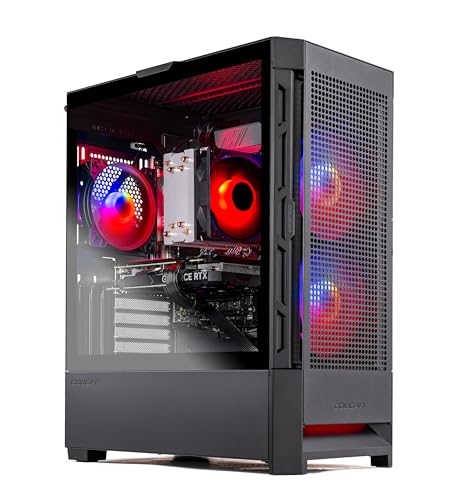
Where to buy
Check the latest price, availability and delivery on Amazon. Orders are placed on Amazon. We may earn a commission from qualifying purchases.
- Easiest first PC to recommend on any day: Skytech Blaze4 Mini, Ryzen 7 5700, RTX 4060 Ti — Check on Amazon
- Thermaltake LCGS Quartz i1460, Core i5-14400F, RTX 5060 — Check on Amazon
- CyberPowerPC Gamer Xtreme VR GXiVR8060A24, Core i5-13400F, RTX 4060 — Check on Amazon
- CyberPowerPC Gamer Xtreme VR GXiVR8040A14, Core i7-13700F, RTX 4060 Ti 16GB — Check on Amazon
See 2 more Amazon options
- Skytech Archangel, Core i5-14400F, RTX 4060, 32GB RAM, 2TB SSD — Check on Amazon
- Skytech Nebula, Ryzen 5 5600X, RTX 4060 Ti — Check on Amazon
Read the full guide ↓
Disclosure: As an Amazon Associate, reviewstook.com earns from qualifying purchases. Links to Amazon on this page are affiliate links; they cost you nothing extra. Listing details such as price and availability change often, so check the current Amazon listing before you buy.
If this is your first gaming PC — your first tower of any kind — start with a confession this page owes you: $1,200 is not really “entry level” money, whatever the search term says. Entry level is the $400–$800 shelf. Twelve hundred dollars is the budget of someone who has decided to skip the starter machine entirely: usually a console player moving over, or a laptop gamer tired of compromises, who wants the first PC to also be the one that lasts. That is a perfectly good plan, and this guide is written for it — in plain language, with every technical term explained before it is used, and with the honesty a first-time buyer needs most: at this price the trap is not buying too little PC, it is paying $1,200 for an $800 PC in a prettier box, or paying the right money on the wrong day, because these listings swing sharply between sales.
What $1,200 honestly buys a beginner, when it is spent well, is three things. A graphics card one class above the entry tier — an RTX 4060 Ti or the current-generation RTX 5060 — which turns 1440p from a stretch into a real resolution and makes 1080p effortless. Freedom from homework: every pick below arrives complete, with at least 16GB of memory and a 1TB drive, so nothing needs installing in your first month. And time: machines at this level stay comfortable for years rather than months. What it does not buy is magic — the picks differ in real ways, two of them are only good purchases at specific prices, and one of them exists in this guide mainly to argue that you might be happier spending $800. Each review below names who the machine suits, what it does well, its honest limitation, and when to walk away. Check the price on Amazon before you buy, because a listing’s price changes often and is never a promise.
The Words on the Listing Page, in Plain English
Thirteen terms explain nearly every line of every listing below. Learn these and the rest of the guide reads itself.
- Graphics card (GPU). The part that draws the game. In a gaming PC it matters more than everything else combined. Bigger model numbers are generally newer and stronger: in this guide, RTX 4060, then 4060 Ti, then the current-generation RTX 5060.
- Integrated graphics. A weak graphics chip built into some processors, fine for a desktop screen, not for modern games. Every pick here has a separate, real graphics card instead — but note that the three Intel processors with an “F” in their name (14400F, 13400F, 13700F) have no integrated graphics at all, which matters on setup night, below.
- Graphics memory (VRAM). The graphics card’s own private memory, used for textures. Five of these six cards carry 8GB; one carries 16GB. It cannot be added later — a card keeps its VRAM for life — and it is the specification that decides how long a card stays comfortable in new games.
- Processor (CPU). The machine’s general brain. At this level every processor here is comfortably fast enough that the graphics card is the limit in games; you do not need to agonise over this line.
- Memory (RAM). Short-term workspace, measured in gigabytes; 16GB is the healthy floor, 32GB is generous. Two ways of fitting it matter: socketed memory sits in slots and can be swapped or added to later, while soldered memory is fixed to the board forever. Good news: all six picks use ordinary socketed desktop memory. Nothing here is soldered.
- Storage (SSD). Where games live. Modern games are huge, so 1TB is the sensible floor and 2TB is breathing room. All six picks use fast SSD storage, not old spinning drives.
- Resolution. How many pixels your screen shows. 1080p (1920×1080) is the standard starter target; 1440p (2560×1440) is sharper and needs a stronger card. This budget is where 1440p honestly begins.
- Refresh rate. How many times per second the screen redraws, in hertz (Hz). A 60Hz screen shows at most 60 frames per second no matter how strong the PC is — and Windows often leaves a fast monitor set to 60Hz until you change it, which is why the setup walkthrough below includes switching it on.
- Upscaling (DLSS and FSR). A trick where the game renders at a lower resolution and clever software rebuilds a sharper picture: upscaling to a 1440p screen in “Quality” mode actually renders about 1707×960 inside, and “Performance” mode about 1280×720. DLSS is NVIDIA’s version, so it belongs to the RTX cards — all six picks have one. It genuinely helps, but it is a boost applied to native performance, not a replacement for it.
- Frame generation. Software that inserts extra, computer-invented frames between real ones so motion looks smoother. The RTX 5060 pick adds a stronger “multi” version. It does not make the game respond faster — your inputs still travel at the real frame rate — and it only works in games that support it.
- Power supply (PSU). The box inside the tower that feeds everything electricity, rated in watts. A named, quality unit (several picks list a 650W or 600W Gold-rated supply) is what makes a future graphics-card swap possible. Towers carry their supply inside; none of these six uses a laptop-style power brick.
- Prebuilt vs barebones. A prebuilt arrives complete — parts fitted, Windows installed, switch it on. A barebones kit arrives missing memory, storage and Windows, and is a project, not a purchase. All six picks here are complete prebuilts. Not one is a barebones kit.
- Renewed / refurbished. Second-hand machines cleaned, tested and resold with a shorter warranty. Sometimes a bargain — but not what this guide is selling. None of the six picks is renewed or refurbished; all six are sold new.
In this guide
Quick Picks
Short on time, or comparing several options at once? Each row below names a buyer type and the product that suits it, with a link to the listing.
| Buyer type | Pick | Why it stands out | Link |
|---|---|---|---|
| Best first PC when its price behaves | Skytech Blaze4 Mini, Ryzen 7 5700, RTX 4060 Ti | The strongest card here — check the price on Amazon, as its value depends on catching it low | Check on Amazon |
| Best buy-it-today first PC | Thermaltake LCGS Quartz i1460, RTX 5060 | Current-generation card at a fair price on ordinary days | Check on Amazon |
| Best for beginners who should spend less | CyberPowerPC GXiVR8060A24, RTX 4060, DDR5 | A complete first PC for lower-tier money — check the price on Amazon | Check on Amazon |
| Best for never-upgrade beginners | CyberPowerPC GXiVR8040A14, RTX 4060 Ti 16GB | Double the graphics memory of the rest — a deal-only pick, so check the price on Amazon | Check on Amazon |
| Best nothing-left-to-buy build | Skytech Archangel, 32GB RAM, 2TB SSD | Memory and storage already doubled — nothing to add | Check on Amazon |
| Best for patient first-time buyers | Skytech Nebula, Ryzen 5 5600X, RTX 4060 Ti | Same card class as the top pick — a bargain when its price dips, a trap when it climbs | Check on Amazon |
How These Picks Were Chosen
We did not use these products ourselves. We read the makers’ listings and specification pages and compared graphics cards, processors, memory, storage, power supplies and platforms, favouring listings that publish their numbers in full. Three beginner-specific rules then shaped the six. First, completeness: a first PC must arrive finished, so every pick ships with at least 16GB of memory, at least 1TB of storage and Windows installed — no kits, no half-built bargains, nothing that needs a screwdriver in its first month. Second, honesty about condition: all six are new machines from established prebuilt brands, because a beginner’s first warranty experience should be with a maker, not a refurbisher.
Third, price discipline — the rule that matters most at this tier. Prebuilt prices are not fixed; they move between sale events, and some listings swing widely. So this guide treats the budget as a ceiling rather than a target, tells you to check the price on Amazon rather than trusting any single figure, and states a clear walk-away rule in every review where the listing’s pricing behaviour demands one. Two picks are only recommended when the live price is right, and the reviews say so in bold rather than footnotes. A final note on claims: upscaling and frame generation are described throughout as what they are — software boosts for supported games, judged on top of native performance, never instead of it.
The 6 Best Entry Level Gaming PCs for Beginners Under $1200
Skytech Blaze4 Mini — Ryzen 7 5700, RTX 4060 Ti 8GB, 16GB DDR4, 1TB SSD
Who it suits: The first-time buyer who wants the most graphics power this money can reach and is willing to check the price before committing — because with this listing, the day you buy matters almost as much as the machine.
The Blaze4 Mini (model ST-BLAZE4MINI-1266-B-AM) pairs the strongest graphics card in this guide, the RTX 4060 Ti, with a Ryzen 7 5700 processor, 16GB of memory, a 1TB SSD and a named 650W Gold-rated power supply, in a compact case that will not swallow a small desk. When its price dips, this listing drops to the tier below’s money for this tier’s card — check the price on Amazon, because on ordinary days it sits much higher. For a beginner, the practical meaning is simple: at 1080p this machine plays the current catalogue without negotiation, and at 1440p it renders a large share of games natively, with DLSS upscaling widening that share in supported titles. It is the pick that makes the $1,200 ceiling feel justified.
Its limitations are about the future, and they are worth understanding before you buy rather than after. The processor sits on AMD’s older AM4 platform with DDR4 memory: quick enough that the graphics card is the limit in nearly every game, but a finished design with no worthwhile processor upgrade — when this PC eventually slows, the fix is a new graphics card (that 650W supply leaves room for one), not a new CPU. The card’s 8GB of graphics memory is the second ceiling, the one most likely to bite first in future releases. Skytech also notes the graphics card’s brand may vary between units; the model and memory are what you are promised, not the badge on the cooler. None of this changes the verdict at the right price — it changes which price is right.
- RTX 4060 Ti: the graphics class this whole budget exists to reach.
- When its price dips, the strongest card-per-dollar value in the guide — check the price on Amazon.
- Named 650W Gold power supply and a 1TB SSD: the supporting parts are proper, not cut corners.
Honest limitation: A finished AM4/DDR4 platform with no real processor upgrade path, 8GB of graphics memory, and a value case that collapses if you pay its usual higher price instead of catching it low.
Choose it if its price is sitting well inside this budget when you shop — check the price on Amazon. Skip it if it is up near the top of this budget that day — at full price the Thermaltake below is the wiser first PC.

Thermaltake LCGS Quartz i1460 — Core i5-14400F, RTX 5060 8GB, 16GB DDR4, 1TB NVMe SSD
Who it suits: The beginner buying on an ordinary day, at full price, who wants the newest technology and the longest support life rather than the sharpest deal.
This is the only machine here built around a current-generation graphics card, the RTX 5060 (model S2QT-B760-560-LCS), with an Intel Core i5-14400F, 16GB of DDR4 memory, a 1TB NVMe drive and a 600W Gold-rated supply. It sits inside this budget without waiting for a sale — check the price on Amazon — which for a beginner is a genuine feature: you can buy it on a Tuesday, pay a fair price, and never think about timing again. The newer card brings the longest driver-support runway of the six and DLSS 4 with multi frame generation in the games that support it, on top of native performance that trades blows with the 4060 Ti picks — strong 1080p everywhere, and a real start at 1440p.
Two explanations protect you here. Multi frame generation invents extra frames so supported games look smoother; it does not make controls respond faster, because your inputs still run at the genuinely rendered rate, and many games do not support it at all. Buy the card for what it renders, and treat generated frames as a bonus. And the “F” in 14400F means this processor has no integrated graphics of its own — on setup night the monitor cable must go into the graphics card, a step the walkthrough below covers. The platform is a halfway house, Intel’s LGA1700 with DDR4 rather than DDR5 memory, and the card carries the same 8GB of graphics memory as the others. What you are buying is time and simplicity, and for many first-time owners that is the correct purchase.
- The RTX 5060 is this guide’s only current-generation graphics card.
- Priced inside this budget on ordinary days, without depending on a promotion — check the price on Amazon.
- The longest driver-support life of the six picks — the keep-it-for-years choice at full price.
Honest limitation: Frame generation is not real performance and does not reduce input lag; the DDR4 platform is not the DDR5 future, and 8GB of graphics memory is unchanged from the cheaper picks.
Choose it if you are buying today at full price and value a long, quiet ownership. Skip it if the Blaze4 Mini above is near its low — when it dips, the faster last-generation card wins.

CyberPowerPC Gamer Xtreme VR GXiVR8060A24 — Core i5-13400F, RTX 4060 8GB, 16GB DDR5, 1TB SSD
Who it suits: The beginner honest enough to ask whether they need this budget at all. If your screen is 1080p and your library is the usual first-PC mix, this is the machine — and the money it leaves unspent is part of the recommendation.
The specification teaches the tier’s central lesson. The RTX 4060 graphics card is one class below the 4060 Ti picks, but the platform underneath is newer than theirs: a Core i5-13400F with 16GB of DDR5 memory and a 1TB PCIe Gen4 SSD. Check the price on Amazon: it is a lower-tier listing, priced well below this guide’s ceiling on its good days. At 1080p — where a first PC with a first monitor actually lives — this plays the current catalogue properly, with DLSS available in the heavier titles, and nothing about the experience feels like a compromise model. The money it leaves behind buys the monitor, the games, or the future graphics upgrade this modern platform is well placed to accept.
The limitation is the reflection of the virtue: this is the $800 tier’s card, not this tier’s. At 1440p it leans on upscaling rather than rendering natively in demanding games, and its 8GB of graphics memory will trim texture settings in the heaviest releases sooner than a 4060 Ti would. If you already own a 1440p high-refresh monitor, scroll back up — this pick is not for you. And hold the price discipline: while it stays at lower-tier money it is the smartest money in this guide, but if it drifts toward the top of this budget it has quietly become a worse Thermaltake, and the correct response is to buy that instead.
- Most of this guide’s real-world performance for much less — check the price on Amazon.
- DDR5 memory on a current Intel platform: the newest foundations among the value picks.
- A complete, nothing-to-fix first PC — 16GB of memory and 1TB of storage from day one.
Honest limitation: One graphics class below the 4060 Ti picks; 1440p means upscaling in demanding games, and the deal only exists while its price stays in the lower tier.
Choose it if you game at 1080p and would rather keep the savings for the rest of your setup. Skip it if a 1440p monitor is already on your desk — feed it with the picks above.
CyberPowerPC Gamer Xtreme VR GXiVR8040A14 — Core i7-13700F, RTX 4060 Ti 16GB, 16GB DDR5, 1TB NVMe SSD
Who it suits: The first-time buyer whose honest plan is to never upgrade anything — who wants the specification most likely to date a PC like this pushed as far into the future as $1,200 can push it.
One number defines this machine: 16GB of graphics memory, double every other pick here. That matters because the quiet reason PCs of this class start struggling is rarely raw speed; it is textures and settings being trimmed to fit a small graphics-memory budget. This CyberPowerPC pairs its RTX 4060 Ti 16GB with the strongest processor in the guide, a Core i7-13700F, plus 16GB of DDR5 memory and a 1TB NVMe drive, with one HDMI and two DisplayPort sockets for monitors. The card is not meaningfully faster than the Blaze4 Mini’s today — it is built to stay comfortable longer, at 1440p, with settings left where the developers put them. On deal days it lands inside this budget with room to spare — check the price on Amazon.
Everything else about this pick is the price it is not. On ordinary days it sits outside this budget and outside the argument — so this is a deal-only recommendation, stated without softening: when a deal brings it inside this budget it may be the smartest purchase in the guide for a keep-it-forever beginner; at its usual premium it is one specification wearing a price the RTX 5060 build beats for less. Hear the counter-argument fairly, too: the multiplayer staples, back catalogue and indie games that fill most first years on PC will not trouble 8GB of graphics memory at 1080p, so the extra memory is insurance against a future library, not a present-tense improvement. Buy it on sale, for the insurance, with your eyes open.
- RTX 4060 Ti with 16GB of graphics memory — double the rest of this guide.
- The strongest processor here, on a modern DDR5 platform.
- On deal days it lands inside this budget — check the price on Amazon while a deal lasts.
Honest limitation: Deal-dependent in the extreme: above $1,200 it leaves this budget entirely, and the 16GB advantage is future insurance many beginners will not cash in for years.
Choose it if you catch it at or under $1,200 and intend to keep the machine for years untouched. Skip it if it is above $1,200 on the day you buy — wait for the deal, or take the Thermaltake.

Skytech Archangel — Core i5-14400F, RTX 4060 8GB, 32GB DDR5, 2TB SSD
Who it suits: The beginner whose worry is not frame rates but friction — the full drive by spring, the “your first upgrade is due” conversation within the year. This machine’s entire purpose is that neither happens.
The Archangel (model ST-ARCH4-1247-W-AM) carries the same RTX 4060 graphics card as the CyberPowerPC two reviews up, then doubles everything around it: 32GB of DDR5 memory where this guide’s floor is 16, and a 2TB SSD where the floor is 1TB, on a 650W Gold-rated power supply with a Core i5-14400F. For a first-time owner those numbers are practical, not decorative. Game installs are enormous, a 1TB drive shared with Windows and a growing library fills far faster than any beginner expects, and memory is the upgrade new owners get talked into first. This PC simply removes both errands for years. It sits inside this budget even on ordinary days, and dips lower on sale days — check the price on Amazon.
The trade must be stated as plainly in this version as in its Quick Picks row: the step-up money buys capacity, not graphics class. Beside the Blaze4 Mini at similar money, this card runs a demanding game a settings notch lower and leans harder on upscaling at 1440p — and no quantity of system memory changes that, because the graphics card is a gaming PC’s ceiling and 32GB of RAM does not raise it. The 8GB graphics-memory limit applies in full. So decide by library: multiplayer staples, older titles and indies — the realistic first-PC catalogue — run beautifully on an RTX 4060, and the doubled memory and storage will make daily life with the machine easier for years. This year’s flagship releases at 1440p are a different purchase, and it is the 4060 Ti picks.
- 32GB of memory and a 2TB SSD: the two most common first upgrades, already done.
- On sale days its price dips into lower-tier money — check the price on Amazon.
- 650W Gold power supply leaves sensible room for a future graphics card.
Honest limitation: The extra money buys room, not speed — the RTX 4060 and its 8GB of graphics memory are $800-tier hardware, and demanding games at 1440p will mean upscaling.
Choose it if your game library is large, your appetite for upgrades is nil, and your screen is 1080p. Skip it if headline games at 1440p are the point — buy the graphics card instead and accept a future drive purchase.

Skytech Nebula — Ryzen 5 5600X, RTX 4060 Ti 8GB, 16GB DDR4, 1TB NVMe SSD
Who it suits: The patient beginner — the one willing to watch a price for a few weeks rather than buy on a fixed date, in exchange for the 4060 Ti class at a genuinely low figure.
On paper the Nebula (model ST-NEBULA-0762-B-AM) is the top pick’s close relative: the same RTX 4060 Ti 8GB card, 16GB of memory, a 1TB NVMe drive and a 600W Gold-rated supply, in a full-size case with ordinary room to work inside later. Its Ryzen 5 5600X has six processor cores against the 5700’s eight — a difference streamers and heavy multitaskers notice more than gamers do, since the graphics card is the limit in nearly every game. As a machine it is entirely respectable: the same tier of 1080p performance, the same door into 1440p. It sits last in this guide for one reason only — its pricing is the most volatile of the six, swinging widely between its low and its high on a single listing.
That makes this review the guide’s clearest lesson for a first-time buyer: in the prebuilt market, when you buy is part of the specification. Near its low, the Nebula rivals the top pick as the guide’s best value. At its usual level it is a defensible, unexciting PC. At its high it is simply the wrong machine at the wrong price, and nothing on its page rescues it. The platform caveats match the Blaze4 Mini’s — finished AM4 with DDR4 memory, no processor upgrade worth the name, the same 8GB graphics-memory ceiling. So set your rule before you open the listing: when its price has dipped well inside this budget, buy without regret; at its usual level, only if the Blaze4 Mini is out of stock or at full price; above $1,200, close the tab.
- 4060 Ti-class performance, and this listing dips to lower-tier money on its good days — check the price on Amazon.
- Full-size case and a named 600W Gold supply: an ordinary, workable first tower.
- The clearest proof in the guide that timing is part of what you are buying.
Honest limitation: The most price-volatile pick here — a very wide spread between its low and high — on the same finished AM4/DDR4 platform as the top pick, with a six-core processor a step behind the 5700.
Choose it if the listing’s price has dipped well inside this budget on the day you buy — check the price on Amazon. Skip it if it is near or above $1,200 — at that money the Thermaltake and the 16GB CyberPowerPC are better first PCs.

Comparison Table
| Product | Graphics card | Best use | Link |
|---|---|---|---|
| Skytech Blaze4 Mini | RTX 4060 Ti 8GB | Most graphics power per dollar, when caught near its low | Check on Amazon |
| Thermaltake LCGS Quartz i1460 | RTX 5060 8GB | Current generation at a fair any-day price | Check on Amazon |
| CyberPowerPC GXiVR8060A24 | RTX 4060 8GB | The honest $800 alternative inside a $1,200 guide | Check on Amazon |
| CyberPowerPC GXiVR8040A14 | RTX 4060 Ti 16GB | Graphics-memory longevity, on deal days only | Check on Amazon |
| Skytech Archangel | RTX 4060 8GB | 32GB memory and 2TB storage — nothing left to add | Check on Amazon |
| Skytech Nebula | RTX 4060 Ti 8GB | 4060 Ti value for beginners willing to wait for the low | Check on Amazon |
Your First Evening: Setting Up, Step by Step
Every pick in this guide is a complete prebuilt, so setup night is an hour of unboxing and clicking, not building. Follow these steps in order and the two classic first-PC mistakes — a black screen and a fast monitor stuck at 60Hz — never happen.
- Place it and unbox it. Put the tower where air can move around it — on or under a desk, never sealed inside a closed cabinet while it runs. Remove any internal packing foam or plastic the maker fitted for shipping before you switch on; the case instructions point to it.
- Connect the power. These are towers with the power supply built inside, so there is no laptop-style brick to hide: plug the supplied power cable from the back of the PC into the wall, and flip the small switch beside the socket on the back panel to on.
- Plug the monitor into the graphics card — not the motherboard. This is the step beginners get wrong. The back of the PC has two clusters of sockets: a vertical group belonging to the motherboard, and a horizontal row lower down belonging to the graphics card. Your monitor cable goes into the graphics card’s row. On the three Intel picks here — the Thermaltake (14400F), both CyberPowerPCs (13400F, 13700F) — the processor has no integrated graphics at all, so the motherboard sockets produce no picture, ever; there is no fallback. Use the card’s HDMI or DisplayPort socket and ignore the motherboard’s entirely.
- Add keyboard, mouse and wired internet. Peripherals go into any USB sockets. For the first night, run an Ethernet cable to your router if you possibly can: the updates in the next step are large, and wired is faster and cannot drop halfway.
- Let Windows update, then update the graphics driver. Work through Windows Update until it stops offering restarts. Then install NVIDIA’s driver app and let it fetch the current graphics driver — the driver the card shipped with is rarely the current one, and this single step prevents a whole category of “why does my game run badly” evenings.
- Switch your monitor to its real refresh rate. Windows frequently leaves a 144Hz monitor running at 60Hz. Go to Settings, Display, Advanced display, and select the highest refresh rate your monitor offers. Until you do this, you are seeing only part of what you paid for.
- Verify you received the machine you ordered. Open Settings, System, About for the processor and memory, and Task Manager’s Performance tab for the graphics card’s name and memory and the storage size. Check them against your order and the model number: ST-BLAZE4MINI-1266-B-AM (Blaze4 Mini), S2QT-B760-560-LCS (Thermaltake), GXiVR8060A24 and GXiVR8040A14 (the two CyberPowerPCs), ST-ARCH4-1247-W-AM (Archangel), ST-NEBULA-0762-B-AM (Nebula). One reassurance: Skytech listings note the graphics card’s brand may vary between units — a different badge on the card is normal. A different card model or memory size is not; that is a return.
- Install a game store and start light. Install Steam (and any other store you use), download a lighter game first to confirm everything works end to end, and only then queue the hundred-gigabyte downloads overnight.
What Else You Will Spend
The tower is not the whole purchase, and no pick’s price in this guide includes any of the following. Budget for them in this order. A monitor comes first, because it decides what the PC can show you: if you do not already own one, a 1440p screen is the natural partner for this budget — on a basic 1080p 60Hz display, everything above the $800 tier is largely invisible, and the CyberPowerPC GXiVR8060A24 plus a good screen is the better beginner setup. Keyboard and mouse second; any ordinary set works while you learn what you like. A headset, a desk that fits the tower with air around it, and a chair you can sit in come after. One honest accounting note: two picks carry a hidden second line item — not a part, but a price condition. The 16GB CyberPowerPC is only this guide’s pick at its deal pricing, and the Nebula only near its low; treat them as “machine, at the right price” and walk away when the price is wrong, rather than paying the difference and calling it the same purchase.
Upgrades, in Plain Terms
Beginners are often sold a first PC on its upgrade future, so here is exactly what each machine here can and cannot accept, stated conservatively. Memory and storage are easy everywhere: all six picks use ordinary socketed desktop memory — nothing is soldered — so adding memory or a second drive later is a normal, cheap job on any of them. The DDR5 machines (both CyberPowerPCs and the Archangel) can take the faster, larger memory kits of the coming years; the DDR4 machines (Blaze4 Mini, Thermaltake, Nebula) take DDR4 kits, which are cheaper but at the end of their line.
Graphics cards are where promises get rationed. A card swap needs a power supply with watts and connectors to spare, and this guide only promises it where the base specification names one: the Blaze4 Mini and Archangel (650W Gold) and the Nebula and Thermaltake (600W Gold) have documented headroom for a future card — on the compact Blaze4, also check the new card physically fits the smaller case. For the two CyberPowerPCs, the base research does not publish a power-supply wattage, so no swap is promised here: their modern DDR5 platforms are ready for one, but read the wattage on the fitted supply’s label before planning it. Processors are the honest dead end: the two AM4 machines (Blaze4 Mini, Nebula) have no processor upgrade worth the name — their path is a graphics card first, a new platform years later — while the Intel LGA1700 machines have some headroom within their socket. Plan on that basis and no listing’s “future-proof” language can mislead you.
How to Choose Your First PC Under $1200
- Let your monitor set the budget. A 1080p screen needs the $800 tier; a 1440p screen is what justifies this one. If you own neither yet, the cheaper CyberPowerPC plus a 1440p monitor beats a $1,200 tower on an old display.
- Read the graphics card first, its memory second. The card decides what you can play; its memory — 8GB versus 16GB here — decides for how many years. Everything else on the listing is supporting cast.
- Decide whether you are a deal-watcher or a buy-it-today person. Two picks here are bargains only below specific numbers, and two are fairly priced every day. Both kinds of buyer are served — but only if you pick the row that matches your temperament.
- Treat upscaling and frame generation as a bonus. They improve supported games, sometimes a lot. They do not apply to every game, and frame generation does not make controls respond faster. Judge the card on what it renders natively.
- Apply the nothing-to-fix test. At this budget a first PC should arrive with at least 16GB of memory and 1TB of storage, Windows installed, ready to play. All six picks pass; anything you meet elsewhere that does not is a project, not a purchase.
- Count the whole desk. Tower, monitor, keyboard, mouse, desk. If $1,200 on the tower leaves the rest unfunded, the complete lower-tier setup is the better gaming PC.
Common Buying Mistakes
- Plugging the monitor into the motherboard instead of the graphics card, then concluding the new PC is broken. On the F-processor picks there is no picture from those sockets at all — the card’s row of sockets is the only correct home for the cable.
- Never switching the monitor above 60Hz in Windows settings, and playing for months at half the speed the screen — and the PC — can deliver.
- Paying the usual or high price for a listing whose fame rests on its low, instead of waiting for the dip. The Nebula and the 16GB CyberPowerPC are bargains on their good days and poor value on their ordinary ones.
- Believing “entry level” at $1,200 and accepting an $800-tier graphics card inside a $1,200 machine. This is mid-range money; hold it to mid-range standards.
- Reading frame-generation marketing as real performance, then wondering why games without support — and the feel of the controls — do not match the advertisement.
- Spending the entire budget on the tower and driving it through a borrowed keyboard and an old television. The setup is the product; fund all of it.
- Choosing a finished DDR4 platform at DDR5 prices. The discount is the compensation for the dead end; where there is no discount, there is no deal.
- Skipping the delivery check. Five minutes in Task Manager on night one confirms the card, memory and storage you paid for — while returning the wrong machine is still easy.
Final Recommendation
- Most beginners, when the price behaves: Skytech Blaze4 Mini, caught when its price dips well inside this budget.
- Buying today at full price: Thermaltake LCGS Quartz i1460 — the current generation, fairly priced on any day.
- Beginners at 1080p who should spend less: CyberPowerPC GXiVR8060A24 — and keep the change for the monitor.
- Keep-it-for-years beginners: CyberPowerPC GXiVR8040A14, at its deal pricing only — check the price on Amazon.
- Big libraries, zero appetite for upgrades: Skytech Archangel.
- Patient beginners: Skytech Nebula when its price dips well inside this budget.
For a first PC at this ceiling, the two recommendations that cover most beginners are the Blaze4 Mini for maximum graphics power when its price dips, and the Thermaltake Quartz for the current generation without any timing games. But the advice this guide most wants a beginner to keep is about the screen and the calendar, not the tower: decide your resolution first, set a walk-away price for the listing you choose, and check the live price before you order. Readers still settling the budget itself can compare this tier against the plainer guide to Best Entry Level Gaming PC Under $1200, the step down at Best Entry Level Gaming PC Under $800, and the step up at Best Entry Level Gaming PC Under $1500.
Frequently Asked Questions
Is $1,200 really “entry level” for a first gaming PC?
No, and a beginner deserves to hear that plainly. Entry level is roughly $400–$800; $1,200 buys mid-range hardware — a graphics-card class above the entry tier, a real start at 1440p, and configurations with nothing left to fix. The phrase survives because many console graduates set their first-PC ceiling here. Spend it knowingly: on graphics class, graphics memory, or the current generation — and refuse any $1,200 listing whose graphics card belongs to the $800 shelf.
I have never owned a gaming PC. Which of these is the safest first buy?
The Thermaltake Quartz, if you are buying on an ordinary day: a current-generation card, a fair price that does not depend on a promotion, and nothing to fix on arrival. If the Blaze4 Mini is sitting near its low when you shop, it becomes the better buy — more graphics power for less money. Either way, follow the setup walkthrough above, and verify the delivered configuration against the model number on your first evening.
Are any of these machines refurbished or kits I have to finish?
None. All six are complete prebuilts sold new: parts fitted, Windows installed, ready to switch on, with the maker’s warranty. There are no barebones kits in this guide — nothing arrives missing memory, storage or an operating system — and no renewed or refurbished units. That was a deliberate filter for a beginners’ guide: your first PC should be a product, not a project.
Do I need a 1440p monitor for this budget to make sense?
It is the purchase that justifies the tier. On a 1080p 60Hz screen, the machines above the $800 class are largely invisible — the same games, at settings your display cannot distinguish — and the sensible beginner buy is the CyberPowerPC GXiVR8060A24 plus, in time, the monitor. On a 1080p high-refresh screen the stronger cards show up as smoothness. On a 1440p screen, this is the budget where native rendering begins. If a monitor is also on your list, readers planning a desk setup may also want Best Entry Level Gaming PC For Small Spaces Under $1200.
Will I be able to upgrade my first PC later?
Memory and storage, yes, on all six — nothing here is soldered, and both are beginner-friendly jobs when the day comes. A graphics-card swap is a documented prospect where the power supply is named with headroom: the Blaze4 Mini and Archangel at 650W Gold, the Nebula and Thermaltake at 600W Gold. On the two CyberPowerPCs, check the fitted supply’s label first, because the base research does not publish its wattage. A processor upgrade is the weak path: the AM4 picks have none worth the name. Beginners weighing the other big first-PC decision — whether to build instead — can also read Best Prebuilt Gaming PC Under $1200 for how prebuilt pricing at this tier compares.
How long will a first PC at this level stay good?
Realistically four to six years as a competent gaming machine. The 16GB CyberPowerPC is built for the long end of that range; the 8GB cards will meet texture and resolution compromises in new releases sooner and will live their later years at 1080p with upscaling — a respectable retirement, not a failure. The DDR5 machines can grow memory and storage along the way. What decides the date is mostly the graphics card’s memory, which is why this guide keeps returning to it. When you are ready to use the machine for more than games, Best Entry Level Gaming PC For Streaming Under $1200 covers the step into broadcasting, and Best Entry Level Gaming PC For 1440p Gaming Under $1200 goes deeper on the resolution this budget unlocks.
- Best Entry Level Gaming PC Under $1200
- Best Entry Level Gaming PC Under $800
- Best Entry Level Gaming PC Under $1500
- Best Entry Level Gaming PC For Streaming Under $1200
- Best Entry Level Gaming PC For 1440p Gaming Under $1200
- Best Entry Level Gaming PC For Small Spaces Under $1200
- Best Budget Gaming PC Under $1200
- Best 1080p Gaming PC Under $1200
- Best Prebuilt Gaming PC Under $1200


