Where to buy
Check the latest price, availability and delivery on Amazon. Orders are placed on Amazon. We may earn a commission from qualifying purchases.
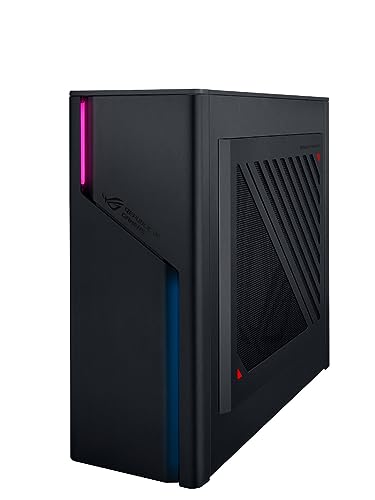
- Best overall compact gaming PC for streaming: ASUS ROG G22CH, Core i7-13700KF, Desktop RTX 4070, 32GB DDR5, 1TB SSD — Check on Amazon
- ASUS ROG NUC (2025), Core Ultra 9 275HX, RTX 5070 Ti Mobile, 16GB DDR5, 1TB SSD — Check on Amazon
- Minisforum AtomMan G7 Pro, Core i9-14900HX, RTX 5070 Laptop GPU, 32GB DDR5, 1TB SSD — Check on Amazon
- ASUS ROG NUC 970, Core Ultra 9 185H, RTX 4070 Laptop GPU, 32GB DDR5, 1TB SSD — Check on Amazon
See 2 more Amazon options
- Minisforum AtomMan G7 Ti, Core i9-14900HX, RTX 4070 Laptop GPU, 32GB DDR5, 1TB SSD — Check on Amazon
- Minisforum AtomMan G1 Pro, Ryzen 9 8945HX, Desktop RTX 5060, 32GB DDR5, 1TB SSD — Check on Amazon
Read the full guide ↓
Disclosure: As an Amazon Associate, reviewstook.com earns from qualifying purchases. Links to Amazon on this page are affiliate links; they cost you nothing extra. Listing details such as price and availability change often, so check the current Amazon listing before you buy.
A streaming PC does two jobs at once: it plays the game, and it compresses that game into a broadcast, sixty times a second, without letting either job stutter the other. The component that decides whether that works is not the one on the box art. It is the encoder — a small, fixed block of silicon inside the graphics chip that turns rendered frames into the video stream your audience watches. Game benchmarks never measure it. A machine can top a gaming chart and still be a mediocre streaming PC, because gaming loads the GPU’s rendering cores while streaming loads a separate block that either exists in duplicate or exists once. This guide grades six genuinely compact PCs (every one is 10.7 liters or smaller, with published dimensions) encoder-first: how many encoder blocks each GPU carries, which generation they are, whether they can encode AV1, and what is left over for the game, the browser full of dashboards, and the local recording you should be keeping.
First, the workflow this budget honestly supports, so the picks can be judged against it. One-machine game-plus-stream at 1080p60 is genuinely available on every pick here — all six carry a modern NVIDIA encoder, and none asks the CPU to compress video in software while a game runs. Streaming at 1440p is a different conversation: Twitch’s standard ceiling of roughly 6,000 kbps CBR starves a 1440p picture no matter what hardware you own, while YouTube accepts far higher bitrates, takes 1440p uploads, and accepts AV1 live streams — so 1440p streaming at this tier is a YouTube plan, not a Twitch one, and Twitch’s AV1 path runs through its Enhanced Broadcasting programme rather than the standard ingest. And 4K streaming is limited by the platforms, not by these machines: the encoder blocks here could feed a 4K stream long before the services most streamers use will carry one at sane bitrates. Two honesty notes carry over from the base guide. In boxes under about 4 liters a desktop GPU does not fit, so most of these machines run laptop GPUs — an RTX 5070 Ti Mobile or RTX 4070 Laptop is a different, slower part than the desktop card of the same name, encoder included, and every review below grades the mobile part as a mobile part. And there is no RTX 5080 in a true small-form-factor PC under $2,500: the one genuine sub-4-liter 5080 machine sits in a higher tier above this budget. What $2,500 buys instead is the tier where compact streaming stops being a compromise — provided you spend it on the encoder, not just the frame rate.
In this guide
Quick Picks
Short on time, or comparing several options at once? Each row below names a streamer type and the product that suits it, with a link to the listing.
| Streamer type | Pick | Why it stands out | Link |
|---|---|---|---|
| Best overall for streaming | ASUS ROG G22CH (DB779) | The set’s only dual encoder — one block streams, one records — in the quietest case here | Check on Amazon |
| Most powerful, when on deal | ASUS ROG NUC (2025), RTX 5070 Ti Mobile | Newest-generation mobile encoder and a 24-core CPU in ~3 liters; sits at the top of this budget tier — check price on Amazon | Check on Amazon |
| Best value current generation | Minisforum AtomMan G7 Pro | Blackwell-generation NVENC with AV1 and a 24-core i9, positioned well below the ASUS equivalent in this tier | Check on Amazon |
| Smallest serious streaming PC | ASUS ROG NUC 970 | 2.5 liters with a full-power 140W RTX 4070 Laptop GPU and an SD reader for camera ingest | Check on Amazon |
| Best living-room streamer | Minisforum AtomMan G7 Ti | Full-wattage 4070-class encoder in a console-style slab that out-reviewed the NUC 970 | Check on Amazon |
| Only upgradable encoder | Minisforum AtomMan G1 Pro | A swappable desktop RTX 5060 and 5-gigabit Ethernet — the encoder can be replaced when a better one exists | Check on Amazon |
How These Picks Were Chosen
The first filter was the tape measure, inherited from the base guide. Every pick has published dimensions from the maker or the listing, converted to liters (width × depth × height in centimeters, divided by 1,000), and anything over 20 liters was excluded whatever its title claimed — which removes most famous names in this budget tier, because the big-brand RTX 5070 Ti and 5080 prebuilts in this budget tier are 35-to-45-liter mid-towers with their own guides, such as Best Streaming PC Under $2500. What survives is the real compact market: two ASUS ROG NUC mini PCs, one ASUS small-form-factor desktop, and three Minisforum AtomMan machines.
The second filter was the encoder, read as carefully as the base guide read the GPU itself. A desktop RTX 4070 carries two eighth-generation NVENC blocks with AV1 encode; the laptop GPUs in the mini PCs carry a single encoder block of their generation — Blackwell-generation NVENC with AV1 on the RTX 5070-class mobile parts, eighth-generation Ada NVENC with AV1 on the RTX 4070 Laptop parts — and that difference, invisible in game benchmarks, is the spine of this guide’s ranking. We recorded the encoder count and generation for every pick alongside the GPU type and, where makers or reviewers publish it, the wattage. We read the maker listings and specification pages and the independent reviews that publish measurements — Notebookcheck, Digital Trends, Tom’s Guide, PC Gamer and others — and where a review exposed a catch the listing hides (a low-power mode left on, a single stick of memory, fan noise under load), the catch is in the review below, because for a streamer those catches land on the broadcast, not just the game.
The third filter was simultaneous load — what a streaming PC actually endures. A game alone is the easy part. The real workload is the game, OBS compositing scenes, a browser holding chat, dashboards and alerts, a local recording writing to disk, and a microphone that can hear every fan in the room. So each pick is also graded on CPU cores behind the encoder, on memory as shipped (not as supported), on storage headroom for recordings, on wired networking, and on how much noise it makes at arm’s length from a microphone. Prices change often between sellers and seasons, so check price on Amazon for each pick before you order; one pick sits at the very top of this budget tier, and the reviews say so wherever that is true.
The Encoder Is the Streaming Spec
Everything in this guide turns on one piece of silicon literacy, so here it is plainly. NVENC is NVIDIA’s hardware video encoder: a dedicated block that compresses video without borrowing the cores the game is rendering with. Two properties matter. The first is generation: the eighth-generation Ada encoder and the ninth-generation Blackwell encoder both encode AV1 — the codec YouTube’s live ingest rewards with cleaner pictures at a given bitrate — while anything older cannot encode AV1 at all. Every GPU in this guide, desktop and laptop alike, is Ada or Blackwell generation, so AV1 encode is present on all six picks; that is not true one tier down, and it is the main thing this budget buys a streamer. The second property is count. The desktop RTX 4070 in the G22CH carries two NVENC blocks, which lets OBS stream on one and record a high-bitrate local copy on the other, simultaneously, at full quality. Every other pick here carries a single encoder block: it can stream and record at once only by sharing that block, which means the recording inherits the stream’s settings or the encoder works double duty within one session. Neither is a defect — a single modern NVENC is a complete Twitch toolkit — but the dual-block machine is the only one for which “stream it and keep a pristine local copy for editing” costs nothing.
What the encoder does not do is rescue a weak platform around it. OBS still needs CPU for scene compositing, browsers and everything else Windows is doing; memory still has to hold the game, OBS and the browser at once; and a recording habit still eats storage at a rate of several gigabytes an hour at high bitrates. That is why the reviews grade the whole simultaneous load — and why one pick below, the most powerful per liter, is graded harder than its scores suggest: it ships with 16GB of memory, and 16GB is where the game-plus-OBS-plus-browser pile-up starts swapping to disk mid-stream.
The 6 Best Compact Gaming PCs for Streaming Under $2,500
ASUS ROG G22CH (DB779) — Core i7-13700KF, Desktop RTX 4070, 32GB DDR5, 1TB SSD
Who it suits: Streamers who want the one-machine setup done properly — stream and record at the same time, on separate encoder blocks, from the quietest case in this guide.
For streaming, the G22CH’s headline is not its size but its graphics card’s spec sheet. Inside its roughly 10-liter case (ASUS publishes 11.5 × 32.3 × 28.7 cm) sits a proper desktop GeForce RTX 4070 DUAL with 12GB of GDDR6X — and the desktop 4070 carries two eighth-generation NVENC encoders with AV1 encode, the only dual-encoder configuration in this guide. That changes what a broadcast can be: OBS sends the Twitch or YouTube stream from one block while the second block writes a high-bitrate local recording for editing and uploads, and neither touches the cores playing the game. Around the encoder, the platform supports the load honestly: a 16-core Core i7-13700KF for OBS, browser and background work, 32GB of DDR5 as shipped, a 1TB PCIe 4.0 SSD, and a 600W 80+ Gold internal power supply — no external brick. Desktop cooling volume makes it the calmest machine here under load — and for a streamer, acoustic headroom is a broadcast feature, not a comfort feature.
The fine print is about ceilings. Memory is laptop-style SO-DIMM and ASUS rates the platform at 32GB maximum — fine for streaming loads, but what you buy is what you keep. The 1TB drive is the recording budget: at high local-recording bitrates it fills in a season of regular streams, so an archiving habit belongs in the plan. The graphics card can technically be replaced, but only with dual-fan cards that fit the case and the 600W budget — the encoder is upgradable within a class, not to a future flagship — and the LGA1700 processor platform is at the end of its road. Check the current price on Amazon, and verify the DB779 model number and who is selling it before ordering — reseller listings for lesser G22CH variants, such as a 13700F with 16GB, also appear under this family name, and with this listing the variant decides what you get. Judged on its specs and its positioning in this tier, this is the streaming pick with the fewest asterisks: the only dual encoder, the quietest case, desktop behavior throughout.
- Desktop RTX 4070 with two NVENC blocks: stream on one, record on the other, both with AV1 available.
- 32GB of memory as shipped and a 16-core CPU: the full game-plus-OBS-plus-browser load fits without swapping.
- The quietest machine in this guide under load — the microphone hears the least from it.
Honest limitation: Memory is capped at 32GB, the single 1TB drive is the whole recording budget, and GPU swaps are limited to cards that fit the case and the 600W supply.
Choose it if you stream and record simultaneously and want one machine to do both without compromise. Skip it if the box must truly disappear — at ~10L it is three to four times the mini PCs below.

ASUS ROG NUC (2025) — Core Ultra 9 275HX, RTX 5070 Ti Mobile, 16GB DDR5, 1TB SSD
Who it suits: Streamers who want the newest encoder generation and the most CPU in a roughly 3-liter box — and who will check the current price on Amazon and budget the memory upgrade it needs.
The 2025 ROG NUC (model RNUC15JNK9X369AU) stands 282.4 × 187.7 × 56.5 mm — almost exactly 3 liters — and pairs Intel’s 24-core Core Ultra 9 275HX with an RTX 5070 Ti Mobile GPU carrying 12GB of GDDR7. Graded as the mobile part it is, its encoder is a Blackwell-generation NVENC with AV1 encode: the newest encoder generation in this guide, a genuine step for YouTube AV1 streaming and high-quality local recording, though a single block where the desktop 5070 Ti carries more headroom — the mobile card’s lower power limit and 12GB frame buffer put it a step below its desktop namesake in every respect. The 24-core processor is the strongest simultaneous-load CPU here: game, OBS compositing, browser dashboards and chat all have cores to spare. Dual Thunderbolt 4 leads a port selection that makes capture devices, docks and fast storage easy to attach, and the triple-fan, dual-vapor-chamber cooling is engineered for the full power envelope.
Now the two catches, both real, and one of them graded harder for streaming than the base guide graded it for gaming. The first is memory: this configuration ships with 16GB of RAM. A game alone tolerates that; a game plus OBS plus a browser full of stream dashboards plus chat is exactly the load that pushes 16GB into swapping, and swapping mid-broadcast shows up as stutter your viewers see. The two SO-DIMM slots make the fix easy — but it is a fix that belongs in the plan for this pick from the start. The second catch is its positioning. This configuration sits at the very top of this budget tier, and the same chassis with an RTX 5080 sits in a higher tier above this budget. Check the current price on Amazon before you order — if the listing has moved above this budget, treat it as an over-budget option and this article will not pretend otherwise — and put a memory kit in the same basket.
- Blackwell-generation NVENC with AV1 — the newest encoder here, in a ~3L chassis.
- 24-core Core Ultra 9 275HX: the most simultaneous-load headroom in this guide.
- Dual Thunderbolt 4 and triple-fan vapor-chamber cooling: capture gear attaches easily, thermals are handled.
Honest limitation: Only 16GB of RAM as shipped — the tightest memory budget in this guide for a game-plus-OBS load — and a position at the very top of this budget tier, so check price on Amazon to confirm it still fits the budget.
Choose it if the current price on Amazon still fits this budget and you will upgrade the memory immediately. Skip it if the listing has moved over budget, or you want a machine that streams perfectly out of the box with nothing to add.

Minisforum AtomMan G7 Pro — Core i9-14900HX, RTX 5070 Laptop GPU, 32GB DDR5, 1TB SSD
Who it suits: Streamers who want the current encoder generation and a 24-core processor in a slim mini PC, without the premium positioning of the ASUS equivalent.
The G7 Pro is Minisforum’s direct answer to the ROG NUC: a flagship laptop processor and a laptop RTX GPU in an ultra-thin vertical chassis that stands on a desk like a hardback book, positioned well below the ASUS equivalent in this tier. The graphics part is an RTX 5070 Laptop GPU with 8GB of GDDR7, tested at around 115W — and for streaming its relevant line is the encoder: a single Blackwell-generation NVENC block with AV1 encode, the same generation as the NUC 2025’s, without the ASUS premium positioning. The Core i9-14900HX brings 24 cores to the simultaneous load, the configured version carries 32GB of DDR5 and a 1TB SSD, memory can grow to 96GB across two SO-DIMM slots, and a second M.2 slot waits empty — which, for a streamer, reads as a dedicated recording drive waiting to be filled. Connectivity is modern throughout: Wi-Fi 7, USB4, HDMI 2.1. Check price on Amazon for the configured machine — it is positioned well inside this budget tier, with room in the tier for the streaming kit below.
Two warnings from the review record belong in this review, and both touch the broadcast. First, start with the style selector, before you order: this listing also sells a barebone style — no memory, no storage, no operating system — and buyers have been caught by the gap between the two styles before. The pick here is the configured 32GB + 1TB style. Second, reviewers found their test units shipped with a single 32GB memory stick, which runs the memory in single-channel mode; for a gamer that leaves performance on the table, and for a streamer running a game and OBS at once it leaves more — if your unit arrives that way, a matched SO-DIMM is a simple upgrade and should be fitted before the first broadcast, not after the first stutter. The structural limits are the usual ones for the class: a single encoder block means stream and recording share it, the RTX 5070 Laptop GPU’s 8GB of VRAM is the ceiling that will age first, and neither CPU nor GPU can ever be changed. What you are buying is the current generation’s encoder positioned in a lower part of this tier, in a box that disappears behind a monitor.
- Single Blackwell-generation NVENC with AV1 encode — the newest encoder generation, without the ROG premium.
- 24-core i9-14900HX and 32GB configured memory: simultaneous-load headroom to spare.
- An empty second M.2 slot: a dedicated recording drive is a one-part upgrade.
Honest limitation: One encoder block shared between stream and recording, review units shipped with single-channel memory, and the listing’s barebone style is a trap for anyone who does not read the style name.
Choose it if you want the newest GPU and encoder generation in a mini PC without the ROG premium. Skip it if you need the stream-and-record separation only a dual encoder gives, or more than 8GB of VRAM for heavy texture packs.

ASUS ROG NUC 970 — Core Ultra 9 185H, RTX 4070 Laptop GPU, 32GB DDR5, 1TB SSD
Who it suits: Streamers for whom size is the first specification — a 2.5-liter broadcast box that travels in a backpack, hides behind a monitor, and still encodes like a proper gaming laptop.
Nothing else in this guide goes this small: 270 × 180 × 50 mm, 2.5 liters, light enough to forget in a backpack between home, office and LAN. Its RTX 4070 Laptop GPU runs at the full 140W limit — the same wattage as the G7 Ti below — and its streaming line is a single eighth-generation Ada NVENC block with AV1 encode: a complete modern toolkit, one generation behind the Blackwell parts above it, which in practice means the same Twitch H.264 quality and AV1 available for YouTube and recordings. You get 32GB of DDR5-5600 as shipped, a 1TB SSD, Thunderbolt 4, a vertical stand in the box, and one port streamers and creators will notice specifically: an SD card reader, which makes ingesting camera footage for clips and VOD edits a slot-in job rather than a dongle hunt. Check the current price on Amazon — it is the most portable route into 4070-class streaming that carries a major brand’s badge and support network.
The honest problem is arithmetic. The AtomMan G7 Ti further down this guide matches this machine’s GPU wattage and encoder generation, matches or beats it in independent testing, and is positioned well below it in this tier through Minisforum’s channels — Digital Trends’ reviewer found the G7 Ti outclassed the NUC 970 outright. What the ASUS premium positioning buys is the smaller chassis (2.5 liters against a larger slab), Thunderbolt, the SD reader and the brand’s support and resale value; whether that is worth the difference is a judgment about how much the last liter and the badge matter to you. The platform is also the 2024 generation: the Core Ultra 9 185H is a capable chip, but it gives up headroom to the 24-core HX machines here when the simultaneous load peaks, and the GPU and its encoder are soldered down for life. Bought for the size and the badge, it justifies itself; at its usual positioning in this tier, with the G7 Ti in stock, the premium is for the logo and the smaller chassis.
- Full-power 140W RTX 4070 Laptop GPU with Ada NVENC and AV1 encode — no wattage or encoder compromise for the size.
- 2.5 liters with a stand included: the streaming PC that disappears behind the monitor it feeds.
- SD card reader and Thunderbolt 4: camera ingest and capture gear handled without a drawer of adapters.
Honest limitation: The G7 Ti matches its GPU and encoder class from a lower position in this tier; you are paying for the final liter, the ports and the brand — and the encoder is soldered for life.
Choose it if the PC must travel or vanish entirely and you value ASUS support. Skip it if value outranks size — the G7 Pro and G7 Ti win that contest.

Minisforum AtomMan G7 Ti — Core i9-14900HX, RTX 4070 Laptop GPU, 32GB DDR5, 1TB SSD
Who it suits: Living-room streamers who want a slim, upright box beside the TV — and the strongest reviewed performance of the RTX 4070 laptop class — provided the microphone does not have to live beside it.
Strip a gaming laptop of its screen and keyboard and stand what remains upright: that is the G7 Ti — a 24-core Core i9-14900HX and an RTX 4070 Laptop GPU running at its full 140W power limit, in a vertical slab roughly 80mm thick and weighing 2.6kg. Its encoder is a single eighth-generation Ada NVENC block with AV1 encode — the same streaming toolkit as the NUC 970’s, backed here by the 24-core processor that gives OBS, the game and the browser the most simultaneous-load headroom of any 4070-class pick. Reviewers have been unusually kind to the machine itself: Digital Trends scored it near-perfectly and found it outclassing the ROG NUC 970; Notebookcheck measured strong, sustained performance; Tom’s Guide calls it great for 1080p and 1440p gaming while noting, correctly, that 4K is beyond it. The configured style on the Amazon listing carries 32GB of DDR5-5600 — expandable to 96GB — a 1TB SSD with a second M.2 slot free for recordings, Wi-Fi 7 and USB4. Check price on Amazon for the configured machine — it is positioned in the lower half of this budget tier and is the performance benchmark of its class.
The catches are the ones its shape dictates, and for streaming one of them matters more than it does for gaming. A slim slab cooling a 140W GPU and a 24-core HX processor uses small fans spinning fast, and under sustained load it is audible in a quiet room. Across a living room, under a TV, that is a footnote; on a desk, at arm’s length from a microphone, it is a broadcast problem — fan noise is the one flaw your audience hears, and it argues for placing this machine across the room, using a directional microphone, or choosing the G22CH. The port selection is thin for this tier: reviewers counted just two USB-A ports, and a streamer’s desk — microphone, camera, controller, capture device — makes a hub mandatory from day one, not optional. And like the G7 Pro, the listing sells both configured and barebone styles: confirm the style name says 32GB + 1TB before ordering, because the barebone arrives without memory, storage or Windows. None of this displaces it: as a reviewed, measured, full-wattage streaming machine that stands upright in the space a hardback book would take, it is the pick the NUC 970 has to justify itself against.
- Full 140W RTX 4070 Laptop GPU with Ada NVENC and AV1 — the wattage and encoder that separate it from throttled rivals.
- 24-core i9-14900HX: the strongest simultaneous-load CPU in the 4070 class here.
- Memory to 96GB and a free second SSD slot for the recording archive, in a slab ~80mm thick.
Honest limitation: Fan noise under load is the trade-off of the slim shape — a real problem near a microphone — the two USB-A ports make a hub mandatory, and a single encoder block is shared between stream and recording.
Choose it if it will live across the room on a TV stand and you want the best-reviewed 4070-class value. Skip it if your microphone sits on the same desk in a quiet room, or you want the newer 50-series encoder in the G7 Pro.

Minisforum AtomMan G1 Pro — Ryzen 9 8945HX, Desktop RTX 5060, 32GB DDR5, 1TB SSD
Who it suits: Streamers who refuse to accept a soldered encoder — the one mini PC in this guide whose graphics card, and therefore its NVENC block, can be unplugged and replaced.
Every other small machine in this guide treats the GPU as a life sentence, encoder included. The G1 Pro does not. The chassis is a 3.8-liter vertical box — Tom’s Guide measured 12.4 × 8.5 × 2.25 inches, smaller than a PS5 on its side — and inside it sits a genuine desktop graphics card, a low-profile GeForce RTX 5060 running at 145W, seated in a real PCIe x16 slot. Its encoder as shipped is a single Blackwell-generation NVENC block with AV1 encode — current-generation, one block — but the slot is the story: when a faster low-profile card with a newer encoder exists in three years, this is the one sub-4-liter machine here that can take it. Around that slot: a 16-core Ryzen 9 8945HX, 32GB of DDR5-5200 expandable to 96GB, a 1TB SSD with a second M.2 slot, Wi-Fi 7, and the best wired networking in this guide — 5-gigabit Ethernet, which matters because the OBS section below will tell you to stream wired or not at all. An internal 350W power supply means no laptop-style brick cluttering the floor. Check the current price on Amazon. Minisforum also sells a sibling configuration in the same chassis with a 16GB Radeon RX 9060 XT positioned in a similar part of this tier — a separate listing, but VRAM-hungry buyers should know it exists.
The review record adds three honest footnotes, and the first is an instruction, not a warning: the machine ships in an 80W gaming mode that hides a fifth of its performance behind a toggle in Minisforum’s software — set it to its full-performance mode on day one, before your first stream, or you will broadcast from a slower PC than you bought. Under heavy load it gets loud, as 3.8 liters moving this much heat tends to, so the microphone-placement advice from the G7 Ti applies here too. Reviewers also flagged a software wart: Minisforum’s control utility bundles a system driver that Windows Defender flags as vulnerable. It is fixable, but it is the kind of thing to know before setup, not discover during it. And the GPU class itself is the compromise: the RTX 5060 is a step below the 4070-class machines above it as a gaming card; its encoder, though, is the same Blackwell generation as the flagship picks’. You are paying for the chassis, the slot, the 5-gigabit port and the right to upgrade the encoder later — a defensible buy with your eyes open.
- A swappable desktop graphics card in a PCIe x16 slot — the only future encoder upgrade in this guide.
- 5-gigabit Ethernet: the best wired connection here, and wired is how this guide tells you to stream.
- Blackwell-generation NVENC with AV1 encode and an internal power supply: current encoder, console-clean setup.
Honest limitation: The RTX 5060 is a gaming class below the 4070/5070 machines here, it ships in a low-power mode you must switch off, and it is loud under sustained load.
Choose it if upgradability, wired networking and a TV-stand footprint matter more than this year’s GPU class. Skip it if today’s frame rate is the whole question — positioned in a similar part of this tier, the G7 Pro and G7 Ti are simply faster.
Comparison Table
| Product | Size | Encoder | Best use | Link |
|---|---|---|---|---|
| ASUS ROG G22CH (DB779) | ~10.7 L | Desktop RTX 4070: dual Ada NVENC + AV1 | Stream and record at once, quietly | Check on Amazon |
| ASUS ROG NUC (2025) | ~3 L | RTX 5070 Ti Mobile: Blackwell NVENC + AV1 | Maximum power per liter, at the top of this tier | Check on Amazon |
| Minisforum AtomMan G7 Pro | Slim slab, ~80mm thick class | RTX 5070 Laptop: single Blackwell NVENC + AV1 | Current-gen encoder value | Check on Amazon |
| ASUS ROG NUC 970 | 2.5 L | RTX 4070 Laptop 140W: single Ada NVENC + AV1 | Smallest brand-name streaming PC | Check on Amazon |
| Minisforum AtomMan G7 Ti | Slim slab, ~80mm thick, 2.6kg | RTX 4070 Laptop 140W: single Ada NVENC + AV1 | Living-room slab, best reviews | Check on Amazon |
| Minisforum AtomMan G1 Pro | 3.8 L | Desktop RTX 5060: single Blackwell NVENC + AV1, swappable | Upgradeable encoder for the TV stand | Check on Amazon |
Set Up OBS Once, Correctly
Every pick in this guide can run the same OBS configuration; the differences are in which encoder line you select and how much headroom surrounds it. Work through this once, on whichever machine you buy, before your first public stream.
- Pick the hardware encoder, never the software one. In OBS output settings, choose the NVIDIA NVENC encoder (H.264 or AV1) — every pick here lists it the same way. The x264 software encoder belongs to dedicated streaming PCs with spare CPUs; on a one-machine setup it steals cores from the game and is the wrong choice on all six picks here.
- Match the codec to the platform. For Twitch’s standard ingest, stream H.264 at roughly 6,000 kbps CBR with a 2-second keyframe interval — that is the platform’s working ceiling, and every encoder here produces it easily. For YouTube, you have more room: higher bitrates are accepted, 1440p output is worthwhile, and AV1 — available on every pick in this guide — gives the cleanest picture per bit. On the G22CH, assign the second NVENC block to the local recording at a high bitrate; on the single-encoder picks, record using the stream’s encoder settings or accept that recording shares the block.
- Set CBR and 2-second keyframes, and leave them. Constant bitrate with a two-second keyframe interval is what the platforms’ players and transcoders expect. Variable bitrate saves nothing your audience can see and causes exactly the buffering complaints that get blamed on the PC.
- Learn the three lag counters before you need them. OBS’s Stats dock separates your problems into three numbers, and each has a different fix. Rendering lag means the GPU is saturated compositing scenes — cap the game’s frame rate and lower the game’s settings a notch, because OBS needs a slice of GPU the game is using. Encoding lag means the NVENC block is overcommitted — drop the output resolution or bitrate, and on single-encoder picks, stop asking the same block for a stream and a maximum-quality recording at once. Dropped frames (network) are not the PC’s fault at all — they are the connection’s, and the fix is below.
- Stream wired, or do not blame the machine. Every pick here has Wi-Fi 6E or Wi-Fi 7, and none of that changes the rule: a stream is a sustained upload that Wi-Fi delivers unevenly and Ethernet delivers flat. Run a cable. The G1 Pro’s 5-gigabit port is the best in this guide, but even a basic gigabit Ethernet port on any pick here beats the best wireless link for broadcast stability.
- Switch off the shipping power mode first. Several compact PCs arrive in a reduced-power profile — the G1 Pro’s 80W default is the documented example in this guide. Set the full-performance mode in the maker’s software before you tune OBS, or you will spend an evening diagnosing an encoder that was never the problem.
What $2,500 Does Not Include
The PC is the largest line in a streaming setup, not the only one. This budget covers the PC alone and does not include any of the following, and none of it should be folded into a pick’s comparison — buy it in this order, because this is the order your audience notices it.
- A microphone, first. Viewers forgive a soft picture; they leave over bad audio. A decent USB or XLR microphone, placed close and kept away from the PC’s fans, improves a stream more than any encoder generation in this guide. Note the interaction with the picks: the slim Minisforum slabs are audible under load, so microphone placement — or choosing the quieter G22CH — is a real decision, not an accessory detail.
- Lighting, second. A single key light makes a modest camera look professional; no camera upgrade makes a dark room look lit. Light the face before you upgrade the lens.
- A webcam, third. Any competent camera benefits from the light above; buy it after the microphone and the light, not before.
- A capture card, only for console streaming. Every pick in this guide plays and streams PC games on one machine with no capture card involved. A capture card earns its cost only when a console enters the setup — for a PC-only streamer it is money spent on a box that does nothing.
- The unglamorous lines: an Ethernet cable long enough to reach the router, a USB hub for the port-poor machines (the G7 Ti’s two USB-A ports make this a certainty, not a maybe), a second memory stick where a pick ships single-channel or at 16GB, and storage for the recording archive once the first drive fills.
How to Choose a Compact Gaming PC for Streaming
- Count encoder blocks before you count cores. Two NVENC blocks (the G22CH’s desktop 4070) means stream and record run independently. One block — every other pick here — means they share. Both work; they are different products for a streamer who edits.
- Buy the encoder generation for your platform. Twitch’s standard ingest is an H.264 conversation, and any encoder in this guide aces it. YouTube rewards AV1 and higher bitrates — and AV1 encode is present on all six picks, which is the quiet reason this tier is where compact streaming gets serious.
- Grade memory as shipped, under streaming load. A game plus OBS plus a browser needs more than a game alone. The NUC (2025)’s 16GB is the tightest budget in this guide and the G7 Pro’s single-stick shipping configuration is the sneakiest — check what arrives, and budget the fix into your plan for the pick.
- Match the box to the microphone. Slim slabs are audible under sustained load. If the PC shares a desk with a microphone, the quietest machine (the 10-liter G22CH) or across-the-room placement is part of the purchase, not an afterthought.
- Measure in liters, never in adjectives. Take the published width, depth and height in centimeters, multiply them together and divide by 1,000. Under 5 liters is mini-PC territory, 5–15 is true small form factor, and anything above 20 is a mid-tower in a costume, whatever the listing title says. Readers fitting machines into tight rooms should also see Best Compact Gaming PC For Small Spaces Under $2500.
- Read the style selector like a contract. Mini-PC listings routinely place barebone and configured styles side by side. Barebone means no memory, no storage, no Windows — the eye-catching listing may be the empty box’s.
- Plan the recording drive. Every pick ships with 1TB, and high-bitrate local recordings eat several gigabytes an hour. A free second M.2 slot (G7 Pro, G7 Ti, G1 Pro) is a streaming feature; plan for the archive habit honestly.
- Wire it. However good the Wi-Fi spec reads, the stream goes over a cable. Check the Ethernet port, not the wireless headline — and note the G1 Pro’s 5-gigabit port as the guide’s best.
Common Buying Mistakes
- Buying on game benchmarks alone. They measure rendering cores; your stream runs on the encoder block the benchmark never touched.
- Assuming a laptop GPU’s encoder is the desktop card’s. The mobile parts here carry a single NVENC block where the desktop 4070 carries two — same generation, different capacity.
- Streaming over Wi-Fi because the spec sheet boasts Wi-Fi 7. Wireless headlines describe peak local speed; a broadcast needs sustained upload stability, which is a cable.
- Recording and streaming from one encoder block at maximum settings on both, then blaming OBS for encoding lag. Share the block knowingly, or buy the dual-encoder pick.
- Ordering a Minisforum listing’s barebone style and finding no memory, storage or Windows in the box. The style name is the product.
- Ignoring memory configuration. 16GB in a machine at the top of this budget tier, or a single stick in a dual-channel design, are both real configurations in this guide — under a game-plus-OBS load they are the first thing that stutters.
- Leaving the shipping power mode on. A compact PC left in its 80W or “quiet” default can give away a fifth of the performance you bought — encoder headroom included.
- Putting a loud slim PC beside the microphone. Your audience hears your fans more clearly than they hear the difference between encoder generations.
- Sealing the PC in a cabinet. Compact machines throttle when their intakes are boxed in, and a throttling machine drops frames in the game and the stream alike.
Final Recommendation
- Most streamers: ASUS ROG G22CH — the only dual encoder in this guide, the quietest case, and desktop behavior throughout, positioned well under the top of this budget tier — check price on Amazon.
- Maximum power per liter: ASUS ROG NUC (2025) with RTX 5070 Ti Mobile — but only when the current price on Amazon still fits this budget, and with a memory upgrade in the same basket.
- Best value, current generation: Minisforum AtomMan G7 Pro.
- Smallest and most portable: ASUS ROG NUC 970.
- Living-room slab with the best reviews: Minisforum AtomMan G7 Ti — placed across the room from the microphone.
- The upgradable encoder: Minisforum AtomMan G1 Pro.
Our top two are the G22CH and the G7 Pro, because they answer the streaming question from its two honest ends: the ASUS is the only machine here that streams and records on separate encoder blocks while staying quiet beside a microphone, and the Minisforum delivers the current Blackwell encoder generation and a 24-core processor in a book-thin slab from a lower position in this tier. The ROG NUC (2025) is the better machine than both on paper and the worse buy when its listing moves above this budget — check the current price on Amazon, add the memory it should have shipped with, and it jumps the queue when it fits the budget. Shoppers whose space allows a step up in size should also see Best Compact Gaming PC Under $3000, those working with a smaller budget will find the same machines’ smaller siblings in Best Compact Gaming PC Under $1500, and anyone still deciding whether compact is right at all should weigh the tower alternative in Best 1440p Gaming PC Under $2500. Whichever you choose: count the encoder blocks, check the memory as shipped, read the style selector, switch on the full power mode, run the Ethernet cable, and check price on Amazon before you order.
Frequently Asked Questions
Can a compact PC really stream and play on one machine?
Yes — that is exactly what a hardware encoder is for. NVENC compresses the broadcast on a dedicated block of silicon while the game renders on the GPU’s main cores, so a single compact PC handles game plus stream at 1080p60 on every pick in this guide. The differences are in headroom: the G22CH’s second encoder block lets it record locally at full quality at the same time, and the 24-core machines absorb the browser-and-OBS load more easily than the rest.
What actually counts as a compact gaming PC?
By volume, not by marketing. The working scale: below 5 liters is a mini PC, 5–15 liters is genuine small form factor, and up to roughly 20 liters counts as a compact tower. Nothing in this guide exceeds 10.7 liters. Plenty of listings wearing the word are ordinary 35–45-liter mid-towers — do the multiplication yourself before trusting the adjective. If a tower is acceptable after all, the wider field is covered in Best Gaming PC Under $2500.
Is AV1 encoding worth paying for?
For YouTube, yes; for Twitch’s standard ingest, not yet. AV1 gives a cleaner picture at a given bitrate, and YouTube accepts AV1 live streams and higher bitrates generally, which is where the codec earns its keep. Twitch’s standard path remains H.264 at roughly 6,000 kbps, with AV1 arriving through its Enhanced Broadcasting programme. Every pick in this guide encodes AV1, so the choice of platform — not the hardware — decides whether you use it.
Can I stream at 1440p or 4K from one of these?
1440p, yes — on YouTube, whose higher bitrate ceiling makes the picture worthwhile; on Twitch, the roughly 6,000 kbps standard ceiling starves 1440p regardless of hardware. 4K streaming is limited by the platforms rather than these machines: the encoders could feed it long before the services most streamers use will carry it at sensible bitrates. Stream 1080p60 to Twitch, 1440p to YouTube, and record locally at the highest quality your storage allows.
Is a laptop GPU’s encoder as good as the desktop card’s?
Same generation, less capacity. The RTX 4070 Laptop GPU’s Ada NVENC encodes the same codecs at the same quality settings as the desktop 4070’s — but the desktop card carries two encoder blocks and the laptop part carries one, so the desktop machine streams and records independently while the laptop-based machines share a single block between the two jobs. For a stream-only setup the difference is invisible; for a stream-and-edit workflow it is the difference that matters.
Which of these can I upgrade later?
Memory and storage on all six. The graphics card — and with it the encoder — on two: the G1 Pro takes replacement low-profile desktop cards in its PCIe slot, and the G22CH can swap its desktop card within the case’s size and 600W limits. The two ROG NUCs and the two other AtomMan machines have soldered GPUs: the encoder you buy is the encoder you keep. Newcomers to the category should also read Best Compact Gaming PC For Beginners Under $2500 before ordering.
Are compact gaming PCs too loud to stream with?
They are louder than towers under load — small fans spin faster to move the same air — and a microphone hears what a gamer’s headphones forgive. The 10-liter G22CH is the quietest of the six and the natural desk pick; the slim slabs belong across the room, where they fade into the game audio. Placement and a directional microphone solve what the spec sheet cannot; a sealed cabinet makes it worse and throttles the machine besides.
- Best Compact Gaming PC Under $3000
- Best Compact Gaming PC Under $1500
- Best Compact Gaming PC For Small Spaces Under $2500
- Best Streaming PC Under $2500
- Best Small Form Factor Gaming PC Under $2500
- Best Mini Gaming PC Under $2500
- Best Compact Gaming PC For 1440p Gaming Under $2500
- Best Compact Gaming PC For Beginners Under $2500


