Where to buy
Check the latest price, availability and delivery on Amazon. Orders are placed on Amazon. We may earn a commission from qualifying purchases.
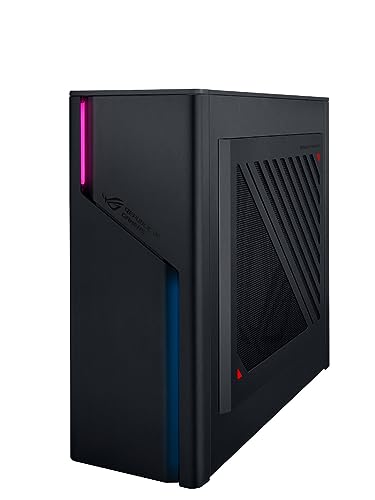
- Best first compact gaming PC for most beginners: ASUS ROG G22CH, Core i7-13700KF, Desktop RTX 4070, 32GB DDR5, 1TB SSD — Check on Amazon
- ASUS ROG NUC (2025), Core Ultra 9 275HX, RTX 5070 Ti Mobile, 16GB DDR5, 1TB SSD — Check on Amazon
- Minisforum AtomMan G7 Pro, Core i9-14900HX, RTX 5070 Laptop GPU, 32GB DDR5, 1TB SSD — Check on Amazon
- ASUS ROG NUC 970, Core Ultra 9 185H, RTX 4070 Laptop GPU, 32GB DDR5, 1TB SSD — Check on Amazon
See 2 more Amazon options
- Minisforum AtomMan G7 Ti, Core i9-14900HX, RTX 4070 Laptop GPU, 32GB DDR5, 1TB SSD — Check on Amazon
- Minisforum AtomMan G1 Pro, Ryzen 9 8945HX, Desktop RTX 5060, 32GB DDR5, 1TB SSD — Check on Amazon
Read the full guide ↓
Disclosure: As an Amazon Associate, reviewstook.com earns from qualifying purchases. Links to Amazon on this page are affiliate links; they cost you nothing extra. Listing details such as price and availability change often, so check the current Amazon listing before you buy.
If this is your first gaming PC, welcome — and a quick warning before the shopping starts. “Compact” is the most stretched word in PC listings. Type it into Amazon with a $2,500 budget and most of what comes back is an ordinary mid-tower: a case the size of a carry-on suitcase, wearing the word compact in its title because the seller wanted the click. This guide uses a tape measure instead of adjectives. A compact PC here means under 20 liters of case volume, with the maker’s published dimensions checked. The biggest machine below is a roughly 10.7-liter small desktop: genuinely small next to a tower, but still a real case that wants a desk corner or a deep shelf. The smallest is 2.5 liters and can hide behind the screen. Both are honestly “compact”; they are not the same kind of small, and the reviews say which is which.
The second thing a first-time buyer needs to know is the naming trap in small PCs. A desktop graphics card does not physically fit in a box of 3 or 4 liters, so the tiniest machines borrow their graphics from gaming laptops. An RTX 5070 Ti Mobile or an RTX 4070 Laptop GPU is a different, slower part than the desktop card with the same name — less memory, a lower power limit — and sellers are not eager to explain that. Every review below states plainly which kind of graphics card you are actually getting, because at this budget that fact matters more than any other line on the spec sheet.
So what does $2,500 honestly buy in a compact PC? A strong 1440p gaming machine — the resolution most people should pair with these PCs — in a case a fraction of a tower’s size. Several picks can also drive a 4K TV with upscaling help, but be honest about the flip side: on a 1440p monitor, part of the flagship money buys 4K capacity your screen physically cannot show you, so a cheaper pick below plus a good 1440p high-refresh monitor is often the smarter first setup. One ceiling applies to the whole category: there is no RTX 5080 in a true small-form-factor PC under $2,500 — the one genuine sub-4-liter RTX 5080 machine sits in a higher tier well above this budget. What follows is the strongest tier below that ceiling, explained for someone buying their first PC, not their fifth.
The Words on the Box, in Plain English
Listings are written for people who already know the jargon. Here is the jargon, translated. Keep this section open while you read the reviews.
- GPU (graphics card): The part that draws the game. It decides how good games look and how smoothly they run more than any other component. In small PCs the GPU often comes from gaming laptops instead of desktops — same name, less power — so always check which kind a listing means.
- VRAM: The graphics card’s own memory, used for textures and detail. More VRAM lets the card hold higher detail settings, especially at 1440p and 4K; a card with 8GB runs out of room at high settings sooner than one with 12GB or 16GB.
- CPU (processor): The part that runs the game itself — the world, the physics, the other players — and everything else Windows does. Cores are its parallel workers; more cores help with streaming, editing and multitasking.
- RAM (memory): The PC’s short-term workspace, shared by Windows, your game and everything open beside it. 16GB is the workable minimum in 2026; 32GB is comfortable. In mini PCs the RAM is often laptop-style sticks called SO-DIMMs, and in some machines it is soldered down and can never be changed.
- SSD (storage): Where games live permanently. Modern games are huge, so 1TB fills faster than new buyers expect. An SSD also makes the PC feel fast — Windows and games load from it in seconds.
- Resolution: How many pixels your monitor shows, written as width × height. 1080p is 1920×1080, 1440p is 2560×1440, 4K is 3840×2160. More pixels look sharper and demand much more from the graphics card.
- Refresh rate: How many times per second the monitor redraws the picture, measured in Hz. A 60Hz screen redraws 60 times a second, which caps how smooth motion can look no matter how powerful the PC is; a 144Hz screen redraws more than twice as often. Windows often leaves a fast monitor set to 60Hz until you change it — the setup section below covers that.
- Upscaling and frame generation (DLSS): Tricks that let the graphics card do less work for a similar picture. Upscaling renders the game at a lower internal resolution and rebuilds it to fit your screen: DLSS Quality on a 1440p monitor renders at about 1707×960 internally, and on a 4K screen Quality renders at about 2560×1440 while Performance renders at about 1920×1080. Frame generation invents extra frames in between real ones — motion looks smoother, but it does not make the game respond faster.
- PSU (power supply): The part that feeds electricity to everything else, rated in watts. Desktop-style PCs have it built in; most mini PCs use an external power brick like a laptop’s. Its wattage decides whether a future graphics-card upgrade is possible.
- Prebuilt: A PC that arrives assembled, with Windows installed, ready to plug in. Everything in this guide is a prebuilt — the alternative, building your own, is a hobby in itself and not required to enjoy any of these.
- Current price: Prices on listings change often, so this guide does not print a fixed price for any machine. Where a review tells you to check the current price on Amazon, do that before you judge value — a machine that sits inside this budget at its current price can sit outside it at another time, and the right move then is to wait or pick something else.
In this guide
Quick Picks
Short on time, or comparing several options at once? Each row below names a buyer type and the product that suits it, with a link to the listing.
| Buyer type | Pick | Why it stands out | Link |
|---|---|---|---|
| Best first compact PC | ASUS ROG G22CH (DB779) | Real desktop parts in a ~10-liter case, keyboard and mouse in the box — the easiest ownership here | Check on Amazon |
| Most power in the least space | ASUS ROG NUC (2025), RTX 5070 Ti Mobile | The strongest graphics that fit in ~3 liters — but check the current price on Amazon before judging its value | Check on Amazon |
| Best value, newest parts | Minisforum AtomMan G7 Pro | Current-generation laptop graphics and a 24-core processor for far less than the big-brand equivalent | Check on Amazon |
| Smallest and most portable | ASUS ROG NUC 970 | 2.5 liters — hides behind a monitor or travels in a backpack | Check on Amazon |
| Best for the TV stand | Minisforum AtomMan G7 Ti | A book-thin upright slab with the strongest review record of its class | Check on Amazon |
| Best if you want to upgrade later | Minisforum AtomMan G1 Pro | The only mini PC here whose graphics card can actually be replaced | Check on Amazon |
How These Picks Were Chosen
The first test was a tape measure, because it had to be. Every pick has published dimensions from its maker, converted to liters as width × depth × height in centimeters, divided by 1,000. Anything over 20 liters was cut, however famous the name — and that removed most of the big-brand machines in this price range, because their RTX 5070 Ti and 5080 prebuilts are 35-to-45-liter mid-towers with their own guides, such as Best Gaming PC Under $2500. What survived is what genuinely small gaming PCs look like on Amazon: two ASUS ROG NUC mini PCs, one ASUS small desktop, and three Minisforum AtomMan machines.
The second test was reading the graphics card’s name like a lawyer. A desktop RTX 4070, an RTX 4070 Laptop GPU running at its full 140 watts, and the same laptop chip limited to 80 watts are three different products sharing one label, so we recorded the GPU type — and its wattage where the maker or reviewers publish it — for every pick. We did not use these machines ourselves; we worked from maker listings and specification pages and from independent reviews that publish measurements, including Notebookcheck, Digital Trends, Tom’s Guide and PC Gamer. Where a review found a catch the listing stays quiet about — a performance mode switched off by default, a single memory stick in a machine built for two — that catch appears in the review below. Check the current price on Amazon for every pick: pricing changes often between sellers and seasons, one pick’s place in this budget depends on its current pricing, and each review says when that is the case.
The third test was life after the unboxing. In a compact PC, the upgrade path is part of the product: memory and storage can be changed on all six machines here, the graphics card on only two, and the processor on none. We gave credit for honest headroom — a spare SSD slot, memory that can grow, a power supply with watts to spare — because a $2,500 PC that cannot be improved has an expiry date, and at this size expiry dates arrive sooner than they do in a tower.
The 6 Best Compact Gaming PCs Under $2,500 for Beginners
ASUS ROG G22CH (DB779) — Core i7-13700KF, Desktop RTX 4070, 32GB DDR5, 1TB SSD
Who it suits: A first-time buyer who wants compact without the laptop-parts compromise — real desktop components, the fewest surprises, and a keyboard and mouse already in the box.
Start with the honest description: at roughly 10 liters (ASUS publishes 11.5 × 32.3 × 28.7 cm), this is the largest PC in the guide — a small desktop, shaped like a games console scaled up, not a mini PC. What that size buys is the thing no smaller machine here can offer: a genuine desktop GeForce RTX 4070 graphics card with 12GB of its own memory, running at full desktop power, beside a 16-core Core i7-13700KF desktop processor, 32GB of memory, a 1TB SSD and a 600W 80+ Gold power supply built into the case — no power brick on the floor. In plain terms, this is a strong 1440p gaming PC that behaves like a normal desktop: steady performance that does not depend on switching a “mode” on, and cooling with room to breathe. It is also the easiest first evening in the guide, because a wired keyboard and mouse are included. On pricing: check the current price on Amazon for the DB779, and take care with reseller listings for lesser G22CH versions — a 13700F processor with 16GB of memory — which can be positioned above the correct configuration. The model number is DB779; check it, and check the sold-by line, before you pay.
- A real desktop RTX 4070 with 12GB — no laptop-GPU discount on performance.
- Built-in 600W power supply and an included keyboard and mouse: the least extra shopping in this guide.
- Roughly 10 liters in a console-like wedge — sized for a media unit or a small desk corner.
Honest limitation: Memory is laptop-style sticks capped at 32GB total — it ships with that much, so there is nowhere to grow — the processor’s platform is at the end of its road, and a future graphics card must fit both the case and the 600W supply, which means same-class cards, not flagships.
Choose it if you want the compact PC that behaves most like a regular gaming desktop. Skip it if every liter counts — the mini PCs below are a third of its size or less.

ASUS ROG NUC (2025) — Core Ultra 9 275HX, RTX 5070 Ti Mobile, 16GB DDR5, 1TB SSD
Who it suits: A beginner with a small desk who wants the most graphics power that exists in a box of about 3 liters — and who is willing to wait for the right price instead of buying on any given day.
The measurements first: 282.4 × 187.7 × 56.5 mm, almost exactly 3 liters — a slim slab that stands on a desk like a hardback book. Inside this configuration (model RNUC15JNK9X369AU) sits a 24-core Core Ultra 9 275HX processor and an RTX 5070 Ti Mobile graphics chip with 12GB of GDDR7 memory, cooled by three fans and dual vapor chambers, with two Thunderbolt 4 ports — the best connections in this guide. Translated: this is the strongest graphics in the smallest serious package here, a genuine high-refresh 1440p machine with the latest DLSS 4 upscaling and frame generation, faster in games than the bigger desktop above it. Now the two catches, both real. It ships with 16GB of memory, the minimum a PC in this tier should carry in 2026 — the two memory slots make upgrading easy, but budget for it from the start. And its place in this guide depends on its current price: check the current price on Amazon before you judge it, because the ROG NUC (2025) family is typically positioned in a higher tier in ASUS’s own store, and the RTX 5080 version of the same little box sits well above this budget. When the current price sits inside this budget it belongs in this guide; when it sits above it, it belongs in a higher-budget guide, and no honest review should pretend otherwise. One last translation: “5070 Ti” here is the Mobile version — 12GB of memory instead of the desktop card’s 16GB, at a lower power limit. Still fast. Not the same card.
- RTX 5070 Ti Mobile with 12GB GDDR7 — the strongest graphics in a ~3-liter box on Amazon.
- 24-core processor and two Thunderbolt 4 ports: creator-grade hardware, not just gaming.
- Triple-fan, dual-vapor-chamber cooling built for the full power envelope.
Honest limitation: Only 16GB of memory as it ships, the graphics can never be upgraded, and its place under $2,500 depends on its current pricing — check the current price on Amazon, because at its usual higher-tier positioning this machine sits over this guide’s budget.
Choose it if the current price on Amazon sits inside this budget and you want the most power per liter available. Skip it if the current price sits above this budget, or you never want to open a PC to add memory.

Minisforum AtomMan G7 Pro — Core i9-14900HX, RTX 5070 Laptop GPU, 32GB DDR5, 1TB SSD
Who it suits: A value-first beginner who wants the current generation of graphics in a slim, upright mini PC, without paying the big-brand premium for the same recipe.
Minisforum’s idea is the ROG NUC’s idea — a flagship laptop processor, a laptop graphics card, a thin vertical chassis — executed for much less money. The processor is a 24-core Core i9-14900HX; the graphics are an RTX 5070 Laptop GPU with 8GB of GDDR7 memory, tested at around 115 watts, which makes this a genuine 1440p machine with DLSS 4. The configured version carries 32GB of memory and a 1TB SSD, memory can grow to 96GB across two slots, a second SSD slot sits empty waiting, and the connections are thoroughly modern: Wi-Fi 7, USB4, HDMI 2.1, Windows 11 Pro. Through Minisforum’s own channels the configured machine is positioned well below the big-brand equivalents with the same graphics generation. Check the current price on Amazon before you buy — Amazon and direct pricing can differ — and on its positioning it lands well inside this budget.
Two warnings from the review record matter for a first-time buyer. First, read the style selector on the Amazon listing like a contract: the same listing also sells a barebone version — no memory, no storage, no Windows — and its lower price has caught buyers out before. The pick in this guide is the configured 32GB + 1TB style. Second, reviewers found their test units shipped with a single 32GB memory stick. Memory works best in matched pairs (that is what “dual-channel” means), so a single stick leaves some performance on the table; if yours arrives that way, adding a matched stick later is the cheapest upgrade in this entire guide. The lasting limits are the usual ones for the class: the graphics card’s 8GB of VRAM is the ceiling that will age first at 1440p high settings, and neither the processor nor the graphics can ever be changed.
- RTX 5070 Laptop GPU and a 24-core i9-14900HX: current-generation 1440p performance.
- Configured version positioned as the value benchmark every other pick here is measured against — check price on Amazon.
- Memory up to 96GB and a spare SSD slot: unusual headroom for a mini PC.
Honest limitation: 8GB of VRAM is the long-term ceiling, review units shipped with a single memory stick running single-channel, and the listing’s barebone style is a trap for anyone who does not read the style name.
Choose it if you want the newest graphics generation in a mini PC without the ROG premium. Skip it if you play heavily modded games or texture-heavy titles at 1440p and need more than 8GB of VRAM.

ASUS ROG NUC 970 — Core Ultra 9 185H, RTX 4070 Laptop GPU, 32GB DDR5, 1TB SSD
Who it suits: A beginner for whom size is the first requirement — the smallest brand-name gaming PC in this guide, small enough to travel in a backpack and hide behind a monitor.
The NUC 970 is the machine that defined this category: 2.5 liters, 270 × 180 × 50 mm, light enough to carry between home, desk and a friend’s place without planning the trip around it. Inside are a Core Ultra 9 185H processor and an RTX 4070 Laptop GPU running at its full 140-watt limit — that wattage figure is the detail that matters, because it means this little box performs like a good RTX 4070 gaming laptop: strong at 1080p, genuinely capable at 1440p with DLSS help. You also get 32GB of DDR5-5600 memory, a 1TB SSD, Thunderbolt 4, an SD card reader, a vertical stand in the box, and ASUS’s support and software updates behind it. Check the current price on Amazon — on its positioning, the most portable route into 4070-class gaming with a major brand’s badge on it.
The honest problem is value. The AtomMan G7 Ti further down this guide matches this machine’s graphics wattage, matched or beat it in independent testing — Digital Trends’ reviewer found the G7 Ti outclassed the NUC 970 outright — and is positioned as the value alternative through Minisforum’s channels. What the ASUS premium buys is the smaller box (2.5 liters against a bigger slab), the Thunderbolt port, and the brand’s support network and resale value; whether that is worth it depends on how much the last liter and the badge matter to you. The processor is also from the 2024 generation — capable, but a step behind the 14900HX machines here — and the graphics are soldered in place for life, as in every NUC. Buy it for the size and the badge, after you check the current price on Amazon, and it earns its place; buy it without that check while the G7 Ti is in stock and you risk paying mainly for the logo.
- The smallest box here at 2.5 liters, with its stand included.
- Its RTX 4070 Laptop GPU runs at the full 140W — the size cost it nothing in wattage.
- Thunderbolt 4, an SD card reader and ASUS support: the polished, travel-ready package.
Honest limitation: The G7 Ti matches its graphics class for less money; you are paying for the final liter, the ports and the brand — and the graphics are soldered for life.
Choose it if the PC has to disappear into a backpack or behind a monitor, and ASUS support matters to you. Skip it if performance for your budget is the priority — that is the G7 Pro and G7 Ti below.

Minisforum AtomMan G7 Ti — Core i9-14900HX, RTX 4070 Laptop GPU, 32GB DDR5, 1TB SSD
Who it suits: Living-room and small-desk beginners who want a slim, upright box that stands beside the TV or monitor like a console — and the strongest reviewed performance in the RTX 4070 laptop class.
Think of the G7 Ti as a gaming laptop’s best hardware with the screen and keyboard removed: a 24-core Core i9-14900HX and an RTX 4070 Laptop GPU at its full 140-watt power limit, in a slim vertical slab about 80mm thick and 2.6kg in weight. Reviewers have been unusually kind to it. Digital Trends found it outclassing the ROG NUC 970; Notebookcheck measured strong, sustained performance; Tom’s Guide calls it great for 1080p and 1440p gaming while noting, correctly, that 4K is beyond it. The configured style on the Amazon listing carries 32GB of DDR5-5600 memory — expandable to 96GB — a 1TB SSD with a second slot free, Wi-Fi 7 and USB4. Check the current price on Amazon, and check Minisforum’s own channels as well, since the two can differ; on its positioning it is the value benchmark of the 4070 class and sits well inside this budget, leaving room for a beginner to put more of the budget toward the monitor.
The catches are the ones its shape dictates. A slim slab cooling a 140W graphics card and a 24-core processor uses small fans spinning fast, and under sustained gaming it is audible in a quiet room in a way the 10-liter G22CH is not — across a living room that is a footnote; on a desk beside your monitor it is a character trait. The port selection is thin for this tier: reviewers counted just two USB-A ports, the rectangular kind your keyboard, mouse, headset and controller all want, so a USB hub belongs in the budget from day one. And like the G7 Pro, this listing sells both configured and barebone styles — confirm the style name says 32GB + 1TB before ordering, because the barebone version arrives without memory, storage or Windows. None of that displaces it: as a reviewed, measured, full-wattage 1440p machine that stands upright in the space a hardback book would take, it is the pick the NUC 970 has to justify itself against.
- The RTX 4070 Laptop GPU runs at its full 140W, the figure throttled rivals cannot match.
- The best independent review record here, headlined by wins over the ROG NUC 970.
- Memory up to 96GB and a free second SSD slot, in a slab about 80mm thick.
Honest limitation: Fan noise under load is the price of the slim shape, the two USB-A ports make a hub a near-mandatory extra, and the graphics card’s 8GB of VRAM caps its 1440p high-settings future.
Choose it if you want console-style placement with the best-reviewed 4070-class performance for the money. Skip it if a silent desk matters more than a slim one, or you would rather have the newer 50-series graphics in the G7 Pro.

Minisforum AtomMan G1 Pro — Ryzen 9 8945HX, Desktop RTX 5060, 32GB DDR5, 1TB SSD
Who it suits: A beginner who refuses to accept a soldered graphics card — the one mini PC in this guide whose graphics can be unplugged and replaced, built for a TV stand and a long life.
Every other small machine in this guide treats the graphics card as a life sentence. The G1 Pro does not. Its 3.8-liter vertical chassis — measured by Tom’s Guide at 12.4 × 8.5 × 2.25 inches, smaller than a PS5 standing on its side — contains a genuine desktop graphics card, a low-profile GeForce RTX 5060 running at 145 watts, seated in a real PCIe x16 slot, the same kind of slot a full-size desktop uses. When a faster low-profile card arrives in three years, this is the only sub-4-liter machine here that can take it. Around that slot: a 16-core Ryzen 9 8945HX processor, 32GB of DDR5-5200 memory expandable to 96GB, a 1TB SSD with a second slot free, fast 5-gigabit Ethernet, Wi-Fi 7, and an internal 350W power supply — no laptop-style brick cluttering the floor, a detail every other mini PC here gets wrong. Check the current price on Amazon; Minisforum also sells this machine through its own store. Minisforum also sells a sibling version of the same chassis with a 16GB Radeon RX 9060 XT graphics card through its own store — worth knowing about if VRAM is your priority, though it is a separate listing.
The review record adds three honest footnotes a beginner should know before setup, not after. The machine ships in an 80W “Gaming Mode” that hides about a fifth of its performance behind a switch in Minisforum’s software — the setup section below tells you to set it to full performance on day one, or you will be playing on a slower PC than the one you paid for. It gets loud under heavy load — 3.8 liters moving this much heat usually does — and Tom’s Guide named the noise its main manners problem. Reviewers also flagged that Minisforum’s control utility ships a system driver that Windows Defender identifies as vulnerable — a fixable software wart, but one to know about in advance. And the graphics class itself is the compromise: the RTX 5060 is a step below the 4070-class machines above it, an honest 1080p-and-1440p card rather than a flagship. You are paying for the chassis, the slot and the internal power supply — for the right to upgrade later — and on that basis that is a defensible thing to buy, as long as you buy it with your eyes open.
- A replaceable desktop graphics card in a real PCIe slot — unique in this guide at this size.
- The 350W power supply is built in — no brick on the floor, a console-clean setup.
- 16-core Ryzen 9 processor and memory up to 96GB for streaming and creator work.
Honest limitation: The RTX 5060 is a class below the 4070/5070 machines here, it ships in a low-power mode you must switch off yourself, and it is loud under sustained load.
Choose it if upgradability and a TV-stand footprint matter more than this year’s graphics class. Skip it if you want the most performance for your budget today — the G7 Pro and G7 Ti are faster in this tier.
Comparison Table
| Product | Size | Graphics | Best use | Link |
|---|---|---|---|---|
| ASUS ROG G22CH (DB779) | ~10.7 L | Desktop RTX 4070 12GB | Desktop parts and behavior, console footprint | Check on Amazon |
| ASUS ROG NUC (2025) | ~3 L | RTX 5070 Ti Mobile 12GB | Most power per liter — check price on Amazon | Check on Amazon |
| Minisforum AtomMan G7 Pro | Slim upright slab | RTX 5070 Laptop 8GB | Newest generation, best value | Check on Amazon |
| ASUS ROG NUC 970 | 2.5 L | RTX 4070 Laptop 8GB, 140W | Smallest brand-name gaming PC | Check on Amazon |
| Minisforum AtomMan G7 Ti | Slim slab, ~80mm thick, 2.6kg | RTX 4070 Laptop 8GB, 140W | TV-stand slab with the best reviews | Check on Amazon |
| Minisforum AtomMan G1 Pro | 3.8 L | Desktop RTX 5060 8GB, replaceable | The upgradable mini PC | Check on Amazon |
Your First Evening: Setting Up, Step by Step
Every machine here is a prebuilt, so the hard part is already done. What remains takes under an hour, and this order prevents the mistakes almost every first-time buyer makes.
- Step 1 — Check the box against your order before you unbox. Find the model number on the carton and compare it with your order confirmation: DB779 for the G22CH, RNUC15JNK9X369AU for the ROG NUC (2025). On the two Minisforum AtomMan listings, confirm you received the configured style — memory, storage and Windows included — not the barebone. If anything disagrees, stop here; returning an unopened wrong variant is painless, and a hassle once set up.
- Step 2 — Give it air and a home. Stand the machine upright if it came with a stand, leave a few centimeters clear on the sides and top where it breathes, and never close it inside a cabinet — small PCs throttle and get loud when their intakes are boxed in. The mini PCs run from an external power brick like a laptop’s; the G22CH and G1 Pro have their power supplies built in, so they need only a wall socket.
- Step 3 — Plug the monitor into the graphics card, not the motherboard. This is the classic first-PC mistake. On the two machines with desktop graphics cards — the G22CH and the G1 Pro — the back panel has two clusters of video outputs; use the ones on the graphics card itself, not the ones grouped with the USB ports near the top. Plug into the motherboard and the PC will run on weak backup graphics or show nothing, and the expensive card you paid for sits idle. On the four mini PCs there is no wrong choice: every video output on the box is wired to the graphics hardware.
- Step 4 — First boot, then updates, then the graphics driver. Let Windows finish setting up, run Windows Update until it stops finding things, restart, then update the NVIDIA graphics driver through NVIDIA’s app. The driver a PC ships with is rarely the current one.
- Step 5 — Set your monitor’s real refresh rate. Windows usually defaults a fast monitor to 60Hz, which silently caps the smoothness you paid for. Go to Settings → System → Display → Advanced display and choose the highest refresh rate your monitor offers — 144Hz or whatever it is rated for — and confirm the resolution is the monitor’s native one.
- Step 6 — Switch on full performance mode. Several compact PCs ship in a reduced-power profile. The documented example here is the G1 Pro’s 80W default, which hides about a fifth of its performance behind a toggle in Minisforum’s software; the ASUS and AtomMan machines have equivalent settings in their control apps. Find yours, set it to full performance, and accept the fan noise as the trade.
- Step 7 — Install a game store and verify what arrived. Install Steam (or whichever store your games live on), sign in, and start a download. While it runs, open Settings → System → About and Task Manager → Performance and check the machine against your order: the memory amount (16GB vs 32GB), the graphics card’s name, the SSD size, and — in Task Manager’s Memory view — how many memory slots are used. Any machine whose numbers do not match the model number from Step 1 is a return-window problem, and the return window is now.
How to Choose a Compact Gaming PC Under $2,500
- Measure in liters, never in adjectives. Take the published width × depth × height in centimeters and divide by 1,000 to get liters. Under 5 liters is mini-PC territory, 5–15 is true small form factor, 15–20 is a compact tower, and anything above that is a mid-tower in a costume, whatever the title says.
- Ask which graphics card it really is. A desktop card, a laptop chip at full wattage and the same chip at reduced wattage are three different products sharing one name. Hunt for the words “Laptop GPU” or “Mobile” plus a wattage figure — an RTX 4070 Laptop at 140W and the same chip at 80W are different purchases.
- Budget the compact tax honestly. Per unit of gaming performance, small costs more — the same graphics class in a tower typically costs less, as the picks in Best 1440p Gaming PC Under $2500 show. You are paying for liters removed. That tax is worth it when the space is real — a studio flat, a TV stand, a desk shared with work, a machine that travels — and wasted on a PC that will sit under a desk in a spare room with space for a tower all along.
- Check the memory as shipped, not as supported. A machine advertised as “supports 96GB” may still ship with 16GB, or with one stick running in single-channel mode. Both appear in this guide. Fixing it costs little — as long as you know it needs fixing.
- Read the style selector like a contract. Mini-PC listings routinely sell barebone and configured versions side by side. Barebone means no memory, no storage, no Windows. The price that caught your eye may be the empty version’s.
- Count the power brick. Most mini PCs come with a laptop-style external adapter — a brick on your floor and another cable on your desk. A built-in power supply, as on the G1 Pro and G22CH, is a real quality-of-life feature at this size.
- Plan the upgrade you will actually make. On four of these six machines the graphics card is forever. If a graphics upgrade in three years matters, your choice narrows now to the G1 Pro’s low-profile slot or the G22CH’s desktop bay.
- Match the box to the room. Slim slabs belong on TV stands; a 2.5-liter NUC vanishes behind a monitor; a 10-liter desktop wants a desk corner or a deep media shelf. Measure the shelf before the PC, not after.
- Expect fan noise, and plan around it. A gaming PC turns electricity into heat, and a small case has smaller, faster-spinning fans to move it. The slim machines here are all reviewer-noted as audible under sustained gaming; the 10-liter G22CH is the quietest of the six. Across a living room they fade into the game audio; at arm’s length on a quiet desk, headphones are part of the compact-PC kit.
What Else You Will Spend
The PC’s price is not the whole purchase, and none of the extras below is included in any pick’s price. Budget for them in this order. First, the monitor: no machine here includes one, and it is the purchase that decides how everything looks. A 1440p monitor with a high refresh rate (144Hz class) is the right partner for all six picks — sharp, and fast enough to show what these graphics cards can do. Resist overspending on a 4K monitor: several picks can drive 4K with upscaling, but their comfortable home is 1440p, and a 4K panel mostly buys capacity the PC cannot feed natively. Second, controls: only the G22CH’s listing documents a keyboard and mouse in the box, so assume you need a keyboard, a mouse and something for sound — a headset is the beginner-friendly default. Third, the small fixes this guide has flagged: a second memory stick for the 16GB ROG NUC (2025) when you upgrade it, a possible matched stick if a G7 Pro arrives single-channel, and a USB hub for the port-poor G7 Ti. Fourth, games themselves and, optionally, a surge protector for the wall socket. They are a reason to leave room in the budget — which is exactly why several picks below deliberately cost less than $2,500.
Upgrades, in Plain Terms
Beginners often ask what they will be able to change later. In this category the honest answer is short. Storage: every machine here can take more — the G7 Pro, G7 Ti and G1 Pro each have a second SSD slot waiting empty, and adding a drive is the easiest upgrade that exists. Memory: the ROG NUC (2025) goes from its shipped 16GB to 32GB with a second laptop-style stick — the one upgrade most of its buyers should plan from day one; the G7 Pro and G7 Ti can grow to 96GB and the NUC 970 to 64GB; the G1 Pro to 96GB; the G22CH is the exception, shipping already at its 32GB ceiling. Graphics card: only two machines allow it at all. The G1 Pro’s desktop RTX 5060 sits in a real slot and can be replaced by another low-profile card within its internal 350W power supply’s budget. The G22CH can swap its desktop card for another dual-fan card of the same class that fits the case and its named 600W Gold power supply. On the other four — both ROG NUCs, the G7 Pro and the G7 Ti — the graphics are soldered down and can never be changed; what you buy is what you keep, forever. Processor: on none of the six. That is the compact bargain in one paragraph: you trade tomorrow’s graphics upgrade for today’s small footprint, on every pick except the G1 Pro and, within limits, the G22CH.
Common Buying Mistakes
- Believing the word “compact” in a listing title. Many are 35–45 liter mid-towers; run the liter math on the published dimensions before anything else.
- Assuming every RTX 5070 Ti is the same card. In a mini PC it is the Mobile version — fewer cores, 12GB of memory instead of 16GB, a lower power limit. Still fast; not the same card.
- Paying the RTX 5080 price by accident. Compact 5080 machines exist, in a tier well above this budget. If one appears positioned far below that tier, read its configuration very carefully before believing a word of it.
- Ordering a Minisforum listing’s barebone style and finding no memory, storage or Windows in the box. The style name is the product.
- Plugging the monitor into the motherboard’s video outputs on a desktop-card machine and concluding the PC is slow or broken. Use the graphics card’s own ports.
- Leaving the monitor at its 60Hz default and the PC in its shipping power mode. Between them, those two settings can hide a fifth of the performance and half the smoothness you paid for.
- Ignoring the memory configuration. 16GB in a premium machine in this tier and a single stick in a dual-channel design are both real configurations here — check what ships, not what the platform supports.
- Expecting a graphics upgrade that physics forbids. Soldered laptop GPUs do not come out — buy the machine with the slot instead.
- Sealing the PC in a cabinet. Boxed-in intakes make compact machines throttle and roar; even the smallest PC needs to breathe.
- Forgetting the hub. Two USB-A ports is a genuine specification in this category. Your keyboard, mouse, headset and controller all need somewhere to plug in.
Final Recommendation
- Most beginners: ASUS ROG G22CH — desktop RTX 4070 performance in a console-sized case, keyboard and mouse included, positioned well under budget — check price on Amazon.
- Most power per liter: ASUS ROG NUC (2025), RTX 5070 Ti Mobile — check the current price on Amazon; it belongs here only when that price sits inside this budget.
- Best value, current generation: Minisforum AtomMan G7 Pro.
- Smallest and most portable: ASUS ROG NUC 970.
- Best-reviewed living-room slab: Minisforum AtomMan G7 Ti.
- The upgradable mini PC: Minisforum AtomMan G1 Pro.
Our top two are the G22CH and the G7 Pro, because they sit at the two ends of what compact honestly means for a first PC: the ASUS keeps desktop parts and desktop behavior in the smallest case that can hold them, with the least setup fuss in the guide, and the Minisforum delivers the current graphics generation in a book-thin slab for the least money. On paper the ROG NUC (2025) beats both, and when its current price sits above this budget it is the worse buy — when the current price on Amazon sits inside this budget, it jumps the queue. Shoppers whose space allows a step up in size should also see Best Compact Gaming PC Under $3000, and those working with less money will find the same category’s smaller siblings in Best Compact Gaming PC Under $1500. Whichever you choose: do the liter math, read the style selector, check the memory configuration, plug the monitor into the right ports, switch on the full power mode, and check the live price before you order.
Frequently Asked Questions
What actually counts as a compact gaming PC?
By volume, not by marketing. Under 5 liters is mini-PC territory; 5–15 liters is genuine small form factor; up to roughly 20 liters counts as a compact tower. Every pick in this guide is 10.7 liters or smaller. Many Amazon listings titled “compact” are standard mid-towers of 35–45 liters; multiply the dimensions yourself before believing the adjective.
Do I need to spend $2,500 on my first gaming PC?
No. A genuinely good first gaming PC costs far less, and several picks in this guide — the G7 Ti, the G7 Pro, the G1 Pro — sit well under the ceiling and leave money for the monitor, which improves your setup more than stretching to the top of this tier would. This tier is for buyers who want small and strong at once: high-refresh 1440p in a case that fits a shelf, a TV stand or a backpack. If you are unsure, start lower and upgrade your screen first.
Is a laptop GPU in a mini PC as fast as the desktop card with the same name?
No. The RTX 5070 Ti Mobile carries 12GB of memory to the desktop card’s 16GB and runs at a lower power limit, and the RTX 4070 Laptop GPU trails the desktop 4070 by a similar margin. Run at their full 140W limits, as in the NUC 970 and G7 Ti, they are strong 1440p parts — still a step down from the desktop namesakes, and this guide labels every one.
Can I get an RTX 5080 in a compact PC under $2,500?
No — not a genuine small-form-factor one. ASUS’s ROG NUC (2025) in its top configuration is the compact RTX 5080 machine on Amazon, and it sits in a tier well above this budget. Compact under $2,500 tops out at this guide’s RTX 5070 Ti Mobile, and only when its current price on Amazon sits inside this budget.
Which of these can I upgrade later?
Memory and storage on all six, within each machine’s limits — the ROG NUC (2025) most urgently, since it ships with 16GB. The graphics card on two machines: the G1 Pro accepts replacement low-profile desktop cards in its PCIe slot, and the G22CH can swap its desktop card within its case size and 600W limits. The two ROG NUCs and the other two AtomMan machines have soldered graphics and processors — what you buy is what you keep.
What monitor should a beginner pair with these PCs?
A 1440p monitor with a high refresh rate — 144Hz class — is the sweet spot for every pick here: sharp on a desk, and fast enough to display the smoothness these graphics cards produce. Several picks can drive a 4K TV with upscaling, which is a fine living-room option, but do not buy an expensive 4K monitor expecting native 4K gaming at this tier; part of a flagship compact PC’s price already buys 4K capacity, and a 4K panel on top spends twice on the same headroom.
Which compact PC is best for a TV and living room?
The natural TV-stand machines are the G1 Pro and the G7 Ti: both stand vertically, both are console-sized, and the G1 Pro’s built-in power supply keeps the setup cleanest. If the PC must hide entirely — behind the TV, or in a backpack between rooms — the NUC 970 is the pick. For more on fitting a PC into tight rooms, see Best Compact Gaming PC For Small Spaces Under $2500.


