Where to buy
Check the latest price, availability and delivery on Amazon. Orders are placed on Amazon. We may earn a commission from qualifying purchases.
- Best overall compact streaming PC: ZOTAC MEK AI-Enhanced Gaming PC, Ryzen 5 5500, GeForce RTX 3050 — Check on Amazon
- GMKtec NucBox K8 Plus Mini PC, Ryzen 7 8845HS, 32GB DDR5, 1TB SSD, OCuLink — Check on Amazon
- Beelink SER8 Mini PC, Ryzen 7 8745HS, Radeon 780M, 135 × 135 × 44.7 mm — Check on Amazon
- HP Victus 15L Gaming Desktop TG02-1020h, Core i5-13400F, GeForce RTX 3050 — Check on Amazon
See 2 more Amazon options
- Beelink SER5 MAX Mini PC, Ryzen 7 7735HS, Radeon 680M, 24GB LPDDR5 — Check on Amazon
- GMKtec NucBox M6 Mini PC, Ryzen 5 6600H, Radeon 660M, 16GB DDR5 — Check on Amazon
Read the full guide ↓
Disclosure: As an Amazon Associate, reviewstook.com earns from qualifying purchases. Links to Amazon on this page are affiliate links; they cost you nothing extra. Listing details such as price and availability change often, so check the current Amazon listing before you buy.
A streaming PC has two jobs running at the same time, and a compact streaming PC has to do both of them inside a box the size of a paperback or a small shoebox. The first job is the game. The second — the one this keyword actually turns on — is the broadcast: capturing the picture, encoding it into a stream, and pushing it out at a steady bitrate for hours without the game noticing. That second job is done by a small, dedicated piece of silicon called an encoder, and at $700 the encoder, not the headline graphics, is what separates a machine that streams from a machine that merely plays. So this guide grades encoder-first. Every pick below is judged on which encoder it carries, what that encoder can honestly send to Twitch and YouTube, and what is left of the machine once the game, OBS and a browser full of chat are all running at once.
The realistic workflow map belongs up front, because at this budget it is narrower than the listings imply. One-machine game streaming — playing a demanding game on the same PC that encodes the broadcast — is honest here only on the two picks with a desktop graphics card, whose NVENC encoder does the broadcast work on its own silicon while the game keeps the rest. On the four integrated-graphics mini PCs, the same chip renders the game and encodes the stream, and the honest division of labour is different: talk, desktop and just-chatting streams at 1080p60 on any of them; console gaming through a capture card at 1080p60, because the console does the rendering and the little box only encodes; and game streaming from the box itself at reduced output — 720p60 or 1080p30, or lighter titles at modest settings. Twitch’s standard ceiling of roughly 6,000 kbps with constant bitrate is the quality test every encoder below is graded against, and YouTube’s more generous bitrates — and its AV1 ingest, where the silicon supports it — are the second.
Two more honesty notes frame the picks. First, AV1 encoding — the newest codec, the one that buys visibly cleaner streams at the same bitrate — exists in this guide on exactly two picks, the pair built on AMD’s Radeon 780M, whose RDNA3 encoder supports it. The desktop RTX 3050 in the two towers is Ampere-generation silicon: its NVENC encoder is excellent at H.264 but it does not encode AV1, and no review below pretends otherwise. Second, nothing about streaming is free inside a small case. The encoder may be dedicated, but memory, storage and fan noise are shared: a streamer’s browser, chat bots and scene collection eat the same RAM the game wants, local recordings eat the same small SSD, and a mini PC’s fan sits close to the microphone. Those shared costs are graded pick by pick, because at $700 they are where streams actually succeed or fail.
In this guide
Quick Picks
Short on time, or comparing several options at once? Each row below names a streamer type and the product that suits it, with a link to the listing.
| Streamer type | Pick | Why it stands out | Link |
|---|---|---|---|
| Best overall for streaming | ZOTAC MEK AI-Enhanced Gaming PC, RTX 3050 | A dedicated NVENC encoder in a compact tower — the game and the broadcast stop competing | Check on Amazon |
| Best mini PC streamer | GMKtec NucBox K8 Plus, 32GB/1TB | Radeon 780M with AV1 encoding, 32GB of RAM for the whole streaming stack, and an OCuLink port for a future encoder card | Check on Amazon |
| Best for a quiet room | Beelink SER8, Ryzen 7 8745HS | AV1 encoding in 0.81 liters, measured around 34.6 dB(A) under load — the fan your microphone will not hear | Check on Amazon |
| Best brand-name streamer | HP Victus 15L TG02-1020h | NVENC and a big-brand warranty — once you fix the 8GB of RAM it ships with | Check on Amazon |
| Best value stream box | Beelink SER5 MAX, Ryzen 7 7735HS | A talk, desktop and console-capture station with 24GB of RAM already fitted — check the price on Amazon | Check on Amazon |
| Cheapest way to start | GMKtec NucBox M6, Ryzen 5 6600H | The budget-tier way in — a credible first broadcast box for talk and capture-card work; check the price on Amazon | Check on Amazon |
How These Picks Were Chosen
The compact filter from the base guide stands unchanged: every pick is either a mini PC of roughly a liter or less, or a compact tower a clear step down from a standard mid-tower — the largest machine here is HP’s roughly 15-liter Victus 15L. What changed is the grading order. A gaming guide asks what a machine renders; a streaming guide asks, first, what encodes the broadcast, and only then what is left for the game.
That produced three tests. The first is the encoder test: which hardware encoder the documented silicon actually carries. The two towers’ desktop RTX 3050 brings NVIDIA’s NVENC in its Ampere generation — a dedicated block, separate from the rendering cores, H.264 and HEVC only. The two Radeon 780M boxes bring AMD’s RDNA3 encoder, the only one here that also encodes AV1. The 680M and 660M boxes bring the previous RDNA2 generation: H.264 and HEVC, no AV1, and — the consistent finding across this batch’s encoder research — a picture that runs visibly softer than NVENC at Twitch’s bitrates. The second test is simultaneous load: game plus OBS plus browser plus chat tooling, all at once, against each machine’s memory and storage. That is the test the Victus’s 8GB fails as shipped and the 500GB drives pass only with an expansion plan. The third test is the room test: streaming microphones hear fans, so documented noise character — measured where a reviewer measured it, described qualitatively where not — is graded as a streaming feature, not a comfort footnote.
We did not use these products ourselves. The picks and specifications are the base guide’s verified research, reused unchanged: maker listings and specification pages, and independent review coverage. Prices on listings like these move constantly, so this guide quotes none — check the live price on Amazon before you buy. One pick below is handled as a buy-only-when-it-sits-inside-this-budget recommendation, because its listing is known to swing well above it. No encoder, codec or port is claimed for any pick beyond what its documented hardware carries.
The Encoder Is the Streaming Spec
Everything in the reviews follows from one paragraph, so it gets its own section. An encoder is a fixed-function block that turns rendered frames into a compressed stream without asking the main processor or the graphics cores to do it. When a machine has a good one, broadcasting costs the game almost nothing. When it does not — when the same integrated GPU is rendering the game and encoding the output — every frame is paid for twice, and the stream settings have to shrink to fit what is left.
Applied to this set: the two RTX 3050 towers carry the strongest streaming arrangement here, a dedicated NVENC block that encodes H.264 (and HEVC for recordings) while the card renders. NVENC at Twitch’s roughly 6,000 kbps is the benchmark combination in budget streaming for a reason — it holds detail in motion that older encoders smear. What the 3050’s Ampere generation does not do is AV1: for YouTube’s AV1 ingest or AV1 local recordings, these towers are out, and that is a silicon fact, not a settings problem. The two 780M mini PCs invert the trade. Their RDNA3 encoder is the only AV1 encoder in the guide and YouTube will take a cleaner stream from them at a given bitrate — but it shares one small chip with the game itself, so it is an encoder for talk, desktop, capture-card and lighter game streams, not a licence to broadcast demanding games at 1080p60 from the same box. The 680M and 660M boxes carry the RDNA2 encoder: entirely serviceable for talk and capture work in H.264, softer than NVENC at Twitch bitrates, and with no AV1 at any setting. Software x264 encoding is treated throughout as a fallback for talk and desktop scenes only — none of these compact machines has the spare CPU headroom to software-encode a game stream well, and the reviews do not suggest otherwise.
The 6 Best Compact Gaming PCs for Streaming Under $700
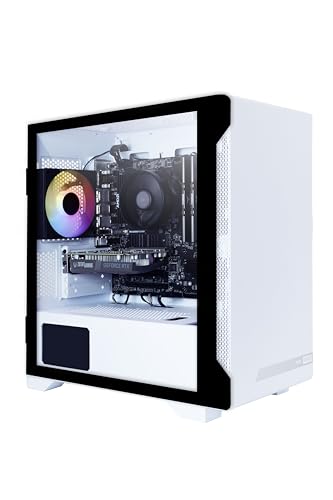
ZOTAC MEK AI-Enhanced Gaming PC — Ryzen 5 5500, GeForce RTX 3050, 16GB, 500GB
Who it suits: The one-machine game streamer — the buyer who wants to play a real game and broadcast it from the same compact box, with the encoder problem solved by hardware rather than by compromise.
The base guide leads with this tower because it is the strongest gaming machine here; the streaming guide leads with it for a more specific reason. Its desktop RTX 3050 carries a dedicated NVENC encoder, and that single fact reorganises everything about a broadcast. OBS hands the stream to the encoder block, the block does its work without touching the cores rendering the game, and the Ryzen 5 5500 is left to run the game, the scenes and the browser. This is the only arrangement in the guide where a 1080p60 game stream at Twitch’s standard bitrate is an honest, set-it-up-once recommendation rather than a negotiation. DLSS, which the base guide credits to this card for gaming, helps the streaming side too: rendering the game a little lighter leaves the whole machine calmer. The 650W 80+ Gold power supply — honestly oversized for these parts — also matters more to a streamer than to a gamer: a supply loafing at half load runs cool and quiet through a four-hour broadcast, and the compact tower’s larger air volume is easier on the microphone than any liter box working hard. Unlike several picks below, this listing tends to sit inside the budget as its standing price rather than as a sale to wait for — check the current price on Amazon to confirm before you order.
The limits are the generation’s and the configuration’s. NVENC here is Ampere-generation: H.264 and HEVC, no AV1 encode — stream to YouTube in H.264 like everyone else, and do not buy this machine for an AV1 plan. The 500GB SSD is the streaming-specific pinch: local recordings at streaming quality consume tens of gigabytes in a long session, and this drive also holds the games, so the expansion the base guide recommends — a second drive or a larger replacement, easy in a tower — should be treated as part of the streaming setup, not an optional extra. And the DDR4 platform’s upgrade story is a GPU swap within the supply’s headroom, which for a streamer is actually the relevant one: a future card brings a future encoder with it.
- Dedicated NVENC encoder: the broadcast runs on its own silicon, the game keeps the rest of the machine.
- The honest one-machine 1080p60 game-stream pick at Twitch’s standard bitrate.
- 650W Gold supply and tower airflow: the quiet-running, cool-running streaming shift, plus room for a future GPU-and-encoder swap.
Honest limitation: Ampere NVENC means no AV1 encoding, and the 500GB SSD fills fast once local recordings join the game library — budget the second drive from the start.
Choose it if you will actually stream the games you play, from this one machine. Skip it if your channel is talk and console content — the mini PCs below do that job smaller and cheaper.

GMKtec NucBox K8 Plus Mini PC — Ryzen 7 8845HS, Radeon 780M, 32GB DDR5, 1TB SSD, OCuLink
Who it suits: The mini PC streamer with a plan: talk, desktop and capture-card broadcasts today from the strongest integrated encoder here, with a documented route to a desktop encoder card later.
The K8 Plus measures about 132 × 125 × 58 mm — roughly a liter — and its streaming credentials start with the Radeon 780M’s RDNA3 encoder, the only encoder in this guide that handles AV1. For a YouTube-first streamer that is a real distinction: AV1 ingest at YouTube’s bitrates produces a cleaner picture than H.264 from the same connection, and AV1 local recordings are smaller for the same quality. Around the encoder, the configuration is the best in the guide for simultaneous load. The 32GB of socketed DDR5 is the memory the game, OBS, the browser and the chat tools all draw from, and 32GB is the amount that stops that negotiation from mattering; the 1TB SSD, with a second M.2 slot beside it, is the only storage here that treats local recordings as a normal activity rather than a space crisis. Dual 2.5GbE networking gives the wired connection this guide insists on, twice over. The honest boundary is the shared chip: the 780M renders and encodes at once, so game streams from this box itself belong at lighter settings and reduced output, while talk, desktop and console-capture work — where the box only encodes — runs at full 1080p60 without strain.
Then there is the port on the back. The K8 Plus’s native OCuLink connection — a PCIe 4.0 x4 link, about 64Gbps — is the one documented route in this guide by which a mini PC gains a desktop graphics card, and with it a desktop encoder: dock a suitable NVIDIA card and NVENC does the broadcasting while the 780M goes back to rendering, or the card takes both jobs. The base guide’s arithmetic applies unchanged and in full: a dock such as Minisforum’s DEG1 is a separate purchase on Amazon, the dock does not include the ATX or SFX power supply it needs, and the card is a third purchase — a substantial extra outlay beyond the box before the docked setup encodes a frame, with a small performance cost from the x4 link and no hot-plugging. It is a staged plan, honestly costed, and it is the reason this box outranks the other 780M pick for streamers who know they will grow. The price condition is equally blunt: this listing is volatile, and it has swung well above this budget during the late-2026 memory shortage. Buy it only when the live price on Amazon sits at or under $700, or do not buy it at all.
- RDNA3 encoder with AV1: the only AV1 streaming and recording path among the mini PCs here.
- 32GB of socketed RAM and 1TB plus a second slot: the simultaneous-load and recording-storage test, passed outright.
- Native OCuLink: a documented route to a desktop NVENC card later — no other pick has the port built in.
Honest limitation: The encoder shares one chip with the game, so this is a talk/capture and lighter-games streamer as shipped — and the listing’s price is volatile, swinging far above this budget at times.
Choose it if the live price sits at or under $700 when you buy and the staged OCuLink plan appeals. Skip it if the listing is near its highs, or you need one-machine game streaming on day one — that is the ZOTAC above.

Beelink SER8 Mini PC — Ryzen 7 8745HS, Radeon 780M, 32GB DDR5, 1TB SSD
Who it suits: The streamer whose studio is a living room or bedroom — where the machine’s fan is part of the broadcast whether it is invited or not.
The SER8 is the smallest full-strength box in this guide: 135 × 135 × 44.7 mm, about 0.81 liters, 0.75 kg. Its Ryzen 7 8745HS carries the same Radeon 780M as the K8 Plus, which means the same RDNA3 encoder and the same AV1 distinction: this is the second of only two picks that can send YouTube an AV1 stream or keep AV1 recordings. The streaming division of labour matches the other 780M box — the chip renders and encodes together, so its home ground is talk, desktop and console-capture broadcasting at 1080p60, plus lighter game streams at reduced output — and its 32GB of DDR5 and 1TB PCIe 4.0 SSD clear the simultaneous-load and recording tests the same way. What makes the SER8 a streaming pick in its own right rather than a K8 Plus variant is acoustic, and it is measured rather than claimed: Notebookcheck’s review recorded fan noise around 34.6 dB(A) under full load, among the quietest results recorded for a mini PC of this performance class. A microphone a meter away hears the difference between that and a typical small fan working hard, on every broadcast, for the life of the channel. At sofa distance the same quiet is what lets the machine live beside a TV at all.
The trade-offs are the connection and the listing. There is no OCuLink port: the eGPU route here is USB4, which tunnels the connection and gives up bandwidth the native port keeps, so the docked-encoder future exists but in its second-best form, with the same dock-plus-supply-plus-card arithmetic and a wider performance haircut. And the listing is a multi-configuration one whose styles sit at very different price points — the 16GB/512GB style is the cheaper one, the 32GB/1TB style costs more, and the bigger styles have climbed well above this budget. The configuration in this review is the 32GB/1TB one; match the style name before paying, check its live price on Amazon, and treat any style priced over $700 as a different purchase.
- AV1 encoding from the RDNA3 block, in the guide’s smallest full-strength box.
- Measured around 34.6 dB(A) under load: the pick whose fan stays out of the recording.
- 32GB of socketed DDR5 and 1TB of storage: the streaming stack and the recordings both fit, as shipped.
Honest limitation: No OCuLink — the docked-encoder route runs over USB4 with a bandwidth penalty — and the multi-style listing demands care to buy the configuration actually reviewed.
Choose it if the stream happens in a quiet room and AV1 matters to you. Skip it if a native OCuLink port is part of the plan — the K8 Plus is the pick that has one.

HP Victus 15L Gaming Desktop TG02-1020h — Core i5-13400F, GeForce RTX 3050, 8GB, 512GB
Who it suits: The cautious one-machine game streamer — the buyer who wants the ZOTAC’s encoder arrangement with a major brand’s warranty behind it, and who will do one clearly flagged piece of homework first.
The streaming hardware story here mirrors the top pick’s: a desktop RTX 3050 whose Ampere NVENC block encodes the broadcast on its own silicon — H.264 and HEVC, no AV1 — while the Core i5-13400F and the card handle the game. In pure encoder terms this tower ties for the best arrangement in the guide, and HP’s ownership experience is the differentiator the base guide identified: a proper warranty channel, recovery tooling and parts availability no white-box brand matches, which matters more, not less, when the machine is also your broadcast studio. The size is the big-brand interpretation of compact — about 15.5 × 29.7 × 33.7 cm, roughly fifteen liters, 6.31 kg — several times the mini PCs’ volume and still a fraction of a mid-tower. Between HP’s own sale cycles, third-party sellers carry this listing higher, so the rule is the familiar one: check the live price on Amazon, and at or under $700 it belongs in this guide — above that it does not.
The homework is memory, and streaming makes it less optional than gaming does. This configuration ships with 8GB of RAM. A game alone can work within that, badly; a game plus OBS plus a browser running chat, alerts and a dashboard cannot — that stack swaps to disk, and swapping shows up on air as stutter in the game and dropped rendering frames in the broadcast. The fix is the one the base guide prescribes: a second DDR4 stick, inexpensive, in a case built to be opened — but for a streamer it is not a week-one nicety, it is a before-the-first-broadcast requirement, and its cost belongs in the total. The second caveat is the proprietary power supply, an HP unit in an HP form factor, which sets the ceiling on the future GPU swap — and therefore on the future encoder upgrade — by what HP designed around rather than by the open market. Buy it as a supported appliance with one mandatory fix pending, and it is a genuinely good streaming purchase; buy it expecting to grow it like a white-box tower, and it is the wrong one.
- Dedicated NVENC encoding with a big-brand warranty: the lowest-risk one-machine game-streaming arrangement here.
- In budget whenever HP’s sale pricing is live — check the current price on Amazon.
- The RAM fix is cheap, documented and easy — one stick, in a case designed to open.
Honest limitation: 8GB of RAM as shipped cannot carry a game plus OBS plus a browser — the second stick is effectively mandatory before streaming — and the proprietary power supply caps future GPU and encoder upgrades.
Choose it if brand support matters and the RAM stick goes in before the first broadcast. Skip it if you want the machine finished as it ships — the ZOTAC is.

Beelink SER5 MAX Mini PC — Ryzen 7 7735HS, Radeon 680M, 24GB LPDDR5, 500GB SSD
Who it suits: The talk, desktop and console streamer on a firm budget: a small, finished broadcast station for just-chatting, podcast-style and capture-card content at a firm mid-range price.
Grade this box by what a streamer actually asks of it, and it answers well. Its Radeon 680M carries AMD’s RDNA2 encoder — H.264 and HEVC, no AV1, and a picture that runs softer than NVENC at Twitch’s roughly 6,000 kbps. For a face camera, a desktop and a console feed arriving through a capture card, that encoder is doing light work and doing it at 1080p60 without drama, because the box is only encoding, not rendering a game at the same time. Console streaming is this pick’s quiet strength: the console renders, the SER5 MAX encodes and runs the stream, and the division is exactly what a small PC is for. The 24GB of RAM — a generous amount, and the reason the simultaneous-load test passes here — holds OBS, the browser and the chat tooling comfortably alongside a capture feed. Its price is a standing one, not a sale artifact, and it sits comfortably below the 780M picks — the headroom buys the microphone and lighting this guide’s kit section puts first. Game streaming from the box itself is the reduced form: lighter and older titles, 720p60 or 1080p30 outputs, with the same chip paying for render and encode together.
The limitation is permanence, stated the way the base guide states it. The 24GB of LPDDR5 is soldered: generous today, and the amount the machine dies with, because there is no slot to fill later. The 500GB SSD is replaceable but small, and recordings accumulate — plan on the external drive or the early upgrade. There is no OCuLink port, so there is no docked-encoder future either; the streaming machine you buy is the streaming machine you keep. Within those lines, the offer is coherent: pay the mid-range asking price, accept the configuration as final, and get a compact broadcast station whose only real compromises against the $700 tier are the older encoder and the smaller drive.
- A finished talk/desktop/console-capture station at a standing mid-range price — check it on Amazon; the budget left over buys the microphone.
- 24GB of RAM fitted: the streaming stack’s memory test passed without a shopping list.
- The same disappear-behind-the-monitor Beelink format as the SER8, from the category’s most established storefront.
Honest limitation: The RDNA2 encoder has no AV1 and runs softer than NVENC at Twitch bitrates; the RAM is soldered forever and 500GB is tight once recordings accumulate.
Choose it if your channel is talk, desktop or console content and a finished-and-done mid-range price beats $700 with headroom. Skip it if you will stream PC games from the same box — step up to the ZOTAC or the 780M picks.

GMKtec NucBox M6 Mini PC — Ryzen 5 6600H, Radeon 660M, 16GB DDR5, 512GB SSD
Who it suits: The first-time broadcaster spending the least that still works: a talk, desktop and capture-card box bought with open eyes about its graphics and encoder tier.
The M6 is the floor of the guide, and its streaming review starts with the encoder: the Radeon 660M’s RDNA2 block handles H.264 and HEVC, has no AV1, and sits a tier below the 680M pick above it — which sets this machine’s honest ceiling as a broadcast station rather than a game streamer. Talk and desktop streams at 1080p60, console feeds through a capture card, and game streams only in the lightest form — esports and older titles at reduced output — are what it does, and for a first channel that is a legitimate list. Around the encoder, the hardware is better than the price suggests: a Ryzen 5 6600H, 16GB of DDR5 in SO-DIMM slots — socketed, unlike the SER5 MAX — a 512GB SSD with a second M.2 slot that makes an obvious dedicated recording drive, dual 2.5GbE networking for the wired connection streaming demands, a full-feature USB4 port and Windows 11 Pro. It is the cheapest pick in this guide — check the live price on Amazon — and it leaves much of the budget for the microphone, the capture card and the games, the purchases that decide a new channel’s quality far more than the encoder tier does.
Beyond that, three cautions apply. The fitted SSD is a PCIe 3.0 drive, a step slower than the 4.0 drives above it, though for recording a stream the difference is minor. There is no OCuLink, so no docked future; USB4 is the only eGPU route and the weakest version of it. And GMKtec sells this model in several configurations, including barebones variants on related listings — confirm the listing you order is the complete 16GB/512GB Windows machine described here, not a kit expecting you to supply the memory and storage it streams with. Bought as a deliberately modest first broadcast box, it is the guide’s easiest recommendation to a beginner; bought to stream demanding PC games from the same machine, it is the wrong tool, and the ZOTAC exists precisely for that job.
- The cheapest credible broadcast box here — check the price on Amazon — with budget left for the kit that matters.
- Socketed DDR5 and a second M.2 slot: memory can grow and recordings can get their own drive.
- Dual 2.5GbE and USB4: the wired streaming connection, done properly, at the guide’s lowest tier.
Honest limitation: The RDNA2 encoder is the guide’s weakest — no AV1, softer at Twitch bitrates — and the 660M confines game streaming to light titles at reduced output; there is no OCuLink escape route.
Choose it if the channel is starting small — talk, desktop, console capture — and the real budget is $300–$400. Skip it if one-machine PC game streaming is the point; that job starts at the ZOTAC.

Comparison Table
| Product | Encoder | Best streaming use | Link |
|---|---|---|---|
| ZOTAC MEK AI-Enhanced, RTX 3050 | NVENC (Ampere), H.264/HEVC | One-machine game streaming at 1080p60 | Check on Amazon |
| GMKtec NucBox K8 Plus, 32GB/1TB | AMD RDNA3, H.264/HEVC/AV1 | AV1 talk/capture streaming now, docked NVENC later | Check on Amazon |
| Beelink SER8, 8745HS | AMD RDNA3, H.264/HEVC/AV1 | Quiet-room AV1 streaming beside a TV | Check on Amazon |
| HP Victus 15L TG02-1020h | NVENC (Ampere), H.264/HEVC | Brand-supported game streaming, after the RAM fix | Check on Amazon |
| Beelink SER5 MAX, 7735HS | AMD RDNA2, H.264/HEVC | Talk, desktop and console-capture, mid-range | Check on Amazon |
| GMKtec NucBox M6, 6600H | AMD RDNA2, H.264/HEVC | First-channel talk and capture on the smallest budget | Check on Amazon |
How to Choose a Compact Streaming PC Under $700
- Name your stream before your PC. Game streaming from the same machine, talk and desktop content, and console gaming through a capture card are three different purchases wearing one keyword. The first needs a dedicated encoder — the two towers. The second and third need only a competent one — any pick here. Deciding this first makes the rest of the list short.
- Read the encoder line, not the graphics headline. The streaming spec is the encoder generation: NVENC (Ampere) on the 3050 towers, RDNA3 with AV1 on the 780M pair, RDNA2 without it on the 680M and 660M boxes. A listing that trumpets the GPU and never mentions encoding is telling you the part that matters least to a broadcast.
- Match the codec to the platform. Twitch is an H.264 world at roughly 6,000 kbps, where NVENC’s edge in motion detail is worth the most. YouTube accepts higher bitrates and AV1, which is where the 780M pair earns its distinction. A 3050 tower streaming to YouTube sends H.264 and looks fine; it simply cannot send AV1, and no setting changes that.
- Count memory for the whole stack, not the game. OBS, a browser with chat and alerts, and the game share one pool. 32GB (K8 Plus, SER8) makes the question disappear, 24GB (SER5 MAX) answers it, 16GB (ZOTAC, M6) works with a tidy browser, and 8GB (Victus as shipped) fails it — which is why that pick’s review treats the second stick as part of the purchase.
- Give recordings a home. A streamed hour recorded locally consumes real space, and the 500GB-class drives here also hold the games. Prefer a second M.2 slot (K8 Plus, M6), an openable tower (ZOTAC, Victus), or accept the external drive as part of the SER5 MAX’s cost.
- Treat OCuLink as a staged plan, not a feature. The K8 Plus’s native port is the only built-in route to a desktop encoder card; the SER8 and M6 offer the same idea over USB4 with a bandwidth penalty. Either way the dock, its separate power supply and the card add a substantial extra cost beyond the box — value the port only if you will actually spend the second tranche.
- Put the fan in the recording budget. A microphone hears the machine. The SER8’s measured ~34.6 dB(A) under load is a streaming specification in every way that matters; for any pick, open placement away from the mic and out of sealed cabinets is the free version of the same fix.
- Wire it. Streaming over Wi-Fi is the most common self-inflicted wound in this category. Every pick here has real Ethernet — dual 2.5GbE on the K8 Plus and M6 — and the cable costs less than the dropped frames it prevents.
Set Up OBS Once, Correctly
Whichever pick you buy, the same half hour of setup separates a stable broadcast from a troubleshooting hobby. Choose the hardware encoder that matches your machine: NVENC on the two towers, the AMD hardware encoder on the four mini PCs — AV1 selected on the 780M pair when the destination is YouTube or the recording is local, H.264 everywhere Twitch is involved. Set the rate control to CBR — constant bitrate — because streaming platforms are built for a steady stream, not an efficient file: around 6,000 kbps is Twitch’s standard ceiling for a 1080p60 broadcast, while YouTube accepts substantially more, which is where its quality headroom and the AV1 option live. Set the keyframe interval to 2 seconds; the platforms expect it, and a wrong value here is a quiet cause of ingest problems. On the integrated-graphics picks, set the output honestly — 720p60 or 1080p30 for game content, 1080p60 reserved for talk, desktop and capture-card feeds — because a smaller, stable picture beats a larger, dissolving one every time.
Then learn the three counters in OBS’s Stats dock, because each one names a different failure with a different fix. Rendering lag means the graphics side missed its deadline: on the mini PCs, lower the game’s settings or the output resolution; on any machine, cap the game’s frame rate so the encoder and compositor are not fighting an unlimited renderer for the same chip. Encoding lag means the encoder itself is overloaded: drop the output resolution or frame rate, or move down one encoder quality preset — on the RDNA2 boxes this is the counter that enforces the honest workflow in this guide. Dropped frames on the network counter are not the PC’s fault at all: they are the connection, and the fixes are a wired Ethernet cable, a lower bitrate, or a different ingest server — never a settings expedition inside the encoder. Run a test stream and a local recording before the first real broadcast, watch all three counters for ten minutes under genuine load, and the setup is done once instead of weekly.
What $700 Does Not Include
The PC is the middle of a streaming budget, not the whole of it, and the order in which the rest is bought matters more than the brands. Buy the microphone first: it is the single largest quality difference a viewer can hear, it outlives every PC in this guide, and no encoder in it can rescue bad audio. Lighting comes second — a modest light aimed properly does more for a face camera than any camera upgrade, because it lets whatever webcam you use work at a sane exposure. The webcam itself is third, and for many talk and desktop formats a serviceable one is enough for a long time. The capture card is a conditional purchase, not a default one: it is required only if a console is part of the channel, and PC-only streamers should skip it entirely — the picks above capture their own screens natively. None of these items is inside any pick’s price in this guide, and no prices are quoted for them because the base research documents none; what can be said is the sequencing rule — a budget-tier M6 with a good microphone will sound like a more serious channel than a $700 tower with a headset mic, which is why the cheapest pick’s leftover budget is a feature, not a consolation.
Common Buying Mistakes
- Buying the graphics headline and never asking about the encoder. For streaming, the encoder generation decides the broadcast; the GPU decides the game. Confusing the two is how a buyer ends up with strong frames and a dissolving stream.
- Crediting the RTX 3050 with AV1. It is Ampere silicon: NVENC does H.264 and HEVC, and AV1 encoding is not in it. Any listing or guide implying otherwise is wrong, and an AV1 plan built on it collapses at the first OBS setting screen.
- Expecting a mini PC to stream the games it plays, at full output. On integrated graphics the render and the encode share one chip. Talk, desktop and capture work at 1080p60, yes; demanding game streams, no — reduced output is the honest setting, and pretending otherwise produces encoding lag on air.
- Streaming on 8GB of RAM. The Victus is a good machine with one mandatory fix; a game plus OBS plus a browser on 8GB swaps, and swapping is visible to every viewer. The stick goes in before the first broadcast, not after the first bad one.
- Counting an OCuLink port as an encoder you own. The port encodes nothing. The dock, its separate power supply and the card are substantial additional purchases — a fine staged plan, a dishonest day-one claim.
- Recording to the same small drive that holds the games, with no plan. A 500GB SSD, a game library and an archive of broadcasts cannot coexist; the second slot, the bigger drive or the external disk belongs in the purchase, not in a future apology to your footage.
- Streaming over Wi-Fi because the desk is far from the router. Every pick here has proper Ethernet. A long cable is the cheapest quality upgrade in the entire setup and the fix for the dropped-frames counter.
- Spending the whole $700 on the PC and nothing on the microphone. Viewers forgive a soft picture long before they forgive bad audio. The kit order in this guide — microphone, light, camera, capture card only for consoles — exists because the audience’s ears outrank the encoder.
Final Recommendation
- One-machine game streamers: ZOTAC MEK AI-Enhanced Gaming PC — the dedicated NVENC encoder is the whole argument, at a standing in-budget price.
- Mini PC streamers with a growth plan: GMKtec NucBox K8 Plus, bought only when its live price sits at or under $700.
- Quiet rooms and living rooms: Beelink SER8 — AV1 encoding your microphone will never hear working.
- Brand-name peace of mind: HP Victus 15L, plus one RAM stick fitted before the first broadcast.
- Talk and console channels on a firm budget: Beelink SER5 MAX.
- First channels on the tightest budget: GMKtec NucBox M6, with the savings spent on the microphone.
Our top two for compact streamers at this budget are the ZOTAC MEK, because a dedicated encoder in a small tower is the only arrangement here that makes one-machine game streaming a setup task rather than a compromise, and the GMKtec K8 Plus — at the right price — because AV1 encoding, 32GB of memory and a native OCuLink port make it the mini PC that can start as a talk and capture station and grow into a docked-encoder machine without being replaced. Between them they cover the two honest shapes of this search. If the room is quiet and the channel is conversation, the SER8 is the measured answer; if the budget is really $500, the SER5 MAX gives up AV1 and nothing the talk format will miss. Streamers working to a smaller spend should see Best Compact Gaming PC For Streaming Under $500, those with more room Best Compact Gaming PC For Streaming Under $800, and anyone still deciding whether compact is the right shape at all can start from Best Compact Gaming PC Under $700 and Best Streaming PC Under $700. Name the stream, read the encoder line, price the whole setup including the kit — and check the live price and exact configuration style before you order.
Frequently Asked Questions
Can a mini PC really run a stream by itself?
Yes — for the work this guide assigns it. Talk, desktop and just-chatting streams at 1080p60, and console gaming through a capture card, ask the box only to encode, and every mini PC here does that comfortably. What a mini PC cannot honestly do is render a demanding game and encode its broadcast at full output from the same chip; game streams from the box itself belong at 720p60, 1080p30 or lighter titles. The two towers exist in this guide for buyers whose stream is the game.
Does the RTX 3050 support AV1 streaming?
No. The desktop RTX 3050 is Ampere-generation, and its NVENC encoder handles H.264 and HEVC only — AV1 encoding arrived with a later NVIDIA generation. For Twitch, which is an H.264 platform at this level, that costs the 3050 towers nothing. For YouTube AV1 ingest or AV1 recordings, the picks in this guide are the two Radeon 780M boxes, whose RDNA3 encoder supports it.
Which encoder should I select in OBS on these machines?
The hardware one that matches the box: NVENC on the ZOTAC and HP towers, the AMD hardware encoder on the four mini PCs — with AV1 chosen on the K8 Plus and SER8 for YouTube or local recordings, and H.264 for Twitch. Pair it with CBR rate control at the platform’s accepted bitrate and a 2-second keyframe interval. Software x264 is a fallback for talk and desktop scenes on these machines, not a game-streaming plan.
Why does the HP Victus need a RAM upgrade before streaming if games run on it?
Because streaming is not a game alone. OBS, a browser carrying chat and alerts, and the streaming tools all draw from the same 8GB the game is using, and when the pool runs out the machine swaps to disk — visible on air as stutter and dropped rendering frames. A second DDR4 stick is inexpensive and the case is built to be opened; for a streamer it is part of the purchase, not an optional extra.
Is the OCuLink port on the K8 Plus worth it for a streamer?
As a staged plan, yes; as a day-one feature, no. The port lets a desktop graphics card in an external dock take over encoding — NVENC from a suitable NVIDIA card — but the dock is a separate purchase, its power supply is another, and the card is a third. Budget a substantial extra amount beyond the PC, expect a small cost from the x4 link, and remember the connection is not hot-pluggable. If the second tranche will never be spent, the port is worth nothing and the SER8 or SER5 MAX is the better buy.
How much storage does streaming actually need?
More than the game library alone suggests. Local recordings at streaming quality consume tens of gigabytes across a long session, and they accumulate quietly. The K8 Plus’s 1TB plus second slot is the only arrangement here with real slack; the 500GB-class picks — ZOTAC, Victus, SER5 MAX — should be bought with their expansion route already chosen, and the M6’s second M.2 slot makes a natural dedicated recording drive.
- Best Compact Gaming PC Under $700
- Best Compact Gaming PC For Streaming Under $500
- Best Compact Gaming PC For Streaming Under $800
- Best Compact Gaming PC For Beginners Under $700
- Best Compact Gaming PC For Small Spaces Under $700
- Best Streaming PC Under $700
- Best Mini Gaming PC Under $700
- Best Mini PC Under $700
- Best Small Form Factor Gaming PC Under $700
- Best Barebones Mini PC Under $700


