Where to buy
Check the latest price, availability and delivery on Amazon. Orders are placed on Amazon. We may earn a commission from qualifying purchases.
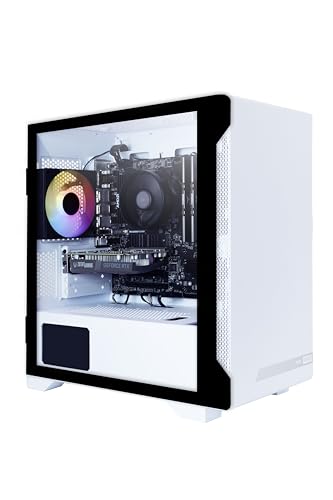
- Best overall for 1440p on a budget: ZOTAC MEK AI-Enhanced Gaming PC, Ryzen 5 5500, GeForce RTX 3050 — Check on Amazon
- GMKtec NucBox K8 Plus Mini PC, Ryzen 7 8845HS, Radeon 780M, 32GB DDR5, 1TB SSD, OCuLink — Check on Amazon
- HP Victus 15L Gaming Desktop TG02-1020h, Core i5-13400F, GeForce RTX 3050 — Check on Amazon
- Beelink SER8 Mini PC, Ryzen 7 8745HS, Radeon 780M, 135 × 135 × 44.7 mm — Check on Amazon
See 2 more Amazon options
- Beelink SER5 MAX Mini PC, Ryzen 7 7735HS, Radeon 680M, 24GB LPDDR5 — Check on Amazon
- GMKtec NucBox M6 Mini PC, Ryzen 5 6600H, Radeon 660M, 16GB DDR5 — Check on Amazon
Read the full guide ↓
Disclosure: As an Amazon Associate, reviewstook.com earns from qualifying purchases. Links to Amazon on this page are affiliate links; they cost you nothing extra. Listing details such as price and availability change often, so check the current Amazon listing before you buy.
Start with the sentence most guides in this category bury: no compact gaming PC under $700 renders modern games natively at 1440p. Not the strongest pick here, not on a good day, not with the settings turned down to a smear. Native 1440p rendering in demanding current titles is work for a graphics tier that starts well above this entire budget, and any listing or headline implying a $700 compact box does it is selling you the monitor’s resolution, not the machine’s. So this guide grades a different, honest question: what does “for 1440p gaming” truthfully mean at $700, and which of these six machines delivers the most of it?
The honest answer has three parts, and every pick below earns its place on at least one of them. First, all six output a genuinely sharp 1440p desktop: text, browsing, video and the Windows interface render at the panel’s full 2560×1440 on every machine here, and that alone is a real quality-of-life step up from a 1080p screen. Second, games are rendered lower and upscaled: the working pattern at this budget is rendering at 1080p — or at an upscaler’s internal resolution — and letting DLSS or FSR reconstruct a 1440p image for the panel. Done that way, a 1440p monitor looks noticeably better than simply feeding it a plain 1080p signal, which is why the upscaling support each chip actually has matters more in this guide than the raw spec sheet. Third, native 1440p does exist here in one honest corner: light and esports titles, and older games, on the two picks with a real desktop graphics card. Everywhere else in this guide, “1440p” means upscaled — and the reviews grade how good each machine’s version of that bargain is.
One more framing note before the picks. Buying a 1440p monitor to pair with a machine in this guide is not a mistake — it is arguably the smart order of operations. The panel will outlive the PC, it makes the desktop sharper from day one, and when a stronger graphics card eventually arrives — including through the one docked upgrade path described later in this guide — the screen is already waiting. What would be a mistake is paying for the monitor and then believing the current machine renders at its resolution. Buy the panel for the future and the desktop; grade the PC on its rendering, which is what the next sections do.
In this guide
Quick Picks
Short on time, or comparing several options at once? Each row below names a buyer type and the product that suits it, with a link to the listing.
| Buyer type | Pick | Why it stands out | Link |
|---|---|---|---|
| Best overall for 1440p | ZOTAC MEK AI-Enhanced Gaming PC, RTX 3050 | The strongest renderer here, with DLSS upscaling to the 1440p panel and native 1440p in light titles | Check on Amazon |
| Best mini PC for 1440p | GMKtec NucBox K8 Plus, 32GB/1TB | Radeon 780M with FSR today, and an OCuLink port that is the only route to true native 1440p later | Check on Amazon |
| Best brand-name 1440p tower | HP Victus 15L TG02-1020h | The same RTX 3050 and DLSS as the leader, from a big brand — once you fix its 8GB of RAM | Check on Amazon |
| Best quiet 1440p mini PC | Beelink SER8, Ryzen 7 8745HS | 780M upscaling in 0.81 liters, and the quietest measured fan in this class for desk-near play | Check on Amazon |
| Best value for a 1440p desk | Beelink SER5 MAX, Ryzen 7 7735HS | Radeon 680M and FSR in the lower part of this budget tier — the upscaled-1440p experience for less; check price on Amazon | Check on Amazon |
| Cheapest way onto a 1440p panel | GMKtec NucBox M6, Ryzen 5 6600H | The entry tier of this guide; honest floor — esports and older games, upscaled hard; check price on Amazon | Check on Amazon |
How These Picks Were Chosen
The filter was the same compact one used across this site — a mini PC of roughly a liter or less, or a tower clearly smaller than a standard mid-tower — with one grading change for this keyword: every machine was scored on its rendering path to a 1440p panel, not on its output resolution. Output resolution is free; every pick here can light up a 2560×1440 display. Rendering is the scarce resource, so the reviews grade three documented things: the graphics class (a desktop RTX 3050 is a different animal from an integrated Radeon 660M, whatever the listing headline says), the upscaling technology the silicon genuinely supports, and the internal resolution that upscaler will actually work from.
Those internal resolutions are published figures, not vibes, and they are used consistently below. A Quality-mode upscale to a 1440p output renders at roughly 1707×960 internally; Performance mode renders at roughly 1280×720. That is the honest arithmetic of this entire guide: when a pick below is described as playing “at 1440p,” it is almost always rendering somewhere between those two numbers and reconstructing the rest. We also graded upscaling support strictly from the hardware. NVIDIA’s RTX 3050 is an Ampere card: it supports DLSS upscaling, and that is a genuine advantage at 1440p — but it has no frame generation, and no claim of it appears anywhere in this guide. AMD’s integrated picks use FSR, which is built into individual games rather than the driver, so the reviews phrase it as “FSR in games that include it” — because a title without FSR leaves the iGPU rendering at whatever plain resolution it can manage.
We did not use these products ourselves. We read maker listings and specification pages for the exact listings linked, and independent review coverage, and we carried over the base guide’s discipline: check the current price on Amazon before you buy, because listing prices change; any pick whose appeal depends on hardware it does not include — a dock, a power supply, a second stick of RAM — has that extra purchase named; and no dimensions, weights or noise figures are stated beyond what the underlying research documented. Where a base-researched fact decides the 1440p grade — the HP’s 8GB of RAM, the K8 Plus’s dock-dependent upgrade path, the SER5 MAX’s soldered memory — it is stated at full size in the review, not footnoted.
What “1440p” Honestly Means at $700
Three different things get called 1440p gaming, and separating them is the whole skill of shopping this keyword. The first is display output: the resolution the monitor receives. Every pick in this guide does this at full 2560×1440, all the time, including on the desktop — which is why a 1440p panel never looks bad with these machines outside games. The second is render resolution: the resolution the game actually draws each frame at before anything reaches the screen. At this budget that number is 1080p on a good day, and lower in demanding titles. The third is upscaled output, where an algorithm — DLSS on the two NVIDIA towers, FSR on the AMD mini PCs — takes the lower-resolution render and reconstructs a 1440p frame from it, using motion data and accumulated detail from previous frames. Modern upscalers are genuinely good: a Quality-mode reconstruction is visibly sharper and cleaner than a plain 1080p image stretched across the same panel, and it is the correct way to run every pick in this guide.
That last point deserves emphasis, because it is the most common setup error with a budget PC and a 1440p screen: do not simply set the game or the desktop to 1080p and let the monitor stretch it. 1080p does not divide evenly into 1440p, so plain scaling smears edges and text in a way that looks worse than either native resolution. The better pattern, on every pick here, is to leave the output at 1440p and let the game’s own upscaler do the reconstruction — DLSS or FSR set to Quality first, dropping to Performance only when a title still struggles. Quality mode’s internal render of roughly 1707×960 is close enough to 1080p-class work that these GPUs can sustain it; Performance’s roughly 1280×720 internal render is the pressure valve for the heaviest games and the weakest picks, and it looks like what it is — acceptable on a TV across a room, soft at a desk.
Where does that leave native 1440p? In the corner the intro promised: esports and competitive titles, older AAA games, and indie catalogs — on the two RTX 3050 towers, and only just. Those are the games whose rendering cost is low enough that a 3050-class card can draw the full 2560×1440 without an upscaler’s help, and for players whose library genuinely lives there, the towers below are honest native-1440p machines. For everyone else, the truthful summary of this whole category is: a sharp 1440p desktop, an upscaled 1440p gaming image that looks better than 1080p ever did on the old panel, and a monitor that is ready for the stronger card your next upgrade brings. Graded on that summary, here are the six machines worth your money.
The 6 Best Compact Gaming PCs for 1440p Gaming Under $700
ZOTAC MEK AI-Enhanced Gaming PC — Ryzen 5 5500, GeForce RTX 3050, 16GB, 500GB
Who it suits: The buyer whose 1440p monitor is already on the desk and who wants the strongest honest version of upscaled 1440p this budget allows — plus genuine native 1440p in the light titles where it is actually achievable.
The ZOTAC leads this guide for the same reason it leads the base one — it is the only shape in this budget tier that pairs compact size with a real desktop graphics card — but the 1440p lens sharpens why that matters. The RTX 3050 is entry-class desktop silicon, and its rendering ceiling is a 1080p-class ceiling; nothing in this review will call it a native-1440p card for modern games. What it has that no integrated pick here can match is DLSS. Set a demanding game to a 1440p output with DLSS on Quality and the card renders internally at roughly 1707×960 — work it can genuinely sustain — while NVIDIA’s reconstruction delivers a panel image that is cleaner than a native 1080p render and far cleaner than a stretched one. In esports and older titles, where the rendering bill is small, the same card steps up to drawing the full 2560×1440 itself. That two-mode behavior — upscaled in the heavy games, native in the light ones — is the best 1440p story $700 tells, and only the two 3050 towers tell it.
The supporting hardware is graded the same way as in the base guide: a Ryzen 5 5500, 16GB of DDR4-3200, a 500GB NVMe SSD, Wi-Fi 6E and Windows 11 Home, behind a 650W 80+ Gold power supply that is oversized for the parts — cool, quiet, and with real headroom for a future graphics-card swap, which is the natural sequel to a 1440p monitor purchase. Two honest limits ride along. The Ampere generation’s DLSS is upscaling only: there is no frame generation on this card, so when a game’s render rate is low, DLSS makes it sharper, not smoother. And the 500GB SSD fills fast — two or three modern installs — though a tower at least makes adding a drive easy. Check price on Amazon before you buy: this is the pick to consider when its current listing sits inside this guide’s budget, which is precisely what a 1440p buyer needs, since the monitor has probably already eaten the shopping patience.
- A desktop RTX 3050 with DLSS: Quality-mode upscaling renders ~1707×960 and reconstructs the cleanest 1440p image in this guide.
- Native 1440p where it is honestly available — esports, older and lighter titles — rather than promised everywhere.
- 650W 80+ Gold power supply leaves room for the stronger card a 1440p panel eventually deserves.
Honest limitation: DLSS on this Ampere card is upscaling only, with no frame generation — and modern AAA games at native 1440p are beyond it, full stop.
Choose it if you want the best upscaled-1440p image and the only native-1440p corner at this budget. Skip it if the machine must disappear behind the monitor — that is the mini PCs’ job, below.

GMKtec NucBox K8 Plus Mini PC — Ryzen 7 8845HS, Radeon 780M, 32GB DDR5, 1TB SSD, OCuLink
Who it suits: The 1440p buyer who wants a liter-class box today and the only credible route to true native 1440p tomorrow — without replacing the PC to get it.
Grade the K8 Plus first on what it is: about 132 × 125 × 58 mm — roughly a liter — holding a Ryzen 7 8845HS with Radeon 780M graphics, 32GB of DDR5 in two SO-DIMM slots expandable to 96GB, a 1TB SSD with a second M.2 slot, dual 2.5GbE, dual USB4, and HDMI 2.1 and DisplayPort outputs that drive a 1440p panel without breaking a sweat. The 780M is the strongest integrated graphics in this class, and its honest 1440p mode is upscaled: it renders demanding games at 1080p-class resolutions — or at FSR’s internal resolutions, roughly 1707×960 on a Quality setting — and reconstructs the panel image from there. FSR lives inside individual games rather than the driver, so the experience varies by title in a way DLSS does not: games with FSR get the full treatment; games without it fall back to plain lower-resolution rendering, which on a 1440p panel means the soft stretch this guide warns about. Esports and older titles run at high frame rates, some at or near the panel’s native resolution; modern AAA at native 1440p is not a claim this review makes.
What lifts the K8 Plus above the other 780M box in this guide is on its back panel: a native OCuLink port, a PCIe 4.0 x4 connection to an external dock holding a desktop graphics card. For a 1440p buyer that port is not an abstraction — it is the single upgrade in this entire guide that converts an upscaled-1440p machine into a native-1440p one, because a docked midrange desktop card is exactly the hardware tier that renders 2560×1440 properly. The full setup is laid out further down and it is not a small extra commitment: a dock such as Minisforum’s DEG1 is a separate purchase, it needs its own ATX or SFX power supply that is not included, the card is a third purchase, and the connection is not hot-pluggable. One buying condition rides on top: check the current price on Amazon before you buy, and only consider this pick when its current listing sits inside this guide’s $700 budget; when it sits above that budget, the SER8 below is the correct 780M answer.
- Radeon 780M with 32GB of socketed DDR5: the strongest integrated rendering here, feeding FSR upscaling to the panel.
- Native OCuLink port — the only path in this guide from upscaled 1440p to a genuinely native-rendering docked GPU.
- Dual USB4, HDMI 2.1 and DisplayPort outputs, dual 2.5GbE and a second M.2 slot in about a liter.
Honest limitation: Its 1440p gaming is upscaled, not native, and its listing needs a careful check — only buy when the current price on Amazon sits inside this guide’s budget; the dock that unlocks native 1440p adds substantial extra cost beyond the box.
Choose it if the current listing sits inside the $700 budget — check price on Amazon first — and you want the docked-GPU future kept open. Skip it if the listing is sitting above this budget, or you want the strongest upscaling on day one — that is the ZOTAC above.

HP Victus 15L Gaming Desktop TG02-1020h — Core i5-13400F, GeForce RTX 3050, 8GB, 512GB
Who it suits: Buyers who want the ZOTAC’s 1440p story — a desktop RTX 3050 with DLSS — wrapped in a big brand’s warranty and support, and who will do one cheap, clearly flagged fix in the first week.
The Victus 15L is the big-brand shape of compact: about 15.5 × 29.7 × 33.7 cm, roughly fifteen liters, 6.31 kg — several times the mini PCs’ volume, still a fraction of a mid-tower. Its Core i5-13400F and RTX 3050 pair the stronger CPU in this guide with the same entry-class desktop GPU as the leader, so the 1440p grading is the same two-mode story: DLSS Quality upscaling from an internal render of roughly 1707×960 for demanding games, genuine native 1440p in esports and older titles, and a sharp native desktop everywhere else. HP’s ownership experience is the reason to pick it over the ZOTAC: a proper warranty channel, recovery tooling and parts availability no white-box brand matches. Check the current price on Amazon before you buy: between HP’s sale cycles, third-party sellers can carry the listing higher, so the rule is familiar — when the current listing sits at or under this guide’s $700 budget it belongs here, above that it does not.
The fix is memory, and at 1440p it matters more, not less. This configuration ships with 8GB of RAM, below the working floor for modern gaming: an upscaled pipeline still loads the game’s full texture and world data, and 8GB machines stutter and swap in scenes where the GPU itself is coping. A second DDR4 stick is inexpensive and the case is built to be opened — but count it in your total cost and install it before judging the machine’s 1440p performance, because as shipped you would be grading the RAM, not the card. The second caveat is the proprietary side of big-brand ownership: the power supply is an HP unit in an HP form factor, so the future GPU upgrade ceiling — the upgrade a 1440p panel eventually asks for — is set by what that supply and case were designed around, not by the open market. Buy it as a supported appliance with one pending fix, not as a platform.
- The same RTX 3050 and DLSS upscaling as the guide leader, with a stronger Core i5-13400F beside it.
- HP warranty, recovery tooling and support: the lowest-risk ownership in this guide.
- Check price on Amazon — consider it when the current listing sits inside this guide’s budget.
Honest limitation: 8GB of RAM as shipped will bottleneck modern games before the GPU does — a second stick is effectively mandatory — and the proprietary power supply caps the future GPU upgrade a 1440p panel invites.
Choose it if brand support matters and the RAM stick goes in during week one. Skip it if you want the machine finished as it ships, or the ZOTAC’s standard-parts upgrade path matters more.

Beelink SER8 Mini PC — Ryzen 7 8745HS, Radeon 780M, 32GB DDR5, 1TB SSD
Who it suits: The desk-near 1440p player: someone gaming at a monitor in a quiet room, who wants the 780M’s upscaled 1440p without a fan announcing every demanding scene.
The SER8 is the smallest full-strength box in this guide — 135 × 135 × 44.7 mm, about 0.81 liters, 0.75 kg — and its Ryzen 7 8745HS is the 8845HS silicon without the AI engine: the same eight Zen 4 cores and the same Radeon 780M as the K8 Plus, here paired with 32GB of DDR5 and a 1TB PCIe 4.0 SSD, with triple 4K display output over HDMI 2.1, DisplayPort and USB4 for the panel and anything beside it. Its 1440p grading therefore matches the K8 Plus’s on rendering: an honest 1080p-render machine, playing demanding titles at 1080p-class settings with FSR reconstructing the 1440p output in games that include it, and running lighter and esports titles at high frame rates. Where it separates itself is acoustic. Notebookcheck’s measured review recorded fan noise around 34.6 dB(A) under full load — among the quietest results recorded for a mini PC of this performance class — and at a desk, unlike across a living room, you sit inside fan range for every session. For 1440p desk play specifically, that measured quiet is a feature of the experience, not a footnote.
The trade-offs are the eGPU route and configuration discipline. There is no OCuLink port: expansion runs over USB4, which tunnels the connection and gives up bandwidth the K8 Plus’s native port keeps — so the SER8’s docked future is the second-best version of an already costly plan, and most SER8 buyers should treat its 780M ceiling as the machine’s final one. The listing is also multi-configuration, and its styles sit in very different tiers: the smaller styles sit lower in this budget range, the 32GB/1TB style reviewed here sits toward the top of it, and bigger styles can sit well above this budget. Check price on Amazon for the exact style, and match the style name to the configuration reviewed here before paying — a 16GB style is a materially weaker 1440p machine, because the 780M renders from the same memory pool the game and system share.
- 0.81 liters and 0.75 kg, with the 780M’s full FSR-upscaled 1440p story in the smallest strong box here.
- Measured around 34.6 dB(A) under load by Notebookcheck: verified quiet for desk-distance play.
- DDR5 in real slots, expandable to 64GB, plus a second M.2 bay — growing room the soldered competition does not offer.
Honest limitation: No OCuLink — the docked route to native 1440p runs over USB4 with a bandwidth penalty — and the multi-style listing demands care: the 16GB style is not the machine reviewed here.
Choose it if quiet desk play on a 1440p panel is the brief and upscaled rendering is accepted as the deal. Skip it if a native OCuLink port is part of your upgrade plan — the K8 Plus is the pick that has one.

Beelink SER5 MAX Mini PC — Ryzen 7 7735HS, Radeon 680M, 24GB LPDDR5, 500GB SSD
Who it suits: The value-first 1440p buyer: a sharp 1440p desktop and an upscaled gaming image from the lower part of this budget tier — check price on Amazon — with open eyes about which graphics tier that buys.
The SER5 MAX runs the previous step of AMD’s integrated graphics. Its Ryzen 7 7735HS carries the Radeon 680M — one tier below the 780M in the K8 Plus and SER8 — paired with 24GB of RAM and a 500GB PCIe 4.0 SSD, in the same disappear-behind-the-monitor Beelink format. It sits in the lower part of this budget tier rather than at its top. Graded for 1440p, the step down is real but bounded: this is a 1080p-render machine in the stricter sense — esports, indie and older titles at 1080p with high frame rates, demanding modern games at 1080p low-to-medium settings or leaning on FSR, which in games that include it reconstructs a presentable 1440p output from a lower internal render. Where the 780M picks can hold a Quality-mode internal resolution in more titles, the 680M more often wants the Performance end of the upscaler, rendering nearer 1280×720 internally — visibly softer at a desk, acceptable on a TV. For the large share of libraries that are last decade’s catalog, strategy and indie games, the difference from the picks above will rarely be visible at all.
The limitation is permanence. The 24GB of LPDDR5 is soldered: generous today, and the amount the machine dies with, because there is no slot to fill later — and memory headroom is exactly what an upscaling iGPU spends, since the graphics render out of the same pool as the game. The 500GB SSD is replaceable, unlike the RAM, but small enough that a serious library means an external drive or an early upgrade. There is no OCuLink port, so no docked escape to native 1440p exists here. What the SER5 MAX offers instead is the honest budget shape for this keyword: spend in the lower part of this tier, accept upscaled 1440p as the permanent arrangement, and get a compact machine whose desktop is every bit as sharp as the $700 picks’ — because at the desktop, all six are equal, and only in games do the tiers separate.
- Radeon 680M with 24GB of RAM in the lower part of this budget tier — the value center of upscaled 1440p; check price on Amazon.
- The same full 2560×1440 desktop output as every pick here; the tiers only separate inside games.
- A straightforward value position in this tier — check the current price on Amazon, then buy it whenever you are ready.
Honest limitation: The 24GB of RAM is soldered and can never be upgraded, the 680M more often needs the softer Performance end of FSR at 1440p output, and there is no OCuLink route out of either fact.
Choose it if a lower-tier, finished-and-done machine beats spending at the top of this budget, and your library is esports, indie and older titles. Skip it if you keep machines for years and want memory you can grow — the SER8 and K8 Plus both take socketed DDR5.

GMKtec NucBox M6 Mini PC — Ryzen 5 6600H, Radeon 660M, 16GB DDR5, 512GB SSD
Who it suits: The smallest-spend route onto a 1440p desk: a first gaming PC, a kids’-room or spare-room machine whose monitor happens to be 1440p — bought with clear eyes about how much upscaling that involves.
The M6 is the floor of this guide, and its 1440p grading starts with the number that defines it: the Radeon 660M is a six-core integrated GPU, two tiers below the 780M picks, and it sets an honest ceiling lower than any other pick here. Esports titles, older AAA games and the indie catalog run well rendered at 1080p and displayed on the panel; demanding modern releases are a 720p-render conversation, upscaled hard — FSR at its Performance end, rendering internally around 1280×720 or below, produces an image that is playable and visibly soft at desk distance. None of that makes the machine a bad buy in its entry tier. It is the only pick here that leaves most of this guide’s budget unspent — check price on Amazon — which for a 1440p-desk buyer can mean the monitor itself gets bought properly instead of cheaply. Around the GPU, the hardware is better than its entry tier suggests: a Ryzen 5 6600H, 16GB of DDR5 in SO-DIMM slots — socketed, unlike the SER5 MAX — a 512GB SSD with a second M.2 slot, dual 2.5GbE, a full-feature USB4 port and Windows 11 Pro.
The cautions are its class’s usual ones plus one of its own. The SSD is a PCIe 3.0 drive, a step slower than the 4.0 drives above it, though in game loading the difference is minor. There is no OCuLink; USB4 is the only eGPU route and the weakest version of it, so the docked path to native 1440p is theoretical here rather than planned. One more check belongs to this model specifically: GMKtec lists the M6 in several configurations, barebones kits among them on related pages — make sure the listing in your cart is the complete 16GB/512GB Windows machine reviewed here, not a shell waiting for your own memory and storage. Bought as a deliberately modest machine, the M6 is the guide’s easiest recommendation to a first-time buyer whose screen outclasses their PC. Bought as an attempt at modern 1440p gaming, it is the wrong tool, and the honest move is up the page to the 780M picks or the ZOTAC.
- The entry tier of this guide — the cheapest complete route onto a 1440p desk here; check price on Amazon.
- Memory in real slots and two M.2 bays, where soldered rivals in this tier offer neither.
- Full 1440p desktop output, dual 2.5GbE and USB4 — a capable little machine beyond its gaming tier.
Honest limitation: The Radeon 660M is an esports-and-back-catalog GPU; at 1440p output, demanding games mean a 720p-class internal render upscaled hard, and there is no OCuLink port for a docked escape route.
Choose it if you want to spend well under this guide’s budget and the library is esports, indie and older titles. Skip it if current AAA releases are the point — step up to the 780M picks or the ZOTAC.

Comparison Table
| Product | Graphics | Upscaling | Its honest 1440p mode | Link |
|---|---|---|---|---|
| ZOTAC MEK AI-Enhanced, RTX 3050 | RTX 3050 desktop | DLSS (no frame generation) | Upscaled in demanding games; native in esports/older titles | Check on Amazon |
| GMKtec NucBox K8 Plus, 32GB/1TB | Radeon 780M + OCuLink | FSR, in games that include it | Upscaled today; docked desktop GPU is the native-1440p future | Check on Amazon |
| HP Victus 15L TG02-1020h | RTX 3050 desktop | DLSS (no frame generation) | Same two-mode story as the ZOTAC, once the RAM is fixed | Check on Amazon |
| Beelink SER8, 8745HS | Radeon 780M | FSR, in games that include it | Upscaled, in the quietest box here | Check on Amazon |
| Beelink SER5 MAX, 7735HS | Radeon 680M | FSR, in games that include it | Upscaled, more often at the upscaler’s Performance end | Check on Amazon |
| GMKtec NucBox M6, 6600H | Radeon 660M | FSR, in games that include it | Esports/older at 1080p render; demanding games upscaled from 720p-class | Check on Amazon |
How to Choose a Compact Gaming PC for 1440p Under $700
- Grade the render, not the output. Every machine here outputs 2560×1440; that spec line is free and means nothing about gaming. Ask instead: what resolution does the game render at, and what upscaler reconstructs the rest? That pair of answers is the product you are buying.
- Learn the upscaling ladder. Quality mode to a 1440p panel renders about 1707×960 internally and looks close to native at a glance. Performance mode renders about 1280×720 and looks soft at a desk. A pick that can hold Quality in your games is worth a tier more than one living at Performance.
- Know which upscaler your chip actually has. The RTX 3050 towers use DLSS — consistent, driver-level, and present in most major titles — but this Ampere generation has no frame generation. The AMD mini PCs use FSR, which exists only in games that build it in. Check your own library’s FSR support before valuing it.
- Leave the output at 1440p and upscale; never stretch 1080p. A plain 1080p signal on a 1440p panel smears, because the resolutions do not divide evenly. In-game DLSS or FSR at the panel’s native output is sharper on every pick here — set it once, per game, and leave the desktop alone.
- Match the pick to where native 1440p actually lives. If your library is esports, older AAA and indie titles, the two 3050 towers genuinely render 1440p and the question is settled. If it is current AAA, every pick here upscales, and you are choosing an upscaler and a graphics tier, not a resolution.
- Count memory as a 1440p spec. Integrated graphics render out of system RAM, so a 16GB iGPU machine is rendering and gaming from one small pool; the 32GB picks hold their upscaling resolutions more comfortably. On the towers, the HP’s 8GB as shipped is below the floor — count the second stick in your total cost.
- Buy the monitor for the future, on purpose. A 1440p panel outlives this PC, sharpens the desktop today, and is ready for a stronger card later. That is a good purchase — as long as you buy it knowing the current machine upscales to it, rather than believing a headline that it renders there.
- Count the whole setup. The honest totals here include extras: a RAM stick for the Victus, a second drive for the 500GB machines, and — for the K8 Plus’s native-1440p future — a dock chain described in the next section. Compare full setups, not headline listings, and check the current price on Amazon for each pick before you order.
The One Route to Native 1440p: OCuLink, Explained Honestly
Exactly one pick in this guide can outgrow upscaled 1440p without being replaced, so its upgrade deserves its own section. The K8 Plus’s OCuLink port is a PCIe 4.0 x4 connection — about 64Gbps — brought to the outside of the case. It is meaningfully faster than the 40Gbps USB4 link the SER8 and M6 would use for the same trick, and because it is a direct PCIe connection rather than a tunneled one, a docked card performs closer to the same card in a desktop. Closer is not identical: the x4 link costs measurable performance against a full x16 slot, and the connection is not hot-pluggable — you dock and undock powered down, like internal hardware, because electrically that is what it is. What the dock buys a 1440p owner is specific: a midrange desktop card in that dock is precisely the tier that renders 2560×1440 natively in modern games, which no pick in this guide can do alone.
Then there is the extra cost, which is where most compact guides quietly stop counting. What the K8 Plus gives you is the port — only the port. A dock in the Minisforum DEG1 class is a separate purchase: an open frame offering a PCIe slot and a power-supply connector, where the supply itself, an ATX or SFX unit, is a second purchase the dock leaves out, and the graphics card is a third. The full chain adds substantial cost well beyond the mini PC itself, and by the time it renders its first native-1440p frame the setup sits well above this guide’s budget tier. None of that makes it a bad plan — the spending is staged, the card can follow you into a future desktop build, and unplugged from the dock the mini PC is still a complete, quiet little computer in its own right. But it is a staged plan, not a $700 one. Anyone whose real budget is $700 all-in should buy the ZOTAC or HP tower, enjoy the best upscaled image here, and let the monitor wait patiently for a future PC — it will keep.
Common Buying Mistakes
- Believing a “1440p gaming PC” headline at this price means native 1440p rendering. It means 1440p output. The render resolution and the upscaler are the real specs — ask for both.
- Setting the game to 1080p on a 1440p monitor and letting the panel stretch it. Non-integer scaling smears the image; in-game DLSS or FSR at native output is sharper on the same hardware.
- Assuming DLSS means frame generation. On this generation of card — the RTX 3050 towers here — DLSS is upscaling only. It sharpens a frame rate; it does not multiply one.
- Counting an OCuLink port as graphics performance. The port itself renders nothing at all — the dock, the power supply and the card that turn it into graphics performance add substantial extra cost, and not one of them is in the box.
- Buying the 16GB style of a multi-configuration mini PC for 1440p. Integrated graphics render from system memory; the cheaper style is a weaker 1440p machine in a way the headline price hides.
- Accepting 8GB of RAM as a finished configuration. The Victus here is a good machine with one mandatory fix; grading its 1440p performance before the fix grades the memory, not the GPU.
- Buying the K8 Plus without checking its current listing. Check price on Amazon first: when the current listing sits above this guide’s budget, buying anyway converts the guide’s best mini PC into its worst purchase; wait, or buy the SER8.
- Skipping the monitor homework. A 1440p panel is a good buy for this setup — but buy it for desktop sharpness and the future, and size the PC purchase with the panel’s cost already spoken for.
Final Recommendation
- Most 1440p buyers: ZOTAC MEK AI-Enhanced Gaming PC — DLSS upscaling and the only honest native-1440p corner at this budget.
- Mini PC with a native future: GMKtec NucBox K8 Plus, bought only when its current listing sits at or under $700 — check price on Amazon.
- Brand-name peace of mind: HP Victus 15L, plus one RAM stick, fitted before you judge it.
- Quiet desk play: Beelink SER8.
- Value pick: Beelink SER5 MAX.
- Tightest budgets: GMKtec NucBox M6.
Our top two for 1440p buyers at this budget are the ZOTAC MEK, because DLSS upscaling from a real desktop GPU is the cleanest 1440p image this money buys and its native-1440p corner covers the esports and older catalogs outright, and the GMKtec K8 Plus — when its current listing sits inside this budget — because it is the only pick that can stop upscaling one day: a liter of 780M performance now, a docked desktop card rendering true 1440p later. Between them they cover the two honest shapes of this search: the best upscaled image today, and the only staged path to a native one. If noise rules the decision, the SER8 is the measured-quiet answer; if you want to spend well under the full budget, the SER5 MAX gives up one graphics tier and keeps the same sharp desktop. Shoppers whose panel ambitions are more modest should see Best Compact Gaming PC For 1440p Gaming Under $500, those with more room to spend Best Compact Gaming PC For 1440p Gaming Under $800, and anyone still deciding whether compact is the right shape at all can start from the base guide, Best Compact Gaming PC Under $700. Set the output to 1440p, set the upscaler to Quality, check the live price and the exact configuration style before you order — at this budget, that homework is the difference between a 1440p setup that looks like the promise and one that merely lights up the panel.
Frequently Asked Questions
Can any compact PC under $700 really game at native 1440p?
In light workloads, yes; in modern demanding games, no — and this guide is built on that distinction. The two RTX 3050 towers render the full 2560×1440 natively in esports, older and lighter titles. In current AAA games, every pick here renders at 1080p-class resolutions or lower and upscales to the panel. A compact machine that renders native 1440p across the board is a higher-budget purchase, or the K8 Plus plus the dock chain described in this guide.
Is upscaled 1440p actually better than just using a 1080p monitor?
Yes, in two ways. In games, a Quality-mode DLSS or FSR reconstruction from an internal render around 1707×960 is sharper and cleaner than a native 1080p image, and far better than a 1080p signal stretched by the panel. Outside games, the desktop, text and video all render at the panel’s full native resolution, which no 1080p monitor can match. The only honest caveat is Performance-mode upscaling from around 1280×720, which is visibly soft at a desk — a fallback, not a plan.
Does the RTX 3050 support DLSS frame generation?
No. The RTX 3050 is an Ampere-generation card, and its DLSS support is upscaling — Super Resolution — only. Frame generation arrived with the later Ada generation. On the two 3050 towers in this guide, DLSS makes the rendered frame rate sharper at 1440p output; it does not increase the frame rate itself, and no review here claims otherwise.
Why does FSR support vary between games on the AMD picks?
Because FSR is implemented inside individual games rather than in the graphics driver. A title with FSR gives the Radeon 780M, 680M and 660M picks their upscaling path to a 1440p panel; a title without it leaves the iGPU rendering at whatever plain resolution it can sustain, which the monitor then stretches. NVIDIA’s DLSS is also per-game, but its coverage across major titles is broader — one of the quieter reasons the two towers lead this guide.
Is a 1440p monitor a waste of money with a PC this cheap?
No — it is usually the right order of purchases. The panel sharpens your desktop from day one, it makes upscaled gaming look better than a 1080p screen can, and it will outlive this PC and serve the next one, or a docked GPU upgrade, at full native resolution. The waste would be believing the monitor’s resolution describes what the current machine renders. Buy the panel for the future; grade the PC on its rendering.
What should I check on the K8 Plus listing before I buy it?
Check the exact configuration and the current price on Amazon, because this listing’s styles and sellers vary. The rule from the review applies unchanged: when the current listing sits at $700 or under — this guide’s budget — it is one of this guide’s two best picks; above that, take the SER8 or SER5 MAX instead.
- Best Compact Gaming PC For 1440p Gaming Under $500
- Best Compact Gaming PC For 1440p Gaming Under $800
- Best Compact Gaming PC Under $700
- Best Compact Gaming PC For Beginners Under $700
- Best Compact Gaming PC For Small Spaces Under $700
- Best Compact Gaming PC For Streaming Under $700
- Best 1440p Gaming PC Under $700
- Best Mini Gaming PC Under $700
- Best Mini PC Under $700
- Best Barebones Mini PC Under $700
- Best Small Form Factor Gaming PC Under $700


