Where to buy
Check the latest price, availability and delivery on Amazon. Orders are placed on Amazon. We may earn a commission from qualifying purchases.
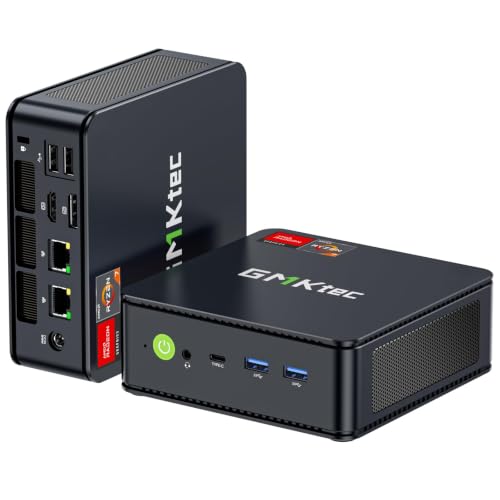
- Best overall for small spaces: GMKtec M5 Plus Gaming Mini PC, Ryzen 7 5825U, 32GB RAM, 1TB SSD — Check on Amazon
- Beelink SER5 MAX Mini PC, Ryzen 7 5800H, 16GB RAM, 500GB SSD — Check on Amazon
- BOSGAME P4 Light Gaming Mini PC, Ryzen 7 5700U, 32GB RAM, 1TB SSD — Check on Amazon
- ACEMAGICIAN AM06 Pro Mini Gaming PC, Ryzen 7 5800U, 16GB RAM, 512GB SSD — Check on Amazon
See 2 more Amazon options
- KAMRUI E3B Mini Gaming PC, Ryzen 5 7430U, 32GB RAM, 512GB SSD — Check on Amazon
- Dell RGB Gaming Tower, Core i7, GTX 1050 Ti, 16GB RAM, 512GB SSD (Renewed) — a real graphics card, but a full-size tower: the anti-compact exception — Check on Amazon
Read the full guide ↓
Disclosure: As an Amazon Associate, reviewstook.com earns from qualifying purchases. Links to Amazon on this page are affiliate links; they cost you nothing extra. Listing details such as price and availability change often, so check the current Amazon listing before you buy.
Shopping for a gaming PC “for small spaces” under $400 starts with a truth about the category: the small tower with a real graphics card inside, the machine the phrase brings to mind, is not sold new at this price. Graphics cards on their own begin near this entire budget, and the compact cases and power supplies built to hold them are the costly kind. What $400 actually buys in a small footprint is a mini PC — a complete, finished computer smaller than a paperback, built around a laptop processor whose integrated Radeon graphics do the gaming. For a dorm desk, a shared bedroom, a living-room TV or a desk already crowded with a monitor, a lamp and a life, a sub-litre PC is often the only gaming machine that fits at all — and fitting, in a small space, is the whole specification.
But a small space grades a PC on more than the box’s dimensions, and that is how this guide differs from a general roundup. The computer you install is never just the computer: it is the box, plus the external power brick that needs a ventilated home of its own, plus the cable drop behind it — display lead, power lead, network cable, controller dongle — plus the moving air its single small fan requires on every vented side. A mini PC that measures five inches square can still fail a small room if its brick ends up cooking in a tangle behind the TV stand, or if the only shelf it fits is a sealed cabinet where it will throttle itself hoarse. So every pick below is graded as an installation: where it can physically live, how it mounts, where its cables fall, how its heat escapes, and how much of the room it asks for beyond its own footprint.
The gaming honesty of this price tier carries over unchanged. These machines play esports titles and older AAA games at 1080p on low-to-medium settings, indie games without complaint, and emulation comfortably into the PlayStation 2 and GameCube era. They do not play this year’s AAA releases at high settings, and when a budget mini PC advertises “smooth 4K gaming,” it is describing the resolution of its desktop output, not the gameplay. There is one deliberate exception in the guide, kept visible rather than hidden: a renewed full-size Dell tower with a discrete GTX 1050 Ti. It is the only route under $400 to a real graphics card, and its price is the exact opposite of this search — it takes a tower’s worth of room. It is graded below on the same installation terms as everything else, and it fails the space test on purpose, so you can see the trade with your eyes open.
In this guide
Quick Picks
Short on time, or comparing several options at once? Each row below names a small-space situation and the product that suits it, with a link to the listing.
| Your space | Pick | Why it fits there | Link |
|---|---|---|---|
| Best overall for small spaces | GMKtec M5 Plus, Ryzen 7 5825U, 32GB/1TB | 0.78 litres, VESA-mountable, and the coolest-running chip here — the fewest placement demands | Check on Amazon |
| Tiniest footprint, open air available | Beelink SER5 MAX, Ryzen 7 5800H, 16GB/500GB | The smallest case in the guide at about 0.6 litres — but its 54W chip needs room to breathe | Check on Amazon |
| Best value on a desk or TV shelf | BOSGAME P4, Ryzen 7 5700U, 32GB/1TB | 32GB and a full terabyte in a 0.77-litre chassis — check price on Amazon | Check on Amazon |
| Behind the TV or monitor | ACEMAGICIAN AM06 Pro, Ryzen 7 5800U, 16GB/512GB | Built to VESA-mount out of sight, with the calmest fan behaviour in the guide | Check on Amazon |
| Zero desk space at all | KAMRUI E3B, Ryzen 5 7430U, 32GB/512GB | 0.68 litres with a VESA plate in the box — it rides on the monitor’s back from day one | Check on Amazon |
| Space is not actually the problem | Dell Gaming Tower, GTX 1050 Ti (Renewed) | A real graphics card in a full-size refurbished tower — included so the trade-off is visible | Check on Amazon |
How These Picks Were Chosen
The entry rules match the wider guide to this category, Best Compact Gaming PC Under $400: a pick had to be a complete, ready-to-run PC — processor, memory, storage and Windows fitted — sold on Amazon at or regularly within $400 in the United States. Barebones kits were excluded no matter how strong their chips, because a shell that still needs RAM, an SSD and an operating system is not a $400 computer; it is the first instalment of a dearer one. Memory configuration mattered as much as processor names: integrated graphics borrow system RAM for their frame buffer and bandwidth, so every mini PC here ships dual-channel, and a single-stick 16GB configuration was treated as a defect rather than a detail. Graphics class was the third filter — all five mini PCs use AMD’s Vega-generation integrated graphics, eight compute units in four of them and seven in the KAMRUI, which is the honest ceiling of this budget.
On top of those rules sat the filter this variant exists for: placement. A pick earned its place only if it fits where small-space buyers genuinely put computers — on a VESA bracket behind a monitor, inside the shelf height of a TV stand, on the last clear corner of a dorm desk — and only if its cooling can survive living there. Dimensions and volumes quoted in this guide come from the base research for this batch: manufacturer figures and listing spec tables, recorded per machine in each review. Where the base research documents a mounting option — a VESA bracket, an included plate — the review says so; where it does not, no mounting is claimed, and the live listing’s photographs and contents line are the place to confirm it before ordering. The same discipline applies to noise: no decibel figures are published for these machines in the base research, so none are invented here — fan behaviour is graded by chip class and case size.
Price discipline is the last rule, and it bites hardest on the sixth pick. Mini PC prices at this tier move weekly with coupons and Prime pricing, so this guide does not print fixed prices — check price on Amazon for the live figure on any pick. The renewed Dell carries an absolute condition, stated in its review, its table rows and the final recommendation — it is a buy only on days its live price sits at or under $400.
The 6 Best Compact Gaming PCs for Small Spaces Under $400
GMKtec M5 Plus Gaming Mini PC — Ryzen 7 5825U, 32GB RAM, 1TB SSD
Who it suits: The small-space buyer who wants the complete specification and the gentlest installation: the most memory and storage in this guide, in a box that asks the least of the room around it.
The physical facts first, because they are the review. The M5 Plus measures about 128.8 × 127 × 47.8 mm — call it five inches square and under two inches tall, roughly 0.78 litres — and weighs around half a kilogram. That footprint is smaller than the stand of most monitors, which gives it three honest homes: flat on the desk under the screen’s shadow, standing on a TV shelf where its two-inch height clears shelf gaps that exclude everything else in this guide except its siblings, or on a VESA mount behind the monitor, where it stops existing visually altogether. The mounting matters more in a small room than in a big one: a desk PC in a dorm is furniture you negotiate with daily, while a mounted PC is a rumour. Its display outputs — triple 4K across its connections — and its dual 2.5GbE LAN ports mean the cables it needs are the cables any PC needs, no more: one display lead, one power lead, and a network cable only if you choose wired over its WiFi 6E.
Heat is where this pick quietly wins the small-space argument. Its Ryzen 7 5825U is a 15W-class chip — the gentlest sustained load in this guide — so the single fan moves less heat, less often, than the H-series machine below. In a quiet bedroom you will hear it under load, as you will hear every pick here; the difference is how quickly it settles when the game closes, and how little warm air it pushes into a small room across a long session. Inside, the specification is the fullest at this price: the 5825U’s eight Zen 3 cores boosting to 4.5GHz, Radeon Vega 8 integrated graphics, and — the figure that decides this tier — 32GB of dual-channel DDR4 feeding that graphics chip, with a 1TB NVMe SSD fitted. The gaming claim is the tier’s standing one: esports and older AAA at 1080p low-to-medium, modern AAA as a low-settings conversation, emulation gladly. Check price on Amazon for the live figure; on specification and placement alone it is the strongest complete small-space package here. One caution belongs to the whole value-brand class: support runs through the seller, so keep the order records.
- About 0.78 litres and VESA-mountable — it can occupy a shelf, a desk corner, or no visible space at all.
- 32GB dual-channel RAM and 1TB SSD: the fullest specification in the guide, and the one shared-memory graphics benefit from most.
- 15W-class chip produces the least heat and the fastest-settling fan of the six — the kindest load for a small room.
Honest limitation: The Vega 8 graphics are this budget’s ceiling, permanently — there is no path from this box to discrete graphics — and the U-series chip concedes sustained clock speed to the H-series Beelink below.
Choose it if you want one purchase that needs nothing added and can live anywhere including behind the screen. Skip it if your library is current AAA releases you refuse to run at low settings; no pick in this guide fixes that, and the money belongs toward a tower budget instead.

Beelink SER5 MAX Mini PC — Ryzen 7 5800H, 16GB RAM, 500GB SSD
Who it suits: The buyer whose space is measured in centimetres but whose shelf is open: the smallest case in this guide, wrapped around the strongest sustained chip — with an airflow condition attached.
The listing puts the SER5 MAX at 4.96 × 4.44 × 1.65 inches and 2.44 lb, which works out to roughly 0.6 litres — the smallest volume here, a thick paperback’s worth of computer. Into that space Beelink fits a Ryzen 7 5800H, and the letter matters for a small room. The U-series chips elsewhere in this guide are 15W laptop parts; the 5800H is a 45W-class part, and this listing runs it at a 54W TDP setting, which is why it holds its clock speeds through a long session where the U-series machines ease off. The graphics are the same Radeon Vega 8 class as the GMKtec’s, fed by 16GB of dual-channel DDR4 — correctly configured, though the M5 Plus’s 32GB is the more comfortable long-term answer for graphics that share system memory. Storage is the visible compromise: 500GB fills quickly with modern installs, and the honest budget includes a later SSD swap; the machine supports up to 2TB of storage and 64GB of RAM per the listing details, which also makes it the most upgradeable mini PC here after purchase.
Now the installation grade, which is this machine’s real review. Fifty-four watts leaving a 0.6-litre case is the densest heat load in this guide, and the case answers with vents on multiple faces and a fan that works audibly in a quiet room under sustained play — not a defect, just arithmetic: a small fan moving that much heat spins fast. Placement is the mitigation, and it costs nothing. On an open desk, or VESA-mounted behind a monitor with air moving around it — a position the base research documents for this machine — the SER5 MAX sustains its performance and its noise stays a desk-distance fact rather than a room-filling one. Sealed inside a TV cabinet, it will throttle sooner than anything else here. So the rule is simple: this is the pick for small footprints with open air, and the wrong pick for small enclosed ones. Check price on Amazon for the live figure; on performance per litre it is the winner of this guide by a distance. Triple display output over HDMI, DisplayPort and USB-C, WiFi 6 and Windows 11 Pro complete a specification that moonlights as a work machine outside gaming hours.
- Smallest case in the guide at roughly 0.6 litres, holding the strongest sustained chip: a 54W-mode 5800H.
- Documented homes include an open desk and a VESA mount behind a monitor — both workable, both ventilated.
- Upgradeable after purchase — RAM to 64GB and storage to 2TB per the listing — so the small box can grow internally.
Honest limitation: The densest heat load here makes it the most placement-sensitive pick: it needs open air on its vented faces, its fan is the most audible under sustained load, and 500GB is tight for a modern library.
Choose it if frames per litre is your metric and your spot has moving air. Skip it if the PC must live inside a closed cabinet, or you know 500GB will be full within the year and do not want to open the case.

BOSGAME P4 Light Gaming Mini PC — Ryzen 7 5700U, 32GB RAM, 1TB SSD
Who it suits: The value hunter with a shelf or a desk corner: the guide’s 32GB/1TB recipe in a budget-tier package, in a chassis that asks for nothing exotic from the room.
The P4’s proposition is arithmetic wrapped in a small box. The chassis family measures about 5.1 inches square and 1.8 inches tall — roughly 0.77 litres, the machine itself about 2.2 lb — which on a desk reads as a slightly tall stack of coasters and on a TV stand slides into shelf heights that exclude even small towers. That two-inch profile is the placement story: it is short enough for the shelf under a television, wide enough to sit stably beside a monitor, and undemanding about which of those it gets. The base research does not document a VESA bracket for this model, so treat behind-screen mounting as unconfirmed until the live listing’s contents line says otherwise — this pick’s homes are surfaces, and it is good at them. The configuration tied to this listing is a Ryzen 7 5700U with Radeon Vega 8 graphics, 32GB of dual-channel DDR4 and a 1TB NVMe SSD — the GMKtec’s memory-and-storage recipe — so check price on Amazon for the live figure. The 5700U is a close relative of the M5 Plus’s 5825U: same Zen 3 eight-core layout, same Vega 8, a fraction less boost headroom, so the gaming story is identical and honest — esports and older AAA at 1080p low-to-medium, modern AAA at low settings with upscaling, excellent emulation.
Two cautions belong to this pick and both are stated plainly. The first is the listing family: BOSGAME has sold this P4 line in both 5700U and 5825U variants under near-identical titles, so the machine in your head must be the configuration on the live page in front of you — read the processor line and the RAM and storage figures before ordering, not the title alone. The second is the brand: BOSGAME is a value label whose support channel is the seller storefront rather than a global service network, so buy it as a specification, not a service promise. The specification itself is generous for a machine this size — dual 2.5GbE LAN ports, triple 4K output over HDMI, DisplayPort and USB-C, WiFi 6E, and room to grow to 64GB of RAM per the listing details — which gives it second careers in media and home-server duty when gaming hours end. On noise it follows the U-series pattern: a gentle sustained load, audible in a silent room, unobtrusive across a living room, quick to settle. When the live page matches that configuration, check price on Amazon — this is the guide’s value configuration on a shelf or desk.
- The 32GB/1TB recipe in a budget-tier chassis — the guide’s value configuration; check price on Amazon.
- About 0.77 litres and under two inches tall: fits TV-stand shelf heights that exclude towers entirely.
- Dual 2.5GbE LAN and triple display output give it media and home-server second careers.
Honest limitation: The listing family mixes 5700U and 5825U variants under similar titles — the configuration must be confirmed on the live page — mounting hardware is not documented for this model, and value-brand support is a storefront, not a service network.
Choose it if the live listing shows the 32GB/1TB configuration and your spot is a shelf or desk surface. Skip it if the page shows a lesser variant at the same money, or if behind-screen mounting is a requirement rather than a preference.

ACEMAGICIAN AM06 Pro Mini Gaming PC — Ryzen 7 5800U, 16GB RAM, 512GB SSD
Who it suits: The buyer whose small space is a shared space: this is the machine in the guide most designed to be mounted out of sight and forgotten between sessions.
Start with the dimensions, because they frame the trade. At 5.19 × 5.19 × 1.96 inches per the model’s published specifications — about 0.86 litres — the AM06 Pro is the largest mini PC in this guide, and it spends that extra fraction of a litre on the best placement story here. The case VESA-mounts behind a monitor or a television, which in a living room is the difference between a computer that lives in the room and a computer that is furniture in it. Bolt it behind the TV, add the wireless keyboard and controller you were buying anyway, and the PC’s footprint in the room becomes exactly zero — no shelf negotiation, no desk corner surrendered. The cable drop is equally tidy: behind a screen, the display lead runs inches, the power lead drops to the same strip the TV uses, and the brick tucks behind the set where its warmth harms nothing. It is the only pick here whose installation genuinely disappears.
The specification inside is the tier’s familiar honest recipe — a Ryzen 7 5800U with eight Zen 3 cores to 4.4GHz, Radeon Vega 8 graphics, 16GB of dual-channel DDR4 and a 512GB NVMe SSD — with one storage trick none of the others match at this size: a 2.5-inch expansion bay, so a cheap SATA drive can double the library later without reopening the memory question. Dual LAN, triple 4K output and WiFi 6 complete a box that moonlights as a media front-end without missing a beat. Gaming expectations are the standing ones — 1080p esports and older AAA at low-to-medium — and the 5800U’s 15W-class profile makes this, with the M5 Plus, one of the two calmest sustained loads here; behind a TV, its fan is effectively in another room. On price, check price on Amazon before comparing it with the BOSGAME — the live figure there is the only one that counts. One brand note, in the same spirit as the sibling guides in this series: ACEMAGICIAN is a value brand whose wider family of labels has drawn scrutiny in past years over bundled software, and the standard advice for any budget mini PC applies — run a security scan on first boot, and treat a clean Windows install as a reasonable first hour.
- VESA-mounts behind a TV or monitor — the true zero-footprint installation for shared rooms.
- A 2.5-inch bay lets you add a cheap second drive later — a trick none of the other picks offers.
- 15W-class chip in the largest case here: the calmest fan behaviour under load in the guide.
Honest limitation: 16GB of RAM is this guide’s floor rather than its comfort zone for shared-memory graphics, the live price can vary — check price on Amazon — and at 0.86 litres it is the mini PC here that most needs its mount to justify its size.
Choose it if the machine is destined for the back of a screen in a room other people use, and quiet matters. Skip it if 32GB from day one is the requirement — that is the GMKtec or the BOSGAME.

KAMRUI E3B Mini Gaming PC — Ryzen 5 7430U, 32GB RAM, 512GB SSD
Who it suits: The buyer with no desk space to give: a budget-tier route in this guide to a dual-channel 32GB machine, and the one that can occupy literally none of your desk.
The E3B’s case is the second smallest here — 128 × 128 × 41.2 mm, about 0.68 litres and roughly 560 grams — and KAMRUI includes a VESA plate in the box, which changes the buying question entirely. Every other pick asks where on your surfaces the PC will sit; this one can ride on the back of the monitor from the first evening, taking no desk, no shelf and no floor. For a dorm desk shared with textbooks, or a bedroom setup where the “desk” is a tray table, that included plate is worth more than a specification line. Inside is a Ryzen 5 7430U — six Zen 3 cores to 4.3GHz, Radeon Vega 7 graphics, one compute unit down from the Vega 8 machines above it. That is the honest trade at this pick’s heart, and it cuts in a specific direction: CPU-heavy and esports gaming barely notices, because the chip is modern and efficient and the fitted memory is exactly what integrated graphics crave — 32GB across two sticks, dual-channel, the configuration a shared-memory GPU needs to breathe. Where the missing compute unit shows is in demanding 3D scenes, where the Vega 8 picks hold settings the E3B lowers. Storage is 512GB, the guide’s standard compromise, upgradeable to 2TB per the coverage of this listing, with RAM headroom to 64GB. Value is the second argument: this is a budget-tier way into that 32GB dual-channel configuration — check price on Amazon for the live figure.
Placement and noise follow the U-series pattern: a low-wattage chip in a vented case, quiet at desktop distances, audible in a silent room under load, and happiest with open air around it — which the VESA-behind-monitor position provides by design, since the back of a screen is ventilated space with warm air already rising past it. Two cautions are part of the purchase. The brand sits in the same value family as the ACEMAGICIAN, so the first-boot routine — security scan, updates, a clean install if anything looks off — is part of the price in effort. And there is a configuration trap on this listing family: a 16GB sibling exists under a separate listing, so confirm the page in front of you says 32GB before ordering, because at 16GB this machine’s whole argument changes. Bought correctly — 32GB, plate on the monitor — the E3B is the guide’s proof that the smallest budgets in this category still buy a properly configured machine that takes no room at all.
- A budget-tier way here into 32GB dual-channel — check price on Amazon.
- 0.68-litre chassis with a VESA plate included — zero-desk installation out of the box.
- Six efficient Zen 3 cores keep esports and emulation smooth while sipping watts and staying quiet.
Honest limitation: In demanding 3D games the Vega 7 sits a clear step below the Vega 8 picks, and the value-brand first-boot routine — scan, update, verify the 32GB configuration — comes with the territory.
Choose it if your library is esports, indie and emulation and your desk has nothing left to give. Skip it if recent 3D releases are your library and you need every compute unit this budget offers — step up to the M5 Plus.
Dell RGB Gaming Tower Computer — Core i7, GTX 1050 Ti 4GB, 16GB RAM, 512GB SSD (Renewed)
Who it suits: The reader who worked through the five mini PCs, understood the graphics ceiling, and decided a real graphics card matters more than the space it eats — and who has the floor or desk volume to prove it.
Everything about this pick is a disclosed exception, and in a small-spaces guide the disclosure is the review. It is not compact: it is a full-size RGB gaming tower, twenty to thirty times the volume of the machines above it, and it will live on or under a desk the way towers do — occupying the under-desk volume a small room usually assigns to legs, a bin or a bag. It is not new either: Amazon Renewed stock, professionally inspected and resold, on a 6th-generation Intel Core i7 platform that was current a decade ago. And its price will not sit still, which means it qualifies for this guide only on days its live price is at or under $400 — check price on Amazon, and on the days it sits above that line, the correct action is to pass, and this guide says so in every place the machine appears. Its justification is the component in its name: a GeForce GTX 1050 Ti carrying 4GB of its own memory. A discrete card, even an old one, changes the gaming conversation — graphics memory stops competing with system RAM, driver support is the full desktop kind, and 1080p at medium settings in the games of its era is a straightforward expectation rather than a negotiated one. Around the card sit an adequate 16GB of RAM and a 512GB SSD, with Windows 11 Pro installed.
The costs are as concrete as the dimensions. A 6th-generation platform is a dead end: no meaningful processor upgrade path, older connectivity, and a graphics card that was entry-level when new and is now several generations behind — it plays the back catalog, not the future. Renewed condition means the standard is Amazon’s Renewed inspection, not a factory warranty from Dell, and individual units vary in ways new mini PCs do not. Its internal power supply at least spares it the brick problem — one less object to house — but that is the only installation courtesy it offers. It is in this guide because small-space shoppers deserve to see the actual price of the alternative stated in space rather than money: the moment a real graphics card enters, the box stops being compact, the machine stops being new, and the platform stops having a future. If those three trades are acceptable, the floor space exists, and the live price is under the line, this is a legitimate back-catalog gaming PC. If even one of them is not, the honest $400 answer is the mini PCs above.
- The guide’s only discrete graphics card — a GTX 1050 Ti with 4GB of its own memory, beyond any integrated GPU here for its era’s games.
- Check price on Amazon — a buy only when the live price sits at or under the $400 budget line.
- Internal power supply and a standard tower interior: the only pick with room to change components at all.
Honest limitation: It fails this guide’s reason for existing — full-size, refurbished, on a decade-old platform with no upgrade path — and it is a buy only on days the live price — check price on Amazon — is at or under $400.
Choose it if a discrete card beats size, newness and upgrade future in your priorities, and today’s price is under the line. Skip it if any of those three matter to you — and on any day the listing sits above $400.

Comparison Table
| Product | Size / volume | Mounting | Best placement | Link |
|---|---|---|---|---|
| GMKtec M5 Plus, 5825U, 32GB/1TB | ~128.8 × 127 × 47.8 mm, ~0.78 L | VESA-mountable | Anywhere — shelf, desk, or behind the screen | Check on Amazon |
| Beelink SER5 MAX, 5800H, 16GB/500GB | 4.96 × 4.44 × 1.65 in, ~0.6 L | VESA-mountable | Open desk or behind a monitor — never a sealed cabinet | Check on Amazon |
| BOSGAME P4, 5700U, 32GB/1TB | ~5.1 × 5.1 × 1.8 in, ~0.77 L | Not documented — confirm on the live listing | TV-stand shelf or desk surface | Check on Amazon |
| ACEMAGICIAN AM06 Pro, 5800U, 16GB/512GB | 5.19 × 5.19 × 1.96 in, ~0.86 L | VESA-mounts behind TV/monitor | Behind the screen — zero visible footprint | Check on Amazon |
| KAMRUI E3B, 7430U, 32GB/512GB | 128 × 128 × 41.2 mm, ~0.68 L | VESA plate included | On the monitor’s back — no desk required | Check on Amazon |
| Dell Gaming Tower, GTX 1050 Ti (Renewed) | Full-size tower — not compact | None | Floor or under-desk, if the room can spare it | Check on Amazon |
How to Choose: Measure Before You Buy
In a small space, the order of operations is the whole game. Specifications come second; the room comes first. Work through these five steps in order, with a tape measure, before any listing gets your money.
- Step 1 — Measure the spot itself. Shelf height first: every mini PC here is under two inches tall, but a TV-stand shelf with a soundbar already in it may offer less clear height than you think. Then desk or shelf depth, and — if behind-screen mounting tempts you — whether your monitor or TV has a free VESA pattern and how much clearance sits between the screen’s back and the wall. Write the three numbers down; they are your real budget.
- Step 2 — Reserve the ventilation clearance. The measured spot is not the usable spot. A mini PC needs a hand’s width of open air on its vented sides and nothing stacked on top of it, ever. Subtract that clearance from your Step 1 numbers. If what remains is a sealed compartment, the honest options are gaming with the cabinet door open or choosing a different spot — thermal throttling in an enclosed box will cost more performance than any specification difference in this guide.
- Step 3 — Give the power brick an address. Every mini PC here runs from an external adapter roughly the size of a deck of cards, and it needs a ventilated surface of its own. Decide where it lives before ordering: on the shelf beside the PC, on the floor by the strip, behind the TV. A brick buried in cable spaghetti behind a stand runs hot and shortens its own life. The box is 0.7 litres; the installation is the box, the brick and the airflow, counted together.
- Step 4 — Walk the cable drop. Count what must connect and where it falls: the display lead, the power lead, an Ethernet run if you choose wired networking — dual-LAN models like the GMKtec and BOSGAME reward it — plus a controller dongle and headset cable at desk distance. Behind a screen, the drop is inches and invisible. Across a room to a router, it is a cable-management project; if that project is a non-starter, WiFi 6 or 6E models carry the room instead. Check the live listing’s photographs for where each model’s ports sit before assuming a tidy route.
- Step 5 — Then, and only then, order. With the spot measured, the air reserved, the brick housed and the cables walked, choose the machine that fits the installation: the fullest specification your spot supports (the M5 Plus), the strongest chip your open air allows (the SER5 MAX), or the mount that deletes the footprint entirely (the AM06 Pro, the E3B). Ordering first and measuring later is how small rooms end up with returns.
Three further checks ride along with the checklist. Dual-channel memory is non-negotiable: integrated graphics share system RAM, and two sticks roughly double the bandwidth the GPU can use, so a 32GB dual-channel machine out-games a faster-chip single-stick one. Match the chip’s wattage to the room: the U-series chips here game at modest wattage and stay relatively quiet; the H-series Beelink sustains more performance and makes more fan noise doing it — bedrooms and living rooms should weight the U-series, headphone-wearing desk buyers can take the H. Count storage in game installs, not gigabytes: 500GB holds a handful of modern titles plus Windows, 1TB holds a library, and the AM06 Pro’s 2.5-inch bay is the cheapest future fix if you start small. Readers whose space problem extends to streaming or a desk that doubles as a broadcast corner should also see Best Compact Gaming PC For Streaming Under $400, and anyone whose measurements rule out even these boxes should compare the still-smaller end of the category in Best Mini Gaming PC For Small Spaces Under $400.
The Invisible Half of the Installation: Brick, Cables, Air
A tower case is mostly air, and that air is a cooling budget: big slow fans, space between components, heat rising away from the parts making it. A 0.7-litre mini PC inverts every term of that bargain. Processor, memory and SSD sit centimetres apart, one small fan does every bit of the work, and the whole gaming load — 15 to 54 watts depending on the chip — exits through vents a coaster could cover. None of that makes mini PCs badly engineered; it makes placement itself a performance decision. The machine that holds its boost clocks on an open desk sheds them inside a closed cabinet, and the fan that is a whisper three metres away across a living room is a presence at arm’s length in a silent bedroom at midnight.
The brick deserves its own paragraph because small-space buyers forget it exists. A mini PC’s product photographs show a clean little box; the installation includes a power adapter the size of a deck of cards, a display cable with a bend radius, and whatever network and peripheral leads your setup needs. Planned for, all of it vanishes — brick on the strip behind the TV, cables dropped straight down the screen’s back, dongle in a reachable port. Unplanned, it becomes the visible tangle that makes a “minimal” setup look worse than the tower it replaced. The mounts are the reward for planning: behind the monitor the PC ceases to exist visually; on an open TV shelf it is a console that also runs a full Windows desktop; and in a bag — under two and a half pounds for the heaviest machine here, brick included — it travels between home, dorm and family visits in a way no tower ever will.
Dust is the slow variable in all of this. A small fan in a small case clogs faster than a tower’s filters, and in a small room the PC usually sits closer to bedding, carpet and soft furnishings that feed it lint. The whole maintenance schedule is a thirty-second vacuum of the intake vents every few months — trivial, but only if the installation leaves the vents reachable. Follow those rules and a mini PC’s noise settles into what owners actually report: audible under load in a quiet room, irrelevant over game audio or across a living room, and gone entirely at idle, where these machines sip power and make effectively no sound at all. Readers still torn between this form factor and a true small tower should weigh the other end of the trade in Best Small Form Factor Gaming PC For Small Spaces Under $400 — the graphics ceiling lifts, and so does the volume, by an order of magnitude.
Common Buying Mistakes
- Measuring the PC and forgetting the installation. The box is 0.7 litres; the box plus brick plus cable bend plus breathing room is the real footprint, and it is the one your shelf has to fit.
- Shutting the PC inside an unventilated TV cabinet, then blaming the chip for the throttling and fan noise that follow. Enclosed air is the most expensive mistake in this category because it taxes every specification you paid for.
- Assuming every mini PC here mounts behind a screen. Three document it — the GMKtec, the AM06 Pro, and the E3B with its included plate. The BOSGAME’s mounting is not documented in the base research; confirm on the live listing before planning a zero-desk build around it.
- Burying the power brick in a cable tangle behind the stand. Adapters need air too, and a hot brick is a shortened life and a faint smell nobody enjoys diagnosing.
- Believing “4K gaming” in a mini PC title. At this price it means 4K desktop and video output; gameplay is a 1080p conversation, and listings that blur that line are telling you something about the seller.
- Buying a barebones kit by accident — or on purpose without pricing the RAM, SSD and Windows licence it still needs. A barebones kit is not a complete PC, and it is not a smaller one either once the parts arrive.
- Saving a little on a single-stick 16GB configuration, and halving the memory bandwidth your graphics live on.
- Comparing mini PCs by processor name alone. A 5825U and a 5800H are both “Ryzen 7,” but their sustained wattage — and therefore their sustained performance, heat and noise in a small room — are different classes.
- Ordering from a listing family without confirming the configuration on the live page; the P4’s processor variants and the E3B’s 16GB sibling are the standing examples in this guide.
- Judging the renewed tower by new-PC standards. It is inspected refurbished stock on an old platform — check price on Amazon, and buy only when the live price is at or under $400 and the condition is acceptable, never on the headline alone.
Final Recommendation
- Most small-space buyers: GMKtec M5 Plus — the fullest specification, the coolest chip, and a mount when you want it.
- Smallest footprint with open air: Beelink SER5 MAX.
- Value on a shelf: BOSGAME P4.
- Shared rooms and behind-screen mounting: ACEMAGICIAN AM06 Pro.
- No desk to give: KAMRUI E3B, plate on the monitor.
- A discrete GPU or nothing: Dell Gaming Tower (Renewed) — with every caveat in its review attached, and only at a live price of $400 or under.
Our top two for small spaces at this budget are the GMKtec M5 Plus, for the complete 32GB/1TB specification in a 0.78-litre box that runs cooler than anything else here, and the Beelink SER5 MAX, for the strongest sustained chip in the smallest case — provided its home has open air. Between them they cover the two shapes this search usually takes: the machine that needs nothing added, and the machine that trades storage for speed. The BOSGAME P4 matches the GMKtec’s recipe on a shelf — check price on Amazon; if the PC is bound for a shared room, the AM06 Pro is the one designed to disappear behind the screen; and if the desk has nothing left to give, the KAMRUI E3B’s included plate deletes the footprint entirely. Shoppers who can stretch should also see Best Compact Gaming PC Under $500, and those starting from the general category should begin with Best Compact Gaming PC Under $400. Measure the spot, reserve the air, house the brick, walk the cables — then order. At $400, that order of operations is the whole difference between a PC that vanishes into your room and one that merely takes up less of it while disappointing you.
Frequently Asked Questions
How small are these PCs, really?
Between roughly 0.6 and 0.86 litres — about five inches square and under two inches thick, in the range of a thick paperback or a stack of coasters. For scale, even a compact mini-tower runs twenty to thirty times that volume, and the renewed Dell here is a full-size tower. Three of the five mini PCs document VESA mounting behind a typical monitor; the KAMRUI includes the plate in the box.
Can I put a mini PC inside my TV cabinet?
You can put it there; you should not game with the door closed. A mini PC’s single fan needs moving air, and a sealed compartment turns into an oven within a session — the machine throttles and the fan works at its loudest. An open shelf, a cabinet with the door open during play, or a behind-screen mount are the placements this guide’s picks are graded for.
Where does the power brick go?
Anywhere with a little air: on the shelf beside the PC, on the floor by the power strip, or behind the TV with the set’s own cables. What it should not do is live buried inside a tangle of leads, where it runs hot. Budget its space when you measure — roughly a deck of cards’ worth — and the installation stays tidy.
Are mini PCs loud in a bedroom?
Audible in a silent room; unobtrusive in a lived-in one. A single small fan does all the cooling, so under load it spins fast enough to hear at desk distance; across a living room, or under game audio, it fades, and at idle the machines are effectively silent. The U-series picks — most of this guide — run quieter than the H-series Beelink, and open placement is quieter than any cabinet.
Can a PC this small really play games?
Yes — a specific class of them. Esports and indie titles and older AAA releases run well at 1080p on low-to-medium settings, and these Ryzen chips emulate the PlayStation 2 and GameCube era as a genuine strength. Current AAA releases at high settings are beyond every machine in this guide at $400; anyone who tells you different is selling something.
Why is there no small tower with a graphics card in this guide?
Because new, there isn’t one under $400. A graphics card, a small-form-factor case and a suitable power supply eat the whole budget before a processor, memory or storage enters the basket. The only discrete-GPU route at this price is refurbished — the renewed Dell tower included here as an explicitly non-compact exception, and a buy only when its live price is at or under $400.
Can I upgrade a mini PC later?
RAM and storage, on most of them — the Beelink supports up to 64GB and 2TB per its listing, the BOSGAME’s RAM ceiling is 64GB, and the AM06 Pro adds a 2.5-inch bay. Graphics are the exception: the GPU is built into the processor for good. Buy the graphics class you need on day one, because it is the one specification that cannot change — and the one a small room cannot fix with a bigger case.


