Where to buy
Check the latest price, availability and delivery on Amazon. Orders are placed on Amazon. We may earn a commission from qualifying purchases.
- Best first compact PC for most beginners: GMKtec M5 Plus Gaming Mini PC, Ryzen 7 5825U, 32GB RAM, 1TB SSD — Check on Amazon
- Beelink SER5 MAX Mini PC, Ryzen 7 5800H, 16GB RAM, 500GB SSD — Check on Amazon
- BOSGAME P4 Light Gaming Mini PC, Ryzen 7 5700U, 32GB RAM, 1TB SSD — Check on Amazon
- ACEMAGICIAN AM06 Pro Mini Gaming PC, Ryzen 7 5800U, 16GB RAM, 512GB SSD — Check on Amazon
See 2 more Amazon options
- KAMRUI E3B Mini Gaming PC, Ryzen 5 7430U, 32GB RAM, 512GB SSD — Check on Amazon
- Dell RGB Gaming Tower, Core i7, GTX 1050 Ti, 16GB RAM, 512GB SSD (Renewed) — the only pick with a separate graphics card, and it is neither compact nor new — Check on Amazon
Read the full guide ↓
Disclosure: As an Amazon Associate, reviewstook.com earns from qualifying purchases. Links to Amazon on this page are affiliate links; they cost you nothing extra. Listing details such as price and availability change often, so check the current Amazon listing before you buy.
If this is your first gaming PC, welcome — and start with the sentence most listings in this price range hope you never read: under $400, a “compact gaming PC” is not a small version of the big glass towers in the adverts. Those towers carry a separate graphics card, and a card on its own can cost most of this budget before you have bought a case, a processor or a cable. What $400 honestly buys in a small box is something different and, for a first machine, arguably better: a mini PC. It is a complete, finished computer about the size of a thick paperback book — processor, memory, storage and Windows already inside — that you plug in and switch on. Nothing to build, nothing to assemble, no part you can install backwards.
The trade is graphics power, and this guide will not hide it. A mini PC’s pictures are drawn by graphics built into the processor itself — “integrated graphics” — and that sets a clear ceiling: esports games, indie games and older big-name titles play well at 1080p on low-to-medium settings, and classic console emulation is a genuine strength. This year’s biggest releases at high settings are beyond every machine here, and when a listing at this price promises “smooth 4K gaming,” it is talking about the desktop and video resolution, not about playing games that way. Five of the six picks are mini PCs. The sixth shows the alternative: a renewed — second-hand and refurbished — full-size Dell tower that does contain a real graphics card, in exchange for being large, used and built on old parts. It is included so you can see the choice clearly.
Because this guide is written for first-time buyers, it explains every technical word before it relies on it, walks you through your first evening step by step, and separates the price of the PC from everything else you will need. The reviews grade each machine on what a beginner actually feels: memory and storage (because integrated graphics feed on both), fan noise in a quiet room, where it can physically live, and how much checking its listing needs. Prices are not printed here because mini PC prices move weekly with coupons and membership deals, so check price on Amazon for the current figure before you decide.
Words You Will See in Every Listing: A Plain-English Glossary
Twelve terms explain nearly every line of every product page in this category. Learn these and the listings lose their power to confuse you.
- GPU (graphics card). The part that draws the game on your screen. In a big gaming tower it is a separate card you could hold in your hand — the most important part for gaming, and the part that costs the most.
- Integrated graphics. A smaller graphics processor built into the main chip instead of living on its own card. Every mini PC here uses integrated graphics (AMD calls theirs Radeon Vega). It shares the computer’s memory rather than having its own, and suits esports, indie and older games — not the newest releases at high settings.
- VRAM and shared memory. Memory reserved just for graphics. A separate card has its own; integrated graphics have none, so they borrow from the main RAM — which is why the amount and arrangement of RAM matters so much on these machines.
- CPU (the processor). The computer’s general-purpose brain — it runs Windows, the game itself and everything else. Names like “Ryzen 7 5825U” look like licence plates; all six processors here are modern or proven enough for the games these machines can play.
- RAM (memory). Short-term working space, measured in gigabytes (GB). More RAM means the PC and its borrowed graphics memory breathe easier. Just as important is “dual-channel” — two sticks instead of one — which roughly doubles the speed at which integrated graphics can reach that memory. Every mini PC here ships dual-channel, deliberately.
- SSD (storage). The drive your games live on, also measured in GB — 500GB, 512GB and 1TB (a terabyte, roughly 1,000GB) appear below. Modern games are enormous, so storage fills faster than beginners expect; 500GB holds a handful of big titles, 1TB holds a library.
- Resolution. How many dots make up the picture. “1080p” is the standard these machines game at. “4K” is a much bigger picture — these PCs can display a 4K desktop and play 4K video, but they do not play modern games at 4K, whatever a listing implies.
- Refresh rate. How many times per second your screen redraws, measured in hertz (Hz). Many monitors can show 144 pictures a second but arrive set to 60. Setting the real rate takes two minutes (walked through below), and skipping it is the most common beginner mistake of all.
- Upscaling. The PC draws the game at a smaller size and stretches it cleverly to fill the screen: slightly softer picture, much smoother play. It is how integrated graphics handle heavier games, and you will meet it as a settings option inside games.
- Power brick. The external power adapter — about the size of a deck of cards — that every mini PC runs from, like a laptop charger. It needs a home on or under your desk and a little air around it, so plan for the brick as well as the box.
- Prebuilt. A computer that arrives finished: assembled, Windows installed. All six picks are prebuilt. The opposite is a “barebones kit,” which arrives missing memory, storage and Windows — a trap this guide deliberately avoids.
- Renewed / refurbished. Second-hand equipment that has been inspected, tested and resold, usually with a shorter guarantee than new. Exactly one pick here is renewed — the Dell tower — labelled as such everywhere it appears.
In this guide
Quick Picks
Short on time, or comparing several options at once? Each row below names a first-time buyer and the product that suits them, with a link to the listing.
| First-time buyer | Pick | Why it stands out | Link |
|---|---|---|---|
| Best first compact PC overall | GMKtec M5 Plus, Ryzen 7 5825U, 32GB/1TB | The most memory and storage in this guide, in a box smaller than a monitor stand | Check on Amazon |
| Best if you want the strongest chip | Beelink SER5 MAX, Ryzen 7 5800H, 16GB/500GB | The most powerful processor here, in the smallest case — check price on Amazon | Check on Amazon |
| Best value if you catch the price | BOSGAME P4, Ryzen 7 5700U, 32GB/1TB | The same 32GB/1TB recipe as the GMKtec at a budget-tier price — check price on Amazon | Check on Amazon |
| Best for behind the TV | ACEMAGICIAN AM06 Pro, Ryzen 7 5800U, 16GB/512GB | Mounts hidden behind a screen, with room to add a second drive later | Check on Amazon |
| Best on the tightest budget | KAMRUI E3B, Ryzen 5 7430U, 32GB/512GB | A proper dual-channel 32GB machine at a budget-tier price — check price on Amazon | Check on Amazon |
| Only pick with a real graphics card (renewed, full-size) | Dell Gaming Tower, GTX 1050 Ti (Renewed) | A separate graphics card — in a used tower the size of a suitcase, not a mini PC | Check on Amazon |
How These Picks Were Chosen
Three filters came before any brand names. The first was completeness: a pick had to arrive as a finished computer — processor, memory, storage and Windows already fitted — because a beginner’s first PC should not begin with a parts list. Barebones kits were excluded however impressive their chips, since a kit still needing memory, storage and a Windows licence is not a $400 computer, just the deposit on a pricier one. The second filter was size: a compact pick had to be a mini PC of roughly one litre or less — about five inches square — the class that mounts behind a monitor or vanishes onto a TV shelf. Five picks pass. The sixth, the renewed Dell tower, fails openly and says so everywhere; it is here because it is the only way under $400 to get a separate graphics card, and beginners deserve to see what that route costs in size, condition and future options.
The third filter was memory configuration, the one beginners are never told about: integrated graphics borrow RAM far more effectively from two sticks than from one, so every mini PC here ships dual-channel; a single-stick machine was treated as faulty goods, not a bargain. Beyond that, we compared what the listings publish — processor, graphics, memory, storage, dimensions, ports — and favoured listings that print their full numbers. We did not use these products ourselves. Check price on Amazon for the current figure, because this category’s prices swing weekly with coupons and Prime-only deals, and the one pick whose live price wanders across the $400 line in both directions — the renewed Dell — carries that warning in its name, its review and its table row.
Two beginner-specific judgements sat on top. Noise: one small fan cools a mini PC, and in a bedroom that fan is the loudest thing in the room during a game, so we weighted modest-power chips. And support: several brands here sell through a seller storefront rather than a service network — normal at this price; the reviews say where it applies, and the setup walkthrough includes the short first-boot routine that makes any budget machine’s software state a known one.
The 6 Best Compact Gaming PCs for Beginners Under $400
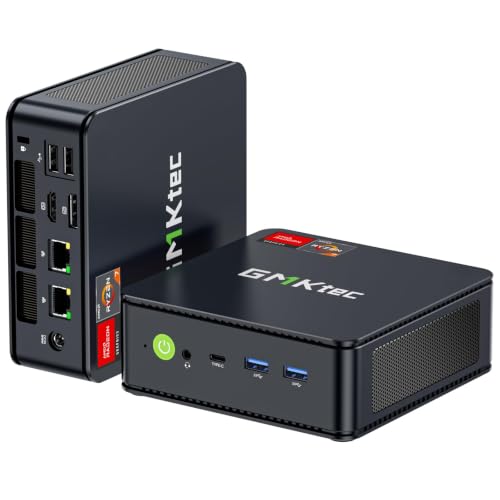
GMKtec M5 Plus Gaming Mini PC — Ryzen 7 5825U, 32GB RAM, 1TB SSD
Who it suits: The beginner who wants to buy once and think about nothing afterwards — the fullest specification in this guide, in a box that disappears behind the monitor.
The first surprise is the size: about 128.8 × 127 × 47.8 millimetres — roughly five inches square, under two inches tall, about half a kilogram — smaller than the stand of most monitors. It can sit under your screen, beside it, or mounted on the back of it, and your desk looks as it did before you owned a gaming PC. Inside is a Ryzen 7 5825U processor with Radeon Vega 8 integrated graphics, plus the two numbers that decide how this class of machine feels: 32GB of memory fitted as two sticks — dual-channel, the arrangement integrated graphics feed on best — and a 1TB SSD. For a beginner, that pairing removes the two frustrations of cheap PCs at a stroke — no memory bottleneck choking the graphics, and enough storage to install the games you own instead of deleting one to make room for the next.
What it plays, stated plainly: esports titles at 1080p run well, older big-name games run at low-to-medium settings, and current releases are a low-settings conversation, sometimes with upscaling switched on. That is the ceiling of every mini PC in this guide; the M5 Plus simply reaches it with the least friction. Around the gaming it is a capable everyday computer: three 4K displays for work or video, two fast wired network ports, WiFi 6E, Windows 11 Pro. On noise, its modest-power 15W-class processor is the gentlest sustained load in this guide, so its fan works less hard than the stronger Beelink’s below; you will hear it while gaming in a silent room, as with every pick here, but it settles quickest when you stop. Check price on Amazon before you decide — a coupon clipped on the page can change what you pay — and when the live price sits within budget, it is the strongest complete package a beginner can buy in this category. One caution applies to this whole class of value brands: help comes through the seller rather than a service network, so keep your order confirmation.
- 32GB of dual-channel memory and a 1TB drive fitted from the factory — nothing to add, nothing to upgrade on day one.
- About 0.78 litres: mounts behind a monitor or disappears onto a TV shelf.
- The modest-power chip makes it one of the two quietest sustained gaming loads here.
Honest limitation: The Vega 8 graphics are the ceiling of this budget, not a first step — there is no socket inside for a graphics card later, ever, and the processor trades a little sustained speed for its quiet manners against the Beelink below.
Choose it if you want the complete package with the fewest decisions attached. Skip it if your game list is this year’s biggest releases at high settings — no compact pick fixes that, and the honest move is saving toward a tower instead.

Beelink SER5 MAX Mini PC — Ryzen 7 5800H, 16GB RAM, 500GB SSD
Who it suits: The beginner who reads one review too many and wants the strongest processor in the smallest box — and is happy to trade storage space for it.
The SER5 MAX is the smallest machine in this guide: the listing puts it at 4.96 × 4.44 × 1.65 inches and 2.44 pounds, roughly 0.6 litres — a thick paperback. Its processor is the difference a beginner can actually feel over a long session. Most chips in this guide are 15W laptop parts; the Ryzen 7 5800H in the Beelink is a 45W-class part, and this listing runs it at a 54W setting, which means it holds its speed through a long session instead of quietly slowing down after twenty minutes. The graphics are the same Radeon Vega 8 class as the GMKtec’s, fed by 16GB of dual-channel memory — enough, and arranged correctly, though 32GB is the more comfortable long-term answer for graphics that borrow memory. The compromise is storage: 500GB fills quickly with modern game sizes, so treat a later drive upgrade as part of the plan — the listing supports storage up to 2TB and memory up to 64GB, which makes this the most upgradeable mini PC in the guide after purchase.
Heat is the price of that strength, and a beginner should hear it plainly: 54 watts in 0.6 litres is the densest load here, the little fan works hard, and in a quiet room it will be audible while you play. That is physics, not a fault — and placement fixes most of it: on an open desk, or behind a monitor with air around it, it sustains its performance; sealed in a closed TV cabinet it slows itself down to stay cool, sooner than the gentler machines. It sits in the budget tier of this guide — check price on Amazon for the current figure — and it is the performance-per-inch winner of this guide by a wide margin. Three displays at once, WiFi 6 and Windows 11 Pro round out a machine that doubles as a serious work computer outside gaming hours.
- Smallest case in the guide at roughly 0.6 litres, holding the strongest sustained processor.
- Room to grow after purchase — memory to 64GB and storage to 2TB per the listing.
- Strong sustained performance in the smallest case here — check price on Amazon.
Honest limitation: 500GB of storage is tight for a modern game library, and the high-power chip in the tiny case makes this the most placement-sensitive pick — it needs open air, and its fan is the most audible under a long gaming load.
Choose it if you play longer sessions, your desk or shelf has open air, and you are comfortable adding storage later. Skip it if the PC must live inside a closed cabinet, or you know half a terabyte will be full within months and you never want to open the case.

BOSGAME P4 Light Gaming Mini PC — Ryzen 7 5700U, 32GB RAM, 1TB SSD
Who it suits: The patient beginner: someone willing to check one listing carefully in exchange for the GMKtec’s memory-and-storage recipe at a strong value positioning.
The appeal here is value. The configuration tied to this listing — a Ryzen 7 5700U processor with Radeon Vega 8 graphics, 32GB of dual-channel memory and a 1TB SSD — matches the same memory-and-storage combination as our top pick, in a case of the same class: the P4 family measures about 5.1 inches square and 1.8 inches tall, roughly 0.77 litres and about 2.2 pounds. The 5700U is a close relative of the GMKtec’s 5825U — same eight-core layout, same Vega 8 graphics, a shade less top speed — so the gaming story is the same honest one: esports and older big titles at 1080p on low-to-medium settings, newer releases at low settings with upscaling, and very happy emulation of older consoles.
Two cautions belong to this pick, and a beginner should treat them as part of the purchase rather than fine print. First, the listing family: BOSGAME has sold this P4 line with both the 5700U and the closely related 5825U under near-identical titles, so the machine you receive is the one described in the specification table on the live page — read the processor, memory and storage lines before ordering, not just the headline. Second, the brand: BOSGAME is a value label whose support runs through its seller storefront, not a global service network. What you are buying is a specification — and it is a strong one, with two fast wired network ports, three-display output, WiFi 6E and room to grow memory to 64GB per the listing — rather than a service promise. If the live page shows the 32GB/1TB configuration, check price on Amazon — this is among the strongest hardware value in the guide.
- 32GB dual-channel memory and 1TB storage fitted at a budget-tier price — check price on Amazon.
- Sub-litre case of about 5.1 inches square suits a desk corner or a TV shelf equally.
- Two fast wired network ports and triple display output give it second careers in media and study duty.
Honest limitation: The listing family mixes two processor variants under similar titles, so the configuration must be confirmed on the live page — and value-brand support is a shopfront, not a service network.
Choose it if the live listing shows the 32GB/1TB configuration at a price that fits your budget — check price on Amazon. Skip it if the page in front of you shows a lesser variant at the same money, or if painless in-warranty support matters more to you than specification value.

ACEMAGICIAN AM06 Pro Mini Gaming PC — Ryzen 7 5800U, 16GB RAM, 512GB SSD
Who it suits: The beginner setting up in a shared room — a living room, a family desk — who wants the PC to disappear behind the screen and be forgotten between sessions.
The AM06 Pro is the largest mini PC here and still tiny: 5.19 × 5.19 × 1.96 inches by the model’s published specifications, about 0.86 litres — a drinks coaster, two inches thick. What the extra sliver buys is the best hiding place in the guide: the case mounts on the standard VESA bracket behind a monitor or TV, so the computer simply stops being visible. Add a wireless keyboard and a controller and the setup is a screen and nothing else. The specification is the guide’s familiar honest recipe — Ryzen 7 5800U, Radeon Vega 8 graphics, 16GB of dual-channel memory, a 512GB SSD — with one storage trick none of the others match: an empty 2.5-inch bay inside, so when the drive fills you can slide in an inexpensive second drive instead of replacing anything. Two wired network ports, three-display output and WiFi 6 make it a natural media front-end too.
Gaming expectations are the standing ones — esports and older big titles at 1080p on low-to-medium settings — and its modest-power processor makes this, with the GMKtec, one of the two calmest fan profiles here; mounted behind a TV, its noise is effectively in another room. Pricing needs one honest note: the price can differ for Prime members, so check price on Amazon and confirm which price applies to you before comparing it with the BOSGAME. One brand note, offered the same way to every value label in this guide: this maker’s wider family of brands has drawn scrutiny in past years over bundled software, so the standard budget-PC routine applies — run a security scan on first boot; a clean Windows install is a reasonable first hour with any machine in this class. Judged as hardware for a TV stand, the AM06 Pro is the placement pick: the one that vanishes.
- Mounts behind a TV or monitor on a standard bracket — the true zero-footprint option for shared rooms.
- An empty 2.5-inch bay inside adds cheap storage later; no other pick here offers one.
- Modest-power chip and the roomiest mini case here make for the calmest fan behaviour under load.
Honest limitation: 16GB of memory is this guide’s floor rather than its comfort zone for graphics that borrow RAM, and the price can split by membership — check price on Amazon to see which price applies to you.
Choose it if the PC is going behind a screen in a shared room and quiet matters. Skip it if you want 32GB fitted from day one — that is the GMKtec or the BOSGAME — or if the non-member price is the one you would actually pay.

KAMRUI E3B Mini Gaming PC — Ryzen 5 7430U, 32GB RAM, 512GB SSD
Who it suits: The beginner on the tightest budget whose games are esports, indie titles and classic-console emulation — and who wants the memory configuration done properly anyway.
The E3B is the second-smallest case here — 128 × 128 × 41.2 millimetres, about 0.68 litres and roughly 560 grams — and KAMRUI includes a mounting plate in the box, so the whole computer can ride on the back of a monitor and take up no desk whatsoever. Its processor, a Ryzen 5 7430U, has six modern cores, and its graphics are Radeon Vega 7: one step down from the Vega 8 in the machines above. Here is the trade as a beginner will feel it: the fitted memory is the configuration integrated graphics crave most — 32GB across two sticks, dual-channel — so everyday play, esports and emulation feel as smooth as the pricier picks. The step down shows only in demanding 3D scenes, where the Vega 8 machines hold settings the E3B has to lower. Storage is 512GB, this guide’s standard compromise, and the value positioning is the argument: this is a budget-tier pick — check price on Amazon for the current figure.
Placement and noise follow the modest-power pattern: quiet at desktop distances, audible in a silent room under load, happiest with open air around it — the behind-the-monitor position suits it perfectly. Two beginner warnings come with this pick, and neither is decoration. The brand sits in the same value family as the ACEMAGICIAN, so the first-boot routine in the setup walkthrough below — security scan, updates, a look through what is installed — is part of the price, paid in an hour of effort. And this listing family has a trap: a 16GB version exists under a separate listing, so confirm the page in front of you says 32GB before you order, because at 16GB this machine’s whole argument changes. Bought correctly — the 32GB configuration — the E3B is the guide’s proof that the smallest budget in the category can still buy a properly configured machine. The listing details also allow growing memory to 64GB and storage to 2TB later, should you ever want to.
- A budget-tier route here to a dual-channel 32GB machine — check price on Amazon.
- 0.68-litre case with a mounting plate included — it can live behind the monitor from the day it arrives.
- Six efficient cores keep esports and emulation smooth at low power and low noise.
Honest limitation: Vega 7 graphics are a step below the Vega 8 picks in demanding 3D games, and the value-brand homework — scan, update, and verify you are really ordering the 32GB version — is part of the deal.
Choose it if esports, indie and emulation are your library and a properly configured 32GB machine at a budget-tier price sounds right. Skip it if you play recent 3D releases and want every graphics unit this budget offers — that is the GMKtec’s job.
Dell RGB Gaming Tower Computer — Core i7, GTX 1050 Ti 4GB, 16GB RAM, 512GB SSD (Renewed)
Who it suits: The beginner who has read everything above, understood it, and still wants a real graphics card most — and has the floor space, and the tolerance for second-hand, that the card demands.
Everything about this pick is a declared exception. It is not compact: a full-size tower that lives on or under a desk. It is not new: an Amazon Renewed machine — second-hand, professionally inspected and resold — built around a 6th-generation Intel Core i7 platform that was current a decade ago. And its price will not sit still: renewed pricing moves above and below the budget line, so it belongs in this guide only on days when the live price is at or under $400 — check price on Amazon before you decide. On days it sits above the line, the correct beginner move is to walk away and wait. What earns it a place is the component in its name: a GeForce GTX 1050 Ti graphics card with 4GB of its own memory. A separate card, even an old one, changes the conversation — graphics stop borrowing system memory, and 1080p play at medium settings in its era’s games is a plain expectation rather than a negotiation. The 16GB of memory and 512GB of storage around it are adequate, and Windows 11 Pro is installed.
The costs are just as concrete. A decade-old platform is a dead end: no meaningful processor upgrade path, older connections, and a card that was entry-level when new and now plays the back catalogue, not the future. Renewed means the standard is Amazon’s inspection programme, not a Dell factory warranty, and individual units vary in ways a new mini PC’s do not. And the size is the size — measure your space. The moment a real graphics card enters at this price, the box stops being compact, the machine stops being new, and the platform stops having a future. If all three trades are acceptable and the live price is under the line, it is a legitimate back-catalogue PC; if any one is not, the mini PCs above are the honest $400 answer.
- The only separate graphics card in this guide — a GTX 1050 Ti with its own 4GB, which no integrated graphics here match for its era’s games.
- Renewed pricing can dip under the budget line — check price on Amazon before you decide.
- A standard tower interior: the only pick with any room inside to change components at all.
Honest limitation: It fails this guide’s own category on three counts — full-size, refurbished, and on a decade-old platform with no upgrade path — and its live price can sit above the budget; it is a buy only on days the live price is at or under $400.
Choose it if the graphics card matters more to you than size, newness or a future upgrade path — and today’s price is under the line. Skip it if any of those three matter to you — or on any day the listing sits above $400, which its own price history says is often.

Comparison Table
| Product | Size / volume | Graphics | Best use | Link |
|---|---|---|---|---|
| GMKtec M5 Plus, 5825U, 32GB/1TB | ~128.8 × 127 × 47.8 mm, ~0.78 L | Radeon Vega 8 (integrated) | The complete first PC — nothing to add | Check on Amazon |
| Beelink SER5 MAX, 5800H, 16GB/500GB | 4.96 × 4.44 × 1.65 in, ~0.6 L | Radeon Vega 8 (integrated) | Strongest chip, longest sessions | Check on Amazon |
| BOSGAME P4, 5700U, 32GB/1TB | ~5.1 × 5.1 × 1.8 in, ~0.77 L | Radeon Vega 8 (integrated) | Generous memory and storage in a sub-litre case | Check on Amazon |
| ACEMAGICIAN AM06 Pro, 5800U, 16GB/512GB | 5.19 × 5.19 × 1.96 in, ~0.86 L | Radeon Vega 8 (integrated) | Hidden behind the TV or monitor | Check on Amazon |
| KAMRUI E3B, 7430U, 32GB/512GB | 128 × 128 × 41.2 mm, ~0.68 L | Radeon Vega 7 (integrated) | 32GB on the smallest budget | Check on Amazon |
| Dell Gaming Tower, GTX 1050 Ti (Renewed) | Full-size tower — not compact | GTX 1050 Ti 4GB (separate card) | A real graphics card, if used and large are acceptable | Check on Amazon |
Your First Evening: Setting Up, Step by Step
Every pick in this guide arrives finished, so setup is an evening of plugging in and clicking through — no tools, no building. Work through these steps in order and you will avoid every classic first-night problem.
- Step 1 — Unbox and place it where air can reach it. Put the mini PC on an open surface, or mount it behind your monitor if your pick supports it. Do not seal it in a closed TV cabinet: one small fan cools it, and a closed compartment will make it slow down and get loud. Leave a hand’s width around the vented sides, and stack nothing on top.
- Step 2 — Give the power brick a home, then plug it in. Every mini PC here runs from an external adapter about the size of a deck of cards. Rest it somewhere it can breathe rather than buried in cables behind the TV stand — bricks run warm. Connect it to the PC and the wall; a surge-protected strip is a sensible home for it. (The renewed Dell tower is the exception: its power supply is inside the case, so it takes one ordinary power cable.)
- Step 3 — Connect the screen to the PC’s display output. Run an HDMI or DisplayPort cable from the back of the mini PC to your monitor or TV. A mini PC has only one place a screen can plug in, so there is no wrong socket of the kind that trips up tower owners. On a TV, note which HDMI input you used; you will select it with the remote.
- Step 4 — Add keyboard, mouse and internet. Plug in or pair your keyboard and mouse. A wired network cable is the steady option for gaming where one can reach; all five mini PCs also have WiFi. Switch on and follow Windows’ first-run questions — language, account, updates. Let it take its time; a first boot with updates can look slow without anything being wrong.
- Step 5 — Do the first-boot routine. Run Windows Update until it says you are done, restart, and check once more. Run a full security scan — on any budget mini PC, whatever the badge, this turns an unknown software state into a known one, and a clean Windows install is a reasonable step if anything looks off. While you are there, confirm the machine matches your order: memory and storage sizes appear in Settings under System and Storage, and this is the moment to catch a wrong variant from a confusing listing family, inside your return window.
- Step 6 — Set your screen’s real refresh rate. Many gaming monitors can redraw 144 times a second but arrive set to 60, and Windows will not always change it for you. Go to Settings, System, Display, Advanced display, and choose the highest refresh rate offered. This two-minute job is the difference between the smoothness you paid for and half of it.
- Step 7 — Install a game store and start light. Download Steam (or the store your games live on), sign in, and install something from the easy end of your library first — an esports title, an indie game, an older favourite. Start games at 1080p on low-to-medium settings; turn on upscaling in a game’s settings if a scene feels heavy. Starting where the machine is strong teaches you its real shape within an evening, instead of judging it by the one blockbuster it was never built for.
What Else You Will Spend (Not Included in Any Pick’s Price)
The $400 buys the computer. It does not buy the things the computer connects to, and a beginner’s budget should name them before checkout rather than discover them after. First and largest: a screen. No pick in this guide includes a monitor, so unless your PC is going to a TV you already own, a monitor is a separate purchase — put it first on the list, ahead of everything below. A standard 1080p screen is the right partner for these machines; a 4K monitor is money spent on sharpness the graphics cannot use in games. Second: something to control it with — keyboard and mouse for the desk, or a controller for the sofa. Third, small but real: a display cable, if your screen’s box lacks one that matches, and a surge-protected strip to give the brick a proper home. Finally, the games themselves, though every store runs free titles and deep sales. None of these costs belongs inside a pick’s price, and any listing bundling “a complete gaming setup” at this money is quietly shrinking the computer to pay for the extras.
Upgrades, in Plain Terms: What Can and Cannot Change Later
Beginners are often sold a first PC as a starting point for upgrades, so here is the honest map for these six machines. One thing can never change on any of the five mini PCs: the graphics. The graphics processor is part of the main chip, permanently — there is no slot inside a sub-litre box for a graphics card, and no pick here can be given one later. Buy the graphics class you need on day one, because it is the one specification that is fixed for the machine’s whole life. What can change, where listings document it, is memory and storage: the Beelink’s listing supports memory to 64GB and storage to 2TB; the BOSGAME’s details allow memory to 64GB; the KAMRUI’s allow 64GB and 2TB; the ACEMAGICIAN has its empty 2.5-inch bay; and the GMKtec arrives with 32GB and a terabyte fitted, plus a second drive slot documented to 4TB — which is why its review says there is nothing to add. Where a listing does not document an upgrade, this guide does not promise one. The renewed Dell is the mirror image: the only pick with a standard case you could open and rearrange — on a decade-old platform with almost nothing worth upgrading toward. Room to change parts is not the same as a future.
How to Choose a Compact Gaming PC Under $400
- Start with your game list, honestly written down. Esports, indie and older titles: every mini PC here serves you. This year’s biggest releases at high settings: none of them does, and knowing that before checkout is the cheapest upgrade in this guide.
- Put memory at the top of the checklist. Integrated graphics borrow RAM, and two sticks feed them far better than one. A dual-channel 32GB machine will out-game a single-stick machine with a fancier processor name. Look for “32GB” and a two-stick configuration before you compare anything else.
- Count storage in game installs, not gigabytes. 500GB holds a handful of modern games plus Windows; 1TB holds a library. If you rotate two or three games, 500GB is fine and the ACEMAGICIAN’s spare bay is a cheap future fix. If you keep everything installed, start at 1TB — the GMKtec or the BOSGAME.
- Match the chip’s appetite to the room. The modest-power processors in most of this guide stay relatively quiet; the Beelink’s high-power chip sustains more performance and makes more fan noise doing it. Bedroom and living-room buyers should weight the quiet ones; desk buyers with headphones can take the strong one.
- Decide where it will live before you order. Behind a monitor, on an open TV shelf, in a bag between home and dorm — each favours a different pick, and all of them require open air. If your only space is a closed cabinet, plan to game with the door open, or rethink the room.
- Check the exact configuration on the live page. Listing families swap processors and memory sizes under near-identical titles — this guide flags the BOSGAME’s variants and the KAMRUI’s 16GB sibling explicitly. The headline is marketing; the specification table is the product.
- Price the whole setup, not just the box. Screen first, then controls, then the small things. A $400 PC attached to a screen you already own is a complete purchase; one that still needs a monitor is a bigger plan, and it is better to know that now.
- For the renewed tower, buy the live price, not the headline. Its live price crosses $400 in both directions. At or under $400 it is a legitimate back-catalogue machine; above it, it is simply out of this guide, whatever the title says.
Common Buying Mistakes
- Believing “4K gaming” in a mini PC title. At this price it means a 4K desktop and 4K video; gameplay is a 1080p conversation, and a listing that blurs that line is telling you something about the seller.
- Buying a barebones kit by accident — or on purpose without pricing the memory, storage and Windows licence it still needs. A cheap kit is not a complete PC, and assembling one is not a beginner’s first evening.
- Choosing a single-stick 16GB configuration to save a little money, and quietly halving the memory speed your integrated graphics depend on.
- Expecting to add a graphics card later. On a mini PC there is nowhere to add one — the graphics are part of the processor forever. The upgradeable parts are memory and storage only, and only where the listing documents them.
- Sealing the PC inside an unventilated TV cabinet, then blaming the chip for the slowdowns and fan noise that follow.
- Ordering from a listing family without confirming the live configuration; the BOSGAME’s processor variants and the KAMRUI’s 16GB sibling are this guide’s standing examples.
- Judging the renewed tower by new-PC standards — it is inspected second-hand stock on an old platform — or buying it on a day its price sits above $400.
- Forgetting the screen: no pick includes a monitor or peripherals, and a budget that forgets them is not finished.
- Skipping the refresh-rate setting, then concluding the new PC feels no smoother than the old laptop. Two minutes in Windows display settings is the whole fix.
Final Recommendation
- Most first-time buyers: GMKtec M5 Plus — the complete specification, nothing to add.
- Long sessions and the strongest chip: Beelink SER5 MAX.
- Value, if the configuration and price check out: BOSGAME P4.
- Shared rooms and behind-screen mounting: ACEMAGICIAN AM06 Pro.
- Tightest budgets, esports libraries: KAMRUI E3B.
- A graphics card or nothing: Dell Gaming Tower (Renewed) — with every caveat in its review attached.
Our top two for a first compact PC at this budget are the GMKtec M5 Plus, for arriving with the memory and storage already sorted in a 0.78-litre box, and the Beelink SER5 MAX, for the strongest sustained processor in the smallest case here. Between them they cover the two shapes a first purchase usually takes: the machine that needs nothing, and the machine that trades storage for speed. If the budget is firm and the live listing cooperates, the BOSGAME P4 matches the GMKtec’s recipe for less; if the PC is bound for behind a TV, the ACEMAGICIAN is the one designed to disappear; and if your library is esports and emulation, the KAMRUI does the job at a budget-tier price — check price on Amazon. Stepping up later, the natural next read is Best Compact Gaming PC For Beginners Under $500; the base guide, Best Compact Gaming PC Under $400, grades the same machines without the beginner framing. Confirm the configuration on the live listing, check the live price, set the refresh rate on your first evening — and a $400 compact PC will do exactly what it promised.
Frequently Asked Questions
I have never owned a gaming PC. Is $400 enough to start?
Yes, with expectations set in advance. It plays esports titles, indie games and older big-name games well at 1080p, and handles everyday computing and media without complaint. What it will not do is run this year’s biggest releases at high settings — that needs a separate graphics card, which this budget cannot include in a new, compact machine.
Do I have to build anything or install parts?
No. All six picks arrive assembled with Windows installed, and setup is the plugging-in sequence in the walkthrough above. The only machine with room inside to change parts at all is the renewed Dell tower — and its old platform means there is little worth changing.
Can I add a graphics card to a mini PC later?
No — the most important answer in this guide. A mini PC’s graphics are built into its processor; there is no slot for a card and no way to add one. Memory and storage can grow on the machines whose listings document it. If a separate graphics card is a must-have, the renewed tower is the only route at this price — with its size, age and condition accepted — or the budget itself has to grow.
Why is there no small tower with a graphics card in this guide?
Because new, there isn’t one under $400: a graphics card, a small case and a suitable power supply consume the budget before a processor, memory or storage is bought. The only discrete-graphics route at this price is second-hand — the renewed Dell included here, labelled as the exception it is.
Is buying the renewed Dell risky for a beginner?
It carries risks a new mini PC does not: inspected second-hand stock rather than factory-fresh, varying units, a retailer’s renewal guarantee rather than Dell’s, and a decade-old platform with no upgrade future. Its price also crosses the $400 line in both directions, and its live price can sit above the line — check price on Amazon before you decide. It is reasonable only for a beginner who wants its graphics card specifically, has the space, and catches it at or under $400.
Are mini PCs loud when gaming?
You will hear it in a silent room and forget it in a lived-in one. A single small fan does all the cooling, so under load it spins fast; across a living room or over game audio it fades, and at idle the machine is effectively silent. The modest-power chips in most of this guide run quieter than the Beelink’s high-power one, and open placement beats any cabinet.
What else do I need to buy besides the PC?
A screen, unless the PC is going to a TV you already own — no pick includes a monitor — plus a keyboard and mouse or a controller, and possibly a display cable and a surge-protected strip. The PCs themselves are complete, with Windows installed; the extras are everything the computer connects to, and they are deliberately kept outside every pick’s price in this guide. Readers comparing first machines more broadly should also see Best Gaming PC For Beginners Under $400.


