Where to buy
Check the latest price, availability and delivery on Amazon. Orders are placed on Amazon. We may earn a commission from qualifying purchases.
- Best overall: AOOSTAR GEM12 MAX Barebone Mini PC, Ryzen 7 8745HS, No RAM / No SSD — Check on Amazon
- MINISFORUM UM870 Slim Barebone Mini PC, Ryzen 7 8745H, No RAM / No SSD / No OS — Check on Amazon
- AOOSTAR MACO Barebone Mini PC, Ryzen 7 H 255, No RAM / No SSD / No OS — Check on Amazon
- AOOSTAR GEM12+ PRO Barebone Mini PC, Ryzen 7 PRO 8845HS, No RAM / No SSD — Check on Amazon
See 2 more Amazon options
- GMKtec NucBox K8 Plus Barebone Mini PC, Ryzen 7 8845HS, Without RAM / SSD / OS — Check on Amazon
- MINISFORUM UM890 Pro Barebone Mini PC, Ryzen 9 8945HS, Without RAM / SSD / OS — Check on Amazon
Read the full guide ↓
Disclosure: As an Amazon Associate, reviewstook.com earns from qualifying purchases. Links to Amazon on this page are affiliate links; they cost you nothing extra. Listing details such as price and availability change often, so check the current Amazon listing before you buy.
A barebones mini PC is the most honest product in the small-PC market and the easiest one to misread. The price on the listing is real, but it is not the price of a computer: it is the price of a chassis, a motherboard, a soldered processor and a power supply. There is no memory in the slots, no drive in the bays and no operating system waiting at first boot. At the $800 tier that distinction matters more than anywhere else, because $800 is exactly where a barebones kit plus the parts to finish it lands next to complete, ready-to-run mini PCs — and the whole question of this guide is which side of that line your money works harder on. Read this guide by the finished machine, not the bare kit: every pick below still needs 32GB of memory and a 1TB drive added before it is a working computer.
The second honesty note is about graphics. At $800, the barebones market is an integrated-graphics market. Every verified kit in this guide runs AMD’s Radeon 780M — a genuinely capable integrated GPU that plays most games at 1080p on medium settings and esports titles far faster — and none of them hides a discrete graphics card inside. We checked for a barebones kit with a true discrete GPU that could be bought and completed under $800, and on Amazon there isn’t one we could verify: discrete-GPU mini PCs such as Minisforum’s AtomMan line sell configured at higher prices, and their barebone versions are not reliably listed. What $800 does buy, on four of these six picks, is an OCuLink port — the socket that lets a desktop graphics card join the machine later, at near-full PCIe speed, when the budget for it exists. That upgrade path, plus your choice of memory and drive, is the real product here. For most buyers we would start with the AOOSTAR GEM12 MAX, or the GMKtec NucBox K8 Plus if dual networking matters more. Below: quick picks, detailed reviews, a comparison table, the barebones-versus-complete comparison, common mistakes, and pre-purchase questions.
In this guide
Quick Picks
Short on time, or comparing several options at once? Each row below names a buyer type and the kit that suits it, with a link to the listing. Check price on Amazon for each kit, and remember that the finished machine also needs memory and storage on top of the kit.
| Buyer type | Pick | Why it stands out | Link |
|---|---|---|---|
| Best overall | AOOSTAR GEM12 MAX Barebone | Cheapest verified route to a finished 780M machine, with a dedicated OCuLink port | Check on Amazon |
| Best for small spaces | MINISFORUM UM870 Slim Barebone | The slimmest box here, with WiFi 6E and a USB4 port for a one-cable desk | Check on Amazon |
| Best compact build quality | AOOSTAR MACO Barebone (Ryzen 7 H 255) | Aluminum shell, side OCuLink port and dual Intel 2.5G networking at a low kit price | Check on Amazon |
| Best feature set | AOOSTAR GEM12+ PRO Barebone | Status screen, fingerprint sign-in and an OCuLink port that keeps both SSD slots free | Check on Amazon |
| Best for gaming plus homelab | GMKtec NucBox K8 Plus Barebone | Dual Intel 2.5G LAN, OCuLink and room for 96GB of memory and 8TB of storage | Check on Amazon |
| Most powerful | MINISFORUM UM890 Pro Barebone | The fastest chip in this guide and the strongest cooling, for sustained loads | Check on Amazon |
How These Picks Were Chosen
The budget was applied to the finished machine, not the box. Every pick below is a real Amazon listing for a true barebone kit — no RAM, no SSD, no operating system unless the listing itself says otherwise — that can be finished with a standard completion kit of 32GB DDR5-5600 memory and a 1TB PCIe 4.0 NVMe drive and stay within the under-$800 budget for the finished machine. Memory and drive prices move — a well-documented DRAM and NAND shortage keeps them shifting — so check price on Amazon and price the parts on the day you buy rather than relying on any figure quoted in advance.
We did not use these machines ourselves. We read the maker listings, the manuals published for each Amazon listing, and independent model databases and reviews, and compared processors, graphics, memory ceilings, storage slots, ports and networking, favoring listings whose sellers publish their numbers in full. Three filters did most of the work. The first was graphics class: at this budget a gaming guide owes you the Radeon 780M at minimum, so older 680M kits and office-class Intel kits were excluded even when their kit prices were attractive. The second was the eGPU question: we verified OCuLink port by port, because listings blur the difference between a dedicated OCuLink connector, an OCuLink adapter that borrows an SSD slot, and plain USB4 — and only claimed OCuLink where a source confirms the hardware. The third was truth in labeling: where a listing contradicts itself — one pick below says “without OS” in its title and names an operating system in its spec fields — the review flags it rather than repeating it.
Two exclusions deserve stating plainly. We looked hard for a barebones kit with a discrete GPU that could be completed under $800 and could not verify one on Amazon: the AtomMan-class machines with laptop discrete graphics sell as complete systems at higher prices, and claims of cheap barebone versions could not be tied to a live, priced listing, so they are discussed as context but not recommended as picks. We also excluded kits whose barebone status itself was doubtful — listings where the “barebone” variant could not be confirmed against a manual or a maker’s configuration chart.
The 6 Best Barebones Mini PCs Under $800
AOOSTAR GEM12 MAX Barebone Mini PC (Ryzen 7 8745HS)
Who it suits: Buyers who want the lowest total cost of entry into a modern 780M mini PC — and who would rather spend the savings on memory, storage or a future graphics dock than on the box itself.
The GEM12 MAX is the arithmetic winner of this guide. Its barebone listing — Ryzen 7 8745HS, no RAM, no SSD — sits at the budget end of the verified kits here — check price on Amazon — and once you add a 32GB memory kit and a 1TB drive, the finished machine is a complete, current-generation gaming-capable mini PC for the kind of money that buys a far weaker complete system. The 8745HS is an eight-core Zen 4 chip boosting to 5.1GHz with the full Radeon 780M, there are two M.2 2280 PCIe 4.0 slots and two DDR5 SODIMM slots, and the port set reads like a machine twice the price: a dedicated OCuLink port for an external GPU dock, two USB4 ports, HDMI 2.1 and DisplayPort for up to four displays, and dual 2.5-gigabit Ethernet. If your plan is “integrated graphics now, a docked desktop card later,” this is the cheapest chassis that keeps that promise.
Two honest notes belong here. The 8745HS has no NPU — unlike the 8845HS in the picks below — so if local AI workloads are part of your plan, that permanent absence matters: no upgrade changes a soldered chip. And owners and reviewers note the chassis is harder to open than most, which matters more on a barebone than on any other kind of PC, because opening it is literally the first thing you will do. AOOSTAR also sells a configured 24GB/1TB version, which frames the barebone deal precisely: completing the kit yourself with 32GB instead of 24GB gets you more memory and your choice of parts — check price on Amazon for both versions before you decide.
- Lowest completed cost in this guide — the budget-tier route to a finished 780M machine.
- Dedicated OCuLink port plus two USB4 ports: both eGPU routes stay open.
- Dual 2.5G Ethernet and two M.2 slots, where cheaper kits usually cut one of them.
Honest limitation: The Ryzen 7 8745HS has no NPU, and the chassis is harder to open than rivals’ — an annoyance on a machine you must open on day one.
Choose it if total cost rules and you want OCuLink headroom at the lowest price. Skip it if you need an NPU, or want the easiest first build — the UM870 Slim and GEM12+ PRO are friendlier boxes.
MINISFORUM UM870 Slim Barebone Mini PC (Ryzen 7 8745H)
Who it suits: Desk minimalists and small-space buyers who want the slimmest, quietest-looking box in this guide — and who plan to run one good monitor setup over USB4 rather than build an eGPU rig on day one.
The UM870 Slim is the small-spaces pick, and its dimensions earn it: at roughly 130 × 127 × 50mm it is noticeably slimmer than the cube-shaped rivals here, the kind of box that disappears behind a monitor on its included wall mount. The barebone listing — sold explicitly as “No DDR & SSD & OS” — sits in the budget tier of this guide — check price on Amazon — and a finished machine adds 32GB of memory and a 1TB drive on top of the kit. Inside is the Ryzen 7 8745H, a close sibling of the GEM12 MAX’s chip: eight Zen 4 cores boosting to 4.9GHz, the same Radeon 780M graphics, and the same absence of an NPU. Memory goes in two DDR5 SODIMM slots up to 96GB, storage in two M.2 PCIe 4.0 slots, and the single USB4 port carries display, data and 65–100W power delivery, so a one-cable docking setup is genuinely on the table. Wireless is a step up from most of this guide: WiFi 6E and Bluetooth 5.3, against the WiFi 6 found elsewhere.
The compromises are specific, and they define who should not buy it. There is no OCuLink port at all: an external GPU can only connect over USB4, which carries less bandwidth than OCuLink’s PCIe link — fine for a casual dock, wrong for a serious eGPU build. There is one 2.5G Ethernet port rather than two, which rules out the router-and-firewall second career some rivals here can have. And Linux buyers should budget a possible extra step: the machine’s MediaTek wireless module is documented to have driver problems under Linux, and owners commonly swap in an Intel wireless card — a cheap fix, but one to know about in advance.
- Slimmest chassis in this guide at about 50mm tall, with a wall mount in the box.
- WiFi 6E and Bluetooth 5.3 — the best wireless here.
- USB4 with power delivery input, so the box itself can run from a suitable USB-C supply.
Honest limitation: No OCuLink port — eGPU means USB4 only — and the MediaTek wireless card is a known pain point for Linux installs.
Choose it if the desk is small, the look matters and your graphics plans stop at the 780M or a light USB4 dock. Skip it if an OCuLink eGPU is the whole point of the build, or you want dual Ethernet — the MACO below does both for similar money.

AOOSTAR MACO Barebone Mini PC (Ryzen 7 H 255)
Who it suits: Buyers who like the GEM12 MAX’s formula but want a nicer shell and a side-mounted OCuLink port — and who are comfortable buying a chip sold under a less familiar name.
The MACO is AOOSTAR’s aluminum-bodied take on the same recipe: its Ryzen 7 H 255 barebone sits in the budget tier — check price on Amazon — and completes with the standard memory and storage kit. That chip name needs translating: the H 255 is a China-market rebadge of the same Hawk Point silicon as the 8745HS — eight Zen 4 cores boosting to 4.9GHz, Radeon 780M graphics, and no NPU. Around it, the MACO gets the details right for a builder: a dedicated OCuLink port on the side under a rubber flap, wired so it does not consume either of the two M.2 PCIe 4.0 slots; two USB4 ports; dual 2.5-gigabit Ethernet on Intel controllers; two DDR5 SODIMM slots for up to 128GB; and a power button that doubles as a fingerprint reader for Windows Hello sign-in. The recycled-aluminum shell feels a class above the plastic boxes in this tier, and the base comes off with four screws — the friendliest entry in this guide for a first-time builder.
The honest caveats are about the edges, not the core. There is no VESA mount — an odd omission — ruling out the behind-the-monitor trick unless you improvise a bracket. Reviewers found both rear USB-A ports running at USB 2.0 speeds, so fast peripherals belong on the front ports. And one reviewer checking for BIOS and driver downloads found the MACO missing from AOOSTAR’s driver page — support caught up in their account, but go in expecting to hunt for files rather than be handed them. None of this stops the MACO being the best-built box per dollar here; it just asks for a buyer who reads the fine print.
- Aluminum chassis with a four-screw base — the easiest case here to open and work in.
- Dedicated OCuLink that leaves both M.2 slots free, plus dual Intel 2.5G LAN.
- Fingerprint reader built into the power button, rare in this tier.
Honest limitation: No VESA mount, rear USB-A ports measured at USB 2.0 speeds in testing, and the H 255 chip name obscures that this is a rebadged 8745-class part with no NPU.
Choose it if build quality and a clean OCuLink path matter and you do not need to mount the box. Skip it if behind-monitor mounting is the plan, or you need the NPU the 8845HS picks below include.
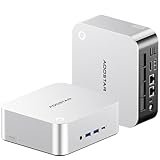
AOOSTAR GEM12+ PRO Barebone Mini PC (Ryzen 7 PRO 8845HS)
Who it suits: Buyers who want the fullest feature set in this guide — a status screen, fingerprint sign-in, the 8845HS’s NPU and the cleanest OCuLink implementation here — and who will use at least some of it.
The GEM12+ PRO’s barebone listing pairs the Ryzen 7 PRO 8845HS — the full Hawk Point chip, eight cores to 5.1GHz, Radeon 780M, and a 16 TOPS NPU the 8745-based picks lack — with a 2.68-inch status screen on the top panel showing live temperatures and load, and a fingerprint sensor for Windows sign-in. The barebone sits in the mid-range of this guide — check price on Amazon — and finishing it as a 32GB/1TB machine means adding the standard memory and storage kit. For builders, the decisive detail is underneath: the OCuLink port runs on its own PCIe 4.0 x4 link, so docking a graphics card does not cost you one of the two M.2 slots — a compromise the UM890 Pro below does ask for. Memory headroom is the best in this guide at up to 128GB across two DDR5-5600 slots, networking is dual Intel 2.5G, there are two USB4 ports, and the BIOS offers power modes topping out at 70W. AOOSTAR also sells a configured 24GB/1TB version: completing the kit yourself gets you 32GB of memory you chose instead — check price on Amazon for both versions.
The owner feedback gathered for this model carries two warnings. The screen’s control software drew complaints from an owner — it works, but it is the least polished part of the package — and the drivers arrive as a single disorganized download rather than an installer. And at least one Amazon buyer reported receiving a unit that had plainly been opened and returned before, feet removed, sold as new: inspect your unit on arrival, whichever seller ships it, and use the return window if the seals tell a story. Wireless, finally, is WiFi 6 rather than the UM870 Slim’s 6E — a step down that will matter to few.
- Dedicated OCuLink on its own PCIe link — both M.2 slots stay free with a dock attached.
- Ryzen 7 PRO 8845HS brings the 16 TOPS NPU the 8745-based picks omit.
- Memory ceiling of 128GB, the highest in this guide, plus a live status screen.
Honest limitation: The screen software is rough, drivers come as a disorganized bundle, and at least one buyer received a previously opened unit — check yours on delivery.
Choose it if you want the screen, the NPU and slot-free OCuLink in one box. Skip it if you would never look at a status screen — the GEM12 MAX delivers the same graphics for less overall.

GMKtec NucBox K8 Plus Barebone Mini PC (Ryzen 7 8845HS)
Who it suits: The gaming-plus-homelab buyer — someone building one small box that plays games today and can moonlight as a dual-network server, firewall or virtualization host tomorrow.
The K8 Plus is the guide’s all-rounder, and its barebone listing is admirably blunt about what it is: the Amazon title ends with “(Without RAM/SSD/OS)” and the style is literally named “0+0”. The kit is also sold through GMKtec’s own store — check price on Amazon for the listing here — and a completed 32GB/1TB build adds the standard memory and storage kit on top. The Ryzen 7 8845HS brings the NPU; memory runs to 96GB; two M.2 PCIe 4.0 slots take up to 8TB between them; and the networking is the best here for infrastructure work — dual Intel i226V 2.5-gigabit ports, the controllers homelab buyers specifically look for. An OCuLink port covers the eGPU path, joined by HDMI 2.1, DisplayPort and USB4 video outputs. The comparison against buying it finished is the strongest in this guide: the same machine is also sold configured with 32GB and 1TB on Amazon, and completing the barebone yourself is the clearest case here for the barebone route paying for its own assembly time — check price on Amazon for both versions.
One listing flaw deserves a spotlight. This listing’s own metadata contradicts its title: the title and style name say no RAM, no SSD and no OS, while a spec field in the same listing names an operating system as if one were installed. Believe the title — this is a barebone, it arrives empty, and GMKtec’s configured versions are separate listings. The lesson generalizes: in this category, always read the style name and the title, not the auto-filled spec table. Beyond that, its compromises are mild: a plain black box with no screen or fingerprint reader, compact rather than tiny at 5.2 × 5 × 2.3 inches.
- Dual Intel i226V 2.5G ports — the homelab-friendly networking the others split or skip.
- A clear saving over its own configured version when you complete it yourself.
- 96GB memory ceiling and 8TB across two M.2 slots for a machine that can grow into server duty.
Honest limitation: The Amazon listing contradicts itself — its spec fields name an operating system its title correctly says is absent — so confirm you are buying the barebone style before checkout.
Choose it if one box must game and serve, and the configured price of the same machine offends you. Skip it if you want the screen-and-fingerprint experience of the GEM12+ PRO, or the slimmer footprint of the UM870 Slim.

MINISFORUM UM890 Pro Barebone Mini PC (Ryzen 9 8945HS)
Who it suits: Buyers spending to the top of this budget for the strongest sustained performance — streamers, creators and heavy multitaskers who will hold the chip at full load for hours, not minutes.
The UM890 Pro is the flagship of this guide, and the kit sits at the premium end of this guide — check price on Amazon — and with the standard completion kit the finished machine stays inside this budget, but close enough to its edge that the comparison section below matters. What the money buys over the 8845HS machines is the Ryzen 9 8945HS itself: the same eight Zen 4 cores pushed to a 5.2GHz boost, the Radeon 780M at its fastest 2800MHz clock, and Minisforum’s Cold Wave cooling with an active heatsink fan for the memory and SSD bays, holding around 43dB in performance mode under sustained load. Around the chip: two DDR5 slots to 96GB, two M.2 PCIe 4.0 slots, dual 2.5G Ethernet, two USB4 ports that can also power the machine via USB-C PD, and four-display output. Against its own configured sibling — the 32GB/1TB version — the barebone route offers the largest saving in this guide when you complete it yourself.
The compromise is printed in the box contents, and it is the one to weigh carefully: the UM890 Pro’s OCuLink arrives as an included M.2-to-OCuLink adapter plate, which means using an external GPU consumes one of your two SSD slots. For a gaming build that means choosing between a second internal drive and the dock — or accepting a single-drive machine while docked. The GEM12+ PRO and MACO above carry dedicated OCuLink ports that ask no such trade. At about 3.5 pounds barebone it is also the heaviest box here, with cooling tuned for performance rather than silence. Its shape is clear: the pick for buyers whose bottleneck is sustained CPU and iGPU performance, not for buyers whose plan starts with an eGPU.
- Fastest chip in this guide: 8945HS at 5.2GHz with the 780M at 2800MHz.
- Cooling built for sustained loads, including an active fan for the RAM and SSD bays.
- Largest saving versus its configured version when you fit the parts yourself.
Honest limitation: OCuLink works through the included M.2 adapter, so docking a GPU costs you one of the two SSD slots — a real trade the dedicated-port picks avoid.
Choose it if sustained performance is the priority and one internal drive is enough while docked. Skip it if your build plan is “two big SSDs plus an eGPU” — that machine is the GEM12+ PRO.
Comparison Table
| Product | Chip & graphics | Kit tier | Completed tier* | OCuLink | Link |
|---|---|---|---|---|---|
| AOOSTAR GEM12 MAX Barebone | Ryzen 7 8745HS / Radeon 780M | Budget | Budget tier | Yes, dedicated | Check on Amazon |
| MINISFORUM UM870 Slim Barebone | Ryzen 7 8745H / Radeon 780M | Budget | Budget tier | No — USB4 only | Check on Amazon |
| AOOSTAR MACO Barebone | Ryzen 7 H 255 / Radeon 780M | Budget | Budget tier | Yes, dedicated | Check on Amazon |
| AOOSTAR GEM12+ PRO Barebone | Ryzen 7 PRO 8845HS / Radeon 780M | Mid-range | Mid-range tier | Yes, dedicated | Check on Amazon |
| GMKtec NucBox K8 Plus Barebone | Ryzen 7 8845HS / Radeon 780M | Mid-range | Mid-range tier | Yes | Check on Amazon |
| MINISFORUM UM890 Pro Barebone | Ryzen 9 8945HS / Radeon 780M | Premium | Premium tier, near the budget edge | Via M.2 adapter | Check on Amazon |
*Completed tier reflects the kit plus a 32GB (2×16GB) DDR5-5600 SODIMM kit and a 1TB PCIe 4.0 NVMe drive. It excludes an operating system license: none of these barebone listings includes one. Memory and SSD prices are volatile in 2026 — check price on Amazon for the kit and check both parts on the day you order.
How to Choose a Barebones Mini PC Under $800
- Budget the finished machine, never the kit. Add memory, storage and — if you need one — a Windows license to every kit price before comparing anything. A budget-tier kit and a premium-tier kit become very different finished computers once parts are added; shop the finished machine, not the box.
- Buy the graphics class, not the chip name. Every pick here runs the Radeon 780M, which is the honest gaming floor at this budget: strong at 1080p, helped by fast dual-channel memory. Chips named 8745H, 8745HS, H 255, 8845HS and 8945HS differ in clocks and NPU, not in graphics class.
- Decide the eGPU question before you buy the box. A dedicated OCuLink port (GEM12 MAX, MACO, GEM12+ PRO, K8 Plus) keeps both SSD slots free with a dock attached. The UM890 Pro’s OCuLink borrows an M.2 slot. The UM870 Slim has no OCuLink at all. This cannot be fixed later.
- Memory speed is graphics performance. The 780M shares system memory, so fit two matched DDR5-5600 SODIMMs for dual-channel bandwidth — a single stick can cost you a fifth or more of your frame rates. 32GB (2×16GB) is this budget’s sweet spot.
- Know whether you need the NPU. The 8845HS and 8945HS carry a 16 TOPS AI accelerator; the 8745H, 8745HS and H 255 do not have one at all. If local AI features matter to you, that single spec splits this guide in half.
- Count the SSD slots against your plans. Two M.2 slots is the norm here. If one will be borrowed by an OCuLink adapter or filled by a games drive on day one, plan capacities accordingly — replacing a too-small boot drive later costs more than sizing it right now.
- Read the style name, not the spec table. Barebone listings are frequently polluted with auto-filled fields from configured siblings — operating systems that are not included, memory that is not fitted. The title and the selected style (“0+0”, “Without RAM/SSD/OS”, “No DDR & SSD & OS”) are the truth.
- Plan the operating system like a component. No kit here includes a Windows license. Budget for one if you need it, install Linux for free, or move an eligible existing license — but decide before the parts arrive.
- Keep the box and check the seals. At least one pick in this guide has a documented case of a buyer receiving a previously opened unit as new. Photograph the seals and test every port inside the return window.
What $800 Actually Buys in a Barebones Mini PC
Shoppers reasonably ask whether the $800 tier hides a different class of machine — a kit with a discrete graphics card, the mini-PC equivalent of a real gaming GPU. We looked for one specifically, and the honest answer shapes this whole guide: at the time of writing, there is no barebones kit with a discrete GPU that we could verify as buyable on Amazon and completable under $800. The machines that pair a mini-PC chassis with laptop discrete graphics — Minisforum’s AtomMan line is the known example — sell as complete systems above this tier; their barebone versions could not be tied to a live Amazon listing at a survivable price. A guide that recommended one anyway would be recommending a rumor.
What $800 genuinely buys is the top of the integrated-graphics class with the expansion door left open. Every pick here pairs the Radeon 780M — integrated graphics capable of 1080p gaming at medium settings in most titles and far higher frame rates in esports games — with either a dedicated OCuLink port or, at minimum, USB4. That port converts today’s integrated machine into tomorrow’s docked system running a desktop graphics card at close to full PCIe 4.0 x4 bandwidth, without replacing the computer. Spend the tier on the port, the chip and the cooling, in that order.
Barebones vs Complete at the Same Total: The Honest Arithmetic
The case for barebones is usually made with vibes; it deserves arithmetic instead. Take the strongest comparison in this guide: GMKtec’s NucBox K8 Plus is also sold configured with 32GB of memory and a 1TB drive on Amazon, while its barebone kit plus the same class of parts completes for noticeably less — a clear saving for perhaps twenty minutes with a screwdriver; check price on Amazon for both versions. The UM890 Pro tells the same story at the top of the range, with its barebone route undercutting its own configured version. Complete 8845HS machines with 32GB and 1TB generally sit above the completed cost of the picks in this guide. When parts are priced normally, barebones wins on money and on choice — your memory brand, your drive, your warranty terms.
The honest counterweight is that “normally” is doing real work in that sentence. Memory and NAND prices are volatile in 2026, with a widely reported component shortage pushing DDR5 and SSD prices up in steps; the cost of the memory and drive used to complete a kit moves with the market, and on a bad month the gap over a discounted complete system narrows or briefly closes. AOOSTAR’s configured GEM12 models price close enough to the do-it-yourself totals that the barebone case there rests on getting 32GB instead of 24GB and choosing your own drive, not on a headline saving. The durable rule: price the exact parts you will buy, on the day you buy them, against the exact configured machine.
OCuLink, USB4 and the External GPU Question
Since the eGPU path is half the reason to buy barebones at this tier, the connectors deserve one plain explanation. OCuLink is a cabled PCIe connection: on these machines it carries a PCIe 4.0 x4 link at roughly 64Gbps, wired close to directly to the processor, which is why a desktop graphics card on an OCuLink dock keeps nearly all of its performance. USB4 carries 40Gbps and tunnels its PCIe traffic, so the same card on a USB4 dock gives up a further slice — still a transformation over integrated graphics, just a smaller one. Neither is hot-swappable on the picks here, so docks connect with the machine off, and OCuLink damage from live-plugging is explicitly outside warranty coverage in the makers’ manuals.
The implementation details are where the picks separate. A dedicated OCuLink port — the GEM12 MAX, MACO, GEM12+ PRO and K8 Plus — is the clean solution: the dock plugs in and both SSD slots remain yours. The UM890 Pro instead ships an adapter plate that converts one of its M.2 slots into the OCuLink port, which works electrically the same but spends storage to do it. The UM870 Slim omits OCuLink entirely, leaving USB4 as its only dock route. And set one expectation now: a dock and a desktop card are a second substantial purchase, not an accessory — buy the port because the plan is real, not as a vague someday.
Common Buying Mistakes
- Comparing kit prices against complete PCs. A barebone kit is not a finished computer; a complete machine may be the cheaper finished product once parts are priced honestly.
- Expecting a discrete GPU at this tier. No verified barebones kit within this budget has one — the tier is Radeon 780M class, with OCuLink as the upgrade path.
- Assuming a Windows license is included because a spec field names one. Barebone listings inherit metadata from configured siblings; if the title says no OS, there is no OS.
- Fitting a single memory stick. Integrated graphics feed from system RAM, and single-channel memory can cut frame rates by a fifth or more. Always buy a matched pair.
- Buying the UM890 Pro for an eGPU build without noticing its OCuLink adapter occupies an M.2 slot — then discovering the second SSD has nowhere to go.
- Buying the UM870 Slim for an eGPU build at all. It has no OCuLink port; USB4 docks work, but at lower bandwidth than the port you thought you were getting.
- Ignoring the DRAM shortage. Memory and SSD prices move in steps in 2026 — price parts the week you order, not the month before.
- Skipping the unboxing check. Previously opened units sold as new are documented in this category — inspect seals, photograph the box, and test inside the return window.
- Plugging or unplugging an OCuLink dock with the machine on. It is not hot-swappable, and the makers exclude the resulting damage from warranty.
Final Recommendation
- Most buyers: AOOSTAR GEM12 MAX Barebone.
- Small desks and quiet rooms: MINISFORUM UM870 Slim Barebone.
- Build quality on a budget: AOOSTAR MACO Barebone (Ryzen 7 H 255).
- Features and future-proofing: AOOSTAR GEM12+ PRO Barebone.
- Gaming plus homelab: GMKtec NucBox K8 Plus Barebone.
- Maximum sustained performance: MINISFORUM UM890 Pro Barebone.
Our top two at this budget are the AOOSTAR GEM12 MAX, for the lowest honest route to a finished 780M machine with a dedicated OCuLink port, and the GMKtec NucBox K8 Plus, for the broadest all-round build — dual Intel networking, 96GB of memory headroom and the largest verified saving over its own configured version. If your desk is the constraint, the UM870 Slim is the pick that disappears; if you want to watch your machine work, the GEM12+ PRO’s screen and slot-free OCuLink earn their premium; and if your workloads run at full tilt for hours, the UM890 Pro’s chip and cooling justify finishing within sight of the budget’s edge. Builders working to a tighter total should also see Best Barebones Mini PC Under $700, and those whose plan starts with a docked desktop card should read Best Barebones Mini PC For 1440p Gaming Under $800 before choosing a port. Price the memory and drive the same week you order the kit, read the listing’s style name twice, and check the live price before you buy — at $800, that homework is the difference between a bargain and a box of missing parts.
Frequently Asked Questions
What does “barebones” actually mean for a mini PC?
It means the box arrives with a chassis, motherboard, soldered processor, cooling and power supply — and nothing else. There is no memory in the SODIMM slots, no SSD in the M.2 slots and no operating system installed. Every pick in this guide is a true barebone in that sense. Listings that include memory, storage or an OS are configured versions, sold under separate style names.
What is the real total cost of a barebones mini PC under $800?
Add the cost of the parts this guide standardizes on — a 32GB (2×16GB) DDR5-5600 memory kit and a 1TB PCIe 4.0 NVMe drive — to the kit price; check price on Amazon for the kit and price the parts the same week. The six finished machines here range from budget-tier to premium-tier completed builds within this budget. A Windows license, if you need to buy one, is extra on top of every total; Linux costs nothing. Because memory and SSD prices are volatile in 2026, re-price the parts the week you order.
Can a barebones mini PC under $800 play games?
Yes — at 1080p. All six picks run AMD’s Radeon 780M integrated graphics, which handles most games at medium settings at 1080p and esports titles at much higher frame rates, provided you fit dual-channel DDR5-5600 memory. Demanding games at 1440p or high settings are beyond integrated graphics — that is what the OCuLink port on four of these picks is for, with a dock and desktop card added later.
Is there a barebones mini PC with a discrete GPU under $800?
Not that we could verify on Amazon. Discrete-GPU mini PCs exist — Minisforum’s AtomMan line is the known family — but they are sold as complete systems above this budget, and their barebone versions could not be tied to a live, priced Amazon listing that completes under $800. At this tier, the realistic route to discrete-class graphics is a 780M kit with an OCuLink port now and a GPU dock later.
What is OCuLink, and why does it matter here?
OCuLink is a cabled PCIe connector that lets an external dock hold a desktop graphics card and feed it at PCIe 4.0 x4 bandwidth — roughly 64Gbps, against 40Gbps for USB4 — so the card keeps nearly all its performance. Four picks here have OCuLink; check the implementation, because the UM890 Pro’s version borrows an M.2 slot via an adapter, while the AOOSTAR and GMKtec ports are dedicated. OCuLink is not hot-swappable: connect docks with the machine off.
Do I need to buy Windows for a barebones mini PC?
Only if you want Windows and do not already hold an eligible license. None of the six barebone listings in this guide includes an operating system, whatever their spec fields imply — one listing even contradicts its own title on this point. Your options are a retail Windows license, transferring an eligible existing one, or installing Linux free. Decide before the parts arrive.


