Where to buy
Check the latest price, availability and delivery on Amazon. Orders are placed on Amazon. We may earn a commission from qualifying purchases.
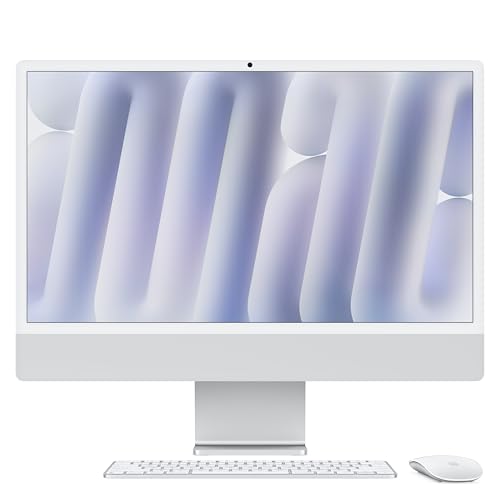
- Best overall: Apple 2024 iMac with M4 Chip, 24-inch 4.5K Retina, 16GB, 256GB — Check on Amazon
- Dell 27 All-in-One EC27250, Core 7 150U, GeForce MX570A, 32GB, 1TB — Check on Amazon
- HP OmniStudio 27, Ryzen AI 7 445, Radeon 840M, 16GB, 512GB — Check on Amazon
- Dell 27 All-in-One EC27250, Core 5 120U, 16GB, 512GB — Check on Amazon
- HP 27-inch All-in-One, Ryzen 5 7520U, 16GB, 1TB, Touchscreen — Check on Amazon
See 1 more Amazon option
- Apple 2023 iMac with M3 Chip, 24-inch 4.5K Retina, 8GB, 256GB — Check on Amazon
Read the full guide ↓
Disclosure: As an Amazon Associate, reviewstook.com earns from qualifying purchases. Links to Amazon on this page are affiliate links; they cost you nothing extra. Listing details such as price and availability change often, so check the current Amazon listing before you buy.
If this is your first computer — or the first one you have bought in a long time — an all-in-one is the kindest place to start, and this guide is written for you. An all-in-one is simply a screen with the whole computer built into the back of it: no separate box, no nest of cables. You plug in one power cord, and you own a complete computer with a camera and speakers already inside. That simplicity is the entire point of the category, and at $1,200 all-in-ones stop being stripped-down bargains and become genuinely good machines: big screens, 16GB-class memory, and current processors.
Because this guide assumes no prior knowledge, here is the honest summary before any product names appear. An all-in-one under $1,200 is an excellent everyday computer: browsing, email, documents, video calls, streaming, photos and school or office work are all comfortably within every machine below. What it is not is a gaming computer. Five of the six machines here use integrated graphics — a small graphics circuit that shares the main processor’s resources — fine for older games, simple games and low settings, not for demanding modern titles. One machine, a Dell, includes a separate graphics chip, making it the best of the six for games and graphics-using apps — but it is an entry-level laptop part with little memory of its own, so it improves light gaming rather than turning the machine into a gaming PC. If playing the latest games well is the main reason for this purchase, a gaming tower at the same money buys a completely different level of performance, and our guide to Best 1080p Gaming PC For Beginners Under $1200 is the right starting point instead.
Three more plain facts will help you read the reviews like an experienced buyer. First, the screen cannot be changed later: display and computer are one object, so the screen you buy is the screen you keep for the machine’s whole life — why this guide judges the screen first. Only the two Apple machines below beat standard high definition; every Windows pick is a 27-inch Full HD screen, big and pleasant but a little less crisp for text, and no Windows all-in-one with a sharper 27-inch screen could be verified under $1,200 on Amazon in the US during this research — treat any listing claiming one as an error until proven otherwise. Second, memory and storage are mostly permanent too, so the reviews keep returning to two numbers — memory (look for 16GB) and storage (256GB, 512GB or 1TB). Third, it matters who sells the machine: some listings below are sold by Amazon itself; one comes from an independent seller that opens the box to fit the advertised parts.
In this guide
Quick Picks
Short on time, or comparing several options at once? Each row below names a buyer type and the machine that suits it, with a link to the listing.
| Buyer type | Pick | Why it stands out | Link |
|---|---|---|---|
| Best overall | Apple 2024 iMac, M4, 24-inch | The sharpest screen here, 16GB of memory included, sold by Amazon | Check on Amazon |
| Most complete Windows machine | Dell 27 EC27250, Core 7, MX570A | The only separate graphics chip here, plus 32GB of memory and 1TB of storage | Check on Amazon |
| Newest Windows technology | HP OmniStudio 27, Ryzen AI 7 445 | The most modern processor in the guide and the strongest built-in graphics | Check on Amazon |
| Safest mainstream Windows choice | Dell 27 EC27250, Core 5 | A proven 27-inch design with the right everyday specification for less money | Check on Amazon |
| Most features for the least money | HP 27-inch, Ryzen 5 7520U | Touchscreen, 1TB of storage and Windows 11 Pro — with a slow-processor warning | Check on Amazon |
| Best screen on a tighter budget | Apple 2023 iMac, M3, 24-inch | The same superb Apple screen for less money — with an 8GB memory warning | Check on Amazon |
How These Picks Were Chosen
Every machine below is a real Amazon listing selected to fit this budget in the United States. Prices in this category move a great deal, so check price on Amazon before you buy and confirm the live listing still fits the budget. Two machines here, the Dell Core 7 and the HP OmniStudio, can sit above $1,200 at times; they are included for buyers willing to wait for a dip, and their reviews instruct you, plainly, to buy only when the live price on the page is at or under the ceiling.
We did not use these computers ourselves. We read the manufacturers’ listings, specification pages and price histories, and compared the parts in the order a beginner should care about them. The screen comes first, because it is the one part you will look at every day and the one part that can never be replaced. Memory comes second, because it decides whether the computer still feels smooth in three years, and on most of these machines it can never be increased. Storage and the processor come third. And the seller matters more than beginners expect: the name beside “sold by” decides who handles your return and your warranty. Where a listing’s own details contradict each other — and one below does, in its memory description — the review points at the contradiction and tells you how to check the machine when it arrives.
One test was applied to all six machines: will this exact machine, exactly as sold, still be pleasant to use in five years? All-in-ones are bought finished — you cannot swap in a faster processor later, the graphics cannot be upgraded, and on most of these designs the memory is fixed at the factory. So each pick was judged on the configuration in the listing, not on what it might become. Machines that failed the five-year test on memory or storage were left out, or are included with that failure stated openly as their honest limitation.
A Beginner’s Glossary: The Words on the Listing, Translated
Computer listings are written in a shorthand that assumes you already know it. Here are the terms used in this guide.
- All-in-one (AIO). A computer built into the back of its own screen. One power cord, a keyboard and a mouse, and you are done. The opposite is a “tower” — a separate box that needs a separate monitor.
- Processor (CPU). The chip that does the computer’s thinking. More “cores” generally means it can juggle more tasks at once. Any current processor in this guide is fast enough for everyday use; the one older, weaker processor below is clearly flagged.
- Integrated graphics. A small graphics circuit built into the processor, sharing the machine’s memory. It handles the screen, videos, photos and light games. Five of the six machines here work this way.
- Graphics card / discrete GPU. A separate, dedicated chip just for graphics, with its own memory — what serious gaming requires. Only one machine here has one, and it is an entry-level laptop version: better than integrated graphics, far below a gaming PC’s card.
- Memory (RAM), measured in GB. The computer’s short-term workspace — how much it can hold open at once. Think desk size: 8GB is a small desk that fills up fast, 16GB a comfortable desk for everyday work, 32GB a big desk for heavy multitasking. On all-in-ones the desk usually cannot be enlarged later, so buy the size you need now.
- Storage (SSD), measured in GB or TB. The computer’s filing cabinet — where files, photos and programs live permanently. 1TB equals 1,000GB. 256GB suits light users who keep things online; 512GB is the comfortable mainstream choice; 1TB suits large photo and video collections. An SSD is the modern, fast kind of storage; every machine here has one.
- Resolution. How many tiny dots (pixels) make up the picture; more pixels means sharper text and images. “Full HD” or “1080p” is 1920 × 1080 pixels — the standard on the 27-inch Windows screens here. The iMacs’ “4.5K” screen packs roughly four times as many pixels into 24 inches, which is why their text looks almost printed.
- Operating system. The software the whole computer runs on — Windows on the Dell and HP machines, macOS on the Apple machines. Choose by the programs you need, not the hardware: a Windows program does not run on an iMac, and the other way round.
- Sold by. The line on the Amazon page naming who is actually selling you the machine. “Sold by Amazon” or the brand itself is the simplest arrangement. An independent seller can be legitimate, but it changes who handles returns and warranty — and one listing below comes from a seller that opens the box to install the advertised parts, which is why its review asks you to check the delivered machine carefully.
The 6 Best All-in-One PCs Under $1,200 for Beginners
Apple 2024 iMac with M4 Chip, 24-inch 4.5K Retina (16GB, 256GB) — Silver
Who it suits: A beginner who wants the easiest, prettiest computer ownership experience available at this budget — one beautiful screen, nothing to assemble, nothing to configure — and whose programs live happily on a Mac: web, mail, documents, photos, video calls and streaming.
Start with the screen, because with this machine the screen is most of what you are buying, and it is superb. The 24-inch display shows 4480 × 2520 pixels — about four times as many as the Windows screens in this guide — at 500 nits with rich, accurate color. Behind it is Apple’s M4 processor, and this generation fixed the old iMac’s biggest beginner trap: 16GB of memory is now standard, so the comfortable desk size from the glossary is what you get without paying extra. Day to day it is quick and completely silent, with the best built-in camera and speakers in this guide. The listing here is sold by Amazon.com itself — check price on Amazon to confirm it still fits the budget before you order.
The compromises are few but permanent. Storage is 256GB, the smallest amount in this guide, sealed inside the machine forever — neither storage nor memory can ever be added internally. Large photo or video collections will eventually mean an external drive or paid online storage; the total-cost section below covers that honestly. The screen, for all its sharpness, is 24 inches — smaller than the 27-inch Windows screens here — the stand tilts but does not rise or sink, and there is no touchscreen. Games are its weakest subject: strong integrated graphics, but a much smaller game library than a Windows PC’s. Finally, it runs macOS, not Windows — if a program you need is Windows-only, no screen quality can fix that, and you should choose from the Windows picks below instead.
- The finest screen under $1,200 in this category: 4.5K resolution, 500 nits, wide color.
- 16GB of memory is standard on this generation — the old entry-level trap is gone.
- Sold by Amazon.com; check price on Amazon before you buy.
Honest limitation: 256GB of storage, sealed in permanently — and when the computer eventually ages out, the wonderful screen retires with it.
Choose it if you want the best screen and the calmest, quietest ownership experience, and your programs are Mac-friendly. Skip it if you need Windows, a bigger 27-inch screen or a touchscreen, or keep large files on the machine itself.

Dell 27 All-in-One EC27250 — Core 7 150U, GeForce MX570A, Touchscreen (32GB, 1TB)
Who it suits: A Windows beginner who wants the most complete specification in the guide — the biggest memory, the biggest storage, a touchscreen, and the only separate graphics chip — for a family desk, a home office, or a first step into photo editing, video work or light gaming.
The processor is Intel’s Core 7 150U, a current ten-core chip. The memory is 32GB — the big desk — and storage is a full 1TB, the filing cabinet you do not have to manage. The screen is a 27-inch Full HD touchscreen — tap and scroll on the glass, something no iMac offers. It runs Windows 11 Pro, connects with fast Wi-Fi 6E, and Dell’s onsite service sends a technician to your home if the sealed machine develops a fault. Then there is a feature no other pick has: an NVIDIA GeForce MX570A, a genuine separate graphics chip with 2GB of its own memory. In plain terms, programs that use graphics hardware — photo and video editors, design tools — get real help, and older, lighter games run noticeably better than on any integrated-graphics machine here. What it does not change: 2GB is a small amount of graphics memory and this is an entry-level laptop-class chip, so recent demanding games at high settings remain out of reach. Treat the chip as a genuine bonus for creative apps and light gaming — not as a reason to buy the machine for games, because it is still not a gaming PC.
Two cautions, one about the screen and one about the price. The screen is Full HD spread over 27 inches, so text looks softer than on the iMac’s dense panel; that softness is what all-day readers will notice most. The price demands patience, as this model can sit above the budget. So the rule for this pick is absolute — check price on Amazon and buy only when the live price on the page is at or under $1,200, and before ordering confirm the seller’s name and that the configuration on the page matches this one.
- 32GB of memory and 1TB of storage — the only pick needing no apology on either number.
- The only separate graphics chip in the guide, for creative apps and light gaming.
- 27-inch touchscreen, Windows 11 Pro and Dell’s come-to-you onsite service.
Honest limitation: It does not always fit this budget, so timing matters — check the live price before you commit — and the graphics chip’s 2GB of memory is an entry-level ceiling, not gaming headroom.
Choose it if you want the fullest Windows specification and can wait for a price dip. Skip it if you need the sharpest possible text, serious gaming, or a price that is under budget every day of the week.

HP OmniStudio 27 (27-cw0102, 2026) — Ryzen AI 7 445, Radeon 840M (16GB, 512GB)
Who it suits: A Windows beginner who likes the idea of buying the newest technology in the room — the most current processor in this guide, with the strongest built-in graphics — in a tidy, modern design sold by Amazon itself.
Most all-in-ones at this price are built around processors a generation or two behind. This one is the exception. Its AMD Ryzen AI 7 445 is a current-generation chip that also carries a small dedicated circuit (an NPU) for the artificial-intelligence features built into Windows 11 — the sort of thing that quietly handles background blur on calls. Its graphics are integrated, but the Radeon 840M is the strongest integrated graphics in this guide: photo editing feels snappier, and older or casual games at modest settings are more comfortable here than on the Intel-based Dells. The rest is the sensible mainstream pairing — 16GB of memory and 512GB of storage — behind a 27-inch Full HD screen, in a Jet Black design, on an adjustable stand. Amazon sells this model directly — the cleanest buying route of the Windows picks. Its price, however, can vary — check price on Amazon and buy it only when the live price fits the budget, on a dip below $1,200.
The limits, in the same plain terms. Storage at 512GB is adequate rather than generous at this price, and on this model both storage and memory should be treated as fixed: owner reporting indicates the memory cannot be upgraded, and changing storage inside an all-in-one is a technician’s job at best, so an external drive or online storage is the growth plan. The screen is 27 inches of Full HD, with the same gentle softness for text as the Dells. One warning about the graphics matters: HP’s own marketing uses grand language about gaming, and this guide will not repeat it. The Radeon 840M is the best of the built-in graphics here, but “best integrated” still means light and older games at modest settings. And because this is a recent model, its long-term reliability record is still being written by its first owners.
- The newest processor in the guide, including a dedicated AI circuit for Windows features.
- Radeon 840M — the strongest built-in graphics of the six machines.
- Sold by Amazon directly; check price on Amazon and buy only when the live price fits the budget.
Honest limitation: 512GB of storage and 16GB of memory are effectively permanent, the screen is standard Full HD, and it does not always sit inside this budget — check the live price and buy only on a dip that fits.
Choose it if you want the most up-to-date Windows all-in-one and the simplicity of buying from Amazon itself. Skip it if you want 1TB of storage, 32GB of memory, or a screen sharper than Full HD.

Dell 27 All-in-One EC27250 — Core 5 120U (16GB, 512GB)
Who it suits: The first-time Windows buyer who wants the safe, sensible choice: a big, proven screen and exactly the right everyday specification from a major brand, without paying for the flagship model above.
This is the Core 7 machine’s design in its calmer, cheaper configuration — and for many beginners it is the better buy. The processor is Intel’s Core 5 120U, a ten-core chip that reaches up to 5.0 GHz, paired with 16GB of memory and 512GB of storage: the comfortable desk and the mainstream filing cabinet from the glossary. The screen is the family’s 27-inch Full HD IPS panel with 99% sRGB coverage, which in plain language means colors look accurate rather than washed out. Dell includes a wireless keyboard and mouse in the box, the Wi-Fi is the fast 6E kind, and the same onsite service stands behind it. Of the Windows picks, this design carries the strongest record of buyer feedback behind it — reassuring for a first-time buyer. Best of all, check price on Amazon — this configuration is positioned to fit this budget as an everyday option, not only on deal days. For the work these machines actually do — browser tabs, documents, spreadsheets, video calls, streaming, sorting photos — this is the correct amount of computer.
What you give up versus the Core 7 version: Memory is 16GB instead of 32GB — still the right amount for years of everyday use, with less spare room. Storage is half, at 512GB. The graphics are Intel’s integrated kind, so gaming shrinks to the very lightest titles. There is no touchscreen, and Windows is the Home edition rather than Pro — a difference most home users will never notice. The screen is the same 27-inch Full HD, with the same softness for text. One detail deserves attention: Dell’s documentation for this family shows the 16GB of memory can be built as one stick or two depending on the variant, which affects whether a spare slot exists inside. If adding memory one day matters to you, check the exact unit’s configuration on the live listing or with Dell before buying, rather than assuming.
- The most proven Windows design in the guide, with the strongest buyer track record.
- 27-inch screen with accurate color, fast Wi-Fi 6E, wireless keyboard and mouse included.
- Positioned to fit the budget as an everyday option — check price on Amazon to confirm.
Honest limitation: Integrated graphics only, no touchscreen, and 512GB of storage — this is the sensible configuration, not the generous one, and the 27-inch Full HD screen’s softness for text is permanent.
Choose it if you want a dependable, mainstream Windows all-in-one for everyday work at a fair price. Skip it if you want touch, a separate graphics chip, 32GB of memory or a terabyte of storage — that is the Core 7 model above — check its live price carefully.

HP 27-inch All-in-One — Ryzen 5 7520U, Touchscreen (16GB, 1TB)
Who it suits: A beginner shopping by features — a big touchscreen, a full terabyte of storage, Windows 11 Pro and everything in the box — for a machine that will live a light-duty life: browsing, documents, video calls, streaming, a family desk or a grandparent’s first computer.
On paper, this listing is the bargain of the guide. A 27-inch Full HD touchscreen you can tap and swipe. Sixteen gigabytes of memory. A full 1TB of storage — the big filing cabinet. Windows 11 Pro, with Microsoft Office included according to the listing’s title. Wi-Fi 6, a wireless keyboard and mouse, in a budget-tier bundle within this guide — check price on Amazon to confirm the live listing. For a shared space where people walk up and tap the screen — a kitchen counter, a reception desk, a family room — that bundle answers the brief completely, and for light work it may be the cleverest spend of the six.
Here is the warning, stated plainly. The processor, a Ryzen 5 7520U, is an entry-level chip built on an older design with four cores, created for inexpensive laptops. It is the weakest processor in this guide by a wide margin — every other machine here will feel quicker in year one and much quicker in year four — and its built-in graphics suit video and very light games. The seller matters just as much: this listing is sold by an independent seller called Smartisan Tech, not by Amazon or HP, and listings of this kind are typically machines whose box the seller has opened to fit the advertised memory and storage. The listing’s own specification table contradicts itself — it describes the memory as DDR4, although this processor’s platform is built around a different memory type, LPDDR5. So check the delivered machine, item by item, against what you ordered, while the return window is open. None of this makes it a bad buy for light work. All of it makes it the wrong buy for anyone hoping for a five-year main computer at this budget level.
- The fullest feature list here: 27-inch touch, 1TB of storage, Windows 11 Pro, wireless keyboard and mouse.
- A budget-tier option in this guide — check price on Amazon before you buy.
- A complete, ready-to-use bundle for shared, light-duty spaces.
Honest limitation: The processor is a budget-laptop chip, the slowest here by far; the seller is a third party that opens the box to fit the advertised parts; and the listing’s own details contradict themselves about the memory. Verify everything when it arrives.
Choose it if your workload is light, the space is shared, and the feature list matters more than speed that lasts. Skip it if this will be your main computer for the next five years — the Dell Core 5 or the HP OmniStudio above is where that money belongs.

Apple 2023 iMac with M3 Chip, 24-inch 4.5K Retina (8GB, 256GB) — Silver
Who it suits: A beginner who fell in love with the iMac’s screen in the first review but not with its price — someone whose computer life is reading, writing, browsing, mail and streaming, and who can honestly say their use is light.
Everything good said about the first iMac’s screen applies here, because it is the same screen: 24 inches, 4480 × 2520 pixels, 500 nits, wide color — the sharpest, most pleasant display in this guide, in the same slim, silent enclosure. The processor is Apple’s M3, one generation older than the M4, and for everyday jobs — documents, browsing, email, streaming, organizing photos, light editing — it remains entirely capable. The attraction is value: it sits in a lower tier than its newer sibling for the same viewing experience — check price on Amazon to compare the two. If the screen is what you are really buying, that saving can be worthwhile.
But this machine carries the most important warning in the entire guide, and it is not about the processor. It is about memory: 8GB, sealed inside, forever. The glossary called 8GB the small desk, and on the newer iMac Apple itself made 16GB standard — an admission that the small desk had become this computer’s defining compromise. For genuinely light use, 8GB copes: a browser, mail, documents, a film. For anyone who keeps dozens of tabs open, edits photos seriously, or expects a computer to feel fresh in five years, 8GB is the limit they will meet first and most often — and it cannot be fixed later, because the memory can never be changed. Storage is the same sealed 256GB as on the M4 model. So read this pick the honest way: it is a magnificent screen with a good computer attached, at a fair price, for light users. For everyone else it is a false economy, and the extra money for the 16GB M4 model is the best-spent difference in this guide.
- The same 4.5K screen as the newer iMac, in a lower price tier.
- A lower-tier route here to a screen of this quality — check price on Amazon.
- The M3 processor remains entirely capable for everyday home and office jobs.
Honest limitation: 8GB of memory, sealed permanently — the single specification in this guide most likely to decide how long the machine stays pleasant, and the reason heavier users should buy the M4 instead.
Choose it if your use is genuinely light and the screen is the purchase. Skip it if you multitask heavily, edit media, or keep computers for five years or more — the newer iMac’s 16GB is worth every cent of the difference.

Comparison Table
| Product | Display | Processor / Graphics | Memory / Storage | Link |
|---|---|---|---|---|
| Apple 2024 iMac, M4 | 24-inch 4.5K Retina, 500 nits | Apple M4 (8-core CPU / 8-core GPU) | 16GB / 256GB | Check on Amazon |
| Dell 27 EC27250, Core 7 | 27-inch FHD touchscreen | Core 7 150U / GeForce MX570A 2GB | 32GB / 1TB | Check on Amazon |
| HP OmniStudio 27 (27-cw0102) | 27-inch FHD | Ryzen AI 7 445 / Radeon 840M | 16GB / 512GB | Check on Amazon |
| Dell 27 EC27250, Core 5 | 27-inch FHD IPS, 99% sRGB | Core 5 120U / Intel integrated | 16GB / 512GB | Check on Amazon |
| HP 27-inch, Ryzen 5 7520U | 27-inch FHD touchscreen | Ryzen 5 7520U / integrated | 16GB / 1TB | Check on Amazon |
| Apple 2023 iMac, M3 | 24-inch 4.5K Retina, 500 nits | Apple M3 (8-core CPU / 8-core GPU) | 8GB / 256GB | Check on Amazon |
How to Choose an All-in-One PC Under $1,200
- Decide the operating system before anything else. Windows or macOS decides which programs you can run for the life of the machine. If your work, school or family already lives in one world, stay in it. If you are free to choose, the iMacs offer the best screen and the simplest ownership; the Windows machines offer bigger screens, touch, and more storage.
- Pick the screen with your eyes open. The real choice at this budget is between the iMacs’ smaller, far sharper 24-inch screen and the Windows machines’ larger, softer 27-inch screens. Read and write all day? Sharpness wins. Share the machine or watch video? Size may win. And remember: no sharper 27-inch Windows all-in-one could be verified under $1,200, so treat any listing promising one as a mistake until proven otherwise.
- Treat 16GB of memory as the minimum, and 8GB as a warning sign. Memory is the desk size from the glossary, and on these machines the desk cannot be enlarged later. Sixteen gigabytes is comfortable for years of everyday use; the one 8GB machine here is fenced with warnings because that saving is repaid, with interest, in a machine that feels old before its time.
- Match storage to your real habits, not your hopes. Photos online and few documents? 256GB works. A growing photo library on the machine? Start at 512GB. Video or a big media collection kept locally? Look for 1TB. Whatever you choose is effectively permanent.
- Read the “sold by” line before the specification line. Sold by Amazon or the brand means the standard return process and the manufacturer’s warranty. Sold by an independent seller — particularly one that opens the box to fit the advertised parts — means verifying the delivered machine against your order, promptly, while returns are still simple.
- Be honest about games. Built-in graphics, including the strong Radeon 840M in the HP, mean older games, simple games and modest settings. The Dell Core 7’s separate graphics chip is a real step up for light gaming and creative programs, and still not a gaming machine. If modern games are the point, a gaming tower at this money is the right purchase instead.
- Check the everyday comforts: camera, speakers, stand. You will use these daily, and in an all-in-one they are built in rather than bought separately. The iMacs lead this guide on camera and speakers. On the Windows machines, confirm the camera is present and whether the stand adjusts in height as well as tilt, especially if people of different heights share the desk.
- Be patient with prices in this category. Prices here can swing noticeably, and two picks in this guide only belong in it when their live price dips into the budget. Set the budget you are willing to pay and watch for it: a week of patience is worth more than any single specification upgrade at this level.
- Confirm the exact configuration on the page before ordering. Computer families sell many near-identical variants under almost the same name. Match the processor, memory, storage and screen on the live listing to the review you read — a cheaper variant wearing the same product name is the oldest trick in this category.
Your First Evening: Setting Up, Step by Step
Beginners often worry that setup is a technical ordeal. With an all-in-one it genuinely is not — there is almost nothing to connect. Here is the whole first evening, in order.
- Step 1 — Unbox and place it. Lift the machine out, peel off the protective film, and set it on the desk where it will live. Plug the power cord into the back and into the wall. That is the only cable the computer itself needs.
- Step 2 — Connect the keyboard and mouse. The Windows machines here include a wireless keyboard and mouse — fit the batteries if needed, and look for a tiny USB receiver, in the box or stored inside the mouse, which plugs into the back of the screen. The iMacs’ matching keyboard and mouse pair automatically. A wired set, if supplied instead, plugs into any USB socket.
- Step 3 — Turn it on and answer the questions. The machine walks you through choosing a language, joining your home Wi-Fi (have the password handy), and signing in — with a Microsoft account on Windows or an Apple ID on a Mac. That account is how your settings, purchases and backups follow you, so create it properly.
- Step 4 — Let it update, and let it take its time. A new computer almost always has system updates waiting; on the first evening they can take a while and restart the machine more than once. This is normal, not a fault. Leave it plugged in, and do not judge the machine’s speed until the updates are done.
- Step 5 — Check that you received what you ordered. Open the settings screen that describes the computer — “About” in Windows Settings, or “About This Mac” under the Apple menu — and read the processor, memory and storage against your order confirmation. This matters most for the marketplace listing in this guide, whose own description contradicts itself about memory. If anything differs, contact the seller now, inside the return window, and keep the box until you are satisfied.
- Step 6 — Install the handful of programs you actually use. A web browser if you prefer a different one, your email, your video-call app, your photo service. Take everything from the machine’s own app store or the maker’s website — downloading programs from unfamiliar sites is how beginners most often install things they never wanted.
- Step 7 — If you play games, here is where they come from. Games are bought and downloaded from online stores — on Windows, the Microsoft Store and the popular Steam store; on a Mac, the Mac App Store. Download one or two lighter or older titles first, lower the graphics settings if the game offers the choice, and set your expectations by the reviews above: these machines are for gentle gaming.
What the Price Does Not Include: The Honest Total Cost
The good news first: an all-in-one is the closest thing in computing to a complete price. The screen, camera and speakers are built in — items a tower buyer must purchase separately — and the Dell Core 5 and the budget HP include a wireless keyboard and mouse in the box, as do the iMacs. For most beginners, the machine in the listing is the whole purchase. There are, however, three honest additions to be aware of.
The first applies to the two iMacs and their sealed 256GB of storage. If your photo and video library outgrows it — and for many households it will, over five years — the growth path is an external drive, or a monthly online-storage subscription. Either belongs in the iMac decision from the start; a household with a large library should weigh the Windows machines’ 512GB and 1TB configurations against it. The second addition is patience, which costs time rather than money: the Dell Core 7 and the HP OmniStudio are only good purchases when their live price fits the budget, so check price on Amazon and wait for a dip rather than paying over the ceiling for the same machine. The third is small and optional — a desk, a chair, a surge protector are your own furniture decisions; no pick here requires any accessory to work as described. And you will never need to budget for the upgrade that does not exist: there is no later memory or graphics purchase for these machines, which is precisely why this guide insists on choosing the right configuration now.
Can You Upgrade It Later? The Plain Answer
Mostly no — and it is better to understand that before buying than to discover it after. In a tower computer, parts sit in slots and can be swapped: more memory, a bigger drive, a faster graphics card. An all-in-one is built like a television instead: everything is fitted tightly behind the screen at the factory, to be used as it arrives. In plain terms: the processor can never be changed, in any machine here. The graphics can never be changed either — if games outgrow the machine, the answer is a different computer, not a new part. Memory is fixed permanently in both iMacs, is reported as not upgradeable in the HP OmniStudio, and in the Dell family depends on how the exact unit was built — Dell’s documentation shows variants assembled differently — so treat any Dell memory upgrade as a question to confirm for the specific machine before purchase, not as a plan. Storage changes, where possible at all in the Windows machines, are a technician’s job, not an afternoon project for a beginner.
What you can always do is expand from the outside: plug in an external drive for more filing-cabinet space, add a second screen alongside the Windows machines, attach a better camera or speakers by USB. But the honest conclusion stands, and it is why this guide repeats its two favorite numbers — 16GB of memory, and storage matched to your library — so insistently: you are not buying a starting point. You are buying the finished thing, and the configuration on the listing page is the configuration you will own in five years — the one decision in this purchase that cannot be revisited.
Common Buying Mistakes
- Buying an all-in-one mainly for games. At $1,200 this category offers built-in graphics and one entry-level graphics chip; a gaming tower at the same money is a different universe of performance.
- Saving money by accepting 8GB of memory. On a sealed machine, that saving is collected back with interest as the computer slows in a few years — the older iMac’s warning applies to every brand.
- Assuming a bigger screen is a sharper screen. Every 27-inch pick here is standard Full HD; the smaller iMac screens carry about four times the pixels. Size and sharpness are two different purchases.
- Paying over budget for a deal-dependent machine. Two picks in this guide are only under budget when their live price dips; buying them above the ceiling overpays for nothing at all — check price on Amazon first.
- Ignoring who is selling the machine — and what its own listing says. A third-party listing can be a good purchase, but ordering without noting the seller, who handles the warranty, and whether the box was opened to fit the advertised parts is how specification surprises happen; on one listing here, the specification table even disagrees with the machine’s own platform about its memory type, so check the delivered computer against the order during the return window.
- Underbuying storage because “everything is online these days.” Online storage for a photo library costs money every month for the life of the machine; include it in the 256GB decision honestly rather than discovering it later.
- Forgetting that the screen retires with the computer. A tower’s monitor can serve three successive PCs; an all-in-one’s screen ends when the computer does — one more reason to judge the display first.
- Skipping the first-evening checks: the processor, memory and storage shown in the settings, the camera and speakers on a real call, and the seller’s name against your invoice.
Final Recommendation
- Most beginners who can use macOS: Apple 2024 iMac with M4.
- The fullest Windows specification, bought at its low price: Dell 27 EC27250, Core 7 with MX570A.
- The newest Windows platform, sold by Amazon: HP OmniStudio 27 (27-cw0102).
- The safe mainstream Windows choice: Dell 27 EC27250, Core 5.
- Light-duty shared spaces on a feature budget: HP 27-inch, Ryzen 5 7520U.
- The premium screen for genuinely light users: Apple 2023 iMac with M3.
For a first computer, our top two are the M4 iMac — for the screen that defines this category and the calmest ownership experience a beginner can buy — and the Dell EC27250 in its Core 7 configuration, for buyers who need Windows and can catch it when its live price fits the budget: the only pick here with 32GB of memory, a terabyte of storage, a touchscreen and a separate graphics chip. Between them they cover the two honest shapes of this search: the best screen and simplest life, or the biggest specification sheet. If neither fits, the Dell Core 5 is the safe mainstream answer and the OmniStudio the modern one, and the older iMac and budget HP can both be chosen well, as long as their memory and processor warnings are read as part of the price. Beginners on a tighter budget should also see Best All In One PC Under $800, and those with more room can step up to Best All In One PC Under $1500. Check the live price, the seller and the exact configuration before you order — at $1,200, in a machine that cannot be upgraded, that homework is the whole purchase.
Frequently Asked Questions
I have never bought a computer. Which of these is the safest first purchase?
If your programs allow macOS, the 2024 iMac with M4: sold by Amazon, its memory is the right size as standard, and there is almost nothing to set up or maintain. If you need Windows, the Dell EC27250 in its Core 5 configuration is the safe mainstream choice — a proven design, the right everyday specification, and a price under budget normally rather than only on deal days.
Can any of these computers play games?
Gently, and with honest expectations. The Dell Core 7’s separate graphics chip and the HP OmniStudio’s strong built-in graphics handle older games, simple games and modest settings best; the rest are for very light gaming. None of the six is a gaming machine in the way a $1,200 gaming tower is — if games are the main purpose, start from a gaming-PC guide instead.
How much memory and storage do I actually need?
For a machine you intend to keep five years: 16GB of memory is the comfortable minimum for browsing, office work and video calls; 32GB — offered here only by the Dell Core 7 — adds headroom for heavier multitasking and creative programs. For storage, 256GB suits light users who keep files online, 512GB is the mainstream choice, and 1TB suits collections kept on the machine. Neither can be meaningfully increased later, which is why the question matters now.
Why is there no Windows all-in-one here with a sharper 27-inch screen?
Because none could be verified selling under $1,200 on Amazon in the US during this research. The Windows picks are all 27-inch Full HD; the sharp screens at this budget are the iMacs’ smaller 24-inch 4.5K displays. Sharper Windows all-in-ones exist, at higher prices than this ceiling allows.
Does it really matter who sells the machine on Amazon?
Yes — more than on most purchases. A machine sold by Amazon or the brand comes with the standard return process and the manufacturer’s warranty in their usual forms. An independent seller that opens the box to install the advertised parts is responsible for those parts being what the title claims, which is why this guide asks you to check the delivered machine during the return window.
Can I upgrade the computer later if I need more?
Plan on no. Processors and graphics can never be changed in this class of machine; memory is permanently fixed in the iMacs and reported as fixed in the HP OmniStudio; and storage changes, where possible at all, are a technician’s job. You can always add an external drive or accessories from the outside. The machine you order is the machine you will own.
iMac or Windows — how do I decide?
By your programs, not by the hardware. If something you need for work, school or family life is Windows-only, choose from the Dell and HP picks and let the iMac’s screen go. If your life is the web, documents, photos and communication, the M4 iMac’s screen, camera, speakers and silence make it the strongest single purchase in this guide — with its 256GB of storage as the standing caveat.


