Where to buy
Check the latest price, availability and delivery on Amazon. Orders are placed on Amazon. We may earn a commission from qualifying purchases.
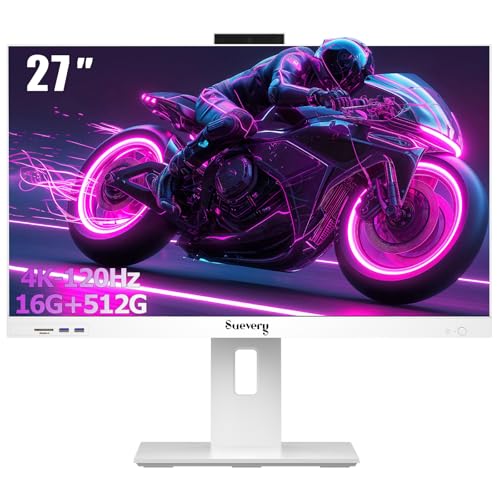
- Best overall under $700: suevery 27-Inch All-in-One Desktop Computer, Core i5, 16GB RAM, 512GB SSD — Check on Amazon
- Acer Aspire C24-1700-UA91 All-in-One, 23.8-Inch FHD IPS, Core i3-1215U — Check on Amazon
- HP 24-Inch All-in-One 24-cr0002, Ryzen 5 7520U, Pop-Up Privacy Camera — Check on Amazon
- HP OmniStudio 24 All-in-One, 16GB DDR5 Configuration, Keyboard & Mouse Included — Check on Amazon
See 2 more Amazon options
- Lenovo A100 All-in-One, 23.8-Inch IPS, 16GB RAM, Windows 11 Pro — Check on Amazon
- Lenovo IdeaCentre 24 All-in-One (V100), 8GB RAM, 512GB NVMe SSD — Check on Amazon
Read the full guide ↓
Disclosure: As an Amazon Associate, reviewstook.com earns from qualifying purchases. Links to Amazon on this page are affiliate links; they cost you nothing extra. Listing details such as price and availability change often, so check the current Amazon listing before you buy.
Every all-in-one is already a small-space computer — that is the format’s whole reason to exist. The screen, the processor, the speakers and the camera live in a single panel on a stand, and the only cable the setup truly needs is one power lead. There is no tower claiming the floor beside the desk, no separate monitor with its own brick and its own HDMI run, no cable bundle dropping behind the furniture. So if you are shopping for a dorm desk, a kitchen counter, a studio apartment or a spare-room corner, do not ask which of these machines is “the compact one” — they all are. The useful question is narrower: what still differs once the tower is gone, and which differences will you actually feel in a small room?
Three things differ, and this guide grades all six picks on them. The first is screen size against desk depth: five of these machines wear 23.8- or 24-inch panels and one wears a 27-inch panel, and on a shallow desk that gap decides whether the screen sits at a comfortable viewing distance or looms over your keyboard. The second is what the stand and bezels do with the footprint — how much desk the base occupies, whether the panel tilts to clear glare or a low shelf, and how much of the front is screen rather than frame. The third is the hidden space cost: the boxes and cables that creep back onto a small desk after the “one cable” promise — an external drive in one pick’s storage arrangement, wired peripherals in another’s, a webcam or speakers you may still end up adding. A small desk has no slack for any of that, so the reviews below name it wherever it appears.
The honesty note that governs this whole category belongs up front. No all-in-one under $700 carries a discrete graphics card, and none of these six machines is a gaming PC in any serious sense, whatever the category label on the keyword says. Integrated graphics handles calls, streaming, documents, school platforms and light casual games perfectly well, and that is the work these machines are for. If what you actually need is gaming power squeezed into a small footprint, that is a different product family — a mini or small-form-factor PC plus a monitor — and the trade runs in both directions, as the routing section below explains: those machines game far better and upgrade properly, but the monitor, its cables and the box itself give back some of the space an all-in-one saves. Readers weighing that fork should also see Best All In One PC Under $700, where the same six machines are graded as general-purpose computers rather than as furniture. Below: the quick picks, six detailed reviews graded on footprint and desk reality, a comparison table, a measure-before-you-buy checklist written for small rooms, the mistakes that waste both money and desk space, and the questions small-space buyers ask most.
In this guide
Quick Picks
Short on time, or comparing several options at once? Each row below names a buyer type and the machine that suits it, with a link to the listing.
| Buyer type | Pick | Why it stands out | Link |
|---|---|---|---|
| Best overall under $700 | suevery 27-Inch All-in-One, Core i5, 16GB RAM | The only 27-inch screen and the strongest CPU here — for desks deep enough to hold it; check price on Amazon | Check on Amazon |
| Slimmest front, factory brand | Acer Aspire C24-1700-UA91 | 91% screen-to-body IPS panel — nearly all screen, almost no frame, from Acer’s own listing | Check on Amazon |
| Best for calls in shared rooms | HP 24-Inch All-in-One 24-cr0002 | Pop-up privacy camera built in — no webcam box clipped to the top of the screen | Check on Amazon |
| Best memory figure | HP OmniStudio 24, 16GB DDR5 Configuration | 16GB of DDR5 in a current HP design — read the storage split before the desk plan | Check on Amazon |
| Best office bundle | Lenovo A100 All-in-One, 16GB RAM | 16GB, a proper internal 512GB SSD and Windows 11 Pro; check price on Amazon | Check on Amazon |
| Best value | Lenovo IdeaCentre 24 (V100), 8GB RAM | Honest 512GB NVMe storage and Wi-Fi 6 at the value end of this guide; check price on Amazon | Check on Amazon |
How These Picks Were Chosen
The starting pool is the same six verified listings as our general guide to this tier: real Amazon.com all-in-ones in the United States, each with its ASIN and specification checked against the listing during research. One pick, the HP 24-cr0002, is carried on its verified specification, and its review states the rule openly: only consider it while the live listing sits under $700 — check price on Amazon. Anything that turned out to be a tower-plus-monitor bundle wearing an all-in-one title, a refurbished unit that did not say so, or a touchscreen model priced well above this budget — where the brand-name touch bundles in this category actually sit — was excluded, because none of those answers the search you made.
On top of that pool, this variant applies a space filter, and it is a deliberately strict one. We graded only what the verified sources document: the panel size of each machine, the stand behaviour where a tilt range is published, the screen-to-body figure where a maker states one, whether the webcam and speakers are built into the panel or left for you to add, whether the keyboard and mouse in the box are wired or not where the listing says, and whether the storage figure is a single internal drive or a small internal drive plus an external box that will live somewhere on or under your desk. Where the sources do not publish a figure — and for several of these listings they do not publish exact dimensions, weights or mount specifications — this guide claims none. You will find no invented centimetres below. Instead, the how-to-choose section turns the live listing’s own specification table into your measuring tool, because on the day you order, that table is the only dimension source worth trusting.
One more filter matters in a small room, and it is the support filter from the general guide, unchanged. Amazon’s all-in-one aisle mixes factory listings from HP, Lenovo and Acer with seller-configured listings, where a marketplace seller upgrades a base machine’s memory or storage before shipping it. Two picks below are seller configurations and one is a seller listing of a factory model; their specifications are genuinely strong for the money, but warranty and support run through the seller, and every review says which kind it is describing. In a small space the machine is often the household’s only computer, bought once and expected to simply work — knowing whose door to knock on in month thirteen is part of the purchase.
The 6 Best All-in-One PCs for Small Spaces Under $700
suevery 27-Inch All-in-One Desktop Computer — Core i5, 16GB RAM, 512GB SSD
Who it suits: Buyers whose “small space” still has a proper desk — a home office corner, a studio’s work table — and who want the largest screen and strongest processor this budget offers in a single panel, from a smaller Amazon-native brand.
Place this machine first in the guide and first in the room, because the room has to be planned around it. Its 27-inch Full HD anti-glare panel is the biggest screen here by a clear margin, and on a desk with enough depth that size is a genuine working advantage: two documents genuinely side by side, a spreadsheet that shows its columns, video that fills your field of view like a small television. The stand tilts from -5 to 25 degrees, a documented range that matters in small rooms more than large ones — a low desk under a window, or a counter beneath kitchen cabinets, both ask the panel to angle rather than sit bolt upright. Behind the glass sits the strongest specification in this guide: a desktop-class Intel Core i5-12400F — a six-core desktop chip, not the laptop silicon in every other pick — with 16GB of RAM and a 512GB SSD that is internal and honestly stated. It ships in white with a keyboard and mouse in the box — check price on Amazon for the current listing.
The small-space cautions are real, and they are about fit rather than quality. A 27-inch panel on a shallow desk sits close — closer than the viewing distance a screen that size is comfortable at — and Full HD spread across 27 inches is visibly less sharp than the same resolution on the 23.8-inch panels below it. On a deep desk neither point bites; on a dorm-depth desk both do, and the honest advice is to measure before falling for the screen. Two further cautions carry over from the general guide at full size. The brand is suevery, a small Amazon-native label whose support and spare-parts pipeline will not match HP or Lenovo. And the Core i5-12400F is an F-suffix chip with no integrated graphics of its own, while the listing description we could verify names no discrete graphics solution — so read the live listing’s graphics line before ordering, and treat a listing that cannot answer that question as an answer in itself.
- 27-inch Full HD anti-glare display — the largest screen here, on a stand documented to tilt from -5 to 25 degrees.
- Desktop-class Core i5-12400F with 16GB RAM and an internal 512GB SSD — the strongest core specification in the guide.
- Keyboard and mouse included in the box — check price on Amazon.
Honest limitation: The biggest panel here needs the deepest desk here, and its listing does not clearly name the graphics solution its F-suffix processor requires — verify that line on the live listing before you buy.
Choose it if your desk is deep enough for a 27-inch screen and you will do the one-minute graphics check at checkout. Skip it if your desk is shallow — the 23.8-inch machines below will sit at a kinder distance — or if a big manufacturer’s warranty network matters more than specification.

Acer Aspire C24-1700-UA91 All-in-One — 23.8-Inch FHD IPS, Core i3-1215U
Who it suits: Small-space buyers who want the tidiest possible front — a panel that is almost entirely screen — from an established maker’s own factory listing: students, reception desks, and anyone whose computer is also the room’s furniture.
If the suevery wins on size, the Acer wins on disappearance. Its 23.8-inch Full HD IPS display fills 91% of the machine’s front — a screen-to-body figure Acer publishes and the highest-quality space claim in this guide, because it means the footprint you give up buys nearly pure screen, with bezels slim enough that the panel reads as a floating sheet of glass rather than a computer. In a small room, where the machine is always in your eyeline, that is not vanity; it is the difference between a desk that looks like an office and a desk that looks like a workstation. Acer’s BlueLightShield is built in for long days, the stand tilts from -5 to 25 degrees so the panel can dodge window glare or sit low under a shelf, and the specification behind the glass is a tidy one: a 12th-generation Intel Core i3-1215U with Intel UHD graphics, a proper internal 512GB NVMe M.2 SSD, 8GB of DDR4 memory and Wi-Fi 6, running Windows 11 Home. It is Acer’s factory listing, so the warranty and support pages are Acer’s, with no marketplace seller in between.
The debits are the mirror image of the seller-configured picks. Eight gigabytes of memory is the configuration as sold, and memory is the figure that ages first — adequate for focused work, tight for the sprawling tab-and-app juggle. And the price can press against the ceiling, so check price on Amazon before you order. The rule is simple and absolute: buy the Acer only while its live listing sits at or under $700, and walk away above it, because above that line you are paying factory money for a memory figure the seller-configured listings beat. For a small desk that has to look calm — a studio, a reception counter, a student’s room — this is the best-finished panel in the guide.
- 91% screen-to-body IPS panel — the most screen per unit of desk footprint in this guide, with BlueLightShield.
- Factory Acer listing with brand warranty and support; no seller in the middle.
- Internal 512GB NVMe SSD, Wi-Fi 6, and a documented tilt range of -5 to 25 degrees.
Honest limitation: 8GB of RAM is the figure that will age first, and its price can press against the ceiling — buy only while the live listing sits at or under $700, never above.
Choose it if a calm, nearly bezel-free front and factory support matter more than memory headroom. Skip it if your days run to dozens of tabs and several demanding apps at once — the 16GB machines further down trade this finish for memory you will feel more.

HP 24-Inch All-in-One 24-cr0002 — Ryzen 5 7520U, Pop-Up Privacy Camera
Who it suits: Remote workers and students in shared or small rooms whose days run on video calls — and who want the camera to vanish into the machine when the call ends rather than perch on top of it.
In a small room, every accessory you do not have to buy is space you do not have to find. That is the case for this HP. Its defining feature sits on the top edge of its 23.8-inch Full HD panel: a pop-up privacy camera that rises when a call begins and physically retracts into the body when it finishes. No separate webcam box clipped to the bezel, no extra USB cable hunting for a port, no camera staring at the bedroom or the kitchen between meetings — the one peripheral small-space buyers most often end up adding is already built in, and built in properly, with a physical off state rather than a software promise. Behind the panel is the strongest processor in this guide’s factory listings, an AMD Ryzen 5 7520U with Radeon integrated graphics, which gives the everyday stack — calls, documents, browsing, streaming, school platforms — more headroom than the Acer’s Core i3 and far more than the N-series chips below. It is HP’s own factory listing, in HP’s clean current design, and for a machine that will live in a shared room it is the most considerate package here.
The compromises live in the memory and storage lines, and one of them has a space consequence of its own. The factory configuration pairs the Ryzen with 8GB of RAM and a 256GB SSD, the smallest internal storage in this guide. Buyers whose files live in the cloud will never notice; a family photo and video library will fill it, and the fix — an external drive — is precisely the extra box this variant exists to help you avoid, so weigh that before choosing it for local media. The pricing note also stays in the open, exactly as in the general guide: we verified the full specification from HP’s model data and the Amazon listing, so check price on Amazon for the current listing. The rule is the recommendation: at a live price under $700, this is the call-quality and shared-room pick of the guide; if the live listing has drifted above $700, take the Acer instead.
- Pop-up privacy camera built into the panel — the guide’s best answer to the webcam-box problem, retracting physically when idle.
- AMD Ryzen 5 7520U — the strongest processor in the factory listings, with Radeon graphics.
- HP factory listing and warranty in a compact 23.8-inch Full HD design.
Honest limitation: 256GB is the smallest internal storage here and 8GB of RAM is merely adequate — and only buy it while the live listing sits under $700 — check price on Amazon.
Choose it if your room is shared, your day is calls, and your files live in the cloud. Skip it if you keep a large local media library — the 512GB internal drives around it avoid the external-box fix.

HP OmniStudio 24 All-in-One — 16GB DDR5 Configuration, Keyboard & Mouse Included
Who it suits: Tab-heavy multitaskers in small spaces who want the most memory in a current HP design — and who will plan one small home for an external drive before they order.
Begin with what this listing is, because it is two things at once. Underneath the configuration sits the OmniStudio 24 as HP’s factory builds it: a 24-inch Full HD panel in the maker’s current design language, Wi-Fi 6, Windows 11, and a keyboard and mouse in the box. The listing is a seller configuration, and the configuration’s headline is memory — an Intel N150 quad-core processor paired with 16GB of DDR5, a figure none of the factory listings here match in this budget tier, in the faster DDR5 standard. For the workload that actually slows everyday machines — thirty tabs, a call, a document, a spreadsheet, a stream, all at once — memory is usually the binding constraint, and 16GB is the difference between a machine that juggles silently and one that starts closing things behind your back. Check price on Amazon for this configuration and for the family’s other variants, and buy only while the live listing sits inside the budget.
Now the debit that this variant exists to catch. The storage headline is split: a small 128GB internal UFS drive plus a 512GB external drive. On a big desk that is a footnote; on a small one it is a physical fact — an extra box that needs a home on the desk or under it, an extra cable, one more thing in the way of the “one lead and done” promise that brought you to an all-in-one. And it is a functional split as well as a physical one: Windows, your programs and your working files live on the internal drive, and 128GB fills faster than new buyers expect, while the external drive serves photos, media and backups. Treat this as a 128GB computer with a generous external drive included, and decide where that drive will sit before the box arrives. The second debit is the processor: the N150 is Intel’s entry-level efficiency chip — adequate for browsing, documents, schoolwork, streaming and calls, noticeably weaker than the Ryzen 5 and Core i3 above for anything heavier. The 16GB makes it multitask better than the same chip with 8GB; it does not make it a faster chip. Buy it for the memory and the design, with the drive’s home planned, and it is a rational small-space purchase.
- 16GB of DDR5 — a memory figure matched only once elsewhere in this guide, and in the newer, faster standard.
- HP’s current OmniStudio shell, with Wi-Fi 6, Windows 11 and the peripherals in the box.
- Seller configuration in this budget tier — check price on Amazon.
Honest limitation: The storage is split — a small 128GB internal drive plus a 512GB external box that needs desk or under-desk space of its own — and the entry-level N150 is the weakest class of processor in this guide.
Choose it if open tabs are your bottleneck and you have a shelf or drawer ready for the external drive. Skip it if the whole point is zero extra boxes — the internal-drive machines above and below keep the promise better.

Lenovo A100 All-in-One — 23.8-Inch IPS, 16GB RAM, Windows 11 Pro
Who it suits: Home-office and small-business buyers who want 16GB of memory, an honest internal 512GB SSD and Windows 11 Pro in one panel — and who accept two cables’ worth of wired peripherals as the price.
Of the three seller-arranged picks in this guide, this Lenovo A100 listing is the most straightforwardly specified, and for small spaces its storage honesty is the headline: 16GB of RAM and a 512GB SSD that is internal, full-size and exactly what the number says — no external box, no split figure, nothing extra to house. The screen is a 23.8-inch IPS Full HD panel, and IPS earns its mention at a shared desk because it holds colour and brightness when the viewer sits off to one side, as colleagues and family members do. It runs Windows 11 Pro rather than Home — worth having for a small business’s management and security features, costing a home buyer nothing — and it is sold by WYL Tech — check price on Amazon. Set against the factory listings, the proposition is the same as in the general guide: the factories will sell you a stronger processor or their own warranty at this money, but not 16GB of memory and 512GB of internal storage together under $700. This listing will.
Two cautions, one about cables and one about provenance. The peripherals in the box are a wired keyboard and a wired mouse. On a deep desk that is nothing; on a small one, two cables crossing the surface to the back of the panel are exactly the clutter the format promises to delete, and a wireless set is a likely early upgrade — budget the desk accordingly. The provenance point is what the A100 is in Lenovo’s own catalogue: an entry-level machine whose factory configurations pair the same Intel N100 chip with 8GB of memory and a 256GB SSD. The 16GB and 512GB here are the seller’s pre-shipment upgrade, and that changes who stands behind the machine. Support for the upgraded specification runs through the seller, and the listing’s own warranty line, not Lenovo’s standard terms, is the document that governs you; read it before ordering and keep the invoice. The N100 itself is the shared tier ceiling: four efficiency cores, genuinely sufficient for documents, browsing, school platforms, reception and point-of-sale duty, streaming and calls, and not a chip for video editing or modern games at any memory figure.
- 16GB RAM with a proper internal 512GB SSD — the memory-and-storage combination the factory listings do not sell under $700, with no external box to house.
- 23.8-inch IPS Full HD display and Windows 11 Pro.
- In this budget tier on Amazon — check price on Amazon.
Honest limitation: A seller-upgraded configuration — support runs through the seller — with wired keyboard and mouse that put cables back on a small desk, and an N100 processor meant for light work only.
Choose it if 16GB of memory, a full internal drive and Windows 11 Pro in a single box is the combination your office has been waiting for. Skip it if you would rather have the brand itself standing behind the machine than the strongest specification — the Acer and the HP 24-cr0002 are the factory routes.

Lenovo IdeaCentre 24 All-in-One (V100) — 8GB RAM, 512GB NVMe SSD
Who it suits: Students, families and first-all-in-one buyers who want the smallest, quietest route to a tidy desk in this guide — at its lowest price — without giving up proper internal storage to get there.
The IdeaCentre 24 is the value anchor of this list, and in a small room its virtues compound. The panel is a 23.8-inch Full HD anti-glare IPS display — anti-glare being a small-room feature in disguise, because compact spaces put desks where the light is, not where the light is best, and a matte panel opposite a window stays readable where a glossy one mirrors it. Behind the glass: Intel’s N100, four cores running up to 3.4GHz, paired with 8GB of DDR4 memory and — the line that earns this machine its place — a 512GB PCIe NVMe SSD that is fully internal. Nothing to plug in, nothing to house, no storage arithmetic to decode. Wi-Fi 6 and Bluetooth 5.2 are both present, and wireless is a space feature too: Bluetooth is what lets a keyboard, mouse and headphones connect without cables or dongles competing for the back panel. Check price on Amazon for the current listing. As the value pick in this guide, it leaves more room in the budget for the things small-space buyers reliably end up wanting: a better keyboard, a lamp that does not reflect in the screen, or simply money unspent.
The limits are the familiar ones for the tier, fairly traded at this price. Eight gigabytes of memory covers focused everyday work — documents, a sane number of tabs, a call, a stream — and not the sprawling multitask stack the 16GB picks absorb; research-heavy students should look at the A100 configuration above. The N100 sets the same ceiling as its sibling: light work done coolly and quietly, heavy work done slowly or not at all. And one documentation habit applies to Lenovo’s Amazon seller listings generally: the model naming is untidy, with the same V100 hardware appearing under slightly different titles and memory descriptions, so confirm the exact RAM and storage figures on the specific variant you order, on the day you order it. None of that dents the case. As the least expensive route here to a tidy desk, a decent matte screen and storage you will not outgrow in a year, this is the pick for buyers who would rather save money than buy headroom they will never use.
- A full 512GB PCIe NVMe SSD inside the machine, as the value pick in this guide — nothing padded, nothing external.
- 23.8-inch FHD anti-glare IPS display — the easiest panel here to place in a bright, awkward corner.
- Wi-Fi 6 and Bluetooth 5.2 for a cable-light desk — check price on Amazon.
Honest limitation: 8GB of RAM and the entry-level N100 cap this machine at light, focused work — and Lenovo’s seller-listing titles are untidy, so verify the exact configuration on the variant you order.
Choose it if your days are documents, browsing, lessons and calls, and saving money appeals more than headroom. Skip it if your tab count is legendary — spend the difference on the 16GB A100 configuration above.
Comparison Table
| Product | Type | Best use | Link |
|---|---|---|---|
| suevery 27-Inch All-in-One, Core i5 | 27-inch, small-brand listing | Biggest screen and strongest CPU — on a desk deep enough for it | Check on Amazon |
| Acer Aspire C24-1700-UA91 | 23.8-inch, factory Acer | Slimmest front, brand support, proper 512GB SSD | Check on Amazon |
| HP 24-Inch All-in-One 24-cr0002 | 23.8-inch, factory HP | Video calls in shared rooms, camera built in | Check on Amazon |
| HP OmniStudio 24, 16GB DDR5 Configuration | 24-inch, seller-configured HP | Maximum memory — with an external drive to house | Check on Amazon |
| Lenovo A100 All-in-One, 16GB RAM | 23.8-inch, seller-configured Lenovo | Memory, honest storage and Windows 11 Pro | Check on Amazon |
| Lenovo IdeaCentre 24 (V100) | 23.8-inch, value Lenovo listing | Everyday work, honest storage, value pick | Check on Amazon |
How to Choose an All-in-One for a Small Space
Work through these five steps in order, before you order anything. They take ten minutes, most of them with a tape measure, and they prevent the only failure mode that matters in a small room: a good computer that does not fit the life around it.
- Step 1 — Measure the desk’s depth, not its width. Width is rarely the constraint; depth decides how far the screen can sit from your eyes. A 23.8- or 24-inch panel is comfortable on the shallow desks, counters and dorm surfaces that small rooms actually contain. A 27-inch panel — the suevery in this guide — wants a deeper desk: on a shallow one it sits close enough to feel oversized, and its Full HD resolution, spread thinner at that size, looks less sharp up close. If your desk is shallow, the honest answer is a 24-inch machine, and that is a fit decision, not a downgrade.
- Step 2 — Match the screen size to the viewing distance you really have. Measure from where the panel will stand to where your head will be — chair pushed in, not pulled out. Then check the placement constraints around that spot: a stand that tilts (the suevery and the Acer both document a -5 to 25 degree range) can angle a panel away from a window or drop it below a shelf; a desk under kitchen cabinets or a sloping ceiling needs that tilt clearance behind and above the screen, so check the space the panel will swing through, not just the space it will occupy.
- Step 3 — Tape the footprint before you commit. The live listing’s specification table is the only dimension source worth trusting for the exact model you are ordering — makers publish the stand’s footprint there, and sellers’ roundups and renders are not a substitute. Read the width and depth figures off the listing, mark the rectangle on your desk with painter’s tape, and live with the outline for a day. Then walk what is left: keyboard in front, notebook beside, mug where the mug goes. If the taped outline eats the desk, it will eat it worse in three dimensions.
- Step 4 — Walk the cable drop. Trace the route the one power cable will take from the back of the panel to the socket: where it falls, what it crosses, whether the socket is actually reachable without an extension lead trailing across the floor. Then count what else wants a home: an external drive (the OmniStudio’s storage split) needs a shelf or a desk corner and a cable of its own; wired peripherals (the A100’s keyboard and mouse) put two more cables on the surface; a power brick, where a listing shows one, needs floor space and air. None of these rejects a machine — all of them are worth knowing before the box arrives.
- Step 5 — Only then order. With the depth measured, the distance checked, the footprint taped and the cable route walked, the specification choice is the easy part: the processor order in this guide (desktop Core i5, then Ryzen 5 and Core i3, then the N-series chips), 16GB of memory if the machine must serve for years, and an internal storage figure you have read like a contract rather than a headline.
When an All-in-One Is the Wrong Kind of Small
There is one buyer this format underserves, and small-space shopping is where that buyer most often ends up: the one who needs real gaming power in a small footprint. No all-in-one under $700 has a discrete graphics card, and nothing inside this guide changes that — integrated graphics runs casual, older and esports titles at modest settings, and modern games belong elsewhere. The elsewhere is a different shelf of this catalogue: a mini gaming PC from Best Mini Gaming PC Under $700, a small-form-factor build from Best Small Form Factor Gaming PC Under $700, or a compact tower from Best Compact Gaming PC Under $700 will game in a different league at this money and can be upgraded over time; a general mini PC from Best Mini PC Under $700 splits the difference for mixed work and play. Name the trade honestly in both directions before you switch shelves, though. Those machines need a separate monitor, and the monitor brings its own stand, its own power brick and its own display cable — the box-plus-screen arrangement gives back a real part of the space the all-in-one saved, and the desk will never be as clean as one panel and one lead. Buy the all-in-one for the desk and the everyday work; buy the small gaming machine for the games, knowing what the games cost in cables. Readers whose priority is pure gaming at this budget, space be forgiven, should start at Best Gaming PC Under $700 instead.
The Space Costs Listings Do Not Show You
Beyond the checklist, three recurring hidden costs decide whether a small desk stays small after the computer arrives. The first is storage that lives outside the machine: an internal SSD takes no space at all, while an external drive takes a home, a cable and a USB port forever — one pick in this guide is built that way by design, and small internal drives push other buyers toward the same box within a year. The second is peripheral creep: a webcam for a machine whose camera disappoints, speakers for films at the desk, a wireless set to replace wired peripherals. Each is small; together they rebuild the clutter the format promised to remove — so favour picks whose built-ins are documented and adequate, like the HP’s pop-up camera, and price the rest as planned purchases. The third is the stand’s quiet footprint: tilt ranges are published for some of these machines and not others, and a stand that cannot angle will dictate your layout around windows and shelves. None of this appears in a listing title. All of it appears in your room.
Common Buying Mistakes
- Buying the 27-inch screen for a shallow desk. The largest panel here is the best pick on a deep desk and the most uncomfortable one on a shallow desk — depth first, size second.
- Counting an external drive as desk-free storage. A split storage figure means a box, a cable and a port living somewhere in your small room; plan its home or choose an internal-drive machine.
- Assuming the peripherals in the box are wireless. At least one pick here ships a wired keyboard and mouse; on a small desk those cables are the clutter you bought the format to avoid.
- Guessing dimensions from photographs or roundups. Listings’ renders lie about scale in both directions. The live listing’s specification table is the only footprint worth taping to your desk.
- Forgetting the tilt and the shelf above. A panel that cannot angle under a cabinet or away from a window will dictate the whole desk layout — check the documented tilt range, or its absence, before ordering.
- Buying an all-in-one for gaming. No discrete graphics exists at this price in this format; small gaming machines exist, on a different shelf, with a monitor’s worth of cables as the admission price.
- Paying for a touchscreen that is not there. Brand-name touchscreen all-in-one bundles on Amazon sit well above this budget — if a listing under $700 implies touch, verify it in the specification table, not the title.
- Expecting a seller-configured machine to come with the factory’s warranty experience. The specification can genuinely be the stronger one — but support runs through the seller, and the warranty line printed on the listing is the only promise you actually hold.
Final Recommendation
- Most buyers with a real desk: suevery 27-Inch All-in-One — the biggest screen and strongest processor under the ceiling, after the one-minute graphics check and an honest desk-depth measurement.
- Smallest visual footprint, factory support: Acer Aspire C24-1700-UA91.
- Shared rooms and video calls: HP 24-Inch All-in-One 24-cr0002, while its live price is under $700.
- Tab-heavy multitasking: HP OmniStudio 24, 16GB DDR5 Configuration — with a home planned for its external drive.
- Offices that want memory and Windows 11 Pro in one panel: Lenovo A100 All-in-One, 16GB RAM.
- Tightest budget, tidiest desk: Lenovo IdeaCentre 24 (V100).
Our top two for small rooms split the same way the general guide’s do, with the tape measure added. The suevery 27-inch is the most computer and the most screen this budget buys in one panel, and on a desk deep enough to hold it at a proper distance it is the pick — with the graphics detail verified at checkout and the small-brand support accepted knowingly. The Acer Aspire C24 is the pick for the genuinely small desk: a 23.8-inch panel that is 91% screen, a factory warranty behind it, and a shape that disappears into the room. Between them sit the specialists — the HP 24-cr0002 for rooms where a camera must vanish between calls, the OmniStudio configuration for multitaskers who have a drawer ready for its drive, the A100 for offices that want memory and Pro in one box, and the IdeaCentre 24 for buyers who would rather save money than buy headroom. Smaller budgets and smaller desks still should compare Best All In One PC For Small Spaces Under $500, and anyone whose room can stretch should look at Best All In One PC For Small Spaces Under $800 before deciding. Measure the desk, tape the footprint, walk the cable — then enjoy the quietest corner a $700 computer has ever given you.
Frequently Asked Questions
Will a 27-inch all-in-one fit on a small desk?
It will stand on most desks; the question is whether it will sit well. A 27-inch panel wants more viewing distance than a 24-inch one, and on a shallow desk it ends up close enough to feel oversized, with its Full HD picture spread thinner and less sharp at that range. On a desk with real depth it is the best screen in this guide. Measure the depth, tape the footprint from the live listing’s specification table, and let the room decide — the 23.8-inch picks exist precisely for the desks that say no.
How much desk space does an all-in-one actually save?
Against a tower and a separate monitor, the saving is the tower’s floor or desk footprint, the monitor’s power brick and display cable, and the cable bundle between them — what remains is one panel on a stand and one power lead. The saving shrinks if the setup grows back: an external drive, a separate webcam, speakers and wired peripherals each return a piece of it. That is why this guide grades the built-ins and the storage arrangement, not just the panel: the tidiest all-in-one is the one that never makes you add a box.
Can I wall-mount an all-in-one to save the whole footprint?
Only if the specific model supports it, and that is a fact you must take from the live listing for the exact machine you are ordering — mount specifications are not published consistently across this category, and this guide claims them for none of its picks because the verified sources do not state them. If mounting is your plan, confirm it on the listing’s specification table before ordering, and treat any listing that does not mention mounting as a machine that stands on its base. A stand on a shallow shelf or counter remains the reliable small-space arrangement for everything in this guide.
Is an all-in-one or a mini PC better for a small space?
They save space in different currencies. The all-in-one is one object: screen, computer, speakers and camera in a single panel, one cable, nothing else on the desk — but its graphics are integrated, its specification is fixed for life, and it cannot game beyond casual and older titles. A mini PC is a smaller computer but a larger setup, because the monitor, its stand, its brick and its cables come back; in exchange it can carry far stronger hardware for games and can be upgraded. For everyday work on the smallest, calmest desk, the all-in-one wins. For gaming power in a small footprint, the mini PC wins and the desk pays for it. The full gaming-side shortlist is at Best Mini Gaming PC Under $700.
What should I measure before ordering?
Four things, in this guide’s order: the desk’s depth; the viewing distance from the panel’s spot to where your head will actually be; the stand’s footprint, taken from the live listing’s specification table and taped onto the desk to live with for a day; and the cable route from the back of the panel to the socket, including a home for anything external the machine ships with — a drive, a brick, wired peripherals. Ten minutes of this prevents the one return small-space buyers actually make, which is never about speed. It is about fit.
Can any of these play games in a small setup?
In the modest sense only: none of the six has a discrete graphics card, and integrated graphics — strongest in the Ryzen 5 and Core-class picks — runs casual, older and esports titles at reduced settings, plus cloud gaming services, which stream happily to all of them and take no desk space at all. Modern demanding titles are beyond every machine here; a household that games should buy a small gaming machine and a monitor instead, accepting the cables — the full discussion is at Best All In One PC For 1440p Gaming Under $700.


