Where to buy
Check the latest price, availability and delivery on Amazon. Orders are placed on Amazon. We may earn a commission from qualifying purchases.
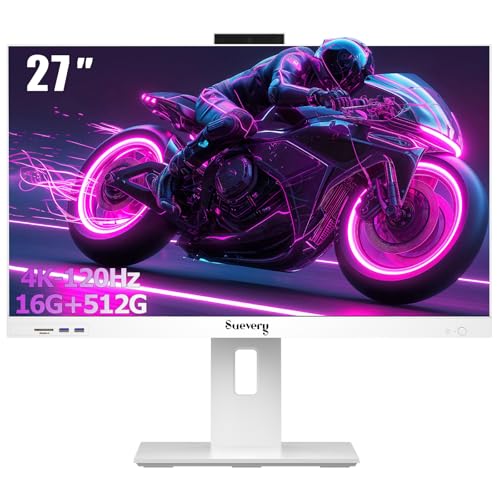
- Best overall under $700: suevery 27-Inch All-in-One Desktop Computer, Core i5, 16GB RAM, 512GB SSD — Check on Amazon
- Acer Aspire C24-1700-UA91 All-in-One, 23.8-Inch FHD IPS, Core i3-1215U — Check on Amazon
- HP 24-Inch All-in-One 24-cr0002, Ryzen 5 7520U, Radeon Graphics, Pop-Up Privacy Camera — Check on Amazon
- HP OmniStudio 24 All-in-One, 16GB DDR5 Configuration, Keyboard & Mouse Included — Check on Amazon
See 2 more Amazon options
- Lenovo A100 All-in-One, 23.8-Inch IPS, 16GB RAM, Windows 11 Pro — Check on Amazon
- Lenovo IdeaCentre 24 All-in-One (V100), 8GB RAM, 512GB NVMe SSD — Check on Amazon
Read the full guide ↓
Disclosure: As an Amazon Associate, reviewstook.com earns from qualifying purchases. Links to Amazon on this page are affiliate links; they cost you nothing extra. Listing details such as price and availability change often, so check the current Amazon listing before you buy.
This search contains a trap, and it is better to spring it in the first paragraph than at the checkout. Put “1440p gaming,” “all-in-one” and “under $700” together and no machine on Amazon satisfies all three at once. Every all-in-one in this price band runs on integrated graphics — the kind built into the processor, with no separate graphics card — and every screen in this guide is a 1920×1080 Full HD panel, not a 2560×1440 one. So nothing below renders modern games natively at 1440p on its own display, and any listing or headline implying otherwise is selling you a phrase, not a capability. What this guide does instead is answer the honest version of the question: which all-in-ones under $700 come closest to a 1440p gaming experience, what each one actually renders and displays, and where to go if native 1440p is genuinely non-negotiable.
“Closest” turns out to have three legitimate meanings, and the picks below are graded against all of them. First, upscaled gaming: a game rendered below 1440p and reconstructed upward by upscaling software, which is how most real 1440p setups — including far more expensive ones — actually work. Second, the external-monitor route: an all-in-one driving a separate 1440p monitor, where the desktop and light games can live at 1440p even though demanding games still render lower. Third, plain rendering strength: the stronger the integrated graphics, the higher the resolution it can sustain before settings have to fall, and the six machines here span that range from a Radeon chip that handles esports titles at 1080p down to entry-level Intel silicon that belongs at 720p. One warning travels with the second route: the research behind this guide did not capture verified video-output specifications for these listings, so treat any port claim as a question to settle on the live listing’s specification table, not as a promise made here.
The six machines are the same verified listings as our general shortlist, Best All In One PC Under $700, re-graded here purely for the resolution question — same deal rules, same cautions. Two structural facts from that guide matter even more in this one. Two of the six are seller-configured listings, where a marketplace seller upgrades a base machine before shipping it, so support runs through the seller rather than the brand. And one pick’s listing does not clearly name its graphics solution at all — a gap that is a footnote for office work and a headline for gaming, because graphics is the entire subject here. Below: the quick picks, an explainer on render versus display resolution, six reviews graded by what each machine renders, a comparison table, the real routes to 1440p, and the mistakes that waste money when buyers chase a resolution number.
In this guide
Quick Picks
Short on time, or comparing several options at once? Each row below names a buyer type and the machine that suits it, with a link to the listing.
| Buyer type | Pick | Why it stands out | Link |
|---|---|---|---|
| Best overall under $700 | suevery 27-Inch All-in-One, Core i5, 16GB RAM | The only 27-inch screen and the strongest CPU here — check the live price on Amazon, and verify its graphics line before you buy | Check on Amazon |
| Strongest graphics you can verify | HP 24-Inch All-in-One 24-cr0002 | Ryzen 5 7520U with Radeon integrated graphics — the best rendering chip in this guide | Check on Amazon |
| Best factory-brand design | Acer Aspire C24-1700-UA91 | 91% screen-to-body IPS panel and a factory Acer listing | Check on Amazon |
| Best memory figure | HP OmniStudio 24, 16GB DDR5 Configuration | 16GB of DDR5 alongside a game, a browser and a voice call | Check on Amazon |
| Best Windows 11 Pro bundle | Lenovo A100 All-in-One, 16GB RAM | 16GB and an honest internal 512GB for a game library — check the live price on Amazon | Check on Amazon |
| Best value | Lenovo IdeaCentre 24 (V100), 8GB RAM | 512GB NVMe storage in the guide’s value pick — check the live price on Amazon | Check on Amazon |
How These Picks Were Chosen
The starting point was verification, not enthusiasm. Every pick is a real Amazon.com listing whose ASIN and specification were checked against listing crawls during the research for the base guide, and because prices move constantly, this guide points you to the live listing to check the current price on Amazon rather than printing a number that would go stale. The budget was applied as a ceiling for the whole machine, and it bites in two places worth knowing about. The Acer sits close enough to the $700 line that its rule is absolute: buy it only when the live listing is at or under $700; above that, it does not belong here. And the HP 24-cr0002 is included on its specification, because no trustworthy numeric price for it was captured in research; its review states the same rule the base guide used — live price under $700, consider it; over $700, take the Acer. Listings that turned out to be tower-plus-monitor bundles, refurbished units not labelled as such, or touchscreen models priced well above this budget were excluded, as they were there.
What changed for this angle is the grading. A general guide ranks these machines by processor, memory and screen; a 1440p guide has to rank them by graphics, because the graphics chip is what decides the resolution a game can be rendered at. That produces an order some readers will find surprising: the strongest processor in the set, the suevery’s desktop-class Core i5, cannot be graded for rendering at all until its unnamed graphics solution is confirmed, while the HP’s Ryzen 5 7520U — a lesser CPU — carries the strongest verified graphics and therefore tops the rendering table. Below the Radeon sit Intel’s UHD graphics in the Acer’s Core i3-1215U, and below that the entry-level UHD-class silicon in the three N-series machines, which render light games at reduced resolutions and settings. Memory was graded as a supporting actor — 16GB keeps a game, a browser and a voice call resident together; 8GB forces choices — and storage was graded on the honesty test this category keeps failing: internal gigabytes are real, while a headline figure padded with an external drive is not, and game installs live on the internal drive or nowhere.
A note on what this guide refuses to do: there are no per-game frame-rate figures anywhere below. Integrated-graphics performance shifts with driver versions, memory configuration and the specific build of a game, and a tidy number invented for a listings page would be fiction wearing a lab coat. What you get instead is class-level grading — which chip renders what class of game at what class of resolution and settings — which is the level of precision the evidence supports and the level at which buying decisions in this tier should be made.
Render Resolution, Display Resolution, and What “1440p” Can Honestly Mean Here
Two different numbers hide inside the word “1440p,” and untangling them is the whole key to this category. Display resolution is what the screen can show: a fixed grid of pixels. Every panel in this guide is 1920×1080, so the built-in screen physically cannot display a 2560×1440 image — set a game to 1440p on one of these machines and the picture is simply squeezed back down to 1080p before you see it, having cost rendering power for nothing. Render resolution is what the graphics chip draws, frame by frame, and it is the number that decides both how sharp a game looks and how hard the hardware works. On a desktop with a real graphics card, the two numbers usually match. On an all-in-one under $700, they almost never do, and the gap between them is where honest buying happens.
On the built-in screen, then, the realistic target for every pick below is rendering at 1080p or below — and “or below” is doing real work in that sentence. The strongest integrated graphics here, the HP’s Radeon, can render esports and older titles at the panel’s full 1080p with settings turned down thoughtfully. The mid-set Intel UHD in the Acer asks for 1080p at low settings in light games and 720p in anything heavier. The N-series machines at the bottom are 720p-class renderers for games with any ambition, whatever their screens say. None of this makes these machines useless for play — casual games, indie titles, older catalogues and cloud-streamed games are genuinely enjoyable on all six — but it does mean the built-in panel is a 1080p gaming display at best, and usually a sub-1080p rendering target wearing a 1080p screen.
The external monitor is where 1440p legitimately enters the room. Connect one of these machines to a 1440p monitor and the desktop itself — text, browsing, video, documents — can run at full 1440p, because drawing a desktop is trivially light work for any chip here. Light games can render at 1440p on the strongest graphics in the set. Demanding games still render at 1080p or below and are scaled up to fill the panel, which looks softer than native rendering and better than it sounds. Two cautions keep this honest. The research behind this guide did not verify the video-output specifications of these listings, so before you build a plan around a monitor, confirm the port and its capabilities on the live listing’s specification table — outputs vary across this class of machine and the listing is the only authority. And remember that the monitor is a separate purchase outside this budget; the all-in-one’s price buys the computer, not the 1440p screen.
Upscaling is the bridge technology, and it deserves a precise explanation because marketing has blurred it. Modern upscalers render the game at a lower internal resolution and reconstruct a higher-resolution image from it, using information accumulated across frames. At a 1440p output, a Quality-mode upscaler typically renders at roughly 1707×960 internally — about two-thirds of the output in each dimension — and rebuilds the rest. The best-known implementation, NVIDIA’s DLSS, follows exactly that math, and it is unavailable on every machine in this guide, because DLSS runs only on NVIDIA graphics hardware and none of these integrated chips is NVIDIA’s. The upscaler these machines can use is AMD’s FSR, which is vendor-neutral: it works on the HP’s Radeon graphics and on Intel’s integrated graphics alike, in the games that implement it. FSR at Quality mode toward a 1440p monitor is the single most realistic “1440p gaming” experience an all-in-one under $700 offers — genuinely sharper than a plain 1080p render, honestly short of native 1440p, and available only where the game supports it. On the built-in 1080p panels, rendering natively at 1080p is usually the better target; upscaling earns its keep there mainly when a chip cannot quite hold 1080p and needs the internal resolution dropped a notch.
The 6 Best All-in-One PCs for the 1440p Question Under $700
suevery 27-Inch All-in-One Desktop Computer — Core i5, 16GB RAM, 512GB SSD
Who it suits: Buyers who want the most computer this budget buys in the format — the biggest screen and a desktop-class processor — and who will spend one minute verifying the graphics line before ordering, because on this machine that line is the entire ballgame.
The paradox of this guide sits at the top of it. The suevery pairs the strongest processor here by a wide margin — an Intel Core i5-12400F, a desktop-class six-core chip in a field of laptop silicon — with 16GB of RAM, a 512GB SSD and the only 27-inch screen in the set, a Full HD anti-glare panel tilting from -5 to 25 degrees. As a CPU for gaming, it is in a different league from everything below: game logic, physics, simulation and the stack of a browser and voice call are exactly what its cores are for, and it is the one machine here that would not bottleneck a real graphics card if it had one. Check the current price on Amazon before you order; keyboard and mouse are included in the box. If its graphics were verified and capable, it would top this guide on rendering as well as everything else.
They are not verified, and that is the review. The 12400F is an F-suffix processor, which in Intel’s naming means it contains no integrated graphics whatsoever — a machine built around it cannot light its own screen without a separate graphics solution, and the listing description our research could verify does not name one. For an office buyer that is a detail to check; for a gaming buyer it is the difference between a machine that might genuinely render games at respectable resolutions and one whose display is driven by something too modest to advertise. So the instruction is unchanged from the base guide and non-negotiable here: open the live listing, read the specification table, and confirm exactly what drives the display before money moves. If the answer is a real entry-level discrete card, this becomes the most interesting gaming all-in-one under $700. If the listing cannot answer clearly, treat the silence as the answer. One more angle-specific note: its 27-inch panel spreads the same 1920×1080 pixels over a larger area than the 23.8-inch screens below, so of all six displays it sits furthest from 1440p sharpness — you are trading pixel density for size, knowingly.
- Desktop-class Core i5-12400F with 16GB RAM and a 512GB SSD — the strongest core specification in this guide.
- 27-inch Full HD anti-glare display, tilting -5 to 25 degrees — the largest screen here.
- Check the live price on Amazon before ordering; keyboard and mouse included.
Honest limitation: The listing does not clearly name the graphics solution its F-suffix processor requires, so its rendering ability is unverifiable from the listing — and suevery is a small brand whose support will not match HP or Lenovo.
Choose it if you will do the graphics check at checkout and want the maximum CPU and screen this budget buys. Skip it if you want rendering power you can verify in advance — that is the HP below.

HP 24-Inch All-in-One 24-cr0002 — Ryzen 5 7520U, Radeon Graphics, Pop-Up Privacy Camera
Who it suits: The buyer this angle was written for: someone staying in the all-in-one format who wants the strongest verified rendering under $700, and whose day also runs on video calls.
If the suevery is the paradox, this HP is the answer. Its AMD Ryzen 5 7520U carries Radeon integrated graphics, and in a set where every rival’s graphics are either entry-level Intel silicon or unverifiable, that Radeon chip is the strongest rendering hardware we could verify — the only one here we would point at a 1080p gaming target without flinching. The realistic picture: esports titles, indie games and older catalogues rendered at the panel’s full 1080p with settings chosen sensibly; heavier games rendered lower and carried by FSR in the titles that support it, since AMD’s upscaler runs natively on this hardware. Paired with an external 1440p monitor, this is also the pick that makes the upscaled-to-1440p route most credible — FSR Quality rendering near 1707×960 and reconstructing the rest is a workload this chip can attempt in light games, where the N-series machines below cannot. The screen is a 23.8-inch Full HD panel, and on top of it sits the feature that made this machine the base guide’s call-quality pick: a pop-up privacy camera that rises for a call and physically retracts afterward, the right design for a machine living in a shared room.
The compromises live in the memory and storage lines, and for gamers they bite in specific places. Eight gigabytes of RAM is adequate for a game alone and tight for the real gaming stack — game, voice chat, a browser of guides and clips — which will have this machine swapping where the 16GB picks below breathe easily. The 256GB SSD is the smallest internal storage in the guide, and modern game installs are the fastest way known to fill a drive; a library of two or three large titles plus Windows is a realistic ceiling before the external-drive shuffle begins. Then the pricing honesty, repeated from the base guide because it still governs: research verified this listing’s full specification but captured no trustworthy numeric Amazon price, so this review claims none — check the live price on Amazon. The rule is the recommendation — at a live price under $700, this is the rendering pick of the guide; if the live listing sits above $700, the Acer below is the factory machine to take instead.
- AMD Ryzen 5 7520U with Radeon graphics — the strongest verified rendering chip in this guide, with native FSR support.
- Pop-up privacy camera: physically retracts when the call ends.
- HP’s own factory listing and warranty behind a 23.8-inch Full HD design.
Honest limitation: 8GB of RAM squeezes the game-plus-chat-plus-browser stack, 256GB is the smallest internal storage here, and no numeric price was captured in research — buy only when the live listing sits under $700.
Choose it if verified rendering strength inside the format is your priority. Skip it if your game library is large or your multitasking is heavy — the 16GB, 512GB configurations below hold more of both.

Acer Aspire C24-1700-UA91 All-in-One — 23.8-Inch FHD IPS, Core i3-1215U
Who it suits: Buyers who want a factory machine from an established maker — a slim, well-finished design and a proper brand warranty — and whose gaming is light enough that rendering class is not the deciding factor.
The Acer is the design pick, and its screen package explains the title. The 23.8-inch Full HD IPS display sits behind a 91% screen-to-body ratio, so the bezels nearly vanish and the machine reads as a floating panel — the aesthetic promise of the all-in-one format, kept. Acer’s BlueLightShield reduces blue-light exposure, the stand tilts from -5 to 25 degrees, and for the external-monitor route discussed above, this is also the panel whose owner is most likely to care about adding a second, larger screen beside it. The processor is a 12th-generation Core i3-1215U with Intel UHD graphics, and graded as a renderer it sits in the middle of this set: a clear step below the HP’s Radeon, a clear step above the N-series chips. Light and older games at 1080p with low settings, esports titles at reduced settings, and anything heavier rendered at 720p and upscaled — with FSR available in supported games, since AMD’s upscaler runs on Intel graphics too. Storage is a proper 512GB NVMe M.2 SSD, the joint-best internal figure here, and the listing is Acer’s own: Acer’s warranty, Acer’s support, no seller in between.
The debits are the familiar two, sharpened by this angle. Eight gigabytes of DDR4 memory is the configuration’s ceiling as sold, and it is the figure that ages first — for the gaming stack of game plus chat plus browser it is merely workable today. And the price discipline is strict: check the live price on Amazon before you buy, because this model tends to sit right at the top of this budget, and third-party new sellers sometimes list it a little lower. At or under $700 this is the best-supported, best-finished everyday all-in-one in the guide, and a perfectly pleasant light-gaming desk. Above $700 you are paying factory money for a specification — and a rendering class — that the market beats elsewhere, so walk away and wait for it to come back under the line. Buyers whose first question is “how well does it render” should be honest that this machine answers it third-best of six; buyers whose first question is “who stands behind it” will find it answers that one first.
- A 91% screen-to-body 23.8-inch FHD IPS panel with BlueLightShield — the most polished display package in the set.
- Sold as Acer’s own factory listing — brand warranty and support, with no marketplace seller between you and either.
- A 512GB NVMe SSD, Wi-Fi 6 and a stand that tilts from -5 to 25 degrees.
Honest limitation: Intel UHD graphics render light games only, 8GB of RAM is the figure that will age first, and its price tends to sit right at the ceiling — buy at or under $700, not above.
Choose it if brand support and design matter more than rendering headroom. Skip it if gaming is the point of the purchase — the HP renders better, and real gaming PCs live outside this format entirely.

HP OmniStudio 24 All-in-One — 16GB DDR5 Configuration, Keyboard & Mouse Included
Who it suits: Multitaskers whose gaming is casual and browser-adjacent — a stream or a call running beside everything else — and who understand exactly what a seller-configured listing is before paying for one.
Start with what this listing is, because it is two things at once. Underneath sits HP’s current OmniStudio 24: a 24-inch Full HD all-in-one in HP’s modern design language, with Wi-Fi 6, Windows 11, and a keyboard and mouse included. The listing itself is a seller configuration pairing an Intel N150 quad-core processor with 16GB of DDR5 memory — a memory figure none of the factory listings match at this price, in the faster DDR5 standard. For the workload that actually surrounds casual gaming — the game in one window, a stream or call in another, thirty tabs behind both — memory is the resource that runs out first, and 16GB is why this machine juggles that stack without closing things behind your back. Check the live price on Amazon before ordering: this configuration sits at the premium end of this guide’s budget, while the family’s 8GB variant sits a tier lower — both are worth considering only while the live listing stays inside the $700 ceiling.
Graded as a renderer, though, this is an entry-level machine and the review has to say so plainly. The N150’s integrated UHD-class graphics are the lightest class in this guide alongside the other N-series picks: casual and browser games, older titles at reduced resolution and settings, and nothing beyond. Sixteen gigabytes of fast memory does not change that — RAM feeds the processor; it does not draw frames — and a buyer whose priority is rendering should spend on the HP 24-cr0002 instead. The second debit matters to gamers specifically: the storage headline is split between a small 128GB internal UFS drive and a 512GB external drive. Programs, Windows and game installs live on the internal drive, and 128GB fills with startling speed once a couple of modern titles land on it. Treat this as a 128GB computer with a generous external drive for media and backups included — not as a machine with room for a game library — and it is a rational multitasking purchase. Buy it for the headline numbers and it will disappoint in precisely the two places those numbers are thinnest.
- 16GB of DDR5 — tied for the most memory in this guide, in the newer, faster standard.
- HP’s current OmniStudio styling, Wi-Fi 6 and Windows 11, with keyboard and mouse in the box.
- Check the live price on Amazon; the family’s 8GB variant sits in a lower tier.
Honest limitation: Entry-level N150 graphics render casual games only, and the storage is split — a small 128GB internal drive plus a 512GB external — which is the wrong shape for a game library.
Choose it if your bottleneck is open tabs and apps around light gaming. Skip it if rendering power or local game storage is the point — the HP above and the Lenovo below each beat it on one of those.

Lenovo A100 All-in-One — 23.8-Inch IPS, 16GB RAM, Windows 11 Pro
Who it suits: Buyers who want room — 16GB of memory and a full internal 512GB for an actual game library — in a tidy office-grade machine, and who are comfortable that a marketplace seller assembled the configuration.
Of the three seller-configured listings in this guide, this Lenovo A100 is the most straightforwardly specified, and its storage line is the reason it earns a gaming-adjacent place the OmniStudio cannot. The screen is a 23.8-inch IPS Full HD panel — IPS holds its color and brightness at an angle, which is how shared desks and family rooms are actually used. Behind it: an Intel N100 processor, 16GB of RAM and a 512GB SSD that is internal, full-size and honestly described. It runs Windows 11 Pro, ships with a wired keyboard and mouse, is sold by WYL Tech — check its live price on Amazon; it sits in the mid-range of this guide, comfortably under the ceiling. Set against the factory listings, the proposition is the base guide’s: the factories sell a better processor or a better warranty at this money, but not 16GB of memory and 512GB of internal storage together under $700. For a buyer whose games are modest but numerous, that internal room is a real, practical advantage — a library can actually live on this machine.
The rendering grade, however, is the entry-level one, and no memory figure rescues it. The N100’s integrated UHD graphics are built for efficiency: casual games, older titles at reduced resolution and settings, cloud-streamed games arriving over the network — those it handles quietly and coolly. Asking it to render a modern title at 1080p, let alone toward 1440p even with FSR’s help, is asking the wrong chip; the honest description of this machine is a comfortable home for light gaming and a library, not a renderer. The configuration context also carries over at full size: Lenovo’s factory A100 pairs this same N100 with 8GB of memory and a 256GB SSD, so the 16GB and 512GB figures here are the seller’s pre-shipment upgrade — a common, legitimate practice that nonetheless routes support for the upgraded parts through the seller, with the listing’s own warranty line as the document that governs you. Read it before ordering and keep the invoice. Judged on what it is — an honestly specified, roomy, quiet desk machine — it is the seller-configured pick we would hand to a light gamer without hesitation.
- 16GB of memory paired with a full internal 512GB SSD — a pairing no factory listing in this guide offers under $700.
- Windows 11 Pro and a 23.8-inch IPS Full HD panel, with a wired keyboard and mouse in the box.
- Check the live price on Amazon; this mid-range pick leaves part of the budget unspent.
Honest limitation: A seller-upgraded configuration whose support runs through the seller, and the N100’s graphics are for light gaming only — this machine stores a library better than it renders one.
Choose it if you want memory, storage and Windows 11 Pro together for light gaming and office duty. Skip it if rendering strength is the priority — that is the HP 24-cr0002, or a different format entirely.

Lenovo IdeaCentre 24 All-in-One (V100) — 8GB RAM, 512GB NVMe SSD
Who it suits: Students, families and first-all-in-one buyers who want the guide’s value pick without giving up proper internal storage — and whose gaming is the casual, older or cloud-streamed kind.
The IdeaCentre 24 is the value anchor, and its specification is more honest than its price requires. The processor is Intel’s N100 — four cores, up to 3.4GHz, the same entry-level chip as in the A100 above — paired with 8GB of DDR4 memory and, critically, a 512GB PCIe NVMe SSD. That storage line is why this machine beats cheaper all-in-ones built around 128GB or 256GB drives: real programs and real game installs fit, and the external-drive shuffle does not begin in the first semester. The 23.8-inch Full HD anti-glare IPS display, Wi-Fi 6 and Bluetooth 5.2 complete a specification covering the things everyday buyers actually notice. It sits at the value end of this guide — check the live price on Amazon — and leaves a meaningful slice of the $700 budget unspent, which for this angle has a specific use: it helps toward the external 1440p monitor that turns any of these machines into a sharper desktop, even if the games themselves still render at this chip’s level.
That level, stated plainly, is the bottom of this guide’s rendering table, shared with its N100 sibling: casual and older games at reduced resolution and settings, streamed games handled by someone else’s hardware, and modern titles out of reach. The 8GB of memory tightens the same screw the HP’s does — a game alone is fine; a game with chat and a browser is a negotiation. And the documentation note from the base guide applies unchanged: Lenovo’s seller listings use untidy model naming, with the same V100 hardware appearing under slightly different titles and memory descriptions, so confirm the exact RAM and storage on the specific variant you order, on the day you order it. None of that overturns the value case. As the cheapest route here to a tidy desk, a decent screen and storage you will not outgrow in a year, the IdeaCentre 24 is the pick for buyers who would rather keep a slice of the budget unspent than spend it on rendering headroom this chip class cannot provide anyway.
- The guide’s value pick still buys a proper internal 512GB PCIe NVMe SSD — nothing padded, nothing to upgrade early.
- Anti-glare 23.8-inch FHD IPS screen, Wi-Fi 6 and Bluetooth 5.2.
- The value end of this guide — check the live price on Amazon before ordering.
Honest limitation: 8GB of RAM and the entry-level N100 cap this machine at light gaming and focused work — and Lenovo’s seller-listing titles are untidy, so verify the exact configuration on the variant you order.
Choose it if your gaming is casual or cloud-streamed and you would rather bank the savings. Skip it if you multitask heavily around games — spend the extra on the 16GB A100 configuration above.
Comparison Table
| Product | Graphics | What it honestly renders | Link |
|---|---|---|---|
| suevery 27-Inch All-in-One, Core i5 | Not named in the listing — verify before buying | Unverifiable until checked; the strongest CPU here if a real graphics solution is present | Check on Amazon |
| HP 24-Inch All-in-One 24-cr0002 | Radeon integrated (Ryzen 5 7520U) | Esports and older titles at 1080p with reduced settings; FSR toward an external 1440p screen | Check on Amazon |
| Acer Aspire C24-1700-UA91 | Intel UHD (Core i3-1215U) | Light games at 1080p low settings, heavier ones at 720p; FSR where supported | Check on Amazon |
| HP OmniStudio 24, 16GB DDR5 Configuration | Intel UHD-class (N150) | Casual and older games at reduced resolution and settings | Check on Amazon |
| Lenovo A100 All-in-One, 16GB RAM | Intel UHD (N100) | Light games at reduced settings; room for a library it cannot fully exploit | Check on Amazon |
| Lenovo IdeaCentre 24 (V100) | Intel UHD (N100) | Casual, older and cloud-streamed games; the value route to the format | Check on Amazon |
How to Choose an All-in-One for 1440p Gaming Under $700
- Decide which “1440p” you actually mean. A 1440p picture on the built-in screen is impossible in this set — every panel is 1080p. A 1440p desktop and upscaled light gaming via an external monitor is achievable. Native 1440p rendering in modern games is a different product category. The three goals have three different correct purchases, and confusing them is how money gets wasted.
- Rank by graphics class, not by processor headlines. For rendering, the order here is: the HP’s Radeon integrated graphics, then Intel UHD in the Core i3, then the N-series UHD-class chips — with the suevery unranked until its graphics line is verified. A big CPU number behind entry-level graphics is a multitasking machine, not a gaming one.
- Know your upscaler. DLSS is NVIDIA-only and exists nowhere in this guide. FSR is the tool these machines actually have — vendor-neutral, present in the games that implement it, and the mechanism behind every credible “upscaled to 1440p” claim below. If a game you care about lacks FSR, its realistic resolution on these chips is the native render, full stop.
- Treat 16GB of RAM as the gaming-stack line. A game alone survives on 8GB. A game plus voice chat plus a browser of guides and clips is the actual gaming session, and that stack is what 16GB is for. On machines where memory cannot be upgraded later, this choice is permanent.
- Read the storage figure like a contract — games make it urgent. Modern installs are tens of gigabytes each and they live on the internal drive. An internal 512GB holds a real library; a headline figure padded with an external drive does not, and a 256GB internal drive is a two-or-three-big-games ceiling.
- Verify the monitor route on the live listing. If your 1440p plan involves a monitor you own or intend to buy, the all-in-one’s video output is the hinge — and our research did not verify output specifications for these listings. Read the port line on the live specification table before ordering, not after the monitor arrives.
- Know who is selling the machine. Factory listings carry the brand’s warranty and support. Seller-configured listings can offer memory and storage the factories do not sell at the price — and route support through the seller. Neither arrangement is wrong in itself; the injury comes from buying one while assuming you bought the other.
- Accept the upgrade ceiling. These are laptop parts behind a screen: the processor and graphics are fixed for life, memory is slotted on some models and soldered on others, and storage is the only figure sometimes rescuable later. Buy the graphics class for the machine’s whole life, because that is the part you are keeping.
The Real Routes to 1440p Gaming
If the honest grading above leaves you cold — if what you actually want is modern games rendered at or near 1440p, at settings worth looking at — then the correct move is to leave this format, and this guide would rather lose the sale than the reader. The same $700 spent on a conventional gaming PC buys a discrete graphics card, and a discrete card is the entire difference between rendering 1440p and approximating it; start with Best 1440p Gaming PC Under $700 for the machines that genuinely answer the search. If the appeal of the all-in-one was the small, tidy footprint rather than the format itself, a mini gaming PC keeps most of that tidiness — a small box that hides behind or under the monitor — while still carrying real graphics hardware; Best Mini Gaming PC Under $700 covers that route. What you give up in both cases is the single-cable elegance and the included screen, and what you gain is the thing you searched for.
There is one more route that stays inside this format, and for some households it is the right one: cloud gaming. A cloud service renders the game on its own servers and streams the picture to your machine, which means the rendering hardware — the part these all-in-ones lack — is rented rather than bought. On a fast, stable connection, any of the six picks here can present a streamed game at resolutions their own chips could never draw, and the all-in-one’s virtues — the good screen, the silent desk, the single cable — suddenly apply to gaming in full. The costs are a subscription, a dependence on your connection’s quality, and a library limited to what the service carries. Readers leaning that way will find the streaming-focused version of this shortlist at Best All In One PC For Streaming Under $700. But if the games are local, the settings matter and 1440p is the point, the tower and the mini PC are the honest answers, and no all-in-one under $700 — in this guide or out of it — changes that.
Common Buying Mistakes
- Believing the category label. This keyword sits in a gaming category and some listings use gaming language freely; no all-in-one under $700 has a discrete graphics card, and integrated graphics define everything these machines can render.
- Setting games to 1440p on a 1080p panel and expecting sharpness. The screen cannot show those pixels; the extra rendering cost buys a downsampled picture and a slower game.
- Expecting DLSS on AMD or Intel integrated graphics. DLSS is NVIDIA-only. The upscaler available here is FSR, and only in games that implement it.
- Buying split storage for a game library. A small internal drive plus an external box is not the headline number, and game installs live on the internal drive — a 128GB internal drive is full before the library starts.
- Assuming a video output you have not read. The 1440p-monitor plan depends on the port and its capabilities; verify them on the live listing’s specification table rather than assuming this class of machine includes what you need.
- Paying above $700 for the Acer. Its price tends to sit right at this guide’s ceiling; above the line, its specification and rendering class are beaten elsewhere.
- Choosing 8GB of RAM for a gaming setup to save money today. The game-plus-chat-plus-browser stack is what memory feeds, and on many of these machines the figure cannot be changed later.
- Paying for a touchscreen that is not there. During this research, brand-name touchscreen all-in-one bundles on Amazon sat well above this budget — if a sub-$700 listing hints at touch, confirm it in the specification table rather than the title’s adjectives.
Final Recommendation
- Strongest verified rendering: HP 24-Inch All-in-One 24-cr0002, when its live price is under $700.
- Most machine per dollar: suevery 27-Inch All-in-One — after the one-minute graphics check its listing demands.
- Factory support and design: Acer Aspire C24-1700-UA91, bought at or under $700.
- Tab-heavy multitasking around casual games: HP OmniStudio 24, 16GB DDR5 Configuration.
- Room for a library, light rendering: Lenovo A100 All-in-One, 16GB RAM.
- Tightest budget, honest storage: Lenovo IdeaCentre 24 (V100).
Our top two for most households remain the suevery 27-inch and the Acer Aspire C24 — the first because it is the most computer and the most screen this budget buys in one box, with the graphics detail verified at checkout and the small-brand support accepted with open eyes; the second because a factory warranty and the best-finished 24-inch design in the guide are worth real money to most buyers. But this angle has a specialist, and honesty requires naming it: if rendering is the question you came with, the HP 24-cr0002 is the pick, because its Radeon graphics are the strongest we could verify and the only ones that make upscaled gaming toward a 1440p monitor a plan rather than a hope. If your budget is tighter, the same shortlist exists at Best All In One PC Under $500, and if it can stretch, Best All In One PC Under $800 is worth comparing before you decide the stronger processors there are not worth it. And if your conclusion is that no all-in-one answers your search — that native 1440p is the point and approximations are not — then you have read this guide correctly, and the gaming PC routes above are where your $700 will do the work you want done.
Frequently Asked Questions
Can an all-in-one under $700 actually game at 1440p?
Not natively, no. Every all-in-one in this price band uses integrated graphics and a 1920×1080 screen, so no machine here renders modern games at 2560×1440 on its own display. What is achievable is the approximation: games rendered at 1080p or below on the built-in screen, lighter games rendered lower and upscaled toward 1440p on an external monitor, and cloud-streamed games drawn by a server’s hardware. If native 1440p rendering is the requirement, a gaming PC with a discrete graphics card is the product that meets it.
What resolution will games actually run at on these machines?
It follows the graphics class. The HP’s Radeon integrated graphics can render esports and older titles at the panel’s full 1080p with reduced settings, and lighter games lower with FSR assistance. The Acer’s Intel UHD manages light games at 1080p on low settings and heavier ones at 720p. The N-series machines — the OmniStudio configuration and both Lenovos — are 720p-class renderers for anything beyond casual games. The suevery cannot be graded until its listing’s graphics solution is confirmed. In all cases the built-in display itself shows 1080p at most.
Can I connect one of these all-in-ones to a 1440p monitor?
That is the right plan and the right question — with one verification step. A 1440p monitor gives you a full 1440p desktop and a screen worth upscaling toward, and light games on the stronger graphics here can render at that resolution. But the research behind this guide did not capture verified video-output specifications for these listings, and outputs vary across this class of machine, so confirm the port and its capabilities on the live listing’s specification table before you rely on the plan. The monitor itself is also a separate purchase outside the $700 budget.
What is FSR, and can these machines use it?
FSR is AMD’s upscaling technology: the game renders at a lower internal resolution — at a 1440p output, Quality mode renders at roughly 1707×960 — and the software reconstructs a sharper, higher-resolution image from it. Unlike NVIDIA’s DLSS, which runs only on NVIDIA hardware and is therefore absent from every machine in this guide, FSR is vendor-neutral and works on both the Radeon graphics in the HP and the Intel integrated graphics in the other picks, in games that implement it. It is the main tool that makes “1440p gaming” an honest phrase anywhere near this budget.
Why does the suevery’s graphics specification need checking before I buy?
Because its processor, the Core i5-12400F, is an F-suffix chip with no integrated graphics of its own — the machine depends entirely on a separate graphics solution, and the listing description our research could verify does not name one. For office work that is a footnote. For gaming it is the difference between a pleasant surprise and a machine whose display is driven by something too modest to advertise. Read the specification table on the live listing; if it names a real graphics solution, the suevery becomes the most interesting machine in this guide, and if it cannot answer, the silence is your answer.
Is cloud gaming a real route to 1440p on an all-in-one?
Yes — the only route, in fact, where the picture can genuinely be drawn at high resolution, because the drawing happens on the service’s servers rather than on the machine’s integrated graphics. Any pick in this guide can present a streamed game far beyond its own rendering class, provided your internet connection is fast and stable. The trade-offs are the subscription, the connection dependence and the service’s catalogue. For households whose gaming is occasional, it can be a better answer than hardware; for players who want local games at native resolution, it is a different product wearing similar clothes.
Should I just buy a gaming PC instead?
If your goal is modern games rendered natively at 1440p, yes — plainly. A discrete graphics card is the component that makes 1440p rendering possible, no all-in-one under $700 contains one, and the same budget in a tower or a mini gaming PC buys exactly that component. Buy an all-in-one from this guide if the tidy desk, the included screen and light or streamed gaming match your life; buy the gaming PC if the resolution in the search was the point all along.


