Where to buy
Check the latest price, availability and delivery on Amazon. Orders are placed on Amazon. We may earn a commission from qualifying purchases.
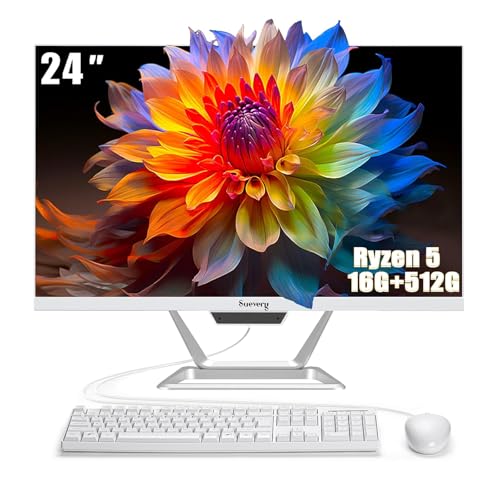
- Best small-space pick overall: suevery All-in-One PC 24, Ryzen 5, 16GB RAM, 512GB SSD — Check on Amazon
- Lenovo IdeaCentre AIO 3 24, Ryzen 5 5500U, 16GB RAM, 512GB SSD — Check on Amazon
- HP ProOne 600 G4 All-in-One, Core i5-8500T, 8GB RAM, 256GB SSD (Renewed) — Check on Amazon
- Dell OptiPlex 5260 All-in-One, Core i5-8400, 8GB RAM, 256GB SSD (Renewed) — Check on Amazon
See 2 more Amazon options
- HP 22-inch FHD All-in-One, Intel N100, 8GB RAM, 128GB SSD — Check on Amazon
- Lenovo IdeaCentre AIO 3i 22, Core i3-1115G4 Touch, 8GB RAM, 256GB SSD — Check on Amazon
Read the full guide ↓
Disclosure: As an Amazon Associate, reviewstook.com earns from qualifying purchases. Links to Amazon on this page are affiliate links; they cost you nothing extra. Listing details such as price and availability change often, so check the current Amazon listing before you buy.
Start with the honest core, because it shapes everything below: an all-in-one PC is already the small-space form factor. The computer lives inside the monitor, so there is no tower competing for floor or desk room, no separate screen to mount, and exactly one power cable between the machine and the wall. That means “best all-in-one for small spaces under $500” is not a search for a special compact category — every machine in this guide is compact by construction. What actually differs, and what this guide grades, is everything around that shared advantage: how big the screen is, how much of the desk the stand asks for, whether the keyboard, mouse, webcam and speakers are built in or arrive as extra boxes and cables, and which hidden companions — a power brick that needs a home, a Wi-Fi dongle sticking out of a port, an external drive bundled to inflate a storage number — quietly move back into the space you thought you had saved.
The second honesty note is about power, and it matters more in a small room than anywhere else. Nothing in this guide has a discrete graphics card, and no all-in-one under $500 plays modern AAA games properly. These are everyday machines — documents, browser tabs, video calls, streaming video, schoolwork, light photo work, older and lighter games — that happen to take up almost no room. If what you actually need is gaming power in a small footprint, that is a different shelf entirely: mini gaming PCs, small-form-factor builds and compact gaming desktops exist for exactly that job, and this guide links to them below with the trade named in both directions. Buy an all-in-one for the desk it frees, not for games it cannot run.
The six picks split into the same three families this price band always produces. Two are new 23.8-inch machines with 16GB of memory and 512GB of internal storage — the biggest screens here, bought when a small room still has one proper desk. Two are renewed 21.5-inch business machines from HP and Dell with six-core processors, bought when the budget is hard and the corner is tight. One is a brand-new 21.5-inch HP built for counters and first computers. And one is a 21.5-inch Lenovo whose touchscreen lets it work in places a mouse cannot. Each review below grades its pick twice: once as a computer, and once as a piece of furniture competing for the scarcest resource in the room.
In this guide
Quick Picks
Short on time, or comparing several options at once? Each row below names a space situation and the product that suits it, with a link to the listing.
| Space situation | Pick | Why it stands out | Link |
|---|---|---|---|
| One small desk, most computer | suevery All-in-One PC 24, Ryzen 5, 16GB / 512GB | Biggest screen class here with nothing external to store | Check on Amazon |
| Small desk, big-brand backing | Lenovo IdeaCentre AIO 3 24, Ryzen 5 5500U | 23.8-inch screen and a DVD drive built in, not bolted on | Check on Amazon |
| Tight corner, tighter budget | HP ProOne 600 G4, i5-8500T (Renewed) | 21.5-inch business machine in the budget tier — check price on Amazon | Check on Amazon |
| Small now, second screen later | Dell OptiPlex 5260, i5-8400 (Renewed) | DisplayPort and USB-C when the desk eventually grows | Check on Amazon |
| Counter, dorm or first computer | HP 22-inch All-in-One, Intel N100 | Brand-new and compact — but read the storage warning | Check on Amazon |
| No room for a mouse | Lenovo IdeaCentre AIO 3i 22, i3-1115G4 | Touchscreen works standing, at a counter, without peripherals | Check on Amazon |
How These Picks Were Chosen
The budget was applied to the whole computer — screen, processor, memory, storage, peripherals and Windows licence together — because completeness is the entire argument for an all-in-one in a small room. Every product below is a real Amazon listing in this budget tier in the United States. Prices change often, so check price on Amazon on the live listing before you buy rather than relying on any older figure. Two renewed machines appear because at this budget they are a third of the realistic market, and excluding them would misrepresent what $500 can do.
We did not use these products ourselves. We read the maker listings and specification pages and compared two ledgers. The first is the computing ledger: processor class and core count, memory, internal storage — internal, a distinction this category abuses — display size and resolution, included peripherals and operating system. The second is the space ledger, and it is the one most guides skip: screen-size class, stand class, which functions are built into the single unit (webcam, speakers, Wi-Fi) and which arrive as separate objects (a wired keyboard and mouse with cables to route, a USB Wi-Fi dongle permanently occupying a port, an external drive bundled into a storage headline). A pick earned its place only if both ledgers balanced: a strong spec sheet attached to a desk full of accessories is not a small-space computer, whatever the product name says.
One discipline needs stating plainly. The source research for these six listings documents screen sizes and configurations; it does not document weights, mounting patterns or noise figures, so this guide claims none. Where an exact stand footprint matters — and on a shallow desk it does — the checklist below turns the live listing’s own product-information block into the source, because that is the only honest place the number lives. Everything graded here by class rather than by measurement is labelled as class grading, so you always know which kind of claim you are reading.
The Space You Cannot See on the Spec Sheet
An all-in-one’s listed footprint is the screen and its stand. The real footprint is everything that shows up with it, and in a small room the difference decides whether the purchase works. Four hidden space costs recur across this guide, and each review prices them for its pick.
The power brick. Most all-in-ones run from an external power adapter rather than a cord straight into the unit. The brick is small, but it needs a home: on the desk it is clutter, on the floor it is a dust trap and a toe-stubber, and in a power strip it can block the neighbouring socket. Before ordering, decide where it lives — behind the stand, in a cable tray under the desk, or in the strip — and count it as part of the machine’s footprint, because it is.
The dongle. On the renewed business machines especially, Wi-Fi and Bluetooth sometimes arrive as USB adapters rather than internal cards, varying by seller and listing. A dongle costs almost no space, but it permanently occupies a USB port and sticks out of the back or side of a machine you bought partly for its clean lines. In a tight alcove where the unit sits close to a wall, a rear dongle also sets a minimum clearance. Check the live listing for whether wireless is internal, and treat a dongle as a small but real tax.
The bundled drive. This band’s most creative accounting trick is storage: bundles that advertise a large total by adding an external drive or docking-station drive to a small internal one. For a small-space buyer the trick has a second cost beyond the dishonesty — the external drive is a physical box that must sit somewhere, with a cable that must run somewhere. A machine with 512GB inside it needs nothing on the desk; a machine with 128GB inside and 256GB in an accessory needs a home for the accessory forever. Read the internal figure alone, and count every bundled box as furniture.
The peripherals. A keyboard and mouse are included with most picks here, but wired and wireless sets live differently. Wired peripherals are two cables crossing the desk and dropping behind it — trivial on a big desk, a daily annoyance on a 60-centimetre one. A touchscreen, on the one pick that has it, deletes the mouse entirely, which is why that machine suits counters and standing spots where a mouse has nowhere to travel. When you compare picks, compare the full set of objects that will live on the surface, not just the screen.
The 6 Best All-in-One PCs for Small Spaces Under $500
suevery All-in-One PC 24 — Ryzen 5, 16GB RAM, 512GB SSD
Who it suits: The small-room buyer with one real desk — a bedroom desk, a studio corner, a home-office nook — who wants the most capable complete computer that still arrives as a single box.
As a computer, this is the strongest new package the research found under the ceiling. Behind the 23.8-inch Full HD display sits an AMD Ryzen 5 processor — the listing records it at up to 3.7GHz, and the exact sub-model is not fully pinned in the listing, so this guide does not name one — with 16GB of DDR4 memory and a 512GB SSD, and a keyboard and mouse included. Sixteen gigabytes is the difference between a browser that shrugs at thirty tabs and one that reloads them; 512GB is the difference between a photo library that lives on the machine and one that lives somewhere else. For the everyday workload this category exists for, nothing else new in this guide matches the pairing.
As furniture, the interesting fact is what is absent. The storage is all internal, so no external drive needs a home on the desk. The peripherals are in the box, so nothing else needs buying or storing. The one honest tension is size: 23.8 inches is the largest screen class in this guide, and on a genuinely shallow desk — a hallway console, a kitchen counter run — the bigger panel is the one most likely to sit closer to your face than is comfortable. On a standard desk depth it is simply the most screen this budget buys in a single unit, and the stand is the only footprint beyond the panel itself. For a new 24-inch machine with 16GB of RAM it sits in the budget tier of this guide — check price on Amazon, because smaller-brand pricing moves often.
- 16GB DDR4 RAM and a 512GB internal SSD — no external drive to house, ever.
- Ryzen 5 pace behind the guide’s joint-largest screen, keyboard and mouse included.
- Budget-tier value for a new 24-inch machine — check price on Amazon.
Honest limitation: The listing markets this machine with gaming language, but it has integrated graphics only — light and older games at modest settings, not modern AAA titles — and support is a small-brand operation rather than a national service network.
Choose it if your small space has one proper desk and you want the most complete single-box computer on it. Skip it if the surface is a shallow counter rather than a desk — a 21.5-inch pick below will sit more comfortably — or if a big-brand warranty matters more than the spec sheet.

Lenovo IdeaCentre AIO 3 24 — Ryzen 5 5500U, 16GB RAM, 512GB SSD
Who it suits: Buyers who want the same 16GB/512GB class of machine from a major brand — and households with discs, because this pick’s most space-relevant feature is one most all-in-ones have deleted.
The processor is a Ryzen 5 5500U: six cores, twelve threads, 2.1GHz base and up to 4.0GHz boost per Lenovo’s own specifications, with integrated Radeon graphics that handle video, casual games and light creative work without complaint. Around it sit 16GB of DDR4 memory, a 512GB SSD, a 23.8-inch Full HD display and Windows 11. It is, specification for specification, the best-balanced new big-brand machine in this guide when it is priced under the ceiling.
The space argument is the DVD RW drive. In a tower setup, an optical drive is invisible; in a small room served by an all-in-one, the alternative to a built-in drive is a USB external drive — another box, another cable, another thing to store between uses and find when a school disc, a tax archive or a family’s film collection appears. Lenovo building it into the unit deletes that object from the room entirely, and for disc households that is worth more than a spec-sheet line suggests. The buying discipline is the same as ever with this model: it is an older line sold largely by third-party sellers whose prices wander, so check price on Amazon on the live listing. When a listing shows the 16GB/512GB F0G1008MUS configuration at or under the ceiling, it is arguably the best-balanced pick here; when sellers ask well above that, walk past — the badge is not worth a premium, and the configuration must be confirmed on the live listing because this family was sold in several.
- The Ryzen 5 5500U’s six cores make it the strongest big-brand processor here.
- Built-in DVD RW drive: one less external box in a small room.
- 16GB RAM and 512GB internal SSD behind a 23.8-inch Full HD screen.
Honest limitation: An older model sold through third-party sellers, so price and exact configuration vary by listing — and, like every pick here, graphics are integrated only.
Choose it if you want big-brand backing, the joint-biggest screen and a disc drive, caught at or under the ceiling. Skip it if the live listing is priced well above the ceiling or shows a lesser configuration.
HP ProOne 600 G4 All-in-One — Core i5-8500T, 8GB RAM, 256GB SSD (Renewed)
Who it suits: The tightest corners on the hardest budgets — a reception point, a small-office desk, a student’s room — where the spend needs to stay in the budget tier and the machine still has to feel like a real computer.
The ProOne 600 G4 was built for corporate fleets, and its Core i5-8500T shows it: six cores at 2.1GHz base and up to 3.5GHz turbo, with Intel UHD Graphics 630, still out-muscle the brand-new entry chips in this guide for everyday multitasking. The documented renewed configuration pairs it with 8GB of DDR4 memory and a 256GB SSD behind a 21.5-inch Full HD display, includes a keyboard and mouse, and runs Windows 11 Pro, with BitLocker and remote-desktop hosting that home licences lack. As a renewed listing it sits in the budget tier of this guide — check price on Amazon — and it is one of the most affordable routes here to a small desk that works properly.
The space grading cuts both ways. In its favour: the 21.5-inch class is the smaller footprint tier here, suited to counters and shallow desks the 23.8-inch picks crowd, and the business chassis was designed to be serviced — memory and storage sit behind panels a technician can open, which makes this one of the more upgradeable picks in a category famous for sealed boxes. Against it: renewed listings for this model vary, and in some of them Wi-Fi and Bluetooth arrive as USB adapters rather than internal cards — a dongle permanently in a port, and a minimum clearance behind the unit if the port faces the wall. Accessories may be compatible replacements rather than original HP parts, and the warranty is the refurbisher’s or Amazon Renewed’s, not a fresh factory one. Check the specific listing’s wireless arrangement and return window, photograph the machine on arrival, and the trade is a good one.
- Six-core i5-8500T and Windows 11 Pro in the budget tier — check price on Amazon.
- Smaller 21.5-inch class for counters, alcoves and shallow desks.
- Serviceable business design: memory and storage are technician-replaceable.
Honest limitation: Renewed and previous-generation — 8GB of RAM, a refurbisher warranty, and wireless that may arrive as a USB dongle depending on the listing.
Choose it if value per dollar and the smaller screen class top your list and renewed condition does not bother you. Skip it if you need a factory warranty, 16GB of memory, or guaranteed internal Wi-Fi.

Dell OptiPlex 5260 All-in-One — Core i5-8400, 8GB RAM, 256GB SSD (Renewed)
Who it suits: The same renewed-business buyer as the HP above, in a small space that might not stay small — because this pick’s distinguishing ports are really a decision about the desk’s future.
Dell’s OptiPlex line is the other great corporate fleet. The renewed listing documents a Core i5-8400 — six cores, up to 4.0GHz; the listing title’s stray “quad-core” wording is an error, and the detailed specification is the six-core part — with 8GB of DDR4 memory, a 256GB SSD, a 21.5-inch Full HD display and Windows 11 Pro. As a computer for a tight corner today, it matches the ProOne closely: same screen class, same core count, same serviceable fleet chassis.
What separates it is connectivity: the listing includes Wi-Fi, Bluetooth, DisplayPort and a USB-C port alongside the keyboard and mouse. Read those ports as a space plan. DisplayPort is the easiest second-monitor path in this guide, and a second monitor is the single most common real office upgrade — but it is also a doubling of the screen footprint, so the honest advice runs both ways: if the desk will grow, this is the renewed pick that grows with it; if the room is permanently small, the second screen will never come and the ports are simply a tiebreaker. The renewed cautions mirror the HP’s, because the deal is the same shape: a professionally inspected, tested and cleaned ex-business machine sold by a third-party refurbisher, graded by the seller rather than by Dell. Whether Wi-Fi is internal or a USB dongle varies between listings of this same model, so verify it in the specific offer — two listings with the same title can be meaningfully different purchases. This guide claims no hard price for the Dell; renewed pricing is seller-dependent, and the better-graded unit with the clearer warranty is the right buy on the day.
- Six-core i5-8400 with Windows 11 Pro in Dell’s serviceable fleet chassis.
- USB-C and DisplayPort — the guide’s easiest route to a second screen later.
- The documented listing includes keyboard, mouse, Wi-Fi and Bluetooth.
Honest limitation: Renewed stock is only as good as its seller: the condition grade, the warranty and even how Wi-Fi is provided all change from one listing of this model to the next.
Choose it if you want renewed Dell hardware in the smaller screen class, with a growth path if the desk ever expands. Skip it if the seller’s condition grade and returns terms cannot be pinned down before ordering — on a renewed machine, the seller is half the product.

HP 22-inch FHD All-in-One — Intel N100, 8GB RAM, 128GB SSD
Who it suits: Buyers who want a brand-new, big-brand machine for the smallest duties in the smallest spots — a kitchen counter, a child’s homework desk, a reception point, a relative’s first computer.
The virtues are genuine: a 21.5-inch Full HD display in a compact white body, a built-in webcam, Wi-Fi 6, HDMI and Ethernet ports, a wired keyboard and mouse in the box, and Windows 11 Home, all new with a manufacturer’s warranty. It is positioned at the top end of this guide’s budget tier — check price on Amazon to confirm it still fits the ceiling. For video calls, webmail, homework platforms and streaming, it is a tidy, quiet, low-power machine that asks almost nothing of its owner, and its smaller screen class is the easiest fit in this guide for counters and shared family surfaces.
Now the two cautions, and both are space cautions as much as spec cautions. The Intel N100 is a four-core, four-thread efficiency processor (up to 3.4GHz turbo) paired with 8GB of memory: fine for light work, visibly slow under heavy tab loads or big spreadsheets. The serious warning is storage. This configuration’s internal drive is 128GB, which Windows and its updates steadily erode — and this corner of the market is where storage arithmetic gets creative: reporting on this very HP model family has documented Amazon bundles advertising “384GB” that combine the 128GB internal drive with 256GB in an external docking accessory. For a small-space buyer that bundle is a double cost: the internal drive is still 128GB, and the accessory is a physical box that must live on the desk with a cable run to it. Add the wired keyboard and mouse — two cables crossing a small surface — and the “compact” HP can quietly assemble more desk clutter than the bigger-storage picks above. Read any listing until the internal drive’s size stands alone, and if your files live locally rather than in the cloud, the 512GB picks are worth more than the new-machine smell.
- A factory warranty, Wi-Fi 6 and a built-in webcam, with peripherals in the box.
- Positioned at the top end of the budget tier — check price on Amazon.
- Compact 21.5-inch class suits counters, dorm desks and shared spaces.
Honest limitation: The N100 and 8GB of RAM cap it at light work, the 128GB internal drive is this guide’s smallest, and bundle listings may pad the storage figure with an external drive that then needs a home.
Choose it if new-with-warranty matters most, the workload is genuinely light and cloud-based, and the surface is truly small. Skip it if your files live on the machine or your multitasking is heavy — the small drive and entry chip will be a daily frustration long before the year is out.

Lenovo IdeaCentre AIO 3i 22 — Core i3-1115G4 Touch, 8GB RAM, 256GB SSD
Who it suits: The spaces where a mouse has nowhere to go — a kitchen worktop, a hallway information point, a child’s desk, a standing-height counter — because this is the one pick that can be operated by touching it.
Touch is the whole argument, and in a small space it is a stronger argument than it first sounds. The 21.5-inch Full HD display is a touch panel, so the machine can work with the keyboard pushed back and the mouse left in a drawer: tapping through recipes with floury hands, zooming homework, signing a document, driving music and video by finger. No other pick in this guide can shed a peripheral that completely, and on a narrow counter the mouse’s travelling room is often the scarcest resource of all. Behind the screen sits a Core i3-1115G4 — dual-core, four threads, up to 4.1GHz, with strong single-core pace for everyday apps — plus 8GB of memory, a 256GB SSD, Windows 11 and, like its larger Lenovo sibling, a built-in DVD RW drive, so disc households need no external drive here either.
The trade-offs mirror the strengths. Two cores are the fewest in this guide: right for browsing, documents, calls and streaming, wrong for heavy multitasking or creative work beyond touch-ups. The 256GB SSD is adequate rather than roomy. And the pricing needs a buyer’s discipline: third-party pricing for this model has historically drifted above the ceiling, so check price on Amazon before ordering. The rule is simple: buy it only when a listing shows it at or under the ceiling, and walk past a nostalgia premium. Touch is worth having at the right price; it does not justify paying well over the ceiling against picks with more cores, memory and storage.
- Full HD touchscreen — the only pick that can work without a mouse.
- Built-in DVD RW drive and a compact 21.5-inch body for shared spaces.
- Core i3-1115G4 pace for everyday apps, from a big-brand maker.
Honest limitation: A dual-core processor and 256GB SSD are modest, and third-party pricing has historically drifted above the ceiling — buy only at or under the ceiling.
Choose it if the machine will live somewhere a mouse cannot travel and the live price respects the budget. Skip it if it will sit at a normal desk all its life — there, touch is used twice and forgotten, and the money buys more computer elsewhere in this guide.

Comparison Table
| Product | Display | Processor / RAM / Storage | Space profile | Link |
|---|---|---|---|---|
| suevery All-in-One PC 24 | 23.8″ FHD | Ryzen 5 / 16GB / 512GB SSD | Largest screen class; all storage internal, nothing extra to house | Check on Amazon |
| Lenovo IdeaCentre AIO 3 24 | 23.8″ FHD | Ryzen 5 5500U / 16GB / 512GB SSD | Big screen; DVD drive built in, deleting an external box | Check on Amazon |
| HP ProOne 600 G4 (Renewed) | 21.5″ FHD | i5-8500T 6-core / 8GB / 256GB SSD | Smaller class; check whether Wi-Fi arrives as a dongle | Check on Amazon |
| Dell OptiPlex 5260 (Renewed) | 21.5″ FHD | i5-8400 6-core / 8GB / 256GB SSD | Smaller class now; DisplayPort if the desk grows a second screen | Check on Amazon |
| HP 22-inch All-in-One | 21.5″ FHD | Intel N100 / 8GB / 128GB SSD | Smallest duties; wired peripherals, beware bundled external drives | Check on Amazon |
| Lenovo IdeaCentre AIO 3i 22 | 21.5″ FHD Touch | i3-1115G4 / 8GB / 256GB SSD | Touch class; can work with no mouse on the surface at all | Check on Amazon |
How to Choose an All-in-One PC for a Small Space
Measure before you buy — in this order.
- Step 1 — Measure the desk depth, then choose the screen class. Sit where you will sit and measure from your eyes to where the screen will stand. A 23.8-inch panel wants a proper desk’s depth to sit at a comfortable viewing distance; on a shallow counter, a narrow hallway desk or a small dorm surface, the 21.5-inch class is the one that fits the room instead of crowding it. Both classes are Full HD here, so the smaller screen costs you working room, never sharpness.
- Step 2 — Tape the footprint. The source research for this guide documents screen sizes, not stand dimensions, so take the stand’s measurements from the live listing’s product-information block, mark that rectangle on the desk with painter’s tape, and live with the tape for a day. If the taped rectangle swallows the notebook, the mug and the phone charger, the pick is too big for the surface whatever its screen diagonal says.
- Step 3 — Count every object, not just the computer. List what will actually live on and around the surface: the unit, its power brick and where the brick goes, the keyboard, the mouse and its travelling room, any USB dongle, any bundled external drive and its cable. A pick that wins on paper can lose on this count — the touchscreen Lenovo deletes the mouse, the 512GB picks delete the external drive, and the renewed picks may add a dongle.
- Step 4 — Walk the cable run. One power cable is the all-in-one promise, but it still has to reach. Check the distance from the stand to the outlet, whether the cable drops cleanly behind the desk or trails across it, and whether a wired keyboard and mouse add two more runs. If the outlet is far, a power strip’s location becomes part of the plan — and part of the footprint.
- Step 5 — Then order. Only after the tape, the count and the cable walk: confirm the configuration on the live listing, the internal storage figure stated alone, the seller and return window on renewed picks, and the live price against the $500 ceiling.
And the computing checks that still apply. Read the internal storage number and only the internal number — 128GB internal is tight, 256GB workable, 512GB comfortable, regardless of what accessories share the box. Treat 16GB of RAM as the longevity line if the machine must serve four years or more. Rank processors by class: the six-core Ryzen 5 5500U and the renewed six-core Core i5 chips are the strong tier, the white-box Ryzen 5 configuration sits with them on everyday work, the Core i3-1115G4 is a capable dual-core for light use, and the N100 is an efficiency chip for genuinely light duties. Decide new versus renewed early, because it is the real fork in this market: new buys a factory warranty paid for with an entry processor; renewed business buys six cores and Windows 11 Pro paid for with age and a refurbisher’s warranty. Finally, plan for zero upgrades except where stated — most all-in-ones seal processor and graphics for life, and the renewed business machines, with technician-serviceable memory and storage, are the exception.
When an All-in-One Is the Wrong Answer
There is one small-space job an all-in-one cannot do, and this guide will not pretend otherwise: gaming. Every pick here runs integrated graphics, which means older titles, casual games and esports games at modest settings — and not modern AAA games at any setting worth having. If the small room is a gaming room, the honest purchase is a small computer with a real graphics card and a separate monitor: start with Best Mini Gaming PC Under $500, Best Small Form Factor Gaming PC Under $500 and Best Compact Gaming PC Under $500, or the broader Best Mini PC Under $500 guides if the gaming is lighter.
Name the trade in both directions before you switch shelves. The gaming route buys what no all-in-one here offers — a discrete GPU, upgrade paths, a monitor that survives the computer — and pays for it in exactly the currency this guide counts: a separate box to place, a separate screen to stand or mount, more cables to route, and a webcam and speakers to add yourself. The all-in-one route buys a single object, a single cable and a ten-minute setup, and pays with a hard performance ceiling and a screen that retires when its computer does. Neither trade is a mistake. The mistake is buying one while expecting the other’s half of the bargain.
Common Buying Mistakes
- Assuming “all-in-one” means “nothing else on the desk.” Power bricks, dongles, wired peripherals and bundled external drives all take space — count them before you order, not after.
- Choosing the screen by diagonal alone. A 23.8-inch panel on a shallow counter sits too close and crowds the surface; desk depth, not diagonal envy, should pick the class.
- Believing a headline storage total that includes an external or dock drive. The internal drive is the computer’s storage; the accessory is a box that needs a home and a cable.
- Forgetting the dongle. On renewed listings, Wi-Fi by USB adapter permanently occupies a port and sets a clearance behind the unit — check whether wireless is internal.
- Buying a touchscreen for a desk-bound machine, or skipping it for a counter. Touch earns its money exactly where a mouse cannot travel, and nowhere else.
- Paying a “gaming” premium for integrated graphics. If no discrete GPU is named in the specification, there is no gaming hardware in the box — at any size.
- Choosing 8GB of RAM and 128GB of storage to save a little on a machine meant to serve five years. The saving lasts a month; the constraint, and the external drive it eventually forces onto the desk, lasts sixty.
- Dismissing renewed business machines out of hand — or buying one without reading the seller’s grade, warranty and return window first. Either reflex costs money.
- Blaming the computer for a screen placed opposite a sunny window. Where a modest-brightness panel sits in the room is part of the purchase.
- Throwing the packaging away on day one. Run every port, the webcam, the speakers and a full Windows update cycle in the first days — an all-in-one is a single unit, so a fault anywhere is a return of everything.
Final Recommendation
- Most small-space buyers with a real desk: suevery All-in-One PC 24.
- Big-brand buyers, when it lists under the ceiling: Lenovo IdeaCentre AIO 3 24.
- Tightest corner, hardest budget: HP ProOne 600 G4 (Renewed).
- Small now, maybe a second screen later: Dell OptiPlex 5260 (Renewed).
- Brand-new for counters and first computers: HP 22-inch All-in-One.
- Where a mouse has nowhere to go: Lenovo IdeaCentre AIO 3i 22.
Our top two for a small space are the suevery 24 — the strongest complete single box our research found under $500, with the 16GB and 512GB that mean nothing else ever has to live on the desk — and the HP ProOne 600 G4 renewed, for the smallest budgets in the smallest corners, in the budget tier — check price on Amazon. Between them they cover the two honest shapes of this search: the most computer in one unit, and the most computer per dollar in the smaller class. If a factory warranty is non-negotiable and the Lenovo IdeaCentre AIO 3 is listed at or under the ceiling, it splits the difference and deletes the external disc drive besides; if the machine must work standing at a counter, the touchscreen 3i is the only pick designed for it. Shoppers working the other direction can start with Best All In One PC Under $400, and those with more room in the budget should see Best All In One PC Under $700. Measure the desk, tape the footprint, count the objects, walk the cable — then check the live price and the internal storage figure before you order.
Frequently Asked Questions
How much desk space does an all-in-one PC actually take?
Less than any tower setup, but more than the screen alone. The unit’s stand is the footprint, and around it you must budget for the power brick, the keyboard, the mouse’s travelling room and any bundled accessories such as an external drive or a Wi-Fi dongle. This guide grades by screen class — 21.5-inch picks for counters and shallow desks, 23.8-inch picks for full desks — because the source listings document screen sizes rather than stand dimensions; take the exact stand measurements from the live listing and tape them on the desk before ordering.
Is a 21.5-inch or a 23.8-inch all-in-one better for a small room?
It depends on the surface, not the room. Both classes are Full HD and equally sharp. Choose 21.5 inches for counters, dorm desks, reception points and shallow surfaces where the screen sits close; choose 23.8 inches for a main desk where split-screen work happens and the viewing distance is comfortable. The difference is working room and presence, not clarity.
Can an all-in-one under $500 play games?
Light ones, honestly labelled. Integrated graphics — all any of these machines has — copes with older titles, casual games and esports games at modest settings. Modern AAA games sit beyond every pick here: no all-in-one at this price contains a discrete GPU, whatever the listing language implies. If gaming power in a small footprint is the actual requirement, a mini gaming PC or small-form-factor desktop with a separate monitor is the correct purchase instead.
Why do some listings advertise more storage than the computer has?
Because the headline number is sometimes bundle arithmetic: external drives, docking-station drives and flash drives counted as if they were inside the machine. Reporting on this HP model family has documented a “384GB” offer assembled from a 128GB internal drive and a 256GB accessory. For a small-space buyer the bundle costs twice: the internal drive — the only storage Windows and your apps live on — is still small, and the accessory is a physical box that must sit somewhere. Compare internal figures only.
Is a renewed business all-in-one a safe buy for a small desk?
It is a calculated one. Renewed fleet machines are professionally inspected, tested and cleaned, carry a refurbisher or Amazon Renewed warranty rather than a factory one, and may ship with compatible rather than original accessories — and on some listings the Wi-Fi arrives as a USB dongle, which matters in a tight spot. The hardware underneath — six-core processors, serviceable chassis, the smaller 21.5-inch class — suits small spaces well. Buy from a listing with a stated condition grade and a clear return window, and test everything in the first week.
Can I wall-mount an all-in-one to save more space?
Only if the specific model supports it, and this guide will not guess: the source research for these six listings does not document mounting patterns, so no pick here is claimed as mountable. If wall-mounting is the plan, confirm the mounting specification on the live listing for the exact model before ordering — and if it is not documented there, treat the answer as no and choose a pick whose stand footprint fits instead.
All-in-one or a mini PC with a separate monitor — which is smaller?
On the desk, the all-in-one: one unit, one cable, webcam and speakers built in, nothing else to place. A mini PC hides its box more completely — behind the monitor or under the desk — but adds the monitor as a second object with its own stand and cable, plus peripherals and usually a webcam to place. If simplicity and a clean surface matter most, choose the all-in-one; if you already own a good monitor, the mini PC route can be the stronger computer for the same money.


