Where to buy
Check the latest price, availability and delivery on Amazon. Orders are placed on Amazon. We may earn a commission from qualifying purchases.
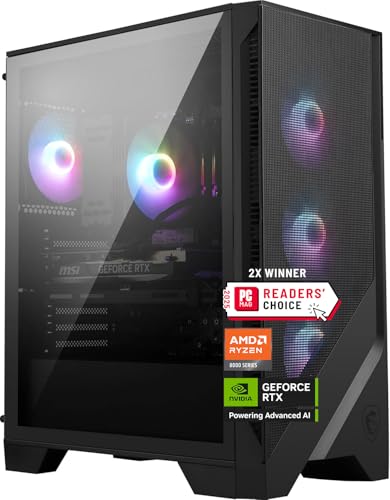
- Newest GPU generation for streamers: MSI Codex Z2 Gaming Desktop, Ryzen 7 8700F, RTX 5070, 32GB DDR5, 2TB SSD — Check on Amazon
- Skytech Omega Gaming PC, Ryzen 7 7800X3D, RTX 4070 Super, 32GB DDR5, 1TB NVMe — Check on Amazon
- iBUYPOWER Slate 8 MESH Gaming PC, Intel Core i7-14700F, RTX 4070 Super, 2TB NVMe — Check on Amazon
- Thermaltake LCGS View i4770 Gaming Desktop, Intel Core i7-14700KF, RTX 4070, 32GB DDR5 — Check on Amazon
See 2 more Amazon options
- Skytech Omega Gaming PC, Ryzen 7 7700X, RTX 4070 Super, 32GB DDR5, White — Check on Amazon
- ASUS ROG Strix G15DS Gaming Desktop, Ryzen 7 7700X, RTX 4070 Dual, 1TB PCIe SSD — Check on Amazon
Read the full guide ↓
Disclosure: As an Amazon Associate, reviewstook.com earns from qualifying purchases. Links to Amazon on this page are affiliate links; they cost you nothing extra. Listing details such as price and availability change often, so check the current Amazon listing before you buy.
A streaming PC has two jobs that fight over the same hardware. Job one is the game on your own screen: at this budget, that means playing at 1440p, or on a 4K panel with DLSS doing the reconstruction work. Job two is the broadcast leaving your house: OBS compositing your scenes, an encoder turning them into a video stream, and your upload connection carrying it to the platform. This guide grades both jobs, in that order of honesty — because the second job is the one most buying guides ignore, and it is the one your viewers actually see. One clarification belongs at the very top: nobody in this guide streams in 4K, and neither will you. The mainstream platforms do not accept a 4K live stream at a bitrate that would make it worthwhile — Twitch’s standard ceiling is roughly 6,000 kbps at 1080p60, and even YouTube, which allows higher bitrates, 1440p streams and AV1 ingest, is a 1440p conversation at most. The “4K” in this keyword is your monitor. The stream your audience watches is 1080p60, and the quality of that 1080p60 is decided less by your graphics card’s gaming speed than by its encoder — the small, dedicated block of silicon that turns frames into broadcast video without stealing performance from the game.
That is why this guide is graded encoder-first. Five of the six systems below carry RTX 4070-class cards, and every one of those cards — the 4070 Super and the plain 4070 alike — carries two eighth-generation NVENC encoder units with AV1 support. Two encoders means the broadcast encode and a simultaneous high-quality local recording can run on separate hardware units instead of sharing one. The sixth system, the MSI, carries the newer RTX 5070 — and here is the detail the spec sheet will not shout: the plain RTX 5070 has only one NVENC unit, albeit a newer ninth-generation one with AV1. It is the strongest gaming card in this guide and the best local picture, but for the specific dual job of streaming-plus-recording, the older dual-encoder cards hold a genuine structural advantage. Neither fact makes the other machine bad. It makes them different tools, and the reviews below grade them as such — on encoder headroom, on the CPU cores left over for your chat, browser sources and alerts, on the 12GB of VRAM that the game and the OBS canvas must share, and on the storage that a local recording habit eats at roughly 20GB per hour.
Prebuilt pricing at this tier is volatile, so check the current price on Amazon for every system below before you decide: a pick belongs in this under-$1,500 guide only while its live listing fits the budget. If the live listing has moved above the budget when you read this, wait for it to come back within budget or read Best 4K Gaming PC Under $1200 instead of overpaying. Streamers on a tighter budget should also see Best Streaming PC Under $1500, which grades dedicated streaming machines without the 4K-panel requirement.
In this guide
Quick Picks
Short on time, or comparing several options at once? Each row below names a streamer type and the product that suits it, with a link to the listing.
| Streamer type | Pick | Why it stands out | Link |
|---|---|---|---|
| Best local picture | MSI Codex Z2, Ryzen 7 8700F, RTX 5070 | Newest GPU, DLSS 4, 32GB RAM and 2TB for recordings — single (9th-gen) encoder | Check on Amazon |
| Best overall for streaming | Skytech Omega, Ryzen 7 7800X3D, RTX 4070 Super | Dual NVENC plus the strongest gaming CPU here — smooth game, smooth stream | Check on Amazon |
| Best for a heavy app stack | iBUYPOWER Slate 8 MESH, i7-14700F, RTX 4070 Super | 20 cores and 2TB for recordings — but only 16GB of RAM | Check on Amazon |
| Best creator CPU headroom | Thermaltake LCGS View i4770, i7-14700KF, RTX 4070 | 20 unlocked cores, 32GB DDR5-5600, dual NVENC | Check on Amazon |
| Best value for streaming | Skytech Omega, Ryzen 7 7700X, RTX 4070 Super, White | Dual NVENC and strong value positioning in this tier — check price on Amazon | Check on Amazon |
| Best big-brand build | ASUS ROG Strix G15DS, Ryzen 7 7700X, RTX 4070 | Dual NVENC in a compact ROG tower — 16GB RAM, check the seller | Check on Amazon |
How These Picks Were Chosen
The six systems are the verified set from our base guide to 4K gaming PCs under $1,500: real Amazon listings, each built around an RTX 4070-class card or better. Nothing was added for this streaming edition and nothing was removed — the same machines, re-graded for a different job. Check the current price on Amazon for each pick, because a recommendation only fits this budget while its live listing does.
We did not use these products ourselves. We read the maker listings and specification pages, and for this edition we sorted the parts in the order a stream actually loads them. First, the encoder: how many NVENC units the card carries, which generation, and whether AV1 encoding is available for the platforms that accept it. Second, the processor — not for the game, which the GPU feeds, but for everything running beside it: OBS scene compositing, browser sources for alerts and overlays, chat, voice apps, and the local recording’s file handling. Third, system memory, because a game plus OBS plus a browser is a heavier combined load than any of them alone. Fourth, storage, because a streamer who records locally at 40–50 Mbps is budgeting roughly 20GB per hour of footage. The gaming hardware itself — raster speed, DLSS, the shared 12GB VRAM ceiling — is graded last, not because it matters least, but because at this tier all six cards are already competent at the local half of the job, while their encoder and headroom differences are real.
Two filters from the base guide still apply. The completeness filter: 32GB of memory and at least 1TB of storage are the tier standard, and the two 16GB systems carry that shortfall as a named limitation — for streamers it bites harder than for pure gamers, and the reviews say where. The transparency filter: listings that publish their power supply and memory configuration were favoured, and where a maker publishes no PSU figure, the review flags the gap rather than guessing. A $1,500 purchase deserves published numbers.
The Encoder Is the Streaming Spec
Every graphics card in this guide contains NVENC, NVIDIA’s dedicated hardware encoder. It is a separate block of silicon from the cores that render your game, which is the entire point: encoding a 1080p60 broadcast on NVENC costs the game almost nothing, while encoding on the CPU (the x264 software path) steals cores from the game and everything else. When streamers say a card is “good for streaming,” NVENC is what they mean.
The count matters as much as the generation. The RTX 4070 and 4070 Super carry two eighth-generation NVENC units. OBS can put the live broadcast on one unit and a high-bitrate local recording — the clean copy you edit for clips and uploads — on the other, and neither job slows the other down. Both generations here also encode AV1, the newer codec that produces a visibly cleaner picture at the same bitrate; YouTube accepts AV1 live ingest, and Twitch is rolling AV1 out through its Enhanced Broadcasting programme, so an AV1-capable card is a small piece of future-proofing you already own. The RTX 5070’s single ninth-generation NVENC is a newer, slightly more efficient unit, and for the broadcast alone it is excellent. But it is one unit: ask it to broadcast and record at high quality simultaneously and the two jobs share its capacity, where a 4070-class card gives each job its own. For a streamer who only broadcasts, the difference never appears. For a streamer who records everything, it is the most important line in this guide.
Then there is the platform ceiling, which no hardware purchase removes. Twitch’s standard guidance caps a stream at about 6,000 kbps with 1080p60 output — that is the canvas your viewers get, whatever system in this tier you bought. YouTube is more generous: higher bitrates, 1440p stream output (which also earns your 1080p stream a better playback codec on the viewer’s side), and AV1 ingest. Streaming “in 4K” is not on either menu at bitrates that would do it justice, which is why this guide treats 4K as your local panel resolution and grades the broadcast at 1080p60. Play locally at 1440p — or at 4K-panel output with DLSS Quality rendering around 1440p internally — and let OBS downscale to the 1080p canvas. A downscaled stream from a higher-resolution render looks cleaner than a native 1080p render, and it costs the encoder nothing extra.
The 6 Best 4K Gaming PCs for Streaming Under $1,500
MSI Codex Z2 Gaming Desktop, Ryzen 7 8700F, RTX 5070, 32GB DDR5, 2TB SSD
Who it suits: The streamer who plays for the broadcast but watches the footage back — someone whose own screen experience comes first, who records selectively rather than constantly, and who checks the current price on Amazon before buying.
Start with what this machine does better than anything else here: the game itself. The RTX 5070 is the current-generation Blackwell card, with 12GB of GDDR7 and DLSS 4 multi frame generation, which can insert up to three generated frames between rendered ones. On your own 4K panel that is the smoothest local picture in this guide, and your viewers benefit indirectly — a game running comfortably at its settings cap produces steadier frames for the encoder to work with than a game stuttering at its limit. The system around the card is the most complete here for a recording workflow: the Ryzen 7 8700F’s 8 cores and 16 threads are ample for OBS, chat and browser sources once the encode sits on NVENC; 32GB of memory swallows the combined game-plus-apps load without swapping; and the 2TB NVMe drive is the only one besides the iBUYPOWER’s that treats local recording as a habit rather than an event — at roughly 20GB an hour, it holds weeks of footage before the delete-or-archive decision arrives.
Now the honest grading, because this is a streaming guide. The plain RTX 5070 carries one ninth-generation NVENC unit. It is a newer unit than the 4070-class cards carry, with AV1 encoding, and for the broadcast encode alone it is flawless — your Twitch or YouTube stream will not know the difference. The constraint appears only when you ask for two encodes at once: broadcast plus a separate high-bitrate local recording share the single unit’s throughput. In practice that means choosing the recording’s quality preset more carefully than a dual-encoder owner must, or recording the broadcast-quality copy instead of a pristine one. Streamers who clip from their VODs will never notice; streamers who record a clean 50 Mbps local copy of every session should weigh the dual-NVENC picks below. Pricing is the other catch: this listing sits at the volatile end of the tier, so check the current price on Amazon and only treat it as an under-$1,500 pick while the live listing fits the budget.
- Strongest local picture here: RTX 5070 with DLSS 4 multi frame generation.
- 32GB of RAM and a 2TB SSD — the recording-friendly specification.
- Ninth-generation NVENC with AV1 for YouTube ingest and Twitch’s AV1 rollout.
Honest limitation: A single NVENC unit where the 4070-class picks carry two — broadcast-plus-pristine-recording shares one encoder — and the listing does not publish its PSU wattage in the sources we checked, and pricing that moves a lot within the tier — check price on Amazon before you buy.
Choose it if your own screen comes first, you record selectively, and it fits the budget when you check price on Amazon. Skip it if you record a high-bitrate local copy of every session — a dual-encoder 4070 Super pick does that job better — or if the live listing sits above this budget when you check.

Skytech Omega Gaming PC, Ryzen 7 7800X3D, RTX 4070 Super, 32GB DDR5, 1TB NVMe
Who it suits: The streamer whose games are CPU-demanding — simulation, strategy, big multiplayer titles, heavily modded sandboxes — and who wants the broadcast and the game to both stay smooth when the scene gets busy.
The encoder story is the joint-best in this guide: the RTX 4070 Super carries two eighth-generation NVENC units with AV1, so the broadcast encode and a simultaneous high-quality local recording run on separate hardware and neither touches the game’s performance. What elevates this system above the other dual-encoder picks is the processor feeding the game. The Ryzen 7 7800X3D, with its stacked 3D V-Cache, is the strongest gaming CPU in this guide: its advantage lives in minimum frame rates and frame-time consistency, which is precisely what an encoder wants to receive. A stream built from steady frames looks smoother than a stream built from a higher average with dips, because every dip is a moment the broadcast shows your viewers. When DLSS lowers the internal render resolution — the normal state of a 4K-panel setup — CPU workload rises and the X3D’s edge grows. Meanwhile the chip’s 8 cores are enough for the streaming stack itself, because the encode is on the GPU: OBS compositing, browser sources and chat are light work next to a modern game.
The supporting spec is complete and, unusually, published: 32GB of DDR5, a stated 750W Gold power supply, and a 360mm liquid cooler in documented configurations of this model line, which keeps a long streaming session’s temperatures and fan noise in check — your microphone will appreciate the quiet as much as the chip does. Storage is the one streaming-relevant shortfall: 1TB fills quickly when a recording habit costs roughly 20GB an hour, so budget for archiving to an external drive or adding a second NVMe. Check the current price on Amazon before you buy: when it fits this budget, this is the best-balanced streaming system in the guide; when the live listing sits well above the budget, that money is better spent shopping a tier up.
- Dual NVENC with AV1 — broadcast and local recording on separate encoder units.
- 7800X3D frame consistency: the smoothest frame delivery an encoder can ask for.
- Published 750W Gold PSU, 32GB DDR5, liquid cooling for long, quiet sessions.
Honest limitation: 1TB of storage is tight for a record-everything workflow, and the 7800X3D is a gaming specialist — heavy multi-threaded production work is faster on the Intel picks.
Choose it if you stream CPU-heavy games and record locally as a matter of routine. Skip it if your games are purely GPU-bound and another 4070 Super pick offers better value when you check price on Amazon — the X3D premium buys the game less there, though the encoder is identical.

iBUYPOWER Slate 8 MESH Gaming PC, Intel Core i7-14700F, RTX 4070 Super, 2TB NVMe
Who it suits: The streamer running the full desk — game, OBS with layered scenes, browser sources, chat, voice, maybe a virtual camera — who wants CPU cores and recording space to spare, and games focused enough that one spec compromise stays invisible.
The simultaneous-load grading is this system’s whole argument. The Core i7-14700F is a 20-core, 28-thread hybrid chip (8 performance cores plus 12 efficiency cores) boosting to 5.4 GHz: the game takes the performance cores, and everything a busy stream runs beside it — OBS compositing, alert and overlay browser sources, Discord, a clip tool, a browser full of dashboard tabs — lands on the efficiency cores instead of competing with the game. No other pick here gives the app stack this much room. The encoder matches the best in the guide: an RTX 4070 Super with two eighth-generation NVENC units and AV1, so broadcast and local recording proceed in parallel. And the 2TB NVMe drive is the recording pick of the guide alongside the MSI — at roughly 20GB per hour of 40–50 Mbps footage, it is the difference between recording every session by default and rationing the habit. The mesh-front case prioritises airflow, and a keyboard and mouse are in the box. Check price on Amazon for the current listing and availability.
Then the compromise, which a streaming guide must state more bluntly than a gaming guide did: the memory is 16GB of DDR5-5200 in a 2 × 8GB layout. For gaming alone that still runs everything — system RAM is not the render bottleneck. For gaming while streaming, the arithmetic changes: the game, OBS, a browser stack and chat together press on 16GB in a way no single one of them does, and the first symptom is exactly what a stream cannot afford — hitches when a browser source refreshes or a scene switches. The 2 × 8GB layout also means upgrading later means replacing both sticks, not adding two. The fair framing is that iBUYPOWER spent the money on cores and storage instead, and a focused streamer — game, OBS, chat, nothing else — will genuinely never feel the trade. A multitasking streamer should plan to add a 32GB kit as part of the purchase and treat that upgrade as part of choosing this system.
- 20-core i7-14700F: the most headroom here for the streaming app stack.
- Dual NVENC with AV1, plus a 2TB drive that makes record-everything the default.
- RTX 4070 Super raster pace, airflow mesh case, keyboard and mouse included.
Honest limitation: Only 16GB of RAM (2 × 8GB DDR5-5200) — the spec a busy stream feels first — and no published PSU figure in the offer data we reviewed.
Choose it if your stream runs a heavy stack of apps and recordings and your gaming stays focused. Skip it if you know you multitask hard while live and do not want a memory upgrade in the plan — take a 32GB dual-encoder pick and add storage later instead.

Thermaltake LCGS View i4770 Gaming Desktop, Intel Core i7-14700KF, RTX 4070, 32GB DDR5
Who it suits: The creator-streamer whose PC edits the VODs, renders the clips and compiles the highlights after the stream ends — and who checks the current price on Amazon carefully, because this system’s value depends on where its live listing sits within the tier.
For the live hours, the grading is strong. The RTX 4070 carries the same dual eighth-generation NVENC with AV1 as the Super cards, so the broadcast-plus-recording workflow runs on separate encoder units; the plain 4070’s slightly lower raster pace matters less to a stream than to a benchmark, because your viewers watch a 1080p60 downscale either way — it is your own panel, at 4K output with DLSS, where the step down from the Supers is felt, and even there DLSS 3 frame generation keeps the experience properly smooth. The simultaneous-load side is the best in the guide: the unlocked Core i7-14700KF matches the iBUYPOWER’s 20-core, 28-thread layout and adds overclocking headroom, and here it is paired with the full 32GB of DDR5 at a published 5600MT/s, so the game-plus-OBS-plus-browser stack has both the cores and the memory it wants. Closed-loop liquid cooling keeps long sessions quiet — a genuine streaming feature when a microphone shares the room.
Two honest flags. The first is small and specific: the KF chip has no integrated graphics, so there is no Quick Sync backup encoder and no iGPU fallback if the graphics card ever needs troubleshooting mid-season — a minor resilience point that costs nothing to know in advance. The second is pricing position: this system is positioned toward the upper end of the tier, so its value in this guide depends on checking the current price on Amazon. When it fits the under-$1,500 budget, a creator-streamer gets the guide’s strongest all-round CPU platform and its fullest memory spec. When its live listing sits above the budget, the same money is better directed to a 4070 Super system that fits the budget. Check price on Amazon, or move on — both are correct.
- Dual NVENC with AV1 behind the guide’s strongest multitasking platform.
- 20-core unlocked i7-14700KF plus the full 32GB of published DDR5-5600.
- Liquid cooling: quiet long sessions, which your microphone will notice.
Honest limitation: The plain RTX 4070 is the weakest local-play GPU among the top picks, its upper-tier pricing position makes this a check-price-first pick, and the KF’s missing integrated graphics removes the backup-encoder fallback.
Choose it if it fits the budget when you check price on Amazon and your PC produces content as hard as it streams it. Skip it if its live listing sits above the budget today — a 4070 Super system that fits the budget serves the stream identically and your screen better.

Skytech Omega Gaming PC, Ryzen 7 7700X, RTX 4070 Super, 32GB DDR5, White
Who it suits: The value-hunting streamer who wants the full dual-encoder specification with no cut corners — and, if a facecam is part of the show, the one case in this guide that looks the part on camera.
The streaming hardware is identical where it counts to the 7800X3D system above: an RTX 4070 Super with two eighth-generation NVENC units and AV1 encoding, so broadcast and simultaneous local recording run on separate units; 32GB of DDR5 for the combined load; and the published 750W Gold power supply. The difference is the processor: the Ryzen 7 7700X, a strong 8-core chip boosting to 5.4 GHz, in place of the 3D V-Cache flagship. For the stream itself the difference is nearly nothing — the encoder does not care which of these chips feeds the GPU, and in GPU-bound play at 4K-panel resolutions the two are close. Where the X3D earns its premium is frame-time consistency in CPU-sensitive games; everywhere else this is the same streaming machine with stronger value positioning in the tier. It sits toward the value end of this guide rather than balanced on the budget edge — check the current price on Amazon — which can leave more of your overall budget for the microphone this guide insists you buy before anything else.
The white Omega case earns a streaming-specific mention the base guide had no reason to make: on a facecam, your PC is furniture in the background of every broadcast, and this is the only pick designed to be looked at. The honest cautions are the family ones — pricing within the tier moves, so check the current price on Amazon rather than assuming its position; the 7700X runs hot and its documented 360mm liquid cooling configuration for this model line is a necessity, not a garnish; and storage is 1TB, which a record-everything habit at roughly 20GB an hour will fill, so plan for a second drive or external archive as the library grows. When it fits the budget, this is among the strongest streaming hardware for the tier we could document.
- Dual NVENC with AV1 and the full 32GB spec — no streaming corner cut.
- Value positioning toward the lower end of this tier — check price on Amazon.
- White build that works on camera; published 750W Gold PSU.
Honest limitation: 1TB of storage for a recording workflow, a hot-running CPU that depends on its liquid cooler, and pricing that moves within the tier — its value depends on the live listing fitting the budget.
Choose it if it fits the budget when you check price on Amazon — it is the value pick of this guide. Skip it if CPU-sensitive simulation or strategy titles dominate your channel; that is the one case where the 7800X3D Omega’s premium is money well spent.
ASUS ROG Strix G15DS Gaming Desktop, Ryzen 7 7700X, RTX 4070 Dual, 1TB PCIe SSD
Who it suits: The brand-and-build buyer who wants ROG engineering and a compact tower that sits comfortably in a living-room streaming corner — and who games focused, with a light app stack.
The encoder grading matches the Thermaltake’s: the ASUS Dual-fan RTX 4070 carries two eighth-generation NVENC units with AV1, so the broadcast and a simultaneous local recording get separate hardware, and DLSS 3 frame generation supports the local 4K-panel experience. The Ryzen 7 7700X is the same strong 8-core chip as the white Omega’s, with cores to spare once the encode sits on the GPU. The build itself brings streaming-relevant touches: a compact mid-tower with multi-zone airflow — separate chambers for the hot components — that fits a TV-corner setup where a full tower would crowd the frame; a carry handle rated to 20kg and a headphone hook, small things that matter when the streaming desk is also the living room; and three DisplayPort outputs plus HDMI, the connectivity a PC-plus-TV-plus-second-screen arrangement wants. Check the current price on Amazon: this system is positioned close to this budget tier rather than at the very top of the range above it.
The compromises mirror the iBUYPOWER’s, one notch tighter. Memory is 16GB, here at DDR5-4800 — the slowest published memory speed in the guide — so the game-plus-OBS-plus-browser stack has the least headroom of any pick here; a focused streamer will be fine, a dashboard-and-alerts maximalist will feel it. And the seller note must be stated plainly because it affects real purchases: this model has been listed via a marketplace seller (Jztech LLC) rather than Amazon itself, so on the live listing, check who is selling and shipping the unit and confirm the warranty path before you buy. The same model sold by Amazon or an authorised seller is the cleaner purchase. Neither caveat erases the build quality — but at this budget, who stands behind the box is part of the specification.
- Dual NVENC with AV1 in a compact, camera-friendly ROG tower.
- 7700X plus full 3× DisplayPort connectivity for multi-screen streaming desks.
- Positioned close to this budget tier — check price on Amazon.
Honest limitation: 16GB of DDR5-4800 is the tightest streaming headroom in the guide, and listings have appeared via a marketplace seller — verify the seller and warranty on the live listing.
Choose it if build quality, compact size and brand support matter most and your stream runs lean. Skip it if 32GB in the box matters to you, or you want Amazon itself as the seller — both Omegas cover that.

Comparison Table
| Product | GPU / Encoder | CPU | RAM / Storage | Best streaming use | Link |
|---|---|---|---|---|---|
| MSI Codex Z2 | RTX 5070 12GB / 1× NVENC (9th gen) + AV1 | Ryzen 7 8700F | 32GB / 2TB | Best local picture, selective recording | Check on Amazon |
| Skytech Omega (7800X3D) | RTX 4070 Super 12GB / 2× NVENC + AV1 | Ryzen 7 7800X3D | 32GB / 1TB | CPU-heavy games, record everything | Check on Amazon |
| iBUYPOWER Slate 8 MESH | RTX 4070 Super 12GB / 2× NVENC + AV1 | Intel i7-14700F | 16GB / 2TB | Heavy app stack, big recording library | Check on Amazon |
| Thermaltake LCGS View i4770 | RTX 4070 12GB / 2× NVENC + AV1 | Intel i7-14700KF | 32GB / 1TB | Stream plus content production | Check on Amazon |
| Skytech Omega (7700X, White) | RTX 4070 Super 12GB / 2× NVENC + AV1 | Ryzen 7 7700X | 32GB / 1TB | Best value positioning, on-camera build | Check on Amazon |
| ASUS ROG Strix G15DS | RTX 4070 12GB / 2× NVENC + AV1 | Ryzen 7 7700X | 16GB / 1TB | Compact big-brand build, lean stack | Check on Amazon |
Set Up OBS Once, Correctly
Every machine in this guide can produce a clean 1080p60 broadcast with the same core settings. Do these once and most streaming problems never happen.
- Encoder: NVENC, always. In OBS, set the streaming encoder to NVIDIA NVENC H.264 (or AV1 where the platform accepts it — YouTube ingest, and Twitch via Enhanced Broadcasting). Never x264 on a single-PC setup: software encoding spends the CPU cores your game and apps need. On the dual-encoder picks, set the recording encoder to NVENC as well, at a higher quality preset — it runs on the second unit. On the MSI’s single encoder, broadcast and recording share one unit, so keep the recording preset one notch more conservative.
- Rate control: CBR, ~6,000 kbps for Twitch. Constant bitrate is what Twitch’s ingest expects; set the keyframe interval to 2 seconds, which the platform requires. For YouTube you can raise the bitrate substantially and output 1440p — the headroom is there on every pick — but do not send a 6,000 kbps Twitch stream and a 1440p YouTube stream from different habits: pick per platform and save profiles.
- Canvas and output: set the base canvas to your monitor’s resolution (1440p, or 2160p on a 4K panel) and the output to 1920×1080 for Twitch. Downscaling in OBS is cheap for the GPU and produces a cleaner 1080p than rendering the game at 1080p. If you play at a 4K panel, DLSS Quality in-game keeps the render near 1440p internally, which is the sweet spot this whole guide is built around.
- Know the three lag counters. OBS’s stats window separates your problems into three numbers, and each has a different fix. Rendering lag means the GPU is saturated compositing scenes: cap your game’s frame rate, or drop a heavy browser source — the 12GB VRAM pool is shared between the game and the canvas, so texture discipline in game is stream discipline too. Encoding lag means the encoder is over capacity: lower the recording quality or preset before touching the broadcast, especially on the single-encoder MSI. Network lag (dropped frames) is your connection, never the PC: no setting in this guide fixes it, which brings us to the rule.
- Wired Ethernet. No exceptions. A stream is a sustained upload, and Wi-Fi’s problem is not speed but consistency — interference spikes become dropped frames your viewers see as stutter. Every pick here has a wired port. Run the cable, however ugly the route; it is the cheapest quality upgrade in this entire guide.
- Record locally like you mean it. Record at 40–50 Mbps to the NVMe drive — roughly 20GB per hour — and archive or delete on a schedule. On the 1TB picks, that schedule is weekly discipline; on the 2TB picks, monthly. Your future clip editor self says thanks.
What $1,500 Does Not Include
The PCs above are the computer. A broadcast needs a small kit around it, and none of it is inside any pick’s price — budget for it separately, in roughly this order. A microphone comes first, before everything: viewers forgive a soft picture and leave over bad audio, and a competent USB microphone is a modest entry-level accessory purchase. A webcam is second if you appear on camera — a clean 1080p unit is likewise an entry-level accessory — and every GPU here can composite it without noticing. A second monitor is the quality-of-life item streamers underestimate: chat, OBS and alerts live there instead of alt-tabbing the game, and any spare screen you already own does the job at no extra cost. A capture card is only for streaming a console through the PC — if you play on the PC itself, you need nothing of the kind, and sellers will happily let you buy one anyway. The realistic kit is a separate accessory budget on top of the PC, and its total depends on what you already own. One cost is not money: a wired Ethernet run to the desk, covered in the setup section, which is a cable and an afternoon.
How to Choose a Streaming PC Under $1,500
- Count encoders before counting cores. If you record locally while you broadcast — most growing streamers do — a dual-NVENC card (every 4070-class pick here) gives each job its own hardware. If you broadcast only, the RTX 5070’s single newer encoder is equally clean and its local picture is better. Decide which streamer you are first; the right answer follows.
- Read the live price like a spec line. Check the current price on Amazon for all six systems: a pick is only an under-$1,500 pick while its live listing fits the budget. If a listing sits above the budget, patience within the tier is worth more than overpaying for a recommendation framed for this budget.
- Budget memory for the combined load. A game alone is happy with 16GB; a game plus OBS plus browser sources plus chat is a different sum. Four picks ship 32GB. If you choose a 16GB system for its other strengths, plan for the upgrade honestly and know that a 2 × 8GB layout means replacing the kit.
- Size storage for your recording habit. At 40–50 Mbps, local footage costs roughly 20GB an hour. A 1TB drive is a few dozen hours of archive; 2TB is a few months. Record-everything streamers should buy the 2TB picks or confirm a free M.2 slot for later.
- Accept the shared 12GB VRAM pool knowingly. All six cards carry 12GB, and at a 4K panel the game and the OBS canvas draw from the same pool. It is enough with sensible texture settings; it is also the first wall you will meet, in stream stability as much as in game settings.
- Match the CPU to your stack, not your game. The game is fed by the GPU and the encoder. The CPU runs everything else: heavy multitaskers want the 20-core Intel picks or 32GB behind the 8-core chips; focused streamers are served by any processor in this guide.
- Check the published power supply. A stated 750W Gold unit, as in the Skytech systems, tells you the builder stands behind the electricals. An unpublished PSU is not proof of a bad one — but at $1,500, verify it on the live listing before ordering.
- Confirm the seller and the warranty. In this tier, some units ship from marketplace sellers rather than Amazon or the brand. On a $1,500 machine that will work for its living every evening, who stands behind the box is part of the specification.
Common Buying Mistakes
- Shopping for a “4K streaming PC” and expecting a 4K broadcast. The platforms cap you at 1080p60 on Twitch and 1440p on YouTube; 4K is your monitor’s resolution, and any listing implying otherwise is selling a panel spec as a stream spec.
- Assuming the newest GPU is the best streaming GPU. The RTX 5070 is the best gaming card here — and the only single-encoder one. For broadcast-plus-recording, the dual-NVENC 4070-class cards hold the structural edge.
- Encoding on the CPU. x264 on a single-PC setup taxes the exact cores your game and apps need; NVENC exists on every card in this guide precisely so you never have to.
- Streaming over Wi-Fi. Sustained upload over wireless drops frames under interference no matter how fast the speed test looks. Run the cable.
- Buying the microphone last. Audio drives viewers away faster than picture quality ever will; the mic is the first accessory purchase, not the finishing touch.
- Buying a capture card to stream PC games. Capture cards are for consoles. PC gameplay is captured by OBS directly, for free.
- Accepting 16GB of memory at $1,500 without doing the combined-load maths. It is the most common quiet compromise at this tier; for a streamer it is felt sooner than for a gamer.
- Paying above this budget for a recommendation framed for this budget. Check the current price on Amazon for every pick; a system only belongs in this guide while its live listing fits the under-$1,500 budget.
- Letting recordings eat the system drive. 20GB an hour adds up silently until the drive is full mid-stream. Record to a schedule, archive on a schedule.
Final Recommendation
- Best overall for streaming: Skytech Omega, Ryzen 7 7800X3D, RTX 4070 Super — dual NVENC and the steadiest frames to encode.
- Best local picture: MSI Codex Z2, RTX 5070 — if you record selectively; check price on Amazon.
- Heavy app stacks and big recording libraries: iBUYPOWER Slate 8 MESH — 20 cores and 2TB, 16GB noted.
- Creator-streamers with patience: Thermaltake LCGS View i4770 — only when it fits the budget; check price on Amazon.
- Best value: Skytech Omega, Ryzen 7 7700X, White — dual NVENC with value positioning in the tier; check price on Amazon.
- Compact, big-brand build: ASUS ROG Strix G15DS — check the seller.
Our top two for streamers at this budget are the 7800X3D Skytech Omega, because it pairs the dual-encoder card with the frame consistency an encoder most wants to receive, and the white 7700X Omega, which delivers the identical streaming hardware with value positioning in the tier, leaving more of your overall budget for the broadcast kit in the section above. The MSI is the pick we’d hand to a streamer who plays first and records second; the Intel systems argue their case to anyone whose PC edits as hard as it broadcasts. Readers who do not need the 4K panel at all should compare Best Streaming PC Under $1500 and Best 1440p Gaming PC For Streaming Under $1500, and those building purely for gaming should return to Best 4K Gaming PC Under $1500. Check the current price on Amazon, confirm the seller, plug in the Ethernet cable, set NVENC and CBR, and go live.
Frequently Asked Questions
Can I actually stream in 4K with one of these PCs?
No — and the limit is the platforms, not the PC. Twitch’s standard is 1080p60 at roughly 6,000 kbps; YouTube allows higher bitrates, 1440p output and AV1 ingest. No mainstream platform takes a 4K live stream at a bitrate that would justify it. In this guide “4K” is your monitor: you play at 4K-panel output with DLSS, and OBS downscales to the 1080p canvas your viewers receive.
Why does the RTX 5070 system have a streaming caveat when it has the newest card?
Because the plain RTX 5070 carries one NVENC encoder unit — a newer ninth-generation one — while the RTX 4070 and 4070 Super carry two eighth-generation units. For the broadcast alone the 5070 is excellent. When you broadcast and record a high-quality local copy at the same time, the 5070’s two jobs share one unit, while a 4070-class card gives each job its own. Broadcast-only streamers will never meet the difference.
Is 16GB of RAM enough for streaming on the two picks that have it?
For a focused setup — game, OBS, chat — yes, today. The pressure arrives with the full stack: browser sources, dashboards, voice apps and a game together press 16GB in a way gaming alone does not, and both 16GB picks use a 2 × 8GB layout, so upgrading means replacing the kit. Treat it as a built-in compromise, named in both reviews.
How much storage does local recording actually use?
At the 40–50 Mbps recording bitrates worth keeping, roughly 20GB per hour. A three-hour session is about 60GB. That is why the two 2TB picks are graded as the recording-friendly systems, and why the 1TB picks come with an archive-on-a-schedule instruction rather than a warning after the fact.
Should I stream at 1080p or 1440p?
On Twitch, 1080p60 — that is the platform’s standard canvas and bitrate ceiling. On YouTube, 1440p output is worth it: the platform accepts the higher bitrate, your stream gets a better playback codec for viewers, and every card here has the encoder headroom. Play locally at the higher resolution either way; the downscale is what makes the 1080p picture look clean.
Do I need a capture card with one of these PCs?
Only if you stream a console through the PC. PC gameplay is captured by OBS directly from the game at no cost and with no extra hardware. The capture card is one of the most commonly wasted accessory purchases in new-streamer setups.
Why does this guide use “check price on Amazon” instead of exact prices?
Because prebuilt pricing at this tier moves constantly. Systems in this tier can move above and below the budget over time; only the price on the live Amazon listing counts, and a system belongs in this guide only while that live price fits the under-$1,500 budget. Check the current price on Amazon before you buy.


