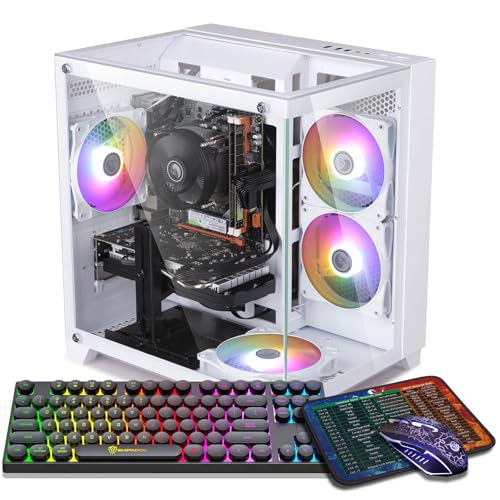
Where to buy
Check the latest price, availability and delivery on Amazon. Orders are placed on Amazon. We may earn a commission from qualifying purchases.
- Best encoder under $700: ZER-LON Gaming PC, Ryzen 5 5500, RTX 4060 8GB — Check on Amazon
- STGAubron Gaming PC, Ryzen 5 5500, RTX 3060 12GB — Check on Amazon
- GMKtec K6 Mini PC, Ryzen 7 7840HS, Radeon 780M — Check on Amazon
- LXZ Gaming PC, Ryzen 5 5500, RTX 3050 8GB, 32GB RAM — Check on Amazon
See 2 more Amazon options
- STGAubron Gaming PC, Ryzen 5 5500, RTX 3050 6GB, White — Check on Amazon
- ZOTAC MEK Gaming PC, Ryzen 5 5500, RTX 3050, 650W Gold PSU — Check on Amazon
Read the full guide ↓
Disclosure: As an Amazon Associate, reviewstook.com earns from qualifying purchases. Links to Amazon on this page are affiliate links; they cost you nothing extra. Listing details such as price and availability change often, so check the current Amazon listing before you buy.
Before any product names, this guide needs to correct the expectation built into its own title, because streaming is where the word “4K” does the most misleading work in PC gaming. You will not be streaming in 4K from a $700 PC — and you would not be streaming in 4K from a $3,000 PC either. The limit is not your hardware; it is the platforms. Twitch’s standard ingest runs at roughly 6,000 kbps with a 1080p60 output as the working ceiling for most channels. YouTube is more generous — it accepts higher bitrates, carries 1440p streams, and supports AV1 live ingest — but a true 4K live broadcast remains the exception there too, not the service a new channel builds on. So the 4K in this search honestly refers to the screen in front of you: the 4K monitor or TV you play on. The stream your viewers watch is a separate, smaller thing, and this guide grades every machine on the job as it actually exists.
That job, defined precisely, looks like this. You play locally at 1080p or 1440p on your 4K display — rendered at that lower resolution, upscaled to the panel, exactly as the base version of this guide describes. OBS sits beside the game with an output canvas of 1920×1080 at 60 frames per second. A hardware encoder inside your graphics card compresses that canvas in real time — the single most important component in a streaming PC, because a dedicated encoder does the broadcast work on its own silicon without stealing frames from the game. OBS sends the result out at a constant bitrate — about 6,000 kbps to Twitch, more to YouTube if your upload allows it — while Discord, a browser full of chat and dashboards, your alerts and overlays, and possibly a local recording all compete for the same CPU cores, the same system RAM, the same pool of video memory and the same SSD. A streaming PC is therefore not a gaming PC with a webcam bolted on. It is a machine doing four jobs at once, and it fails at whichever job runs out of resources first.
Graded that way, this budget has a clear shape. One pick carries a current-generation NVIDIA encoder with AV1 support — the future-proof broadcast chip in this price class. Three picks carry the previous NVIDIA encoder generation: entirely competent for the H.264 streams Twitch actually receives, but with no AV1 path, ever. One pick is a mini PC whose integrated Radeon graphics bring their own media engine and the strongest CPU in the guide, in exchange for asking that chip to render the game and encode the stream at the same time. Listings in this class move around a lot, so this is a buy at or under $700 list: check the current price on Amazon for every pick before you buy, and if a listing sits above $700 on the day you shop, the correct move is to wait for the dip or step up a tier. One more thing this guide will not do: none of the $700 buys the microphone, camera or second screen a stream needs. Those are covered separately, in their own section, and they are never hidden inside a pick.
In this guide
Quick Picks
Short on time, or comparing several options at once? Each row below names a streamer type and the product that suits it, with a link to the listing.
| Streamer type | Pick | Why it stands out for streaming | Link |
|---|---|---|---|
| Best streaming pick overall | ZER-LON Gaming PC, RTX 4060 8GB | The only AV1-capable encoder under $700, plus the strongest game render | Check on Amazon |
| Best VRAM pool for busy scenes | STGAubron Gaming PC, RTX 3060 12GB | 12GB shared by game, overlays and browser sources without texture panic | Check on Amazon |
| Best CPU and network for the app stack | GMKtec K6 Mini PC, Radeon 780M | 8 cores, 32GB DDR5 and dual 2.5GbE wired LAN in a four-inch box | Check on Amazon |
| Best memory for recording and multitasking | LXZ Gaming PC, RTX 3050 8GB, 32GB RAM | 32GB of system RAM absorbs OBS, chat, browser and the game together | Check on Amazon |
| Best budget floor for a first channel | STGAubron Gaming PC, RTX 3050 6GB, White | A real NVENC encoder at the budget end of this tier — check price on Amazon | Check on Amazon |
| Best upgrade base for a growing channel | ZOTAC MEK Gaming PC, RTX 3050 | 650W 80+ Gold PSU ready for the stronger GPU a bigger channel will want | Check on Amazon |
How These Picks Were Chosen
A streaming guide has to grade a different specification sheet than a gaming guide, so the filter here was rebuilt around the broadcast. First, the encoder — because the encoder is the streaming spec. Every discrete NVIDIA card carries NVENC, a dedicated hardware encoder that compresses your stream without consuming the GPU’s rendering muscle, and the generation matters. The RTX 4060’s encoder is the current Ada generation: one NVENC unit with AV1 encode support, which matters because YouTube accepts AV1 live and AV1 delivers a cleaner picture at the same bitrate than H.264. The RTX 3060 and RTX 3050 cards carry the previous Ampere-generation NVENC: very good H.264 and HEVC encoding, no AV1, and no upgrade path short of a new card. AMD’s integrated Radeon 780M answers with its own VCN media engine, AV1 encode included on this RDNA 3 generation — a genuinely modern feature list, graded honestly below on the two things that temper it: the same silicon is also rendering your game, and AMD’s encoder output at Twitch’s tight bitrates is visibly a little softer than NVIDIA’s in fast motion. Any machine whose “encoder” would have been the CPU alone failed this filter outright.
Second, the simultaneous load. A stream is a second workload laid over the game, and it draws on four shared pools. CPU cores run Discord, the browser sources OBS renders for alerts and chat, your audio processing and the game itself — five of these six picks are six-core Ryzen 5 5500 machines, adequate when the hardware encoder does the heavy lifting, and one pick brings eight cores and earns its place partly on that. Video memory is a single pool shared by the game’s textures, the OBS canvas and its browser sources, and your compositing — which is why a 12GB card outranks faster 8GB cards for busy scenes, and why the 6GB pick carries the tightest warning in this guide. System RAM holds the app stack; 16GB works, 32GB removes a whole category of mid-stream hitching, and two picks here carry it. Storage is a recording spec: a high-quality local record at 40–50 Mbps consumes roughly 20GB per hour, so a 1TB drive is a comfortable archive and a 500GB drive is a discipline you will have to keep. Network hardware was checked too — every pick can be wired by Ethernet, which this guide treats as non-negotiable.
On prices, the rule is simple: listings change constantly, so no static price is printed for any pick here — check the current price on Amazon before you buy. Every pick was chosen to fit this $700 budget tier, with the RTX 4060 tower frankly labelled a reach pick that belongs here when its listing falls within the budget. Finally, the platform note five of six picks share: they are built on AMD’s AM4 socket around the Ryzen 5 5500, a dead-end platform with no next-generation CPU upgrade. For a streamer that matters in a specific way — when the channel outgrows the machine, the upgrade that counts is the graphics card and its encoder, and the towers here accept one. The mini PC upgrades its RAM and storage only; its encoder is the chip it was born with.
The 6 Best PCs for Streaming on a 4K Screen Under $700
ZER-LON Gaming PC, Ryzen 5 5500, RTX 4060 8GB, 16GB DDR4, 1TB NVMe SSD
Who it suits: The streamer who wants one machine that does every part of this job at the highest level this budget allows — the strongest game render, the best encoder, and a feature set that will still look current when the channel grows.
Start with the silicon that decides this category. The RTX 4060 carries a single Ada-generation NVENC encoder with AV1 encode support, and it is the only card in this guide that does. For a Twitch stream today, that encoder’s H.264 output is the cleanest available here at the platform’s roughly 6,000 kbps ceiling — the fast-motion confetti of an arena shooter or a racing game holds together with the least visible smearing of any pick in this article. Just as important is what NVENC is: a separate block of silicon. The encode runs there, the game runs on the rendering cores, and neither meaningfully taxes the other — the fundamental reason a hardware-encoder machine out-streams a stronger PC that encodes on its CPU.
The game side of the simultaneous load is the strongest here as well. As the base guide establishes, this is a genuine 1440p-class card: play at 1440p or 1080p on your 4K panel with DLSS upscaling, hold DLSS Quality as the default mode, and the broadcast canvas OBS downscales from that render is the sharpest source material in this guide. DLSS 3 Frame Generation needs one honest warning in a streaming context: it raises the frame rate you see, but it adds a measure of latency, and your viewers cannot see the generated frames’ benefit the way you feel smoothness — so use it for your own experience in single-player games, and leave it off in competitive titles where the latency costs you. The shared pools around the card are adequate rather than generous. The Ryzen 5 5500’s six cores run the game plus Discord, OBS and a browser comfortably while NVENC does the encoding — this is precisely the workload split the chip can handle. The 8GB of VRAM is the tightest constraint: game textures at a 4K output already press it, OBS’s canvas and browser sources drink from the same pool, and in the heaviest games you will drop textures a notch to keep everything smooth. The 1TB SSD records at roughly 20GB an hour without anxiety. On price, the discipline is simple: this is the premium option at the top of this budget tier, so treat it as a buy-only-at-or-under-$700 pick — check the current price on Amazon, and when the listing falls within the budget, it is the best streaming machine in this article by a clear margin; when it sits above the line, wait for a dip.
- Ada-generation NVENC with AV1 encode — the only future-proof encoder under $700.
- Strongest game render here: a real 1440p-class card feeding the OBS canvas.
- Encode runs on dedicated silicon — the game keeps its frames while you broadcast.
Honest limitation: 8GB of VRAM is a pool the game, OBS and your browser sources all share, and this pick often sits above the $700 line except on dips — buy it only at or under the budget.
Choose it if you stream to YouTube as well as Twitch, play modern games, and can time the purchase to a sale. Skip it if the listing is above $700 today, or your scenes are unusually overlay-heavy and your games texture-hungry — the 12GB pick below was chosen for that load.

STGAubron Gaming PC, Ryzen 5 5500, RTX 3060 12GB, 16GB DDR4, 1TB SSD
Who it suits: The streamer whose broadcasts are busy — layered overlays, browser sources, a texture-heavy open-world game underneath — and who would rather have memory headroom than the newest feature list.
The encoder first, with its terms stated plainly. The RTX 3060 carries the Ampere-generation NVENC: an excellent H.264 encoder, fully capable of a clean 1080p60 Twitch broadcast at 6,000 kbps, and the encoder a generation of streamers built channels on. What it does not have is AV1 — the card decodes AV1 video but cannot encode it, so YouTube streams from this machine go out in the older codecs and there is no settings change that alters that. If AV1 is a word you had to look up, understand the practical size of the loss: on Twitch, nothing at all, since H.264 is what the platform takes; on YouTube, a modest quality difference at equal bitrate. For most channels at this budget, that is an acceptable trade — and what you get in exchange is the reason this machine ranks second.
The exchange is 12GB of VRAM, and streaming is where that buffer stops being a gaming luxury. Your video memory is one pool: the game draws its textures from it — sized generously, because your output is a 4K display — OBS draws its canvas and every animated overlay and browser source from it, and the encoder’s work sits alongside. On an 8GB card, a heavy game plus a busy scene collection is where mid-stream stutter is born. This card simply has half again as much room. The rest of the simultaneous load is well covered: the six-core Ryzen 5 5500 handles the app stack while NVENC encodes, 16GB of system RAM is workable, the 1TB SSD swallows recordings at roughly 20GB an hour, WiFi 6 is on board — though you will plug in the Ethernet cable anyway, per the rule later in this guide — and the box includes an RGB keyboard and mouse, which trims the starter-kit bill in the section below. Price discipline is simple: check the current price on Amazon — this is the right machine when its listing sits at or under $700, and an overpay above the budget line.
- 12GB of VRAM — the largest shared pool for game, overlays and browser sources.
- Ampere NVENC: a proven, clean 1080p60 H.264 broadcast at Twitch bitrates.
- Complete package: 1TB SSD, WiFi 6, keyboard and mouse included in the box.
Honest limitation: No AV1 encode and no path to it — YouTube streams use older codecs, and in raw game rendering it is a step behind the 4060 above.
Choose it if your scene collection is elaborate, your games are texture-heavy, and Twitch is your main platform. Skip it if AV1 on YouTube matters to you now, or the listing is sitting well above this budget tier when you check it.

GMKtec K6 Mini PC, Ryzen 7 7840HS, Radeon 780M, 32GB DDR5, 1TB SSD
Who it suits: The living-room streamer — a 4K TV, a couch, a channel built on esports, indies, older games or variety content — who wants the broadcast box to disappear into the TV stand and the network connection to be the least of their worries.
The encoder story here is genuinely interesting, and this review will grade it in both directions. The Radeon 780M’s media engine is AMD’s VCN on the RDNA 3 generation, and its feature list is modern: hardware encoding including AV1, which puts this mini PC ahead of the three Ampere towers below on codec support. Two honest tempering facts follow. First, at the tight bitrates Twitch imposes, AMD’s encoder output is visibly a little softer than NVIDIA’s NVENC in fast motion — at 6,000 kbps, in a chaotic scene, the difference is there if you look for it, though at couch distance under a talking streamer most viewers will never name it. Second — the structural one — this chip is also rendering your game. A discrete card’s encoder is a separate block beside an engine with power to spare; here, game and encode share one integrated GPU, one memory pool and one small cooling solution. For the games this box is for — esports titles, indies, older AAA at 1080p with FSR upscaling to the 4K panel — that sharing is manageable. For a current heavyweight release, the game alone is already the whole budget, and the stream will show it.
Where the K6 stops apologising is everywhere around the encode. Its Ryzen 7 7840HS has eight cores — the most in this guide — and the app stack is where cores go: OBS, Discord, a browser running chat and dashboards, audio processing, all of it runs here with the most headroom of any pick. The 32GB of dual-channel DDR5 is double the towers’ memory and matters twice over, because the integrated GPU shares system RAM and its bandwidth. Storage is a 1TB PCIe 4.0 SSD with a second slot — recordings at roughly 20GB an hour have somewhere to live and somewhere to grow. And the network hardware is the best in this article: dual 2.5GbE LAN ports, so the wired connection this guide insists on is a first-class feature of the machine, with WiFi 6E behind it. On price it is the most comfortable fit here: check the current price on Amazon — this pick typically sits within this budget tier rather than only visiting it on dips. Its limits are the form’s limits: no discrete GPU today or ever, and a small fan that will be audible on a quiet desk under sustained load, though beside a TV it vanishes.
- VCN media engine with AV1 encode — modern codec support in a four-inch box.
- Best support cast in the guide: 8 CPU cores, 32GB DDR5, dual 2.5GbE wired LAN.
- Native 4K desktop for your dashboard and chat; FSR-upscaled games on the TV.
Honest limitation: Game and stream share one integrated GPU — current heavy AAA is beyond it, and AMD’s encode at Twitch bitrates is a touch softer than NVENC in fast motion.
Choose it if your channel is esports, indie or variety content on a TV, and a silent, invisible box matters. Skip it if you stream new AAA releases — the discrete cards above exist for exactly that.

LXZ Gaming PC, Ryzen 5 5500, RTX 3050 8GB, 32GB DDR4, 1TB NVMe SSD, White
Who it suits: The streamer who records everything — full sessions saved locally for editing into videos later — and runs a heavy desktop of chat, dashboards and tabs alongside the game.
The encoder is the Ampere-generation NVENC in the RTX 3050, and its profile is the same honest one as the 3060’s, a tier down: clean H.264 encoding for a 1080p60 Twitch stream, no AV1 encode, and the great virtue of being dedicated silicon — the broadcast does not touch the game’s rendering budget. What the 3050 asks in return is a modest game to encode. It is a 1080p-class card: your local play is a 1080p render upscaled by DLSS to the 4K panel at low-to-medium settings in modern titles, and the OBS canvas downscales from there. For esports, older games and lighter releases that is a perfectly presentable stream. For this year’s heavyweights, both the render and the broadcast will look like what they are — a budget card working at its ceiling.
This pick’s identity is memory, and in a streaming guide memory is not a footnote. The 32GB of system RAM — double every other tower here — is the largest app-stack pool in this article: OBS with a deep scene collection, a browser holding chat, the stream dashboard and your alerts page, Discord, and the game, all resident at once without the system paging to disk mid-broadcast. Paging is the stutter viewers describe as “the stream froze for a second,” and this machine is built to never do it. The 8GB version of the 3050 — rather than the cut-down 6GB card in the next pick — keeps the shared VRAM pool workable when overlays join the game, and the 1TB SSD is the right size for a record-everything habit at roughly 20GB an hour, with the second-stick and second-drive upgrades a standard tower makes easy. Two cautions from the base guide carry over at full size. This listing family mixes variant information — a different configuration appears in the same page data — so confirm on the live listing that the style name reads RTX 3050 8GB and 32GB of RAM before you pay. And check the current price on Amazon for this exact configuration before you pay, deliberately: the wider LXZ line also includes a lower 6GB/16GB configuration, and confusing the two variants — or accepting the lower configuration in the cart — is the mistake this pick’s buyers most need to avoid.
- 32GB of system RAM — the deepest app-stack and multitasking pool in this guide.
- The 8GB RTX 3050: NVENC broadcast plus the VRAM-safer version of the card.
- 1TB SSD sized for a record-everything workflow at ~20GB per recorded hour.
Honest limitation: The GPU is a 1080p-class card — the memory smooths everything around the stream, not the render inside it, and the listing’s variants must be checked carefully.
Choose it if you record full sessions for editing, run a heavy desktop, and stream games a 3050 can honestly carry. Skip it if your channel is built on new AAA launches — aim the same money at the 3060 or 4060 on a dip.

STGAubron Gaming PC, Ryzen 5 5500, RTX 3050 6GB, 16GB DDR4, 1TB SSD, White
Who it suits: The first-time streamer whose channel will be esports, older games and lighter titles — and who would rather start this month at the lowest honest price than save for a tier their library does not need.
The most important sentence in this review is that the cheapest pick in the guide still has the right kind of encoder. The 6GB RTX 3050 carries the same Ampere NVENC block as its 8GB sibling: the broadcast is compressed on dedicated silicon, in clean H.264, at no cost to the game’s frame rate. That single fact separates this machine from every same-price alternative that would encode on the CPU and stutter under the double load — and it is why a budget tower at this end of the tier can be a legitimate streaming PC at all. There is no AV1 encode, as with all the Ampere picks, and the Twitch-first workflow this machine is for does not miss it.
The boundaries are the render and the pools. The game side is the 3050’s home territory: competitive and lighter titles at 1080p — many at high settings — upscaled to your 4K screen, with older AAA at medium; OBS takes its 1080p60 canvas from that render and the result, in the games this card was built for, is clean and fluid. Six gigabytes of VRAM is the tightest pool in this guide: game textures sized for a 4K output, plus the OBS canvas and browser sources, will crowd it in modern games, and the working response is the one this batch of guides repeats — lower textures first, before resolution, before anything. System RAM is 16GB, workable for a lean scene collection and a chat tab, tight for a hoarder’s browser. Storage is a full 1TB, so the recording habit is affordable at roughly 20GB an hour. Its position in the tier is this pick’s headline virtue: it sits at the budget end of this guide — check the current price on Amazon — with WiFi 6, six RGB fans and a keyboard and mouse in the box trimming the starter kit further. Buy it for the library it can serve and it is a bargain; buy it to stream this year’s flagship releases and you will be re-shopping within a year, which is the most expensive way to own a PC.
- A real NVENC encoder at the budget end of this tier — check price on Amazon for the cheapest legitimate stream here.
- Complete white tower: 1TB SSD, WiFi 6, keyboard and mouse included.
- Esports and older games render at 1080p and broadcast exactly as they should.
Honest limitation: 6GB of VRAM shared between a 4K-output game and the OBS stack is the tightest ceiling in this guide — modern AAA means low textures and a lean scene collection.
Choose it if your hours go to competitive and lighter games and you want to start streaming now, cheaply and properly. Skip it if new AAA releases are your content — the 3060 pick above is the one built for that library.

ZOTAC MEK Gaming PC, Ryzen 5 5500, RTX 3050, 16GB DDR4, 500GB NVMe SSD
Who it suits: The streamer thinking one upgrade ahead — someone starting a channel on a sound tower today, who already knows a stronger graphics card is in their future and wants the power supply waiting for it.
Today’s streaming terms are the 3050 terms, stated without softening. The card’s Ampere NVENC encodes a clean 1080p60 H.264 broadcast on dedicated silicon — Twitch-ready, no AV1 — while the game renders at 1080p class and upscales to the 4K panel: esports and older titles comfortably, modern AAA at low-to-medium settings with textures kept honest. One deliberate omission from the base guide is preserved here: ZOTAC’s listing data does not make this card’s VRAM figure plain, and this guide does not print a number it could not verify from the listing. Confirm it on the live page before buying, and budget your expectations for the tighter buffer if that is what you find — with a shared OBS canvas on top of a 4K-output game, VRAM is the pool you will feel first.
The rest of today’s specification has one streaming-specific weakness that outranks the others: storage is 500GB, half of every other pick. Games are large and recordings at 40–50 Mbps consume roughly 20GB an hour, so a record-everything workflow fills this drive in a matter of weeks; either budget a 1TB or 2TB second drive into the plan from day one, or adopt the discipline of moving VODs off the machine weekly. System RAM is 16GB, the six-core Ryzen 5 5500 runs the app stack while NVENC encodes, and WiFi 6E is the fastest wireless here — a distinction you should ignore in favour of the Ethernet cable. The reason to buy this machine anyway stands in its specification where the no-name towers rarely compete: a 650W 80+ Gold power supply from ZOTAC, a long-established graphics brand. When your channel outgrows the 3050 — and a growing channel’s first real upgrade is always the GPU, for its render and its encoder together — this is the only pick where that swap is a swap, rather than a GPU-plus-PSU-plus-rewire project. On price, check the current price on Amazon: at or under $700, with the VRAM confirmed, it is the upgrade-minded streamer’s pick; above the line, it is not.
- 650W 80+ Gold PSU — the only pick ready for a serious future GPU and encoder upgrade.
- From ZOTAC, a graphics brand with a long track record — and the fastest wireless here, WiFi 6E.
- NVENC broadcast today on a standard, upgradeable tower platform.
Honest limitation: 500GB of storage is a recording workflow’s enemy at ~20GB an hour, today’s GPU is the same 1080p-class 3050 as the cheaper picks, and the card’s VRAM must be confirmed on the live listing.
Choose it if a GPU upgrade is already in your plan and you want the PSU and the brand behind you when you make it. Skip it if you record long sessions and will never open the case — the white STGAubron above gives the same class of stream today with twice the storage.

Comparison Table
| Product | Encoder | AV1 encode | VRAM pool | CPU / RAM | Storage | Link |
|---|---|---|---|---|---|---|
| ZER-LON Gaming PC | RTX 4060 — NVENC (Ada) | Yes | 8GB | 6-core / 16GB | 1TB | Check on Amazon |
| STGAubron Gaming PC (3060) | RTX 3060 — NVENC (Ampere) | No | 12GB | 6-core / 16GB | 1TB | Check on Amazon |
| GMKtec K6 Mini PC | Radeon 780M — VCN (RDNA 3) | Yes | Shared DDR5 | 8-core / 32GB | 1TB | Check on Amazon |
| LXZ Gaming PC | RTX 3050 — NVENC (Ampere) | No | 8GB | 6-core / 32GB | 1TB | Check on Amazon |
| STGAubron Gaming PC (3050) | RTX 3050 — NVENC (Ampere) | No | 6GB | 6-core / 16GB | 1TB | Check on Amazon |
| ZOTAC MEK Gaming PC | RTX 3050 — NVENC (Ampere) | No | Confirm on listing | 6-core / 16GB | 500GB | Check on Amazon |
Set Up OBS Once, Correctly
Every pick in this guide can produce a clean stream, and every one of them can produce a stuttering mess with the wrong settings. The configuration below is the one-evening setup that separates the two. Do it once, test it with a private broadcast or a recording, and then stop touching it.
- Pick the hardware encoder, never the CPU. In OBS output settings, choose NVENC on the NVIDIA picks or the AMD hardware encoder on the GMKtec K6 — never x264 on these machines. The six- and eight-core CPUs here have a game and an app stack to run; asking them to also compress video in software is the single most common cause of a stream that stutters while the game feels fine.
- Set the canvas and the output honestly. Base canvas at your display’s resolution if you like, but set the output (scaled) resolution to 1920×1080 and the frame rate to 60. Downscaling in OBS is cheap and looks clean; trying to output above 1080p buys nothing on Twitch and costs encoder headroom everywhere.
- Use CBR and a 2-second keyframe interval. Constant bitrate is what the platforms expect — set roughly 6,000 kbps for Twitch, and for YouTube you can push higher if your upload genuinely sustains it, with AV1 selected on the two picks whose encoders support it. Keyframe interval: 2 seconds. VBR and long keyframes are recording settings, not broadcast settings.
- Wire the Ethernet cable. This is a rule, not a preference. Every pick here has an Ethernet port — use it. WiFi, including the fast WiFi 6 and 6E in these machines, drops packets in bursts under exactly the sustained-upload conditions streaming creates, and no encoder setting can repair a frame the network never delivered. If your router is in another room, a long cable or a powerline adapter is the cheapest stream-quality upgrade that exists.
- Learn the three lag counters, because each has a different fix. OBS’s Stats window separates your problems into three numbers. Frames missed due to rendering lag means the GPU could not composite your scene in time — cap the game’s frame rate, lower its settings a notch, trim heavy browser sources. Frames skipped due to encoding lag means the encoder is saturated — use a faster encoder preset, or drop the output to 720p60, which at Twitch’s bitrate can actually look cleaner in fast games. Dropped frames is the network counter, and its only fixes are network fixes: wire the cable, lower the bitrate, or change the ingest server. Treating a network problem with encoder settings — or the reverse — is how streamers lose whole evenings.
- Record locally like it matters, because it does. If you save VODs for editing, record at 40–50 Mbps in a separate, higher-quality profile rather than capturing the 6,000 kbps broadcast — and remember the arithmetic from the reviews: that quality costs roughly 20GB per hour of storage.
What $700 Does Not Include
The $700 budget in this guide buys the computer. A stream is the computer plus a broadcast kit, and honest budgeting means counting the kit separately — none of the items below is included with any pick, and any guide that quietly assumes you already own them is understating the real cost of starting. Buy in this order, because it is the order your viewers will notice.
- A microphone, first. Viewers forgive a soft picture for hours and a bad microphone for about ninety seconds. A competent USB microphone on a cheap arm, close to your mouth, is the highest-value purchase in streaming after the PC itself. Budget for it before anything else on this list.
- A webcam. A serviceable 1080p camera is enough; your face window is a few hundred pixels wide in the corner of a 1080p canvas, and the 4K camera upsell is money spent where no viewer can see it. Lighting you already own, pointed at you rather than at the screen, does more than a camera tier does.
- A second monitor — the one you already own counts. Chat, OBS and your dashboard need a home that is not your game screen. Any spare display, however old, ends the alt-tab era. If you must buy, buy cheap and used; this screen’s only job is text.
- A capture card — and only for console streaming. If every game you stream runs on the PC itself, you need no capture card at all, full stop — OBS captures the game directly. The card is solely for bringing a console’s picture into the PC, and buying one “just in case” for a PC-only channel is the classic wasted purchase.
Altogether, a realistic broadcast kit adds a meaningful extra cost on top of the PC, depending on how much of it you already own. Two picks — both STGAubron towers — include a keyboard and mouse in the box, which trims the general starter bill slightly, but no pick here includes any item on the list above. Plan the total, not the tower.
How to Choose a Streaming PC on a 4K Screen Under $700
- Choose the encoder generation before the GPU tier. For streaming, the encoder is the spec that reaches your viewers. AV1 support (the RTX 4060, the Radeon 780M) is a future-proofing feature; Ampere NVENC (the 3060 and 3050s) is a fully capable present-tense one. Decide which tense your channel lives in.
- Count the pools, not just the parts. Your game, OBS canvas, browser sources and recording draw on shared VRAM, shared system RAM and one SSD. Busy scenes and heavy games argue for the 12GB card or the 32GB machines; lean setups and light games make the 6GB floor pick entirely rational.
- Keep the CPU honest. With a hardware encoder doing the compression, six cores run a normal stream comfortably. If your desktop is a second job — many browser sources, audio processing chains, a recording rendering in the background — the eight-core mini PC or a 32GB tower is the shape of your workload.
- Budget storage as a recording spec. At 40–50 Mbps, local records consume roughly 20GB per hour. A 1TB drive is an archive; a 500GB drive is a weekly chore or a second-drive purchase. Plan for it before the first long session, not after the drive-full warning mid-stream.
- Treat wired networking as part of the PC. Whichever pick you buy, the Ethernet cable is a component of the streaming rig. The GMKtec K6’s dual 2.5GbE ports make it the best-connected pick; every other pick’s single port is still all the rule requires.
- Buy the dip, not the day. The two strongest picks often sit above $700 and reach the line on sales — check the current price on Amazon before you order. Patience is worth more than any single specification difference in this article — and above $700, several picks here stop being the deals this guide reviewed.
Common Buying Mistakes
- Shopping for a “4K streaming PC.” The platforms cap your broadcast at 1080p60 in practice — Twitch at roughly 6,000 kbps, YouTube more generous but not a 4K service for a new channel. The 4K is your monitor. Buy for the encoder, the pools and the render, in that order.
- Encoding on the CPU because a forum said x264 looks better. At these core counts, software encoding spends the frames your game and your app stack needed. On every machine here, the hardware encoder is the correct choice and it is not close.
- Streaming over WiFi because the router is “fast.” Sustained upload is a different test from a speed test, and WiFi fails it in bursts that read as dropped frames. The cable is part of the rig.
- Judging a stream PC by the game alone. A machine that plays beautifully solo can fall apart when OBS, chat, alerts and a recording join — the simultaneous load is the product you are buying.
- Spending the microphone money on a 4K webcam. Viewers leave bad audio, not small facecams. Mic first, camera second, lights from a drawer.
- Buying a capture card for a PC-only channel. It does nothing — OBS captures PC games directly. The card is console equipment only.
- Ignoring the shared VRAM pool. On a 6GB or 8GB card driving a 4K display, the game’s textures plus a busy OBS scene can crowd each other into stutter. Lower textures first; it is the setting that frees the pool.
- Letting the cart swap your configuration. Amazon’s variant tiles in this category look identical while quietly changing RAM, VRAM and storage between them. Read the style name on the live listing before you pay — twice over on the LXZ pick, whose listing family mixes variants.
Final Recommendation
- Most streamers with a 4K screen: ZER-LON Gaming PC, RTX 4060 — bought at or under $700.
- Busy scenes, texture-heavy games: STGAubron Gaming PC, RTX 3060 12GB.
- Living-room channel, best network and CPU: GMKtec K6 Mini PC, Radeon 780M.
- Record-everything workflow, heavy desktop: LXZ Gaming PC, RTX 3050 8GB, 32GB RAM.
- Cheapest legitimate start, esports library: STGAubron Gaming PC, RTX 3050 6GB.
- Buying now, upgrading the GPU later: ZOTAC MEK Gaming PC.
If the budget stretches to one machine, make it the ZER-LON — on its price dips. It holds the only current-generation encoder in this guide, one of only two that can speak AV1, and the strongest game render to feed the canvas. The STGAubron 3060 is the connoisseur’s alternative: an older encoder traded for the VRAM pool that busy scenes and heavy games actually stress, and for a Twitch-first channel that trade can be the right one. The GMKtec K6 is the pick we would put beside a TV — eight cores for the app stack, wired networking done properly, and an AV1-capable encoder in a box the audience will never see. Below them, the LXZ serves streamers whose real workload is memory, the white STGAubron starts a legitimate channel for the least money in this article, and the ZOTAC is the down payment on the GPU your channel will eventually earn. Streamers whose ambitions or libraries outgrow this tier should see Best 4K Gaming PC For Streaming Under $1200 for the dual-encoder class, compare the dedicated streaming field in Best Streaming PC Under $700, and keep Best 4K Gaming PC Under $700 open for the gaming-first version of this same budget. Wire the cable, buy the microphone before the camera, set the encoder once — and check the live price before you order.
Frequently Asked Questions
Can I actually stream in 4K with one of these PCs?
No — and the reason is the platforms, not the PCs. Twitch’s standard ingest is built around roughly 6,000 kbps and a 1080p60 output; YouTube accepts higher bitrates, 1440p streams and AV1 live, but 4K live remains exceptional there too. What these machines do is let you play on a 4K screen while broadcasting a clean 1080p60 stream — which is what nearly every channel you watch is actually doing, whatever the streamer’s monitor costs.
Which encoder should I use in OBS?
The hardware one your card provides: NVENC on the five NVIDIA picks, the AMD hardware encoder on the GMKtec K6. Do not use x264 software encoding on any machine in this guide — the CPU cores are already spoken for by the game, Discord, your browser sources and OBS itself. Set CBR, about 6,000 kbps for Twitch, and a 2-second keyframe interval, and the encoder question is settled permanently.
What does AV1 actually get me as a streamer?
Two things, one now and one later. Now: on YouTube, which accepts AV1 live ingest, the newer codec delivers a cleaner picture at the same bitrate than H.264 — most visible in fast motion. Later: it is the direction platform support is moving, so an AV1-capable encoder (the RTX 4060 and the Radeon 780M here) ages better. On Twitch today it gets you nothing, because H.264 is what the platform takes — which is why the Ampere picks remain entirely viable.
Why does a streaming PC need more RAM and VRAM than a gaming PC?
Because the stream is a second tenant in every pool. VRAM holds the game’s textures — sized generously for your 4K output — plus the OBS canvas and every browser source and overlay. System RAM holds the game plus OBS, chat, dashboards and Discord. When either pool runs dry, the symptom is a stutter your viewers see even when your game feels smooth. That is why a 12GB card and two 32GB machines earn their places in a streaming guide specifically.
How much storage does recording my streams take?
A broadcast-quality local record at 40–50 Mbps consumes roughly 20GB per hour — a five-hour session is about 100GB. On the 1TB picks that is a comfortable archive you clear out monthly; on the ZOTAC MEK’s 500GB drive it is a discipline: move VODs off weekly, or add the second drive this guide plans into that pick’s setup. Recording at the 6,000 kbps broadcast bitrate instead takes far less space but gives an editor far less to work with.
Can I stream over WiFi if my connection is fast?
Do not. A speed test measures a burst; a stream is a sustained upload held for hours, and WiFi drops packets in bursts under exactly that load — each burst arrives in OBS as dropped frames that no setting can recover. Every pick in this guide has an Ethernet port. Run the cable, use a powerline adapter if the router is far away, and treat the wire as part of the streaming PC you bought.
Do I need a capture card?
Only if you stream console games. OBS captures games running on the PC itself directly, for free, at full quality — a capture card adds nothing to a PC-only channel. If a console joins the setup later, budget for the card then, alongside the microphone and webcam this guide covers in the “What $700 Does Not Include” section.


