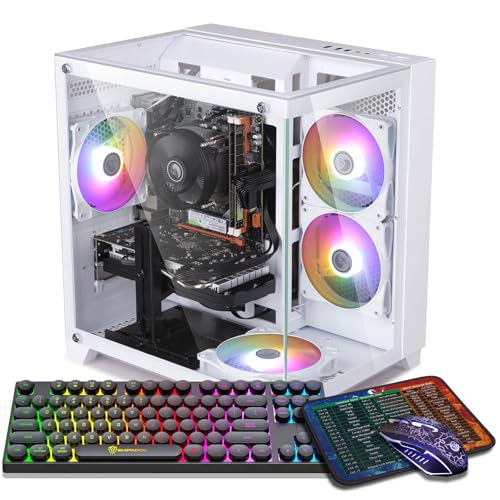
Where to buy
Check the latest price, availability and delivery on Amazon. Orders are placed on Amazon. We may earn a commission from qualifying purchases.
- Best first 4K-screen PC overall: ZER-LON Gaming PC, Ryzen 5 5500, RTX 4060 8GB — Check on Amazon
- STGAubron Gaming PC, Ryzen 5 5500, RTX 3060 12GB — Check on Amazon
- GMKtec K6 Mini PC, Ryzen 7 7840HS, Radeon 780M — Check on Amazon
- LXZ Gaming PC, Ryzen 5 5500, RTX 3050 8GB, 32GB RAM — Check on Amazon
See 2 more Amazon options
- STGAubron Gaming PC, Ryzen 5 5500, RTX 3050 6GB, White — Check on Amazon
- ZOTAC MEK Gaming PC, Ryzen 5 5500, RTX 3050, 650W Gold PSU — Check on Amazon
Read the full guide ↓
Disclosure: As an Amazon Associate, reviewstook.com earns from qualifying purchases. Links to Amazon on this page are affiliate links; they cost you nothing extra. Listing details such as price and availability change often, so check the current Amazon listing before you buy.
If this is your first gaming PC, welcome — and let’s start with the one thing you most need to hear, because almost no product listing will tell you: a $700 PC does not play modern games at native 4K. That is not a warning that these six machines are bad. It is a warning about the words on the box. “4K gaming PC” on a listing means the computer can send a picture to a 4K screen. Every machine in this guide can do that, and your desktop, videos and photos will look beautifully sharp doing it. But playing a demanding game — actually drawing every one of a 4K screen’s 8.3 million pixels, sixty times a second — takes a graphics card that costs nearly this whole budget by itself. What $700 honestly buys is something almost as good and far more sensible for a first PC: a machine that draws games at 1080p or 1440p, then uses a clever trick called upscaling to stretch that picture onto your 4K screen so well that, especially on a TV across the room, most people cannot tell the difference.
This guide is written for a beginner, so it does three things most guides skip. First, it explains every technical word before it uses it (see the glossary below). Second, every review grades its machine on what it actually renders, not on the 4K number in the title. Third, it covers what happens after the box arrives: the setup, the true total cost, and upgrading later. One more promise: prices in this corner of Amazon swing wildly, so this is a buy at or under $700 list. Check the current price on Amazon for each pick before you decide, and if a listing is sitting well above $700 on the day you shop, the right move is to wait for the price to fall back — not to pay extra and hope.
The Words on the Box, in Plain English
Every term below appears in the reviews; none of them are hard, just never explained.
- Resolution is how many dots (pixels) make up the picture. 1080p is 1920×1080, about 2.1 million pixels. 1440p is 2560×1440, about 3.7 million. 4K is 3840×2160, about 8.3 million — roughly four times 1080p and about 2.25 times 1440p. More pixels means a sharper picture and much more work for the PC.
- Render resolution vs display resolution. Your screen’s resolution is fixed — a 4K screen always shows 3840×2160 dots. But the game does not have to draw all of them. It can draw at a lower “render” resolution and let software stretch the result to fill the screen. That stretching is upscaling, and the gap between the two numbers is the entire secret of this price range.
- GPU (graphics card) is the part that draws games — the single most important component in a gaming PC, ahead of the processor, the memory, everything. Names to know: NVIDIA’s cards are called GeForce RTX; AMD’s are called Radeon.
- Discrete vs integrated graphics. A discrete GPU is a separate graphics card plugged into the PC — five of these six machines have one. Integrated graphics are built into the processor itself: smaller, quieter, cheaper, weaker. One pick below (the mini PC) uses a strong integrated chip called the Radeon 780M — fine for lighter games, hopeless for the heaviest.
- VRAM is the graphics card’s own memory, listed in gigabytes (8GB, 12GB). Games store their textures — the detailed surfaces on walls, clothing, terrain — in VRAM. Running out causes stutter and blurry, late-loading textures, and a 4K screen makes games hungry for it. More VRAM does not make a card faster, but too little puts a hard ceiling on how good the picture can look.
- CPU (processor) is the computer’s general brain — it runs Windows, the game logic, your browser, everything that is not drawing the picture. Five of these six machines use the AMD Ryzen 5 5500, a perfectly capable six-core chip. At this budget the CPU is rarely the problem; the GPU almost always is.
- RAM is the computer’s short-term workspace (16GB is standard here; 32GB is generous). It matters for having a game, a browser and chat apps open at once. RAM and VRAM are different things — a listing shouting “32GB!” is usually talking about RAM, not the graphics memory that decides texture quality.
- Upscaling — DLSS and FSR. Upscaling is the trick that makes this whole guide possible: the game renders fewer pixels, and smart software rebuilds a sharp-looking full-size image from them. NVIDIA’s version is called DLSS and only works on RTX cards; AMD’s is called FSR and works on almost anything, including integrated graphics. Both offer quality levels. At a 4K output, Quality renders at 2560×1440 internally, Balanced at about 2227×1253 with DLSS (about 2259×1271 with FSR), Performance at 1920×1080, and Ultra Performance at 1280×720. Higher quality mode = sharper picture = more work. When a review says a machine “plays at Performance mode,” the game is really being drawn at 1080p and stretched — which, on a TV, looks far better than that sounds.
- Frame Generation is a newer RTX feature (part of DLSS 3) that inserts extra software-created frames between the real ones, making motion look smoother. It needs the game to already be running playably, and it adds a tiny delay, so competitive players often leave it off.
- Refresh rate (Hz) is how many times per second your screen can show a new picture; most 4K TVs and budget 4K monitors are 60Hz. A new PC often arrives set lower by default — the setup section below shows the fix.
In this guide
Quick Picks
Short on time, or comparing several options at once? Each row below names a buyer type and the product that suits it, with a link to the listing.
| Buyer type | Pick | Why it stands out | Link |
|---|---|---|---|
| Best first 4K-screen PC overall | ZER-LON Gaming PC, RTX 4060 8GB | The strongest graphics card here, with DLSS and Frame Generation | Check on Amazon |
| Best if your games are big open worlds | STGAubron Gaming PC, RTX 3060 12GB | 12GB of VRAM — the most graphics memory in this guide | Check on Amazon |
| Best for a 4K TV in the living room | GMKtec K6 Mini PC, Radeon 780M | Tiny, quiet box; sharp 4K desktop, lighter games upscaled | Check on Amazon |
| Best if you multitask while you play | LXZ Gaming PC, RTX 3050 8GB, 32GB RAM | Double the usual memory, plus the 8GB version of its card | Check on Amazon |
| Best for the smallest budget | STGAubron Gaming PC, RTX 3050 6GB, White | Entry-end positioning in this tier — check price on Amazon | Check on Amazon |
| Best if you plan to upgrade later | ZOTAC MEK Gaming PC, RTX 3050 | A strong 650W Gold power supply, ready for a bigger card one day | Check on Amazon |
How These Picks Were Chosen
We did not use these PCs ourselves. We read the manufacturer listings and specification pages, and compared the things that decide whether a first PC puts a good picture on a 4K screen: the graphics card and its VRAM, its upscaling support, the processor and memory behind it, storage, and what can be upgraded later. Two filters did most of the work. The first was honesty about rendering: any machine whose graphics could not produce a decent 1080p or 1440p picture to upscale — older cards with no DLSS or FSR worth using, weak integrated graphics from previous generations — was cut, however cheap, because upscaling a bad picture just gives you a bigger bad picture. The second filter was budget fit: every pick is positioned for this under-$700 tier, and you should check the current price on Amazon before you buy, because listings move frequently.
One pattern is worth knowing before the reviews: five of the six picks are built around the same processor, AMD’s Ryzen 5 5500, on AMD’s older AM4 platform. The chip is plenty for every graphics card in this guide, so none of these machines is held back by its processor. The caveat is that AM4 is a finished platform — years from now, a processor upgrade means a new motherboard and memory too. A graphics-card upgrade, the one that actually matters for gaming, stays easy in the towers. The mini PC is the exception to everything in this paragraph: a stronger, newer processor and modern memory — and graphics that can never be upgraded at all, because they are part of the chip. Buy it for what it is, not for what it might become.
The 6 Best 4K-Screen PCs for Beginners Under $700
ZER-LON Gaming PC, Ryzen 5 5500, RTX 4060 8GB, 16GB DDR4, 1TB NVMe SSD
Who it suits: The beginner who wants the best picture this budget can put on a 4K screen and is willing to wait for a sale to get it.
Start with what this machine actually does. Its graphics card, the RTX 4060, is a genuinely good 1440p card: in most modern games it draws the picture at 2560×1440 with high settings, and DLSS then stretches that render to fill your 4K screen (DLSS “Quality” mode at 4K output). The result is close enough to real 4K that you will stop thinking about it within an hour of playing. In the heaviest new releases you would step down to DLSS Balanced — an internal render of about 2227×1253 — and the picture softens slightly while the game stays smooth. This card also has Frame Generation, which inserts extra frames to make motion look smoother still: a comfort feature, lovely in a story-driven game already running playably, not a rescue for a struggling one, and best switched off in fast competitive games where its small added delay matters.
The rest of the machine is the standard, sensible recipe for this class: Ryzen 5 5500, 16GB of memory, a 1TB solid-state drive (the right starting size for modern games), WiFi, four RGB fans and Windows 11 Home already installed, in a white tower. Two honest limits. First, the card has 8GB of VRAM, and in the most texture-hungry new games you may need to turn textures from ultra down to high — a two-click change barely visible in motion, and the normal tax at this budget. Second, the price positioning: this configuration sits at the top end of this tier and often lists above the budget line, so check the current price on Amazon and only buy it when it sits within the under-$700 budget. If it sits well above the line, you are paying for a different class of machine and should be shopping in a different guide.
- RTX 4060 8GB — the strongest graphics card in this guide, and the only one with Frame Generation.
- Draws most games at a real 1440p and upscales to 4K — the sharpest route available under $700.
- Everything a first PC needs in the box: 1TB storage, WiFi, Windows 11 Home installed.
Honest limitation: 8GB of VRAM means turning textures down a notch in the heaviest games, and its price often sits above the budget line — check price on Amazon and treat this as a wait-for-the-right-price pick.
Choose it if you can be patient about price and want the sharpest picture and the longest useful life from a first PC. Skip it if you need to buy this week at whatever it costs, or your favorite games are giant open worlds where texture memory matters more than speed — the next pick exists for you.

STGAubron Gaming PC, Ryzen 5 5500, RTX 3060 12GB, 16GB DDR4, 1TB SSD
Who it suits: The beginner whose library is big, beautiful, texture-heavy games — open worlds, RPGs, modded favorites — and who would rather keep the world looking rich than chase the last few frames.
This machine’s whole argument is one number: 12GB. That is its VRAM — the graphics card’s own memory — half again as much as any other card in this guide. Here is why a beginner should care. When a game runs on a 4K screen, it loads its texture collection sized for that big output, even when the drawing happens at a lower render resolution. Run short of VRAM and the symptoms are ugly and confusing if nobody warned you: surfaces that stay blurry for seconds, scenery popping in late, a stutter that has nothing to do with how “fast” the card is. The RTX 3060 12GB simply does not hit that wall in games where the 8GB cards must start turning texture settings down — and in still moments, texture quality is most of what “looking 4K” means.
Now the trade, stated plainly. The 3060 is one generation older than the 4060 above: a bit slower at raw drawing, its DLSS is the earlier version without Frame Generation, and ray-traced lighting is something to sample lightly rather than build settings around. Its working recipe is DLSS Quality or Balanced from a 1440p-class render at medium-to-high settings, which looks great on a 4K screen. Around the card you get the Ryzen 5 5500, 16GB of memory, a 1TB drive, WiFi 6 and Bluetooth, four RGB fans, an RGB keyboard and mouse in the box (two fewer things to buy), and a one-year warranty stated in the listing. On price, it is positioned at the top of this budget tier, so check the current price on Amazon before you buy — it often lists above the budget line.
- 12GB of VRAM — holds high textures at a 4K output where 8GB cards have to compromise.
- DLSS upscaling from an honest 1440p-class render in most games.
- The most complete starter box here: keyboard and mouse included, WiFi 6, 1TB storage.
Honest limitation: An older, slightly slower card with no Frame Generation — and it makes sense when the current price sits within this budget tier — check price on Amazon before you buy.
Choose it if you play open worlds and RPGs, sit reasonably close to your screen, and hate stutter more than you love maximum frame rates. Skip it if you mostly play competitive shooters, where frames beat textures and the 4060’s speed and Frame Generation serve you better.

GMKtec K6 Mini PC, Ryzen 7 7840HS, Radeon 780M, 32GB DDR5, 1TB SSD
Who it suits: The beginner whose “gaming setup” is the family 4K TV — someone who wants one small, quiet box for the desktop, streaming apps and games from the couch, with no glowing tower beside the television.
This pick works differently from the other five. It has no separate graphics card; its graphics, the Radeon 780M, are built into its processor. Job one is showing 4K, and it is excellent at it: the Windows desktop, web pages, photos and streaming video are displayed at the TV’s full native 3840×2160, pin-sharp, over HDMI, DisplayPort or USB-C. Job two is drawing games, and here the honest number is 1080p. The 780M is the strongest integrated graphics in this guide by a wide margin — roughly a 1080p gaming chip. Esports titles, indies and older releases play at native 1080p with good settings; modern heavy games play at 1080p on low-to-medium settings; and FSR upscaling then stretches either to fill the 4K TV. On a couch, in motion, that looks far better than the specification suggests. On a desk monitor at arm’s length, you will see the softness.
As an everyday computer it is, in several ways, the nicest specification in this guide: an eight-core Ryzen 7 7840HS stronger than the towers’ Ryzen 5 5500, a full 32GB of fast modern memory in two sticks (which matters doubly here, because integrated graphics borrow system memory, and two sticks let the 780M breathe), a fast 1TB drive with room for a second, dual wired network ports, WiFi 6E, USB4 and Windows 11 Pro — all in a box about four inches square that hides behind the TV. On price, it sits comfortably within this tier — unlike the top two picks, it usually lives below the line rather than visiting it. Check the current price on Amazon before you buy. The limits are the shape of the thing: the graphics can never be upgraded, because there is no card to swap; a tiny box works its fan harder under long gaming loads than a tower does; and support comes from a smaller brand.
- Radeon 780M integrated graphics — a native, razor-sharp 4K desktop and video, games drawn at 1080p and upscaled with FSR.
- The best everyday-computer specification here: stronger processor, 32GB of memory, fast 1TB drive, Windows 11 Pro.
- About four inches square — the only pick that truly belongs next to a TV.
Honest limitation: Games render at 1080p or below, full stop — current heavy releases will look soft, especially on a desk monitor, and the graphics can never be upgraded.
Choose it if your screen is a TV, your seat is a couch, and your library leans toward esports, indies, older games and everyday computing. Skip it if you want this year’s big releases looking their best, or you sit close to a 4K monitor — that is what the discrete cards above are for.

LXZ Gaming PC, Ryzen 5 5500, RTX 3050 8GB, 32GB DDR4, 1TB NVMe SSD, White
Who it suits: The beginner who does everything at once — a game on the big screen, a browser full of tabs, chat and maybe a stream running alongside — and keeps feeling 16GB machines run out of breath.
First, the graphics, with no dressing up: the RTX 3050 is a 1080p-class card. On a 4K screen its games are drawn at 1920×1080 and DLSS stretches them to fill the panel (Performance mode, with Balanced for lighter games), at low-to-medium settings in modern titles. That is the envelope, and within it this tower makes two smart choices. It uses the 8GB version of the 3050 rather than the cut-down 6GB version in the cheaper pick below — a real difference at a 4K output, where the extra buffer is what lets medium textures hold through an upscaled picture instead of thrashing. And it pairs the card with 32GB of system memory, double every other tower here. That memory adds no frames to the game itself, and this review will not pretend it does. What it removes is the other stutter: the freeze-and-catch-up when a game plus a browser plus Discord plus a recording app together exceed 16GB and the PC starts shuffling data to disk.
The rest follows the class pattern — Ryzen 5 5500, a 1TB drive, a clean white tower — and then there are two cautions specific to this listing, both worth full attention. First, price: check the current price on Amazon for this exact 32GB configuration before you judge it. The wider LXZ line includes lower configurations with the 6GB card and 16GB of memory that sit lower in the tier. Do not let a lower configuration anchor you, and do not accept the cheaper configuration in your cart while paying for this one. Second, this listing family’s pages mix information between variants — a different processor and card combination appears in the same page data — so confirm on the live listing, before you pay, that the style name says RTX 3050 8GB and 32GB of RAM.
- The 8GB RTX 3050 — the safer version of the card for feeding a 4K screen.
- 32GB of system memory — double the other towers, for games plus everything else at once.
- Real DLSS upscaling and a full 1TB of storage in a tidy white tower.
Honest limitation: The graphics card is still a 1080p-class card — the extra memory smooths the system around the game, not the picture inside it — and this listing’s variants must be checked with unusual care.
Choose it if you multitask heavily and want the 3050 tier without the 6GB compromise. Skip it if the PC will only ever game — on a sale day, the same money aimed at the 3060 or 4060 above buys you picture quality instead of headroom.

STGAubron Gaming PC, Ryzen 5 5500, RTX 3050 6GB, 16GB DDR4, 1TB SSD, White
Who it suits: The beginner on the tightest budget whose 4K screen will mostly show esports, older games and lighter titles — and who would rather keep a hundred dollars than buy graphics power their library will never use.
This is the starter rung of the guide, positioned at the entry end of the tier — the tower here most often under the budget line rather than visiting it on sale days. Check the current price on Amazon. You get a complete modern PC, not a compromise box: Ryzen 5 5500, 16GB of memory, a 1TB drive, WiFi 6, six RGB fans and an RGB keyboard and mouse in the box, in white, built around the 6GB version of the RTX 3050. What does that card honestly do on a 4K screen? Its home ground is the games most people actually spend the most hours in. Competitive and lighter titles are drawn at 1080p — many at high settings — and DLSS or the game’s own upscaling presents them on the 4K panel cleanly, at frame rates that feel properly quick. Older big games at 1080p on medium settings, upscaled, are the second comfort zone, and a wide one.
The boundary is this year’s heavy releases, and it is worth describing exactly what hitting it feels like, so there are no surprises in month two. Six gigabytes of VRAM is the tightest graphics memory in this guide, and a 4K output makes games reach for texture memory early. Expect the newest titles to want low texture settings, an internal render at or below 1080p, and ten honest minutes in the settings menu before a big game feels right. That is not a defective PC — it is a correctly scoped one. If your hours go to League of Legends, Valorant, Fortnite on sensible settings, Rocket League, Minecraft, indies and a backlog of pre-2022 releases, this machine serves that library completely, in a real tower you can upgrade later, with money left over for the things the total-cost section below lists. If you buy new blockbuster games at launch and want them to look like the trailers, hear this guide clearly: save the difference and buy the 3060 or the 4060 on a dip instead. The most expensive first PC is the one you replace within a year.
- Positioned at the entry end of this tier — check price on Amazon.
- A complete starter box: 1TB storage, WiFi 6, keyboard and mouse included.
- A real RTX card with DLSS — esports and older games upscale to a 4K screen convincingly.
Honest limitation: 6GB of VRAM and a 1080p-class card: the newest releases mean low textures and renders at or below 1080p — the tightest ceiling in this guide.
Choose it if your library is esports, older and lighter games, and you want the lowest sensible price onto a 4K screen. Skip it if you buy big new releases at launch — this is the one pick that could have you shopping again within a year.

ZOTAC MEK Gaming PC, Ryzen 5 5500, RTX 3050, 16GB DDR4, 500GB NVMe SSD
Who it suits: The beginner thinking one purchase ahead — happy with a sensible starter machine today, who already suspects a stronger graphics card is in their future and wants the PC ready for it.
ZOTAC is a name beginners may not know but should be glad to see: a long-established graphics-card maker selling a complete PC. Its priorities show in the component most listings hide — the power supply, the box inside the PC that feeds electricity to everything else. This MEK carries a 650W unit with an 80+ Gold efficiency rating, where rivals in this class routinely ship unnamed 500–600W units with no rating stated. Today, powering an RTX 3050, you will never notice the difference. The day you upgrade the graphics card — and a PC bought for a 4K screen is exactly the PC that eventually wants a card that can draw closer to 4K — that Gold-rated 650W supply is the difference between a simple card swap and a card-plus-power-supply-plus-rewiring project. The machine that makes that upgrade cheapest has a genuine claim on a beginner’s money.
For today, the terms are the same RTX 3050 terms as the two reviews above, not softened here: games drawn at 1080p, DLSS upscaling to the 4K output, low-to-medium settings in modern releases, comfortable esports and older titles. Two specifics deserve attention. Storage is 500GB rather than 1TB — modern games are huge, and that drive will fill faster than you expect, so plan on adding a second drive before long (the easiest upgrade there is; the upgrade section below explains). And one deliberate omission: ZOTAC’s listing does not state this card’s VRAM figure as plainly as its rivals do, and this guide will not print a number it could not verify from the listing. Check the figure on the live page before you buy, and set texture expectations for the tighter buffer if that is what you find. The rest is solid: Ryzen 5 5500, 16GB of memory, WiFi 6E — the fastest wireless in this guide — and Windows 11 Home. On price, check the current price on Amazon and buy it only when it sits within the under-$700 budget, with the VRAM confirmed on the live listing; above the line, it is not the pick.
- 650W 80+ Gold power supply — the only one here already ready for a serious graphics-card upgrade.
- Built by ZOTAC, an established graphics brand, with the fastest WiFi in this guide.
- A standard tower platform — the cheapest route from this guide to a future near-4K card.
Honest limitation: Today’s graphics are the same 1080p-class 3050 as the cheaper picks, storage is only 500GB, and the card’s VRAM figure must be confirmed on the live listing before buying.
Choose it if an upgrade is already in your plans and you want the power supply and the brand behind you when you do it. Skip it if you will never open the case — the white STGAubron above gives you the same class of gaming today for less money, with twice the storage.

Comparison Table
| Product | Graphics | VRAM | What it really draws on a 4K screen | Link |
|---|---|---|---|---|
| ZER-LON Gaming PC | RTX 4060 | 8GB | 1440p render, DLSS Quality to 4K, plus Frame Generation | Check on Amazon |
| STGAubron Gaming PC (3060) | RTX 3060 | 12GB | 1440p-class render, DLSS Quality/Balanced, high textures | Check on Amazon |
| GMKtec K6 Mini PC | Radeon 780M (integrated) | Shared memory | Native 4K desktop and video; games at 1080p, FSR to 4K | Check on Amazon |
| LXZ Gaming PC | RTX 3050 | 8GB | 1080p render, DLSS to 4K; 32GB RAM for multitasking | Check on Amazon |
| STGAubron Gaming PC (3050) | RTX 3050 | 6GB | 1080p render, DLSS to 4K; esports and older games | Check on Amazon |
| ZOTAC MEK Gaming PC | RTX 3050 | Confirm on listing | 1080p render, DLSS to 4K; 650W Gold PSU for upgrades | Check on Amazon |
Your First Evening: Setting It Up Without the Classic Mistakes
A prebuilt PC is close to plug-and-play, but “close” hides traps that catch almost every first-time owner. Here is the whole first evening, in order.
Step 1 — Check the box before you fall in love. Photograph the packaging if it is damaged. Confirm you received the PC, a power cable, and whatever the listing promised (two picks include a keyboard and mouse). Then — the check that matters most — compare the PC against your order: open the listing on your phone and confirm the graphics card name, memory and storage match the box and the PC’s labels. Listings here mix variants between near-identical tiles, so this check is worth more than any other step tonight.
Step 2 — Plug the screen into the graphics card, not the motherboard. The most famous beginner mistake in PC gaming, and it costs people half their performance for months without them knowing. On the towers, the back of the case has two clusters of ports: a vertical group belonging to the motherboard, and a horizontal group lower down belonging to the graphics card. Your monitor or TV cable goes into the graphics card’s HDMI or DisplayPort socket — the lower, horizontal one. Plug into the motherboard instead and the PC will either show nothing or quietly run on weak backup graphics. (The GMKtec mini PC is the exception: it has no separate card, so any of its HDMI, DisplayPort or USB-C video outputs is correct.)
Step 3 — Tell the TV it is a game screen. If your screen is a 4K TV, open its settings and do two things: turn on Game Mode for that input (this removes the TV’s picture processing, which otherwise adds a mushy delay between your mouse and the screen), and set that HDMI port’s format to its enhanced/4K mode if it offers one. Many “blurry, laggy TV” complaints are these two menu items, not the PC.
Step 4 — Set the refresh rate. New PCs frequently arrive displaying at a low default rate. In Windows, go to Settings → System → Display → Advanced display, and set the refresh rate to the highest your screen offers (60Hz on most 4K screens). While you are there, confirm the display resolution reads 3840×2160 — your desktop at full native 4K sharpness.
Step 5 — Update the graphics driver, then Windows. The driver is the software that lets Windows and games talk to your graphics card, and the one in the box is often months old. For the five RTX towers, install NVIDIA’s app and let it fetch the latest driver; for the GMKtec, use AMD’s Adrenalin software. Then run Windows Update until it stops offering updates, and restart — all before installing games.
Step 6 — Set your upscaling once, per game. There is no global switch; each game has its own settings menu. The beginner routine: set the game’s display resolution to 3840×2160 (your screen), find the upscaling option — DLSS on the RTX machines, FSR on the GMKtec — and start at Quality. If a heavy game feels sluggish, step down to Balanced, then Performance, before touching anything else; drop texture quality a notch only if the game still stutters on an 8GB or 6GB card. That order — upscaling first, textures second — is the whole settings skill this budget requires.
What the Whole Setup Really Costs
The $700 in the title buys the PC. It does not buy the screen it plugs into or everything on the desk, and a beginner budget deserves the full picture — with these costs kept honestly separate from the PC itself, never folded into its price.
- The 4K screen. If you already own a 4K TV, this costs you nothing and the living-room picks make immediate sense. If you are buying a monitor, a decent 27–28 inch 4K 60Hz monitor typically costs a few hundred dollars — and a 1440p high-refresh monitor is a legitimate alternative, because the top picks here draw games at 1440p natively and show their best work on one with no upscaling at all. A good 1440p screen beats a dim, poor-quality 4K one for gaming.
- Keyboard and mouse. Two picks (both STGAubron towers) include an RGB keyboard and mouse in the box. For the others, a basic wired or wireless combo is an inexpensive starter — upgrade to a mechanical keyboard and a gaming mouse later; neither affects how games run.
- The small stuff that is not optional. A surge protector (cheap insurance for a $700 machine), an HDMI 2.0-class or DisplayPort cable if the box lacks one long enough, and a headset or speakers if you own none — PCs in this class do not come with sound. A controller is worth budgeting for if your library is living-room games; most modern gamepads connect over Bluetooth or USB with no setup.
- Software. Windows 11 is included with every pick here (Home on the towers, Pro on the mini PC) — do not pay anyone to “install Windows” for you. Games are the ongoing cost; every storefront runs deep sales several times a year, and buying on sale builds a library for a fraction of launch prices.
Added up honestly: if you already own a 4K TV and any keyboard and mouse, your extra spend can be close to zero. Starting from an empty desk, budget the PC plus a few hundred more for the screen and peripherals — which is why keeping the PC at or under its $700 line matters so much.
How to Choose Among the Six
- Start with your screen and your seat. A 4K TV viewed from a couch forgives upscaling completely — the whole list is open to you, including the mini PC. A 4K monitor at arm’s length shows every softness, so start at the two DLSS picks at the top.
- Then be honest about your library. This year’s big releases: the 4060, or the 3060 if textures matter more than frames. A backlog, esports and indies: the 3050 picks and the mini PC are not compromises, they are correct sizing. Buying for a library you do not play is the most common way beginners overspend.
- Learn to read a listing like a reviewer. The headline number (“32GB!”) is usually system RAM. The numbers that decide gaming are the graphics card model and its VRAM, in that order. And always read the exact style/configuration name on the live listing before paying — that is where variant mix-ups happen.
- Respect the price line. Every pick here is positioned for the under-$700 tier, and several spend long stretches above it. Check the current price on Amazon, set a price alert, give it a couple of weeks, and treat a listing sitting well above the line as a different, worse deal than the one reviewed here.
- Decide now whether you will ever upgrade. If yes, a tower — especially the ZOTAC with its 650W Gold power supply — is a down payment on a future near-4K machine. If the honest answer is “I will never open the case,” buy the machine that fits your life today, which for TV owners is often the mini PC.
- Keep ray tracing out of the decision. At this budget it is a garnish on the 4060 in lighter games and a settings-menu trap everywhere else.
Beginner Mistakes to Avoid
- Believing “4K gaming PC” means games are drawn at 4K. At $700 it means the PC can output a 4K signal and upscale to it. That is a good, honest product — as long as it is what you thought you bought.
- Plugging the monitor into the motherboard. The cable goes into the graphics card’s ports — the horizontal cluster lower on the back of the tower. This one mistake silently halves performance on PCs whose owners never find it.
- Leaving the screen at its default refresh rate, or the TV out of Game Mode. Two minutes in settings menus fix both — yet the PC gets blamed for both, constantly.
- Chasing “Ultra” presets. Presets are marketing, not instructions. At this budget the winning combination is high-ish settings plus the right upscaling mode; a game on High with DLSS Quality looks and runs better than the same game chugging on Ultra.
- Turning Frame Generation on to rescue a struggling game. It smooths a game that is already playable; it cannot fix one that is not, and in fast competitive games its small added delay is a reason to leave it off.
- Confusing RAM with VRAM when comparing listings. 32GB of system RAM does not make textures sharper. The graphics card’s own memory — 12GB, 8GB, 6GB — decides that, and it is always the smaller, quieter figure on the page.
- Skipping the variant check in the cart. Configurations change between product tiles that look identical. Read the style name — card, VRAM, RAM, storage — on the live listing before you pay, especially on the LXZ listing, whose family mixes variants.
- Paying the non-sale price because the guide said the PC was good. The top picks here are good at or under $700. When they sit well above the budget line, the correct purchase is patience — or a deliberate step up to the next tier’s guide, not an accidental one at checkout.
When You’re Ready to Upgrade: The Plain-English Path
Every tower here can grow. Here is the order that makes sense, with the honest platform limit at the end.
- First, storage — the easy win. Games are enormous and the ZOTAC’s 500GB fills first, but every tower here can accept a second SSD, and adding one is the simplest upgrade in computing: no settings archaeology, no compatibility drama, just more room. Do this whenever the drive starts forcing you to delete games.
- Second, the graphics card — the upgrade that changes everything. This is the step that moves you from “upscaled to 4K” toward “drawn near 4K.” A future card in the class above these slots into any of the five towers; the ZOTAC’s 650W Gold power supply means it is the only one guaranteed not to need a new power supply at the same time. On the others, check the new card’s recommended wattage against the fitted supply before ordering — that single check is the whole skill.
- Third, memory — only if your multitasking asks for it. The 16GB towers can go to 32GB cheaply, and the LXZ shows what that headroom feels like. It will not add game frames; it removes the everything-else stutter. Buy it when you feel that stutter, not before.
- The honest limit: the processor platform. Five of these six machines sit on AMD’s AM4 platform. A much stronger processor one day means a new motherboard and new memory as well — a “platform upgrade,” effectively a new PC’s core. The GMKtec mini PC is the exception in both directions: its processor and memory are modern, but its graphics are fixed forever — its upgrade path is storage and memory only, which is the trade you accepted for a four-inch box.
Final Recommendation
- Most beginners with a 4K screen: ZER-LON Gaming PC, RTX 4060 — bought at or under $700.
- Big open worlds, textures first: STGAubron Gaming PC, RTX 3060 12GB.
- A 4K TV and a couch: GMKtec K6 Mini PC, Radeon 780M.
- Games plus everything else at once: LXZ Gaming PC, RTX 3050 8GB, 32GB RAM.
- The tightest budget, a lighter library: STGAubron Gaming PC, RTX 3050 6GB.
- An upgrade already in your future: ZOTAC MEK Gaming PC.
If you take one sentence from this guide to the checkout, make it this one: you are buying the render, not the badge. The ZER-LON’s RTX 4060 renders at 1440p and brings the best upscaling and the only Frame Generation here — on its sale dips, it is the closest thing to a real 4K gaming PC that $700 can honestly mean. The STGAubron’s RTX 3060 trades a little speed for the 12GB of VRAM that keeps big worlds looking rich. Beginners who want the full technical treatment of this same budget should read Best 4K Gaming PC Under $700; those whose real target turns out to be higher should see Best 4K Gaming PC Under $800; and if your screen is actually a 1440p one — or should be — Best 1440p Gaming PC Under $700 applies this same honesty at the resolution these machines draw best. Plug the cable into the graphics card, set the refresh rate, start DLSS or FSR at Quality — and check the live price before you order.
Frequently Asked Questions
I’m a beginner — can a PC under $700 really game on my 4K TV?
Yes, with the one honest asterisk this whole guide is built on. The PC will show your desktop, videos and games on the 4K screen, and the games will look good — but they are drawn at 1080p or 1440p and upscaled to fill the screen, not drawn at native 4K. On a TV from a couch, in motion, that distinction is much smaller than it sounds. At a desk monitor, up close, you will notice the softness in heavy games — which is why monitor owners are pointed at the top two picks.
What do DLSS Quality, Balanced and Performance actually mean?
They are choices about how many pixels the game really draws before upscaling stretches it to your 4K screen. At a 4K output: Quality draws at 2560×1440, Balanced at about 2227×1253, Performance at 1920×1080, and Ultra Performance at 1280×720. Start every game at Quality. If it feels sluggish, step down one level at a time — each step trades a little sharpness for a lot of smoothness. Performance is the normal working mode for the RTX 3050 picks and the mini PC in modern games.
Why does an older card, the RTX 3060, rank so high for beginners?
Because of its 12GB of VRAM. A 4K screen makes games load big texture collections, and running out of that memory causes the most confusing beginner symptom there is: blurry surfaces and stutter no settings guide seems to fix. The 3060 simply has more room than the newer 8GB cards. It gives up some raw speed and Frame Generation to the 4060, which is why it is second rather than first — but if your games are big open worlds, it may be the better first PC for you.
Is the mini PC a real computer, or a toy?
A real computer — in everyday terms, the strongest one in this guide: a faster processor than the towers, double the memory of most, a fast 1TB drive and Windows 11 Pro, in a paperback-sized box. Its limit is specific, not general: its graphics are built into the processor, so games are drawn at 1080p and upscaled, and that can never be upgraded. For TV gaming with a lighter library, plus everything else a household PC does, it is arguably the smartest buy here.
Should I wait for a sale, or just buy one?
For the top two picks, wait and check the current price on Amazon — their prices spend long stretches above the $700 line and dip to it. The mini PC and the white STGAubron 3050 sit at or under $700 more routinely, so buying either when it sits within the budget is reasonable. Whichever you choose, confirm the card, VRAM, memory and storage on the live listing before you pay — variant pages are where first-time buyers most often receive a slightly different computer than the one they chose.
Can I upgrade it later, or is this a dead end?
The five towers all accept a stronger graphics card later — the upgrade that moves you toward real 4K — and the ZOTAC’s 650W Gold power supply makes it the only one ready for a serious card with no other changes. Adding storage is easy everywhere. The shared limit is the processor platform: a future processor upgrade on the AM4 towers means a new motherboard and memory too. The mini PC upgrades its storage and memory only. None of that matters in year one; all of it is worth knowing in year four.


