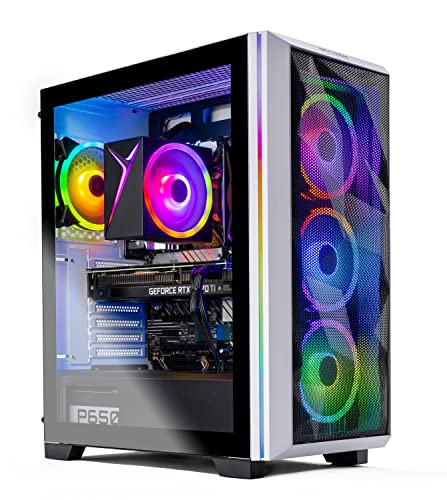
Where to buy
Check the latest price, availability and delivery on Amazon. Orders are placed on Amazon. We may earn a commission from qualifying purchases.
- Best overall for streaming: Skytech Chronos Gaming PC, Ryzen 7 5700X, RTX 4070 Ti 12GB — Check on Amazon
- HOENGAGER Gaming PC, Intel Core i7-12700F, RTX 4070 12GB, 32GB DDR4 — Check on Amazon
- CYBERPOWERPC Gamer Xtreme VR, Intel Core i7-13700F, RTX 4060 Ti 16GB — Check on Amazon
- CYBERPOWERPC Gamer Master, AMD Ryzen 7 8700F, RTX 4060 Ti 8GB — Check on Amazon
See 2 more Amazon options
- iBUYPOWER Scale, AMD Ryzen 5 7600, RTX 4060 Ti 8GB — Check on Amazon
- Skytech Shiva Gaming PC, AMD Ryzen 5 5600X, RTX 4060 Ti 8GB, White — Check on Amazon
Read the full guide ↓
Disclosure: As an Amazon Associate, reviewstook.com earns from qualifying purchases. Links to Amazon on this page are affiliate links; they cost you nothing extra. Listing details such as price and availability change often, so check the current Amazon listing before you buy.
A streaming PC does two jobs at once, and they compete for the same hardware. The first is the one every gaming guide grades: rendering your game, here at 1440p. The second is invisible in most buying guides and decisive in this one: encoding that gameplay into a broadcast, continuously, for hours, while OBS composites your camera, overlays and alerts on top of it and a browser full of chat and dashboards runs alongside. A machine can be excellent at the first job and mediocre at the second — a strong card with a weak encoder, a fast CPU with no cores left for the stack. This guide grades all six systems below on both jobs, in the order a streamer feels them: encoder first, then the processor’s spare capacity, then VRAM, then memory and storage.
The workflow this budget serves is specific, so here it is plainly. You play at 1440p, at high settings and high refresh. Your stream does not go out at 1440p: on Twitch the practical standard is 1080p60 output at around 6,000 kbps CBR, because that is what the platform’s ordinary ingest reliably carries; on YouTube you may send more, and YouTube accepts AV1, which every card here encodes. Broadcasting in 1440p is a platform question before it is a hardware question, and no purchase changes Twitch’s ceiling. What the hardware decides is how cleanly the encode happens and what else the machine can do at the same time — above all, whether it can also record a high-quality local copy of the session for editing while the broadcast runs. That is where these six systems split into two families: the two RTX 4070-class machines carry two hardware encoder units, and the four RTX 4060 Ti machines carry one.
The honesty note from the companion gaming guide carries over unchanged. Every system below is a real Amazon listing that belongs in a guide built around the $1,200 ceiling — but prices in this category move constantly, so check the live price on Amazon for the system you want before you buy. Where a pick only makes sense when its live listing sits at or under the ceiling, its review says so plainly and gives that rule instead of a number to trust.
In this guide
Quick Picks
Short on time, or comparing several options at once? Each row below names a streaming situation and the system that suits it, with a link to the listing.
| Streaming situation | Pick | Why it stands out | Link |
|---|---|---|---|
| Best overall for streaming | Skytech Chronos, Ryzen 7 5700X, RTX 4070 Ti 12GB | Two encoder units and the strongest GPU here — check price on Amazon | Check on Amazon |
| Best for streamers who record everything | HOENGAGER Gaming PC, i7-12700F, RTX 4070 12GB | Dual encoders plus 32GB of RAM for the whole streaming stack | Check on Amazon |
| Best VRAM for game plus overlays | CYBERPOWERPC Gamer Xtreme VR, i7-13700F, RTX 4060 Ti 16GB | 16GB of VRAM — the most room for textures, compositing and browser sources | Check on Amazon |
| Best modern platform for streaming | CYBERPOWERPC Gamer Master, Ryzen 7 8700F, RTX 4060 Ti 8GB | 8-core AM5 chip and DDR5 on a current platform — check price on Amazon | Check on Amazon |
| Best price stability | iBUYPOWER Scale, Ryzen 5 7600, RTX 4060 Ti 8GB | A calmer, more predictable buy in this budget — check price on Amazon | Check on Amazon |
| Best white streaming setup | Skytech Shiva, Ryzen 5 5600X, RTX 4060 Ti 8GB | A white 4060 Ti system; check the coupon and the final cart total on Amazon | Check on Amazon |
How These Picks Were Chosen
The budget was applied as a ceiling: every system below is a real Amazon listing chosen for a guide built around $1,200 in the United States. Prices in this category change often — with deal events, coupons and seller changes — so no static number in a guide can settle what you pay. Check price on Amazon for each pick, and treat the live listing as the only figure that counts.
We did not use these PCs ourselves. We read the maker listings and specification pages and graded the parts in the order streaming loads them. First, the encoder: the dedicated hardware block that turns gameplay into a broadcast without taxing the game’s frame rate. Every card here is Ada-generation and encodes AV1 as well as H.264, but the family splits — the RTX 4070 Ti and RTX 4070 carry two NVENC units, the RTX 4060 Ti carries one — and that decides whether a simultaneous high-quality local recording gets its own hardware or shares. Second, the processor’s spare capacity: OBS itself is light, but the real stack — game, compositing, browser, Discord, alerts — is not, and core counts from six to sixteen are graded accordingly. Third, VRAM, shared at 1440p between textures, encoding and every browser source in the scene. Fourth, memory and storage as recording specifications: how much RAM the stack can breathe in, and how many hours of footage a 1TB drive holds. Platform and price discipline sit underneath all of it.
Two filters sat on top of that grading. The streaming filter excluded systems whose graphics cards lack a modern hardware encoder, or whose processors leave nothing for the stack, however good they look as pure gaming machines. The honesty filter: several listings note that the exact graphics card brand may vary — normal for system integrators, and stated in the reviews rather than smoothed over — and no frame-rate figures are claimed anywhere in this guide, because no systems were tested for this article.
The Encoder Is the Streaming Spec
Every graphics card renders games; only some encode broadcasts well, and the encoder is separate silicon from the part that draws your frames. NVIDIA’s is called NVENC, and its virtue is independence: the game renders on the main GPU, the broadcast is encoded on the NVENC block, and the two barely interfere — which is why a hardware-encoded stream looks smooth while a CPU-encoded one, on a processor also running the game, so often does not. All six systems here use Ada-generation cards with eighth-generation NVENC — H.264 for Twitch, AV1 for YouTube and local recording — and at Twitch’s ~6,000 kbps ceiling the H.264 quality from any of them is genuinely good. The encoder generation is not what separates these machines. The count is.
The RTX 4070 Ti and RTX 4070 carry two NVENC units; the RTX 4060 Ti carries one. The difference appears the moment you ask for the defining streamer workflow: broadcast and record at the same time. On a dual-encoder card, OBS sends the live stream through one encoder — H.264, 1080p60, 6,000 kbps CBR for Twitch — while the second writes a separate, much higher-quality local recording at 1440p for editing and uploads. Neither job slows the other or touches the game’s rendering. On a single-encoder card the two jobs share one unit: it can be done, and many streamers do it, but the settings become a negotiation, and the headroom for scene complexity shrinks. Stream-only? One encoder is honestly enough. Stream-and-publish? The two-encoder systems are built for it — which is why they sit at the top of this guide despite their price behaviour.
Two platform facts belong here because no purchase overrides them. Twitch’s standard ingest is built around roughly 6,000 kbps at 1080p60; a 1440p broadcast squeezed into that bitrate looks worse than a clean 1080p60, which is why this guide plays at 1440p and broadcasts at 1080p. YouTube accepts higher bitrates and AV1 ingest, so a YouTube-first streamer can broadcast at 1440p from any system here, and AV1 at a given bitrate is visibly cleaner than H.264. And none of it matters over Wi-Fi: a stream is an upload that must not wobble for hours, so every system here — all include Wi-Fi — should be wired to the router for broadcast duty. That rule returns in the checklist and the mistakes; it is the cheapest quality upgrade a streamer can make.
The 6 Best 1440p Gaming PCs for Streaming Under $1,200
Skytech Chronos Gaming PC — Ryzen 7 5700X, RTX 4070 Ti 12GB
Who it suits: The streamer who wants the full dual-encoder workflow — broadcast live, record locally at high quality, edit afterwards — on the strongest graphics card this budget can contain, and is willing to buy at the right moment rather than on a random day.
Start with the encoder, because for this guide it outranks everything else. The RTX 4070 Ti carries two eighth-generation NVENC units and AV1 encoding, making this one of only two systems here that runs the complete streamer workflow on separate hardware: the Twitch broadcast in H.264 at 1080p60 on one unit, a high-bitrate 1440p local recording on the other, and the game rendered by a card that is, not incidentally, the strongest in this guide — a genuine high-settings, high-refresh 1440p GPU with 12GB of GDDR6X, leaving real room for textures, compositing and browser sources at once. The processor is AMD’s Ryzen 7 5700X, eight cores at 3.4 GHz boosting to 4.6 GHz: comfortably enough for OBS, chat software, a browser stack and the game, though streamers who also edit video will feel its eight cores work harder than the twelve- and sixteen-core systems below. Around it: a 1TB NVMe SSD, 16GB of DDR4 at 3200, a 750W Gold power supply with wattage and certification both stated, 802.11ac Wi-Fi — with the wired-Ethernet rule applying as to every pick — and Windows 11 Home, model ST-CHRONOS-0638-W-AM.
Price is where this pick lives or dies, because this system often sits above this guide’s ceiling and only belongs here when its live listing comes down to meet it. When it does, it is the best streaming purchase here by a wide margin — a dual-encoder, 4070 Ti-class machine at a 4060 Ti-class tier. When the live price sits well above the ceiling, it does not belong here at all, and no streaming feature justifies stretching: the HOENGAGER below offers the same dual-encoder workflow with more RAM. The advice is mechanical — check price on Amazon, buy when the listing sits at or near the $1,200 ceiling, and if it has drifted well above, set an alert and buy a more predictably priced pick instead. The platform caveat is the other half of the honesty: the 5700X is an AM4 chip on DDR4, so the CPU upgrade path ends with this generation — a fair trade for a buyer who replaces whole systems, and a reason for piece-by-piece upgraders to look at the AM5 systems below.
- RTX 4070 Ti with two NVENC units and AV1 — broadcast and high-quality local recording on separate encoder hardware.
- The strongest 1440p GPU in this guide, with 12GB of VRAM shared between game, compositing and sources.
- The single best streaming buy here when its live price on Amazon sits at or near the ceiling.
Honest limitation: Its price is volatile and often sits above this guide’s ceiling, so it is a buy-at-the-right-moment pick — and the AM4/DDR4 platform offers no CPU upgrade path beyond its own generation.
Choose it if the listing is showing at or near the $1,200 ceiling and the stream-and-record workflow is your plan. Skip it if the live price has drifted well above the ceiling — dual encoders are not worth paying well over the ceiling — or you specifically want a current platform to upgrade over time.

HOENGAGER Gaming PC — Intel Core i7-12700F, RTX 4070 12GB, 32GB DDR4
Who it suits: The creator-streamer: someone whose broadcast runs alongside a heavy stack — animated overlays, a VTuber model or camera effects, chat bots, a browser wall of dashboards — and who records everything for editing afterwards.
This is the second dual-encoder system in the guide, and in one respect the best-balanced streaming specification here. The GeForce RTX 4070 carries the same two eighth-generation NVENC units and AV1 support as the Ti above it, so the defining workflow — H.264 broadcast on one encoder, high-quality local record on the other — runs in full, on a card that is itself a genuine high-settings 1440p GPU with 12GB of VRAM. What surrounds it is chosen as if someone read a streamer’s task manager. The Intel Core i7-12700F is a 12-core processor — eight performance cores plus four efficiency cores: the efficiency cores absorb the browser, Discord and alerts while the performance cores and GPU handle the game, precisely the division of labour a busy stream wants. The memory is 32GB of DDR4 at 3200MHz, double every other system here, and for streaming that is no luxury: multi-source OBS scenes, voice processing, editing software left open and the game itself can crowd 16GB in a way pure gaming rarely does. Storage is a 1TB M.2 PCIe SSD, cooling includes a 240mm AIO, and the rest is complete: 802.11ac Wi-Fi and Bluetooth, HDMI and DisplayPort, a tempered-glass RGB case, Windows 11 Pro.
The caveats concern the seller and the platform, not the parts. HOENGAGER is a smaller integrator than the big US builders; its listing is thinner — no power supply wattage in the material we could verify — and support runs through the seller rather than a large domestic network. So check price on Amazon before anything else: the rule is that it belongs on a $1,200 streaming shortlist when the live listing sits at or under the ceiling, and should be passed over without regret when it sits above. The platform is mature — DDR4, a 12th-generation Intel socket — so judge it as a finished machine to be used as built, which its specification is genuinely good at being.
- RTX 4070 with two NVENC units and AV1 — the full broadcast-plus-record workflow on separate hardware.
- 32GB of DDR4 RAM — double the guide’s typical fit, and the right call for a heavy streaming stack.
- 12-core i7-12700F: efficiency cores for the apps, performance cores for the game.
Honest limitation: A smaller seller, a thinner listing with no PSU wattage in the verified material, and a DDR4 platform; the buy rule is strict — live price at or under $1,200, or not at all.
Choose it if you stream with a heavy scene and app stack and record for editing, and the live price is within the ceiling. Skip it if you prefer a large integrator’s support network, or the live listing is priced above $1,200.

CYBERPOWERPC Gamer Xtreme VR — Intel Core i7-13700F, RTX 4060 Ti 16GB (GXiVR8040A14)
Who it suits: The streamer whose scene is heavy but whose workflow is broadcast-first: animated overlays, multiple browser sources, texture-rich games at 1440p — and the most processor headroom in this guide behind it.
Take this machine’s one real compromise first: the RTX 4060 Ti carries a single NVENC unit. It encodes AV1 and H.264 at the same eighth-generation quality as the cards above, and for a stream-only broadcast at Twitch’s bitrate it is fully sufficient — the compromise appears only when a simultaneous high-quality local recording must share that encoder, turning the record settings into a negotiation. What it offers in exchange is headroom everywhere else. Its 16GB of VRAM is the largest figure in this guide, and at 1440p that memory is shared three ways: game textures, OBS compositing, and every browser source layered into the frame. Eight-gigabyte cards manage that stack with discipline; this one manages it with room to spare — the natural pick for VTubers, multi-source scenes and texture-heavy releases. Behind it sits the Intel Core i7-13700F, a 16-core processor — eight performance, eight efficiency — that is more CPU than streaming strictly needs and exactly the surplus a creator wants when the same machine also edits the footage. Around that sit 16GB of DDR5, a 1TB PCIe Gen4 NVMe SSD, Wi-Fi and Windows 11 Home, model GXiVR8040A14.
Its pricing needs watching, though less anxiously than the Chronos’s. This system crosses this guide’s ceiling in both directions depending on the deal and the seller, so the buy signal is simply the live listing: check price on Amazon, and at or under $1,200 it is the thinking streamer’s pick of the 4060 Ti systems, while above that the dual-encoder HOENGAGER or a lower-priced 8GB system makes more sense. One specification to verify on the live listing before ordering is the memory configuration: this class of system has shipped with a single 16GB stick before, which leaves performance on the table until a second is added — and for a streaming stack competing for memory bandwidth, dual-channel matters at least as much as for gaming. CyberPowerPC’s scale is the other quiet advantage: a large US integrator with a real warranty operation.
- RTX 4060 Ti 16GB — the most VRAM in this guide, for textures plus compositing plus sources at 1440p.
- Core i7-13700F, 16 cores — the most CPU headroom here, ready for editing and a future card upgrade.
- Single AV1-capable NVENC: fully sufficient for broadcast, shared when recording simultaneously.
Honest limitation: One encoder unit, not two, so stream-plus-record shares hardware; and its price straddles the ceiling, so check the live listing on Amazon before you buy.
Choose it if your scene is heavy, your games are texture-rich, and you catch it at or under $1,200. Skip it if simultaneous high-quality recording is your core workflow — that is the dual-encoder picks’ job — or its live price is sitting above the ceiling when you shop.

CYBERPOWERPC Gamer Master — AMD Ryzen 7 8700F, RTX 4060 Ti 8GB (GMA2900A)
Who it suits: The streamer buying a platform as much as a machine: a current AM5 foundation that can grow — more memory, a bigger drive, a dual-encoder graphics card in a later generation — on a foundation that fits comfortably inside this budget tier.
As a streaming system today, this is the balanced single-encoder option. The RTX 4060 Ti 8GB carries one eighth-generation NVENC unit with AV1, which handles the Twitch workflow — 1080p60 output at around 6,000 kbps from your 1440p gameplay — without touching the game’s rendering, and records locally at sensible settings when asked. Its honest ceiling is the 8GB of VRAM: at 1440p, textures, OBS compositing and browser sources share that memory, and in the heaviest releases you will manage texture settings a notch down to keep the stack comfortable — exactly what the 16GB system above exists to avoid. The Ryzen 7 8700F is an 8-core AM5 processor at 4.1 GHz, a sound streaming CPU with real headroom for OBS and the app stack, on AMD’s current socket with DDR5: the foundation argument. The motherboard accepts newer Ryzen generations, and when a future dual-encoder graphics card becomes your upgrade, this machine takes it without a rebuild. The supporting kit is the guide’s standard, complete: 16GB of DDR5, a 1TB PCIe Gen4 NVMe SSD, Wi-Fi and Windows 11 Home, on AMD’s B650 chipset, model GMA2900A.
Its pricing depends heavily on who is selling it, and that belongs in the open. Sold by Amazon, it sits comfortably inside this guide’s budget and is one of the best-balanced streaming buys here; sold by a marketplace seller at a markup, it can climb above the ceiling and stops making the same sense. Check price on Amazon and check who the seller is just as carefully — and confirm the listing in front of you is the RTX 4060 Ti configuration reviewed here, since system families like this one span several GPU variants under similar names. Bought from Amazon at its in-budget tier, it also leaves budget headroom unspent — which for a streamer is not spare money but the microphone, as the kit section below explains.
- Ryzen 7 8700F on AM5 with DDR5 — the most upgradeable foundation in this guide, ready for a future dual-encoder card.
- Single AV1-capable NVENC — the full Twitch workflow handled without taxing the game.
- Positioned in the lower part of this budget tier through Amazon — budget left over for the broadcast kit when Amazon is the seller.
Honest limitation: 8GB of VRAM is the ceiling for game plus scene at 1440p, the single encoder is shared when recording, and marketplace sellers have listed this system far above its Amazon prices — seller and configuration both need checking.
Choose it if you want a current AMD platform to grow a streaming setup on, and find it at its Amazon-sold prices. Skip it if texture-maxed AAA streaming is your main use today — that is the 16GB system above — or the only listings are marked-up third-party ones.

iBUYPOWER Scale — AMD Ryzen 5 7600, RTX 4060 Ti 8GB (SCA5N46T01)
Who it suits: The new streamer who wants to start broadcasting this week positioned simply inside the budget — predictably priced, with peripherals in the box and money left for a microphone.
After the price drama above, the Scale is calm reading: it is the most predictably priced pick in this guide, positioned comfortably inside this budget tier — check price on Amazon to confirm it still sits there when you shop. The streaming hardware is the same single-encoder recipe as the Gamer Master: an RTX 4060 Ti 8GB with one AV1-capable NVENC unit, covering the standard workflow — play at 1440p, broadcast at 1080p60 — with the same honest 8GB VRAM ceiling in the heaviest titles. The Ryzen 5 7600 is a 6-core AM5 chip boosting to 5.1 GHz: the fewest cores in this guide, graded as such — fine for the game, OBS and a normal chat stack, with the least spare capacity if your scene grows heavy or you edit on the same machine. It carries one quiet streaming-relevant bonus the F-suffixed chips lack: integrated graphics, which makes troubleshooting a display or GPU problem mid-setup a five-minute job instead of a blind one. The rest is sensibly complete: a 1TB NVMe SSD, Wi-Fi, Windows 11 Home, iBUYPOWER’s Scale mesh case, and — genuinely useful for a first streaming desk — a gaming keyboard and mouse in the box, under model number SCA5N46T01.
To iBUYPOWER’s credit, the flaw is printed in its own listing title: the 16GB of DDR5-5200 memory ships as one stick, listed as 16×1. A single stick runs in single-channel mode, and for streaming that costs more than it does for gaming alone, because the game, OBS’s compositing and a browser full of sources are all drawing on the same memory bandwidth at once. The fix is inexpensive and quick: a second matching 16GB DDR5-5200 stick takes minutes to fit, and this system leaves budget headroom to do it and remain under $1,200 all-in. Budget for that stick from day one — treat it as part of the purchase — and the Scale becomes what it should have been from the factory: a balanced AM5 streaming system with dual-channel 32GB, at the most predictable price in this guide.
- The most predictable pricing in this guide — no other pick sits this comfortably inside the budget tier.
- Single AV1-capable NVENC covers the standard Twitch workflow; Ryzen 7600 integrated graphics ease troubleshooting.
- Keyboard and mouse included, and enough budget left over to fix its one flaw and buy a microphone.
Honest limitation: The 16GB of RAM ships as a single stick (16×1), so it runs single-channel until you add a second stick — for a streaming stack, plan that cheap upgrade into the purchase from day one.
Choose it if you are starting out, want a stable price on a current platform, and are happy fitting one memory stick. Skip it if your scene and app stack are already heavy — the 12- and 16-core systems above have the headroom — or you will never open the case for any reason.

Skytech Shiva Gaming PC — AMD Ryzen 5 5600X, RTX 4060 Ti 8GB, White
Who it suits: The streamer whose setup is on camera: a white build that looks the part in the background of the shot, with honest single-encoder hardware inside, bought at a coupon price.
A streaming PC is often furniture in the broadcast itself, and the Shiva is the pick for the desk that is seen. Skytech builds this system in a white case with the specification that matters intact. The RTX 4060 Ti 8GB brings the same single eighth-generation NVENC unit with AV1 as the other 4060 Ti systems: the standard workflow — 1440p play, 1080p60 broadcast at Twitch bitrates, local recording at sensible settings — is fully covered, with the same shared-encoder and 8GB-VRAM ceilings stated rather than hidden. The Ryzen 5 5600X, a 6-core chip at 3.7 GHz, matches the Scale’s streaming grading: adequate for the game plus a normal OBS stack, the joint-least spare capacity here, and not the pick for heavy scenes or same-machine editing. Around it: a 1TB NVMe SSD, 16GB of DDR4 RAM at 3200, a 600W Gold power supply with wattage and certification both stated in the listing, 802.11ac Wi-Fi, and Windows 11 Home, under model number ST-SHIVA2-0763-W-AM. It is the same essential streaming recipe as the other 4060 Ti systems here, on the previous AMD platform, finished in the colour half the market forgets to offer.
Coupon mechanics matter with this system — a clip-on coupon may only apply in the cart, so the headline figure and the final total can differ — so check price on Amazon, apply any live coupon, and check the final number at checkout, treating anything above $1,200 as a pass. The platform caveat is the familiar AM4 one: the 5600X and DDR4 perform well today with no upgrade path beyond their generation, so this is a buy-it-finished machine. Within that understanding it is coherent — a known CPU, a known encoder, a properly specified power supply, and the only case colour here that matches a white streaming room — and when a coupon brings it inside the ceiling, it is a budget-friendly route to a genuine 1440p streaming system from a large US integrator.
- A genuine white build — the only non-black option in this guide, and the one that suits an on-camera setup.
- Single AV1-capable NVENC, a stated 600W Gold PSU, and a proven 5600X plus 4060 Ti pairing.
- A coupon can bring it inside this budget tier — check the final cart total on Amazon when a coupon is live.
Honest limitation: Its in-budget position can depend on a coupon, with the uncouponed figure sitting above this guide’s ceiling — the 6-core CPU leaves the least stack headroom here, and the AM4/DDR4 platform is finished, with no CPU upgrade path.
Choose it if your setup is on camera and white, or a live coupon brings it inside the ceiling when you shop. Skip it if no coupon is live and the price sits at list, or your scene is heavy — the systems above have the cores and memory for it.

Comparison Table
| Product | GPU / Encoders | CPU / Platform | RAM / Storage | Best streaming use | Link |
|---|---|---|---|---|---|
| Skytech Chronos | RTX 4070 Ti 12GB / 2× NVENC + AV1 | Ryzen 7 5700X / AM4 | 16GB DDR4 / 1TB NVMe | Broadcast plus high-quality record; check price on Amazon | Check on Amazon |
| HOENGAGER Gaming PC | RTX 4070 12GB / 2× NVENC + AV1 | Core i7-12700F / DDR4 | 32GB DDR4 / 1TB SSD | Heavy scenes and stacks; buy only at/under $1,200 live | Check on Amazon |
| CYBERPOWERPC Gamer Xtreme VR | RTX 4060 Ti 16GB / 1× NVENC + AV1 | Core i7-13700F / DDR5 | 16GB DDR5 / 1TB Gen4 NVMe | VRAM headroom for game plus compositing plus sources | Check on Amazon |
| CYBERPOWERPC Gamer Master | RTX 4060 Ti 8GB / 1× NVENC + AV1 | Ryzen 7 8700F / AM5 | 16GB DDR5 / 1TB Gen4 NVMe | Newest AMD platform in this guide; check price on Amazon | Check on Amazon |
| iBUYPOWER Scale | RTX 4060 Ti 8GB / 1× NVENC + AV1 | Ryzen 5 7600 / AM5 | 16GB DDR5 (1 stick) / 1TB NVMe | Predictable in-budget pricing; add a second RAM stick | Check on Amazon |
| Skytech Shiva | RTX 4060 Ti 8GB / 1× NVENC + AV1 | Ryzen 5 5600X / AM4 | 16GB DDR4 / 1TB NVMe | White on-camera build; check the coupon on Amazon | Check on Amazon |
How to Choose a 1440p Streaming PC Under $1,200
- Count the encoders before anything else. This is the streaming-specific decision no gaming guide will make for you. Two NVENC units — the RTX 4070 Ti and 4070 systems here — let you broadcast and record a separate high-quality local copy simultaneously, on separate hardware. One unit — every 4060 Ti system — broadcasts perfectly well and shares when recording. Decide which workflow is yours before you decide which PC is yours.
- Play at 1440p; broadcast at 1080p60. Set the game to your monitor’s native 1440p and set OBS’s output to 1920×1080 at 60 frames per second, around 6,000 kbps constant bitrate for Twitch. A 1440p broadcast squeezed into Twitch’s bitrate looks worse than a clean 1080p60, and the downscale costs the encoder almost nothing. YouTube-first streamers are the exception: YouTube accepts higher bitrates and AV1, and every card here encodes AV1.
- Wire the machine to the router. Every system here includes Wi-Fi, and none should stream on it: a broadcast is a sustained upload that must not wobble for hours, and Wi-Fi wobbles. An Ethernet cable is the cheapest stream-quality upgrade that exists.
- Grade the CPU by the stack, not the game. The game alone would run on any processor here. The stack — OBS compositing, chat and alerts, a browser of dashboards, Discord, voice processing — runs simultaneously, and it is what separates this guide’s 16- and 12-core systems from its 6-core ones. Light stack, any pick; heavy scene or same-machine editing, buy cores.
- Treat VRAM as a shared pool. At 1440p it holds game textures, the composited scene and every browser source at once. Sixteen gigabytes is comfort, twelve is sound, eight is workable with texture discipline in the heaviest releases. Elaborate scene or texture-rich games? Weight the 16GB and 12GB systems accordingly.
- Check the RAM configuration, not just the capacity. Sixteen gigabytes in two sticks runs dual-channel; sixteen in one stick — as the Scale ships — leaves bandwidth the whole stack could have used. For streaming, where everything runs at once, this matters more than for gaming alone. Buy dual-channel, or budget the second stick in.
- Do the recording arithmetic. A high-quality local record at 40–50 Mbps consumes roughly 20GB per hour, so the 1TB drive in every system here holds about forty to fifty hours of footage alongside your games — a month of regular streaming, not a library. Archive on a schedule; never discover this mid-session.
- Check the live price, not a remembered one. Prices here swing widely. Check price on Amazon for your pick, set a price alert, check whether Amazon or a third-party seller is the vendor, confirm the exact GPU configuration on the listing, and remember coupons may only appear in the cart. Patience is often rewarded in this guide.
- Keep the broadcast kit in the budget. A ceiling-priced PC with a headset microphone sounds worse than a lower-priced PC with a real one. The systems that leave headroom — the Scale and the Gamer Master at their Amazon-sold tiers — may serve a new streamer better than a ceiling-priced tower and nothing left for the kit below.
Set Up OBS Once, Correctly
Whichever system you buy, the same handful of settings decides whether the encoder advantage reaches your viewers. In OBS, set the encoder to NVENC — never x264 while gaming on these machines; the hardware encoder exists so the processor doesn’t have to. Use constant bitrate (CBR), around 6,000 kbps for Twitch at 1080p60, with a 2-second keyframe interval, which the platforms expect. Keep the base canvas at your monitor’s 1440p and the output at 1080p, so the game renders once at full quality and OBS downscales for broadcast. Recording locally — the workflow the dual-encoder systems exist for — should be at 1440p and a much higher bitrate, 40–50 Mbps, in AV1 where your editing software accepts it.
When a stream stutters, OBS’s statistics window tells you which of three problems you have, and each has a different fix. Rendering lag means the GPU was too busy rendering the game to composite the scene on time; cap the game’s frame rate or lower settings a notch. Encoding lag means the encoder was overloaded — on NVENC, usually a quality preset beyond what a shared encoder should carry; drop the preset a step, and lighten a simultaneous recording on single-encoder cards. Dropped frames in the network column are not the PC at all: they are the connection, and the fix is the Ethernet cable. Streamers who can tell these apart stop buying hardware to solve settings problems.
What $1,200 Does Not Include
None of the six systems includes the equipment your audience actually hears and sees. Buy the microphone first: a decent USB microphone is the single largest quality jump a new stream makes — larger than any difference between the PCs here — because viewers forgive soft video and leave over bad audio. A budget-friendly webcam follows if your format uses one. A second monitor, even an inexpensive one, is the streamer’s quiet essential, holding chat and OBS where you can see them. A capture card is needed only for streaming console gameplay through the PC. Budget for the kit separately, keep it outside the PC’s price when comparing systems, and let it influence the choice: for many new streamers, a lower-priced system like the Scale plus the kit is the better broadcast than a ceiling-priced system without it.
Common Buying Mistakes
- Paying a high price for a deal-priced system. A listing whose price swings widely rewards patience and punishes impulse; check the live price on Amazon before you buy.
- Buying a gaming specification and assuming a streaming one. GPU tier alone does not settle it: encoder count, spare cores, memory configuration and VRAM are what a broadcast feels.
- Streaming over Wi-Fi because the listing advertised it. Wi-Fi is for convenience; the broadcast goes on the cable.
- Trying to broadcast at 1440p on Twitch because the PC can render it. The platform’s bitrate ceiling makes 1080p60 the cleaner picture; render resolution and broadcast resolution are different decisions.
- Encoding with x264 on the CPU while gaming, on any system in this guide. NVENC is present on every card here and does the job without touching the game.
- Recording everything and storing nothing: filling the 1TB drive mid-season because nobody did the 20GB-an-hour arithmetic.
- Ignoring the RAM configuration and discovering single-channel memory after the fact — or, on the Scale, skipping the cheap second stick that completes the machine.
- Trusting a marketplace seller’s markup as the real price, or buying a same-named system in a weaker GPU configuration. Check the seller, and confirm the exact configuration on the listing.
- Spending the whole budget on the tower and streaming through a headset microphone. The audience hears the microphone, not the graphics card.
- Skipping the coupon. Part of a system’s real price sometimes lives only in a clip-on coupon or cart discount — the Shiva is this guide’s standing example.
Final Recommendation
- Stream and record, at the right price: Skytech Chronos, Ryzen 7 5700X, RTX 4070 Ti.
- Heavy scenes, stacks and editing: HOENGAGER Gaming PC, i7-12700F, RTX 4070, 32GB RAM.
- VRAM headroom for elaborate scenes: CYBERPOWERPC Gamer Xtreme VR, RTX 4060 Ti 16GB.
- A platform to grow the setup on: CYBERPOWERPC Gamer Master, Ryzen 7 8700F.
- Starting out at a stable price: iBUYPOWER Scale, Ryzen 5 7600.
- White on-camera setups and coupon hunters: Skytech Shiva, Ryzen 5 5600X, White.
Our top two for streamers are the Skytech Chronos — catch it when its live price sits at or near the ceiling and take home the full dual-encoder workflow on the strongest card here — and the iBUYPOWER Scale, with its predictable in-budget pricing, current AM5 platform, and budget headroom for the second memory stick and the microphone that will do more for the broadcast than any tower upgrade. Between them they cover the two shapes this search takes: the complete stream-and-publish machine, bought patiently, or the honest broadcast starter, bought today with the kit funded. Heavy scene and a real editing queue? The HOENGAGER’s dual encoders and 32GB are the specialist pick. Texture-hungry games and overlays? The 16GB Gamer Xtreme ages slowest of the single-encoder systems. Desk on camera? The Shiva was built for you. Streamers working to a tighter budget should also see Best 1440p Gaming PC For Streaming Under $800, those who can stretch should compare Best 1440p Gaming PC For Streaming Under $1500, and anyone whose PC will never broadcast can start with the gaming-first view in Best 1440p Gaming PC Under $1200. Check the live price on Amazon against this guide’s ceiling, confirm the seller and the memory configuration, wire the Ethernet cable — and then go live.
Frequently Asked Questions
Can I stream and play on one PC at 1440p, or do I need a second streaming PC?
One PC is enough, and it is what this guide assumes: the hardware encoder on every card here handles the broadcast without taxing the game, and the processors carry the stack alongside. A second PC earns its place only for very heavy productions or total redundancy; at this budget the money serves you better in one good machine plus the kit.
Why does this guide recommend broadcasting at 1080p from a 1440p PC?
Because render resolution and broadcast resolution are separate decisions. You play at 1440p for your own screen; Twitch’s standard ingest, around 6,000 kbps, cannot carry a 1440p picture cleanly, so 1080p60 output looks better to viewers than a starved 1440p one. On YouTube, which accepts higher bitrates and AV1, 1440p broadcasting is practical from any system here.
What is the real difference between one and two NVENC encoders?
Simultaneous jobs. With two encoder units — the RTX 4070 Ti and RTX 4070 systems — OBS can run the live broadcast on one and a separate, high-quality local recording on the other, with neither affecting the other or the game. With one unit, the 4060 Ti systems broadcast just as cleanly, but a simultaneous recording shares the encoder and its settings become a compromise.
Is AV1 worth caring about for streaming?
For recording, yes: AV1 files are cleaner at the same bitrate, which matters across an archive of footage. Live, it matters where the platform accepts it — YouTube does, and every card here encodes it. Twitch’s standard ingest remains H.264, which all six handle at the same encoder generation, so no pick is disadvantaged there.
How much storage does streaming actually use?
The broadcast itself uses none — it leaves through the network. Local recording is the consumer: at the 40–50 Mbps settings worth keeping, roughly 20GB per hour, so the 1TB drive in every system here holds on the order of forty to fifty hours of footage alongside your games. Archive finished sessions routinely; a second SSD is the natural first storage upgrade.
Is 16GB of RAM enough for streaming, or do I need 32GB?
Sixteen gigabytes in dual-channel covers the standard stack — game, OBS, chat, a browser — on every system here; the Scale’s single stick is a configuration to fix, not a capacity problem. Thirty-two gigabytes earns its place when the stack grows: VTuber software, voice processing, many browser sources, editing apps left open. It is the HOENGAGER’s standard fit, and an inexpensive later upgrade elsewhere.
Why do prices in this guide vary so much for the same system?
Because that is how this category is actually priced. Deal events, coupons, stock cycles and third-party sellers swing a single listing widely, so no static figure in a guide stays true for long. Some systems here, like the Chronos, only fit this budget when their live listing drops to the ceiling, while others, like the Scale, sit more predictably inside it. Judge today’s live price on Amazon against the $1,200 ceiling for the system you want — that comparison, not a remembered headline price, tells you whether to buy or wait.


