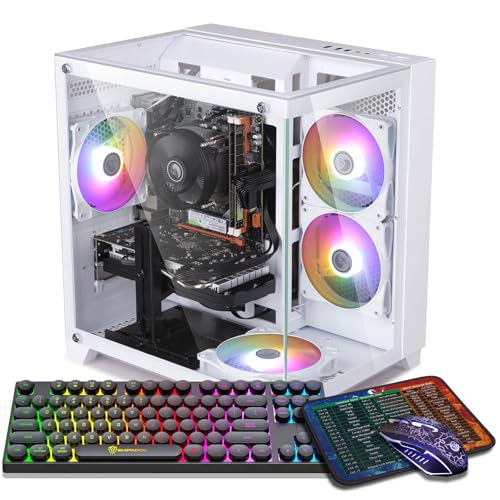
Where to buy
Check the latest price, availability and delivery on Amazon. Orders are placed on Amazon. We may earn a commission from qualifying purchases.
- Best overall for 1440p: ZER-LON Gaming PC, Ryzen 5 5500, RTX 4060 8GB — Check on Amazon
- STGAubron Gaming PC, Ryzen 5 5500, RTX 3060 12GB — Check on Amazon
- LXZ Gaming PC, Ryzen 5 5500, RTX 3050 8GB, 32GB RAM — Check on Amazon
- ZOTAC MEK Gaming PC, Ryzen 5 5500, RTX 3050 — Check on Amazon
See 2 more Amazon options
- STGAubron Gaming PC, Ryzen 5 5500, RTX 3050 6GB, 1TB SSD, White — Check on Amazon
- WIWB Gaming PC, Ryzen 5 5500, RTX 3050 8GB, 512GB SSD — Check on Amazon
Read the full guide ↓
Disclosure: As an Amazon Associate, reviewstook.com earns from qualifying purchases. Links to Amazon on this page are affiliate links; they cost you nothing extra. Listing details such as price and availability change often, so check the current Amazon listing before you buy.
Let us start with the sentence this whole guide hangs on: none of the six machines below is small. Every one is a standard desktop tower — the same broad shape of box that has sat under desks for thirty years — because at $700, real 1440p performance with a discrete graphics card lives in towers and nowhere else. So “small spaces” in this guide is not a product category. It is a placement problem, and it is a solvable one. A tower needs a footprint roughly the size of a large shoebox lid, a few inches of breathing room on the sides that pull air in and push it out, and a spot where its fan noise and its waste heat will not wear on the person sleeping or working three feet away. Get those three things right and a tower disappears into a studio apartment, dorm room or bedroom corner as completely as furniture does. Get them wrong — sealed in a cabinet, choked against a wall, humming beside your pillow — and the smallest room will feel smaller.
That framing also tells you what kind of compromise you are making. A tower bought for a small space is a performance-first compromise: a full-size box in exchange for a real graphics card, standard upgradeable parts, and cooling no compact machine at this price can match. If your space is genuinely tight — a shelf, a TV stand, a desk that is also your dining table — the honest alternative is a genuinely small machine, and we cover those in Best Mini Gaming PC Under $700, Best Small Form Factor Gaming PC Under $700 and Best Compact Gaming PC Under $700. Those guides trade some graphics muscle for a footprint a fraction of a tower’s. This guide is for the reader who has measured, decided the tower fits, and now needs to know which of the six under-$700 1440p machines will live most comfortably in the room — and exactly how to place it. One more piece of housekeeping: live prices in this class move often, so treat every machine here as a check-price-on-Amazon buy within this under-$700 budget. If a listing sits above the budget line on the day you shop, wait, pick the machine that fits the budget that day, or step up to Best 1440p Gaming PC Under $800 — do not pay next-tier money for this-tier hardware.
In this guide
Quick Picks
Short on time, or comparing several options at once? Each row below names a small-space situation and the machine that suits it, with a link to the listing.
| Your situation | Pick | Why it stands out in a small room | Link |
|---|---|---|---|
| Best overall, least heat | ZER-LON Gaming PC, Ryzen 5 5500, RTX 4060 8GB | The most efficient card here — the coolest-running tower of the six | Check on Amazon |
| Texture-heavy games, floor placement | STGAubron Gaming PC, Ryzen 5 5500, RTX 3060 12GB | 12GB of VRAM, keyboard and mouse in the box — one less delivery to store | Check on Amazon |
| Desk that does everything | LXZ Gaming PC, Ryzen 5 5500, RTX 3050 8GB, 32GB RAM | 32GB of RAM for the game-plus-everything-else desk | Check on Amazon |
| Placement freedom | ZOTAC MEK Gaming PC, Ryzen 5 5500, RTX 3050 | Wi-Fi 6E and an efficient Gold power supply — sit it where the room wants it | Check on Amazon |
| Big library, complete box | STGAubron Gaming PC, Ryzen 5 5500, RTX 3050 6GB, White | 1TB of storage and peripherals included — nothing else to find room for | Check on Amazon |
| Budget floor | WIWB Gaming PC, Ryzen 5 5500, RTX 3050 8GB | The better 8GB version of the RTX 3050 in the cheapest frame | Check on Amazon |
How These Picks Were Chosen
The six machines are the verified under-$700 1440p set from our main guide to this budget, re-graded here on the questions a small room asks. The verification standard is unchanged: every product is a real Amazon.com listing we checked directly — brand, processor, graphics card, memory, storage and model number all come from the listing itself — and live prices are left to the Amazon listing itself — check price on Amazon before you buy. The performance hierarchy is also unchanged, because a small room does not repeal it: graphics card first, video memory second, processor third. All six picks share the six-core Ryzen 5 5500 on the AM4 platform — what separates them is the card, the memory, the storage and the builder. The RTX 4060 machine leads and adds DLSS 3 Frame Generation; the RTX 3060 machine follows on its 12GB of VRAM; the four RTX 3050 machines are 1080p-class cards that drive a 1440p monitor well in esports and lighter games and respectably in heavier ones with upscaling, and their reviews say so.
What this variant adds is a placement grade, with a discipline we want on the record: the verified listing material for these six machines does not publish a full set of case dimensions, and no listing publishes a verified noise figure. So this guide prints no dimensions, no volumes and no decibel numbers — inventing them would be worse than useless in a guide whose entire subject is whether a box fits. Instead, each machine is graded on what is documented: its form-factor class (all six are standard towers), its cooling layout and power supply where the listing states them, and its wireless standard, which decides how far from the router the tower can live. Where a review needs an exact measurement, it tells you to take it from the live listing’s dimensions field — that ten-minute check, described in How to Choose below, is worth more than any number we could print. Heat and noise are graded qualitatively: by graphics-card class, fan layout, and the placement levers — floor versus desk, distance, clearance — that actually control both.
When a Tower Is the Wrong Answer
Before the reviews, the exit door, clearly marked. If your available space is a shelf narrower than a tower is tall, a fixed-height TV-stand compartment, or a desk that must clear completely for work or meals, no machine here is your machine. Towers also lose when the room is a shared bedroom and the PC will run late a metre from someone else’s pillow — fan noise at that distance is a relationship issue before it is a specification. In those cases the genuinely small categories are the honest route: mini gaming PCs and mini PCs in Best Mini Gaming PC Under $700 and Best Mini PC Under $700 sit on a shelf or behind a monitor, small form factor builds in Best Small Form Factor Gaming PC Under $700 use real desktop parts in a fraction of a tower’s volume, and Best Compact Gaming PC Under $700 splits the difference. What you give up on that route is graphics headroom and easy upgrades; what you gain is a machine that fits the room instead of negotiating with it. Everyone else — anyone with a floor corner or a metre of wall the tower can stand against — should read on: placed properly, the six towers below will outperform every small machine at this price.
The 6 Best 1440p Gaming PCs Under $700 for Small Spaces
ZER-LON Gaming PC, Ryzen 5 5500, RTX 4060 8GB, 16GB RAM, 1TB NVMe SSD
Who it suits: The small-room buyer who wants the strongest 1440p performance in this guide and the least heat and noise baggage that comes with it — a bedroom, studio or dorm setup where the PC runs a few feet from the bed.
Performance first, briefly, because it is why this machine leads both guides. The RTX 4060 is a generation newer than every other card here, it is the only one with DLSS 3 Frame Generation, and it treats 1440p as close to a home resolution as this budget gets: esports at genuinely high frame rates, modern single-player games at a smooth 60 at medium-to-high settings with upscaling doing its share. Around it sits the shared platform done completely — Ryzen 5 5500 to 4.2GHz, 16GB of DDR4, a full 1TB NVMe SSD, Windows 11 Home, and four RGB fans in a white tower (model AOV4060). The small-space grade, though, is where this machine quietly wins the guide. The RTX 4060 is an efficiency design: it produces its performance on modest power, and modest power means modest waste heat. In a large room that is a footnote. In a small one it is the difference between a tower that warms the corner it sits in and one that slowly turns a closed bedroom into a sauna over a long session. Of the six machines here, this is the one we would place closest to where people sit and sleep with the fewest reservations.
Placement notes, honestly given. It is still a full tower: plan a floor spot beside the desk or a generous desk corner, keep the intake side a few inches clear of the wall, and take the exact case dimensions from the live listing before you assume the spot you have in mind works — the verified listing material does not publish them in a form we will print. Two documented details shape where it can live. Its wireless is Wi-Fi 5, the oldest standard in this guide, which argues for placing it within easy reach of the router or running a cable along the skirting board. And its four RGB fans glow — in a shared bedroom, case lighting is a real placement input, so check how the lighting is controlled before its first night beside someone else’s bed. Check price on Amazon before you buy: this model moves in and out of this budget tier, so treat it as a first buy only when its live price fits the under-$700 budget; above that line, wait, or let the next pick have the sale.
- RTX 4060 8GB with DLSS 3 Frame Generation — the strongest and most efficient card here.
- Low-power design dumps the least heat into a small room of any pick in this guide.
- The shared Ryzen 5 5500 platform with 16GB of DDR4 and a full 1TB NVMe SSD — no 512GB compromise.
Honest limitation: 8GB of VRAM caps texture settings in the heaviest 1440p titles, its live price can move above this budget tier, and Wi-Fi 5 is the weakest wireless here — placement near the router or a cable run is part of the deal.
Choose it if it is at or under $700 on the day you shop and the PC will live close to where you sit or sleep. Skip it if its live price has moved well into the next tier today — that money belongs to the next tier, not to this tower.

STGAubron Gaming PC, Ryzen 5 5500, RTX 3060 12GB, 16GB RAM, 1TB SSD
Who it suits: The player with texture-hungry games — open worlds, modded installs, big sims — and a floor corner to give a tower, who would rather spend the room’s one PC spot on memory headroom than on the newest badge.
The performance case is a single number: 12. This build’s RTX 3060 carries 12GB of GDDR6 video memory, half again what the 8GB cards around it offer, and at 1440p VRAM is the resource that runs out first — when a game exceeds it, textures stream in late and the world pops into view around you. The 3060 is a step behind the 4060 in raw speed and tops out at DLSS 2 upscaling rather than Frame Generation, but for the big open worlds and heavily modded libraries, the memory is the trade that matters. The rest of the build is generous: the same Ryzen 5 5500, 16GB of DDR4, a 1TB SSD, Wi-Fi 6 and Bluetooth 5.2, four RGB fans, a bundled RGB keyboard and mouse, Windows 11 Home and a stated one-year warranty (model ABR1722).
For a small room, grade it as the guide’s floor tower. The RTX 3060 works harder than the 4060 to do its job, and harder work means more heat leaving the case — in a small room that argues for the placement with the most air around it: a floor spot with clearance on the intake side, not a desk corner hemmed in by a wall and a monitor. Its documented details suit floor duty. Wi-Fi 6 is a strong, current standard, so the tower does not need to huddle near the router the way the ZER-LON does; a cable-free floor corner is a realistic home for it, and distance from your chair is the cheapest noise control there is — no listing here publishes a noise figure, but every metre between the fans and your ears is worth more than any specification. The bundled keyboard and mouse deserve a small-space mention of their own: one box, no second parcel to store or unbox, and a desk that is complete on day one. On price, check price on Amazon before you buy — this listing sits on this guide’s border, so the rule is the guide’s rule: at or under $700, its VRAM makes it the connoisseur’s pick; above it, the premium belongs to the next tier up.
- An RTX 3060 carrying 12GB of VRAM — half again the memory of every 8GB card in this guide.
- Wi-Fi 6 frees placement — a floor corner away from the router is realistic.
- 1TB SSD, keyboard and mouse bundled — the complete setup arrives as one box.
Honest limitation: An older card with no Frame Generation and modest ray tracing, and the hardest-working — read warmest — machine here; give it the best-ventilated spot, and do the value-builder arrival checks (confirm the 12GB card in the tower) inside the return window.
Choose it if your library is open-world, modded or sim-heavy and you have a floor corner with air around it. Skip it if the only available spot is a tight desk corner in a hot room — the ZER-LON’s cooler running suits that spot better.

LXZ Gaming PC, Ryzen 5 5500, RTX 3050 8GB, 32GB RAM, 1TB NVMe SSD
Who it suits: The one-desk life — the small-room dweller whose single desk is office, battlestation and streaming corner at once, with Discord, a browser, a recording and the game all running together.
Every other machine in this guide ships 16GB of system RAM, the right amount for gaming alone. This LXZ build ships 32GB, and on a desk that does everything, that is the specification that decides whether the machine feels calm. Sixteen gigabytes runs the game; thirty-two runs the game, the stream’s supporting cast, forty browser tabs and voice chat, without the operating system swapping to disk mid-fight. The graphics card is the 8GB RTX 3050, and this guide’s standing sentence applies in full: it is a 1080p-class card that drives a 1440p monitor well in esports and lighter games and acceptably in heavier ones through DLSS upscaling at medium settings — not a native-1440p card, and bought with that understood, it is a rational allocation of a small budget. The platform is the shared one: Ryzen 5 5500, a 1TB NVMe SSD, Windows 11, white tower.
Small-space grading for this pick is mostly about information, because this listing tells you less than its rivals do. No power supply is named in the verified material and no case dimensions are published that we will print, so the placement questions a small room asks — heat headroom, exact footprint — must be answered from the live listing and a tape measure before you commit the spot. Structurally, it is a standard tower with a modest-power graphics card, so its heat class is the gentle end of this guide, and a floor spot beside the desk with a few inches of intake clearance is the natural home. The listing discipline matters more here than anywhere else in the guide: LXZ sells several configurations under similar titles, and this ASIN’s details page mixes variant information — an i5-12400F/RTX 4060 variant appears in the same page data — so confirm in the cart that the machine is the Ryzen 5 5500, RTX 3050 8GB, 32GB, 1TB configuration before you pay, and verify the parts again on arrival. On price, check price on Amazon for this exact configuration and hold it to the same at-or-under-$700 rule as everything else here.
- 32GB of DDR4 — double every other pick, and the multitasking headroom a one-desk room needs.
- The 8GB form of the RTX 3050, leaning on DLSS to reach 1440p output.
- A white tower on the standard Ryzen 5 5500 platform, with a 1TB NVMe SSD inside.
Honest limitation: The RTX 3050 is a 1080p-class card living on upscaling at 1440p, the listing mixes configurations, and the unpublished power supply means the live listing and a tape measure answer the placement questions — verify the exact configuration in the cart and on arrival.
Choose it if your one desk runs the game and everything else at once. Skip it if demanding single-player games at 1440p are the point — that is the RTX 4060’s job, at the top of this guide.

ZOTAC MEK Gaming PC, Ryzen 5 5500, RTX 3050, 16GB RAM, 500GB NVMe SSD
Who it suits: The buyer whose room layout is awkward — the tower has to live where the room dictates, not where a cable run or a weak signal allows — and who values a manufacturer’s backing over marketplace roulette.
ZOTAC is a name you can also find on graphics cards sold worldwide, and this MEK tower (model MEK3050A5500BG0A) is the budget formula built by a real manufacturer. The core is the guide’s standard one — Ryzen 5 5500 to 4.2GHz, RTX 3050 graphics, 16GB of DDR4, Windows 11 Home — and we deliberately do not state a VRAM figure for its card, because the verified listing material does not headline one. Two documented specification lines do the small-space work. The first is Wi-Fi 6E, the best wireless standard in this guide: a tower that connects well from anywhere can live in the room’s least-bad corner — the far side of the bed, the spot with actual airflow — instead of being tethered to wherever the router happens to be. Placement freedom is a specification, and this pick has the most of it. The second is the power supply: a 650W 80+ Gold unit, named in the listing where most rivals in this class say nothing. A Gold-rated supply converts less electricity into waste heat inside your small room, runs its own fan less hard doing it, and has the headroom to survive the graphics-card upgrade this budget class is designed around.
The trades are storage and the shared 3050 ceiling. The SSD is 500GB — half the 1TB drives elsewhere here — which in modern install sizes means a curated library of four or five big titles, or a second drive later; in a standard tower that is an easy, inexpensive fit. The RTX 3050 carries the guide’s standing caveat: a 1080p card that handles 1440p through DLSS and sensible settings, strongest in esports and lighter games. On price, check price on Amazon before you buy, and the guide’s rule applies unchanged — at or under $700, the brand backing, the named Gold supply and the placement freedom make it the risk-averse buy; above the line, wait for it rather than chasing it.
- Wi-Fi 6E — the best wireless here, and with it the most placement freedom in the guide.
- 650W 80+ Gold power supply, specified in the listing — less waste heat, upgrade headroom.
- A global brand’s warranty and support channel behind a standard, openable tower.
Honest limitation: The 500GB SSD is the joint-smallest in this guide, the RTX 3050 is a 1080p-class card, and its VRAM is not stated in the verified listing material — you are paying for build quality, backing and placement freedom, not extra frames.
Choose it if the tower must live in an awkward spot and you want a manufacturer standing behind it. Skip it if your library is huge and unmanaged — a 1TB pick forgives more.

STGAubron Gaming PC, Ryzen 5 5500, RTX 3050 6GB, 16GB RAM, 1TB SSD, White
Who it suits: The value hunter in a small room whose library is big, whose monitor is already 1440p, and who wants one box to arrive, be placed once, and hold everything they play.
Read this build as an allocation exercise, because that is what it is. STGAubron spends less on the graphics card — the RTX 3050 in its 6GB form — and more on everything around it: the Ryzen 5 5500, 16GB of DDR4, a full 1TB SSD, six RGB fans, Wi-Fi 6, Bluetooth 5.0, and a bundled RGB keyboard and mouse in a white tower. For a small room there is a real argument in that allocation: a 1TB drive holds the library without the uninstall shuffle, and the bundled peripherals mean the setup is complete out of one box, with no second purchase to store or unbox. Positioned at the budget end of this guide, it is one of the picks most likely to fit the under-$700 line in ordinary weeks — check price on Amazon to confirm on the day you shop.
Now the placement grading, and it starts with the fans. Six RGB fans is the most elaborate documented cooling-and-lighting layout in this guide, and in a small room both halves of that phrase matter. More fan positions moving air means the tower still breathes with its exhaust facing open room rather than a wall; it also means more glow, and in a shared bedroom a white tower lit by six fans is a piece of furniture that announces itself at night — check how the lighting is controlled on the live listing, and think about whether the tower faces the bed or away from it. The heat story is gentler than the fan count suggests: the 6GB RTX 3050 is a modest-power card, so this machine’s waste heat sits at the low end of the guide, and its real constraint is not thermal but graphical. State it at full size, as this guide always does: 6GB of VRAM is the tightest in the guide, texture settings in demanding games come down to medium or low, DLSS is structural rather than optional, and the heaviest recent releases are 1080p games on this machine whatever the monitor says. Esports, older AAA, indie and strategy at 1440p are genuinely enjoyable on it. Buy it as a roomy, complete, well-founded starting point — the standard case and AM4 platform mean a future graphics card transforms it — and it will not disappoint you.
- 1TB SSD with keyboard and mouse included — the most complete single box in this guide.
- A budget-tier pick in this guide — check price on Amazon, as it often sits near this budget line in ordinary weeks.
- Modest-power card keeps waste heat low; six-fan layout gives placement options for airflow.
Honest limitation: The 6GB RTX 3050 is the guide’s graphics floor — 1440p here means upscaled, medium textures, and the heaviest new games belong at 1080p — and six RGB fans are a lighting commitment in a shared bedroom.
Choose it if a big library, a complete box and a low price outrank settings today, and a graphics upgrade is already pencilled into a future sale. Skip it if you want to buy once and never open the case — the ZER-LON is that machine.

WIWB Gaming PC, Ryzen 5 5500, RTX 3050 8GB, 16GB RAM, 512GB SSD
Who it suits: The buyer at the very floor of the budget — stepping up from a console or an ageing laptop into a first small room of their own — who wants onto a 1440p monitor now and expects to grow the machine over time.
One choice defines this WIWB build (model wwr5go), and it is the right one: with limited money available for graphics, it buys the better version of its card. The RTX 3050 came in two forms, and the 8GB one fitted here is meaningfully the better buy at 1440p than the 6GB version above — more memory for textures, the same DLSS upscaling to lean on, and a longer useful life before VRAM becomes the binding constraint. Around it: the Ryzen 5 5500 every pick shares, 16GB of DDR4 at 3200MHz as the listing specifies, a 512GB SSD and Windows 11, sold by WIWB Direct and shipped from Amazon. The listing notes a Prime-member price, which makes the live-price check doubly important — the number you see may depend on your membership, so check price on Amazon for the live figure. Hold the live listing to the guide’s at-or-under-$700 rule like everything else here.
For a small room, the honest grading is that the verified material says the least about this pick, and the review should not pretend otherwise. No case dimensions are published that we will print, no power supply is named, and no fan layout is documented — so its footprint class is simply “standard tower,” and the measure-before-you-buy checklist later in this guide was practically written for it: take the dimensions from the live listing, tape the footprint on your floor, and plan the cable run before the box arrives. What can be said structurally works in its favour: the 8GB RTX 3050 is a modest-power card, so its heat class is the gentle end of this guide, and a future graphics card — bought in a sale — will make this standard tower unrecognisable. The compromises are the visible ones: the 512GB drive is the joint-smallest here, so plan a focused library or a second drive, and as a small Amazon brand it carries the same arrival homework as the other value builders — verify the card and memory against the listing on day one, run your hardest game inside the return window, and keep the packaging until week two.
- An 8GB RTX 3050 rather than the 6GB — the variant whose memory survives 1440p textures longer.
- The shared Ryzen 5 5500 platform with 16GB of DDR4 3200, ready to grow.
- Shipped from Amazon, with a Prime-member price noted on the listing.
Honest limitation: A 512GB SSD, a small-seller badge, and the least documented specification in the guide — no published dimensions, power supply or fan layout to grade — so the live listing and a tape measure do the placement work, and 1440p performance is upscaling-based.
Choose it if the budget will not move, a 1440p monitor is already on the desk, and growing the machine over time sounds like a plan rather than a chore. Skip it if a ZER-LON sale is within reach — the RTX 4060 plays 1440p in a different league.

Comparison Table
| Product | Graphics card | RAM / Storage | Space notes | Link |
|---|---|---|---|---|
| ZER-LON Gaming PC, RTX 4060 | RTX 4060 8GB, DLSS 3 Frame Generation | 16GB / 1TB NVMe | Coolest-running tower here; Wi-Fi 5 argues for a near-router or cabled spot | Check on Amazon |
| STGAubron Gaming PC, RTX 3060 | RTX 3060 12GB, DLSS 2 | 16GB / 1TB SSD | The floor tower — warmest runner, give it the best-ventilated corner; Wi-Fi 6 | Check on Amazon |
| LXZ Gaming PC, RTX 3050 8GB | RTX 3050 8GB, DLSS 2 | 32GB / 1TB NVMe | Standard tower; PSU and dimensions unpublished — measure from the live listing | Check on Amazon |
| ZOTAC MEK Gaming PC, RTX 3050 | RTX 3050, DLSS 2 (VRAM not stated in listing material) | 16GB / 500GB NVMe | Wi-Fi 6E placement freedom; 650W Gold PSU wastes the least heat | Check on Amazon |
| STGAubron Gaming PC, RTX 3050 6GB | RTX 3050 6GB, DLSS 2 | 16GB / 1TB SSD | Low heat, six RGB fans — mind the glow in a shared bedroom | Check on Amazon |
| WIWB Gaming PC, RTX 3050 8GB | RTX 3050 8GB, DLSS 2 | 16GB / 512GB SSD | Least documented spec here — dimensions and PSU from the live listing only | Check on Amazon |
All six are standard towers; no verified dimensions were published for any of them in the listing material we checked, so the Space notes grade placement behaviour — heat, wireless freedom, documentation — rather than size. Exact dimensions live in each live listing’s product information.
How to Choose a 1440p Gaming PC Under $700 for a Small Space
Two decisions are tangled together in this purchase — which machine, and where it will live — and the small-room buyer has to make both before checkout, because the wrong pairing wastes the money either way. Work through them in this order.
- Measure before you buy — the checklist. (1) Open the live listing of the machine you favour and find its case dimensions in the product information; sellers publish them there even when roundups do not. (2) Measure your candidate spot — floor corner, desk section, shelf — for width, depth and height. (3) Add clearance: a few inches on every vented side, more above a top exhaust; a tower that fits with zero clearance does not fit. (4) Tape the footprint on the floor or desk and live with it for a day. (5) Walk the cable run — power, monitor, Ethernet if you are cabling — and check nothing has to cross a doorway. (6) Only then order. Ten minutes of this is worth more than any dimension printed in any guide, including this one.
- Floor beats desk in a small room, almost every time. A tower on the desk puts its fans at ear height and its footprint in your working space; on the floor beside the desk it frees the surface, drops the noise below desk level, and puts distance between the exhaust and your face. The exceptions are thick carpet — a bottom-mounted power supply intake chokes on it, so use a board or a low stand — and rooms where floor space is the scarcest thing in them.
- Grade heat by the graphics card, because the card is the heater. Every watt a PC consumes leaves the case as heat in your room. Here the RTX 4060 machine runs coolest, the RTX 3050 machines sit in the gentle middle, and the RTX 3060 machine warms a small room fastest. If your room already runs hot, or the PC will game for hours with the door closed, that ordering is a buying criterion, not a footnote — and a Gold-rated power supply like the ZOTAC’s shaves a little more waste heat off whatever card you choose.
- Treat wireless as a placement feature. Wi-Fi 6E and Wi-Fi 6 (the ZOTAC and the two STGAubron builds) let the tower live where the room wants it. Wi-Fi 5 (the ZER-LON) argues for a spot nearer the router or a cable along the skirting board. Choose the corner the signal can reach.
- Never seal a tower in. Media cabinets, closed cupboards and desk hutches with doors are where gaming PCs go to throttle and age early. If the furniture has a door, the door stays open while you play — or the PC lives somewhere else. This rule prevents more small-room misery than any other in this guide.
- Count the whole footprint, not just the case. The tower is one item; the setup is the tower, the monitor, keyboard and mouse, the power brick or strip, and the cable slack behind all of it. The two STGAubron builds bundle keyboard and mouse, which genuinely reduces the parcel-and-storage footprint of getting set up. Whatever you buy, leave the cable slack accessible and one side of the case reachable — you will open this machine to clean or upgrade it sooner than you expect.
- Keep the performance order straight. Placement decides between near-equals; it does not repeal the graphics hierarchy. Shop the card first (RTX 4060, then the 12GB RTX 3060, then the 3050s with their upscaling role understood), VRAM second, and let placement break ties — do not buy a weaker card because its photograph looked smaller.
- Apply the live-price rule. A pick belongs in this guide when its listing sits at or under $700 on the day you buy. If your first choice is above the line, buy the pick that is under it, wait for the dip, or re-budget honestly to the $800 tier in Best 1440p Gaming PC Under $800 — and compare Best 1440p Gaming PC For Small Spaces Under $500 and Best 1440p Gaming PC For Small Spaces Under $800 if your budget sits nearer those lines.
Common Buying Mistakes
- Assuming a tower in a “small spaces” guide is a small tower. All six machines here are standard towers; the guide grades how to place them, and the measure-before-you-buy checklist exists because listing photographs lie about scale.
- Sealing the PC inside a cabinet or hutch and closing the door. Temperatures climb, fans scream, performance throttles — the classic small-room failure, and entirely self-inflicted.
- Standing the tower on thick carpet with a bottom intake. The power supply breathes through the floor of the case on many towers; carpet starves it. A board or stand is a two-minute fix.
- Pushing the case flush against the wall to “save space.” The inches you save are the inches the intake needed. Clearance is part of the footprint — budget it or the machine pays it back in heat and noise.
- Putting the tower on the desk beside the bed or the study chair. Fan noise is a distance game and the floor wins it for free; RGB glow at eye level all night is a complaint no specification warned you about.
- Forgetting the router. A Wi-Fi 5 tower exiled to the room’s far, weak-signal corner will stutter in downloads and online play no matter how strong its graphics card is. Place for the signal, or run the cable.
- Buying on a render’s proportions. Marketplace images stretch and shrink cases freely. The live listing’s dimensions field and your tape measure are the only authorities, and both come before checkout.
- Ignoring the upgrade day. A tower jammed into a zero-clearance alcove cannot be opened without moving furniture. Leave one side reachable; your future graphics card will thank you.
- Overpaying for a machine outside this budget. Several picks belong in this guide only when their live price fits this budget tier; paying next-tier money for this-tier hardware leaves a room that deserved better arithmetic.
Final Recommendation
- Most small rooms, when the price is right: ZER-LON Gaming PC, RTX 4060 — the strongest card and the least heat.
- Texture-heavy libraries with a floor corner: STGAubron Gaming PC, RTX 3060 12GB.
- The one-desk life: LXZ Gaming PC, 32GB RAM.
- Awkward layouts and the risk-averse: ZOTAC MEK Gaming PC — Wi-Fi 6E puts it anywhere.
- Big libraries, complete box: STGAubron Gaming PC, RTX 3050 6GB, 1TB.
- The lowest-cost start: WIWB Gaming PC, RTX 3050 8GB.
The small-space version of this budget’s answer is the same pair of machines, for one extra reason each. The ZER-LON pairs the guide’s best 1440p performance with its coolest running — exactly the combination a small room rewards; buy it at or under $700 and cable it if the corner is far from the router. The STGAubron RTX 3060 machine trades a little of that cool efficiency for 12GB of VRAM that will still be holding high textures when the 8GB cards negotiate, and it earns the best-ventilated floor corner in the room. The LXZ’s 32GB serves the desk that does everything; the ZOTAC’s wireless freedom and named Gold power supply serve the room whose layout will not negotiate; and the two budget builds are rational starting points bought as starting points. If your measurements say no tower fits at all, that is a real answer too — take it to Best Mini Gaming PC Under $700 or Best Small Form Factor Gaming PC Under $700 rather than forcing a box into a room that rejected it, and cross-check the wider field in Best Gaming PC Under $700. Measure the spot, check the live price, confirm the configuration, verify on arrival: in a small room, that discipline is worth as much as any component in the box.
Frequently Asked Questions
Will a gaming tower really fit in a small room?
Almost always — with placement treated as part of the purchase. A standard tower needs a footprint in the class of a large shoebox lid, a few inches of ventilation clearance, and a cable run. What it cannot survive is being sealed into furniture or choked against a wall. Measure your spot against the live listing’s dimensions and tape the footprint out for a day; you will know before the box arrives. If the answer is genuinely no, the mini and small form factor guides linked here are the honest alternative.
Desk or floor — which is better for a tower in a small space?
Floor, in most small rooms: it frees your desk surface, drops fan noise below ear level, and keeps exhaust heat away from your face. Two cautions — thick carpet can choke a bottom-mounted power supply intake (use a board or low stand), and the floor spot still needs side clearance. Choose the desk only when floor space is truly scarcer, and expect to hear the machine more.
How much clearance does a gaming PC actually need?
A few inches on every side that carries a vent or fan grille, and more above a top exhaust — enough that the machine breathes room air rather than its own exhaust. Vent layouts differ by case and are visible on the live listing’s photographs. The rule that matters is the negative one: zero clearance, or a closed cabinet door, will cost you temperatures, noise and eventually performance.
Which of these PCs heats a small room up the least?
The ZER-LON: its RTX 4060 produces this guide’s best performance on the least power, and every watt a PC uses becomes heat in the room. The RTX 3050 machines sit in the gentle middle; the RTX 3060 machine warms a room fastest. An efficient power supply helps at the margin — the ZOTAC’s 650W 80+ Gold unit wastes the least electricity of the six. No listing here publishes a noise figure, and neither do we; distance and placement are the noise controls you actually own.
Can I put one of these towers inside a TV stand or media cabinet?
Only with the door open while it runs, and ideally not at all. A closed compartment recirculates a gaming PC’s exhaust until the machine throttles and the fans run at full speed — louder and slower at once. If a TV-stand home is the whole point of your setup, that is the mini PC category’s job, and Best Mini PC Under $700 is the guide written for it.
Why does this guide print no dimensions or noise figures?
Because the verified listing material for these six machines does not publish a complete, trustworthy set of either, and a small-spaces guide that invents measurements would fail at the one job it has. Each live listing carries its case dimensions in the product information — take them from there and use the checklist in How to Choose. Noise is graded structurally instead: by card class, fan layout and placement.
Should I buy one of these towers or a mini gaming PC instead?
Buy the tower if it fits: at $700 it buys a discrete graphics card, standard parts and an upgrade path no mini at this price matches. Buy the mini if the room vetoes the tower — shelf-only space, a TV-stand home, or a shared bedroom where a glowing tower at midnight is a genuine problem. The linked mini, compact and small form factor guides grade the small machines on their own terms.


