Where to buy
Check the latest price, availability and delivery on Amazon. Orders are placed on Amazon. We may earn a commission from qualifying purchases.
- Best overall: MXZ Gaming Desktop, Ryzen 5 5500, GTX 1660 Super 6GB, 16GB DDR4, 500GB NVMe SSD — Check on Amazon
- STGAubron Gaming PC, Ryzen 5 5500, Radeon RX 580 8GB, 16GB DDR4, 512GB SSD — Check on Amazon
- Beelink SER5 MAX Mini PC, Ryzen 7 7735U, Radeon 680M, 24GB LPDDR5, 500GB SSD — Check on Amazon
- GMKtec NucBox M6 Ultra, Ryzen 5 7640HS, Radeon 760M, 16GB DDR5, 512GB SSD — Check on Amazon
See 2 more Amazon options
- LXZ Gaming PC, Ryzen 5 5600GT, Integrated Radeon Graphics, 16GB DDR4, 1TB NVMe SSD — Check on Amazon
- ACEMAGICIAN AM06 Pro Mini PC, Ryzen 7 5800U, Radeon Vega 8, 16GB DDR4, 512GB NVMe SSD — Check on Amazon
Read the full guide ↓
Disclosure: As an Amazon Associate, reviewstook.com earns from qualifying purchases. Links to Amazon on this page are affiliate links; they cost you nothing extra. Listing details such as price and availability change often, so check the current Amazon listing before you buy.
Five hundred dollars and a 1440p monitor is an awkward pairing, and this guide starts by saying so plainly, because most pages answering this search do not. A genuinely comfortable 1440p gaming PC — one that runs new releases at native 2560×1440, high settings, sixty frames per second — costs meaningfully more than $500 in a prebuilt box. The graphics card alone in that class of machine typically consumes most of this entire budget. What $500 can buy, if you shop carefully and time a sale, is a PC that drives a 1440p display honestly in specific, well-defined ways: esports titles and older games at native 1440p on medium settings, newer games rendered at 1080p or below and upscaled to fill the panel, and everyday desktop work, video and browsing at full, crisp 1440p all day long. That is a real and enjoyable machine. It is just not the machine the phrase “1440p gaming PC” makes most people picture, and the difference matters more than any single pick below.
The second honesty note is about price itself. Two of the six picks below — the traditional towers with proper discrete graphics cards, also the two strongest gaming machines here — spend much of the year above $500 and drop under it on sale. The other four picks are the ones that more reliably sit at or under the budget, including a mini PC in this tier and a tower with a full terabyte of storage. So read this guide as a shortlist to buy at the right moment, not a promise that all six sit under $500 every hour of every day. Where a pick is sale-dependent, the review says so in those words. If your $500 is hard and today is the day, start with the Beelink mini PC or the LXZ tower. If you can wait for a discount, the MXZ tower at the top is the strongest 1440p-adjacent machine $500 can reach.
In this guide
Quick Picks
Short on time, or comparing several options at once? Each row below names a buyer type and the product that suits it, with a link to the listing.
| Buyer type | Pick | Why it stands out | Link |
|---|---|---|---|
| Best overall | MXZ Gaming Desktop, Ryzen 5 5500 / GTX 1660 Super | The strongest GPU in this guide — real 1440p medium in esports and older titles when bought on sale | Check on Amazon |
| Best 8GB graphics card | STGAubron Gaming PC, Ryzen 5 5500 / RX 580 8GB | 8GB of VRAM for texture headroom at 1440p — a sale-dependent pick | Check on Amazon |
| Best mini PC under $500 | Beelink SER5 MAX, Ryzen 7 7735U / Radeon 680M | Modern RDNA 2 integrated graphics and 24GB RAM in a box that hides behind the monitor — check price on Amazon | Check on Amazon |
| Best modern platform | GMKtec NucBox M6 Ultra, Ryzen 5 7640HS / Radeon 760M | DDR5 memory, USB4 and dual 2.5GbE — the newest hardware here, a sale-watch pick | Check on Amazon |
| Best tower to upgrade later | LXZ Gaming PC, Ryzen 5 5600GT / 1TB NVMe | A full-size tower with a terabyte of storage — check price on Amazon; add a graphics card later and it transforms | Check on Amazon |
| Cheapest credible option | ACEMAGICIAN AM06 Pro, Ryzen 7 5800U / Vega 8 | Eight CPU cores and honest esports ability at the budget end of this guide | Check on Amazon |
How These Picks Were Chosen
The budget was applied the way a careful shopper actually experiences it: every product below is a real Amazon listing that belongs in this budget class in the United States, verified against the listing itself. Where a machine usually sits above the line and only visits it during sales, the review says so plainly rather than pretending the sale price is its everyday price. Anything that has never credibly touched $500 was excluded, however good it might be; that rule removed several well-known brand-name towers that stay well above the line even on sale, because a guide that answers “under $500” with far pricier machines has not answered the search.
We did not use these PCs ourselves. We read the maker listings and specification pages and compared the parts that decide 1440p outcomes: the graphics hardware first, its video memory second, and the CPU, memory configuration and storage after that. That ordering is the opposite of how these listings are marketed — big CPU names and RGB fan counts up front, graphics details buried — and reversing it is most of the work. A six-core Ryzen 5 appears in half this guide and is never the limiting factor at 1440p; the graphics chip is, every time. We also weighted memory configuration heavily for the integrated-graphics machines, because an iGPU borrows system RAM and runs far better on fast dual-channel memory, and we favored listings that publish full specifications over ones that hide behind phrases like “Core i7” with no generation attached — a vagueness this corner of Amazon is notorious for.
Two reality filters sat on top of the specifications. The first is the 1440p filter: a pick earns its place only if it can do something genuine at 2560×1440 — native resolution in lighter titles, or clean upscaled output with the honesty to say which is which. The second is the exit filter: what happens in a year. The towers here can accept a better graphics card and become genuinely capable 1440p machines; the mini PCs largely cannot, and their reviews say so.
The 6 Best 1440p Gaming PCs Under $500
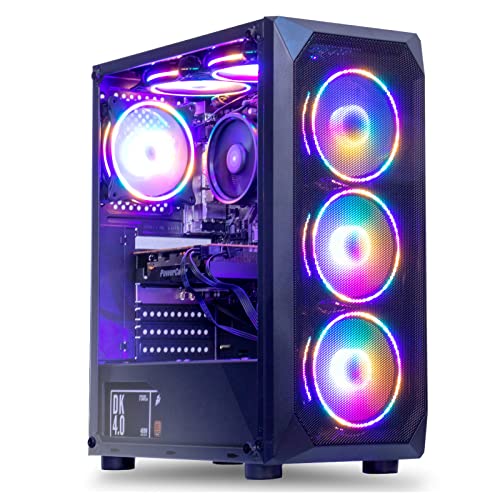
MXZ Gaming Desktop — Ryzen 5 5500, GTX 1660 Super 6GB, 16GB DDR4, 500GB NVMe SSD
Who it suits: The buyer who wants the most real gaming performance this budget can reach and is willing to wait for a sale to get it — esports players and older-AAA fans with a 1440p monitor already on the desk.
The graphics card is the headline, correctly for once. The GeForce GTX 1660 Super is a Turing-generation discrete card with 6GB of GDDR6 memory, and it remains a genuinely capable gaming GPU: at 1440p it handles esports titles — Counter-Strike 2, Valorant, Rocket League, Apex Legends at reduced settings — at native resolution with playable-to-good frame rates, and it runs the large back catalogue of pre-2022 AAA games at 1440p medium comfortably. Newer heavy releases are a different conversation: expect to render internally at 1080p and let the monitor upscale. The card has no DLSS — NVIDIA’s AI upscaling never came to the GTX line — and no ray tracing worth enabling, so the tools available are the game’s own scalers and AMD’s FSR in titles that support it. Around the GPU sits a sensible supporting cast: a six-core Ryzen 5 5500 that will not bottleneck this card at 1440p, 16GB of DDR4-3200, a 500GB NVMe SSD, a listed 450W 80 Plus power supply, six RGB fans, and Windows 11 Pro. It is a complete, standard-parts tower, which matters for the exit filter: its case and format accept a future graphics card upgrade in a way no mini PC here can match.
Now the price honesty, because this pick lives or dies by it. This exact configuration spends much of its time priced above this guide’s budget and only drops under it during sales. In other words, it is a sub-$500 PC roughly when Amazon feels like it, and a pricier PC the rest of the time. Catch it on sale under the budget and it is the best value in this guide by a clear margin. Buy it at its regular higher pricing and you have overpaid for this guide’s premise; the correct move at that point is our Best 1440p Gaming PC Under $700 guide instead. Two specification cautions from the listing itself: MXZ’s own page is internally untidy — one bullet mentions a 1TB drive while the title and spec table say 500GB NVMe, and a stray line in the description references a different graphics card entirely — so confirm the configuration on the live listing at checkout, and screenshot what you ordered. That kind of listing sloppiness is common with marketplace tower brands and is a reason to buy through Amazon’s returns window, not a reason to avoid the hardware, which is standard and verifiable on arrival.
- GTX 1660 Super 6GB GDDR6 — the strongest graphics hardware in this guide, full stop.
- Standard tower platform: Ryzen 5 5500, DDR4 and a listed 450W 80 Plus PSU leave a real GPU upgrade path.
- A genuine sale pick — when it drops under the budget, nothing else here is close for gaming.
Honest limitation: It is only under $500 on sale; at its frequently seen above-budget pricing it breaks this guide’s budget, and the 6GB of VRAM caps texture settings at 1440p in recent games.
Choose it if you can wait for the price to dip under $500 and want the most gaming per dollar when it does. Skip it if you must buy today at whatever it costs, or you want ray tracing and DLSS — neither exists at this budget in a prebuilt.

STGAubron Gaming PC — Ryzen 5 5500, Radeon RX 580 8GB, 16GB DDR4, 512GB SSD
Who it suits: Texture-conscious players of older and mid-weight games who catch it on sale — and anyone whose 1440p ambitions are mostly esports, MOBAs, and a deep Steam back catalogue rather than this year’s releases.
The RX 580’s one specification that still matters in 2026 is printed right in its name here: 8GB of video memory. At 1440p, VRAM is where budget cards die first — textures spill, stutter arrives, settings menus start locking options — and this 2017-era Polaris card carries more of it than the GTX 1660 Super above or any integrated solution in this guide. In the games it was built for, and the many since that share their engines, that translates to honest native-1440p play at medium settings, and strong 1080p performance everywhere else. The rest of the machine mirrors the MXZ formula with STGAubron’s own touches: the same six-core Ryzen 5 5500 (up to 4.2GHz), 16GB of DDR4, a 512GB SSD, WiFi 6 and Bluetooth 5.2, four RGB fans, an included RGB keyboard and mouse, and Windows 11 Home. The peripherals are worth a sentence of calibration: bundled keyboard-and-mouse sets in this class are starter gear you will eventually replace, not a reason to choose the PC — but they do mean a first-time buyer games the day the box arrives, with a 1440p monitor as the only other purchase.
The caveats for this pick are the oldest in the guide, literally. The RX 580 launched in 2017. AMD has moved Polaris to legacy driver support, so new-game optimizations are no longer coming; power draw is high for the performance, which means more heat and fan noise; and marketplace RX 580 builds have a long-running reputation for variable component quality, so the Amazon returns window is part of the product. Pricing tells the same sale story as the MXZ: this configuration spends much of its time above the budget and only drops under it on deal days. Caught on sale, with the card verified in the first week, it is a defensible, VRAM-rich way into 1440p-shaped gaming. At its regular higher pricing, it is an old graphics card wearing a new PC’s price tag, and this guide does not recommend it.
- 8GB of GDDR5 VRAM — the most video memory in this guide, and it shows at 1440p texture settings.
- Ryzen 5 5500 platform with WiFi 6, Bluetooth 5.2 and bundled peripherals: game on day one.
- The cheapest discrete-GPU route here when the sale lands.
Honest limitation: A 2017 graphics architecture on legacy drivers, with high power draw and marketplace build variability — and, like the MXZ, only under $500 during sales.
Choose it if you find it under $500, play mostly pre-2023 and esports titles, and will test it hard inside the return window. Skip it if you play brand-new releases expecting day-one driver support, or the live price sits well above the budget.

Beelink SER5 MAX Mini PC — Ryzen 7 7735U, Radeon 680M, 24GB LPDDR5, 500GB SSD
Who it suits: The buyer who needs to purchase today, under $500, no sale-watching — especially desk-space misers, living-room gamers, and anyone whose “1440p” is as much crisp desktop and video as it is games.
This is the first pick in the guide whose price does not need an asterisk the size of a paragraph. This exact configuration — Ryzen 7 7735U, 24GB of LPDDR5, 500GB PCIe 4.0 SSD — is one of the picks that reliably sits under the budget rather than only visiting it on sale. In other words it lives under $500, rather than visiting. Check price on Amazon before you buy, as mini PC pricing still moves around. What the money buys is the most modern integrated graphics AMD put in a generation of mini PCs: the Radeon 680M, an RDNA 2 iGPU with 12 compute units that independent testing places roughly in GTX 1050 Ti territory. Translated to a 1440p monitor: esports and indie titles at native 1440p on low-to-medium settings, heavier games rendered at 1080p — or 720p with FSR in demanding scenes — and upscaled, and a flawless 1440p desktop for everything else. The 24GB of fast LPDDR5 matters more than it looks: the 680M eats system memory for both bandwidth and capacity, and 24GB removes the squeeze that hobbles 16GB iGPU machines when a game, a browser and Discord share the pool.
The mini PC trade-offs are structural. There is no graphics card slot and never will be: the 680M is the best GPU this box will ever have. The LPDDR5 is soldered, so 24GB is also the final memory figure; storage, at least, is a standard replaceable SSD. Against that, the form factor is a genuine quality-of-life win — a book-sized, quiet box that mounts behind the very 1440p monitor it drives, sips power compared with the towers above, and carries Beelink’s comparatively established name in a category full of anonymous ones, with triple-display output for the work side of its life. For a small desk or dorm, it is the pick in this guide we would buy on an ordinary Tuesday.
- Radeon 680M integrated graphics — RDNA 2, the strongest iGPU class available under $500.
- 24GB LPDDR5 feeds the iGPU properly, and its pricing reliably sits in this budget tier.
- Tiny, quiet, triple-display: the only pick here that disappears behind the monitor.
Honest limitation: No upgrade path for graphics or RAM, ever — when the 680M stops being enough, the whole PC is replaced, and heavy modern games mean rendering well below 1440p.
Choose it if you are buying now at a real sub-$500 price and value size, quiet and modern efficiency. Skip it if a future GPU upgrade matters to you — that is what the towers in this guide are for.

GMKtec NucBox M6 Ultra — Ryzen 5 7640HS, Radeon 760M, 16GB DDR5, 512GB SSD
Who it suits: The forward-looking mini PC buyer — someone who wants the newest platform (DDR5, USB4, Zen 4) under the desk and can wait for this one’s frequent discounts to bring it back under the line.
On paper this is the most modern machine in the guide. The Ryzen 5 7640HS is a Zen 4 processor — six cores boosting to 5.0GHz — paired with the Radeon 760M, an RDNA 3 integrated GPU with 8 compute units running up to 2,600MHz. The 760M is a step below the Beelink’s 680M in raw graphics terms despite the newer architecture, because it carries fewer compute units; expect esports at native 1440p low, mainstream games rendered at 1080p with upscaling, and excellent AV1 video handling. Where the M6 Ultra claws ground back is everything around the GPU: DDR5 memory in real SO-DIMM slots rather than solder, dual M.2 SSD slots, a full-function USB4 port, dual 2.5GbE networking, triple 4K display output, and WiFi 6 with Bluetooth 5.2. As a small, modern, efficient computer that also games at 1440p-shaped settings, it is arguably the nicest object in this guide.
It is also the guide’s clearest sale-watch case among the minis: this 16GB/512GB configuration spends real time under $500 during its regular promotions, but also long stretches above it. The buying rule writes itself: when it drops under the budget, the M6 Ultra is a strong, modern alternative to the Beelink, trading a little graphics muscle for slots, ports and platform youth; at its regular higher pricing, it has left this guide’s budget and should be compared in the Best Mini Gaming PC Under $700 class instead. One configuration warning that applies to this whole product family: GMKtec sells several near-identically named M6 variants with different memory and storage, and marketplace roundups have flagged listings whose headline configuration differs from the variation actually selected — verify the exact RAM and SSD in the cart before paying, every time.
- Newest platform here: Zen 4 CPU, DDR5 in upgradeable slots, USB4, dual 2.5GbE LAN.
- Radeon 760M RDNA 3 graphics with AV1 support — modern media and light 1440p gaming.
- A genuine under-$500 machine whenever its regular sales run.
Honest limitation: The 760M is a step behind the 680M for games, and this configuration often sits above budget until the next discount.
Choose it if you catch it on sale under the budget and want modern ports, DDR5 and networking in a mini. Skip it if the live price sits well above the budget and gaming is the priority — the Beelink above games harder for less, today.

LXZ Gaming PC — Ryzen 5 5600GT, Integrated Radeon Graphics, 16GB DDR4, 1TB NVMe SSD
Who it suits: The patient strategist: a first-PC buyer whose real plan is a proper graphics card in six months, and who wants a full-size tower, a strong CPU and a terabyte of storage already in place when it arrives.
Judge this machine by what it is on day one and you will underrate the purchase; judge it by month seven and it makes complete sense. Day one first, honestly: the Ryzen 5 5600GT’s integrated Radeon graphics (the listing is candid that there is no dedicated card) are the weakest gaming hardware in this guide. At a 1440p monitor that means esports titles rendered at 1080p or 720p on low settings and upscaled, older games at reduced internal resolution, and no credible native-1440p AAA play at all. If this box were the end of the story, it would not be in a 1440p guide. The story, though, is the chassis around the chip: a full tower with a listed 400W power supply, RGB fans, WiFi, Windows 11 — and a 1TB NVMe SSD, double the storage of everything else here, at a price that sits inside this guide’s budget — check price on Amazon. The 5600GT is a strong six-core CPU that will happily feed a mid-range graphics card later; the platform is standard AM4/DDR4, so the upgrade is a single purchase and ten minutes with a screwdriver.
That framing also defines this pick’s risk: you are paying budget money for a PC that does not yet do the thing in the headline. Buyers who never get around to the graphics card will own an office-and-esports tower that upscales to their 1440p screen, and should choose the Beelink instead. Buyers who do upgrade — a used or entry card in the budget class makes this the only machine here with nothing left to apologize for at 1440p — will have spent their budget on exactly the parts that are annoying to replace later. One homework item: LXZ sells sibling configurations under similar titles, so confirm “5600GT, 16GB, 1TB NVMe” on the live listing before checkout.
- 1TB NVMe SSD — double the storage of every other pick, at a budget-tier price — check price on Amazon.
- Full-size AM4 tower: one graphics card away from genuine 1440p gaming.
- Ryzen 5 5600GT is a strong six-core CPU that will not bottleneck a future mid-range GPU.
Honest limitation: As delivered, its integrated graphics are the weakest here — 1440p output is upscaled esports and older games only, until you add a card.
Choose it if a GPU upgrade within the year is genuinely in your plan and budget. Skip it if the PC must be finished the day it arrives — pick the Beelink, or catch the MXZ on sale.

ACEMAGICIAN AM06 Pro Mini PC — Ryzen 7 5800U, Radeon Vega 8, 16GB DDR4, 512GB NVMe SSD
Who it suits: The strictest budgets and the second-room problem: a spare 1440p monitor, a kid’s first PC, a living-room box for indie and retro libraries — anywhere “under $500” really means “as far under as possible.”
Every guide needs its floor, and this is a well-built one. The AM06 Pro pairs an eight-core, sixteen-thread Ryzen 7 5800U (up to 4.4GHz) with Vega 8 integrated graphics, 16GB of dual-channel DDR4 and a 512GB NVMe SSD, in a mini PC that sits at the budget end of this guide’s tier — check price on Amazon — with a larger 32GB/1TB configuration also available inside this budget class. The CPU side is honestly strong for the money: eight Zen 3 cores make it a better everyday computer, homework machine and media box than several pricier picks here. The graphics side requires the guide’s most careful honesty. Vega 8 is a generation behind the 680M and two behind the 760M; at 1440p it is an esports-and-indies device — League of Legends, Rocket League, older Source and indie titles at native or near-native settings, everything heavier rendered at 720p–1080p and upscaled, ideally with FSR where a game offers it. Its triple-display 4K output and dual LAN ports, meanwhile, make it a genuinely good 1440p desktop for work, browsing and video, which for many second-room buyers is most of the job.
Why include the weakest gamer as the sixth pick? Because at its budget-tier pricing it is the only machine here that leaves real money in a $500 budget — enough for a monitor arm, a better keyboard, or the start of a savings pot toward a future tower — while still playing a large, real library acceptably on a 1440p screen. It is also the lowest-risk experiment in the guide: if the household discovers it loves PC gaming, nothing was wasted, because it retires gracefully to desk, TV or server duty. The listing’s marketing name-checks heavy shooters; treat that as aspiration, set expectations at esports and back-catalogue, and this little box will meet them.
- The cheapest credible PC in this guide — a budget-tier mini, check price on Amazon.
- Eight-core Ryzen 7 5800U: the strongest everyday-computing CPU per dollar here.
- Dual LAN and triple-display output make it a superb 1440p work and media box after gaming duty.
Honest limitation: Vega 8 graphics are the floor of this guide — modern AAA at 1440p is out of reach even upscaled in many titles, and RAM is limited to its DDR4 platform.
Choose it if your budget is at the tightest end of this tier, or the games are esports, indie and retro. Skip it if current AAA titles are the point — save toward the $700 tier instead.

Comparison Table
| Product | Graphics | Best use | Link |
|---|---|---|---|
| MXZ Gaming Desktop (Ryzen 5 5500) | GTX 1660 Super 6GB discrete | Most real gaming performance — buy at its sale prices under the budget | Check on Amazon |
| STGAubron Gaming PC (Ryzen 5 5500) | RX 580 8GB discrete | VRAM-rich older-game and esports play — a sale-dependent pick | Check on Amazon |
| Beelink SER5 MAX (Ryzen 7 7735U) | Radeon 680M integrated | Best buy-today mini under $500 — check price on Amazon | Check on Amazon |
| GMKtec NucBox M6 Ultra (Ryzen 5 7640HS) | Radeon 760M integrated | Modern DDR5/USB4 mini — buy on its regular sales | Check on Amazon |
| LXZ Gaming PC (Ryzen 5 5600GT) | Integrated Radeon (Vega) | 1TB tower built to accept a GPU later | Check on Amazon |
| ACEMAGICIAN AM06 Pro (Ryzen 7 5800U) | Radeon Vega 8 integrated | Cheapest credible option in the budget tier | Check on Amazon |
How to Choose a 1440p Gaming PC Under $500
- Define your 1440p before you shop. Native 1440p in esports and older games, upscaled 1440p output in newer games, and a 1440p desktop for work are three different products wearing one search term. All six picks here do at least one honestly; none does native high-settings 1440p in new AAA releases. If that is your non-negotiable, the honest budget is the one in Best 1440p Gaming PC Under $700.
- Shop the graphics chip, not the CPU name. Every tower here uses a six-core Ryzen 5 and every one is CPU-sufficient at 1440p. The entire performance difference lives in the graphics line of the spec sheet: GTX 1660 Super, then RX 580, then the 680M, 760M, and the Vega iGPUs. A listing that shouts the processor and whispers the graphics is telling you where the compromise is.
- Count the video memory. At 1440p, 6GB is a floor and 8GB is breathing room. The RX 580’s 8GB is its whole argument; the 1660 Super’s faster 6GB is its ceiling; the integrated machines borrow from system RAM, which is why the Beelink’s 24GB matters.
- Treat the price as a range, and buy the bottom of it. Prices on the same tower swing widely within months. Set the budget line as your target for the sale-dependent picks — the MXZ, the STGAubron and the GMKtec — and let the sale come to you. Paying the top of the range converts a smart budget buy into an overpriced one.
- Decide towers versus minis by the exit, not the desk. A tower is a platform: GPU, RAM and storage all upgrade, and today’s compromise becomes next year’s capable 1440p PC. A mini is a finished appliance: smaller, quieter, more efficient, and permanently exactly as fast as the day it arrived. Neither is wrong; buying one while expecting the other’s behavior is.
- For integrated graphics, memory speed is graphics speed. iGPUs share system RAM, so LPDDR5 and DDR5 machines (Beelink, GMKtec) feed their graphics far better than DDR4 ones, and dual-channel configuration is mandatory — a single-stick 16GB tower iGPU is hobbled in a way its spec sheet will never mention. Check the channel configuration in the listing’s Q&A if it is not stated.
- Use upscaling as a feature, not a failure. At this budget, rendering at 1080p with a quality upscaler on a 1440p panel is the intended experience for newer games, and on a 27-inch monitor it looks far better than the phrase “not native” suggests. Prefer games and GPUs with FSR support; note the GTX 1660 Super has no DLSS, and set render resolution deliberately instead of letting games auto-detect into mush.
- Verify the exact configuration at checkout. Marketplace PC listings run multiple variants under one title, and this guide’s own research found spec contradictions inside single listings. Confirm CPU, GPU, RAM, SSD size and PSU wattage on the live page, screenshot your order, and test everything inside Amazon’s return window.
What $500 at 1440p Actually Buys
It is worth pausing on the shape of this market, because it explains the strange mix in this guide — two ageing discrete-GPU towers, three mini PCs, one tower with no graphics card at all. A modern entry graphics card suitable for comfortable native 1440p, inside a prebuilt with a current CPU, Windows license, warranty and a maker’s margin, simply does not fit in $500 right now. So the sub-$500 market routes around the problem three ways. The first is time: older graphics hardware — a 2019 GTX card, a 2017 RX card — in new towers at sale prices. The second is integration: AMD’s RDNA integrated graphics became good enough, in the 680M generation, to play real games, and mini PC makers built tiny machines around them that live under $500 permanently. The third is deferral: sell the platform now and let the buyer add the graphics card when funds allow, which is the LXZ’s entire proposition.
Setting Up a Sub-$500 PC for a 1440p Monitor
Whichever pick you buy, the first hour of settings decides whether it feels like a 1440p machine or a disappointment, because most games auto-detect optimistically and then stutter. Set the Windows display resolution to the panel’s native 2560×1440 — desktop, browsing and video should always run at full resolution, and every pick here handles that effortlessly. Then, per game, separate display resolution from render resolution: keep output at 1440p, and set the internal render scale your hardware sustains — native for esports and older titles on the discrete cards, 1080p-equivalent (about 67–75% scale) for heavier games, and 720p–1080p with FSR on the integrated machines. Turn textures as high as VRAM allows, and turn shadows, volumetrics and ray tracing down or off first; they cost the most frames and are missed the least.
Two free wins apply across the guide. Enable your monitor’s variable refresh (FreeSync works with all of these AMD and NVIDIA parts) so the 40–60fps range these machines live in at 1440p feels smooth instead of juddery. And on the integrated machines, confirm once in the BIOS that memory runs at rated speed in dual channel; iGPU performance scales with memory bandwidth, and a misconfigured mini can leave a fifth of its games performance on the table.
Common Buying Mistakes
- Believing “1440p gaming PC” on a listing means native 1440p, high settings, new games. At $500 it means esports, older titles, and upscaling — buy with that definition or raise the budget.
- Paying the non-sale price for a sale-dependent tower. The MXZ and the STGAubron at their regular pricing are not under-$500 PCs having a bad day; they are above-budget PCs, and should be judged against that class.
- Choosing by CPU and RGB fans. Six-core Ryzen 5 chips are everywhere in this guide and are never the bottleneck at 1440p; the graphics line and VRAM count decide your experience.
- Trusting a listing title over its spec table — or its spec table over the box that arrives. Variants hide under one title, listings contradict themselves, and the return window is your verification tool. Use it.
- Buying an integrated-graphics tower with single-channel RAM, or a mini with soldered memory, without realizing the graphics ceiling that sets.
- Expecting ray tracing or DLSS at this budget. The discrete cards here predate useful versions of both; FSR and native rendering are the tools on the table.
- Ignoring the monitor math: spending the whole $500 on the PC for a 1440p panel you do not yet own. The Best 1080p Gaming PC Under $500 tier exists, and on a 1080p screen several of these machines feel twice as fast.
- Skipping the PSU question on towers. A listed wattage (450W on the MXZ, 400W on the LXZ) is adequate for the shipped card and modest upgrades, not for a future flagship GPU — plan upgrade ambitions around it.
Final Recommendation
- Most gaming performance per dollar: MXZ Gaming Desktop (GTX 1660 Super) — at its sale prices under the budget only.
- VRAM-rich back-catalogue play: STGAubron Gaming PC (RX 580 8GB) — on sale under the budget, tested inside the return window.
- Buy today, under $500, no games with pricing: Beelink SER5 MAX (Radeon 680M, 24GB).
- Newest, most connected mini: GMKtec NucBox M6 Ultra — when its price returns under $500.
- Stepping-stone tower: LXZ Gaming PC (5600GT, 1TB) — for buyers committed to adding a GPU later.
- Tightest budgets and second rooms: ACEMAGICIAN AM06 Pro — the budget-tier floor of this guide.
Our top two depend on your calendar. If you can wait for a sale, the MXZ with its GTX 1660 Super is the strongest gaming machine $500 can reach — the only pick here that plays a wide range of games at native 1440p without apology. If you are buying this week, the Beelink SER5 MAX is the recommendation: a real sub-$500 price, modern RDNA 2 graphics, and memory specified the way integrated graphics need. The STGAubron is the value wildcard for older-game players who catch it on sale; the GMKtec is the modern-platform alternative when discounted; the LXZ is a platform purchase, not a finished 1440p PC; and the ACEMAGICIAN is the honest floor. Small-desk buyers should compare Best 1440p Gaming PC For Small Spaces Under $500, and anyone who decides the compromises are one too many should step straight to Best 1440p Gaming PC Under $700, where native 1440p stops being a negotiation. Check the live price on Amazon before you order — at this budget, when you buy is half of what you buy.
Frequently Asked Questions
Can a PC under $500 really game at 1440p?
Yes, with the definition this guide uses throughout: esports titles and older games at native 2560×1440 on low-to-medium settings, newer and heavier games rendered at 1080p or below and upscaled to the 1440p panel, and a full native-1440p desktop for everything outside games. What it cannot do at $500 is native 1440p at high settings in current AAA releases — no prebuilt at this price can, whatever its listing implies.
Which is better for 1440p: the GTX 1660 Super tower or the RX 580 tower?
The GTX 1660 Super is the faster, more efficient card in most games and the better buy at equal prices. The RX 580’s case rests on its 8GB of VRAM — kinder to texture settings at 1440p — and on price: it is often the cheaper of the two when sales land. If both sit under $500 on the day you shop, take the 1660 Super unless your games are known VRAM-hogs from its era.
Are mini PCs with integrated graphics a trap for gaming?
No — they are a different contract. The Radeon 680M and 760M are legitimately capable for esports, indie and older games, and the minis are quieter, smaller and more efficient than any tower here. The trap is only in expecting an upgrade path: the graphics you buy are the graphics you retire. If your game library fits their ability, they are among the most satisfying purchases in this guide.
Why do some prices in this guide differ from what I see on Amazon today?
Because sub-$500 gaming PC pricing is unusually volatile — the same pick can swing widely between regular pricing and sale pricing within months. Judge today’s price against the budget line: at or under it, buy with confidence; far above it, wait or choose a pick whose pricing is more stable.
Should I just build my own PC for $500 instead?
If you are comfortable building and shopping the used market for a graphics card, a self-build can beat every machine here on raw performance. What the prebuilts sell is a Windows license, a warranty, a single box and a return window. Decide which currency you are richer in: money, or time and confidence.
What should I upgrade first on the tower picks?
The graphics card, when the time comes — it is the entire ballgame at 1440p. On the LXZ it is the missing piece outright. On the MXZ and STGAubron, a future mid-range card transforms them, subject to their modest power supplies (450W and unspecified respectively — check before buying a hungry card). RAM to 32GB is a distant second; storage is cheap and external until it is not.
Is 1440p worth it over 1080p at this budget?
For desktop clarity, browsing, work and video, unambiguously yes — and every pick drives that perfectly. For games alone on a fixed $500, a 1080p monitor would let these same machines run higher settings natively. The sweet spot for this budget is the buyer who wants the 1440p screen for everything, and accepts upscaled gaming as the trade.


