Where to buy
Check the latest price, availability and delivery on Amazon. Orders are placed on Amazon. We may earn a commission from qualifying purchases.
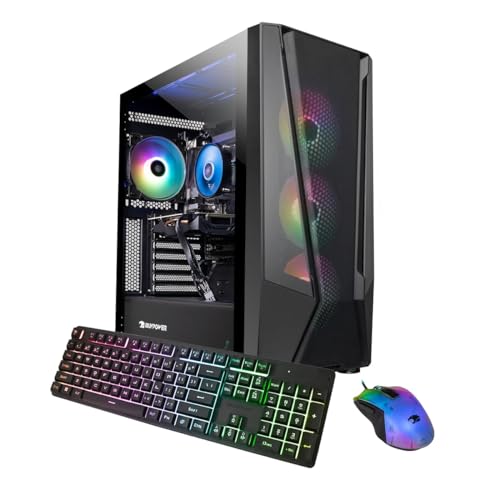
- Best overall for streaming under $1,500: iBUYPOWER TraceMesh Gaming PC, Intel Core i7-14700F, RTX 4060 Ti — Check on Amazon
- Acer Nitro 70 N70-130-UR13, AMD Ryzen 9 7900, RTX 4070 — Check on Amazon
- CyberPowerPC Gamer Xtreme VR GXiVR8040A14, Intel Core i7-13700F, RTX 4060 Ti 16GB — Check on Amazon
- MSI Codex R2 A14NUD5-213US, Intel Core i5-14400F, RTX 4060 Ti — Check on Amazon
See 2 more Amazon options
- iBUYPOWER Slate Mesh SMA7N46T01, AMD Ryzen 7 5700, RTX 4060 Ti — Check on Amazon
- CyberPowerPC Gamer Xtreme VR GXiVR8060A24, Intel Core i5-13400F, RTX 4060 — Check on Amazon
Read the full guide ↓
Disclosure: As an Amazon Associate, reviewstook.com earns from qualifying purchases. Links to Amazon on this page are affiliate links; they cost you nothing extra. Listing details such as price and availability change often, so check the current Amazon listing before you buy.
Any PC in this guide can run a game at 1080p. That is not the test a streaming PC has to pass. The real test is simultaneity: the same machine rendering your game at high frame rates, encoding the outgoing stream, writing a clean local recording, compositing your OBS scenes, and keeping a browser, a chat client and a voice app alive — all at once, for hours, without the stream stuttering every time the game gets busy. That is the workload this guide grades. All six machines below are built around NVIDIA’s Ada-generation graphics cards, which means all six carry the same generation of NVENC hardware encoder with AV1 encoding — the single most important streaming component in a modern PC — and the differences that decide this ranking live around that encoder: how many CPU cores are left over for OBS and your scene sources, whether the system memory is 32GB or a tighter 16GB, how much VRAM the game and the encoder stack share, and what each listing’s price cycle is doing this week.
Two honest boundaries before the picks. First, what $1,500 buys here is the tower only. It does not include the gear that decides whether anyone stays in your stream: a microphone comes first, then a camera and a light, a second monitor so chat and OBS are not competing with your game for the same screen, and — only if you plan to stream console games through the PC — a capture card. That kit is real money bought sensibly, and it is covered separately in its own section below; it is not hidden inside any pick’s price, and no pick below should be read as “stream-ready out of the box” without it. Second, two of these six listings spend much of the year above $1,500 and only visit this budget on promotions. Both are included with the condition printed where it belongs — buy at or under $1,500, walk away otherwise — because a streaming PC bought well over budget is money not spent on the microphone your viewers will actually judge you by. Readers building a dedicated streaming setup rather than a game-and-stream combo should also read Best Streaming PC Under $1500; this guide is for the single-PC streamer, and it grades accordingly.
In this guide
Quick Picks
Short on time, or comparing several options at once? Each row below names a streamer type and the machine that suits it, with a link to the listing.
| Streamer type | Pick | Why it stands out | Link |
|---|---|---|---|
| Best overall for streaming under $1,500 | iBUYPOWER TraceMesh TMI7N46T01 | 20-core i7, 32GB DDR5 and a 4060 Ti — the most simultaneous-load headroom here | Check on Amazon |
| Strongest stream-and-play power, on deal days | Acer Nitro 70 N70-130-UR13 | The only RTX 4070 here, 12GB of VRAM and a 12-core Ryzen 9 — at its deal price only | Check on Amazon |
| Best for VRAM-heavy games while streaming | CyberPowerPC Gamer Xtreme VR GXiVR8040A14 | RTX 4060 Ti with 16GB of VRAM, so game textures and the encode stack stop competing | Check on Amazon |
| Best for upgraders and tinkerers | MSI Codex R2 A14NUD5-213US | DIY-friendly standard parts, Gold PSU, keyboard and mouse in the box | Check on Amazon |
| Best straightforward, stable-price option | iBUYPOWER Slate Mesh SMA7N46T01 | Ryzen 7 5700 and RTX 4060 Ti at a stable price that stays in budget — check price on Amazon | Check on Amazon |
| Best value — leaves money for the mic | CyberPowerPC Gamer Xtreme VR GXiVR8060A24 | The same Ada NVENC encoder in a cheaper tower, banking budget for stream gear | Check on Amazon |
How These Picks Were Chosen
The starting filter was the encoder. Streaming from a single PC in 2026 means hardware encoding, and the hardware that matters is NVIDIA’s NVENC block: a dedicated section of the graphics card that compresses your stream without asking the game’s rendering hardware or the CPU to do it. Every pick here carries an RTX 4060, 4060 Ti or 4070 — all Ada-generation cards whose NVENC supports AV1 encoding alongside H.264 and HEVC. AV1 matters because YouTube accepts it for live streaming today and delivers visibly cleaner 1080p at the same bitrate; H.264 remains the Twitch default, at roughly 6,000 kbps for a 1080p60 stream. One precision, because streaming guides routinely blur it: these cards carry a single NVENC encoder each. The dual-encoder layout — one encoder for the stream, a second, completely separate one for the local recording — starts a tier above this budget, on 4070 Ti-class cards and up. A single NVENC can still run a stream encode and a local record at the same time, and at 1080p60 it does so comfortably; what you give up versus the dual-encoder tier is separation, not capability. The picks were then graded on the rest of the simultaneous load: CPU cores for OBS compositing, browser sources and VTubing software; system RAM for everything open at once; VRAM for the game plus encode headroom; and storage, because local recordings eat disk space at a rate new streamers never budget for.
The budget was applied as a ceiling, not a target, because prebuilt prices on Amazon swing widely around promotions — always check the live price on Amazon before you buy. Two picks, the Acer Nitro 70 and the iBUYPOWER TraceMesh, regularly drift above $1,500 between deals; both carry their buy-only-at-or-under-$1,500 condition inside their reviews, not just here. We did not use these machines ourselves. We read the manufacturer listings and specification pages and cross-checked configurations against independent price trackers and deal coverage. We also excluded machines whose price never reaches this budget — a popular RTX 4070 Skytech configuration never comes down to this level, so it is not a $1,500 pick. No capture cards, microphones or cameras appear as picks — the streaming kit is covered openly in its own section instead of being smuggled into a tower price.
The Simultaneous-Load Test: What Streaming Actually Asks of a PC
A gaming benchmark runs one job. A stream runs at least three, and the ways they interfere with each other are the whole subject of this guide. Job one is the game itself: rendering frames at 1080p, ideally at the high refresh rates these machines are built for. Job two is the outgoing stream: a 1920×1080 picture at 60 frames per second, compressed in real time to the platform’s bitrate — around 6,000 kbps CBR on Twitch, with more headroom available on YouTube, where AV1 ingest rewards exactly the encoder hardware every pick here carries. Job three is the local recording: most serious streamers record a clean, high-bitrate copy of every session for clips and uploads, and at 40–50 Mbps that recording consumes roughly 20GB of disk space per hour — worth remembering when every machine here ships with a 1TB drive.
The reason a single PC can do all three is that the jobs land on different hardware. The encode — jobs two and three — runs on NVENC, a fixed-function block that sits beside the rendering hardware rather than inside it. Encoding on NVENC costs the game almost nothing; encoding on the CPU, the older x264 way, spends the very cores the game and OBS are fighting over, and at 1080p60 with a busy scene it is the first thing that breaks. This is why the encoder generation outranks almost everything else in a streaming guide, and why all six picks are NVIDIA machines: at this budget, AMD’s competing encoder has closed much of the quality gap on its newest hardware, but the verified listings under $1,500 are Ada cards, and Ada’s NVENC with AV1 is the safest streaming silicon in the class. What the CPU is actually for, in a streaming PC, is everything else: OBS compositing your scene — game capture, camera, overlays, alerts — the browser sources behind those alerts, your chat and music apps, and, for VTubers, the face-tracking software that drives the avatar. That workload scales with scene complexity, not with the game, and it is why this guide grades a 20-core processor and 32GB of memory as streaming specifications rather than luxuries. A simple just-chatting or single-game stream asks little of the CPU; a VTuber running tracking software, a dozen animated sources and a modded game at once is the heaviest simultaneous load in this guide, and the rankings below say plainly which machines are built for it.
The 6 Best 1080p Gaming PCs for Streaming Under $1,500
iBUYPOWER TraceMesh Gaming PC (TMI7N46T01) — Intel Core i7-14700F, RTX 4060 Ti, 32GB DDR5
Who it suits: The single-PC streamer who wants one tower to absorb the whole workload — a demanding game, a 1080p60 stream, a local recording, a heavy OBS scene — and who is willing to time the purchase to this listing’s promotion cycle.
Start with the specification that decides this ranking: memory. Most prebuilts at this price ship 16GB of system RAM, which is adequate for a game and survivable for a game plus a stream. The TraceMesh ships 32GB of DDR5 5600, and for a streamer that difference is not a luxury line — it is the difference between closing things before you go live and not thinking about it. A modern game, OBS with a multi-source scene, a browser running your dashboard and alerts, a voice client and a recording buffer can lean on memory all evening; 32GB is what makes that a non-event for the life of the machine. Beside it sits the strongest processor in this guide: Intel’s Core i7-14700F, a 20-core chip with eight performance cores and twelve efficiency cores. In the simultaneous-load test that pairing is exactly right — the performance cores feed the game, the efficiency cores absorb OBS compositing, browser sources and background apps, and the RTX 4060 Ti’s NVENC block handles both the stream encode and the local record without touching either. VTubers should read this pick first: face-tracking software is a real, continuous CPU load layered on top of everything else, and this is the machine with the cores to spare for it.
The honest limitation is the graphics card’s memory, not its speed. The 4060 Ti’s 8GB of VRAM runs 1080p streaming loads well — the encoder does not meaningfully consume VRAM — but texture-heavy games at maximum settings already press against 8GB, and a streamer running a modded game while encoding should expect to negotiate textures down a notch where the 16GB CyberPowerPC below does not. The second condition is price. This listing lives on promotions and often sits well under the cap, but at its full list price it breaks this guide’s budget outright — check price on Amazon before you buy. Bought on promotion, it is the most complete streaming machine here. Bought at list, it is a good PC purchased at the wrong moment.
- 32GB of DDR5 — the system-memory headroom a game plus OBS plus everything else actually uses.
- 20-core i7-14700F: the strongest simultaneous-load processor in this guide, VTubing included.
- Frequently promoted well under the cap — check price on Amazon.
Honest limitation: 8GB of VRAM is the tight line in the specification, and the price swings widely — at its full list price it fails this guide’s brief and should be left for a sale.
Choose it if you stream and play on one machine, run a busy OBS scene or a VTuber rig, and can buy on promotion. Skip it if the listing is at full price today, or your games are modded and texture-maximal — the 16GB CyberPowerPC below trades its CPU and RAM for the VRAM you need.

Acer Nitro 70 (N70-130-UR13) — AMD Ryzen 9 7900, RTX 4070, 32GB DDR5
Who it suits: The graphics-first streamer — playing ray-traced single-player games live, recording at high bitrate for edited uploads — who is disciplined enough to buy only when this machine’s deal price appears, and never at its headline price.
On hardware, this is the strongest streaming PC in the guide. The graphics card is the GeForce RTX 4070 with 12GB of GDDR6X memory, a full tier above the 4060 Ti machines around it. For a streamer that tier buys two concrete things: ray tracing and maximum settings stop competing with the stream for GPU capacity, and the 12GB of VRAM gives the game-plus-encode stack room that the 8GB cards manage more carefully. The encoder itself is the same Ada NVENC generation as the rest of this guide, AV1 included — the 4070’s advantage is rendering headroom, not a better encoder, and this guide will not pretend otherwise. Behind the card, a 12-core AMD Ryzen 9 7900 boosting to 5.4GHz and 32GB of DDR5 give the simultaneous load a proper foundation: heavy OBS scenes, a browser full of dashboard tabs and a local recording are all unremarkable loads on this specification, and Wi-Fi 6E is fitted for everything except the stream itself — which, like every pick here, belongs on a wired Ethernet connection, full stop.
Then the condition, and it is absolute. This machine’s headline Amazon price sits well above this budget for much of the year, and it only periodically falls into this budget on deal days before climbing back out — check price on Amazon to see where it stands today. So the rule is mechanical: at $1,500 or less, buy it, because nothing else in this guide touches its combination of card, cores and memory. At anything well above that, close the tab — at that money you are in a different guide’s territory (Best 1080p Gaming PC For Streaming Under $2500), and the honest move is to wait for the cycle or take the TraceMesh on promotion. Verify the exact configuration at checkout, too: the Nitro name spans several generations, and the newer Nitro 70 line is a different, pricier machine.
- The only RTX 4070 here — 12GB of VRAM and a rendering tier above the rest of the guide.
- 12-core Ryzen 9 and 32GB of DDR5: simultaneous-load headroom to match the card.
- A major manufacturer’s support network, Wi-Fi 6E and a 1TB Gen 4 SSD.
Honest limitation: Its price, which is over this budget most of the year; the DDR5 is also a modest 4800MHz. This is a deal-watch purchase with a hard ceiling, not a buy-it-today recommendation.
Choose it if you can wait for the price to fall to $1,500 or under and graphics power is your priority. Skip it if you need to stream this week at whatever the listing says — bought at its headline price, it fails this guide’s brief outright.

CyberPowerPC Gamer Xtreme VR (GXiVR8040A14) — Intel Core i7-13700F, RTX 4060 Ti 16GB
Who it suits: The streamer whose games are the texture-heavy kind — modded, open-world, maximum settings — and who wants the VRAM question settled for the life of the machine while the stream runs.
There are two GeForce RTX 4060 Ti cards, and almost every prebuilt in this class ships the 8GB one. This CyberPowerPC ships the 16GB variant: the same rendering core with double the graphics memory. In a streaming PC that headroom has a specific job. The game holds its textures in VRAM; the encoder, the OBS canvas and the recording pipeline all want their share of the same card at the same time. On an 8GB card playing a texture-hungry game at ultra settings, that sharing is where frame pacing goes to die — the game quietly sheds texture quality or stutters while the stream stays smooth, and viewers see a worse game than the one you are playing. Sixteen gigabytes removes the negotiation. Add the Intel Core i7-13700F — sixteen cores, eight performance and eight efficiency — and the machine passes the simultaneous-load test with a particular strength: it is the pick for long sessions in heavy games, recorded at high bitrate, with nothing turned down for the stream’s sake.
The trade is printed on the other side of the ledger: system memory. This machine ships 16GB of DDR5 where the TraceMesh and the Acer ship 32GB, and for a streamer that is the specification to plan around. A game, OBS, a browser and a voice client fit in 16GB, but they fit the way luggage fits a small trunk — arranged, and with nothing spare for a VTubing tracker or a second game’s launcher updating in the background. The fair reading is that CyberPowerPC spent the money on the graphics card’s memory instead of the system’s — a defensible allocation for a pure game-and-stream workload, and RAM is the cheapest upgrade in this guide when the day comes. On price, it sits in the mid-range of this guide and periodically drops on promotion — check price on Amazon, and a patient buyer should aim for one of those deal windows.
- RTX 4060 Ti with 16GB of VRAM — double every other 4060 Ti in this guide, and the streaming stack feels it.
- i7-13700F’s sixteen cores handle OBS, browser sources and background load without drama.
- Periodically discounted on promotion — check price on Amazon.
Honest limitation: 16GB of system RAM is the tight specification for a streaming workload — workable, but the first upgrade a heavy multitasker or VTuber will make — and in games that never press VRAM, the 16GB card performs like the 8GB one.
Choose it if your streamed games are modded or texture-maximal and you record everything. Skip it if your scene is the heavy part — animated sources, tracking software, a dozen browser sources — because the 32GB TraceMesh serves that load better.

MSI Codex R2 (A14NUD5-213US) — Intel Core i5-14400F, RTX 4060 Ti, DIY-Friendly
Who it suits: The streamer who treats a prebuilt as a starting point — streaming now, then growing the machine over the years: a second drive for recordings, more memory, eventually a dual-encoder graphics card — without fighting proprietary parts.
MSI makes components for a living, and the Codex R2 is a prebuilt assembled the way a component company assembles one: standard, replaceable parts in a mid-tower sold explicitly as DIY-friendly, powered by an 80 Plus Gold power supply, with Wi-Fi, a bundled keyboard and mouse, and Windows 11 Home. The configuration pairs an Intel Core i5-14400F — ten cores, six performance and four efficiency — with a GeForce RTX 4060 Ti and 16GB of DDR5. For a streaming workload, that processor deserves a fairer reading than its spec-sheet position suggests. Because the encode runs on NVENC rather than the CPU, a streaming PC’s processor is mostly compositing scenes and feeding the game; the 14400F does both without strain for a typical single-game stream, and the Gold-rated PSU behind it is the component that decides whether a future graphics card upgrade — the dual-encoder tier included — is a ten-minute job or a rebuild. Independent review coverage of the Codex R2 14 line, tested in this same i5-14400F and RTX 4060 Ti configuration, praised the assembly quality and room to work inside the case, which is precisely what an upgrading streamer is buying.
Two cautions, one inherited from the hardware and one from the listing. The hardware caution is headroom: 16GB of system memory and a ten-core CPU are this guide’s floor for the simultaneous load, adequate for game-plus-stream-plus-chat and tight for VTubing or very heavy scenes — both are upgradeable in this chassis, which is the point of the pick, but they are upgrades you should expect to make. The listing caution matters more on day one: Amazon’s metadata for this machine contradicts itself, naming the graphics coprocessor as an RTX 4060 in one field while the title and card description say RTX 4060 Ti. For a streamer the distinction is not cosmetic — verify the configuration on the listing, then verify the delivered machine in Task Manager inside the return window, and treat anything less than the Ti you paid for as a return, not a disappointment to live with. Check price on Amazon for the current listing before you buy.
- Standard, DIY-friendly parts and an 80 Plus Gold PSU — the easiest machine here to grow into a bigger streaming rig.
- The i5-14400F is genuinely sufficient when NVENC carries the encode, which it does.
- Keyboard and mouse in the box — starter money that can go toward a microphone instead.
Honest limitation: The CPU and 16GB of RAM are the simultaneous-load floor of this guide, and Amazon’s own listing data contradicts itself on the graphics card in one field — the delivered configuration must be verified.
Choose it if you plan to upgrade over time and value standard parts and a proper power supply. Skip it if you never open a case and run a heavy scene today — the TraceMesh gives you the headroom immediately, on promotion.

iBUYPOWER Slate Mesh (SMA7N46T01) — AMD Ryzen 7 5700, RTX 4060 Ti, 16GB DDR4
Who it suits: The streamer who wants to buy this week at a price that is simply there — no promotion-watching, no deal alerts — and who buys a PC to use for its whole life rather than to upgrade its platform halfway through.
In a guide with two deal-cycle picks, the Slate Mesh is the calm one. It tends to sit inside this budget rather than visiting it — check price on Amazon. The streaming hardware is right: an RTX 4060 Ti means the same Ada NVENC encoder with AV1 as the pricier picks, and the eight-core, sixteen-thread AMD Ryzen 7 5700 is a proven quantity for the rest of the load — OBS compositing, chat, browser sources and the game itself at 1080p. The mesh-fronted case favors airflow over the sealed glass fronts that make some prebuilts run hot and loud, which matters more to a streamer than to a gamer: a PC that spins its fans up audibly during a quiet game is a PC your microphone can hear, and stream audio is a war against exactly that kind of background noise. Keyboard and mouse are in the box, and Windows 11 Home is installed; as a complete, predictable purchase it is the easiest recommendation in this guide to act on today.
The limitation is structural and permanent. The platform beneath the machine is finished: DDR4 memory and AMD’s AM4 socket are at the end of their road, so there is no path to a current-generation processor without replacing motherboard and memory together — in effect, rebuilding the PC. For a streamer whose scene grows over the years, that ceiling arrives as a replacement decision rather than an upgrade afternoon. There is also a naming subtlety to read carefully: the Ryzen 7 5700 is a different, slightly lesser chip than the 5700X its name invites comparison with, with lower clocks — a reminder to read prebuilt spec sheets letter by letter. And the 16GB of DDR4 is the simultaneous-load floor, as on the two picks above it. None of this makes the Slate Mesh a bad streaming PC; it makes it a finished one. If your pattern is to stream happily on a machine for four or five years and then replace it whole, its dead end will never once inconvenience you.
- The same Ada NVENC + AV1 encoder as the top picks, at a stable, predictable price — check price on Amazon.
- Eight-core Ryzen 7 and a mesh, airflow-first case that keeps fan noise off your microphone.
- Keyboard and mouse included — a complete purchase with no extras required to start.
Honest limitation: The AM4/DDR4 platform has no CPU upgrade path short of a rebuild, 16GB of memory is the streaming floor, and the Ryzen 7 5700 sits a step below the 5700X its name suggests.
Choose it if you want to buy now at a predictable price and replace your PCs whole. Skip it if your stream is still growing — the DDR5 machines above keep their upgrade options alive for similar money.

CyberPowerPC Gamer Xtreme VR (GXiVR8060A24) — Intel Core i5-13400F, RTX 4060
Who it suits: The new streamer with their priorities in the right order — a competent tower now, and the rest of the budget spent where viewers actually notice: the microphone, the light, the second screen.
This pick rests on a fact that surprises people: the RTX 4060 in this cheaper CyberPowerPC carries the same generation of NVENC encoder as the 4060 Ti and 4070 above it — Ada silicon, AV1 encode included. Streaming quality at 1080p60 is set by the encoder and the bitrate far more than by the rendering tier, so the stream this machine sends to Twitch or YouTube is, encoder for encoder, the same stream the top picks send. What the lower tier costs you is in the game, not the broadcast: the RTX 4060 is a class down in the heaviest titles, where maximum settings with ray tracing will mean DLSS compromises its siblings avoid, and its 8GB of VRAM shares their ceiling. Around the card, the specification is sensibly matched to the job — an Intel Core i5-13400F with ten cores for the game plus OBS, 16GB of DDR5 on a current platform, a 1TB PCIe Gen 4 SSD, Wi-Fi ready and Windows 11 Home — and it sits in the value tier of this guide, with its class regularly promoting lower — check price on Amazon.
That price gap is the argument, and for a streamer it is stronger than for a gamer. A gamer’s leftover budget buys a nicer monitor. A streamer’s leftover buys the microphone that decides whether a first-time viewer stays for sixty seconds — plus a basic light, plus part of a second monitor for chat. Audiences forgive a game running at high settings instead of ultra; they do not forgive echoing, muffled audio, and no streamer in this guide’s audience should spend the last dollar of $1,500 on rendering headroom while broadcasting through a headset mic. The DDR5 platform also keeps the future open: memory, storage and eventually a dual-encoder graphics card all move up without a rebuild. If the high-refresh monitor and the stream gear are already on your desk, this pick’s logic inverts — buy the 4060 Ti machines above. If they are not, this is the most honest allocation of the $1,500 in the guide.
- The same Ada NVENC + AV1 encoder as the top picks — the outgoing stream does not know the tower was cheaper.
- Ten-core i5 and DDR5 platform: a real simultaneous-load machine, not a compromise that feels like one.
- Priced in the value tier, freeing budget for the microphone and second screen that decide a stream’s fate.
Honest limitation: A rendering tier down in the heaviest games while streaming them — expect DLSS and settings discipline where the 4060 Ti picks have slack — on the same 8GB VRAM ceiling and 16GB of system memory.
Choose it if the tower is only part of what the $1,500 must buy, or your streamed games are competitive titles this card handles easily. Skip it if your gear shelf is already complete and the streamed games are the newest single-player releases at maximum settings.
Comparison Table
| Product | CPU / GPU | RAM / Storage | Best use | Link |
|---|---|---|---|---|
| iBUYPOWER TraceMesh TMI7N46T01 | i7-14700F / RTX 4060 Ti 8GB | 32GB DDR5 / 1TB NVMe | Heaviest simultaneous load: VTubing, busy scenes, multitasking | Check on Amazon |
| Acer Nitro 70 N70-130-UR13 | Ryzen 9 7900 / RTX 4070 12GB | 32GB DDR5 / 1TB Gen 4 | Strongest game-plus-stream power; buy only at its deal price | Check on Amazon |
| CyberPowerPC GXiVR8040A14 | i7-13700F / RTX 4060 Ti 16GB | 16GB DDR5 / 1TB Gen 4 | Modded and texture-heavy games, recorded at high bitrate | Check on Amazon |
| MSI Codex R2 A14NUD5-213US | i5-14400F / RTX 4060 Ti 8GB | 16GB DDR5 / 1TB NVMe | Standard parts that grow into a bigger streaming rig | Check on Amazon |
| iBUYPOWER Slate Mesh SMA7N46T01 | Ryzen 7 5700 / RTX 4060 Ti 8GB | 16GB DDR4 / 1TB NVMe | Stable price on a finished platform | Check on Amazon |
| CyberPowerPC GXiVR8060A24 | i5-13400F / RTX 4060 8GB | 16GB DDR5 / 1TB Gen 4 | Value pick that funds the microphone and second monitor | Check on Amazon |
What $1,500 Does Not Include: The Rest of the Streaming Desk
Every price in this guide buys a tower and nothing else, so the honest accounting continues here. None of the six PCs includes a microphone, a camera, a light, a second monitor or a capture card — and of those, the order in which they matter is the opposite of the order in which they are usually bought. The microphone is first, and it is not close: viewers will watch a 1080p stream at medium settings all evening, but they leave bad audio in under a minute. A decent USB microphone is a budget-friendly purchase and is the single highest-value purchase in streaming. A camera comes next — a competent 1080p webcam sits in the same modest tier — and a simple, inexpensive light does more for that camera’s picture than a camera upgrade twice its price. A second monitor, a serviceable 1080p panel from the budget tier, is the workflow purchase: OBS, chat and your dashboard live there, and your game stops sharing a screen with the tools that run the stream. Add it up and the realistic streaming desk adds a real extra cost beyond the tower — which is precisely why this guide includes a value pick that leaves money on the table, and why paying a deal-cycle pick’s inflated headline price is a streaming mistake and not just a pricing one.
The capture card deserves its own paragraph because it is the item most often bought by mistake. If you stream games played on the PC itself — the setup this entire guide assumes — you do not need one; the PC captures its own gameplay in software. A capture card — a reputable 1080p60 model is a mid-range extra — is only for bringing an external source into the PC: a console, a handheld, or a camera used as a webcam. Console streamers should budget it from the start; PC-only streamers who buy one have spent a microphone-and-light budget on a box for the drawer. Everything else — an audio interface, a stream controller, acoustic treatment — can wait until a month of streaming tells you what you actually need.
How to Choose a 1080p Streaming PC Under $1,500
- Grade the encoder first, and know what tier you are in. Every pick here carries Ada-generation NVENC with AV1 — the right silicon for Twitch today and YouTube’s AV1 ingest. These are single-encoder cards: the stream and the local record share one encoder block, which handles 1080p60 easily. The dual-encoder separation lives on 4070 Ti-class cards and above; if your plan is a 4K local record beside a 1440p stream, you are shopping in Best Streaming PC Under $2500 territory, not this guide.
- Match the CPU to your scene, not to the game. With NVENC carrying the encode, the processor’s streaming job is OBS compositing, browser sources, alerts and chat. A simple single-game scene runs on any pick here. Animated overlays, a dozen sources and VTuber face-tracking are a continuous second workload — that buyer should start at the 20-core, 32GB end of this guide and work down, not up.
- Treat 32GB of RAM as the streaming specification. Sixteen gigabytes runs a game and a stream. Thirty-two runs the game, the stream, the recording, the browser dashboard, the voice client and the clip editor you open afterwards — without a closing-things ritual before every session. Three picks here ship 16GB; all three are honest machines, and all three will meet their memory ceiling before anything else.
- Decide your VRAM position by game type. Competitive and older titles never trouble 8GB. Modded, open-world and texture-maximal games, streamed for years, are what the 16GB 4060 Ti and the 12GB RTX 4070 exist for. The encoder barely touches VRAM; the game plus the streaming stack together do.
- Wire the stream. No exceptions. Every pick here advertises Wi-Fi, and Wi-Fi is for everything except the broadcast. A stream is a sustained, unforgiving upload; a cable costs almost nothing and removes the single most common cause of dropped frames that new streamers misdiagnose as a weak PC.
- Budget the recording drive. A high-bitrate local record consumes roughly 20GB an hour. On the 1TB drives every pick here ships, that is a few dozen long sessions beside your game library — plan a second drive (the MSI’s chassis makes it trivial) or an archiving habit from the start, not after a recording dies mid-stream on a full disk.
- Shop the price cycle, not the list price. Two picks in this guide are only picks at their deal prices, and the gap between their deal and headline prices is large enough to matter for the rest of your desk. A price tracker and a week of patience are worth more at this budget than any single component upgrade.
- Verify the delivered configuration inside the return window. Prebuilt listings aggregate variants, and at least one listing here contradicts itself in its own metadata. Open Task Manager, confirm the graphics card and memory you paid for, and stream a test session before the window closes.
Common Buying Mistakes
- Spending the entire $1,500 on the tower and streaming through a headset microphone. The tower renders the game; the microphone is the stream. Budget them together or the cheaper CyberPowerPC plus a real mic beats every premium pick here.
- Paying a deal-cycle machine’s headline price — buying the Acer at its headline price because a guide listed it under $1,500. Its condition is printed in its review because it is the costliest mistake this page can cause.
- Streaming over Wi-Fi because the listing says “WiFi Ready.” Ready for browsing, yes. A wired Ethernet connection is a streaming requirement, not an upgrade.
- Encoding on the CPU (x264) out of habit or a forum post’s advice, then blaming the PC for dropped frames. On every machine here, NVENC is the correct encoder and it is not close.
- Buying a capture card to stream PC games. The PC captures itself; capture cards are for consoles and external cameras only.
- Assuming 16GB of RAM is generous because it was in a gaming guide. For streaming it is the floor — fine for a simple scene, the first wall a VTuber or heavy multitasker hits.
- Recording every session at maximum bitrate to the same 1TB drive as the game library, discovering the limit when a recording stops mid-stream.
- Confusing the two RTX 4060 Ti versions — or worse, receiving a plain RTX 4060 in a listing whose metadata could not keep its own story straight, and never checking. Verify on delivery.
- Chasing a 1440p or 4K stream because the PC can render it. Your platform and bitrate decide what viewers receive; a clean, stable 1080p60 stream beats an ambitious one that buffers.
- Plugging the monitor into the motherboard instead of the graphics card, then concluding the streaming PC is slow. It is the most common own-goal in PC ownership, and it survives into streaming setups intact.
Final Recommendation
- Most single-PC streamers: iBUYPOWER TraceMesh TMI7N46T01 — on promotion.
- Graphics-first streamers with patience: Acer Nitro 70 N70-130-UR13 — at $1,500 or less, only.
- Modded and texture-heavy games: CyberPowerPC Gamer Xtreme VR GXiVR8040A14.
- Upgraders building a rig over time: MSI Codex R2 A14NUD5-213US.
- A stable price, bought today: iBUYPOWER Slate Mesh SMA7N46T01.
- New streamers splitting the budget with gear: CyberPowerPC Gamer Xtreme VR GXiVR8060A24.
Our top two for streaming at this budget are the TraceMesh and the Acer Nitro 70, and they represent the tier’s two honest philosophies. The TraceMesh is the simultaneous-load machine: twenty cores, 32GB of memory and a 4060 Ti, bought in the lower half of its price cycle, is the configuration that absorbs a heavy scene, a VTuber rig or a long modded session without making the streamer manage the PC instead of the stream. The Acer is the power play — the only RTX 4070 here, with 12GB of VRAM and a 12-core Ryzen 9 — reserved strictly for the buyer patient enough to catch it at $1,500 or less. Between those poles, the 16GB CyberPowerPC settles the VRAM question, the MSI grows with you, the Slate Mesh simply sits at a fair price, and the cheaper CyberPowerPC makes the wisest streaming argument of all: the same encoder, and money left for the microphone. Streamers whose budget is tighter will find the same encoder-first logic applied a tier down in Best 1080p Gaming PC For Streaming Under $1200, and anyone whose real ambition is a dual-encoder, higher-resolution setup should step up to Best 1080p Gaming PC For Streaming Under $2500. Check the live price, verify the configuration, plug in the Ethernet cable — then spend your first evening live, not shopping.
Frequently Asked Questions
Can one PC really game and stream at the same time at this budget?
Yes — that is the normal way streaming is done, and it works because the jobs separate. The graphics card renders the game, its NVENC block encodes the stream and the local recording, and the CPU composites your OBS scene and runs everything else. The machines in this guide are specified for exactly that simultaneous load; the differences between them are how heavy a scene and how demanding a game they absorb before something has to give.
What is NVENC, and why does every pick here have it?
NVENC is the hardware video encoder built into NVIDIA’s graphics cards. It compresses your stream on dedicated silicon instead of spending CPU cores (the x264 software method) or game-rendering power. The Ada-generation version in every pick here adds AV1 encoding, which YouTube accepts for live streams and which delivers a cleaner 1080p picture at Twitch-class bitrates. It is the single most important streaming component in a PC, and at this budget it is the reason these six machines are all NVIDIA builds.
Do I need a capture card to stream?
Only if the gameplay happens outside the PC — a console, a handheld, or a separate gaming PC. If you play and stream on the same machine, as this guide assumes, the PC captures its own screen in software and a capture card adds nothing. Budget for a reputable one as a separate extra if console streaming is genuinely part of the plan.
Is 16GB of RAM enough for streaming?
For a game, OBS and a chat client, yes. For the way streaming setups actually grow — browser dashboards, alert sources, a voice app, a VTuber tracker, a clip editor opened mid-session — it is the first ceiling you will meet. Three picks here ship 16GB and are honest machines for simpler scenes; the two 32GB picks exist for streamers who already know their scene is heavy.
Why is the Acer Nitro 70 in a $1,500 guide when it usually costs more?
Because on deal days it periodically falls into this budget — check price on Amazon to see where it stands today. It is included only under that condition, printed in its review: buy it at $1,500 or less, and at its usual headline price, do not buy it from this guide at all.
Should I stream at 1080p, or push for 1440p and 4K?
Stream at 1080p60. Platform bitrates — around 6,000 kbps on Twitch, more generous on YouTube — decide what viewers receive, and a stable, clean 1080p60 stream outperforms an ambitious higher-resolution one that strains the connection. These PCs render games at higher resolutions happily, and several streamers play at 1440p while broadcasting the downscaled 1080p feed; the broadcast itself stays at 1080p.
What else do I need to buy besides the PC?
A microphone first, then a webcam and a basic light, then a second monitor for OBS and chat. Realistically a meaningful extra beyond the tower, mostly in the budget-to-mid-range tier. An Ethernet cable, which costs almost nothing, is not optional. Everything else — interfaces, controllers, treatment — can wait until a month of streaming tells you what you actually need.


