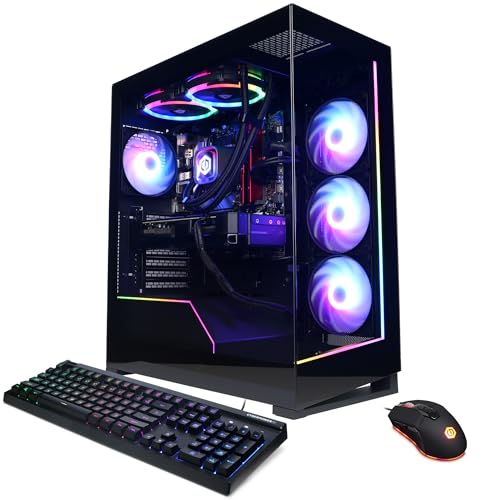
Where to buy
Check the latest price, availability and delivery on Amazon. Orders are placed on Amazon. We may earn a commission from qualifying purchases.
- Best overall for streaming: CyberPowerPC Gamer Supreme Liquid Cool, Ryzen 7 7800X3D, RTX 4070 Ti Super — Check on Amazon
- ZOTAC MEK Hero A7748S, Ryzen 7 7700X, RTX 4080 Super — Check on Amazon
- iBUYPOWER Y40 PRO, Ryzen 9 7900X, RTX 5070 Ti — Check on Amazon
- CyberPowerPC Gamer Xtreme VR Liquid Cool, Core i7-14700KF, RTX 4070 Super — Check on Amazon
See 2 more Amazon options
- Skytech Omega, Ryzen 7 7800X3D, RTX 4070 Super — Check on Amazon
- MSI Codex Z2, Ryzen 7 8700F, RTX 5070 — Check on Amazon
Read the full guide ↓
Disclosure: As an Amazon Associate, reviewstook.com earns from qualifying purchases. Links to Amazon on this page are affiliate links; they cost you nothing extra. Listing details such as price and availability change often, so check the current Amazon listing before you buy.
A streaming PC does two jobs at once, and this guide grades both of them. The first job is the game itself, played properly at 1440p. The second job runs in parallel, every second you are live: OBS compositing your scenes, an encoder turning those scenes into a broadcast, chat and alerts and a browser full of dashboards riding along. The broadcast side has a fixed shape. Twitch is built around roughly 6,000 kbps of constant-bitrate H.264, conventionally at 1080p60 with two-second keyframes. YouTube is the more generous platform — it accepts higher bitrates, takes a 1440p feed, and can receive AV1 where your encoder offers it. Live 4K, by contrast, is platform-limited rather than hardware-limited: no machine in this guide, or any guide, turns it into a mainstream broadcast plan, so treat 4K as something you record locally, not something you stream. Everything below is graded against that workload — the game on one axis, the encode on the other.
Graded that way, this $2,000 tier has a genuinely strong story to tell, with one distinction that matters more than any other in these pages. Five of the six systems carry graphics cards with two hardware encoder blocks — the RTX 4070 Ti Super, 4080 Super, 5070 Ti and both RTX 4070 Super machines — which means the broadcast can run on one block while a high-quality local recording runs on the other, the stream-and-record split that clip channels and VOD workflows are built on. The sixth machine, built on the plain RTX 5070, carries a single encoder block, and this guide grades it as exactly that, however the listing titles blur the two cards together. There is no Intel Quick Sync anywhere in the set to fall back on: the F-suffix CPUs here ship with no integrated graphics at all, and no integrated encoder is documented for the remaining AMD picks, so none is claimed. And the tier’s ceiling from the base guide still applies — no RTX 5080 system belongs in this budget tier — but for streaming specifically, what lives here is arguably the sweet spot: flagship-adjacent game performance with last generation’s and this generation’s dual-encoder hardware wrapped around it.
Several picks are deal-conditional, so check price on Amazon for each one, because at this budget when you buy matters. Below: the quick picks, an encoder map for the whole set, reviews of all six systems, a comparison table, a full OBS setup section, the kit around the PC, a buying checklist, the mistakes that cost streamers money at this tier, and a closing FAQ.
In this guide
Quick Picks
Short on time, or comparing several options at once? Each row below names a streamer type and the system that suits it, with a link to the listing.
| Streamer type | Pick | Why it stands out | Link |
|---|---|---|---|
| Best overall for streaming | CyberPowerPC Gamer Supreme Liquid Cool (SLC8480A3) | Dual NVENC, 16GB VRAM and a 7800X3D at prices that actually live at this budget | Check on Amazon |
| Strongest card and encoder | ZOTAC MEK Hero A7748S | RTX 4080 Super with dual NVENC — check price on Amazon; memory is the catch | Check on Amazon |
| Best current generation | iBUYPOWER Y40 PRO | RTX 5070 Ti with dual 9th-generation NVENC and a 12-core CPU — fits this budget only when discounted; check price on Amazon | Check on Amazon |
| Best for streaming plus production | CyberPowerPC Gamer Xtreme VR Liquid Cool (GXiVR8760A4) | 20-thread i7-14700KF behind a dual-NVENC 4070 Super — check price on Amazon | Check on Amazon |
| Best value when discounted | Skytech Omega | Dual-NVENC 4070 Super and a 7800X3D with strong value when discounted — check price on Amazon | Check on Amazon |
| Blackwell on a budget | MSI Codex Z2 | RTX 5070 with AV1 encode on a single NVENC block — buy only when discounted; check price on Amazon | Check on Amazon |
How These Picks Were Chosen
The grading order in this variant is the streaming order, and it is not the order listings advertise. The encoder comes first: which NVENC generation a card carries, whether it carries one block or two, and whether it encodes AV1 — because those three facts decide what your broadcast can be before the game renders a single frame. Game-side headroom comes second, GPU class and VRAM together, because OBS composites its scenes on the same graphics card that is rendering your game; a card with nothing spare is a stream that drops frames every time the action peaks. The CPU comes third, as a fallback and a second job: cores are what software encoding, editing and rendering run on, and they matter in proportion to how much of that your week actually holds. Memory, storage and networking follow — a stream runs a game, OBS, a browser and chat simultaneously, and it runs them on a wired connection or it runs them badly.
Every encoder claim in this guide is derived from the documented silicon in the base guide’s research, and nothing has been upgraded in the retelling. The Ada-generation cards here — RTX 4070 Super, 4070 Ti Super and 4080 Super — carry two eighth-generation NVENC blocks with AV1 encode. The RTX 5070 Ti carries two ninth-generation blocks, also with AV1. The plain RTX 5070 in the Codex Z2 carries one ninth-generation block: newer than the Ada blocks, and half the count of its Ti sibling’s. Quick Sync is claimed for no pick. The i7-14700KF and the Ryzen 7 8700F are F-suffix parts with their integrated graphics disabled at the factory, and for the Ryzen 7800X3D, 7700X and 7900X systems the base research documents no integrated-encoder role, so this guide assigns them none and routes every encode to the graphics card, where it belongs.
The budget was applied the way this tier demands. Every system below is included because it can fit this budget when its live Amazon price is in range, and where a listing normally lives above the ceiling, the review says so plainly and makes the recommendation conditional on the live price. Component costs climbed hard through late 2026 and dragged prebuilt prices with them, so much of this class now sits above this budget for much of the year, dropping into it only during sales. The rule used throughout: a recommendation applies only when the live listing fits this $2,000 budget — check price on Amazon before you buy. We did not use these systems ourselves; we read the maker listings, specification pages and published deal records behind the base guide, and re-graded them for the streaming workload described above.
The Encoder Map: What Each Machine Can Actually Broadcast
Before the individual reviews, the whole set on one table — because the encoder column, not the graphics column, is where these six machines genuinely differ for a streamer.
| Pick | Hardware encoder | AV1 encode | Stream + record split | CPU encode fallback |
|---|---|---|---|---|
| CyberPowerPC Gamer Supreme (SLC8480A3) | 2× NVENC, Ada (RTX 4070 Ti Super) | Yes | Yes — one block broadcasts, one records | 7800X3D: light duty only; keep encoding on the card |
| ZOTAC MEK Hero A7748S | 2× NVENC, Ada (RTX 4080 Super) | Yes | Yes | 7700X: workable at fast software presets |
| iBUYPOWER Y40 PRO | 2× NVENC, Blackwell (RTX 5070 Ti) | Yes | Yes | 7900X: the set’s strongest software-encode fallback |
| CyberPowerPC Gamer Xtreme VR (GXiVR8760A4) | 2× NVENC, Ada (RTX 4070 Super) | Yes | Yes | 14700KF: strong — 20 threads; no Quick Sync (F-suffix) |
| Skytech Omega | 2× NVENC, Ada (RTX 4070 Super) | Yes | Yes | 7800X3D: light duty only; keep encoding on the card |
| MSI Codex Z2 | 1× NVENC, Blackwell (RTX 5070) | Yes | No — a single block is shared | 8700F: modest; no integrated graphics at all (F-suffix) |
Two blocks buy a specific workflow, and it is worth naming precisely. With dual NVENC, OBS sends the Twitch broadcast out through one encoder — H.264 at 6,000 kbps — while the second encoder writes a high-bitrate local recording of the same session — the clean source footage clip edits and VOD uploads are cut from. Neither job taxes the other, and neither touches the CPU. A single block, as in the Codex Z2, runs the broadcast perfectly well; what it does not offer is that simultaneous second full-quality encode, so its recording workflow is a lighter local capture or a download of the broadcast VOD instead. AV1, present on all six cards, is the YouTube-side asset — sharper at a given bitrate, and the codec its higher-bitrate and 1440p ingest paths are built around — while Twitch’s standard path remains H.264, which every card here also encodes in hardware. No pick here needs its CPU to encode, and the two X3D systems are better off never trying.
The 6 Best High End Gaming PCs for Streaming Under $2,000
CyberPowerPC Gamer Supreme Liquid Cool, Ryzen 7 7800X3D, RTX 4070 Ti Super (SLC8480A3)
Who it suits: The streamer who wants the complete single-PC setup at a price that actually resides at this budget — dual encoders, 16GB of VRAM headroom, and no deal lottery to win first.
This is the anchor pick for streaming for the same reason it anchors the base guide, plus one reason of its own. The specification is the tier’s resident ceiling: a Ryzen 7 7800X3D, an RTX 4070 Ti Super with 16GB of memory, 32GB of DDR5 and a 2TB PCIe Gen4 SSD, a premium pick whose pricing fits this budget without relying on a fleeting deal, which no other top-card pick here can say as consistently — check price on Amazon. The streaming reason is the card’s encoder bench: two eighth-generation NVENC blocks with AV1 encode. One block carries the Twitch broadcast in H.264; the second writes the high-bitrate local recording your clips are cut from; the 7800X3D, the best pure-gaming CPU in this guide, spends itself entirely on the game. That division of labour is exactly what a single-PC stream wants, and the 16GB frame buffer is the quiet enabler — OBS composites on the same GPU that renders the game, and this card has the texture headroom at 1440p to do both without either job negotiating with the other.
The discipline this machine asks of you is simple: never software-encode on it. The 7800X3D’s stacked cache is a gaming instrument, not an encoding one, and an x264 preset worth using would tax precisely the cores the game is enjoying. With NVENC fitted that is no hardship — the hardware path is better anyway — but buyers migrating from a CPU-encoding setup should rebuild their OBS profiles around the card from day one. The generational caveats stand unchanged: a previous-generation, increasingly clearance configuration whose DLSS feature set is the older one, gone when its stock is gone.
- Two NVENC blocks with AV1 — broadcast and local recording run independently.
- 16GB VRAM: room for 1440p textures and OBS compositing on the same card.
- Premium positioning that fits this budget — check price on Amazon.
Honest limitation: A previous-generation clearance configuration, and its X3D CPU is a gaming specialist — software encoding is the one streaming job this machine should never be asked to do.
Choose it if you stream and record at the same time and want the tier’s full measure without watching prices. Skip it if your week is half editing and rendering — the many-core picks below divide their power your way.

ZOTAC MEK Hero A7748S, Ryzen 7 7700X, RTX 4080 Super
Who it suits: The streamer who wants the strongest game-and-encoder combination in the guide — and will price in a memory upgrade and deal timing to get it.
The RTX 4080 Super is the strongest graphics card in these pages in both of a streamer’s currencies. As a game card it makes native 1440p a solved problem and 4K-with-DLSS a comfortable one; as an encoder card it carries the same dual eighth-generation NVENC bench as the anchor pick, with AV1, so the stream-plus-record split runs here at the highest game settings this budget can present. ZOTAC’s launch specification for this exact machine — the MEK Hero A7748S, built around its Trinity Black Edition 4080 Super — is also the most forthcoming in the guide: an 800W 80+ Gold power supply, a 240mm liquid cooler on the Ryzen 7 7700X, Wi-Fi 6E, a three-year GPU warranty, US hand-assembly, and the set’s only documented wired networking figure, 2.5-gigabit Ethernet — the port a wired-streaming rule can actually be written around. This is a premium system that has appeared in manufacturer-promoted Amazon deals, but that history is not a promise about today: check price on Amazon, and if the live price sits above this budget, it belongs to the next guide up.
The shortfall is one line long and, for this angle, it bites harder than it does for a pure gamer: 16GB of DDR5-4800, backed by a 1TB SSD. A gaming-only machine tolerates 16GB today; a streaming machine runs the game, OBS with its browser sources, chat, alerts and a dashboard or two on top of it, and that stack is exactly where 16GB stops being a footnote. Read the pick honestly, then, as a purchase with an errand attached: the machine plus a 32GB memory kit is the real configuration, and it remains a compelling way to get a fully-specified 4080 Super system — the card and its encoders are the parts you will not be upgrading at sensible money, and memory is a twenty-minute screwdriver job.
- RTX 4080 Super — the strongest raster card here, with the same dual-NVENC + AV1 bench as the anchor.
- 2.5-gigabit Ethernet documented — the only pick whose wired port speed this guide can state.
- Published 800W Gold power supply, 240mm liquid cooling, three-year GPU warranty.
Honest limitation: Only 16GB of DDR5-4800 and 1TB of storage — tight for a game-plus-OBS stack — and its place in this budget depends on deal timing, so check price on Amazon — the pick applies only when the live price fits this budget.
Choose it if the card and its encoders are your first priority and you will fit the memory kit yourself. Skip it if the listing sits above this budget when you check, or you want a finished, balanced streaming rig out of the box.

iBUYPOWER Y40 PRO, Ryzen 9 7900X, RTX 5070 Ti (Y40BA9N57T01)
Who it suits: The streamer-producer who wants the current generation’s encoder bench and a twelve-core CPU for the editing that follows the broadcast — and is disciplined enough to buy only when the price visits this budget.
The framing comes first, as it does in the base guide, because this pick’s relationship with $2,000 is conditional. Its standing Amazon price normally sits above this budget — that is where the RTX 5070 Ti tier actually starts. Its deal history is what earns its place: when discounted, the strongest current-generation streaming specification in this class passes through this budget, briefly and seasonally — check price on Amazon. The recommendation is mechanical: when the live price fits this $2,000 budget, this is arguably the best streaming buy in the guide; when it sits above it, it is a Best High End Gaming PC Under $2500 machine and should be compared there.
What the deal buys is the newest version of everything a streamer touches. The RTX 5070 Ti carries two ninth-generation NVENC blocks — the current encoder generation, a step on from the Ada bench in most of this guide — with AV1 encode, 16GB of GDDR7 and the current DLSS feature set; the stream-plus-record split runs here with the most headroom of any pick. Behind the card sits the Ryzen 9 7900X, twelve full cores, which is this set’s strongest answer to the second half of a streamer’s week: if any machine here can software-encode a backup feed, hold a render queue overnight and edit the session’s footage the next morning, it is this one. The supporting specification is complete — 32GB of DDR5 RGB, a 2TB NVMe drive, keyboard and mouse in the box. One caution from the base research: this configuration’s PSU wattage is not published in the verified material, so none is claimed here, and any future GPU-swap plan starts with reading the fitted unit’s label.
- Two ninth-generation NVENC blocks with AV1 — the current encoder generation, with the split workflow intact.
- Ryzen 9 7900X: twelve cores — the set’s best software-encode fallback and editing CPU.
- A premium current-generation pick that fits this budget only on deal — check price on Amazon.
Honest limitation: Its standing price is above this budget — the pick is valid only when discounted into this tier, and those windows are short and seasonal.
Choose it if you can wait for the price and your streaming week includes real production work. Skip it if you are buying this week at a fixed $2,000 — the anchor pick is the same money with no lottery attached.

CyberPowerPC Gamer Xtreme VR Liquid Cool, Core i7-14700KF, RTX 4070 Super (GXiVR8760A4)
Who it suits: The streamer whose PC also works for a living — twenty threads for software-encode insurance, editing and rendering — with pricing that fits this budget — check price on Amazon.
The fork at this tier, restated for streamers, is what your CPU is for. In the X3D systems the processor is a gaming instrument and the encoders do everything else. This CyberPowerPC takes the other fork: a Core i7-14700KF — eight performance cores and twelve efficiency cores, twenty threads — paired with an RTX 4070 Super, 32GB of DDR5 and a 2TB Gen4 SSD in liquid-cooled Xtreme VR trim. The card carries the dual eighth-generation NVENC bench with AV1, so the standard streaming play is identical to the anchor’s: broadcast on one block, record on the other, and let the game run. What the twenty threads add is the insurance policy and the second shift — a software-encoded backup or recording that does not fold when a hardware path misbehaves, and a machine that edits, compiles and renders at full pace between sessions. One encoder fact must be stated plainly because listings invite the assumption: the 14700KF is an F-suffix chip with no integrated graphics and no Quick Sync. There is no third encoder hiding in this CPU, and any workflow designed around one is designed around a part this machine does not have.
The graphics card sets the ceiling, and it sits one clear step below the anchor pick: the 4070 Super is a strong native-1440p card and a workable 4K card with DLSS, but its 12GB of VRAM is the specification that will age first in this company — the texture budget and the OBS canvas share that memory, and three rivals here carry 16GB. Check price on Amazon — this pick’s quiet strength is that it can fit this budget without relying on a seasonal deal. Stock can be thin and these configurations rotate, so confirm the model number GXiVR8760A4 and the 4070 Super on the live page before ordering — CyberPowerPC reuses its case families across very different specifications.
- Core i7-14700KF: 8 performance + 12 efficiency cores — the strongest thread count in the guide.
- Dual NVENC with AV1 for the broadcast, twenty threads for everything behind it.
- Fits this budget without deal timing — check price on Amazon.
Honest limitation: No Quick Sync — the F-suffix CPU has no integrated graphics at all — and the 4070 Super’s 12GB of VRAM is the tightest graphics memory among this guide’s top picks.
Choose it if your stream sits inside a working week of editing, rendering or compiling. Skip it if the machine only ever games and streams; the 7800X3D picks spend the same money where you will feel it.
Skytech Omega, Ryzen 7 7800X3D, RTX 4070 Super
Who it suits: The patient value hunter: the full dual-encoder streaming specification and the best gaming CPU here, for hundreds under budget when the sale comes.
The Omega’s hardware, read as a streaming machine, is the anchor pick’s younger sibling with the same working shape: a Ryzen 7 7800X3D for the game, an RTX 4070 Super carrying two eighth-generation NVENC blocks with AV1 for the broadcast and the local recording, 32GB of DDR5 RGB to hold the game-plus-OBS stack, a 1TB Gen4 NVMe drive and a published 750W Gold power supply, in Skytech’s white Omega case (this configuration is the ST-OMEGA2-1126-W-AM model). Nothing in that list is a streaming compromise except the card’s 12GB of VRAM, which at 1440p means high settings rather than ultra in the most demanding current titles and earlier reliance on DLSS — a real step down from the Ti Super anchor, and the only one that matters here.
What makes this a $2,000-guide pick is its price behaviour: its list positioning sits just over this ceiling, while its discounted positioning sits well under it — a wide swing on one listing, so check price on Amazon. The honest summary is that the Omega is a strong value pick when discounted and a premium-priced machine at list, and only the discounted version belongs in a streamer’s cart. When discounted it is the best value in this guide by a wide margin: the full dual-encoder workflow, the strongest gaming CPU here, and meaningful headroom left in the budget — which, as the kit section below argues, is where a stream’s perceived quality is actually bought. The discipline is the mirror of the Y40 PRO’s: refuse this previous-generation machine at its list price. At list price the anchor pick’s stronger card and 16GB win outright; when discounted, the comparison inverts completely.
- 7800X3D plus a dual-NVENC 4070 Super with 32GB DDR5 and a published 750W Gold PSU.
- Strong discounted value — check price on Amazon for the current deal.
- The full stream-plus-record workflow with no memory trap in the fitted specification.
Honest limitation: Its list price is above budget and indefensible there; the pick lives entirely on its discounted pricing, and the card carries 12GB of VRAM with 1TB of storage.
Choose it if it is on sale when you shop — when discounted it embarrasses pricier streaming rigs. Skip it if it is at list price; at that level the anchor pick wins outright.

MSI Codex Z2, Ryzen 7 8700F, RTX 5070 (A8NVP-436US)
Who it suits: The broadcast-only streamer who wants Blackwell’s current encoder and feature set as an accessible entry point in this guide — check price on Amazon — and does not need to record locally at full quality at the same time.
The Codex Z2’s streaming story is a tale of one block, and this guide will tell it without blurring. Its RTX 5070 is a Blackwell card with a ninth-generation NVENC encoder and AV1 — the current encoder generation, shared with the 5070 Ti above — but the plain 5070 carries a single NVENC block where the Ti carries two. For the broadcast itself that costs nothing: one block encodes a Twitch H.264 stream at 6,000 kbps, or a YouTube AV1 feed, entirely in hardware, and the card’s DLSS 4 feature set with multi frame generation makes this, frame for displayed frame, a very smooth high-refresh 1440p gaming machine. What the single block removes is the split — the simultaneous, independent, high-bitrate local recording that the other five picks run as a matter of course. If your workflow is broadcast, clip from the VOD, move on, this machine loses little. If your workflow is broadcast and a pristine local master, it loses the thing you came for, and no setting changes that arithmetic. The 8700F beside the card is the quiet compromise: an eight-core chip that games well, with no integrated graphics (it is an F-suffix part — no Quick Sync, no backup display path) and none of the X3D cache.
Its pricing is the most volatile in the guide, swinging from strong value when discounted to well above budget at other times during the memory-price spike. Read the pick as a price-sensitive product. When discounted toward the lower end of its range it is a strong buy — the current platform’s encoder at last generation’s money — check price on Amazon. Near the top of this budget it is defensible only for a broadcast-only buyer who specifically wants Blackwell. Above that, leave it to the Best High End Gaming PC Under $2500 comparison, where its card class belongs. One specification note from the base research: MSI does not publish this configuration’s PSU wattage in the verified listing material — put the question to the live listing before ordering rather than assuming it.
- Ninth-generation NVENC with AV1 — the current encoder generation at the guide’s most accessible discounted entry — check price on Amazon.
- DLSS 4 multi frame generation: the smoothest displayed 1440p experience here for the money when discounted.
- 32GB DDR5 and 2TB storage: the complete supporting specification.
Honest limitation: A single encoder block — no simultaneous full-quality local recording alongside the broadcast — plus the most volatile price in the guide and an unpublished PSU wattage.
Choose it if you broadcast without a local-master workflow and catch it when discounted. Skip it if stream-plus-record is your routine, or its live price sits near the top of this budget while the dual-encoder anchor offers more for similar money.

Comparison Table
| Product | Graphics card & encoder | Best streaming use | Link |
|---|---|---|---|
| CyberPowerPC Gamer Supreme Liquid Cool (SLC8480A3) | RTX 4070 Ti Super 16GB — 2× NVENC + AV1 | Stream and record at once, at resident prices | Check on Amazon |
| ZOTAC MEK Hero A7748S | RTX 4080 Super 16GB — 2× NVENC + AV1 | Strongest card and encoder, at its deal price; budget a memory kit | Check on Amazon |
| iBUYPOWER Y40 PRO | RTX 5070 Ti 16GB — 2× NVENC (9th gen) + AV1 | Current-generation encoder plus a 12-core production CPU, on deal | Check on Amazon |
| CyberPowerPC Gamer Xtreme VR Liquid Cool (GXiVR8760A4) | RTX 4070 Super 12GB — 2× NVENC + AV1 | Streaming inside a working week: 20 threads behind the broadcast | Check on Amazon |
| Skytech Omega | RTX 4070 Super 12GB — 2× NVENC + AV1 | Best value in the guide when discounted — check price on Amazon | Check on Amazon |
| MSI Codex Z2 | RTX 5070 12GB — 1× NVENC (9th gen) + AV1 | Broadcast-only Blackwell streaming when discounted — check price on Amazon | Check on Amazon |
Setting Up OBS on These Machines
Encoder assignment, per pick. Every machine in this guide broadcasts from its graphics card: set OBS to NVENC, full stop. For Twitch, that means NVENC H.264 at a constant bitrate of about 6,000 kbps with a two-second keyframe interval, at 1080p60 — the platform’s standard shape, and one every card here produces without measurable cost to the game. For YouTube, the same hardware offers the richer path: NVENC AV1 (or HEVC) at the platform’s higher bitrates, with a 1440p canvas entirely reasonable on the dual-encoder picks, since the encode no longer shares a block with anything. On the five dual-NVENC systems, add the second job in the recording tab: a separate NVENC output writing a high-bitrate local file while you broadcast — that file, not the platform VOD, is what your edits should start from. On the Codex Z2, with its single block, the broadcast takes the encoder; record at a lighter setting, or pull clips from the VOD, and do not design a workflow that assumes otherwise. Software x264 encoding is a fallback for exactly two picks — the 7900X and the 14700KF have the cores for it — and a mistake on the two 7800X3D systems, whose cores belong to the game.
The three lag counters, and what each one is telling you. OBS’s stats window separates streaming pain into three counters, and each has a different cause and a different fix. Rendering lag — frames missed because the GPU was too busy to composite your scenes — means the game is consuming the whole card; the fix is headroom, not hardware: cap the in-game frame rate, trim the heaviest settings a notch, and remember that OBS needs a slice of the same GPU your game is standing on. Encoding lag — frames skipped because the encoder could not keep up — should be rare on NVENC; if it appears, you have almost certainly selected a software encoder or an over-ambitious preset, so return the encode to the card and ease the preset before touching anything else. Dropped frames in the network counter are neither of those: they are your connection discarding broadcast data, and no component in the PC causes or cures them except the path to the router.
The wired rule. Stream on a cable. Wi-Fi’s retransmissions and interference show up in that third counter as dropped frames your viewers see as stutter, and every pick in this guide should sit on a wired Ethernet run for broadcast hours. On port speeds this guide claims exactly one figure, because exactly one base listing documents one: the ZOTAC MEK Hero’s 2.5-gigabit Ethernet. For the other five machines the base research documents no wired port speed, so none is stated here — check the live listing if the number matters to you; for a 6,000 kbps broadcast, connection type matters far more than the port’s headline speed. What is not optional is the cable itself.
The Kit Around the PC
A streaming budget that ends at the tower buys half a stream. The items below are listed in the order they improve a broadcast, and deliberately without prices — peripheral markets move too fast for printed figures to stay honest. Cost them live, as a second line under whichever pick you choose.
- A microphone, first. Viewers forgive a soft picture years before they forgive bad audio; the voice is the stream. A decent USB microphone — or an XLR microphone and interface, if you want the upgrade path — is the highest-value purchase in this entire section, ahead of anything visual.
- Light and a camera, second. A key light makes an inexpensive camera look deliberate; without one, an expensive camera still looks like a webcam in a cave. Buy the light before the lens.
- A second monitor, third. Chat, OBS and alerts need a home that is not your game screen. It does not need to match your main panel — it needs to exist.
- A capture card, only for what it is for. A capture card ingests an external source: a console, a camera, or a second PC in a two-machine setup. For games played on the machine in this guide it does nothing at all — the graphics card’s own encoder is the capture path, and it is already in the tower. Streamers who buy one to “help” a single-PC setup have purchased an expensive ornament.
How to Choose a High End Gaming PC for Streaming Under $2,000
- Count encoder blocks before you count cores. Two NVENC blocks mean broadcast and local recording are independent jobs. One block — the plain RTX 5070 — means the broadcast shares its hardware with everything else. This single fact separates the Codex Z2 from the rest of the guide.
- Match the encoder to your platform. Twitch’s standard path is H.264 at roughly 6,000 kbps; YouTube rewards AV1 and accepts 1440p and higher bitrates. Every card here encodes both. Platform choice does not change which pick wins; workflow does.
- Decide whether you record while you stream. If clips and VODs are cut from a local master, dual NVENC is a requirement, not a luxury — five picks qualify. If you broadcast and clip from the platform VOD, the single-encoder pick re-enters the conversation at its discounted price.
- Buy CPU cores for the second job, not the broadcast. With NVENC fitted, cores do not encode your stream. The 7900X and 14700KF earn their place through editing, rendering and software-encode insurance; the 7800X3D earns its through the game. Choose for your actual week.
- Treat 32GB of memory as the streaming standard. Game plus OBS plus browser sources plus chat is a heavier stack than gaming alone. The ZOTAC’s 16GB is a shortfall to price as machine plus memory kit, not a spec to accept silently.
- Keep VRAM in the streaming budget too. OBS composites on the same GPU that renders the game. The 16GB cards hold 1440p textures and the stream’s headroom together longest; the 12GB cards are strong now and will negotiate sooner.
- Wire the machine. Ethernet for broadcast hours is not a preference. Only the ZOTAC’s port speed (2.5GbE) is documented in this guide’s research; for the rest, confirm the port on the live listing and run the cable regardless.
- Apply the live-price rule to every deal pick. A recommendation here is valid only when the live price fits this $2,000 budget. Check price on Amazon before you shop — a hard budget cap for the ZOTAC, deal pricing only for the Y40 PRO, discounted pricing only for the Omega and the Codex Z2 — and let a listing above it go.
- Check the model number, not the case name. Case families span wildly different specifications across listings, so shop by the model codes printed in these reviews — SLC8480A3, GXiVR8760A4, A8NVP-436US — and never by the silhouette.
Common Buying Mistakes
- Assuming the plain RTX 5070 has the 5070 Ti’s encoder bench. It does not: one NVENC block, not two. The stream-plus-record split is a Ti feature at this tier, and the Codex Z2’s reviews and price only make sense once that is understood.
- Encoding in software on a gaming CPU while NVENC sits idle. On the 7800X3D systems especially, an x264 preset taxes the exact silicon the game is using — the hardware encoder exists precisely so the broadcast costs the game nothing.
- Expecting a Quick Sync fallback that is not there. Both the i7-14700KF and the 8700F are F-suffix parts with no integrated graphics. Any setup guide that routes a backup encode through “the Intel iGPU” is describing a different machine.
- Streaming over Wi-Fi because the router is in another room. The dropped-frames counter does not care about your floor plan. Run the cable, or accept the stutter as a permanent feature of the broadcast.
- Buying a capture card to stream PC games from the same PC. It ingests external sources — consoles, cameras, second machines. For the games on this tower, the GPU’s encoder is already the capture device.
- Planning a 4K broadcast. Live 4K is platform-limited, not a settings toggle: the mainstream paths are 1080p60 on Twitch and up to 1440p with AV1 on YouTube. Record locally at 4K if you want it; broadcast in the shapes the platforms actually take.
- Paying the standing price for a deal pick. At full price the Y40 PRO and the Omega stop being the bargains their discounted pricing describes — at that level, picks from the guides either side of this one beat them.
- Leaving the game’s frame rate uncapped. An unlimited frame rate lets the game consume the entire GPU and starves OBS’s compositing — rendering lag on a machine with power to spare. A sensible cap is a streaming setting, not a compromise.
Final Recommendation
- Most streamers at $2,000: CyberPowerPC Gamer Supreme Liquid Cool (SLC8480A3) — dual encoders, 16GB, at resident prices.
- Strongest card and encoder, deal permitting: ZOTAC MEK Hero A7748S — with a 32GB memory kit priced in.
- Current generation plus production cores: iBUYPOWER Y40 PRO, on deal only — check price on Amazon.
- Streaming inside a working week: CyberPowerPC Gamer Xtreme VR Liquid Cool (GXiVR8760A4).
- Best value event: Skytech Omega, when discounted — check price on Amazon.
- Broadcast-only Blackwell: MSI Codex Z2, when discounted only — and only if you do not record locally at full quality.
Our top two for streaming at this budget are the CyberPowerPC Gamer Supreme Liquid Cool, because it is the complete single-PC streaming shape at prices that live here — two encoder blocks, 16GB of VRAM, the best gaming CPU in the set, 32GB and 2TB, with pricing that fits this budget — check price on Amazon — and the iBUYPOWER Y40 PRO, because on the weeks its price visits this tier it upgrades every part of that shape at once: ninth-generation dual encoders, GDDR7, and twelve cores for the production work that follows the broadcast. The ZOTAC out-guns both on the right day and asks a memory kit for the privilege; the Intel CyberPowerPC is the working machine of the six; the Omega is the value event; the Codex is the honest single-encoder exception, priced like one only when discounted. If your ceiling is honestly lower, start with Best High End Gaming PC Under $1500; if it can stretch to where the 5070 Ti sits at standing prices, your comparison belongs in Best High End Gaming PC Under $2500. Check the live price on Amazon, confirm the model number on the listing, wire the machine to the router, and buy the encoder bench your workflow actually uses.
Frequently Asked Questions
Can one PC really game at 1440p and stream at the same time?
Yes — that is precisely the workload this tier is built for. The hardware encoder on the graphics card produces the broadcast independently of the game’s rendering, so a Twitch stream at 6,000 kbps costs the game almost nothing on any pick here. The five dual-NVENC systems go further and record a high-bitrate local copy simultaneously on the second block. What a single PC cannot repeal is platform shape: 1080p60 on Twitch’s standard path, up to 1440p on YouTube, however strong the machine is.
What is the difference between one NVENC block and two?
One block encodes one full-quality job at a time as an independent stream; two blocks run two. In practice: a dual-NVENC card broadcasts your Twitch feed and writes a pristine local recording at once, which is the workflow behind most clip and VOD channels. The plain RTX 5070 in the Codex Z2 carries one block — the broadcast is fully hardware-encoded and excellent, but a simultaneous local master shares that single block or steps down in quality. The RTX 5070 Ti, 4070 Super, 4070 Ti Super and 4080 Super all carry two.
Should I stream to Twitch or YouTube with these machines?
Both are fully supported in hardware; the difference is what each platform accepts. Twitch’s standard broadcast is H.264 at roughly 6,000 kbps and 1080p60 — every card here does it in its sleep. YouTube accepts higher bitrates, takes a 1440p feed, and can receive AV1, which all six cards encode and which holds detail better at a given bitrate. If your audience is on YouTube and your upload supports it, the AV1 path at 1440p is the best-looking broadcast in this guide. If your audience is on Twitch, the encoder bench still matters — for the recording running beside the stream.
Is there any Quick Sync in this guide?
No, and it is worth knowing why. Intel’s Quick Sync lives in the integrated graphics, and the two CPUs here that might have carried it — the i7-14700KF and the Ryzen 7 8700F (an AMD part with the same F-suffix convention) — ship with their integrated graphics disabled. For the three remaining AMD systems, the base research documents no integrated-encoder role, so this guide claims none. Every encode in these pages runs on the graphics card, which is where a streamer’s encode should run anyway.
Do I need a capture card to stream from one of these PCs?
Not for the PC’s own games — the graphics card’s encoder is the capture path, and OBS takes the game’s frames directly. A capture card earns its place only when the source is external: a console you want to broadcast through the PC, a camera used as a video source, or a second gaming PC in a two-machine setup. Buying one to improve a single-PC stream improves nothing.
Why do several picks in this guide depend on sale prices?
Because pricing in this class is volatile. Component prices pulled prebuilt listings upward through late 2026, and much of this class now sits above this budget, reaching it only in sale windows. So the rule throughout is simple: check price on Amazon, and the recommendation holds only while the live listing fits this $2,000 budget. If no deal pick is in range the week you shop, the anchor system is the standing answer — for a streamer, it gives up nothing that matters.


