Where to buy
Check the latest price, availability and delivery on Amazon. Orders are placed on Amazon. We may earn a commission from qualifying purchases.
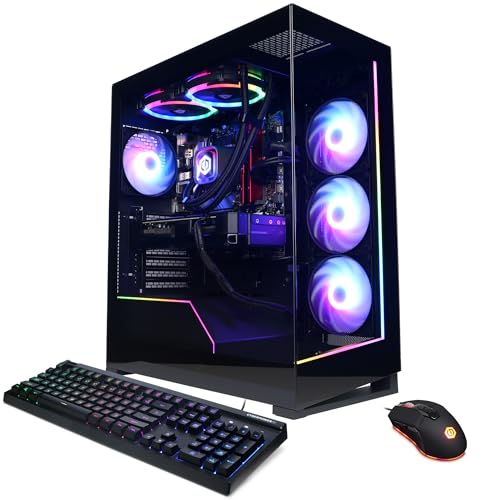
- Best overall: CyberPowerPC Gamer Supreme Liquid Cool, Ryzen 7 7800X3D, RTX 4070 Ti Super — Check on Amazon
- ZOTAC MEK Hero A7748S, Ryzen 7 7700X, RTX 4080 Super — Check on Amazon
- iBUYPOWER Y40 PRO, Ryzen 9 7900X, RTX 5070 Ti — Check on Amazon
- CyberPowerPC Gamer Xtreme VR Liquid Cool, Core i7-14700KF, RTX 4070 Super — Check on Amazon
See 2 more Amazon options
- Skytech Omega, Ryzen 7 7800X3D, RTX 4070 Super — Check on Amazon
- MSI Codex Z2, Ryzen 7 8700F, RTX 5070 — Check on Amazon
Read the full guide ↓
Disclosure: As an Amazon Associate, reviewstook.com earns from qualifying purchases. Links to Amazon on this page are affiliate links; they cost you nothing extra. Listing details such as price and availability change often, so check the current Amazon listing before you buy.
Begin with the admission this guide owes you: nothing below is small. All six systems are full-size towers, because the hardware that makes $2,000 interesting — RTX 4070 Super-class graphics cards and stronger, with 12GB or 16GB of video memory — is sold in towers with room for long cards, full-size supplies and radiators, and this research found no compact case at this price containing that class. What “for small spaces” can legitimately promise at this budget is an installation that works: one measured spot the tower genuinely fits, clearance its cooling can breathe through, cables that arrive without strain, and a plan for the warmth such a machine hands a small room over a long evening. That is the grading this variant applies, on top of the performance grading the tier always demands.
Performance first, briefly, because it is the foundation the installation layer sits on. What lives at $2,000 as an ordinary, buy-it-today specification is RTX 4070 Ti Super-class power: native 1440p at high refresh, 16GB of VRAM on the strongest resident card, and 4K handled honestly through DLSS upscaling. Visiting rather than living here: an RTX 4080 Super system that has appeared inside this budget through a manufacturer promotion, and an RTX 5070 Ti system whose home is the tier above and which crosses under this budget only in deal windows. The RTX 5080 is absent entirely, beyond this budget even when discounted. Deal-dependence is therefore flagged plainly on every pick it touches, with one walk-away rule throughout: if the live listing sits above this guide’s budget, the machine belongs to the next guide up — check the current price on Amazon before you decide.
Two disciplines run through everything that follows. The first is placement: no system here goes inside a sealed cabinet, a closed TV stand or any furniture with a door on it — a refusal repeated until it bores you, because it is the costliest small-space mistake made with hardware this powerful. The second is measurement honesty: the research behind these six systems documents case dimensions for none of them, so this guide prints none, and its checklist routes every measurement to the live listing. Ahead: quick picks, what an installed tower actually occupies, a five-step measuring routine, six graded reviews, a comparison table, buying guidance, small-room mistakes, and the questions readers ask before giving a corner of a small home to a $2,000 machine.
In this guide
Quick Picks
Short on time? Each row below names a buyer type and the system that suits it, with a link to the listing.
| Buyer type | Pick | Why it stands out | Link |
|---|---|---|---|
| Best overall | CyberPowerPC Gamer Supreme Liquid Cool (SLC8480A3) | RTX 4070 Ti Super 16GB beside a 7800X3D — the strongest spec that actually resides at this price | Check on Amazon |
| Strongest graphics card | ZOTAC MEK Hero A7748S | RTX 4080 Super 16GB — with a memory shortfall to remedy; check price on Amazon | Check on Amazon |
| Best current generation | iBUYPOWER Y40 PRO | RTX 5070 Ti and twelve CPU cores — inside this budget only when its price dips | Check on Amazon |
| Gaming plus a working week | CyberPowerPC Gamer Xtreme VR Liquid Cool (GXiVR8760A4) | Twenty-thread i7-14700KF with an RTX 4070 Super — check the current price on Amazon | Check on Amazon |
| Best value when the sale lands | Skytech Omega | 7800X3D and RTX 4070 Super at the low end of its range when on sale — and a list position to refuse | Check on Amazon |
| Blackwell at the lowest entry | MSI Codex Z2 | RTX 5070 with DLSS 4 — compelling when its price sits low in the band, a different proposition when it drifts toward the top of the tier | Check on Amazon |
How These Picks Were Chosen
Price discipline decides what may be recommended at all. Each system below has been documented inside this guide’s budget in this batch’s research, and wherever a machine’s home is above that line, the review says so plainly and frames the pick as deal-conditional rather than dressing a promotion up as an everyday position. Much of this class now spends the year in the tier above and drops into this budget during sales. Banishing every deal-dependent system would leave almost nothing truthful standing. So the rule is printed instead: the recommendation holds while the live listing sits within this guide’s budget — check the current price on Amazon, and let a listing above the budget pass.
Performance grading follows the order 1440p imposes. Graphics class leads, since the GPU caps every game you install. VRAM follows: the three 16GB cards here will keep high texture settings available years after the three 12GB cards begin negotiating, and the gap widens with each release cycle. The CPU is third, and it is a fork, not a ladder — X3D cache for pure gaming, many cores for machines that also encode, edit, compile or render. Nobody on this team has used these systems; grading rests on maker listings, published specifications and documented deal records.
The installation layer is this variant’s own, and it works strictly from documented fact. Form factor is stated without varnish: six towers, zero graded as small machines, no credit for compactness nobody possesses. Cooling is graded from what listings publish — liquid where fitted, air where not — because the arrangement decides which face exhales and therefore which face needs the air. Power is graded from published figures only; where a listing keeps quiet, the guide flags the silence instead of estimating. Mounting gets one line for the whole set: none of these systems mounts to a wall, a desk arm or a monitor. VESA is a display standard, no tower in this guide offers it, and every VESA mention below is an explicit statement that it does not apply. Heat, finally, is graded as a room problem: a small room does not care which component made the warmth, only how much arrives and where it can go.
What “Installed” Actually Means at This Tier
A tower’s footprint is not its box. It is the box, plus the air the box breathes, plus the cables leaving its rear panel, plus the heat it transfers to the room — and in a small space the additions routinely exceed the box. Four parts, then, before the reviews, because every review assumes them.
The box. Six upright towers, built to stand on a floor or a desk. None is low-profile, none lies flat by design, and — read this carefully, because it shapes how you buy — the research documents dimensions for none of them. Height, width and depth for the exact configuration you order must come off the live listing at ordering time; these builders reuse case families across specifications, and a photograph’s silhouette is not a measurement. What can be said without a tape measure is the class: plan for a floor spot beside a desk, or a long unbroken run of desk surface.
The air. Each pick inhales cool air and exhales warm air through grilles that must stay unblocked. Liquid cooling relocates CPU heat to a radiator — it changes which face exhales, not how much heat exists. The working rule is a hand’s breadth of open space on every vented face, and nothing soft — curtains, bedding, laundry — within reach of an intake. A tower shoved flush against a wall on its exhaust side recycles its own warmth.
The power. No external brick exists anywhere in this set: six internal supplies, six single mains cords — the one unambiguous convenience towers offer a small room, since there is no adapter to house, ventilate or trip over. Where builders publish the supply, it is substantial — 800W Gold in the ZOTAC, 750W Gold in the Skytech Omega — and those figures double as heat-class evidence: a supply sized like that feeds components converting much electricity into warmth under load. Where a listing publishes no wattage, as with the MSI Codex Z2, the omission is flagged rather than papered over, and confirming it becomes part of ordering.
The cables and the room. Behind the tower, budget for the power cord, one display cable per monitor — landed in the graphics card’s ports, never the motherboard’s — keyboard and mouse leads or a receiver, and an Ethernet run if you wire the connection. The bundle needs slack, a drop path crossing no vent, and rear clearance the checklist will make you measure. Then the heat itself: a 4070 Super-class machine gaming hard warms a small closed room noticeably across an evening. It does make the room part of the installation — a door that can open, a window, or at least the foreknowledge that summer sessions run warm.
Placement resolves into three honest classes. Floor-standing beside the desk is the default and the recommendation for all six: unimpeded airflow, cables dropping behind the desk, heat rising away from the player. On the desk is legitimate where the surface genuinely has the run — cable access improves and intakes lift clear of floor dust — but it spends a small room’s scarcest resource and puts fan noise at ear height. Inside furniture — cabinet, closed media unit, enclosed hutch — is refused for every pick, without exception and without an open-door compromise: a door that must stay open is not a placement, it is a warning. If your home’s only spot is inside a cabinet, none of these towers is your purchase; a genuinely compact machine from the Best Small Form Factor Gaming PC Under $1500 class is, with the performance step down accepted knowingly.
Measure Before You Buy: The Five-Step Checklist
Work these five steps in order, before ordering anything in this guide. They cost one evening and a tape measure, and they separate a tower that installs in twenty minutes from one shuffled around a small room for its first month.
- Step 1 — Measure the spot. Fix the exact placement first: which floor corner, which end of the desk. Measure its width, depth and height. Then open the live listing of the machine you intend to buy and take its dimensions from that page — this guide prints none deliberately, because the research documents none, and a figure copied from a different configuration is worse than no figure. The spot must swallow the case with room to spare on every side; numbers that only just fit do not fit, because steps 2 and 4 spend the spare.
- Step 2 — Claim the ventilation clearance. Add a hand’s breadth of open air to every vented face — front, top, rear, whichever side carries a grille — and measure the spot again with the air included. Check what the air faces: open room is good, a wall an inch away is not, and the inside of closed furniture is a refusal for every pick, full stop. If the clearance does not exist in your spot, the spot is wrong, not the rule.
- Step 3 — Give the power an address. Internal supplies mean no brick to house, so this step is about the socket. Identify the outlet the tower will use, confirm the cord reaches it without crossing a walkway or sliding under a rug, and check what else shares that circuit — a gaming tower at full load is a serious draw beside a heater or a kettle. If the only reachable socket leaves a cord trailing across the room, move the spot, not the standard.
- Step 4 — Walk the cable drop. Stand at the spot and trace each cable’s route: display leads from the graphics card up to every monitor — into the card’s ports, not the motherboard’s, a distinction two systems here make unforgiving, as their reviews explain — keyboard and mouse, and an Ethernet run if you wire it. Every route needs slack at both ends and must cross no vent nor drape across the exhaust. Measure the longest run; if it wants a longer cable than the box includes, order it with the PC, not after it.
- Step 5 — Then order. Only now: confirm the model number on the live listing — case families are reused across very different specifications, and the model codes in the reviews are the identity — check the current price on Amazon and confirm it sits within this guide’s budget, and confirm on the listing itself any unpublished specification you depended on. A machine failing step 5’s checks is not a bargain at any discount; it is a different machine.
The 6 Best High End Gaming PCs for Small Spaces Under $2,000
CyberPowerPC Gamer Supreme Liquid Cool, Ryzen 7 7800X3D, RTX 4070 Ti Super (SLC8480A3)
Who it suits: The 1440p high-refresh player with one good floor spot and no appetite for price-watching — the strongest resident specification at the budget, installed once and forgotten.
Installation grade: Full-size tower, floor-standing class. Liquid cooling hands the CPU’s heat to a radiator, so the exhaust side does the heavy breathing and takes the checklist’s full clearance; no external brick, no mounting option, no documented dimensions — yours come from the live listing at step 1. Floored beside the desk, exhaust facing open room, it is the most set-and-forget install in the guide.
The specification is the one the tier is measured against: a Ryzen 7 7800X3D alongside an RTX 4070 Ti Super carrying 16GB, with 32GB of DDR5 and a 2TB PCIe Gen4 SSD. The card carries the argument. Built a step below the 4080 on the larger die, with the full memory allocation the plain 4070 Ti never got, it renders native 1440p at high refresh without negotiation and drives 4K credibly with DLSS on top. The CPU pairing is the deliberate pure-gaming pick, and the supporting specification asks for no upgrade on arrival. Its position in this tier is the calmest here: it is a resident pick rather than a deal event, documented inside this budget as an ordinary listing. For a small-space buyer the calm has spatial value too: the install is planned once, around a machine that can simply be ordered — check price on Amazon first.
The limitations are generational, and genuine. This is an Ada card — the previous generation’s DLSS toolkit, without Blackwell’s additions — and the configuration is discontinued and increasingly a clearance item: when the stock clears, this exact machine vanishes, and its successor in this tier will be a 5070-class system a step slower in raw rendering. Five-year keepers should weigh the Y40 PRO’s newer platform below; players in a small room, playing now at 1440p, should not: card for card, this is the most performance $2,000 reliably buys.
- RTX 4070 Ti Super 16GB — the strongest card that actually resides at this budget.
- 7800X3D, 32GB of memory and 2TB of storage: a complete spec on arrival.
- A resident pick in this tier rather than a deal event — check the current price on Amazon.
- Liquid-cooled, internally powered: a single cord, no brick to accommodate.
Honest limitation: A discontinued, previous-generation configuration living on clearance time — the older DLSS toolkit, and no guarantee the exact spec survives the season.
Choose it if your spot is a floor corner with open air behind it and you want the tier’s full measure without monitoring prices. Skip it if platform newness outranks raw card strength for you — the Y40 PRO makes that case, on deal terms.

ZOTAC MEK Hero A7748S, Ryzen 7 7700X, RTX 4080 Super
Who it suits: The buyer with exactly one tower-sized spot who wants the strongest graphics card in this guide standing in it — and who will remedy a memory shortfall to complete the machine.
Installation grade: Full-size tower, floor-standing class, and the guide’s most powerful heat source: the published 800W Gold supply advertises the class of hardware being fed, and the 240mm liquid cooler exhales that warmth at radiator height. Award it the best-ventilated placement here. Wiring is its one small-space kindness — 2.5-gigabit Ethernet is documented, and Wi-Fi 6E covers rooms where a run is impossible.
The RTX 4080 Super is flagship-adjacent in the strict sense — 16GB of GDDR6X on the full Ada die a step below the 4090 — rendering native 1440p a settled question and 4K through DLSS a comfortable one. ZOTAC’s launch material for this exact machine, the MEK Hero A7748S built around its Trinity Black Edition of the card, positions it as a premium system, and the manufacturer’s own promoted Amazon deal has brought it inside this guide’s budget — documented proof the machine has traded within this tier through the maker’s own channel, never a promise about today’s listing. Check the current price on Amazon: above this guide’s budget it belongs to the next guide up; at or under it, nothing else here touches its card.
Beyond the card, the spending is creditable: the 240mm cooler on a Ryzen 7 7700X, the published 800W Gold supply, Wi-Fi 6E, Bluetooth 5.2, US hand-assembly and a three-year warranty covering the graphics card. The saving is one line long, and it is this review’s named debt: 16GB of DDR5-4800 in a tier where 32GB is standard, backed by a 1TB SSD where 2TB is the generous norm. Gaming alone runs on it today; anything more means a memory kit belongs in the plan from day one — counted as machine plus fix, never folded silently into the headline. The strategy underneath is respectable: the trims land on the two components an owner upgrades cheaply, protecting the one that cannot be upgraded at sensible money. Hold this guide’s budget as a hard walk-away line, verify the live configuration before ordering, and if the listing sits in the tier above when you shop, the CyberPowerPC above delivers most of the experience with none of the shortfalls.
- RTX 4080 Super 16GB — the most powerful graphics card in this guide, without qualification.
- Published 800W Gold supply, 240mm liquid cooling, three-year GPU warranty.
- Documented 2.5-gigabit Ethernet and Wi-Fi 6E — the set’s best-documented connectivity.
- Has traded within this budget through the maker’s own channel — check price on Amazon.
Honest limitation: Sixteen gigabytes of DDR5-4800 and a 1TB drive in $2,000-class hardware, and the pick applies only while the live price holds within this guide’s budget.
Choose it if the graphics card outranks every other consideration and your spot has the airflow this heat class earns. Skip it if the listing sits above this guide’s budget, or your only placement is ventilation-marginal — this is the last pick to squeeze into a tight corner.

iBUYPOWER Y40 PRO, Ryzen 9 7900X, RTX 5070 Ti (Y40BA9N57T01)
Who it suits: The buyer chasing the current generation — a 5070 Ti, DLSS 4, twelve cores for the working week — with the discipline to purchase only when the price visits this budget.
Installation grade: Full-size tower, floor-standing class, with the joint-heaviest heat signature here: a twelve-core CPU and a 5070 Ti under one roof is a workstation’s worth of warmth for a small room to register. Keyboard and mouse ride in the box, quietly helping a small desk — two fewer peripherals to buy and route. No external brick, no mounting option; the research publishes no supply wattage for this machine, so step 5’s confirmation is part of the purchase.
Its standing position in this batch’s research was the tier above — where the RTX 5070 Ti class genuinely begins. Its documented deal history earns its place: it has dipped inside this budget in deal coverage and reached the low end of the band during seasonal sales. The strongest current-generation card in the class does pass through this budget — briefly, seasonally, never on demand. The recommendation is therefore mechanical: check the current price on Amazon, and if it sits within this guide’s budget, this is arguably the best buy in the guide; if it sits at its standing position in the tier above, it is a Best High End Gaming PC Under $2500 machine, to be compared there against its own class.
What the deal buys is the complete modern specification. The 5070 Ti carries 16GB of GDDR7 and the current DLSS generation, whose multi frame generation genuinely alters what the card can do — at 1440p it makes high-refresh monitors a default rather than a target. Behind it, the Ryzen 9 7900X’s twelve full cores answer the half of this tier that also works: streaming with a software-encoded backup, editing footage, render queues overnight. The 7800X3D picks edge it at pure gaming; across a production week, this is the better-balanced machine. The supporting spec is complete — 32GB of DDR5 RGB, a 2TB NVMe drive — and completeness has a spatial meaning in a small home: nothing to open or add in the first month. The honest limitation is the premise itself: availability at budget is a deal event, not an everyday position. Deal windows last days, the deepest dips have been seasonal, and anyone needing a PC this week within this guide’s budget should treat the anchor pick as the plan and this machine as the opportunistic upgrade.
- RTX 5070 Ti 16GB GDDR7 with DLSS 4 — the guide’s only current-generation top card.
- Ryzen 9 7900X: twelve cores serving streaming, editing and rendering beside gaming.
- Known to dip into this budget during deal windows — check the current price on Amazon.
- Keyboard and mouse included: a small desk’s cable count starts lower.
Honest limitation: A standing position above this budget — the pick lives only inside deal windows, and those windows are brief and seasonal.
Choose it if you can wait on the price and your spot has the ventilation a twelve-core, top-card tower deserves. Skip it if you are buying this week against this guide’s fixed budget — the anchor pick is the same tier with no lottery attached.

CyberPowerPC Gamer Xtreme VR Liquid Cool, Core i7-14700KF, RTX 4070 Super (GXiVR8760A4)
Who it suits: The gaming-plus-production buyer wanting Intel’s many-core answer — twenty threads for the week, a 4070 Super for the weekend — with a listing that has sat inside this budget.
Installation grade: Full-size liquid-cooled tower, floor-standing class. One installation fact outranks the rest: the 14700KF has no integrated graphics, so the display cable must land in the graphics card’s ports from the very first boot — no motherboard picture exists to fall back on while cables get rearranged, which makes step 4’s cable walk a pre-order task rather than a first-evening discovery. No brick, no mounting, no documented dimensions; the radiator’s exhaust face takes full clearance.
At $2,000 the CPU choice forks, and this machine is the other tine: built on the Core i7-14700KF — eight performance cores, twelve efficiency cores, twenty threads — beside an RTX 4070 Super, 32GB of DDR5 and a 2TB Gen4 SSD in liquid-cooled Xtreme VR trim. Gaming alone concedes a little in cache-sensitive titles to the X3D machines and recovers it nowhere. A machine that also encodes a stream in software, compiles, renders or edits finds the extra threads to be the difference between a PC that games and a PC that works. The card sets a ceiling one clear step below the anchor — a strong native-1440p GPU, workable at 4K through DLSS — but its 12GB of VRAM ages first in this company, with three rivals carrying 16GB and current releases already leaning on the difference at ultra textures. This system spends on CPU breadth and storage and pays in graphics memory; for the production-leaning buyer the spend is right, and for a pure gamer it is wrong — as the same brand’s machine atop this guide demonstrates in the same tier.
Its position is the quiet strength: it has been documented inside this budget on the Amazon listing as an ordinary, everyday position — no seasonal timing required — making this the most powerful many-core configuration here purchasable on an ordinary Tuesday; check price on Amazon to confirm it still sits there. Two notes travel with that position: stock was thin when recorded, and liquid-cooled Xtreme VR configurations rotate; and since CyberPowerPC reuses case families across very different specifications, confirm model number GXiVR8760A4 and the 4070 Super on the live page before ordering — the page that also publishes the dimensions your step 1 measurement awaits.
- Core i7-14700KF: 8 performance + 12 efficiency cores, for gaming alongside real production work.
- 32GB of memory and 2TB of storage — the complete supporting spec, liquid-cooled.
- Documented inside this budget with no deal timing required — check the current price on Amazon.
Honest limitation: The 4070 Super’s 12GB of VRAM is the tightest graphics memory among the guide’s leading picks, and the extra cores return nothing to a buyer who only games.
Choose it if the PC earns its keep between gaming sessions and your spot is a floor placement whose cable routes were walked in advance. Skip it if the machine will only ever game — the 7800X3D picks spend the same budget where it will be felt.
Skytech Omega, Ryzen 7 7800X3D, RTX 4070 Super
Who it suits: The patient value hunter in a small home: a best-in-class gaming CPU and a proper 1440p card in a white showcase case, well under budget when the sale lands.
Installation grade: Full-size tower, floor-standing class — and the one pick where the desk question is honestly arguable — the white Omega case (model ST-OMEGA2-1126-W-AM) is a showcase design some buyers will want visible rather than floored. Visible still means ventilated: glass and glow alter nothing about the clearance rule, and fan noise at ear height is desk placement’s tax. The published 750W Gold supply keeps it in the set’s serious heat class.
As hardware, the Omega reads as the anchor’s younger sibling: the same Ryzen 7 7800X3D, a 4070 Super one step down the range, 32GB of DDR5 RGB, a 1TB Gen4 NVMe drive and that published supply. Its presence in this guide rather than a cheaper one is explained by price behaviour: its everyday list position sits just over this guide’s ceiling, while its documented sale low sits well inside it — a wide swing on one listing. The honest summary: the Omega is a strong-value machine at its sale position and an over-ceiling machine at its list position, at different hours of the year, and only one of those belongs in a cart. Check the current price on Amazon: at its low it is the guide’s best value by a wide margin — the strongest gaming CPU here, a genuine native-1440p card, and a meaningful share of the budget left unspent. In a small space that remainder funds the monitor, the longer cables step 4 measured for, and a desk arrangement that makes the install work.
Against the top pick, the compromises number exactly two, both survivable. The 4070 Super surrenders the Ti Super’s 16GB buffer — 12GB here — plus a real margin of rendering power, translating at 1440p to high settings rather than ultra in the most demanding current titles and an earlier reliance on DLSS; the 1TB drive is the tier’s smaller standard. Everything else is full specification. The discipline demanded mirrors the Y40 PRO’s — there, wait for a current-generation deal; here, refuse a previous-generation machine at list. At its list position a 4070 Super system is indefensible while the Ti Super anchor sits inside this budget as a resident pick: if the Omega sits at list when you shop, buy the CyberPowerPC instead. At or near its sale low the comparison inverts entirely, and this becomes the pick to beat.
- 7800X3D and an RTX 4070 Super, with 32GB of memory and a published 750W Gold supply.
- Its documented sale low is the strongest value event in this guide — check price on Amazon.
- White showcase case, and a full specification with no 16GB memory trap.
Honest limitation: A list position that sits above budget and cannot be defended there; the pick exists only inside its sale windows, and the card carries 12GB with a 1TB drive.
Choose it if it is on sale when you shop — at its low it embarrasses dearer systems in this tier and funds the rest of the installation. Skip it if it is wearing its list position; there, the anchor’s stronger card wins outright.

MSI Codex Z2, Ryzen 7 8700F, RTX 5070 (A8NVP-436US)
Who it suits: The buyer wanting Blackwell — DLSS 4, GDDR7, the current platform — at an accessible entry point in this guide when its price sits low, clear-eyed about what its price volatility means.
Installation grade: Full-size tower, floor-standing class, air-cooled through an ARGB cooler and four system fans — the most conventionally ventilated install here, under the same clearance rule as every pick. Like the Intel CyberPowerPC, it carries an F-suffix chip with no integrated graphics: display cables go into the graphics card from the first boot. One silence matters to an installer: MSI publishes no supply wattage for this configuration in the listing material this research could verify — a step 5 confirmation, not a detail to assume. No brick, no mounting.
Its RTX 5070 is a Blackwell card with 12GB of GDDR7 and the complete DLSS 4 toolkit including multi frame generation — making it, displayed frame for displayed frame, the smoothest high-refresh 1440p experience here on a supported monitor, even while raw rendering sits a step below the Ti Super anchor. Around it sit a Ryzen 7 8700F, 32GB of DDR5 and a 2TB SSD in a proper gaming chassis. At the low end of its range the value startles: price tracking for this exact ASIN has recorded it at the low end of this tier on Amazon.
The same tracking shows this listing spending long stretches far above budget, among them a pronounced spike in November 2026. No pick here swings wider. Check the current price on Amazon, because the pick is a price position with a product attached: toward the low end of this tier, a strong buy; near the top of this guide’s budget, a defensible one for a buyer specifically wanting the current platform; above that, leave it to the Best High End Gaming PC Under $2500 comparison, where its card class belongs. The 8700F is the build’s quiet compromise — an eight-core AM5 chip that games well while lacking its 8700G sibling’s integrated graphics and the X3D parts’ cache; it will never be the reason you upgrade, nor match the 7800X3D picks in CPU-bound titles.
- RTX 5070 with DLSS 4 multi frame generation — the current toolkit, compelling at the low end of its range.
- 32GB of memory and 2TB of storage: the complete supporting specification.
- Known to reach the low end of this tier on Amazon — check the current price on Amazon.
Honest limitation: The guide’s most volatile price — it can drift well above this budget — compounded by an unpublished supply wattage and a 12GB frame buffer.
Choose it if you catch it near its low and value the current platform’s features above the older cards’ raw strength. Skip it if the live price drifts toward the top of this guide’s budget while the Ti Super anchor holds its resident position beneath it.

Comparison Table
| Product | Graphics card | Best use | Link |
|---|---|---|---|
| CyberPowerPC Gamer Supreme Liquid Cool (SLC8480A3) | RTX 4070 Ti Super 16GB | The resident high-end spec: native 1440p high refresh, calmest install | Check on Amazon |
| ZOTAC MEK Hero A7748S | RTX 4080 Super 16GB | Strongest card in the guide, when its price sits within budget; wants the airiest spot | Check on Amazon |
| iBUYPOWER Y40 PRO | RTX 5070 Ti 16GB | Current generation plus a 12-core producer CPU, on deal | Check on Amazon |
| CyberPowerPC Gamer Xtreme VR Liquid Cool (GXiVR8760A4) | RTX 4070 Super 12GB | Gaming plus production on a 20-thread Intel CPU | Check on Amazon |
| Skytech Omega | RTX 4070 Super 12GB | Best value in the guide at its sale low | Check on Amazon |
| MSI Codex Z2 | RTX 5070 12GB | Blackwell features when its price sits low in the band | Check on Amazon |
What $2,000 Actually Buys: The Honest Ceiling
Three statements describe where this money stops. First, the resident ceiling: 4070 Ti Super-class performance at ordinary prices — native 1440p at high refresh across effectively everything current, ray tracing without apology, and 4K delivered honestly through DLSS upscaling, rendered internally at a lower resolution and reconstructed. Nobody should make that trade unknowingly, and native 4K at high settings in demanding titles is not a $2,000 promise. Second, what waits just above the line: the 5070 Ti tier at its standing prices in the next tier up — the Y40 PRO is the documented example — buying the current DLSS generation and a stronger card; and the 5080 tier, whose complete systems remain in the tier above even when discounted, so they live in the Best High End Gaming PC Under $2500 guide rather than this one. A budget that genuinely stretches into that next tier on the right week is shopping a different guide, and this one says so instead of inflating its ceiling to keep the reader.
Third, the two judgment calls inside the tier. On VRAM: the 16GB cards — Ti Super, 4080 Super, 5070 Ti — are the longevity picks, since 1440p ultra settings already test 12GB in current releases; the 12GB cards are faster than fine today and will request settings compromises sooner. On CPUs: the 7800X3D is the gaming specialist and correct default, the 7900X and 14700KF the generalists. This variant adds the spatial corollary it exists to state: at this tier, performance per litre is not a purchasing axis. Every dollar of the step up buys frames, memory and cores; none of it buys a smaller box. At $2,000 the room adapts to the machine — or the buyer steps down to a genuinely compact class and adapts the expectations instead.
How to Choose a High End Gaming PC for a Small Space Under $2,000
- Settle whether the room can take a tower before choosing which tower. If the checklist fails in your space — no floor spot, no clearance, only a cabinet — move down a class, toward the Best Compact Gaming PC Under $1500 and small-form-factor guides, rather than into a compromise placement you will fight for years.
- Grade the card first, by class rather than generation. A previous-generation 4070 Ti Super out-renders a current 5070. Newer buys features — DLSS 4, GDDR7 — while older buys frames per dollar.
- Draw the VRAM longevity line at 16GB for 1440p. Invisible in this month’s charts, it decides whether ultra textures remain available in three years.
- Take the CPU fork on purpose. Pure gaming points to the 7800X3D’s 3D V-Cache; gaming beside streaming, editing, rendering or compiling points to the 7900X’s twelve cores or the 14700KF’s twenty threads. No other single choice in this guide wastes more money when taken wrongly.
- Enforce the budget rule on every deal pick. A recommendation here is valid while the live listing sits within this guide’s budget. Check the current price on Amazon, write each walk-away line down before shopping, and let a listing above it pass.
- Apply a completeness test: 32GB of memory, 2TB of storage. At this money, 16GB of RAM is a shortfall to remedy — the ZOTAC’s is named openly for that reason — and a 1TB drive fills inside a year of modern installs.
- Budget the room’s heat alongside the case’s cooling. Liquid cooling relocates heat to a radiator; it does not remove it from the room. The warmest picks — the 4080 Super and 5070 Ti systems — want the room’s best airflow and a door or window that opens during long sessions.
- Insist on a published power supply. Builders stating a wattage and rating — 750W and 800W Gold appear here — tell you something about themselves and about the machine’s heat class. Where a listing stays silent, ask before ordering.
- Verify the model number, never the case name. Case families span wildly different specifications across listings; the model codes in these reviews (SLC8480A3, GXiVR8760A4, A8NVP-436US) are the identity, the silhouette is not — and the listing behind that code is also where your step 1 dimensions live.
Common Buying Mistakes
- Sealing a tower inside a closed cabinet, TV stand or desk hutch — the costliest error in this guide. A 4070 Super-class machine or stronger, boxed into furniture, recycles its own exhaust until noise, throttling and shortened component life arrive together. No pick is exempt, and an open door is not a placement.
- Measuring the case and forgetting the installation. The box is the footprint’s smallest part: clearance on every vented face, the cable drop behind, and the cord’s run to a socket all spend space the tape measure never assigned.
- Believing a $2,000 “RTX 5080” listing. Complete 5080 systems sit firmly in the tier above, even when discounted. A 5080 pitched inside this budget is a misread listing, a barebones kit, or a title naming a card the configuration does not contain.
- Paying standing prices for deal picks. The Y40 PRO and the Omega at their standing or list positions are different purchases from the same machines inside their deal windows — at those positions, other picks beat them.
- Landing the monitor cable in the motherboard on an F-suffix system. The 14700KF and 8700F machines carry no integrated graphics: a motherboard-port cable yields a black screen and a support search, not a broken PC.
- Copying a case dimension from a review of a different configuration. Case families are reused across specifications, so a sibling model’s figure is a wrong figure held with confidence. The live listing for your exact model number is the only source trusted here — which is why this guide prints none.
- Letting a countdown timer set the price. Every deal in this guide recurs or has a rival; the walk-away line exists because listing urgency is a sales instrument, not information.
Final Recommendation
- Most high-end buyers at $2,000: CyberPowerPC Gamer Supreme Liquid Cool (SLC8480A3).
- Strongest graphics card, deal permitting: ZOTAC MEK Hero A7748S.
- Current generation plus production cores: iBUYPOWER Y40 PRO, inside a deal window only.
- Gaming plus a working week: CyberPowerPC Gamer Xtreme VR Liquid Cool (GXiVR8760A4).
- Best value event: Skytech Omega, at or near its sale low.
- Blackwell on a budget: MSI Codex Z2, near its low position only.
Two machines head this budget. The CyberPowerPC Gamer Supreme Liquid Cool is the tier’s honest ceiling in resident form — 4070 Ti Super, X3D chip, 32GB and 2TB documented inside the budget, in a liquid-cooled tower asking for one good floor spot and nothing more exotic; check price on Amazon before ordering. The iBUYPOWER Y40 PRO earns its place because, on the weeks its price visits this tier, it is the only machine here both current-generation and complete. The ZOTAC out-guns both on the right day and charges a memory upgrade plus the room’s best airflow for the privilege; the Omega and the Codex are deal-dependent picks with excellent PCs attached. What none of the six will do is shrink. If your checklist says the room cannot take a tower, believe it — reset expectations with the Best High End Gaming PC For Small Spaces Under $1500 guide, or step across to a genuinely compact class. Lower ceilings belong to Best High End Gaming PC Under $1500; budgets stretching to where the 5070 Ti lives at standing prices belong in Best High End Gaming PC Under $2500. Measure the spot, check the current price on Amazon against this guide’s budget, confirm the model number, and buy the machine your room and your week actually call for.
Frequently Asked Questions
Can a high-end gaming PC actually fit in a small room?
Yes — as a tower standing in a measured spot, not as a small machine. Every system here is a full-size tower for a floor or a desk, and the installation succeeds or fails on the space surrounding it: clearance on the vented faces, a cable drop crossing no exhaust, a room able to shed a long session’s heat. Work the five-step checklist before ordering. If the only available spot sits inside closed furniture, no tower at this level belongs there, and a compact-class machine is the honest purchase instead.
Can I put one of these PCs inside a TV stand or cabinet if I leave the door open?
No, and the open door does not rescue the idea. Machines of this class move a great deal of air; any enclosure traps the exhaust layer around the case, raises intake temperatures, and turns the cooling into the loudest object in the room before it begins costing performance. The refusal is strict across all six picks: open floor or open desk, or a different class of computer.
What is the strongest graphics card genuinely available in a $2,000 gaming PC?
As a resident specification, the RTX 4070 Ti Super with 16GB — this guide’s anchor, documented inside this budget as an ordinary listing; check price on Amazon. Above it, appearances are conditional: an RTX 4080 Super system has appeared within this budget through a maker promotion, and a 5070 Ti system has dipped inside this budget inside deal windows while its standing position sits in the tier above. The RTX 5080 never reaches this budget; even discounted, its complete systems remain in the tier above.
Why does this guide print no case dimensions?
Because the research behind these six systems documents none, and an invented or borrowed measurement is worse than an absent one — case families are reused across very different specifications, so a sibling model’s figure can be confidently wrong. The checklist is built around that honesty: measure your spot, take the exact configuration’s dimensions from its live listing, and let the two numbers meet before money moves.
Is a $2,000 PC enough for 1440p high-refresh gaming?
Yes — this is the tier where the question closes. The 4070 Super-class cards and above here drive native 1440p at high refresh across current titles, the 16GB cards holding ultra textures longest. The honest boundary sits elsewhere: native 4K at high settings in demanding games lies beyond this budget, and 4K here runs on DLSS upscaling — a genuinely good experience that should still be bought knowingly.
Should I choose the 7800X3D or a many-core CPU at this price?
By workload. For a machine that only games, the 7800X3D and its 3D V-Cache are the correct pick — nothing else here touches it in cache-sensitive titles. The 7900X and 14700KF give a little of that back and return far more once the PC streams with software encoding, edits video, renders or compiles. Most buyers overestimate their production use; honesty about your week settles the choice by itself.
Should I stretch to $2,500 instead?
Only for a named reason: the current generation without deal discipline, or a 4K monitor wanting the strongest upscaling headroom available. That step reaches the 5070 Ti tier at its standing prices, and on deal weeks touches 5080 systems in the next tier up. Stretching because a listing made $2,000 sound inadequate is not a reason: the anchor machine here is a complete high-end 1440p PC needing no upgrade on arrival — and it occupies exactly the same floor spot as everything above it.


