Where to buy
Check the latest price, availability and delivery on Amazon. Orders are placed on Amazon. We may earn a commission from qualifying purchases.
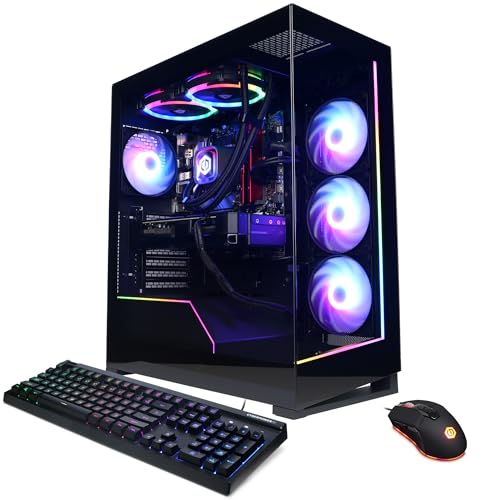
- Best overall: CyberPowerPC Gamer Supreme Liquid Cool, Ryzen 7 7800X3D, RTX 4070 Ti Super — Check on Amazon
- ZOTAC MEK Hero A7748S, Ryzen 7 7700X, RTX 4080 Super — Check on Amazon
- iBUYPOWER Y40 PRO, Ryzen 9 7900X, RTX 5070 Ti — Check on Amazon
- CyberPowerPC Gamer Xtreme VR Liquid Cool, Core i7-14700KF, RTX 4070 Super — Check on Amazon
See 2 more Amazon options
- Skytech Omega, Ryzen 7 7800X3D, RTX 4070 Super — Check on Amazon
- MSI Codex Z2, Ryzen 7 8700F, RTX 5070 — Check on Amazon
Read the full guide ↓
Disclosure: As an Amazon Associate, reviewstook.com earns from qualifying purchases. Links to Amazon on this page are affiliate links; they cost you nothing extra. Listing details such as price and availability change often, so check the current Amazon listing before you buy.
Buying your first gaming PC is confusing at any price, but $2,000 adds a special trap: it is enough money that every listing sounds like the best one ever made. Product pages at this level throw around words like “flagship”, “extreme” and “4K ready” the way cereal boxes say “part of a balanced breakfast”. So here is the honest version, in plain language. Two thousand dollars genuinely buys a high-end gaming PC — the first budget in this guide series where that is simply true. What it buys on a normal day is a machine built around the RTX 4070 Ti Super, a previous-generation graphics card that sat one step below the top, with enough power to run games beautifully on a 1440p monitor — the sharpness level this tier is really for — and enough memory to keep doing it for years. What it does not buy, no matter what a listing title hints, is an RTX 5080: complete systems with that card sit well above this whole budget, even on sale.
This guide is written for a first-time buyer, and organized the way one actually needs it: the six machines, ranked; a plain-language glossary translating every term on the box, because nobody should spend $2,000 on words they had to guess at; the reviews; a step-by-step walkthrough of your first evening — including the one cable mistake that makes new owners think their PC arrived broken — and the extra costs product pages forget to mention. One warning runs through everything below: at this budget, several of the best machines are only good buys at their sale prices. Each review tells you to check the live price on Amazon, and to walk away if it sits above this budget. That single habit — checking the live price before you shop — will save you more money than any other advice here.
In this guide
Quick Picks
Short on time, or comparing several options at once? Each row below names a buyer type and the system that suits it, with a link to the listing.
| Buyer type | Pick | Why it stands out | Link |
|---|---|---|---|
| Best overall | CyberPowerPC Gamer Supreme Liquid Cool (SLC8480A3) | The strongest card that actually lives at this price, with nothing to upgrade on arrival | Check on Amazon |
| Strongest graphics card | ZOTAC MEK Hero A7748S | An RTX 4080 Super — one step below flagship — check price on Amazon; buy only on a maker deal within this budget | Check on Amazon |
| Newest technology | iBUYPOWER Y40 PRO | Current-generation RTX 5070 Ti and a 12-core processor — under $2,000 only when it goes on sale | Check on Amazon |
| Games plus work | CyberPowerPC Gamer Xtreme VR Liquid Cool (GXiVR8760A4) | A 20-thread Intel processor for streaming and editing alongside a strong gaming card | Check on Amazon |
| Best bargain when discounted | Skytech Omega | Top-tier gaming processor and a proper 1440p card — a strong bargain when discounted; check price on Amazon | Check on Amazon |
| Newest features, lowest entry | MSI Codex Z2 | Current-generation RTX 5070 with the latest DLSS — buy only when discounted well within this budget; check price on Amazon | Check on Amazon |
How These Picks Were Chosen
Every machine below is positioned for this budget when you check the price on Amazon. That sentence needs one explanation, because it is where guides like this usually mislead beginners. Some of these systems sit at or under $2,000 regularly; others normally cost more and only visit this budget during sales. When that is the case, the review says so and states the rule out loud: the recommendation counts only while the live price is at or under $2,000. Prices on prebuilt PCs climbed through late 2026 as memory and storage got more expensive, so pretending a sale price is the everyday price would send you shopping for machines you cannot buy — and excluding every sale-dependent machine would leave the guide nearly empty. The honest middle is to check the live price on Amazon and decide with your eyes open.
We have not used these systems ourselves; we compared the manufacturers’ listings, specification pages and published deal records, grading in a deliberate order that is not the order listings advertise. The graphics card comes first, because it does most of the work in games and sets the ceiling for everything else. Its memory — VRAM, explained in the glossary below — comes second, because the 16GB cards here will hold high quality settings years longer than the 12GB ones. The processor comes third, and it is a choice between two good answers rather than a ranking: AMD’s X3D chips are built purely for gaming, while the many-core Intel and Ryzen 9 chips earn their money if you also record, stream, edit or render. Lights, glass panels and included extras were treated as what they are — decoration — and weighted last.
Two things are worth knowing before the reviews. First, none of the six is renewed, refurbished or a bare-bones kit: all are sold new and arrive complete, with Windows installed, ready to plug in. Second, none has any part soldered in place in a way that blocks normal upgrades — these are full-size towers with standard parts inside, exactly what you want for a first PC you plan to keep. Where one specific upgrade is safe to promise, the review promises it; where the manufacturer has not published the detail that would make it safe, the review says that instead.
The Words on the Box, Translated
Thirteen terms explain almost everything in the six listings below.
- Prebuilt. A complete PC built by a company and sold ready to use — what all six machines here are. Building your own from parts is a hobby in itself; a prebuilt trades a little value for arriving finished, tested and under one warranty.
- Graphics card (GPU). The part that draws the game, and the hardest worker in any gaming PC. Its name — RTX 4070 Super, RTX 5070 Ti and so on — is the single best clue to how the machine will perform: bigger family numbers and extra words like “Ti” and “Super” mean stronger cards within a generation.
- VRAM. The graphics card’s own private memory, in gigabytes. Games load their textures — the detailed surfaces you see — into it. At 1440p, 12GB works today; 16GB keeps working comfortably as new games get greedier. It is the quietest long-term difference between the picks here.
- Processor (CPU). The machine’s general-purpose brain, handling game logic, Windows and everything that is not drawing the picture. In a gaming PC it matters second — a mid-range processor with a strong graphics card beats a flagship processor with a weak card, every time.
- Cores and threads. A core is one worker inside the processor; threads are the jobs it can juggle at once. Games mostly use a handful. Twenty threads sounds twice as good as ten and is not, for gaming — extra cores pay off when you stream, edit or render while you play, which is why two picks below are built around them.
- 3D V-Cache (X3D). AMD’s trick of stacking extra memory directly on the processor, which games happen to love. The two “X3D” processors in this guide are, part for part, the fastest pure-gaming chips here — the specialist choice, against the many-core generalists.
- Memory (RAM). The PC’s short-term workspace, separate from the graphics card’s VRAM. 32GB is the comfortable standard at this budget and five of the six picks have it. 16GB — the one exception below — runs games fine today but is the first thing that will feel tight.
- Storage (SSD). Where games and Windows live permanently. All six picks use fast SSD storage, in 1TB or 2TB sizes. Modern games can exceed 100GB each, so 2TB is the size that saves you deleting games to make room within a year.
- Resolution. How many dots make up the picture. 1080p is the old standard, 1440p is sharper and is what this budget is built for, and 4K is sharpest and hardest to run. A PC can display 4K without being able to play games well at 4K.
- DLSS and upscaling. A trick where the card draws the game at a lower resolution, then reconstructs it at your monitor’s full resolution. It looks close to the real thing and runs much faster. It is how PCs at this budget honestly play on 4K screens, and the newest version, DLSS 4, can also generate extra frames to smooth motion.
- Refresh rate. How many times per second your monitor redraws the picture, measured in Hz. A 60Hz screen shows 60 pictures a second no matter how fast the PC is; a 144Hz screen can show the smoothness these machines produce. Buying a fast PC for a slow screen wastes half of what you paid for.
- Integrated graphics. A tiny graphics chip built into some processors, fine for Windows and video, far too weak for serious games. It matters here for one practical reason: it decides what happens if you plug your monitor into the wrong socket, which the walkthrough below covers in detail.
- Power supply (PSU). The box inside the PC that feeds electricity to everything else, rated in watts. You will never think about it while gaming — but it decides whether you can safely install a stronger graphics card years from now, which is why this guide promises that upgrade only where a manufacturer has published the rating.
The 6 Best High End Gaming PCs for Beginners Under $2,000
CyberPowerPC Gamer Supreme Liquid Cool, Ryzen 7 7800X3D, RTX 4070 Ti Super (SLC8480A3)
Who it suits: A first-time buyer who wants to unbox the strongest complete machine that genuinely lives at this budget, plug it in, and not think about upgrades for years.
If you read nothing else in this guide, read this review: this machine is the yardstick the other five are measured against. Inside is a combination that would have been a dream specification one generation ago — a Ryzen 7 7800X3D processor, the X3D chip from the glossary, built purely for gaming, paired with an RTX 4070 Ti Super graphics card carrying 16GB of VRAM. That card sat directly below the flagship cards when it was current, on a bigger chip than the plainer Ti model, with the full 16GB of memory that version never received. In practical terms: on a 1440p monitor it runs demanding games at high settings with room to spare and fast competitive games at a high-refresh screen’s full speed, and on a 4K screen it plays honestly using DLSS upscaling. The 16GB is its real long-term gift — texture quality in new games keeps climbing, and this is the amount that absorbs the climb.
The supporting parts show the same absence of corner-cutting. There is 32GB of system memory rather than the 16GB that still sneaks into expensive machines, and a 2TB solid-state drive rather than the 1TB that starts feeling small once a few modern games move in. The processor is liquid-cooled, which mostly means quiet under load. And its pricing position is the best in this guide: it regularly sits inside this budget — check price on Amazon — and is the one recommendation here that does not depend on catching a sale at the right moment.
Two honest warnings, both about time rather than quality. The card belongs to the previous graphics generation, so its DLSS is the older version — still very good, without the newest frame-generation tricks the current cards below can use. And this exact configuration is a discontinued model being sold through: when the stock is gone, whatever replaces it at this price will be built around a slower card. Neither warning should talk a beginner out of it — together they mean that if it is in stock within budget when you shop, that is the moment to buy.
- The strongest graphics card that resides at this budget, with the full 16GB of VRAM.
- The specialist X3D gaming processor, 32GB of memory and 2TB of storage — nothing needs upgrading on arrival.
- Regularly sits within budget — check price on Amazon.
Honest limitation: A previous-generation configuration being cleared out — its DLSS is the older version, and when the stock runs out, this exact specification disappears with it.
Choose it if you want the most gaming performance $2,000 reliably buys, today, with no sale-watching required. Skip it if having the newest platform matters more to you than raw strength — that argument belongs to the Y40 PRO below, and only when it is discounted into this budget.

ZOTAC MEK Hero A7748S, Ryzen 7 7700X, RTX 4080 Super
Who it suits: A beginner whose priority is the graphics card above everything — and who is comfortable adding one memory upgrade later to complete the machine.
This is the most powerful graphics card in the guide, and it is not close. The RTX 4080 Super was a flagship-class card — one step below the most expensive card of its generation — with 16GB of GDDR6X memory. On a 1440p screen it makes the resolution a non-issue; on a 4K screen, with DLSS helping, it is the most comfortable card here. ZOTAC launched this exact machine at a premium list price, and its own promoted Amazon deals have brought it within this budget’s ceiling. That does not promise it is sitting there today, so check price on Amazon before you decide. The rule for this pick is a hard one: at or under $2,000, it is the strongest card your money can reach; above that, it belongs to a bigger budget’s guide, and you should let it go without a second thought.
ZOTAC’s choices elsewhere are mostly easy to respect. The Ryzen 7 7700X processor is a strong all-rounder, the card is kept cool by a 240mm liquid cooler, and the power supply is published in the official specification — 800 watts, Gold-rated — the detail many builders hide, and the reason this is one of only two machines here where a future graphics-card upgrade can be promised outright: a standard tower case and documented power headroom. You also get Wi-Fi 6E, fast wired networking, US hand-assembly, and a three-year warranty on the graphics card itself.
Then there is the compromise, and a beginner should see it clearly, because it is this machine’s whole pricing trick. It ships with 16GB of system memory — the amount from a machine costing half as much — in its slower DDR5-4800 form, and a 1TB drive. Games run fine on 16GB today; the pressure arrives when a browser, chat and recording software stay open alongside, and it grows each year. Treat this purchase as machine plus one planned fix: a memory upgrade to 32GB is a beginner-friendly job — sticks that click into slots, no tools beyond opening the panel — and it belongs in your real budget from day one. Read this pick as the strongest card in the guide wearing one deliberate shortfall, priced accordingly, and it makes complete sense; read the listing price carelessly, above $2,000, and it makes none.
- RTX 4080 Super 16GB — the strongest graphics card in this guide, one step below flagship.
- Published 800W Gold power supply, liquid cooling, three-year graphics-card warranty.
- A future card upgrade can be promised: standard case, documented power headroom.
Honest limitation: Only 16GB of system memory and a 1TB drive in a machine in this class, and its at-budget availability depends on manufacturer promotions — the pick applies only while the live price is at or under $2,000.
Choose it if the graphics card is your first, second and third priority, and adding memory later sounds like a fair trade. Skip it if the listing is above $2,000 when you check, or you want a finished machine you never have to open.

iBUYPOWER Y40 PRO, Ryzen 9 7900X, RTX 5070 Ti (Y40BA9N57T01)
Who it suits: A beginner who wants the current generation — the newest card features and a processor with power to spare for streaming and video work — and has the patience to buy it only when the price drops into this budget.
Start with the price, because with this machine the price is the review. Its everyday pricing sits above this budget — simply where the RTX 5070 Ti tier starts, and no honest guide should round that down to $2,000. What earns the Y40 PRO its place here is its history of visiting this budget on sale. So the rule is mechanical: if the live listing — check price on Amazon — sits at $2,000 or less, this is arguably the best purchase in the guide; if it sits above that, it is a fine machine in the wrong guide — compare it in Best High End Gaming PC Under $2500 instead, and do not let a countdown timer argue otherwise.
What the sale price buys is the most modern specification here. The RTX 5070 Ti is a current-generation card with 16GB of newer GDDR7 memory and DLSS 4, whose multi frame generation genuinely changes the experience: on a high-refresh 1440p monitor it makes smooth motion the default rather than the target, and its upscaling is the standard the older cards are judged against. Behind it, the Ryzen 9 7900X brings twelve full processor cores — a shade behind the X3D specialists in games alone, and the best-balanced processor here across a week that also includes streaming, editing recordings, or rendering overnight. The rest of the box is complete: 32GB of memory, a 2TB drive, and a keyboard and mouse included — the one pick that arrives needing nothing at all on the desk.
The catch is purely about timing: sale windows at this level last days, the deepest discounts are seasonal events, and needing a PC this week is a perfectly good reason to buy the CyberPowerPC at the top of this guide instead. One more note: the manufacturer does not publish this machine’s power supply rating, so unlike the ZOTAC and the Skytech below, no future graphics-card swap is promised for it — when upgrade day comes, the first step is reading the label on the power supply inside, a five-minute check. Set a price alert, decide your number in advance, and let the machine come to you.
- RTX 5070 Ti 16GB with DLSS 4 — the only current-generation top card in the guide.
- Twelve-core Ryzen 9: the best processor here for gaming plus streaming and editing.
- Keyboard and mouse in the box; a deal-dependent pick — check price on Amazon.
Honest limitation: Its standing price is above this budget. The recommendation exists only when it is on sale within budget, and those windows are short and seasonal.
Choose it if you can wait for the price and want the newest platform with a producer’s processor. Skip it if you are buying this week at this budget — the top pick gives you the same money’s worth with no lottery attached.

CyberPowerPC Gamer Xtreme VR Liquid Cool, Core i7-14700KF, RTX 4070 Super (GXiVR8760A4)
Who it suits: A beginner whose PC will work as well as play — streaming, video editing, school or office projects — on the strongest many-core processor in the guide, at a price that sits inside the budget without a sale.
Every guide like this contains one genuine fork in the road, and this machine is the other path. The X3D machines above and below are gaming specialists. This CyberPowerPC is built around Intel’s Core i7-14700KF, which packs eight full-power cores and twelve smaller efficiency cores — twenty threads — next to an RTX 4070 Super graphics card, 32GB of memory and a 2TB drive, all liquid-cooled. For games alone, it trades a little ground to the X3D chips in the titles that love their special cache. For everything around the games — broadcasting your play, keeping a dozen browser tabs and chat windows alive, editing footage, compiling code, rendering — the extra threads stop being a specification and start being the difference between a machine that copes and one that cruises. Neither answer is wrong — they are answers to different weeks, and yours is the one that counts.
The graphics card sets this machine’s ceiling one clear step below the top pick. The RTX 4070 Super is a genuinely strong 1440p card — high settings in demanding games, high refresh in competitive ones, and usable 4K with DLSS — but it carries 12GB of VRAM where the two machines above it carry 16GB, and that figure is the part of this specification that will age first. Put plainly: this system spends its money on processor breadth and storage, and pays for it in graphics memory. For the buyer who works on their PC, that is the correct trade; for a pure gamer, the same brand’s machine at the top of this guide spends the same money better.
Two practical notes belong to this pick alone. First, the price: check price on Amazon — it has sat inside the budget as an ordinary standing price rather than a seasonal record, with stock noted as thin at times, so check the model number GXiVR8760A4 on the live page before ordering, because this builder reuses its case designs across very different insides. Second, a setup warning the walkthrough below repeats: the “F” at the end of 14700KF means this processor has no integrated graphics at all. Your monitor must plug into the graphics card’s sockets, not the motherboard’s — on this machine the motherboard sockets are not a slower option, they are a permanently black screen. Remember that one sentence and your first evening goes fine.
- Twenty threads of Intel processor for gaming plus streaming, editing and rendering.
- 32GB of memory and 2TB of storage, liquid-cooled — the complete working specification.
- Sits inside the budget with no sale timing needed — check price on Amazon.
Honest limitation: The card’s 12GB of VRAM is the tightest graphics memory among the guide’s top picks, and the processor’s extra cores do nothing at all for someone who only games.
Choose it if your PC earns its keep between gaming sessions. Skip it if the machine will only ever play games — the X3D picks put the same money where you will actually feel it.
Skytech Omega, Ryzen 7 7800X3D, RTX 4070 Super (ST-OMEGA2-1126-W-AM)
Who it suits: A patient first-time buyer who wants the best gaming processor in the guide and a proper 1440p card — and is willing to wait for this listing’s frequent sales instead of paying its list price.
Think of this machine as the top pick’s younger sibling in a white showcase case. It keeps the same Ryzen 7 7800X3D specialist gaming processor and steps the graphics card down one rung to the RTX 4070 Super, alongside 32GB of memory, a 1TB drive, and a power supply Skytech actually publishes: 750 watts, Gold-rated. That published rating matters more than it sounds: it makes this the second of only two machines here where a future graphics-card upgrade can be promised in advance — standard tower case, documented power headroom, no guessing. For a beginner planning to keep a first PC for years and improve it once, that is a real, practical advantage over flashier rivals.
The reason this machine appears in a $2,000 guide at all is its dramatic price behavior: its list price sits just above this budget, while its sale pricing can drop well below it — the same computer at very different value depending on when you look. The Omega is two different purchases wearing one name. When discounted, it is the best value in this guide by a wide margin: the strongest gaming processor here, a genuine 1440p card, and room left in the budget for the monitor this tier deserves. At list price it is indefensible, because the top pick offers a stronger card within budget. The rule writes itself: on sale, buy this; at list, buy the CyberPowerPC and do not look back.
Judged purely as hardware, its compromises against the top pick are exactly two, and both are survivable for years. The 4070 Super gives up the bigger card’s extra memory — 12GB here against 16GB — which at 1440p means choosing high settings over ultra in the most demanding new releases, and leaning on DLSS a little earlier. And the 1TB drive is the tier’s smaller standard: enough to start, with a second drive an easy upgrade whenever it fills. Everything else — the processor, the memory, the published power supply — is the full specification with no traps, which is why this machine keeps earning its place in this guide series at several budgets. Only its price moves; your job is to buy it at the right one.
- The best gaming processor in the guide with 32GB of memory and a published 750W Gold power supply.
- A future graphics-card upgrade can be promised — one of only two picks where that is true.
- On sale, the best value in this guide — check price on Amazon.
Honest limitation: At its list price it costs more than the stronger top pick — the recommendation lives entirely on its sale pricing. The card carries 12GB of VRAM and storage is 1TB.
Choose it if it is on sale when you shop; at its sale price it embarrasses more expensive machines. Skip it if it is sitting at list price — at that number the anchor pick wins outright.

MSI Codex Z2, Ryzen 7 8700F, RTX 5070 (A8NVP-436US)
Who it suits: A beginner who specifically wants the newest technology — the current card generation and its latest features — at the lowest entry price in this guide, and who understands that this listing’s price swings more than any other here.
The Codex Z2 is the current generation’s doorway at this budget. Its RTX 5070 is a Blackwell card — the newest architecture here — with 12GB of the faster GDDR7 memory and the full DLSS 4 feature set, including the multi frame generation that makes motion on a high-refresh 1440p monitor exceptionally smooth. Judged on raw drawing power alone it sits a step below the top pick’s older card; judged on displayed smoothness in supported games, it can feel like the fastest machine here. Around it, MSI fits a Ryzen 7 8700F processor, 32GB of memory and a 2TB drive in a proper gaming case. And when discounted well within budget, the value is startling — check price on Amazon.
Now the half of the story that decides whether this pick is for you. This listing can also spend long stretches far above this budget, during memory-price spikes. No machine here swings wider: when discounted well within budget it is the easiest recommendation in these pages; when priced above budget it competes against stronger 5070 Ti systems it cannot match. Treat it by position rather than as an endorsement: well within budget, a strong buy; at the top of this budget, a defensible one if the current platform is what you want; above that, leave it to the Best High End Gaming PC Under $2500 comparison where its card class belongs.
Two specification notes complete the honest picture — both are the kind a beginner would never spot on a product page. The 8700F games well, but its “F” means no integrated graphics: exactly like the Intel machine above, your monitor must plug into the graphics card, because the motherboard’s sockets will never light up on this PC. And MSI does not publish this configuration’s power supply wattage in the listing material we could verify, so no future card swap is promised here — before any upgrade, the fitted power supply’s label has to be read first. Neither point disqualifies the machine; both are printed because a first-time buyer deserves the whole record, not the flattering half.
- RTX 5070 with DLSS 4 — the newest feature set, at the guide’s lowest entry position when discounted.
- 32GB of memory and 2TB of storage: the complete supporting specification.
- Lowest entry position in the guide when discounted — check price on Amazon.
Honest limitation: The most volatile price in the guide — it can swing well above this budget — with an unpublished power supply rating and a 12GB frame buffer.
Choose it if you catch it near its low and value the newest features over the older cards’ raw strength. Skip it if its live price drifts near the top of this budget while the top pick sits comfortably within budget.

Comparison Table
| Product | Graphics card | Best use | Link |
|---|---|---|---|
| CyberPowerPC Gamer Supreme Liquid Cool (SLC8480A3) | RTX 4070 Ti Super 16GB | The resident high-end spec: strongest complete machine at this price | Check on Amazon |
| ZOTAC MEK Hero A7748S | RTX 4080 Super 16GB | Strongest card in the guide, bought on deal plus a memory upgrade | Check on Amazon |
| iBUYPOWER Y40 PRO | RTX 5070 Ti 16GB | Current generation plus a 12-core producer processor, on deal only | Check on Amazon |
| CyberPowerPC Gamer Xtreme VR Liquid Cool (GXiVR8760A4) | RTX 4070 Super 12GB | Gaming plus a working week on a 20-thread Intel processor | Check on Amazon |
| Skytech Omega | RTX 4070 Super 12GB | Best value in the guide when discounted — check price on Amazon | Check on Amazon |
| MSI Codex Z2 | RTX 5070 12GB | Newest features at the lowest entry position when discounted | Check on Amazon |
Your First Evening: Setup, Step by Step
Every machine here arrives complete, with Windows installed — nothing to build, nothing to solder, no kit of parts. All six are sold new (none is renewed or refurbished), and none has its memory or storage soldered in place, so the upgrades mentioned in the reviews stay possible later. Your first evening is connecting things in the right order and checking three settings — about an hour, unhurried:
- Check the delivery before you settle in. Find the model number on the box or the order page and match it against the one in the review you bought from — SLC8480A3, A7748S, Y40BA9N57T01, GXiVR8760A4, ST-OMEGA2-1126-W-AM or A8NVP-436US. Builders reuse the same case across very different insides, so the model number — not the shape of the box — is the machine’s identity. If it does not match, contact the seller before removing protective film.
- Give it air. Put the tower where air can move around it — on or under the desk with open space at the back and sides, never inside a closed cabinet. These machines cool themselves with fans and liquid radiators that breathe room air; a sealed cupboard turns any of them into an oven.
- Plug the monitor into the graphics card. This is the step that matters most. The back of the PC has two clusters of sockets: a vertical group on the motherboard, and a horizontal group lower down, on the graphics card itself. Your monitor cable goes into the graphics card’s group — always. What happens otherwise depends on the machine. On the CyberPowerPC Xtreme VR and the MSI Codex Z2, whose processors (the 14700KF and the 8700F) have no integrated graphics at all, the motherboard sockets are dead: plug in there and the screen stays black forever, on a perfectly healthy PC. On the other four picks the motherboard socket lights up — using the processor’s tiny backup graphics — and games run mysteriously slowly until you move the cable. Black screen or slow picture, the fix is the same: the cable belongs in the card.
- Connect keyboard, mouse and power. Only the Y40 PRO includes a keyboard and mouse among these six, so have your own ready for the others. Plug the power cable into a surge protector rather than straight into the wall if you have one.
- Use a cable for the internet, at least tonight. All six machines have Wi-Fi, but the first evening involves gigabytes of downloads. A wired Ethernet connection, if your router is within reach, makes setup far faster and stays the better choice for online games afterward.
- Walk through Windows setup. Follow the on-screen prompts: language, account sign-in, privacy choices. There is nothing to install from discs and no product key to type — the license is built into the machine.
- Verify you received what you paid for. Open Settings, then System, then About, and read the memory line: 32GB on five of these picks, 16GB on the ZOTAC — which is correct for that machine, not an error. Then open Task Manager, choose the Performance tab, and confirm the graphics card’s name matches your order. Two minutes well spent.
- Update everything, then set your screen’s speed. Run Windows Update until it stops finding things, and install the latest graphics driver from NVIDIA’s app when prompted. Then — the setting almost every new owner misses — go to Settings, System, Display, Advanced display, and set the refresh rate to your monitor’s full number. Monitors commonly arrive set to 60Hz even when they can do far better, and a fast PC under a 60Hz setting is money left on the table.
- Install one game, set it up properly, and make a safety copy. In the game’s settings, choose your monitor’s full resolution and turn DLSS on where offered — that is the glossary’s upscaling, and it is how these machines are meant to be played. Finally, search Windows for “restore point” and create one. If anything ever goes wrong later, tonight’s clean machine is the place you can return to.
What Else You Will Spend
The PC is the biggest cost, not the only one. Budget for these alongside it, in the order they matter — with no prices invented for any of them, because peripheral prices vary too much to quote honestly.
- A monitor comes first, and it is not optional spending. None of these six machines includes one, and the monitor is half the experience you are paying for. This tier of PC is built for a 1440p screen with a high refresh rate — 144Hz or above. On a 1080p 60Hz screen, these machines will look like far cheaper ones; the Best High End Gaming PC Under $1500 guide exists for that desk. If your budget is truly fixed, the Skytech Omega at its sale price is partly a recommendation to fund the monitor properly.
- Keyboard and mouse. Only the Y40 PRO includes them. The other five assume you own a set — any USB or wireless set works from day one, and gaming-grade peripherals can come whenever you like.
- Sound. None of these PCs includes speakers. Headphones you own will plug straight in; a headset with a microphone is the standard choice if you play with friends.
- The ZOTAC’s memory fix. Price that pick as machine plus fix: it ships with 16GB of memory where this budget deserves 32GB, and adding the second half is a planned purchase, not a surprise. The job itself is beginner-level — open the side panel, click the sticks into their slots — but the cost belongs in your budget from the start.
- Storage headroom, eventually. The ZOTAC and the Skytech carry 1TB drives where the others carry 2TB, and a modern game library fills 1TB within about a year. Adding a second drive later is one of the easiest upgrades there is — just do not be surprised when the day comes.
How to Choose a High End Gaming PC Under $2,000
- Judge the graphics card by strength, not by newness. A previous-generation 4070 Ti Super out-draws a current-generation 5070. Newer buys features — the latest DLSS, faster memory — while older buys raw power per dollar. Decide which currency you are spending.
- Treat 16GB of VRAM as the keep-it-for-years line. It will not change this month’s gaming; it decides whether the highest texture settings are still available in three years, and three picks here clear it.
- Pick your processor by your week, not by charts. Games only: the X3D chips. Games plus streaming, editing or rendering: the twelve-core Ryzen 9 or the twenty-thread Intel. Choosing the wrong fork wastes more money than any other decision in this guide.
- Write down your walk-away number for every sale-dependent pick. Each review above states the rule: the recommendation applies at a live price at or under this budget — check price on Amazon. A listing above your number is not a temptation to negotiate with yourself — it is a different, worse purchase.
- Only trust upgrade promises backed by a published power supply. Two picks here publish theirs — 750W and 800W Gold — and those are the two where a future card swap is promised. Everywhere else, the honest answer is “check the label inside first”, and any guide that promises more is guessing with your money.
- Match the machine to the monitor you actually own. These PCs are for 1440p high-refresh screens. On a 4K screen they play through DLSS upscaling — genuinely good, and worth buying knowingly. Expecting native 4K at high settings means shopping at least one tier up, in Best High End Gaming PC Under $2500 and beyond.
- Count the whole desk before you commit. Monitor, keyboard, mouse and sound are part of this purchase whether you plan them or not. A slightly cheaper machine plus the right monitor beats a flagship tower glowing behind an old screen, every time.
Common Buying Mistakes
- Believing an “RTX 5080 in this budget” listing. Complete 5080 systems sit well above this budget, even on sale. A 5080 claimed within this budget is a misread title, a parts kit, or a configuration that does not contain the card in its name — read the specification, not the headline.
- Paying the everyday price for a sale pick. The Y40 PRO and the Omega at their standing prices are different purchases from the same machines on sale. At those prices, other machines beat them — the reviews say which.
- Plugging the monitor into the motherboard. The most common first-evening panic in PC gaming. On two of these six machines the screen stays black; on the other four, games run at a crawl. The cable belongs in the graphics card — step 3 of the walkthrough exists because of this mistake.
- Accepting 16GB of memory at this budget without budgeting the fix. It is the one shortfall in this guide that affects everyday use within the year, not just benchmark charts — budget the upgrade with the machine.
- Letting a countdown timer set your price. Every deal in this guide has recurred or has a rival. The walk-away numbers in the reviews exist because a listing’s urgency is a sales tool, not information.
- Sleeping on the clearance pick. The top recommendation is excellent value precisely because it is being sold through — when its stock is gone, the strongest resident card at this budget goes with it. In stock within budget is the moment, not a detail for next month.
Final Recommendation
- Most first-time buyers at $2,000: CyberPowerPC Gamer Supreme Liquid Cool (SLC8480A3).
- Strongest graphics card, deal permitting: ZOTAC MEK Hero A7748S, plus its planned memory upgrade.
- Newest platform plus production power: iBUYPOWER Y40 PRO, at a sale price only.
- Gaming plus a working week: CyberPowerPC Gamer Xtreme VR Liquid Cool (GXiVR8760A4).
- Best value event: Skytech Omega, at or near its sale low.
- Newest features on a budget: MSI Codex Z2, near its sale low only.
For most beginners the shortlist is two machines. The CyberPowerPC Gamer Supreme Liquid Cool is the straightforward answer: the strongest card that lives at this budget, the specialist gaming processor, memory and storage with nothing missing, at pricing that needs no sale to work — check price on Amazon. The iBUYPOWER Y40 PRO is the patient answer: on the weeks its price visits this tier, it is the only machine here that is both current-generation and complete, keyboard and mouse included. Around them, the ZOTAC out-guns everything on the right day and asks a memory upgrade for the privilege; the Intel CyberPowerPC is the working machine of the six; the Skytech is the value event with an upgrader’s power supply; the MSI is the newest technology at the wildest price swings. If your ceiling is genuinely lower, the ladder continues at Best High End Gaming PC Under $1500; if it stretches to where the 5070 Ti lives at everyday prices, at Best High End Gaming PC Under $2500. Whichever you choose: check the live price on Amazon, confirm the model number, plug the monitor into the graphics card — and enjoy the first evening.
Frequently Asked Questions
Is $2,000 too much to spend on a first gaming PC?
It is a serious budget, and it buys a genuinely high-end machine — but “first” does not oblige you to spend it. Everything here is aimed at a 1440p high-refresh monitor and years of keeping the same PC. If your screen is a 1080p model, or you are still finding out which games you love, the machines in Best High End Gaming PC Under $1500 will look identical on your desk and leave money for the monitor upgrade that matters more. Spend $2,000 when the screen and the habit justify it, not because the listings made smaller budgets sound inadequate.
My new PC shows a black screen. Is it broken?
Almost certainly not — check where the monitor cable is plugged in. It must go into the graphics card’s sockets, low on the back of the case, not the motherboard’s group above them. On the CyberPowerPC Xtreme VR and the MSI Codex Z2, whose processors have no backup graphics at all, the motherboard sockets can never produce a picture. On the other four picks the same mistake produces a working screen but painfully slow games, because the PC falls back to its tiny integrated graphics. Move the cable to the card and both problems vanish.
Can I upgrade the graphics card later?
On two of these six, yes — that promise is made only where the manufacturer publishes the power supply, because that rating is what makes a stronger card safe. The ZOTAC (800W Gold) and the Skytech Omega (750W Gold) both qualify, in standard tower cases with room to work. For the other four the rating is not published, so the honest answer is conditional: when upgrade day comes, open the panel, read the power supply’s label — a five-minute check — and choose the new card against that number. No pick here is soldered shut; the question is only ever the power budget.
Should I wait for a sale, or buy now?
It depends which machine you want, and the guide is built around that split. The top pick regularly sits inside the budget, so waiting buys nothing except the risk its clearance stock runs out. The Y40 PRO, the Omega and the Codex Z2 are the opposite: their recommendations exist only when discounted into this budget, so for those, waiting — price alert set, walk-away number decided — is the entire strategy. Never split the difference by paying a standing price for a sale pick.
- Best High End Gaming PC Under $1500
- Best High End Gaming PC Under $2500
- Best High End Gaming PC Under $3000
- Best High End Gaming PC For 1440p Gaming Under $2000
- Best High End Gaming PC For Streaming Under $2000
- Best High End Gaming PC For Beginners Under $1500
- Best High End Gaming PC For Beginners Under $2500


