Where to buy
Check the latest price, availability and delivery on Amazon. Orders are placed on Amazon. We may earn a commission from qualifying purchases.
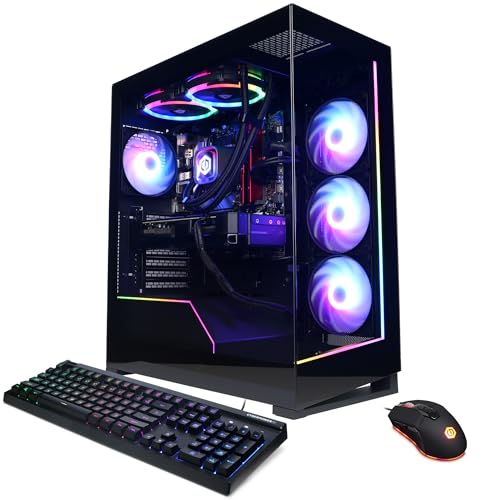
- Best overall: CyberPowerPC Gamer Supreme Liquid Cool, Ryzen 7 7800X3D, RTX 4070 Ti Super — Check on Amazon
- ZOTAC MEK Hero A7748S, Ryzen 7 7700X, RTX 4080 Super — Check on Amazon
- iBUYPOWER Y40 PRO, Ryzen 9 7900X, RTX 5070 Ti — Check on Amazon
- CyberPowerPC Gamer Xtreme VR Liquid Cool, Core i7-14700KF, RTX 4070 Super — Check on Amazon
See 2 more Amazon options
- Skytech Omega, Ryzen 7 7800X3D, RTX 4070 Super — Check on Amazon
- MSI Codex Z2, Ryzen 7 8700F, RTX 5070 — Check on Amazon
Read the full guide ↓
Disclosure: As an Amazon Associate, reviewstook.com earns from qualifying purchases. Links to Amazon on this page are affiliate links; they cost you nothing extra. Listing details such as price and availability change often, so check the current Amazon listing before you buy.
Two thousand dollars is the first budget in this entire high-end ladder where the word “high-end” stops being aspirational and starts being descriptive — with one honest asterisk. What genuinely lives at this price, as a standing configuration you can buy on an ordinary day, is RTX 4070 Ti Super-class performance: a previous-generation card that sat one step below the flagship, with 16GB of VRAM, enough raster power for native 1440p at high refresh, and enough headroom to drive a 4K display with DLSS upscaling doing honest work. Around that anchor, this tier is a market of visitors. An RTX 4080 Super system has been seen inside this budget on a manufacturer-promoted deal. An RTX 5070 Ti system — the current-generation card most buyers actually mean by “high end” — normally starts above this budget at standing prices and has dipped under $2,000 only in deal sightings. And the RTX 5080 is simply not here: complete 5080 systems list well above this tier, and even the best deal sighting we have verified for one sits above this entire budget. Anyone who tells you a $2,000 PC is a 5080 machine is selling you a listing you have not read closely enough.
So this guide grades on the truth of the tier. The six systems below are ranked by how close they get to genuine flagship-adjacent performance per dollar: graphics class first, then VRAM — because 16GB versus 12GB is the difference between a card that ages gracefully at 1440p and one that starts negotiating with texture settings — then the CPU split that actually matters at this level, AMD’s X3D chips for pure gaming versus many-core Intel and Ryzen 9 parts for gamers who also stream, edit and render. Several picks are deal-conditional, and the guide says so every time it matters: at this budget, when you buy is a specification, so check the price on Amazon before you commit. Below are the quick picks, detailed reviews of all six systems, a comparison table, a buying checklist, the mistakes that waste money at this tier, and the questions high-end shoppers ask before they commit.
In this guide
Quick Picks
Short on time, or comparing several options at once? Each row below names a buyer type and the system that suits it, with a link to the listing.
| Buyer type | Pick | Why it stands out | Link |
|---|---|---|---|
| Best overall | CyberPowerPC Gamer Supreme Liquid Cool (SLC8480A3) | RTX 4070 Ti Super 16GB with a 7800X3D — the tier’s resident high-end spec | Check on Amazon |
| Best graphics card | ZOTAC MEK Hero A7748S | RTX 4080 Super 16GB — flagship-adjacent, seen inside this budget on a maker deal — check price on Amazon | Check on Amazon |
| Best current generation | iBUYPOWER Y40 PRO | RTX 5070 Ti and a 12-core Ryzen 9 — under $2,000 only at its deal sightings | Check on Amazon |
| Best for gaming plus production | CyberPowerPC Gamer Xtreme VR Liquid Cool (GXiVR8760A4) | 20-core i7-14700KF with an RTX 4070 Super — check price on Amazon | Check on Amazon |
| Best value when discounted | Skytech Omega | 7800X3D and RTX 4070 Super with a verified deep-discount low sighting — check price on Amazon | Check on Amazon |
| Best Blackwell option | MSI Codex Z2 | RTX 5070 with DLSS 4 — buy only near its lowest sightings; check price on Amazon | Check on Amazon |
How These Picks Were Chosen
The budget was applied the way this tier demands: every system below has a verified Amazon sighting at or under $2,000, documented in this guide’s research notes, and where a listing normally lives above the ceiling the review says so plainly rather than pretending a deal price is the everyday price. That distinction is not pedantry at $2,000. Memory and SSD prices climbed hard through late 2026, prebuilt listings followed them up, and several excellent systems in this class now spend much of the year above this budget, visiting it during sales. A guide that ignored that would recommend machines you cannot actually buy at the stated price; a guide that excluded every deal-dependent system would have almost nothing true left to recommend. The middle path, used throughout this batch of guides, is to name the sighting honestly and tell you the rule: the recommendation applies when the live listing is at or under $2,000 — always check the price on Amazon before ordering.
We did not use these systems ourselves. We read the maker listings, specification pages and published deal records, and compared graphics cards, VRAM capacity, CPU core configurations, memory size and speed, storage, power supplies and cooling as published. The grading order matters and it is not the order listings advertise. Graphics class comes first because at 1440p the GPU sets the ceiling for every game you own. VRAM comes second: the three 16GB cards in this guide will hold high texture settings at 1440p years longer than the three 12GB cards, and that gap widens with every new release. CPU comes third, and it is a fork rather than a ladder — a 7800X3D’s 3D V-Cache is the best pure-gaming silicon in this guide, while the 7900X’s twelve cores and the 14700KF’s twenty threads earn their keep only when the machine also encodes, compiles or renders. Everything after that — RGB, case glass, included peripherals — is decoration, and it was weighted as decoration.
Two exclusions deserve stating plainly, because they define the tier. No RTX 5080 system appears below: complete 5080 machines list well above this tier, and even their best verified deal sightings stay above this budget. And no system here is a current-generation flagship of any kind — the RTX 5070 Ti in the Y40 PRO is the strongest current card in the guide, and it is present on deal terms only. What $2,000 honestly buys is the top of the previous generation at full strength, or the middle of the current one at a discount. Judged on those terms, it is a genuinely strong tier. Judged on the terms in some listing titles, it would be a disappointment — which is exactly why the terms are stated here instead.
The 6 Best High End Gaming PCs Under $2,000
CyberPowerPC Gamer Supreme Liquid Cool, Ryzen 7 7800X3D, RTX 4070 Ti Super (SLC8480A3)
Who it suits: The high-refresh 1440p gamer who wants the strongest graphics card that actually resides at this budget — no deal lottery, no generational compromise.
This is the anchor pick, the system the rest of the guide is measured against, because its specification is the tier’s honest ceiling in resident form: a Ryzen 7 7800X3D, an RTX 4070 Ti Super with 16GB of memory, 32GB of DDR5 and a 2TB PCIe Gen4 SSD. The 4070 Ti Super is the important line. It is a previous-generation card, and this guide will not pretend otherwise — but it was built one step below the 4080, on the larger die, with a 256-bit memory bus and the full 16GB that the plain 4070 Ti never got. At native 1440p it is a high-refresh card in the full sense: the GPU stops being the question in esports titles entirely and stays ahead of the monitor in demanding ones at high settings, and with DLSS upscaling it is a credible 4K card as well. The 16GB frame buffer is what separates it from the 12GB picks below — not in this month’s benchmarks, but in the texture budgets of games two and three years out.
The CPU pairing is the deliberate one for a pure gaming machine. The 7800X3D’s stacked cache remains, generation for generation, the gaming-first choice in this class, and CyberPowerPC’s liquid-cooled Supreme trim wraps the pairing in the configuration this batch’s research verified on the listing: 32GB of memory rather than the 16GB that still sneaks into four-figure systems, and 2TB of storage rather than the 1TB that fills within a year of modern installs. The price history is the best documented in the guide: Amazon sale and regular-price sightings recorded across multiple deal posts have both sat inside this budget — which is precisely the point. This is the one top-card system here whose claim on the tier does not depend on catching a price at the right hour.
The honest caveats are generational, and they are real. The 4070 Ti Super is an Ada card: its DLSS upscaling and frame generation are the previous generation’s, without the current Blackwell feature set, and as a discontinued configuration it is increasingly a clearance item — when the stock is gone, this exact machine is gone, and its replacement at the same price will be a 5070-class system a step slower in raster terms. Buyers who keep a PC for five years should weigh the Y40 PRO’s newer platform below. Buyers who play now, at 1440p, at high refresh, should not: card for card, this is the most performance $2,000 reliably buys.
- RTX 4070 Ti Super 16GB — the strongest resident graphics card at this budget.
- 7800X3D plus 32GB DDR5 and 2TB storage: no line item needs an immediate upgrade.
- Documented sale and regular-price sightings — both within budget; check price on Amazon.
Honest limitation: A previous-generation, increasingly clearance configuration — its DLSS feature set is the older one, and once stock clears, this exact spec disappears.
Choose it if you play at 1440p high refresh now and want the tier’s full measure without watching prices. Skip it if you prioritize the newest platform and features over raw card strength — that is the Y40 PRO’s argument, on deal terms.

ZOTAC MEK Hero A7748S, Ryzen 7 7700X, RTX 4080 Super
Who it suits: The buyer who wants the single strongest graphics card mentioned anywhere in this guide — and is willing to accept a 16GB memory shortfall and deal timing to get it.
Start with the card, because the card is the entire argument. The RTX 4080 Super is a flagship-adjacent GPU in the strict sense: 16GB of GDDR6X, the full-fat Ada die one step below the 4090, and raster performance that makes native 1440p a solved problem and 4K with DLSS a comfortable one. ZOTAC’s own launch material for this exact machine — the MEK Hero A7748S, built around its Trinity Black Edition 4080 Super — put the system in a premium tier above this budget, and the manufacturer’s promoted Amazon deal brought it to exactly this budget’s ceiling. That sighting comes from a past maker promotion and this guide presents it as what it is — proof that the machine has traded at this price through the maker’s own channel, not a promise that it sits there today. At any live price above $2,000 it belongs to the next guide up; at or under it, nothing else in this guide touches its graphics card.
The rest of the specification is a study in where ZOTAC spent and where it saved. The spent column is genuinely good: a 240mm liquid cooler on a Ryzen 7 7700X, an 800W 80+ Gold power supply — a figure published in the launch specification, which is rarer honesty than it should be — Wi-Fi 6E, 2.5-gigabit Ethernet, US hand-assembly and a three-year warranty on the graphics card. The saved column is one line long and it matters: 16GB of DDR5-4800. At this budget 32GB is the tier standard, and 16GB is the configuration of a far cheaper machine. For pure gaming today it is workable; for the gaming-plus-anything workload, or for keeping this system uncompromised into its third year, a second memory kit belongs in the real budget from day one. The 1TB SSD is the second, smaller version of the same story.
None of that dethrones the card — it prices the machine honestly. A 4080 Super system with 32GB and 2TB would not be a $2,000 proposition in any market we have verified; the MEK Hero reaches the ceiling by trimming exactly the two line items an owner can upgrade in twenty minutes with a screwdriver. As a strategy that is more respectable than the reverse — a fat spec sheet wrapped around a weaker GPU — because the graphics card is the one component you will not be upgrading at sensible money. Verify the live configuration and price before ordering, treat $2,000 as a hard walk-away line, and if the listing is sitting at its regular premium price instead, the CyberPowerPC above delivers most of the experience with none of the shortfalls.
- RTX 4080 Super 16GB — the strongest graphics card in this guide, full stop.
- Published 800W Gold power supply, 240mm liquid cooling, three-year GPU warranty.
- Manufacturer-documented Amazon deal sighting right at this budget’s ceiling — check price on Amazon.
Honest limitation: Only 16GB of DDR5-4800 and 1TB of storage in a $2,000-class machine, and its at-budget sighting is a past maker promotion — the live price must be at or under $2,000 for the pick to apply.
Choose it if the graphics card is your first, second and third priority and you will add memory yourself. Skip it if the listing is above $2,000 when you check, or you want a finished, balanced system out of the box.

iBUYPOWER Y40 PRO, Ryzen 9 7900X, RTX 5070 Ti (Y40BA9N57T01)
Who it suits: The buyer who wants the current generation — a 5070 Ti, DLSS 4, a twelve-core CPU for streaming and production — and is disciplined enough to buy it only when the price visits this budget.
The framing has to come first, because this pick’s relationship with $2,000 is conditional in a way the others’ is not. The Y40 PRO’s standing Amazon price in this batch’s research sat above this budget — which is where the RTX 5070 Ti tier actually starts, and this guide states that plainly rather than rounding it down. What earns the machine its place is its documented deal history: sightings inside this budget in deal coverage and a lowest-ever sighting recorded around Black Friday. Those are real Amazon prices for this exact configuration, and they mean the strongest current-generation card in this class does pass through this budget — briefly, seasonally, and never on demand. The recommendation is therefore mechanical: if the live listing sits at $2,000 or less, this is arguably the best buy in the guide; if it sits at its usual above-budget standing price, it is a Best High End Gaming PC Under $2500 machine and should be compared there.
What the deal buys, when it comes, is the complete modern specification. The RTX 5070 Ti carries 16GB of GDDR7 and the current DLSS generation, whose multi frame generation is the one feature in this guide that genuinely changes what a card can do — at 1440p it turns high-refresh monitors from a target into a default, and its upscaling quality is the benchmark the older cards are measured against. Behind it sits the Ryzen 9 7900X, twelve full cores, which is the correct CPU answer for the other half of this tier’s buyers: the ones who stream with a software-encoded backup, edit the footage afterward, or run a render queue overnight. In pure gaming the 7800X3D picks edge it; in a week that includes production work, this is the better-balanced machine. The supporting spec is complete — 32GB of DDR5 RGB, a 2TB NVMe drive, keyboard and mouse in the box.
The honest limitation is the premise itself: availability at budget is a sighting, not a shelf price. Deal windows at this level are measured in days, its lowest sighting was a seasonal event, and a buyer who needs a PC this week at exactly $2,000 should treat the CyberPowerPC at the top of this guide as the plan and this machine as the opportunistic upgrade. Set a price alert, know your walk-away number in advance, and do not let a countdown timer talk you into paying above-budget money — the entire value of this pick is the discipline of its price.
- RTX 5070 Ti 16GB GDDR7 with DLSS 4 — the only current-generation top card in the guide.
- Ryzen 9 7900X: twelve cores for streaming, editing and rendering alongside gaming.
- Verified deal sightings inside this budget, including a seasonal low — check price on Amazon.
Honest limitation: Its standing price is above this budget — the pick is valid only at a deal sighting, and those windows are short and seasonal.
Choose it if you can wait for the price and want the newest platform with a producer’s CPU. Skip it if you are buying this week at a fixed $2,000 — the anchor pick above is the same money with no lottery attached.

CyberPowerPC Gamer Xtreme VR Liquid Cool, Core i7-14700KF, RTX 4070 Super (GXiVR8760A4)
Who it suits: The gaming-plus-production buyer who wants Intel’s many-core answer at this price — twenty threads for the work week, a 4070 Super for the weekend — at a standing sighting inside the budget.
Every tier has a fork in it, and at $2,000 the fork is the CPU. The 7800X3D systems in this guide are the pure gaming answer; this CyberPowerPC is the other answer, built on the Core i7-14700KF — eight performance cores and twelve efficiency cores, twenty threads in total — paired with an RTX 4070 Super, 32GB of DDR5 and a 2TB Gen4 SSD in CyberPowerPC’s liquid-cooled Xtreme VR trim. For gaming alone the pairing concedes a little to the X3D machines in cache-sensitive titles and takes it back nowhere; for a machine that also encodes a stream in software, holds a dozen browser sources, compiles, renders or edits, the extra threads are not decoration — they are the difference between a PC that games and a PC that works. Buyers should choose this fork with their eyes open, because it is a genuine trade, not a ranking.
The graphics card defines the machine’s ceiling, and it sits one clear step below the anchor pick. The RTX 4070 Super is a strong native-1440p card — high refresh in competitive titles, high settings in demanding ones — and a workable 4K card with DLSS upscaling, but its 12GB of VRAM is the specification that will age first in this guide’s company. Three of its rivals here carry 16GB, and at 1440p the texture budgets of current releases already lean on that difference at ultra settings. Read the trade in full: this system spends its money on CPU breadth and storage, and pays for it in graphics memory. For the production-leaning buyer that is the right spend. For a pure gamer it is the wrong one, and the same brand’s machine at the top of this guide proves it at similar money.
The price is the pick’s quiet strength. This batch’s research verified a standing sighting inside the budget on the Amazon listing — an everyday price, not a seasonal deal record — which makes this the most powerful many-core configuration in the guide that a buyer can plausibly purchase on an ordinary Tuesday. One note from that same sighting deserves carrying into the listing with you: stock was thin when it was recorded, and liquid-cooled Xtreme VR configurations rotate; confirm the model number GXiVR8760A4 and the 4070 Super on the live page before ordering, because CyberPowerPC reuses its case families across very different specifications.
- Core i7-14700KF: 8 performance + 12 efficiency cores for gaming plus real production work.
- 32GB DDR5 and 2TB storage — the complete supporting spec, liquid-cooled.
- Verified standing sighting inside the budget, without deal timing — check price on Amazon.
Honest limitation: The RTX 4070 Super’s 12GB of VRAM is the tightest graphics memory among this guide’s top picks, and the CPU’s extra cores do nothing for a pure gamer.
Choose it if your PC earns its keep between gaming sessions — streaming, editing, rendering, compiling. Skip it if the machine only ever games; the 7800X3D picks spend the same money where you will feel it.
Skytech Omega, Ryzen 7 7800X3D, RTX 4070 Super
Who it suits: The patient value hunter: a best-in-class gaming CPU and a proper 1440p card in a white showcase case, for well under the budget when the sale comes.
The Omega’s specification reads like the anchor pick’s younger sibling — the same Ryzen 7 7800X3D, an RTX 4070 Super a step down the range, 32GB of DDR5 RGB, a 1TB Gen4 NVMe drive and a published 750W Gold power supply, in Skytech’s white Omega case (this configuration is the ST-OMEGA2-1126-W-AM model). What makes it a $2,000-guide pick rather than a $1,500-guide pick is its price behavior: its list price sits just over this ceiling, and its verified Amazon low sits far below it — a huge swing on a single listing. This batch’s research documented both ends of that range, and the honest summary is that the Omega is a budget-tier machine and an over-ceiling machine at different hours of the year, and only one of those machines belongs in anyone’s cart. At its low, it is the best value in this guide by a wide margin: the strongest gaming CPU here, a genuine native-1440p card, and real money left in the budget for the monitor that this tier of PC deserves.
Judged as hardware rather than as a price event, the compromises against the top pick are exactly two, and both are survivable. The 4070 Super gives up the Ti Super’s 16GB frame buffer — 12GB here — and a real margin of raster performance, which at 1440p means high settings rather than ultra in the most demanding current titles and earlier reliance on DLSS. The 1TB drive is the tier’s smaller standard rather than its generous one. Everything else — the X3D chip, the 32GB of memory, the published Gold-rated power supply — is the full specification, which is why this system keeps appearing across this batch’s guides at three different budgets: it is the same honest machine, and only its price moves.
The discipline this pick demands is the mirror of the Y40 PRO’s. There, the rule was to wait for a current-generation deal; here, it is to refuse a previous-generation machine at its list price. Paying over-ceiling list money for a 4070 Super system is money this guide cannot defend while the 4070 Ti Super anchor exists inside the budget at its regular price — if the Omega is sitting at list when you shop, buy the CyberPowerPC instead and do not look back. If it is at or near its verified low, the comparison inverts completely, and this becomes the pick to beat.
- 7800X3D plus RTX 4070 Super with 32GB DDR5 and a published 750W Gold PSU.
- Verified Amazon low sighting far under the ceiling — the best value event in this guide; check price on Amazon.
- White Omega showcase case; the full specification with no 16GB memory trap.
Honest limitation: Its list price is above budget and indefensible there; the pick lives entirely on its sale sightings, and the card carries 12GB of VRAM with 1TB of storage.
Choose it if it is on sale when you shop — at its low it embarrasses far pricier systems. Skip it if it is at list price; at list price the anchor pick’s stronger card wins outright.

MSI Codex Z2, Ryzen 7 8700F, RTX 5070 (A8NVP-436US)
Who it suits: The buyer who wants Blackwell — DLSS 4, GDDR7, the current platform — at the lowest verified entry price in this guide, and who understands exactly what its volatility means.
The Codex Z2 is this guide’s window into the current generation at non-flagship money. Its RTX 5070 is a Blackwell card with 12GB of GDDR7 and the full DLSS 4 feature set, including multi frame generation — the technology that makes this, frame for frame displayed, the smoothest high-refresh 1440p experience in the guide on a supported monitor, even though its raw raster performance sits a step below the 4070 Ti Super anchor. MSI builds it around a Ryzen 7 8700F, 32GB of DDR5 and a 2TB SSD, in a proper gaming chassis with ARGB cooling. As a specification it is the most modern complete system here that is not deal-gated on a flagship-adjacent card, and at its verified low it is startling value: the price tracker for this exact ASIN recorded a lowest-ever sighting deep under this budget on Amazon.
Now the other half of its record, which this guide will not soften. The same tracker shows this listing spending long stretches far above this budget — including sightings well above this budget during the memory-price spike. No pick in this guide swings wider. The Codex Z2 near its low is the easiest recommendation in these pages; the Codex Z2 at its above-budget highs is a machine from the next tier up competing against 5070 Ti systems it cannot match. The pick is therefore a price with a product attached: near its low it is a strong buy, at the $2,000 ceiling exactly it is a defensible one for a buyer who specifically wants the current platform, and above that it should be left for the Best High End Gaming PC Under $2500 comparison, where its card class belongs.
Two specification notes complete the honest picture. The 8700F is the quiet compromise in the build: an eight-core AM5 chip that games well but lacks the integrated graphics of its 8700G sibling and the cache of the X3D parts — it will not be the reason you upgrade, and it will not match the 7800X3D picks in CPU-bound titles. And MSI does not publish the power supply wattage for this configuration in the listing material this research could verify; at this budget that is a question to put to the live listing before ordering, not a detail to assume. Neither note disqualifies the machine. Both belong in a guide that grades on published fact.
- RTX 5070 with DLSS 4 multi frame generation — the current feature set at the guide’s lowest low sighting.
- 32GB DDR5 and 2TB storage: the complete supporting specification.
- Verified lowest-ever Amazon sighting, deep under budget, for this exact ASIN — check price on Amazon.
Honest limitation: The most volatile price in the guide — tracked well above this budget during the late-2026 price spike — plus an unpublished PSU wattage and a 12GB frame buffer.
Choose it if you catch it near its low and want the current platform’s features over the older cards’ raw strength. Skip it if its live price is anywhere near $2,000 while the 4070 Ti Super anchor sits at its regular price below it.

Comparison Table
| Product | Graphics card | Best use | Link |
|---|---|---|---|
| CyberPowerPC Gamer Supreme Liquid Cool (SLC8480A3) | RTX 4070 Ti Super 16GB | The resident high-end spec: native 1440p high refresh | Check on Amazon |
| ZOTAC MEK Hero A7748S | RTX 4080 Super 16GB | Strongest card in the guide, at its deal price | Check on Amazon |
| iBUYPOWER Y40 PRO | RTX 5070 Ti 16GB | Current generation plus a 12-core producer CPU, on deal | Check on Amazon |
| CyberPowerPC Gamer Xtreme VR Liquid Cool (GXiVR8760A4) | RTX 4070 Super 12GB | Gaming plus production on a 20-thread Intel CPU | Check on Amazon |
| Skytech Omega | RTX 4070 Super 12GB | Best value in the guide at its low sighting — check price on Amazon | Check on Amazon |
| MSI Codex Z2 | RTX 5070 12GB | Blackwell features at the lowest verified low sighting | Check on Amazon |
What $2,000 Actually Buys: The Honest Ceiling
Every guide in this ladder owes its readers a plain statement of where the money stops, and this tier’s statement has three parts. The first is the resident ceiling: RTX 4070 Ti Super-class performance, available at ordinary prices, which means native 1440p at high refresh in effectively everything current, ray tracing that no longer requires apology, and 4K gaming that works honestly with DLSS upscaling — rendered internally at a lower resolution and reconstructed, which at a desk distance is a trade most players happily make and none should make unknowingly. Native 4K at high settings in the most demanding titles is not a $2,000 promise, in this guide or any truthful one.
The second part is what waits just above the line, because knowing the step is how you know whether to take it. The RTX 5070 Ti tier starts above this budget at standing prices — the Y40 PRO’s page price is the documented example — and buys the current DLSS generation, GDDR7 and a card a clear step stronger than the anchor here. The RTX 5080 tier starts far above this budget for complete systems, and even its best verified deal sighting stays out of reach: its discount lives in the Best High End Gaming PC Under $2500 guide, not this one. A buyer whose budget can genuinely stretch into that tier on the right week is shopping a different guide, and this one says so rather than stretching its own ceiling to keep them.
The third part is the two judgment calls inside the tier. On VRAM: the 16GB cards — Ti Super, 4080 Super, 5070 Ti — are the longevity picks, because texture budgets only grow and 1440p ultra settings already test 12GB in current releases; the 12GB cards are faster than fine today and will ask for settings compromises sooner. On CPUs: the 7800X3D is the gaming specialist and the correct default, while the 7900X and 14700KF are the generalists — within a few percent in most games, far ahead the moment the machine encodes, renders or compiles. Neither fork is a trap. Both are priced into the reviews above, and choosing the wrong one for your actual week is the most common way money is wasted at this tier.
How to Choose a High End Gaming PC Under $2,000
- Grade the graphics card first, and by class, not by generation. A previous-generation 4070 Ti Super out-rasters a current-generation 5070. Newer buys features — DLSS 4, GDDR7 — and older buys frames per dollar. Know which currency you are spending.
- Treat 16GB of VRAM as the longevity line at 1440p. It will not show in this month’s charts; it will decide whether ultra textures are still available to you in three years. At this budget you can have it — three picks here do.
- Pick your CPU fork deliberately. Pure gaming: the 7800X3D’s 3D V-Cache. Gaming plus streaming, editing, rendering or compiling: the 7900X’s twelve cores or the 14700KF’s twenty threads. The wrong fork wastes more money than any other choice in this guide.
- Apply the sighting rule to every deal pick. A recommendation in this guide is valid at a live price of $2,000 or under. Hold the $2,000 line before you shop, and let a listing above it go without negotiating with yourself.
- Make 32GB of memory and 2TB of storage the completeness test. At $2,000, 16GB of RAM is a shortfall to price in, not a spec to accept silently — the ZOTAC’s is named openly for exactly this reason — and a 1TB drive fills within a year of modern game installs.
- Demand a published power supply. The picks that publish a wattage and rating — 750W and 800W Gold among them — are telling you something about the builder. Where a listing will not state it, ask before ordering rather than discovering it at the first upgrade.
- Match the machine to your actual monitor. A 1440p high-refresh display is what this tier is for. On a 1080p screen, the Best High End Gaming PC Under $1500 guide’s machines will look identical and cost far less; on a 4K screen, budget for DLSS as part of the plan, because it is.
- Check the model number, not the case name. Case families — King, Omega, Xtreme — span wildly different specifications across listings. The model codes in these reviews (SLC8480A3, GXiVR8760A4, A8NVP-436US) are the identity; the silhouette is not.
- Price the whole desk, once. At this tier the PC is no longer the whole purchase: a 1440p high-refresh monitor, and the keyboard and mouse some of these systems omit, belong in the same budget conversation — the Omega at its low sighting is partly a recommendation to fund the monitor properly.
Common Buying Mistakes
- Believing a $2,000 “RTX 5080” listing. Complete 5080 systems list far above this tier, and even the best verified deal sighting stays out of reach. A 5080 at $2,000 is a misread listing, a barebones kit, or a title that names a card the configuration does not contain.
- Paying the standing price for a deal pick. The Y40 PRO and the Omega at their above-budget standing prices are different purchases from the same machines at their sightings — at those prices, other guides’ picks beat them.
- Choosing the CPU by core count alone, or by gaming charts alone. Twenty threads do nothing for a pure gamer; an X3D chip does nothing extra for a renderer. The fork is about your week, not the benchmark page.
- Accepting 16GB of memory at $2,000 without pricing the upgrade. It is the one shortfall in this guide that affects daily use within the year, not just benchmarks.
- Assuming “4K ready” means native 4K. At this budget, 4K gaming runs on DLSS upscaling — excellent, and worth buying — but a buyer expecting native rendering at high settings is shopping two tiers up.
- Ignoring VRAM because today’s charts look fine. The 12GB cards are strong now; the 16GB cards are the ones still running ultra textures when the next console-generation ports arrive.
- Letting a countdown timer set your price. Every deal in this guide recurs or has a rival; the walk-away rule in the reviews exists because the listings’ urgency is a sales tool, not information.
- Forgetting that clearance cuts both ways. The 4070 Ti Super anchor is excellent value precisely because it is being cleared — and when its stock is gone, the guide’s resident ceiling drops a class. If it is in stock at its regular price when you shop, that is the moment, not a detail to sleep on.
Final Recommendation
- Most high-end buyers at $2,000: CyberPowerPC Gamer Supreme Liquid Cool (SLC8480A3).
- Strongest graphics card, deal permitting: ZOTAC MEK Hero A7748S.
- Current generation plus production cores: iBUYPOWER Y40 PRO, at a deal sighting only.
- Gaming plus a working week: CyberPowerPC Gamer Xtreme VR Liquid Cool (GXiVR8760A4).
- Best value event: Skytech Omega, at or near its verified low — check price on Amazon.
- Blackwell on a budget: MSI Codex Z2, near its low sighting only.
Our top two at this budget are the CyberPowerPC Gamer Supreme Liquid Cool, because it is the tier’s honest ceiling in resident form — a 4070 Ti Super, an X3D chip, 32GB and 2TB at documented prices inside the budget — and the iBUYPOWER Y40 PRO, because on the weeks its price visits this tier it is the only machine here that is both current-generation and complete. Between them they cover the tier’s real choice: last generation’s strength today, or this generation’s platform at a discount when the market blinks. The ZOTAC out-guns both on the right day and asks a memory upgrade for the privilege; the Intel CyberPowerPC is the working machine of the six; the Omega and the Codex are price events with excellent PCs attached. Shoppers whose ceiling is genuinely lower should start with Best High End Gaming PC Under $1500, and those who can stretch to where the 5070 Ti lives at standing prices belong in Best High End Gaming PC Under $2500. Check the price on Amazon against the budget rule in this guide, confirm the model number on the listing, and buy the machine your monitor and your week actually call for.
Frequently Asked Questions
What is the best graphics card you can actually get in a $2,000 gaming PC?
As a resident specification, the RTX 4070 Ti Super with 16GB — the anchor pick in this guide, documented inside this budget at both sale and regular prices. Above it, appearances are conditional: an RTX 4080 Super system has a manufacturer-documented deal sighting right at this budget’s ceiling, and an RTX 5070 Ti system has dipped inside this budget in deal windows, but its standing prices start above it. The RTX 5080 does not reach this budget at all — even its best verified deal sighting for a complete system stays above the ceiling.
Is a $2,000 PC enough for 1440p high-refresh gaming?
Yes — it is the tier where that question closes. The 4070 Super-class cards and above in this guide drive native 1440p at high refresh across current titles, with the 16GB cards holding ultra texture settings the longest. The honest boundary is elsewhere: native 4K at high settings in the most demanding games is beyond this budget, and 4K here runs on DLSS upscaling, which is a genuinely good experience that should still be bought knowingly.
Should I choose the 7800X3D or a many-core CPU at this price?
Choose by workload. The 7800X3D’s 3D V-Cache makes it the strongest pure-gaming CPU in this guide, and for a machine that only games it is the correct pick. The Ryzen 9 7900X and Core i7-14700KF concede a little in cache-sensitive games and return far more the moment the PC streams with software encoding, edits video, renders or compiles. Most buyers overestimate their production use; be honest about your week and the choice makes itself.
Why do several picks in this guide depend on sale prices?
Because that is the verified shape of this market. Memory and storage prices climbed sharply through late 2026 and prebuilt listings followed, so several of the best systems in this class now live above this budget and visit $2,000 during sales. Each pick here is flagged honestly as resident or deal-conditional, and the rule is printed with them: the recommendation applies when the live listing is at or under $2,000. If none of the deal picks are in range when you shop, the anchor pick at its regular price is the standing answer.
Is 12GB of VRAM a problem at 1440p?
Not today, and not uniformly. The 12GB cards in this guide — the 4070 Super systems and the 5070 — run current 1440p titles well. The concern is trajectory: texture budgets grow with every release cycle, and the 16GB cards are the ones that will keep ultra settings available longest. If you keep a PC for four or five years, weight the 16GB picks; if you upgrade on a shorter cycle, 12GB at a better price is a rational trade.
Should I stretch to $2,500 instead?
Only for a named reason. The step buys the RTX 5070 Ti at standing prices, and, on deal weeks, brings 5080 systems within reach. If you want the current generation without deal discipline, or your monitor is 4K and you want the strongest upscaling headroom available, the stretch is real. If you are stretching because a listing made $2,000 sound inadequate, it is not: the anchor machine in this guide is a complete high-end 1440p PC with nothing that needs upgrading on arrival.


