The best multi zone smart thermostat solves the oldest complaint in any house with more than one floor: one room is too hot while another is too cold, and a single thermostat on the hallway wall cannot fix it. A multi-zone setup treats each area as its own zone, with its own temperature target and its own sensor, so the bedroom stays cool at night while the living room stays warm in the evening. The result is a house that feels right in every room, not just near the thermostat.
The seven thermostats below were chosen because they support multi-zone heating and cooling in a real house. Some use wireless room sensors to balance temperatures across zones, some work one-per-zone in a house with zone dampers or separate systems, and one controls electric heat room by room. The list covers the full range: premium thermostats with air quality monitoring, the most popular learning thermostat, and budget options that bring zoning within reach.
Before choosing, check three things. First, confirm the heating and cooling system: a house with zone dampers needs a thermostat per zone, while a house with a single system needs a thermostat with room sensors. Second, check the wiring, because most smart thermostats need a C-wire for constant power, and some older systems do not have one. Third, count the zones: a two-zone house needs two thermostats or one thermostat with two sensors, and the cost grows with each zone. With those details settled, the choice comes down to sensors, features, and budget.
In this guide
Quick picks: best multi zone smart thermostat
| # | Product | Where to buy |
|---|---|---|
| 1 | ecobee Smart Thermostat Premium – WiFi, Siri & Alexa Built-In, Smart Sensor | Check on Amazon |
| 2 | Google Nest Learning Thermostat (4th gen) + Nest Temperature Sensor (2nd gen) – Obsidian | Check on Amazon |
| 3 | Honeywell Home X8S Premium Smart Wi-Fi Thermostat, White | Check on Amazon |
| 4 | Sensi Touch 2 Smart Thermostat Wi-Fi, Alexa, Energy Star Certified, ST76 | Check on Amazon |
| 5 | ecobee Smart Thermostat Enhanced, Programmable Wifi Thermostat | Check on Amazon |
| 6 | Honeywell Home T5 Smart Wi-Fi Thermostat | Check on Amazon |
| 7 | NEW Mysa Smart Thermostat for Heating & Cooling | Check on Amazon |
How the best multi zone smart thermostat were chosen
Each pick below is a current smart thermostat sold as a standalone thermostat, chosen because it supports multi-zone heating or cooling. A thermostat qualified only if it is a genuine smart thermostat from its brand with a matching model name, sold as a current model, and able to manage more than one zone either with room sensors or as one thermostat per zone. Thermostats that were only sold as renewed stock, only sold as part of a bundle with unrelated equipment, or only available as accessories did not qualify. The comparison weighs zoning support, sensor options, ease of setup, and energy features, because those are the things that decide whether a multi-zone system is still working well a year after it is installed.
Quick comparison
| # | Product | Best for |
|---|---|---|
| 1 | ecobee Smart Thermostat Premium | Premium zoning with air quality monitoring and a SmartSensor |
| 2 | Google Nest Learning Thermostat (4th Gen) | Learning thermostat with a temperature sensor for zoning |
| 3 | Honeywell Home X8S Premium | New Honeywell flagship with a sensor and a large touchscreen |
| 4 | Sensi Touch 2 | Easy zoning with room sensors and a simple app |
| 5 | ecobee Smart Thermostat Enhanced | Core ecobee zoning at a lower price |
| 6 | Honeywell Home T5 | Budget thermostat for one-per-zone systems |
| 7 | Mysa Smart Thermostat for Heating and Cooling | Per-room zoning for electric heat and cooling |
The table above is a shortcut, not a verdict. Two products can look close on a spec line and feel very different in daily use, so use it to narrow the field to two or three candidates, then read those full sections before deciding.

1. ecobee Smart Thermostat Premium
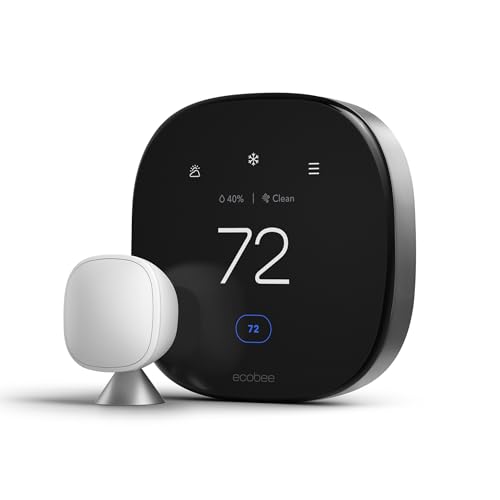
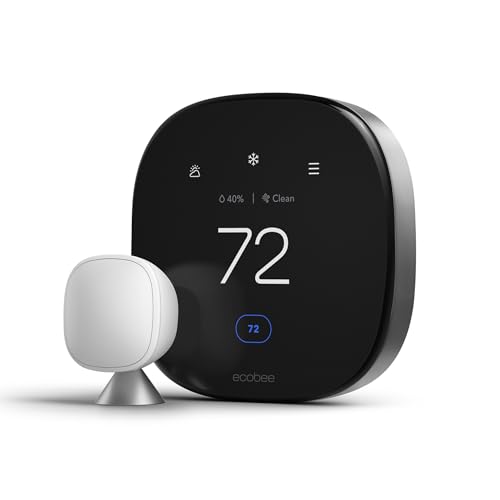
The ecobee Smart Thermostat Premium is the most capable zoning thermostat in this guide, with a SmartSensor included in the box, air quality monitoring, and built-in voice control. It is the pick for a house where rooms run at different temperatures, because the SmartSensor reports the temperature in the room that matters and the thermostat adjusts heating and cooling to that room rather than the hallway. The Premium also monitors air quality and humidity, works with Alexa and Siri, and supports up to 32 sensors across the house.
Verified specs
- SmartSensor included for room-by-room control
- Air quality monitor and humidity sensing
- Alexa and Siri voice control built in
- Supports up to 32 room sensors
- Energy Star certified
Strengths
- Room sensors make zoning work in a single-system house
- Air quality monitoring adds useful data
- Voice control built in, no extra speaker needed
The Premium earns its place because the SmartSensor is the feature that makes multi-zone comfort real in a house with one heating system. Without a sensor, the thermostat only knows the hallway temperature. With a sensor in the bedroom, the thermostat heats or cools until the bedroom is right, which is the room that matters at night. That is zoning without new ductwork.
Before you buy, it is worth checking the practical details that cause most returns. Confirm that the listing shows the exact model name and configuration you expect, because similar models often share a name and differ in one specification that matters. Check the size and the connections against your setup, and make sure you know what is included in the box and what is sold separately. Read the return policy before ordering, and when the product arrives, test it with your real setup in the first few days rather than leaving it in the box. A quick check at the start saves a return later, and it is the simplest way to be sure the product you receive is the one you meant to buy.
Trade-offs
- Premium price compared with simpler thermostats
- Needs a C-wire for power
- Some features need the ecobee app and an account
The Premium costs more than the simpler thermostats in this guide, and the price grows with each extra sensor. For a house with one or two problem rooms, the included sensor and the thermostat itself are enough. For a large house with many zones, the cost of extra sensors adds up, and the Enhanced model below is the cheaper way to expand.
Who it fits best
Houses with rooms that run hot or cold, and anyone who wants air quality data alongside zoning.
Best for: Room-by-room comfort with air quality monitoring
Not suited for: Houses without a C-wire, or very tight budgets
Check price on Amazon: ecobee Smart Thermostat Premium – WiFi, Siri & Alexa Built-In, Smart Sensor

2. Google Nest Learning Thermostat (4th Gen)
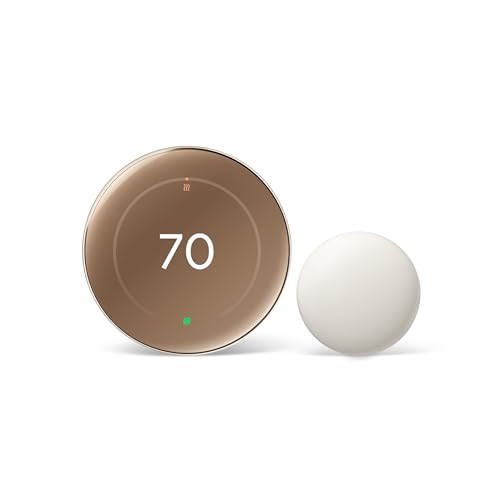
The Google Nest Learning Thermostat (4th Gen) is the most popular smart thermostat in this guide, and it learns the household schedule over the first weeks, then adjusts heating and cooling automatically. It is the pick for people who want zoning without thinking about it, because the included Nest Temperature Sensor reports the temperature in a chosen room and the thermostat targets that room at the right time of day. The 4th Gen model has a larger display, works with Alexa and Google Assistant, and supports multiple sensors across the house.
Verified specs
- Learns the household schedule automatically
- Nest Temperature Sensor included
- Large display with a polished design
- Works with Alexa and Google Assistant
- Energy Star certified
Strengths
- Learns the schedule without programming
- Temperature sensor enables room-based control
- Polished display and simple app
The Nest earns its place because it removes the work from zoning. Most thermostats need schedules programmed by hand, and those schedules drift as routines change. The Nest watches when the house is used and adjusts itself, and the temperature sensor lets it aim at the bedroom at night and the living room in the evening without anyone touching a setting.
Before you buy, it is worth checking the practical details that cause most returns. Confirm that the listing shows the exact model name and configuration you expect, because similar models often share a name and differ in one specification that matters. Check the size and the connections against your setup, and make sure you know what is included in the box and what is sold separately. Read the return policy before ordering, and when the product arrives, test it with your real setup in the first few days rather than leaving it in the box. A quick check at the start saves a return later, and it is the simplest way to be sure the product you receive is the one you meant to buy.
Trade-offs
- Premium price
- Needs a C-wire for power
- Learning takes a few weeks to settle
The Nest costs more than the budget thermostats in this guide, and the learning period means the first two weeks are less efficient than the months that follow. That is a fair trade for a thermostat that manages itself afterwards, but anyone who wants full control from day one may prefer a thermostat with manual schedules.
Who it fits best
Busy households that want the thermostat to manage itself, and Google Home users who want a matching ecosystem.
Best for: Hands-off zoning that learns the household
Not suited for: Houses without a C-wire, or buyers who want full manual control

3. Honeywell Home X8S Premium
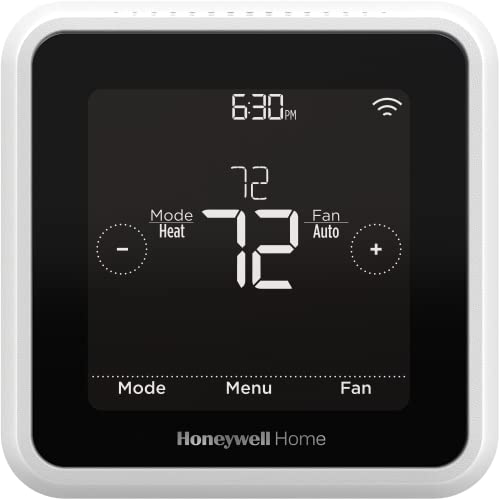
The Honeywell Home X8S Premium is the newest flagship thermostat from Honeywell, with a room sensor, a large customizable touchscreen, and humidity monitoring. It is the pick for people who want a premium thermostat from a brand with a long record in heating controls, because the X8S combines room-sensor zoning with a display that shows the information that matters at a glance. It works with Alexa and Google Assistant, supports geofencing, and carries Energy Star certification.
Verified specs
- Room sensor included for zoning
- Large customizable touchscreen display
- Humidity monitoring
- Geofencing for away and home modes
- Energy Star certified
Strengths
- Room sensor enables zoning in a single-system house
- Large, clear touchscreen
- Long record of reliability from Honeywell
The X8S earns its place because Honeywell has built heating controls for decades, and the X8S brings that experience to a modern smart thermostat. The room sensor does the zoning work, the touchscreen makes the thermostat easy to use without a phone, and the humidity monitoring adds a second measure of comfort beyond temperature alone.
Before you buy, it is worth checking the practical details that cause most returns. Confirm that the listing shows the exact model name and configuration you expect, because similar models often share a name and differ in one specification that matters. Check the size and the connections against your setup, and make sure you know what is included in the box and what is sold separately. Read the return policy before ordering, and when the product arrives, test it with your real setup in the first few days rather than leaving it in the box. A quick check at the start saves a return later, and it is the simplest way to be sure the product you receive is the one you meant to buy.
Trade-offs
- Premium price for a new model
- Needs a C-wire for power
- Fewer third-party integrations than some rivals
The X8S is a new model at a premium price, and the ecosystem around it is smaller than the ecobee or Nest ecosystems. For a house that uses Alexa or Google Assistant, that does not matter. For a house with a complex smart home setup, the ecobee or Nest may connect to more devices.
Who it fits best
Honeywell users and anyone who wants a premium thermostat with a large touchscreen and a room sensor.
Best for: A premium Honeywell thermostat with room sensing
Not suited for: Complex smart home setups, or very tight budgets
Check price on Amazon: Honeywell Home X8S Premium Smart Wi-Fi Thermostat, White

4. Sensi Touch 2
The Sensi Touch 2 is a smart thermostat with a touchscreen, Wi-Fi, and support for Sensi room sensors that balance temperatures across zones. It is the pick for people who want zoning without a complicated setup, because the Touch 2 installs with a straightforward app, works with Alexa, and keeps the interface simple. The thermostat is Energy Star certified, supports geofencing, and works with most heating and cooling systems, including systems without a C-wire in many cases.
Verified specs
- Touchscreen display with simple controls
- Compatible with Sensi room sensors
- Works with Alexa
- Geofencing for away and home modes
- Energy Star certified
Strengths
- Simple setup and app
- Room sensor support for zoning
- Works with many systems, often without a C-wire
The Touch 2 earns its place on ease of use. Smart thermostats can be fiddly to install and configure, and the Sensi app walks through the wiring step by step. For a house where the installer is the homeowner, that guidance matters, and the room sensors add zoning without adding complexity to daily use.
Before you buy, it is worth checking the practical details that cause most returns. Confirm that the listing shows the exact model name and configuration you expect, because similar models often share a name and differ in one specification that matters. Check the size and the connections against your setup, and make sure you know what is included in the box and what is sold separately. Read the return policy before ordering, and when the product arrives, test it with your real setup in the first few days rather than leaving it in the box. A quick check at the start saves a return later, and it is the simplest way to be sure the product you receive is the one you meant to buy.
Trade-offs
- Fewer premium features than ecobee or Nest
- Room sensors sold separately
- No built-in voice assistant
The Touch 2 does not monitor air quality and has no voice assistant built in, so it is a simpler thermostat than the premium picks. The room sensors are also sold separately, which adds cost when zoning is the goal. For a house that needs zoning and simplicity rather than premium features, that is a fair trade.
Who it fits best
First-time smart thermostat buyers and anyone who wants simple zoning with room sensors.
Best for: Simple zoning with an easy setup
Not suited for: Buyers who want air quality monitoring or built-in voice control
Check price on Amazon: Sensi Touch 2 Smart Thermostat Wi-Fi, Alexa, Energy Star Certified, ST76
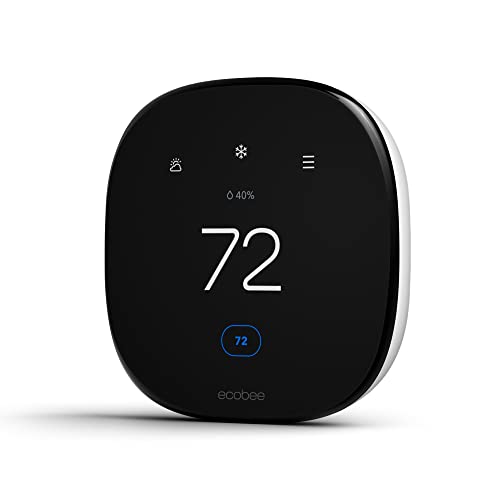
5. ecobee Smart Thermostat Enhanced
The ecobee Smart Thermostat Enhanced is the lower-cost version of the ecobee Premium, with the same room-sensor zoning and the same app, but without the air quality monitor and built-in voice control. It is the pick for people who want ecobee zoning without paying for premium features they will not use, because the Enhanced supports the same SmartSensors and the same multi-zone logic as the Premium. It works with Siri, Alexa, and Google Assistant, and it carries Energy Star certification.
Verified specs
- Supports ecobee SmartSensors for zoning
- Programmable Wi-Fi thermostat
- Works with Siri, Alexa, and Google Assistant
- Energy Star certified
- Lower price than the Premium model
Strengths
- Same zoning as the Premium at a lower price
- Works with the full ecobee sensor range
- Simple, reliable app
The Enhanced earns its place because it is the sensible ecobee. The Premium adds air quality monitoring and voice control, but the zoning itself is the same, and the sensors are the same. For a house that needs room-by-room control and already has a voice speaker, the Enhanced delivers the feature that matters at a lower price.
Before you buy, it is worth checking the practical details that cause most returns. Confirm that the listing shows the exact model name and configuration you expect, because similar models often share a name and differ in one specification that matters. Check the size and the connections against your setup, and make sure you know what is included in the box and what is sold separately. Read the return policy before ordering, and when the product arrives, test it with your real setup in the first few days rather than leaving it in the box. A quick check at the start saves a return later, and it is the simplest way to be sure the product you receive is the one you meant to buy.
Trade-offs
- No air quality monitor
- No built-in voice assistant
- SmartSensor sold separately
The Enhanced ships without a sensor, so the first room sensor is an extra purchase. That is worth knowing before ordering: the thermostat alone can only read the hallway, and zoning starts when the first sensor arrives. Buy the thermostat and at least one sensor together to get the benefit from day one.
Who it fits best
Budget-conscious buyers who want ecobee zoning, and homes that already have voice speakers.
Best for: ecobee zoning without the premium price
Not suited for: Buyers who want air quality data or built-in voice control
Check price on Amazon: ecobee Smart Thermostat Enhanced, Programmable Wifi Thermostat

6. Honeywell Home T5
The Honeywell Home T5 is a budget smart thermostat with a 7-day programmable touchscreen, Wi-Fi, and geofencing. It is the pick for houses with zone dampers or separate heating systems, because those houses need one thermostat per zone, and the T5 keeps the cost of each zone low. The T5 works with Alexa, supports geofencing so heating adjusts when the house is empty, and installs with a straightforward app.
Verified specs
- 7-day programmable touchscreen
- Wi-Fi with app control
- Geofencing for away and home modes
- Alexa ready
- Low price per zone
Strengths
- Low cost makes multi-thermostat zoning affordable
- Simple 7-day programming
- Geofencing saves energy when the house is empty
The T5 earns its place because multi-zone houses need more than one thermostat, and the cost multiplies with each zone. A premium thermostat in every zone is expensive; the T5 delivers the essentials — scheduling, app control, and geofencing — at a price that makes three or four zones affordable. For a zoned house, that is the right way to spend the budget.
Before you buy, it is worth checking the practical details that cause most returns. Confirm that the listing shows the exact model name and configuration you expect, because similar models often share a name and differ in one specification that matters. Check the size and the connections against your setup, and make sure you know what is included in the box and what is sold separately. Read the return policy before ordering, and when the product arrives, test it with your real setup in the first few days rather than leaving it in the box. A quick check at the start saves a return later, and it is the simplest way to be sure the product you receive is the one you meant to buy.
Trade-offs
- No room sensor support
- No air quality monitoring
- Simpler display than premium models
The T5 has no room sensor, so it reads the temperature where it is mounted. In a zoned house that is fine, because each zone has its own thermostat in its own room. In a single-system house, the T5 cannot do what the sensor thermostats do, and one of the sensor picks is the better buy.
Who it fits best
Houses with zone dampers or separate systems that need one thermostat per zone.
Best for: Affordable zoning with one thermostat per zone
Not suited for: Single-system houses that need room sensors
Check price on Amazon: Honeywell Home T5 Smart Wi-Fi Thermostat

7. Mysa Smart Thermostat for Heating and Cooling
The Mysa Smart Thermostat for Heating and Cooling is the pick for homes with electric heat, because it controls each room separately and brings zoning to houses that other smart thermostats cannot serve. Many smart thermostats only work with central forced-air systems, but Mysa controls electric baseboard heaters, in-floor heating, and cooling systems room by room, with a 7-day schedule, Wi-Fi control, and Energy Star certification. Each room gets its own thermostat and its own target, which is true zoning without ductwork.
Verified specs
- Controls electric baseboard and in-floor heating
- Heating and cooling control in one thermostat
- 7-day programmable schedule
- Wi-Fi with app control
- Energy Star certified
Strengths
- True per-room zoning for electric heat
- Works where central thermostats cannot
- Simple scheduling and app control
The Mysa earns its place because it serves the houses other thermostats ignore. Electric heat is common in apartments, additions, and older homes, and those houses have no ducts for a central thermostat to control. Mysa puts a thermostat in each room and controls the heat in that room alone, which is the most direct form of zoning there is.
Before you buy, it is worth checking the practical details that cause most returns. Confirm that the listing shows the exact model name and configuration you expect, because similar models often share a name and differ in one specification that matters. Check the size and the connections against your setup, and make sure you know what is included in the box and what is sold separately. Read the return policy before ordering, and when the product arrives, test it with your real setup in the first few days rather than leaving it in the box. A quick check at the start saves a return later, and it is the simplest way to be sure the product you receive is the one you meant to buy.
Trade-offs
- Only for electric heat and compatible cooling systems
- Needs one thermostat per room
- No room sensor option
Mysa is a specialist: it does not work with a gas furnace or a central forced-air system, so check the heating type before ordering. Each room needs its own thermostat, so the cost grows with the number of rooms. For electric-heat homes, though, there is no simpler way to get room-by-room control.
Who it fits best
Homes with electric baseboard or in-floor heating, and apartments where each room needs its own control.
Best for: Per-room zoning for electric heat
Not suited for: Gas furnaces or central forced-air systems
Check price on Amazon: NEW Mysa Smart Thermostat for Heating & Cooling
Buying guide
Warranties, returns, and checking your purchase
Most products in this guide come with a manufacturer warranty, and the length and coverage vary by brand, so check the warranty terms before you buy rather than after something goes wrong. Keep the packaging until you have tested the product, because a return is much easier with the original box. When the product arrives, check that the model name, the configuration, and the included accessories match the listing, and test it with your real setup in the first few days. If anything is wrong, contact the seller promptly, because return windows are limited and the first week is the time to find problems.
Map the zones before buying
Walk the house and note which rooms run hot or cold, and when. A bedroom that overheats at night, a living room that stays cold in the morning, and a home office above the garage are three different zones with three different needs. That map decides how many thermostats or sensors are needed, and it stops the common mistake of buying one thermostat and hoping it fixes every room.
Check the wiring and the C-wire
Most smart thermostats need a C-wire for constant power. Look at the existing thermostat wiring: a C-wire is usually blue and connects to the C terminal. If there is no C-wire, check whether the thermostat supports a power adapter or works without one — some models do, and some do not. A missing C-wire is the most common reason a smart thermostat install stalls.
Place room sensors where people live
A room sensor belongs in the room that matters, at about chest height, away from direct sun, drafts, and heat sources. A sensor on a sunny windowsill reads hot all afternoon and heats the house wrong. A sensor in the bedroom controls the night temperature, and a sensor in the living room controls the evening. Place sensors where people sit, not where they are easy to reach.
Use schedules and geofencing together
A schedule sets the temperature for each zone through the day, and geofencing adjusts it when the house is empty. Together they save energy without thinking: the house warms before arrival and cools when everyone leaves. Set the schedule first, then add geofencing, and check the first week to confirm the house is comfortable at the times that matter.
Test one zone before expanding
Install the thermostat and the first sensor, then live with it for a week before buying more sensors. That week shows whether the zoning works as expected and whether the sensor placement is right. Expanding after a successful test is cheaper than buying every sensor at once and discovering a placement problem later.
How to use and care for your pick
Keep the thermostat screen clean with a dry cloth, and check the app occasionally for firmware updates, because updates fix bugs and sometimes add features. Replace room sensor batteries when the app reports low battery, and keep sensors away from direct sun and drafts so their readings stay accurate. Check the schedule each season, because a heating schedule that worked in winter is wrong for summer. If the house has a filter, change it on schedule, because a clogged filter makes every zone work harder.
Common mistakes to avoid
The most common mistake is buying a smart thermostat without checking the C-wire, which stalls the install. The second is placing a room sensor in direct sun or near a draft, which gives false readings and heats the house wrong. The third is buying every sensor at once before testing one zone. The fourth is setting every zone to the same temperature, which defeats the point of zoning. A fifth mistake is ignoring the filter and the heating system itself: a thermostat cannot fix a clogged filter or a failing furnace, and those need attention first.
Final recommendation
For most houses with one heating system and rooms that run at different temperatures, the ecobee Smart Thermostat Premium is the pick: a sensor in the box, air quality monitoring, and zoning that works. Buyers who want a lower price should choose the ecobee Enhanced and add a sensor, or the Sensi Touch 2 for a simpler setup. Google Home users should choose the Nest Learning Thermostat (4th Gen) for its learning schedule, Honeywell users should choose the X8S Premium, houses with zone dampers should use the Honeywell T5 one per zone, and electric-heat homes should choose Mysa one per room. Install the thermostat and the first sensor, live with the system for a week, and only then buy more sensors, so the zoning is proven before the full investment.
Frequently asked questions
What is a multi zone smart thermostat?
A multi zone smart thermostat controls heating and cooling in more than one area of a house. It does this with room sensors that report temperatures from different rooms, or by using one thermostat per zone in a house with zone dampers or separate systems. Each zone gets its own temperature target.
Do I need a separate thermostat for each zone?
It depends on the house. A house with zone dampers or separate heating systems needs one thermostat per zone. A house with a single heating system can use one thermostat with wireless room sensors, which is cheaper and simpler to install.
What is a C-wire and do I need one?
A C-wire provides constant power to a smart thermostat. Most smart thermostats need one, and it is usually a blue wire connected to the C terminal. Some models work without a C-wire or with a power adapter, so check the model before buying if the existing wiring has no C-wire.
How do room sensors help with zoning?
A room sensor reports the temperature in a specific room, and the thermostat heats or cools until that room reaches its target. Without a sensor, the thermostat only knows the temperature where it is mounted, usually a hallway. With sensors, the bedroom can be cool at night while the living room stays warm.
Can a smart thermostat save energy?
Yes. Schedules, geofencing, and room sensors reduce heating and cooling in empty rooms and at times when the house is not used. Savings depend on the house and the climate, but a zoned system wastes less energy than a single thermostat heating the whole house to one temperature.
Will a smart thermostat work with electric baseboard heat?
Most central smart thermostats do not work with electric baseboard heat. The Mysa thermostat in this guide is made for electric heat and controls each room separately. Check the heating type before buying any smart thermostat.
Can I install a smart thermostat myself?
Yes, in most houses. A smart thermostat install usually takes 30 to 60 minutes: turn off the heating system power, photograph the existing wiring, label each wire, mount the new thermostat, and connect the wires to the matching terminals. The app walks through the setup step by step. If the wiring has no C-wire or looks unusual, call a heating technician rather than guessing, because wrong wiring can damage the system.
More from Reviewstook
If this guide helped, these related guides cover the rest of your setup: Best wireless home security cameras, Best doorbell cameras with costs, Best residential smoke detectors.
Conclusion
A multi zone smart thermostat ends the argument about the temperature in the house, because each room gets its own target and its own sensor. The seven thermostats in this guide cover the ways to get there: room sensors for a single-system house, one thermostat per zone for a zoned house, and per-room control for electric heat. Map the zones, check the wiring, and test one zone before expanding.
Start with the ecobee Smart Thermostat Premium for the most capable zoning, choose the Enhanced or the Sensi Touch 2 for a lower price, and pick the Nest Learning Thermostat for a schedule that learns itself. Houses with dampers should use the Honeywell T5 per zone, and electric-heat homes should use Mysa per room. Whichever pick fits the house, the result is a home that feels right in every room. The right thermostat is the one that matches the heating system and the zones, and the seven picks in this guide cover every combination of house and heat.