A wireless home security camera has one job: to show you what is happening around your home, day and night, without a tangle of cables or a complicated installation. The best ones do that with a clear picture, reliable motion alerts, and a battery or solar panel that keeps them running for months, and they do it without a subscription if you choose carefully. The worst ones flood you with false alerts, die at the wrong moment, or lock your recordings behind a monthly fee.
This guide focuses on wireless cameras and camera systems that are genuinely wire-free, which means battery or solar power and a Wi-Fi connection rather than a cable run to every corner of the house. Every pick below records in at least 1080p, and most record in 2K, which gives you enough detail to recognize a face or read a license plate in good light. We compared them on video quality, power, storage, night vision, and whether they need a subscription, and we favored systems that cover more than one angle of the house for a single price.
One honest note before the list: most of the cameras here are sold as multi-camera kits, and that is deliberate. A single camera covers one doorway, but a four-camera kit covers the front door, the back door, the driveway, and a side gate, which is what home security actually requires. The per-camera cost of a kit is far lower than buying cameras one at a time, and the kits below are priced as systems rather than single units. If you only need one camera, the single-camera picks in the list still work, but a kit is usually the better value.
In this guide
Quick picks: best wireless home security cameras
| # | Product | Where to buy |
|---|---|---|
| 1 | GMK 4 Pack Cameras System, Security Cameras Wireless Outdoor, 2K Video | Check on Amazon |
| 2 | 2K Security Camera System, 5GHz&2.4GHz WiFi Solar Wireless Cameras for Home Security, Wire-free Installation, AI Detecti | Check on Amazon |
| 3 | Blink Outdoor 4 – Wireless smart security camera, two-year battery life, 1080p HD day and infrared night live view, two- | Check on Amazon |
| 4 | Rraycom 5G/2.4G Security Cameras Wireless Outdoor,4Pack Cameras System | Check on Amazon |
| 5 | aosu D1 Classic 4-Cam Kit, Security Cameras Wireless Outdoor, Solar Powered | Check on Amazon |
| 6 | eufy Security eufyCam C37 4-Cam Kit, 360° Pan&Tilt Auto Tracking | Check on Amazon |
Quick comparison
| # | Product | Best for |
|---|---|---|
| 1 | GMK 4 Pack Cameras System, Security Cameras Wireless Outdoor, 2K Video | Four-camera 2K wireless system with color night vision |
| 2 | 2K Security Camera System, 5GHz and 2.4GHz WiFi Solar Wireless Cameras | Solar-powered 2K system with dual-band Wi-Fi |
| 3 | Blink Outdoor 4, Wireless Smart Security Camera | Blink Outdoor 4 with two-year battery life |
| 4 | Rraycom 5G and 2.4G Security Cameras Wireless Outdoor, 4-Pack | Four-pack wireless system with AI motion detection and siren |
| 5 | aosu D1 Classic 4-Cam Kit, Security Cameras Wireless Outdoor, Solar Powered | Solar-powered four-cam kit with no subscription required |
| 6 | eufy Security eufyCam C37 4-Cam Kit, 360-Degree Pan and Tilt | Four-cam eufy kit with pan, tilt, and auto tracking |
The table above is a shortcut, not a verdict. Two products can look close on a spec line and feel very different in daily use, so use it to narrow the field to two or three candidates, then read those full sections before deciding.

1. GMK 4 Pack Cameras System, Security Cameras Wireless Outdoor, 2K Video
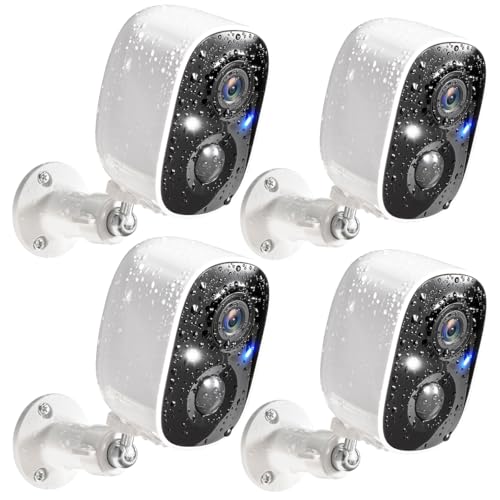
The GMK four-pack is a complete wireless camera system rather than a single camera, and that is its main appeal. Four cameras cover the front door, the back door, the driveway, and a side entrance in one purchase, and the 2K video resolution gives you more detail than 1080p when you need to identify a person or a vehicle. The color night vision is a genuine step up from infrared black-and-white, because it preserves the color of clothing and cars at night, and the motion detection alerts you when something actually moves rather than recording empty hours.
On paper, the headline facts are straightforward: Four-camera wireless system; 2K video resolution; Color night vision; Motion detection; VicoHome app support. None of that makes it the right pick for everyone, but it does define the audience clearly. If those headline facts match what you actually need day to day, this is a shortlist candidate rather than a curiosity. If they do not match, the rest of this section will make that obvious quickly, and you can move on to the next pick without losing anything.
What stands out
- Four-camera wireless system
- 2K video resolution
- Color night vision
- Motion detection
- VicoHome app support
The four-camera kit is the value story here: buying four cameras as a system costs far less per camera than buying them individually, and it covers a whole house in one installation. The 2K resolution and color night vision give you usable evidence rather than a blurry silhouette, and the wireless design means each camera can go where it is needed without a cable run. For a first home security system, this is a complete starting point.
Before you buy, it is worth checking the practical details that cause most returns. Confirm that the listing shows the exact model name and configuration you expect, because similar models often share a name and differ in one specification that matters. Check the size and the connections against your setup, and make sure you know what is included in the box and what is sold separately. Read the return policy before ordering, and when the product arrives, test it with your real setup in the first few days rather than leaving it in the box. A quick check at the start saves a return later, and it is the simplest way to be sure the product you receive is the one you meant to buy.
Trade-offs to weigh
A four-camera system needs four good Wi-Fi spots and four mounting points, so the installation is a bigger job than a single camera, even though each camera is wireless. Battery life depends on how often motion triggers recording, and a busy street can drain batteries faster than a quiet one. The cameras also depend on your Wi-Fi network, so a weak signal at the far end of the house will affect them.
Who it fits best
Best for homeowners who want to cover a whole house in one purchase and who value 2K video and color night vision over a single-camera setup.
Check price on Amazon: GMK 4 Pack Cameras System, Security Cameras Wireless Outdoor, 2K Video

2. 2K Security Camera System, 5GHz and 2.4GHz WiFi Solar Wireless Cameras
This 2K security camera system pairs solar power with dual-band Wi-Fi, and both features solve real problems. Solar power means the cameras recharge themselves in daylight, so you are not climbing a ladder to swap batteries every few months, and dual-band Wi-Fi means the cameras can use the faster 5GHz band close to the router or fall back to the longer-range 2.4GHz band at the far end of the house. The AI detection is designed to tell people and vehicles apart from passing animals and swaying branches, which is the difference between useful alerts and constant noise.
On paper, the headline facts are straightforward: 2K video resolution; Solar powered wireless cameras; 5GHz and 2.4GHz Wi-Fi support; AI detection; Wire-free installation. None of that makes it the right pick for everyone, but it does define the audience clearly. If those headline facts match what you actually need day to day, this is a shortlist candidate rather than a curiosity. If they do not match, the rest of this section will make that obvious quickly, and you can move on to the next pick without losing anything.
What stands out
- 2K video resolution
- Solar powered wireless cameras
- 5GHz and 2.4GHz Wi-Fi support
- AI detection
- Wire-free installation
Solar power is the standout feature, because it removes the main maintenance chore of wireless cameras and keeps them running through the seasons. The dual-band Wi-Fi gives you flexibility in placement, since 2.4GHz reaches further through walls than 5GHz, and the 2K resolution provides the detail needed to identify what the camera sees. The AI detection, if it works as described, cuts down on the false alerts that make many owners ignore their cameras entirely.
Before you buy, it is worth checking the practical details that cause most returns. Confirm that the listing shows the exact model name and configuration you expect, because similar models often share a name and differ in one specification that matters. Check the size and the connections against your setup, and make sure you know what is included in the box and what is sold separately. Read the return policy before ordering, and when the product arrives, test it with your real setup in the first few days rather than leaving it in the box. A quick check at the start saves a return later, and it is the simplest way to be sure the product you receive is the one you meant to buy.
Trade-offs to weigh
Solar panels need sunlight to work, so a camera mounted under a deep eave or on a north-facing wall will charge slowly, and winter days are shorter everywhere. The AI detection is only as good as its implementation, and no AI system is perfect at telling a person from a large dog. The system also depends on a stable Wi-Fi network, so homes with weak coverage at the edges will need a better router or an extender.
Who it fits best
Best for sunny locations where solar charging works well, and for homeowners who want a low-maintenance system they do not have to think about.

3. Blink Outdoor 4, Wireless Smart Security Camera
The Blink Outdoor 4 is the battery-life champion of this list, with a claimed two-year battery life that is far longer than most wireless cameras manage. It records in 1080p HD, which is enough to recognize people and activity around the house, and it has infrared night vision for after-dark coverage. The camera is designed to work with Alexa, so you can view the feed on an Echo Show or receive announcements when motion is detected, and the whole system is built around simplicity: set it up, mount it, and forget about it for months at a time.
On paper, the headline facts are straightforward: Two-year battery life; 1080p HD video; Infrared night vision; Wireless smart security camera; Works with Alexa. None of that makes it the right pick for everyone, but it does define the audience clearly. If those headline facts match what you actually need day to day, this is a shortlist candidate rather than a curiosity. If they do not match, the rest of this section will make that obvious quickly, and you can move on to the next pick without losing anything.
What stands out
- Two-year battery life
- 1080p HD video
- Infrared night vision
- Wireless smart security camera
- Works with Alexa
The two-year battery life is the feature that changes how you use a security camera, because it removes the chore of recharging and means the camera is always on when you need it. The Blink system is one of the simplest to set up and use, and the Alexa integration is genuinely useful for hands-free viewing. The 1080p video is sharp enough for everyday security, and the compact design is easy to mount anywhere.
Before you buy, it is worth checking the practical details that cause most returns. Confirm that the listing shows the exact model name and configuration you expect, because similar models often share a name and differ in one specification that matters. Check the size and the connections against your setup, and make sure you know what is included in the box and what is sold separately. Read the return policy before ordering, and when the product arrives, test it with your real setup in the first few days rather than leaving it in the box. A quick check at the start saves a return later, and it is the simplest way to be sure the product you receive is the one you meant to buy.
Trade-offs to weigh
The 1080p resolution is lower than the 2K cameras on this list, so fine detail at a distance will be less clear. The two-year battery claim assumes typical use, and a camera that triggers constantly will drain faster. Some Blink features, including cloud storage, require a subscription, so check what is included before buying if you want to avoid a monthly fee.
Who it fits best
Best for Alexa households and for anyone who wants a set-and-forget camera with the longest battery life on this list.

4. Rraycom 5G and 2.4G Security Cameras Wireless Outdoor, 4-Pack
The Rraycom four-pack is a wireless outdoor camera system with a feature the others lack: a built-in siren. When the AI motion detection spots a person where they should not be, the siren can sound an alarm, which turns the camera from a passive recorder into an active deterrent. The cameras record in 2K, run on battery power, and connect over both 5GHz and 2.4GHz Wi-Fi, so they can be placed wherever they are needed without a cable run or a power outlet.
On paper, the headline facts are straightforward: Four-pack camera system; 2K battery-powered video; AI motion detection; Built-in siren; 5GHz and 2.4GHz Wi-Fi. None of that makes it the right pick for everyone, but it does define the audience clearly. If those headline facts match what you actually need day to day, this is a shortlist candidate rather than a curiosity. If they do not match, the rest of this section will make that obvious quickly, and you can move on to the next pick without losing anything.
What stands out
- Four-pack camera system
- 2K battery-powered video
- AI motion detection
- Built-in siren
- 5GHz and 2.4GHz Wi-Fi
The siren is the standout feature, because a camera that only records is less useful than one that can also scare off an intruder, and the AI motion detection is meant to trigger it only for people rather than for every passing cat. The four-pack covers a whole house in one purchase, and the 2K resolution gives you usable detail. The dual-band Wi-Fi makes placement flexible, and the battery power means no electrician is needed.
Before you buy, it is worth checking the practical details that cause most returns. Confirm that the listing shows the exact model name and configuration you expect, because similar models often share a name and differ in one specification that matters. Check the size and the connections against your setup, and make sure you know what is included in the box and what is sold separately. Read the return policy before ordering, and when the product arrives, test it with your real setup in the first few days rather than leaving it in the box. A quick check at the start saves a return later, and it is the simplest way to be sure the product you receive is the one you meant to buy.
Trade-offs to weigh
A siren is only useful if it triggers at the right time, and no AI detection is perfect, so false alarms are possible and a siren that cries wolf will be ignored or switched off. The four cameras need four good Wi-Fi spots, and battery life depends on how often they record. The system also needs a strong enough network at the edges of the house to work reliably.
Who it fits best
Best for homeowners who want an active deterrent as well as recording, and who want to cover multiple entrances with one system.
Check price on Amazon: Rraycom 5G/2.4G Security Cameras Wireless Outdoor,4Pack Cameras System

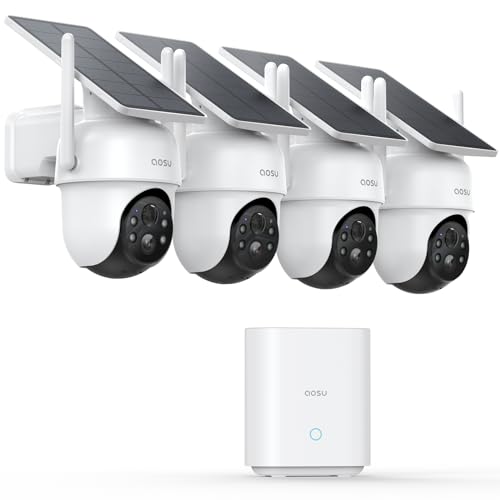
5. aosu D1 Classic 4-Cam Kit, Security Cameras Wireless Outdoor, Solar Powered
The aosu D1 Classic four-cam kit is built around two promises that matter to a lot of buyers: solar power and no subscription required. The solar panels keep the cameras charged without battery swaps, and the 32GB of built-in storage means your recordings are stored locally rather than in a cloud service that charges every month. Four cameras cover the main angles of a house in one kit, and the wireless design means each camera can be mounted where it is needed without running cables.
On paper, the headline facts are straightforward: Four-camera kit; Solar powered; No subscription required; 32GB built-in storage; Wireless outdoor cameras. None of that makes it the right pick for everyone, but it does define the audience clearly. If those headline facts match what you actually need day to day, this is a shortlist candidate rather than a curiosity. If they do not match, the rest of this section will make that obvious quickly, and you can move on to the next pick without losing anything.
What stands out
- Four-camera kit
- Solar powered
- No subscription required
- 32GB built-in storage
- Wireless outdoor cameras
No subscription required is the feature that saves money every month, and it is surprisingly rare among wireless cameras, many of which lock basic features behind a paywall. The solar power removes the battery chore, and the built-in 32GB of storage is enough for a rolling record of recent events. The four-camera kit covers a whole house, and the wireless installation keeps the setup simple.
Before you buy, it is worth checking the practical details that cause most returns. Confirm that the listing shows the exact model name and configuration you expect, because similar models often share a name and differ in one specification that matters. Check the size and the connections against your setup, and make sure you know what is included in the box and what is sold separately. Read the return policy before ordering, and when the product arrives, test it with your real setup in the first few days rather than leaving it in the box. A quick check at the start saves a return later, and it is the simplest way to be sure the product you receive is the one you meant to buy.
Trade-offs to weigh
Thirty-two gigabytes of built-in storage is finite, and it will fill up faster if the cameras record often, so the system will overwrite older footage sooner in a busy location. Solar charging needs sunlight, so shaded mounting spots will charge slowly. The cameras also depend on Wi-Fi, so the far corners of a large property may need a stronger network.
Who it fits best
Best for buyers who refuse to pay a monthly subscription and want a solar-powered, low-maintenance system that covers the whole house.
Check price on Amazon: aosu D1 Classic 4-Cam Kit, Security Cameras Wireless Outdoor, Solar Powered
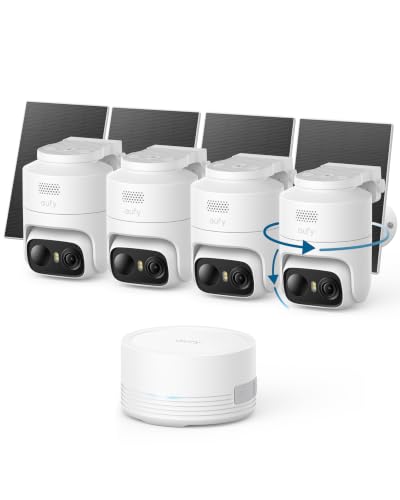
6. eufy Security eufyCam C37 4-Cam Kit, 360-Degree Pan and Tilt
The eufy eufyCam C37 four-cam kit is the most capable system on this list, and the reason is movement: each camera can pan 360 degrees and tilt, and it can automatically track a person or vehicle as it moves across the yard. A fixed camera sees one angle, but a pan-and-tilt camera can follow the action, which means fewer blind spots and more useful footage. The cameras record in 2K, run on solar power, and include human and vehicle detection, so the alerts are meant to be about people and cars rather than every moving branch.
On paper, the headline facts are straightforward: Four-camera kit; 360-degree pan and tilt; Auto tracking; 2K solar-powered wireless camera; Human and vehicle detection. None of that makes it the right pick for everyone, but it does define the audience clearly. If those headline facts match what you actually need day to day, this is a shortlist candidate rather than a curiosity. If they do not match, the rest of this section will make that obvious quickly, and you can move on to the next pick without losing anything.
What stands out
- Four-camera kit
- 360-degree pan and tilt
- Auto tracking
- 2K solar-powered wireless camera
- Human and vehicle detection
The pan, tilt, and auto-tracking combination is the standout, because it turns each camera into a flexible observer rather than a fixed peephole, and it covers more ground with fewer cameras. The eufy brand is well established in home security, and the solar power plus 2K resolution match the best systems here. Human and vehicle detection helps keep alerts relevant, which is what makes owners actually pay attention to them.
Before you buy, it is worth checking the practical details that cause most returns. Confirm that the listing shows the exact model name and configuration you expect, because similar models often share a name and differ in one specification that matters. Check the size and the connections against your setup, and make sure you know what is included in the box and what is sold separately. Read the return policy before ordering, and when the product arrives, test it with your real setup in the first few days rather than leaving it in the box. A quick check at the start saves a return later, and it is the simplest way to be sure the product you receive is the one you meant to buy.
Trade-offs to weigh
A moving camera has more parts that can wear out than a fixed one, and the pan-and-tilt mechanism adds complexity. The four-cam kit is also a larger investment than a single camera, and the system needs a strong Wi-Fi network to stream 2K video from four moving cameras. Solar charging still needs sunlight, so shaded spots will charge slowly.
Who it fits best
Best for homeowners who want the most capable system on this list, with cameras that follow movement and cover large yards with fewer blind spots.
Check price on Amazon: eufy Security eufyCam C37 4-Cam Kit, 360° Pan&Tilt Auto Tracking
Buying guide
Warranties, returns, and checking your purchase
Most products in this guide come with a manufacturer warranty, and the length and coverage vary by brand, so check the warranty terms before you buy rather than after something goes wrong. Keep the packaging until you have tested the product, because a return is much easier with the original box. When the product arrives, check that the model name, the configuration, and the included accessories match the listing, and test it with your real setup in the first few days. If anything is wrong, contact the seller promptly, because return windows are limited and the first week is the time to find problems.
Wired or wireless: which is right for you?
Wireless cameras win on installation and lose on reliability compared with wired cameras. A wireless camera can be mounted anywhere with a Wi-Fi signal and no cable run, which makes it the right choice for most homes, especially rentals. A wired camera never needs recharging and never drops off the Wi-Fi, but it needs a cable to every mounting point, which is a project. For most households, wireless is the right starting point, and the battery or solar power on modern cameras is good enough that the trade is worth it.
Resolution: 1080p or 2K?
Resolution decides how much detail you can see in a recording. At 1080p you can recognize a person and see what happened; at 2K you can read a license plate or recognize a face at a greater distance, which matters if the camera covers a driveway or a street. The difference is real but not dramatic, and a well-placed 1080p camera beats a poorly placed 2K camera every time. Choose 2K if the camera covers a large area, and do not worry about it if it covers a doorway.
Battery, solar, or wired power?
Battery cameras need recharging every few months, and the interval depends on how often they record. Solar panels remove that chore in sunny spots but charge slowly in shade or winter. Wired power removes the question entirely but needs an outlet or a cable. For most homes, solar is the best compromise if the mounting spot gets sun, and a long-life battery camera like the Blink is the best choice if it does not.
Storage and subscriptions
Recordings have to live somewhere, and the options are local storage or the cloud. Local storage, whether built in or on a hub, costs nothing every month but can fill up and be lost if the camera is stolen. Cloud storage is safer and easier to access, but it usually requires a subscription, and the monthly cost adds up over the life of the camera. Before buying, check what is free and what requires a subscription, because the subscription can cost more than the camera over a few years.
Night vision: infrared or color?
Infrared night vision produces a clear black-and-white image in total darkness, and it works well for detecting movement and recognizing shapes. Color night vision uses a low-light sensor and sometimes a spotlight to preserve color at night, which helps identify clothing and vehicles. Color night vision is better when it works, but it needs some ambient light, while infrared works in complete darkness. For a front door or driveway, color night vision is a real advantage; for a dark backyard, infrared is more reliable.
Placement: where to put your cameras
The front door is the first camera, because most visitors and most intruders come through it. The back door and the driveway are next, and a side gate or a garage entrance follows. Mount cameras high enough that they cannot be easily reached or tampered with, but not so high that they only see the tops of heads. Angle them slightly downward, keep them out of direct rain where possible, and test the Wi-Fi signal at each mounting point before you commit to it.
How many cameras do you need?
Most homes need three to five cameras: the front door, the back door, the driveway, and one or two side angles. A single camera covers one entrance, but a burglar does not have to use the front door, so coverage of the back and sides matters as much as the front. A four-camera kit is the most common starting point because it covers the main angles in one purchase, and it costs far less per camera than buying individually. Start with the entrances, then add cameras for blind spots like a side gate or a garage entrance if the budget allows. More cameras are not always better: each one adds alerts, storage use, and maintenance, so cover the entrances first and expand only where there is a real gap.
Frequently asked questions
Do wireless security cameras need Wi-Fi?
Yes, almost all wireless cameras need Wi-Fi to send alerts and let you view the feed remotely. Some systems use a dedicated hub that connects to your router, which can be more reliable than a direct Wi-Fi connection. If your Wi-Fi does not reach the mounting point, the camera will not work reliably, so check the signal strength before you install.
How long do wireless camera batteries last?
It depends on the camera and how often it records. A camera that triggers a few times a day can last several months, while a camera facing a busy street may last only a few weeks. Solar panels extend the interval indefinitely in sunny spots, and cameras with very long claimed battery life, like the Blink Outdoor 4, are designed for low-trigger locations.
Do I need a subscription for a wireless security camera?
It depends on the brand. Some cameras store recordings locally for free, while others require a subscription for cloud storage, extended history, or advanced detection. Before buying, check exactly what is free and what costs extra, because a subscription can add up to more than the camera itself over a few years.
Can wireless cameras work without internet?
Most wireless cameras need the internet for remote viewing and alerts, but some can record locally to built-in storage or a hub even when the internet is down. If your internet goes out, you will usually lose remote access, but local recording may continue. Check the specific camera’s offline behavior if this matters to you.
Are wireless security cameras easy to install?
Yes, that is their main advantage. Most wireless cameras mount with a few screws or a magnetic bracket, connect to Wi-Fi through an app, and are working within minutes. The hardest part is usually choosing the mounting spot and making sure the Wi-Fi signal is strong enough there, so test the signal before you drill any holes.
Conclusion
The best wireless home security camera system depends on what you value most. The eufy eufyCam C37 kit is the most capable system here, with cameras that pan, tilt, and track movement. The aosu D1 Classic is the best choice if you refuse to pay a subscription, with solar power and local storage. The Blink Outdoor 4 is the simplest single camera, with a two-year battery life that removes maintenance entirely. And the GMK and Rraycom four-packs are the best value for covering a whole house in one purchase. Whichever you choose, mount it high, test the Wi-Fi, and check the subscription terms before you buy.
Start with the entrances: the front door, the back door, and the driveway. A four-camera kit covers those in one purchase and costs far less per camera than buying individually, so it is usually the best value. Once the cameras are up, test the alerts for a week and adjust the sensitivity until you get alerts that matter and ignore the ones that do not. A security camera you actually pay attention to is worth far more than a system you learn to ignore.