Disclosure: As an Amazon Associate, reviewstook.com earns from qualifying purchases. Links on this page are affiliate links; they cost you nothing extra. Prices and availability change often, so check the current Amazon listing before you buy.
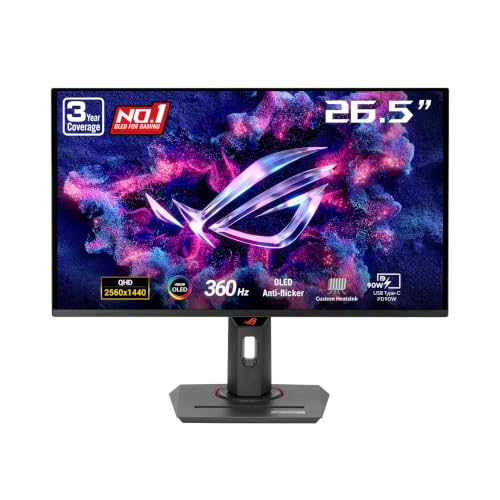
The rog strix oled xg27acdng is a 26.5-inch QD-OLED gaming monitor that makes a specific, confident bet: that at the sharp end of gaming, the winning combination is 1440p resolution, a 360Hz refresh rate, and OLED’s per-pixel light — speed and contrast together, with resolution set exactly where a flagship graphics card can feed the frame rate the panel can show. Its specification per the listing is the competitive wish list written out: QHD at 360Hz, a 0.03ms response class, a custom heatsink and the OLED Care+ suite managing the panel’s longevity, G-SYNC compatibility, and 99 percent DCI-P3 colour. This guide examines that bet honestly — who it pays, who it does not, how OLED ownership actually works across years, and where the two alternatives in these pages, the 240Hz glossy OLED sibling and the 4K OLED flagship, divide the readers the XG27ACDNG does not claim.
The short answer: for the competitive and cinematic player whose desk is games-first, this is one of the most complete 27-inch-class monitors its generation produced — motion clarity that LCD cannot approach, blacks that make night scenes a different medium, and a refresh ceiling serious hardware can actually reach at QHD. For the desk that works all day in documents, the calculus changes: OLED asks a light static-image discipline, and 1440p text, however well rendered, is not the 5K density the previous guide in this series celebrated. Know which desk is yours and this monitor chooses or excuses itself, cleanly, in a paragraph. The rest of the guide is the evidence.
Key takeaways
- The XG27ACDNG is a 26.5-inch QHD (2560 by 1440) QD-OLED gaming monitor at 360Hz, per the listing.
- OLED response in the 0.03ms class plus 360Hz delivers motion clarity no LCD panel matches.
- Per-pixel blacks give perfect contrast: dark games and films are transformed, not improved.
- OLED Care+ and a custom heatsink address burn-in with engineering; ownership still asks a light static-image discipline.
- The XG27AQDMG sibling offers 1440p at 240Hz with a glossy OLED finish; the PG27UCDM alternative steps up to 4K OLED at 240Hz.
- Buy the ACDNG for competitive speed with cinematic contrast; buy the 4K model for detail; keep LCD for document-first desks.
Why 1440p at 360Hz is a deliberate choice, not a compromise
Resolution choices in flagship monitors are usually framed as a ladder — more is better, budgets permitting — and the XG27ACDNG’s design rejects the ladder outright. At 27 inches, 1440p is sharp enough that individual pixels are a leaning-in discovery rather than a viewing condition, while its pixel count is a quarter of 5K’s and well under half of 4K’s, which means a flagship graphics card can drive it at the frame rates competitive play actually uses. The panel’s 360Hz ceiling is therefore not a brochure figure awaiting hardware from the future; it is a working specification for the present, reachable in the esports titles whose players care about it most. Pair that with OLED’s near-instant pixel response — the 0.03ms class in the listing, against the several-millisecond reality of even fast LCD — and the motion picture completes: frames arrive three hundred and sixty times a second, and each one is fully formed almost the instant it begins. Motion clarity is the product of those two numbers multiplied, and it is the quality competitive players describe, imprecisely and correctly, as the game feeling connected to their hands.
The contrast half of the bet deserves equal plainness. A QD-OLED pixel makes its own light and can turn entirely off, so black is not a dark grey negotiated with a backlight but an absence, and a night scene’s shadows hold detail and depth that LCD panels of any price flatten into murk. Highlights, meanwhile, are rendered per-pixel rather than per-zone, so a lantern in a dark street blooms exactly where it should and nowhere else. For horror, space, noir, and every cinematic title whose art direction lives in the dark, this is not an incremental improvement on LCD. It is a different and better medium, and it is the reason OLED gaming monitors converted a sceptical market within a single product cycle.
How the picks in this guide were chosen
The subject is the ASUS ROG Strix XG27ACDNG in its verified listing. The XG27AQDMG is included as the sibling alternative — a 27-inch 1440p OLED at 240Hz with a glossy finish per its listing — for buyers whose ceiling is lower or whose room flatters gloss. The PG27UCDM is the step-up alternative: 4K QD-OLED at 240Hz for the player who wants OLED’s contrast at a creator’s resolution. Each of the three was checked against the catalogue record before a word of this guide was written, and each is named here exactly as its listing names it. What follows compares those verified configurations with one another, and the OLED ownership guidance later in the guide applies, with the obvious adjustments, to all three.
In this guide
Quick picks at a glance
| Monitor | Panel | Refresh | Choose it if |
|---|---|---|---|
| ROG Strix XG27ACDNG | 26.5-inch QHD QD-OLED | 360Hz | Competitive speed and OLED contrast are both the point |
| ROG XG27AQDMG | 27-inch 1440p OLED, glossy | 240Hz | You want OLED contrast at a calmer ceiling and price of admission |
| ROG PG27UCDM | 27-inch 4K QD-OLED | 240Hz | You want OLED with 4K detail for work and cinematic play |

ASUS ROG Strix XG27ACDNG — the subject: speed with contrast
Badge: The connected feeling. Play a fast title on the ACDNG and the specification becomes a sensation: the image does not smear between frames, because there is effectively no between — response in the 0.03ms class means each of the 360 frames a second arrives complete. Play a dark title and the second sensation lands: shadows with architecture, blacks that are black, highlights that live only where the scene put them. The supporting engineering is the mature OLED package per the listing — a custom heatsink spreading the panel’s thermal load, the OLED Care+ suite running its pixel-care routines, G-SYNC compatibility keeping the card and panel in step, and colour at 99 percent of DCI-P3 for the cinematic side of the library. It is the rare monitor whose two headline virtues multiply rather than trade, and for the games-first desk it is the reference its sibling and its step-up are measured against in this guide.
- Panel: 26.5-inch QHD QD-OLED, 2560 by 1440, per the listing
- Refresh: 360Hz, per the listing
- Response: 0.03ms class, per the listing
- Colour: 99 percent DCI-P3, per the listing
- Care: OLED Care+, custom heatsink, per the listing
- Sync: G-SYNC compatible, per the listing
Strengths
- Motion clarity of the first rank: 360Hz multiplied by near-instant OLED response.
- Perfect per-pixel contrast that transforms dark games and films.
- A serious longevity package — heatsink and care suite — from a maker treating OLED as a decade product.
Trade-offs
- 1440p text is good, not print-class; document-first desks should weigh the 5K LCD alternative in this series.
- OLED asks static-image manners: all-day static interfaces are its least favourite workload.
- Full-screen brightness in bright rooms is OLED’s physics, not this model’s flaw, and sunlit desks should audition accordingly.
Best for: Competitive players, dark-room cinematic gamers, and games-first desks with flagship cards. / Not suited for: Document-heavy work desks, or buyers unwilling to keep OLED’s small disciplines.

ASUS ROG XG27AQDMG — the glossy 240Hz sibling
Badge: The calmer OLED. The AQDMG shares the family’s OLED soul — 1440p, per-pixel contrast, a custom heatsink and anti-flicker engineering per its listing — at a 240Hz ceiling and with a glossy screen finish that deepens its blacks and colours in a controlled room while reflecting a careless one. It is the right OLED for the player whose games top out below the ACDNG’s stratosphere, whose card is a tier calmer, or whose budget prefers its drama in the image rather than in the refresh figure. The glossy finish is its signature decision: in a dim room it is the most cinematic surface of the three picks here; in a bright office it will show you the window. Choose it as deliberately as the room it will live in.
- Panel: 27-inch 1440p OLED, glossy, per the listing
- Refresh: 240Hz, per the listing
- Response: 0.03ms class, per the listing
- Features: Custom heatsink, anti-flicker, uniform brightness option, G-SYNC compatibility, 99 percent DCI-P3, per the listing
Strengths
- Full OLED contrast and response at a more accessible tier and ceiling.
- Glossy finish delivers the deepest perceived blacks in a controlled room.
- The family’s care engineering — heatsink and brightness management — is present, not rationed.
Trade-offs
- 240Hz is a ceiling competitive specialists may outgrow where the ACDNG’s 360Hz would not ask them to.
- Gloss reflects bright rooms and windows honestly and unforgivingly.
- The same OLED ownership disciplines apply; the calmer price buys no exemption.
Best for: Cinematic and mid-competitive players in dim rooms, and OLED newcomers. / Not suited for: Bright offices, or specialists who know they will spend the 360Hz ceiling.
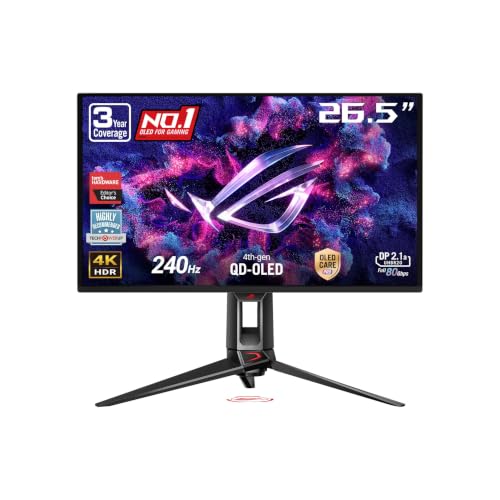
ASUS ROG PG27UCDM — the 4K OLED step-up
Badge: The detail OLED. The PG27UCDM keeps OLED’s contrast and raises the resolution to 4K at 240Hz, with the OLED Care Pro suite, a proximity sensor among its party tricks, DisplayPort 2.1, and true 10-bit colour per its listing. It is the pick for the player whose desk also finishes video, judges photographs, or simply wants its cinematic games rendered at the higher density — and who accepts that 240Hz at 4K is a ceiling today’s cards reach in fewer titles than the ACDNG’s 360Hz at QHD. Between the subject and the step-up, the deciding question is embarrassingly simple: would you rather your flagship budget buy frames or pixels? Competitive hearts buy frames. Creator hearts buy pixels. This guide refuses to call either heart wrong.
- Panel: 27-inch 4K QD-OLED, per the listing
- Refresh: 240Hz, per the listing
- Features: OLED Care Pro, proximity sensor, custom heatsink, DisplayPort 2.1, true 10-bit, per the listing
Strengths
- OLED contrast at 4K density: the most complete image in this comparison.
- 240Hz keeps competitive ambitions alive at the higher resolution.
- The fullest care and connectivity suite of the three picks.
Trade-offs
- The flagship price of the trio, for pixels a games-only desk may never invoice.
- 4K at high refresh is the heaviest workload here; upscaling becomes a way of life in demanding titles.
- OLED’s disciplines apply at full strength, now guarding a costlier panel.
Best for: Creator-players and detail devotees who want one OLED for everything. / Not suited for: Pure competitive players, who should buy the frames instead.
How does OLED ownership actually work across years?
Burn-in is the word every OLED buyer arrives with, so it gets the plain treatment. OLED pixels age with use, and a static element displayed at high brightness for thousands of hours — a taskbar, a news ticker, a game’s fixed interface — can age its pixels unevenly enough to leave a ghost. The engineering answer, visible in this panel’s listing, is layered: a custom heatsink lowers the panel’s operating temperature, which slows ageing everywhere; the OLED Care+ suite runs pixel-refresh and shifting routines that even out wear invisibly; and brightness management keeps sustained full-screen output within the panel’s comfortable physics. The owner’s answer is a short liturgy that this guide will state once and expect to be kept: let the care routines run rather than disabling them, vary your content naturally, hide the taskbar if the desktop is your day job, use a screen saver or sleep timer, and do not leave a static image parked at maximum brightness while you are on holiday. Owners who keep that liturgy — it totals perhaps ten minutes of setup, once — report panels that serve for years without a visible ghost. Owners who use an OLED as an airport departure board are conducting a different experiment, and should buy an LCD for it.
How do you set the XG27ACDNG up for competition and for cinema?
For competition: connect by the highest-bandwidth cable in the box’s class, confirm the system has actually selected 360Hz — the default-rate trap from the previous guide in this series applies here with interest — enable adaptive sync, and set the game’s own frame-rate cap a breath below the panel’s ceiling so sync stays in its happiest range. Keep the uniform-brightness and care features as the maker configured them; competitive settings live in refresh and sync, not in defeating the panel’s protections. For cinema: let the HDR mode engage with HDR content rather than forcing the desktop into it, dim the room rather than fighting it, and if the glossy-versus-matte question arises, note that the ACDNG’s finish is tuned for the controlled room its buyer probably has. In both modes, run the panel’s care cycle when it asks, the way you would let a good car idle down — it is the machine maintaining the very uniformity you bought.
What should you check before buying any OLED gaming monitor?
Begin with the workload audit this series insists on: OLED’s ideal citizen is varied, moving content — games, films, streams — and its least favourite is the static interface displayed all day, so count your static hours honestly. Check the care suite and thermal design in the listing, because at this tier they are the difference between a panel engineered for a decade and one merely sold for one. Verify your card can feed the ceiling you are paying for, at the resolution you are buying, in the titles you actually play. Audit your room’s light, since OLED’s contrast is a dark-room dividend and its full-screen brightness a bright-room negotiation. And read the warranty’s OLED terms as a grown-up reads terms — the makers who engineer care suites tend to stand behind them, and the document, not the forum, is where that standing is written.
What are the common mistakes OLED buyers make?
Disabling the care features for a marginally brighter static image is the first and the most expensive, a small daily gain purchased with the panel’s uniformity. Leaving the Windows taskbar and a static desktop parked all day, every day, is the second — the departure-board experiment by accident. The third is judging OLED by a bright showroom or a sunlit office, where its physics is at its worst, rather than in the room it will live in. The fourth is buying the 360Hz ceiling for a card and a library that live at a hundred frames, paying for a stratosphere never visited; the sibling exists precisely for that reader. And the fifth is the mirror error — a document worker buying OLED for its gaming glory and spending a decade reading 1440p text under a static interface, when the 5K LCD in this series was designed for their exact week. Every one of these mistakes is a mismatch, not a defect, and every one is preventable by the audit in the previous section.
How does the XG27ACDNG handle work, honestly?
Better than its reputation and worse than its price might suggest, and both halves deserve stating. For mixed work — writing, browsing, communication, the ordinary office day — 1440p at this size is perfectly serviceable, the colour is excellent, and the panel’s motion smoothness makes even scrolling feel expensive. The honest debits are the two this guide has carried throughout: text rendered at 1440p density will never have the print-class fineness of the 5K panel in the previous guide, which heavy readers feel by evening; and a workday of static interfaces is the workload OLED’s care engineering works hardest to forgive, so the document-first owner is spending flagship money to be forgiven daily. The verdict is not avoidance but proportion: if work is the monitor’s second job, the ACDNG serves it well; if work is the first job and games the second, the series’ 5K guide is your door, and this panel is the one to admire through it.
Final recommendation
The ROG Strix XG27ACDNG is the games-first flagship this guide can recommend without a qualifying clause: 360Hz and OLED response for the competitive half of the library, perfect contrast for the cinematic half, and a care package engineered for the decade a flagship should serve. Buy it if your desk’s centre of gravity is play and your card can feed it. Choose the XG27AQDMG if your ceiling is calmer and your room is dim, and the PG27UCDM if your heart, examined honestly, beats for pixels over frames. Keep the small OLED liturgy, and whichever of the three you choose will still be astonishing you — in the dark, at speed — years after the purchase has stopped being a topic.
ACDNG, AQDMG, or PG27UCDM — criterion by criterion
Motion. The ACDNG’s 360Hz with OLED response is the comparison’s motion ceiling, full stop. The UCDM’s 240Hz at 4K and the AQDMG’s 240Hz at QHD share the same response physics and trail only in refresh. Against any LCD all three are in another sport. Verdict: ACDNG, for the players who can feed it.
Image depth. All three are per-pixel OLED, so the dark-scene crown is shared; the UCDM adds 4K detail to it, the AQDMG’s gloss deepens it in a dim room, and the ACDNG pairs it with the highest motion specification. Verdict: UCDM for detail, AQDMG for gloss-drama, ACDNG for the complete competitive-cinematic compound.
Work. The UCDM is the only one of the three a creator should call a work monitor without qualification. The QHD pair serve mixed work well and document work adequately. Verdict: UCDM, and behind it the 5K LCD from the previous guide outranks all three for the reading desk.
Room. The AQDMG’s gloss is the best surface in a dark room and the worst in a bright one. The ACDNG’s finish is the all-rounder. The UCDM splits the difference with flagship brightness behaviour. Verdict: scored by your windows, not by the panels.
Value. The AQDMG is the OLED experience at the calmest admission. The ACDNG charges for a ceiling that is genuinely usable at QHD. The UCDM charges most for the most complete image. Verdict: all three are honestly priced against their own propositions; the waste case is buying any ceiling your desk cannot spend.
Games on OLED, genre by genre
Horror is OLED’s coronation genre, and it is not close: true black turns darkness from a rendering into a place, flashlight beams and candlelit rooms gain physical presence, and the jump scare you cannot see coming is scarier than the one rendered in grey. Competitive shooters are the second showcase, for the opposite reason — nothing here is about atmosphere, everything is about the image keeping up with the hand, and the ACDNG’s motion clarity is the closest the category comes to removing the display from the skill equation. Cinematic adventures and role-playing games split the difference beautifully: night exploration, neon cities, and firelit interiors all spend the contrast, while the 360Hz ceiling waits unused and unbothered. Racing games at night are a small genre with an outsized OLED dividend — headlights, wet tarmac, dark grandstands — and strategy titles, bright and static by nature, are the one genre where this panel is merely excellent rather than transformative, and where its care routines earn their keep during long, interface-heavy sessions. The library audit writes itself: the darker and faster your games, the more this monitor is worth; the brighter and more static, the more its virtues go politely unspent.
Ergonomics, stands, and the dark-room desk
A 27-inch-class OLED rewards the same setup discipline as the 5K flagship in this series — centre near eye level, arm’s-length distance, tilt matched to the chair — with one addition the technology itself requests: control the room’s light not for the panel’s sake alone but for the contrast you paid for, because a bright room taxes OLED’s dividend twice, once in reflections and once in perceived black level. Blackout or curtains behind the seating position, rather than behind the screen, do the most work per penny in a gaming room. The stand’s adjustments should be used to the millimetre, since at 360Hz the eye notices instability it would forgive at lower refresh, and a monitor arm, if your desk runs one, should be rated honestly for the panel’s weight. Cable for the full mode, as ever: the highest-bandwidth connection, verified in settings after connection, because the default-rate trap has ended more flagship first impressions than any panel defect in history.
Troubleshooting a new OLED flagship
It is not running at 360Hz. Cable standard, port choice, then the system and game settings, in that order — the chain’s weakest link sets the ceiling and it is rarely the panel. The image dims in bright scenes. That is OLED’s brightness management protecting the panel across a full-white field; it is physics with a purpose, most visible on documents, and one more reason the document desk belongs to LCD. A faint retention appears after a long static session. Run the panel’s care or pixel-refresh routine from the menu and let it complete; temporary retention is the care system’s home turf, and it is distinguished from permanent wear precisely by clearing. Text fringes slightly. OLED’s subpixel arrangement can fringe fine text at QHD density in some applications; operating-system text tuning helps, and the honest cure for a full-time reader remains the higher-density LCD. The care prompt interrupts a session. Reschedule it rather than disabling it — the prompt is the panel asking for the maintenance that keeps it uniform, and deferring to the session’s end costs nothing.
Who should skip the XG27ACDNG?
Skip it if your monitor’s first job is documents — the 5K LCD in this series serves that desk better in every particular that matters to it, and costs its owner no disciplines at all. Skip it if your room is a sunroom, because OLED’s dividend is paid in controlled light and taxed in glare. Skip it if your card and library live at modest frame rates, where the AQDMG delivers the same contrast at a calmer admission and the unspent ceiling is money returned to the rest of the setup. Skip it if the care liturgy, all ten minutes of it, genuinely irritates you in prospect, because a flagship you resent maintaining is a flagship mis-sold, and LCD flagships ask nothing. And skip it if your gaming is bright, static, and strategy-shaped for entire weekends — the panel will serve you excellently and transformatively never, which at this tier is a reason to choose its sibling or its LCD cousins instead. The ACDNG’s buyer is legible: games-first, dark-room, flagship-fed, and delighted by motion. That buyer is not a niche. They are the centre of the gaming market, and this monitor was built as if ASUS knew it.
Your first week with the ACDNG
Day one is verification and mercy: the right cable, the refresh confirmed at its ceiling, adaptive sync on, and the care features left exactly as the maker set them while you learn the panel on familiar games. Choose one dark title and one fast title as your reference pair, because between them they audition everything this monitor claims. Day two belongs to the room — curtains, lamp positions, the panel’s angle against the window — since the room is half the contrast you bought. Midweek, set the desktop manners: taskbar hidden if the machine works by day, sleep timer honest, a moving wallpaper or none, and the care prompt scheduled where it will be obeyed rather than dismissed. By the weekend, revisit the stand’s geometry with a week’s evidence in your neck, and set the per-game notes — which titles take the full ceiling, which prefer their own caps — while the experiments are still fresh. Owners who run this week describe the second week in the vocabulary of settled furniture. Owners who skip it sometimes spend a flagship’s first year at a default refresh rate, under a static desktop, wondering what the reviewers were excited about. The panel is patient. Be quicker than it is.
The economics of an OLED flagship
An OLED flagship should be bought the way this series buys all flagships: by the decade and by the match. By the decade, because a monitor outlives the cards that feed it, and the ACDNG’s ceiling is high enough that your next two graphics cards will grow into it rather than past it — a rare direction for hardware ageing to run. By the match, because the panel’s virtues are workload-shaped to an unusual degree: dark and fast content spends them nightly, bright and static content leaves them in the bank, and the same purchase is therefore a bargain in one house and an extravagance in another at an identical price. There is no contradiction in that; it is simply what buying a specialised instrument means. The generalist alternative exists, costs less, and is reviewed elsewhere in this series without condescension. But for the desk the ACDNG matches, the arithmetic is almost unfair — cost per astonished evening, across a decade of evenings, falls to the level of a streaming subscription, and the astonishment, unlike the subscription’s, does not require renewal.
What should you verify at checkout?
Read the listing title in full and confirm it names the XG27ACDNG — the 26.5-inch QHD QD-OLED at 360Hz with OLED Care+ in the verified listing — because ROG’s OLED family contains near-identical names at 240Hz and at 4K, and the family’s naming is a speed trap for the hurried. Confirm your card’s outputs and add the certified cable the full mode requires if your drawer cannot prove one. Run the room audit one last time — controlled light, games-first week, static hours counted — and if the audit still points here, order, and keep the packaging until the first week’s verification is complete. Of all the purchases in this series, this is the one where the first evening, correctly set up, settles the question permanently; give it that evening, in a dim room, with a dark game, and let the panel make its own closing argument.
Frequently asked questions
Will the XG27ACDNG burn in?
Not under the ownership this guide describes. The panel carries a custom heatsink and the OLED Care+ suite — pixel care routines and wear management — engineered precisely against uneven ageing, and varied gaming and film content is the workload OLED handles most happily. The risk concentrates in static elements displayed for thousands of hours at high brightness, which is why the owner’s liturgy is short and specific: let the care routines run, hide static bars where practical, use sleep timers, and vary content naturally. Kept that way, the panel is a decade product, not a countdown.
Is 360Hz actually noticeable over 240Hz?
Yes, in the titles that can feed it, though the step is refinement rather than revelation. The larger half of the ACDNG’s motion advantage is OLED’s near-instant response, which both refresh rates share against LCD; the 360Hz ceiling then sharpens fast pans and tracking further for players whose hardware and eyes are at that level. If your card and library live nearer 240, the sibling in this guide delivers most of the experience at its calmer tier, and honesty about your frame rates is worth real money here.
Is 1440p sharp enough at this size?
For games and general use, comfortably — at normal desk distances the image is clean, and the panel’s contrast does more for perceived quality than extra pixels would. For heavy text work, it is good rather than print-class: readers who spend their days in documents will feel the difference against a 5K panel by evening, which is why this series keeps a separate 5K guide for that desk. Judge by your week’s content, not by the number’s reputation in either direction.
Can consoles make use of this monitor?
They can use it beautifully within their own ceilings: consoles output up to 4K-class signals at up to 120Hz-class refresh, which this panel downscales and displays with OLED contrast and response that flatter every title. What a console cannot do is feed the 360Hz ceiling or the native QHD high-refresh modes that justify the flagship tier, so a console-only desk is over-buying in the pleasant direction. In a PC-and-console household the monitor is superb for both, with the PC collecting the flagship’s full value.
How bright is it in a normal room?
OLED brightness is a tale of two scenes. Highlights and mixed content — games, films, anything with contrast in it — are vivid, because the panel spends its brightness per pixel where the image asks. A full-screen white document in a sunlit room is the technology’s hardest scene, and there an LCD flagship will look stronger. Most gaming rooms are not sunlit, and in a controlled room the ACDNG never feels dim where it matters. Audition your room honestly before buying, as this guide keeps prescribing, and the physics will not surprise you.
XG27ACDNG or PG27UCDM — frames or pixels?
That is exactly the question, and your library answers it. If your flagship hours are competitive and cinematic at QHD-reachable frame rates, the ACDNG’s 360Hz is the spend that shows nightly. If your hours include 4K content creation, high-detail cinematic play, or a card that lives at 4K, the UCDM’s pixels are the spend that shows. Both are OLED, both carry serious care engineering, and neither is the other’s consolation prize — they are the same excellence aimed at two different definitions of a great image, and the definitions, not the monitors, are what you are choosing between.
OLED versus the best LCD, settled without slogans
Because this guide and its 5K sibling will be read together, the technology question deserves one clean settlement. LCD’s virtues are brightness, static-image indifference, and — at 5K — a density OLED does not currently sell at this size. OLED’s virtues are contrast of a different physical kind, response of a different physical order, and a motion clarity that compounds the two. Neither list is longer; they are differently aimed, like the switch philosophies in this series’ keyboard guides. The market’s habit of declaring a winner per generation is a spectator sport. The buyer’s task is smaller and more profitable: name your content, your room, and your static hours, and the technology selects itself with embarrassing reliability. Dark, fast, varied: OLED, and this panel is its competitive flagship. Bright, static, textual: LCD, and the 5K guide is its professional flagship. A desk honestly between the two should weight its evenings over its days, because monitors are bought with gaming money and forgiven by gaming joy — and then keep whichever liturgy the choice implies, LCD’s none or OLED’s small one, without resentment.
Films, series, and the household screen
The ACDNG’s second job is the household’s best small screen, and in a dim room it is not close. Films graded for HDR find a panel that renders their blacks as the colourist left them, series with night cinematography stop being an exercise in squinting, and the 360Hz panel’s motion handling makes even ordinary video look composed. A partner inheriting the desk for an evening’s film will not care about a single specification in this guide and will notice the picture within a scene, which is the household definition of a successful flagship. The disciplines travel with the panel — varied content is a film library’s natural state, so the household use is the workload OLED loves most — and the only negotiation is the room’s light, which the household will settle in favour of the picture within one film night. Buy the monitor for your matches, by all means. Expect it to be requisitioned for cinema, and count that requisition as part of the return.
The competitive player’s settings, in the order they matter
For the player this panel was built for, the settings hierarchy is refresh, sync, response-affecting features, and then everything else, in that order and with no orphans. Refresh first, verified in the system and then in the game, because a 360Hz panel at a default rate is a rumour, not a specification. Sync second, enabled and capped as the setup section described, because tearing and stutter are the two textures that make fast panels feel slow. Third, any motion or overdrive-style settings the panel offers should be left at the maker’s competitive defaults for a full week before experimentation, because OLED’s native response leaves almost nothing for processing to add and a baseline must exist before a preference can. Everything after that — colour temperature, brightness, the care schedule’s timing — is comfort and longevity, set once and forgotten. The discipline underneath the list is the one this series applies to every flagship: change one variable, play a familiar map, and keep notes, because at this level of equipment the differences are real and small, and only a method can tell them apart from the weather of a good or bad evening.
And the last setting is not in any menu: the chair’s distance and the room’s darkness, which decide how much of the panel’s motion and contrast your eyes can actually collect. A flagship monitor in a bright room at the wrong distance is a specification being spent on the wrong things. Set the room as carefully as the refresh rate, and the ACDNG will show you, in the first dark scene of the first evening, exactly what the last several thousand words were about.
The second year: an OLED owner’s honest diary, projected
Project this panel forward through two years of evenings and the diary writes itself in the technology’s own hand. The care prompts become weather — acknowledged, deferred to the session’s end, forgotten — and the panel’s uniformity, protected by the heatsink’s cool running and the routines you stopped noticing, stays the uniformity of the first month. The desktop manners, if work shares the desk, become as automatic as locking a door. What changes is the owner’s eye: after a year of per-pixel black, other screens begin to look like photographs of screens, their blacks a grey negotiation, their motion a polite smear — the well-known OLED acclimatisation that makes its owners evangelists and its ex-owners wistful. The graphics card will likely change before the panel does, and the new card will find the 360Hz ceiling still there, still meaningful, which is the flagship’s definition of ageing well. Nothing in that diary is dramatic, and its lack of drama — no ghost, no dimming saga, no regret — is precisely what the care engineering and the small liturgy were purchased to produce. A flagship that stays a flagship is the rarest sentence in this category, and it is the sentence this panel was built to earn.
For streamers and competitive creators
One constituency deserves its own paragraph because its needs cut across the frames-versus-pixels debate: the streamer, whose desk is simultaneously a stage, a workstation, and a competitive station. For that desk the ACDNG offers a specific compound — the motion clarity that makes high-level play legible to an audience, the contrast that makes a stream’s dark games watchable rather than murky, and a QHD canvas that matches the resolution most streams are actually delivered at, so the panel being played is the picture being broadcast. The static elements of a streaming layout are the one caution, and they are managed the way broadcasters manage everything: scenes rotate, overlays rest, and the care routines run between sessions. A creator whose production is video-first rather than play-first should still read the UCDM’s section with care, since 4K timelines are that desk’s native country. But the playing creator — the one whose content is the match itself — is standing in the exact centre of the ACDNG’s design, and the monitor will feel less like equipment and more like a colleague.
That is the note to end on. Every flagship in this series has been a fitted instrument — a keyboard fitted to shoulders, a network fitted to a house, a panel fitted to a week’s ratio of documents to games. The XG27ACDNG is fitted to the dark, fast, varied heart of gaming itself, and it fits that heart more completely than any monitor in this comparison. If that is where your hours live, stop auditioning alternatives and give it a dim room and a dark game. It has been waiting, at 360Hz, to make its argument in person.
A practical postscript on pairing: this monitor and the series’ mesh guide belong to the same desk more often than chance suggests, because the player who buys 360Hz has usually already discovered that their connection, not their hands, was the variable apologising in ranked matches. If that discovery is still ahead of you, the order of operations matters — network first, panel second — since a flagship display fed by a wandering connection will be blamed for sins it did not commit. With the network honest beneath it, the ACDNG’s motion is the last variable removed, and what remains, for better or worse, is entirely the player. Competitive equipment can offer no fairer promise than that, and this panel, uniquely among monitors this series has examined, makes the promise at 360Hz in perfect black.
A note on buying OLED with your eyes open, in both senses
Every technology in this series has asked its buyer for one honest act of self-knowledge — a charging habit confessed, a shoulder audited, a house measured — and OLED’s act is the room and the workload, confessed together. The buyers who perform it become the owners whose testimonials read like love letters, because the panel’s virtues were aimed at their actual evenings and hit. The buyers who skip it become the cautionary threads, not because the panel failed but because it was aimed at a life it never met. This guide has now described the target life in enough detail — dark, fast, varied, flagship-fed — that no reader can mistake whether it is theirs. If it is, the ACDNG is not a gamble on a young technology; it is the mature flagship of the category’s defining idea, with the care engineering to prove the maturity. Buy it, dim the room, and load the darkest game you own. The first cavern, the first night street, the first shadow that is actually shadow will finish this review more eloquently than its author can.
One evening with your current screen settles the question
If the decision still feels abstract, settle it the way this series settles every flagship: with your own room, your own library, and one honest evening. Dim the lights to the level you actually game at. Play the darkest scene in your library on your current screen and look — really look — at what its shadows are made of: the grey wash, the crushed detail, the glow around the bright things. Then play your fastest title and attend to the smear between frames, the slight divorce between your hand and the world. Those two observations are the entire case for this panel, stated in your own room’s evidence, and no review — including this one — can make the case more persuasively than your current monitor just did by failing it. If the shadows and the smear do not trouble you, keep your money and your current screen with this guide’s blessing; OLED’s virtues are wasted on the untroubled. If they do trouble you, you have just written the ACDNG’s review yourself, in the only venue whose verdict you were ever going to trust.
One more word, addressed to the reader who arrived here from the 5K guide with the hybrid desk still undecided between density and darkness. The two panels are not rivals in any household sense — they are the two halves of a complete answer, and the market will eventually sell them as one product at a price that makes today’s choice look quaint. Until then, the choice is made by the clock: count where your flagship hours fall. The day belongs to text, and text belongs to density. The night belongs to worlds, and worlds belong to contrast and speed. Most desks keep both hours, but few keep them equally, and the inequality — measured honestly, in your own week, with your own eyes — is the whole of the law. Follow it, and either flagship will feel, within a month, less like a purchase and more like the room’s original furniture, which is what every great monitor quietly becomes.
Related reading
the ROG Strix 5K XG27JCG examined 1080p 240Hz versus 1440p 144Hz 1080p versus 1440p versus 4K for gaming the 1440p gaming PC buying guide how to set up a 1440p gaming PC the ROG Rapture GT6 mesh system