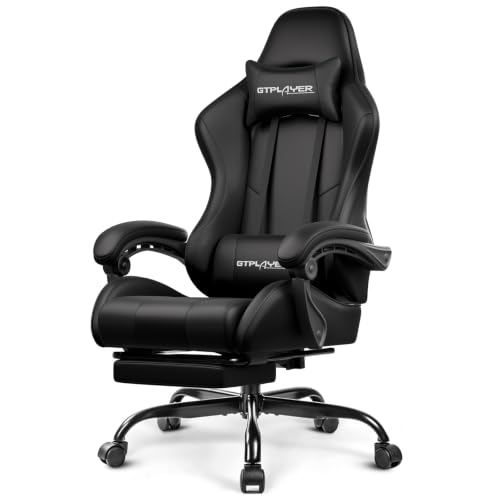
Disclosure: As an Amazon Associate, reviewstook.com earns from qualifying purchases. Links on this page are affiliate links; they cost you nothing extra. Prices and availability change often, so check the current Amazon listing before you buy.
Finding the best chair for cs2 sounds like a joke until you have played a double-overtime match sitting on a kitchen stool. Counter-Strike sessions have a particular shape: long ranked blocks, tense rounds where your posture freezes while your crosshair waits, short breaks where you lean back and breathe, and then the queue pops again. A chair for this game is therefore not a throne or a fashion statement; it is the piece of equipment that decides whether your shoulders, back, and forearms feel the same in round thirty as they did in round one. This guide reviews three verified chairs through that CS2 lens — a flagship gaming chair, a fabric gaming alternative, and an ergonomic office chair with a footrest — and then teaches the desk and armrest setup that matters as much as the purchase itself.
The framing deserves one honest paragraph. No chair improves your aim directly, and this page makes no medical promises; comfort and support during long sessions are the claims, stated in the language of comfort throughout. What a good chair does is remove the slow sabotage of a bad one: the creeping shoulder hunch, the forearm pressed into a desk edge because the armrests sit wrong, the fidgeting that steals attention in the rounds where attention is the whole game. Remove the sabotage and your practice hours compound instead of taxing you.
Key Takeaways
- For CS2, judge a chair by long-session support, armrest adjustability for your desk height, and how its recline serves the break between matches.
- The Secretlab Titan Evo is the flagship pick: built-in lumbar support, 4D armrests, a magnetic head pillow, and a high-back reclining frame in leatherette.
- The Razer Iskur V2 X is the fabric alternative, with built-in lumbar support, a wide seat, dense foam, and a deep recline for decompression between games.
- The Hbada P5 is the ergonomic office route — mesh, adjustable lumbar, a footrest and headrest — for players whose desk also earns their living.
- Armrest height relative to your desk is the most underrated variable in the whole purchase, because it sets your shoulder posture for every aiming hour.
- Chair, desk height, monitor position, mouse, and pad form one system; the setup section below tunes them together rather than blaming the chair alone.
In this guide
Quick Picks: three chairs, three philosophies
| Pick | Listing highlights | Best suited to | Link |
|---|---|---|---|
| Secretlab Titan Evo, black, regular | Leatherette, lumbar support, high back, reclining, magnetic head pillow, 4D armrests, height adjustable | Serious players wanting the flagship all-rounder | Check price on Amazon |
| Razer Iskur V2 X, black | Built-in lumbar support, wide seat, high-density foam, 152-degree recline, 2D armrests, plush fabric | Players who prefer fabric and a wide, relaxed seat | Check price on Amazon |
| Hbada P5 ergonomic office chair, black | Adjustable lumbar and height, mesh, footrest, 2D headrest, swivel and tilt | Work-and-play desks, mesh and footrest fans | Check price on Amazon |
Three chairs is the honest size of this table: one per philosophy, each verified, none invented to pad a list. If your needs fall between them, the buying guide below names the deciding variables — body size, desk height, fabric preference, and whether the chair must also serve a working day.
How were these picks chosen?
Each listing was confirmed through marketplace data with an exact title describing the chair’s support system, armrests, materials, and adjustments, and each appears with its official product image before its review. The pool deliberately spans gaming and office designs because CS2 players sit in both, and because the game’s demands — upright attention, adjustable arm support, long-session comfort — do not care which department a chair was marketed from. Banned or unverifiable products play no part here, and health language stays in the comfort register throughout.

Secretlab Titan Evo — the flagship for ranked grinds
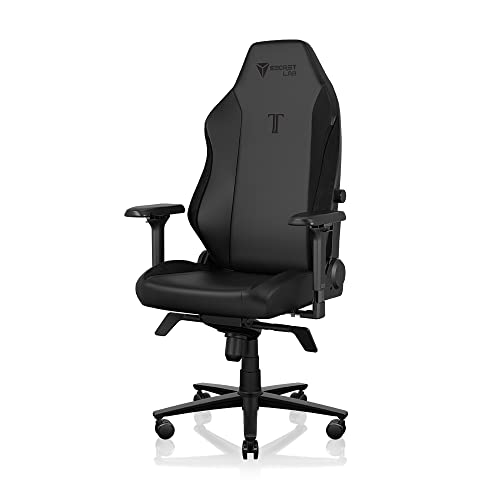
Badge: Best overall for committed CS2 players. The Titan Evo in its regular size and black leatherette is the reference gaming chair of its generation: ergonomic shaping with lumbar support, a high reclining back, a magnetic memory-foam-style head pillow that actually stays where you put it, and 4D armrests that adjust in every direction a desk setup can demand.
- Material: leatherette upholstery
- Support: lumbar support built into the ergonomic frame
- Armrests: 4D, height adjustable among their ranges
- Back: high back, reclining
- Extras: magnetic head pillow
- Capacity note: standard figure in the listing for the regular size
Strengths
- The 4D armrests solve the CS2 player’s central geometry problem, dialling height and angle until forearms rest level with the desk and shoulders stay down.
- The magnetic pillow removes the strap-fighting ritual every other gaming chair imposes, staying placed through leans and breaks.
- The frame and foam feel built for daily multi-hour use rather than for occasional novelty, which matches a ranked habit’s real demands.
Trade-offs
- It is the premium tier of this table, and players on a strict budget should weigh the alternatives without embarrassment.
- Leatherette runs warmer than fabric or mesh in a hot room, which matters for summer sessions.
- The regular size will not flatter every body; check the maker’s sizing guidance against your height and build honestly.
In CS2 terms, this chair’s gift is repeatability. Your posture in the pistol round and your posture in overtime are the same posture, supported the same way, with armrests that return your forearms to the identical height your muscle memory was trained at. Consistency is the currency of this game at every level, and a chair that standardises your sitting the way a good pad standardises your glide is equipment in the full sense, not furniture.
Best for: committed players with long sessions who want the flagship feature set and 4D armrest control. / Not suited for: hot rooms without airflow, strict budgets, or bodies outside the regular size’s intended range.

Razer Iskur V2 X — the wide fabric alternative
Badge: Best for fabric fans and wide-seat sitters. Razer’s Iskur V2 X builds its case on a wide seat, high-density foam cushions, built-in lumbar support, plush fabric upholstery, and a recline that travels to 152 degrees — a specification that reads like it was written by someone who has decompressed after a lost match and a won one alike.
- Material: plush fabric
- Support: built-in lumbar support
- Seat: wide, high-density foam cushions
- Recline: adjustable to 152 degrees
- Armrests: 2D adjustable
- Colourway: black
Strengths
- Fabric breathes where leatherette cannot, keeping long summer queues noticeably more comfortable.
- The wide seat welcomes cross-legged breaks and larger frames without the bucket-seat squeeze some gaming chairs impose.
- The deep recline makes the between-match ritual — lean back, breathe, reset — genuinely restorative.
Trade-offs
- 2D armrests adjust less completely than the flagship’s 4D set, so exacting desk geometries may need a compromise.
- Fabric asks for more care with spills and crumbs than a wipe-clean leatherette surface does.
- The wide seat can feel under-supportive to smaller players who prefer to be held firmly in place.
Choose the Iskur if your sessions are long, your room runs warm, and your sitting style mixes upright rounds with sprawled breaks. Its comfort argument is about texture and space rather than about maximum adjustability, and for a large share of players that is the argument that actually decides their third hour. Razer’s gaming fluency shows in the details that matter at a desk built for play.
Best for: warm rooms, wide-seat and fabric preferences, and players whose breaks are part of their performance routine. / Not suited for: perfectionists about armrest geometry, or spill-prone desks without a care routine.

Hbada P5 — the ergonomic office crossover
Badge: Best for work-and-play desks. The Hbada P5 comes from the office side of the fence with the credentials that world respects: an ergonomic mesh chair with adjustable lumbar support and height, a footrest, a 2D headrest, and swivel-tilt movement — a chair that can chair a working day and then stay for the evening’s matches.
- Material: mesh back construction
- Support: adjustable lumbar support, height adjustable
- Extras: footrest, 2D headrest
- Movement: swivel and tilt functions
- Colourway: black
- Role: desk and computer chair for mixed use
Strengths
- Mesh ventilation is the coolest sitting experience on this table, unbeatable across a full work-plus-play day.
- The footrest turns the between-match lean-back into a genuine feet-up reset, a small luxury with an outsized effect on session freshness.
- Its office manners suit shared and visible spaces where a racing-styled chair would look like a costume.
Trade-offs
- Mesh support feels different from foam cushioning — firmer and more suspended — and foam devotees may not convert.
- Armrest adjustability is more modest than the gaming flagship’s, so check the geometry against your desk with care.
- The aesthetic is professional rather than esports, which cuts both ways depending on your room and your taste.
The P5 is the grown-up answer for the majority of CS2 players who are, in daylight, something else — students, developers, designers — and whose chair budget must serve both lives. It will not photograph like a streamer’s throne, and it does not need to. It needs to keep you comfortable from the morning standup to the midnight queue, and its mesh, lumbar adjustment, and footrest are aimed precisely at that double shift.
Best for: mixed work-and-play desks, mesh and footrest fans, and shared spaces. / Not suited for: players wanting a gaming aesthetic, maximum armrest adjustment, or deep foam cushioning.
Best Chair For Cs2: how to set up your desk, armrests, and monitor
The chair is one third of a triangle. Set its height so your feet rest flat and your thighs sit roughly level, then set the armrests so your forearms, resting on them, continue in a straight, relaxed line to your mouse and keyboard with shoulders down — not shrugged toward your ears, not reaching down into a slump. If the armrests cannot reach that geometry with your desk, adjust the desk side of the equation where possible, because this single alignment governs the comfort of every aiming hour you will ever sit. Your monitor’s top should sit near eye level at a distance where the whole screen is readable without leaning, since a leaning neck will defeat a good chair by lunchtime.
Then tune for the game’s rhythm specifically. In rounds, you sit upright and forward in the chair’s support; between matches, you recline and reset. Practise both positions until switching is a habit rather than a fidget, and keep water within reach of your non-mouse hand so hydration never requires a posture-breaking expedition. The mouse and pad complete the system: a shape that fits your grip from Zowie U2 or its taller sibling in Zowie ZA13 DW, gliding on a control surface like the one in Xraypad Origin Pro Cerberus, at a desk whose seating you have now arranged like you mean it. Even your loadout’s cosmetics get their own guide, at best AK skins CS2, for when the hardware is settled and the fun begins.
How long should a gaming session posture last, and what breaks help?
Comfort guidance for long sitting is consistent across every sensible source: change position often, stand between matches, and treat the queue timer as a movement prompt rather than a countdown to more sitting. Walk to the window during agent select, roll your shoulders while the map loads, and let the chair’s recline do its restorative work deliberately instead of slumping into it accidentally. None of this is medical advice and none of it needs to be; it is the ordinary hygiene of a hobby that happens to be played seated, offered in the same spirit as a pad-cleaning routine for your mouse surface.
Notice, too, what your body reports across a week. A new ache that arrives with a new chair is information about fit or setup, and the correct response is adjustment — armrest height, lumbar position, monitor distance — before it is complaint. The chairs on this page offer the adjustments their philosophies allow; the setup triangle above tells you the order to try them in. Players who treat their desk as a system to be tuned, like their sensitivity or their crosshair placement, stop having equipment problems and start having only game problems, which are the kind worth having.
Common mistakes when buying a chair for Counter-Strike
Buying by photograph is the first: a chair’s look in a render tells you nothing about its third hour. The second is ignoring armrest adjustability while obsessing over recline angles, when your shoulders live at the armrests and only visit the recline. The third is size denial — choosing a regular or a wide model against your body’s evidence — because chairs, like mice, fit bodies rather than aspirations. The fourth is assembling a premium chair and then placing it at a desk whose height makes its geometry impossible, blaming the purchase for the room’s arithmetic.
Fifth, some players expect a chair to fix what is actually a break discipline problem, sitting four unbroken hours and indicting the foam. No chair on this page — no chair anywhere — repeals the value of standing up between matches. Sixth, buyers forget the room: a leatherette flagship in a sun-baked attic and a mesh chair in a chilly basement are both answers to questions nobody asked. Match the material to your climate as the reviews above suggest, and let the broader seating market context in best gaming chair under 30 frame the tiers below these picks if your budget points downward.
How do the three picks compare?
| Factor | Secretlab Titan Evo | Razer Iskur V2 X | Hbada P5 |
|---|---|---|---|
| Upholstery | Leatherette | Plush fabric | Mesh |
| Lumbar approach | Built into ergonomic frame | Built-in support | Adjustable support |
| Armrests | 4D | 2D | Standard adjustable class |
| Signature extra | Magnetic head pillow | 152-degree recline, wide seat | Footrest and headrest |
| Best room | Dedicated gaming desk | Warm rooms, relaxed sitters | Shared work-and-play spaces |
| Session style | Repeatable ranked posture | Upright rounds, sprawled breaks | All-day double duty |
Read across the row that matches your life rather than down the column that matches your favourite brand. All three chairs will support a CS2 habit; they differ in texture, geometry control, and the kind of day they were born to serve.
Final recommendation
For the dedicated CS2 player, the Titan Evo is this guide’s first recommendation: its armrest control and repeatable support are the closest thing seating offers to a performance feature in a game of consistency. Choose the Iskur V2 X if fabric, width, and a deep between-match recline describe your comfort better, and the Hbada P5 if one chair must serve your job and your rank with equal grace. Whichever you choose, spend the first evening on the setup triangle rather than on a match — the chair you tune is the chair that works.
What does a week of ranked play feel like in each chair?
Monday in the Titan Evo feels like reporting to a cockpit you have already adjusted: armrests at their remembered height, pillow magnetised where your head expects it, posture assembled by the chair as much as by you. By Friday, the chair’s contribution is the absence of negotiation — nothing has drifted, nothing needs re-dialling, and your warm-up can start with the game instead of with the furniture. In the Iskur, the week feels softer at the edges: fabric that never greets you cold, a seat wide enough for the thinking sprawl between matches, a recline that turns a lost pistol round into a genuine exhale rather than a slump. In the P5, the week is a double shift done honestly — mesh cool through the workday, footrest out for the evening queue — and its victory is that Friday’s match feels no more tired than Monday’s meeting.
These diaries matter because chairs are not bought for their first sitting. They are bought for the fiftieth, when novelty has evaporated and only support, texture, and geometry remain. Every chair on this page was chosen to survive that evaporation in its own dialect — flagship adjustability, fabric spaciousness, or mesh endurance — and the comparison you should run is not which felt best in a showroom minute, but which diary you would rather live inside for a season of ranked evenings.
How should you assemble and adjust a new chair on day one?
Build it slowly, on a clear floor, checking each fastener’s snugness twice, because a chair assembled in a hurry announces its haste at midnight for months. Set the casters on the surface they will live on and confirm the chair rolls without drama. Then adjust in the order this guide’s setup section prescribes: seat height for flat feet and level thighs, armrests for the level forearm line to your desk, lumbar contact where your lower back actually curves, headrest or pillow where your head rests when you lean — not where it looks right in a photograph. Sit in full match posture for ten minutes before declaring victory, and keep the tools in the desk drawer for the fortnight of micro-adjustments that honest fitting always involves.
Photograph your final settings and note the armrest heights somewhere durable. Chairs get moved for cleaning, borrowed by visiting friends, and bumped by life; a recorded setup turns the restoration from a week of fidgeting into a five-minute errand. That small ritual is the seating version of this site’s recurring sermon — write down what works, because memory is a generous liar — and it will repay you the first time the chair comes back from the other side of the room wrong.
Frequently asked questions
Does a gaming chair actually help in CS2?
It helps the player, not the crosshair. A supportive chair with armrests set correctly keeps your posture — and therefore your mouse geometry — consistent from the first round to overtime, and removes the fidgeting and shoulder creep that quietly tax attention in long matches. That is a comfort and consistency claim, not a promise about rank, and it is the honest size of what seating can do for a game.
How should armrests be set for aiming?
Set them so your forearms rest level, continuing in a relaxed line to the desk surface with your shoulders down and your elbows near your sides. If your shoulders shrug, the rests are too high or the desk is; if your wrists bend upward to reach the mouse, the whole geometry sits too low. This adjustment, more than any other, is worth ten unhurried minutes on the day the chair arrives.
Which chair is best for a hot room?
The mesh Hbada P5 breathes best, with the fabric Iskur V2 X second and the leatherette Titan Evo last in pure ventilation. Hot-room players should weigh that order seriously, because a chair’s material is in contact with you for every second of every session, and summer ranked blocks are long. Airflow in the room itself remains the senior partner in comfort, whatever you sit on.
Is an office chair really suitable for competitive gaming?
Yes — the P5’s presence on this page is the argument. CS2 asks for upright support, sensible armrests, and long-session comfort, all of which good office chairs are engineered to provide, often with better ventilation than gaming designs. What you give up is the gaming aesthetic and, in this case, some armrest adjustability; what you gain is a chair that serves your working day with the same competence.
How do I choose the right chair size?
Use the maker’s sizing guidance against your real height and build, and be honest rather than aspirational — a regular size that fits supports you, while a larger model you swim in cannot hold your posture where your muscle memory expects it. If you sit between sizes, prioritise seat width comfort and armrest reach, and remember that returns exist for the honest mistake, not as a substitute for measuring.
What else should I tune besides the chair?
Desk height, monitor height and distance, mouse shape and sensitivity, and pad surface — the system this guide’s setup section walks through. Players are often surprised how a chair complaint dissolves when the monitor rises to eye level or the armrests finally meet the desk correctly. Tune in order: chair height, armrests, monitor, then peripherals, and change one thing at a time.
How long should a chair like these serve, and how do you help it?
A well-kept chair in this class should serve for years of daily sitting, and its lifespan is mostly a story of small kindnesses: casters cleaned of the hair and grit that grind floors and bearings alike, upholstery wiped or vacuumed on the rhythm its material prefers, fasteners checked when a creak first whispers rather than when it shouts. Leatherette appreciates being kept out of punishing direct sun; fabric appreciates prompt attention to spills; mesh appreciates a brush and an occasional vacuum more than any liquid enthusiasm. None of this is a burden — it is five minutes a month, traded for a chair that feels in year three like the chair you tuned in week one.
Judge replacement by support rather than by looks. When the foam or mesh no longer returns your posture to its trained geometry, when adjustments slip under load, when the sitting itself becomes the distraction the purchase was meant to abolish — that is the honest retirement signal, whatever the upholstery’s cosmetic state. Players who replace on that signal, and record their settings as this guide nags them to, find each successive chair easier to choose, because they are no longer buying from adverts; they are buying from their own documented history of what their body, at their desk, in their game, actually needed.
How do you choose if your body sits between the usual categories?
Sizing guidance assumes tidy categories, and bodies decline to be tidy: long legs with a short torso, broad shoulders on a narrow frame, a tall player who sits low, a compact player who sits tall. For the in-between body, prioritise the adjustments over the labels. A chair whose armrests travel widely, whose lumbar contact can be positioned rather than merely present, and whose seat depth does not force a choice between thigh support and back contact will forgive more anatomical individuality than a chair with a perfect label and fixed geometry. That logic quietly favours the flagship’s 4D armrests and considered sizing, while the wide-seated Razer answers the broad-framed version of the same problem from the opposite direction — space instead of adjustment — and the mesh P5 answers it with suspension that conforms rather than carves.
Wherever you land, let the trial discipline from the mouse guides apply: a week of real evenings, honest notes about hour three, and a verdict made from evidence. Chairs are among the most returnable large purchases in the home when bought through sane channels, and using that safety net intelligently is not indecision — it is fitting, conducted properly, for the object your body will spend a thousand hours inside.
What is the total cost of sitting well for CS2?
Less than the cost of sitting badly, measured across a season — but let us count the visible side honestly. The chair is the headline; around it gather the small companions this guide has mentioned in passing: a footrest if your desk height leaves your feet dangling after the chair is set for your arms, a cushion only if a specific gap demands it, a floor mat if casters and carpet are at war, and the lighting that keeps your eyes from leaning you forward into the monitor’s gravity. None rivals the chair’s figure, and all of them together cost less than the difference between the tiers on this page — which is why the sane order is chair first, tuned properly, then the companions nominated by your own evenings rather than by a bundle’s photograph.
How does seating interact with your mouse, pad, and sensitivity?
Your sensitivity was calibrated, whether you knew it or not, in a posture. Change the posture — a new chair at a different height, armrests at a new angle, a shoulder line raised or dropped by two centimetres — and the same sensitivity can feel subtly foreign for an evening, because the arm delivering it has changed its geometry. Serious players therefore treat a chair change like a mouse change: one variable at a time, a week of ordinary play before judgement, and no simultaneous experiments with sensitivity or pad. The good news hidden in that discipline is diagnostic: if your aim feels off after a seating change and returns when the old geometry is restored, you have learned that your problem was never your hands. Setup amnesia causes more slumps than declining skill ever will, and a recorded chair setup — heights, armrest positions, the photograph this guide keeps recommending — is a slump-prevention device disguised as housekeeping.
The pad and mouse complete the circuit. A control pad rewards a planted forearm; a planted forearm requires armrests that meet the desk without shrugging; armrests require a chair height that keeps feet flat. Pull any thread and the whole garment moves, which is why this guide’s setup triangle refuses to rank its corners. Tune them together, in the prescribed order, and the system effect is larger than any single purchase — the closest thing gaming ergonomics offers to a free upgrade, available to every reader of this page including the ones who buy nothing at all.
What should you do during the first ranked week in a new chair?
Play your normal volume, at your normal hours, and keep the adjustments coming in small, single steps. Day one is for the setup triangle, not for verdicts. Midweek, revisit only the armrests, because they are the adjustment your shoulders will have opinions about first. By the weekend, run the hour-three test honestly: does the final match of a session feel like the first, or is something — a pressure point, a heat build-up, a slow slump — taxing you in a way the old chair did not? Note it, adjust the one variable it names, and give the change two more evenings before concluding anything.
If the week ends with the chair forgotten, it has passed the only examination that matters, and you can stop reading chair reviews for several years with this page’s blessing. If a specific friction survives honest adjustment, name it precisely — width, texture, armrest range, lumbar position — because that named friction is the shopping list for the trial of a different philosophy from this page’s table, and naming it converts a disappointing purchase into tuition. Either way, you will know something about your own sitting that no roundup could have told you, and in a hobby measured in thousands of seated hours, that knowledge compounds.
How do materials behave across seasons and rooms?
A chair is a climate device whether it advertises itself as one or not, because its upholstery is the largest surface in continuous contact with your body. Leatherette, the Titan Evo’s skin, presents a smooth, wipeable, slightly formal surface that feels cool for the first minute and warm thereafter, holding heat across a long session in a way that air-conditioned rooms forgive and summer attics do not. Fabric, the Iskur’s answer, starts neutral and stays closer to neutral, breathing enough to matter in warm rooms while asking for a vacuum’s attention and a spill’s quick response. Mesh, the P5’s construction, is barely a surface at all — a suspended net that lets air pass continuously, which is why it owns the hot-room argument outright and why some sitters find its suspended firmness strange for the first week, the way a hammock is strange before it is wonderful.
Choose with your room’s worst month in mind, not its best. A chair bought in a mild spring will be judged by a hot August and a cold January, and the material that serves the extremes you actually get is the material to buy. Players in climate-controlled rooms can safely demote this entire section and choose on geometry alone; players in converted garages, attic rooms, and sun-facing flats should promote it to the first question they ask, ahead of brand, ahead of recline, ahead of everything except armrest geometry — because a chair that fights your climate taxes every session, and taxes compound.
What is the case for buying once, properly?
Seating punishes false economy with unusual reliability, because a chair’s cost is paid in hours and its failures are collected in the same currency. A budget chair that sags in month four has not saved its difference from a mid-tier chair; it has rented discomfort at a monthly rate and scheduled a second purchase. The three chairs on this page occupy the tiers where construction — frames, foams, mesh tension, armrest mechanisms — is built to be adjusted thousands of times and sat in for years, and their prices divide across those years into figures that look very different from the checkout’s. That is not an argument for the flagship by default; the P5’s office engineering makes the same point at its tier. It is an argument for buying at the tier your hours justify, once, and then spending your attention on the game instead of on an annual furniture negotiation. Your back, your shoulders, and your rank will all file the same report.
How do you handle breaks, movement, and the space around the chair?
A chair’s job includes letting you leave it well. Keep the floor path behind it clear so standing between matches is a motion, not an obstacle course, and give the casters a surface they can roll on without fighting — a mat on thick carpet, bare floor where the floor allows — because a chair that resists small movements trains its owner to sit still in the bad way, frozen, rather than in the good way, supported. Position a small bin, the water bottle’s home, and the charging cable’s parking place within the chair’s orbit, so the hundred small reaches of a session stay inside your posture instead of taxing it. These are room decisions, not product decisions, and they are available tonight to every reader including those who buy nothing.
Then use the breaks the game itself schedules. The queue, the map veto, the halftime side-swap — Counter-Strike is full of built-in pauses that most players spend seated, scrolling, in the same posture the rounds demanded. Stand for one of them. Walk for another. Let the recline do its work in a third, deliberately, the way the Iskur’s deep angle or the P5’s footrest invite. A session punctuated like that ends differently from a session endured as one long sit, and the difference shows up in the last matches’ attention long before it shows up anywhere else. The chair is the base; the rhythm is yours.
What should streamers and content players add to the calculation?
A chair that appears on camera is partly a set piece, and there is no shame in admitting it into the decision — the Titan Evo’s silhouette reads as serious gaming furniture in a frame, the Iskur’s fabric photographs softly, and the P5’s office manners suit a professional stream’s daytime costume. What streamers must not do is let the set piece outrank the sitting, because a broadcast day is longer than a ranked evening and the audience can hear a bad chair in a voice before they can see it in a posture. Choose the chair your body would pick with the camera off, then check that it does not embarrass the frame; in that order, both masters are served, which is more than most streaming purchases manage.
A worked example: three players, three chairs
Player one is a rifler in a dedicated gaming room, playing four evenings a week, whose old chair’s armrests could never quite meet his desk. His problem was geometry, so his answer is the chair with the most geometry to give: the Titan Evo, dialled once, photographed, and forgotten, while his shoulders unlearn a shrug they had held for two seasons. Player two shares a sun-facing flat with a partner, plays in a warm room, and sprawls magnificently between matches; the Iskur’s fabric and width answer her climate and her sprawl in the same purchase, and her between-match recline becomes part of her reset routine rather than a collapse. Player three is a developer whose desk earns his salary by day and his rank by night, in a room his clients see on calls; the P5’s mesh and office manners serve both shifts without a costume change, and its footrest turns his halftime into a genuine rest. Three players, three chairs, no winner — because the question was never which chair is best, but which life each chair was built to sit inside.
Closing note: sit like you mean it
Counter-Strike rewards the player whose hundredth decision is as clean as their first, and cleanliness of decision is partly a physical state — shoulders down, forearms level, attention unspent on discomfort. A chair cannot give you game sense, but the right one, tuned with the triangle this guide teaches, stops taxing the sense you have. Choose the philosophy that matches your room and your day, set it up like equipment rather than furniture, stand up between matches like a professional of your own hobby, and let the chair join the pad, the mouse, and the monitor in the ranks of things you no longer think about. That invisibility is the best chair for CS2, whichever of the three names it carries.
One more test: the hour-three audit
Whatever chair you trial, schedule the audit that decides it: a full session, your normal games at your normal hours, with a notebook beside the keyboard. At the end of hour one, note anything your body mentions. At the end of hour two, note what it repeats. At the end of hour three, read the repetitions — those, and only those, are the chair’s true review of itself, written in the only language that cannot be spun. A chair whose hour-three page is blank has passed. A chair whose page repeats one word — heat, width, armrest, lumbar — has handed you the precise specification of its successor or of the adjustment it still needs. Run the audit before the return window closes, act on it without sentimentality, and you will never again buy a chair on a showroom minute. Your body has been trying to file this report for years; the audit simply gives it a form to fill in.
Frequently revisited: gaming chair or office chair, one last time
Because it is the fork every reader of this page actually stands at, it deserves a rule of thumb with its exception attached. If your desk is a gaming desk — dedicated, unapologetic, tuned for sessions — the gaming chairs’ geometry and ritual extras serve it natively, and the choice between them is fabric, width, and armrest ambition. If your desk must earn a living in daylight and a rank at night, the office crossover’s ventilation and manners serve both shifts without a costume change, and its footrest quietly wins the halftime. The exception is climate, which outranks category: a mesh chair in a hot room beats a gaming flagship in the same room regardless of the desk’s purpose, because the body casting the deciding vote does not care which department designed its relief. Choose by day, by room, and by the hour-three audit — in that order — and the fork resolves itself.
The glossary this purchase deserves
4D armrests: supports adjustable in height, width, depth, and angle — the full geometry set a desk can ask for. Lumbar support: structure meeting the lower back’s curve, built in, adjustable, or added, with positioning mattering more than presence. Recline: the back’s rearward travel, useful in proportion to your between-match ritual. Seat depth: the front-to-back measure that decides whether thighs are supported without the edge pressing behind the knees. Casters: the wheels, whose suitability for your floor is a small decision with daily consequences. Tilt tension: the resistance governing how the chair leans with you rather than against you. Hour-three test: this guide’s audit, the only specification that cannot be printed on a box. With those terms settled, any chair listing becomes readable in a minute — and the reading will point, as every section here has pointed, back to your desk, your room, and your body’s own report.
What a great gaming chair should leave behind
Judge your chair, a season from now, by what is absent. Absent: the shoulder shrug that used to arrive by the third match, the forearm’s red line from a desk edge met at the wrong height, the fidgeting that stole the pistol round’s first seconds. Absent, too, the furniture shopping — the sense that your setup is a draft awaiting a better chair — because a chair fitted to your body and tuned to your desk stops being a topic and becomes a place. In their stead, a posture so repeatable that your muscle memory treats it as a constant, and sessions whose last rounds feel, physically, like their first. That is the state each of this page’s three chairs was built to produce in its own dialect — flagship adjustability, fabric spaciousness, mesh endurance — and it is worth more than any single feature printed on any of their boxes.
So choose by your life, tune by the triangle, audit at hour three, and write the settings down. Then go and spend a season thinking about Counter-Strike instead of about sitting, which is the entire point of the exercise and the highest compliment a chair can be paid. Your crosshair will not know why the evenings feel longer in the good way. Your body will, and it will thank you in the only currency it deals in: silence.
A parting checklist for the day you order
Measure your desk’s height and your own hour-three posture before any listing is opened. Choose the philosophy by your day — dedicated gaming desk, warm-room sprawl, or double-duty professionalism — and let climate cast its veto early. Confirm the size against the maker’s guidance with your real measurements, not your aspirations. Plan the setup triangle’s evening in advance: feet, armrests, monitor, in that order, with the tools kept in the drawer for a fortnight of micro-adjustments. Schedule the hour-three audit inside the return window and protect it like a match you intend to win. Photograph and record the final settings somewhere durable. A chair bought and fitted with that much intention tends to stay bought for years, and the years repay it nightly — in rounds that start fresh, shoulders that stay down, and a queue button you can press at midnight with the confidence of a player whose body is not part of the opposition.
How the right chair rewards the player who keeps records
A chair’s settings are a configuration file written in centimetres, and the players who keep that file — seat height, armrest positions, lumbar placement, a photograph of the whole arrangement — own an advantage invisible to everyone else: restoration. Chairs get moved by cleaners, borrowed by guests, bumped by life, and rebuilt after house moves, and each event silently taxes the unrecorded owner with a week of almost-right sitting. The recorded owner restores the geometry in minutes and never learns what the tax would have felt like. Keep the record with the household’s durable facts, update it whenever an adjustment earns its place, and let it outlive the chair itself, because its final gift arrives at the next purchase: a precise, personal specification of what your body needs, written in your own measurements, against which every future chair can be judged in a single reading.