Disclosure: As an Amazon Associate, reviewstook.com earns from qualifying purchases. Links on this page are affiliate links; they cost you nothing extra. Prices and availability change often, so check the current Amazon listing before you buy.
The wooting 60he vs steelseries apex pro debate is the defining argument of the rapid trigger era, because these are the two keyboards that built the category from opposite directions. Wooting is the small specialist that proved analog Hall-effect sensing belonged on tournament desks, selling a compact 60 percent board directly to players through its own store. SteelSeries is the major gaming brand that took the same underlying idea — switches whose actuation the software controls — and wrapped it in a full retail product line with screens, media controls, and sizes for every desk. One important honesty note before the verdicts begin: Wooting has no official Amazon listing, so the Wooting side of this comparison is covered in prose, while the SteelSeries boards are linked to their verified Amazon listings. No link or image on this page belongs to the Wooting; where a SteelSeries model appears, it is named as itself.
Key takeaways
- On raw movement responsiveness the two are effectively peers at the top of the category; the differences that decide this contest live in software, layout choice, and buying channel.
- Wooting’s browser-based configuration and genuine analog depth control remain its signature advantages, and they cost you a direct-store purchase.
- SteelSeries counters with a size for every desk, an OLED-equipped flagship line, per-key adjustment of both actuation and a second action, and ordinary Amazon availability.
- The Apex Pro family spans tenkeyless, mini, and full-size boards, while the 60HE commits you to a single compact layout philosophy.
- Players who want graduated analog inputs for driving or stealth games should buy the Wooting; players who want competitive speed with mainstream convenience should buy the Apex Pro.
- Neither board will rescue sloppy movement technique, and both reward a few weeks of deliberate practice before their advantages fully arrive.
In this guide
Wooting 60He Vs Steelseries Apex Pro: the quick verdict
If you forced a single sentence from this entire page, it would be this: the Wooting 60HE is the purist’s instrument and the SteelSeries Apex Pro is the complete product, and most buyers should choose by deciding which of those two descriptions sounds like them. The 60HE does fewer things and does its core things with a single-mindedness that still sets the reference for rapid trigger feel and analog experimentation. The Apex Pro line does more things — more sizes, more onboard convenience, dual-action keys, a small screen that proves more useful than it sounds — and delivers its competitive features through the ordinary retail channels most people prefer. Performance alone will not separate them for any but the most sensitive players; ecosystem, layout, and ownership experience will.
The two contenders side by side
| Criterion | Wooting 60HE (prose-only, direct store) | SteelSeries Apex Pro Gen 3 family (Amazon listings) |
|---|---|---|
| Sensing | Hall-effect Lekker magnetic switches with analog depth output | OmniPoint 3.0 adjustable HyperMagnetic switches |
| Rapid trigger | Yes, the feature the brand popularised, tuned in browser software | Yes, with per-key adjustment and rapid tap for opposing inputs |
| Layouts | 60 percent only in this model | Full-size, tenkeyless, and mini variants |
| Extra hardware | Minimalist deck, no screen or media cluster | OLED smart display and media controls on flagship sizes |
| Software | Browser-based, profiles stored on the board | Desktop suite within a broader device ecosystem |
| How you buy it | Maker’s own store only | Amazon and mainstream retailers |
Read the table as a map of philosophies. Every row where Wooting wins is about focus and depth in the input itself; every row where SteelSeries wins is about breadth and convenience around the input. The detailed rounds below score each criterion properly, because a table alone cannot tell you how these boards feel at hour three of a session or week three of ownership.

The SteelSeries standard-bearer: Apex Pro TKL Gen 3
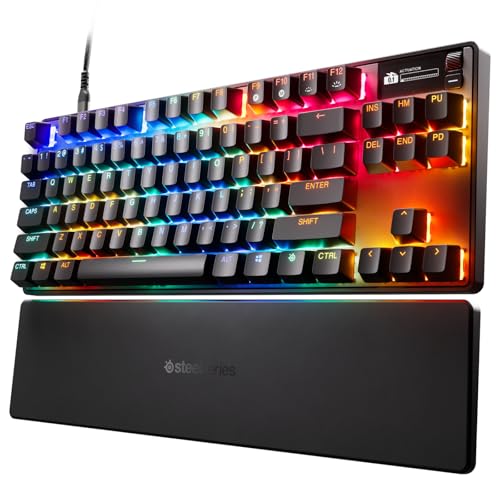
Badge: The Apex Pro to buy for most desks. The tenkeyless Gen 3 is the centre of the SteelSeries range and the fairest single representative of its side in this contest. Its OmniPoint 3.0 switches provide adjustable actuation, rapid trigger, rapid tap, and a protection mode that damps accidental neighbour-key inputs, and the board adds the line’s signature OLED display, PBT keycaps, and a USB-C connection in a footprint that suits the majority of gaming desks.
At a glance: Tenkeyless layout; analog magnetic switches with per-key actuation; rapid trigger and rapid tap; OLED display; RGB lighting; wired USB-C.
Strengths
- A complete competitive feature set with nothing important reserved for a pricier sibling.
- The tenkeyless footprint keeps a function row and arrows while freeing real mouse space.
- The display earns its keep for profile and actuation feedback without opening software.
Trade-offs
- The ecosystem software is a substantial install compared with a browser tab.
- It is a wired board in a market where rivals increasingly offer strong wireless.
- The flagship feature list puts it in premium territory rather than value territory.
Best for: players who want the Apex Pro experience in the size most desks want. / Not suited for: minimalists chasing the smallest deck or buyers seeking the lowest-cost rapid trigger board.

The like-for-like challenger: Apex Pro Mini Gen 3
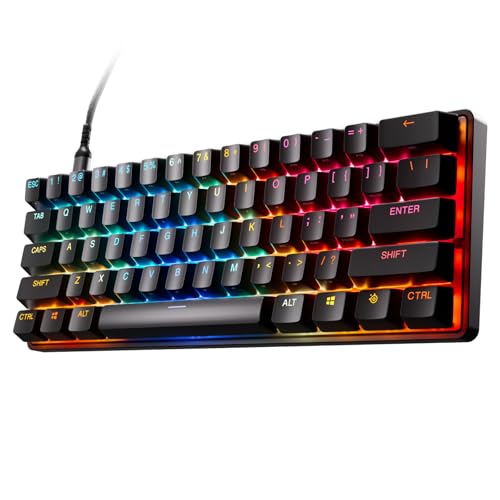
Badge: The direct size rival to the 60HE. Judged purely as a 60 percent rapid trigger deck, the Mini Gen 3 is the SteelSeries that stares straight at the Wooting. It carries the same OmniPoint 3.0 generation of switches, the same rapid trigger and protection features, and the same design language, compressed into the footprint the 60HE made famous. What it cannot copy is the Wooting’s analog depth ecosystem and browser-light software; what it adds is retail availability and the backing of a large accessory ecosystem.
At a glance: 60 percent layout; HyperMagnetic switches with adjustable actuation; rapid trigger, rapid tap, and protection mode; RGB; USB-C wired.
Strengths
- Matches the Wooting’s layout bet exactly, so mouse-room arguments cancel out.
- Feature parity on the competitive essentials means the contest moves to feel and software, where it competes hard.
- Ordering, delivery, and returns run through ordinary retail channels.
Trade-offs
- No analog depth output comparable to Wooting’s for graduated game inputs.
- Configuration depends on the full desktop suite rather than a lightweight web tool.
- The mini layout inherits every layer compromise of the 60 percent class.
Best for: players who want the 60HE’s exact desk footprint with mainstream buying convenience. / Not suited for: analog-control enthusiasts or anyone who dislikes layered access to everyday keys.
The full-size flagship: Apex Pro Gen 3
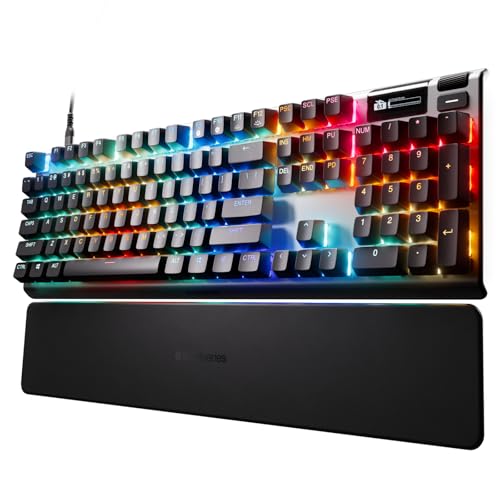
Badge: For players who refuse to give up the number pad. The full-size Gen 3 exists to prove that rapid trigger need not mean a stripped deck. It brings the same switch generation and competitive features to a complete keyboard with a number pad, the OLED display, and game-ready presets, serving players whose days mix ranked matches with spreadsheets, editing timelines, or data entry and who refuse to run two keyboards.
At a glance: Full-size layout with number pad; OmniPoint 3.0 HyperMagnetic switches; adjustable actuation and rapid trigger; OLED display; PBT keycaps; USB-C wired.
Strengths
- Nothing is sacrificed for work: every key a full desk expects is present.
- Per-key actuation lets work keys stay calm while gaming keys run sharp, in one profile set.
- The flagship build and display make it the most complete single-board answer SteelSeries offers.
Trade-offs
- The wide footprint pushes the mouse far right, which low-sensitivity players will feel immediately.
- It is the range’s premium statement, priced accordingly.
- All that width makes it a permanent desk resident rather than a portable setup piece.
Best for: hybrid work-and-play desks that want one flagship board for everything. / Not suited for: competitive players who guard their mouse space above all else.
Round one: which board responds faster where it counts?
On paper both sides deploy the same arsenal: adjustable actuation to shorten the press, rapid trigger to shorten the release and re-press, and sensing that tracks keys continuously. In play, the differences shrink to nuance. The Wooting’s tuning has a devoted following for the way its rapid trigger curve feels across the whole keystroke, a smoothness born of a company that thinks about little else. The Apex Pro answers with features wrapped around the same core: protection mode for players whose fingers stray, rapid tap for the opposing-direction cases modern shooters reward, and dual-action keys that can fire a second command at a deeper press — a trick the Wooting’s analog depth handles differently but in the same spirit. Verdict: a genuine draw at the level of winning and losing rounds, with the Wooting ahead on purity of feel and SteelSeries ahead on assists that forgive imperfect hands. The broader buying context for both brands sits in the full Hall-effect keyboard field.
Round two: whose software would you rather live in?
This round has a clearer winner for most readers, and it depends on what you value. Wooting’s configuration runs in a browser, asks for no account and no heavyweight install, stores profiles on the keyboard, and presents analog and rapid trigger controls with unusual clarity. It is the software equivalent of the board itself: narrow, deep, and fast to reach. SteelSeries offers a full desktop ecosystem that unifies mice, headsets, and keyboards, with game-linked profiles and a broader automation surface, at the cost of size, background presence, and the occasional feeling that a keyboard setting should not require an ecosystem at all. Verdict: Wooting for players who configure once and prize lightness; SteelSeries for players whose whole desk already lives in that suite and who enjoy per-game automation. Neither is bad; they are answers to different temperaments.
Round three: which layout philosophy serves your desk?
The 60HE makes one bet and makes it completely: the smallest sensible deck, layers for everything else, maximum mouse freedom. It is the right bet for dedicated gaming desks and the wrong bet for almost every other kind of desk. The Apex Pro line refuses to bet at all, offering the same core technology in mini, tenkeyless, and full-size forms, which quietly resolves the argument for households and hybrid workers. Verdict: SteelSeries, decisively, on choice — with the caveat that a player who truly wants only the compact deck loses nothing by that breadth existing. If layout is your deciding axis, the survey at the Wooting range and its sizes in full places the 60HE among its siblings, and the 60HE and 80HE compared with alternatives covers the size question from the Wooting side.
Round four: what does ownership actually feel like?
Ownership is where the channels diverge. Buying the Wooting means ordering from a small maker’s store, accepting its shipping rhythm, and dealing with that same small team for support — a team whose reputation among enthusiasts is strong precisely because keyboards are all it does. Buying an Apex Pro means ordinary retail: fast delivery options, familiar returns, and a large company’s support machinery. The Wooting’s ownership delights are subtler: a board that holds its configuration anywhere, software that never nags, and a community of tinkerers sharing profiles and modifications. The Apex Pro’s delights are practical: replacement keycaps and accessories everywhere, a display that answers questions without software, and firmware that arrives through the same suite as your other gear. Verdict: SteelSeries for frictionless ownership, Wooting for characterful ownership, and no honest way to call either universally better.
There is one ownership difference that rarely appears in comparisons and matters within the first month: how each board behaves when something goes wrong. A misbehaving key on a sensing board is usually a calibration or profile question before it is a hardware question, and the Wooting’s browser tool makes that diagnostic loop short enough to run between matches. The Apex Pro routes the same loop through its suite, which is slower to open but better at holding your hand, with guided resets and a support path that assumes no prior knowledge. Neither experience is objectively better; they are the two brands’ philosophies expressed as troubleshooting, and players who know their own patience for diagnostics can score this quiet round for themselves.
Round five: how do the switches themselves differ?
Underneath the branding, this contest is Lekker against OmniPoint, two mature answers to the same question of how to sense a key continuously. Wooting’s Lekker switches were designed in-house for analog duty, and their travel has a smooth, linear character that suits both feathered analog inputs and rapid repeated presses; the company’s whole identity rides on their consistency from key to key. SteelSeries’ OmniPoint line has evolved across generations into a magnetic switch with adjustable actuation as its founding trick, now in a third generation that layers rapid trigger and the protection behaviours on top. In blind typing, most players describe the Wooting’s stroke as the more uniform and the SteelSeries’ as the more familiar, closer in spirit to the mechanical boards both are replacing. Neither switch family accepts ordinary mechanical switches, so both boards ask you to commit to their platform; both reward that commitment with contact-free sensing that shrugs off the chatter and wear that end mechanical boards’ lives. Verdict: the Wooting for players who savour switch feel as a hobby in itself, the SteelSeries for players who want the technology to feel transparent and ordinary in the best sense.
Round six: which board sounds and feels better built?
Put both on a desk and the personalities show before a single game loads. The 60HE is light, compact, and unadorned, a tool that disappears under the hands; its sound is bright and lively, the honest voice of a small case built for response rather than acoustics. The Apex Pro boards feel like appliances from a larger industrial designer: denser, more damped, with a calmer typing voice and small luxuries like the display and media controls breaking up the deck. Players who equate heft with quality will score this round for SteelSeries every time, and players who equate focus with quality will score it for Wooting. The tiebreaker is context. On a travel setup the Wooting’s lightness is a genuine feature. On a permanent desk that hosts work calls, the Apex Pro’s composure earns its keep daily. Verdict: SteelSeries for the permanent workstation, Wooting for the portable battlestation, and a reminder that a good desk mat improves both more than either’s case engineering can.
Round seven: what do tournament rules and game policies say?
Any honest comparison in this category must spend a moment on legality, because the features that make these boards famous live near the line that competitive rulesets draw around input automation. Rapid trigger itself, being a property of the switch hardware sold openly by major brands, is widely accepted in ordinary ranked play. The contested ground is the family of behaviours that prioritise or coordinate opposing directions automatically, which some titles and tournament circuits have restricted or banned in specific implementations. Both ecosystems have shipped features in that family, and both have adjusted as rules evolved. The practical guidance is identical whichever board you buy: read your main title’s current competitive rules before a serious event, keep a stripped, compliant profile saved for organised play, and never build your entire movement identity on a feature a patch note could retire. Verdict: a draw, and a standing instruction to check the rules rather than the marketing.
How does each board behave across different games?
A tactical shooter is the home fixture for both: counter-strafing sharpens, movement feels deliberate, and the boards’ differences fade behind the game’s own demands. A movement-heavy arena title separates them slightly more, because continuous rapid inputs expose the Wooting’s tuning depth and the Apex Pro’s direction assists in alternating exchanges, and players tend to develop fierce loyalties here that say as much about their technique as about the hardware. In a driving or flight-leaning title, the contest ends early: the Wooting’s graduated keys give keyboard players a control dimension the Apex Pro simply does not offer, and owners who split their library that way should weigh this round heavily. In strategy and MMO play, the Apex Pro’s larger layouts and dual-action keys find their purpose, and the 60HE’s layers become a daily negotiation. In plain typing, both are fast and comfortable once profiles are set sensibly, with the SteelSeries’ bigger boards ahead on convenience. Summarised brutally: shooters call it a draw, driving crowns the Wooting, and the working week crowns the SteelSeries.
The Wooting side, honestly: strengths and trade-offs in prose
Because the 60HE cannot be linked here, it deserves its own plain accounting rather than a borrowed product card. Its strengths are focus, feel, and freedom: a rapid trigger implementation refined by a company with one product category to think about; analog depth control that no rival in this comparison reproduces as completely, opening graduated movement and driving inputs to keyboard players; browser-based configuration that respects your machine; and a compact, honest design that has become a modern classic on esports desks. Its trade-offs are equally plain: one layout, a direct-only purchase with shipping timelines you do not control, a minimalist feature set with no screen or media luxuries, and an ecosystem of accessories far smaller than a giant brand’s. A buyer who reads that paragraph and feels recognition should buy the Wooting. A buyer who feels a list of objections forming should buy the SteelSeries, and neither buyer is wrong.
Who should buy which, player by player?
The tournament-focused shooter player with a dedicated desk should buy the 60HE if analog experimentation also appeals, or the Apex Pro Mini if the weekend’s event requires a board that retail can replace quickly. The hybrid worker who games at night should buy the Apex Pro TKL or the full-size Gen 3 and let per-key actuation separate the workday from the ranked session. The tinkerer who loves profiles, layers, and graduated inputs should buy the Wooting and enjoy the deepest playground. The player upgrading from a membrane or entry mechanical board, unsure whether rapid trigger matters to them at all, should buy whichever side they can obtain most easily and return most painlessly — which in practice usually means the SteelSeries — and spend the saved deliberation on the practice weeks that make the technology pay. The gift buyer, finally, should always buy the SteelSeries, because a present that depends on a small overseas store’s stock rhythm is a present that can miss its occasion.
How do you set up the winner once it is on your desk?
Whichever badge the box carries, the first-session routine rhymes. Begin with actuation at a moderate depth on every key, rapid trigger enabled only on the movement cluster, and any direction-prioritisation feature left at its default until your hands have an opinion. Play real matches for several days. Then sharpen gradually: a slightly shallower actuation for the keys you strike most deliberately, rapid trigger extended across the letter block, and a separate calm profile for typing if the board shares your working day. Save one untouched fallback profile before experimenting, and treat the first fortnight as calibration rather than verdict. Players who follow this routine tend to keep these boards for years; players who maximise every slider on day one tend to blame the hardware by day three. The keyboard-side input chain rewards the same patience as the mouse side, a point explored at how polling and input chains really behave.
What mistakes decide this purchase badly?
Choosing by logo tribe is the first: both brands have earned their followings, and neither following is evidence about your desk. Choosing the mini layout for a spreadsheet-heavy life is the second, and it afflicts both brands’ small boards equally. The third is expecting the board to fix movement fundamentals; rapid trigger tightens inputs you already make, and a player whose counter-strafing is mistimed will simply mistime faster until practice catches up. The fourth is ignoring the returns question on a first rapid trigger purchase: because feel is personal, an easy return path has real value, and it is a legitimate point in SteelSeries’ favour for first-time buyers. The fifth is buying the full-size flagship for a small desk because it was the most complete model, then spending a year with the mouse exiled to the desk’s edge.
Round eight: what does the surrounding ecosystem look like?
A keyboard is bought once and accessorised for years, so the shelves around each board matter. SteelSeries operates a broad ecosystem: matching mice and headsets under one software roof, replacement keycaps and wrist rests through ordinary retail, and a steady cadence of firmware and feature updates delivered to a huge installed base. The advantages are convenience and certainty; the disadvantage is that your keyboard’s software experience is partly governed by a suite designed for a dozen product categories. Wooting’s ecosystem is narrower and deeper: the maker’s own accessories, a community that trades profiles and modifications with hobbyist energy, and software development that answers to keyboard players alone. Its advantage is focus; its disadvantage is that every accessory journey starts at one small store. Verdict: SteelSeries for the buyer who wants a matched, maintained desk with minimum effort, Wooting for the buyer who enjoys curating their own setup piece by piece.
Two players, two fortnights: how the choice plays out
Consider a competitive player who orders the Wooting. The first days involve a shipping wait that tests patience, then a first session in a browser tab configuring movement keys, then a week where counter-strafes feel simultaneously sharper and stranger as old timing misfires against the faster resets. By the second week the player’s practice routine has absorbed the board, the analog keys have been quietly mapped for the racing title played on Sundays, and the board has disappeared into the setup exactly as a tool should. The lingering frictions are small and specific: a missing function key during a work call, a layer combination forgotten at a friend’s house.
Now consider a hybrid player who orders the Apex Pro TKL. It arrives quickly, the suite installs alongside the headset software already present, and the first evening is spent splitting actuation depths between a calm work profile and a sharp game profile, with the little display confirming each change. The adjustment fortnight is gentler because the layout never fights back, and by the second week the player’s questions have narrowed to whether rapid tap belongs in their main title’s rules this season. The lingering frictions are also small and specific: a suite update that rearranges a menu, a wish that the board were lighter for the one trip it takes each year. Neither story contains a villain or a miracle, which is the truest thing this comparison can tell you: both boards reward their owners, along different curves of convenience and character.
How should you think about the money without fixating on it?
Both sides of this contest live in the premium tier of the keyboard market, and neither is the value play; the value play in this category is a smaller brand’s rapid trigger board, several of which appear in the companion guide at the 60HE and 80HE guide with its wider alternatives. What the premium buys here is not speed — the speed is available more cheaply — but the surrounding certainties: switch consistency, software that will still be maintained in three years, support that answers, and a board whose feel will not drift as it ages. Between the two premium answers, let the deciding cost be the hidden one. The Wooting’s hidden costs are time and flexibility: shipping patience, one layout, a separate accessory journey. The Apex Pro’s hidden costs are weight and complexity: a heavier software footprint and a flagship price for the full-size conveniences. Whichever hidden cost sounds cheaper to you personally is the board to buy, and that sentence is a more reliable decision tool than any benchmark either brand publishes.
A decision guide you can run in two minutes
Answer five questions quickly and honestly. Do you play driving, flight, or stealth titles where graduated key input would genuinely be used? If yes, the Wooting takes a lead that nothing else on this page can close. Do you need a function row, arrows, or a number pad without layers at least several times a week? If yes, the Apex Pro in TKL or full-size form resolves your largest daily friction. Do you need the board this week, or as a gift with a date attached? If yes, retail availability makes SteelSeries the pragmatic champion. Do you already run a desk full of one brand’s gear under one software suite? If yes, matching that suite saves real friction. Do you enjoy tinkering with profiles, layers, and community modifications as a hobby in itself? If yes, the Wooting will keep rewarding that temperament for years. Most readers find one question lands much harder than the other four, and that question is the comparison’s real verdict for them.
Round nine: which board ages better?
Longevity in this category has two halves, the physical and the digital. Physically, both boards start with an advantage over conventional keyboards, because contact-free magnetic sensing removes the leaf wear and oxidation behind most switch failures, and both are built to a standard that should survive years of daily ranked abuse with nothing more than cleaning and the occasional keycap refresh. The Wooting’s simplicity helps it here: fewer features means fewer things to fail, and its community has a strong record of keeping older boards useful through software. The Apex Pro’s extra hardware, the display chief among it, adds a component with its own lifespan, balanced by a large company’s parts and support infrastructure standing behind the whole product. Digitally, both makers treat this category as a flagship worth updating, and the features that define these boards have historically arrived and improved through firmware rather than demanding new hardware. Verdict: the Wooting by a nose for mechanical simplicity, the SteelSeries by a nose for institutional support, and a practical tie for any buyer keeping a board for a normal three-to-five-year cycle.
What do most comparisons of these two get wrong?
The commonest error is scoring the contest as a latency shootout, as though one board’s victory by a fraction of a millisecond in a synthetic test settles a purchase that will be lived with for years. The second error is treating the Wooting’s direct-only availability as a footnote rather than a central fact; for many buyers it is the deciding fact, in both directions, since some prize the specialist channel and others cannot use it. The third error is ignoring the layout question, which touches the owner every single day, in favour of switch debates that touch the owner in specific games. The fourth is assuming the reader plays one genre; most libraries are mixed, and the mixed library is exactly where these two boards’ different strengths stop cancelling out. A comparison that avoids those four errors arrives where this one has: at a pair of excellent, genuinely different answers whose ranking depends on the reader’s desk, library, and temperament far more than on any specification either brand prints largest.
Round ten: customisation and personal feel
Both boards accept the standard keycap ecosystem, so the visual and tactile tailoring of the top surface is equally open to their owners, and a favourite keycap set follows you to either camp. Beyond the caps, the paths diverge in flavour. The Wooting invites depth-first tinkering: layered behaviours, analog curves, per-key personalities tuned over months, with a community that treats a keyboard profile the way other hobbies treat a project car. The Apex Pro invites breadth-first tailoring: display content, lighting scenes that match the rest of the desk, dual actions and presets organised per game, all administered from one suite. Neither flavour is superior; they are different hobbies wearing the same product category. A buyer who knows which flavour of tinkering they actually enjoy, as opposed to the one they admire in videos, will choose well here, and a buyer who enjoys neither should weight the earlier rounds — layout, channel, software weight — and let customisation go as a tie.
What does it cost to switch camps later?
Buyers often ask whether choosing one side locks them in, and the reassuring answer is that the lock-in is shallow in both directions. Your keycaps, your desk setup, and most of your hard-won movement skill transfer freely, because the core techniques of rapid trigger play are shared across the category. What does not transfer is configuration labour: profiles, layers, and per-key tuning live inside each maker’s software philosophy, and rebuilding them on the other side takes an evening or two rather than a month. The analog habits are the one asymmetric case — a player who builds driving or stealth technique around graduated Wooting keys has no equivalent waiting on the SteelSeries side, just as a player devoted to the Apex Pro’s display-driven workflow finds no screen on the Wooting. Knowing that the switching cost is mostly an evening of setup should lower the temperature of the original decision: this is a preference to be lived with and occasionally revisited, not a marriage. Buy the board that fits your current desk and library, keep your fallback profiles exported where the software allows, and revisit the contest when your desk, your games, or your working life changes shape.
How do the two boards pair with the rest of a setup?
A keyboard does not compete alone, and pairing exposes one more practical difference. The 60HE’s tiny footprint is at its best beside a large mousepad and a low-sensitivity mouse, the classic esports geometry in which the keyboard is nearly a spectator; it also travels beautifully beside a laptop, turning a hotel desk into a credible battlestation. The Apex Pro TKL shares most of that geometry with a little more presence, while the full-size Gen 3 demands a wide desk and pairs naturally with a monitor arm, a streaming setup, and a working day that never leaves the chair. Cable management flatters both, since each is wired: a coiled or routed cable is part of the aesthetic either way, and players who dream of a cable-free deck should be reading the wireless corners of the category instead, starting with wireless keyboards built for FPS play. Judged as citizens of a whole desk rather than as spec sheets, the Wooting is the specialist instrument in an esports shrine and the Apex Pro is the flagship appliance in a complete workstation, and most readers know which room they are furnishing.
A first-week training plan whichever board you choose
Because both boards reward the same adjustment process, one plan serves both camps, and following it is worth more than the margin between the hardware. On day one, resist configuration maximalism: set a middle actuation depth, enable rapid trigger on the movement keys only, and spend the session in ordinary matches rather than aim trainers, so the new timing meets real opponents. On days two and three, add a short daily drill of deliberate counter-strafing in a practice environment, fifteen unhurried minutes of stopping, resetting, and firing only when fully settled, because that drill is where rapid trigger’s benefit is manufactured. On day four, build your second profile — the calm typing and work configuration — before frustration with accidental inputs in chat or documents builds it for you resentfully. On day five, extend rapid trigger across the letter keys and notice which inputs your hands were already making correctly and which the faster board now exposes. By the end of the week, change exactly one variable you have been curious about — a shallower actuation on two keys, a direction feature on or off — and give it three days before judging it. Players who run this week honestly usually arrive at settings they keep for a year, and they also arrive at the comparison’s final truth: the boards were close enough that the training, not the badge, produced the improvement.
Buying second-hand: what changes between the two?
The used market treats these boards differently, and a bargain hunter should know how. A used Wooting tends to hold its value stubbornly, reflecting the direct channel’s steady pricing and the board’s enthusiast following, and verifying a used unit means confirming the exact revision, checking that the browser software recognises and updates it, and testing analog behaviour across the deck. A used Apex Pro is easier to find through ordinary resale channels and easier to verify against retail listings, with the display and its controls added to the checklist of things to test. In both cases, contact-free sensing is the used buyer’s friend, since the most common age-related keyboard failures are designed out, and a board that passes a full key-by-key test is likely to serve for years. Factor in that a used purchase usually forfeits the original warranty experience, and the channel differences from the new market reappear in miniature: character and scarcity on one side, convenience and verifiability on the other.
What if you already own one of them?
Owners reading a comparison usually want permission either to stay or to switch, so here is the honest version of both. If you own the 60HE and your only frictions are the missing keys, the cure is layout, and it can be as cheap as a small supplementary keypad for work hours rather than a whole new flagship; if your friction is the purchase channel itself, it has already been paid and should stop weighing on you. If you own an Apex Pro and your friction is software weight, an afternoon spent stripping the suite back to the profiles you actually use usually cures more than a hardware swap would. Switch camps when the thing you lack is structural — analog depth, a layout class, a channel — and stay when the thing you lack is a setting, a profile, or a habit. Comparisons make their money by implying every reader should move; most readers of this one should simply configure, practise, and play.
Settling the SteelSeries side of the shortlist first
Readers who have decided for SteelSeries still face a three-way choice inside the family, and it deserves a cleaner answer than the product cards gave it. Pick the Mini Gen 3 when your desk and your games mirror the 60HE’s world — small tray, huge mousepad, shooters first — because it is the only Apex Pro that contests the Wooting on identical geometry. Pick the TKL Gen 3 when you want the same competitive core with a function row and arrows restored, which describes the majority of real desks and is why it carries this page’s standard-bearer badge. Pick the full-size Gen 3 when the number pad is a working tool rather than a decoration, and accept the mouse-space cost as the price of never reaching for a second board. What you should not do is climb the sizes for prestige; the switch generation and the competitive features are shared across the three, so the largest board is not the fastest board, merely the widest. That internal equality is, in the end, one of SteelSeries’ strongest arguments in the whole comparison: the family lets the layout question be answered on its own merits, at no performance cost, which is precisely the freedom the single-layout Wooting asks its buyers to surrender.
Final recommendation
Buy the Wooting 60HE, direct from its maker, if you want the reference rapid trigger feel, genuine analog depth, and the lightest serious software in the category, and if a single compact layout is a feature rather than a compromise in your life. Buy the SteelSeries Apex Pro — TKL Gen 3 for most desks, Mini Gen 3 for the like-for-like duel, full-size Gen 3 for the no-sacrifices desk — if you want the same competitive core wrapped in sizes, conveniences, and a purchase you can complete through Amazon today. The category is lucky to have both answers, and the only losing move is pretending one of them does not exist. Buy with your desk, your library, and your calendar in mind, configure patiently, and then let practice, rather than comparison pages, occupy your evenings from that point onward.
Frequently asked questions
Is the Wooting 60HE actually faster than the Apex Pro?
At the level where rounds are decided, they are peers: both offer adjustable actuation and rapid trigger built on continuously sensed switches, and any residual difference is smaller than the variation in a player’s own form across an evening. The meaningful differences are the Wooting’s analog depth and lighter software against the Apex Pro’s sizes, display, and retail convenience. Choose on those, not on a stopwatch fantasy.
Why is the Wooting not linked in this comparison?
Wooting sells through its own web store and has no official Amazon listing, so there is no legitimate product page to link. The SteelSeries boards are linked to their verified listings, and the Wooting is compared in prose on equal footing. Be cautious of any comparison that quietly links a different brand’s board as though it were the Wooting.
What is rapid tap, and does the Wooting have it?
Rapid tap is SteelSeries’ name for prioritising the most recently pressed direction when opposing movement keys are held together, which cleans up direction changes in modern shooters. Wooting addresses the same family of movement problems through its own software behaviours and rapid trigger tuning rather than an identically named feature. The practical effect for most players is comparable, and both implementations should be checked against your main game’s current competitive rules.
Which board is better for typing and office work?
The Apex Pro in its tenkeyless or full-size forms, because the restored keys and per-key actuation let one board serve both lives without layer gymnastics. The 60HE can type perfectly well once its layers are learned, and many owners write on it daily, but it asks for that learning investment and never gives the function row back. A shared household desk tips the answer further toward SteelSeries.
Can either board work on a games console or a second computer easily?
Both are wired USB boards at heart, so moving between machines is a matter of unplugging, and onboard profiles mean your settings travel with the hardware rather than living in one PC’s software. Console support depends on the console and the game rather than the keyboard, so check your specific title. The Wooting’s browser configuration is a small extra convenience when the second machine cannot install a full software suite.
How long will a board like this stay relevant?
These are mature implementations of a settled technology, and their contact-free sensing avoids the wear failures that age conventional boards. Expect relevance measured in years, extended further by software updates, which both makers issue for this category. The likelier reason to replace one is a changed desk or layout need, not obsolescence, which is why choosing the right size now matters more than chasing the newest revision.
If I can only test one board before deciding, which should it be?
Test the one whose deciding feature you cannot evaluate from a page like this. If analog depth is your open question, only hands on a Wooting can answer it, and a friend’s board or a community meetup is worth more than another week of reading. If layout is your open question, any 60 percent board borrowed for a weekend answers it for both camps at once. If neither is open and your questions are about availability, software weight, and desk fit, the Apex Pro is the easier test to arrange through ordinary retail, and its result generalises: players who love its rapid trigger but crave the specialist’s depth can still migrate later at the cost of one evening of profile building, as the switching section above explains.
Does the loser of this comparison ever make sense as a second board?
Surprisingly often, yes, because the two boards’ strengths map onto different rooms and machines. A Wooting on the main rig and a compact Apex Pro in the travel kit, or the reverse arrangement in a household that shares gear, is a combination owners arrive at naturally once the tribal framing fades. The profiles and habits transfer well enough that the second board feels like a dialect rather than a foreign language.
Keep exploring: every model in the Wooting family explained · wireless gaming keyboards for FPS players · gaming keyboards across every size and budget