Disclosure: As an Amazon Associate, reviewstook.com earns from qualifying purchases. Links on this page are affiliate links; they cost you nothing extra. Prices and availability change often, so check the current Amazon listing before you buy.
Mouse grips sound like a small topic until you notice how much of your aim, comfort, and consistency is decided by the few centimetres of plastic between your fingers and the mouse shell. The phrase covers two related things: the way you hold a mouse — palm, claw, or fingertip — and the grip tape players stick onto a shell to change friction, sweat behaviour, and shape. This guide treats mouse grips as an explainer first, because choosing tape before you understand your hold is like buying tyres before you know what car you drive. Once the holds are clear, we look at two verified grip-tape accessories that genuinely help, explain how to fit them, and answer the questions readers ask most.
There is no single correct hold. There is only the hold that matches your hand size, your mouse shape, your desk posture, and the games or work you do. A palm gripper who forces a fingertip style because a streamer uses it will usually end up with a tired forearm and worse control, not better aim. Equally, a fingertip player who adds thick, tacky tape everywhere can blunt the micro-adjustments that make their style work. The useful question is never “which grip is best” but “which grip is mine, and what is it costing me?”
Key takeaways
- Your grip style is a relationship between hand, mouse shape, and task — not a badge of skill, and not something to copy blindly from a favourite player.
- Palm grip spreads contact and favours comfort and broad swipes; claw adds finger leverage for faster stops; fingertip maximises micro-adjustment at the cost of stability and endurance.
- Grip tape changes friction and sweat behaviour, not your underlying hold. Thin tape preserves shape; textured tape adds security for sweaty hands.
- Fit tape to the contact points your own hold actually uses — usually the sides and the two main buttons — rather than covering the whole shell.
- Most grip problems blamed on “bad aim” are really shape, size, or moisture problems, and they are cheaper to fix than a new mouse.
In this guide
Mouse Grips explained: the three holds and what each one really does
Palm grip is the hold most people start with and many never leave. The whole hand rests on the mouse: fingers lie fairly flat along the buttons, the palm fills the hump of the shell, and movement comes mostly from the arm and shoulder with the wrist making smaller corrections. Because contact area is large, the mouse feels planted and predictable, and long sessions are comfortable because no single muscle group does all the work. The trade-off is agility at the smallest scale. Lifting and repositioning the mouse takes a fraction longer, vertical flicks are less natural, and very small mice feel cramped because there is nowhere for the palm to sit. Palm grip suits larger, higher-humped mice, lower in-game sensitivity with big sweeping motions, and anyone whose priority is an ache-free workday that also happens to include gaming.
Claw grip curls the fingers so the fingertips press down on the buttons while the base of the palm still touches the rear of the shell. The arch in the fingers works like a spring: clicks feel snappier, the mouse can be pulled back toward the palm with the fingers alone, and stopping a swipe precisely is easier because the fingers brake as well as push. Many competitive players land here because it balances control and speed. The costs are real, though. The curled posture loads the finger joints and the forearm, sessions can end in a dull ache that palm grippers rarely report, and the style demands a shell whose rear hump supports the palm base without forcing the wrist up. A relaxed claw — fingers gently curved rather than hooked — keeps most of the benefit with much less strain, and it is the version worth learning if you try the style.
Fingertip grip removes the palm from the mouse entirely. Only the fingertips touch, the wrist often hovers or rests on the desk as a pivot, and nearly all movement comes from the fingers and small wrist motions. This gives the finest micro-adjustments of any hold: tiny corrections, quick vertical movements, and effortless small lifts. It also gives the least stability. Without palm contact there is nothing damping small tremors, the hand tires faster, and the style punishes heavy mice because the fingers do all the accelerating and braking. Fingertip grip pairs with small, light, low-profile shells and with players who value flick precision over marathon comfort. It is also the hold most sensitive to surface friction, which is why fingertip players tend to care about mouse feet and pads as much as about the mouse itself.
Hybrid holds are not a failure to commit; they are the norm. Plenty of players palm the mouse while browsing and working, then drift into a relaxed claw the moment a ranked match starts. Others rest the palm on very large mice and lift it away on small ones, so the same person uses two grips in one evening depending on hardware. Treat the three named styles as reference points on a dial rather than boxes you must live in. The practical test is to watch your own hand during ordinary play — a phone video from the side is brutally honest — and note where contact actually happens. That contact map, not the label, is what should drive any tape or shape decision later.
Hand size quietly decides more than preference does. A large hand on a small mouse cannot palm grip no matter how much it wants to; the fingers run out of shell. A small hand on a long mouse cannot fingertip comfortably because reaching the buttons stretches the fingers flat. As a rough orientation, measure your hand from wrist crease to middle fingertip and compare it with the mouse length: when the shell is around sixty percent of that length or less, fingertip and claw come naturally; when it approaches two-thirds or more, palm support becomes realistic. These are starting points for experimentation, not laws, and width matters too — a wide mouse fills the palm and encourages a flatter hold even at shorter lengths.
The accessory picks: grip tape that earns its place
Because this is an explainer, the only products linked here are grip-tape accessories — the one purchase that directly changes how a hold feels. Two verified options cover the two sensible approaches: a universal pre-cut sheet you trim to your own contact map, and a model-specific kit shaped for one popular mouse family. If your hold is comfortable and your hands stay dry, you may need neither, and this guide will still have done its job.
Quick picks
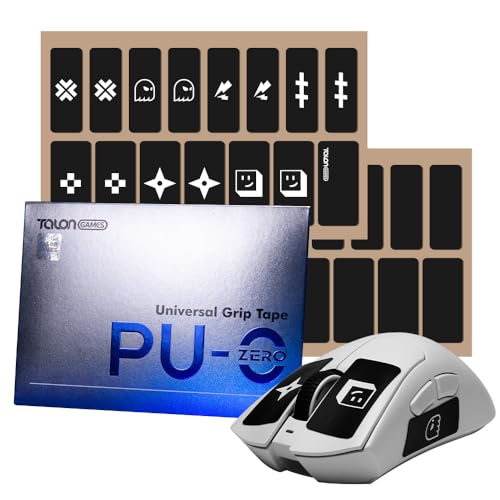
- Best universal option: TALONGAMES Universal Mouse Grip Tape — thin, pre-cut, and trimmable to almost any shell. Check price on Amazon
- Best model-specific fit: HOTLINEGAMES 2.0 Plus Mouse Anti Slip Grip Tape for the Logitech G Pro X Superlight family — shaped pieces that follow that shell exactly. Check price on Amazon
How these were chosen: both listings were verified against the Creators API for this site, with the exact product title and an official image confirmed. Beyond that, the selection follows the logic of the explainer — one flexible sheet for readers whose mouse or hold does not match a pre-made kit, and one precision kit for readers who own the mouse it is cut for. We deliberately did not link any mice here: recommending a shell inside a grip explainer would invert the whole point, which is to fit your existing mouse to your hand first.

TALONGAMES Universal Mouse Grip Tape
Badge: The adaptable sheet for any mouse
- Format: pre-cut universal grip tape pieces
- Thickness: 0.3mm, described by the maker as ultra-thin
- Material family: PU-0 series surface, sweat-absorbing
- Intended surfaces: gaming mouse, controller, or keyboard
- Colour in the verified listing: black
The appeal of a universal sheet is that it respects your contact map instead of a designer’s guess. You can place narrow strips exactly where your thumb and ring finger ride, add a piece under the palm heel if you palm grip, or leave the top shell bare if your fingers prefer smooth plastic. At 0.3mm the tape is thin enough that it changes friction far more than it changes shape, which is exactly what most players want: the mouse they already like, minus the slipperiness. The sweat-absorbing surface matters most in summer or in long sessions, when a glossy shell starts to feel like it is skating away from the hand and the player unconsciously squeezes harder to compensate. That extra squeeze is a hidden source of forearm fatigue, and reducing it is the real comfort win here.
Strengths
- Trimmable pieces adapt to unusual shells, small mice, and hybrid holds that no model-specific kit anticipates.
- Very thin profile preserves the original shape and click feel, so the adjustment period is short.
- Sweat-absorbing texture helps players whose hands turn glossy shells treacherous mid-session.
Trade-offs
- Universal pieces need measuring and cutting by hand, so a neat result takes more patience than a shaped kit.
- Thin tape adds little cushioning; players wanting a plumper, softer hold should look at thicker materials instead.
- Coverage depends on your own layout choices — a careless layout can leave an edge exactly where a finger lands.
Best for: players with sweaty hands, unusual mouse shapes, or a hybrid grip who want friction without bulk. / Not suited for: anyone who wants a five-minute, no-measuring installation or who dislikes any texture under the fingers.

HOTLINEGAMES 2.0 Plus Mouse Anti Slip Grip Tape
Badge: The precision kit for Superlight owners
- Format: model-specific pre-cut grip tape kit
- Compatibility in the verified listing: Logitech G Pro X3 Superstrike, G Pro X2 Superstrike, and G Pro X Superlight 2
- Focus: anti-slip, sweat-resistant playing surface
- Positioning: a performance upgrade for an existing mouse
A shaped kit trades flexibility for fit. Every piece follows the curves of the Superlight shell, so the sides, buttons, and back are covered in the places that mouse’s typical claw and palm users actually touch, with edges that land in the shell’s natural seams instead of across a fingertip’s path. Installation is quicker and looks tidier, and because the kit was designed around one shell, the texture coverage feels deliberate rather than improvised. For a mouse as widely used in competitive play as the Superlight line, that design attention makes sense: the manufacturer knows the contact map of its typical user because thousands of players share it.
Strengths
- Pre-shaped pieces fit the listed Logitech shells precisely, with fast, tidy installation.
- Sweat-resistant surface keeps a light mouse secure during long, warm sessions.
- Coverage follows the contact zones claw and palm players use on this particular shell.
Trade-offs
- Compatibility is narrow by design — it is the wrong purchase for any mouse outside the listed family.
- The fixed layout cannot adapt if your personal contact points differ from the typical pattern.
- Like all adhesive tape, removal after months of use can leave residue that needs gentle cleaning.
Best for: Superlight-family owners who claw or palm grip and want a factory-neat result. / Not suited for: owners of other mice, or fingertip players who prefer most of the shell left bare.
Comparing the two approaches side by side
| Question | TALONGAMES universal sheet | HOTLINEGAMES 2.0 Plus kit |
|---|---|---|
| Which mice does it fit? | Almost any, after trimming | The listed Logitech Superlight models only |
| How much shape change? | Minimal at 0.3mm | Minimal; follows the shell |
| Installation effort | Measure, cut, place | Peel and place |
| Layout freedom | Full — your contact map decides | Fixed by the kit designer |
| Main benefit | Adaptability plus sweat absorption | Precision fit plus sweat resistance |
The pattern in that table is the whole buying decision in miniature. Universal tape rewards a player who knows their own hand; a shaped kit rewards a player whose hand matches the crowd the kit was designed for. Neither is better in the abstract, and buying both is pointless — pick the philosophy that matches how much you enjoy tinkering, then commit to one layout long enough to judge it fairly, which means at least a week of ordinary use rather than one evening.
Buying guide: matching grip solutions to your hand, not to hype
Start with diagnosis, not shopping. Play or work as you normally would for twenty minutes, then look at your hand before you move it: where is the skin actually touching? Photograph it if you can. Shine on the shell tells the same story over weeks — the polished patches on an older mouse are a map of your real grip, and they often surprise people who believed they used a different style. If the polish sits on the rear hump and along both buttons, you palm more than you think. If it concentrates on the sides and button tips, your fingers are doing the steering. Buy for the hand in the photograph, not the hand in your imagination.
Next, name your actual problem, because each problem has a different cheapest fix. Slipping when hands sweat points to texture or tape. A mouse that feels like it wanders during fine work points to shape or to a fingertip hold on too large a shell. Clicks that feel slow often trace to finger position on the buttons rather than switch quality — sliding the whole hold a few millimetres forward changes leverage noticeably. Pain is a separate category: numbness, tingling, or sharp joint pain is a signal to change posture, take breaks, and consider a different shape or a vertical mouse, not to add tape and push through. This guide covers comfort and control for healthy hands; persistent pain deserves advice from a qualified professional, not a peripherals article.
Thickness is the spec that matters most in tape and the one buyers overlook. Very thin tape, around the 0.3mm of the universal sheet above, is a friction change only. Thicker, cushioned tapes start to reshape the mouse: they can fill a hump for a palm gripper or widen the sides for a large hand, but they also move your fingers further from the buttons and can soften click feel. Decide which job you are hiring the tape to do. If the shape already fits, stay thin. If the shape almost fits, a slightly thicker side piece can be a cheaper experiment than a new mouse — but treat it as an experiment, with the old setup easy to restore.
Texture deserves the same honesty. Aggressive, rubbery textures feel secure in the shop and can feel abrasive in hour three. Smooth, sweat-absorbing surfaces feel underwhelming in a quick squeeze test yet stay consistent across a long session, which is when grip actually matters. Players with dry hands often prefer a tackier surface because they generate little natural moisture; players with sweaty hands usually do better with absorbent textures that manage moisture rather than fighting it. There is no universal winner, only a match between skin and surface, and it is why borrowing a taped mouse from a friend for one session teaches more than an afternoon of product pages.
Finally, budget your attention correctly. Grip is one variable among mouse shape, weight, sensor behaviour, feet, and pad. Changing everything at once makes improvement impossible to attribute and problems impossible to isolate. Change the grip variable alone — a tape layout, or a deliberate two-week trial of a relaxed claw — and judge the result in your ordinary games and work. Players who experiment one variable at a time end up with a setup that suits them; players who overhaul everything monthly end up with a drawer of mice and the same complaints.
How to fit grip tape without ruining a good mouse
Step 1: Clean the shell properly
Wipe the mouse with a slightly damp microfibre cloth, then dry it fully. Skin oil is the enemy of adhesive, and a tape edge laid over an oily patch will lift within days. Avoid harsh solvents on coated shells; patience with a plain cloth beats a damaged finish.
Step 2: Map before you peel
Hold the mouse in your playing grip and mark your contact points with small pieces of masking tape or a washable marker dot. This takes two minutes and prevents the classic mistake of covering decorative areas your hand never touches while leaving the thumb’s real landing zone bare.
Step 3: Cut and dry-fit universal pieces
For a universal sheet, cut conservatively — you can trim more, you cannot add back. Lay each piece over the shell without removing the backing, check that edges sit in seams or low-contact areas, and only then commit. Button pieces deserve special care: keep tape clear of the gap around each button so travel stays crisp.
Step 4: Apply from the centre outward
Peel, position the centre of the piece first, and smooth outward to push air out. Working centre-out avoids the trapped bubbles that later become peeling edges. Warm hands help the adhesive settle; so does leaving the mouse unused for a few hours afterwards.
Step 5: Live with it for a week
Any texture change feels strange for the first sessions. Judge the layout after a week of normal use, then adjust single pieces rather than stripping everything. Note which piece you would move and why — that note is your contact map improving, and it is the real product of the whole exercise.
Common mistakes players make with grip
The first mistake is copying a professional’s hold without copying their hand size, mouse, sensitivity, and thousand hours of practice. A pro’s fingertip grip on a tiny mouse is the end of a long adaptation, not a shortcut available for purchase. The second is gripping harder when control feels poor. Excess squeeze is usually a symptom — of slipperiness, of a shape that does not support the hand, of sensitivity set too high — and squeezing through it trades a fixable equipment issue for a tired forearm. The third is covering the entire shell in tape. Tape where fingers never land adds edges, collects grime, and can blunt the shell contours that were guiding your hand into position. The fourth is changing grip style and sensitivity in the same week, then concluding the new style is worse when the real culprit was relearning two variables at once. The fifth, and the most expensive, is buying a new mouse to solve a moisture problem that a thin sheet of tape would have settled.
Final recommendation
Learn your own contact map first; that knowledge is free and it improves every later purchase. If sweat or slipperiness is your named problem and your mouse is an unusual shape — or your hold is a hybrid — start with the TALONGAMES universal sheet and lay it out according to your map. If you own one of the listed Logitech Superlight models and want the tidy, designed result, the HOTLINEGAMES 2.0 Plus kit is the cleaner path. And if your hold is comfortable and your mouse stays put, keep your money: the best grip upgrade is sometimes recognising you do not need one.
Frequently asked questions
Which mouse grip is the most accurate?
None of them, in isolation. Fingertip offers the finest micro-corrections, claw offers strong braking and quick clicks, and palm offers the steadiest large movements. Accuracy comes from the match between hold, mouse shape, and sensitivity, practised over time — a comfortable palm player will out-aim a miserable fingertip player almost every time.
Can grip tape damage a mouse?
Quality tape removed slowly, with gentle warmth, usually leaves at most adhesive residue that a damp cloth clears. The risks come from rushing removal, from solvents on coated shells, and from tape wedged into button gaps. Keep pieces clear of moving gaps and you avoid nearly all of it.
How long does grip tape last?
It depends on texture, session length, and hand moisture, but expect edges and high-contact zones to wear first. A layout that starts lifting at one corner can often be saved by replacing that single piece rather than the whole set, which is another argument for universal sheets in the drawer.
Should beginners learn claw grip straight away?
Beginners should learn a relaxed hold that does not hurt, then experiment. A gentle claw is a reasonable experiment for players who feel their clicks and stops lack snap; a forced, tightly hooked claw is a reliable route to sore fingers. Comfort over a full session is the test, not how the hold looks on camera.
Does grip tape help with sweaty hands at a desk, not just in games?
Yes. The same moisture that ruins a late-game swipe also makes a work mouse feel greasy by mid-afternoon. Absorbent tape on the sides and palm contact zone makes long spreadsheet or editing sessions feel more secure, and the reduced squeeze benefits the forearm all day.
What if my mouse is simply the wrong size?
Then tape is a bandage, not a cure. If your fingers overflow a small shell or cannot reach the buttons of a large one, a correctly sized mouse will improve things more than any accessory. Use the hand-versus-shell proportions in this guide, try sizes in person when you can, and let tape fine-tune the winner.
Related guides
choosing a gaming mouse that fits your hand
the best mouse grip tapes compared
grip styles for gaming, in depth
why mouse skates change glide and control
the Razer Naga V3 Pro and its button plates
How shell shape quietly chooses your grip for you
Pick up any mouse and the designer has already voted on your grip. The position of the hump is the clearest ballot: a hump placed toward the rear supports the palm base and invites claw and palm holds, because the hand can rest against that rise and pivot around it. A hump centred under the middle of the hand suits a fuller palm contact. A low, flat shell with almost no hump removes the support entirely, which fingertip players love — there is nothing pushing back — and palm players often describe as the mouse “disappearing” uncomfortably. When a mouse feels wrong within the first minute, it is usually this geometry arguing with your hand, not a defect.
The sides cast a vote too. Deeply curved, inward-scooped sides give the thumb and ring finger a ledge to lift the mouse by, which claw and fingertip players use constantly for repositioning. Flatter sides suit a palm hold where lifting is rarer and a broad, calm contact is the point. Width at the grip zone matters more than headline width: a mouse can measure wide at its base yet narrow where fingers actually hold it, and that pinch point decides whether a large hand feels in control or feels like it is holding a pebble. Button design completes the picture. Long, light main buttons with a pronounced finger groove reward a flat palm finger; short, stiff buttons favour the fingertip press of a claw. None of these features is good or bad alone — each is a sentence in the shape’s argument about how it wants to be held, and the happiest owners are the ones whose hands agree with the argument.
This is also why borrowing and in-store handling beat specification sheets for grip questions. Length and weight numbers cannot tell you where the hump will meet your palm or whether the side curve lands under your thumb or beside it. Thirty seconds of holding, clicking, and lifting a mouse tells you which grip it wants from you. If you must buy unseen, buy from somewhere with painless returns, and judge the mouse across several days: the first hour flatters almost any shape, while the fifth day of ordinary use reveals the truth.
Matching your hold to what you actually play and do
Tactical shooters reward small, certain movements and long holds at a single angle. Players there often settle into palm or relaxed claw, with sensitivity low enough that the arm handles turning and the fingers handle the final few pixels. The hold must stay comfortable while nearly still, because most of a round is waiting with the hand loaded and ready; a tense fingertip hover is exhausting in that rhythm. Arena and hero shooters invert the demand: constant tracking, fast turns in every direction, and vertical aim. Claw and fingertip holds earn their keep there, since the fingers can drag the mouse through small, continuous corrections without involving the whole arm. Real-time strategy and MOBA play sit between the two — rapid, repeated clicks and short hops across the pad — and tend to favour a light claw on a smaller shell, where the hand can dart without travelling.
Work deserves equal honesty, because most hands spend more hours on documents than on games. Palm support wins the workday for most people: the hand is parked for long stretches, movements are unhurried, and the enemy is cumulative strain rather than a flicking opponent. Creative work splits by tool. Photo retouching and illustration want fine, slow control — many artists drop sensitivity and use a fingertip-leaning hold for detail, then rest back into palm for broad strokes. Video editors scrubbing timelines make thousands of short horizontal movements, where a relaxed claw on a mouse with a good wheel feels natural. The lesson across all of it: name your dominant activity and optimise for that, letting the secondary activity adapt, instead of buying for the game you play twice a month and suffering through the work you do daily.
Sensitivity ties the whole system together, and it should be set after the grip, not before. A fingertip player on high sensitivity can cross a screen with finger movement alone; the same setting in a palm hold produces constant overshoot because the arm’s smallest comfortable movement is larger. Low sensitivity magnifies the differences too: palm players use the desk like a runway, while fingertip players on very low settings must lift and reset constantly, which is where fatigue creeps in. When you experiment with a new hold, give sensitivity a fresh look in the same week — but change it once, deliberately, and then leave both variables alone while you adapt. Constant adjustment is the enemy of the muscle memory you are trying to build.
A two-week plan for testing a different hold
If you suspect your current grip is costing you — clicks feel late, stops feel sloppy, or your forearm complains — test an alternative properly instead of dabbling for one match. Days one to three are for posture only: adopt the new hold during ordinary desktop use and easy, low-stakes play, and consciously relax it every few minutes, because new holds always begin with excess tension. Expect your performance to dip; you are spending attention on your hand that used to go to the game. Days four to seven move the hold into your normal games at your normal sensitivity, with one adjustment allowed at the start of day four if the combination feels plainly unworkable. Keep sessions shorter than usual and stop if joints ache — adaptation soreness in muscles is normal, joint pain is information that the hold or the shell does not suit you.
The second week is where the verdict forms. By days eight to ten the hold should stop feeling like a costume; you will catch yourself using it without thinking during desktop work, which is the sign it is becoming yours. Use days eleven to fourteen for comparison rather than more change: replay the situations that frustrated you in the old hold — holding a tight angle, tracking a strafing target, an hour of detailed editing — and judge those specific moments. If the original problem is smaller and comfort is equal or better, the experiment succeeded. If nothing improved, revert without regret; you have bought useful knowledge about your own hand for the price of two weeks, and that knowledge will steer your next mouse purchase better than any review can.
Throughout the fortnight, change nothing else. Same mouse, same pad, same chair height, same game settings apart from the one permitted sensitivity adjustment. Players who skip this discipline end up unable to say what helped, and they often abandon a good hold because a simultaneously changed setting made the first days feel awful. Write down two or three sentences each evening — comfort, control, one moment that stood out. The note takes a minute and turns a vague impression into a decision you can trust.
Desk setup: the grip variables nobody mentions
Chair and desk height decide your wrist angle before your hand ever reaches the mouse. If the desk sits too high relative to the chair, the forearm presses its edge and the wrist bends upward, which pushes players toward a tense fingertip hover whether they chose it or not. Too low, and the shoulder shrugs to compensate, shortening every swipe. The comfortable target is a forearm roughly level, with the wrist floating neutrally rather than kinked in either direction. A pad with a gentle surface also matters: a very fast, slick pad makes a palm hold feel vague and rewards the fingertip player’s touch, while a slower, controlled cloth pad adds the friction that lets claw players brake confidently. Players often blame their grip for behaviour that their pad is causing.
Cable drag, for the remaining wired faithful, is a grip issue too: a cable pulling sideways forces the fingers to fight a constant small force, which reads as poor control and invites a harder squeeze. A simple bungee or a cable routed with slack removes that fight. Wireless removes it by design, at the cost of weight in some models — and weight, finally, is the variable that interacts with grip most directly. Every extra gram is lifted by the fingers in a fingertip hold, shared with the palm in a palm hold. That is why the same mouse can feel nimble to one reviewer and sluggish to another: they are not disagreeing about the mouse, they are reporting from different holds.
Small hands, large hands, and the left-handed problem
Small hands live with a permanent temptation: mice sized for the average hand force a choice between reaching the buttons with stretched, flattened fingers or holding further back and losing the wheel. For smaller hands, a shorter shell restores the choice — claw becomes available again because the rear hump sits where the palm base can reach it, and fingertip stops being a stretch and becomes a style. Width is the trap in this segment: many “small” mice shrink length but keep a wide grip zone, so the fingers still splay. If you have small hands, prioritise a narrow grip width over almost every other feature, and be suspicious of ambidextrous shells whose side buttons crowd the thumb’s resting place.
Large hands face the mirror problem. On a medium mouse, a large hand cannot palm without the fingers draping past the buttons, so many big-handed players become fingertip or claw users by necessity and then believe it was preference. A genuinely long, tall shell can be a revelation for them: the palm finally parks, the fingers land mid-button, and the whole arm relaxes. The cost is weight and a smaller choice of models, because the market concentrates on medium shells. If your hand measures at the long end of the scale, treat shell length as a first-order filter, ahead of sensor or switch debates that you will barely feel by comparison.
Left-handed players have the thinnest market of all. True left-handed ergonomic shells are rare, so most left-handed players use symmetrical mice and adapt their hold to a shape designed to be neutral. The good news is that symmetrical shells suit claw and fingertip holds well, and grip tape is genuinely useful here: a left-handed player can build up the right side of a symmetrical shell — the side their ring and little fingers use for lifting — creating the ledge the designer left out. Universal tape, cut to a personal map, is one of the few tools that lets a minority-hand player customise rather than compromise.
Looking after tape, shells, and the skin that meets them
Grip tape is a consumable and behaves like one. The pieces under the thumb and on the main buttons polish smooth over weeks of play, and the honest signal to replace them is feel, not the calendar: when a zone starts sliding again mid-session, that piece has done its work. Replace pieces individually and the rest of the layout can stay, which keeps your contact map stable instead of forcing you to relearn a fresh layout each time. Keep the removed layout as a template — trace it onto the backing paper of the new sheet before you cut — and each replacement gets faster and more accurate.
Shells without tape need care too. A glossy mouse that has gone slippery is often just carrying a film of skin oil; a proper clean with a microfibre cloth restores much of the original purchase before any accessory is considered. Matte coatings wear into shiny patches with use, and those patches are information — they are your contact map drawn by friction — but they also change feel unevenly across the shell. Some players embrace the worn-in zones; others tape exactly over them to restore consistency. Either response is reasonable, and both are better than assuming the mouse has become defective.
Finally, the hand itself is part of the equipment. Dry, cracked skin grips unpredictably; very soft, freshly moisturised skin slides. Players who take control seriously often wash and fully dry their hands before a session, the way a climber chalks up, and keep hand cream for after play rather than before it. It sounds fussy until you notice that the first twenty minutes on clean, dry hands feel like a different, better mouse. Combined with a hold that fits, a shell that supports it, and tape only where your own map says it belongs, that small ritual completes the least glamorous and most honest upgrade path in PC gaming: making the interface between you and the machine disappear.
One more question: do professionals really all grip the same way?
No — even within a single professional team you will find palm, claw, and fingertip holds, sometimes on identical mice. What the professionals share is not a grip but a history: thousands of hours in one hold until it vanished from conscious thought. That, more than any particular finger arrangement, is the trait worth copying.
Troubleshooting: read your symptom, find the likely cause
| Symptom | Likely grip cause | First fix to try |
|---|---|---|
| Mouse slips during fast swipes late in sessions | Moisture on a glossy shell; fingers losing purchase | Clean the shell, then add absorbent tape to the sides only |
| Forearm aches after an hour | Over-squeezing to compensate for slip, or a tense claw | Relax the hold deliberately; add friction so the hand can loosen |
| Small corrections overshoot | Sensitivity too high for the hold, or a slick pad | Lower sensitivity a step, or try a more controlled cloth pad |
| Clicks feel slow and heavy | Fingers resting too far back on the buttons | Slide the whole hold forward a few millimetres |
| Mouse feels unstable when lifted | Not enough side contact for your hold style | Tape or texture at the thumb and ring-finger lift points |
| Fingertips go numb in long sessions | Pressure and posture, not texture | Change hold or shape, raise the chair, take breaks; seek professional advice if it persists |
Work through that table in order and change one row at a time. Most grip complaints resolve in the first two rows, because most grip complaints are moisture and tension wearing a disguise. The players who struggle longest are usually treating a posture row with a texture fix, or a texture row with a new mouse. Matching the fix to the layer that is actually failing is the whole skill, and it is learnable in an afternoon of honest observation.
What grip cannot fix — and when to buy a different mouse
Tape and technique operate within the limits a shell sets. If the mouse is fundamentally the wrong length for your hand, if its hump digs into a joint, if its buttons sit where your fingers cannot reach without stretching, no layout of tape will rescue it, and persistence becomes a tax you pay every session. The same applies when a mouse is far too heavy for a fingertip style you love, or so light that a palm player finds it skittish. Recognising a shape mismatch early is a money-saving skill: sell or return the mouse while it still has value, and shop next time with your contact map and hand measurements in hand, literally.
There is also a point where preference should simply win. Two players with identical hands can settle into different holds because one values calm stability and the other values twitchy freedom, and both are right. Grip advice, including everything in this guide, is a set of lenses for understanding your own experience — not a ranking to climb. The moment a hold disappears from your attention and the game or the work takes its place, you have found your grip, whatever it is called. Protect that state. It is worth more than the next accessory, the next shell, or the next opinion — including ours.
Grip tape on buttons, sides, and back: where each piece actually earns its keep
Placement deserves one more pass, because the three zones do different jobs. Side pieces work hardest: they carry the lift, resist the sideways slide during swipes, and give the thumb a reference point it can find without looking. If you tape only one zone, tape the sides. Button pieces change click feel as much as grip — a textured surface stops a fingertip migrating forward during rapid clicking, which claw players notice immediately, but it also adds a whisper of height and can mute the crispness of a light switch. Try button tape last, and be ready to remove it; many players discover they prefer bare buttons once the sides are secure. Back and hump pieces serve palm players, spreading the contact patch and stopping the slow forward creep of the hand during long sessions. Fingertip players should usually leave the back bare, since their palm never arrives there and an unused piece only collects dust at its edges.
Edge placement is the detail that separates a layout that lasts from one that peels by Friday. An edge that ends exactly where a finger drags across it will be worried loose; an edge tucked into a seam, a contour change, or a zone the hand crosses rarely can survive for months. When you plan a piece, run your finger along its intended border in your playing grip and ask whether anything will catch. If it will, move the border, shrink the piece, or round the corner with scissors. Two minutes of that thinking at installation is worth more than the strongest adhesive.
And a word for the tape-sceptical: a strip of ordinary matte adhesive tape, or even the textured surface of a well-worn shell, can teach you whether texture helps your hold before you spend anything. The experiment is the point. Players who test cheaply and observe honestly end up with setups that look unremarkable and feel inevitable — which is precisely what a good grip is supposed to feel like.
A short history of why grips became a topic at all
Twenty years ago almost nobody discussed how they held a mouse, because almost every mouse was a similar heavy, rounded shape and the question answered itself. Three changes made grip a subject. Mice became dramatically lighter, so the hand rather than the hardware’s momentum began deciding how movement felt. Shell design diversified into distinct philosophies — tall ergonomic humps, flat esports slivers, symmetrical and asymmetrical versions of each — so the same hand suddenly had real choices. And competitive play professionalised, which meant players analysed their own mechanics the way athletes analyse a golf swing, naming holds and trading notes. Grip tape arrived as the natural accessory of that era: a way to personalise the last millimetre of a mass-produced product.
That history carries a warning and a comfort. The warning is that grip discourse inherits marketing energy — new terms and miracle textures appear because they sell, not always because they help. The comfort is that the underlying question is genuinely simple and always was: does the mouse stay where your hand expects it, for as long as you need it to, without your hand paying for the privilege? Every section of this guide is that question wearing different clothes. Answer it with your own hand as the instrument, and the vocabulary, the tape, and the next mouse all fall into place behind it.
Keeping a grip diary: the cheapest coaching you will ever get
Serious players in other precision pursuits keep practice notes, and mouse control rewards the same habit. A grip diary needs nothing more than a few lines after sessions that felt notably good or bad: the game or task, the hold you used, how your hand felt at the end, and one moment you remember clearly. Within a month, patterns surface that memory alone smooths over — perhaps your claw feels brilliant in short sessions and ragged in long ones, or your aim steadies noticeably on days when you cleaned the shell first. Those patterns are purchasing advice written by the only reviewer who uses your exact hand. They tell you whether your next improvement is tape, a pad, a sensitivity step, or simply shorter sessions, and they stop you buying solutions to problems you do not actually have. When every other voice in this hobby is trying to sell you a new answer, a month of your own evidence is a quietly radical thing to own.