Disclosure: As an Amazon Associate, reviewstook.com earns from qualifying purchases. Links on this page are affiliate links; they cost you nothing extra. Prices and availability change often, so check the current Amazon listing before you buy.
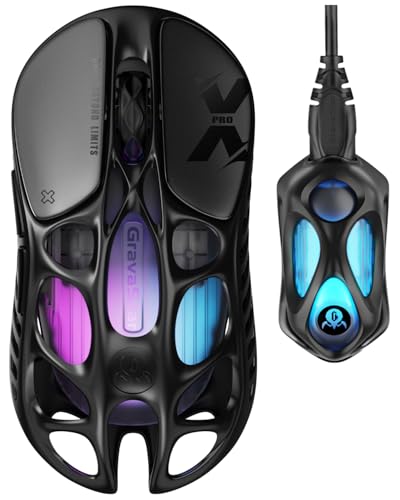
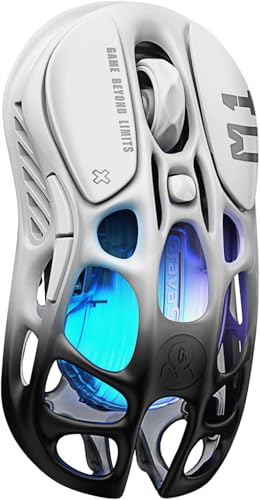
The mercury x pro is GravaStar’s attempt to answer a question the ultralight mouse market had been asking politely for years: why do the fastest mice all look like office equipment that went on a diet? At 49 grams, with a magnesium alloy shell, a PAW3950 sensor and an 8K polling dongle in the box, the X Pro has the specification of a tournament mouse. What it adds is a shell that looks machined for a science-fiction film — openworked, angular, unapologetically mechanical. This review examines whether that shell helps, hinders or simply decorates the serious hardware underneath, and it compares the X Pro with GravaStar’s own Mercury M1 Pro, the ergonomic sibling that trades some of the X Pro’s extremes for a claimed battery life nearly twice as long.
Context matters here. The ultralight category is mature: the shape-first school argues that a mouse is a handle and everything else is weight to be deleted, while GravaStar argues that a handle can also be an object. Both schools agree on the fundamentals — a flawless sensor, honest switches, a shell that does not flex, and wireless that never reminds you it is wireless. Where they differ is what happens between matches, on the desk, in the hand during a slow strategy game. The sections below separate those two judgements carefully, because conflating them is how buyers end up with a mouse they admire and do not use, or a mouse they use and never once enjoy owning.
Key takeaways
- The Mercury X Pro pairs a 49 g magnesium alloy shell with the PAW3950 sensor and an included 8000 Hz dongle — flagship internals, not just flagship styling.
- Its symmetrical shape and five programmable buttons target fingertip and claw players in fast titles; palm players with large hands should test the fit mentally against the M1 Pro’s ergonomic shell.
- Battery life is quoted up to 110 hours, and polling rate is the dial that decides how close you get to that figure.
- The Mercury M1 Pro is the comfort alternative in the same family: ergonomic shape, PAW3395 sensor and up to 209 hours of battery.
- Bluetooth 5.1 on the X Pro makes it a travel-capable second mouse for a laptop, not only a desk-bound esports tool.
In this guide
Who the Mercury X Pro is built for
Start with the hand. The X Pro is a symmetrical, low-profile ultralight, and that geometry speaks to claw and fingertip grips in tactical shooters and arena titles, where the mouse is steered by the fingers as much as by the arm. At 49 grams it asks almost nothing of the wrist across a long session, and its magnesium shell stays cool and dry in a way plastic cannot — a small, real advantage in summer rooms and long tournaments. Palm-grip players are not excluded, but they should be honest about hand size: a large hand draped over a small ultralight tends to cramp by the third match, and no sensor specification compensates for a shape your hand is fighting.
Then consider the desk. The X Pro is the centrepiece mouse, the one in setup photographs, the one guests ask about. GravaStar knows its buyer and leans in. If your peripherals are tools you hide in a drawer, the premium buys nothing; if your setup is a place you enjoy sitting, the X Pro’s shell is a daily pleasure rather than a launch-week novelty. Between those poles sits the competitive question — can it perform? — and the answer lives in the sensor, the switches and the wireless, which the detailed review takes in turn.
How the comparison set was chosen
Two mice are linked in this article, both GravaStar Mercury models, both verified against Amazon catalogue data before drafting. The subject is the Mercury X Pro in its 8K configuration, whose listing confirms the 49 g magnesium alloy construction, PAW3950 sensor, included 8000 Hz dongle, Bluetooth 5.1, RGB lighting, five programmable buttons and battery life up to 110 hours. The alternative is the Mercury M1 Pro, whose listing confirms an ergonomic magnesium shell, the PAW3395 sensor, tri-mode connectivity and up to 209 hours of battery, with 4K polling supported via a dongle that is not included. Rival ultralights from other brands appear in prose only, as category context, because they were not verified for this article and this page links only what it checked.
That pairing is deliberate. Most X Pro shoppers are not choosing between GravaStar and a laboratory; they are choosing between the two personalities inside GravaStar’s own line — the symmetrical sprinter and the ergonomic marathoner — and this review is organised around that real decision.

GravaStar Mercury X Pro review: magnesium, speed and sculpture
Badge: The flagship sprinter
The shell is the first thing your hand learns. Magnesium alloy feels different from the ABS of ordinary ultralights: cooler at first touch, harder under the fingers, with a faint metallic ring when you set it down. The openwork design is not merely decorative — it is how a metal shell reaches 49 grams — and it has a practical side effect in that the mouse never feels clammy. The trade-off is texture: players who love the soft, grippy coating of a conventional mouse may find the X Pro’s shell slick in the first week, and grip tape, discussed in the accessories section, is the standard answer. Buttons sit with a confidence that suits the material; the primary clicks are crisp without the hollow echo that thin plastic shells can produce, and the side buttons are placed for a claw grip’s thumb rather than a palm grip’s reach.
Mini spec box — GravaStar Mercury X Pro
- Weight: 49 g, magnesium alloy shell
- Sensor: PAW3950, up to 32K DPI per the listing
- Polling: 8000 Hz dongle included
- Connectivity: 2.4 GHz wireless, Bluetooth 5.1, wired
- Buttons: 5 programmable
- Battery: up to 110 hours per the listing
- Lighting: RGB
The PAW3950 is the current flagship optical sensor in this class, and its virtue is boredom: tracking stays true at low and high sensitivities, flicks land where the hand sent them, and there is no smoothing or acceleration behaviour to unlearn. DPI figures in the tens of thousands are marketing headroom — most competitive players live between a few hundred and a few thousand — but headroom costs nothing and the sensor’s low-end precision is what you actually bought. Polling at 8000 Hz is the feature to handle thoughtfully. It smooths the cursor’s path on high-refresh monitors and it drinks battery; the sensible pattern is 8K for ranked sessions on the dongle, a lower rate for desktop and casual play, and Bluetooth for the laptop bag.
In games, the X Pro’s character is agility. The combination of low weight and a cool, hard shell makes micro-corrections feel direct, and the mouse disappears during fast play in the way good tools do — you notice it again only when you set it down and see it. Across a week of mixed use, the habits that form are the dongle extension kept close, the polling rate treated as a mode rather than a setting, and the charging cable appearing roughly when the listing’s battery figure says it should if your polling habits are moderate.
Strengths
- Flagship sensor and an included 8K dongle mean no performance accessory is left to buy later.
- Magnesium shell stays cool, resists sweat and gives the mouse a feel no plastic ultralight imitates.
- At 49 g it is genuinely effortless for fingertip and claw play across long sessions.
Trade-offs
- The hard, openworked shell can feel slick until your grip adapts or tape is added.
- Maximum polling shortens battery life sharply; the headline battery figure assumes gentler settings.
- Large-handed palm players may find the shape small, and no specification fixes a shape mismatch.
Best for: claw and fingertip players who want tournament hardware in a mouse that also anchors a themed desk. Not suited for: palm-grip players with large hands, or buyers who want a soft-coated, anonymous tool.
GravaStar Mercury M1 Pro review: the ergonomic marathoner
Badge: The comfort alternative
The M1 Pro is what GravaStar offers the player who likes the family’s design language but plays — and works — in a palm grip. Its listing confirms an ergonomic magnesium alloy shell, the PAW3395 sensor, five programmable buttons, tri-mode connectivity and a battery figure of up to 209 hours that reframes the mouse as something you charge monthly rather than weekly. The PAW3395 is the previous flagship generation: in practice it tracks flawlessly for any human hand, and the honest difference between it and the newer sensor is measured by instruments, not by missed shots. The M1 Pro also supports 4K polling, but note the listing’s parenthesis carefully — the 4K dongle is not included — so buyers who want high polling from this mouse should budget for that accessory or accept standard polling, which most players should.
Mini spec box — GravaStar Mercury M1 Pro
- Shape: ergonomic, right-handed comfort profile
- Shell: magnesium alloy
- Sensor: PAW3395
- Connectivity: tri-mode wireless and wired
- Buttons: 5 programmable
- Battery: up to 209 hours per the listing
- Polling: supports 4K with a dongle that is not included
Daily life with the M1 Pro is calmer than with its sibling. The ergonomic hump fills a palm, the battery figure changes your relationship with the charging cable, and the mouse crosses between work and play without asking you to adjust your grip philosophy at 6 p.m. It is the GravaStar for the person whose desk is one desk — office by day, games by night — and whose hand prefers support to agility.
Strengths
- Ergonomic magnesium shell suits palm grips and long mixed work-and-play days.
- Battery life up to 209 hours makes charging a rare event rather than a routine.
- PAW3395 tracking is flawless in human terms, at a lower tier than the flagship’s price of entry.
Trade-offs
- High polling requires a separate dongle purchase, which the listing states plainly and budgets should respect.
- The ergonomic shape is right-hand committed; left-handed and ambidextrous-shape players are served by the X Pro instead.
- Heavier in spirit than the X Pro — marathon comfort is a different virtue from sprint agility.
Best for: palm-grip players and hybrid workers who want GravaStar design with monthly charging. Not suited for: fingertip players chasing the lightest possible mouse, or anyone unwilling to buy a dongle for high polling.
X Pro vs M1 Pro: choosing inside the Mercury family
The decision tree is refreshingly short. Grip first: fingertip or claw points to the X Pro, palm points to the M1 Pro, and a relaxed claw can be happy with either, in which case battery and polling decide. Polling second: the X Pro includes its 8K dongle, so its high-polling story is complete in the box; the M1 Pro’s 4K story needs an accessory. Battery third: the M1 Pro’s figure is roughly double, which matters if your desk doubles as a workspace where a charging cable is clutter. Sensor last, because both sensors out-resolve the human hand and the difference will never be the reason a match was lost. Buyers cross-shopping outside the family will find the shape discussion in the Lamzu Maya X ultralight reviewed useful, and the same mouse from another angle in Maya X shape and grip analysis.
Buying guide: how to shop for an ultralight mouse without regrets
Shape is the specification that cannot be patched. Measure your hand, name your grip honestly — not the grip you admire in highlight reels, the one your hand actually falls into at hour two — and shortlist shapes before sensors. Weight is the second specification, and it interacts with your mousepad and sensitivity: low-sensitivity arm players feel every gram on long swipes, while high-sensitivity wrist players may find the lightest mice skittish. Sensor choice, by contrast, is nearly a solved problem at the flagship end; any current top-tier optical sensor tracks beyond human resolution, so let shape and weight spend your money and treat the sensor as a checkbox.
Wireless quality is the third check, and it is about the ecosystem rather than the radio: is the high-polling dongle included, does the mouse offer Bluetooth for a second machine, and does wired play charge while you play? The X Pro answers all three well. Finally, interrogate battery claims with your own polling habits in mind. Every headline battery figure in this category assumes modest polling and lighting; your real figure is the headline divided by your habits, and planning charge points around that real figure is the difference between a mouse that is always ready and one that dies during a final round.
How to set up the Mercury X Pro for ranked play
Begin wired, charge fully, and set your DPI to the value you actually play — then leave it there for a week, because sensitivity tourism is the enemy of muscle memory. Place the 8K dongle on its extension close to the mousepad, clear of metal and USB 3 hubs, and confirm the polling rate in the software before your first match rather than assuming the default is the maximum. Assign the side buttons to the two in-game actions you press most under pressure, and resist remapping anything else until those two are reflexes. Set RGB to a level you enjoy looking at between matches and forget it during them. Finish with a familiar aim routine: if the mouse disappears from your attention inside ten minutes, the setup is right, and any remaining misses are yours to train away. Players furnishing the rest of the setup can continue with the Mercury K1 keyboard from the same family and grip styles and when each one wins.
Common mistakes ultralight buyers make
Chasing the lowest weight as if it were a score is the classic error; below a certain point, stability suffers and aim gets nervous, especially for low-sensitivity players. The second mistake is copying a professional’s DPI and polling settings wholesale, when those settings were tuned for a different hand, pad and game. The third is running maximum polling permanently and concluding the battery is poor, when the battery is simply paying for a feature the desktop does not need. The fourth is judging a metal shell in the first hour: magnesium feels foreign before it feels right, and the honest trial is a week. The fifth is ignoring the sibling — buying the X Pro for its headline while your palm grip was quietly asking for the M1 Pro all along.
Accessories that actually help: tape, pads and skates
Grip tape is the one accessory this review endorses without hesitation for the X Pro, because it answers the shell’s only real ergonomic question — slickness — for very little money, and it is reversible. Apply it to the primary buttons and the thumb side first, play for a few days, and add panels only where your fingers report slipping. A controlled, medium-speed mousepad pairs better with a 49 g mouse than an ultra-fast glass pad for most players, because the mouse brings its own speed and the pad should bring the stopping power. Skates wear is the slow variable: inspect them monthly, and when the glide turns scratchy, replacement feet restore the mouse more completely than any software tweak. None of this is mandatory on day one; it is the maintenance path that keeps a flagship mouse feeling flagship in year two.
Grip tape, hand size and other fit questions
Fit questions deserve direct answers. A small-to-medium hand in claw or fingertip will find the X Pro immediately natural. A medium-to-large hand in relaxed claw should expect an adjustment week. A large hand in full palm should start with the M1 Pro and treat the X Pro as a travel or second mouse. Sweaty hands favour the metal shell once tape is fitted; dry hands may prefer a coated mouse and should weigh that honestly. These are not judgements of the mouse — they are the geometry of hands, and respecting geometry is how flagship purchases avoid becoming expensive experiments.
Final recommendation
Buy the Mercury X Pro if your grip is claw or fingertip, your games reward agility, and you want the complete high-polling package in the box with a shell that makes the desk feel designed. Buy the Mercury M1 Pro if your palm wants support and your charging cable wants a quiet life. Both are verified above with their listings checked; choose by hand first and by headline second, and either mouse will justify itself. For the keyboard side of the same family, see GravaStar Mercury K1 keyboard review, and for the wider ultralight field, Logitech and Razer compared across categories.
Deep dive: what 49 grams actually changes in your aim
Weight in a mouse is inertia, and inertia is the hidden opponent in every flick. A heavier mouse resists starting and resists stopping; a lighter one obeys sooner in both directions. At 49 grams the X Pro starts moving with so little force that players often overshoot for the first days — the hand is calibrated for a heavier tool and applies yesterday’s effort. The correction is not to change sensitivity immediately, but to give the hand a week to recalibrate its effort, after which the same flicks cost less and stopping becomes more precise, because there is less momentum to arrest. This is why ultralight converts describe the change as effortlessness rather than speed: the mouse is not faster, the argument with physics is shorter.
The benefit is not universal. Players who aim with large arm movements at low sensitivity sometimes prefer a little mass as a stabiliser, the way a heavier pen steadies some handwriting. Players with tremor or fatigue issues may find a featherweight mouse amplifies what they want damped. The X Pro’s weight is a choice with a direction, and the direction suits quick, finger-led aiming. Knowing your own aiming style is worth more than any review’s verdict, including this one.
Polling rate, explained without the mythology
Polling rate is how often the mouse reports its position: a thousand times a second at standard polling, eight thousand times a second at the X Pro’s maximum. More reports mean the cursor’s path is drawn with finer steps and each movement reaches the game sooner, by fractions of a millisecond that add up to smoothness rather than to superpowers. The benefit is real on high-refresh monitors, where the screen can actually display those finer steps, and invisible on slow displays. It is also not free: the radio works harder, the battery drains faster, and some older systems handle very high polling poorly. The mature way to use the feature is as the X Pro’s design intends — a mode for the sessions that reward it, not a permanent identity for the mouse.
There is a hierarchy worth memorising: a well-placed dongle at standard polling beats a badly placed dongle at 8K every time. Signal quality decides whether reports arrive cleanly; polling decides how many reports there are. Players who chase the second while neglecting the first are tuning the wrong variable, and the fix — an extension cable and a clear line between dongle and mouse — costs almost nothing.
The sensor, in plain terms
The PAW3950’s job is to watch the surface beneath the mouse thousands of times per second and report movement faithfully. Its flagship status buys three practical things: it stays accurate at the very low sensitivities competitive players use, where lesser sensors can feel vague; it stays accurate during violent flicks, where lesser sensors can spin out; and it behaves identically across the wide range of pads players actually own. DPI, the number on the box, is the least interesting of its traits — a resolution ceiling almost nobody uses. When a review says a sensor is flawless, it means the sensor has exited the list of things you think about, and that is the correct ambition for a component you should never notice.
Magnesium care: keeping a metal mouse beautiful
Magnesium alloy asks for slightly different care than plastic. Wipe it with a dry or barely damp microfibre cloth; avoid solvents and abrasive pads, which can mark the finish. The openwork shell invites dust and crumbs into its geometry, so a weekly pass with a soft brush or a gentle blast of air keeps the interior clean — do this with the mouse off, and never with a vacuum directly against the sensor lens. Skin oils are the slow enemy of any finish; a thirty-second wipe after a long session is the whole secret of owners whose metal mice still look new in year three. Treat the shell well and it will outlast the switches, which is the correct order of things for a flagship.
Switches, clicks and the sound of the mouse
Click feel is where a mouse’s price becomes audible. On the X Pro the primary buttons actuate with a crisp, contained sound that suits the metal shell — there is no cavernous echo because there is barely a cavity. Side buttons matter more than reviews admit: in fast games they carry abilities, pings and push-to-talk, and a side button that is mushy or misplaced costs real actions. The X Pro’s placement favours the claw thumb, and players should test their two most-used bindings in the first session and move them if the reach feels long. A mouse’s buttons are its vocabulary; fluency is the goal, and fluency is personal.
The X Pro in different games
In tactical shooters the X Pro is in its element: low weight for angle clearing, a sensor that never argues, and clicks that confirm. In battle royale titles, where tracking aim at range dominates, the polling smoothness and the shell’s coolness across long sessions earn their keep. In MOBA and RTS play, where the mouse lives in constant small motion, the low inertia reduces the background fatigue that players usually blame on their chair. In slow strategy and productivity, the mouse is simply pleasant and precise, with Bluetooth making it the same device across machines. The through-line is that agility generalises: there is no genre where a light, accurate mouse is wrong, only genres where its advantages matter less.
Longevity and the two-year view
Two years into ownership, a flagship mouse should be judged on glide, clicks and battery. Glide is maintained by skate care and pad hygiene. Clicks on a well-built mouse stay consistent far beyond the warranty of cheaper devices, and the magnesium shell will not develop the shiny wear patches that plastic grows. The battery will age as all batteries do, which is another argument for the polling discipline described above: batteries cycled gently live longer. The X Pro’s replaceable-nothing design is typical of ultralights — weight forbids modularity — so care is the longevity strategy, and this mouse rewards it with materials that age gracefully rather than shabby.
Training with a lighter mouse: the first two weeks
Switching to a 49 g mouse is a motor-learning event, and treating it as one shortens the awkward phase. Spend the first sessions in low-stakes modes and aim trainers rather than ranked matches, and keep your sensitivity unchanged for at least the first week — changing sensitivity and weight together makes it impossible to know which change caused which wobble. Most players find their flicks overshoot early, then settle, then quietly improve as the reduced effort compounds across thousands of small movements. By the end of week two the mouse should feel unremarkable, which is the highest compliment a tool can earn: attention has moved back to the game.
One drill helps specifically with ultralights: slow, deliberate tracking of a moving target at the edge of your comfortable range, where inertia differences are most legible. Ten minutes of this teaches the hand the new stopping distance faster than hours of ordinary play, because ordinary play lets the hand hide inside its habits. Players who skip the drill still adapt — the hand is a patient learner — but they adapt through their ranked matches, which is an expensive classroom.
The desk ecosystem around a flagship mouse
A mouse like the X Pro exposes the rest of the desk. A worn, inconsistent pad will be blamed on the new sensor within a day; a pad with a clean, uniform surface lets the mouse show what it can do, which is why a pad refresh is the smartest companion purchase for any flagship mouse. The keyboard pairing matters for theme and for space: a compact board leaves the mouse room to travel, and GravaStar’s own K1 is the family’s answer, though any 75 percent board achieves the geometry. Lighting and cable discipline finish the picture — a wireless mouse on a desk still trailing three charging cables from other devices is a theme waiting to be completed.
There is also a second-machine story. Bluetooth makes the X Pro a citizen of two desks, and players who work from a laptop away from home often find the flagship mouse migrating into the travel kit, displacing a lesser travel mouse entirely. One excellent mouse used everywhere builds more muscle memory than two good mice used alternately, which is a genuine performance argument for buying a mouse this versatile and then actually carrying it.
Value in the ultralight flagship tier
Flagship ultralights cluster at similar prices because their ingredients — top sensors, exotic shells, high-polling radios — cost what they cost. Within that cluster, the X Pro’s value argument is completeness: the 8K dongle is in the box, Bluetooth is present, the shell material is the exotic one, and nothing essential is sold back to you as an accessory. The M1 Pro’s counter-argument is that it removes the two most expensive extremes — the newest sensor and the highest polling — and returns battery life and a lower tier in exchange. Both arguments are coherent. The incoherent purchase is the middle one: paying flagship money for a mouse whose shape you have not thought about. Shape first, then completeness, then price, in that order, and the flagship tier becomes a safe place to shop.
What we would change about the X Pro
The next version should ship with grip tape in the box, since so many owners add it anyway, and GravaStar’s design team would cut it more beautifully than any third party. A charging dock that displays the mouse the way its shell deserves would suit the family’s design ambitions and solve the cable question elegantly. And a slightly larger sibling — same sensor, same material, a shape for the large-handed palm players the current mouse excludes — would complete the line the way the M1 Pro completes its comfort side. None of these wishes diminishes the current mouse; they are the roadmap of a product that got its fundamentals right first.
A note on tournament and travel practicality
Players who attend LAN events should note the practical virtues hiding inside the X Pro’s specification: wired mode exists for venues that restrict wireless, the mouse is light enough to vanish into a carry-on, and a metal shell tolerates travel knocks with more grace than thin plastic. Pack the dongle and its extension in the same pouch as the mouse, keep a charging cable with your laptop kit rather than your desk kit, and the flagship becomes a road tool rather than a home ornament. That dual life — sculpture at home, instrument away — is the fullest expression of what GravaStar built here.
Reading the specification sheet like an engineer
Mouse specifications reward translation. Weight in grams is the one number you will feel every second, so it deserves its place at the top of the listing. Sensor model names are generational markers: the PAW3950 is the current flagship, the PAW3395 in the M1 Pro is its predecessor, and the practical gap between flagship generations is small because the older one was already beyond human resolution. DPI ceilings are best read as sensor headroom rather than as a setting anyone should use. Polling figures describe a mode with a battery cost attached, not a permanent trait. Battery hours are a budget that your polling and lighting habits spend. Buttons are a layout question, not a count question — five well-placed buttons beat nine awkward ones. Read this way, the X Pro’s sheet says something coherent: minimum weight, current sensor, complete polling hardware, a battery sized for players who manage their modes, and a button set sized for shooters. Coherence across a specification sheet is rarer than any single impressive number on it.
Ergonomics and hand health, honestly
A lighter mouse reduces the force your hand applies thousands of times a day, and for players who feel wrist or forearm fatigue after long sessions, that reduction is the most meaningful specification in this review. It is not a medical intervention and this article makes no health claims; it is simple mechanics that less mass asks less effort. The other half of comfort is posture and breaks, which no mouse supplies. Players with persistent pain should address their setup and, where needed, seek professional advice rather than expecting a peripheral to solve it. What the X Pro can honestly offer is a shape that suits claw and fingertip grips without forcing them, a weight that does not tax, and a shell that stays dry — the peripheral’s proper share of a comfortable desk.
How the X Pro ages across a season of play
New-mouse impressions decay predictably: the shell’s novelty fades in a fortnight, the weight becomes normal in a month, and what remains is the daily texture of clicks, glide and reliability. The X Pro is built to survive that decay because its virtues are the durable kind — a sensor that never intrudes, a shell that does not wear shiny, a battery routine that settles into the calendar. Owners should expect one maintenance rhythm: brush the openwork weekly, inspect skates monthly, wipe the shell after long sessions. Follow it and the mouse at month six feels like the mouse at week two, which is the actual definition of a flagship in a category full of exciting first weeks.
The GravaStar question, answered for sceptics
Sceptics ask whether GravaStar is a design studio that makes peripherals or a peripheral company with good design, and the X Pro is the strongest evidence for the second description: the sensor is current, the polling hardware is complete, the weight is competitive with the most serious mice in the class, and the wireless is full-featured. The design is not compensation for missing engineering; it is the visible layer of a mouse that did the engineering first. That ordering matters, because the market has seen the reverse — beautiful shells around forgettable hardware — and buyers are right to test for it. Tested, the X Pro passes: strip the styling away in your mind and the remaining specification is one you would shortlist anyway.
Three owners, three verdicts
Consider the ranked grinder, playing a tactical shooter five nights a week on a high-refresh monitor. For this owner the X Pro is close to a default answer: the weight, the sensor and the included 8K dongle all point at their game, and the only homework is grip tape and dongle placement. Consider next the hybrid professional, whose mouse works a spreadsheet day before it plays. The M1 Pro’s shape and battery will serve that owner better across the whole day, and the X Pro becomes the tempting but second choice. Consider finally the setup builder, for whom the desk is a project and a photograph. The X Pro is the piece they were saving for, and its performance means the photograph and the performance review finally describe the same mouse. Three owners, three different correct answers, one product family that contains two of them — that spread is what a well-built line looks like.
The pattern generalises beyond GravaStar. Most flagship mouse regret is not about quality; it is about an owner buying another owner’s mouse. The discipline this review keeps recommending — hand, grip, games, desk, in that order — is boring precisely because it works, and it is the cheapest performance upgrade in PC gaming: it costs one honest self-assessment.
Closing assessment of the Mercury line
GravaStar’s Mercury mice make a bet that the ultralight era does not have to look utilitarian, and the X Pro is that bet placed with the best hardware available to it. The M1 Pro hedges the same bet for comfort players. Between them, the family covers the grips that matter with materials nobody else is using at this weight, and it does so without asking buyers to forgive the fundamentals. That is a rarer achievement than a striking shell, and it is why this review recommends the X Pro on performance grounds first and lets the design be the reason you smile about the purchase afterwards.
Software, profiles and the settings that matter
Mouse software should be visited rarely and leave permanent results. On the X Pro the settings worth your ten minutes are DPI, polling per mode, button assignment and lighting, in that order of importance. Set DPI once and protect it from accidental changes, because a sensitivity that shifts unnoticed is the most corrosive bug in gaming — you adapt to it, blame your aim, and adapt wrongly. Assign buttons by frequency under pressure, not by novelty. Save lighting last and save it modestly. If the software offers onboard profile storage, use it: a mouse that carries its own settings is a mouse that behaves identically on a tournament PC, a laptop and a friend’s machine, and that consistency is worth more than any dashboard chart the software can draw.
Players who share a machine should create separate profiles rather than negotiating one compromise profile, and players who play one game seriously should resist per-game button sprawl. Two bindings you own completely outperform six you half-remember. The X Pro’s five buttons enforce that discipline naturally — there is no room for sprawl — and many owners find the constraint improves them, the way a smaller keyboard improves a desk.
When the X Pro is the wrong purchase
Honesty requires a list of buyers this mouse will disappoint. Players who rest their whole hand’s weight on the mouse and steer from the shoulder will find 49 grams nervous and the shell small. Players who need a dozen side buttons for MMO rotations are shopping in the wrong category entirely. Players who hate visible design — who want their desk to disappear — will tire of a shell that insists on being looked at. And players on a strict budget will find the same sensor generation’s performance, minus the magnesium and the completeness, at lower tiers elsewhere. Each of these is a fit failure, not a quality failure, and naming them is how a review protects both its readers and the product’s reputation among the people it was actually built for.
There is one more wrong-purchase pattern worth naming because it is so common in this category: buying the flagship mouse as a substitute for practice. The X Pro removes friction — weight, latency, inconsistency — and removing friction is valuable, but friction was never the main thing standing between most players and the next rank. Buy this mouse because your hand and your desk will enjoy it daily, let the removed friction be a quiet bonus, and spend the practice hours anyway. Tools reward the people who use them; they do not replace the using.
The X Pro on the road: a LAN-weekend field note
Take the X Pro away for a tournament weekend and its specification rearranges itself into a packing list of virtues. The mouse itself weighs almost nothing in the bag, which matters when the bag also holds a keyboard, a headset and a change of clothes. Wired mode answers the venue that restricts radios, and the same cable charges it overnight in the hotel, where the Bluetooth pairing to a laptop covers the evening’s replay review without touching the tournament setup. The magnesium shell shrugs off the weekend’s knocks — desk changes, bag corners, a borrowed mousepad of uncertain vintage — and arrives home looking like the desk object it is rather than a survivor. Owners who travel to play should still pack the dongle extension and a spare cable, because accessories are the only part of this mouse’s story that can be lost; the mouse itself, across a season of such weekends, simply accumulates air miles and loses nothing else.
Back home, the ritual reverses in a minute: dongle to its extension, polling to its match setting, tape checked, shell wiped. A flagship that travels this gracefully and docks this quickly is not two mice — the home sculpture and the road tool — but one, and that unity is the deepest sense in which the X Pro’s price is honest.
A final consideration for buyers choosing between this mouse and the wider flagship field: support and continuity. A niche maker’s flagship lives or dies by whether the company stands behind its line across years — firmware attention, available accessories, a design language that persists so a replacement feels like a continuation. GravaStar’s Mercury family, spanning mice and keyboards with one vocabulary, reads as a commitment rather than an experiment, and the X Pro, as its current flagship, is where that commitment is most visible. Buy it as a citizen of that family and its value compounds; buy it as a lone specification and it is merely excellent. Either way, it is enough.
Frequently asked questions
Is 8000 Hz polling worth it on the Mercury X Pro?
On a high-refresh monitor, in a fast game, with the dongle placed well — yes, the cursor path is measurably smoother and some players feel it immediately in tracking aim. On a 60 Hz office monitor it is worthless, and everywhere it costs battery. Treat 8K as a match mode: enable it for ranked sessions, step down for everything else, and the X Pro’s battery figure stays honest. The included dongle is what makes this a fair feature rather than an upsell, since the hardware to use it is already in the box.
Magnesium or plastic: does the shell material change performance?
Indirectly. Magnesium lets the X Pro reach 49 g with a rigid, cool-touch shell, and rigidity matters because a shell that flexes under a hard grip can change how clicks feel mid-fight. The material also manages sweat differently — it does not grip like a soft coating, which is why tape is a common pairing. None of this makes plastic mice slow; it makes the X Pro’s particular combination of weight, rigidity and temperature one that some hands prefer, and preference at this level is a legitimate performance variable because comfort is what lets technique repeat.
How long does the X Pro battery really last?
The listing quotes up to 110 hours, and your real figure depends on the two dials you control: polling rate and lighting. At moderate polling with lighting low, expect the mouse to live in the neighbourhood of that claim across mixed use; at permanent 8K with bright RGB, expect a fraction of it and a weekly charge. The M1 Pro’s up-to-209-hour figure follows the same logic with a larger budget. Neither mouse asks for daily charging under sane settings, which is the threshold that actually matters for wireless ownership.
Can the Mercury X Pro double as a work and travel mouse?
Yes, and Bluetooth 5.1 is the reason: pair it to a laptop once and it becomes a travel mouse that happens to be a tournament mouse at home. The light weight suits a laptop bag, the shell shrugs off travel knocks better than thin plastic, and switching between the dongle at your desk and Bluetooth on the road is a mode change rather than a re-pairing ritual. The only travel caveat is the openwork shell collecting pocket lint — carry it in a small pouch and the problem never starts.
X Pro or M1 Pro if I play a bit of everything?
Let your grip answer. A bit-of-everything player with a claw or fingertip grip gets more from the X Pro’s agility across genres, while the same player in a palm grip gets more from the M1 Pro’s support across long, varied days. If your grip is genuinely between the two, choose by battery and polling: the M1 Pro for minimal charging, the X Pro for the complete high-polling box. Either way you are choosing inside one design family, so the loser of the comparison is a mouse you would still enjoy — which is the nicest thing a comparison can say.
Does the X Pro need GravaStar software to be usable?
No mouse in this class should, and the X Pro’s essentials — DPI, polling, button assignment — are configuration tasks you do once, not a companion you live with. Set the mouse up, save your profile, and then let the software be invisible. Players who move between machines should favour settings stored on the mouse itself where offered, so the profile travels with the hardware. The deeper point is that a flagship mouse earns its price in the hand, not in its settings window, and the X Pro’s case is its hand feel, sensor and shell — the software is plumbing.