Disclosure: As an Amazon Associate, reviewstook.com earns from qualifying purchases. Links on this page are affiliate links; they cost you nothing extra. Prices and availability change often, so check the current Amazon listing before you buy.
This logitech m575 trackball review examines the mouse that carried the thumb-ball idea into the Bluetooth era: the Ergo M575, Logitech’s successor to the legendary M570, tested here in its for Business listing with the Logi Bolt receiver, and set against the refreshed M575S variant, the original M570, and two alternatives from ProtoArc and Kensington for readers whose hands or budgets point elsewhere. The review’s central question is simple: whether the M575 is merely a modernised classic or the rare sequel that understands exactly why the original was loved, and the answer, earned section by section below, is that it is the second thing.
Trackballs ask for a different reviewing discipline than gaming mice, because their virtues are cumulative rather than spectacular. Nobody’s first hour with a thumb ball is impressive; the device’s case is built across the first month, in shoulders that stop aching at four in the afternoon, in a cursor that is always exactly where it was left, and in a desk that suddenly has room for a notebook where the mouse used to travel. This review therefore weighs adaptation, maintenance, and connection manners as heavily as the shape and sensor that a specification sheet can describe.
Key takeaways
- The M575 keeps the M570’s beloved posture and modernises everything around it: Bluetooth, Logi Bolt, broader platform support.
- The M575S is a later refreshed variant of the same line; know which one a listing is selling before comparing prices.
- Adaptation takes about a week, after which the thumb ball disappears into the work like any good tool.
- Alternatives serve real niches: ProtoArc for value and colour, Kensington’s Orbit for finger-ball and left-handed users.
In this guide
The five trackballs in this review
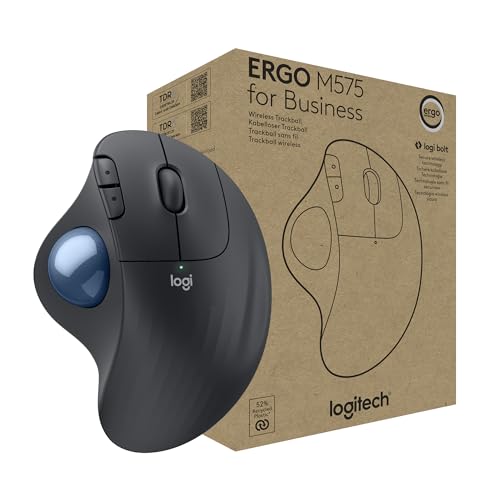
- Logitech Ergo M575 (for Business listing) — the review subject: thumb control, Bluetooth, Logi Bolt, graphite.
- Logitech Ergo M575S — the refreshed variant of the M575 line, with a graphite-and-blue-ball finish as listed.
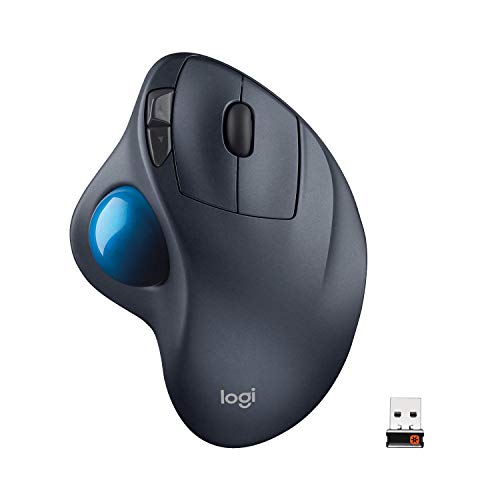
- Logitech M570 — the original design, receiver-only, for loyalists and simple desks.
- ProtoArc EM01 NL — a thumb-control alternative in purple, for value seekers and smaller setups.
- Kensington Orbit Wireless with Scroll Ring — a finger-ball alternative that welcomes left-handed users.

Logitech Ergo M575 review: the modernised classic
Badge: Review subject — best all-round thumb ball here
- Control: thumb-operated ball, easy thumb control as listed
- Shape: ergonomic sculpted right-hand design as listed
- Connections: Bluetooth and Logi Bolt receiver on this listing as listed
- Platforms: Windows, Mac, Chrome, Linux as listed
- Finish: graphite as listed
- Edition: for Business, globally certified as listed
The M575’s first impression is familiarity, and that is a design achievement disguised as a lack of one. Logitech resisted the temptation to reinvent a shape its owners had spent a decade memorising, so the hand settles onto a sculpted slope that will be recognised instantly by any M570 veteran, while newcomers meet a posture that needs no explanation: rest, roll, click. The refinements are in the details the hand discovers over days, a palm support that feels a fraction more complete, edges that meet the fingers without seams arguing, and a ball whose glide out of the box is smoother than the original’s ever was.
Tracking is the second quiet victory. The sensor generation inside the M575 reads the ball’s motion with a steadiness that shows in the slowest work, the spreadsheet cell approached at a crawl, the photo edge nudged by a breath, the timeline trimmed to a frame. There is no drama in it, and drama is not what office precision wants; it wants a cursor that behaves like a physical extension of intent, stopping where the thumb stops, every time, for years. On that measure the M575 is the most trustworthy pointing device in this review, which is the highest praise its category knows how to give.
Connections complete the modernisation. Bluetooth pairing makes the M575 native to the current laptop landscape, where ports are rationed and tablets moonlight as work machines, while the Logi Bolt receiver on this Business listing serves desks that prefer a dongle: managed offices, crowded radio environments, and anyone whose employer’s security posture has opinions about Bluetooth. Serving both worlds in one mouse is the M575’s defining practical advantage, and it is why this mouse, rather than its ancestor, is the correct default recommendation for a trackball bought today.
The Business framing of this listing deserves a translation for home buyers. It signals the receiver standard, the certification breadth, and a distribution channel aimed at fleets; the mouse in the hand is the same M575 a home listing sells, wearing its office credentials. Home buyers lose nothing by choosing it and gain the Bolt ecosystem’s tidiness, particularly if a Logitech keyboard from the same family already lives on the desk and the household is standardising its receivers the way sensible desks increasingly do.
Strengths
- Beloved shape preserved, with refinements where hands actually notice
- Bluetooth plus Logi Bolt covers every modern desk arrangement
- Smooth, trustworthy tracking for precision office work
Trade-offs
- Right-handed sculpture excludes left-handed users entirely
- Adaptation week is real for first-time trackball users
- Ball and bearings ask for a small monthly cleaning ritual
Best for: office workers, multi-device desks, and M570 owners ready to modernise. / Not suited for: left-handed users and competitive gamers.

Logitech Ergo M575S: the refreshed variant, kept distinct
Badge: Alternative — the later refresh of the line
- Control: thumb ball, precise and smooth tracking as listed
- Connections: Bluetooth and Logi Bolt USB receiver included as listed
- Finish: graphite with blue ball as listed
- Platforms: PC and Mac as listed
- Position in line: refreshed variant of the M575 family
The M575S exists because product lines, like desks, accumulate small improvements over time, and Logitech gathered its running refinements of the M575 into a refreshed variant with its own name and a distinctive blue ball. Treating it honestly means treating it as its own model rather than as a synonym for the M575: listings, prices, and small specification details belong to whichever name is printed on the box, and a buyer standardising a household or an office should pick one name and buy it consistently so every desk behaves identically.
For the individual buyer, the S variant is best understood as the line’s current-season edition: the same ergonomic thesis, the same dual-connection manners, presented in the fresher finish. If it is the listing your market offers at the sensible tier, it is a perfectly good way to buy into this family; if the original M575 listing undercuts it, the core experience you are purchasing is the same shape and the same daily behaviour. What this review will not do is pretend the two are one product, because the confusion between them is the single most common ordering mistake in this corner of the catalogue.
Strengths
- The M575 family’s thesis in its refreshed edition
- Bluetooth and Bolt receiver both in the box as listed
- Distinctive blue ball makes the variant easy to identify
Trade-offs
- Easy to confuse with the M575 when ordering quickly
- Platform list on this listing is narrower than the Business M575’s
- Refresh pricing can exceed the original’s in some markets
Best for: buyers who find the refresh at the right tier and value the current edition. / Not suited for: fleets that have already standardised on the original M575.

Logitech M570: the ancestor in the room
Badge: Alternative — the budget veteran
- Control: thumb ball, sculpted right-hand shape as listed
- Connection: USB Unifying receiver as listed
- Finish: dark gray as listed
- Platforms: Apple Mac and Microsoft systems as listed
Every M575 review owes the M570 a respectful section, because the sequel’s shape is the original’s gift. As a purchase today, the M570’s case is narrow but real: a traditional desktop with a spare port, an existing Unifying ecosystem, a tight budget, or a veteran replacing a worn unit like for like without wishing to relearn anything at all. Its receiver-only connection and older platform list are the toll its decade charges, and buyers who pay that toll knowingly, for a desk that will never miss Bluetooth, get a proven tool at a veteran’s price.
What the M570 should not be is an accidental purchase, the result of a hurried search that lands on the famous name without noticing the generation. The two mice look like relatives because they are, and the listings sit close together in every catalogue. Read the model number as carefully as the price, a discipline this review has now recommended three times in three forms, because the difference between a deliberate M570 and an accidental one is the difference between a bargain and a return label.
Strengths
- The original shape, proven across a decade of desks
- Simple single-receiver setup with nothing to configure
- Frequently the lowest tier in this review
Trade-offs
- No Bluetooth for modern port-poor machines
- Older Unifying standard rather than Logi Bolt
- Narrower platform credentials than its successor
Best for: traditional desktops and like-for-like veteran replacements. / Not suited for: new buyers building a modern multi-device desk.

ProtoArc EM01 NL: the colourful value alternative
Badge: Alternative — value and personality
- Control: thumb control as listed
- Finish: purple as listed
- Positioning: accessible tier within the thumb-ball category
- Line: EM01 series, NL variant as listed
ProtoArc has built a following by serving the buyers the big brands underserve: trackball newcomers who want to test the philosophy without paying the flagship’s tier, and desk owners who would like their peripherals to have a colour other than graphite. The EM01 NL’s purple shell is not a trivial detail in a category that dresses like office equipment from a spy film; for a home desk that is also a living space, a tool with a personality is a legitimate feature, and ProtoArc’s thumb-ball ergonomics are a credible interpretation of the same posture the Logitech models teach.
The honest caveats are about ecosystem rather than ergonomics. ProtoArc cannot match Logitech’s software depth, receiver standards, or the sheer public library of answers that a decade of M-series ownership has created, and a buyer whose desk depends on those things should pay for them knowingly. A buyer whose desk is one laptop and a curiosity about trackballs faces a different calculation, and for that buyer the EM01 NL is the low-risk doorway into the category, with the M575 waiting as the graduation present if the philosophy takes.
Strengths
- Accessible entry into the thumb-ball philosophy
- A colour option in a category of grey boxes
- Credible ergonomic posture for new converts
Trade-offs
- Thinner software and support ecosystem than Logitech’s
- Less proven long-term track record at this scale
- Fewer receiver and fleet credentials for managed desks
Best for: curious newcomers and colour-loving home desks. / Not suited for: managed offices standardising on Logi Bolt.

Kensington Orbit Wireless: the finger-ball alternative
Badge: Alternative — ambidextrous, scroll ring
- Control: finger-operated ball with scroll ring as listed
- Design: symmetrical, welcoming either hand
- Finish: black and red as listed
- Model: K70990WW as listed
The Orbit answers the question the Logitech models cannot: what if the hand is left, or shared, or simply prefers its fingers to drive? Kensington’s design centres the ball under the index and middle fingers, surrounds it with the company’s signature scroll ring, a control so satisfying that its owners evangelise it, and keeps the shell symmetrical so either hand, or both across a day, can drive. The pointing feel differs from a thumb ball’s in character: broader, more deliberate, with the scroll ring turning document navigation into a single continuous gesture.
Choose the Orbit when its specific gifts match your desk: left-handed use, a household that shares one mouse between hands, heavy document scrolling, or a preference for finger control discovered through trial. Choose the Logitech models when the thumb philosophy and the receiver ecosystem matter more. This is the healthiest kind of alternative, one that does not pretend to be a cheaper version of the subject but a different answer to the same human problem, and a review that respects its readers should present it exactly that way.
Strengths
- Ambidextrous design welcomes left-handed users
- Scroll ring is a genuinely delightful document control
- Finger-ball feel suits deliberate, broad movements
Trade-offs
- Different learning curve from the thumb-ball family
- Larger desk footprint than the sculpted Logitechs
- Outside the Logi Bolt and Unifying receiver ecosystems
Best for: left-handed users, shared desks, and heavy scrollers. / Not suited for: buyers committed to the thumb-ball posture.
Buying guide: entering the trackball category wisely
The first buying decision is philosophical: thumb or finger. Thumb balls keep the hand in a familiar mouse posture and ask one digit to learn the travelling; finger balls change the posture itself and distribute the work across the strongest fingers. Neither is superior in the abstract, and the honest way to choose is to notice your own history: users arriving from conventional mice usually adapt to thumb balls faster, while users with thumb joint sensitivities, or left-handed users, should start their search among finger balls and ambidextrous designs like the Orbit in this review.
The second decision is connection, and it is the one the M575 was built to answer. Inventory your machines and their ports before pricing anything, because a trackball’s connection is the feature you will negotiate with daily. Bluetooth covers the modern laptop and tablet world; a receiver standard shared with your keyboard consolidates a desk’s dongles into one; and a mouse that offers both, as the subject of this review does, removes the decision’s risk almost entirely, which is a large part of what its price is actually purchasing.
The third decision is horizon. A trackball is a long-tenure tool whose switches and ball will outlast several laptops, so the support ecosystem, the availability of answers, and the manufacturer’s commitment to the line are worth real money over a five-year view. That is the structural reason the Logitech models anchor this review: not that alternatives are poor, several are genuinely good, but that a decade-deep category leader offers a future tense the value brands are still earning. Buy the horizon you actually intend to keep, and the tier argument usually settles itself.
How to set up the M575 and survive the first week
Pair the M575 by Bluetooth to the machine that travels and by its receiver to the machine that stays, if your desk has both, and put the receiver in a front-facing port where its signal path to the desk is clean. Set the pointer speed a notch below your instinct, because the untrained thumb overshoots, and commit to the ball for every task including the idle browsing where the old mouse tempts from its drawer. Cleanliness begins now rather than later: note where the ball-release is, and make the first gentle cleaning a day-seven ritual so the habit exists before the first lint slowdown can be mistaken for a defect.
The week’s emotional arc is predictable enough to print. Days one and two feel like a prank your hand is playing on you. Day three brings the first unselfconscious hour, usually during absorbed work rather than during practice. Days four and five expose the remaining weaknesses, most often fine selection and fast window dragging, both of which yield to the deliberate exercises of selecting single words and hauling windows by their title bars. Day seven is the honest referendum, and most first-time users who reach it with the old mouse still in the drawer find the question has quietly changed from whether to keep the trackball to why the desk ever worked any other way.
Common trackball mistakes
The canonical mistake is the ten-minute verdict, judging a motor skill before it has been learned and returning a device whose crime was novelty. The second is neglecting the ball’s bearings until the glide degrades and then blaming the sensor, when two minutes with the ball out and a dry cloth would have restored the factory feel. The third is leaving pointer acceleration and speed at whatever the operating system inherited from your old mouse, a mismatch that makes the new device feel drunk for reasons that have nothing to do with its hardware.
A fourth mistake is buying a right-handed sculpture for a shared or left-handed desk out of brand loyalty, when the category offers ambidextrous designs precisely for that household. A fifth is expecting the trackball to game competitively and reviewing it as a failure for declining a job it never applied for. The thread through all five is the same: trackballs reward buyers who match the tool to the hand, the desk, and the work, and punish, mildly and correctably, buyers who purchase a reputation instead of a fit.
Final recommendation
The logitech m575 trackball review conclusion is that the M575 is the correct default trackball for this decade’s desks: the classic posture, modernised connections, trustworthy tracking, and a support horizon measured in years. Choose the M575S when the refreshed edition is the one your market prices kindly, the M570 for a traditional desk on a budget, the ProtoArc for a colourful, low-risk first step, and the Kensington Orbit when your hand is left or your scrolling is heavy. Whichever you choose, grant it the adaptation week; the category’s rewards are all on the far side of that week, and they compound for years.
Frequently asked questions
How long does the M575 take to feel natural?
About a week of full-time use for most people, with basic competence arriving by the third day and genuine fluency, the kind where the device leaves your conscious attention entirely, closer to the end of the second week. The curve is steepest for users who commit completely and slowest for users who keep rescuing themselves with the old mouse. Treat the week as tuition every trackball owner before you has paid, and know that the skill, once bought, transfers to any ball you will ever use afterwards.
Is the for Business version different from the regular M575?
The mouse is the same M575 design; the Business listing emphasises the Logi Bolt receiver, broad certification, and fleet distribution. Home buyers gain the Bolt ecosystem and lose nothing, while offices gain the standardisation vocabulary they require. When comparing prices across listings, compare like with like on the receiver included, because the connection hardware in the box is the main practical variable between editions of the same mouse, and it is the variable your desk will negotiate with daily.
What is the difference between the M575 and the M575S?
The M575S is a later refreshed variant within the same family, distinguished on its listing by its own name and a graphite finish with a blue ball, while the M575 is the original model of the line, represented here by the for Business listing. They share the ergonomic thesis and dual-connection approach. Buyers should order by the exact name they intend, especially when equipping several desks, because consistency across a fleet is worth more than any single unit’s small refinements.
Does a trackball help with desk space?
Immediately and measurably. A thumb ball needs only its own footprint, so the sweeping territory a conventional mouse reserves, and the pad beneath it, return to the desk for notebooks, coffee, and elbows. On shallow desks, tray tables, and the arm of a sofa, the trackball is not merely more compact but often the only pointing device that works at all. Many owners discover the space dividend is the benefit they would surrender last, ahead even of the comfort story that brought them to the category.
How do I clean the M575’s ball?
Push the ball out from beneath, wipe the three small bearing points inside the socket with a dry cloth or fingertip, and wash the ball itself with mild soap and water if it has grown dull, drying it fully before it goes home. Two minutes, roughly monthly, or whenever the glide feels less than silky. Never use solvents on the ball or socket, and resist compressed air blasted directly at the sensor. The ritual is the entire maintenance contract, and owners who keep it describe the mouse as ageless.
Can I use the M575 with a tablet or a Chromebook?
The M575’s listing includes Chrome among its platforms and its Bluetooth connection pairs with tablets that accept a Bluetooth mouse, which makes it one of the more portable citizens of this review. A tablet on a stand with a trackball beside it is a surprisingly capable travel workstation, and the mouse’s stationary nature suits the small, improvised surfaces travel provides. Confirm the individual tablet’s mouse support in its own settings, because the operating system, not the mouse, is the variable in that pairing.
The working day test: where the M575 earns its reputation
Reviews of office tools should be written against a working day, so here is the M575’s. The morning begins with email triage, a task of a hundred small landings in a list, and the ball’s stillness shines: the cursor waits where it was left between sips of coffee, and each selection is a roll and a click without the desk-space negotiation a travelling mouse performs. Spreadsheets follow, the category’s examination hall, and the M575’s slow-speed manners, the crawl into a cell, the drag across a range without a slip, pass in the unglamorous way that real competence always passes, unnoticed.
Afternoon brings the tasks that expose lesser pointing devices: a long document edited at the sentence level, a slide deck nudged into alignment, a video call during which notes are taken in a second window. The M575’s contribution is absence: no shoulder commute, no pad-edge rescues, no moment where the tool enters the worker’s thoughts as an obstacle. By six in the evening the verdict writes itself in the negative space of the day, the complaints that never occurred, and that is why this category’s owners sound evangelical when asked: they are describing the dog that did not bark, across a thousand working days.
None of this requires the M575 specifically, which is precisely why the alternatives in this review exist and deserve their sections. It requires a trackball that fits the hand, connects to the machines, and tracks without temperament, and the M575 is simply the most complete current answer to that specification, the one against which the ProtoArc’s value and the Kensington’s inclusivity define themselves. A buyer who understands the working-day test can evaluate any future trackball in an afternoon, and that understanding is worth more than the brand conclusion it happens to produce today.
Ergonomics in plain terms, without medical promises
This review will describe mechanisms and refuse diagnoses, because a mouse is furniture, not treatment. The mechanism is plain: a stationary device removes the arm’s travel from pointing, a sculpted shell supports the hand in a resting posture, and the thumb, a strong digit with fine control, performs the movement. Workers whose strain lives in the travelling, the shoulder’s daily mileage, often find the arrangement more sustainable, while workers whose sensitivity lives in the thumb itself may find the opposite, and both experiences are data rather than verdicts on the product.
The responsible way to use that mechanism is as an experiment with honest terms: one week of committed use, the old mouse retained, comfort noted at the same hour each day, and a willingness to accept the result whichever way it lands. Desks are ecosystems, and chair height, desk depth, and working hours all vote in the experiment alongside the mouse. Readers with persistent pain should take the question to a clinician rather than to a catalogue, because the catalogue, this review included, can offer a different posture but never a prognosis, and conflating the two does a disservice to everyone involved.
Fleet thinking: the M575 in offices and households
A mouse bought once is a preference; a mouse bought thirty times is a policy, and the M575’s Business listing exists because Logitech understands the difference. Fleet buyers care about receiver standardisation, certification breadth, predictable supply, and a shape that suits the statistical hand, and the M575 answers each in the vocabulary procurement speaks. The home buyer benefits from the same engineering without needing the vocabulary, in the same way a home cook benefits from a knife designed for professionals: the requirements were stricter than yours, and the surplus discipline arrives in your hand as quality you did not have to specify.
Households are small fleets with worse inventory control, and the same logic applies at kitchen-table scale. Standardise on one trackball across the home’s desks and the spare ball, the cleaning ritual, and the pairing procedure become family knowledge rather than per-device trivia. The M575’s dual connections make it the easiest standardisation candidate in this review, because it can serve the port-rich desktop and the port-poor laptop without asking either to change. That versatility, more than any single specification, is what a standard is actually made of.
Software touches: Options, Flow, and restraint
Logitech’s software lets the M575’s buttons be reassigned and its pointer behaviour tuned, and offers multi-computer features for desks where one mouse serves machines side by side, copying a cursor’s allegiance across screens as if the desks were one. These are real capabilities and some households will build their workflow on them. The review’s standing advice applies with its usual force: configure once, deliberately, and then let the software alone, because a pointing device should be the most boring software relationship in your life, a tool that asks for nothing between the day it is set up and the day its battery finally requests a successor.
Button assignment deserves one specific suggestion. The M575’s secondary buttons arrive mapped to browser navigation, and most owners should live with that mapping for the full adaptation week before inventing a cleverer one, because the factory choice encodes years of aggregate user behaviour. If a reassignment still begs after the week, make exactly one, live with it for another week, and let the mouse accumulate personality at the speed habits actually form. A trackball configured in an afternoon of enthusiasm often ends up reset to defaults by the end of the month, at the cost of the fluency the defaults were quietly building all along.
Longevity and the economics of a boring device
Price the M575 across its likely service and it becomes one of the cheapest objects on the desk per day of use, because trackballs age slowly and this one’s failure modes are mostly rituals deferred: a dirty bearing, a tired battery, a ball polished by years of thumbs. None of those is a funeral. The switches and shell are built for office eternity, the receiver standards it speaks are the current ones, and the category itself shows no sign of being disrupted by anything except its owners’ continued satisfaction, which is the most durable moat in consumer technology.
Compare that with the economics of the alternatives honestly. The ProtoArc asks less today and may ask for a successor sooner, a trade that suits a curious newcomer perfectly and a five-year standardiser poorly. The Kensington prices its inclusivity fairly and will serve a left-handed desk for just as long. The M570 undercuts its own successor while it remains stocked, a veteran’s discount with an expiry date nobody prints. None of these is the wrong answer; they are answers priced for different horizons, and the review’s insistence on naming your horizon before your model is the closest thing it has to a thesis.
The travel kit test: one mouse, many borrowed desks
Consultants, auditors, lecturers, and the growing class of workers whose office is a calendar of other people’s rooms are the M575’s natural constituency, because the mouse carries its working surface inside itself. A borrowed desk with no pad, a client’s glass table, a lecture theatre’s lectern, a train’s fold-down tray: all become adequate the moment the M575 is set down, and its Bluetooth pairing means the laptop’s single free port is never the price of pointing. Add that the device cannot be knocked off a crowded table by a passing sleeve, having no need to travel itself, and the travel case writes itself.
There is a hygiene footnote that travelling professionals will recognise. Shared hot-desk mice are among the least loved objects in modern offices, and carrying your own pointing device, sculpted to your hand and cleaned on your schedule, is a small sovereignty worth its bag space. The M575’s size is the honest cost: it is not a pocket mouse, and it asks for a real compartment in the bag rather than a coat pocket. Travellers for whom that space is contested should weigh it against the ultralight travel mice of the world, while travellers with a proper bag will find the exchange, space for certainty, heavily in their favour.
What a month of ownership teaches that a week cannot
The adaptation week teaches the thumb; the first month teaches the household. By week three the M575 has usually migrated to its permanent coordinates and acquired the invisible infrastructure of a settled tool: the receiver’s port is mentally labelled, the spare battery has a drawer, the cleaning cloth lives nearby, and colleagues or family have stopped commenting on the strange mouse because it has become part of the room’s furniture in their minds as well. This social settling is a real stage of ownership, and products that reach it tend to stay for years, because replacing them would require renegotiating a small treaty with everyone who shares the space.
The month also reveals the device’s one true recurring cost, which is explanation. Visitors, new colleagues, and curious children will pick the M575 up, attempt to slide it, and require the thirty-second trackball sermon, which owners deliver with the patience of people who have given it forty times. Some owners consider this a tax; others, a small recurring pleasure, the chance to evangelise a tool that genuinely improved their working day. Either way it belongs in an honest review, because a product’s life includes the conversations it starts, and this one starts the same conversation, warmly, for as long as you own it.
A short defence of boring excellence
There is a temptation, in reviewing, to reward novelty because novelty is easy to describe, and the M575 suffers from that temptation in the wider press: it is a better version of a known thing, and its improvements are the unphotogenic kind, a receiver standard, a smoother glide, a platform list. This review has tried to correct the imbalance by describing the unphotogenic things at the length they deserve, because in a device used eight hours a day for five years, the unphotogenic things are the product. Connections that never argue, tracking that never startles, a shape that never asks to be noticed: that is the whole specification of trust, and the M575 meets it as completely as any pointing device currently sold.
Buyers who need excitement from a mouse should buy a gaming mouse, several excellent ones appear elsewhere in this cluster, and enjoy the M575 for what it is at the hours it serves. The desk, like a life, has room for both a tool that thrills and a tool that disappears, and confusing their roles is how workstations become expensive and uncomfortable at the same time. The M575 is the disappearing kind, perfected; let it disappear into your working day, and judge it, as its owners do, by everything that stops going wrong.
Inspection checklist for the day it arrives
Give the new mouse the same methodical welcome this series recommends for every significant tool. Confirm the listing’s model name against the box, M575 or M575S, before the packaging is discarded, because the family’s resemblance makes the delivery day the cheapest moment to catch a mix-up. Roll the ball through a full minute of slow circles and confirm the glide is even in every direction, click each button a dozen times, pair both connection channels to their intended machines, and run one genuinely fiddly task, a dense spreadsheet or a photo crop, as the unit’s entrance examination. A mouse that passes its first evening this thoroughly will rarely surprise you afterwards, and the ten minutes buy confidence that lasts the whole tenure.
Then set the scene for the adaptation week deliberately: old mouse in the drawer rather than beside the new one, pointer speed set and recorded, cleaning cloth placed where the monthly ritual will happen. Register the warranty while the receipt is still on the screen, and note the purchase date in the same place you keep the desk’s other records. These are small acts of administration, and they are the difference between a device that is owned and a device that is merely present, a distinction that only becomes visible years later, when the owned device is still serving and the merely present ones have drifted into drawers.
The M575 and the hybrid-work settlement
The settlement most knowledge workers now live under, some days at an employer’s desk and some at home, is the environment the M575 was quietly designed for. One mouse can live in the bag between the two desks, pairing by receiver to the managed office machine and by Bluetooth to the home laptop, carrying the worker’s posture and habits across the border unchanged. That continuity is a small but real quality-of-life good: the hand’s environment stays constant while everything else about the working day changes postcode, and tools that provide constancy in a fragmented routine earn a loyalty out of proportion to their price.
Employers benefit from the same arrangement in mirror image, because a worker’s own M575, or one issued from the fleet, removes the hot-desk mouse lottery from the office entirely. The Business listing’s existence, with its certifications and its receiver standard, is the manufacturer’s acknowledgment that this settlement is permanent. A review written a decade ago would have treated the M575 as a niche comfort device; written today, it is more accurate to call it standard equipment for a working pattern that now describes most of its readers, which is why this article has treated a humble trackball with the seriousness usually reserved for the machine it plugs into.
Closing: the reviewer’s own summary, without hedging
If a single trackball had to be recommended to a stranger with no further questions allowed, it would be this one, because its failure modes are the mildest in the category: a week of adaptation, a monthly cloth, a right hand required. Everything else about it, the connections, the tracking, the shape’s pedigree, the ecosystem behind it, is either best in class or tied for it, and a recommendation built on mildest failures plus broad excellence is the most robust kind a reviewer can offer. The alternatives in this article exist for readers whose questions do continue, whose hand is left, whose budget is tight, whose curiosity is preliminary, and they are good answers to those specific questions.
For everyone else, the advice compresses to a sentence: buy the M575, give it the week, clean the ball, and get on with the work the mouse was bought to serve. Tools earn their keep by vanishing, and few vanish as completely, or for as many years, as this one will once the thumb has learned its trade and the desk has accepted its quiet new citizen.
One more audience: writers and other long-session word workers
Writers deserve a specific mention because their pointing pattern is unusual: long stillness punctuated by microscopic selections, a word here, a clause there, across sessions measured in chapters. A conventional mouse spends those sessions being nudged, parked, and occasionally knocked by a notebook, while the M575 simply waits at the sentence’s side, its cursor unmoved by the desk’s archaeology. Writers who adopt it tend to cite the selection precision first and the desk space second, the reclaimed territory becoming the notebook’s permanent home, and the combination quietly restructures the writing desk around the text rather than around the pointing.
Editors and proofreaders share the pattern at higher intensity, their days an unbroken chain of small landings in dense text. For them the adaptation week pays an unusually high dividend, because the task the trackball performs best, the repeated precise landing without travel, is literally their job description rendered as a pointing task. If this review’s working-day test has a championship division, it is text work, and a reader whose days are made of sentences should weight the M575’s candidacy accordingly, ahead of flashier tools whose talents lie in motions their work never asks for.
And a word for the sceptic at the back
Every trackball review is read by one sceptic who believes the whole category is a affectation, a way of signalling seriousness about ergonomics while a normal mouse would do. The honest reply is that the sceptic may be right about their own hand, and the category makes no claim on it. What the M575 offers the sceptic is the cheapest possible falsification: one mouse, one week, the old device in a drawer rather than in the bin, and a comfort log kept at the same hour daily. If the log shows nothing, the experiment cost a return label and produced certainty, which is more than most peripheral purchases ever produce. If it shows what most logs show, the sceptic gains a tool and loses an argument, a trade this review is happy to broker.
Final practicalities: spares, sharing, and succession
Settled owners think in spares, and the M575 rewards the habit modestly: a spare ball is unnecessary for most, a spare battery is a drawer staple, and a second receiver is the one spare worth considering if the mouse serves a fleet or a bag that travels hard. Sharing the mouse within a household works best when the second user’s machine pairs on the other channel, so the mouse’s two connections map to two people as neatly as to two computers. And succession, the question of what replaces the M575 in five years, is the easiest in this review to answer: almost certainly another M575-family mouse, because the line’s whole design philosophy is continuity, and continuity is what a settled hand is actually buying each time it renews the same shape.
One last image is worth leaving with the reader. Somewhere in the middle of the second week, there is a moment, usually unremarkable, when the hand reaches for the M575 and the cursor is simply there, mid-task, before the conscious mind has finished forming the intention. That moment is the entire product, and everything in this long review, the receivers, the certifications, the recycled plastics, the blue-balled sibling, exists to make that moment ordinary. Buy the mouse that makes it ordinary for your hand, and the review will have done its work.
Envoi for the trackball-curious
If you arrived at this review merely curious, leave with the curiosity converted into a plan rather than a purchase: borrow a trackball if one exists in your orbit, or buy the subject of this review from a seller whose returns policy respects experiments, and run the week honestly. Curiosity about how your own hand might work differently is a respectable reason to spend a week, and the worst outcome available is knowledge. The best outcome is a working day quietly rebuilt around a still hand and a rolling thumb, which is the outcome this unassuming graphite mouse has been delivering, desk by desk, since the line began.
A note on buying for someone else
Trackballs are frequently bought for a partner, a parent, or an employee whose desk the buyer has watched with concern, and the M575 is a kind gift provided it arrives as an offer rather than a prescription. Include the adaptation week’s warning in the card, keep the receipt visible, and let the recipient’s own comfort log deliver the verdict. A pointing device is as personal as handwriting, and the generosity that respects the experiment’s possible failure is the generosity that makes its success, when it comes, feel like the recipient’s own discovery rather than the giver’s instruction.
And should the experiment succeed, as it does for most hands that give it the full week, consider writing the purchase date on a small label beneath the mouse. Years later, when the ball still glides and the shape still fits, that faded date becomes the review no website could write for you: your own hand’s testimony, in your own home, across the only timescale that ever really mattered to a tool.
That is the note to end on, because it returns the judgement to its rightful owner. Reviews can rank receivers and recite platform lists, but the M575’s fate is decided at one desk at a time, by one thumb at a time, across one honest week. Everything needed for that decision is now in front of you, including the alternatives for the hands this mouse cannot serve, and the rest is simply a matter of beginning.
Begin, then, with the desk audit rather than the checkout: count the ports, name the machines, picture the hand at four in the afternoon, and let those three facts choose between the five good answers in this review. The checkout is merely where the decision is signed.
Related guides
the M570 and M575 compared head to head
Logitech and Razer compared as brands
the G915 TKL keyboard for the same desk
office keyboard and mouse combinations