Disclosure: As an Amazon Associate, reviewstook.com earns from qualifying purchases. Links on this page are affiliate links; they cost you nothing extra. Prices and availability change often, so check the current Amazon listing before you buy.
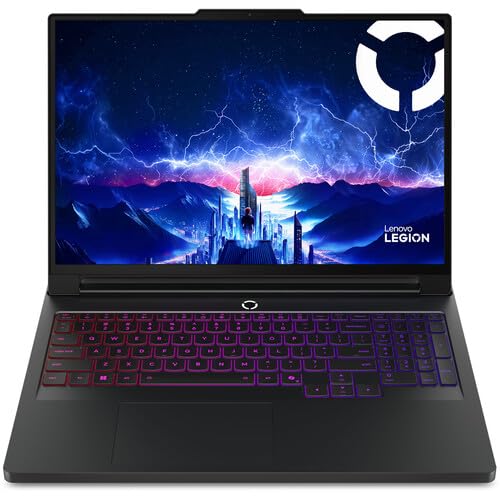
The legion pro 7i gen 10 16 is Lenovo’s flagship 16-inch gaming laptop for this generation, pairing Intel’s Core Ultra 9 275HX processor with NVIDIA’s RTX 5080 or RTX 5090 graphics and a 16-inch WQXGA OLED display running at 240Hz. This review sorts the three configurations in the current listings, explains who should pay for the 5090 and the larger memory and storage tiers and who plainly should not, and sets the machine against its most obvious rival, the ASUS ROG Strix SCAR 16, so the decision rests on cooling, screen, and daily usability rather than on badge loyalty.
Flagship gaming laptops are no longer desktop replacements by aspiration; at this tier they are desktop replacements by measurement, with the compromises moved from raw speed to noise, heat, and price. The Legion Pro 7i Gen 10 leans into that reality with a chassis built around sustained power rather than thinness theatre. Read on for the configuration logic first, because with three versions of the same machine on sale, choosing the right Legion matters more than choosing between brands for most buyers.
Key takeaways
- The RTX 5080 configuration is the sensible flagship for most players; the 5090 tier serves creators and maximum-settings devotees.
- The 16-inch 240Hz OLED is the machine’s centrepiece: fast, high-resolution, and bright enough for mixed use.
- Memory and storage tiers differ between listings, so read each configuration as its own product.
- The ROG Strix SCAR 16 is the one true rival here, trading blows on screen technology and styling.
In this guide
The three Legion configurations, decoded
- Legion Pro 7i Gen 10, RTX 5080, 32GB, 1TB — the balanced flagship: Ultra 9 275HX, 16-inch OLED 240Hz, Windows 11 Pro as listed.
- Legion Pro 7i Gen 10, RTX 5090, 64GB, 2TB — the maximum build: RTX 5090 with 24GB of graphics memory, doubled RAM and storage as listed.
- Legion Pro 7i Gen 10 AI model, RTX 5080, 64GB, 2TB — the creator-leaning 5080: more memory and storage on the 5080 platform, Wi-Fi 7 as listed.
- ASUS ROG Strix SCAR 16 (2025) — the alternative: RTX 5090, Mini LED-class Nebula HDR display, 32GB and 2TB as listed.
How these configurations were compared
Three of the four machines here share a chassis, a processor, and a screen, so the comparison turns on the variables that actually differ: graphics tier, memory capacity, storage capacity, operating system edition, and price tier positioning. Those variables interact with real workloads in predictable ways. Games today are far more sensitive to the graphics tier than to the difference between 32GB and 64GB of system memory, while video editing, virtual machines, and heavy multitasking invert that ranking completely. The reviews below therefore grade each configuration against the workload it was plainly built for.
The ASUS earns its place as the control sample: a rival flagship with the same processor family and the same top graphics tier, but a different display philosophy and a different design language. Where the Legion and the SCAR agree, you are looking at the settled state of the flagship art; where they differ, you are looking at a genuine choice about what a gaming laptop should feel like on a desk and in a bag, which is the most useful kind of difference a review can expose.

Legion Pro 7i Gen 10 with RTX 5080: the balanced flagship
Badge: Recommended configuration for most buyers
- Processor: Intel Core Ultra 9 275HX, 24 cores as listed
- Graphics: NVIDIA GeForce RTX 5080
- Display: 16-inch WQXGA OLED, 500 nits, 240Hz as listed
- Memory and storage: 32GB RAM, 1TB Gen 5 NVMe SSD as listed
- System: Windows 11 Pro as listed
This is the configuration the Legion Pro 7i Gen 10 will be remembered by, because it puts the money where frames are made. The RTX 5080 at laptop scale drives the native 2560×1600 panel properly in modern titles, especially with the current generation of upscaling and frame-generation features doing their share of the lifting, and the OLED screen returns the favour with response times that make 240Hz meaningful rather than decorative. In fast games the panel’s near-instant pixel transitions keep motion clean in a way that LCD gaming laptops at the same refresh rate still cannot quite imitate.
The 32GB memory tier is correctly judged for a gaming-first machine. Current titles, a browser, voice chat, and recording software coexist comfortably inside it, and the chassis class generally leaves a door open to later upgrades in a way sealed ultrabooks do not, though buyers should confirm the exact slot arrangement on the listing before planning around it. The 1TB drive is the one specification that will feel small first, because modern game installs are enormous; an external drive for the back catalogue or a second internal drive where supported is the standard companion purchase for this tier.
Strengths
- RTX 5080 power matched honestly to the native OLED panel
- 240Hz OLED delivers elite motion clarity and contrast
- Windows 11 Pro suits buyers who also work on the machine
Trade-offs
- 1TB storage fills quickly with a modern game library
- Flagship cooling means flagship fan noise under full load
- OLED care habits apply, as with any OLED laptop panel
Best for: players wanting the flagship experience without paying for unused headroom. / Not suited for: creators who already know they need 64GB of memory and a 5090.
Legion Pro 7i Gen 10 with RTX 5090: the maximum build
Badge: Maximum performance tier
- Processor: Intel Core Ultra 9 275HX, 24 cores as listed
- Graphics: NVIDIA GeForce RTX 5090 with 24GB as listed
- Display: 16-inch OLED, WQXGA, 500 nits, 240Hz as listed
- Memory and storage: 64GB RAM, 2TB NVMe SSD as listed
- System: Windows 11 Home as listed
The 5090 configuration exists for buyers who measure value in settings sliders pushed fully right and in workloads that spill beyond gaming. The graphics tier’s larger memory pool matters increasingly to high-resolution texture loads, to local AI experimentation, and to creators who render or encode on the same machine they play on. Paired with 64GB of system memory and a 2TB drive, this build removes the three ceilings a power user is most likely to meet, and it does so inside the same well-cooled chassis rather than in a thinner design that would throttle the privilege away.
Honesty about diminishing returns belongs here. In many games at this panel’s native resolution, the step from the 5080 build reads as a meaningful but not transformative gain, and the price step is the largest in the range. The buyers who should pay it are those with a named second workload, professional creation, heavy simulation, or a firm intention to keep the machine a long time and let future titles grow into its headroom. Buyers whose second workload is a vague feeling should save the difference towards a monitor, a headset, or the next machine entirely.
Strengths
- Top graphics tier with a large memory pool for games and creation
- 64GB and 2TB remove the usual upgrade errands
- Same flagship OLED and cooling as the rest of the line
Trade-offs
- Largest price step in the range for a partial performance step in games
- Windows 11 Home on this listing, where the 5080 build lists Pro
- Power draw and fan noise at full tilt are unapologetic
Best for: creator-players and long-horizon owners who will use the headroom. / Not suited for: pure gamers seeking the best frames per unit of currency.

Legion Pro 7i Gen 10 AI model: the creator-leaning 5080
Badge: Best for mixed work and play
- Processor: Intel Core Ultra 9 275HX as listed
- Graphics: NVIDIA GeForce RTX 5080 as listed
- Display: 16-inch OLED 2.6K (2560×1600), 240Hz, 500 nits as listed
- Memory and storage: 64GB DDR5, 2TB SSD as listed
- Extras: 5MP camera with e-shutter, Wi-Fi 7, black finish as listed
This listing is the quiet strategist of the three: it keeps the RTX 5080, which the first review argued is the balanced gaming choice, and spends the upgrade money on 64GB of memory and 2TB of storage instead. For the growing class of buyers whose laptop is a workstation from nine to five and a gaming rig after dinner, that allocation is arguably the smartest in the whole range. Video timelines, large photo libraries, code builds, and a shelf of installed games stop competing for space and memory, and the machine simply gets on with everything at once.
The details support the dual-life pitch. A 5MP camera with an electronic shutter is a meeting-quality camera with a privacy answer built in, Wi-Fi 7 future-proofs the wireless side as routers turn over, and the OLED panel’s colour and contrast serve photo and video work as faithfully as they serve games. If your employer’s software or your own projects benefit from memory headroom more than from the last graphics tier, this is your Legion, and the money saved against the 5090 build buys the dock, the monitor arm, or the backup drive that a serious desk setup eventually demands anyway.
Strengths
- Memory and storage tiers matched to real multitasking
- RTX 5080 keeps gaming performance at flagship level
- Camera, shutter, and Wi-Fi 7 suit professional daily use
Trade-offs
- Gamers chasing maximum settings should look at the 5090 build
- Still a heavy, power-hungry chassis for daily commuting
- Premium pricing over the base 5080 configuration
Best for: professionals who game seriously on the same machine. / Not suited for: players whose only heavy workload is gaming itself.

ASUS ROG Strix SCAR 16: the rival flagship
Badge: Alternative — Mini LED philosophy
- Processor: Intel Core Ultra 9 275HX as listed
- Graphics: NVIDIA GeForce RTX 5090 as listed
- Display: 16-inch ROG Nebula HDR, 2.5K, 240Hz, 3ms as listed
- Memory and storage: 32GB DDR5, 2TB PCIe Gen 4 SSD as listed
- System: Windows 11 Pro, Wi-Fi 7, model G635LX-XS97 as listed
The SCAR 16 is the machine cross-shoppers will test the Legion against, and its defining choice is the display: a Nebula HDR Mini LED-class panel rather than OLED. That choice trades OLED’s perfect blacks and instant response for higher full-screen brightness and freedom from OLED care considerations, and reasonable players can land on either side. ROG wraps the hardware in a more extroverted design language, with lighting and styling that announce themselves across a room where the Legion prefers a comparatively restrained, almost corporate suit.
Configuration-wise this listing pairs the 5090 with 32GB of memory and a 2TB drive, an allocation tilted more towards gaming than the Legion’s maximum build. Cooling, keyboard feel, and port selection at this tier are all strong on both machines, so the decision honestly reduces to screen philosophy, styling tolerance, and which brand’s software and support you would rather live with for four years. Neither answer is wrong, and a review that pretends otherwise is selling something other than advice.
Strengths
- Nebula HDR display offers high brightness without OLED care habits
- RTX 5090 with generous 2TB storage as listed
- Distinctive ROG styling and gaming-first software suite
Trade-offs
- 32GB memory where the Legion maximum build offers 64GB
- Mini LED blooming exists where OLED blacks are perfect
- Styling is bold for buyers who share the machine with an office
Best for: players who prefer Mini LED brightness and ROG’s design language. / Not suited for: buyers who want OLED contrast or the Legion’s memory-heavy tiers.
Buying guide: spending flagship money wisely
The first decision is workload, stated in one honest sentence. If the sentence is ‘I play games,’ the balanced 5080 Legion is your machine and the savings are real. If the sentence adds creation, simulation, development, or local AI work, the memory-heavy listings enter, and the choice between the AI model and the 5090 build becomes a question about whether your second workload eats memory or graphics. Buyers who cannot finish the sentence should not buy a flagship yet; a month of watching your current machine’s task manager will finish it for free.
The second decision is lifespan. A flagship bought for four or five years justifies tiers that a two-year flipper should skip, because headroom is only valuable if you are still holding the machine when software grows into it. Storage is the exception to every tier debate: games and media only grow, drives are the ceiling owners meet first, and choosing 2TB at purchase is almost always cheaper than the migration dance later. Memory sits one rung below in urgency, and graphics tier, paradoxically the headline, is the most workload-dependent of the three.
The third decision is the ecosystem around the laptop. Budget honestly for the whole desk: a quality headset, a mouse that suits your hand, a cooling-conscious stand or dock, and backup storage. A balanced 5080 Legion plus those companions will out-serve a maximum build sitting alone on a bare desk for most owners, and the discipline of pricing the whole setup before choosing the configuration is what separates a satisfying flagship purchase from an impressive receipt followed by a year of small lacks.
How to set up the Legion Pro 7i Gen 10 in its first week
Day one belongs to updates and images. Run the operating system and driver updates fully, including the manufacturer’s own utility for firmware, then create a recovery image or at least a restore point before installing anything you care about. Set the display to its native resolution and full refresh, confirm the graphics mode is using the dedicated GPU for games rather than hybrid routing where performance matters, and choose a power profile deliberately rather than inheriting whatever the first boot selected on battery.
Games come next, installed in a deliberate order: your main title first, fully patched and benchmarked in its own repeatable scene, so you have a baseline number for the machine’s health. Record that baseline somewhere; in eighteen months, when a driver or a dusty vent has cost you performance, the baseline is how you will know. Configure per-game graphics with upscaling as the first lever, because at 2560×1600 the modern upscalers are close to free image quality, and native rendering should be earned by headroom rather than assumed as a right.
The rest of the week is ergonomics and noise management. Learn the fan profiles, because the difference between the performance and balanced modes at this tier is often a small frame cost for a large civility gain during evening play near other people. Set battery charge limits if the machine lives plugged in, a habit that meaningfully slows battery ageing in desktop-replacement duty, and arrange the desk so the rear and side vents breathe into open room rather than into a wall or a bookshelf’s patient wooden back.
Common flagship laptop mistakes
The most expensive mistake is buying the top graphics tier for a workload that never arrives, financed by skipping the storage and memory that the actual workload needed monthly. The second is judging the machine by its first-hour thermals on a bare desk in a warm room and returning a healthy laptop that only needed airflow and a fan profile. The third is treating a 16-inch flagship as a travel companion without weighing it, literally, alongside its power brick; the pair is a serious carry, and commuters should make that decision with a bag on their shoulder rather than with a specification sheet.
A quieter mistake is neglecting the screen’s nature. The Legion’s OLED rewards owners who vary content, use dark themes kindly, and let the panel’s own maintenance features run, while punishing nobody who simply uses the machine normally. Conversely, buyers who know their usage is a static dashboard twelve hours a day should take the SCAR’s Mini LED seriously for exactly that reason. Matching panel technology to usage pattern is the flagship decision most often skipped, because it requires imagining an ordinary Tuesday rather than an exciting unboxing.
Final recommendation
For the majority of buyers, the legion pro 7i gen 10 16 to choose is the RTX 5080 configuration: flagship processor, flagship OLED, and a price tier that leaves room for the desk around it. Step to the AI model when your working life genuinely eats memory and storage, and to the 5090 build when a named professional workload or a long ownership horizon justifies the summit. Choose the SCAR 16 instead when Mini LED brightness, styling, or static-content usage outweighs OLED’s charms. Every machine here is formidable; the review’s job was to make the formidable specific, and your workload sentence is the key that turns it.
Frequently asked questions
Is the RTX 5090 configuration worth it over the 5080?
For gaming alone at this panel’s native resolution, the gain is real but partial, and most players will feel the storage and memory ceilings of a lesser build before they feel the 5080’s limits. For creation, rendering, or local AI work, the 5090’s larger graphics memory can be the difference between a job running and a job failing. Name the workload before paying the step; if the name is a specific program you use weekly, pay it, and if the name is someday, save the money.
How does the OLED screen handle everyday work?
Beautifully, with minor habits. Text is sharp at this resolution and density, colours are rich for creative work, and the 240Hz refresh makes even scrolling feel liquid. The habits are the standard OLED ones: vary static content where convenient, let brightness sit at comfortable rather than maximum levels for document work, and allow the panel’s built-in maintenance to do its quiet work. Owners who follow ordinary, unobsessive care routines should expect the screen to remain the machine’s best feature for years.
Can this laptop really replace a desktop?
For most players and many creators, yes, with the desktop’s traditional advantages narrowed to upgradability and absolute noise. The Legion’s processor and graphics sit in genuine desktop territory for the workloads most people run, and a dock plus external monitor completes the transformation at a desk. What you give up is the ability to swap the graphics card in three years, which is why the lifespan and tier decisions in the buying guide matter so much more here than they do in a modular tower.
How loud is a flagship gaming laptop under load?
Loud enough to plan around, quiet enough to manage. Full-performance modes move serious air and are best paired with headphones, while balanced modes trade a modest slice of performance for a sound profile that can share a room. Placement helps more than buyers expect: hard desk surfaces reflect fan noise, vents aimed at walls amplify it, and a stand that lifts the rear improves both cooling and acoustics. Judge noise in your room, at your hours, not in a reviewer’s studio.
Which configuration suits a student?
The balanced 5080 build, bought with the whole picture in view: it games at flagship level, handles coursework and creative modules easily, and leaves budget for the bag, the mouse, and the backup drive a student actually needs. The cautions are weight and battery: this is a desk-anchored machine that visits lectures rather than living in them, and students whose days are spent roaming between rooms should weigh that honestly against a lighter laptop and a console or desktop at home.
What should I check in the return window?
Run your main game and note its frame rate in a repeatable scene, check the screen for uniformity issues on dark and grey images, confirm every port and key works, and listen to the fans at idle for anything beyond a smooth hush. Verify the configuration in the system information matches the listing exactly, memory, storage, and graphics included, because flagship tiers are easy to confuse at a glance. These checks take an evening and protect a purchase measured in years.
Cooling, power, and the physics of a flagship chassis
A 16-inch flagship is a heat-management device that also computes. The Ultra 9 processor and an RTX 5080 or 5090 together can draw power on a scale that would embarrass a small desktop, and every watt of it becomes heat that the chassis must escort out through its vents without cooking the keyboard deck or the user’s palms. Lenovo’s Legion line has built its reputation on taking that escort duty seriously, with vapour-chamber cooling and fan curves tuned for sustained loads rather than benchmark sprints, which is why the Pro models hold their performance in hour three of a session where thinner rivals have quietly stepped down.
Sustained performance is the metric that separates this class from its marketing. A laptop that boosts heroically for ninety seconds and then throttles is a sprinter wearing a marathoner’s number, and modern games, which load every system continuously, expose the difference within one long match. When comparing the Legion against any rival, ask how it behaves at minute forty, not minute four, and be suspicious of any review, including this one, that cannot frame its claims in those terms. Your evenings are marathons, and the machine should be bought as one.
The power brick deserves its own sentence because it shapes travel and desk life alike. Flagship bricks are large, heavy, and essential; there is no pocketable substitute for feeding this class of hardware at full performance. Plan the desk so the brick lives ventilated and off the floor’s dust, plan the bag so its weight is expected rather than resented, and understand that battery operation is a reduced-performance mode for light work, not a portable version of the plugged-in experience. A flagship laptop on battery is a sports car in a traffic jam: capable, calm, and nowhere near its element.
The keyboard, trackpad, and ports you will touch daily
Performance sells the machine; the keyboard decides whether you love it. Legion Pro models carry full-travel gaming keyboards with per-key lighting on flagship trims and a layout that keeps the arrow keys and number pad honest, which matters to the mixed work-and-play owners the AI configuration targets. Key feel at this tier is a matter of taste between Lenovo’s firm, quiet travel and ROG’s slightly different tuning, and it is one of the few flagship attributes that genuinely rewards an in-person press if a showroom offers the chance before a purchase of this size.
Ports are the other daily reality. A flagship should let you build a one-cable desk: power, display, and peripherals arriving through a dock, with the laptop’s own ports left for the transient things, drives, headsets, and controllers. Check the listing’s port inventory against your actual desk rather than an ideal one, particularly for the number of high-speed USB ports and the display outputs your monitors need. The SCAR and the Legion both serve this duty well, which is precisely why the decision between them can safely be made on screen and styling rather than on a fear of missing sockets.
The trackpad on a gaming flagship is a supporting actor and should be judged as one. It needs to be accurate for the hours the mouse is packed away, large enough for gestures, and resistant to palm interference while typing. Beyond that, its quality is a comfort rather than a performance matter, because every serious session in this machine’s life will be played on a real mouse. Reviews that spend pages on a gaming laptop’s trackpad are telling you the performance gave them nothing to discuss, which is not the situation with the hardware under discussion here.
Ownership across four years: upgrades, warranty, and resale
Think of the purchase as a four-year tenancy and the configuration choices change character. Storage upgrades are the tenancy’s most predictable renovation, which is why starting at 2TB or confirming an accessible second slot belongs high on the checklist. Memory upgrades follow the same logic for the creator-leaning buyer. Battery health is the slow variable: a machine that lives docked should use its charge-limiting features, and a machine that travels should expect its battery to be a consumable whose replacement cost belongs in the year-three budget rather than in a year-three crisis.
Warranty and support are brand-level decisions hiding inside a product purchase. Lenovo and ASUS both operate large support organisations with depot and on-site options varying by region and tier, and the honest advice is to read the terms that apply to your postcode rather than to a reviewer’s. Accidental-damage cover is worth pricing for any machine that will genuinely travel, because a flagship’s repair costs are flagship-sized, and a cracked OLED panel is the single most expensive sentence in this entire article’s vocabulary of possible futures.
Resale closes the loop. Flagship gaming laptops hold value in proportion to their tier, their condition, and the completeness of their packaging and receipts, and the 5090 builds will anchor the top of the used market for this generation exactly as their predecessors did. None of this should drive the purchase, but a buyer choosing between two configurations at similar comfort levels can let it break the tie: the machine that will be easier to pass on is also, not coincidentally, usually the machine that was easier to own.
Workloads examined: five evenings with a flagship
Picture the competitive player first, because the machine was drawn for them. Their evening is a high-refresh shooter at native resolution, voice chat running, a recording buffer watching for clips, and a browser of guides behind it all. The 5080 configurations swallow this whole without a stutter, the OLED’s response keeping fast pans legible, and the only management required is a fan profile chosen for the room. For this player the flagship premium buys consistency, the absence of the one dropped fight per evening that a lesser machine eventually charges as rent.
Picture the creator next: a timeline of 4K footage, effects rendering while thumbnails generate, a game downloading for later, and a video call with a collaborator squeezed between. This is the AI model’s home ground, where 64GB of memory stops being a specification and becomes the difference between a machine that queues tasks and a machine that simply does them. The 5090 build accelerates the renders further, and the honest divider between the two is whether rendering time is billable time; for a professional it is, and the maths does itself.
Picture the simulator devotee, flight or racing, with a wheel or stick clamped to the desk and multiple displays driven hard. Their loads are long, steady, and thermally honest, exposing any cooling shortcut across a three-hour session, and their peripheral forests test port counts and dock behaviour. The Legion’s sustained-power design philosophy serves this player disproportionately well, and the SCAR stands as the equally serious alternative. For this profile the review’s advice is to buy cooling and ports first and let the graphics tier follow the simulator’s known appetite rather than a general fear of missing out.
Software: Lenovo’s utilities and the discipline of leaving them alone
Every flagship ships with a control suite for performance modes, lighting, macros, and updates, and the correct relationship with that suite is brief and businesslike. Use it to set your performance profiles, confirm firmware currency, and configure the charge limits and fan behaviours this review recommends, then close it and let it age quietly. The suites from both Lenovo and ASUS are competent; the failures owners report usually trace to running two competing utilities at once, or to chasing every optional update on release day rather than a week later when its reputation has formed.
Bloatware discipline applies on first boot. A flagship’s performance margin forgives a surprising amount of preinstalled clutter, which is exactly why owners tolerate it until the day the clutter starts interrupting games with notifications and update theatre. Spend twenty minutes on day one removing what you did not ask for, disabling startup items you do not recognise the purpose of, and setting notification rules for the machine’s gaming hours. That small act of housekeeping, done once, is worth more real smoothness than several of the specification steps buyers agonise over in this price range.
The case for and against waiting for a sale or a successor
Flagship laptops follow a rhythm: launch pricing holds while reviews land, then the first meaningful discounts arrive as the season matures and rival launches crowd the calendar. A buyer whose current machine still serves can often harvest that rhythm, particularly on the balanced 5080 configuration, which is the volume model retailers compete hardest on. A buyer whose machine has failed or whose work has outgrown it should ignore the rhythm entirely, because months of compromised evenings cost more than any plausible discount returns, and this generation’s hardware will not be embarrassed by its successor for a long time.
The successor question deserves the same calm. Next year’s model will be faster in the ways next year’s models always are, and it will not make this machine slow, because software grows into flagship headroom over years rather than months. The OLED panel, the processor’s core count, and the memory tiers in these listings are all specifications with long useful shadows. Buy the machine when the need is real, configure it for the workload you actually have, and let the launch calendar proceed without your participation; that detachment is the final flagship skill, and it is free.
Desk companions that complete a flagship setup
A laptop of this class anchors a desk rather than merely visiting it, so its companions deserve a paragraph of budget honesty. An external monitor for work hours spreads the OLED’s gaming brilliance across a larger canvas and saves the laptop panel for play, a mouse and keyboard chosen for your hands convert the machine into a true desktop at home, and a rated surge protector stands guard over the whole arrangement. None of these companions is glamorous, and together they routinely deliver more daily satisfaction than the step from the 5080 tier to the 5090 tier that buyers debate for weeks.
Backup is the companion nobody budgets and everybody eventually needs. A flagship that holds your games is a toy; a flagship that holds your only copy of a thesis, a client project, or a decade of photographs is a liability wearing a toy’s clothes. An external drive and an automatic backup routine, set up in the first week while motivation is high, convert the machine from a single point of failure into the centre of a small, resilient system. That conversion, unglamorous as it sounds, is the most professional purchase decision described anywhere in this review.
Travel, LAN nights, and living out of a bag
Some flagship owners do move their machines weekly, to LAN events, to a partner’s flat, to a studio across town, and for them the Legion’s virtues travel unevenly. The performance arrives intact, which is the point of the exercise, and the OLED makes any borrowed desk feel like home within minutes. The costs are the carry weight with its brick, the vigilance a premium machine demands in shared spaces, and the fan noise in a quiet room full of other people’s microphones. A padded bag with a real laptop compartment, a cable kit that lives in it permanently, and a lock for shared venues convert those costs from anxieties into logistics.
At the event itself, the flagship etiquette is simple. Arrive with drivers and games updated, because venue networks are where good evenings go to queue behind a forty-gigabyte patch; carry your own power strip, because sockets are the scarcest resource in any hall; and set your fan profile for the room rather than for your bedroom, since a machine tuned for solo midnight silence will run hot and loud when the room warms up. Owners who prepare this way discover that a desktop-class laptop at a LAN is not a compromise at all, but the most comfortable seat in the building.
Reading benchmark charts without being misled by them
Flagship reviews live and die by charts, so a buyer’s defence kit is worth including. First, separate the processor and graphics results from the system results: a suite that stresses everything at once measures cooling as much as silicon, and the Legion’s chassis often looks better there than in isolated component tests precisely because sustained power is its design brief. Second, distrust any comparison where the machines ran different resolutions, different power modes, or different driver generations; at this tier those variables are larger than the gaps between the products themselves, and a chart that hides them is advertising wearing a lab coat.
Third, translate percentages into evenings. A ten percent frame advantage at high frame rates is a handful of frames inside a range your eyes experience as identical smoothness, while the same ten percent at the edge of playability in a heavy title can be the difference between a locked experience and a stuttering one. Ask where on the curve your games live. The Legion configurations were specified to sit comfortably above that edge at native resolution for years, and that positioning, not a chart position, is what a flagship purchase is actually buying.
What the 16-inch size gets right
Sixteen inches has become the flagship sweet spot for reasons that compound. The chassis is large enough to cool serious hardware honestly and to hold a full keyboard layout with a number pad, yet the whole machine still fits the laptop sleeves and backpack compartments designed when fifteen inches ruled. The screen size at 2560×1600 gives strategy interfaces and timelines room to breathe without external help, while staying dense enough that text and fine detail render crisply at normal desk distances. Fourteen-inch flagships exist for the weight-obsessed and eighteen-inch ones for the desk-bound, and both make their owners defend the choice; sixteen inches is the size nobody has to explain.
That middle position also shapes the used market and the accessory world in the buyer’s favour. Bags, stands, cooling pads, and sleeves are all stocked deepest for this size class, replacement parts circulate longest, and a future buyer for your machine is easier to find. None of these are reasons to choose a laptop by themselves, but stacked together they describe an ecosystem advantage that quietly rewards the mainstream choice, in laptops as in most mature technologies, with lower friction at every stage of ownership from the first dock to the final resale listing.
Security, privacy, and the professional half of the machine
Mixed-use flagships carry work data alongside game libraries, so their privacy furniture matters more than gaming reviews usually admit. The AI configuration’s camera with its electronic shutter is the visible example: a lens that can be closed by design rather than by a sticker. Fingerprint or facial sign-in, drive encryption enabled from first setup, and a firmware password for the truly cautious complete a posture that costs an hour once and protects for the machine’s whole working life. Buyers who split the laptop between an employer and a ranked queue should also consider separate user accounts for the two lives, a free feature that prevents more awkwardness than any specification in this review.
None of this is paranoia; it is the ordinary hygiene of a device that will hold tax documents and tournament accounts in the same storage pool. The Legion and the SCAR both support the modern platform features these habits rely on, so the choice between them need not be made on security grounds. Make the hygiene a first-week ritual alongside the updates and the backup routine, and the flagship’s second identity as a professional tool stops being a risk you carry and becomes simply the other half of what you bought.
If the budget will not stretch: stepping down gracefully
Not every reader of a flagship review should buy a flagship, and the honest exit ramps deserve naming. Stepping down within the Legion family to a Pro 5 or a mainstream gaming line keeps the brand’s cooling philosophy and software while surrendering the OLED, some graphics headroom, and the summit processor; for 1080p and 1440p external-monitor players, that surrender can be nearly painless. Stepping sideways to a desktop plus a modest laptop serves the permanently desk-bound better than any single flagship can. The Legion Pro 7i earns its price only when its specific combination, portable, powerful, OLED-equipped, and dockable, matches a life that actually moves between desks.
What stepping down should never mean is buying a thin machine with flagship badges and netbook cooling, the category’s one genuinely bad neighbourhood. A honest mid-range laptop with modest components and proper vents will out-serve and outlast a starved flagship every time, in frame consistency, in noise, and in the owner’s temper. If the numbers in this review strain the budget, take the exit ramp with confidence; the goal was never the badge on the lid, but evenings that run exactly as fast and as calmly as you planned them.
A note on ordering, delivery, and the first inspection
Flagships travel in serious packaging, and the delivery still deserves a methodical reception. Photograph the box before opening if it shows damage, keep every insert and bag until the return window closes, and perform the inspection from the earlier checklist while the packaging is still at hand rather than flattened for recycling. Register the warranty in the first week, when the receipt is findable and the serial number is on the screen in front of you, and store the invoice with the backup records rather than in an email folder you will search in a panic in year three.
If the machine arrives with the wrong configuration, a real risk in a range where three listings share a name and a photograph, the system information screen is your evidence and the unopened-accessories state is your leverage; contact the seller before the setup wizard makes the machine yours in spirit. These are dull paragraphs in an exciting purchase, and they exist because flagship money deserves flagship procedure. The buyers who follow them are the same buyers whose four-year ownership stories tend to be boring in the best possible way, a machine that simply worked, season after season, exactly as configured on the first evening.
Why this generation feels like a plateau, and why that helps buyers
Every few generations, laptop hardware reaches a plateau where the flagship formula settles: processors with cores to spare, graphics that drive their own panels honestly, screens that satisfy both players and creators, and chassis that cool the whole arrangement without apology. This Legion generation sits on such a plateau, and plateaus are the buyer’s friend, because the machine you buy is not a rough draft of next year’s idea but a mature answer whose compromises are known, documented, and priced accordingly. The risk profile of the purchase is as low as flagship risk ever gets, and the remaining decisions are the personal ones this review has spent its length on: workload, tiers, and the desk the machine will call home.
The verdict restated for the undecided
If you have read this far without a workload sentence forming, form one now by opening your current machine and watching an ordinary evening honestly. The Legion configuration that matches that evening is visible in the reviews above, and it is almost certainly not the most expensive one. Flagship buying rewards the buyer who treats the purchase as fitting a life rather than winning a catalogue, and the Pro 7i Gen 10, in whichever of its three personalities fits yours, is currently one of the most complete expressions of what a 16-inch gaming laptop can be when a manufacturer refuses to choose between power and polish.
One more consideration: noise etiquette in shared homes
A flagship’s fan curve is a social document in any home where someone else sleeps, studies, or takes calls in the next room. The Legion’s quieter profiles exist for exactly those hours, and learning to switch profiles as deliberately as you switch games is part of owning the machine considerately. Headphones solve the player’s side of the equation; the profile solves the household’s side. Couples and flatmates rarely object to a gaming laptop they cannot hear through a door, and the small frame cost of a balanced mode at midnight is the cheapest domestic diplomacy in this entire review.
Desk placement extends the courtesy. A machine exhausting towards a shared wall broadcasts its hardest-working moments to the neighbour’s quiet room, while a machine given open air on a stand keeps its voice local and its temperatures lower at the same time. These are the unglamorous adjustments that separate a flagship that integrates into a home from one that merely occupies it, and they cost nothing but the ten minutes it takes to think about where hot air goes before the first long session begins.
Closing note on confidence
There is a particular confidence that comes from a machine bought correctly: no settings envy when a rival launches, no upgrade itch at the first demanding title, no apology when a friend asks what you play on. The Legion Pro 7i Gen 10 configurations in this review can each deliver that confidence to the buyer they were built for. Do the workload sentence, choose the tier it names, set the machine up with the care its price deserves, and then close the catalogue for a few years. The games, after all, were the point of the entire exercise.
Related guides
Mini LED and OLED screens compared through televisions
gaming laptops for long sessions at a lower tier
the Logitech flagship keyboard for the same desk
Logitech against Razer for the rest of the setup