Disclosure: As an Amazon Associate, reviewstook.com earns from qualifying purchases. Links on this page are affiliate links; they cost you nothing extra. Prices and availability change often, so check the current Amazon listing before you buy.
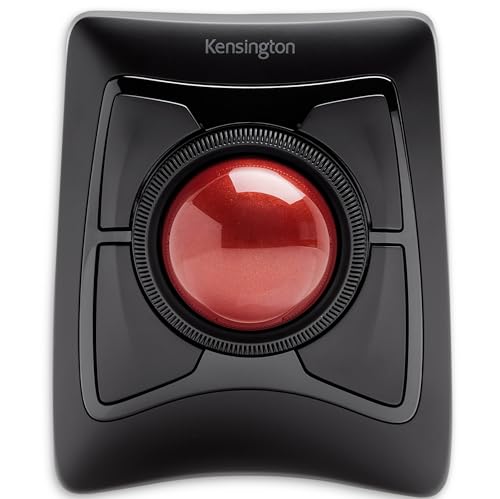
Some products survive by being redesigned every year, and some survive by being right once — this kensington expert review concerns the second kind. The Kensington Expert is a large-ball trackball that has anchored CAD desks, editing suites and wrist-weary offices for decades with a design that barely apologises for its size: a billiard-scale ball in a sculpted base, a scroll ring around the ball that remains the best scrolling mechanism ever fitted to a pointing device, four large buttons, and a detachable wrist rest. This review examines the current wireless Expert in depth — who it serves, how the ball-and-ring interaction actually feels across a working week, what it cannot do — and sets it beside its wired ancestor and the slimmer SlimBlade Pro for readers deciding which Kensington philosophy fits their hand.
Key takeaways
- The Expert’s 55mm-class ball and scroll ring are the product: precision through fingertip inertia, and scrolling that no wheel has ever matched for long documents.
- It is a stationary device for a fixed desk — your arm stops travelling, which is the ergonomic point and the lifestyle commitment.
- The wireless model (K72359WW) frees the cable while keeping the classic shape; the wired original (K64325) remains for purists and permanent desks.
- Four programmable buttons plus Kensington’s software make it a workflow tool for CAD, editing and spreadsheet labour, not just a mouse replacement.
- The SlimBlade Pro is the alternative for users who want Kensington’s ball craft in a lower, sleeker profile with modern wireless and rechargeability.

Kensington Expert Wireless Trackball (K72359WW) — the classic, untethered
Badge: Best for dedicated desks and wrist-weary professionals
- Device: wireless trackball mouse, large ball
- Controls: four buttons plus scroll ring
- Extras: detachable wrist rest included
- Colour: black
- Role: stationary precision pointing for work
Approach the Expert as furniture first and electronics second. The base occupies real desk territory and expects to keep it; in exchange, your hand’s territory shrinks to the ball itself. Movement is fingertip work: the large ball’s mass gives it inertia, so a flick sends the cursor travelling with a glide that smaller balls cannot imitate, while the same mass settles instantly under a fingertip for the pixel-level nudges that CAD constraints, audio edits and photo masks demand. Precision here is not a DPI figure but a physical relationship — ball weight, bearing smoothness and the sheer resolution of your fingertips — and it is why the design has outlived dozens of technically newer rivals.
The scroll ring is the Expert’s second masterpiece and the feature owners evangelise. A knurled ring encircling the ball, turned by a fingertip with the same inertia logic, it scrolls long documents, timelines and spreadsheets with a control that makes wheel users feel they have been scrolling with a spoon. There is a learning week — new users overshoot, then calibrate, then refuse to go back — and the ring’s slight mechanical sound is part of its feedback, a soft ratchet of progress through a hundred-page document. Four large buttons surround the arrangement, programmable through Kensington’s software into the chords and shortcuts of your trade: CAD constraints, editor commands, browser navigation, push-to-talk. The included wrist rest aligns the hand at the ball’s height, and whether you use it is a matter of personal geometry — the desk setup section below treats it properly.
The wireless model’s contribution is freedom from the cable’s small tyrannies — no drag, no routing around the monitor stand, a desk that can be cleared in one motion — at the cost of the battery rhythm every wireless device imposes. For a stationary device, that trade is unusually painless: the Expert lives in one place, its charging or battery swaps happen in situ, and the desk gains more from the missing cable than the device loses in vigilance. Under the hand, nothing about the wireless version betrays the classic: same ball, same ring, same deliberate heft.
Strengths
- Ball-and-ring interaction is a genuine precision instrument, unmatched for long scrolling and fine placement.
- Stationary ergonomics: shoulder and arm stop travelling, which is the relief many users are actually buying.
- Programmable buttons and mature software make it a trade tool, not a novelty.
Trade-offs
- Desk footprint is large and permanent — this is furniture, not a travel peripheral.
- A learning curve of days to weeks precedes fluency; the first hour undersells it badly.
- Not a gaming device for aim-driven titles, and not ambidextrous in spirit despite its symmetric shape — it rewards commitment.
Best for: CAD and design professionals, editors, analysts, programmers with multi-monitor desks, and any wrist or shoulder asking for a different way to point. / Not suited for: laptop travellers, small desks, competitive gamers, and the impatient.
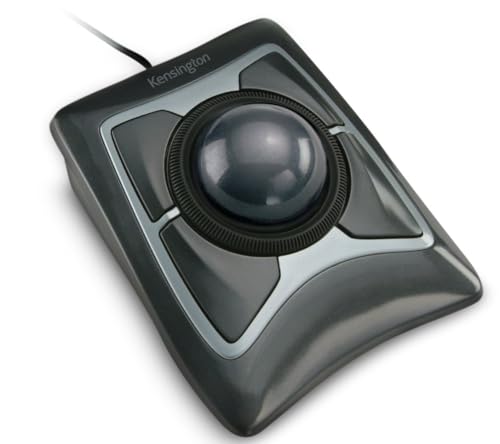
Kensington Expert Trackball (K64325, wired) — the original
Badge: Best for permanent desks and cable purists
- Device: wired trackball mouse, large ball
- Controls: four buttons plus scroll ring
- Colour: black and silver
- Role: the classic Expert, unchanged in spirit
The wired Expert is the ancestor still in service: the same ball, ring and button philosophy, tethered. Its constituency is precise — permanent workstations where a cable is invisible infrastructure, users who never want a battery thought, and institutions buying a known quantity by the dozen. If your desk never moves and your cable management is solved, the wired model’s simplicity is a feature the wireless cannot beat; if your desk is cleared, shared or photographed, the wireless sibling earns its small premium in freedom. Either way, you are buying the same interaction, which is the actual product.
Strengths
- Zero battery management, forever.
- The classic design in its most established form and support ecosystem.
- Institutional familiarity — training and spares are non-issues.
Trade-offs
- The cable is a permanent desk resident.
- Older-platform expectations apply; verify current system compatibility on the listing.
- Same footprint and learning curve as its wireless sibling.
Best for: fixed workstations, institutional buyers, battery refuseniks. / Not suited for: clear-desk minimalists and shared hot-desks.

Kensington SlimBlade Pro — the sleek alternative
Badge: Best for low-profile desks and modern wireless expectations
- Device: wireless trackball, low-profile body
- Battery: rechargeable
- Connectivity: Bluetooth and 2.4GHz options
- Scrolling: ball-twist scrolling gesture
The SlimBlade Pro answers the Expert’s two loudest criticisms — bulk and vintage — with a low, sculpted body, rechargeable battery and dual wireless. Its scrolling is performed by twisting the ball itself, an elegant gesture that some users find magical and others never forgive for replacing the Expert’s ring; that single preference often decides between the two more than any specification. Choose the SlimBlade Pro for a modern, lower desk profile and rechargeable convenience; choose the Expert for the ring, the wrist rest and the battle-tested button field. Kensington sells both because hands differ, and this review declines to overrule yours.
Strengths
- Sleek, low profile suits modern desks and shallower wrist angles.
- Rechargeable with flexible wireless — the contemporary checklist, complete.
- Ball-twist scrolling is fluid once learned.
Trade-offs
- No scroll ring — the Expert’s signature is the price of the sleekness.
- The twist gesture divides users absolutely; audition if you can.
- A different button feel and layout for Expert veterans to relearn.
Best for: style-conscious professionals, rechargeable devotees, lower-profile ergonomics. / Not suited for: scroll-ring loyalists — a real and numerous nation.
In this guide
Kensington Expert Review: a two-week learning curriculum
Days 1–3: humility and the scroll ring
Your first sessions will be slower than a mouse, and that is the tuition, not the verdict. Use the Expert for everything except your most deadline-critical work, practise long scrolls in documents you know, and let the ring teach your fingertip its inertia. Set the pointer speed lower than instinct suggests — the ball’s glide covers distance; your job is control.
Days 4–7: buttons become a language
Program one button only — your most repeated command — and live with it until it is reflex. Then add the second. Owners who program all four on day one build a system they never learn; owners who grow the language one word at a time end up fluent. This is also the week to experiment with the wrist rest on and off, and with the device’s angle relative to your body’s centreline.
Week 2: the mouse becomes the strange object
Fluency announces itself rudely: you sit at another computer, grab a mouse, and it feels like steering with a brick. Your precision tasks — selections, masks, timeline trims — now happen at fingertip scale, and the shoulder that used to ache at 4 p.m. has stopped filing complaints. If week two does not bring this turn, the honest conclusion is that the Expert’s way is not your hand’s way, and the return window exists for exactly that discovery.
Buying guide: trackball decisions in the right order
First: is your pain pointing at the mouse?
Many Expert purchases begin as ergonomics. If your discomfort lives in the shoulder and forearm that travel with a mouse, a stationary device changes the mechanics fundamentally — but treat this as comfort engineering, not medicine: persistent pain deserves professional assessment, and a trackball is one variable among chair, desk height and workload. This site’s guides to cleaning and using a trackball pair naturally with this review if you are entering the category for the first time.
Second: desk permanence
The Expert is a commitment of territory. Measure its footprint against your desk honestly, including the wrist rest’s, and decide whether the territory is truly the Expert’s for the next five years. If your desk is small, shared or frequently reconfigured, the SlimBlade’s lower profile or a thumb-ball design may fit the life better than the classic fits the imagination.
Third: your software’s button economy
Count the commands you repeat hourly in your main application. If the count is high and keyboard-reachable only with effort, the Expert’s programmable field will pay rent weekly. If your work is mostly reading and light navigation, the ball and ring alone justify the device and the buttons are a bonus you may never cash.
Care and feeding of a large ball
Step 1: The weekly pop-and-wipe
The ball lifts out without tools. Wipe it with a soft cloth, and clean the bearing points and the sensor window inside the cup with a dry swab — the grit that accumulates there is the difference between glide and gravel, and this five-minute ritual is the entire maintenance burden of ownership. This site’s dedicated trackball cleaning guide goes deeper; the short version is that a clean Expert feels new for years.
Step 2: Hands are maintenance too
Hand lotion, dust and desk debris transfer to the ball; a quick ball wipe after eating at the desk (a habit worth breaking for other reasons) keeps the bearings’ world clean. If the ball’s glide changes character suddenly, suspect the cup, not the electronics — it is almost always the cup.
Step 3: Software housekeeping
Keep Kensington’s configuration software current, export your button profile once it matures, and re-check assignments after major operating-system updates. A profile you cannot restore is a language you will have to relearn, and the export takes thirty seconds.
Common mistakes of new trackball owners
The first is judging on day one — the Expert’s first hour is its worst hour, by design of human motor learning. The second is pointer speed set for mouse habits, making the ball feel twitchy; slow it down and let inertia work. The third is placing the device where the mouse was, rather than where the hand rests naturally with the elbow supported — stationary devices reward deliberate placement because they never move from it. The fourth is neglecting the cup cleaning until the glide is ruined and the device is blamed. The fifth is buying it for gaming it was never aimed at, a category error this review has tried to prevent in advance.
Frequently asked questions
Is the Kensington Expert good for wrist pain?
It changes the mechanics that aggravate many users — the arm stops travelling and the wrist stays in a neutral, supported posture — and many owners buy it for exactly that relief. It is a comfort device, not a medical one; persistent or worsening pain should be assessed professionally, with the trackball as one part of a reviewed workstation.
How long does it take to learn a trackball?
Basic competence in days, fluency in about two weeks of daily use, following the gradual curriculum above. Precision tasks often surpass mouse performance once fluent, because fingertip control over a heavy ball is a finer instrument than a sliding hand.
Expert wireless or wired — which should I buy?
The interaction is identical; choose by desk. Wireless for desks that are cleared, shared or cable-averse; wired for permanent stations where a battery thought is one thought too many. Institutions standardising a fleet often choose wired for simplicity.
Expert or SlimBlade Pro?
The Expert for the scroll ring, the wrist rest and the classic button field; the SlimBlade Pro for a low profile, rechargeable battery and modern dual wireless. The scrolling mechanism is the true divider — ring versus ball-twist — so decide that first and the rest follows.
Can I game on the Expert?
For strategy, simulation and turn-based titles, comfortably — the ball is a fine instrument for considered input. For aim-driven shooters, a gaming mouse’s sensor and grip exist for reasons the Expert does not contest. Buy it for work; let it surprise you in the slower genres.
How do I clean the Expert?
Pop the ball out, wipe it, and swab the bearings and sensor window in the cup — weekly for heavy users, monthly for light ones. No solvents, no disassembly; the design assumes this ritual and rewards it with a permanent new-device glide.
How should I set pointer speed and button assignments during the first two weeks?
Start slower than feels dignified. Set the pointer speed so a comfortable roll of the ball crosses your main working area without a second push, then resist changing it daily, because your hands cannot learn a moving target. Turn pointer acceleration on if your software offers it and you work across large or multiple displays, since it lets one ball serve both fine positioning and long crossings. Assign the buttons conservatively at first: primary click under your strongest finger, the secondary click where it cannot be triggered accidentally, and leave chording and advanced assignments alone until basic pointing is automatic. After a fortnight, customise from evidence. By then you will know which action your hand keeps reaching for, whether that is a drag lock for long selections, a dedicated middle click for documents, or a back button for browsing, and that assignment will stick because it answers a real, repeated need.
Can left-handed users and shared desks get on with the Expert?
Better than with almost any conventional mouse, because the design is fundamentally symmetrical. The ball sits in the centre, the button field does not assume a right hand, and the wrist rest supports whichever hand is working, so a left-handed user is not choosing between a mirrored rarity and an uncomfortable compromise. On a shared or hot-desking setup, that symmetry pays off daily: the Expert stays planted in one central position, either user rolls up and works, and nobody is untangling a mouse that has migrated to the wrong side of the keyboard. Two habits help a shared installation. Agree on one sensible pointer speed as the house setting so nobody relearns the desk each morning, and keep the ball-cleaning ritual on a rota rather than leaving it to whoever complains first. It is one of the few pointing devices that treats handedness as a preference instead of a product variant.
The bottom line
The Kensington Expert is a mature instrument that asks two things — desk territory and a fortnight of patience — and repays them with a way of pointing that its owners describe in the language of relief and precision rather than specifications. In a category addicted to novelty, its decades-long design is not stagnation; it is what correctness looks like when it is allowed to settle. If your hand is tired of travelling, let it stay home and roll.
Professions that swear by it: a field survey
CAD operators are the Expert’s oldest constituency, and their reasons are specific: a drawing session is thousands of precise placements separated by long pans, and the ball serves both — inertia for the pans, fingertip stillness for the placements — while the programmable buttons hold the constraints and commands that otherwise live on the keyboard’s far shore. Audio and video editors are the second nation: timelines are the scroll ring’s natural habitat, scrubbing becomes a fingertip art, and the stationary hand can stay on the device through a whole session while the other hand works the keyboard’s shortcuts. Analysts and spreadsheet labourers form the third: a workbook is a landscape to be scrolled in both axes for hours, and the ring plus ball divide that labour between two fingers with an ease wheels never offered. Programmers adopt it for the multi-monitor reason — a flick of the ball crosses three screens without a mouse’s repeated lifting — and writers, surprisingly, for the stillness: a hand that rests while thinking, on a device that does not wander, suits the composition trance. Each profession discovered the same device through a different door, which is usually the sign of a tool rather than a gadget.
The ergonomics chapter, in full and without promises
A mouse asks the shoulder to travel, the forearm to pronate, and the wrist to steer — thousands of small journeys a day. The Expert asks the fingertips to roll and the hand to rest. For many users that redistribution is the entire story of their relief: the large muscles stop commuting, the small ones take work they are built for, and the wrist — supported, neutral, unhurried — stops being the desk’s complaint department. The honest qualifications belong in the same paragraph. A trackball moves the load rather than abolishing it: fingertips and thumb have their own overuse stories, which is why the curriculum above preaches gradual adoption and why alternating devices across a week is a legitimate strategy rather than indecision. Posture upstream matters more than any device: chair height, desk height and monitor position decide the angles the Expert merely inherits. Buy it as a well-designed variable in a reviewed workstation, use it with the patience it requests, and let your own fortnight — not this review, not a forum — deliver the verdict on your body.
Multi-monitor and precision workflows in practice
Wide desktops expose a mouse’s hidden tax: the lift-and-reposition cycle, dozens of times an hour, each one a small break in concentration. The ball abolishes the tax with inertia — a flick crosses the array, a fingertip lands the cursor — and pointer-speed settings can be tuned so that one confident roll spans the real estate while the last centimetre remains fingertip territory. Precision work inverts the same virtue: selections that end on an exact pixel, mask edges, audio cut points and spreadsheet cell surgery all benefit from a device whose finest movement is a finger’s tremor-free nudge rather than a whole hand’s negotiation with friction. Users coming from high-DPI gaming mice should recalibrate their expectations of speed: the Expert’s precision is a different physical system, slower to sprint in games and finer at the finish line where work actually happens.
The scroll ring, appreciated properly
It is worth isolating the ring for a full appreciation, because no rival mechanism has displaced it in decades of trying. A mouse wheel moves in detents or in a free spin that must be braked by the finger itself; the ring gives continuous, weighted travel with tactile feedback, driven by the same fingertip that steers the ball, so scrolling never requires a hand reposition or a finger’s relocation. In a two-hundred-page document, a DAW timeline or a year’s spreadsheet, that continuity compounds into a working style: you do not scroll in hops, you pour. New users should practise on a long document with landmarks — scroll to a remembered heading by feel — and the calibration arrives within days. Owners describing the Expert to the uninitiated almost always start here, before the ball itself, which tells you where the design’s genius concentrated. If the ring were licensed to every pointing device tomorrow, the Expert would still have the ball; that it has never needed to license the ring is the category’s quiet admission.
Buttons as a second keyboard: programming philosophy
Four buttons sounds modest until they are programmed as chords and application-specific commands, at which point the Expert becomes a small control surface. The philosophy that works is subtraction: begin with your single most-repeated mouse-adjacent command, live with it, and add only when a repetition genuinely annoys. CAD users gravitate to constraint and view commands; editors to razor, ripple and marker functions; analysts to navigation and formatting staples; everyone to the browser’s back button, the people’s favourite. Kensington’s software allows per-application profiles, and the discipline is to keep each profile small enough to be remembered without looking — a control surface you must look at has failed as surely as a keyboard you must look at. Export the mature profile and store it with your other professional backups; it is, in a real sense, part of your craft’s toolkit now.
Desk setup: giving the Expert its proper home
Placement is destiny for a device that never moves. Centre it on your hand’s natural rest position with your elbow supported and your forearm roughly level — not where the mouse used to live, which was chosen by a cable’s convenience in another era. The wrist rest debate resolves by geometry: if the rest lifts your hand to the ball’s equator so fingers drape rather than reach, use it; if it forces an upward angle, remove it and let a lower hand position win. Keyboard relationship matters too: the Expert pairs naturally with a centred keyboard for two-handed workflows, and with a split or angled keyboard for users building a fully considered ergonomic station. Cable or receiver routing, monitor distance, and the chair’s arms all inherit from this one placement decision, so spend the first week’s evenings adjusting by centimetres — stationary ergonomics is a millimetre discipline with year-long dividends.
The Expert in shared and institutional life
Studios, labs and offices that standardise on the Expert gain peculiar benefits: any trained user can sit at any desk, loaner units are identical, and the learning investment amortises across the fleet. The countervailing truth is hygiene and preference — shared pointing devices want a cleaning rota (the pop-and-wipe ritual scales to a weekly office habit) and an opt-out for the mouse-loyal, because a trackball imposed is a trackball resented. Hot-desking cultures should note the wireless model’s receiver discipline: label receivers, pair deliberately, and keep one wired unit in the drawer for the day wireless gremlins visit. Institutions have run this playbook for years, which is why the Expert’s design stability is an institutional feature and not merely nostalgia — fleets fear redesigns, and Kensington’s restraint is a procurement virtue.
What wears, what lasts: the decade view
Experts are famous for outliving the computers they serve, and the wear pattern explains why. The ball is a solid, replaceable sphere with no electronics in it; the bearings are simple and cleanable; the buttons are large and unhurried in their actuation; there is no cable strain on the wireless model and no scroll-wheel encoder to develop the jitters that kill mice. What ages is cosmetic — the finish records the desk’s history — and the battery discipline on the wireless model. The second-hand market reflects this: a used Expert with a clean cup and a smooth ball is a rational purchase in a way a used gaming mouse rarely is, provided the buttons click evenly and the ring turns without grit. Buy the design’s longevity knowingly: you are not purchasing this year’s pointing device, you are purchasing a station in your working life, and its resale or hand-me-down value is the market agreeing.
The alternatives landscape, honestly drawn
Beyond Kensington’s own SlimBlade, the Expert’s rivals divide into thumb-balls (the ball under the thumb, the hand shaped like a mouse’s) and finger-balls from other makers. Thumb-balls suit mouse-shaped habits and smaller desks, and many travellers prefer them; their precision ceiling and scrolling are different compromises. Other finger-balls chase the Expert with tilts, extra buttons or gaming sensors, and some are excellent — but none carries the scroll ring, and the ring is the moat. The honest selection method is the fortnight test applied to your own hand: if a local shop, a colleague or a generous return policy lets you live with a candidate, let the second week decide, because trackball loyalty is formed by motor memory and cannot be argued into existence by reviews — including this one, which can only insist that the Expert is the candidate most worth the fortnight.
Troubleshooting the glide: when the ball feels wrong
Ninety percent of Expert complaints are housekeeping in disguise. A gritty or sticky glide means the cup wants its ritual — ball out, bearings and sensor window swabbed, ball wiped — and five minutes later the device feels new, because mechanically it nearly is. A cursor that drifts or stutters after cleaning usually means a fibre left on the sensor window; a cursor that favours one direction can mean a bearing point still wearing its grit. Buttons that seem to miss are more often software profiles confused by an update than switches failing — re-check assignments before suspecting hardware. Wireless hesitations follow the universal liturgy: receiver closer, interference moved, battery honest. The Expert’s virtue in troubleshooting is its simplicity — there is almost nothing in it that cannot be inspected with the ball out and a swab in hand, which is more than any sealed modern mouse can claim.
For left-handers and the ambidextrous question
The Expert’s symmetric shape invites the left-handed question, and the answer is genuinely favourable with one caveat. The ball, ring and button field mirror naturally to the left hand, and the software lets button meanings swap to match; many left-handers run the Expert as their primary device for exactly this reason, in a market that routinely forgets them. The caveat is habit, not hardware: a lifetime of right-handed mice has trained most people’s left hands less, so the curriculum above may run a few days longer. Ambidextrous users — a real constituency among the wrist-weary, who alternate hands across a day to share load — find the Expert unusually cooperative, since its stationary symmetry makes the swap a placement decision rather than a new device. Few premium peripherals serve these readers at all; the Expert serves them by accident of good design, and accidents of that kind deserve naming.
The Expert and the creative software suites
Because the Expert’s constituency is professional, its fit with the suites deserves specifics. In photo editing, the ball’s fine control flatters brush work and mask edges, while the ring pours through filmstrips and adjustment panels; many editors map a button to brush-size duties and never touch the bracket keys again. In video, the timeline is the ring’s home fixture and the ball’s inertia replaces the shuttle habits of older editors with something quieter and more exact. In CAD and 3D, pan-and-place is the device’s native grammar, and the programmable field absorbs the view commands that otherwise scatter a hand across the keyboard. In music production, long arrange windows scroll like timelines and fine knob work rewards the fingertip’s smallest dialect. None of these suites was designed for the Expert; the Expert was, over decades, designed by their users’ accumulated requests — a distinction audible in how naturally it sits inside each of them.
Value: the cost of a decade, divided honestly
The Expert’s price sits at the premium end of pointing devices, and its defence is arithmetic: divide by the years its design routinely serves, and the annual cost falls below that of the disposable mice it replaces in professional lives. Add the harder-to-price entries — the shoulder that stops complaining, the scrolling hours returned, the training that transfers between desks and decades — and the premium reads less like a luxury than like the category’s one honest price. The counter-argument belongs to the uncertain: a buyer who has never lived with a trackball should not pay the premium on faith, which is why this review keeps prescribing the fortnight test and a returnable seller. Certainty first, premium second — the Expert has survived decades of buyers applying exactly that order, and it does not fear yours.
The sceptic’s corner
“It looks like a museum piece.” It is, in the way a good hand plane is: a form that stopped changing because the problem stopped changing. “My mouse is faster.” For the first week, certainly — and for gaming, permanently, which this review has never contested; the Expert’s speed is measured in documents finished and shoulders preserved. “The ball will get dirty.” It will, weekly-cleanably, in five minutes, by design — the only pointing device whose main wear ritual is also a small pleasure, since a freshly cleaned ball’s glide is the product renewing its own first impression. Sceptics are invited to the fortnight; the Expert’s entire commercial history is sceptics returning from it converted or honestly unpersuaded, and both outcomes are respectable.
A day in the life, timed
At nine, the Expert is already where it was last night — the first ergonomic fact of the day is that nothing needs fetching, pairing or charging into readiness. The morning’s spreadsheet session pours through the ring; a long document review at eleven is a fingertip’s gentle work rather than a wrist’s labour. After lunch, a CAD session uses the button language built over months — constraints and views arriving without the keyboard’s far shore — and a colleague borrowing the desk needs thirty seconds of orientation, not a manual, because the device explains itself to hands. At four, the hour when mouse shoulders traditionally file their complaint, there is no complaint to file. At six the desk clears around the device in one motion (the wireless model’s quiet dividend), and the Expert sits in the empty desk’s centre like a paperweight with a profession. No single moment was dramatic. That is the review’s whole argument, timed.
Final scoring, in words rather than numbers
Precision: fingertip-grade, inertia-assisted, the category’s reference. Scrolling: the ring stands alone. Comfort: a fundamentally kinder mechanics for the arm, earned over a fortnight’s learning. Build: furniture-grade, decade-minded. Versatility: professional suites yes, fast games no, travel never. Value: premium divided by years equals economy. The Expert is not the best pointing device for everyone, and it has never claimed the gaming or the road; for the fixed professional desk, it remains the device against which alternatives must argue — and most arguments end at the scroll ring.
Teaching a colleague, or inheriting a desk with one
Because Experts live in shared professional ecosystems, a short social protocol helps. If you inherit one, resist the first day’s verdict, clean the ball before judging the glide (you may be inheriting the cup’s history, not the device’s character), and reset the button profile to defaults so the previous owner’s language does not confuse your hands. If you are the evangelist introducing one, lend it for a fortnight rather than demonstrating it for a minute — the device’s case cannot be made in a minute, and a pressured trial manufactures sceptics. Keep a mouse in the drawer during any trial, yours or theirs; the Expert wins fairly or not at all, and its decades suggest it is comfortable with those terms.
The Expert in the age of the gesture and the voice
Pointing devices now compete with trackpads’ gestures, touchscreens’ directness and voice control’s rising competence, and the Expert’s survival among them is instructive. Each rival wins a context — the trackpad travels, the touchscreen demonstrates, the voice dictates — and the Expert keeps the context that remains stubbornly central: the long, precise, seated working day, where a cursor must land exactly and a document must pour, for eight hours, without the hand paying for either. Technologies do not usually defeat such incumbents; they route around them, and the routed-around incumbent keeps its parish. Expect the Expert’s parish to persist exactly as long as professional work is done sitting down with large screens — which is to say, plan on the design outliving several more generations of its rivals, as it has already outlived several.
Before you check out: the Expert buyer’s final confirmations
Confirm the desk territory is genuinely available and permanent. Confirm you can give the device a fortnight’s honest trial inside a return window. Confirm your work’s centre of gravity — documents, timelines, drawings, data — sits inside the ball-and-ring parish rather than in fast games or constant travel. Confirm whether your desk wants the cable’s simplicity or the wireless model’s freedom, using the desk’s own habits as the witness. Four confirmations, and the Expert stops being a curiosity you are gambling on and becomes what it has been for its owners for decades: the obvious shape of the working day.
A note on children, students and other new hands
Younger users meet the Expert with an advantage adults have lost: no mouse habits to unlearn. Students given a fortnight often reach fluency faster than their parents, and the device’s stationary kindness suits long study sessions at desks that are also bedrooms. For shared family computers, the Expert’s presence teaches a quiet lesson in tool diversity — that the standard input is a choice, not a law — and its durability survives the family years that consume lesser peripherals. If a young person’s work is design-leaning, the early acquisition of fingertip precision and button-language habits is a genuine head start, the kind schools rarely teach and studios quietly value.
The sound of it, and other sensory footnotes
Reviews rarely grade a pointing device on sound, but eight hours a day makes critics of us all. The Expert’s acoustic signature is mechanical and mild: the ring’s soft progression, the buttons’ deep, unhurried click, the ball’s near-silence when its cup is clean. In a quiet office or a shared studio it registers as equipment rather than as noise, and in recordings or calls it stays beneath notice at normal microphone distances. The sensory footnote that matters more is tactile: the ball’s cool, weighted smoothness is the device’s handshake, and owners form an attachment to it that specification sheets cannot predict. Tools that are touched all day are judged by touch in the end; the Expert has been passing that judgement, hand after hand, for a very long time.
When the Expert is the wrong answer, stated plainly
It is the wrong answer for the consultant whose office is a different client site each week, for the gamer whose library is reflex, for the minimalist whose desk is a dining table reclaimed nightly, and for the user whose discomfort traces to causes a pointing device cannot touch. It is also the wrong answer as an impulse purchase: its virtues are all in week two, and impulse does not survive to week two. Naming these exits is not the review hedging; it is the review respecting the same principle the device embodies — fit the tool to the work, exactly, and let both be judged on the match.
The ball itself: a small essay on a sphere
Everything in the Expert radiates from a sphere, and the sphere deserves its paragraph. Its size gives the fingertips leverage and the cursor resolution; its mass gives the glide that makes distance free; its smoothness — maintained by the cleaning ritual — is the medium through which all the device’s precision flows. Replacement and alternative balls exist in the wider trackball world, and some owners experiment, but the stock sphere’s weight and finish are the calibration the whole design assumes. Treat it as the instrument it is: keep it clean, notice when its glide changes (it is reporting the cup’s condition), and appreciate that the most sophisticated part of this decades-old device is a perfect ball rolling on simple bearings — a reminder that precision is often a property of geometry, not of electronics.
Postscript: what the Expert teaches about buying tools
The Expert’s career is a lesson in tool-buying that extends past pointing devices: prefer the design that stopped changing because it was right; budget for the learning curve as part of the price; judge at the end of the trial, not the start; and maintain the simple rituals that keep a mechanical instrument honest. Buyers who internalise those four rules make fewer, better purchases across every category this site covers. The Expert merely happens to be the category’s clearest teacher — a ball, a ring, and several decades of evidence.
The two-minute version for the colleague in the doorway
It is a big ball you roll with your fingers and a ring you turn to scroll, on a base that never moves, so your arm stops travelling and your documents pour. It takes two weeks to learn and about ten years to wear out. If your desk is permanent and your work is documents, drawings, timelines or data, it may quietly become the best tool you own. If you travel or play fast games, it was never aimed at you, and it is too dignified to pretend otherwise.
One more practical matter: the Expert and your keyboard
Because the Expert never moves, its partnership with the keyboard becomes a fixed geometry worth optimising once and enjoying for years. Two-handed professionals often centre the keyboard and place the Expert on the dominant side at the hand’s natural fall; some split the difference with a compact keyboard that lets the trackball sit closer to the body’s centre, reducing the reach that remains. The programmable buttons reduce the keyboard’s workload for the mouse hand’s neighbouring commands, and over months the two devices settle into a division of labour that feels less like peripherals and more like a single instrument played with both hands. Set the geometry deliberately in the first week — stationary setups repay initial precision with permanent comfort.
The inheritance test
Ask of any tool whether you would hand it to a junior colleague as a professional inheritance — not as a spare, but as the way the work is done here. The Expert passes that test in studios and offices every year, complete with its curriculum and its cleaning ritual, because its skills transfer and its hardware endures. Few peripherals are inheritable at all; mice are consumables with better marketing. If your work has a next generation — a team, a student, a child entering the trade — the Expert is one of the rare purchases that can be made partly on their behalf, and that is a strange, durable kind of value to end a review on.
Final word before the fortnight
Everything in this review is an argument for a trial rather than a purchase on faith: the Expert’s virtues are motor memories, and motor memories cannot be read, only acquired. Secure the returnable listing, clear the desk territory, run the curriculum with the mouse in the drawer as the control in the experiment, and let your own second week cast the deciding vote. If the vote is yes, you will understand why this design has needed no defence for decades. If it is no, you will have lost nothing but a fortnight’s curiosity — and gained a precise knowledge of your own hand, which every future pointing purchase will spend.
A closing image
There is a particular sight in long-established studios: an Expert whose finish has recorded a decade of desks, its ball polished by ten thousand hours of fingertips, still gliding like the day its cup was last cleaned — which was this week, because its owner keeps the ritual. Instruments that age this way are not bought; they are adopted. If your working life needs a pointing device it can adopt, the adoption papers are a listing, a fortnight and a clear patch of desk.
And one for the road — except it does not go on the road
The Expert’s refusal to travel is, in the end, a form of honesty the portable-everything era could learn from: it knows its desk, its hand and its decade, and it declines every other invitation with the confidence of a design that has never needed to be all things. Buy it for the desk it will anchor, and it will anchor more than itself — a workflow, a posture, a way of finishing long documents without paying for them in the shoulder. That is the whole review, rolling quietly to a stop under a fingertip.
Summary for the procurement-minded
One device, two connection philosophies, a decade-scale service life, a two-week training investment, and a user population that reorders it by name. For a fleet buyer, that combination — stability, trainability, longevity — is the entire spreadsheet, and the Expert has been winning that spreadsheet since before most of its rivals existed, one quiet desk at a time.