Disclosure: As an Amazon Associate, reviewstook.com earns from qualifying purchases. Links on this page are affiliate links; they cost you nothing extra. Prices and availability change often, so check the current Amazon listing before you buy.
Working out how to choose a power supply for small form factor builds is different from choosing one for a tower, because in a small case the power supply stops being a commodity hidden in a basement and becomes a structural neighbour to everything else. Its dimensions decide which graphics cards fit beside it, its cables decide whether the case closes without a fight, its fan decides part of the machine’s noise, and its heat exhausts into a volume with very little spare air. A mediocre ATX supply in a big case is an invisible compromise; a mediocre SFX supply announces itself daily.
The five verified units below are all SFX or SFX-derived designs from established makers, spanning 750 to 850 watts and Gold to Platinum efficiency. That wattage band is where modern small-form-factor gaming builds live: enough for a strong CPU paired with a mid-to-upper graphics card, without the physical and thermal cost of chasing four-figure wattage in a shoebox. Use them to learn the category’s decision points, because the right choice among them depends on your case’s exact PSU bay, your graphics card’s connector, and how much you value silence at idle.
One principle governs everything that follows: in a small case, buy the power supply early in your planning, not last. The supply’s size class, cable lengths, and connector set constrain the case and graphics card choices that remain open to you, and discovering those constraints after the other parts arrive is how compact builds stall on a workbench for a week.
Key takeaways
- Confirm whether your case takes true SFX, longer SFX-L, or an ATX supply on a bracket before anything else
- Fully modular cables are close to mandatory in small cases, where every unused lead becomes an airflow problem
- An ATX 3.x supply with a native 12V-2×6 cable is the clean route to powering a modern graphics card in a tight bay
- Efficiency matters more in small cases because wasted watts become heat inside a tiny volume
- Cable length is a specification, not a detail: SFX leads are short by design and must match your case’s routing
In this guide
Five SFX supplies that cover the realistic small-build range
These five were chosen to span the decisions a small-form-factor builder actually faces: Platinum versus Gold efficiency, 750 versus 850 watts, and different makers’ approaches to fan behaviour and cable sets. All are fully modular, because in this form factor that is not a luxury feature but the baseline a sane build starts from.
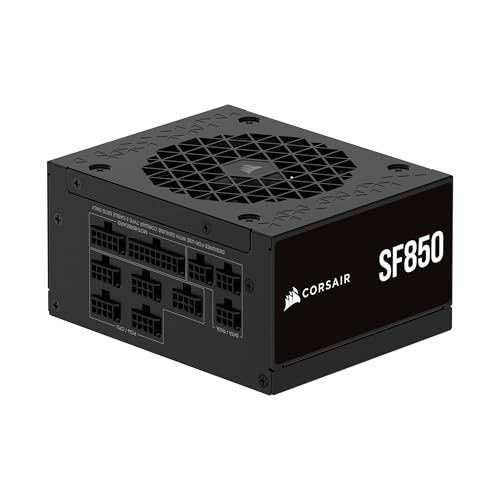
- CORSAIR SF850 (2024) Fully Modular ATX Power Supply — Platinum efficiency and a silent idle in true SFX size
- Cooler Master V850 SFX Gold — ATX 3.1 and a native 12V-2×6 cable in white
- Seasonic Focus SPX-750 — Platinum 750W with a ten-year warranty
- LIAN LI SP750 V2 750W SFX Power Supply — ATX 3.1-ready with a fluid-dynamic-bearing fan
- Thermaltake Toughpower SFX 850W Platinum — 850W Platinum built to ATX 3.1 with a 450W-rated GPU cable

CORSAIR SF850 (2024) Fully Modular ATX Power Supply
Platinum efficiency and a silent idle in true SFX size
- Output: 850W
- Efficiency: 80 PLUS Platinum
- Modularity: fully modular
- Fan behaviour: Zero RPM mode at low load
- Extras: SFX-to-ATX bracket included
Corsair’s SF line has been the default recommendation in small-form-factor building for years, and this 2024 revision of the SF850 shows why the reputation persists. Platinum efficiency means very little of the power it draws turns into waste heat inside your small case, the Zero RPM mode keeps its fan still through desktop work and light gaming, and the unit stays true SFX size rather than creeping into the longer SFX-L territory that some cases cannot accept. The included bracket for ATX mounts is a thoughtful touch for builders who may move the supply to a larger case later.
For a current build, its modern ATX-standard design and native high-power graphics connector support make it the straightforward partner for a power-hungry card in a small bay. The honest cautions are price, since Platinum SFX units command a premium over Gold rivals, and cable stiffness, a recurring theme with high-quality individually sleeved leads that need persuading around tight corners. Neither is a reason to look elsewhere if your case and budget accommodate it; this is the pick against which the others must justify themselves.
Strengths
- Platinum efficiency minimises waste heat in a small volume
- Fan stays off at low load for a silent desktop
- True SFX dimensions fit the widest range of small cases
Trade-offs
- Premium pricing over Gold-rated rivals
- Quality cables can be stiff in the tightest bends
- 850W is more than basic builds need, and you pay for the headroom
Best for: a flagship small-form-factor build meant to stay quiet and cool for years / Not suited for: budget ITX builds whose parts would be satisfied by a 650W Gold unit

Cooler Master V850 SFX Gold
ATX 3.1 and a native 12V-2×6 cable in white
- Output: 850W
- Efficiency: 80 PLUS Gold, Cybenetics Gold certified
- Standard: ATX 3.1, PCIe 5.1 ready
- Cable: native 12V-2×6 included
- Colour: white finish
Cooler Master’s V850 SFX makes its case on modernity and value. It is built to the ATX 3.1 standard with a native 12V-2×6 cable for current graphics cards, which in a small case is worth more than it sounds: one purpose-made cable replaces the bulky multi-lead adapter that high-end cards otherwise require, and adapters are exactly what tight PSU bays have no room to bend. The Cybenetics certification, covering both efficiency and a noise grade, gives a second opinion beyond the 80 PLUS badge.
The white finish of this listing will either delight you or rule it out, depending on your case; white small-form-factor builds are a real aesthetic community and this unit serves them directly. Acoustically the V series has improved across revisions, though it does not chase the Corsair’s silent-idle party trick with the same single-mindedness. As an 850W Gold unit with current connectors at a typically keener price than Platinum rivals, it is the pragmatic enthusiast’s shortlist staple.
Strengths
- ATX 3.1 with a native 12V-2×6 cable simplifies GPU power routing
- Cybenetics noise certification backs its acoustic claims
- White finish serves themed small builds few rivals offer
Trade-offs
- Gold efficiency sheds slightly more heat than Platinum units
- Fan behaviour is good rather than class-leading at idle
- White colourway will clash with all-black interiors
Best for: a modern white or mixed-theme ITX build with a current graphics card / Not suited for: buyers chasing the absolute quietest idle behaviour

Seasonic Focus SPX-750
Platinum 750W with a ten-year warranty
- Output: 750W
- Efficiency: 80 PLUS Platinum
- Modularity: fully modular
- Warranty: 10 years
- Design focus: low noise, premium capacitors
Seasonic’s name carries weight with experienced builders because the company manufactures power supplies for half the industry and reserves its own badge for designs it is proud of. The Focus SPX-750 brings Platinum efficiency down to a 750W rating that suits the majority of small builds better than 850W does, since a supply runs most efficiently and calmly in the middle of its range rather than loafing at a tenth of an oversized unit’s capacity. The ten-year warranty is the longest promise on this page and reflects how the maker expects the unit to age.
Choose this supply when your parts list totals comfortably below its rating: a mid-range or upper-mid-range graphics card and a mainstream CPU are its natural territory, which describes most small-form-factor gaming machines honestly built. Builders planning a flagship graphics card with a high-draw processor should step up to an 850W unit instead, not because this one would fail dramatically, but because headroom is what keeps a small build quiet and unstressed through transient spikes.
Strengths
- Platinum efficiency at a right-sized 750W rating
- Ten-year warranty is the strongest backing here
- Seasonic’s low-noise design suits living-room builds
Trade-offs
- Less headroom for flagship GPU and CPU combinations
- Older platform generation than the newest ATX 3.1 units
- Premium pricing for its wattage class
Best for: a refined 750W-class ITX gaming build kept for the long term / Not suited for: a flagship graphics card paired with a high-draw processor
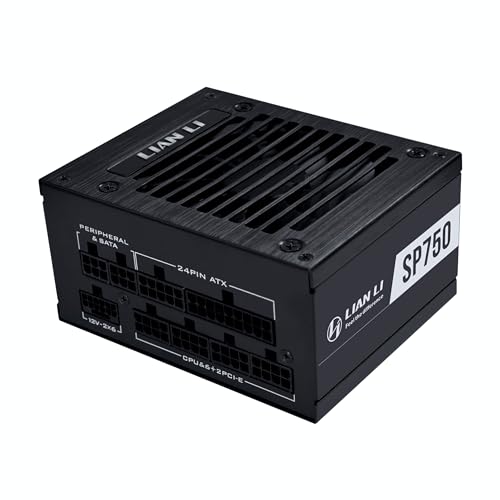
LIAN LI SP750 V2 750W SFX Power Supply
ATX 3.1-ready with a fluid-dynamic-bearing fan
- Output: 750W
- Efficiency: 80 PLUS Gold
- Standard: ATX 3.1-ready, native 12V-2×6 cable
- Fan: 92mm fluid dynamic bearing
- Warranty: 10 years
Lian Li came to power supplies from the case side of the industry, and it shows in the SP750 V2’s priorities: it is designed by people who know exactly how little room an SFX bay leaves for cable bend. The ATX 3.1-ready design with a native 12V-2×6 cable keeps the graphics card’s power run to a single lead, the 92mm fluid-dynamic-bearing fan is chosen for quiet longevity, and the ten-year warranty matches Seasonic’s promise while the efficiency sits at the more affordable Gold tier.
This is the balanced 750W alternative to the Seasonic: a little more waste heat in exchange for a newer connector standard and typically friendlier pricing. In a well-ventilated ITX case that difference in heat is a footnote; in a sealed, acoustics-first build the Platinum units earn their premium. Either way, Lian Li’s unit belongs on the shortlist of anyone whose case and card both come from the current generation of small-form-factor design.
Strengths
- Native 12V-2×6 cable suits current graphics cards cleanly
- Fluid-dynamic-bearing fan is built for quiet, long service
- Ten-year warranty at a Gold-tier price point
Trade-offs
- Gold efficiency trails the Platinum picks for in-case heat
- 750W ceiling applies to ambitious CPU-plus-GPU pairings
- Lian Li’s PSU track record is shorter than Seasonic’s or Corsair’s
Best for: a current-generation ITX build balancing price, noise, and connectors / Not suited for: sealed acoustic builds where every wasted watt matters

Thermaltake Toughpower SFX 850W Platinum
850W Platinum built to ATX 3.1 with a 450W-rated GPU cable
- Output: 850W
- Efficiency: 80 PLUS Platinum
- Standard: ATX 3.1
- Connector: 12V-2×6 rated for 450W delivery
- Fan: 90mm fluid dynamic bearing
- Warranty: 7 years
Thermaltake’s Toughpower SFX is the specification-sheet maximalist of this group: 850 watts, Platinum efficiency, the ATX 3.1 standard, and a 12V-2×6 connector explicitly rated to deliver 450 watts to a graphics card. That last figure is the one to read carefully, because it tells you the maker engineered the GPU power path for genuinely demanding cards rather than treating the connector as a box-ticking accessory. In a small case housing a flagship card, that engineered path is the difference between confidence and hope.
The seven-year warranty is a step behind the ten-year promises elsewhere here, and Thermaltake’s fan tuning historically favours cooling assurance over absolute hush, though the fluid-dynamic-bearing fan in this unit is a respectable acoustic component. Weigh this supply as the headroom pick: if your small build’s parts list reads like a tower’s parts list and only the case is small, this is the unit that will not be the limiting factor.
Strengths
- Full 850W with Platinum efficiency and ATX 3.1 compliance
- 12V-2×6 connector rated for high-draw graphics cards
- FDB fan and fully modular cables suit tight bays
Trade-offs
- Seven-year warranty trails the ten-year rivals
- Fan tuning leans toward cooling over silence
- Specification overkill for mainstream ITX parts lists
Best for: a no-compromise small build with a genuinely power-hungry graphics card / Not suited for: a modest living-room PC that values idle silence above headroom
The five supplies on the figures that matter in a small case
| Supply | Output | Efficiency | Defining strength |
|---|---|---|---|
| Corsair SF850 (2024) | 850W | Platinum | Silent idle, true SFX size |
| Cooler Master V850 SFX | 850W | Gold | ATX 3.1 value, white finish |
| Seasonic Focus SPX-750 | 750W | Platinum | Warranty and refinement |
| Lian Li SP750 V2 | 750W | Gold | Modern connectors, FDB fan |
| Thermaltake Toughpower SFX | 850W | Platinum | GPU power-path headroom |
The table’s real lesson is that wattage is the least interesting column. All five units can power the large majority of small-form-factor builds; what separates them is efficiency heat, idle behaviour, connector modernity, and the length of the promise behind them. Choose your row by the quality your build will actually feel every day, which is silence and cool operation, rather than by a wattage figure your parts will never reach.
SFX, SFX-L, and ATX: the size classes explained
SFX is a defined physical standard, a compact box roughly 125 millimetres wide, 100 deep, and 63.5 tall, designed when small cases needed a supply smaller than the ATX brick. SFX-L keeps the same width and height but stretches the depth to about 130 millimetres, buying room for a larger, quieter fan and more internal volume. That extra depth is the trap: many small cases accept SFX only, and an SFX-L unit in an SFX-only bay either will not fit or will consume the space the graphics card’s cables needed.
Some small cases take a third path and accept a full ATX supply, sometimes through an adapter bracket like the one Corsair bundles with the SF850 in reverse. An ATX unit in a small case is occasionally the budget answer, since ATX supplies are cheaper per watt, but it spends the case’s scarcest resource, volume, on the component that benefits least from it. Unless a case was designed around an ATX supply from the start, the SFX units in this guide are the proportionate choice.
Always confirm the case’s accepted classes from the case maker’s own specification, and confirm the specific supply’s dimensions from its maker rather than its product category. Category labels drift, limited editions change housings, and a few millimetres of depth decide whether a build closes. In small-form-factor work, dimensions are not a detail to check at the end; they are the first filter every candidate must pass.
How much wattage a small build really needs
Add up your parts honestly: a mainstream gaming CPU under gaming load, a mid-range graphics card at its rated draw, and a modest allowance for drives, fans, and USB devices lands most small gaming builds in a band that a quality 650 to 750 watt supply covers with room to spare. The 850 watt units in this guide exist for the builds above that band: flagship graphics cards, high-core-count processors, or owners who want the supply cruising at half load, where efficiency peaks and fans dawdle.
Transient spikes are the reason headroom matters more than averages suggest. Modern graphics cards can draw brief bursts well above their rated figure, and the ATX 3.x standard exists largely to formalise how supplies must absorb those bursts without shutting down. A supply built to that standard, in a wattage class one step above your parts’ steady total, is the recipe for a small build that never mystery-restarts under load. Undersizing to save a small sum is the most expensive economy in compact building.
Oversizing has its own mild costs. A much larger supply than the build needs runs at a low fraction of its capacity during desktop work, where efficiency sags and some fan curves behave less gracefully, and it costs more money that a small build could spend on the case or cooling. The right size is one class above your realistic total, not three. For most readers of this guide, that logic lands on 750 watts, with 850 reserved for flagship graphics hardware.
Why efficiency earns its keep in a tiny case
Efficiency is the share of wall power that becomes useful power rather than heat inside the supply. In a tower with a ventilated PSU basement, the difference between a Gold and a Platinum unit is a rounding error in the case’s thermal life. In a ten-litre small-form-factor box, every wasted watt is heat released into the same small volume that the CPU and graphics card are trying to cool themselves into, and it must be removed by the same small fans. Platinum’s few percentage points stop being a luxury and become part of the cooling system.
That said, efficiency should not outrank platform quality or the right wattage. A well-built Gold unit from a maker with a strong warranty, like the Cooler Master and Lian Li picks here, serves a small build better than a bargain Platinum unit from an unknown badge. Read efficiency as a tiebreaker among good supplies and as a thermal feature in sealed builds, not as a single-number verdict on quality, because it certifies energy conversion and nothing about longevity or protection circuitry.
Cables: the small-case builder’s real battleground
Fully modular design matters more in small cases than anywhere else in computing. Every cable a semi-modular or fixed design forces on you must be coiled, routed, and hidden inside a volume that has no hidden places, where it will block airflow and press against fan blades and panels. With a fully modular SFX unit you attach exactly the leads your build uses, each of the right length, and the interior stays an air path rather than a cable nest. Treat modularity as a requirement at this size, which is why all five picks have it.
Cable length cuts both ways. SFX supplies ship with shorter leads proportioned to small cases, which is a blessing until a particular case routes its motherboard power socket far from the PSU bay, at which point a standard SFX lead can come up short. Check your case maker’s notes: good small-case designers publish recommended cable lengths or sell matched cable sets. Extensions exist but add bulk and another connector in the path, so a supply whose stock lengths suit your case beats a technically superior unit whose cables fight you.
The graphics card’s power cable deserves its own inspection. A native 12V-2×6 lead, as fitted to the Cooler Master, Lian Li, and Thermaltake picks, runs as one cable from supply to card with a defined bend behaviour. The alternative, an adapter splitting into multiple 8-pin leads, multiplies connectors and stiffness exactly where the bay is tightest. If your graphics card uses the new connector, a supply with the native cable is not a nicety; it is the difference between a tidy build and a wrestling match.
Fan behaviour and the sound of a small machine
A power supply fan is easy to forget because it is small, yet in a quiet small-form-factor machine it can be the loudest remaining voice once the CPU and GPU are at idle. This is why zero-RPM modes, like the Corsair SF850’s, matter disproportionately in this category: a supply whose fan stays still through desktop work removes a whole layer of idle noise. Semi-passive operation used to be a flagship feature; in SFX units aimed at living rooms it is close to a requirement.
Bearing type is the detail behind the spec sheet’s fan claims. Fluid dynamic bearings, fitted to the Lian Li and Thermaltake units here, run smoothly and age slowly compared with plain sleeve bearings, which can develop a tick as they wear. In a supply you intend to keep through two or three graphics card upgrades, that bearing choice is a longevity feature disguised as an acoustic one. Fan size matters too: the larger fan an SFX-L housing allows is one of that format’s genuine advantages, if your case can accept the extra depth.
Standards, protections, and the things a badge does not say
ATX 3.0 and 3.1 are worth understanding because small builds pair modern graphics cards with compact supplies. The standards specify, among other things, how a supply must handle the graphics card’s transient power excursions and define the 12V-2×6 connector’s behaviour. A supply certified to the standard has been designed for the exact electrical personality of current cards. When a small build will house a recent high-end GPU, the ATX 3.x units in this guide are the safer engineering match.
Protection features, over-current, over-voltage, short-circuit, and over-temperature among them, are the unglamorous systems that decide whether a fault becomes a dead supply or a dead computer. Reputable makers implement them properly and say so; the ten-year warranties behind the Seasonic and Lian Li units, and Corsair’s and Thermaltake’s established support, are practical evidence of that seriousness. In a form factor where a supply fault’s heat has nowhere to dissipate, buying from a maker with a real protection suite and a real warranty is not brand snobbery but risk management.
Placement, orientation, and the internal extension cable
Small cases mount their supplies in more inventive positions than towers ever attempt: at the front with an internal extension cord carrying mains power to the rear panel, above the motherboard, or in a separate chamber behind the tray. Each position changes which supply suits it. A front-mounted unit exhausts into the case’s front corner and needs its fan orientation planned; a chambered unit lives or dies by the chamber’s vents. Read the case’s PSU section as a design brief for your supply choice, not as an afterthought.
That internal extension cable, where fitted, also deserves a thought during selection. It is part of the case rather than the supply, it adds one more connector in the mains path, and its routing can crowd the same corner your modular leads want. None of this is a reason to avoid such cases, which include many of the best small designs; it is a reason to choose a supply whose cable exits and connector layout cooperate with the specific case you have already fallen for.
Planning the upgrade path of a small build
A good power supply is the component most likely to survive from one build into the next, and small-form-factor supplies hold that role well if you buy with a generation of headroom in connectors rather than in raw wattage. The ATX 3.1 units in this guide will serve the next graphics card generation’s connector expectations, while a cheaper older-standard unit might strand you with adapters in an even tighter future case. When the price gap is modest, connector modernity is the better investment than an extra hundred watts you may never draw.
Keep the supply’s full cable set, including the leads you did not use, labelled and stored with the case’s accessories. The most common small-build frustration two years later is not a failed supply but a missing modular lead whose pinout is specific to that maker and model. Modular cables are not interchangeable between brands and often not between models, so the unused leads in the box are future parts of your build, not clutter to discard.
Worked examples: three small builds and their supplies
Take a ten-litre gaming case with a mid-range graphics card, a 65-watt-class CPU, and a buyer who games in a shared living room. The parts total sits comfortably in 750-watt territory, the room argues for Platinum efficiency and a calm fan, and the Seasonic SPX-750 or the Corsair SF850 both fit the brief, with the Corsair winning if its silent idle is worth the step up in price and wattage the build does not strictly need. This is the most common small-build profile, and it is reassuring how many good answers it has.
Now take a sandwich-style case barely larger than the graphics card it houses, with a flagship GPU and a high-core-count processor chosen deliberately by an enthusiast. Here the supply decision narrows sharply: the case accepts true SFX only, the card wants a native 12V-2×6 lead rated for serious power, and transient headroom matters more than idle elegance. The Thermaltake Toughpower SFX or the Corsair SF850 are the honest candidates, and the loser in this contest is whichever cheaper unit the builder was tempted to squeeze in.
Finally, picture a white-themed mini-ITX showcase build with a tempered side panel and a mid-range card, assembled as much to be looked at as to be played on. The Cooler Master V850’s white housing stops being a footnote and becomes the deciding feature, because a black supply behind glass in an all-white interior is the one component every visitor will notice. Aesthetics are a legitimate specification in a build designed to be seen, and this category finally offers units that treat them as one.
How to read a power supply review like an engineer
A useful supply review measures voltage regulation under varying load, ripple on the main rails, efficiency across the load range rather than at one flattering point, and fan noise against load and temperature. For a small-form-factor buyer, three of those deserve extra weight: efficiency at low load, because small machines idle for long hours; fan behaviour in the middle of the range, where gaming actually lives; and physical measurements of the unit and its cables, which matter more in this category than in any other.
Be wary of conclusions drawn from a single sample at a single load point, and of reviews that test a supply on an open bench and declare it quiet without ever enclosing it in a case that traps its heat. The Cybenetics programme’s standardised efficiency and noise reports, which the Cooler Master pick carries, are valuable precisely because they test many units the same way. Cross-referencing a maker’s claims against an independent lab’s report is the closest a buyer can get to certainty before the unit is in the case.
The second life of an SFX supply
Small-form-factor supplies have become the foundation of more than gaming PCs. The same qualities that suit an ITX case, compact size, modular cables, quiet fans, and high efficiency, suit a home server in a cupboard, a living-room media machine, or a compact workstation that renders overnight in a bedroom. An SFX unit bought well for a gaming build frequently migrates into one of those quieter duties when the gaming machine is rebuilt, which is another argument for buying a respected unit with a long warranty rather than the cheapest adequate box.
That second life also shapes how you should treat the accessories. Keep the ATX adapter bracket if one was included, keep every modular lead, and keep the manual’s pinout information with them. A supply with its full kit remains a flexible component for a decade; a supply missing its cables is a paperweight with a fan. Builders who organise those parts at the first build are the ones who can improvise a media PC from spares on a free weekend years later.
A compact checklist to carry into the store
Reduce this guide to the questions that eliminate candidates, in the order they eliminate them. Does the unit’s format and depth fit my case’s bay, by the numbers? Is it fully modular, with a native graphics cable if my card needs one? Does its wattage sit one class above my parts’ total, on a current ATX standard? Does its efficiency tier suit my case’s ventilation, and its fan behaviour suit my room? Is the warranty long enough to signal the maker’s confidence? A supply that answers all five well is the right supply, and among the five in this guide at least one answers them for every realistic small build.
Notice what the checklist does not ask: it does not ask which unit has the highest wattage, the most connectors, or the most dramatic styling. Small-form-factor building rewards proportion, and the power supply is where proportion is either established or lost. Get this component right and the rest of the build becomes noticeably easier, because every other part was chosen to live in the space and the electrical environment this one defines.
When the answer is not SFX at all
Honesty requires a closing counterpoint: some small-looking builds are better served by stepping one size up. If your shortlist of cases keeps failing on graphics card length, radiator support, or PSU depth, the market may be telling you that your parts list is a micro-ATX build wearing an ITX costume. A slightly larger case that accepts an ATX supply and a full-size card will be cheaper, cooler, and quieter than a tiny case forced to contain the same hardware, and it will still occupy a modest footprint on or under a desk.
The SFX category exists for builds that genuinely benefit from miniaturisation: machines that travel, machines that share living space, machines whose owners value the object itself. If none of those describes your build, there is no virtue in paying the small-form-factor premium for the power supply or anything else. Choose the size class your life requires, then use this guide’s discipline, fit by numbers, wattage by parts list, cables by routing, inside whichever class you land.
How to choose and install an SFX supply in the right order
Work through these steps before ordering, and the installation itself becomes the easiest part of the build.
Confirm the case’s accepted PSU format from its manual
Find the case maker’s stated support for SFX, SFX-L, or ATX supplies and write down any maximum depth figure. Then compare it with your shortlisted supply’s published dimensions, depth first. If the case offers both an SFX position and an alternative mount, note which mount you will use, because cable lengths and graphics card clearance can differ between positions in the same case.
Total your parts’ power and add one class of headroom
List the CPU and graphics card’s rated draws, add a modest allowance for the rest of the system, and choose the supply class one step above that total: most builds land at 750 watts, flagship graphics hardware at 850. Confirm the chosen unit is built to ATX 3.0 or 3.1 if your graphics card is a current model, so its transient behaviour is covered by design rather than by luck.
Check the cable set against your exact parts list
Count the leads you will actually attach: motherboard, CPU power, graphics power in its native connector form, and one lead for any SATA devices. Verify the supply includes each in the box and that the graphics lead is a native 12V-2×6 if your card uses that connector. If your case is known for long routing paths, check the stated cable lengths against the case maker’s guidance now, not with the build half assembled.
Decide your efficiency and noise priorities explicitly
Choose between the Platinum units and the Gold units as a conscious trade: Platinum for sealed or living-room builds where in-case heat and idle silence matter most, Gold for ventilated builds where the saving funds other parts. If the machine will sit near listeners at idle, put a zero-RPM or well-regarded fan design at the top of your criteria and let wattage bragging rights go.
Install the supply before the graphics card
In almost every small case, the working order is supply first, its cables routed and tied, then the graphics card into the space that remains. Attach only the leads the build uses, route each along the case’s edges, and keep the GPU power cable’s bend gentle, especially at a 12V-2×6 plug. Leave the case’s panels off until the machine has passed its first power-on and a short load test.
Load-test and listen before closing the case
Run a demanding game or a combined CPU and GPU stress load for twenty minutes with the panels ready to fit. Watch for shutdowns, which suggest power delivery problems, and listen to the supply’s fan behaviour at idle afterwards. Only when the machine is stable and calm should the panels go on, because in a small case every later investigation costs a full disassembly.
Small-form-factor power mistakes and how to avoid them
Ordering an SFX-L supply for an SFX-only case
The two formats share a name and a width, and listings do not always shout the L. The extra depth then collides with the graphics card or its cables. Measure the case’s maximum PSU depth and the supply’s actual depth and compare numbers, never category labels.
Reusing an old ATX supply because it still works
A retired tower supply may be electrically sound and still ruin a small build with its size, its fixed cable thicket, and its lack of the modern connector your graphics card wants. Small cases deserve a supply designed for them, and the old unit’s proper home is a spare-parts shelf or a budget tower.
Chasing wattage far beyond the parts list
A 1000-watt SFX unit in a build that draws 350 watts buys nothing but cost and a fan curve operating at its least graceful point. Headroom of one class is engineering; headroom of three classes is decoration. Spend the difference on the case, the cooler, or the graphics card itself.
Forcing the 12V-2×6 connector into a sharp bend
The compact high-power connector must seat fully and bend gently, with strain relief respected near the plug. In tight bays this requirement, not the supply’s dimensions, can be the true fit limit. Route the cable with its natural curve, confirm the plug is fully latched, and never let a side panel press the bend tighter.
Ignoring cable lengths until the build is on the bench
A motherboard power lead that falls two centimetres short stops a build as completely as a dead component. Small-case makers publish routing guidance because this failure is common. Check lengths during selection, especially in cases that mount the supply at the front or use an internal extension to the rear panel.
Final recommendation
For most small-form-factor gaming builds, the decision resolves into a short answer. Choose the Corsair SF850 if you want the category’s benchmark combination of Platinum efficiency, silent idle behaviour, and true SFX dimensions. Choose the Seasonic SPX-750 or the Lian Li SP750 V2 if your parts sit in the 750-watt class, the Seasonic for maximum efficiency and warranty pedigree, the Lian Li for the newer native GPU connector at Gold pricing. The Cooler Master V850 is the value-and-modernity pick, especially for a white build, and the Thermaltake Toughpower is the headroom pick for a small case housing genuinely flagship hardware.
Whichever unit you choose, you have chosen well if three things are true: it physically fits with its cables routed gently, its wattage sits one class above your parts, and its fan will be a stranger to you at idle. In small-form-factor building, the power supply is the foundation everything else stands on, and these five all pour a sound one.
Keep one habit after the build is closed: every year or so, when you open the case to clear its filters, glance at the supply’s intake and its fan. A small machine’s power supply breathes the same dusty room air as everything else in the box, and a minute spent clearing its intake is cheap insurance for the component your whole system trusts. The builders whose small machines age gracefully are not the ones who bought the most expensive supply; they are the ones who bought a good one and then left it clean, cool, and undisturbed to do its work.
Frequently asked questions
Can I use a regular ATX power supply in a small form factor case?
Only if the case was designed to accept one, either natively or with a bracket, and even then it is usually the wrong trade. An ATX unit consumes volume the case could give to graphics card length, cooling, or cable space, and its longer fixed cables are harder to manage in a small interior. A few larger small-form-factor cases are genuinely designed around ATX supplies and make it work well. For the typical ITX case, a true SFX unit like the five in this guide is the proportionate and tidier choice, and the modest price difference buys back its cost in build sanity.
Is 750 watts enough for a small gaming PC?
For the majority of small gaming PCs, yes, with room to spare. A mainstream or upper-mid-range graphics card paired with a modern gaming CPU draws well within a quality 750W unit’s comfort zone, particularly one built to the ATX 3.x standards that handle transient spikes gracefully. Step up to 850 watts when the graphics card is a flagship model, when the CPU is a high-core-count part you intend to run at full power, or when you simply want the supply cruising at a lower fraction of its capacity for the sake of quiet. The parts list, not anxiety, should make this call.
What does ATX 3.1 mean and do I need it?
ATX 3.1 is the current revision of the power supply standard, refining the 12V-2×6 graphics connector’s design and formalising how supplies handle the brief power excursions modern graphics cards produce. You need it in the practical sense if your graphics card uses the 12V-2×6 connector and draws serious power, because a native cable and a compliant supply remove the adapter bulk and the guesswork from the highest-stakes connection in a small build. For a modest card with conventional 8-pin power, a quality earlier-standard supply remains perfectly serviceable.
Why do SFX power supplies cost more than ATX ones of the same wattage?
Miniaturisation is the honest answer. Delivering 850 clean watts from a box a fraction of an ATX unit’s volume demands denser engineering, better components, and more careful thermal design, and SFX units sell in smaller numbers to enthusiasts rather than to the whole market. The premium also buys features this category values: full modularity as standard, high efficiency tiers, and quiet fan engineering. Judged per year of service across the decade a good supply lasts, the difference is smaller than the sticker suggests.
How do I know if my case needs SFX or SFX-L?
Read the case maker’s specification for the power supply bay, which will state the supported formats and usually a maximum depth in millimetres. If it says SFX only, an SFX-L unit’s extra depth will not fit or will steal the graphics card’s cable space. If it accepts SFX-L, you gain access to models with larger, slower fans, which can be an acoustic advantage. When the documentation is ambiguous, measure the bay’s depth yourself from the mounting face to the first obstruction and compare it against the specific supply’s published depth.
Should the power supply’s fan face up or down in a small case?
Follow the case’s design intent: if the PSU bay has a vented panel, orient the fan toward that vent so the supply breathes outside air and exhausts without heating the interior. If the bay is sealed on all sides, the supply will draw case air in whichever orientation fits, and the case maker’s recommended mounting is the one to trust. What matters most is that the intake is not blocked by a panel, a cable bundle, or a dust filter you forgot to clean, because a starved supply fan in a small case becomes audible quickly.
Can an SFX supply power a desktop with a flagship graphics card?
Yes, provided you choose one of the serious 850-watt units designed for exactly that duty and confirm the case can cool the resulting system. The electrical question has been answered by the current generation of SFX design: Platinum efficiency, ATX 3.1 transient handling, and a properly rated 12V-2×6 cable, as the Thermaltake and Corsair picks here demonstrate. The harder question in a flagship small build is thermal rather than electrical, because the card’s heat still has to leave a very small box. Buy the supply for the card, then be honest about whether the case deserves the card at all.
What happens if my power supply is slightly too small for a new graphics card?
The symptoms arrive under load rather than at the desktop: the machine restarts mid-game, shuts down during a demanding scene, or behaves perfectly in older titles and fails in new ones that push the card harder. A quality supply protects itself and the system by switching off, which is far better than the alternative, but it is still a build that cannot do its job. In a small case the fix is not to squeeze in a larger ATX unit but to step up one SFX class, from 750 to 850 watts, or to choose a more efficient graphics card. Treat a shutdown under load as the supply asking for that step, and answer it rather than working around it with lowered settings forever.
Are custom cables worth it for an SFX build?
For some cases, emphatically yes. Custom leads cut to the exact lengths of a specific case and supply remove the slack that otherwise has to be folded, tied, and hidden in a volume with nowhere to hide it, and the result is better airflow and a build that is far easier to service. They are a finishing luxury rather than a necessity, and they must be made for your exact supply model, because modular pinouts differ between makers. Buy them after the build works with stock cables, from a maker who asks for your supply’s model number, and keep the stock set as your spares.
How long should a quality SFX power supply last?
A decade is a reasonable expectation, and the warranties in this guide, seven to ten years across the five picks, are the makers putting that expectation in writing. A supply has no performance curve that ages the way a graphics card’s does; an 850-watt unit delivers the same 850 watts in year eight as in year one, provided its fan still turns freely and its capacitors have been kept reasonably cool. That longevity is why the supply is the wrong place to economise in a small build: it is the one component almost guaranteed to be asked to serve in the next machine as well.